

Avis sur Aikido Security 2026 : Avantages, Inconvénients, Fonctionnalités & Tarifs

Nous évaluons les outils indépendamment ; les commissions aident à financer nos tests. Consultez notre politique de transparence et notre méthodologie.
If you’re assessing Aikido Security, you’re undoubtedly sick of spending money on multiple point solutions that annoy your developers by flooding your dashboard with false positives. With AI-powered noise reduction, Aikido combines more than 15 security tools into a single AppSec platform.
In this article, I’ll go over what Aikido Security truly offers, including standout features, pricing information, and areas where it falters. You’ll get an honest evaluation of who gains the most from this platform and where it might not meet your practical security requirements.
Aikido Security Evaluation Summary
4.7/5
- From $350/month
- Free plan available
Pourquoi faire confiance à nos recommandations de logiciels
6,700+
Reviews
20
Industry experts
16+
Evaluation factors
14
Years
Notre équipe teste et évalue des logiciels depuis 2012. En tant que leaders technologiques nous-mêmes, nous savons à quel point il est difficile — et important — de choisir le bon logiciel.
Pour ce guide, nous avons évalué les outils grâce à des tests pratiques et une recherche indépendante, en notant les outils selon nos critères de sélection.
Nos avis reflètent notre jugement éditorial humain, et non un argumentaire de vente.
Réviseurs experts:
- Paulo Gardini MiguelDirecteur technique
 Tim FisherVP de l'IA
 Gabriel RosasTech Lead et architecte logiciel
 Christhian GruhnTech Lead et architecte plateforme

Aikido Security Overview
Aikido Security is an all-in-one application security posture management (ASPM) and cloud security posture management (CSPM) platform. It consolidates 15+ security scanners, including SAST, SCA, secrets detection, container scanning, IaC scanning, and DAST, into a single interface designed to reduce alert fatigue through AI-powered AutoTriage and AutoFix capabilities. Unlike traditional point solutions that overwhelm teams with false positives, Aikido analyzes your codebase context to automatically filter out irrelevant vulnerabilities and generate one-click pull requests for remediation.
Pros
- High-quality developer experience and workflow integration.
- Dramatically reduces remediation time compared to manual fixes with its AutoFix feature.
- Enterprise-grade SAST and SCA.
Cons
- No built-in developer security training program.
- Limited support for retaining historic container image scan records
- Teams needing custom detection logic built from scratch will need different tooling.
Is Aikido Security Right For Your Needs?
Who Would be a Good Fit for Aikido Security?
Aikido Security is built for dev teams at companies of all sizes who need comprehensive security without juggling a dozen different tools. There’s a particularly strong adoption in regulated industries: financial services, healthcare tech, and B2B SaaS companies that need to automate both vulnerability management and compliance requirements like SOC 2 and ISO 27001. You’ll get the most out of Aikido if you’re looking for a tool that lowers the number of false positives that are currently eating up your team’s time, so they can ship secure code faster.
- Enterprise Development TeamsEnterprise customers get custom onboarding and direct access to the Aikido team regardless of contract size. One customer onboarded 150+ developers in 45 minutes, and the flat-rate enterprise pricing means no surprise costs as headcount grows.
- HealthTech and MedTech CompaniesHealthcare teams rely on Aikido to monitor security from code commits through cloud deployments, with automated compliance evidence for HIPAA, SOC 2, and ISO 27001.
- Cloud-Native Startups and Scale-UpsStartups with two team members get Aikido for free, then scale with affordable per-month pricing, so you can avoid that budget-crushing security hire during your critical growth phase.
- B2B SaaS ProvidersSaaS providers who connect Aikido to their GitHub repos get auto-generated SBOMs and compliance evidence reports, which cuts the manual work involved in answering vendor security questionnaires.
- DevOps and Platform Engineer TeamsDevOps teams integrating Aikido with Jenkins or GitHub Actions catch more critical vulnerabilities pre-production, slashing emergency patching and stopping security issues from derailing their release timelines.
- Small Dev TeamsJunior developers can fix their own security bugs thanks to Aikido’s clear step-by-step guides and ready-to-use patch snippets—even without any security background.
Who Would be a Bad Fit for Aikido Security?
Aikido Security focuses on shift-left app security, so organizations with different priorities may need additional or alternative tooling. It may not be the right choice if you need runtime security testing capabilities during QA or production, comprehensive browser-based web application scanning, or if you're a government contractor requiring FedRAMP certification that's still in progress.
- Teams Requiring Runtime Security Testing (IAST/ADR)Aikido focuses on shift-left security to catch issues before deployment. Organizations needing interactive application security testing during QA or runtime application detection and response in production will need additional tooling.
- Security Teams Deeply Invested in Multiple, Specialized ToolchainsOrganizations that have already built mature, specialized security workflows around many separate vendors for each category may not want to consolidate to one.
- Browser-Based Web Application Scanning NeedsAikido's DAST focuses on API security testing rather than full browser-based web application scanning with crawling and form testing.
- Government Contractors Requiring FedRAMP CertificationAikido is working toward FedRAMP compliance, but it's not currently available.
Notre méthodologie d'évaluation
Comment nous testons et notons les outils
Nous avons passé des années à développer, affiner et améliorer notre système de test et de notation des logiciels. Cette grille d’évaluation est conçue pour saisir les subtilités de la sélection des logiciels et ce qui rend un outil efficace, en se concentrant sur les aspects critiques du processus de décision.
Vous trouverez ci-dessous le détail de notre processus de test et de notation sur sept critères. Cela nous permet de fournir une évaluation impartiale du logiciel basée sur les fonctionnalités principales, les caractéristiques distinctives, la facilité d’utilisation, l’intégration, l’accompagnement lors de la prise en main, le support client, les avis utilisateurs et le rapport qualité-prix.
Fonctionnalité principale (25% de la note finale)
Le point de départ de notre évaluation est toujours la fonctionnalité principale de l’outil. Possède-t-il les fonctions de base auxquelles un utilisateur s’attend ? Certaines de ces fonctionnalités principales sont-elles limitées à des forfaits plus chers ? Nous attendons d’un outil qu’il soit au moins à la hauteur des capacités de base de ses concurrents.
Fonctionnalités remarquables (25% de la note finale)
Ensuite, nous évaluons les fonctionnalités exceptionnelles qui dépassent la fonctionnalité de base habituellement trouvée dans ce type d’outil. Un score élevé reflète des fonctionnalités spécialisées ou uniques rendant le produit plus rapide, plus efficace ou apportant une valeur ajoutée à l’utilisateur.
Nous évaluons aussi la facilité d’intégration avec d’autres outils courants dans la pile technologique pour élargir les fonctionnalités et l’utilité du logiciel. Les outils dotés de nombreuses intégrations natives, de connexions tierces et d’un accès API facilitant des intégrations personnalisées obtiennent les meilleurs scores.
Facilité d’utilisation (10% de la note finale)
Nous considérons la rapidité et la simplicité d’exécution des tâches principales avec l’outil. Les logiciels les mieux notés sont bien conçus, intuitifs, proposent des applications mobiles, offrent des modèles et rendent des tâches relativement complexes très simples.
Accompagnement lors de la prise en main (10% de la note finale)
Nous savons que l’adoption rapide d’une nouvelle plateforme au sein d’une équipe est cruciale. Nous évaluons donc la facilité avec laquelle un nouvel utilisateur peut apprendre et utiliser un outil avec un minimum de formation. Les meilleures solutions permettent une mise en route rapide, sans nécessité de support.
Support client (10% de la note finale)
Nous analysons la facilité et la rapidité avec lesquelles il est possible d’obtenir de l’aide par téléphone, chat en direct ou base de connaissances. Les outils et entreprises offrant une assistance en temps réel obtiennent les meilleurs scores, tandis que les chatbots sont moins bien notés.
Avis utilisateurs (10% de la note finale)
Au-delà de nos propres tests et évaluations, nous tenons compte du net promoter score des utilisateurs actuels et passés. Nous regardons la probabilité qu’ils choisiraient à nouveau l’outil pour ses fonctionnalités principales. Un logiciel bien noté reflète un net promoter score élevé.
Rapport qualité-prix (10% de la note finale)
Enfin, en tenant compte de tous les autres critères, nous examinons le prix moyen des forfaits d’entrée de gamme par rapport aux fonctionnalités principales et à la valeur des autres critères. Un logiciel offrant plus, pour moins cher, obtiendra un meilleur score.
Core Features
AI-Powered AutoTriage
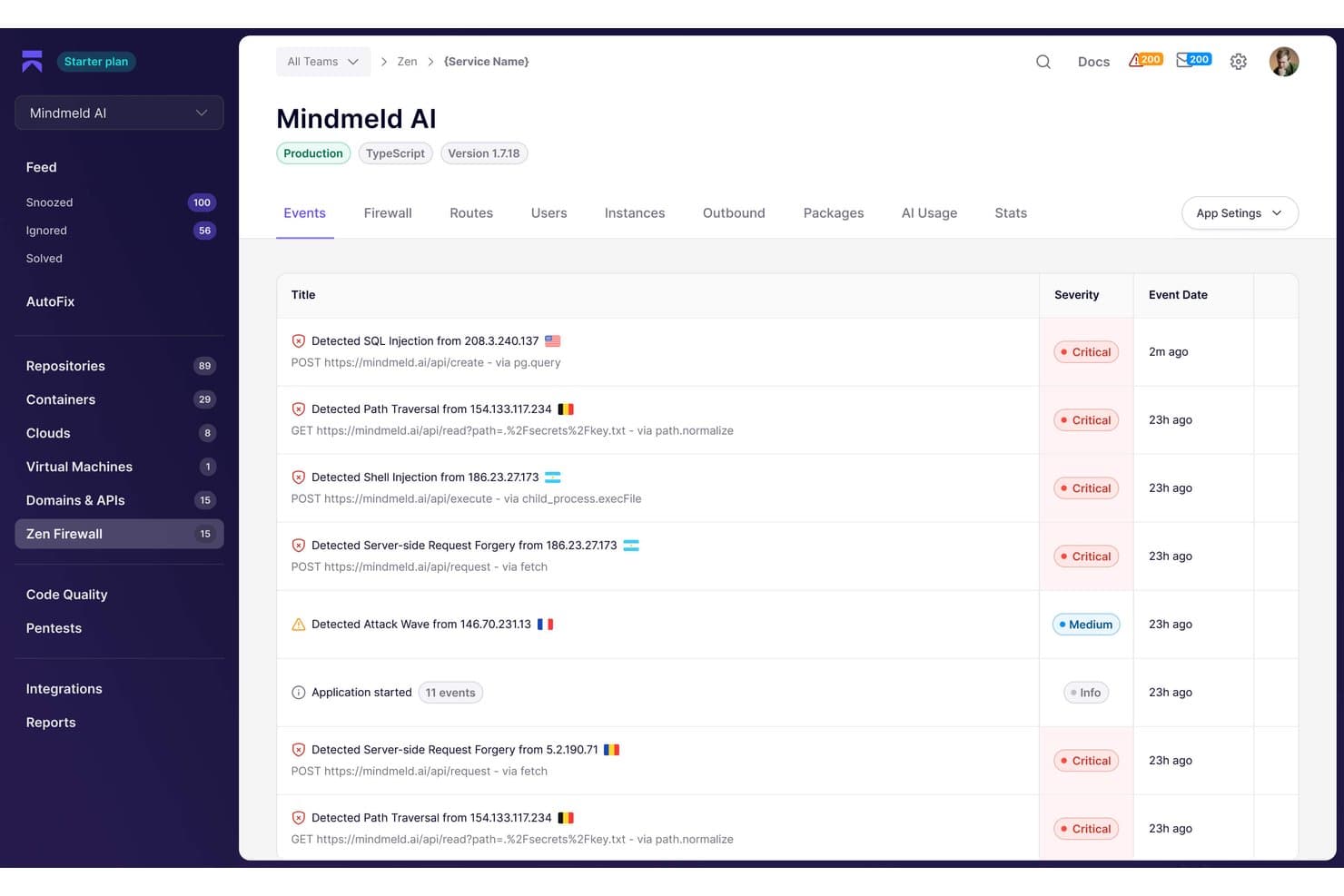
Aikido’s AutoTriage engine cuts through the noise by eliminating false positives. It only flags vulnerabilities that attackers can reach and exploit in your specific environment by using reachability analysis to trace execution paths to verify vulnerable code.
Software Composition Analysis (SCA)
Keep your open-source dependencies in check with continuous monitoring for vulnerabilities, license risks, and malware. Aikido also auto-generates industry-standard SBOMs that you can share with customers and auditors. It flags abandoned dependencies and outdated frameworks that pose silent security risks.
Cloud Security Posture Management (CSPM)
Catch misconfigurations, exposure resources, and compliance issues across AWS, Azure, and Google Cloud—without installing agents or disrupting your VMs. See your cloud security risks as they emerge by spotting questionable container images before they cause production problems.
Static Application Security Testing (SAST)
Catch vulnerabilities right in your PR workflow with specific, actionable feedback as inline comments pointing to the exact lines that need fixing. Aikido’s SAST works across your tech stack and lets you block deployments when critical issues are found.
Runtime Protection (Aikido Protect)
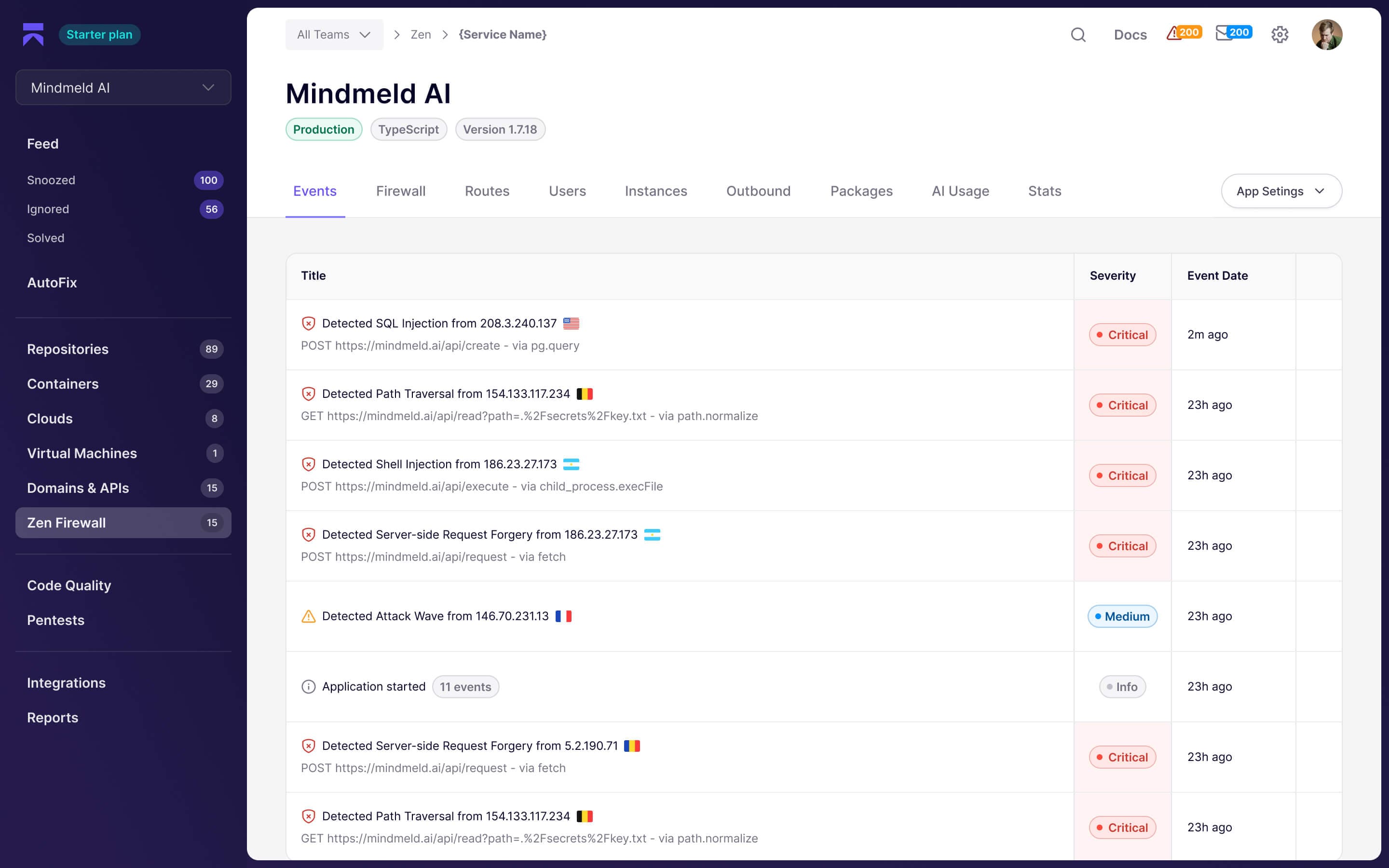
Aikido Protect is your in-app firewall that stops injection attacks cold and prevents API abuse–all with negligible latency impact. When someone tries to exploit your production apps, Aikido Protect catches it in real-time and triggers alerts through your existing incident response tools, such as Slack and PagerDuty.
Standout Features
Bulk Fixes with One Click
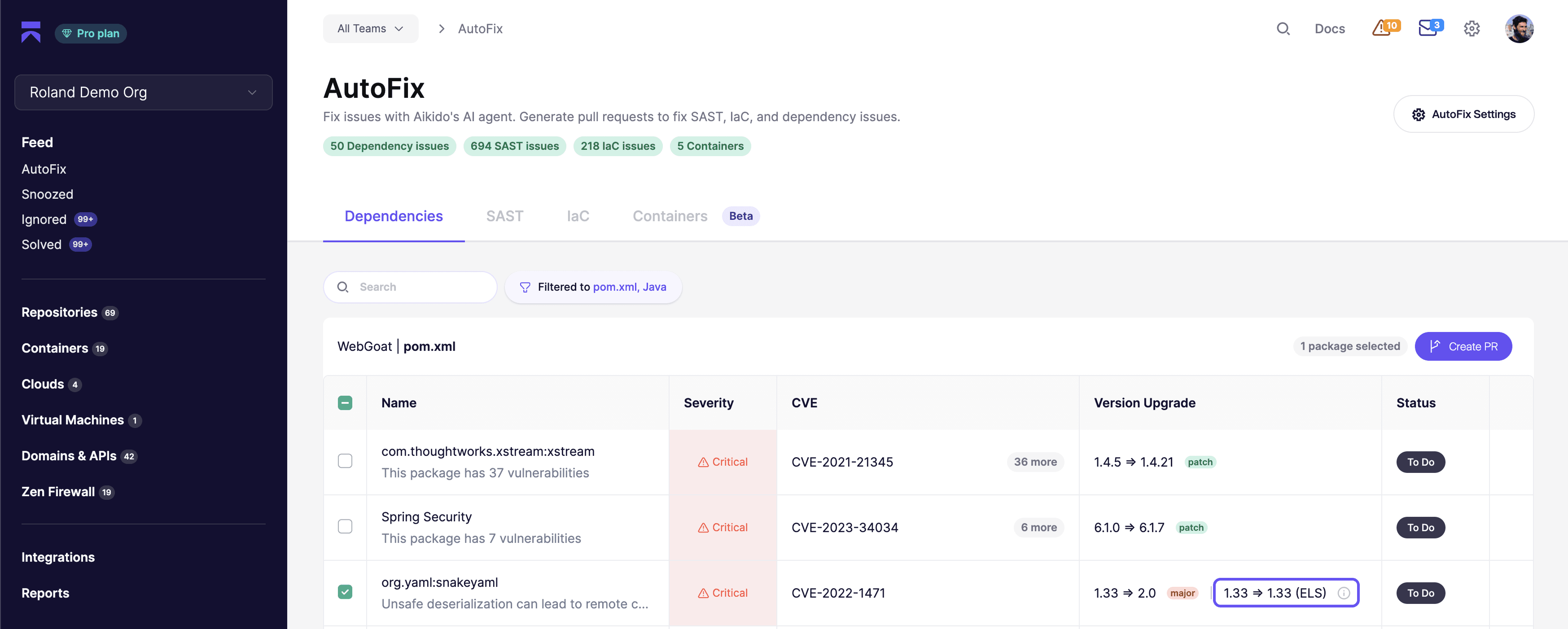
Aikido lets you create merge-ready pull requests that knock out multiple security issues in one shot, so you can quit the mind-numbing grind of fixing vulnerabilities. Your developers won’t burn hours creating endless tickets for every vulnerability that pops up—just batch-select related issues, such as outdated dependencies, and similar SAST findings, and ditch the tedious vulnerability-by-vulnerability approach that’s killing your productivity.
Verified DAST with API Discovery
Aikido logs into your web apps and APIs, finding vulnerabilities from the inside where real attackers strike. The platform discovers API endpoints by watching actual traffic patterns and running targeted fuzzing, so there’s no more wasting days on manual API mapping. Then it hits your authenticated routes with the same attacks real hackers use, helping you catch dangerous vulnerabilities that only appear when someone’s using stolen credentials or API tokens.
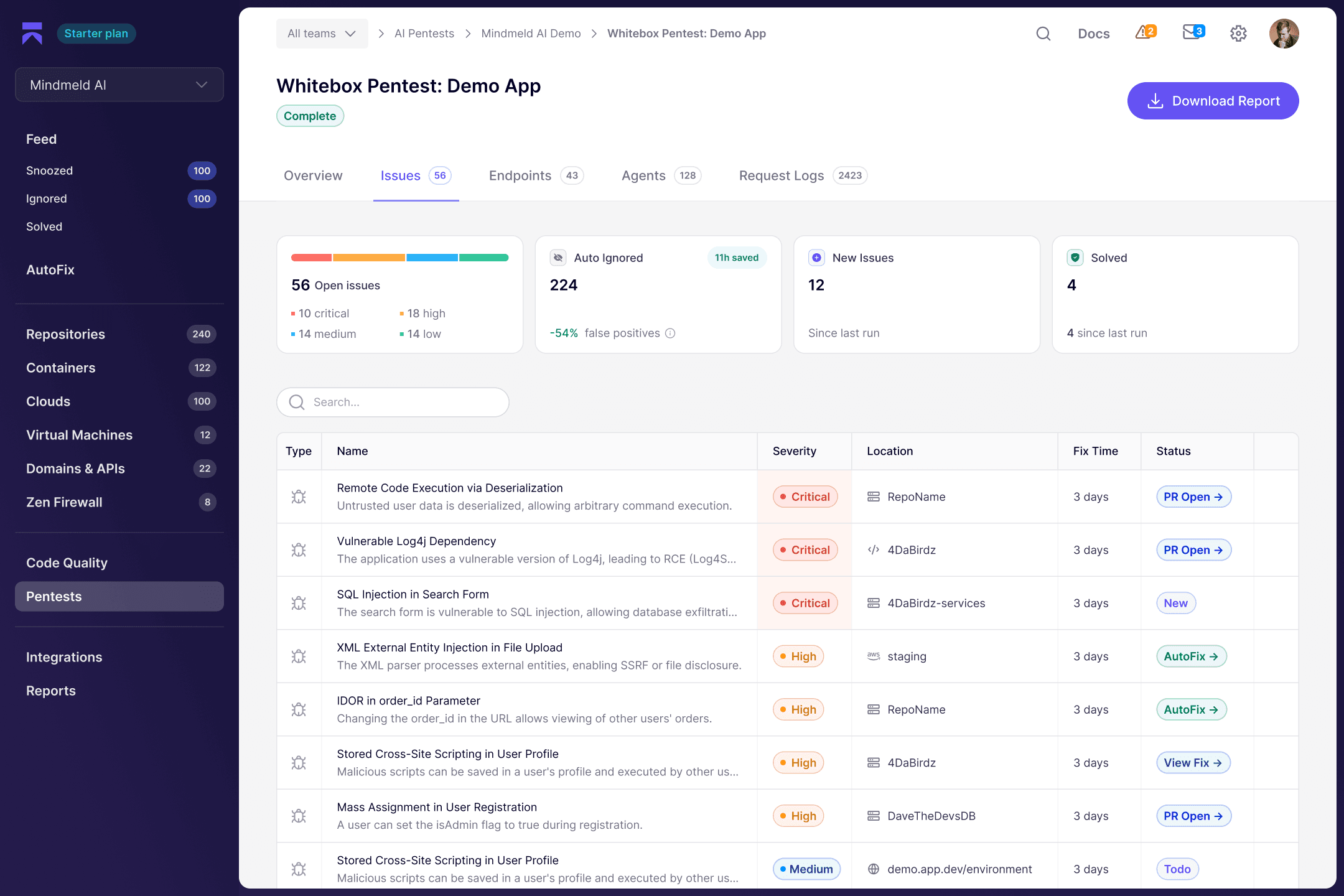
AI Pentesting
Aikido Security's AI pentesting deploys autonomous agents that think like attackers. The platform tests your endpoints with dynamic, context-aware exploits. You hand Aikido different user accounts with varying permission levels, and the AI agents start probing for authorization gaps, testing whether a regular user can access admin functions or whether API endpoints leak data they shouldn't. These AI agents understand your application's logic and hunt for business-critical flaws (which usually require manual pentesting). It enumerates your attack surface, discovers hidden endpoints, and tries novel attack chains in real-time.
Ease of Use
Aikido puts developers first with a clean, straightforward interface you’ll want to use—even if you’re not a security expert. The platform securely connects to GitHub, GitLab, or Bitbucket repositories via read-only OAuth integration. Just connect your repo, and Aikido scans your entire codebase in minutes. You’ll get vulnerability alerts in your pull requests, explained in clear language with specific fix suggestions. The dashboard gives you a single view of all issues, smartly groups duplicates, and helps you focus on fixing what’s critical first.
Onboarding
Aikido’s self-service onboarding gets you scanning code in minutes. The platform finds your repositories automatically and guides you through a straightforward setup process that makes sense. Just connect via OAuth, select your repos, or start with a demo, and you’re off. You’ll pick up new features as you go without ever feeling lost. Enterprise teams can work directly with Aikido to customize the platform to fit your existing security protocols and compliance requirements.
Customer Support
If you’re stuck with any aspect of the platform, Aikido’s team is available 24/7 to help you solve it. Send them an email, chat with them in their app, or browse their library of security guides and tutorials. Aikido’s premium plans get you answers in under two hours. You’ll also get your own account manager who’ll learn the ins and outs of your setup. Everyone can access the platform’s blog and help center, where they break down the latest threats into jargon-free guides with clear action items you can implement immediately.
Integrations
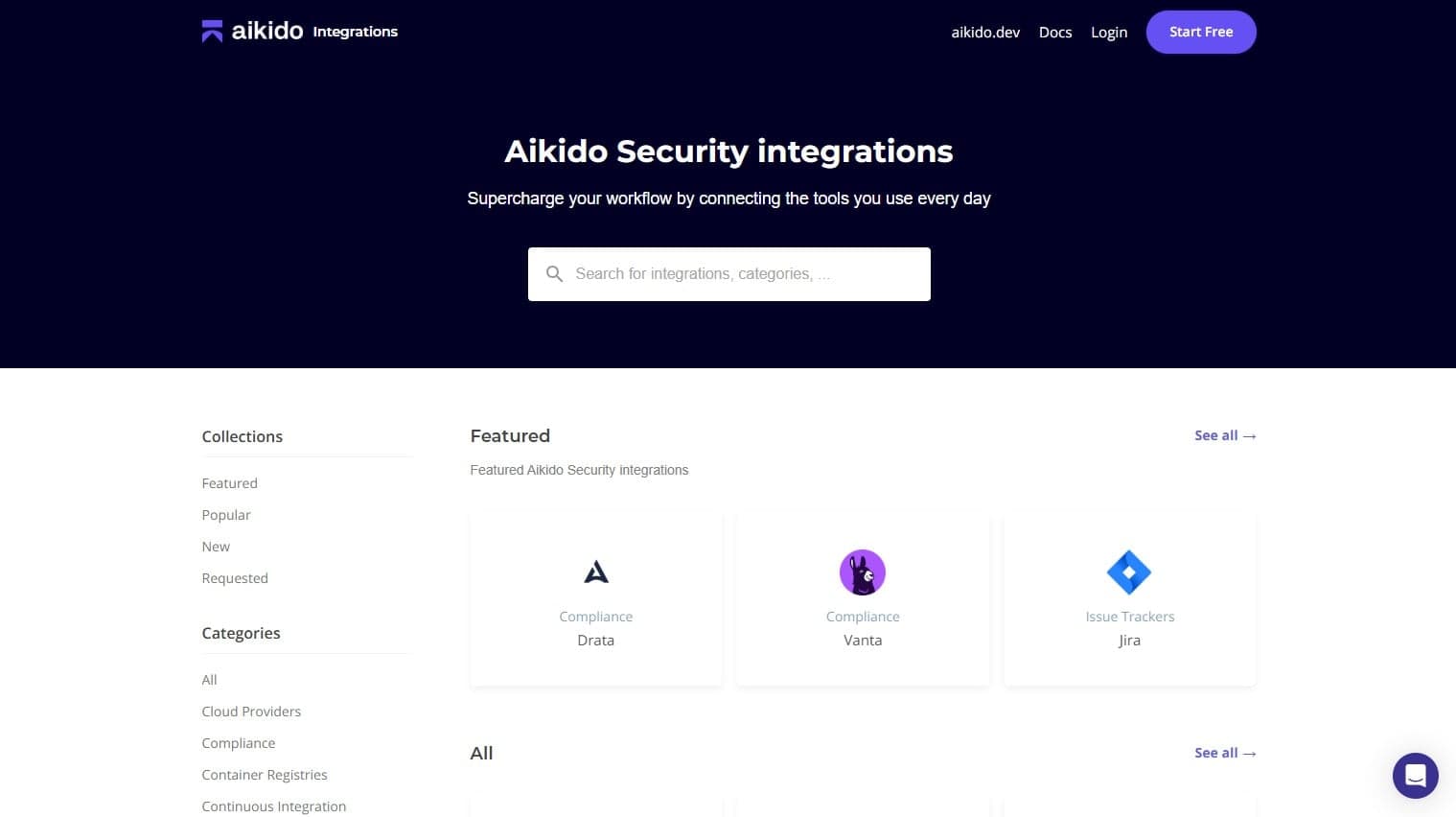
Aikido plugs right into your existing toolkit: GitHub, GitLab, Bitbucket, all major providers like AWS and Azure, plus Jira and Linear for project tracking. They’ve got Slack and Teams covered too, along with compliance tools like Sprinto and Secureframe. This means your team gets security alerts without ever leaving their workflow. An API is available to sync vulnerability data into custom dashboards, GRC systems, or data warehouses, giving you flexibility if you need to extend Aikido Security beyond its out-of-the-box integrations.
Value for Money
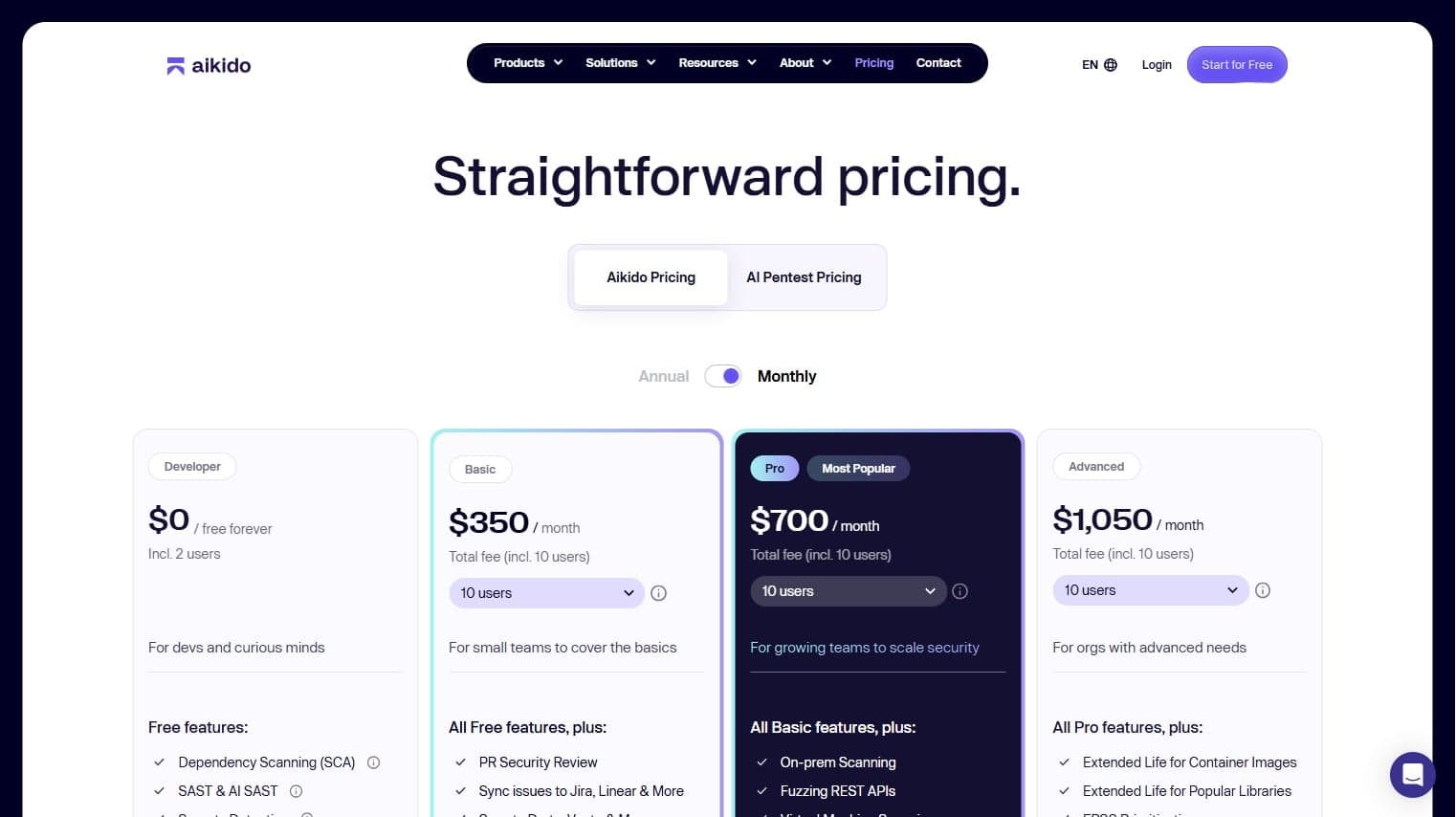
Aikido Security removes the bloat of traditional security tools, giving developers what they actually use daily, such as code scanning and runtime protection, and it typically costs less than cobbling together point solutions or paying premium prices for other established players. You’ll get access to all core scanners without shocking overages for extra seats or scans. Aikido built pricing that works for everyone—agencies, startups, and enterprises alike.
- Developer: Includes core scanners on a limited number of repositories, basic CI integrations, and access for small teams who want to trial Aikido in real projects without commitment.
- Basic: Adds higher repository limits, more frequent scans, expanded cloud and container coverage, and baseline support, making it suitable for small product teams formalizing their AppSec program.
- Pro: Introduces broader cloud posture management, agentless VM scanning, more advanced policies, ticketing integrations, and stronger SLAs aimed at scaling SaaS or mid-market organizations.
- Advanced: Layers in runtime protection, more granular configuration, enhanced reporting, and greater asset and repo capacity for companies with multiple products or stricter compliance needs.
- Enterprise: Offers unlimited users, custom repo and asset allowances, dedicated support, bespoke onboarding, SOC 2/ISO 27001-ready reporting, and procurement options such as AWS Marketplace and tailored agency and startup discounts.
New Product Updates from Aikido Security
Aikido Security Adds Terraform Provider and Six Platform Languages
Aikido Security adds a Terraform Provider for repositories, AutoFix, PR checks, teams, and permissions, plus Spanish, Portuguese, Japanese, French, Turkish, and German across the platform. These updates support infrastructure-as-code workflows and broader team accessibility. Highlights include:
- Terraform Provider: Manage repositories, AutoFix, PR checks, teams, and permissions as code.
- Repository Management: Configure repository settings through Terraform instead of the UI.
- Security Controls as Code: Apply AutoFix and PR check settings programmatically.
- Team and Permission Management: Manage teams and access controls through Terraform.
- Six Platform Languages: Use Aikido Security in Spanish, Portuguese, Japanese, French, Turkish, or German.
Visit Aikido Security’s official site for more details.
Aikido Security Adds Pentest for AI Capabilities
Aikido Security has shipped Pentest for AI capabilities to help teams evaluate the security of production-ready AI agents and LLM-powered features. It focuses on practical, AI-specific risks so you can identify and reduce exposure before issues are exploited. Highlights include:
- Pentest for AI: Tests agents and LLM-powered features for AI-specific security risks.
- OWASP Agentic Top 10: Focuses testing on recognized agentic security threats.
- Prompt Injection Testing: Checks how AI features respond to malicious or manipulated prompts.
- Memory Poisoning Checks: Tests for risks involving compromised or manipulated agent memory.
- Production-Focused Testing: Helps teams assess AI features that are already shipped or ready for release.
Visit Aikido Security’s official site for more details.
Aikido Security Adds SIEM Integrations
Aikido Security can now send issues directly to supported SIEM platforms for centralized monitoring and analysis. Teams can combine Aikido findings with other security signals already collected in their SIEM. Highlights include:
- SIEM Integrations: Connects Aikido Security with 11 supported SIEM platforms.
- Issue Routing: Sends Aikido findings directly into existing SIEM workflows.
- Security Correlation: Combines Aikido issues with broader organizational security signals.
- Centralized Monitoring: Helps teams review findings alongside other security data.
- Expanded Integrations: Extends Aikido Security into existing security operations environments.
Visit Aikido Security’s official site for more details.
 Opens new window
Aikido Security Adds Code Coverage for GitHub
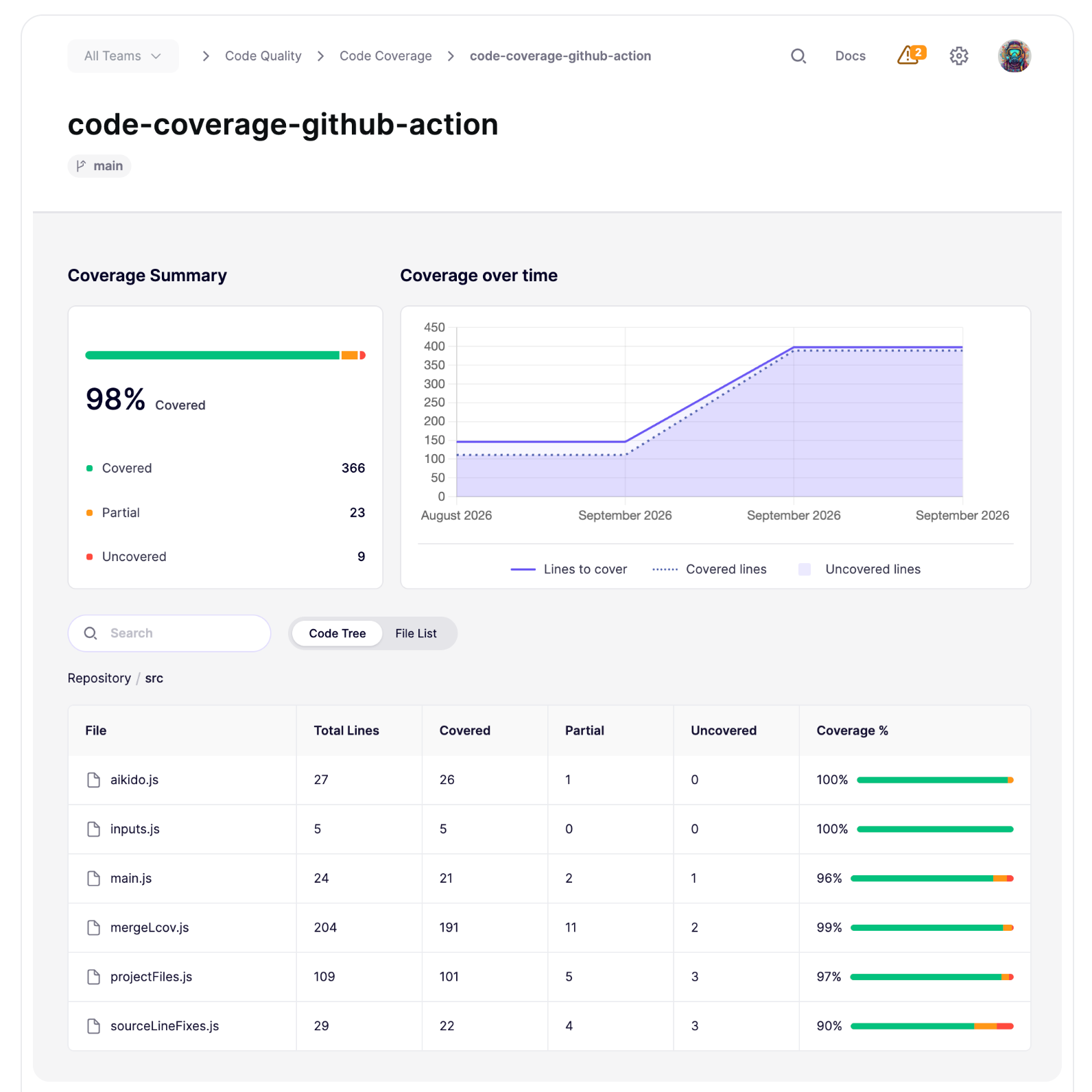
Aikido Security Code Coverage for GitHub highlights untested areas of repositories with a one-step setup and no secrets to manage. Teams can use it to identify where additional test coverage is needed. Highlights include:
- GitHub Code Coverage: Shows which parts of a codebase have no tests.
- Testing Gap Visibility: Helps teams identify untested code quickly.
- One-Step Setup: Simplifies activation for GitHub repositories.
- No Secrets Required: Removes the need to manage additional credentials.
- Instant Visibility: Provides immediate insight into code coverage gaps.
Visit Aikido Security’s official site for more details.
Aikido Security Launches Deep Review for Agentic PR Reviews
Aikido Security launches Deep Review to analyze pull requests using codebase context, linked repositories, and existing PR discussions. It flags security issues, bugs, and logic flaws, then posts suggested fixes and verifies whether later changes resolve them. Highlights include:
- Full-Codebase Review: Analyzes PR changes in the context of the wider codebase.
- Cross-Repo Reasoning: Traces logic across files and linked repositories.
- Suggested Fixes: Posts findings with recommended fixes directly in pull requests.
- Review Memory: Remembers accepted risks and false positives for future reviews.
- Automatic Rechecks: Verifies pushed fixes and resolves findings when issues are addressed.
- Security and Logic Detection: Flags access control issues, cross-tenant leaks, bugs, and business logic flaws.
Visit Aikido Security’s official site for more details.
 Opens new window
Aikido Security Expands Linux and Cloud Protection
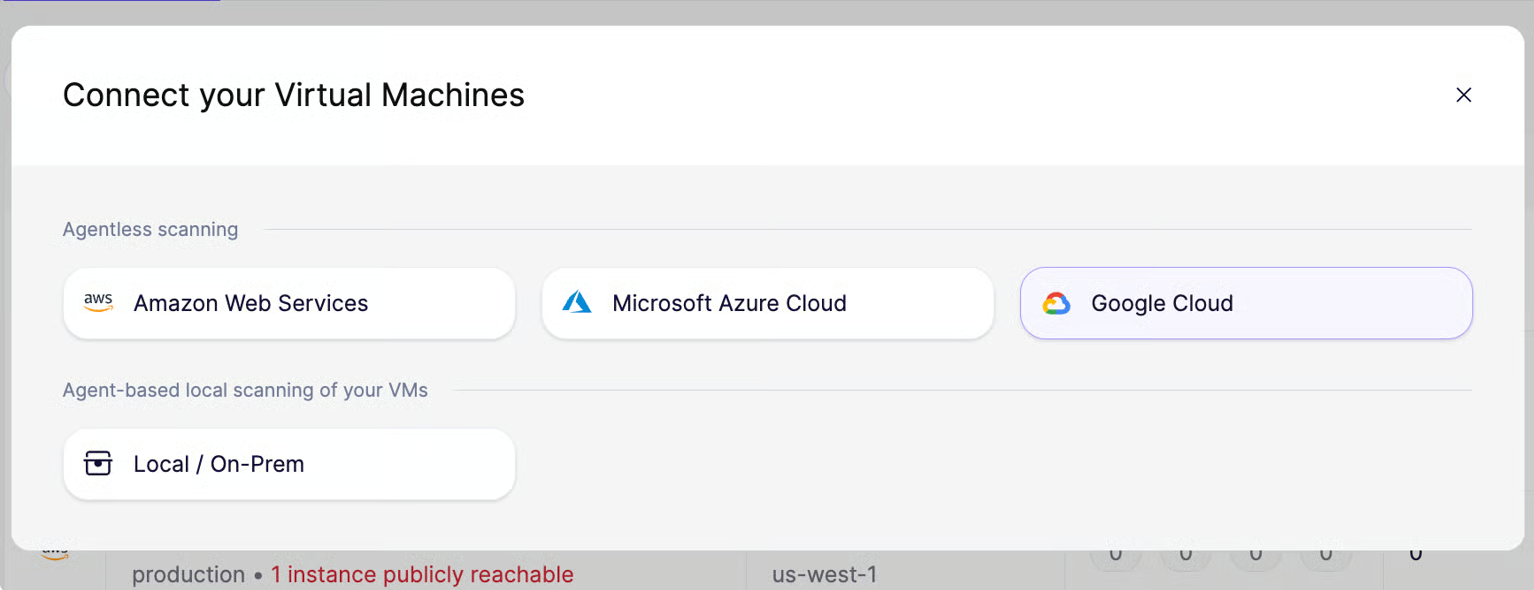
Aikido Security introduces Linux Device Protection for desktops and servers, plus agentless VM scanning for Google Cloud. These updates broaden security coverage across endpoints and cloud workloads without requiring additional agents or SSH keys. Highlights include:
- Device Protection for Linux: Blocks malware at install time on Linux desktops and servers through
.deband.rpmpackages. - GCP VM Scanning: Scans Google Cloud VMs without requiring agents or SSH keys.
- Multi-Cloud VM Coverage: Extends agentless VM scanning across AWS, Azure, and Google Cloud.
Visit Aikido Security’s official site for more details.
 Opens new window
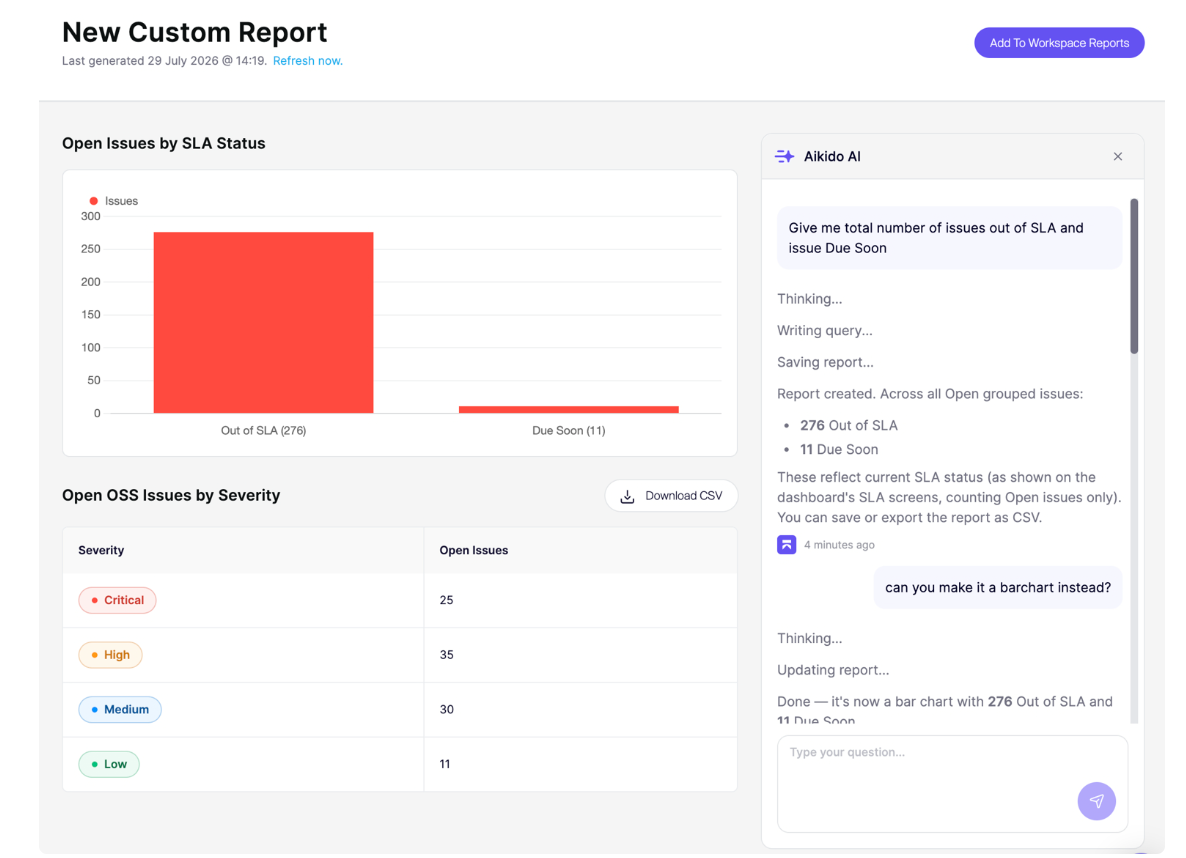
Aikido Security Adds Custom Reports in Aikido Agent
Aikido Security adds Custom Reports in Aikido Agent with plain-language report creation and workspace sharing. The feature helps teams turn security findings into tailored reports without manually building them from scratch. Highlights include:
- Plain-Language Reports: Lets users describe the report they want using natural language.
- Automated Report Creation: Builds reports from existing Aikido security findings.
- Workspace Sharing: Lets teams share generated reports with the workspace in a click.
Visit Aikido Security’s official site for more details.
 Opens new window
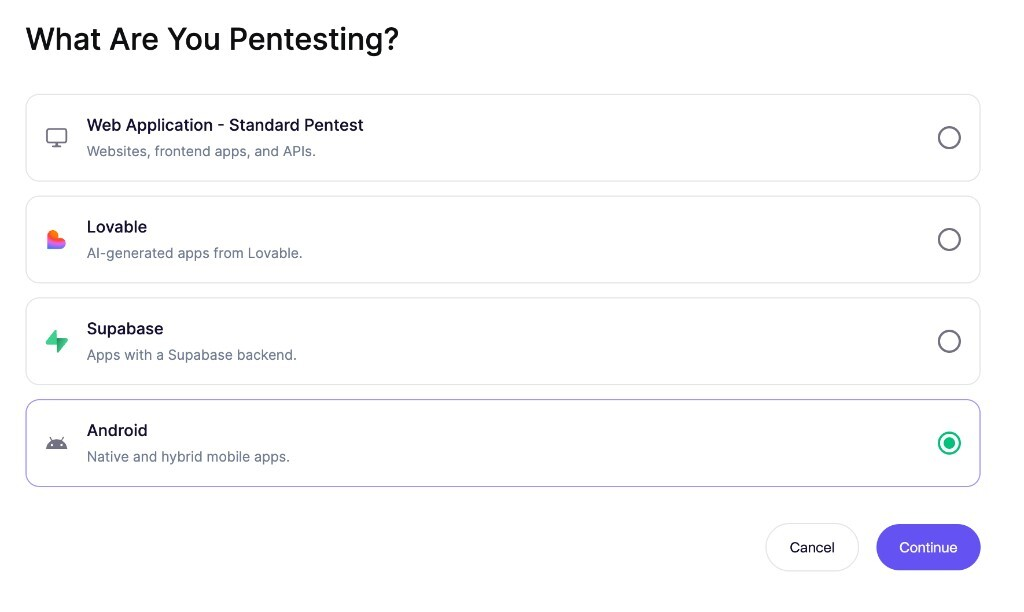
Aikido Security Expands Pentesting to Android Apps
Aikido Security adds Android Pentest support for native and hybrid Android applications, including those that use biometric authentication. The expanded coverage helps teams test more mobile app configurations for security issues. Highlights include:
- Native Android Apps: Extends Aikido Pentest coverage to native Android applications.
- Hybrid Android Apps: Adds support for hybrid mobile applications.
- Biometric Login: Supports pentesting for Android apps that use biometric authentication.
Visit Aikido Security’s official site for more details.
Aikido Security Adds Deep Review for Pull Request Analysis
Aikido Security adds Deep Review, an agentic PR review that analyzes surrounding code and linked repositories in addition to the pull request diff. The feature gives security teams more context to identify business logic flaws and cross-service risks during code review. Highlights include:
- Agentic PR Review: Analyzes pull requests with broader code context beyond the submitted diff.
- Linked Repository Analysis: Reviews connected repositories to surface cross-service security issues.
- Business Logic Detection: Helps identify logic mistakes that standard diff-based reviews may miss.
Visit Aikido Security’s official site for more details.
Aikido Security Adds DSPM, CVE Fixing, and Code Quality Scans
Aikido Security adds code-based Data Exposure Audit, version-specific CVE fixes through Aikido Libraries, and repository scans for existing code quality issues. These updates help teams address security risks and technical debt directly from their codebases. Highlights include:
- Data Exposure Audit: Tracks how sensitive data flows and where it may be exposed by analyzing repository code without database access.
- Aikido Libraries: Generates fixes for open-source CVEs on the exact dependency versions already in use.
- Repository Code Quality Scans: Finds existing code quality issues and helps teams prioritize and monitor technical debt.
Visit Aikido Security’s official site for more details.
Aikido Security Specs
- 2-Factor Authentication: No
- Access Management: No
- Anti-Virus: No
- API: Yes
- Audit Management: No
- Audit Trail: No
- Batch Permissions & Access: No
- Compliance Tracking: No
- Dashboard: Yes
- Data Export: Yes
- Data Import: Yes
- DDoS Protection: No
- External Integrations: Yes
- File Sharing: No
- File Transfer: No
- Firewall: No
- Incident Management: No
- Malware Protection: No
- Multi-User: Yes
- Notifications: Yes
- Password & Access Management: Yes
- Policy Management: No
- Real-time Alerts: No
- Report & Compliance: No
- Risk Assessment: No
- Security Migration: No
- Threat Detection: No
- Workflow Management: No
Aikido Security FAQs
Aikido Security Company Overview & History
Aikido Security is a Belgium-based, developer-first application and cloud security platform founded to address frustration with noisy, expensive, and fragmented security tools by consolidating code-to-cloud protection in a single, opinionated product. The company is led by co-founders Willem Delbare (CTO and CEO), Roeland Delrue (COO and CRO), and Felix Garriau (CMO), and has grown into a globally distributed team with a strong presence in Ghent and North America. Positioned as an all-in-one alternative to traditional AppSec suites, Aikido focuses on reducing alert noise, simplifying developer workflows, and making enterprise-grade security accessible to startups, SMBs, and larger enterprises alike.
Major Milestones
- 2022: Aikido Security is founded in Ghent, Belgium, by Willem Delbare, Roeland Delrue, and Felix Garriau to build a unified, developer-friendly security platform.
- 2023: The team launches its initial platform combining SAST, SCA, secrets, containers, and IaC scanning, onboarding early adopters through GitHub, GitLab, and Bitbucket integrations.
- 2024: Aikido raises over €16 million in growth funding to accelerate product development and international go-to-market, strengthening its position as a developer-first AppSec vendor.
- 2024: The company attains SOC 2 Type II and ISO 27001:2022 certifications, increasing its appeal for regulated industries and larger enterprises.
- 2025: Aikido extends its platform with AI AutoTriage, AI Autofix, CSPM, runtime protection, and autonomous AI pentesting, and partners with Deloitte to bring developer-first security into complex enterprise environments.