

15 meilleurs outils de tests de régression examinés pour 2026

15 Liste des meilleurs outils de tests de régression
Voici ma sélection des meilleurs outils de tests de régression :


Les tests de régression peuvent vite devenir un casse-tête pour votre équipe, surtout lorsque vous gérez plusieurs projets avec des délais serrés. Il est facile de laisser échapper des bugs qui reviennent dans votre code. C’est là que les outils de tests de régression entrent en jeu, vous aidant à détecter les problèmes avant qu'ils ne prennent de l’ampleur.
D’après mon expérience, trouver le bon outil fait toute la différence. J’ai testé et évalué de manière indépendante les meilleures options du marché en me concentrant sur ce qui compte vraiment pour votre flux de travail et vos objectifs.
Dans cet article, je partage mes recommandations impartiales pour les meilleurs outils de tests de régression. Vous découvrirez les fonctionnalités, l’ergonomie et ce qui distingue chaque outil. Allons-y pour trouver la solution idéale pour votre équipe.
Why Trust Our Software Reviews
We’ve been testing and reviewing software since 2023. As tech leaders ourselves, we know how critical and difficult it is to make the right decision when selecting software.
We invest in deep research to help our audience make better software purchasing decisions. We’ve tested more than 2,000 tools for different tech use cases and written over 1,000 comprehensive software reviews. Learn how we stay transparent & our software review methodology.
Résumé des meilleurs outils de tests de régression
Ce tableau comparatif résume les détails des tarifs de ma sélection d’outils de tests de régression pour vous aider à trouver celui qui correspond le mieux à votre budget et à vos besoins business.
| Tool | Best For | Trial Info | Price | ||
|---|---|---|---|---|---|
| 1 | Best for AI-driven automation | Free plan available | From $3,600/year | Website | |
| 2 | Best for expert-led regression testing | Free demo available | Pricing upon request | Website | |
| 3 | Best for organizing your test cases in one visual editor | Free trial available + free demo | Pricing upon request | Website | |
| 4 | Best for checklist-based manual test management | 30-day free trial | From $49/month (billed annually) | Website | |
| 5 | Best suite of flexible and on-demand testing solutions | Not available | Pricing upon request | Website | |
| 6 | Best for CI/CD tool integration | 14-day free trial | From $212/month | Website | |
| 7 | Best to convert manual tests into automated tests | Free open source access available + 14-day free trial | Pricing upon request | Website | |
| 8 | Best full toolkit for complete test coverage | Free plan available + free demo | From $183/user/month | Website | |
| 9 | Best for synthetic testing | Free trial + free demo available | Pricing upon request | Website | |
| 10 | Best for release validation | No free trial available | Pricing upon request | Website | |
| 11 | Best for AI-driven test maintenance | Free plan available | From $99/month (billed annually) | Website | |
| 12 | Best to simplify test virtualization & editing using screenshots | Free demo available | Pricing upon request | Website | |
| 13 | Best for developers testing UI performance and functionality | Free plan available | Free To Use | Website | |
| 14 | Best UI-driven testing solution for regression & functional tests | 14-day free trial | Pricing upon request | Website | |
| 15 | Best to build processes visually for non-technical team members | Free trial available + free demo | Pricing upon request | Website |
-

Site24x7
Visit WebsiteThis is an aggregated rating for this tool including ratings from Crozdesk users and ratings from other sites.4.7 -
GitHub Actions
Visit WebsiteThis is an aggregated rating for this tool including ratings from Crozdesk users and ratings from other sites.4.8 -
Docker
Visit WebsiteThis is an aggregated rating for this tool including ratings from Crozdesk users and ratings from other sites.4.6





Avis sur les meilleurs outils de tests de régression
Vous trouverez ci-dessous mes résumés détaillés des meilleurs outils de tests de régression sélectionnés. Mes avis offrent un aperçu des fonctionnalités clés, des avantages et inconvénients, des intégrations et des cas d’usage idéaux de chaque outil pour vous guider dans votre choix.

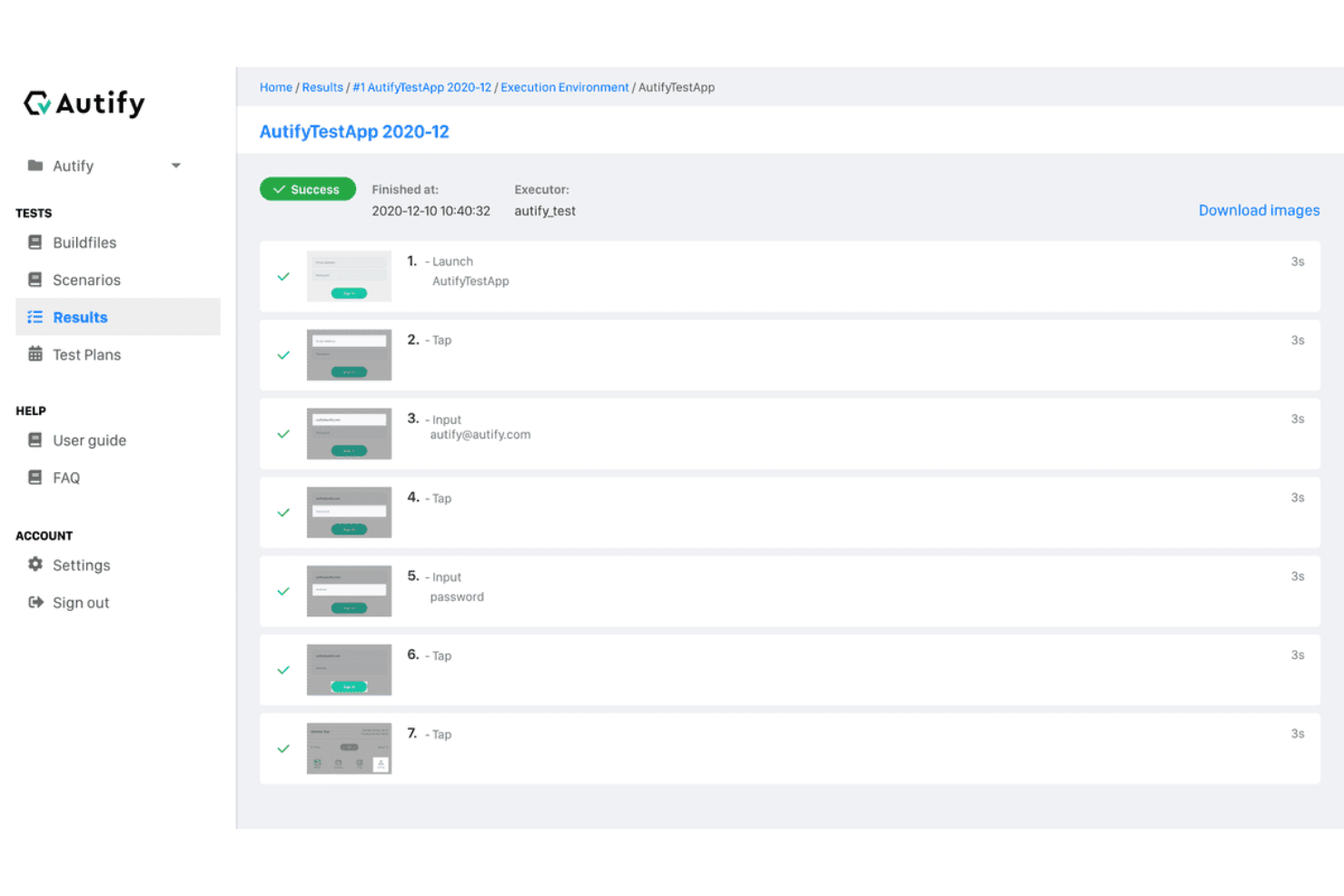
For teams seeking a regression testing solution, Autify Aximo offers a unique blend of AI-driven automation that simplifies the testing process across web, mobile, and desktop applications. This tool is particularly appealing to businesses that value efficiency and accuracy in their testing processes, as it allows users to create test scenarios in plain English, eliminating the need for complex scripting. By minimizing maintenance efforts and reducing failures due to UI changes, Autify Aximo addresses the challenges faced by development teams in maintaining software quality.
Why I Picked Autify Aximo
I picked Autify Aximo for its capability to automate regression testing through AI, allowing your team to focus on more strategic tasks. Its ability to execute test scenarios described in plain English sets it apart, as this feature reduces the dependency on technical scripting skills, making it accessible to wider teams. Additionally, its cross-platform compatibility with iOS, Android, Windows, and macOS ensures that your applications are thoroughly tested across various environments, addressing the critical need for comprehensive coverage in regression testing.
Autify Aximo Key Features
In addition to its AI-driven automation, I also found several features that enhance its utility for regression testing:
- Cross-Platform Support: Autify Aximo is compatible with iOS, Android, Windows, and macOS, ensuring your applications perform consistently across different environments.
- No-Code Interface: The tool allows users to create test scenarios without the need for coding, broadening accessibility to team members without technical backgrounds.
- Visual Regression Testing: It automatically detects UI discrepancies, helping maintain visual consistency after code changes.
- Integration with CI/CD Pipelines: This feature facilitates integration with your development workflow, allowing for continuous testing and timely feedback.
Autify Aximo Integrations
Native integrations are not currently listed by Autify Aximo.
Pros and Cons
Pros:
- Supports web, mobile, desktop
- CI/CD pipeline integrations available
- AI-driven automated test creation
Cons:
- Limited traditional scripting control
- Pricing not publicly available

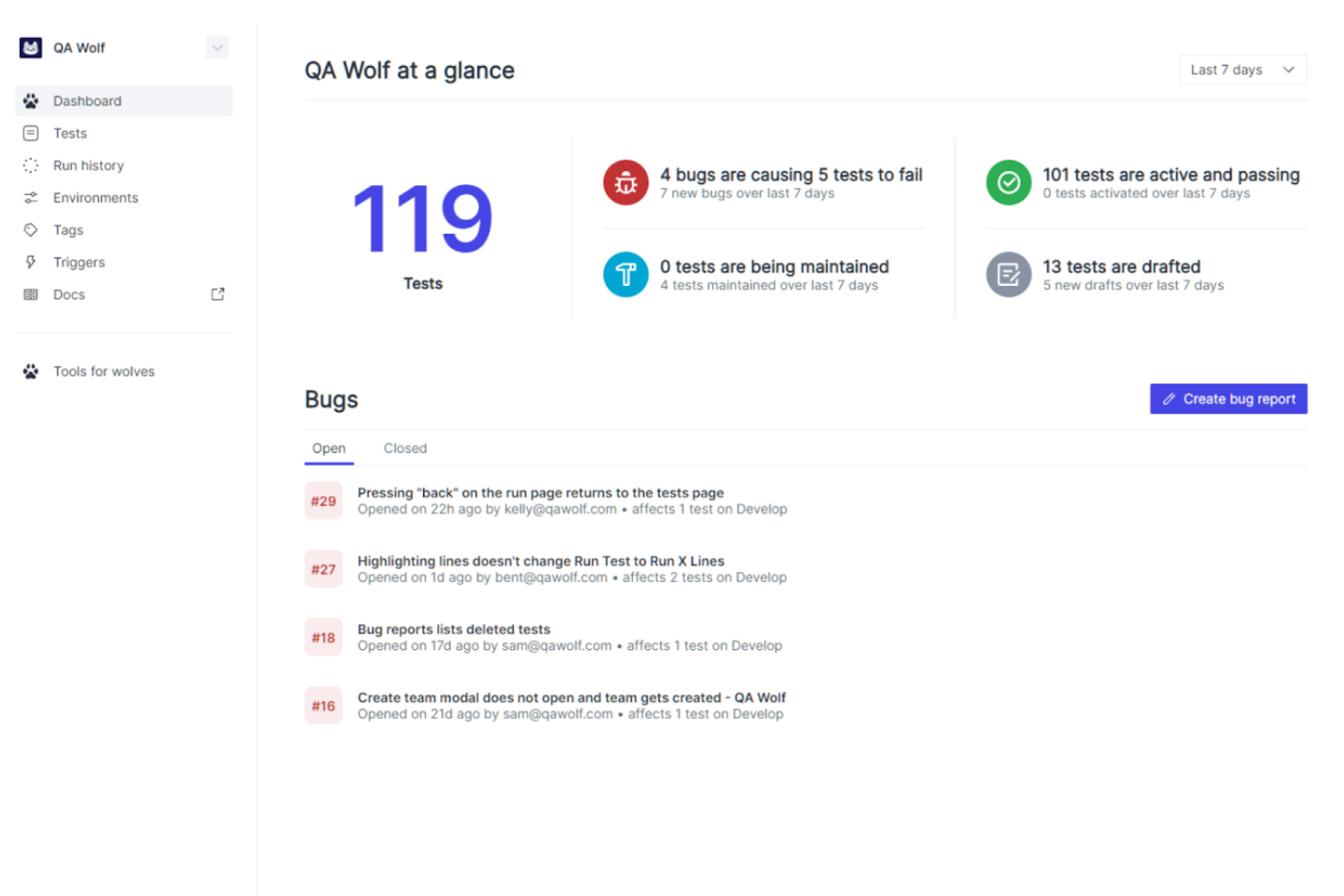
QA Wolf is an automated testing platform designed for developers and QA teams. Unlike traditional tools, QA Wolf is a platform-enabled service that leverages a team of expert QA engineers to handle the creation, execution, and management of all your automated tests. This approach simplifies the testing process and consistently keeps your critical tests maintained and up-to-date, allowing your team to focus on building and improving applications while ensuring new updates in code do not produce any issues.
One of the unique features of QA Wolf that makes it ideal for regression testing is its provision of human-verified bug reports. This ensures that any identified issues are thoroughly vetted by QA experts, minimizing false positives and providing clear, actionable feedback. QA Wolf also offers unlimited test runs, allowing teams to run regression tests as often as needed without worrying about additional costs.
QA Wolf integrates with GitHub, CircleCI, GitLab, Travis CI, Vercel, and Slack. Pricing is available upon request with a free demo available.
New Product Updates from QA Wolf

QA Wolf Adds Android Emulator Infrastructure for Device Testing
QA Wolf introduces Android emulator infrastructure with expanded device and OS testing support. These updates enable teams to test across real-world device conditions and improve test coverage. For more information, visit QA Wolf’s official site.
 .
.
Best for organizing your test cases in one visual editor

Testim Automate is an automated testing platform for fast authoring of AI-powered stable tests and tools to help you scale quality. The tool uses AI to identify and lock-in visual elements, allowing you to increase test stability of UI functional tests. Your tests can be extended with custom JavaScript that can run in or out of the browser.
Testim tests are recorded and then edited in its visual editor, allowing you to better organize your test cases. The tool offers AI-based locators that automatically lock-in elements, and test steps are discrete objects that can be configured, shared, grouped and parameterized, providing you and your team with the means to streamline your processes within your application lifecycle. Testim also helps keep tests clean by identifying duplicate test steps to be replaced by shared objects.
The cost of Testim begins at $1000 per month. The tool also offers a free version with up to 1000 test runs per month.
New Product Updates from Tricentis Testim

Testim's Agentic Test Automation for Salesforce
Testim introduces agentic test automation for Salesforce, simplifying test creation with natural language. For more information, visit Tricentis Testim's official site.


Testpad is a manual test management tool designed for QA teams and software testers who want a flexible, checklist-driven approach to organizing and running regression tests without the complexity of traditional test case management systems.
Who Is Testpad Best For?
QA leads and software teams at startups or SMBs who want a straightforward way to manage and execute manual regression tests.
Why I Picked Testpad
I picked Testpad as one of the best because its checklist-based approach makes it easy for my team to organize and execute manual regression tests. I like that we can quickly create, update, and reuse test checklists for each release cycle. The ability to structure tests as simple, readable lists helps us catch regressions without getting bogged down in complex test case management.
Testpad Key Features
- Guest tester access: Invite external testers to participate without requiring them to create accounts.
- Real-time progress tracking: Monitor test execution status and results as they happen.
- Bulk test editing: Update multiple test items at once to save time during test maintenance.
- CSV import/export: Move test data in and out of Testpad for easier integration with other tools.
Testpad Integrations
Integrations include GitHub, NVIDIA, Bell, Digital Genius, Ideas2Executables, Legrand, Foxhole QA, TestLauncher, OpenROV, and Numed Healthcare. An API is also available for custom integrations.
Pros and Cons
Pros:
- Provides real-time progress tracking for test runs
- Offers CSV import and export for test data
- Enables live editing of tests during execution
Cons:
- Does not support test parameterization
- Limited reporting and analytics features

Testlio is an automated regression testing tool that primarily provides managed application testing. The tool provides a robust suite of flexible and on-demand testing solutions such as end-to-end testing, functional testing and localization testing. Testlio also offers a support team and expert QA resources, allowing easy implementation within your team.
Testlio offers an abundance of features, including detail oriented test plans, which allow you to review the device information, tester information and test criteria. The tool also provides exploratory testing and livestream testing, allowing you and your team to test your applications in real-time, as well as review the bugs identified on the tool’s dashboard. Finally, Testlio allows you access to all devices within your system without the need to build labs.
Testlio provides integrations with project management tools such as Aana and Jira, as well as IDE’s such as Visual studio.
Testlio offers flexible customized pricing upon request.


Reflect is a regression testing platform that helps you automate end-to-end tests without writing any code. It’s built around AI prompts, so you can describe a test in plain English and have Reflect turn it into executable steps. I liked how quickly you can build and run regression suites without touching selectors or scripting frameworks.
I picked Reflect because it removes the complexity from regression testing. Instead of writing and maintaining brittle code, it generates tests by simply typing what you want to happen. Reflect also automatically handles UI changes—tests adapt when the app evolves, which means fewer false positives and less upkeep. I also appreciate the visual diffs and video recordings of test runs, which made debugging faster and clearer.
Reflect supports visual checks, cross-browser runs, parallel execution, and API+UI testing in the same flow. It integrates with CI/CD tools like GitHub, Jenkins, and Jira, lets you schedule tests, and notifies you of failures instantly. You can also use parameterized inputs and isolate test data to cover different scenarios.

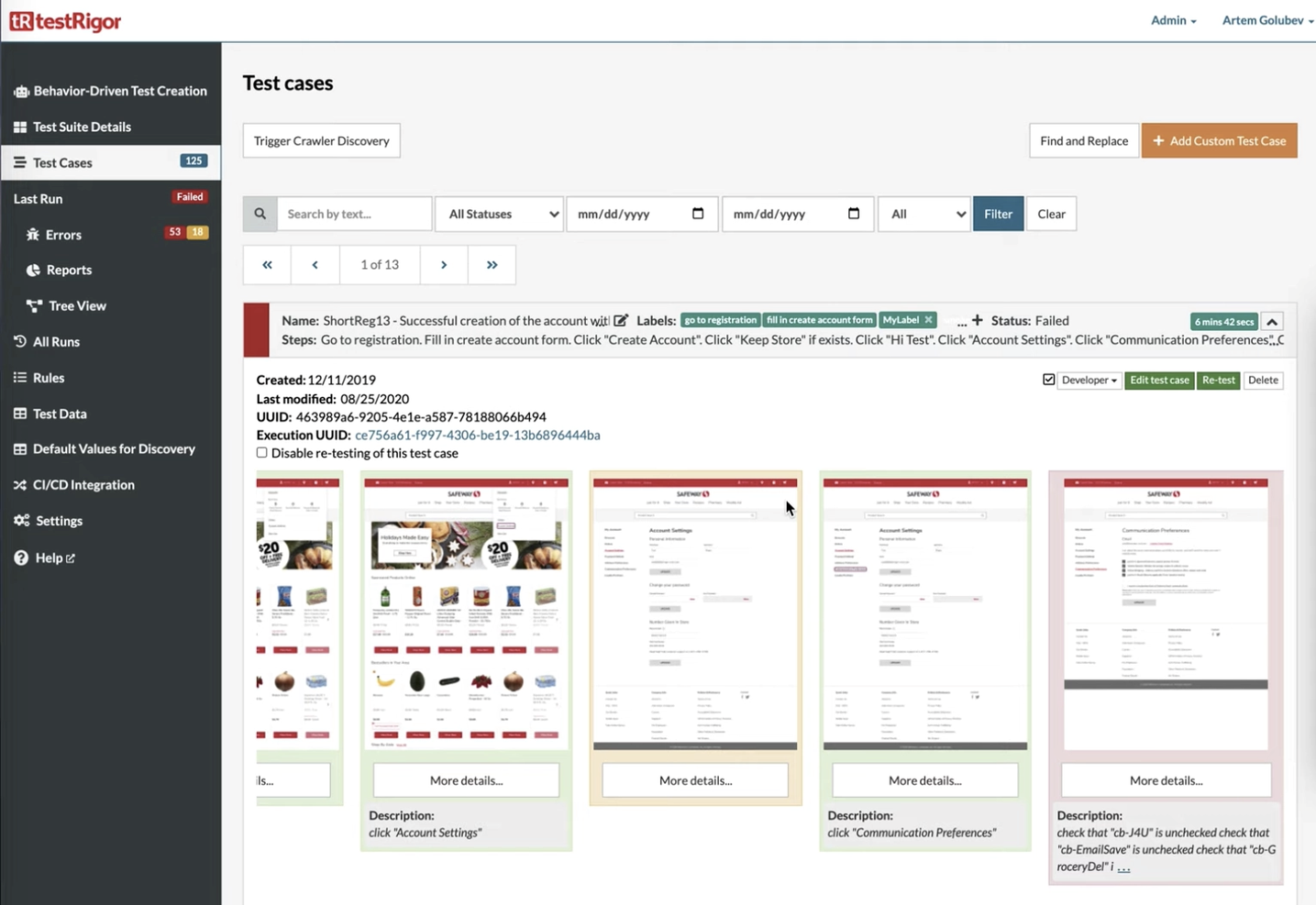
testRigor is a regression testing tool that stands out when it comes to the new era of AI-based automation tools. The tool allows you to create tests in plain English, with elements being referenced from a human perspective. testRigor analyzes all possible parameters behind the scenes to use the most useful ones, which results in ultra-reliable tests.
testRigor allows you to dramatically decrease your test maintenance, by allowing you and your team to spend 95% less time on it on average. Instead, the tool allows you to seamlessly build new tests and increase test coverage. testRigor makes the process of converting existing manual test cases into automated tests very straightforward, and users can also define and customize their own wording if they desire.
The cost of testRigor starts at $300 per month and can be tailored to your specific needs. There is a free 14-day trial with no credit card information required upfront.

Katalon Studio is an all-in-one regression testing platform for simplified web, mobile, API and desktop (Windows, Linux and Mac OS) test automation, and is the alternative to building traditional frameworks with open-source libraries. Katalon Studio offers built-in features such as Object Spy, Debugging UI, Test Artifact Sharing, Retry Failed Tests, Smart Wait, Self-Healing and analytics for test reporting, which provides you complete test coverage from within the toolkit alone.
Katalon Studio provides you with all critical capabilities and stability for functional and end-to-end automated testing, providing your team with a robust testing grid for your application lifecycle. The tool allows you to cycle through every step in weeks instead of months by applying low-code methods for test creation, execution, maintenance, and reporting.
Katalon offers integration with CI/CD tools such as Jenkins, BitBucket, Azure DevOps, VCS platforms such as Git, Github, Azure DevOps Repos, and DevOps tools such as Docker.
The cost of Katalon Studio starts from $69 per user per month. The tool also offers a free version, as well as a 30-day trial to test out all premium features for first-time users.

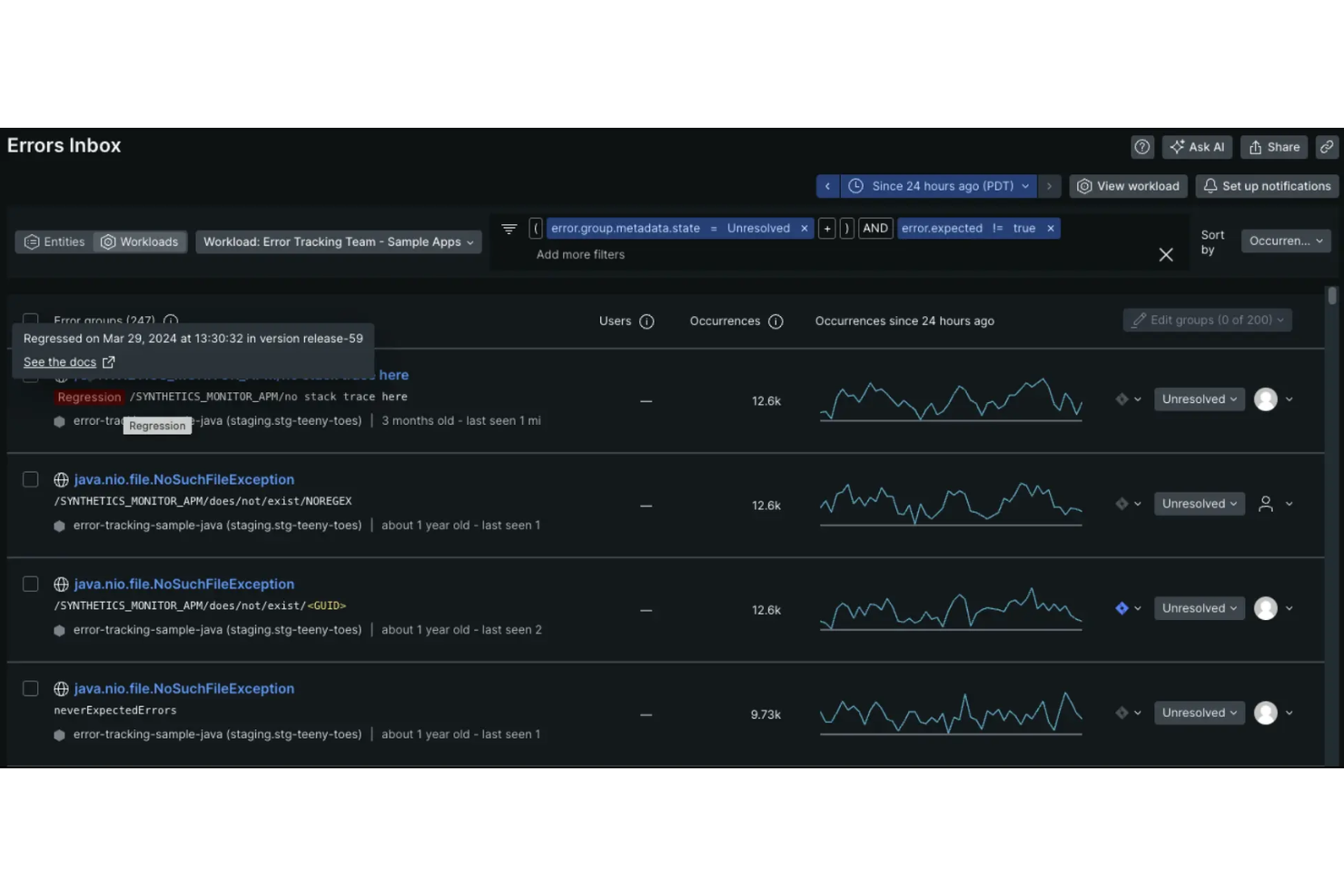
New Relic is an observability platform that helps you monitor and improve your software's performance. Through its synthetic monitoring, you can proactively keep tabs on your applications by simulating user interactions. It helps you identify issues before your users do, ensuring a smooth experience.
I like that it offers the ability to create scripted browser monitors. These monitors allow you to simulate complex user interactions, such as navigating through different pages or submitting forms, which is essential for testing critical user flows after code changes. By mimicking real user behavior, you can ensure that new deployments haven't introduced any unexpected issues.
Another valuable feature is the comparative charting between synthetic and real user monitoring data. This lets you directly compare page load times and other performance metrics between your automated tests and actual user experiences. Such insights help you understand if a regression affects all users or is isolated to specific scenarios.


QA.tech is an AI-driven testing tool designed for teams that need reliable regression testing. It’s aimed at software development teams and QA professionals focused on improving product quality and speeding up release cycles. By automating repetitive tests and supporting end-to-end testing, QA.tech reduces manual effort, helps identify bugs earlier, and allows teams to spend more time on meaningful product improvements, resulting in a more consistent user experience.
Why I Picked QA.tech
I chose QA.tech for its ability to automate and simplify regression testing using AI-based features. A key strength is its support for end-to-end testing across multiple platforms, which helps maintain a consistent user experience. QA.tech also integrates with tools like GitHub and Slack, making it easier to fit testing into existing workflows. Together, these capabilities support faster, more efficient testing without sacrificing quality.
QA.tech Key Features
In addition to its robust automation capabilities, I also found several other features that enhance its value as a regression testing tool:
- Mobile Testing: Provides extensive support for testing mobile applications, ensuring functionality across various devices and operating systems.
- Instant Feedback: Offers real-time insights into code and product quality, allowing teams to address issues promptly.
- Multiple Test Runs: Minimizes flaky tests by executing user journeys multiple times to ensure reliability.
- Integration Capabilities: Seamlessly connects with APIs and other tools to test complex user journeys effectively.
QA.tech Integrations
Integrations include GitHub, Slack, APIs for custom integrations, and support for testing complex user journeys through various platforms.
Pros and Cons
Pros:
- Autonomous AI test case generation
- CI/CD and collaboration integrations supported
- Real-time defect feedback and reports
Cons:
- Pricing available upon request only
- AI may miss edge cases


Autify is an AI-powered, no-code test automation platform designed to help teams create, execute, and maintain automated tests for web and mobile applications.
I picked Autify because of its AI-powered maintenance and cross-environment testing support. Its AI automatically updates test scenarios when UI changes occur, reducing the need for manual maintenance and helping your team keep regression tests accurate over time. You can also run the same tests across multiple browsers and devices without rewriting them, making it easier to catch regressions in different environments and ensure consistency across platforms.
Integrations include Bitbucket Pipelines, GitHub Actions, CircleCI, Jenkins, GitLab CI/CD, Azure Pipelines, AWS CodeBuild, Autify Connect, Bitrise, API integration, Command Line Interface (CLI), and Slack.

Best to simplify test virtualization & editing using screenshots

IBM Rational Functional Tester is a web automation tool that is written in pure Java and provides an array of features. The tool is beneficial to teams who use .Net, Java and C# in their development lifecycle.
IBM Rational Functional Tester allows you to create and prepare test data for manual testers as well as write and run test cases for automated testing. The tool simplifies test visualization and editing using rendered screenshots. IBM Rational Functional Tester also provides intelligent script maintaining capabilities, allowing you to successfully automate functional and regression testing.
IBM Rational Functional Tester integrates with platforms such as Jenkins, Apache Maven and QuickTest.
IBM Rational Functional Tester offers customized pricing upon request.


Selenium is a test automation framework that encapsulates an array of tools and libraries that enable web browser automation. The tool offers easy interaction and manipulation of HTML elements, allowing you to tweak and customize your tests the way you want to write them. Selenium also provides ease of infrastructure management by providing the test environment to your team.
Selenium interacts with your applications via desktop and mobile browsers, allowing you to execute Javascript code, making it easier to test the dynamic components of your DOM. In addition to Javascript, you can use multiple programming languages such as C#, Python, Ruby and Java with Selenium. This allows for easier implementation within development teams as any developer with expertise in any coding language can use the tool.
Selenium is fully open source and free to use.


Rainforest QA is a no-code regression testing solution that provides a building block approach for creating tests and processes. The tool allows you to set up a repeatable testing environment, so you and your team are able to streamline your test process within this environment as often as you need. Rainforest QA also allows you to easily shift between parallel and sequential testing so you are able to keep pace with the development environment, and reduce time between sprints.
Rainforest QA’s intuitive and simple user interface enables you to better organize your test cases by allowing you and your team to tag cases so you can group them, as well as assign and monitor said test cases which are all managed from a single dashboard. The tool allows you to execute cross browser testing (Internet Explorer, Chrome, Edge), as well as access various systems (such as Windows and Linux), providing you extensive test coverage of your application. Rainforest QA also has the results arriving as tests within a suite are still being executed.
Rainforest QA provides integration with notification platforms such as Slack and Microsoft Teams, as well as continuous integration platforms such as Github and CircleCI.
Rainforest QA is free to use for the Professional tier, and offers customized pricing for their Enterprise tier. The tool also offers a 14-day free trial.


Leapwork is a no-code regression testing tool that allows your team to create and execute tests across a variety of environments without the need to have coding experience. The tool is cloud-based, and offers testing in both web and desktop application environments within the same workflow. Leapwork is simple to implement within your team, and provides a growing base of written documentation, videos and articles.
Leapwork provides an array of features such as debugging, parallelization, compliance management, approval process control and recurring tests. The tool allows you to record processes and test cases in context, validate the test steps and input data. Leapwork will then build the processes in a graphical flowchart with logic, making it easy for the non-technical members of your team to review and take action.
Leapwork integrates with platforms such as Microsoft Azure DevOps, Jenkins and TeamCity.
Leapwork provides customized pricing upon request.
Autres outils de tests de régression
Voici d’autres options d’outils de tests de régression qui n’ont pas été retenues dans ma sélection principale, mais qui méritent tout de même d’être explorées :
- Argos
For testing visual elements
- Watir
For executing tests on browsers
- Micro Focus Unified Functional Testing (UFT)
For automating Windows applications
- BugBug
For low-code test automation
- Appsurify TestBrain
For AI-driven test optimization


Critères de sélection des outils de tests de régression
Pour choisir les meilleurs outils de tests de régression à inclure dans cette liste, j’ai pris en compte les besoins courants des acheteurs et leurs principaux points de douleur, comme l’intégration aux flux de travail existants ou la facilité de prise en main pour les membres de l’équipe. J’ai aussi appliqué le cadre suivant afin de garantir une évaluation structurée et objective :
Fonctionnalités principales (25 % du score total)
Pour être inclus dans cette sélection, chaque solution devait répondre à ces cas d’usage communs :
- Détection des régressions logicielles
- Automatisation de l’exécution des tests
- Intégration avec les pipelines CI/CD
- Compatibilité avec plusieurs environnements de test
- Génération de rapports de test détaillés
Fonctionnalités différenciantes (25 % du score total)
Pour affiner la sélection, j’ai aussi recherché des caractéristiques uniques telles que :
- Création de tests basée sur l’IA
- Capacité de tests multiplateformes (navigateurs différents)
- Outils de collaboration en temps réel
- Analyses avancées et insights approfondis
- Tableaux de bord personnalisables de tests
Facilité d’utilisation (10 % du score total)
Pour évaluer l’ergonomie de chaque solution, j’ai pris en compte :
- Interface utilisateur intuitive
- Navigation simplifiée
- Courbe d’apprentissage minimale
- Design responsive
- Réglages personnalisables
Intégration des nouveaux utilisateurs (10 % du score total)
Pour évaluer l'expérience d'intégration de chaque plateforme, j'ai pris en compte les éléments suivants :
- Disponibilité de vidéos de formation
- Visites interactives du produit
- Accès à des modèles prédéfinis
- Webinaires d'accompagnement
- Disponibilité de chatbots
Support client (10 % du score total)
Pour évaluer les services d'assistance de chaque éditeur de logiciel, j'ai pris en compte les éléments suivants :
- Disponibilité d'une assistance 24h/24 et 7j/7
- Accès à une base de connaissances
- Délai de réponse aux demandes
- Qualité du support technique
- Disponibilité du chat en direct
Rapport qualité-prix (10 % du score total)
Pour juger le rapport qualité-prix de chaque plateforme, j'ai pris en compte les éléments suivants :
- Tarification compétitive
- Abonnements flexibles
- Disponibilité d'une période d'essai gratuite
- Fonctionnalités proposées par rapport au coût
- Options de remise pour les équipes
Avis clients (10 % du score total)
Pour évaluer la satisfaction globale des utilisateurs, j'ai pris en compte les éléments suivants lors de la lecture des avis clients :
- Satisfaction générale des utilisateurs
- Retours sur la facilité d'utilisation
- Commentaires sur la fiabilité
- Rapports sur le support client
- Fréquence des mises à jour positives
Comment choisir des outils de tests de régression ?
Il est facile de se laisser submerger par des listes de fonctionnalités interminables et des structures tarifaires complexes. Pour vous aider à rester concentré lors de votre processus de sélection logicielle, voici une liste de points à garder à l'esprit :
| Facteur | À prendre en considération |
|---|---|
| Scalabilité | L'outil s'adaptera-t-il à l'évolution des besoins de votre équipe ? Prenez en compte la taille future des projets et le nombre d'utilisateurs. Privilégiez les solutions capables de gérer un accroissement de la charge sans difficulté. |
| Intégrations | Est-il compatible avec vos outils actuels ? Vérifiez la compatibilité avec vos pipelines CI/CD et autres logiciels déjà utilisés, pour éviter toute rupture dans vos processus. |
| Personnalisation | Pouvez-vous adapter l'outil à vos processus ? Vérifiez que vous pouvez modifier les flux de travail et les rapports en fonction des besoins et préférences de votre équipe. |
| Facilité d'utilisation | Est-il convivial pour l'ensemble des membres de l'équipe ? Privilégiez des interfaces intuitives et un besoin minimal de formation pour un déploiement rapide. |
| Mise en place et intégration | Le processus de configuration est-il fluide ? Évaluez le temps et les ressources nécessaires à l'installation et à la formation. Privilégiez les outils proposant des guides clairs et un support adapté. |
| Coût | La tarification correspond-elle à votre budget ? Comparez les modèles d’abonnement et soyez vigilant face aux frais cachés. Vérifiez que le coût est cohérent avec la valeur et les fonctionnalités proposées. |
| Sécurité | Comment l'outil protège-t-il vos données ? Vérifiez la présence de chiffrement, de contrôles d'accès, et la conformité aux normes applicables pour garantir la confidentialité des informations sensibles. |
| Disponibilité de l'assistance | L'aide est-elle disponible lorsque vous en avez besoin ? Prenez en compte les horaires du support, les délais de réponse et les ressources disponibles comme le chat ou le support téléphonique. |
Qu'est-ce qu'un outil de tests de régression ?
Les outils de tests de régression sont des logiciels conçus pour automatiser les vérifications et garantir que les récents changements dans le code n'ont pas altéré les fonctionnalités existantes. Ces outils exécutent une série de tests sur les logiciels déjà validés après des modifications — telles que des mises à jour ou des corrections de bugs — pour s'assurer que les nouveaux changements n'introduisent pas de nouvelles erreurs ou régressions dans le système.
Ils permettent d'assurer une couverture de test complète, réduisant le risque que des bugs n'apparaissent dans les versions mises en production. Les outils de tests de régression visuelle sont particulièrement efficaces pour détecter les changements d'interface et les problèmes de mise en page.
Fonctionnalités
Lors du choix d’outils de tests de régression, prêtez attention aux fonctionnalités clés suivantes :
- Automatisation : Automatise les cas de test répétitifs, ce qui permet de gagner du temps et de réduire les erreurs manuelles.
- Capacités d'intégration : Se connecte aux pipelines CI/CD existants pour s'intégrer parfaitement à votre flux de développement.
- Rapports personnalisables : Fournit des analyses détaillées des résultats de test, aidant les équipes à prendre des décisions éclairées.
- Tests multi-navigateurs : Garantit le bon fonctionnement du logiciel sur différents navigateurs Web et appareils.
- Création de tests pilotée par l'IA : Utilise l'apprentissage automatique pour générer et optimiser efficacement les cas de test.
- Collaboration en temps réel : Permet aux membres de l'équipe de travailler ensemble et de partager des retours pendant le processus de test.
- Évolutivité : S'adapte à la croissance des projets et à l'expansion des équipes sans compromettre la performance.
- Mesures de sécurité : Protège les données sensibles grâce au chiffrement et au contrôle d'accès afin d'assurer la conformité.
- Interface conviviale : Propose une conception intuitive qui réduit la courbe d'apprentissage pour les nouveaux utilisateurs.
- Ressources de formation et support : Donne accès à des tutoriels, des webinaires et au support client pour accompagner l'intégration et le dépannage.
Avantages
L'intégration d'outils de tests de régression offre plusieurs avantages pour votre équipe et votre entreprise. Voici certains bénéfices auxquels vous pouvez vous attendre :
- Gain de temps : L'automatisation accélère le processus de test, permettant à votre équipe de se concentrer sur des tâches plus stratégiques.
- Amélioration de la qualité logicielle : Les tests réguliers détectent les bugs tôt, garantissant la stabilité et la fiabilité de votre logiciel.
- Efficacité des coûts : La détection précoce des problèmes réduit le coût des corrections ultérieures dans le cycle de développement.
- Collaboration renforcée : Les fonctionnalités de collaboration en temps réel permettent aux membres de l’équipe de partager rapidement leurs idées et leurs retours.
- Évolutivité : La capacité à gérer des projets plus importants et des équipes en croissance sans effort supplémentaire soutient la croissance de l'entreprise.
- Précision accrue : Les tests automatisés éliminent les erreurs humaines, offrant des résultats plus cohérents et fiables.
- Sécurité des données : Des mesures de sécurité intégrées protègent vos informations sensibles lors des phases de test.
Coûts & Tarification
Le choix d’un outil de tests de régression implique de comprendre les différents modèles tarifaires et forfaits disponibles. Les coûts varient selon les fonctionnalités, la taille de l’équipe, les options supplémentaires, et plus encore. Le tableau ci-dessous résume les forfaits les plus courants, leur prix moyen et les fonctionnalités typiques des solutions d’outils de tests de régression :
Tableau comparatif des forfaits pour les outils de tests de régression
| Type de forfait | Prix moyen | Fonctionnalités communes |
|---|---|---|
| Forfait gratuit | $0 | Automatisation de base des tests, intégrations limitées, et support communautaire. |
| Forfait personnel | $5-$25/user/month | Automatisation des tests, rapports basiques, intégrations avec des outils populaires, et support par e-mail. |
| Forfait entreprise | $30-$75/user/month | Rapports avancés, tests multi-navigateurs, support prioritaire et outils de collaboration. |
| Forfait entreprise avancé | $100-$250/user/month | Workflows personnalisables, gestionnaire de compte dédié, sécurité renforcée et capacités d'intégration complètes. |
FAQ sur les outils de tests de régression
J’ai pensé à quelques questions-réponses de base pendant la rédaction afin d’aider tout nouveau venu à s’orienter.
Les outils de tests de régression peuvent-ils simuler différents environnements utilisateur ?
Oui, les outils de tests de régression peuvent simuler divers environnements utilisateur afin de garantir que les applications fonctionnent de manière cohérente sur différentes plateformes, navigateurs et appareils. Ces outils permettent d’émuler différents systèmes d’exploitation, versions de navigateurs, vitesses de connexion réseau, et bien plus encore pour valider le comportement de l’application dans des conditions variées.
Comment les outils de tests de régression assurent-ils l'exhaustivité de la couverture des tests ?
Les outils de tests de régression assurent l’exhaustivité de la couverture des tests en offrant des fonctions qui relient les tests aux exigences, détectent les parties non testées de l’application, et suggèrent des cas de test supplémentaires. Ils incluent souvent des fonctionnalités d’analytique et de rapports permettant d’identifier les lacunes de couverture et de prioriser les cas de test selon le risque et l’impact.
Comment les outils de tests de régression gèrent-ils de grands jeux de données de test ?
Les outils de tests de régression gèrent de grands ensembles de données de test grâce à des fonctionnalités comme la virtualisation des données, la gestion des données de test et les tests pilotés par les données. Ils permettent aux testeurs de créer, d’importer et de gérer efficacement les données de test, garantissant ainsi que les tests soient à la fois complets et pertinents pour les scénarios d’application évalués.
Quels sont les types de logiciels de test de régression ?
Les logiciels de test de régression sont essentiels pour s’assurer que les nouvelles modifications du code n’affectent pas négativement les fonctionnalités existantes des applications logicielles. Ces outils se présentent sous différentes formes, chacune conçue pour répondre à des besoins, des environnements et des méthodologies de test spécifiques. Comprendre les différents types de logiciels de test de régression aide les équipes et les organisations à sélectionner les outils les plus adaptés à leurs exigences spécifiques.
Voici les principaux types de logiciels de test de régression :
Outils de tests de régression automatisés : Ces outils automatisent l’exécution des tests de régression, réduisant considérablement le temps et l’effort nécessaires aux tests. Les outils automatisés sont idéaux pour les projets avec de grands volumes de code ou ceux subissant des changements fréquents, garantissant une couverture de test complète sans intervention manuelle.
Outils de gestion des tests : Bien qu’ils ne soient pas exclusivement dédiés aux tests de régression, les outils de gestion des tests aident à organiser et à gérer les cas de test, y compris ceux de régression. Ils incluent souvent des fonctionnalités de planification, d’exécution et de suivi de l’avancement des tests, ce qui les rend précieux pour coordonner les efforts de test de régression au sein d’un processus d’assurance qualité plus large.
Outils d’intégration continue (CI) : Les outils CI s’intègrent aux logiciels de tests de régression pour exécuter automatiquement les tests dans le cadre du cycle de vie du développement logiciel. Cette intégration est cruciale pour les pratiques Agile et DevOps, permettant aux équipes d’identifier et de corriger rapidement les régressions lors de l’intégration de nouveaux codes.
Outils de tests de régression sans code : Destinés aux équipes ayant des compétences en codage limitées, les outils sans code proposent une interface conviviale pour créer et exécuter des tests sans écrire de code. Ces outils se basent sur l’interaction graphique, rendant les tests de régression accessibles aux membres non techniques de l’équipe.
Outils de tests de régression de performance : Ces outils visent à détecter les régressions qui affectent les performances de l’application, comme les temps de chargement ou la réactivité. Les tests de régression de performance sont essentiels pour les applications où l’expérience utilisateur dépend de la rapidité et de l’efficacité.
Plateformes de tests de régression sur le cloud : Les plateformes cloud offrent la flexibilité de lancer des tests de régression sur une grande variété d’environnements et d’appareils sans infrastructure physique. Ce type d’outil est particulièrement utile pour tester des applications sur divers systèmes d’exploitation, navigateurs et appareils mobiles.
Outils de tests de régression open source : Les outils open source permettent une personnalisation poussée et sont généralement gratuits. Bien qu’ils requièrent souvent davantage de configuration et de maintenance que les outils commerciaux, ils conviennent aux équipes disposant des compétences techniques nécessaires pour les adapter à leurs besoins.
Outils de tests multiplateformes et multi-navigateurs : Ces outils garantissent que les applications fonctionnent comme prévu sur plusieurs navigateurs et plateformes, ce qui est essentiel pour les applications web et mobiles. Ils permettent d’automatiser les tests sur différentes combinaisons de navigateurs et systèmes d’exploitation afin d’assurer la compatibilité et une expérience utilisateur cohérente.
Chaque type de logiciel de test de régression possède ses propres caractéristiques, avantages et limites. Le choix du bon outil dépend de plusieurs facteurs, dont la taille et la complexité du projet, les compétences techniques de l’équipe QA et les objectifs spécifiques du processus de test de régression.
En évaluant soigneusement ces aspects, les équipes peuvent choisir le logiciel de tests de régression le plus adapté afin de garantir des livraisons logicielles de haute qualité.
Comment les outils de tests de régression s'intègrent-ils avec les pipelines CI/CD ?
Ces outils automatisent le processus de test et s’intègrent parfaitement aux pipelines CI/CD, déclenchant automatiquement les tests à chaque nouveau commit de code. Cela permet d’obtenir des retours rapides et de maintenir la qualité logicielle en continu.
Et ensuite
Si vous recherchez des outils de tests de régression, contactez gratuitement un conseiller SoftwareSelect pour obtenir des recommandations.
Vous remplissez un formulaire et vous échangez rapidement afin qu'ils comprennent précisément vos besoins. Ensuite, vous recevrez une liste restreinte de logiciels à examiner. Ils vous accompagneront même tout au long du processus d'achat, y compris lors des négociations tarifaires.