
23 Meilleurs Outils de Test de Pénétration des Applications Web en 2026

Meilleurs outils de test d'intrusion pour applications web - Sélection
Voici ma liste des meilleurs outils de test d’intrusion pour applications web :


Les meilleurs outils de test d'intrusion pour applications web aident les équipes à détecter les vulnérabilités tôt, à valider les contrôles de sécurité et à protéger les données sensibles sur des applications complexes. Lorsque des erreurs de configuration passent à travers les contrôles, que les scanners automatisés manquent des failles à haut risque ou que des écarts existent entre les tests manuels et les pipelines CI/CD, les faiblesses peuvent rester inaperçues et coûter cher à corriger plus tard.
La bonne plateforme de test d'intrusion fournit aux équipes sécurité des résultats précis, des rapports clairs et des workflows qui s'intègrent naturellement aux processus de développement existants. En tant que directeur technique avec plus de 20 ans d'expérience dans le test et la mise en œuvre d'outils de sécurité dans des environnements web actifs, j'ai évalué les meilleures solutions selon leur précision, la qualité de l'intégration et leur facilité d'utilisation. Chaque analyse détaille les fonctionnalités, les avantages et inconvénients, ainsi que les cas d'utilisation idéaux pour aider votre équipe à choisir le meilleur outil de test d'intrusion pour garantir la sécurité de vos applications.
Why Trust Our Software Reviews
Résumé des meilleurs outils de test d'intrusion pour applications web
Ce tableau comparatif synthétise les détails tarifaires de mes meilleurs choix d’outils WAPT pour vous aider à identifier celui qui convient le mieux à votre budget et à vos besoins professionnels.
| Tool | Best For | Trial Info | Price | ||
|---|---|---|---|---|---|
| 1 | Best for proactive, automated penetration testing | 14-day free trial + free demo available | From $149/month | Website | |
| 2 | Best for continuous vulnerability scanning & pentesting for 9300+ test cases | Free demo available | From $69/month | Website | |
| 3 | Best for business logic vulnerability detection | Free demo available | Pricing upon request | Website | |
| 4 | Best for hybrid AI + human pentesting | Free plan available | From $200/month | Website | |
| 5 | Best for AI pentests | Free plan available + free demo | From $350/month | Website | |
| 6 | Best for configuring scan profiles | Free demo available | Pricing upon request | Website | |
| 7 | Best for DeepScan technology in complex web applications | Free demo available | Pricing upon request | Website | |
| 8 | Best for real-time performance monitoring | Free plan + free demo available | Pricing upon request | Website | |
| 9 | Best fully managed web application firewall (WAF) solution | 14-day free trial + free demo | From $99/month | Website | |
| 10 | Best for thread-based parallel testing | Free demo available | From $29/month | Website | |
| 11 | Best for external asset discovery | Not available | Website | ||
| 12 | Best for developers | Not available | Website | ||
| 13 | provides a passive scan feature | Free plan available | From $475/user/year | Website | |
| 14 | Network protocol analyzer that is fully open source, and tracks your network and traffic for cyber security | Not available | Free to use | Website | |
| 15 | Easy to use credential and non credential scans | 7-day free trial + free demo | From $4,390/license/year | Website | |
| 16 | Lightweight solution to web application penetration testing | Not available | Free to use | Website | |
| 17 | Penetration testing tool and password cracker which allows you to test the strength of your passwords | Not available | Website | ||
| 18 | Automate manual tests and streamline your process | Free plan available | Pricing available upon request | Website | |
| 19 | Focuses on being the “middleman proxy” between browser and application | Not available | Free to use | Website | |
| 20 | Best for replicating multi-staged attacks | Free trial available + free demo | From $9,450/user/year | Website |


-

Site24x7
Visit WebsiteThis is an aggregated rating for this tool including ratings from Crozdesk users and ratings from other sites.4.6 -
Docker
Visit WebsiteThis is an aggregated rating for this tool including ratings from Crozdesk users and ratings from other sites.4.6 -
Pulumi
Visit WebsiteThis is an aggregated rating for this tool including ratings from Crozdesk users and ratings from other sites.4.8





Avis sur les meilleurs outils de test d'intrusion pour applications web
Vous trouverez ci-dessous mes synthèses détaillées sur les meilleurs outils de test d’intrusion pour applications web retenus dans ma liste courte. Mes analyses offrent un examen approfondi des fonctionnalités clés, avantages et inconvénients, intégrations et cas d’usage idéaux de chaque outil afin de vous aider à trouver celui qui vous conviendra le mieux.


Intruder is a vulnerability management tool designed to help businesses identify and address security weaknesses across their digital infrastructure. It provides continuous network monitoring, automated vulnerability scanning, and proactive threat response, which collectively contribute to a more secure IT environment for companies aiming to minimize their attack surface.
I chose this platform for my list because of its automation capabilities. It uses underlying vulnerability scanners to take a proactive approach to vulnerability management. This automated scanning feature allows for regular and systematic vulnerability assessments of digital assets with minimal manual effort. Meanwhile, the tool's continuous monitoring and real-time threat monitoring capabilities ensure that security statuses are always current, adapting to new threats and environmental changes.
The software integrates natively with Slack, Microsoft Teams, Jira, Github, and Gitlab. Other integrations can be accessed through Zapier and API.
Paid plans start from $196 per month, per application. A 14-day free trial is also available.
New Product Updates from Intruder
Intruder Partners With DomainTools for Enhanced Security
Intruder has partnered with DomainTools to integrate DNS data, enhancing security. This update helps security teams identify hidden subdomains and uncover Shadow IT risks more effectively. For more information, visit Intruder's official site.
 .
.
Best for continuous vulnerability scanning & pentesting for 9300+ test cases
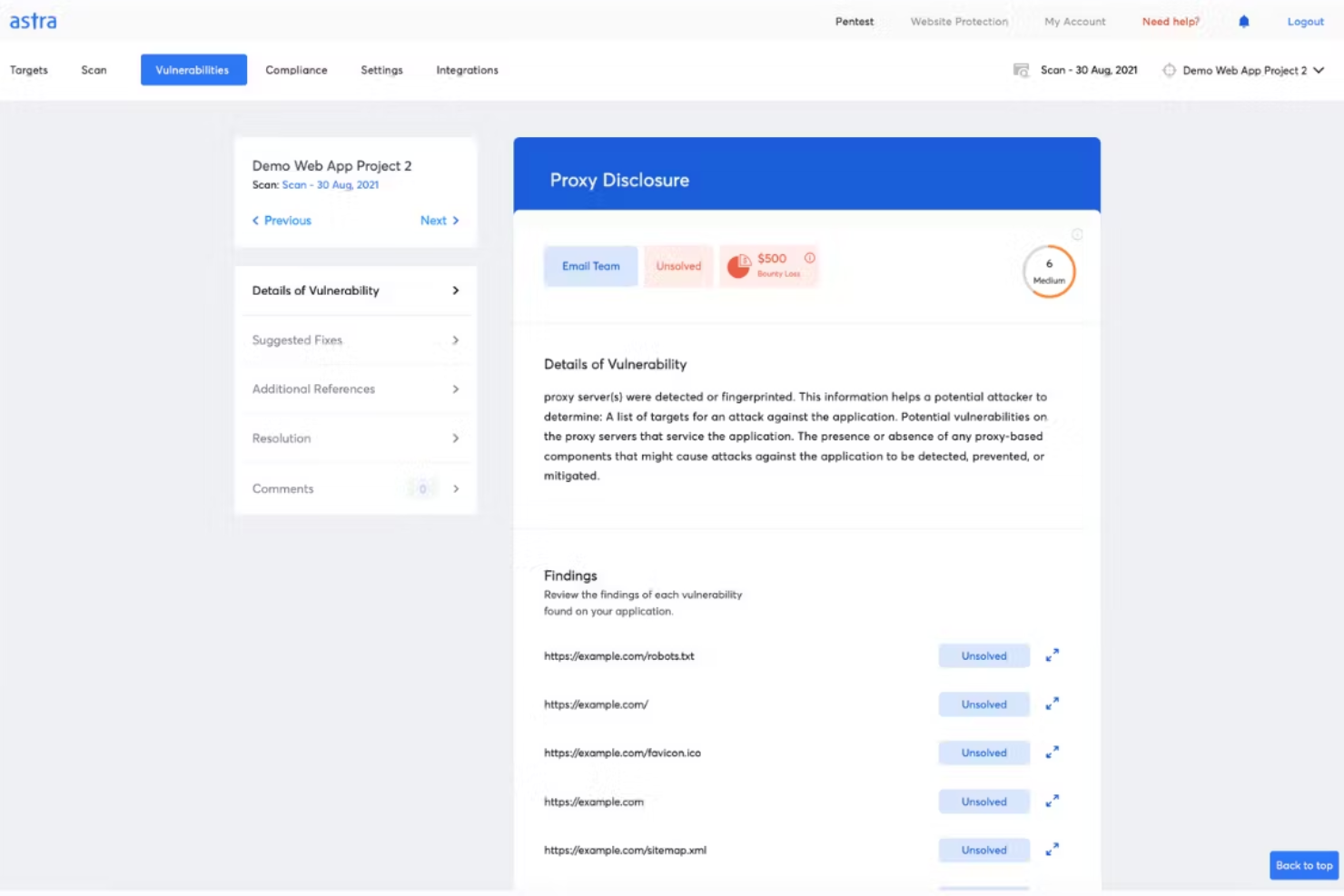
Astra Pentest is a developer-friendly pentest platform featuring an automated vulnerability scanner and manual pentesting by security experts to ensure zero false positives. The platform's vulnerability scanner runs 9300+ test cases covering OWASP, SANS, ISO, SOC, and other standards. This AI-powered business logic test cases feature ensures deep security testing coverage. Additionally, the AI-powered conversational chatbot gives engineers contextual insights on fixing vulnerabilities.
Astra's pentest platform provides a collaborative dashboard that allows team members and security experts to work together efficiently, and it offers a publicly verifiable security certificate to help build trust with customers and partners. The platform also provides real-time support from security experts and emphasizes continuous scanning, which enables ongoing monitoring and detection of security issues.
Furthermore, like the vulnerability scanner, the penetration testing tool covers a wide range of security standards and offers compliance testing for regulations such as ISO 27001, HIPAA, SOC2, and GDPR. The software can also scan progressive web apps, single-page apps, and behind logged-in pages. Integrations include GitHub, GitLab, Slack, Jira, and more.
Paid plans start at $199/month for the Scanner package and they have a free demo available.


Escape is a web application penetration testing tool designed for organizations needing to address modern digital security challenges. It specializes in detecting business logic vulnerabilities that traditional scanners often miss, making it particularly suited for industries like finance, healthcare, and technology. By integrating into existing tech stacks, Escape helps ensure continuous security validation, aligning with the fast-paced deployment cycles of contemporary applications.
Why I Picked Escape
I picked Escape because it excels at identifying complex business-logic vulnerabilities through AI-powered Dynamic Application Security Testing (DAST), setting it apart from traditional tools. This focus on business logic security is crucial for organizations facing sophisticated cyber threats. Additionally, Escape’s integration with CI/CD pipelines ensures that security testing keeps pace with rapid development cycles, providing real-time insights and actionable remediation advice. These features make Escape a compelling choice for teams aiming to enhance their security posture without slowing down innovation.
Escape Key Features
In addition to business logic testing capabilities, Escape offers:
- API Discovery: Automatically identifies and documents APIs within your application, ensuring comprehensive security coverage.
- GraphQL Security Testing: Provides specialized testing for GraphQL APIs, addressing unique vulnerabilities associated with this technology.
- Compliance Reporting: Generates detailed reports to help meet industry compliance standards, simplifying the audit process.
- Sensitive Data Leak Detection: Identifies potential data leaks within your applications, helping to safeguard sensitive information.
Escape Integrations
Escape integrates with modern tech stacks, including CI/CD platforms, to provide seamless security validation. Native integrations include GitHub, GitLab, Jenkins, JIRA, Slack, Bitbucket, Azure DevOps, AWS, Docker, and Kubernetes.
Pros and Cons
Pros:
- Strong API vulnerability detection, including coverage for REST and GraphQL endpoints
- Advanced scanning technology that finds a wide range of security issues
- Continuous scanning and verification that support ongoing security monitoring
Cons:
- Requires technical familiarity to use advanced features effectively
- Platform upgrades can take time to apply and adapt to


Zeropath is an AI-native application security platform designed to meet the needs of security-conscious companies aiming to enhance their web application security processes. By offering advanced tools like Static Application Security Testing (SAST) and automated vulnerability remediation, Zeropath empowers your team to detect and address vulnerabilities efficiently.
Why I Picked Zeropath
I picked ZeroPath because it brings together continuous AI-driven testing and human-led attack analysis, which is ideal if you’re looking for a web application penetration testing tool that goes beyond surface-level checks. You get automated reconnaissance and vulnerability discovery that runs 24/7, giving your team visibility into security gaps as soon as they emerge. Expert pentesters then validate findings and explore complex attack chains, so you’re not left wondering which issues are real or exploitable. This combination lets your team prioritize meaningful vulnerabilities and act on them with confidence.
Zeropath Key Features
In addition to its continuous AI + human testing approach, your team can also take advantage of:
- Automated Vulnerability Remediation: This feature provides automated fixes for identified vulnerabilities, streamlining the resolution process for your development team.
- Real-Time Feedback: Zeropath delivers immediate insights into security issues as they arise, allowing your team to address them promptly.
- Automatic retesting of fixes: Once your team applies a patch, ZeroPath validates the fix to confirm the issue is resolved.
- SARIF Comparison: This feature allows for detailed analysis and comparison of security reports, enhancing your team's ability to track and manage vulnerabilities.
- Real-time vulnerability detection: The platform alerts you as soon as new weaknesses appear in changing application environments.
Zeropath Integrations
Integrations include GitHub, GitLab, Azure DevOps, and Bitbucket.
Pros and Cons
Pros:
- Proof-of-concept exploits clarify real-world risk for teams
- AI reconnaissance expands coverage of hidden attack surfaces
- Continuous monitoring catches new vulnerabilities around the clock
Cons:
- You may need time to adjust your workflow around its automation
- Not ideal for teams wanting only traditional point-in-time tests


Aikido Security’s Attack module delivers autonomous AI penetration testing that mirrors real attacker behavior, providing validated results in hours instead of weeks. It can be used as a standalone pentesting tool or as part of the broader Aikido platform, which also includes modules for code, cloud, and runtime protection. Together, these tools give teams continuous visibility into vulnerabilities across their entire environment.
Aikido Security also includes robust DAST capabilities for black-box testing. It examines your web applications and APIs from the outside without needing access to source code, helping you simulate real-world attacks and uncover potential weaknesses. This approach gives your team a clearer view of external risks and what needs to be fixed to strengthen your defenses.
Another helpful feature is authenticated DAST scanning. By logging in as a user before testing, Aikido can assess a greater portion of the application, identifying vulnerabilities that unauthenticated scans may miss. The platform also provides static application security testing (SAST) to detect issues such as SQL injection and cross-site scripting directly in your codebase.
New Product Updates from Aikido Security

Aikido Security Adds Continuous Pentesting, VM Reachability, and IDE Scanning
Aikido Security introduces Aikido Infinite continuous pentesting, cloud VM reachability diagrams, and full workspace scanning across IDEs. These updates help teams identify exploitable vulnerabilities faster and strengthen security checks during development. For more information, visit Aikido Security’s official site.


Invicti offers a security platform that not only identifies vulnerabilities but also validates and prioritizes them, ensuring your digital assets remain protected. Designed for businesses ranging from IT and financial services to healthcare and government sectors, it addresses the challenge of safeguarding web applications and APIs against potential exploits. By integrating seamlessly into your development pipeline, Invicti helps maintain a robust security posture without disrupting your workflow.
Why I Picked Invicti
I picked Invicti for its exceptional capability in configuring pre-set scan profiles, a feature that stands out in the realm of web application penetration testing tools. This functionality allows you to customize and automate scanning processes, ensuring that security checks are both comprehensive and consistent. The platform also includes dynamic application security testing (DAST) with a high accuracy rate, which is crucial for pinpointing vulnerabilities effectively. Additionally, its seamless integration with CI/CD pipelines means you can maintain security without slowing down your development cycle.
Invicti Key Features
In addition to its pre-set scan profiles, Invicti offers several key features that enhance your security management:
- DAST Engine: Provides a high accuracy rate of 99.98% using AI innovations to quickly identify vulnerabilities.
- Software Composition Analysis (SCA): Identifies vulnerabilities in open-source components, allowing you to address risks in your software supply chain.
- Container Security: Offers scanning for container images to detect vulnerabilities before deployment.
- Role-Based Access Control: Ensures that only authorized personnel have access to critical security functions, enhancing data protection.
Invicti Integrations
Integrations include Bitbucket, Azure API Management, Mend.io, Amazon API Gateway, Kubernetes, Apigee API Hub, MuleSoft Anypoint Exchange, Azure Boards, FogBugz, and Bugzilla.
New Product Updates from Invicti
Invicti Enterprise Adds WebLogic Support and Security Enhancements
The latest Invicti Enterprise v25.10.0 release introduces WebLogic support for Java Shark sensors and improved secrets management through SEM integrations. It also refines API consistency and strengthens overall platform stability. For more information, visit Invicti's official site.
 .
.

Acunetix is a comprehensive web application and API security scanner designed to help organizations automate their application security testing. It offers a robust suite of features, including API discovery and security, which allows users to find and test APIs without disrupting development workflows.
Acunetix uses DeepScan Technology, which allows the tool to fully automate the crawling of complex custom HTML5 websites and web applications, including client-side single-page applications (SPAs). This technology enables Acunetix to interact with JavaScript-rich web applications just like a real user would, ensuring that even the most intricate parts of a web application are thoroughly tested.
Another significant feature is the Login Sequence Recorder (LSR), which simplifies the process of authenticated web application testing. This tool allows users to record a series of actions and/or restrictions and replay them to authenticate a page, making it easier to test web applications that require login credentials.
Integrations include Azure Boards, BitBucket, Bugzilla, DefectDojo, FogBugz, Freshservice, GitHub, GitLab Issues, Invicti Standard, Jazz Team Server, Jira, and Kafka.
Pricing is available upon request.

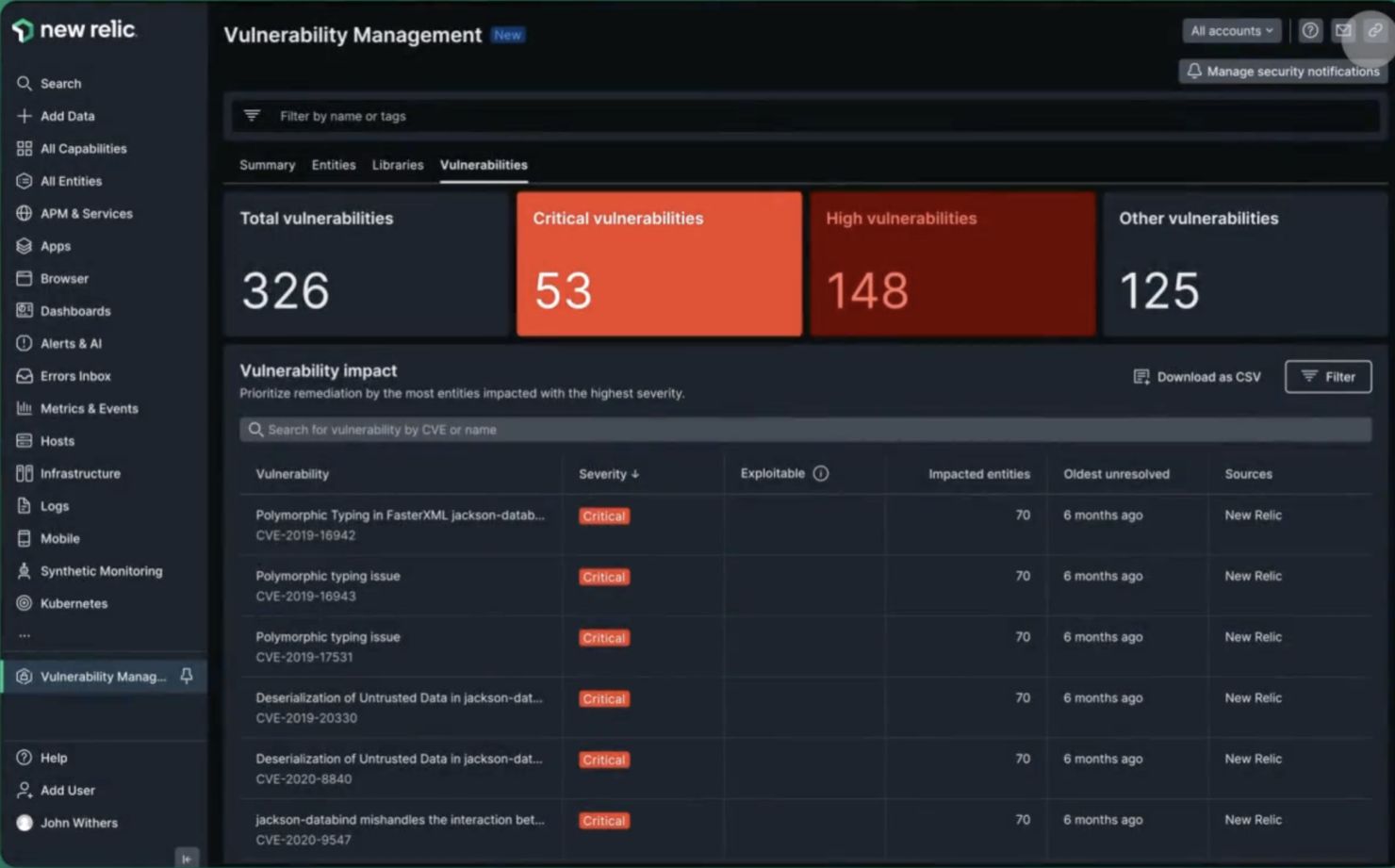
New Relic is a real-time monitoring tool designed to help you track application performance, identify bottlenecks, and resolve issues before they become problems. Steve Morris, Founder and CEO at NEWMEDIA.COM, explained: “At petascale, ingest costs can sneak up and bite you in the a**. Using drop filter rules and the NerdGraph API, we eliminated duplicate log payloads and muddy chatter from some of our wackier metrics.”
The platform includes real-time performance monitoring that lets you see exactly how an app is performing in real time so you can spot any issues as they happen and fix them straight away. It also includes detailed analytics, which allow you to drill down into an app's performance data to find out exactly what's going on. And it's all presented in a really easy-to-understand way.
Key features include backend monitoring, Kubernetes monitoring, mobile monitoring, model performance monitoring, infrastructure monitoring, log management, error tracking, network monitoring, vulnerability management, and browser monitoring.
Integrations include over 500 apps, like AWS, Google Cloud, and Microsoft Azure; CI/CD tools like Jenkins, CircleCI, and Travis CI; communication tools like Slack and PagerDuty; and other monitoring and analytics tools like Grafana, Datadog, and Splunk. It also has an API you can use to build custom integrations.
New Relic costs from $49/user/month and offers a free plan for 1 user and 100 GB/month of data ingest.


AppTrana is a web application firewall (WAF) used for penetration testing, behavioral-based DDoS protection, mitigating bot attacks, and defending against the OWASP top 10 vulnerabilities. AppTrana is employed by security-conscious companies across myriad industries, such as Axis Bank, Jet Aviation, Niva Health Insurance, and TRL Transport.
AppTrana is a fully managed security solution, which means that their web security expert team takes on the analyzing and updating of security policies so you don't have to. Higher-level accounts will get a named account manager to assist them; the highest subscription level comes with quarterly service reviews (highly recommended!).
Key features include unlimited application security scanning, manual pen-testing of applications, managed CDN, false positive monitoring, custom SSL certificates, and risk-based API Protection. Their website is packed full of detailed feature explanations as well as a blog, learning center, whitepapers, infographics, and datasheets, so I highly recommend you take a look around for yourself.
AppTrana costs from $99/month/app and comes with a free 14-day trial.


Medusa is a swift, modular tool designed for brute-forcing login credentials, making it an essential asset for web application penetration testing. Available as an open-source project on GitHub, it offers a valuable means to evaluate the security of web applications.
Why I picked Medusa: One of the reasons I picked Medusa is its capability for thread-based parallel testing. This feature allows you to run multiple brute-force attempts simultaneously, which can significantly speed up the testing process. With Medusa, you can test multiple hosts, users, or passwords concurrently, making it a time-efficient tool for web application security assessments.
Another compelling reason is its modular design, which lets you extend the tool to suit various services. Medusa supports a wide range of protocols, including SMB, HTTP, and SSH, among others. This versatility allows you to tailor your penetration testing efforts based on the specific needs of your web application environment, ensuring a comprehensive security evaluation.
Medusa Standout Features and Integrations:
Features include flexible user input, allowing you to specify target information through single entries or files, giving you the adaptability needed for different scenarios. The tool supports multiple protocols, which means you can test various services requiring remote authentication. Additionally, Medusa's open-source nature means you can access and modify the source code to fit your specific penetration testing needs.
Integrations include SMB, HTTP, MS-SQL, POP3, RDP, SSHv2, Telnet, VNC, MySQL, PostgreSQL, LDAP, and IMAP.
Pros and Cons
Pros:
- Quickly deployable with minimal setup commands
- Thread-based parallel testing enhances speed and effectiveness
- Supports multiple protocols, making it versatile for various testing scenarios
Cons:
- Simple storefronts require design skills for more polished appearances
- Basic out-of-the-box features may not meet all user needs


Amass is a penetration testing tool that allows you to perform network mapping of cyber attack surfaces, known as Attack Surface Management (ASM). This feature provides continuous monitoring of your changing attack surface, allowing you to ensure your application is covered for various cyber attacks. The tool also provides reporting of the results of these penetration tests.
Amass provides features such as external asset discovery, which allows you to identify and locate active and inactive assets that are unknown to your organization. With the feature, you can monitor the security of your application round-the-clock, and improve your team’s vulnerability management.
Amass is fully open source and free to use.


Gobuster is a penetration testing tool that is accessible via Github, which allows you to conduct scanning across your web application, and brute force your URIs, DNS subdomains and Virtual Host names on target web servers which allows you to identify unprotected scripts and old configuration files.
Gobuster is hosted on GitHub and can be installed using your terminal. The tool provides the ability to conduct recon tests, which allows you to delve into the depths of your web application and detect vulnerabilities. The tool then provides a thorough report so you can review your code effectively.
Gobuster is fully open source and free to use.


Burp Suite is a penetration testing tool that allows you to improve your cyber security protocols with the use of a fully fleshed out toolkit. The tool boasts an array of features such as the Burp Intruder which allows you to automate customized cyber attacks against your applications, and Burp Repeater which allows you to manipulate and reissue individual HTTP requests manually.
Burp Scanner also has a passive scanning feature, which allows you to divide the checks performed into active and passive checks. This allows you to set the targets and scopes, and cover areas that are easily missed. The tool also allows you to conduct active scans, ensuring that the entirety of your application is covered.
Burp Suite integrates with tools such as Jenkins and TeamCity.
The cost of Burp Suite starts at $6,995 per year. The tool also offers a free trial.

Wireshark
Network protocol analyzer that is fully open source, and tracks your network and traffic for cyber security

Wireshark is a powerful open source network packet sniffer equipped for the deep inspection of hundreds of different protocols, with more being added all the time. Wireshark runs on multiple platforms, including Windows, macOS, Linux, Solaris, NetBSD, FreeBSD, and many others.Wireshark can read live data from Ethernet, IEEE 802.11, PPP/HDLC, ATM, Bluetooth, USB, Token Ring, Frame Relay, FDDI, and others in a wide range of file formats. Data can easily be exported, compressed and decompressed for offline analysis, and the platform also has a user-friendly built-in network protocol debugging environment.Wireshark integrates with a wide range of tools, including network software emulators like GNS3.Wireshark is open source and free to use.


Nessus is a web application penetration testing tool that allows you to complete vulnerability assessments of your web application. The tool allows you to easily identify and fix vulnerabilities, including software flaws, malware and missing patches. Nessus can operate across a variety of systems and devices.
Nessus provides the ability to perform credential and non credential scans, allowing you to find more depth vulnerabilities. This ensures that you have full test coverage, and are catching every security flaw within your application. The tool also covers network devices such as endpoints, servers and virtualization platforms.
Nessus integrates with tools such as Google Cloud, Microsoft Azure and ServiceNow.
The cost of Nessus starts at $4,719.13 USD per year. The tool also offers a 7-day free trial.


NMap is a web application penetration testing tool that offers a comprehensive platform, allowing you to execute penetration tests and scan your network for vulnerabilities within your applications to the full extent. The tool allows you to configure your port ranges, IPs and protocols to your own needs, and also allows for scanning of multiple IPs for open ports.
NMap boasts a lightweight application that is easy to start up, which is ideal for a team that has less experienced members. The tool’s organized user interface allows you and your team to easily navigate your penetration tests and reporting, and runs on all operating systems and binary packages are available for Mac OS X, Windows and Linux.
NMap is fully open source and free to use.

Penetration testing tool and password cracker which allows you to test the strength of your passwords

John the Ripper is an opensource tool for auditing password security and recovering passwords available in more than 20 languages.While it’s mostly used for cracking Unix passwords, John the Ripper supports a wide range of other operating systems’ and web apps’ password hash and cypher types, including Windows LM, macOS, database servers, filesystems and disks, encrypted private keys, groupware, archives, document files, and more. While John the Ripper is open source and free to use, a more robust commercial John the Ripper Pro product is available for specific operating systems in the form of “native” packages for each target OS.

Metasploit is a web application penetration testing tool that identifies system weaknesses and attempts to exploit them, allowing you to isolate and demonstrate the weakness, and allow for remediations. The tool also works across multiple computer systems such as Windows, Linux and Mac OS X, and can be used across devices.
Metasploit provides the ability to automate manual tests and exploits, allowing you to minimize your team’s time spent on creating manual tests and scans. The tool boasts a large exploit database with new additions regularly, and is extremely intuitive, making it easy for you and your team to implement. Metaspolit also has a large community support system.
Metasploit integrates with tools such as Kali Linux and Dradis.
The cost of Metasploit starts at $2,000 per year. The tool also offers a free version.

Focuses on being the “middleman proxy” between browser and application

Zed Attack Proxy (ZAP) is a web application security scanner that allows you to execute penetration tests. The tool is used to prevent hostile attacks on your web application, and can be used on various platforms such as Mac OS x and Docker. ZAP is extendable and flexible, allowing users who are new to security testing to easily implement it within their workflow.
Zed Attack Proxy is positioned between your browser and your application to act as a “middleman proxy”. From this position, the tool intercepts messages sent between the browser and application, and those messages are examined for vulnerabilities. The tool then, if required, will adjust the contents of the messages, and pass them on to their destination.
ZAP integrates with tools such as Docker, CyCognito and Nucleus.
Zed Attack Proxy is fully open source and free to use.


Core Impact is a comprehensive web application penetration testing tool that allows you to exploit weaknesses in the security of your applications, and increase productivity. The tool provides an easy and clean user interface, as well as the ability to execute rapid penetration tests. This allows you to discover, test and report more efficiently.
Core Impact provides a feature for replicating multi-staged attacks, which allows you to pivot your pen tests across various systems, devices and applications. The feature allows you to configure various tests and execute them all at once. Another feature of Core Impact is the ability to install an agent on the server through SSH and SMB, making white box testing more effective.
The cost of Core Impact starts at $9,450 USD per year for the Basic package. The tool also offers a free trial.
Autres outils de test d'intrusion pour applications web
Voici quelques autres options d’outils de test d’intrusion pour applications web qui ne figurent pas dans ma liste courte, mais qui méritent tout de même d’être examinées :
- SQLMap
For SQL injection techniques
- Pcloudy
For functional experience testing
- Wfuzz
For uncovering hidden vulnerabilities
- Web site software development
For data security emphasis


Critères de sélection des outils de test d'intrusion pour applications web
Pour sélectionner les meilleurs outils de test d'intrusion pour applications web figurant dans cette liste, j'ai pris en compte les besoins d'achat courants et les difficultés récurrentes, comme l'identification des vulnérabilités et la protection des données. J'ai également utilisé le cadre suivant pour conserver une évaluation structurée et objective :
Fonctionnalité principale (25% du score total)
Pour être retenues dans cette liste, les solutions devaient toutes répondre à ces cas d'usage communs :
- Identifier les vulnérabilités de sécurité
- Fournir un scan automatisé
- Générer des rapports détaillés
- Prendre en charge plusieurs technologies web
- Offrir des alertes en temps réel
Fonctionnalités remarquables supplémentaires (25% du score total)
Pour affiner la sélection, j'ai également recherché des fonctionnalités distinctives telles que :
- Intégration du machine learning
- Tableaux de bord personnalisables
- Support multi-langues
- Déploiement dans le cloud
- Renseignement avancé sur les menaces
Facilité d’utilisation (10% du score total)
Pour évaluer l’ergonomie de chaque système, j’ai pris en compte les éléments suivants :
- Interface utilisateur intuitive
- Navigation facile
- Paramètres utilisateur personnalisables
- Courbe d'apprentissage minimale
- Conception adaptative
Intégration des nouveaux utilisateurs (10 % du score total)
Pour évaluer l'expérience d'intégration de chaque plateforme, j'ai pris en compte les éléments suivants :
- Disponibilité de vidéos de formation
- Visites interactives du produit
- Accès aux webinaires
- Utilisation de modèles pour la configuration
- Assistance par chatbot
Support client (10 % du score total)
Pour évaluer les services de support client de chaque fournisseur de logiciel, j'ai pris en compte les éléments suivants :
- Disponibilité 24h/24 et 7j/7
- Multiples canaux de support
- Délai de réponse
- Accès à une base de connaissances
- Disponibilité de gestionnaires de comptes dédiés
Rapport qualité/prix (10 % du score total)
Pour évaluer le rapport qualité/prix de chaque plateforme, j'ai pris en compte les éléments suivants :
- Tarification compétitive
- Disponibilité d'essais gratuits
- Transparence des prix
- Formules d'abonnement flexibles
- Réductions pour achats en volume
Avis clients (10 % du score total)
Pour évaluer la satisfaction globale des clients, j'ai pris en compte les critères suivants lors de la lecture des avis clients :
- Note de satisfaction globale
- Retours sur la facilité d'utilisation
- Commentaires sur l'efficacité des fonctionnalités
- Retours sur le support client
- Satisfaction sur les prix
Comment choisir un outil de test de pénétration pour application web
Il est facile de se perdre dans de longues listes de fonctionnalités et des structures tarifaires complexes. Pour vous aider à rester concentré lors de votre processus de sélection de logiciel, voici une liste de facteurs à garder à l'esprit :
| Facteur | À prendre en compte |
|---|---|
| Scalabilité | L’outil peut-il évoluer avec vos besoins croissants ? Prenez en compte le nombre d'utilisateurs et d'applications qu'il peut gérer sans perte de performance. |
| Intégrations | S’intègre-t-il avec vos systèmes existants ? Recherchez une compatibilité avec d'autres outils de sécurité et plateformes de développement déjà utilisés. |
| Personnalisation | Pouvez-vous adapter l’outil à vos processus spécifiques ? Vérifiez s’il permet la personnalisation des tableaux de bord et des rapports. |
| Facilité d'utilisation | L’outil est-il convivial pour vos équipes ? Évaluez la courbe d'apprentissage et s’il nécessite une formation poussée ou des compétences techniques avancées. |
| Mise en œuvre et intégration | Combien de temps pour le déploiement ? Prenez en compte la complexité de la configuration et la disponibilité de ressources telles que des tutoriels et un support lors de l'implémentation. |
| Coût | La tarification correspond-elle à votre budget ? Comparez le coût aux fonctionnalités proposées et surveillez la présence de frais cachés ou de contrats longue durée. |
| Mécanismes de sécurité | Des mesures de sécurité robustes sont-elles en place ? Assurez-vous que l’outil est conforme à vos normes de sécurité et propose des fonctionnalités de protection des données. |
| Exigences de conformité | Respecte-t-il les normes de conformité du secteur ? Vérifiez si l’outil prend en charge les réglementations nécessaires, comme le RGPD ou la norme PCI-DSS, pour votre secteur d'activité. |
Qu’est-ce qu’un outil de test de pénétration pour application web ?
Les outils de test de pénétration pour applications web permettent d’identifier les vulnérabilités de sécurité dans les applications en ligne. Les professionnels de la sécurité et les développeurs utilisent généralement ces outils pour protéger les données sensibles et garantir la sécurité des applications.
Les capacités d’analyse automatisée, d’alertes en temps réel et de rapports détaillés aident à identifier les menaces et à maintenir les standards de sécurité. Globalement, ces outils sont essentiels pour assurer la protection des applications web contre de potentielles attaques.
Fonctionnalités
Lors du choix de votre outil de test de pénétration pour application web, portez une attention particulière aux fonctionnalités clés suivantes :
- Analyse complète des vulnérabilités : Cette fonctionnalité analyse automatiquement vos applications web afin de détecter un large éventail de vulnérabilités de sécurité telles que l'injection SQL, le cross-site scripting et des paramètres de sécurité mal configurés. Elle vous aide à repérer les menaces cachées dès le début, vous évitant ainsi de courir après des problèmes de sécurité en permanence.
- Tests d'authentification : Cette fonction vérifie si les mécanismes de connexion et de gestion des sessions de votre application sont sécurisés. En simulant différents types d'attaques, vous découvrez si les identifiants, sessions et autorisations sont hermétiques ou nécessitent des améliorations.
- Rapports et analyses : Des rapports clairs et détaillés résument les résultats des analyses de façon exploitable. Ces outils classent les vulnérabilités par gravité, proposent des étapes de remédiation et vous permettent souvent d’exporter les résultats pour les partager avec votre équipe (ou pour s’en vanter un peu).
- Cas de test personnalisables : Vous pouvez adapter ou créer vos propres scénarios de test afin de cibler des risques particuliers de votre environnement. Cela vous donne le contrôle, pour que vos tests ne restent pas bloqués dans un modèle « universel ».
- Capacités d'intégration : Ces outils se connectent avec d’autres plateformes de sécurité ou de développement, comme les pipelines CI/CD, les systèmes de tickets ou les tableaux de bord de sécurité. Vous gardez ainsi un flux de travail fluide, sans passer votre temps à changer d’onglet.
- Exploration et découverte : Cette fonctionnalité parcourt l’ensemble de votre application web pour cartographier les contenus publics comme cachés. Vous ne manquerez plus de sections à sécuriser, car l’outil les met toutes en lumière.
- Réduction des faux positifs : Personne ne veut perdre du temps sur de fausses alertes. Les outils efficaces dans la réduction des faux positifs vous permettent de vous concentrer sur les vrais problèmes de sécurité au lieu de courir après des chimères.
- Vérifications de conformité : De nombreux outils contrôlent la conformité de vos applications web avec des normes telles que l’OWASP Top 10 ou la PCI DSS. Cela vous aide à remplir les exigences du secteur, pour satisfaire à la fois auditeurs et clients.
Fonctionnalités d'IA courantes des outils de test d’intrusion des applications web
Au-delà des fonctionnalités standard mentionnées ci-dessus, beaucoup de ces solutions intègrent désormais l’IA avec des fonctions telles que :
- Détection automatisée des menaces : Ici, l’IA apprend à partir d’analyses précédentes et de nouveaux jeux de données de menaces pour repérer des problèmes de sécurité qui pourraient passer inaperçus lors d’analyses traditionnelles. Le système s’améliore avec le temps, pour que vous n’ayez plus à traquer chaque faille complexe vous-même.
- Priorisation intelligente : L’IA analyse les données d’analyse, prédit l’impact réel des vulnérabilités et les classe par niveau de risque. Vous obtenez ainsi des conseils concrets concernant les mesures de sécurité à traiter en priorité, plutôt qu’une simple liste exhaustive d’incidents.
- Exploration adaptative : Les robots explorateurs pilotés par IA apprennent la structure même des sites web complexes ou dynamiques et découvrent des itinéraires ou contenus cachés que les outils classiques pourraient manquer. Résultat : moins de zones oubliées lors de votre revue de sécurité.
- Simulation d’attaque contextuelle : Grâce à l’IA, ces outils adaptent les attaques simulées en fonction des spécificités de votre application et des comportements utilisateurs, offrant ainsi une estimation plus réaliste de votre niveau d’exposition réel.
- Détection d’anomalies : L’IA surveille votre application web à la recherche d’anomalies — comme des schémas de connexion inhabituels ou des requêtes de données inattendues — et vous les signale pour examen. Vous bénéficiez d'une alerte précoce face à des menaces atypiques avant qu'elles ne prennent de l'ampleur.
Avantages
L'adoption d’outils de test d’intrusion pour les applications web offre plusieurs bénéfices pour votre équipe et votre entreprise. Voici quelques-uns des avantages auxquels vous pouvez vous attendre :
- Sécurité renforcée : En identifiant les vulnérabilités grâce à une analyse automatisée, votre équipe peut traiter les menaces avant qu’elles ne deviennent critiques.
- Efficacité temporelle : Les alertes en temps réel et l’automatisation permettent de gagner du temps, pour que l’équipe puisse se concentrer sur d’autres tâches stratégiques.
- Conformité accrue : Les fonctions de support à la conformité vous assurent de respecter les réglementations du secteur, réduisant ainsi les risques juridiques.
- Aide à la prise de décision : Des rapports détaillés fournissent des informations qui aident à prioriser les mesures de sécurité et à allouer efficacement les ressources.
- Expérience personnalisable : Des tableaux de bord personnalisables permettent aux utilisateurs de mettre l’accent sur les données pertinentes, ce qui améliore l’efficacité du flux de travail et la satisfaction des utilisateurs.
- Simplicité d’utilisation : Une interface conviviale réduit la courbe d’apprentissage, facilitant ainsi l’adoption rapide et efficace de ces outils par votre équipe.
Coûts et Tarification
Choisir des outils de test d’intrusion pour les applications web nécessite de comprendre les différents modèles et offres tarifaires disponibles. Les coûts varient selon les fonctionnalités, la taille de l’équipe, les modules complémentaires, et plus encore. Le tableau ci-dessous résume les formules courantes, leurs prix moyens et les fonctionnalités typiques incluses dans les solutions de test d’intrusion pour applications web :
Tableau comparatif des forfaits pour les outils de test d’intrusion des applications web
| Type de plan | Prix moyen | Fonctionnalités courantes |
|---|---|---|
| Plan gratuit | $0 | Capacités de scan de base, rapports limités et assistance communautaire. |
| Plan personnel | $10-$30/utilisateur/mois | Scan automatisé, alertes en temps réel, tableaux de bord personnalisables et support par email. |
| Plan professionnel | $50-$100/utilisateur/mois | Rapports détaillés, capacités d'intégration, support de conformité et assistance téléphonique. |
| Plan entreprise | $150-$300/utilisateur/mois | Renseignements avancés sur les menaces, gestionnaire de compte dédié, personnalisation complète et assistance 24/7. |
FAQ sur les outils de test de pénétration des applications web
Voici des réponses à des questions courantes sur les outils WAPT :
À quelle fréquence faut-il effectuer un test de pénétration d'application web ?
Il est recommandé d’effectuer un test de pénétration au moins une fois par an, ou à chaque changement significatif de l’application. Des tests réguliers permettent d’identifier de nouvelles vulnérabilités pouvant résulter de mises à jour ou de modifications de l’environnement applicatif.
Les outils de test de pénétration peuvent-ils remplacer les tests manuels ?
Non, les outils de test de pénétration complètent mais ne remplacent pas les tests manuels. Les outils automatisés peuvent rapidement détecter des vulnérabilités connues, mais les tests manuels sont essentiels pour découvrir des failles logiques complexes et des problèmes de sécurité contextuels nécessitant une analyse et une expertise humaines.
Comment s'assurer que les résultats des tests de pénétration sont bien pris en charge ?
Après les tests, il faut prioriser le traitement des vulnérabilités selon leur niveau de risque. Élaborez un plan de remédiation avec des échéances et responsabilités claires. Mettez régulièrement à jour vos pratiques de sécurité et réalisez des tests de suivi pour vérifier que les problèmes ont été résolus.
Et maintenant :
Si vous êtes en train de rechercher des outils de test de pénétration pour applications web, contactez gratuitement un conseiller SoftwareSelect pour des recommandations.
Vous remplissez un formulaire puis échangez rapidement afin qu’ils comprennent précisément vos besoins. Ensuite, vous recevrez une présélection de logiciels à examiner. Ils vous accompagneront même tout au long du processus d’achat, y compris lors de la négociation des prix.