
20 Meilleurs Outils de Test Exploratoire Évalués pour 2026

10 Meilleurs outils de test exploratoire – Liste restreinte
Here's my pick of the 10 best software from the 20 tools reviewed.


Avec autant d’outils de test exploratoire différents disponibles, il peut être difficile de savoir lequel vous convient le mieux. Vous souhaitez explorer les fonctionnalités de votre logiciel et identifier les défauts par un processus d’investigation, mais ne savez pas quel outil choisir. Je suis là pour vous aider !
Dans cet article, je vais vous aider à faire le bon choix en partageant mes expériences personnelles avec des dizaines de logiciels de test exploratoire utilisés avec différentes équipes et projets, ainsi que mes sélections des meilleurs outils de test exploratoire.
Why Trust Our Software Reviews
Résumé des meilleurs outils de test exploratoire
| Tool | Best For | Trial Info | Price | ||
|---|---|---|---|---|---|
| 1 | Best for AI-driven test creation | 14-day free trial | From $212/month | Website | |
| 2 | Best for collaborating with remote team members | Free trial available | From $27/user/month | Website | |
| 3 | Best exploratory testing system for testing across web and desktop apps | Free trial available | Pricing upon request | Website | |
| 4 | Best for end-to-end visibility | 30-day free trial | From $10/10 users/month | Website | |
| 5 | Best exploratory testing system for real-time test tracking | 30-day free trial + demo available | From $30/user/month | Website | |
| 6 | Best for tracking actions automatically and seamlessly saving your recordings | Not available | Free to use | Website | |
| 7 | Best for performing tests across devices, operating systems, and browsers | Free demo available | From $2,000/month | Website | |
| 8 | Best exploratory testing assistant for Chrome and Firefox | Not available | Free to use | Website | |
| 9 | Best tool for visualizing all of your test data in real time | 30-day free trial + free demo | From $37/user/month | Website | |
| 10 | Best for extending and optimizing test cases with custom fields | Free plan available | From $14.50/user/month | Website |
-

Site24x7
Visit WebsiteThis is an aggregated rating for this tool including ratings from Crozdesk users and ratings from other sites.4.6 -
Docker
Visit WebsiteThis is an aggregated rating for this tool including ratings from Crozdesk users and ratings from other sites.4.6 -
Pulumi
Visit WebsiteThis is an aggregated rating for this tool including ratings from Crozdesk users and ratings from other sites.4.8





Avis sur les meilleurs outils de test exploratoire
Voici une brève description de chaque outil de test exploratoire, mettant en avant le meilleur cas d’utilisation de chaque logiciel, ses fonctionnalités phares, ainsi que quelques avantages et inconvénients. J’ai également inclus des captures d’écran afin de vous donner un aperçu de leur interface utilisateur.


Reflect is an AI-powered exploratory testing tool that lets you build and maintain end-to-end tests without writing any code. It eliminates the need for CSS selectors or XPath locators by using natural language commands, allowing you to create functional, visual, and API tests quickly and efficiently. Reflect adapts automatically to UI changes, helping you avoid brittle test scripts and reducing maintenance time.
Why I picked Reflect: I picked Reflect because you can write tests in plain English and its AI handles the rest—no scripting, no selectors, and no complex setup. It’s fast to start and even faster to maintain, automatically updating tests when your UI changes. You can run visual and API tests together in a single flow, debug with screenshots and video replays, and receive real-time alerts. With Reflect plugged into your CI/CD pipeline and GitHub pull requests, you’re always testing where and when it matters most.
Reflect Standout Features and Integrations
Standout features: Reflect enables rapid test creation using AI prompts and action recording. It supports visual regression testing to catch UI issues, API testing for backend validation, and debugging tools like screenshots, video replays, and visual diffs. You can also schedule test runs, ensure cross-browser compatibility, and generate detailed reports with real-time alerts.
Integrations: Reflect integrates with GitHub, Slack, Jira, Jenkins, Bitbucket, CircleCI, Azure DevOps, and Codefresh. It also connects with marketing and analytics platforms like Google Analytics, Marketo, Drift, Facebook Pixel, LinkedIn Insight, and Microsoft Ads—making it a strong fit for SaaS teams testing modern, integrated web applications.
Pros and Cons
Pros:
- No-code test creation
- AI-powered test maintenance
- Comprehensive CI/CD integration
Cons:
- Could offer more customization options for test configurations
- Limitations to mobile app testing

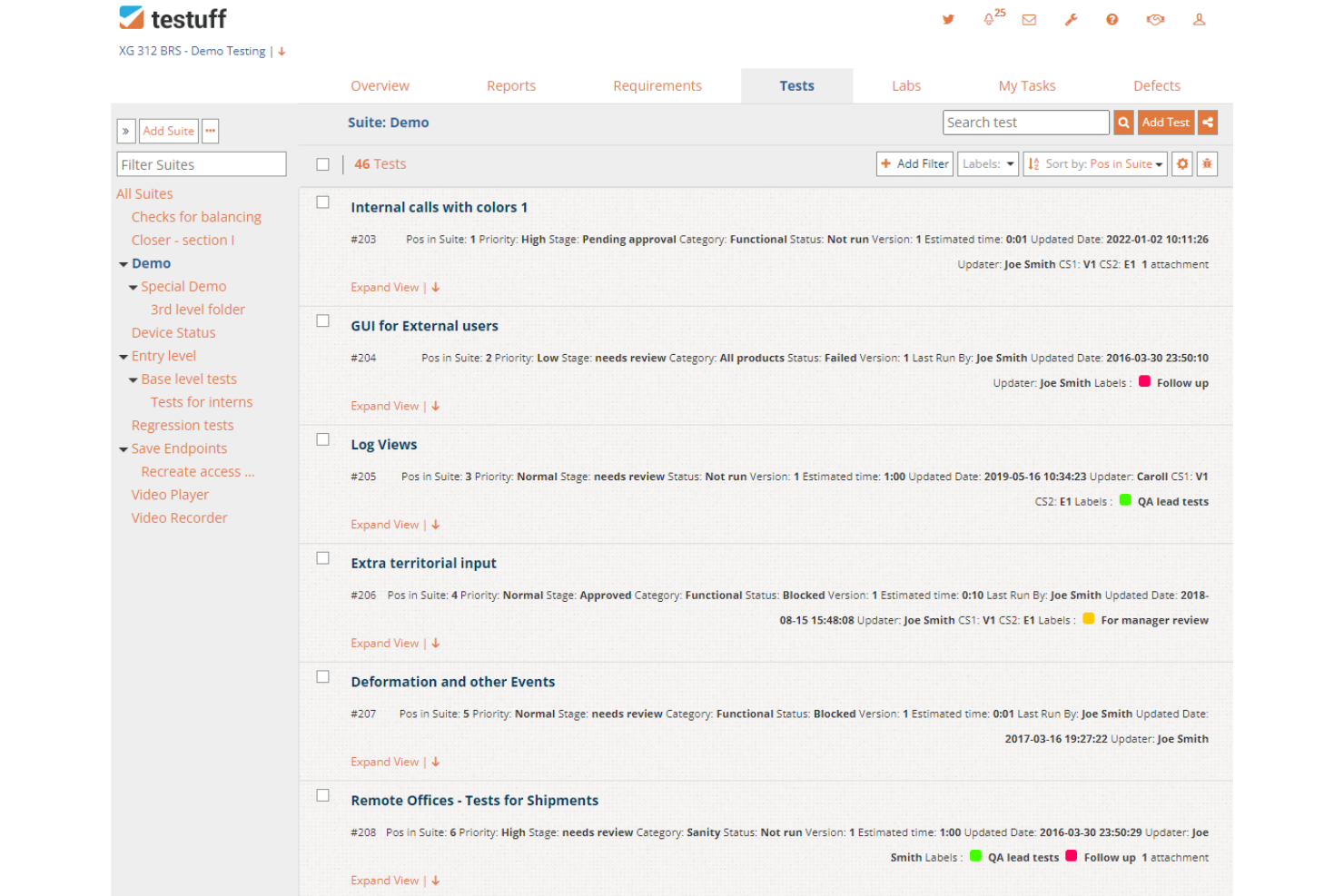
Testuff is a fully featured software testing platform that offers a range of testing methodologies, including exploratory testing. It helps you get started quickly with its on-demand exploratory testing service. They take care of all server maintenance, hourly backups, and security.
Why I picked Testuff: I selected this tool due to its advanced test life cycle management features. It enables team members to collaborate effectively, regardless of location. You can assign tests to specific testers, share steps, set user permissions, and manage requirements with ease. Testuff helps you to implement test cycle planning, organize your team, and assign tasks using the test lab.
Testuff Standout Features and Integrations
Standout features: Testuff has comprehensive defect reporting capabilities that feature integration with bug trackers, easy screenshot capturing, a dedicated video recorder, integration with communication channels, and a dedicated video player. The software handles everything while you sit back to track and improve your testing process with detailed reports.
Integrations with bug trackers include activeCollab, Asana, Assembla, Axosoft, BugTracker.NET, Jira, and more. You can also integrate with test automation tools, such as Selenium, TestComplete, Autolt, and Rational Robot.
Pros and Cons
Pros:
- Easy to manage test cases
- Highly collaborative
- Easy to get started
Cons:
- Support page needs more content
- UI needs an upgrade

Best exploratory testing system for testing across web and desktop apps

Azure Test Plans provides exploratory and manual testing tools that help you test and ship software confidently and reliably.
Why I picked Azure Test Plans: With this tool, you can test across desktop and web apps. It enables you to record rich scenario data in the course of testing. Capturing rich data makes discovered defects or bugs actionable. You have access to test data that lets you know where the issues lie and provides actionable insights into the remediation process to implement.
Azure Test Plans Standout Features and Integrations
Standout features include end-to-end traceability and executing tests simultaneously. You can use end-to-end visibility and quality to improve your stories and features and also use concurrent test execution to boost quality in software development processes using session-based testing.
Another thing that makes this tool unique is its advanced security architecture. It has built-in security and compliance and invests a lot of money in cybersecurity research and development.
Integrations include Katalon Studio, Testomat, Jira, TestComplete, Microsoft Azure, Slack, Testiny, GitHub, Google Cloud Platform, and TestRail.
Pros and Cons
Pros:
- Well-structured and easy to use
- Multi-test plan access
- Real-time dashboards
Cons:
- More automation of test cases needed
- Needs more documentation

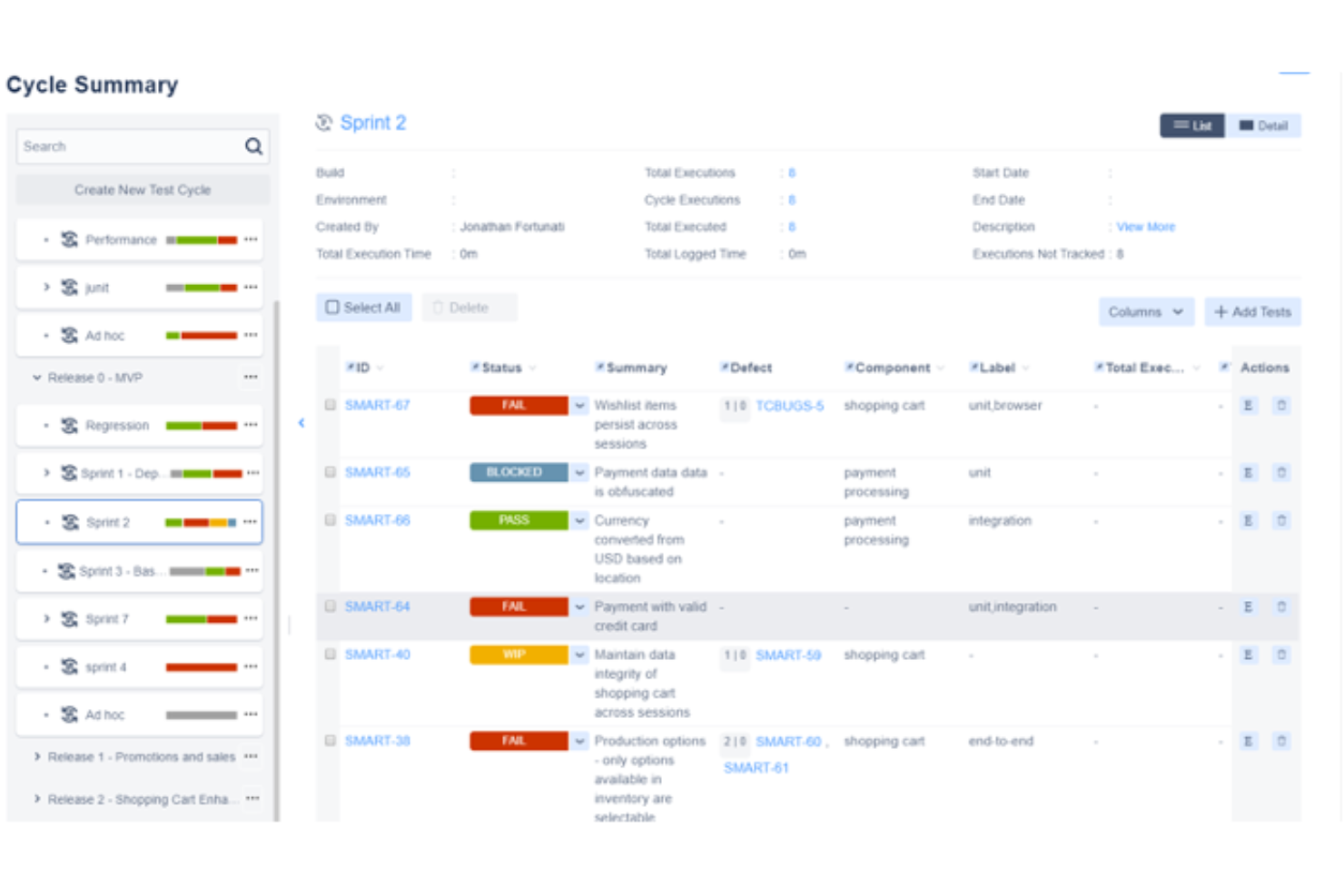
Zephyr is a leading test management platform that provides exploratory testing capabilities, which help you to save time, collaborate better, gain end-to-end visibility, and release high-quality products faster.
Why I picked Zephyr: This software is on my list because it improves collaboration among team members. In addition to other standard exploratory testing features, it fosters good team communication. Zephyr blends exploratory test management, automation, and BDD into one tool; this enables easy access to vital information and the sharing of best practices among your team members.
Zephyr Standout Features and Integrations
Standout features: It allows real-time monitoring of your test suites. With Zephyr, you can improve the quality of products with end-to-end traceability. The software fast-tracks the QA process by allowing integration with automation frameworks, such as Selenium, JUnit, and Nunit.
Integrations: Zephyr lets you integrate with CI tools like Jenkins and Bamboo. Other integrations include TestComplete, ReadyAPI, Jira, Selenium, Cucumber, CrossBrowserTesting, Tricentis Tosca, Avo Assure, and Jira Service Management.
Pros and Cons
Pros:
- Flexible integration with third-party automation frameworks
- Cross-project reporting
- Reusability-at-scale features
Cons:
- Some configurations are complex
- Needs more detailed tutorials for new users

Buildkite is a platform for building your dream CI/CD workflows and running exploratory testing with ease. It helps you assess your software faster and discover hard-to-find defects with its outstanding testing capabilities.
Why I picked Buildkite: It offers a speed and reliability monitoring feature, which enables you to set up speed and reliability monitors to spot problems as soon as they occur. With this tool, you can easily keep tabs on your test suites and get notified when things go wrong.
Buildkite lets you identify your slowest tests. This insight enables you to find which tests are slowing down builds, so you can fix problems based on severity. In a nutshell, this tool provides the advanced test analytics you need to run exploratory testing reliably and cost-effectively.
Buildkite Standout Features and Integrations
Standout features include real-time test tracking and deep performance analysis. Buildkite allows you to keep track of cases and provides the test analytics you need to make informed decisions. The performance analysis helps you get automatic tracing across your test suites.
Additionally, the tool enables you to find and fix flaky tests. You can easily identify tests that are disruptive and get the help you need to fix them.
Integrations include Docker, GitHub, Buildpipe, AWS, Git, Anka, Perforce, Golang, Lambda Deployer, and Codecov.
Pros and Cons
Pros:
- Easy to set up
- Great user interface
- Seamless integration with major programming languages
Cons:
- It requires more customization
- Report generation for finished jobs should be improved

Best for tracking actions automatically and seamlessly saving your recordings
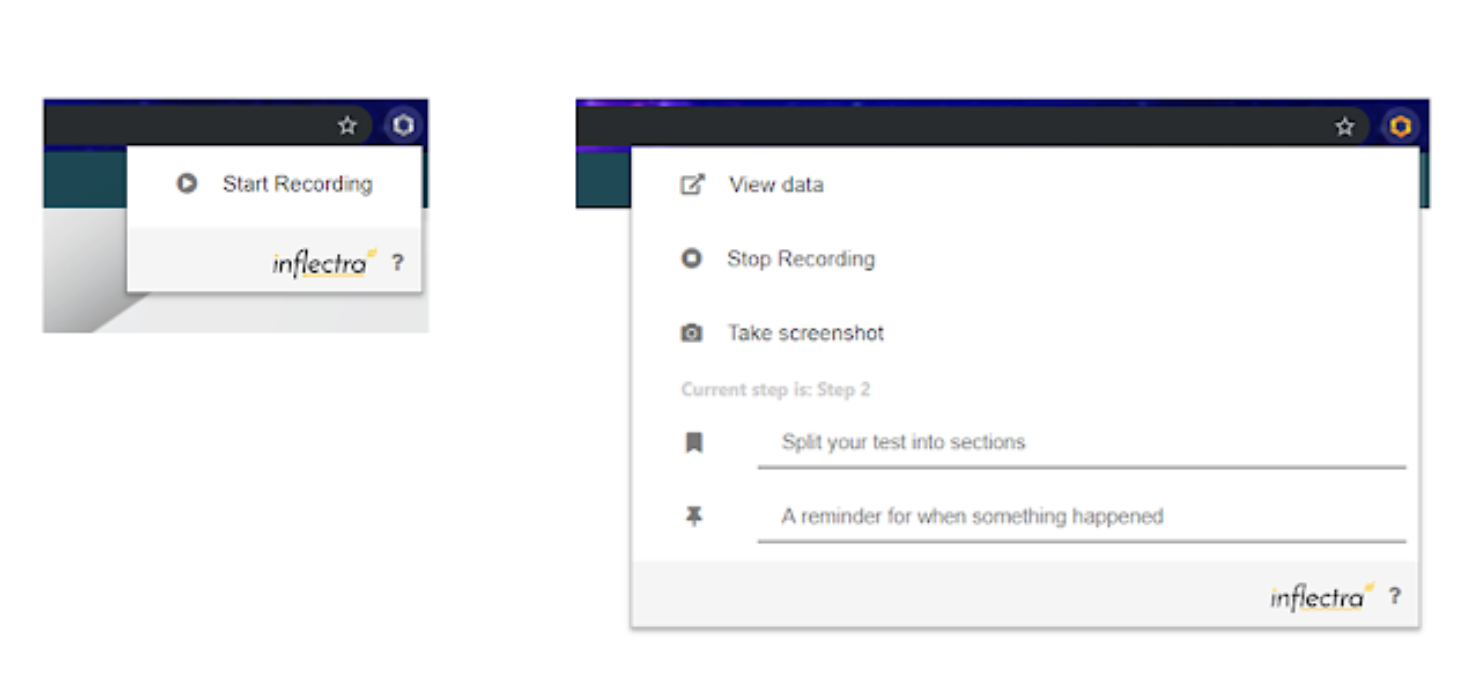
SpiraCapture, a browser extension, is specially designed to help you perform exploratory testing. The tool smartly records and organizes your testing sessions and enables you to save your recordings with ease.
Why I picked SpiraCapture: With this tool, you enjoy outstanding exploratory test capturing and note taking. It allows you to capture testing activities on any tabs you want in Edge or Chrome and create notes to mark when a specific issue occurs. SpiraCapture organizes your captured testing data in ways that are easy to read and understand. The recordings can be categorized based on what was tested and the testing time.
Just by looking at the data, you can easily tell what was clicked or where text was entered. The software goes beyond the limits of other tools to create recordings that any developer can interpret at a glance.
SpiraCapture Standout Features and Integrations
Standout features include creating bugs in SpiraTest and the built-in preview option. You can record events in SpiraCapture and save them in SpiraTest as an incident. While this tool handles the capturing, its preview feature makes communication easier for you. It displays what data will get sent to SpiraTest in an easily readable format, in plain and portable HTML.
You must not have SpiraTest to use this tool. You can copy and paste the HTML (test data) into the application you prefer.
Integrations are available with Jira, Microsoft Visual Studio, Jenkins, TestRail, Axosoft, Rapise, KronoDesk, IQM Studio, and SpiraTest.
Pros and Cons
Pros:
- Features requested by users are created
- Easy to use
- It’s free
Cons:
- Some functions can be slow at times
- The UI needs to be improved


This software helps you deliver high-quality products by providing the capabilities you need to perform exploratory tests under real conditions. Test IO offers the Testing-as-a-Service (TaaS) model, which comes with the offerings you need to address your challenging QA initiatives and deliver better products faster.
Why I picked Test IO: The software helps you identify bugs that people might encounter in real life by connecting you with testers from all over the world on demand. These real testers help you implement diverse user testing scenarios, allowing you to spot defects before release so your customers get the best experience possible.
Another reason I added Test IO to my list is that it gives you access to a diverse pool of crowd testers; they help review your software from various angles and across devices, operating systems, and browsers.
Test IO Standout Features and Integrations
Standout features include testing under real conditions and rapid results. Test IO lets you closely mirror your users’ experience by giving you access to a global community of testers. You can get full test coverage in 24 hours and have your results in as little as 60 minutes.
Integrations are available with Asana, Azure DevOps, Clubhouse, Git, GitHub, GitLab, Jira Server, Mantis, Redmine, and Trello.
Pros and Cons
Pros:
- Great user interface
- Good customer support
- Easy to set up
Cons:
- False positive results occur sometimes
- Expensive for small teams


Bug Magnet is an open-source exploratory testing tool that lets you assess applications via its Chrome and Firefox browser extensions. It provides easy access to common boundaries and edge cases for exploratory testing.
Why I picked Bug Magnet: With this exploratory testing Chrome extension or Firefox extension, you can quickly perform exploratory test sessions with ease. Accessing this tool via browsers makes it very easy to use. You can extend it with your config files, letting you set things up according to your needs or preferences. Bug Magnet allows you to inject values using JavaScript or using clipboard events to simulate user workflows.
Bug Magnet Standout Features and Integrations
Standout features: With Bug Magnet, there are no third-party library dependencies. It gives you access to the necessary things you need to execute exploratory testing. The software makes getting started easy for new users by providing links to comprehensive resources. From learning about the latest version to how to install the tool and how to customize menus, Bug Magnet provides detailed tutorials for new users.
Integrations: Bug Magnet is an open-source Chrome and Firefox extension. The source code is available on GitHub, and the tool can be used in synergy with other testing frameworks.
Pros and Cons
Pros:
- It can be used collaboratively
- It’s customizable
- It’s open-source
Cons:
- The user interface isn’t so good
- No large user community

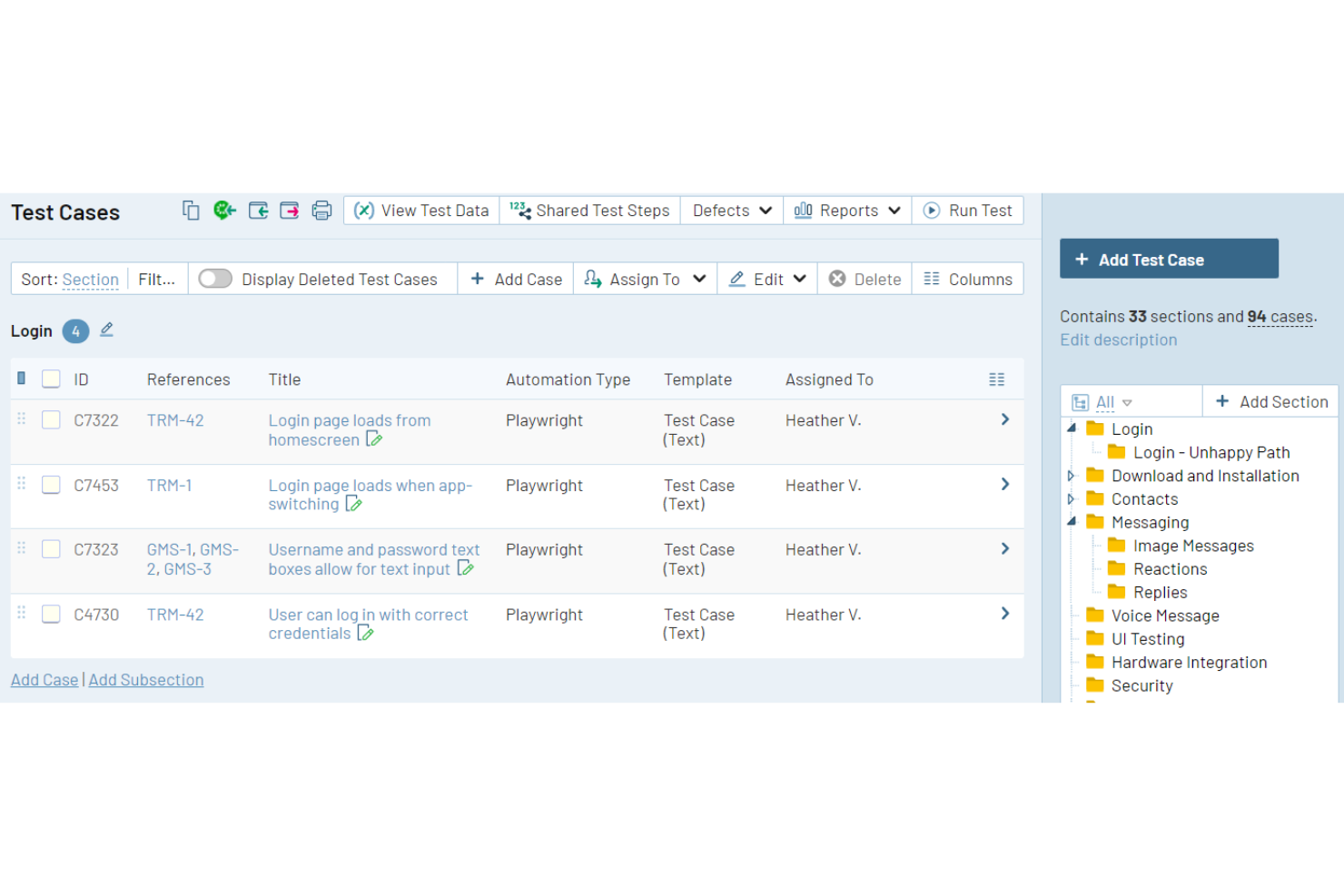
Trusted by over 10,000 QA teams, TestRail helps you streamline your exploratory testing processes. It offers test management capabilities, which empower you to gain real-time visibility at scale and test more efficiently.
Why I picked TestRail: It allows you to integrate with a wide range of DevOps tools and provides good exploratory test case management capabilities. TestRail is a collaborative tool that empowers you to manage, organize, and keep tabs on your exploratory test cases. It’s web-based, so your team can easily access it to get things done faster with the responsive, easy-to-use interface.
Multiple project teams can work in parallel and track their progress without getting things mixed up. You can customize fields, use rich text formatting, and rearrange (move, copy, delete, and restore) test cases according to your needs.
TestRail Standout Features and Integrations
Standout features: TestRail offers real-time reporting that helps you meet compliance requirements and keep track of your exploratory tests. The software helps you generate comprehensive reports that give you detailed insight into your project.
It features built-in report templates, which you can customize or configure to suit your needs. Rich charts and stats are accessible to all testers and stakeholders; this keeps everyone in the loop and improves accountability.
Integrations include automation tools, such as Functionize, Ranorex, Cypress, JUnit5, NUnit, Pytest, and TestNG. Integrations with requirements and issue tracking tools include Jira, Redmine, Bugzilla, and Pivotal Tracker.
Pros and Cons
Pros:
- Easy to setup and maintain
- Run test cases in multiple environments
- Very easy to navigate
Cons:
- Sometimes UI is not intuitive
- New users struggle with some configurations

Testiny
Best for extending and optimizing test cases with custom fields
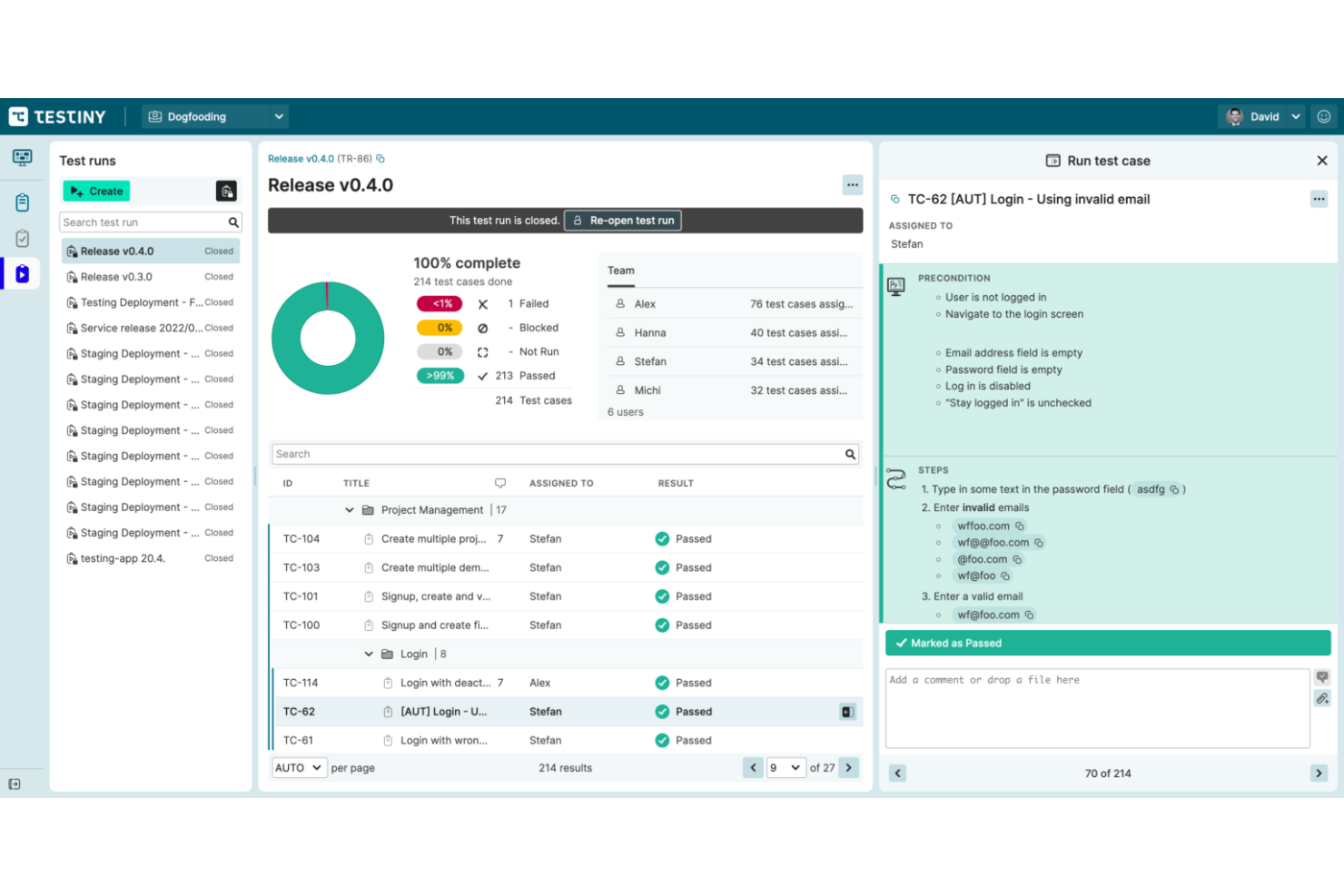
Testiny provides the toolkit you need to create, run, and analyze exploratory tests. This system comes with advanced, comprehensive test management solutions, enabling you to stay in control of your testing projects with great reports and complete visibility.
Why I picked Testiny: Testiny comes with advanced test case management features that let you create and edit test cases, define test cases, and categorize test cases neatly. There are custom fields to help you extend test cases and customize templates to suit your project needs. If the predefined fields are too limiting for your project, you have the flexibility to add custom fields according to your needs.
Additionally, this tool is designed to make collaboration very easy. With Testiny, your team members can work simultaneously with changes updated in real-time across all browsers.
Testiny Standout Features and Integrations
Standout features: Testiny offers industry-standard reporting capabilities. Its in-app reports provide actionable insights that help you understand how your exploratory test cases and runs are doing and what you need to do to optimize them. With this tool, you enjoy no-frills migration. You can seamlessly switch from other products. There is an import feature that makes a smooth transition possible.
Integrations are available with GitHub, Jira, GitLab, Jenkins, CircleCI, Azure Pipelines, and TeamCity.
Pros and Cons
Pros:
- Helpful and friendly support team
- Fast and responsive UI
- Very open to feedback and product feature requests
Cons:
- More detailed documentation needed
- Better API is required to expand integration capabilities
New Product Updates from Testiny
Testiny Improves Test Case Filtering and CSV Import With Jira Links
Testiny introduces Enhanced Test Case Filtering and CSV Import with Jira Requirement Links. These updates improve how you select test cases and strengthen integration with Jira-based workflows, improving test management. For more information, visit Testiny’s official site.
 .
.Autres outils de test exploratoire
Voici d’autres options d’outils de test exploratoire qui n’ont pas été sélectionnées dans ma liste restreinte, mais qui méritent tout de même d’être essayées :
- Xray
For agile teams seeking excellence in exploratory testing
- Telerik Test Studio
Exploratory testing solution for minimizing test maintenance
- Testmo
Exploratory testing tool for detailed note-taking
- QA.tech
For eliminating flaky tests
- Tricentis qTest
For scaling exploratory testing and agile test management
- Katalon Studio
Tool for self-healing, visual testing, and test failure analysis
- LambdaTest
AI-powered tool for testing on an online real device cloud and virtual platform of emulators and simulators
- Testlio
For managing all your test cases in one location
- Rainforest QA
No-code exploratory testing tool for automating and maintaining end-to-end tests
- Leapwork
AI-powered visual test automation system


Critères de sélection pour les outils de test exploratoire
Pour sélectionner les meilleurs outils de test exploratoire à inclure dans cette liste, j’ai pris en compte les besoins courants des acheteurs et leurs difficultés, comme la facilité d’intégration et des interfaces conviviales. J’ai aussi utilisé la grille suivante pour structurer et rendre mon évaluation équitable :
Fonctionnalités essentielles (25 % du score total)
Pour être inclus dans cette liste, chaque solution devait répondre à ces cas d’usage courants :
- Identifier les bugs logiciels
- Prendre en charge les tests basés sur les sessions
- Permettre la documentation des tests
- Fournir une analyse de la couverture des tests
- Faciliter les tests collaboratifs
Fonctionnalités différenciantes (25 % du score total)
Pour affiner la sélection, j’ai également recherché des fonctionnalités uniques telles que :
- Suggestions de tests alimentées par l’IA
- Outils de collaboration en temps réel
- Tableaux de bord personnalisables
- Intégration avec les pipelines CI/CD
- Analyses et rapports avancés
Utilisabilité (10 % du score total)
Pour évaluer l’utilisabilité de chaque système, j’ai pris en compte les éléments suivants :
- Interface utilisateur intuitive
- Facilité de navigation
- Options de personnalisation
- Design réactif
- Libellés et instructions clairs
Prise en main (10 % du score total)
Pour juger l’expérience d’intégration à chaque plateforme, j’ai pris en compte les aspects suivants :
- Disponibilité de vidéos de formation
- Accès à des visites interactives du produit
- Utilisation de modèles d'intégration
- Assistance de la part de chatbots
- Proposition de webinaires et d’ateliers
Support client (10 % du score total)
Pour évaluer les services d'assistance de chaque fournisseur de logiciel, j’ai pris en compte les éléments suivants :
- Disponibilité d'une assistance 24/7
- Accès à une base de connaissances
- Délai de réponse aux demandes
- Qualité de l’assistance par chat en direct
- Disponibilité de l’assistance téléphonique
Rapport qualité-prix (10 % du score total)
Pour évaluer le rapport qualité-prix de chaque plateforme, j’ai pris en compte les éléments suivants :
- Tarification compétitive
- Disponibilité d’essais gratuits
- Inclusion des fonctionnalités essentielles
- Flexibilité des plans d’abonnement
- Coût par rapport à des outils similaires
Avis clients (10 % du score total)
Pour avoir une idée de la satisfaction globale des utilisateurs, j’ai pris en compte les critères suivants en lisant les avis clients :
- Satisfaction globale des utilisateurs
- Retours sur la fiabilité de l’outil
- Commentaires sur la facilité d’utilisation
- Opinions sur le support client
- Commentaires sur les capacités d’intégration
Comment choisir un outil d’exploration de tests
Il est facile de se perdre dans la lecture d’interminables listes de fonctionnalités et de structures tarifaires complexes. Pour vous aider à rester concentré au cours de votre processus de sélection de logiciel, voici une liste de points à garder à l’esprit :
| Élément | À prendre en compte |
|---|---|
| Scalabilité | L’outil pourra-t-il évoluer avec votre équipe ? Pensez à vos besoins futurs et vérifiez si l’outil peut gérer une charge accrue sans frais supplémentaires ni problèmes de performance. |
| Intégrations | Fonctionne-t-il avec vos systèmes actuels ? Vérifiez sa compatibilité avec vos outils existants et s’il prend en charge les intégrations via API. |
| Personnalisation | Pouvez-vous l’adapter à vos flux de travail ? Recherchez des outils offrant des paramètres ou des modules ajustables selon vos besoins spécifiques. |
| Facilité d’utilisation | Est-il facile à prendre en main pour votre équipe ? Considérez la courbe d’apprentissage et si votre équipe peut l’utiliser efficacement avec peu de formation. |
| Mise en œuvre et intégration | La procédure de mise en place est-elle fluide ? Évaluez le temps et les ressources nécessaires au déploiement, ainsi que le support ou la formation offerte par le fournisseur. |
| Coût | La tarification rentre-t-elle dans votre budget ? Comparez le coût total de possession, y compris les éventuels frais cachés, afin de vous assurer qu’il correspond à vos contraintes financières. |
| Garanties de sécurité | Vos données et votre vie privée sont-elles protégées ? Examinez les mesures de sécurité du fournisseur, ainsi que sa conformité aux réglementations sur la protection des données pour éviter tout risque. |
| Disponibilité du support | L’aide est-elle facilement accessible ? Vérifiez la présence d’une assistance 24/7 et la qualité des ressources telles que la documentation, les forums, ou l’aide directe. |
Qu’est-ce qu’un outil d’exploration de tests ?
Les outils d’exploration de tests sont des applications logicielles qui aident les testeurs à explorer la fonctionnalité d’un logiciel afin d’identifier des bogues et des problèmes. Généralement utilisés par des professionnels de l’assurance qualité et des testeurs logiciels, ces outils apportent une valeur ajoutée en améliorant le processus de test grâce à la flexibilité et aux retours en temps réel.
Le suivi des sessions, la documentation des tests et les fonctions de signalement des bogues permettent d’organiser les constats, de collaborer avec les équipes et d’améliorer la qualité des logiciels. Globalement, ces outils permettent aux testeurs de découvrir et documenter efficacement les problèmes dans les applications logicielles.
Fonctionnalités
Lorsque vous sélectionnez des outils d’exploration de tests, accordez une attention particulière aux fonctionnalités clés suivantes :
- Suivi des sessions : Enregistre les sessions de test, aidant les testeurs à documenter leurs découvertes et à les retrouver ultérieurement.
- Documentation des tests : Fournit des outils pour rédiger et gérer facilement les cas de test et les résultats, assurant une couverture complète.
- Signalement des bugs : Facilite la capture et le signalement des bugs, avec captures d'écran et journaux, pour un suivi efficace.
- Collaboration en temps réel : Permet aux membres de l'équipe de travailler ensemble simultanément, améliorant la communication et l'efficacité.
- Prise en charge des intégrations : Se connecte aux outils et systèmes existants, assurant une intégration fluide du flux de travail et un partage des données.
- Options de personnalisation : Permet aux testeurs d’adapter l’outil à leurs besoins spécifiques et à leurs méthodes de test, pour une plus grande facilité d’utilisation.
- Analyses et rapports : Offre une vision sur l’avancement des tests et leurs résultats, aidant à la prise de décision et à l’amélioration des stratégies de test.
- Facilité d’utilisation : Garantit que l’outil est intuitif et accessible, réduisant le temps d’apprentissage pour les testeurs.
- Fonctionnalités de sécurité : Protège les données sensibles et veille au respect des réglementations sur la confidentialité, maintenant confiance et intégrité.
- Ressources d'intégration : Met à disposition des supports de formation comme des vidéos et tutoriels pour aider les utilisateurs à démarrer rapidement et efficacement.
Bénéfices
L’adoption d’outils d’exploration de test apporte de multiples avantages à votre équipe et à votre entreprise. Voici quelques bénéfices dont vous pouvez profiter :
- Amélioration de la détection des bugs : Les fonctionnalités avancées de signalement permettent d’identifier et de documenter les problèmes plus efficacement.
- Meilleure collaboration : Les outils de collaboration en temps réel permettent à votre équipe de travailler ensemble de façon efficace, améliorant communication et productivité.
- Flexibilité accrue : Les options de personnalisation permettent d’adapter l’outil à vos besoins spécifiques de test, augmentant ainsi son utilité.
- Gain de temps : L’ergonomie et les interfaces intuitives réduisent la courbe d’apprentissage, permettant aux testeurs de devenir rapidement opérationnels.
- Analyses basées sur les données : Les fonctions d’analytique et de reporting fournissent des informations précieuses sur les résultats des tests, facilitant la prise de décision stratégique.
- Sécurité renforcée : Les fonctionnalités de sécurité protègent les données sensibles, assurant la conformité et maintenant la confiance.
- Onboarding simplifié : L’accès aux supports de formation et ressources aide votre équipe à se lancer rapidement, maximisant la valeur de l’outil.
Coûts & Tarification
Choisir des outils d’exploration de test nécessite de comprendre les différents modèles et plans tarifaires. Les coûts varient selon les fonctionnalités, la taille de l’équipe, les modules additionnels et plus encore. Le tableau ci-dessous résume les plans courants, leurs fourchettes de prix moyennes et les fonctionnalités typiquement incluses dans les solutions d’outils de test exploratoire :
Tableau comparatif des offres pour les outils de test exploratoire
| Type de plan | Prix moyen | Fonctionnalités courantes |
|---|---|---|
| Plan gratuit | $0 | Signalement de bugs de base, suivi de session limité, et support communautaire. |
| Plan personnel | $10-$30/user/month | Signalement avancé des bugs, documentation des tests et intégrations de base. |
| Plan business | $40-$70/user/month | Collaboration en temps réel, options de personnalisation, analyse et reporting. |
| Plan enterprise | $80-$150/user/month | Pleine intégration, sécurité renforcée, et support dédié. |
FAQ sur les outils de test exploratoire
Voici des réponses à des questions courantes concernant les outils de test exploratoire :
Quel est un outil couramment utilisé dans les tests exploratoires ?
Les outils courants incluent Azure Test Plans et Reflect. Ces outils aident à organiser et à documenter les sessions de test, permettant à votre équipe de mieux suivre les constats et de collaborer efficacement. Tenez compte des intégrations et des fonctionnalités qui correspondent à vos besoins de test.
Comment les outils de test exploratoire favorisent-ils la collaboration ?
Ces outils proposent souvent des fonctionnalités de collaboration en temps réel, permettant aux membres de l’équipe de partager instantanément leurs idées et découvertes. Cela favorise une meilleure communication au sein de l’équipe, assurant que tout le monde est aligné et informé pendant le processus de test.
Les outils de test exploratoire peuvent-ils s'intégrer à d'autres logiciels ?
Oui, de nombreux outils de test exploratoire offrent des intégrations avec des outils de création d’aide ainsi qu’avec des logiciels de gestion de projet et de développement comme JIRA et GitHub. Ces intégrations optimisent les flux de travail et garantissent que votre processus de test est bien coordonné avec les autres activités de l’équipe.
Ces outils sont-ils basés sur navigateur ou des applications de bureau ?
Le modèle de livraison varie : certains outils sont entièrement accessibles via un navigateur web, tandis que d’autres sont des clients de bureau fonctionnant localement pour un accès hors ligne ou un suivi système plus approfondi. Quelques-uns offrent des modèles hybrides avec des tableaux de bord cloud pour une revue centralisée des sessions.
Ces outils peuvent-ils fonctionner en parallèle des suites de tests automatisés ?
Oui, beaucoup sont conçus pour compléter les tests automatisés en se concentrant sur des tests non scriptés, pilotés par l’humain. Certains outils permettent même une comparaison côte à côte entre les sessions automatisées et exploratoires. L’intégration avec les pipelines CI/CD est moins courante, mais possible avec une configuration personnalisée.
Les outils de test exploratoire s'intègrent-ils avec des systèmes de suivi des problèmes ?
De nombreux outils proposent des connexions intégrées à des plateformes comme Jira, Trello ou GitHub Issues. Ces intégrations permettent aux testeurs de signaler les bugs directement depuis la session de test. Certains outils proposent également une synchronisation bidirectionnelle, selon la prise en charge de leur API.
Et après :
Si vous êtes en train de rechercher des outils de test exploratoire, contactez un conseiller SoftwareSelect pour obtenir des recommandations gratuites.
Vous remplissez un formulaire puis discutez brièvement afin qu'ils comprennent précisément vos besoins. Vous recevrez ensuite une liste restreinte de logiciels à évaluer. Ils vous accompagneront même durant tout le processus d'achat, y compris lors des négociations de prix.