

1 meilleures plateformes low-code pour créer des applications en 2026

Meilleure sélection de plateformes low-code
Voici ma sélection des meilleures plateformes low-code :


Les meilleures plateformes low-code aident les équipes à concevoir et lancer des applications rapidement en réduisant le besoin de codage manuel : cela permet d'itérer plus vite, de faciliter les mises à jour et d’accélérer la mise en production. Les développeurs peuvent se concentrer sur la logique et l'expérience utilisateur plutôt que sur le code répétitif, et les non-développeurs peuvent contribuer à la création d’outils internes ou d’applications pour les clients.
De nombreuses équipes se tournent vers les plateformes low-code lorsqu’elles sont bloquées par la gestion d’applications héritées codées à la main, font face à des arriérés de développement qui retardent les livraisons, ou cherchent à avancer sans disposer d'un support technique à temps plein. Si vous avez déjà passé des heures à coder des formulaires ou à reconstruire des tableaux de bord administrateur pour chaque nouveau besoin, vous savez combien de temps il est possible de perdre sur des tâches répétitives.
J’ai testé des outils low-code sur des projets en conditions réelles, allant de tableaux de bord de gestion SaaS interne à des workflows d’onboarding client, et évalué leur capacité à s’intégrer aux stacks technologiques modernes et à évoluer selon les besoins de l’équipe. Ce guide présente les plateformes les plus simples à mettre en place, les plus rapides à adapter et les plus efficaces pour produire des résultats concrets sans surcharge inutile.
Table of Contents
- Meilleure sélection de logiciels
- Pourquoi nous faire confiance
- Comparer les spécifications
- Avis
- Autres plateformes low-code
- Autres avis liés
- Critères de sélection
- Comment choisir
- Tendances des plateformes low-code
- Qu'est-ce qu'une plateforme low-code ?
- Fonctionnalités
- Avantages
- Coûts et tarification
- FAQ
Why Trust Our Software Reviews
We’ve been testing and reviewing software since 2023. As tech leaders ourselves, we know how critical and difficult it is to make the right decision when selecting software.
We invest in deep research to help our audience make better software purchasing decisions. We’ve tested more than 2,000 tools for different tech use cases and written over 1,000 comprehensive software reviews. Learn how we stay transparent & our software review methodology.
Résumé des meilleures plateformes low-code
Ce tableau comparatif synthétise les informations de tarification de mes principales sélections de plateformes low-code afin de vous aider à trouver la solution la plus adaptée à votre budget et à vos besoins professionnels.
| Tool | Best For | Trial Info | Price | ||
|---|---|---|---|---|---|
| 1 | Idéal pour créer des outils internes en entreprise | Forfait gratuit disponible | À partir de 20 $/développeur/mois | Website | |
| 2 | Idéal pour la génération d’applications assistée par l’IA | Offre gratuite disponible | À partir de 160$/mois (facturé annuellement) | Website | |
| 3 | Idéal pour des outils de développement visuel d'entreprise | Plan gratuit disponible | À partir de $25/utilisateur/mois | Website | |
| 4 | Idéal pour les générateurs d’applications personnalisables | Essai gratuit + démo gratuite disponible | À partir de 2 500 $/mois | Website | |
| 5 | Idéal pour le développement sur des bases de données existantes | Essai gratuit disponible | Tarif sur demande | Website | |
| 6 | Idéal pour la création de sites web pilotée par IA | Offre gratuite disponible | À partir de 17$/mois | Website | |
| 7 | Idéal pour la scalabilité des microservices en entreprise | Démo gratuite disponible | Tarification sur demande | Website | |
| 8 | Idéal pour un développement low-code rapide | Offre gratuite + démo gratuite disponible | À partir de 15 $/utilisateur/mois | Website | |
| 9 | Meilleur service client | Plan gratuit disponible | À partir de 127,50 $/mois | Website | |
| 10 | Idéal pour le développement backend évolutif sans code | Offre gratuite disponible | À partir de 85 $/mois (facturé annuellement) | Website | |
| 11 | Idéal pour créer des applications internes sécurisées | Essai gratuit disponible | À partir de 15 $/utilisateur/mois + 49 $/créateur/mois | Website | |
| 12 | Idéal pour l'automatisation des tests pilotée par l'IA | Essai gratuit de 14 jours | À partir de 212 $/mois | Website | |
| 13 | Meilleures fonctionnalités de gestion des dossiers | Offre gratuite disponible | À partir de $2/utilisateur/mois | Website | |
| 14 | Idéal pour la gestion aPaaS | Essai gratuit de 30 jours | À partir de $500/mois | Website | |
| 15 | Idéal pour l’Agile | Plan gratuit disponible | À partir de 60 $/mois | Website | |
| 16 | Idéal pour le développement rapide d’applications | Démo gratuite + essai gratuit de 15 jours disponible | À partir de $8/utilisateur/mois (facturé annuellement) | Website | |
| 17 | Meilleures fonctionnalités de gestion des flux de travail | Essai gratuit de 30 jours | À partir de 2 083 $/mois (facturé annuellement) | Website | |
| 18 | Idéal pour les débutants | Offre gratuite disponible | Gratuit | Website | |
| 19 | Idéal pour la collecte d'informations utilisateur | Un forfait gratuit est disponible avec le plan Jotform gratuit | À partir de 34 $/mois (facturé annuellement) avec l'offre bronze de Jotform | Website | |
| 20 | Idéal pour l'intégration avec Salesforce CRM | Essai gratuit de 30 jours | À partir de $25/utilisateur/mois | Website |
-

Site24x7
Visit WebsiteThis is an aggregated rating for this tool including ratings from Crozdesk users and ratings from other sites.4.6 -
GitHub Actions
Visit WebsiteThis is an aggregated rating for this tool including ratings from Crozdesk users and ratings from other sites.4.8 -
Docker
Visit WebsiteThis is an aggregated rating for this tool including ratings from Crozdesk users and ratings from other sites.4.6





Aperçus des 12 meilleures plateformes low-code
Dans les sections qui suivent, vous trouverez mes plateformes low-code préférées, avec leurs points forts, leurs limites et les raisons de mes choix. Après ces présentations, j’expose également les critères que j’ai pris en compte dans cette sélection.

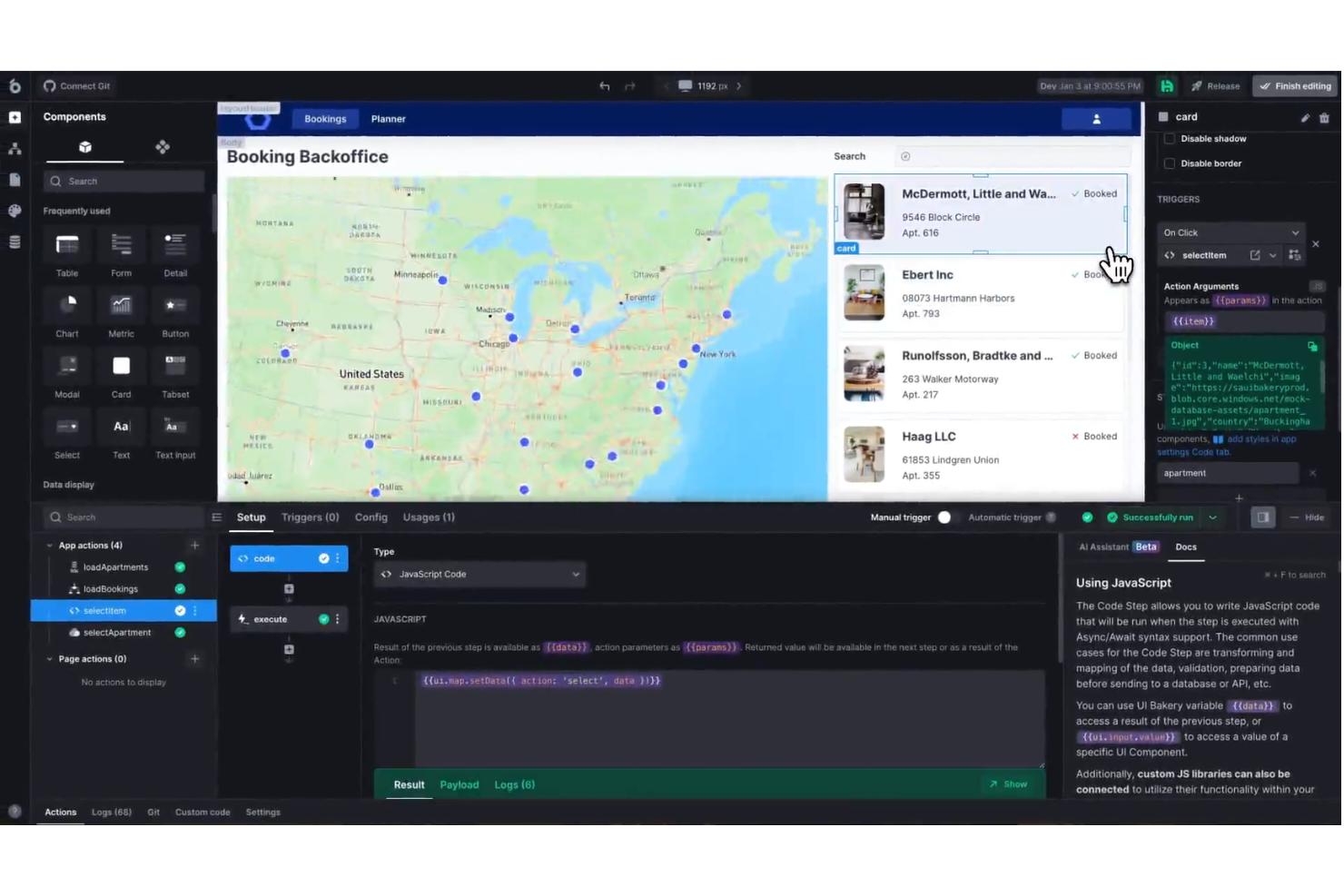
UI Bakery est une plateforme low-code conçue pour les équipes informatiques et les utilisateurs métier qui ont besoin de créer, personnaliser et déployer des applications orientées données avec un minimum de codage, ainsi que de se connecter à des bases de données et d'automatiser des workflows.
À qui s'adresse UI Bakery ?
UI Bakery convient parfaitement aux équipes informatiques et aux développeurs dans les entreprises de taille moyenne à grande qui doivent créer des outils internes, des panneaux d'administration et des tableaux de bord sans tout coder à partir de zéro.
Pourquoi j'ai choisi UI Bakery
UI Bakery mérite sa place parmi les meilleurs de ma liste car il est conçu spécifiquement pour les outils internes des entreprises, et non pour le développement d'applications génériques. J'apprécie particulièrement le contrôle d'accès basé sur les rôles (RBAC) intégré et les journaux d'audit, qui sont essentiels lorsque l'on crée des applications manipulant des données sensibles à travers plusieurs équipes. J'utilise également l'option d'auto-hébergement lorsque je travaille dans des environnements où les données ne peuvent pas quitter un réseau privé, ce qui est une exigence réelle dans des contextes d'entreprise. L'exportation du code React permet à mon équipe de ne jamais être enfermée sur la plateforme : nous pouvons récupérer le code généré et continuer à le développer dans notre propre IDE si l'application devient trop complexe pour UI Bakery.
Fonctionnalités clés de UI Bakery
- Agent de développement IA : Discutez avec un agent IA pour générer et déployer une application entièrement fonctionnelle en quelques minutes, sans codage manuel.
- Déploiement en un clic : Déployez les mises à jour de l'application avec l'auto-scalabilité, le SSL et le CDN intégrés, ainsi que la possibilité de revenir en arrière en un clic pour des déploiements sûrs.
- Plus de 45 connecteurs de bases de données et API : Connectez-vous directement à Postgres, MySQL, MongoDB, SQL Server et bien d'autres afin de bâtir à partir de données en temps réel.
- Base de données hébergée : Lancez une base de données hébergée intégrée pour prototyper de nouvelles idées d'applications sans mettre en place d'infrastructure externe.
Intégrations UI Bakery
Les intégrations incluent AWS S3, Airtable, Azure Blob Storage, Close, Databricks, DynamoDB, Elasticsearch, Firebase, GitHub et Google BigQuery.
Pros and Cons
Pros:
- Possibilité d'ajouter des composants personnalisés sans restriction
- Adapté aux applications simples comme complexes
- Interface glisser-déposer facile à utiliser
Cons:
- Gestion des versions Git limitée à la formule entreprise
- Difficultés potentielles pour intégrer certains outils tiers
New Product Updates from UI Bakery

UI Bakery Adds Data Sources and Improves Chat and Licensing
UI Bakery adds Salesforce OpenAPI and MCP server data sources, improves chat features, and updates licensing and billing. These updates expand integration capabilities and improve AI app building and subscription management. For more information, visit UI Bakery’s official site.
 .
.
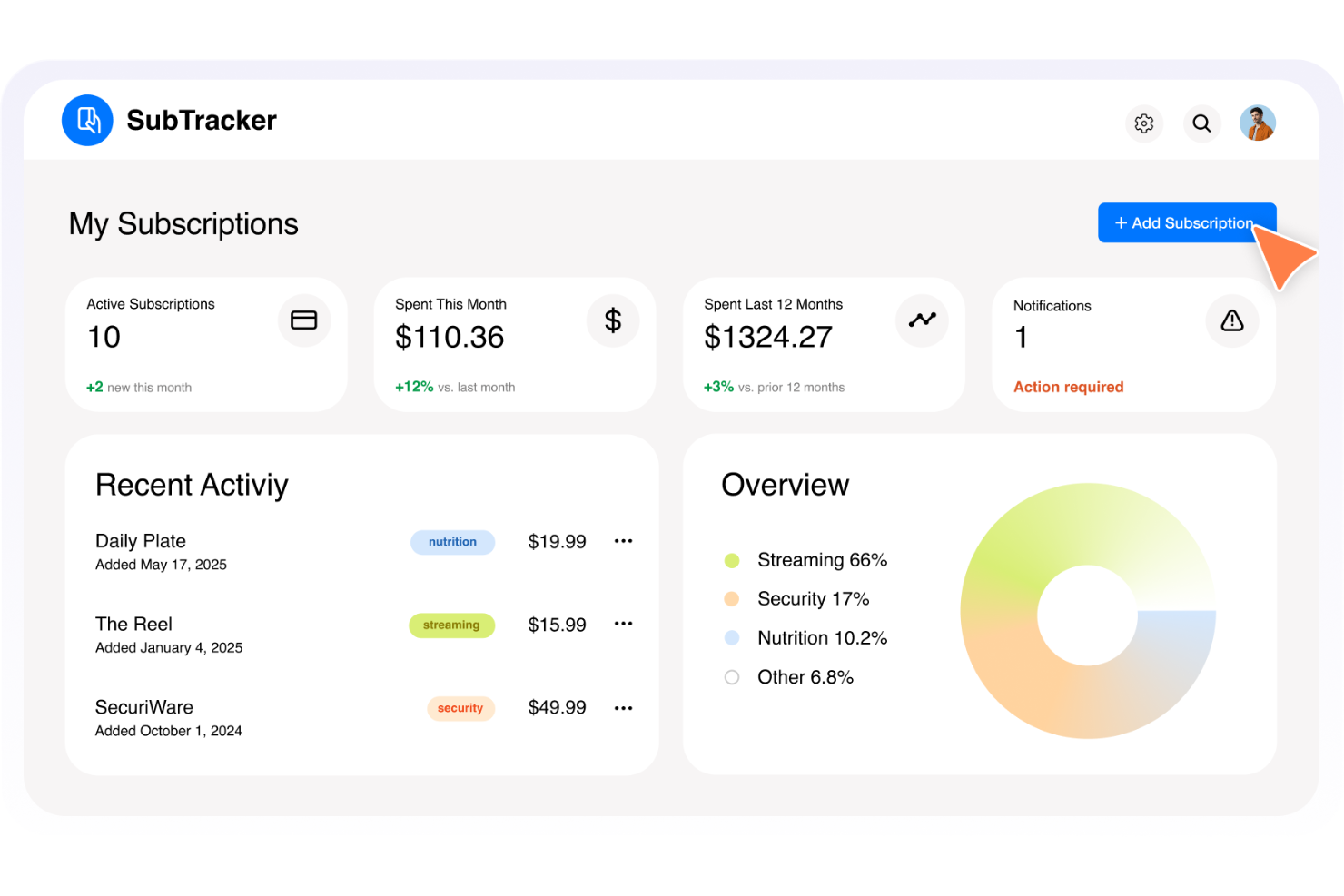
Base44 est une plateforme low-code conçue pour les équipes informatiques et les utilisateurs métiers souhaitant créer et déployer des applications personnalisées sans expertise poussée en programmation, aidant les organisations à automatiser les flux de travail et à numériser les processus grâce à des outils pilotés par l'IA.
À qui s'adresse Base44 ?
Base44 convient particulièrement aux petites et moyennes équipes ainsi qu’aux startups ayant besoin de créer des outils internes et des applications personnalisées dans des délais courts, sans dépendre d’une équipe de développeurs dédiée.
Pourquoi j'ai choisi Base44
Base44 fait partie de mes premiers choix car j'apprécie la façon dont le générateur d'applications par chat en langage naturel vous permet de décrire ce que vous voulez en français courant et de voir une application fonctionnelle se former en quelques minutes. J'ai utilisé le mode de discussion pour organiser des séances de brainstorming et structurer la logique des applications avant de valider toute modification sur une version en ligne, ce qui est un moyen utile de tester des idées sans consommer de crédits. La plateforme génère également automatiquement des points de terminaison API pour chaque partie des données de votre application, ce qui permet de connecter facilement des services externes sans configuration manuelle du backend. Ensemble, la génération pilotée par IA et la mise en place automatique de l’infrastructure offrent à Base44 un avantage pour les équipes qui doivent livrer rapidement des outils internes.
Fonctionnalités clés de Base44
- Gestion des flux de travail : Cartographiez et automatisez les processus métiers, y compris les tâches, les validations, et les séquences, directement dans votre application sans écrire de code.
- Authentification et gestion des utilisateurs : Intégrez des parcours d’inscription, de connexion et de gestion des utilisateurs de façon sécurisée, toute l’authentification étant prise en charge par la plateforme.
- Contrôle de version : Chaque modification est sauvegardée, ce qui vous permet de revenir à n'importe quelle version antérieure de votre application, code ou contenu à tout moment.
- Tableau de bord analytique : Un tableau de bord intégré permet de surveiller la croissance des utilisateurs, les comportements et les indicateurs de performance de l’application en un seul endroit.
Intégrations Base44
Les intégrations incluent Salesforce, Notion, Slack, Google Agenda, Google Drive, HubSpot, Google Sheets, LinkedIn, TikTok et Gmail.
Pros and Cons
Pros:
- Création d’applications en langage naturel assistée par l’IA
- Backend et hébergement automatiques
- Large éventail de modèles d’applications
Cons:
- Options de personnalisation avancées limitées
- Moins de contrôles de niveau entreprise
New Product Updates from Base44
Base44 Launches Mobile App Publishing
Base44 introduces mobile app publishing to Apple App Store and Google Play. This update enables users to turn their projects into fully published mobile apps with a streamlined process. For more information, visit Base44’s official site.
 .
.
Idéal pour des outils de développement visuel d'entreprise
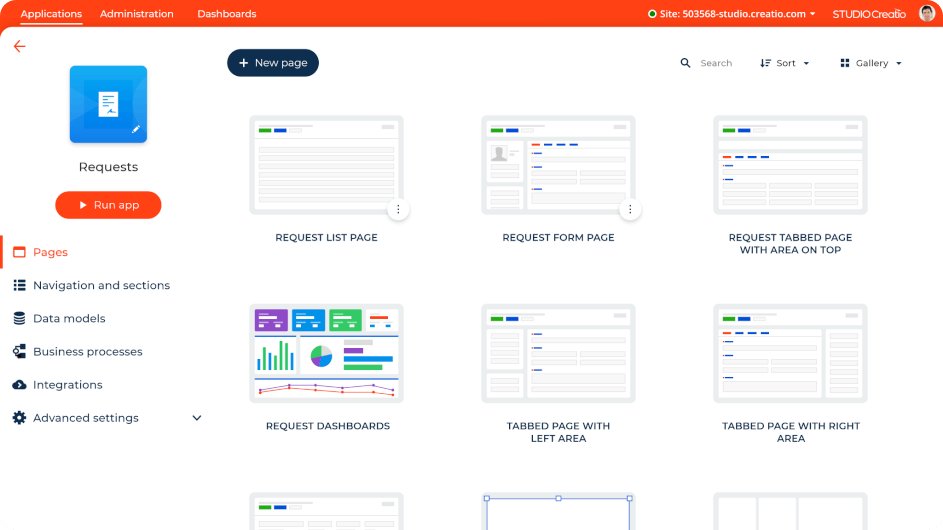
Pour les organisations souhaitant accélérer leur transformation numérique, Studio Creatio propose une plateforme intuitive low-code conçue pour simplifier le développement d'applications et l'automatisation des flux de travail. Cette plateforme convient particulièrement aux entreprises de divers secteurs, notamment celles qui cherchent à permettre à leurs équipes d'innover sans expertise technique avancée. En répondant aux défis tels que les cycles de développement longs et le besoin d'agilité face aux exigences du marché, Studio Creatio offre une solution qui améliore l'efficacité opérationnelle et la collaboration.
Pourquoi j'ai choisi Studio Creatio
J'ai choisi Studio Creatio en raison de sa capacité unique à simplifier les processus complexes grâce à ses outils de développement visuel. L'interface glisser-déposer rend la plateforme accessible aux utilisateurs ayant peu d'expérience en codage, permettant à votre équipe de créer et de modifier rapidement des applications. De plus, son moteur de gestion des processus métier offre une approche structurée pour automatiser les flux de travail, garantissant ainsi une exploitation fluide et efficace. Ces fonctionnalités font de Studio Creatio un choix remarquable pour les organisations souhaitant développer leurs capacités sans nécessiter de compétences avancées en programmation.
Fonctionnalités clés de Studio Creatio
En plus de son interface intuitive et de ses outils de gestion des processus, Studio Creatio propose plusieurs autres fonctionnalités qui renforcent son utilité en tant que plateforme low-code.
- Architecture composable : Permet d'assembler des applications à partir de composants réutilisables, assurant flexibilité et adaptabilité pour le développement.
- Outils d'IA pour l'automatisation : Intègre l'intelligence artificielle pour automatiser les tâches routinières, augmentant la productivité et réduisant la charge de travail manuelle.
- Concepteur de processus basé sur BPMN 2.0 : Offre un cadre visuel pour concevoir et optimiser les processus métier, facilitant la mise en œuvre des changements.
- Marketplace d'applications prêtes à l'emploi : Propose une sélection d'applications préconçues pouvant être intégrées à vos systèmes existants, ce qui vous fait gagner du temps et des ressources.
Intégrations de Studio Creatio
Studio Creatio prend en charge les intégrations avec des services populaires tels que Microsoft Exchange, Google Calendar, Mailchimp, QuickBooks, PayPal, Twilio, Zendesk, Slack, DocuSign et Salesforce, et propose également une API ouverte pour des intégrations personnalisées.
Pros and Cons
Pros:
- Automatisation des flux de travail
- Prise en charge de nombreux secteurs d'activité
- Interface glisser-déposer
Cons:
- L'interface utilisateur pourrait être améliorée
- Courbe d'apprentissage possible pour les personnes non familières avec le no-code
New Product Updates from Creatio Studio
Creatio Adds AI Tools for Content, Meetings, and Knowledge Management
Creatio 8.3.3 introduces AI-driven functionalities and CRM enhancements to boost platform capabilities. For more information, visit Creatio Studio's official site.
 .
.
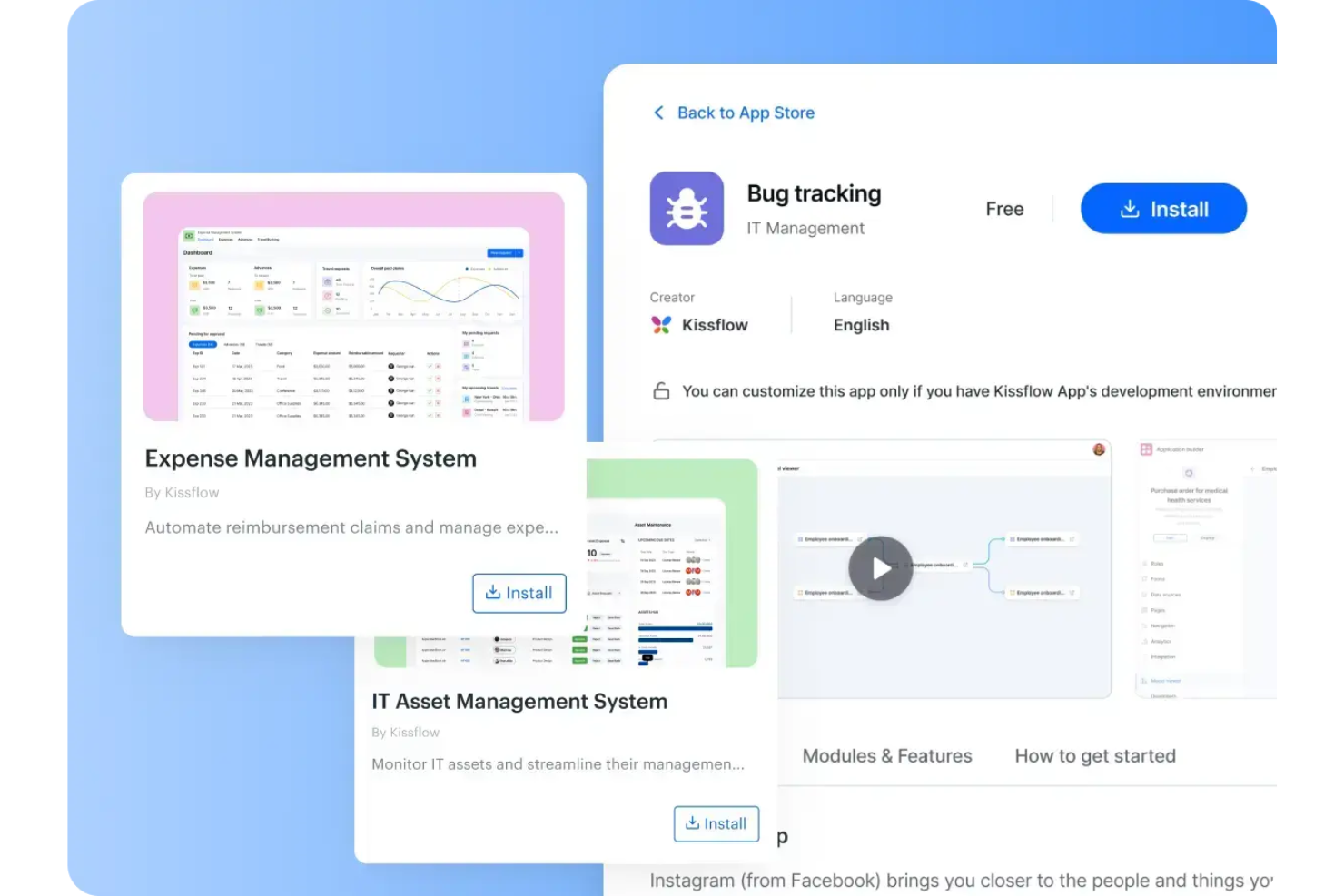
Kissflow est une plateforme low-code qui aide les équipes à concevoir, créer et automatiser des applications sans programmation avancée. Ses outils de développement assistés par l’IA et son interface glisser-déposer permettent aux utilisateurs métiers de créer facilement des workflows personnalisés et d’optimiser les processus internes de différents départements.
Pourquoi j'ai choisi Kissflow : J’ai choisi Kissflow pour son équilibre entre flexibilité et simplicité. Vous pouvez adapter rapidement des applications aux besoins changeants de l’entreprise grâce à son générateur visuel d’applications, tout en bénéficiant d’un contrôle et d’analyses de niveau entreprise. J’apprécie également qu’il regroupe le suivi de projet, l’automatisation des processus et la gestion de la performance dans un espace de travail unifié, ce qui réduit la multiplication des outils pour les équipes en croissance.
Fonctionnalités et intégrations distinctives de Kissflow :
Fonctionnalités : développement d’applications assisté par l’IA, générateurs de formulaires et de workflows personnalisables, tableaux de bord analytiques pour le suivi de la performance. Vous pouvez aussi automatiser des validations, des tâches RH et des demandes de services informatiques grâce à des modèles préconçus.
Intégrations : Salesforce, HubSpot, Slack, Microsoft Teams, Zendesk, Dropbox, Google Forms, Docupilot, Twilio, Jira Software Server, Gmail et Google Sheets.
Pros and Cons
Pros:
- Le développement assisté par l’IA accélère la création d’applications
- Les générateurs personnalisables permettent des workflows flexibles
- Les intégrations facilitent les échanges de données multiplateformes
Cons:
- La personnalisation limitée impacte les configurations complexes
- Des problèmes de stabilité occasionnels réduisent la fiabilité

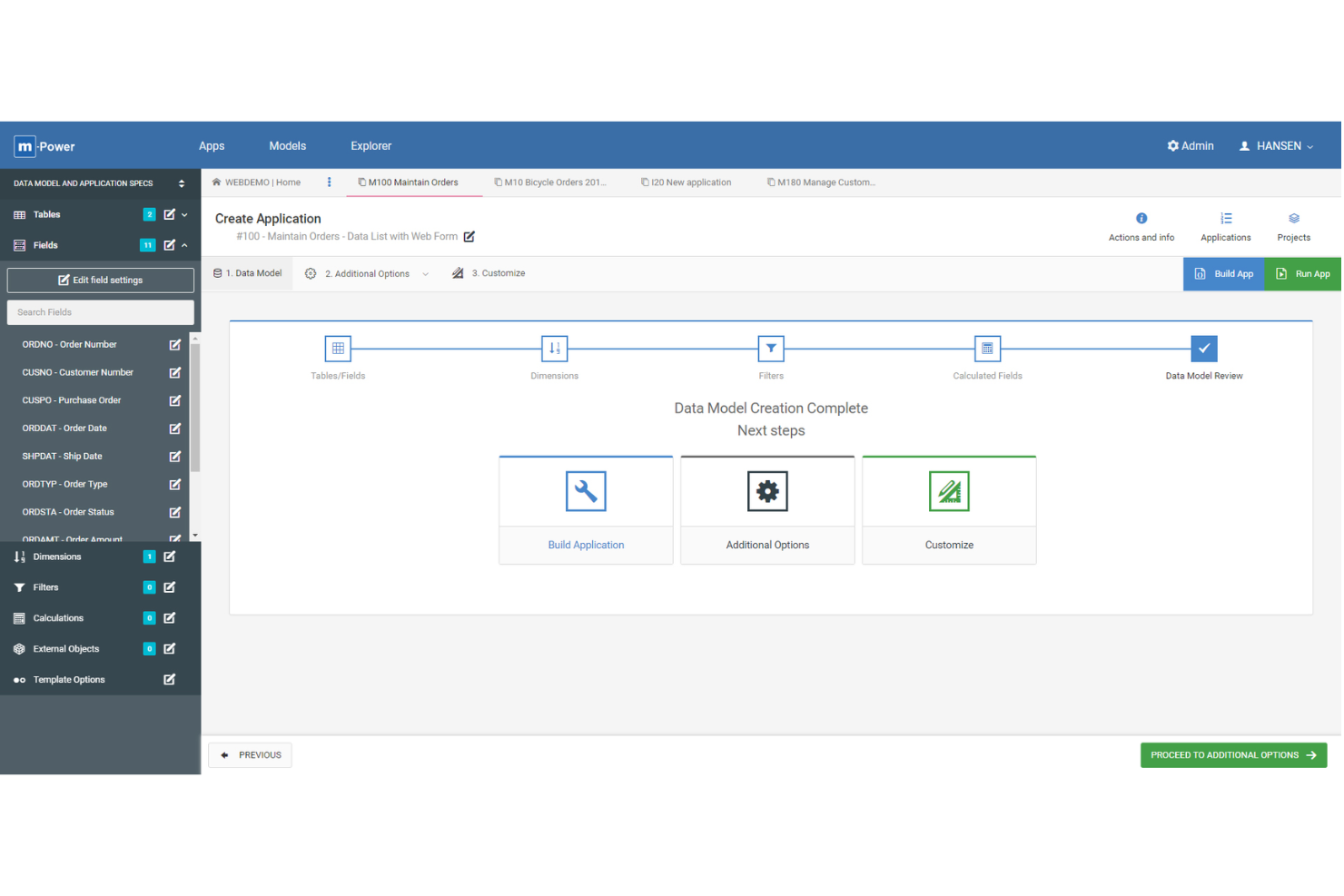
m-Power est une plateforme de développement low-code conçue pour les équipes informatiques et les analystes métier qui ont besoin de créer des applications web personnalisées se connectant directement aux bases de données d'entreprise et automatisant des flux de travail complexes tout en minimisant le temps de développement.
Pour qui m-Power est-il le mieux adapté ?
m-Power convient particulièrement aux entreprises de taille moyenne à grande disposant d'une infrastructure de base de données établie et ayant besoin de concevoir des applications personnalisées sans dépendre fortement des ressources de développement traditionnelles.
Pourquoi j'ai choisi m-Power
J'ai sélectionné m-Power parmi les meilleures plateformes low-code car il a été spécifiquement conçu pour fonctionner directement sur vos bases de données existantes—sans vous obliger à migrer, restructurer ou remplacer quoi que ce soit. Là où la plupart des outils low-code vous demandent d'apporter vos données, m-Power se connecte à vos tables de bases de données en direct, où qu'elles se trouvent, que ce soit sur IBM Db2 sur site, Oracle, SQL Server, PostgreSQL ou Snowflake. J'apprécie particulièrement le processus de création en quatre étapes, où vous choisissez un modèle, sélectionnez vos tables et champs, définissez des filtres et des logiques, puis lancez la génération—ce qui permet d'obtenir une application web totalement fonctionnelle en quelques minutes. La fonctionnalité Smartlink permet de relier plusieurs applications m-Power entre elles tout en transmettant automatiquement les données clés, ce qui simplifie la construction de suites applicatives interconnectées sur une seule base de données sans dupliquer la logique.
Fonctionnalités clés de m-Power
- Gestion de la sécurité basée sur les rôles : Contrôlez l'accès des utilisateurs au niveau de l'application, des données, et des champs avec une sécurité multi-locataires intégrée et des contrôles d'autorisations.
- Assistant IA et générateur de chatbot : Intégrez des assistants IA et des chatbots directement dans vos applications, en les connectant aux enregistrements de base de données en temps réel et aux règles métier.
- Moteur d'automatisation des workflows : Créez des circuits de validation, du routage de tickets, et la mise à jour automatique des enregistrements sans écrire de code.
- Modèle de licence perpétuelle : Achetez m-Power une fois et possédez-le définitivement, sans frais par utilisateur, par application, ou de distribution à mesure que votre utilisation s'accroît.
Intégrations m-Power
Les intégrations incluent IBM Db2, Oracle, SQL Server, MySQL, PostgreSQL, Snowflake, les services REST, les points de terminaison JSON, les serveurs Windows, Linux et AIX.
Pros and Cons
Pros:
- Peut gérer des logiques applicatives complexes
- Applications personnalisables et évolutives
- Processus de développement rapide et intuitif
Cons:
- Modèles préconçus limités par rapport à d'autres plateformes low-code
- Principalement orienté vers les entreprises basées aux États-Unis

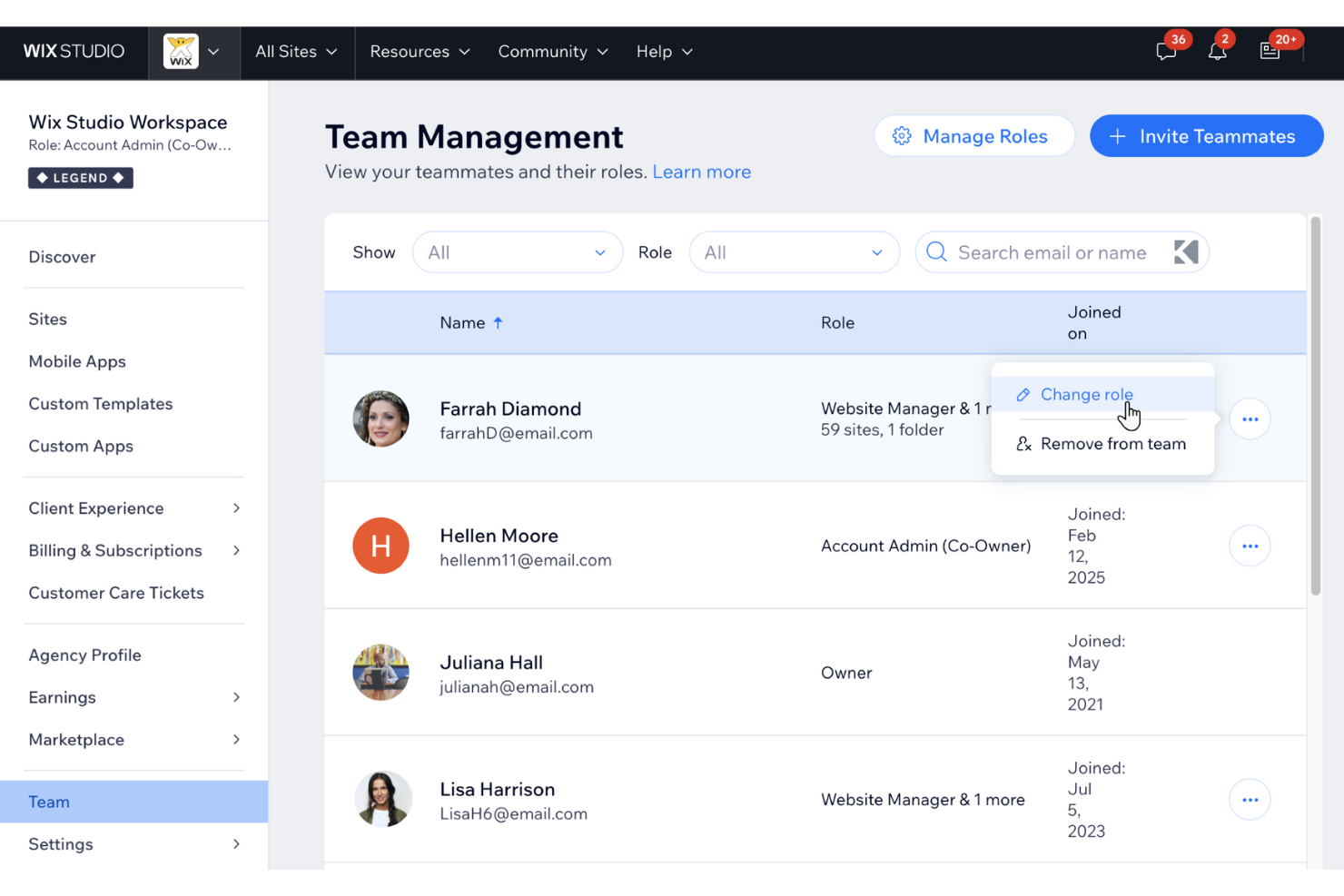
Wix est une plateforme low-code destinée aux entreprises, entrepreneurs et créateurs cherchant à concevoir et lancer des applications web ou des sites internet sans compétences approfondies en programmation. Elle propose un éditeur visuel, un hébergement intégré et une large gamme d'intégrations applicatives personnalisables.
Pour qui Wix est-il le mieux adapté ?
Wix convient particulièrement aux petites et moyennes entreprises ainsi qu'aux professionnels indépendants qui souhaitent créer et gérer leur présence en ligne sans dépendre d'une équipe de développement.
Pourquoi j'ai choisi Wix
J'ai sélectionné Wix parmi les meilleures plateformes low-code en raison des progrès réalisés par ses outils de création de sites pilotés par l'IA. Le créateur de site web IA de Wix vous permet de générer un site entièrement structuré, avec pages, mises en page et contenus, simplement en répondant à quelques questions sur votre activité. J'apprécie également la génération de texte et d'images par IA intégrée directement à l'éditeur, ce qui permet à mon équipe d'itérer sur les textes et visuels sans changer d'outils. De plus, l'App Market de Wix facilite l'ajout de fonctionnalités comme la réservation, le commerce en ligne ou des espaces membres, sans écrire une seule ligne de code.
Fonctionnalités principales de Wix
- Éditeur par glisser-déposer : Concevez et personnalisez visuellement les pages de votre site sans écrire une seule ligne de code, grâce à une interface libre avec contrôle total de la mise en page.
- Système de gestion de contenu (CMS) : Stockez et gérez le contenu de votre site à un seul endroit et créez des pages dynamiques à partir de collections CMS sans programmation.
- Créateur d'applications de marque : Développez une application mobile native entièrement personnalisée et à l'image de votre marque directement depuis Wix, sans aucune connaissance en codage.
- Plateforme de développement Velo : Ajoutez du JavaScript personnalisé à votre site pour des fonctionnalités avancées et un contrôle du design lorsque vous souhaitez aller au-delà de l'éditeur visuel.
Intégrations avec Wix
Wix s'intègre à Google Analytics, Facebook Pixel, Semrush, Google Search Console, Instagram, PayPal, Stripe, Mailchimp, QuickBooks et Shopify.
Pros and Cons
Pros:
- Éditeur intuitif en glisser-déposer
- Fonctionnalités e-commerce puissantes
- Large choix de modèles
Cons:
- Le forfait gratuit inclut des publicités Wix
- Temps de chargement plus longs pour les sites riches en contenu

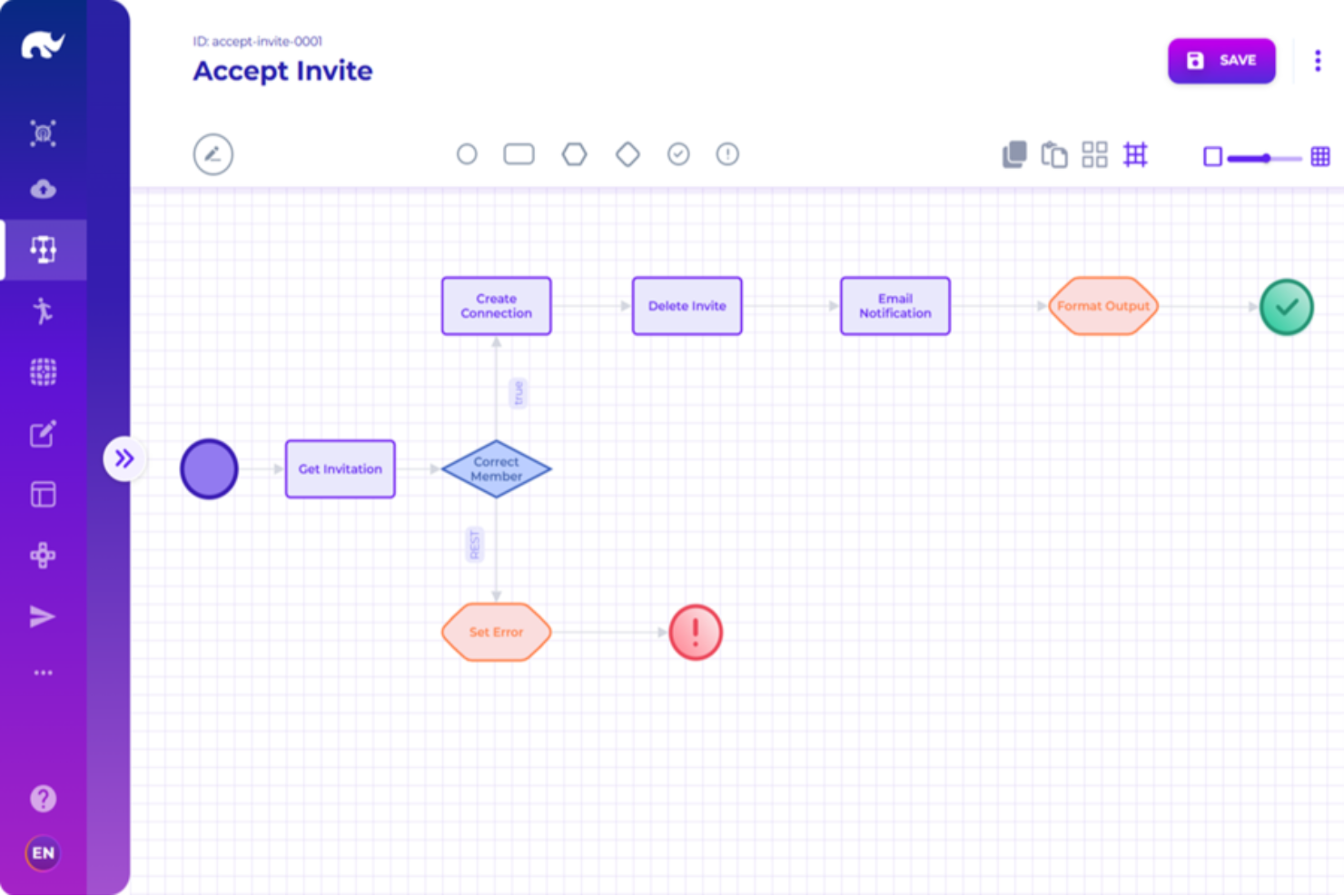
Rierino est une plateforme low-code conçue pour les entreprises et les équipes informatiques qui ont besoin de créer, déployer et gérer des applications complexes, en mettant l'accent sur l'évolutivité, l'intégration et l'automatisation des processus.
Pour qui Rierino est-il le mieux adapté ?
Rierino convient parfaitement aux équipes informatiques et de développement d'entreprise qui doivent créer et faire évoluer des applications distribuées sur des architectures complexes basées sur des microservices.
Pourquoi j'ai choisi Rierino
Rierino mérite sa place dans ma sélection car c'est l'une des rares plateformes low-code qui s'attaque réellement à l'architecture microservice au niveau de l'entreprise — non pas comme un simple argument marketing, mais comme un principe de conception fondamental. J'apprécie le fait qu'on puisse construire, déployer et orchestrer des microservices grâce à une interface de type glisser-déposer sans écrire une seule ligne de code, tout en gardant un contrôle total sur la manière dont ces services communiquent via REST, WebSocket ou Kafka. La couche d'orchestration de microservices permet à mon équipe de connecter des services tiers existants aux côtés de ceux nouvellement créés et de déclencher des flux à partir d'appels d'API, d'événements de capture de données ou de flux d'événements en temps réel — le tout sur une seule et même plateforme.
Fonctionnalités principales de Rierino
- Constructeur d'interface visuel : Interface glisser-déposer pour créer des formulaires web, des listes de données, des interfaces de tâches et des navigations personnalisées adaptées à des rôles utilisateurs et des domaines spécifiques.
- Gestion des règles : Configurer des domaines de règles pour la tarification, la détection de fraude et les promotions, avec des fonctions d'évaluation personnalisées et des modèles de règles paramétrés pour une gestion adaptée aux métiers.
- Automatisation en ML : Déployez des modèles de machine learning en temps réel pour le scoring automatisé à travers des flux de travail et des API, avec MLOps intégré pour l'entraînement et le déploiement de modèles.
- Options de déploiement flexibles : Exécutez Rierino sur tout cloud public ou privé, sur site ou sur infrastructure bare-metal à l'aide de clusters Kubernetes, de conteneurs Docker ou d'applications autonomes.
Intégrations de Rierino
Les intégrations incluent Adyen, Algolia, Amazon Web Services, Cloudinary, Couchbase, Elastic, Google Cloud Platform, Kafka, Keycloak et Microsoft.
Pros and Cons
Pros:
- Technologie adaptative répondant à des besoins de développement variés
- Capacités de développement rapide pour des projets complexes
- Les développeurs peuvent créer des applications en utilisant des services indépendants et réutilisables
Cons:
- La gestion de multiples microservices et des flux de travail événementiels peut être complexe
- Nécessite une gestion rigoureuse des API
New Product Updates from Rierino
Rierino Adds Dynamic Instructions and AI Agent Guidance
Rierino introduces dynamic AI agent instructions and customizable agent guidance features that improve personalization and help users better understand and interact with AI agents. For more information, visit Rierino’s official site.
 .
.
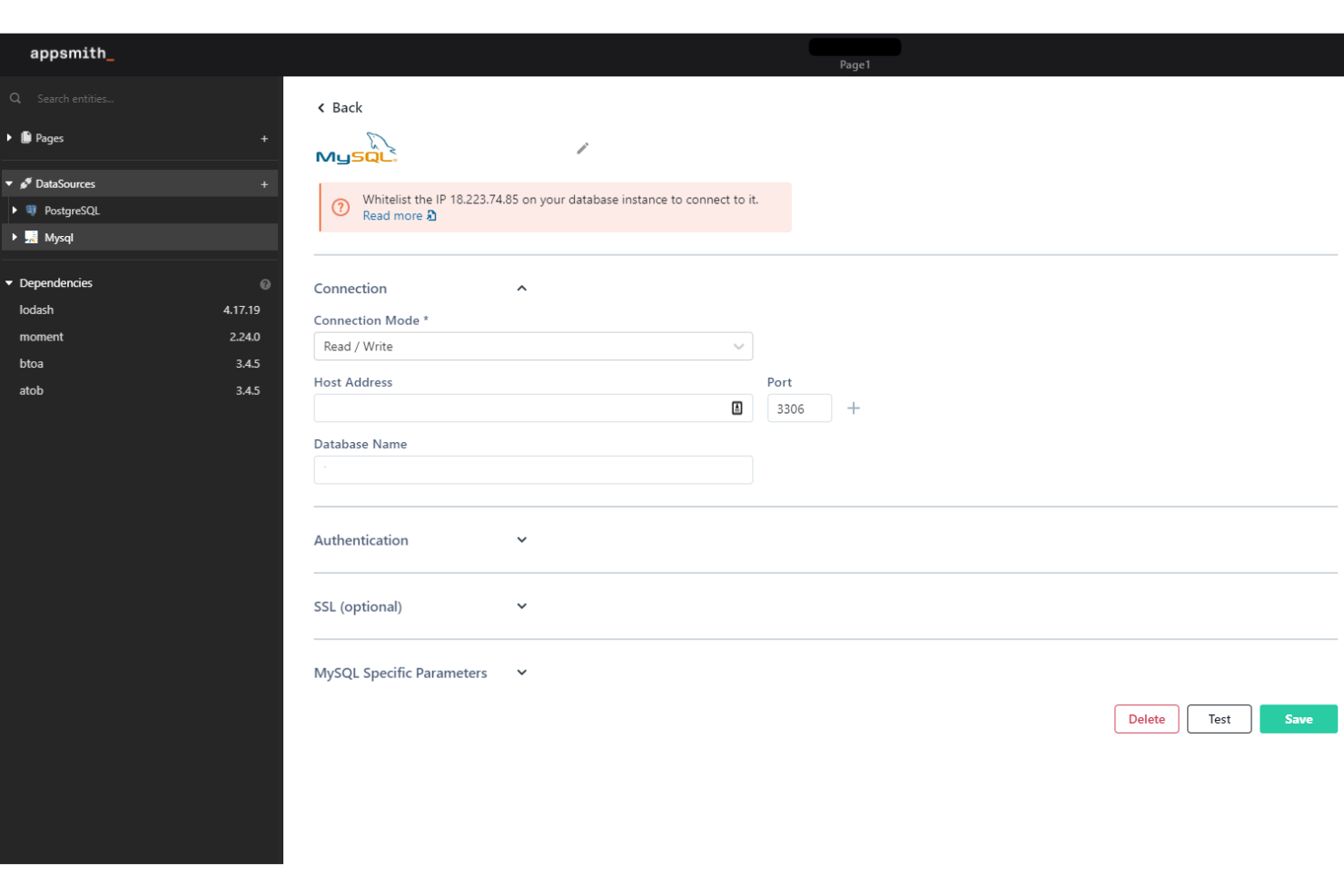
Appsmith offre aux équipes informatiques et aux développeurs une plateforme low-code pour créer, déployer et gérer des applications internes personnalisées qui se connectent aux bases de données et aux API, leur permettant ainsi de relever des défis liés aux flux de travail et à l'automatisation dans les différentes fonctions de l'entreprise.
À qui s'adresse Appsmith ?
Appsmith convient particulièrement aux équipes d'ingénierie et informatiques de moyennes et grandes entreprises qui souhaitent créer et maintenir des outils internes sans avoir à s'engager dans un développement totalement personnalisé.
Pourquoi j'ai choisi Appsmith
Appsmith mérite sa place dans ma sélection grâce à la rapidité avec laquelle on peut passer d'une page blanche à une application interne opérationnelle. Je l'ai choisi notamment pour son workflow de déploiement Git-native : vous pouvez désigner des branches de développement, de préproduction et de production, valider des modifications, examiner les pull requests et pousser des mises à jour via votre pipeline CI/CD existant, ce qui signifie que mon équipe n'a plus à passer d'un outil à l'autre. J'apprécie également l'environnement de développement centralisé, où l'on écrit les fonctions et la logique JS réutilisables au même endroit, plutôt que de disperser le code dans plusieurs widgets. Rien que cela réduit les allers-retours qui ralentissent habituellement le développement des outils internes.
Fonctionnalités clés d'Appsmith
- Constructeur d'interface glisser-déposer : Assemblez des interfaces d'applications réactives à l'aide de widgets préconstruits sans avoir à écrire de code de mise en page depuis le début.
- Copilote IA pour la génération de widgets et de logique : Utilisez des instructions en langage naturel pour générer directement des widgets personnalisés et la logique des flux de travail dans le code.
- Contrôles d'accès basés sur les rôles : Définissez des rôles, des groupes et des autorisations granulaires pour gérer qui peut voir ou modifier des applications spécifiques.
- Déploiement auto-hébergé : Exécutez Appsmith sur votre propre infrastructure, y compris dans des environnements isolés, pour garantir un accès sécurisé aux données internes.
Les intégrations d'Appsmith incluent Amazon Web Services, Salesforce, MongoDB, PostgreSQL, MySQL, Microsoft SQL Server, Google Sheets, les API REST, GraphQL et l'authentification unique SAML.
Pros and Cons
Pros:
- Open source pour une flexibilité et une personnalisation accrues
- Fonctionnalités intuitives de glisser-déposer
- Prend en charge le code JavaScript personnalisé
Cons:
- Peu de modèles prédéfinis
- D'éventuels problèmes de performance avec de grands volumes de données

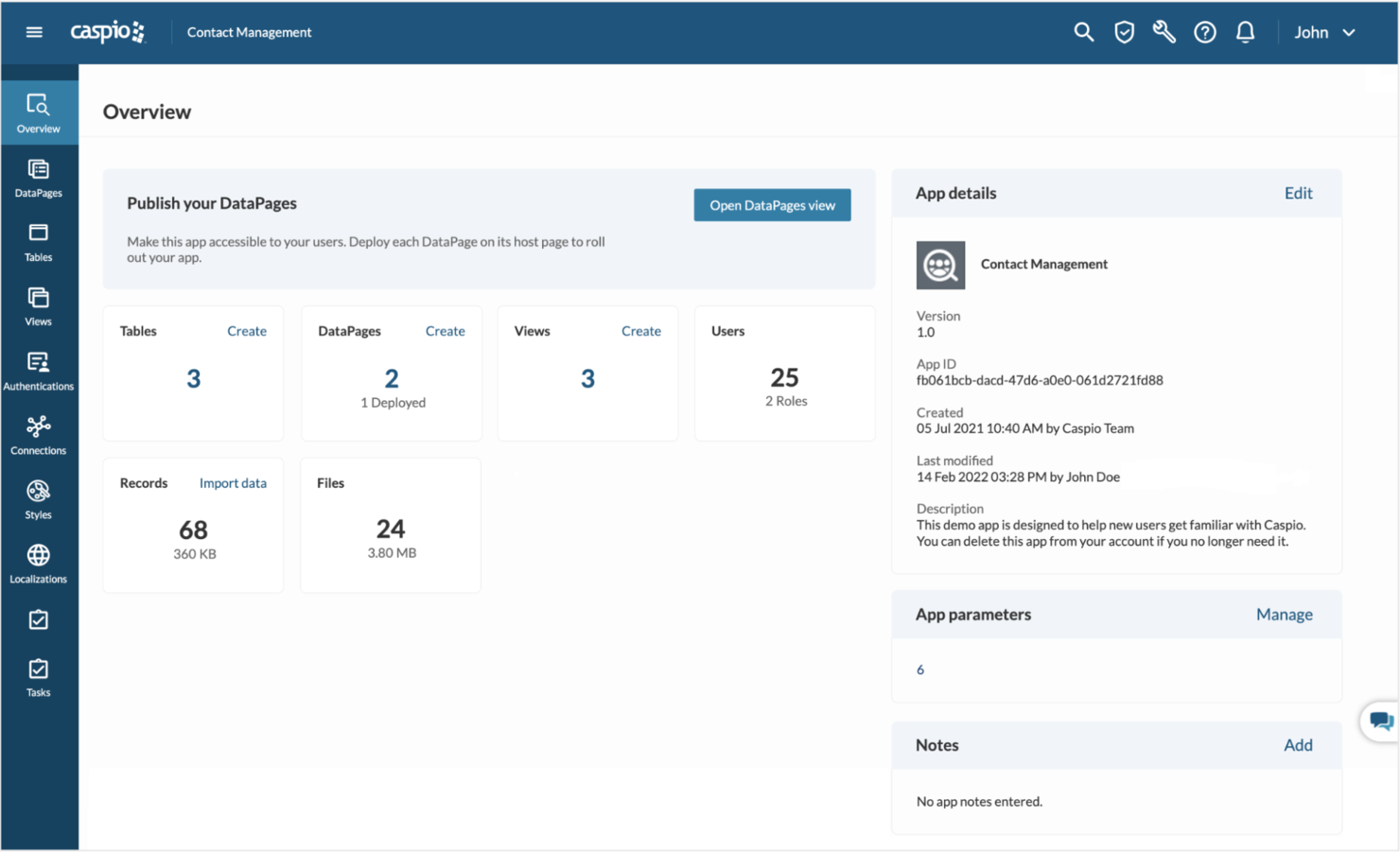
Caspio est une plateforme d'applications low-code conçue pour les équipes informatiques et les professionnels métiers qui doivent créer des applications personnalisées basées sur une base de données, automatiser des flux de travail et déployer des solutions évolutives sans nécessiter de solides compétences en programmation.
Pour qui Caspio est-il le mieux adapté ?
Caspio convient particulièrement bien aux entreprises de taille moyenne et aux grandes entreprises qui ont besoin de créer et de déployer des applications personnalisées basées sur une base de données sans dépendre fortement de ressources de développement.
Pourquoi j’ai choisi Caspio
J'ai choisi Caspio parmi les meilleures plateformes low-code car son modèle de service client est véritablement différent de ce que proposent la plupart des outils dans ce domaine. Il n'y a ni bots ni agents externalisés—une équipe de support interne est disponible 24h/24 et 7j/7 et maîtrise parfaitement la plateforme. J'apprécie particulièrement la fonctionnalité Expert Sessions, qui vous permet de réserver un créneau en direct avec un ingénieur support Caspio pour des tâches spécifiques comme des revues d’architecture d’application, des migrations de données ou des personnalisations JavaScript. L’accompagnement personnalisé lors de l’intégration accélère la première mise en production, ce qui est crucial lorsqu’on développe des applis prêtes à l’emploi sous pression.
Fonctionnalités clés de Caspio
- Constructeur visuel d’applications Caspio Flex : Un environnement de glisser-déposer permettant de concevoir, personnaliser et déployer la structure des applications sans écrire de code front-end.
- GPT Connect optimisé par l’IA : Génère des composants d’application et des rapports à partir de descriptions en langage naturel, réduisant le temps nécessaire au prototypage de vues de données et de logiques métiers.
- Base de données cloud sécurisée : Basée sur Microsoft SQL Server et hébergée sur AWS, avec prise en charge intégrée de la conformité HIPAA, SOC 2 Type II, RGPD et FERPA.
- Gestion des identités et des accès basée sur les rôles : Gérez l’authentification des utilisateurs via SSO, SAML et OAuth, avec un contrôle d’accès granulaire sur l’ensemble de vos applications déployées.
Intégrations Caspio
Les intégrations natives incluent Twilio, PayPal, DocuSign, Microsoft Power BI, Microsoft Office 365, Google Maps, OpenAI, Stripe, QuickBooks et Mailgun.
Pros and Cons
Pros:
- Support client fiable
- Processus d'intégration complet
- Pas de tarification par utilisateur, ce qui rend la plateforme économique à mesure que vous montez en charge
Cons:
- Courbe d'apprentissage abrupte
- Le support est coûteux

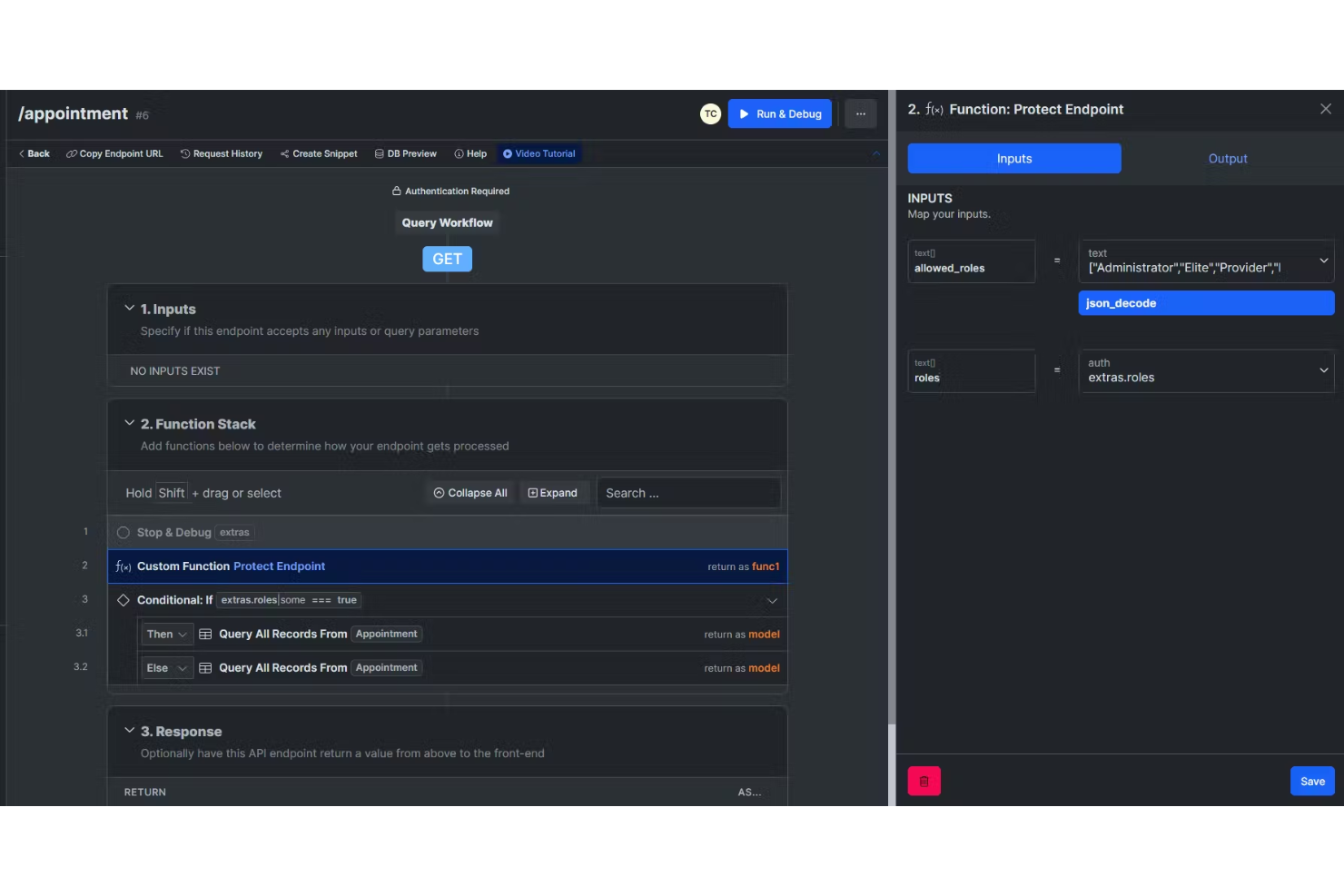
Xano offre aux développeurs, startups et équipes informatiques un moyen de créer et de gérer des backends évolutifs pour les applications web et mobiles sans écrire de code, ce qui facilite le lancement d'applications sur mesure et l'automatisation des flux de travail.
Pour qui Xano est-il le mieux adapté ?
Xano convient particulièrement aux startups et aux petites équipes de développement qui doivent déployer une infrastructure backend rapidement sans disposer de ressources dédiées à l'ingénierie backend.
Pourquoi j'ai choisi Xano
Xano mérite sa place dans ma sélection car c'est l'une des rares plateformes no-code qui gère l'ensemble de la couche backend — base de données, API et logique serveur — sans vous obliger à gérer une quelconque infrastructure. J'apprécie particulièrement le Function Stack visuel, qui permet à mon équipe de modéliser des logiques backend complexes, des flux conditionnels et des transformations de données sans écrire une seule ligne de code. Xano fonctionne sur une infrastructure à mise à l'échelle automatique basée sur Docker et Kubernetes ; lorsque l'application passe du prototype à la production, le backend s'adapte à la charge de travail. La base de données Postgres gérée, avec déclencheurs et relations intégrés, évite de devoir assembler plusieurs outils distincts uniquement pour gérer les données à grande échelle.
Fonctionnalités clés de Xano
- Authentification intégrée et contrôle d'accès par rôle (RBAC) : Xano propose en standard l'authentification des utilisateurs et le contrôle d'accès par rôle, vous évitant ainsi de recourir à un service d'identité séparé.
- MCP Builder : Créez des points de terminaison Model Context Protocol pour connecter des agents d'IA directement à vos données et logiques backend en temps réel.
- Synchronisation Git et gestion des versions : Xano prend en charge la synchronisation Git, la gestion des versions et la comparaison de versions pour les équipes qui souhaitent un contrôle total au niveau du code tout en continuant à développer visuellement.
- Déploiement cloud privé et sur site : Déployez votre backend sur un cloud géré, votre propre cloud privé ou un environnement sur site grâce à Docker et Kubernetes.
Intégrations Xano
Les intégrations incluent Stripe, Google Sheets, OpenAI, Google Gemini, Slack, Postmark, Brevo, Notion, Shopify et Google Maps.
Pros and Cons
Pros:
- Conçu pour gérer l'augmentation du trafic et de la charge
- Interface visuelle simplifiant la logique complexe
- Créateur d'API sans code
Cons:
- Stockage limité
- Limitations géographiques sur la plupart des forfaits sauf entreprise

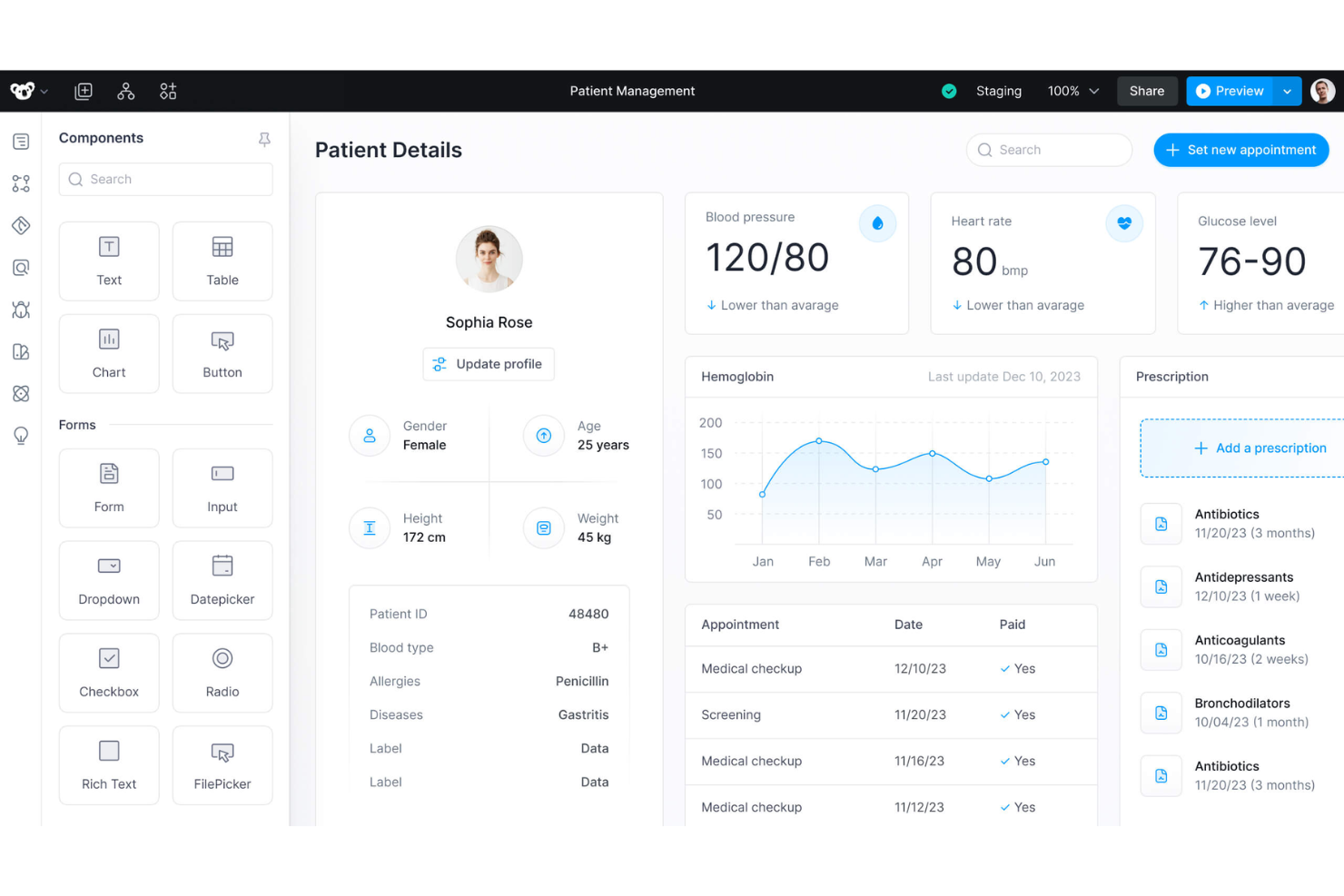
Superblocks offre aux équipes informatiques et aux développeurs une plateforme low-code pour créer, déployer et gérer des applications internes personnalisées connectées à des bases de données, des API et des systèmes d’authentification, aidant ainsi les entreprises à automatiser les workflows et à centraliser leurs opérations.
Pour qui Superblocks est-il le mieux adapté ?
Superblocks convient particulièrement aux équipes d’ingénierie et informatiques des entreprises de taille moyenne à grande qui ont besoin de créer et maintenir des outils internes sans consacrer des cycles complets de développement à ces tâches.
Pourquoi j’ai choisi Superblocks
Superblocks mérite sa place parmi les meilleurs de ma sélection grâce à l’importance qu’il accorde à la sécurité sans compliquer sa configuration. J’apprécie que des contrôles RBAC et ABAC granulaires soient directement intégrés à la plateforme, ce qui permet à mon équipe de définir précisément qui peut accéder à quelles applications, intégrations ou sources de données sans écrire de logique d’authentification personnalisée. La fonctionnalité de journalisation d’audit transmet un enregistrement de chaque action des développeurs et des utilisateurs finaux à votre SIEM, ce que j’ai trouvé inestimable lors de projets soumis à des exigences strictes de conformité. En outre, la gestion des secrets s’intègre à HashiCorp Vault, AWS Secrets Manager et GCP Secrets Manager, garantissant que les identifiants ne sont jamais exposés dans la configuration de votre application.
Fonctionnalités clés de Superblocks
- Éditeur d’interface par glisser-déposer : Créez des interfaces précises au pixel près avec plus de 100 composants préconçus comme des tableaux, graphiques, formulaires et cartes, avec prise en charge des systèmes de design personnalisés.
- Gestion des versions avec intégration CI/CD : Connectez-vous à GitHub ou GitLab pour examiner les pull requests, générer des URL de prévisualisation par commit et intégrer vos pipelines CI/CD existants.
- Éditeur de workflows et de jobs : Créez des workflows backend automatisés et des tâches planifiées sans avoir à écrire toute la logique applicative depuis zéro.
- AI Copilot (Clark) : Générez du code, assemblez des interfaces et corrigez des erreurs grâce à un assistant IA qui apprend progressivement vos intégrations et sources de données.
Intégrations Superblocks
Les intégrations comprennent Airtable, Amazon Redshift, Asana, Azure Blob Storage, Bitbucket, Box, CircleCI, Databricks, Datadog et GitHub.
Pros and Cons
Pros:
- Plateforme intuitive et facile à utiliser
- Contribue à accélérer le processus de développement
- Prend en charge de nombreuses intégrations
Cons:
- Nécessite éventuellement une meilleure documentation et des fonctionnalités de reporting enrichies
- Limitée en personnalisations avancées

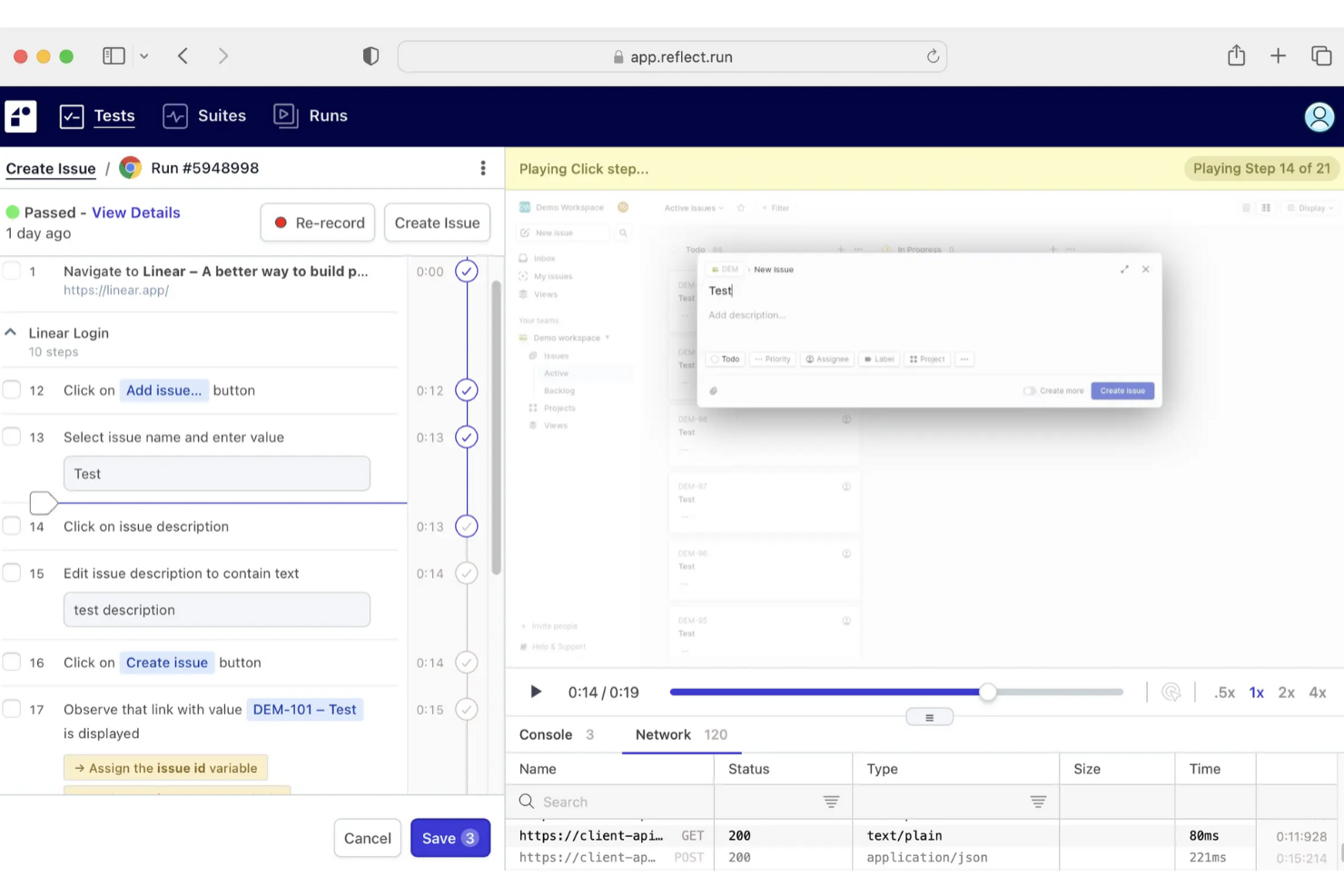
Reflect est une plateforme d'automatisation des tests sans code destinée aux équipes de développement logiciel souhaitant créer, déployer et maintenir des tests d'applications web sans écrire de code, afin de réduire les efforts de QA manuels et d'accélérer les cycles de publication.
Pour qui Reflect est-il le mieux adapté ?
Reflect convient aux équipes de développement logiciel et de QA des petites et moyennes entreprises qui doivent automatiser les tests d'applications web sans dépendre d'ingénieurs de tests dédiés.
Pourquoi j'ai choisi Reflect
Reflect mérite sa place dans ma sélection grâce à la façon dont son IA gère automatiquement la maintenance des tests. La plupart des outils de test sans code échouent toujours lorsque votre interface utilisateur change, obligeant votre équipe à mettre à jour manuellement les sélecteurs et localisateurs. Le moteur SmartBear HaloAI de Reflect s'adapte à ces changements d'interface, de sorte que les tests continuent à s'exécuter sans intervention manuelle. Vous pouvez définir les étapes de test en anglais courant à l'aide de prompts GenAI, permettant ainsi aux testeurs fonctionnels de mon équipe de créer des tests de régression de bout en bout sans attendre qu'un ingénieur en automatisation développe un framework personnalisé.
Fonctionnalités clés de Reflect
- Création de tests par enregistrement et lecture : Capture automatique des étapes de test en interagissant en direct avec votre application dans un navigateur cloud, sans script manuel.
- Tests mobiles multiplateformes : Exécutez le même test sur iOS, Android et des applications hybrides sans dupliquer les tests ni gérer des environnements séparés.
- Rapports de bug en vidéo HD : Lorsqu'un test échoue, Reflect capture une relecture vidéo HD accompagnée de tous les journaux console et réseau pour aider les développeurs à reproduire le problème.
- Exécutions de tests programmées : Planifiez l'exécution des tests de manière récurrente pour surveiller en continu votre application et détecter les régressions entre les versions.
Intégrations de Reflect
Les intégrations incluent Slack, Jira, Zephyr, GitHub Actions, CircleCI, Azure DevOps, GitLab, Bitbucket, email, et une API publique pour des intégrations personnalisées.
Pros and Cons
Pros:
- Création de tests sans code
- Maintenance des tests assistée par l'IA
- Intégration CI/CD complète
Cons:
- Limitations pour les tests d'applications mobiles
- Pourrait offrir davantage d'options de personnalisation des configurations de test

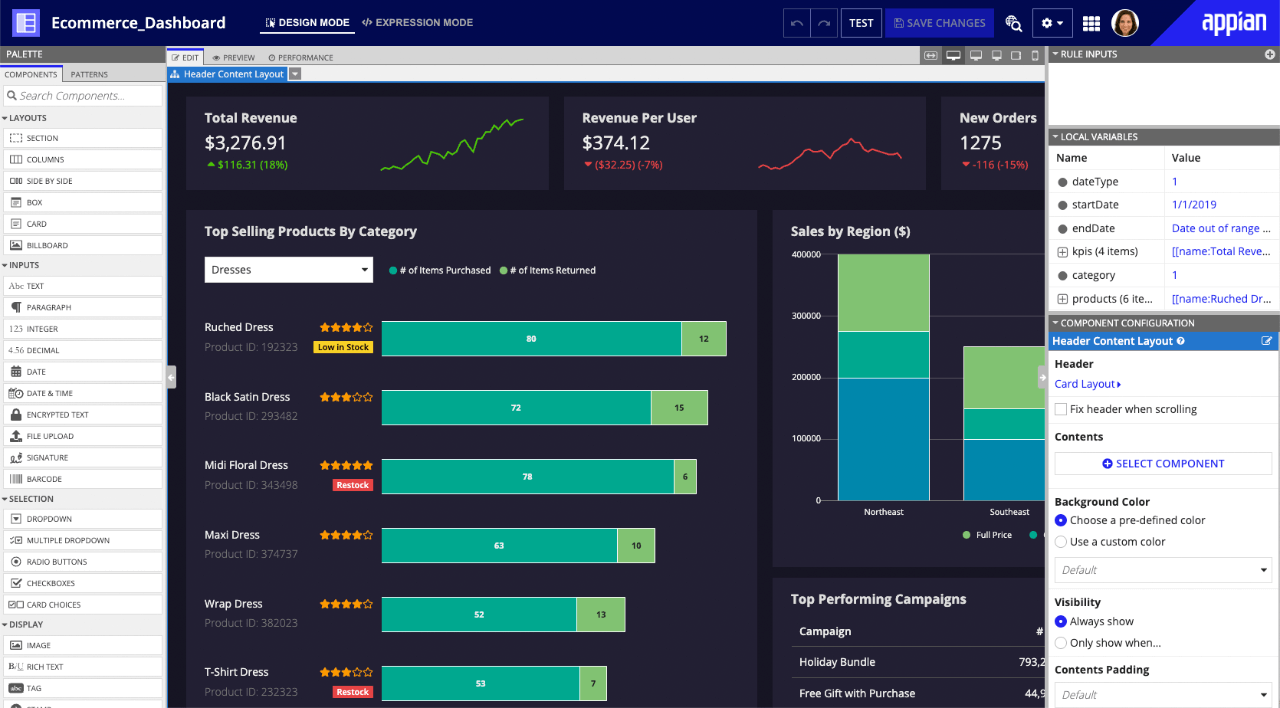
Appian est une plateforme low-code conçue pour les entreprises et les équipes gouvernementales qui doivent créer des applications métier complexes plus rapidement, automatiser les flux de travail et connecter des données entre plusieurs systèmes sans avoir besoin de beaucoup coder.
Pour qui Appian est-il le mieux adapté ?
Appian convient particulièrement aux grandes entreprises et organisations gouvernementales qui ont besoin de concevoir et de gérer des applications complexes et gourmandes en processus, à grande échelle.
Pourquoi j'ai choisi Appian
Appian se distingue dans ma sélection grâce à son Case Management Studio dédié, qui est véritablement l'un des ensembles d'outils de gestion des dossiers les plus aboutis que j'ai vus sur une plateforme low-code. J'apprécie le fait qu'il soit livré avec des modules préconstruits couvrant environ 80 % des besoins typiques en matière de dossiers dès le départ—ce qui évite à mon équipe de devoir partir de zéro pour des applications comme les demandes de services RH, le suivi de conformité GRC ou la gestion des incidents. Le résumé des dossiers assisté par l'IA et la détection des doublons sont particulièrement utiles quand on gère un grand nombre de dossiers à travers différents services. En plus, la personnalisation des workflows sans code permet aux utilisateurs métier de modifier eux-mêmes le traitement des dossiers, sans devoir solliciter le service informatique à chaque évolution du processus.
Fonctionnalités clés d'Appian
- Tissu de données : Connecte et unifie les données de plusieurs systèmes d'entreprise en une seule couche virtuelle, sans migration de données nécessaire.
- Process HQ : Un outil d’intelligence des processus qui utilise l’IA et le process mining pour identifier les goulets d’étranglement des flux de travail et proposer des recommandations d’amélioration.
- Robotic process automation (RPA) : Automatise les tâches répétitives et basées sur des règles sur des systèmes hérités et des applications tierces à l’aide de robots logiciels.
- CI/CD natif et gouvernance du développement : Permet un développement low-code encadré grâce à des contrôles d’intégration et de déploiement continus intégrés pour le déploiement d’applications à l’échelle de l’entreprise.
Intégrations Appian
Les intégrations incluent Salesforce, Google, Microsoft SharePoint, DocuSign, AWS, IBM, Oracle, Microsoft Dynamics, Workday, Box, et une API est disponible pour des intégrations personnalisées.
Pros and Cons
Pros:
- Fonctionnalités d'automatisation des processus bien développées
- Fonctionnalité de gestion des dossiers robuste
- Plateforme à sécurité étagée sur l'ensemble du système
Cons:
- Bases de données intégrées difficiles à exploiter
- Capacités limitées de rapports personnalisés et de visualisation des données

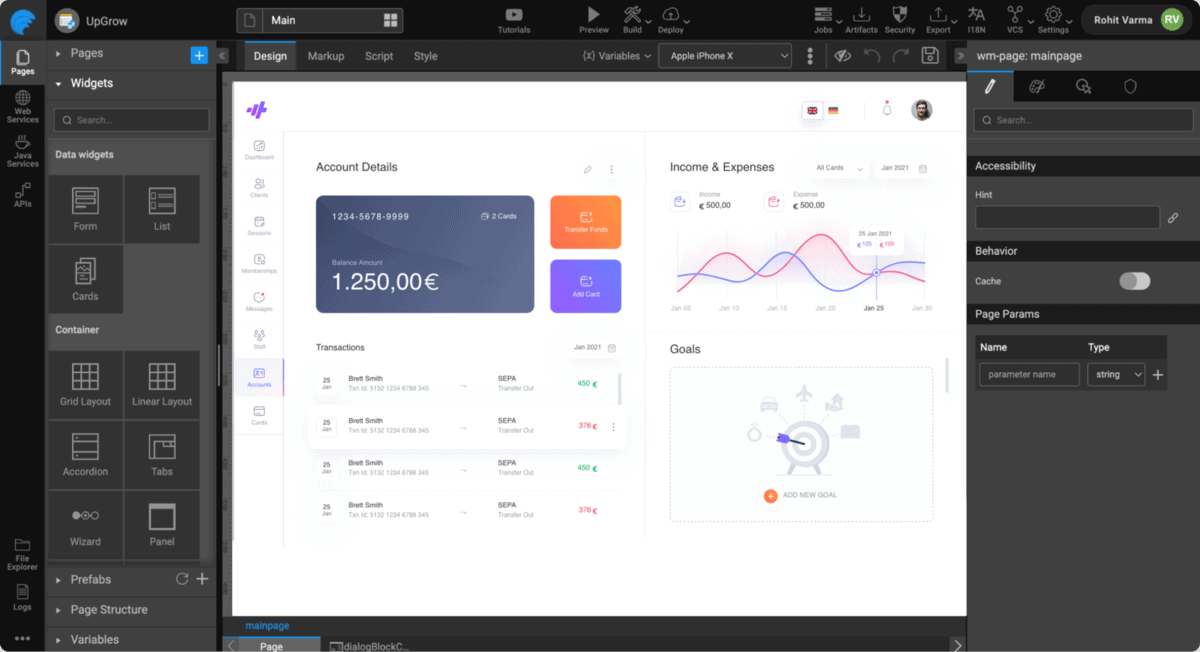
Wavemaker propose une plateforme low-code pour les applications d'entreprise. Sa clientèle principale semble être les institutions financières, mais j'ai constaté que la solution convient aussi à de nombreux autres groupes.
Pourquoi j'ai choisi Wavemaker : J'ai choisi Wavemaker pour ses fonctionnalités Application Platform as a Service (aPaaS), notamment pour la quantité d'outils mis à disposition pour gérer les déploiements en local et sur le cloud. À chaque fois que je déployais une application, l'environnement était automatiquement approvisionné avec toutes les dépendances, bases de données et divers autres services nécessaires à son fonctionnement.
Fonctionnalités et intégrations clés de Wavemaker :
Fonctionnalités comprenant une conception cloud-native à l'échelle du système, m'offrant la tranquillité d'esprit quant à la tolérance aux pannes, l'évolutivité, la résilience et la disponibilité de mes déploiements. De plus, mes déploiements étaient conformes aux normes de sécurité telles que SAML et le chiffrement SSL.
Intégrations prêtes à l'emploi avec GitHub, Sharepoint, Google Calendar, Quickbase, Bitbucket et Yammer.
Pros and Cons
Pros:
- Aucune dépendance exclusive à un fournisseur
- Prend en charge React pour le développement d'interfaces mobiles
- Interface facilement navigable pour les débutants
Cons:
- La version de bureau n'est plus disponible
- Peu rentable pour les petites entreprises
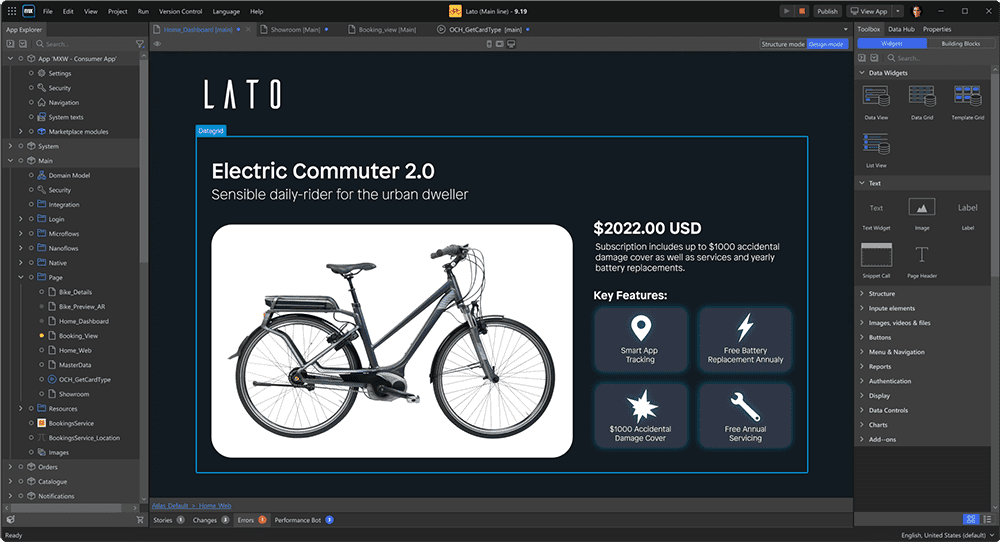
Mendix est une plateforme de développement low-code conçue pour les entreprises et les équipes informatiques qui ont besoin de concevoir, développer et déployer des applications métier complexes sur le web et le mobile avec un minimum de programmation.
Pour qui Mendix est-il le plus adapté ?
Mendix convient particulièrement aux entreprises de taille moyenne à grande disposant d’équipes informatiques et de développement dédiées, chargées de créer et de maintenir plusieurs applications métier internes.
Pourquoi j’ai choisi Mendix
J’ai choisi Mendix comme l’une des meilleures plateformes low-code en raison de l’intégration en profondeur du développement agile dans la plateforme elle-même — et non greffée comme un ajout secondaire. Chaque application dans le portail Mendix vit dans son propre espace projet, avec un support intégré de Scrum et Kanban, gestion du backlog, et création collaborative d’histoires utilisateur assorties de fils de discussion. Mon équipe peut affiner et prioriser les histoires dans le même environnement où nous développons réellement, ce qui maintient une connexion étroite entre la planification des sprints et le développement. J’apprécie aussi la fonctionnalité de gestion de portefeuille, qui nous permet de suivre et d’évaluer la valeur des initiatives à travers plusieurs projets d’application en même temps — ce qui est vraiment utile pour gérer un pipeline d’applications d’entreprise.
Fonctionnalités clés de Mendix
- Assistance IA Mendix (Maia) : Un outil de co-développement avec intelligence artificielle, proposant des recommandations de logique, de bonnes pratiques et de flux de travail tout en signalant les problèmes et en suggérant des améliorations au fur et à mesure du développement.
- Automatisation intelligente des processus : Un concepteur visuel de flux de travail permettant d’ajouter une logique métier complexe aux processus sans écrire de code.
- Framework Atlas UI : Un système de conception préconstruit comportant des modèles, widgets et composants réutilisables pour créer des applications web réactives et des applications mobiles natives.
- Mendix Connect Catalog : Un catalogue de données où les équipes peuvent localiser, décrire et connecter des sources de données entre différents projets grâce à des protocoles standards tels que REST, OData et JDBC.
Intégrations de Mendix
Les intégrations comprennent SAP, Salesforce, Microsoft Dynamics 365, AWS, IBM Cloud, Siemens Teamcenter, Oracle, Google Cloud Platform, Microsoft Azure et Twilio.
Pros and Cons
Pros:
- Fonctionnalités de gestion de projet intégrées
- Permet un véritable développement agile
- La plateforme ouverte permet des solutions sur-mesure
Cons:
- Peu économique pour les petites équipes
- Sensibilité au ralentissement des performances

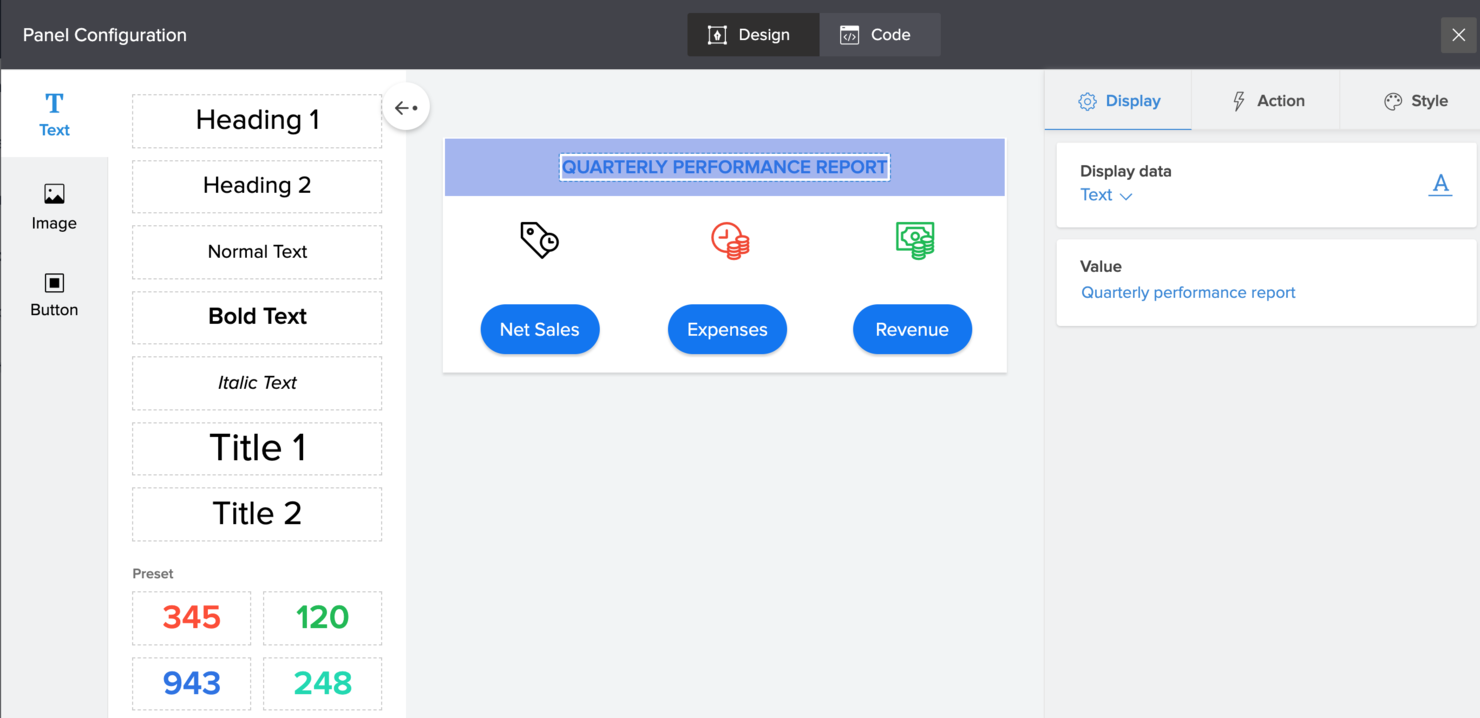
Zoho Creator est une plateforme low-code destinée aux équipes informatiques, aux analystes commerciaux et aux responsables opérationnels qui souhaitent créer des applications personnalisées plus rapidement afin d’automatiser des flux de travail, de digitaliser les processus et de connecter les données entre services sans recourir à un codage complexe.
Pour qui Zoho Creator est-il le mieux adapté ?
Zoho Creator convient parfaitement aux petites et moyennes entreprises qui ont besoin de concevoir et de déployer des applications métier sur mesure sans dépendre d’une équipe de développement dédiée.
Pourquoi j'ai choisi Zoho Creator
J’ai sélectionné Zoho Creator parmi les meilleurs parce qu’il réduit réellement le temps nécessaire pour passer de l’idée à l’application fonctionnelle. L’assistant IA, Zia, y joue un grand rôle : vous décrivez ce dont vous avez besoin en langage courant et il génère pour vous les champs de formulaire, la logique des flux de travail et les étapes de processus, au lieu de tout créer à partir de zéro. J’apprécie aussi que, dès qu’on construit une appli sur le web, Creator génère automatiquement les versions natives pour iOS et Android, sans avoir à gérer un processus de création mobile séparé. Pour les équipes informatiques qui doivent livrer rapidement des outils internes, ce type de déploiement multiplateforme intégré élimine vraiment un goulot d’étranglement.
Fonctionnalités clés de Zoho Creator
- Générateur de formulaires par glisser-déposer : Concevez visuellement des formulaires de saisie de données en déplaçant des types de champs, sans écrire de code.
- Scripting Deluge : Rédigez une logique personnalisée légère avec le langage de script intégré de Zoho lorsque le glisser-déposer ne suffit pas.
- Modèles d’applications préconçus : Démarrez à partir d'une bibliothèque d’applications prêtes à l’emploi couvrant les principaux processus métier pour éviter la page blanche.
- Contrôle d’accès basé sur les rôles : Définissez les rôles et autorisations des utilisateurs au sein de chaque application pour contrôler qui peut consulter, modifier ou gérer les données.
Intégrations Zoho Creator
Les intégrations incluent Zoho CRM, Zoho Books, Zoho Analytics, Zoho Desk, Zoho Projects, Zoho People, Zoho Invoice, Zoho Mail, Zoho Sign et Zoho Flow.
Pros and Cons
Pros:
- Interface simple de type glisser-déposer permettant aux non-développeurs de créer rapidement des applications.
- Prise en charge des déploiements mobiles, tablettes et web, ce qui permet de toucher des utilisateurs sur tous les appareils.
- Bonnes capacités d’intégration avec d’autres applications et bases de données, ce qui simplifie les flux de travail.
Cons:
- Les options de personnalisation peuvent être limitées lors de la création d’applications complexes.
- La migration des données depuis d’autres systèmes vers la plateforme peut être complexe.

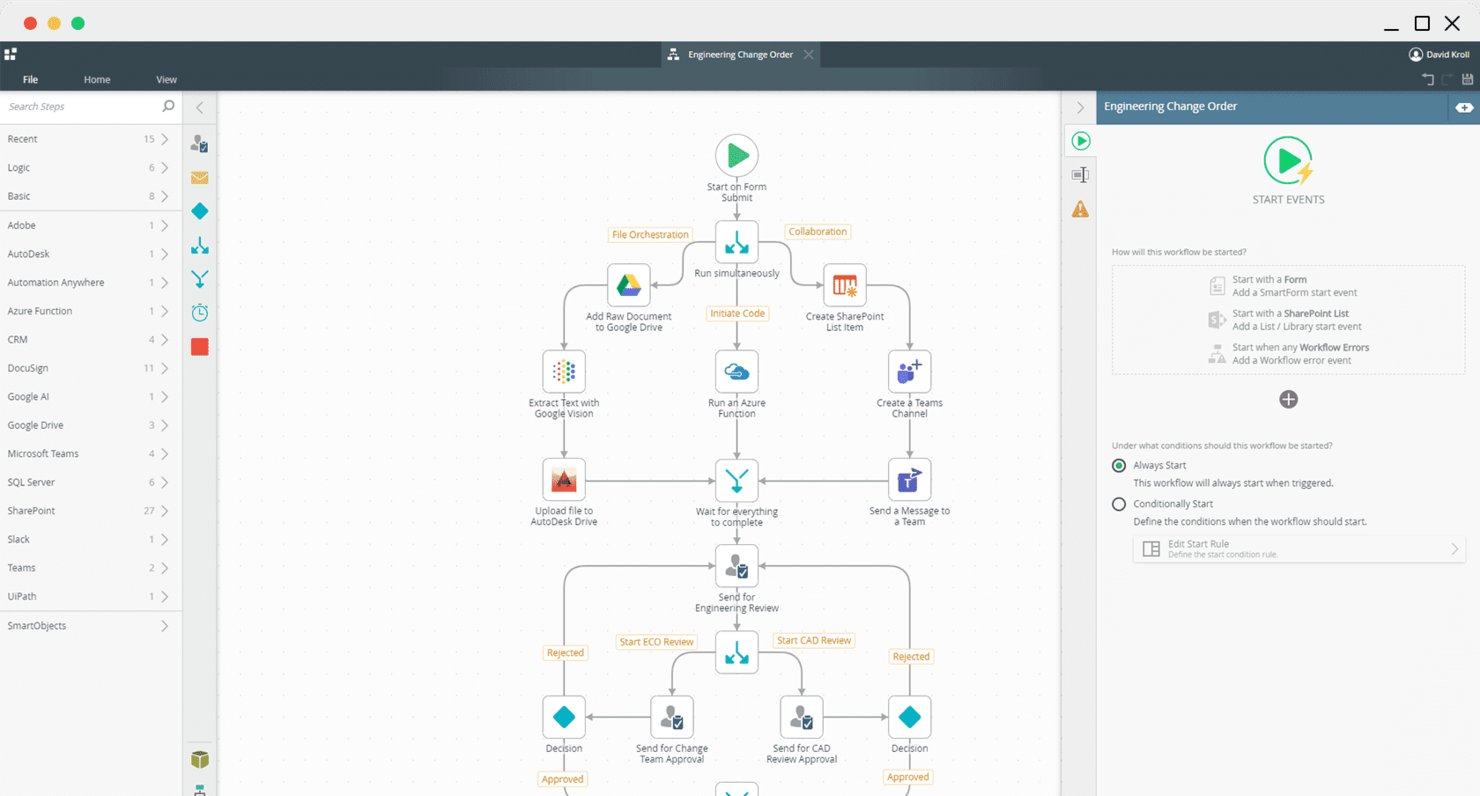
Nintex offre aux équipes informatiques et aux utilisateurs métier une plateforme low-code pour automatiser, cartographier et optimiser des processus d'affaires complexes dans tous les secteurs, aidant ainsi les organisations à réduire le travail manuel et à rationaliser leurs opérations sans de lourdes ressources de développement.
Pour qui Nintex est-il le mieux adapté ?
Nintex convient parfaitement aux organisations de taille moyenne à grande entreprise qui ont besoin d'automatiser et de gérer des flux de travail complexes dans des départements tels que l'informatique, les ressources humaines et les opérations.
Pourquoi j'ai choisi Nintex
J'ai inclus Nintex dans mes meilleurs choix car ses fonctionnalités de gestion de flux de travail vont bien au-delà de l'automatisation basique par glisser-déposer. Le générateur de flux de travail par IA permet à mon équipe de décrire un processus en langage simple et retourne instantanément un cadre de flux de travail fonctionnel — pas de page blanche, pas d'incertitude. À partir de là, nous pouvons ajouter une logique de décision, des branches conditionnelles et des machines à états sans écrire une seule ligne de code. J'apprécie également la couche de gestion des processus, qui permet de découvrir, documenter et suivre les flux de travail existants avant de les automatiser — ce que la plupart des plateformes low-code négligent complètement. Parce qu'elle combine la visibilité sur les processus et l'exécution des flux de travail au sein d'une même plateforme régulée, Nintex est tout indiquée pour les équipes gérant des opérations complexes et interservices.
Fonctionnalités clés de Nintex
- Automatisation documentaire : Générer, remplir et acheminer des documents professionnels comme des contrats et des rapports directement depuis un flux de travail, sans changer d'outil.
- Robotic process automation (RPA) : Déployer des robots logiciels pour gérer les tâches répétitives et basées sur des règles sur des systèmes existants dépourvus d'API.
- Créateur de formulaires low-code : Concevoir des formulaires personnalisés de collecte de données qui se connectent directement aux flux de travail, intégrant des données de référence provenant de systèmes externes comme les tables Azure.
- Déploiement sur site (Nintex Automation K2) : Exécuter l'ensemble de la plateforme dans votre propre centre de données avec prise en charge des installations sur serveur unique ou serveurs distribués et Microsoft SQL Server.
Intégrations Nintex
Les intégrations incluent Microsoft 365, SharePoint, Salesforce, SAP, Azure, nCino, ServiceNow, Epicor, Oracle et DocuSign.
Pros and Cons
Pros:
- L'équipe de support est souvent réactive
- Fonctionnalités d'automatisation robustes
- Processus d'intégration complet
Cons:
- Courbe d'apprentissage abrupte
- Coûteux

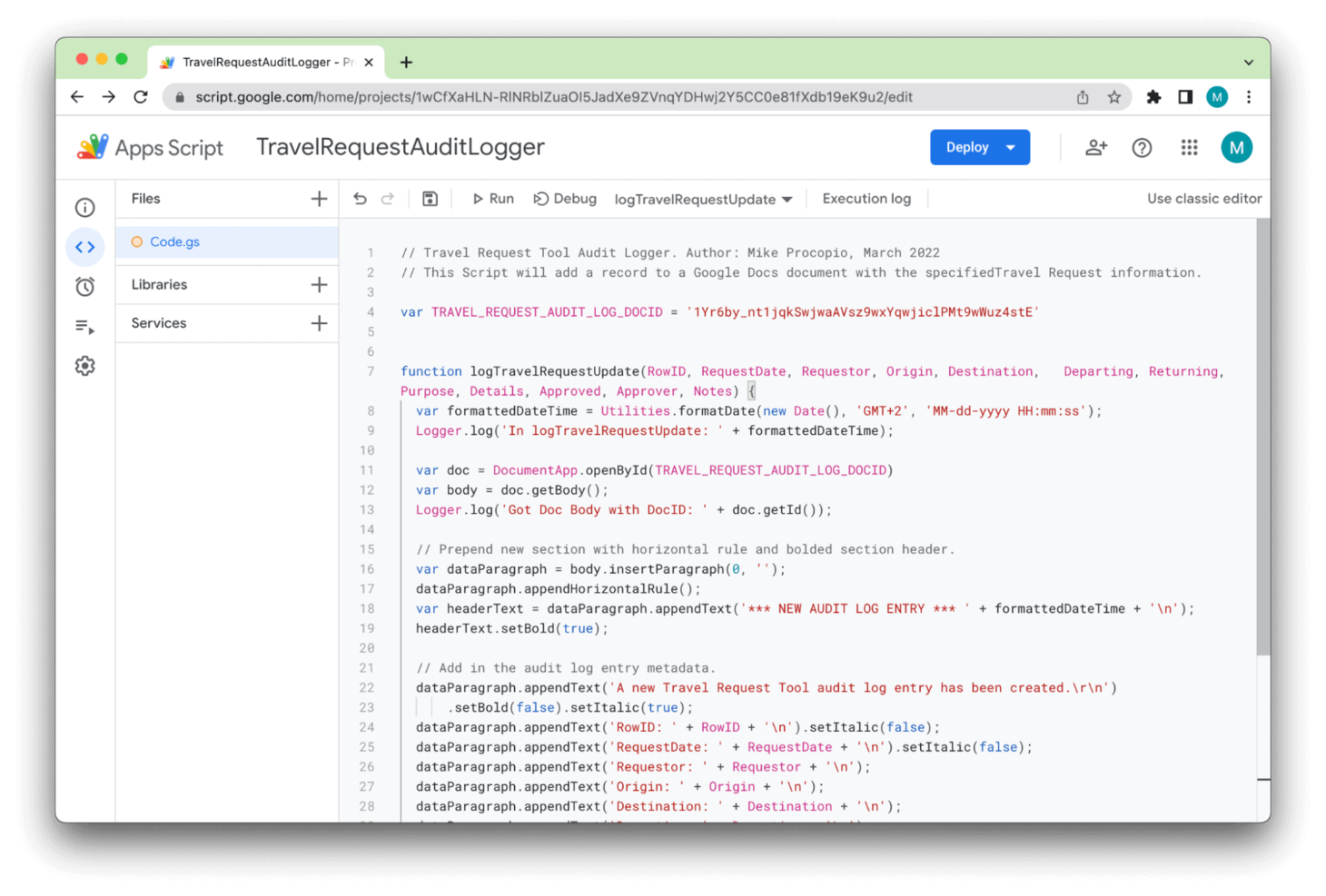
Apps Script est une plateforme de développement cloud native et low-code de Google, conçue pour fonctionner avec la plupart de ses produits.
Pourquoi j'ai choisi Apps Script : Apps Script fonctionne à travers Google Workspace et la multitude d'applications qui en font partie, ce qui signifie que n'importe qui possédant un compte Gmail peut facilement commencer à l'utiliser. Par exemple, ma première utilisation a été un simple script permettant de calculer des paiements groupés dans Google Sheets.
Fonctionnalités et intégrations remarquables d'Apps Script :
Fonctionnalités d'Apps Script dont tout débutant pourrait bénéficier : l'enregistreur de macros, qui permet de consigner les fonctions étape par étape puis de les enregistrer sous forme de script pour une automatisation facile.
J'ai également apprécié qu'en tapant le code pour un script personnalisé, il y avait toujours des suggestions et une sorte de mini documentation, comme dans un environnement de développement intégré (IDE), ce qui m'a évité de devoir mémoriser toute la syntaxe.
Intégrations disponibles nativement avec plus de 100 services de Google, y compris la plupart des applications de Google Workspace ainsi que Youtube, Chat, BigQuery et Google Analytics.
Pros and Cons
Pros:
- Très facile à prendre en main
- Plusieurs intégrations natives
- 100% gratuit
Cons:
- Dépend du support communautaire
- Fonctionne uniquement avec les produits Google

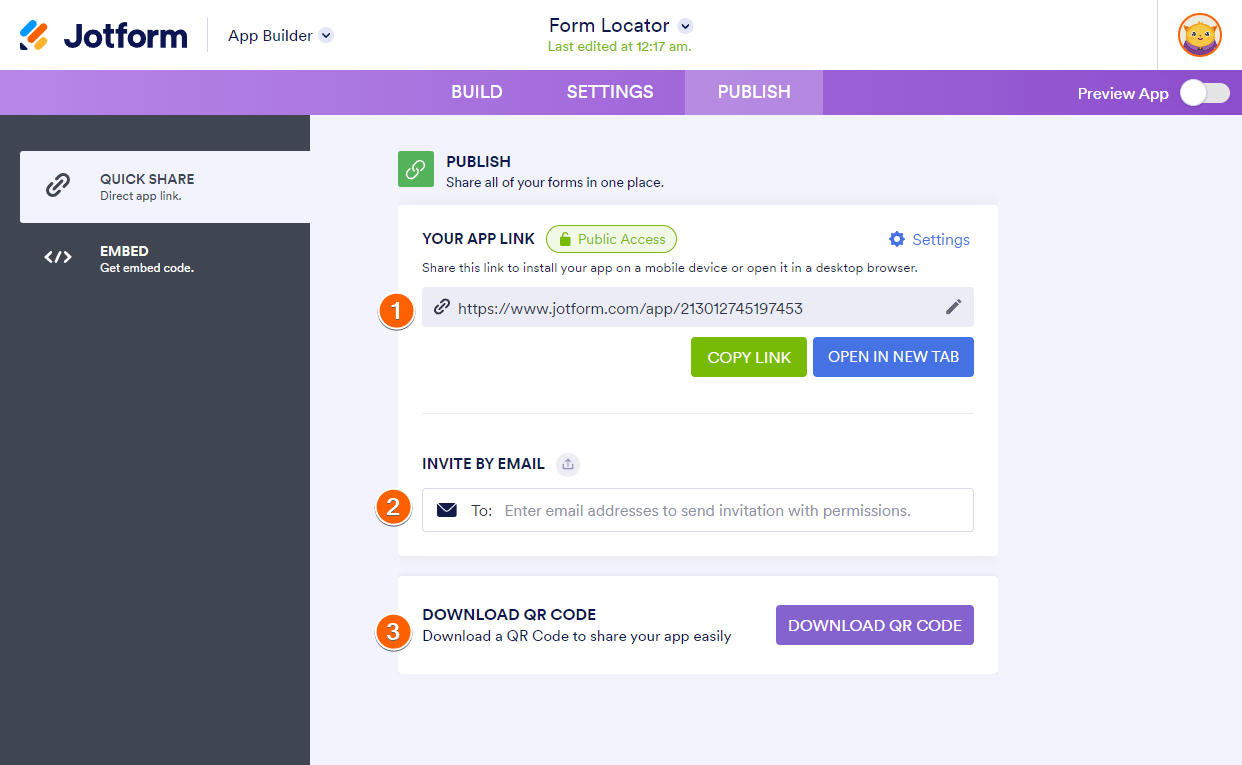
Jotform Apps propose une solution sans code idéale pour ceux qui souhaitent créer des applications personnalisées sans avoir besoin de compétences poussées en programmation. Parfait pour les entreprises, les enseignants et les associations, cette plateforme vous permet de concevoir des applications adaptées à vos besoins spécifiques, qu'il s'agisse de commerce en ligne, de collecte de fonds ou de communication interne. En intégrant des fonctionnalités telles que le glisser-déposer et la personnalisation de l'identité visuelle, elle répond au défi de créer des applications conviviales et attrayantes qui peuvent optimiser vos opérations.
Pourquoi j'ai choisi Jotform Apps
J'ai choisi Jotform Apps pour ses fonctionnalités remarquables de collecte d'informations utilisateur, essentielles pour toute personne recherchant une plateforme à faible code. Le constructeur de formulaires en glisser-déposer permet de créer des formulaires personnalisés répondant à vos besoins spécifiques, garantissant une collecte de données fluide. De plus, la vaste bibliothèque de plus de 80 widgets de la plateforme renforce votre capacité à recueillir toute une variété d'informations, allant des textes simples aux ensembles de données complexes. Cet accent sur la collecte polyvalente de données fait de Jotform Apps un choix séduisant pour ceux qui veulent optimiser la gestion de leurs données.
Principales fonctionnalités de Jotform Apps
En plus de ses capacités de collecte d'informations utilisateur, Jotform Apps propose une gamme de fonctionnalités visant à améliorer votre expérience de création d'applications :
- Générateur de boutique : Créez des applications ecommerce personnalisées avec intégration de passerelles de paiement pour des transactions sans accroc.
- Applications de dons : Développez des applications spécialement conçues pour la collecte de fonds, avec des outils de suivi et de rapport des dons.
- Générateur d'applications intranet : Concevez des outils de communication interne pour simplifier le partage d'informations au sein de votre organisation.
- Générateur d'applications éducatives : Créez des applications pédagogiques favorisant l'apprentissage et l'engagement via des fonctionnalités interactives.
Intégrations de Jotform Apps
Les intégrations incluent PayPal, Stripe, Square, Google Sheets, Dropbox, Slack, Mailchimp, Salesforce, HubSpot et monday.com.
Pros and Cons
Pros:
- Facile à utiliser
- Des centaines de modèles gratuits
- Gratuit avec un compte Jotform
Cons:
- Inadapté aux applications complexes
- De nombreux modèles ont des interfaces datées

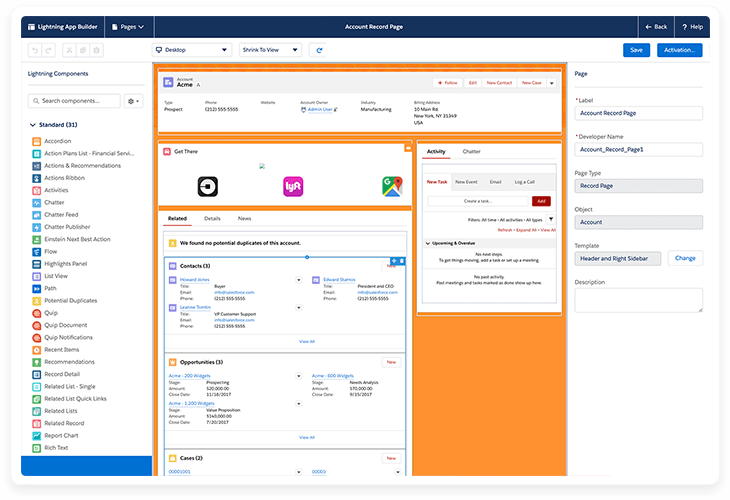
Salesforce Lightning est un produit low-code faisant partie de la plateforme Salesforce. Il permet aux développeurs de bénéficier de la plupart des avantages d'un CRM prêt à l'emploi avec la possibilité d'ajouter des fonctionnalités personnalisées.
Pourquoi j'ai choisi Salesforce Lightning : Salesforce Lightning est présenté comme étant en grande partie similaire à la version classique du CRM, mais que vous pouvez 'personnaliser à votre guise'. Lorsque j'ai testé la fonctionnalité myLightning, cela m'est apparu évident car je pouvais modifier presque tout dans Salesforce, des couleurs aux pages de contenu utilisateur personnalisées.
Fonctionnalités et intégrations remarquables de Salesforce Lightning :
Fonctionnalités dont les équipes CRM peuvent profiter, comme la console de service, qui permet de gérer plusieurs cas depuis un seul écran, avec un aperçu qui réussit à inclure la plupart des détails essentiels en un coup d'œil. Côté vente, il existe une fonctionnalité nommée Path qui cartographie les chemins les plus probables vers la conclusion d'une affaire, avec un suivi détaillé des activités passées et à venir telles que réunions, emails et appels.
Intégrations : des intégrations préconfigurées sont disponibles pour Google Workspace, Slack, HubSpot, Mailchimp, monday.com, ZoomInfo, Docusign, Calendly, Dropbox et LinkedIn.
Pros and Cons
Pros:
- Support client réactif
- Fonctionnalités CRM puissantes
- Système d'organisation des dossiers efficace
Cons:
- Des lenteurs de performance par moments
- Courbe d'apprentissage abrupte pour les utilisateurs venant de Salesforce classique
Autres options
Voici quelques plateformes low-code qui ne figurent pas dans la liste principale mais qui, selon moi, méritent tout de même votre attention :
- Power Apps
Idéal pour les applications d'entreprise
- Pega
Idéal pour DevOps


Critères de sélection pour les plateformes low-code
Pour choisir la meilleure plateforme low-code à intégrer dans cette liste, j'ai étudié les besoins récurrents des acheteurs ainsi que leurs difficultés, comme la facilité d’intégration ou la souplesse de personnalisation. J’ai aussi appliqué la méthodologie suivante afin d’évaluer chaque outil de façon structurée et équitable :
Fonctionnalités principales (25% de la note totale)
Pour apparaître dans cette liste, chaque solution devait répondre à ces cas d’usage courants :
- Créer des applications
- S'intégrer aux systèmes existants
- Automatiser les workflows
- Personnaliser les interfaces utilisateur
- Déployer sur différents supports
Fonctionnalités remarquables supplémentaires (25% de la note totale)
Pour affiner la sélection, j’ai aussi privilégié certaines particularités comme :
- Automatisation par l’intelligence artificielle
- Analyses en temps réel
- Gestion multilingue
- Fonctionnement hors ligne
- Intégration IoT
Facilité d’utilisation (10% de la note totale)
Pour évaluer la prise en main de chaque solution, j’ai tenu compte des points suivants :
- Interface intuitive
- Fonctionnalité de glisser-déposer
- Peu de codage requis
- Design adaptatif
- Navigation conviviale
Onboarding (10 % du score total)
Pour évaluer l'expérience d'intégration sur chaque plateforme, j'ai pris en compte les éléments suivants :
- Disponibilité de vidéos de formation
- Tours de produits interactifs
- Accès à des modèles
- Webinaires et ateliers
- Assistance par chatbot
Assistance client (10 % du score total)
Pour évaluer les services de support client de chaque fournisseur de logiciel, j'ai pris en considération les critères suivants :
- Support disponible 24h/24 et 7j/7
- Options de chat en direct
- Centre d'aide complet
- Délai de réponse
- Support personnalisé
Rapport qualité-prix (10 % du score total)
Pour évaluer le rapport qualité-prix de chaque plateforme, j'ai pris en compte les aspects suivants :
- Transparence des tarifs
- Disponibilité d'une période d'essai gratuite
- Ratio fonctionnalités/prix
- Tarification concurrentielle
- Formules d'abonnement flexibles
Avis clients (10 % du score total)
Pour obtenir un aperçu de la satisfaction globale des utilisateurs, j'ai pris en compte les points suivants lors de la consultation des avis clients :
- Notes de satisfaction des utilisateurs
- Retours sur la fiabilité
- Commentaires sur la facilité d'utilisation
- Expérience avec le support
- Efficacité des fonctionnalités
Comment choisir une plateforme low-code
Il est facile de se laisser submerger par de longues listes de fonctionnalités et des structures tarifaires complexes. Pour rester concentré lors de votre propre processus de sélection de logiciel, voici une liste de contrôle des facteurs à garder à l'esprit :
| Facteur | À prendre en compte |
|---|---|
| Scalabilité | La plateforme pourra-t-elle évoluer avec votre entreprise ? Considérez les besoins futurs, les limites des utilisateurs et les capacités d'extension. Cherchez des plateformes capables de répondre à la fois aux besoins actuels et futurs. |
| Intégrations | Est-ce compatible avec vos outils existants ? Vérifiez la compatibilité avec votre environnement logiciel actuel. Évitez les plateformes nécessitant des solutions d'intégration coûteuses ou complexes. |
| Personnalisation | Pouvez-vous l'adapter à vos processus ? Évaluez la capacité à ajuster les flux de travail et les interfaces. Méfiez-vous des solutions qui imposent des cadres trop rigides. |
| Facilité d'utilisation | La solution est-elle conviviale pour votre équipe ? Évaluez la courbe d'apprentissage et l'ergonomie de l'interface. Privilégiez les plateformes qui réduisent le temps de formation et facilitent l'adoption par de nombreux utilisateurs. |
| Mise en œuvre et onboarding | Peut-on démarrer rapidement ? Analysez le processus d'installation, les ressources disponibles et le support. Évitez les plateformes avec des procédures d'intégration longues ou compliquées. |
| Coût | Est-ce compatible avec votre budget ? Comparez les modèles tarifaires, les frais cachés et les coûts à long terme. Donnez la priorité à la transparence et à la valeur réelle plutôt qu'au prix de départ. |
| Garanties de sécurité | Vos données et utilisateurs sont-ils protégés ? Vérifiez les fonctionnalités de sécurité, la conformité aux réglementations et les pratiques de gestion des données. Assurez-vous que la plateforme respecte vos standards de sécurité. |
| Exigences de conformité | La solution répond-elle aux normes de votre secteur ? Vérifiez la conformité avec toutes les réglementations pertinentes (par exemple RGPD ou HIPAA). Évitez les plateformes ne pouvant garantir la conformité. |
Tendances des plateformes low-code
En 2025, le paysage des plateformes low-code évolue. Les développeurs et les entreprises repoussent les limites de ce qu’il est possible de créer avec peu de code. Le besoin d'accélérer la transformation numérique, de faciliter le développement et de permettre aux utilisateurs non techniques de construire des solutions complexes stimule cette dynamique. J'ai analysé les dernières mises à jour produits, communiqués de presse et journaux de version, et remarqué certaines tendances populaires.
- Intégration de l’IA et de l’apprentissage automatique : De nombreux créateurs d’applications low-code et no code ajoutent des fonctionnalités d’IA. Celles-ci automatisent des parties complexes du développement d’applications, comme l’écriture du code ou la réalisation d’analyses prédictives. Cette tendance reflète le besoin croissant d’intégrer la prise de décision intelligente au sein des applications.
- Intégration de la blockchain : L’ajout de la technologie blockchain devient de plus en plus courant. Cela permet aux utilisateurs de concevoir des applications avec une meilleure sécurité et une intégrité renforcée des données dans un environnement low-code.
- Outils de collaboration en temps réel : Certaines plateformes permettent aux équipes à distance de collaborer en temps réel. Cela répond au besoin constant d’outils adaptés au travail distribué.
Comprendre les tendances claires des plateformes low-code actuelles n’est pas seulement utile, c’est essentiel. Ces plateformes visent à rendre le développement d’applications plus rapide, plus accessible et davantage intégré aux technologies avancées. Cette connaissance vous permet de choisir une plateforme qui répond à vos besoins actuels et vous prépare pour l’avenir. Elle constitue également une feuille de route pour investir dans les outils qui vous offriront un avantage concurrentiel.
Que sont les plateformes low-code ?
Les plateformes low-code sont des outils qui vous permettent de créer des applications logicielles avec un minimum de codage manuel, en utilisant des interfaces visuelles et des composants préconstruits. Ces outils sont utilisés aussi bien par les développeurs cherchant à accélérer la livraison que par des équipes non techniques qui doivent créer des applications internes ou automatiser des processus sans dépendre de l’ingénierie.
Les générateurs par glisser-déposer, les modèles réutilisables et les intégrations natives permettent d’éviter les tâches répétitives de codage, de réduire les files d’attente de développement et d’accélérer la mise en ligne des mises à jour. Au final, les plateformes low-code facilitent la transformation d’idées en applications fonctionnelles sans se perdre dans le développement sur mesure.
Fonctionnalités
Lorsque vous choisissez une plateforme low-code, surveillez les fonctionnalités clés suivantes :
- Interface de développement visuel : Les générateurs par glisser-déposer vous permettent de créer des applications en organisant les composants sans écrire d’interminables lignes de code. C’est comme assembler un puzzle numérique où l’apparence et le comportement de l’application prennent forme sous vos yeux.
- Composants réutilisables : Les modules prédéfinis s’intègrent là où vous en avez besoin. Vous n’avez ainsi pas à réinventer la roue à chaque nouveau projet.
- Capacités d’intégration : Vous pouvez connecter des bases de données, des API tierces et d’autres outils métiers sans passer par un codage manuel fastidieux. Ainsi, votre application n’est pas isolée : elle s’intègre harmonieusement à l’ensemble de votre écosystème technologique.
- Déploiement multi-appareils : Une bonne plateforme low-code permet de lancer les applications simultanément sur le web et sur mobile. Inutile de créer une version différente pour chaque support. Concevez une fois, et soyez présent partout où se trouvent vos utilisateurs.
- Outils de collaboration : Des fonctionnalités telles que les espaces de travail partagés et l’édition en temps réel simplifient le travail en équipe. Vous pouvez réfléchir, modifier et valider ensemble, sans attendre votre tour.
- Contrôle d’accès basé sur les rôles : Vous déterminez qui peut modifier, consulter ou publier chaque partie du projet. Cela sécurise vos travaux et garantit que chacun évolue dans son domaine d’expertise.
- Scalabilité : Commencez par un petit projet, mais si votre base d’utilisateurs croît ou si l’application prend de l’ampleur, la plateforme suit votre croissance sans rupture. Une solution évolutive grandit au rythme de vos ambitions.
- Automatisation des processus : Vous configurez des workflows, des chaînes de validation et des automatisations pour réduire les tâches manuelles. Laissez la plateforme s’occuper du répétitif, vous pourrez ainsi dédier plus de temps à la résolution de problèmes.
Fonctionnalités d’IA courantes dans les plateformes low-code
Au-delà des fonctionnalités standard évoquées ci-dessus, de nombreuses solutions intègrent l’IA avec des fonctions telles que :
- Génération automatisée de code : L’IA analyse la conception et les besoins de votre application, puis rédige pour vous du code ou des routines complètes. Cela accélère le développement et limite les erreurs humaines.
- Suggestions de workflows intelligents : La plateforme exploite l’IA pour vous proposer des étapes suivantes, recommander des règles d’automatisation ou repérer des points de blocage. Un vrai coéquipier qui a toujours des idées pour travailler plus efficacement.
- Traitement du langage naturel : Exprimez vos idées oralement ou par écrit, la plateforme les transforme en logique applicative ou en requêtes de données. Pas besoin de maîtriser le code pour élaborer des fonctionnalités complexes.
- Tests et débogage intelligents : L’IA examine votre application pour détecter des bugs, des dysfonctionnements ou des risques de sécurité et suggère des corrections. Plutôt que de chercher à l’aveugle, vous disposez d’un point de départ pour fiabiliser votre application.
- Analyses prédictives : L’IA embarquée analyse les données utilisateurs pour anticiper les tendances ou signaler des problèmes potentiels avant qu’ils ne surviennent. Vous obtenez ainsi des informations qui vous permettent de prendre des décisions proactives pour les fonctionnalités ou la performance de votre application.
Bénéfices
À mon avis, les plateformes de développement low-code et no-code ont transformé le paysage du développement logiciel. Elles rendent la programmation accessible et simplifient le processus de création d'applications complexes.
Voici cinq avantages majeurs que les plateformes low-code offrent à vos utilisateurs et à votre organisation :
- Développement accéléré : Les plateformes low-code réduisent le temps nécessaire pour développer des applications. Cette rapidité vous permet de mieux répondre aux évolutions du marché et aux besoins internes.
- Réduction des coûts : Les plateformes low-code limitent le besoin de programmation approfondie, diminuant ainsi le nombre d'heures des développeurs sur chaque projet. Cette efficacité réduit les coûts de main-d'œuvre et permet de réaffecter les ressources à d'autres domaines clés du développement.
- Autonomisation des utilisateurs métiers : Ces plateformes proposent des interfaces conviviales permettant aux non-techniciens de programmer. Cette démocratisation donne à vos collaborateurs la capacité d'innover davantage et de résoudre les problématiques métier.
- Flexibilité accrue : Les plateformes low-code offrent des outils pour mettre à jour et faire évoluer facilement les applications au fur et à mesure que les besoins de l'entreprise changent. Cette flexibilité garantit que le logiciel peut évoluer avec l'entreprise.
- Meilleure collaboration entre IT et métiers : Les plateformes low-code simplifient le processus de développement, permettant une collaboration renforcée entre les équipes informatiques et les unités métier. Cette collaboration permet d'obtenir des résultats mieux alignés sur les besoins de l'entreprise.
Les plateformes low-code sont bien plus que de simples outils de création d'applications. Ce sont des leviers stratégiques capables de transformer la façon dont votre organisation fonctionne et concurrence. Les plateformes low-code offrent une base solide pour l'innovation digitale et l'excellence opérationnelle.
Coûts & Tarification
En explorant les plateformes low-code, j’ai découvert qu’il est important de comprendre les plans et options tarifaires disponibles. Ces plateformes proposent une gamme de formules adaptées à différents besoins, du développeur individuel aux grandes entreprises.
Voici un aperçu des types de formules habituelles, de leur tarification moyenne et des fonctionnalités auxquelles vous pouvez vous attendre pour chacune. Ces informations vous seront utiles même si vous avez peu ou pas d'expérience dans l'achat de plateformes low-code.
Tableau comparatif des formules pour les plateformes low-code
| Type de formule | Prix moyen | Fonctionnalités courantes |
|---|---|---|
| Gratuite | $0 | Accès aux outils de base, assistance communautaire, capacités limitées de déploiement d'applications |
| Basique | $10-25/ utilisateur/mois | Fonctionnalités de développement essentielles, accès au support client, capacités d'intégration de base |
| Professionnelle | $50-100/ utilisateur/mois | Intégrations avancées, plus d'options de déploiement, limites de données plus élevées, support premium |
| Enterprise | $250+/ utilisateur/mois | Personnalisation totale, applications illimitées, sécurité de haut niveau, gestionnaire de compte dédié |
FAQ sur les plateformes low-code
Voici des réponses à des questions courantes concernant les plateformes low-code :
Les plateformes low-code vont-elles remplacer les programmeurs ?
Quelle est la sécurité des plateformes low-code ?
Comment les plateformes low-code s’intègrent-elles aux systèmes existants ?
Quels défis faut-il anticiper lors du déploiement d’une plateforme low-code à grande échelle ?
Comment les plateformes low-code aident-elles à mieux gérer la dette technique ?
Quels critères utiliser pour évaluer les plateformes low-code pour une entreprise ?
Les plateformes low-code prennent-elles en charge les pratiques DevOps et agiles ?
Et maintenant :
Si vous êtes en train de rechercher une plateforme low-code, contactez gratuitement un conseiller SoftwareSelect pour obtenir des recommandations personnalisées.
Vous remplissez un formulaire et passez un rapide entretien pour préciser vos besoins. Ensuite, vous recevez une liste restreinte de logiciels à examiner. Ils vous accompagnent même tout au long du processus d’achat, y compris lors des négociations tarifaires.