

10 meilleures alternatives à Ivanti évaluées en 2026

10 Meilleures alternatives à Ivanti – Sélection rapide
Here's my pick of the 10 best software from the 23 tools reviewed.


Si vous recherchez des alternatives à Ivanti, il est probable que vous rencontriez des défis que votre logiciel de gestion informatique actuel ne résout pas. Peut-être que vous faites face à des problèmes de scalabilité, ou que vous avez besoin d’un outil mieux adapté aux spécificités de votre secteur d’activité.
D’après mon expérience, trouver le bon logiciel peut soulager de nombreux maux informatiques tels que des workflows inefficaces ou des problèmes de conformité. J’ai passé en revue différentes options pour vous aider à trouver la solution la plus adaptée à vos besoins spécifiques.
Dans cet article, je vous présenterai mes principaux choix d’alternatives à Ivanti. Vous aurez une vision claire des atouts de chaque option, afin de prendre une décision éclairée pour votre équipe.
Qu’est-ce qu’Ivanti ?
Ivanti est un logiciel de gestion informatique utilisé par les professionnels IT et les organisations pour gérer et sécuriser leurs environnements numériques. Il est couramment utilisé par les administrateurs IT, équipes de sécurité et responsables des services afin d’améliorer l’efficacité opérationnelle et la sécurité. Les fonctionnalités de gestion d’actifs, de sécurité des terminaux et de gestion des services aident à optimiser les processus, sécuriser les données et gérer efficacement les actifs informatiques. Globalement, Ivanti propose une solution centralisée pour gérer et protéger votre infrastructure IT.
Résumé des meilleures alternatives à Ivanti
Ce tableau comparatif résume les informations tarifaires de mes meilleures alternatives à Ivanti afin de vous aider à trouver celle qui convient à votre budget et vos besoins professionnels.
| Tool | Best For | Trial Info | Price | ||
|---|---|---|---|---|---|
| 1 | Best for teams wanting flex IT tracking | 14-day free trial + free plan + free demo available | From $12/user/month (billed annually) | Website | |
| 2 | Best for mid-size teams needing clear workflows | 14-day free trial | Pricing upon request | Website | |
| 3 | Best for large teams needing wide IT support | Free demo available | Pricing upon request | Website | |
| 4 | Best for dev teams linking ops and issues | 7-day free trial | From $20/user/month (billed annually) | Website | |
| 5 | Best for device rules in Microsoft setups | 30-day free trial available | From $4/user/month (billed annually) | Website | |
| 6 | Best for big orgs needing deep IT control | Free demo available | Pricing upon request | Website | |
| 7 | Best for mixed IT admin tasks | 30-day free trial + free demo available | From $104/month | Website | |
| 8 | Best for SaaS access and app control | Free demo available | Pricing upon request | Website | |
| 9 | Best for safe remote access to work apps | Free demo available | Pricing upon request | Website | |
| 10 | Best for fast endpoint work | Free trial + free demo available | Pricing upon request | Website |

Why Trust Our Software Reviews
We’ve been testing and reviewing software since 2023. As tech leaders ourselves, we know how critical and difficult it is to make the right decision when selecting software.
We invest in deep research to help our audience make better software purchasing decisions. We’ve tested more than 2,000 tools for different tech use cases and written over 1,000 comprehensive software reviews. Learn how we stay transparent & our software review methodology.
-

Site24x7
Visit WebsiteThis is an aggregated rating for this tool including ratings from Crozdesk users and ratings from other sites.4.7 -
GitHub Actions
Visit WebsiteThis is an aggregated rating for this tool including ratings from Crozdesk users and ratings from other sites.4.8 -
Docker
Visit WebsiteThis is an aggregated rating for this tool including ratings from Crozdesk users and ratings from other sites.4.6





Analyses détaillées des meilleures alternatives à Ivanti
Vous trouverez ci-dessous mes résumés détaillés des meilleures alternatives à Ivanti qui figurent dans ma sélection. Mes analyses offrent un aperçu détaillé des fonctionnalités phares, des avantages et inconvénients, des intégrations et des cas d’usage idéaux de chaque outil pour vous aider à choisir le meilleur pour vous.


SmartSuite is a workflow automation platform designed for teams looking to optimize their business processes. It helps automate tasks, manage projects, and improve collaboration across different departments.
Why it's a good Ivanti alternative: SmartSuite excels in workflow automation by offering customizable workflows that adapt to your business needs. Its drag-and-drop interface makes it easy for your team to design and implement automated processes. The platform also provides real-time analytics to track performance and identify bottlenecks. These features make SmartSuite a valuable tool for organizations aiming to enhance efficiency and collaboration.
Standout features & integrations:
Features include task management tools that allow you to organize and prioritize work efficiently. The platform's reporting features provide insights into project progress and team performance. Additionally, SmartSuite offers a collaborative workspace where team members can share updates and communicate.
Integrations include Google Workspace, Microsoft 365, Slack, Salesforce, Jira, Trello, Dropbox, Asana, Zapier, and monday.com.
Pros and Cons
Pros:
- Free guest access for external collaborators on specific projects
- Customizable data views
- In-context collaboration within specific records or tasks
Cons:
- Overwhelming interface due to the number of features
- Governance rules require manual setup


HaloITSM is an IT service management tool designed for IT teams looking to automate workflows and enhance service delivery. It helps refine IT operations, service requests, and incident management for businesses of all sizes.
Why it's a good Ivanti alternative: HaloITSM offers workflow automation features that set it apart. Automated ticketing helps your team respond to service requests, while customizable workflows adapt to your specific business needs. The platform also provides extensive reporting tools to track performance and identify areas for improvement. These features make HaloITSM a strong option for organizations focused on improving service delivery through automation.
Standout features & integrations:
Features include a centralized service desk for managing requests, real-time analytics for tracking performance, and a self-service portal for end-users. These features enable your team to provide faster support and enhance user satisfaction. The flexibility to customize service processes ensures that the platform can meet diverse business needs.
Integrations include Microsoft Teams, Slack, Azure Active Directory, Office 365, Jira, Salesforce, Azure DevOps, Google Workspace, Okta, and OneLogin.
Pros and Cons
Pros:
- Supports clear approval paths
- Highly adaptable platform allows for no-code tailoring
- Built around the IT Infrastructure Library (ITIL) best practices
Cons:
- Fewer admins may feel stretched
- Data migration from older systems can be complicated and time-consuming


ServiceNow is a cloud-based platform designed for IT service management, catering primarily to IT teams and service managers. It helps automate and manage a wide range of business processes, from IT operations to customer service.
Why it's a good Ivanti alternative: ServiceNow offers AI-driven solutions that enhance IT operations and decision-making. Its AI capabilities allow you to automate repetitive tasks, reducing manual intervention. Predictive analytics help identify potential issues before they escalate. These features make ServiceNow a strong choice for teams looking for intelligent automation and insights.
Standout features & integrations:
Features include automation of IT workflows, predictive analytics for proactive issue management, and AI-driven task automation. These features help your team focus on strategic initiatives by reducing manual workload and enhancing operational efficiency. The platform's intuitive interface also simplifies the management of complex IT environments.
Integrations include Microsoft Teams, Slack, AWS, Azure, Google Cloud, SAP, Salesforce, Oracle, ServiceNow Store, and Workday.
Pros and Cons
Pros:
- Generative AI capabilities and AI agents automate tasks
- Low-code environment allows for automation of cross-functional processes
- Centralizes incident, problem, change, release, request, and knowledge management
Cons:
- Requires extensive customization to meet enterprise specs
- High total cost of ownership compared to other offerings
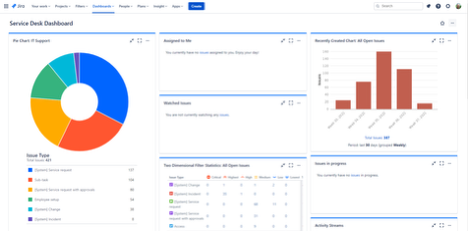
Atlassian Jira Service Management is an IT service management tool designed for IT teams to manage service requests, incidents, and changes. It is widely used by IT service desks and operations teams to enhance service delivery and collaboration.
Why it's a good Ivanti alternative: Atlassian Jira Service Management offers AI-driven IT solutions that improve operational efficiency and decision-making. Its automation capabilities reduce manual work, allowing your team to focus on strategic initiatives. The tool's machine learning features help prioritize and categorize service requests intelligently. Additionally, its intuitive interface makes it easy for teams to collaborate and manage service tasks.
Standout features & integrations:
Features include real-time reporting that provides insights into team performance and service efficiency. The platform also supports customizable workflows, enabling your team to tailor processes to specific needs. Moreover, it offers a self-service portal where users can submit and track their requests.
Integrations include Confluence, Slack, Microsoft Teams, Zoom, GitHub, Bitbucket, Okta, Google Workspace, AWS, and Azure.
Pros and Cons
Pros:
- Confluence integration provides knowledge base articles and self-service
- Powerful no-code automation engine adds efficiency
- Linked requests promote developer-IT collaboration
Cons:
- Limited customization of the portal UI
- Complex projects need careful modelling


Microsoft Intune is a cloud-based service focused on unified endpoint management, designed for IT administrators to manage devices and apps securely. It helps organizations control access and protect data across various devices.
Why it's a good Ivanti alternative: Microsoft Intune provides unified endpoint management capabilities that ensure secure access to corporate resources. Its mobile device management features allow your team to manage devices from a single platform. App protection policies help safeguard company data on both managed and unmanaged devices. Conditional access settings enhance security by allowing only compliant devices to access sensitive information.
Standout features & integrations:
Features include reporting tools that provide insights into device compliance and security. The platform supports policy-based management, enabling your team to enforce security policies across all devices. It also offers remote actions like wiping or locking devices to maintain security in case of loss or theft.
Integrations include Azure Active Directory, Microsoft 365, Microsoft Defender, Azure Information Protection, Microsoft Endpoint Manager, Windows Autopilot, Microsoft Graph API, Apple Business Manager, Google Workspace, and Okta.
Pros and Cons
Pros:
- Highly scalable as a cloud-native solution
- Granular policy control capabilities
- Deep integration with the Microsoft ecosystem
Cons:
- Less flexibility for non-Microsoft environments
- IT admins need to keep up with frequent Microsoft updates


BMC Helix is a cloud-based IT service management platform designed for IT teams to automate and optimize service delivery. It supports incident management, change management, and asset management for businesses of all sizes.
Why it's a good Ivanti alternative: BMC Helix offers AI-driven IT solutions that enhance operational efficiency. Its AI-powered capabilities automate routine tasks, allowing your team to focus on more strategic activities. Predictive analytics help identify and resolve potential issues before they escalate. The platform's intuitive interface makes managing complex IT environments more straightforward.
Standout features & integrations:
Features include a service desk that centralizes all service requests for efficient handling. The platform offers reporting tools to provide insights into service performance and identify areas for improvement. Additionally, it supports multi-cloud management, enabling your team to manage resources across different cloud environments.
Integrations include Salesforce, ServiceNow, Microsoft 365, AWS, Azure, Google Cloud, Slack, Jira, Remedy, and Cisco Webex.
Pros and Cons
Pros:
- Customizable dashboards track performance, SLA compliance, and efficiency
- A centralized service desk manages incidents, requests, problems, and changes
- AIOps uses machine learning to facilitate proactive issue management
Cons:
- Requires seasoned IT owners
- Complexity can lead to lengthy implementation timelines


ManageEngine is an IT management software platform designed for IT administrators and service managers. It helps manage IT operations, provide advanced security, and optimize service delivery.
Why it's a good Ivanti alternative: ManageEngine offers AI-driven IT solutions that enhance operational efficiency. Its AI capabilities automate routine tasks, providing your team with more time to focus on strategic initiatives. The platform's predictive analytics help anticipate and mitigate potential issues, reducing downtime. These features make ManageEngine an attractive option for teams seeking intelligent IT management.
Standout features & integrations:
Features include real-time monitoring to keep your IT environment secure, performance analytics to optimize system operations, and user-friendly dashboards for easy data visualization. These tools enable your team to quickly identify and resolve issues. The platform also offers customizable reporting to fit your specific needs.
Integrations include Microsoft 365, Azure Active Directory, G Suite, ServiceNow, Slack, Jira, Zendesk, Salesforce, AWS, and Google Cloud.
Pros and Cons
Pros:
- Mobile applications allow IT teams to manage infrastructure on the go
- Automation of IT workflows to reduce manual workload
- Suite of 120 products designed to offer integrated solutions across IT domains
Cons:
- User interface can be confusing to navigate without training
- Some users feel overwhelmed by the large number of tools


Zluri is a SaaS management platform designed for IT teams to simplify software access and usage. It helps manage software licenses, track usage, and ensure compliance with organizational policies.
Why it's a good Ivanti alternative: Zluri focuses on SaaS access management, providing visibility into all software used across your organization. Its features include automated onboarding and offboarding, helping your team manage user access efficiently. The platform offers detailed analytics to track software usage and identify cost-saving opportunities. These capabilities make Zluri a strong choice for organizations looking to optimize their SaaS environments.
Standout features & integrations:
Features include a centralized dashboard for managing all your SaaS applications, detailed reporting tools to track software usage and spending, and compliance management to ensure adherence to organizational policies. These features help your team gain control over software operations and reduce unnecessary expenses. The platform's intuitive interface makes it easy to navigate and manage software assets.
Integrations include Microsoft 365, Google Workspace, Slack, Salesforce, Zoom, Dropbox, Okta, GitHub, AWS, and Jira.
Pros and Cons
Pros:
- Tracks license utilization and suggests optimization opportunities
- Unified dashboard for holistic SaaS applications, users, spending and compliance status
- Discovers 100% of SaaS applications used across organizations
Cons:
- Reliant on the quality of system data
- Enterprise focus can make the platform relatively expensive for SMBs


Citrix Gateway is a secure remote access solution designed for IT teams to provide users with secure access to applications and data. It is used primarily by organizations needing to ensure secure connectivity for remote workforces.
Why it's a good Ivanti alternative: Citrix Gateway focuses on secure remote access, offering features that enhance security and connectivity. Its SSL VPN capabilities ensure secure connections to corporate networks, while its single sign-on feature simplifies user authentication. The platform also provides granular access controls, allowing your team to set precise permissions for different users. These features make Citrix Gateway a reliable choice for organizations prioritizing secure access.
Standout features & integrations:
Features include endpoint analysis, which checks devices for compliance before granting access. The platform also supports multi-factor authentication, adding an extra layer of security. Additionally, Citrix Gateway offers centralized management to simplify the administration of remote access policies.
Integrations include Citrix Workspace, Microsoft Azure, AWS, Google Cloud, VMware, Okta, Ping Identity, Salesforce, and Oracle.
Pros and Cons
Pros:
- Can be deployed in on-premises, virtual, or cloud-hosted instances
- Contextual authorization allows for granular access control policies
- Secure remote access through a firewall for all applications
Cons:
- The configuration interface and jargon can be unintuitive for users
- Administrators require specialized training and certification


NinjaOne is an endpoint management software designed for IT professionals and managed service providers. It helps monitor and manage devices, ensuring they operate efficiently and securely.
Why it's a good Ivanti alternative: NinjaOne offers specialized endpoint management capabilities that enhance device oversight. Its real-time monitoring tools allow your team to track device health and performance. Automated patch management keeps systems updated, reducing security vulnerabilities. The intuitive dashboard provides a clear view of all managed endpoints, making it easier to manage large numbers of devices.
Standout features & integrations:
Features include remote control capabilities that let you access and troubleshoot devices from anywhere. The software also offers automated alerting to notify you of potential issues before they escalate. Additionally, NinjaOne provides detailed reporting tools to help analyze system performance and identify trends.
Integrations include ConnectWise, Autotask, ServiceNow, Microsoft 365, Slack, QuickBooks, Zendesk, Freshdesk, Cisco Meraki, and Webroot.
Pros and Cons
Pros:
- Built-in Professional Services Automation (PSA) suite provides a helpdesk system
- Real-time, continuous monitoring and alerting
- Unified endpoint management for centralized visibility and control
Cons:
- Mobile app functionality lacks management feature depth
- Less mature network device management compared to dedicated tools
New Product Updates from NinjaOne
NinjaOne Launches Integrated Remote Access
NinjaOne has expanded its automated management platform by introducing NinjaOne Remote, a secure remote access solution for multiple operating systems. For more information, visit NinjaOne's official site.
Autres alternatives à Ivanti
Voici d’autres alternatives à Ivanti qui n’ont pas été retenues dans ma sélection principale, mais qui méritent quand même d’être étudiées :
- Atera
For MSPs needing all-in-one IT work
- Freshservice
For ITIL-aligned service desk
- Faveo Helpdesk
For open-source helpdesk
- Automox
For cloud-native patch management
- ConnectWise Automate
For remote monitoring
- SysAid
For ITSM with asset management
- Zendesk
For customer support teams
- Cisco Secure Client
For secure remote access
- EASYVISTA
For self-service IT support
- Baramundi Management Suite
For endpoint management
- Tanium
For real-time endpoint visibility
- SecOps Solution
For security operations
- FortiClient
For endpoint protection


Critères de sélection des alternatives à Ivanti
Pour choisir les meilleures alternatives à Ivanti à inclure dans cette liste, j’ai pris en compte les besoins courants et les problématiques fréquentes rencontrées lors de l’évaluation de logiciels de gestion informatique, comme la scalabilité et les capacités d’intégration. J’ai également utilisé la méthodologie suivante pour garantir une évaluation structurée et impartiale :
Fonctionnalité principale (25% de la note totale)
Pour figurer dans cette liste, chaque solution devait répondre à ces cas d’usage essentiels :
- Gestion des actifs
- Gestion des incidents
- Gestion des changements
- Gestion des demandes de service
- Contrôle d’accès des utilisateurs
Fonctionnalités distinctives additionnelles (25% de la note totale)
Pour affiner la sélection, j’ai aussi recherché des fonctionnalités uniques, telles que :
- Analyses pilotées par l’IA
- Suivi automatisé de la conformité
- Tableaux de bord personnalisables
- Gestion multi-cloud
- Supervision en temps réel
Facilité d’utilisation (10% de la note totale)
Pour évaluer la facilité d’utilisation de chaque solution, j’ai pris en compte les critères suivants :
- Interface intuitive
- Navigation aisée
- Courbe d’apprentissage faible
- Options de personnalisation
- Accessibilité sur appareils mobiles
Onboarding (10% de la note totale)
Pour évaluer l’expérience d’intégration sur chaque plateforme, j’ai considéré les points suivants :
- Disponibilité de vidéos de formation
- Visites interactives du produit
- Accès à des modèles
- Webinaires d'accompagnement
- Assistance par chatbot
Service client (10 % du score total)
Pour évaluer les services d'assistance client de chaque fournisseur de logiciel, j'ai pris en compte les éléments suivants :
- Disponibilité 24h/24, 7j/7
- Options de chat en direct
- Base de connaissances étendue
- Support par e-mail
- Forums communautaires
Rapport qualité-prix (10 % du score total)
Pour évaluer le rapport qualité-prix de chaque plateforme, j'ai pris en compte les éléments suivants :
- Tarification compétitive
- Offres flexibles
- Modèles de tarification transparents
- Réductions pour facturation annuelle
- Large éventail de fonctionnalités
Avis clients (10 % du score total)
Pour avoir une idée générale de la satisfaction client, j’ai pris en compte les aspects suivants lors de la lecture des avis clients :
- Notes globales de satisfaction
- Avantages et inconvénients fréquemment mentionnés
- Fréquence des mises à jour
- Réactivité aux retours
- Ancienneté d'utilisation du logiciel
Pourquoi chercher une alternative à Ivanti ?
Bien qu'Ivanti soit un bon choix de logiciel de gestion informatique, de nombreux utilisateurs recherchent des solutions alternatives pour différentes raisons. Vous pourriez chercher une alternative à Ivanti parce que…
- Vous avez besoin d'une meilleure évolutivité pour la croissance
- Votre équipe nécessite davantage d’options de personnalisation
- Vous recherchez une interface utilisateur améliorée
- Vous avez besoin d'un support pour la conformité à des normes sectorielles spécifiques
- Votre équipe est répartie sur plusieurs régions
- Vous souhaitez des options tarifaires plus abordables
Si vous vous reconnaissez dans l’une de ces situations, vous êtes au bon endroit. Ma liste propose plusieurs logiciels de gestion informatique mieux adaptés aux équipes rencontrant ces défis avec Ivanti et cherchant des solutions alternatives.
Fonctionnalités clés d'Ivanti
Voici quelques-unes des principales fonctionnalités d'Ivanti, pour vous aider à comparer ce que proposent les autres solutions alternatives :
- Gestion des services d’entreprise : Fournit des outils de gestion des services et des actifs informatiques, en exploitant l’IA générative pour améliorer l'efficacité.
- Gestion et sécurité des terminaux : Propose des solutions pour gérer et sécuriser les appareils, avec une gestion des correctifs basée sur le risque.
- Gestion de l’exposition : Inclut des services de gestion proactive des vulnérabilités avec capacités d’auto-guérison.
- Sécurité réseau : Offre des solutions d’accès sécurisé, telles que l’accès "zero trust" et le VPN, pour les applications et les données.
- Automatisation de la chaîne d'approvisionnement : Fournit des outils pour optimiser les opérations d’entrepôt et les flux de travail mobiles.
- Intégrations de workflows : Facilitent l’intégration fluide des flux de travail IT pour améliorer l’efficacité opérationnelle.
- IA générative pour l’ITSM : Utilise l’intelligence artificielle pour améliorer les processus de gestion des services informatiques et la prise de décision.
- Gestion des vulnérabilités basée sur le risque : Se concentre sur l’identification et la correction des vulnérabilités en fonction d’une évaluation des risques.
- Accès zero trust : Garantit un accès sécurisé et vérifié aux données et applications sensibles.
- Gestion de l’expérience numérique : Surveille et améliore l’expérience numérique des utilisateurs finaux sur l’ensemble des appareils.
Quelle est la prochaine étape :
Si vous êtes en train de rechercher un logiciel de gestion informatique, contactez gratuitement un conseiller SoftwareSelect pour des recommandations personnalisées.
Il vous suffit de remplir un formulaire puis d’avoir une brève discussion afin d’approfondir vos besoins spécifiques. Vous recevrez ensuite une liste restreinte de logiciels à examiner. Ils vous accompagneront même tout au long du processus d’achat, y compris lors des négociations tarifaires.