Meilleures alternatives à SolarWinds - Liste rapide
Je comprends l'importance de trouver une alternative solide à SolarWinds qui réponde aux besoins de mon équipe. Vous recherchez un outil qui ne se limite pas au simple suivi des performances réseau, mais qui propose des modules étendus, un excellent support API, et une compatibilité avec Microsoft. Vous recherchez un logiciel qui donne les moyens à l'équipe informatique de travailler plus sereinement.
Qu’est-ce que SolarWinds ?
SolarWinds est un outil de supervision informatique qui permet de surveiller les performances et l’état de santé de votre réseau, de vos serveurs et de votre infrastructure. Il est utilisé par des administrateurs IT, des ingénieurs réseaux et des MSP qui doivent détecter au plus tôt les problèmes et assurer la continuité des systèmes. Grâce à ses tableaux de bord de supervision, ses alertes et ses outils de reporting, il facilite l’identification des incidents, la gestion des ressources et la démonstration de la disponibilité aux parties prenantes. Globalement, SolarWinds offre à votre équipe la visibilité nécessaire pour anticiper les problèmes informatiques.
Pourquoi faire confiance à nos avis sur les logiciels
Nous testons et analysons des logiciels SaaS pour le développement depuis 2023. En tant qu'experts techniques, nous savons à quel point il est crucial et difficile de bien choisir son logiciel. Nous investissons dans une recherche approfondie afin d'aider notre audience à prendre de meilleures décisions lors de l'achat de logiciels.
Nous avons testé plus de 2 000 outils pour des cas d'usage SaaS variés et rédigé plus de 1 000 avis complets sur des logiciels. Découvrez comment nous restons transparents et consultez notre méthodologie d’évaluation des logiciels.
Table of Contents
Résumé des meilleures alternatives à SolarWinds
Ce tableau comparatif résume les informations tarifaires de mes principales alternatives à SolarWinds pour vous aider à trouver celle qui convient le mieux à votre budget et à vos besoins métier.
| Tool | Best For | Trial Info | Price | ||
|---|---|---|---|---|---|
| 1 | Best for easy WHD migration planning | Free trial available | $17/user/month | Website | |
| 2 | Best for integrated fault and performance management | 30-day free trial | Pricing upon request | Website | |
| 3 | Best with customizable dashboards | Free plan + 30-day free trial available | From $225/month (billed annually) | Website | |
| 4 | Best for automated network mapping | 14-day free trial available | Pricing upon request | Website | |
| 5 | Best for its scalable and extensible architecture | Free demo + free 60-day trial + free plan available | From $5,000/year | Website | |
| 6 | Best for intuitive setup with auto-discovery | Free trial available | From 2,149/year | Website | |
| 7 | Best for real user monitoring | Free trial + demo available | From $9/month (billed annually) | Website | |
| 8 | Best for log monitoring and tamper-proof retention | Free demo available | From $0.09/GB/month | Website | |
| 9 | Best for hybrid IT monitoring from the cloud | Free 15-day trial | From $16/hybrid unit/month | Website | |
| 10 | Best for comprehensive infrastructure monitoring | Free 30-day trial | From $20/user/month (billed annually) | Website |
-
Site24x7
Visit WebsiteThis is an aggregated rating for this tool including ratings from Crozdesk users and ratings from other sites.4.6 -
Docker
Visit WebsiteThis is an aggregated rating for this tool including ratings from Crozdesk users and ratings from other sites.4.6 -
Pulumi
Visit WebsiteThis is an aggregated rating for this tool including ratings from Crozdesk users and ratings from other sites.4.8
Aperçu des meilleures alternatives à SolarWinds
Retrouvez ci-dessous mes fiches détaillées sur les meilleures alternatives à SolarWinds sélectionnées dans ma liste. Mes avis offrent un aperçu des fonctionnalités clés, des avantages et inconvénients, des intégrations et des cas d’usage recommandés pour chaque outil, afin de vous guider vers le choix qui vous conviendra le mieux.
InvGate Service Management is a no-code IT service management platform built for mid-market and enterprise teams that want to automate service processes without relying on developers or external consultants. It helps teams manage service requests, enforce SLAs, and maintain operational control as service complexity grows, making it a flexible alternative to SolarWinds Web Help Desk for scaling ITSM practices.
Why I Picked InvGate Service Management:
I picked InvGate Service Management as an alternative to SolarWinds because it gives you more autonomy over how your service processes are designed and adjusted. Its visual workflow builder lets you configure workflows, SLAs, and service experiences without developer involvement, which can be especially useful as requirements evolve beyond basic use cases. I also liked that AI capabilities are built directly into the agent workflow, such as assisted categorization and contextual recommendations, without separate licensing tiers. For teams migrating from SolarWinds Web Help Desk, InvGate’s guided migration support can help reduce setup complexity and transition risk.
Standout features & integrations:
InvGate includes no-code workflow configuration, built-in SLA management, and a self-service portal designed to reduce repetitive requests. It also offers configurable analytics dashboards for operational visibility, along with native asset management and a CMDB included out of the box. AI tools are embedded directly into the agent experience to support daily ticket handling with human oversight. Integrations include Jira, ServiceNow, SolarWinds, Freshservice, ManageEngine, Cherwell, Zapier, Microsoft Teams, Azure AD, Active Directory, Office 365, and Lansweeper, supporting coexistence or gradual replacement of existing tools.
Pros and Cons
Pros:
- Integrates ITSM practices into HR service delivery
- Advanced ticket management optimizes response handling
- Self-service portal reduces direct HR inquiries
Cons:
- Primarily benefits organizations with significant IT and HR needs
- Annual billing requires upfront commitment and budgeting
New Product Updates from InvGate Service Management
InvGate Service Management Adds OCR and Voice Input to Chat
InvGate Service Management introduces support for OCR in chat, speech-to-text input, improved AI suggestions, and enhanced Microsoft Teams features. These updates improve communication, automate data capture, and streamline service workflows. For more information, visit InvGate Service Management's official site.
Best for integrated fault and performance management
ManageEngine OpManager, a versatile network management software, offers a comprehensive toolset for integrated fault and performance management. With its ability to swiftly identify, notify, and rectify network issues, it truly shines in ensuring smooth network operations.
Pros and Cons
Pros:
- Detailed network visualization and mapping
- Good scalability for growing networks
- Integrated fault and performance management
Cons:
- High cost for managing larger networks
- Initial setup may require technical expertise
- UI can feel cluttered due to numerous features
New Product Updates from ManageEngine OpManager
ManageEngine OpManager Vendor Templates and NCM XML Import
ManageEngine OpManager introduces enhanced vendor template integration and device template import for the NCM module using XML files. This update helps teams improve device classification and speed up configuration workflows. For more information, visit ManageEngine OpManager’s official site.
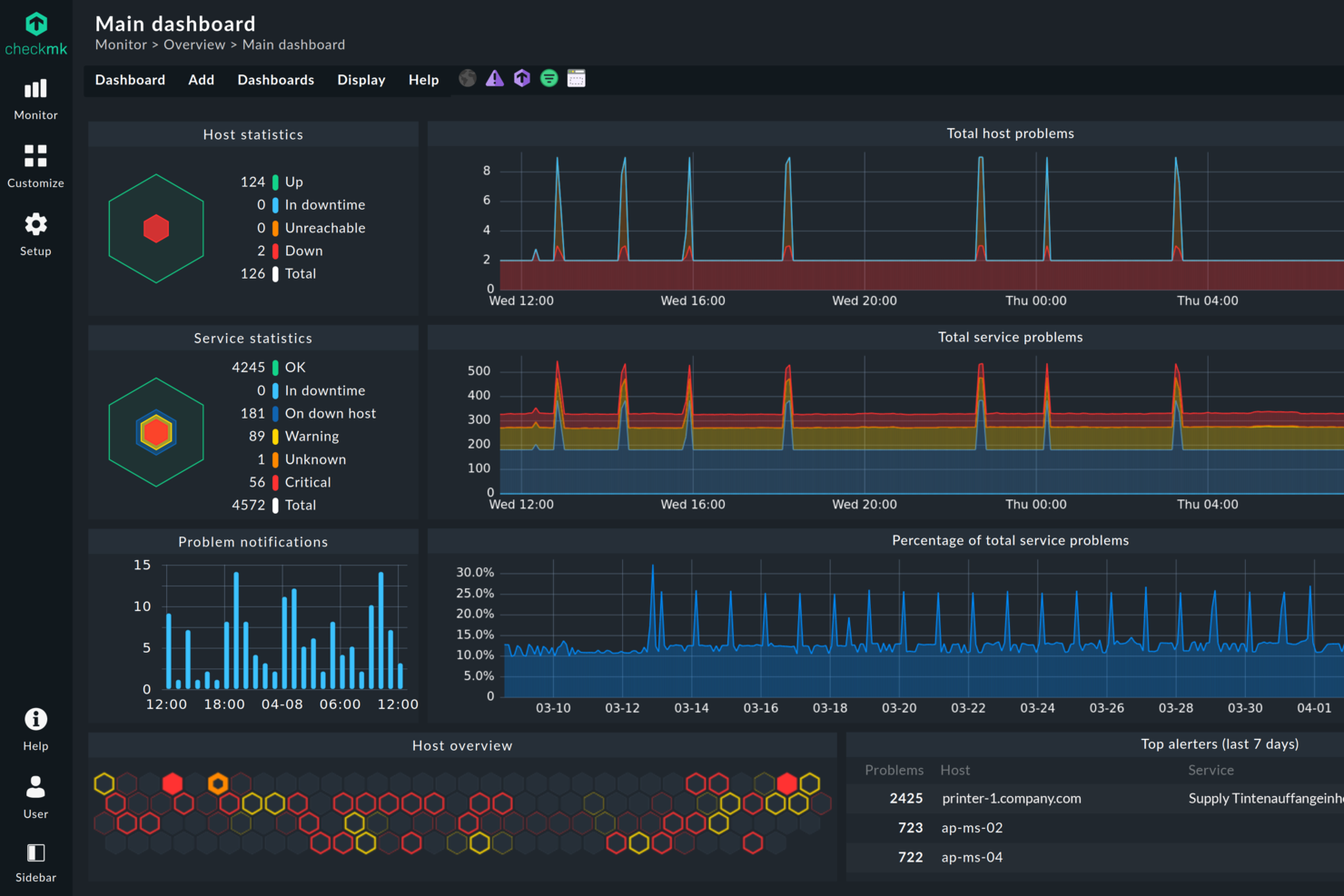
Checkmk is a monitoring platform designed for IT teams managing complex, hybrid, or large-scale infrastructures. It stands out for its flexibility and depth, offering broad compatibility with modern and legacy systems that many SolarWinds alternatives struggle to match. If you need unified visibility, automation, and granular control across diverse environments, Checkmk addresses these challenges head-on.
Who Is Checkmk Best For?
Checkmk is a strong fit for IT operations teams and system administrators who need to create tailored monitoring views for different departments or business units.
Why Checkmk Is a Good solarwinds alternative
If you need monitoring dashboards that adapt to your team’s unique workflows, Checkmk is a strong SolarWinds alternative. I like that you can build fully customizable dashboards, choosing exactly which metrics, graphs, and alerts to display for each user or team. The drag-and-drop dashboard editor and widget library make it easy to create views tailored to specific roles or business needs. This flexibility helps IT teams focus on the most relevant data without distraction from unnecessary information.
Checkmk Key Features
Some other features in Checkmk that stand out for IT teams include:
- Customizable dashboards: Build and tailor dashboards to display the most relevant metrics and alerts for your environment.
- Automated host discovery: Automatically detect and add new devices or services to your monitoring setup without manual intervention.
- Granular alerting rules: Set up detailed notification policies based on thresholds, dependencies, or business hours.
- Integrated log and event analysis: Collect, analyze, and correlate logs and events directly within the monitoring platform.
Checkmk Integrations
Integrations include AWS, Azure, Google Cloud Platform, Cisco, Dell, VMware vSphere, Kubernetes, Microsoft Windows, Oracle, and SAP.
Pros and Cons
Pros:
- Provides deep visibility into network and application layers
- Scales efficiently for large enterprise environments
- Highly granular alerting and notification options
- Offers over 2,000 native plug-ins
- Supports hybrid, cloud, and on-premises monitoring
Cons:
- Community support is less active than SolarWinds
- Fewer out-of-the-box integrations for SaaS tools
- Limited mobile app functionality
- Initial setup can be time-intensive
- Fewer built-in reporting templates than SolarWinds
Auvik is a cloud-based network monitoring platform built to help IT teams and managed service providers (MSPs) gain real-time visibility and control over network infrastructure. It offers tools for network discovery, mapping, monitoring, and performance analysis through a user-friendly interface that requires no additional hardware.
Why I Picked Auvik:
I picked Auvik for this list because it offers automated network mapping that helps you visualize device connections in real time, making it easier to pinpoint performance issues and track changes across complex environments. I also liked that Auvik can be deployed quickly, typically without additional hardware, and provides centralized monitoring for multi-site environments through a single dashboard with global alerting. These features make it especially well-suited for MSPs managing distributed networks.
Standout Features & Integrations:
Auvik’s features include performance monitoring with health metrics, customizable alerts for unusual activity, centralized syslog management, automatic configuration backups, and remote access for faster troubleshooting. For more advanced workflows, Auvik provides tools like configuration comparisons, command execution, and API access. As a cloud-based platform, Auvik ensures automatic updates and scalability without the need for extra infrastructure. Integrations include Slack, Microsoft Teams, ConnectWise Manage, ServiceNow, Autotask PSA, Freshdesk, BrightGauge, PagerDuty, and more.
Pros and Cons
Pros:
- Prompt alerting system for various issues
- Can back up and restore device configurations
- Detailed device inventory aids in lifecycle management
Cons:
- Setting up more advanced functionalities can be challenging
- Occasional delays in real-time data updates
New Product Updates from Auvik
Auvik Adds HA Pair Monitoring, Improves Ping Alerts, & Expands SaaS Integrations
Auvik introduces HA Pair Monitoring for Fortinet firewalls, improved Service Status alerts for Internal Ping Checks, and new SaaS integrations with ServiceNow, GitLab, ClickUp, and Notion. These updates improve network monitoring visibility and provide better insights into SaaS license usage. For more information, visit Auvik’s official site.
Icinga is an open-source network monitoring tool that offers flexible and scalable solutions to monitor network resources, notify users of outages, and provide data for reporting. It's known for its extensible architecture which makes it perfect for environments that need a customizable and scalable monitoring solution.
Pros and Cons
Pros:
- Open-source with enterprise-level support available
- Strong integration capabilities
- Highly scalable and extensible
Cons:
- Interface can feel outdated and less intuitive compared to competitors
- Documentation could be improved
- Requires technical knowledge for setup and customization
New Product Updates from Icinga
Icinga Introduces Contacts/Groups API
Icinga introduces the Contacts and Contact Groups REST API, enabling automated management of notification users and groups while keeping contact data consistent and synchronized across systems. For more information, visit Icinga's official site.
Paessler PRTG is a comprehensive network monitoring solution designed to provide real-time insights into the health and performance of IT infrastructures. With PRTG, IT teams can monitor a wide range of devices, including servers, switches, routers, and applications, through customizable sensors.
Why I Picked PRTG:
PRTG’s auto-discovery tool simplifies the initial setup by automatically detecting devices and setting up relevant sensors. This approach allows your IT team to start monitoring their network almost immediately, saving time and reducing the complexity of the implementation process.
Additionally, PRTG's all-in-one monitoring tool supports various protocols such as SNMP, WMI, Flow, and Ping, allowing it to track key metrics like bandwidth usage, uptime, CPU load, and more.
Standout features & integrations:
PRTG offers other comprehensive features, including flexible alerting, multiple user interfaces, and cluster failover solutions. It also has built-in reporting tools that allow for detailed insights into network performance over time, and a map feature for creating customized, visual representations of your entire network infrastructure, offering a clear and organized view of devices, metrics, and overall network health.
Pricing:
The pricing for PRTG starts from $2,149 for 500 aspects of your devices in your network (billed annually).
Pros and Cons
Pros:
- Rapid auto-discovery of network devices
- Intuitive setup and user-friendly interface
- Wide range of supported technologies for integration
Cons:
- No built-in ticketing system
- Advanced features may require technical expertise
- High cost for managing larger networks
New Product Updates from PRTG
PRTG Introduces Proxmox VE Node Performance Sensor
PRTG introduces the Proxmox VE Node Performance Sensor to monitor performance metrics and status of Proxmox VE host nodes. This update provides better visibility into virtualization infrastructure health and performance. For more information, visit PRTG’s official site.
Site24x7 is a cloud-based, AI-powered monitoring solution that helps you oversee your websites, servers, applications, and network infrastructure. It offers real-time insights into performance and availability, enabling you to detect and address issues promptly.
Why I Picked Site24x7:
One reason I like Site24x7 is its application performance monitoring (APM) capabilities. Site24x7's APM lets you monitor applications built on various platforms, including Java, .NET, PHP, and Node.js. This feature helps you identify and resolve performance bottlenecks in your applications, ensuring a smooth user experience. Another advantage of Site24x7 is its real user monitoring (RUM) feature. RUM provides insights into how actual users experience your website or application by analyzing metrics like page load times and user interactions.
Standout features & integrations:
Other features include synthetic web transaction monitoring, which allows you to record and simulate multi-step user interactions in a real browser to optimize critical user paths like login forms and shopping carts. Additionally, Site24x7 offers log management from the cloud, enabling you to collect, consolidate, and search application logs across servers and data centers for efficient troubleshooting.
Integrations include ServiceNow, PagerDuty, Jira, Microsoft Teams, Slack, Nagios, AWS, Azure, Google Cloud Platform, Docker, Jenkins, and Kubernetes.
Pros and Cons
Pros:
- Comprehensive monitoring for various systems
- Customizable dashboards and reports
- Offers real-time alerts across various channels
Cons:
- Alert overload may be overwhelming for users
- Complexity in initial setup for large environments
New Product Updates from Site24x7
Site24x7 Enhances Monitoring with AI-Powered Features
Site24x7 introduces new AI-powered capabilities to improve monitoring and troubleshooting. These updates help teams identify issues faster and gain insights more efficiently across their systems. For more information, visit Site24x7’s official site.
Logmanager is a powerful log management and Security Information and Event Management (SIEM) platform built to help IT teams improve observability, security, and compliance. As an alternative to SolarWinds, it provides an intuitive interface, flexible deployment, and more flexibility for log retention, making it a solid choice for organizations that want deep visibility without the complexity of legacy systems.
Why I Picked Logmanager:
I picked Logmanager because it gives you real-time visibility into your IT environment. Its live log monitoring means you can detect issues as they occur and act before they escalate into costly downtime. I also like how it supports more than 140 log sources out of the box, giving you unified insight across firewalls, servers, databases, and cloud platforms. For teams that need to stay compliant with standards like GDPR or ISO 27001, Logmanager’s automated reporting and retention policies make it easy to stay audit-ready without manual effort.
Logmanager standout features and integrations:
Logmanager’s predefined dashboards provide actionable insights into system health, network activity, and security alerts the moment you log in. Its no-code customization options let you adapt dashboards and alerts to your specific use cases without relying on developers. The platform’s compliance reporting and data retention policies also help organizations meet regulatory standards while maintaining performance efficiency. Integrations include Apache Tomcat/Web Server, Aruba ClearPass, Cisco ASA, DELL iDRAC, ESET Remote Administrator, Fortinet Products, Kaspersky Security Center, MySQL, NGINX, Microsoft 365, VMware, and Zyxel ZyWALL USG/VPN.
Pros and Cons
Pros:
- No-code customization
- Built-in parsers and compliance reporting tools
- Tamper-proof log storage
Cons:
- Interface could feel dated
- Setup may require learning curve
LogicMonitor is an automated SaaS-based infrastructure monitoring platform designed to help businesses monitor their hybrid IT environments. It provides an intuitive, cloud-based solution for monitoring and visualizing critical metrics, justifying its suitability for hybrid IT monitoring from the cloud.
Pros and Cons
Pros:
- Supports a wide range of integrations
- Provides a comprehensive view of hybrid IT environments
- Offers an automated, cloud-based platform for efficient monitoring
Cons:
- Some users have reported occasional lags in alert notifications
- Initial setup and customization might require technical expertise
- Can be pricey for smaller organizations
Nagios, a renowned player in the IT infrastructure monitoring space, offers a holistic view of your network environment. With its comprehensive feature set, it justifies its stance as the best solution for wide-ranging infrastructure oversight.
Pros and Cons
Pros:
- Extensive integration possibilities
- High level of customization
- Wide-ranging monitoring capability
Cons:
- Cost might be high for small businesses
- Interface could be more modern
- Steep learning curve for beginners
Autres logiciels alternatifs à SolarWinds
Voici d’autres alternatives à SolarWinds qui n’apparaissent pas dans ma sélection principale mais qui méritent néanmoins d’être examinées :
- Datadog
For cloud infrastructure monitoring and analytics
- Zabbix
For versatility in data collection methods
- Spiceworks
For free network monitoring and helpdesk solution
- ScienceLogic
For AI-based IT operations and service management
- Zenoss
For unified monitoring of large-scale environments
- Opsview Monitor
For business service monitoring and reporting
- Dynatrace
Good for AI-powered, full-stack observability
- New Relic
Good for real-time insights into application performance
- AppDynamics
Good for end-to-end business and application performance monitoring
- Sumo Logic
Good for cloud-native log management and analytics
- Prometheus
Good for monitoring and alerting in Kubernetes environments
- WhatsUp Gold
Good for network monitoring with visual interactive maps
- Grafana Cloud
Good for customizable data visualization and analytics
- SysAid
Good for combining IT service management and help desk needs
- Sematext
Good for combining monitoring and logging with real-user monitoring
- ConnectWise Automate
Good for automated IT management and remote monitoring
- Pandora FMS
Good for flexible, open-source monitoring of large environments
- Atera
For all-in-one RMM software for MSPs
- Elastic Stack (ELK Stack)
Good for powerful log analysis and search capabilities
Autres avis logiciels
- Logiciels de gestion des incidents
- Logiciels de support IT
- Outils de surveillance de base de données
Critères de sélection des alternatives à SolarWinds
Après avoir évalué de nombreux outils de supervision IT, il est clair que de nombreux facteurs entrent en jeu pour déterminer quelle plateforme est la plus adaptée.
Le logiciel idéal doit offrir une supervision approfondie, mais aussi une interface conviviale ainsi qu’un ensemble complet de fonctionnalités adaptées à des besoins spécifiques. J'ai personnellement testé chacun de ces outils et vérifié qu'ils respectent une série de critères que je considère comme essentiels pour choisir une solution de supervision informatique.
Fonctionnalités principales :
- Surveiller et gérer l’état de santé de l’infrastructure IT
- Analyser les performances applicatives et détecter les anomalies
- Fournir une vision en temps réel de la performance des systèmes
- Automatiser les alertes selon des conditions spécifiques
- Suivre et gérer les actifs informatiques de l’organisation
Fonctionnalités clés :
- Scalabilité : Capacité à gérer des volumes de travail croissants de manière efficace ou potentiel à s’agrandir pour accompagner la croissance.
- Intégration : Capacité de l’outil à s’intégrer à divers autres logiciels employés par l’entreprise.
- Personnalisation : L’outil doit proposer des options de personnalisation pour l’adapter aux besoins spécifiques de l’entreprise.
- Rapports complets : Des rapports détaillés mettant en lumière les principaux indicateurs de performance sont essentiels.
Facilité d’utilisation :
- Interface utilisateur intuitive : Les outils de supervision informatique doivent offrir une interface permettant une navigation et une utilisation faciles, même pour des utilisateurs non techniques. Un design épuré, avec des fonctionnalités bien organisées et faciles à trouver, améliore l’expérience utilisateur.
- Intégration rapide : L’outil doit offrir un processus d’installation aisé. Des guides, tutoriels ou un support client pour faciliter les premiers pas peuvent s’avérer extrêmement utiles.
- Support client fiable : Bénéficier d’une équipe de support réactive et compétente peut faire gagner beaucoup de temps, notamment lors de difficultés techniques ou lors de la configuration initiale.
- Accès à base de rôles : Dans la supervision informatique, différents niveaux d’accès peuvent être nécessaires selon les membres de l’équipe. Le logiciel doit permettre de gérer et configurer ces niveaux d’accès facilement.
Pourquoi chercher une alternative à SolarWinds ?
Bien que SolarWinds soit un bon choix d'outil de supervision informatique, il existe de nombreuses raisons pour lesquelles certains utilisateurs recherchent des solutions alternatives. Vous pourriez chercher une alternative à SolarWinds parce que…
- Vous souhaitez une interface utilisateur plus rapide et plus moderne.
- Vous n’avez pas besoin de toutes les fonctionnalités avancées pour les grandes entreprises.
- Vous recherchez une configuration et une mise en route plus simples.
- Vous préférez une tarification plus simple et transparente.
- Vous avez besoin d’un meilleur support pour les environnements cloud-native.
- Vous gérez une équipe plus restreinte ou moins d'endpoints.
Si l’une de ces situations vous concerne, vous êtes au bon endroit. Ma liste contient plusieurs outils de supervision informatique mieux adaptés aux équipes rencontrant des difficultés avec SolarWinds et à la recherche de solutions alternatives à SolarWinds ou New Relic.
Principales fonctionnalités de SolarWinds
Voici quelques-unes des principales fonctionnalités de SolarWinds afin que vous puissiez comparer ce que proposent les solutions alternatives :
- Supervision du cloud : Permet de visualiser vos services cloud en parallèle de vos systèmes sur site.
- Superviseur de performance réseau : Permet de détecter, diagnostiquer et résoudre les problèmes réseau.
- Supervision des serveurs et applications : Vous aide à suivre la santé des serveurs et les performances applicatives.
- Gestion de configuration : Permet de sauvegarder et de gérer la configuration de vos équipements réseau.
- Gestionnaire d’adresses IP : Aide votre équipe à suivre et gérer automatiquement les adresses IP.
- Analyseur de trafic NetFlow : Permet de savoir d’où vient et où va le trafic sur votre réseau.
- Gestionnaire de virtualisation : Contrôle et gère les machines virtuelles au sein de votre infrastructure.
- Analyseur de journaux : Aide à collecter et rechercher les logs pour un dépannage plus rapide.
- Système d’alertes : Envoie des alertes en temps réel si les performances chutent ou lorsque des incidents surviennent.
- Tableaux de bord personnalisables : Permet de créer des vues visuelles pour suivre les données les plus importantes.
Résumé
En conclusion, le choix de la meilleure alternative à SolarWinds nécessite une compréhension claire de vos besoins spécifiques et de leur adéquation avec les fonctionnalités offertes par les différentes solutions de supervision informatique.
- Considérez votre environnement : N'oubliez pas de prendre en compte les besoins spécifiques de votre infrastructure informatique. Que vous disposiez d'un environnement à petite échelle ou à grande échelle, d'une infrastructure hybride ou native dans le cloud, il existe un outil parfaitement adapté à vos exigences.
- Évaluez les fonctionnalités principales : Il est essentiel de se concentrer sur la capacité de l'outil à fournir des fonctionnalités robustes de surveillance, d'alerte et de reporting. Les opérations basées sur l'IA, l'analyse prédictive et les fonctionnalités de gestion des services pourraient considérablement améliorer l'efficacité de votre supervision informatique.
- Ne négligez pas l'ergonomie et la tarification : Un outil complexe avec une courbe d'apprentissage abrupte n'est peut-être pas le meilleur choix pour une petite équipe. Privilégiez des plateformes intuitives et conviviales qui correspondent à votre budget. Même si un outil offre des fonctionnalités avancées, il sera de peu d'intérêt s'il est difficile à utiliser. De plus, assurez-vous de choisir un outil avec une tarification transparente et flexible.
Choisir la bonne solution de supervision informatique peut grandement rationaliser vos opérations, améliorer la performance et, finalement, garantir des expériences plus fluides et plus fiables à vos utilisateurs finaux.
Qu'en pensez-vous ?
Alors que le paysage de la surveillance informatique continue d'évoluer, je suis toujours curieux de découvrir d'autres outils impressionnants. Si vous avez des suggestions concernant SolarWinds ou des alternatives à Nagios qui, selon vous, auraient dû figurer dans cette liste, n'hésitez pas à les partager. Vos idées et expériences sont précieuses pour moi et pour les autres lecteurs, et j'aimerais beaucoup avoir vos retours.