


Scalefusion Testbericht: Vorteile, Nachteile, Funktionen & Preise


Scalefusion is an IT service management solution that helps streamline mobile device management for organizations. It best serves industries like healthcare, logistics, and retail, where teams need to manage a diverse range of devices efficiently. Scalefusion offers a straightforward approach to managing IT assets, providing value by saving your team time and reducing complexity.
In this article, you'll find an overview of Scalefusion's features, pros and cons, best and worst use cases, and pricing. As a CTO, you'll appreciate insights that align with your goals of optimizing IT management and supporting your team's productivity.
Scalefusion Evaluation Summary

- From $2/device/month
- 14-day free trial
Why Trust Our Software Reviews
We’ve been testing and reviewing software since 2023. As tech leaders ourselves, we know how critical and difficult it is to make the right decision when selecting software.
We invest in deep research to help our audience make better software purchasing decisions. We’ve tested more than 2,000 tools for different tech use cases and written over 1,000 comprehensive software reviews. Learn how we stay transparent & our software review methodology.
Scalefusion Overview
pros
-
Onboarding is efficient, allowing your team to get started quickly.
-
The interface is user-friendly, making it simple for your team to navigate.
-
You can manage a wide range of devices with ease.
cons
-
Some users might find the customization options limited for their specific requirements.
-
Advanced integrations with other tools aren't as extensive as some competitors.
-
Customer support response times could be faster for your urgent needs.
-

Site24x7
Visit WebsiteThis is an aggregated rating for this tool including ratings from Crozdesk users and ratings from other sites.4.6 -
GitHub Actions
Visit WebsiteThis is an aggregated rating for this tool including ratings from Crozdesk users and ratings from other sites.4.8 -
Docker
Visit WebsiteThis is an aggregated rating for this tool including ratings from Crozdesk users and ratings from other sites.4.6





Our Review Methodology
How We Test & Score Tools
We’ve spent years building, refining, and improving our software testing and scoring system. The rubric is designed to capture the nuances of software selection and what makes a tool effective, focusing on critical aspects of the decision-making process.
Below, you can see exactly how our testing and scoring works across seven criteria. It allows us to provide an unbiased evaluation of the software based on core functionality, standout features, ease of use, onboarding, customer support, integrations, customer reviews, and value for money.
Core Functionality (25% of final scoring)
The starting point of our evaluation is always the core functionality of the tool. Does it have the basic features and functions that a user would expect to see? Are any of those core features locked to higher-tiered pricing plans? At its core, we expect a tool to stand up against the baseline capabilities of its competitors.
Standout Features (25% of final scoring)
Next, we evaluate uncommon standout features that go above and beyond the core functionality typically found in tools of its kind. A high score reflects specialized or unique features that make the product faster, more efficient, or offer additional value to the user.
We also evaluate how easy it is to integrate with other tools typically found in the tech stack to expand the functionality and utility of the software. Tools offering plentiful native integrations, 3rd party connections, and API access to build custom integrations score best.
Ease of Use (10% of final scoring)
We consider how quick and easy it is to execute the tasks defined in the core functionality using the tool. High scoring software is well designed, intuitive to use, offers mobile apps, provides templates, and makes relatively complex tasks seem simple.
Onboarding (10% of final scoring)
We know how important rapid team adoption is for a new platform, so we evaluate how easy it is to learn and use a tool with minimal training. We evaluate how quickly a team member can get set up and start using the tool with no experience. High scoring solutions indicate little or no support is required.
Customer Support (10% of final scoring)
We review how quick and easy it is to get unstuck and find help by phone, live chat, or knowledge base. Tools and companies that provide real-time support score best, while chatbots score worst.
Customer Reviews (10% of final scoring)
Beyond our own testing and evaluation, we consider the net promoter score from current and past customers. We review their likelihood, given the option, to choose the tool again for the core functionality. A high scoring software reflects a high net promoter score from current or past customers.
Value for Money (10% of final scoring)
Lastly, in consideration of all the other criteria, we review the average price of entry level plans against the core features and consider the value of the other evaluation criteria. Software that delivers more, for less, will score higher.
Core Features
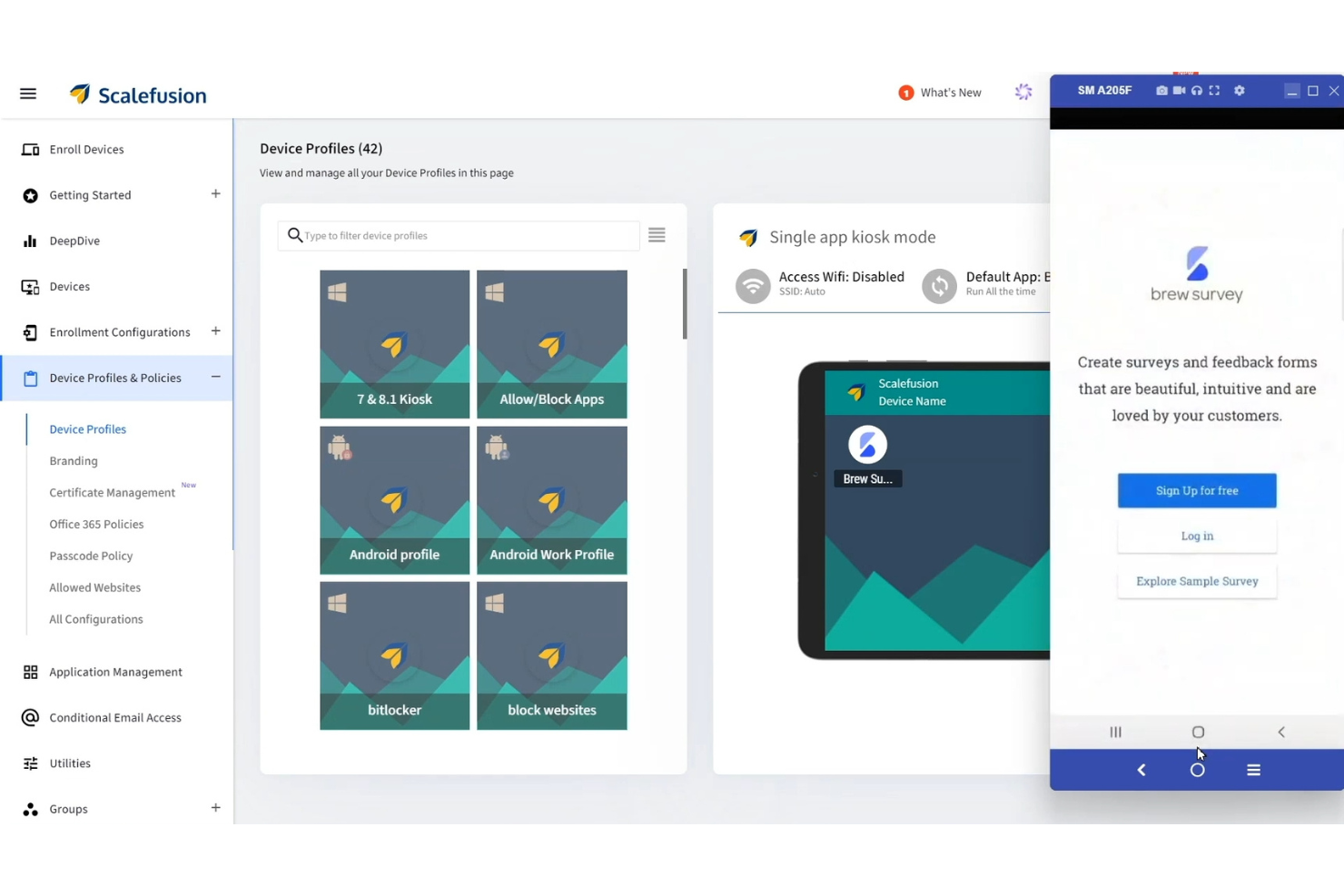
Device Management: You can easily manage a wide range of devices, from smartphones to tablets, ensuring your team stays connected and productive. Its intuitive dashboard lets you oversee all devices in one place, saving you time.
App Management: Scalefusion lets you control app installations and updates across all devices, helping your team maintain consistency. You can push apps directly to devices, ensuring everyone has the tools they need.
Kiosk Mode: This feature locks devices into specific apps or functions, ideal for retail or educational environments. It helps you reduce distractions and ensures devices are used as intended.
Security Policies: With Scalefusion, you can enforce security policies to protect your data and devices. It allows you to set password requirements and remotely lock or wipe devices if needed.
Content Management: You can distribute and manage content across devices, ensuring your team always has access to the latest information. This feature is perfect for businesses needing to share documents or media files securely.
Remote Troubleshooting: Scalefusion allows you to remotely access and troubleshoot devices, minimizing downtime for your team. You can quickly resolve issues without being physically present.

Ease of Use
Scalefusion stands out for its user-friendly interface, making it easy for your team to navigate and manage devices efficiently. The intuitive dashboard provides clear visibility and control, allowing you to oversee all devices without a steep learning curve. Users appreciate its straightforward setup and management processes, which save time and reduce complexity. Scalefusion's design focuses on simplicity, ensuring your team can quickly adapt and maintain productivity without getting bogged down in technical details.
New Product Updates from Scalefusion
Scalefusion Introduces Apple TV Management
Scalefusion has expanded its capabilities to include Apple TV device management, offering enhanced control and efficiency for IT teams. This update allows seamless integration and supervision of Apple TV from the Scalefusion dashboard, streamlining operations and boosting productivity. Highlights include:
- Single App Mode: Enhances focus and minimizes distractions by locking devices into a single application.
- Remote Wi-Fi Preconfiguration: Allows for immediate device connectivity right out of the box, saving time on setup.
- AirPlay Governance: Provides better control over AirPlay functions to ensure secure and authorized usage.
- Granular Device Policies: Offers precise policy settings that enhance device security and usability tailored to specific needs.
- OS Update Deferral Controls: Enables IT administrators to delay updates, ensuring compatibility and stability across managed devices.
Visit Scalefusion's official site for more details.
 for more details.
Scalefusion Introduces Programmable Custom Properties
Scalefusion introduces Programmable Custom Properties, allowing scripts to automatically update device and user metadata based on real-time conditions. These updates eliminate manual tagging, improve compliance accuracy, and strengthen governance across large IT environments. Highlights include:
- Dynamic Property Updates: Scripts automatically update custom properties based on live device conditions.
- Governed Automation: Script-managed properties can be restricted from manual or API edits to maintain data integrity.
- Custom Properties History Report: Tracks all automated changes for improved audit visibility.
Visit Scalefusion’s official site for more details.
Scalefusion Launches OneIdP LAPS
Scalefusion has unveiled OneIdP LAPS (Local Administrator Password Solution) to improve security management on Windows and macOS by automating local administrator password management, thus providing significant value to IT administrators. Here are the highlights:
- Automated Rotation: Rotates local admin passwords automatically after use or at defined intervals so credentials are never reused or left static.
- Secure Storage: Stores every local admin password in OneIdP with encrypted, centralized access to prevent unauthorized sharing or exposure.
- One-Time Access Codes: Lets IT share temporary, one-time-view codes so technicians can securely access admin passwords without revealing persistent credentials.
- Self-Healing Controls: Automatically restores deleted admin accounts, reassigns lost admin privileges, and resets manually changed passwords to maintain policy compliance.
- Detailed Audit History: Logs each password retrieval, rotation event, and admin action, giving IT complete traceability and support for compliance audits.
Visit Scalefusion's official site for more details.
Scalefusion Specs
- 2-Factor Authentication
- Cloud Deployment
- Dashboard
- Data Export
- Data Import
- External Integrations
- Inventory Tracking
- Multi-User
- Network Device Performance Monitoring
- Notifications
- Password & Access Management
- Remote Access
Alternatives to Scalefusion



Scalefusion FAQs
How does Scalefusion handle data security and compliance?
Can Scalefusion support a large number of devices?
What kind of support does Scalefusion offer for troubleshooting?
How customizable is Scalefusion for different business needs?
Does Scalefusion support remote device management?
How often does Scalefusion update its software?
Can Scalefusion assist in managing BYOD policies?
What training resources does Scalefusion provide for new users?
Wie geht es weiter?
Steigern Sie das Wachstum Ihres SaaS-Unternehmens und Ihre Führungskompetenzen. Abonnieren Sie unseren Newsletter für die neuesten Einblicke von CTOs und angehenden Tech-Führungskräften. Wir unterstützen Sie dabei, intelligenter zu skalieren und stärker zu führen – mit Leitfäden, Ressourcen und Strategien von Top-Experten!