
Die 18 besten Netzwerk-Einbruchserkennungssysteme im Jahr 2026

10 Beste Network-Intrusion-Detection-Systeme: Shortlist
Here's my pick of the 10 best software from the 18 tools reviewed.


Ein Network Intrusion Detection System (NIDS) hilft Sicherheitsteams, verdächtige Netzwerkaktivitäten zu erkennen und schnell zu reagieren, bevor sich ein Angriff ausbreiten kann.
Viele Teams suchen nach einem NIDS, wenn sie mit Herausforderungen wie zu vielen Fehlalarmen, eingeschränkter Sichtbarkeit des Ost-West-Verkehrs oder langsamer Erkennung fortschrittlicher Bedrohungen konfrontiert sind. Ohne klare und zeitnahe Warnmeldungen ist es leicht, echte Angriffe zu übersehen oder Zeit mit harmlosen Ereignissen zu verschwenden.
Ich habe mit Sicherheitsteams zusammengearbeitet, um NIDS-Lösungen einzuführen und zu optimieren, die einen echten Ausgleich zwischen Erkennung und Praxistauglichkeit schaffen und sich nahtlos in die Arbeitsabläufe einfügen, ohne zusätzliches Rauschen zu erzeugen. Dieser Leitfaden basiert auf diesen Erfahrungen und soll Ihnen helfen, ein System auszuwählen, das Ihre Abwehr stärkt und die Arbeitsweise Ihres Teams unterstützt.
Why Trust Our Software Reviews
Zusammenfassung der besten Network-Intrusion-Detection-Systeme
Diese Vergleichstabelle fasst Preisinformationen zu meinen Top-Auswahlen für Network Intrusion Detection Systeme zusammen, damit Sie die beste Lösung für Ihr Budget und Ihre geschäftlichen Anforderungen finden können.
| Tool | Best For | Trial Info | Price | ||
|---|---|---|---|---|---|
| 1 | Best for cloud-native cybersecurity protection | Free trial available | From $59.99/device (billed annually) | Website | |
| 2 | Best for broad-based cybersecurity protection | Not available | Pricing upon request | Website | |
| 3 | Best for threat intelligence and response | Not available | Pricing upon request | Website | |
| 4 | Best for firewall policy management | Free demo available | From $33/user/month | Website | |
| 5 | Best for DDoS attack mitigation | Not available | Pricing upon request | Website | |
| 6 | Best for AI-driven threat detection | Free 30-day trial | Pricing upon request | Website | |
| 7 | Best for open-source enthusiasts | Free demo available | From $29.99/year (billed annually) | Website | |
| 8 | Best for unified security management | Not available | Open source project and available for free | Website | |
| 9 | Best for automated real-time attack detection | Free demo available | Pricing upon request | Website | |
| 10 | Best for comprehensive network analysis | Free plan available | From $9/user/month (billed annually) | Website |
-

Site24x7
Visit WebsiteThis is an aggregated rating for this tool including ratings from Crozdesk users and ratings from other sites.4.6 -
Docker
Visit WebsiteThis is an aggregated rating for this tool including ratings from Crozdesk users and ratings from other sites.4.6 -
Pulumi
Visit WebsiteThis is an aggregated rating for this tool including ratings from Crozdesk users and ratings from other sites.4.8





Bewertungen der besten Network-Intrusion-Detection-Systeme
Im Folgenden finden Sie meine ausführlichen Zusammenfassungen der besten Network Intrusion Detection Systeme, die es auf meine Shortlist geschafft haben. Meine Bewertungen bieten einen detaillierten Einblick in die wichtigsten Funktionen, Vor- & Nachteile, Integrationen und idealen Anwendungsfälle jedes Tools, um Ihnen die Auswahl zu erleichtern.


CrowdStrike Falcon is a cybersecurity platform designed to provide comprehensive cloud-native protection. With the ability to safeguard cloud-based infrastructures from various cyber threats, CrowdStrike Falcon is the ideal choice for organizations prioritizing robust, cloud-native cybersecurity defenses.
Why I Picked CrowdStrike Falcon:
I selected CrowdStrike Falcon because it demonstrates a strong focus on cloud-native protection. The tool's ability to leverage the power of AI to detect and respond to threats in real-time places it in a unique position compared to other cybersecurity solutions. Hence, it is my determined opinion that CrowdStrike Falcon is the "Best for..." cloud-native cybersecurity protection.
Standout features and integrations:
Among the most significant features of CrowdStrike Falcon are its artificial intelligence-based threat detection, real-time threat response, and comprehensive visibility across cloud networks. It also boasts a cloud-based architecture, making it scalable and easy to deploy. In terms of integrations, CrowdStrike Falcon can connect with a variety of platforms and tools, including major cloud providers like AWS, GCP, and Azure, as well as SIEM solutions and IT operations tools.
Pros and Cons
Pros:
- Integrates with a wide variety of platforms and tools
- AI-powered real-time threat detection and response
- Comprehensive cloud-native protection
Cons:
- May require advanced technical knowledge for effective use
- Requires annual commitment for pricing
- Pricing can be high for small to mid-size organizations


Symantec Network Security, a product by Broadcom, delivers a comprehensive set of cybersecurity solutions that secure the entirety of an enterprise's network. It offers a holistic approach to network security, making it optimal for organizations seeking broad-based cybersecurity protection.
Why I Picked Symantec Network Security:
During my evaluation, Symantec Network Security stood out due to its expansive, all-encompassing approach to cybersecurity. Unlike other solutions that may focus on specific aspects of security, Symantec provides a wide-ranging suite of tools for robust protection. With this comprehensive perspective in mind, I determined that Symantec Network Security is "Best for..." broad-based cybersecurity protection.
Standout features and integrations:
Symantec Network Security offers a broad array of features, including intrusion prevention, web filtering, and malware analysis. It's known for its integration capabilities with a wide variety of systems, enabling businesses to protect their existing infrastructure without major changes.
Pros and Cons
Pros:
- Strong focus on both detection and prevention of threats
- Seamless integration with a variety of systems
- Offers a comprehensive set of cybersecurity solutions
Cons:
- Integration with non-Broadcom products may require additional configuration
- May be overly complex for smaller organizations
- No public pricing information available


TippingPoint is a network security solution that focuses on providing a proactive approach to threat intelligence and response. With its advanced threat protection system, TippingPoint can identify, analyze, and react to potential threats in real time, making it an excellent choice for organizations prioritizing threat intelligence and response.
Why I Picked TippingPoint:
In my selection process, I was impressed by TippingPoint's robust capabilities in threat intelligence and response. Its proactive approach and real-time analysis stand out in the realm of network security. Considering these aspects, I firmly believe TippingPoint is the "Best for..." threat intelligence and response.
Standout Features and Integrations:
TippingPoint offers robust features like the Threat Protection System and the Digital Vaccine service for real-time threat intelligence. It integrates well with other security products from TrendMicro, providing an interconnected defense system.
Pros and Cons
Pros:
- Real-time threat analysis and protection
- Integrates well with other TrendMicro products
- Proactive approach to threat intelligence and response
Cons:
- Lack of integrations with non-TrendMicro products
- Could have a steep learning curve for beginners
- Pricing information isn't publicly available

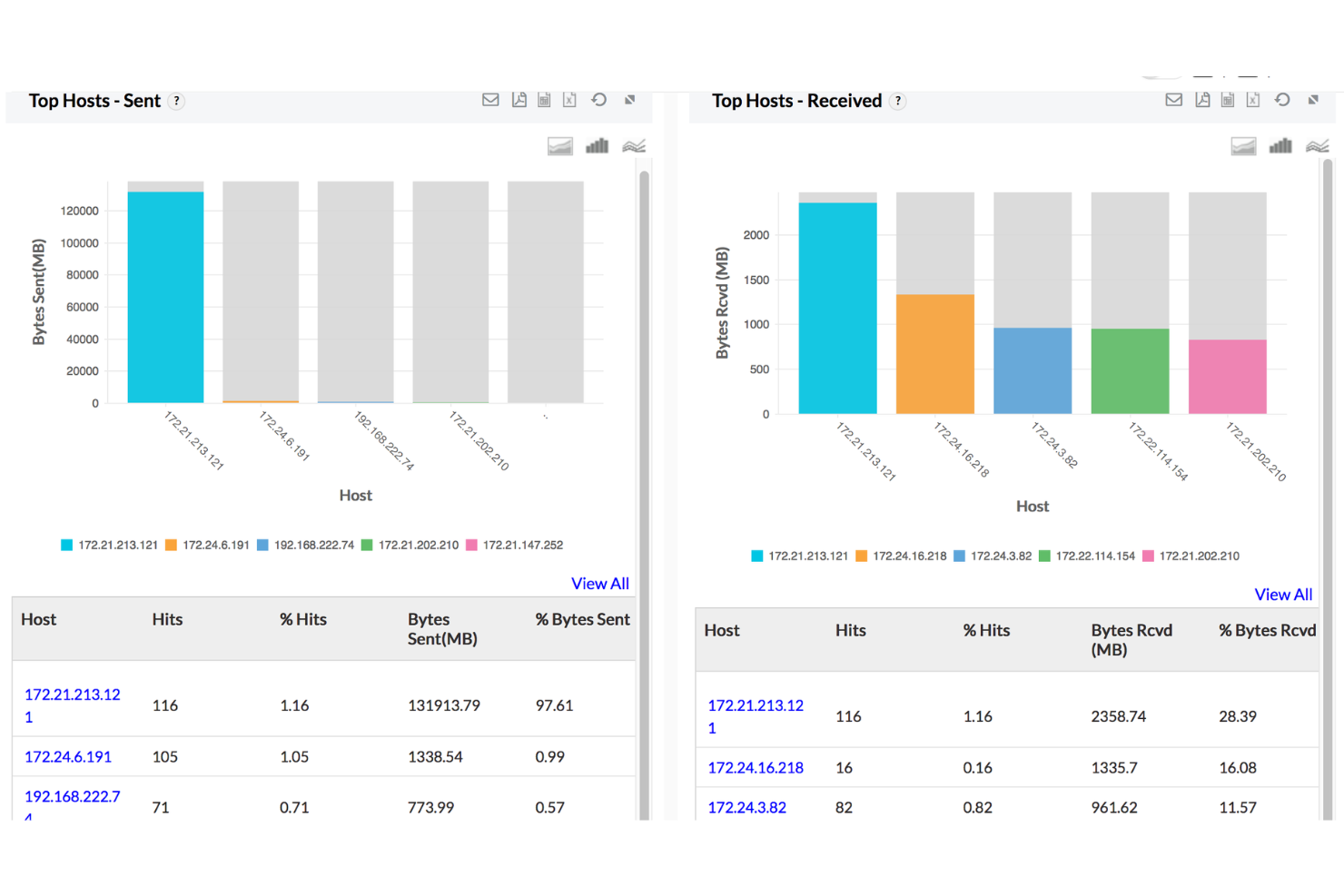
ManageEngine Firewall Analyzer is a firewall log management tool that helps you audit rules, monitor VPN and proxy activity, and run compliance checks—all without needing extra hardware. While it’s not a traditional intrusion detection system (NIDS), it gives you visibility into traffic behaviour and rule usage that can help you spot suspicious patterns and tighten your firewall configurations accordingly.
Why I Picked ManageEngine Firewall Analyzer:
I picked this tool for teams that want deeper insight into how their firewall policies actually function. If you're tasked with managing a multi-vendor firewall setup and need to make sure outdated or overly permissive rules don’t slip through, this tool gives you the visibility to do just that. It’s also helpful if you’re under pressure to produce compliance reports or track changes across multiple devices. Just keep in mind: while it supports real-time alerts for config changes and usage trends, it doesn't analyze raw network packets the way a NIDS does.
Standout features & integrations:
Firewall Analyzer lets you group internet activity by user category (like streaming or file sharing), flagging higher-risk behaviour for review. You can drill into VPN session logs by user or group and get bandwidth data for proxies too. For audits, it generates reports based on standards like PCI-DSS and ISO 27001. It integrates with other ManageEngine tools like Log360, Endpoint Central, Patch Manager Plus, and M365 Security Plus, giving you a broader security stack if needed.
Pros and Cons
Pros:
- Provides detailed insights into firewall traffic and user activity
- VPN tracking and bandwidth management
- Real-time monitoring capabilities help identify unusual traffic patterns
Cons:
- Requires regular updates and maintenance
- Slower patch responses for third-party software vulnerabilities


Radware DefensePro is a renowned cybersecurity solution that specializes in mitigating Distributed Denial of Service (DDoS) attacks. With its focus on ensuring uninterrupted service availability even under severe DDoS attacks, it earns its place as an optimal choice for organizations seeking dedicated DDoS protection.
Why I Picked Radware DefensePro:
I selected Radware DefensePro for its dedicated and robust approach to combating DDoS attacks. It has the ability to detect and mitigate multi-vector DDoS attacks in real time, which makes it distinct in the cybersecurity landscape. Therefore, based on my judgment, Radware DefensePro is the "Best for..." organization looking to ensure service availability during DDoS attacks.
Standout features and integrations:
Key features of Radware DefensePro include real-time DDoS attack detection, multi-layered protection, and machine-learning-powered threat analysis. The system’s ability to protect against a wide variety of attacks, from volumetric to encrypted attacks, is impressive. As for integrations, Radware DefensePro can be incorporated into a broader Radware security ecosystem, interfacing with tools such as Radware's Alteon and AppWall for a comprehensive security setup.
Pros and Cons
Pros:
- Can integrate with other Radware security tools for a holistic data security approach
- Real-time detection and mitigation of attacks
- Dedicated protection against multi-vector DDoS attacks
Cons:
- Its comprehensive features may present a steep learning curve for users
- Could be over-specialized for organizations seeking a more general security solution
- Pricing information is not transparently provided


Darktrace delivers enterprise-wide cyber defense through AI technology and machine learning. Its focus on providing organizations with self-learning AI allows for the detection of unusual network behavior and emerging threats, making it an ideal choice for proactive and AI-driven threat detection.
Why I Picked Darktrace:
In selecting Darktrace for this list, I considered its unique approach to threat detection, leveraging self-learning AI that adapts and learns from your network behavior. This autonomous response technology allows it to react to threats in seconds, making it a stand-out choice. In my opinion, Darktrace is "Best for..." AI-driven threat detection due to this focus on machine learning and quick response.
Standout Features and Integrations:
Darktrace's key features include its Enterprise Immune System, which learns normal 'patterns of life' to detect deviations indicative of a threat, and Darktrace Antigena, an AI response solution that reacts to in-progress cyber threats. Regarding integrations, Darktrace can work alongside your existing security tools, enhancing your defenses by integrating its AI-powered insight into other parts of your security ecosystem.
Pros and Cons
Pros:
- Can integrate with existing security tools
- Autonomous response technology reacts to threats in real-time
- Leverages self-learning AI for adaptive threat detection
Cons:
- Could be overkill for smaller organizations
- May have a steep learning curve for non-technical users
- Pricing isn't transparent


Snort is a robust open-source network intrusion detection system that inspects network traffic in real-time to detect potential threats. As an open-source tool, Snort offers flexible, customizable features that cater well to tech-savvy users who prefer hands-on control over their network security.
Why I Picked Snort:
I chose Snort because of its rich heritage and strong community support, making it a tried-and-true solution in the realm of open-source network security. Its openness means users have the freedom to tweak the system as they see fit, providing a level of customization that is hard to match. That's why I believe it is best for open-source enthusiasts who appreciate control and flexibility.
Standout Features and Integrations:
Snort boasts a rich array of features, including real-time traffic analysis and packet logging. It utilizes a variety of detection methods, such as signature, anomaly-based detection, and policy-based techniques, to provide comprehensive security. As for integrations, Snort benefits from its open-source nature, boasting compatibility with a wide range of other security tools. Its flexibility allows it to work well with systems like Security Onion and various SIEM systems for enhanced threat detection and response.
Pros and Cons
Pros:
- Comprehensive detection methods
- High level of customization
- Strong community support
Cons:
- Up-to-date rule sets come at a cost
- Requires manual setup and configuration
- Steep learning curve for newcomers

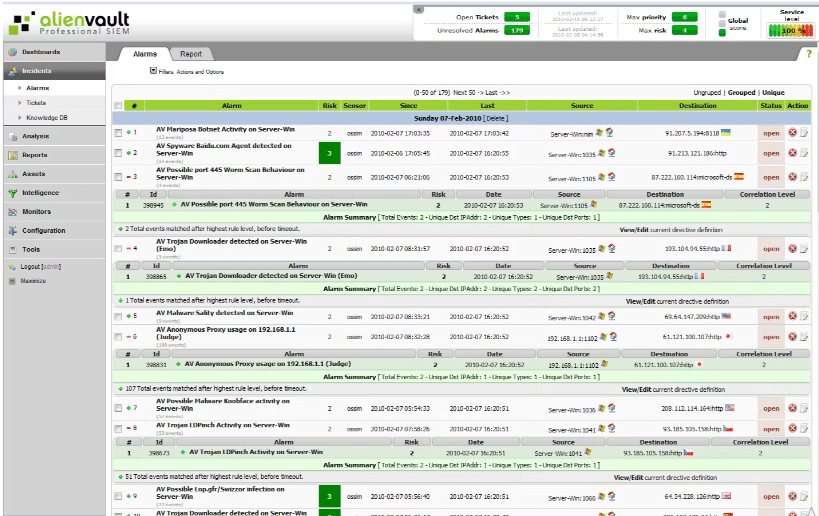
AlienVault OSSIM is an open-source security information and event management (SIEM) system that combines network visibility, log management, intrusion detection, and compliance into one unified platform. It's perfect for those seeking a centralized security platform to manage various security tasks simultaneously.
Why I Picked AlienVault OSSIM:
AlienVault OSSIM made my list because of its ability to merge diverse security technologies into a single, unified platform. It sets itself apart with a broad range of integrated security functionalities, including asset discovery, vulnerability assessment, and intrusion detection. Thus, it's best for organizations in need of unified security management.
Standout Features and Integrations:
AlienVault OSSIM stands out with its features, such as asset discovery, vulnerability assessment, and behavioral monitoring. Its integrated threat intelligence from AlienVault Labs and the AlienVault Open Threat Exchange (OTX) provides real-time information on emerging threats. As for integrations, it allows you to centralize data from existing security tools for better visibility and control.
Pros and Cons
Pros:
- Centralizes data from multiple sources for better visibility
- Provides real-time threat intelligence
- Integrates multiple security functionalities into a single platform
Cons:
- Commercial support costs extra
- Some advanced features only available in the paid version
- May require technical expertise to fully utilize


Vectra AI is a network detection and response (NDR) solution that harnesses artificial intelligence to identify and combat threats in real-time. Given its emphasis on automation and immediate threat identification, it stands as a prime choice for organizations seeking effective real-time attack detection.
Why I Picked Vectra AI:
I chose Vectra AI due to its strong focus on real-time, automated threat detection. The tool applies AI to detect anomalous network behavior promptly and automatically, which sets it apart in the field of network security tools. Thus, in my opinion, Vectra AI is "Best for..." organizations that prioritize swift, automated detection of potential threats.
Standout features and integrations:
Vectra AI's standout features include its real-time threat detection, AI-driven threat hunting, and its capability for automated response. It provides network-based detection, enriches security incidents with unique context, and offers robust reporting.
Importantly, Vectra AI integrates well with security information and event management (SIEM) solutions like Splunk, QRadar, and Chronicle, as well as endpoint detection and response (EDR) systems such as Crowdstrike and Carbon Black.
Pros and Cons
Pros:
- Provides valuable integrations with SIEM and EDR solutions
- Utilizes AI for efficient threat hunting and response
- Robust real-time threat detection
Cons:
- Its comprehensive functionality may be overwhelming for small organizations
- The tool's high level of automation might limit manual control
- Pricing is not directly disclosed, which can be unclear for potential customers


Zeek, formerly known as Bro, is an open-source network intrusion detection system that provides a high-powered platform for network traffic analysis. Its ability to transform raw network traffic into high-fidelity logs, files, and custom insights makes it an excellent choice for those looking for an in-depth understanding of their network.
Why I Picked Zeek:
When I was selecting tools, Zeek caught my eye due to its unique focus on transforming network traffic data into comprehensive, actionable information. This thorough analysis is the cornerstone of Zeek's capability, providing users with rich insights about their networks that many other NIDS don't offer. Therefore, I deem Zeek as best for comprehensive network analysis, given its superior data transformation capabilities.
Standout Features and Integrations:
Zeek's script interpreter is one of its most distinguishing features. It allows users to write scripts that guide the analysis of network traffic, providing unparalleled control over the process. Additionally, Zeek offers file extraction capabilities, further enhancing its analysis. As an open-source platform, Zeek can integrate with a variety of other tools. Most notably, it often pairs with ELK Stack for log management, enhancing its capabilities for thorough network analysis.
Pros and Cons
Pros:
- Extracts files from network traffic for in-depth review
- High flexibility through its scripting language
- Rich, comprehensive network traffic analysis
Cons:
- Commercial support and training come at an additional cost
- No built-in GUI, relies on third-party tools
- Requires technical expertise to use effectively
Weitere Network-Intrusion-Detection-System-Tools
Hier sind einige zusätzliche Optionen für Network Intrusion Detection Systeme, die es nicht auf meine Shortlist geschafft haben, aber dennoch einen Blick wert sind:
- Corelight
For enterprises seeking scalability
- Security Onion
For integrated defense toolkit
- RSA NetWitness
For forensic investigation capabilities
- Cynet 360
Good for advanced threat detection and response
- PRTG Network Monitor
Good for comprehensive network monitoring and fault detection
- Inspection Support Network
Good for business management in inspection industries
- Network Detective Pro
Good for network risk assessment and management
- VM-Ware NXS
Good for multi-cloud networking and security


Auswahlkriterien
Bei der Auswahl des besten Network Intrusion Detection Systems für diese Liste habe ich gängige Bedürfnisse und Schmerzpunkte von Käufern wie Skalierbarkeit und Integration berücksichtigt. Zudem habe ich nach folgendem Bewertungsschema gearbeitet, um die Auswahl strukturiert und fair zu gestalten:
Kernfunktionen (25% der Gesamtwertung)
Um in diese Liste aufgenommen zu werden, musste jedes System folgende Anwendungsfälle abdecken:
- Unbefugten Zugriff erkennen
- Netzwerkverkehr überwachen
- Warnen bei verdächtigen Aktivitäten
- Sicherheitsvorfälle protokollieren und berichten
- Malware-Bedrohungen identifizieren
Besondere Zusatzfunktionen (25% der Gesamtwertung)
Um die Auswahl weiter einzugrenzen, habe ich nach einzigartigen Merkmalen gesucht, wie zum Beispiel:
- KI-gestützte Bedrohungsanalyse
- Integration mit externen Sicherheitswerkzeugen
- Echtzeit-Datenvisualisierung
- Anpassbare Erkennungsregeln
- Cloudbasierte Bereitstellungsoptionen
Benutzerfreundlichkeit (10% der Gesamtwertung)
Um die Benutzerfreundlichkeit jedes Systems einzuschätzen, habe ich Folgendes betrachtet:
- Intuitive Benutzeroberfläche
- Einfache Navigation
- Anpassbare Dashboards
- Responsives Design für mobilen Zugriff
- Klare und verständliche Warnmeldungen
Onboarding (10 % der Gesamtbewertung)
Um das Onboarding-Erlebnis jeder Plattform zu bewerten, habe ich Folgendes berücksichtigt:
- Verfügbarkeit von Schulungsvideos
- Interaktive Produkttouren
- Umfassende Benutzerhandbücher
- Zugang zu Live-Webinaren
- Chat-Support auf Abruf
Kundensupport (10 % der Gesamtbewertung)
Um die Kundensupport-Dienste jedes Softwareanbieters zu bewerten, habe ich Folgendes berücksichtigt:
- 24/7 Erreichbarkeit
- Multikanal-Support-Optionen
- Persönliche Ansprechpartner
- Reaktionszeit auf Anfragen
- Zugang zu einer Wissensdatenbank
Preis-Leistungs-Verhältnis (10 % der Gesamtbewertung)
Um das Preis-Leistungs-Verhältnis jeder Plattform zu bewerten, habe ich Folgendes berücksichtigt:
- Transparente Preisgestaltung
- Gestaffelte Preismodelle
- Kosten im Verhältnis zum Funktionsumfang
- Rabatte für Langzeitverträge
- Vergleich mit Branchenstandards
Kundenbewertungen (10 % der Gesamtbewertung)
Um einen Gesamteindruck der Kundenzufriedenheit zu gewinnen, habe ich beim Lesen von Kundenrezensionen auf Folgendes geachtet:
- Allgemeine Nutzerzufriedenheit
- Häufigkeit von Aktualisierungen und Verbesserungen
- Integrationsfreundlichkeit mit bestehenden Systemen
- Feedback zu Erfahrungen mit dem Kundenservice
- Berichteter ROI und Kosteneffizienz
Wie wähle ich ein Network Intrusion Detection System aus?
Es ist leicht, sich in langen Funktionslisten und komplexen Preisstrukturen zu verlieren. Damit Sie den Überblick behalten, während Sie Ihre individuelle Softwareauswahl treffen, finden Sie hier eine Checkliste wichtiger Faktoren:
| Faktor | Worauf achten |
|---|---|
| Skalierbarkeit | Kann das Tool mit Ihrem Unternehmen mitwachsen? Überlegen Sie, welche Anforderungen in Zukunft entstehen und ob das System mehr Netzwerkverkehr ohne Leistungseinbußen bewältigen kann. |
| Integrationen | Überprüfen Sie, ob es sich mit Ihren bestehenden Sicherheitstools verbinden lässt. Eine nahtlose Integration spart Zeit und verringert Fehler. |
| Anpassbarkeit | Können Sie das System an Ihre speziellen Sicherheitsrichtlinien und Arbeitsabläufe anpassen? Flexibilität ist entscheidend für individuelle Geschäftsanforderungen. |
| Benutzerfreundlichkeit | Ist die Bedienoberfläche für Ihr Team intuitiv? Ein kompliziertes System kann Reaktionszeiten verlangsamen und Nutzer frustrieren. |
| Implementierung und Onboarding | Wie lange dauert es, bis Sie startklar sind? Berücksichtigen Sie die Lernkurve und den Aufwand für einen reibungslosen Übergang. |
| Kosten | Prüfen Sie die Preisstruktur. Gibt es versteckte Gebühren oder Zusatzkosten für weitere Funktionen? Stellen Sie sicher, dass das Tool zu Ihrem Budget passt. |
| Sicherheitsmaßnahmen | Bietet es starke Verschlüsselung und regelmäßige Sicherheitsupdates? Achten Sie darauf, dass das System Ihre Sicherheitsanforderungen erfüllt und sensible Daten schützt. |
| Compliance-Anforderungen | Erfüllt es branchenspezifische Vorschriften wie GDPR oder HIPAA? Nicht-Einhaltung kann zu Bußgeldern und rechtlichen Problemen führen. |
Was sind Network Intrusion Detection Systeme?
Network Intrusion Detection Systeme sind Software-Tools, die den Netzwerkverkehr überwachen und bei verdächtigen oder schädlichen Aktivitäten Alarm schlagen. Sie werden von Sicherheitsanalysten, IT-Administratoren und Netzwerkteams genutzt, die Bedrohungen frühzeitig erkennen und Daten schützen müssen. Funktionen wie Paketinspektion, Signaturabgleich und Protokollierung von Warnmeldungen helfen dabei, ungewöhnliches Verhalten zu erkennen, Fehlalarme zu reduzieren und den Teams einen klaren Überblick über die Netzwerkaktivitäten zu geben. Diese Tools unterstützen dabei, Bedrohungen proaktiv zu erkennen, ohne dass Teams mühsam den gesamten Netzwerkverkehr manuell sichten müssen.
Funktionen
Achten Sie bei der Auswahl eines Network Intrusion Detection Systems auf folgende Schlüsselfunktionen:
- Echtzeitüberwachung: Überwacht kontinuierlich den Netzwerkverkehr, um verdächtige Aktivitäten sofort zu erkennen und zu melden.
- Individuell anpassbare Benachrichtigungen: Ermöglicht das Festlegen spezifischer Bedingungen für Benachrichtigungen, damit Sie über die wichtigsten Bedrohungen informiert werden.
- Integrationsfähigkeiten: Verbindet sich nahtlos mit bestehenden Sicherheitstools, um den Netzwerkschutz insgesamt zu verbessern.
- Bedrohungsintelligenz: Nutzt Daten aus vergangenen Vorfällen, um neue Bedrohungen effektiver zu erkennen und darauf zu reagieren.
- Benutzerfreundliche Oberfläche: Bietet ein intuitives Design, das es Teams erleichtert, sich zurechtzufinden und Sicherheitsaufgaben zu verwalten.
- Skalierbarkeit: Passt sich wachsenden Netzwerk-Anforderungen an und sorgt dafür, dass die Leistung mit dem Wachstum Ihres Unternehmens konstant bleibt.
- Protokoll- und Berichtserstellung: Stellt detaillierte Aufzeichnungen über erkannte Vorfälle bereit, was die Analyse und Einhaltung von Vorschriften erleichtert.
- Individuell anpassbare Erkennungsregeln: Ermöglichen die Anpassung von Erkennungsprotokollen an spezifische Sicherheitsrichtlinien des Unternehmens.
- Verschlüsselungsunterstützung: Gewährleistet, dass Daten sicher übertragen und gespeichert werden, um sensible Informationen vor unbefugtem Zugriff zu schützen.
- Unterstützung für Compliance: Hilft bei der Einhaltung branchenspezifischer Vorschriften wie DSGVO oder HIPAA und reduziert rechtliche Risiken.
Vorteile
Die Einführung eines Netzwerkeinbruchserkennungssystems bringt Ihrem Team und Ihrem Unternehmen mehrere Vorteile. Im Folgenden finden Sie einige, auf die Sie sich freuen können:
- Erhöhte Sicherheit: Echtzeitüberwachung und Bedrohungsintelligenz schützen Ihr Netzwerk vor unbefugtem Zugriff und möglichen Sicherheitsverletzungen.
- Verbesserte Compliance: Die Unterstützung für Compliance gewährleistet, dass Ihr Unternehmen branchenspezifische Vorschriften erfüllt und das Risiko rechtlicher Probleme verringert wird.
- Kosteneinsparungen: Durch die frühzeitige Erkennung von Bedrohungen werden teure Datenpannen verhindert, wodurch Ihr Unternehmen langfristig Geld spart.
- Bessere Ressourcenzuteilung: Individuell anpassbare Benachrichtigungen ermöglichen es Ihrem Team, sich auf echte Bedrohungen zu konzentrieren und Ressourcen optimal zu nutzen.
- Skalierbarkeit: Das System wächst mit Ihrem Unternehmen und sorgt für gleichbleibende Leistung bei zunehmenden Netzwerk-Anforderungen.
- Fundierte Entscheidungsfindung: Detaillierte Protokoll- und Berichtserstellungen liefern Einblicke für zukünftige Sicherheitsstrategien und Verbesserungen.
- Gesteigerte Effizienz: Eine benutzerfreundliche Oberfläche und Integrationsfähigkeiten optimieren das Sicherheitsmanagement.
Kosten und Preise
Die Auswahl eines Netzwerkeinbruchserkennungssystems erfordert Verständnis für die verschiedenen verfügbaren Preismodelle und Tarife. Die Kosten variieren je nach Funktionen, Teamgröße, Zusatzoptionen und mehr. Die folgende Tabelle fasst gängige Tarife, ihre Durchschnittspreise und typische enthaltene Funktionen von Netzwerkeinbruchserkennungssystem-Lösungen zusammen:
Tarifvergleichstabelle für Netzwerkeinbruchserkennungssystem
| Tariftyp | Durchschnittspreis | Typische Funktionen |
|---|---|---|
| Free Plan | $0 | Basisüberwachung, eingeschränkte Benachrichtigungen und Community-Support. |
| Personal Plan | $10-$30/user/month | Echtzeitüberwachung, individuell anpassbare Benachrichtigungen und grundlegende Integrationsoptionen. |
| Business Plan | $50-$100/user/month | Erweiterte Bedrohungserkennung, detaillierte Berichte und Multi-User-Unterstützung. |
| Enterprise Plan | $150-$300/user/month | Umfassende Sicherheitsfunktionen, Compliance-Support und dediziertes Account-Management. |
Häufig gestellte Fragen zu Network Intrusion Detection Systemen
Hier finden Sie Antworten auf häufige Fragen zu Network Intrusion Detection Systemen:
Können Network Intrusion Detection Systeme Angriffe verhindern?
Was sind die Einschränkungen von Network Intrusion Detection Systemen?
Wie oft sollte das Network Intrusion Detection System aktualisiert werden?
Ist ein eigenes Team für die Verwaltung von Network Intrusion Detection Systemen erforderlich?
Wie geht es weiter?
Wenn Sie sich gerade über Network Intrusion Detection Systeme informieren, nehmen Sie Kontakt mit einem SoftwareSelect-Berater auf und erhalten Sie kostenlos Empfehlungen.
Sie füllen ein Formular aus und führen ein kurzes Gespräch, in dem Ihre Bedürfnisse genau erfasst werden. Anschließend erhalten Sie eine Auswahlliste an Softwarelösungen zur Überprüfung. Auf Wunsch begleiten die Berater Sie durch den gesamten Kaufprozess – inklusive Preisverhandlungen.