
Ranking der 10 besten sicheren Web-Gateways 2026

10 Beste Secure Web Gateways – Shortlist
Here's my pick of the 10 best software from the 27 tools reviewed.


Die sichere Navigation durch das weite Internet ist keine leichte Aufgabe. Hier kommen Secure Web Gateways ins Spiel: Diese Werkzeuge fungieren als wachsame Wächter zwischen den Nutzern und potenziellen Online-Bedrohungen. Durch die Implementierung eines solchen profitieren Sie von einem besseren Schutz vor bösartigen Webseiten, Viren und anderen Cyber-Bedrohungen. Ich habe erlebt, wie das Fehlen eines robusten Gateways Organisationen Datenverletzungen, Produktivitätsverlust und finanzielle Folgen einbringen kann.
Why Trust Our Software Reviews
Besten Secure Web Gateways – Zusammenfassung
Diese Vergleichstabelle fasst die Preisinformationen meiner Top-Auswahl an Secure Web Gateways zusammen, um Ihnen bei der Suche nach dem passenden Tool für Ihr Budget und Ihre Geschäftsanforderungen zu helfen.
| Tool | Best For | Trial Info | Price | ||
|---|---|---|---|---|---|
| 1 | Best for secure web access & automated compliance | 14-day free trial | From $2/device/month | Website | |
| 2 | Best for DNS-layer security | Free trial + demo available | Pricing upon request | Website | |
| 3 | Best for flexible hybrid deployment | Not available | Pricing upon request | Website | |
| 4 | Best for robust content filtering | Not available | Pricing upon request | Website | |
| 5 | Best for large-scale cloud deployment | Not available | Pricing upon request | Website | |
| 6 | Best for telecommunication-grade security | Not available | Pricing upon request | Website | |
| 7 | Best for enterprise data transfer | Not available | Pricing upon request | Website | |
| 8 | Best for integrated threat intelligence | Not available | Pricing upon request | Website | |
| 9 | Best for human-centric threat analytics | Not available | Pricing upon request | Website | |
| 10 | Best for real-time data protection | Free demo available | Pricing upon request | Website |
-

Site24x7
Visit WebsiteThis is an aggregated rating for this tool including ratings from Crozdesk users and ratings from other sites.4.6 -
Docker
Visit WebsiteThis is an aggregated rating for this tool including ratings from Crozdesk users and ratings from other sites.4.6 -
Pulumi
Visit WebsiteThis is an aggregated rating for this tool including ratings from Crozdesk users and ratings from other sites.4.8





Besten Secure Web Gateways – Bewertungen
Nachfolgend finden Sie meine ausführlichen Zusammenfassungen der besten Secure Web Gateways, die es auf meine Shortlist geschafft haben. Meine Bewertungen geben Ihnen einen detaillierten Einblick in die wichtigsten Funktionen, Vor- & Nachteile, Integrationen und ideale Anwendungsfälle jedes Tools, um Ihnen die Auswahl zu erleichtern.


Scalefusion is a Unified Endpoint Management (UEM) platform that doubles as a powerful secure web gateway, bringing device management, web content filtering, and automated compliance together in one solution. It’s built for IT admins managing both BYOD and company-owned devices, helping organizations secure data while maintaining productivity.
Why I Picked Scalefusion:
I picked Scalefusion because it balances enterprise-grade security with practical endpoint management. Unlike most secure web gateways that focus solely on blocking threats, Scalefusion combines real-time protection, granular web filtering, and automated compliance enforcement to manage risk without overcomplicating device policies.
I was drawn to its ability to block entire website categories—such as malicious, inappropriate, or non-work-related content—while allowing IT to create custom allowlists for critical apps. It also supports restricting Google Workspace and Microsoft 365 logins to only approved corporate domains, giving teams precise control without micromanaging users.
Standout Features & Integrations:
Scalefusion stands out with granular website category-based filtering, real-time threat prevention, and domain-based login restrictions for cloud apps. The platform also enables custom allowlists to keep essential tools accessible, even within restricted categories.
Seamless integration with Check Point Harmony extends mobile threat detection and protection, safeguarding against phishing and malware across mobile attack surfaces.
Pros and Cons
Pros:
- Reliable for device control and application deployment
- Strong kiosk management features
- Effective application and content management across multiple platforms
Cons:
- Setup needs upfront effort
- Complex for small teams
New Product Updates from Scalefusion
Scalefusion Introduces Apple TV Management
Scalefusion now supports Apple TV management, enabling IT teams to configure and monitor devices. For more information, visit Scalefusion's official site.
 .
.

Cisco Umbrella offers a cloud-delivered security solution that operates at the DNS layer. This approach provides users with a first line of defense against online threats, ensuring that potentially malicious internet destinations are blocked even before a connection is established, thus emphasizing its strength in DNS-layer security.
Why I Picked Cisco Umbrella:
In my journey of selecting top-tier security tools, Cisco Umbrella emerged as a strong contender due to its distinct focus on DNS-layer protection. Through rigorous comparisons and evaluations, I discerned that its specialization in this area made it stand apart from the rest.
This specificity and the comprehensive user experience it provides made me believe that it truly is the "best for DNS-layer security."
Standout Features & Integrations:
A key feature of Cisco Umbrella is its browser isolation capability, which effectively separates a user's browsing activity from their endpoint, reducing the risk of malware infiltration.
Additionally, it integrates a VPN feature ensuring secure and private connections for users. The platform also offers integrations with numerous third-party security solutions, facilitating a more comprehensive security environment.
Pros and Cons
Pros:
- Integrated VPN ensures enhanced user privacy.
- Browser isolation reduces the risk of malware breaches.
- DNS-layer security effectively blocks malicious destinations before connection.
Cons:
- Some users may find the interface to be less intuitive compared to other tools.
- Potential delays in real-time threat updates due to DNS-layer operations.
- Initial setup may require some technical expertise.


Trend Micro Web Security is a formidable tool, that delivers comprehensive threat protection to enterprises. With an unwavering commitment to safeguarding digital environments, it's particularly commendable for its hybrid deployment capabilities, bridging both on-premises and cloud infrastructures.
Why I Picked Trend Micro Web Security:
When selecting a web security tool, the versatility of Trend Micro caught my attention. I chose it after determining its unique position in the market. What stood out was its ability to adapt to both on-premises and cloud environments, making it an ideal choice for businesses seeking deployment flexibility.
The tool's emphasis on flexible hybrid deployment is a testament to its adaptability and responsiveness to varying enterprise needs.
Standout Features & Integrations:
Trend Micro excels in providing proactive threat protection, ensuring potential dangers are nipped in the bud. Its URL filtering feature is exceptional, providing businesses with granular control over web access and ensuring malicious sites are off-limits.
In a world that increasingly recognizes the importance of zero-trust models, Trend Micro integrates seamlessly with various platforms to ensure continuous validation of user and device risk.
Pros and Cons
Pros:
- Adherence to the principles of zero trust for enhanced security
- Efficient URL filtering for controlled web access
- Advanced threat protection across diverse digital environments
Cons:
- Deployment options could be excessive for businesses with straightforward needs
- Integration capabilities might be overwhelming for smaller enterprises
- The learning curve may be challenging for some users


Fortinet FortiProxy stands as a web security gateway solution that focuses on securing internet access through advanced content filtering. With its enhanced focus on content screening, it plays a pivotal role in ensuring that organizations remain protected from harmful online content, aligning perfectly with its claim of robust content filtering.
Why I Picked Fortinet FortiProxy:
In my journey of evaluating web security tools, Fortinet FortiProxy captivated my attention due to its deep emphasis on content filtering. What differentiates it from the crowd is its comprehensive and precise application control that effectively manages and screens web applications.
Based on its capabilities and my assessment, I opine that Fortinet FortiProxy is "best for robust content filtering."
Standout Features & Integrations:
Fortinet FortiProxy is renowned for its potent application control, which ensures that web applications adhere to security and compliance mandates. The tool also boasts the ability to manage bandwidth efficiently, ensuring optimized resource utilization.
Another hallmark is its capacity to address zero-day threats, adding another layer of security. Regarding integrations, it pairs well with other Fortinet solutions, fortifying its ability to offer a unified security posture.
Pros and Cons
Pros:
- Proactive in addressing zero-day vulnerabilities
- Effective bandwidth management ensuring optimal internet usage
- Superior application control for managing web apps securely
Cons:
- Might necessitate advanced expertise for full feature utilization
- Integration with non-Fortinet products might require additional configurations
- Might be a bit complex for smaller organizations


Symantec Cloud Secure Web Gateway provides businesses with a comprehensive security solution tailored for cloud services. Designed to address the unique challenges of cloud-based infrastructures, it efficiently implements security policies across large-scale cloud deployments, making it ideal for organizations with extensive cloud footprints.
Why I Picked Symantec Cloud Secure Web Gateway:
During my exploration of web security tools, Symantec Cloud Secure Web Gateway particularly impressed me. Its specific emphasis on large-scale cloud deployments, combined with its integration of cloud access security broker functionalities, distinguished it from many other options.
After a thorough comparison, I concluded that this tool truly stands out, solidifying its position as the "best for large-scale cloud deployment."
Standout Features & Integrations:
The gateway integrates a cloud access security broker, which provides a pivotal layer of security for cloud services. It also facilitates uniform enforcement of security policies across multiple cloud services, ensuring consistent protection.
On the integration front, Symantec's solution seamlessly cooperates with a variety of other security tools and platforms, enhancing its capability to safeguard vast cloud ecosystems.
Pros and Cons
Pros:
- Designed to scale and accommodate extensive cloud deployments.
- Consistent application of security policies across various cloud services.
- Comprehensive integration of cloud access security broker offers robust cloud service protection.
Cons:
- As with most high-end security solutions, there might be an initial investment in terms of training.
- Some users may find the interface less intuitive compared to competitor products.
- Setup and configuration might demand a certain level of expertise.


AT&T Cybersecurity provides a suite of tools that ensures comprehensive digital protection for organizations, leveraging the trusted robustness commonly associated with large telecommunication entities. Given AT&T's longstanding reputation in the telecommunication sector, its cybersecurity solutions inherently understand the need for telecommunication-grade security.
Why I Picked AT&T Cybersecurity:
While exploring various cybersecurity tools, AT&T Cybersecurity captured my attention for its robustness typically found in telecommunication infrastructures.
I determined that its comprehensive approach to security, enriched by AT&T's extensive experience in the telecommunication sector, set it apart. This unique pedigree is why I opine it's "best for telecommunication-grade security."
Standout Features & Integrations:
A salient feature of AT&T Cybersecurity is its DNS filtering capabilities, which ensure that potentially harmful internet destinations are intercepted promptly. It also boasts advanced malware detection techniques, keeping organizations safe from evolving threats.
Integration-wise, AT&T Cybersecurity seamlessly collaborates with various security platforms and tools, offering users a fortified defense ecosystem.
Pros and Cons
Pros:
- Advanced malware detection keeps pace with emerging threats.
- Effective DNS filtering curtails access to malicious destinations.
- Telecommunication-grade security assures high-level protection.
Cons:
- Possible compatibility issues with non-AT&T hardware or software.
- The extensive suite of tools may be overwhelming for smaller businesses.
- Might not be as agile as smaller, niche cybersecurity solutions.


IBM Secure Gateway Service is a dedicated solution designed to ensure safe and efficient data transfers between private networks and IBM Cloud services. This is particularly beneficial for large enterprises that prioritize the security of their data transfers, matching the essence of it being "best for enterprise data transfer."
Why I Picked IBM Secure Gateway Service:
In my journey of selecting top-notch gateway services, IBM Secure Gateway Service stood out prominently. I judged its capabilities against others, and it was clear that IBM's years of expertise in handling enterprise-level operations made a difference.
This is precisely why I hold the opinion that it's "best for enterprise data transfer."
Standout Features & Integrations:
One of the primary features of the IBM Secure Gateway Service is its advanced network access control, ensuring that only authorized data gets transferred. It effectively monitors and manages network traffic, promoting efficiency. In terms of integrations, the service syncs well with various IBM products and platforms, aiding in a more holistic approach to enterprise networking.
Pros and Cons
Pros:
- Built for the new generation of enterprise network solutions.
- Efficient management of network traffic ensures smooth operations.
- Advanced network access controls secure data transfers.
Cons:
- Requires close integration with other IBM services for best results.
- Might be an overkill for smaller businesses or startups.
- The learning curve might be steeper for those unfamiliar with IBM products.


Barracuda Content Shield specializes in providing comprehensive web filtering and security measures, designed to safeguard businesses from a myriad of online threats. With its emphasis on integrated threat intelligence, it brings together multiple security protocols to deliver a holistic defense mechanism, aptly matching its reputation for top-tier threat awareness.
Why I Picked Barracuda Content Shield:
During my exploration of web security tools, I was drawn to Barracuda Content Shield for its well-rounded features and integrated approach. It struck me that by merging threat intelligence into its core functionalities, it distinguishes itself from many competitors.
I believe that for organizations that value a consolidated and informed security stance, this tool is undoubtedly "best for integrated threat intelligence."
Standout Features & Integrations:
Barracuda Content Shield stands out with its robust web filtering capabilities, ensuring safe browsing while blocking malicious content. It boasts an SSL inspection feature that scrutinizes encrypted traffic, adding an extra layer of security.
Additionally, the antivirus protection incorporated helps in the proactive detection and elimination of malware. As for integrations, it seamlessly collaborates with popular enterprise platforms to enhance its protective scope.
Pros and Cons
Pros:
- Built-in antivirus ensures malware is swiftly addressed
- SSL inspection uncovers hidden threats within encrypted traffic
- Strong web filtering to deter harmful content
Cons:
- Configuration demands might be challenging for those unfamiliar with integrated threat intelligence
- Some advanced features may be over-complicated for small businesses
- Might require a steeper learning curve for new users

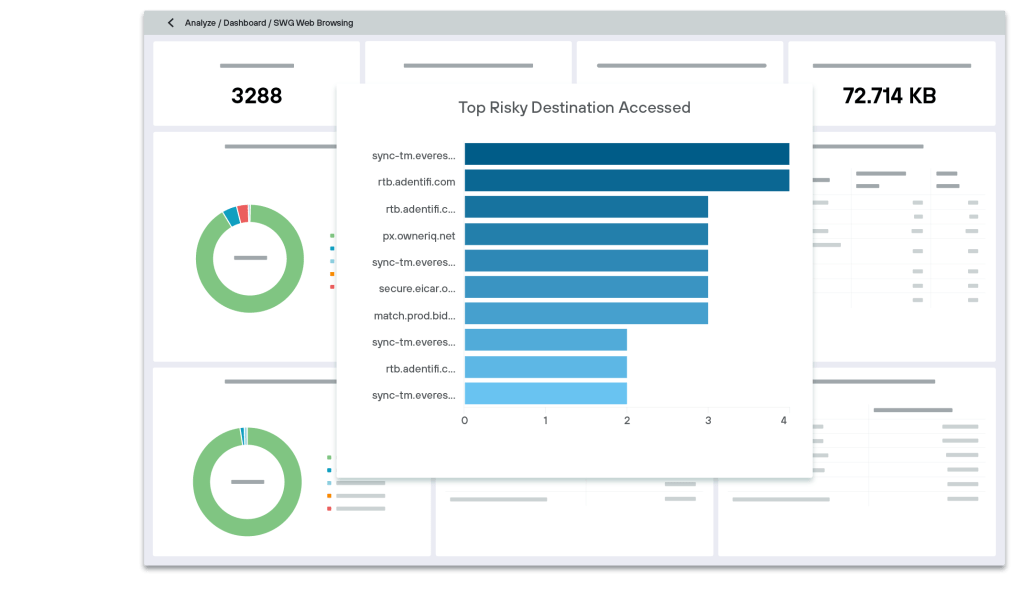
Forcepoint Secure Web Gateway stands as a pivotal tool in deciphering human behavior and its interplay with network security threats. Its commitment to human-centric threat analytics ensures businesses are equipped not only to counter threats but to understand their origin and pattern.
Why I Picked Forcepoint Secure Web Gateway:
In the vast landscape of security tools, Forcepoint distinctly resonated with its unique approach. I chose it because it doesn’t just throw tech at problems—it aims to understand the human behind the action.
By judging and comparing its analytics with others in the market, it became evident that Forcepoint's unique human-centric threat analytics model is unparalleled, making it the best choice for businesses that prioritize understanding behaviors to preemptively counter threats.
Standout Features & Integrations:
One of Forcepoint's signature features is its robust data loss prevention (DLP) capability, ensuring sensitive data remains safeguarded. For businesses relying heavily on apps and SaaS, Forcepoint's integration capabilities seamlessly align with an array of applications ensuring security and smooth operations.
The platform also champions cloud and hybrid deployment options, providing businesses the flexibility to customize their security architecture.
Pros and Cons
Pros:
- Extensive integration with various apps and SaaS platforms
- Comprehensive data loss prevention suite
- Advanced human-centric threat analytics
Cons:
- Possible complexity in configuring certain features
- Human-centric approach might not be everyone's preference
- Might have a steeper learning curve for newcomers


Netskope is dedicated to offering cutting-edge security solutions, focusing particularly on safeguarding critical data. Its prowess in providing real-time data protection ensures that organizations remain shielded from emerging threats, making it a top choice for businesses that prioritize immediate response to potential cyberattacks.
Why I Picked Netskope:
In my quest to find robust security tools, I chose Netskope after judging its comprehensive capabilities. What captured my interest was its commitment to real-time protection, a crucial factor when cyberattacks are becoming more sophisticated. In my opinion, the tool's emphasis on instant data defense makes it stand out and justifies its designation as "best for real-time data protection."
Standout Features & Integrations:
Netskope shines with its advanced anti-malware features, detecting and neutralizing threats swiftly. With an extensive network of data centers, it guarantees optimal performance and reduced latency for users worldwide.
Furthermore, Netskope boasts meaningful integrations with many enterprise tools and platforms, streamlining security operations and enhancing protective measures.
Pros and Cons
Pros:
- Rich integrations with other enterprise-grade tools
- Global network of data centers ensuring performance and accessibility
- Effective anti-malware capabilities for swift threat neutralization
Cons:
- High-end features might be overkill for smaller organizations
- Requires significant configuration for tailored use
- The user interface might be complex for beginners
Weitere Secure Web Gateways
Hier sind einige zusätzliche Secure Web Gateway-Optionen, die es zwar nicht auf meine Shortlist geschafft haben, aber trotzdem einen Blick wert sind:
- Lookout
For mobile-focused cloud security
- Menlo Security Secure Web Gateway
For complete malware isolation
- Clearswift Secure Web Gateway (SWG)
For policy-based content inspection
- DNSFilter
Good for AI-driven domain filtering
- Zscaler
Good for full cloud-based internet security
- Zscaler Internet Access
Good for direct-to-cloud connection security
- McAfee Web Protection
Good for comprehensive threat intelligence
- Check Point URL Filtering
Good for advanced malicious URL detection
- Citrix Secure Browser
Good for remote browser isolation
- Lightspeed Filter
Good for education-focused filtering
- iboss
Good for distributed gateway security
- F5 BIG-IP Access Policy Manager
Good for scalable access policy management
- Netskope Cloud Security Platform
Good for granular visibility into cloud traffic
- Cyren WebSecurity
Good for real-time web threat analysis
- Prisma Access
Good for secure access service edge (SASE)
- Sophos Secure Web Gateway
Good for combined web and network threat prevention
- WebTitan Web Filter
Good for SMB-friendly web filtering


Secure Web Gateways – Auswahlkriterien
Bei der Auswahl der besten Secure Web Gateways für diese Liste habe ich typische Käuferbedürfnisse und Schmerzpunkte wie den Schutz sensibler Daten und die Verhinderung unbefugten Zugriffs berücksichtigt. Außerdem nutzte ich das folgende Rahmenwerk, um meine Bewertung strukturiert und fair zu gestalten:
Kernfunktionalität (25% der Gesamtbewertung)
Um in diese Liste aufgenommen zu werden, musste jede Lösung die folgenden Anwendungsfälle abdecken:
- Schutz vor Malware und Phishing
- Durchsetzung von Sicherheitsrichtlinien
- Überwachung der Internetaktivitäten
- Blockieren unautorisierter Webseiten
- Webinhalte filtern
Zusätzliche herausragende Funktionen (25% der Gesamtbewertung)
Zur weiteren Differenzierung habe ich außerdem auf besondere Features geachtet, darunter:
- Erweiterte Bedrohungsinformationen
- Echtzeitverkehrsanalyse
- Anpassbare Reporting-Dashboards
- Integration mit Cloud-Diensten
- Analyse des Nutzerverhaltens
Benutzerfreundlichkeit (10% der Gesamtbewertung)
Um ein Gefühl für die Benutzerfreundlichkeit des jeweiligen Systems zu bekommen, habe ich Folgendes bewertet:
- Intuitives Oberflächendesign
- Einfache Navigation
- Minimale Lernkurve
- Reaktionsschnelle Performance
- Klare und verständliche Anleitungen
Onboarding (10% der Gesamtbewertung)
Um das Onboarding-Erlebnis jeder Plattform zu bewerten, habe ich Folgendes berücksichtigt:
- Verfügbarkeit von Schulungsvideos
- Interaktive Produkttouren
- Umfassende Dokumentation
- Zugang zu Webinaren
- Reaktionsschnelle Chatbots zur Unterstützung
Kundensupport (10% der Gesamtbewertung)
Um die Kundensupport-Dienste jedes Softwareanbieters zu bewerten, habe ich folgende Aspekte berücksichtigt:
- Rund-um-die-Uhr-Erreichbarkeit
- Mehrere Supportkanäle
- Schnelle Reaktionszeiten
- Kompetente Support-Mitarbeiter
- Zugang zu einem Informationszentrum
Preis-Leistungs-Verhältnis (10% der Gesamtbewertung)
Um das Preis-Leistungs-Verhältnis der einzelnen Plattformen zu beurteilen, habe ich folgende Kriterien herangezogen:
- Wettbewerbsfähige Preise
- Flexible Zahlungsoptionen
- Transparente Preisstruktur
- Rabatte bei langfristigen Verpflichtungen
- Kosteneffizienz im Verhältnis zu den angebotenen Funktionen
Kundenbewertungen (10% der Gesamtbewertung)
Um einen Eindruck von der allgemeinen Kundenzufriedenheit zu erhalten, habe ich beim Lesen von Kundenbewertungen Folgendes berücksichtigt:
- Durchweg positives Feedback
- Hohe Bewertungen für Zuverlässigkeit
- Lob für den Kundensupport
- Berichte über Benutzerfreundlichkeit
- Erfahrungsberichte zu effektivem Bedrohungsschutz
Wie man ein sicheres Web-Gateway auswählt
Es ist leicht, sich in langen Funktionslisten und komplexen Preisstrukturen zu verlieren. Damit Sie sich bei Ihrem individuellen Auswahlprozess auf das Wesentliche konzentrieren können, finden Sie hier eine Checkliste wichtiger Faktoren:
| Faktor | Was zu beachten ist |
|---|---|
| Skalierbarkeit | Kann die Lösung mit Ihren Unternehmensanforderungen mitwachsen? Berücksichtigen Sie zukünftige Erweiterungen, gesteigerten Datenverkehr und zusätzliche Benutzer. Vermeiden Sie Lösungen, die mit Wachstum nicht effizient umgehen können. |
| Integrationen | Funktioniert sie mit Ihren aktuellen Systemen? Stellen Sie die Kompatibilität mit bestehender Software, Cloud-Diensten und Netzwerkinfrastruktur sicher, um teure Anpassungen zu vermeiden. |
| Anpassbarkeit | Können Sie die Lösung an Ihre Arbeitsabläufe anpassen? Suchen Sie nach Möglichkeiten, Einstellungen so zu justieren, dass sie zu den spezifischen Anforderungen Ihres Teams passen. |
| Benutzerfreundlichkeit | Ist die Benutzeroberfläche für Ihr Team intuitiv? Wählen Sie ein Werkzeug, das einfach zu bedienen ist, um die Einarbeitungszeit zu minimieren und Fehler zu reduzieren. |
| Implementierung und Onboarding | Wie schnell können Sie starten? Bewerten Sie die Einrichtungsdauer und die Unterstützung während der Übergangsphase, um einen reibungslosen Einstieg zu gewährleisten. |
| Kosten | Passt es in Ihr Budget? Vergleichen Sie Preispläne, versteckte Gebühren und langfristige Kosten. Achten Sie auf ein ausgewogenes Verhältnis von Preis und notwendigen Funktionen. |
| Sicherheitsmaßnahmen | Wie gut schützt sie vor Bedrohungen? Achten Sie auf starke Verschlüsselung, Bedrohungserkennung und die Einhaltung branchenüblicher Standards. |
| Compliance-Anforderungen | Erfüllt sie Ihre branchenspezifischen Vorschriften? Stellen Sie sicher, dass das Tool mit den für Ihr Unternehmen relevanten Datenschutzgesetzen und -standards übereinstimmt. |
Was sind Secure Web Gateways?
Sichere Web-Gateways sind Tools, die Unternehmen vor Online-Bedrohungen schützen, indem sie unerwünschte Software und Schadprogramme aus nutzerinitiiertem Webverkehr filtern. IT-Fachkräfte, Netzwerkadministratoren und Cybersecurity-Teams setzen diese Werkzeuge typischerweise ein, um sensible Daten zu schützen und sicheren Internetzugang zu gewährleisten. URL-Filterung, Anwendungskontrolle und Schutz vor Datenverlust unterstützen die Durchsetzung von Sicherheitsrichtlinien und den Schutz vor Gefahren. Insgesamt bieten diese Tools einen unverzichtbaren Schutz, um Netzwerke sicher und regelkonform zu halten.
Funktionen
Achten Sie bei der Auswahl sicherer Web-Gateways auf folgende Schlüsselfunktionen:
- URL-Filterung: Blockiert den Zugriff auf schädliche oder nicht autorisierte Websites, um Benutzer vor bösartigen Inhalten zu schützen.
- Malware-Erkennung: Erkennt und verhindert Malware-Bedrohungen, bevor sie in ein Netzwerk eindringen können.
- Anwendungssteuerung: Verwalten und Beschränken der Nutzung von Webanwendungen, um unbefugten Zugriff und Datenlecks zu verhindern.
- Verhinderung von Datenverlust: Überwacht und kontrolliert Datenübertragungen, um zu verhindern, dass sensible Informationen das Netzwerk verlassen.
- Bedrohungsinformationen: Bietet Echtzeit-Analysen zu Bedrohungen, um immer einen Schritt voraus zu sein.
- Analyse des Benutzerverhaltens: Überwacht und analysiert die Aktivitäten der Benutzer, um verdächtiges Verhalten und potenzielle Sicherheitsverletzungen zu erkennen.
- Inhaltsfilterung: Filtert Webinhalte anhand vordefinierter Richtlinien, um die Einhaltung unternehmensinterner Standards sicherzustellen.
- Integrationsfähigkeit: Verbindet sich nahtlos mit bestehenden Sicherheits- und Netzwerksystemen, um den Gesamtschutz zu erhöhen.
- Skalierbarkeit: Passt sich dem Wachstum des Unternehmens an und ermöglicht eine einfache Erweiterung und erhöhte Nutzerkapazität.
- Unterstützung bei der Compliance: Sorgt für die Einhaltung branchenspezifischer Vorschriften und Standards und hält Unternehmen im Einklang mit Datenschutzgesetzen.
Vorteile
Die Implementierung von sicheren Web-Gateways bietet zahlreiche Vorteile für Ihr Team und Ihr Unternehmen. Hier sind einige, auf die Sie sich freuen können:
- Verbesserte Sicherheit: Schützt Ihr Netzwerk vor Malware und Bedrohungen und gewährleistet einen sicheren Internetzugang für Benutzer.
- Compliance-Garantie: Unterstützt die Einhaltung von Industriestandards durch Durchsetzung von Datenschutzrichtlinien und Überwachung der Compliance.
- Schutz von Daten: Verhindert unbefugte Datenübertragungen und schützt sensible Informationen vor Leaks.
- Steigerung der Produktivität: Blockiert den Zugriff auf nicht arbeitsbezogene Webseiten, sodass Mitarbeiter fokussiert und produktiv bleiben.
- Echtzeit-Erkennung von Bedrohungen: Bietet unmittelbare Analyse von Bedrohungen, sodass Ihr Team schnell und effizient reagieren kann.
- Überwachung der Benutzeraktivität: Beobachtet das Benutzerverhalten, um verdächtige Aktivitäten und potenzielle Sicherheitsverletzungen zu erkennen.
- Skalierbarkeit: Wächst mit Ihrem Unternehmen mit und bewältigt erhöhtes Datenaufkommen und mehr Nutzer, ohne die Sicherheit zu kompromittieren.
Kosten und Preise
Die Auswahl von sicheren Web-Gateways erfordert ein Verständnis der verschiedenen verfügbaren Preismodelle und Pläne. Die Kosten variieren je nach Funktionen, Teamgröße, Zusatzleistungen und mehr. Die folgende Tabelle fasst gängige Pläne, deren Durchschnittspreise und typische Merkmale von Lösungen für sichere Web-Gateways zusammen:
Vergleichstabelle für Pläne von Secure Web Gateways
| Plan-Typ | Durchschnittlicher Preis | Gängige Funktionen |
|---|---|---|
| Kostenloser Tarif | $0 | Basis-URL-Filterung, eingeschränkter Malware-Schutz und minimale Datenüberwachung. |
| Persönlicher Tarif | $5-$15/user/Monat | Erweiterte Sicherheitseinstellungen, grundlegende Anwendungssteuerung und Protokollierung der Benutzeraktivitäten. |
| Geschäftstarif | $20-$50/user/Monat | Erweiterte Bedrohungserkennung, Verhinderung von Datenverlust und Unterstützung bei der Compliance. |
| Enterprise-Tarif | $50-$100/user/Monat | Umfassende Integrationsmöglichkeiten, Echtzeitanalysen und anpassbare Sicherheitsrichtlinien. |
Häufig gestellte Fragen zu Secure Web Gateways
Hier finden Sie Antworten auf häufig gestellte Fragen zu Secure Web Gateways:
Warum ist es entscheidend, in ein Secure Web Gateway zu investieren?
Mit der Zunahme von Cyberbedrohungen, insbesondere während der Umstellung von Unternehmen auf Cloud-Anwendungen, werden SWGs immer unverzichtbarer. Sie verhindern Datenverstöße, schützen vor Malware, gewährleisten sicheren Zugriff auf Cloud-Anwendungen und bewahren den Ruf und die Integrität des Unternehmens.
Ist ein Secure Web Gateway eine DLP-Lösung?
Ein Secure Web Gateway ist zwar keine eigenständige DLP-Lösung, trägt aber dazu bei, Datenverluste zu verhindern. Es setzt Richtlinien zur akzeptablen Nutzung durch und wendet Maßnahmen wie URL-Filterung und Anti-Malware-Scanning an, die zur Verhinderung von Datenverlust beitragen.
Kann ein Secure Web Gateway die Cloud-Einführung unterstützen?
Ja, Secure Web Gateways können die Einführung von Cloud-Lösungen unterstützen, indem sie sicheren Zugriff auf Cloud-Anwendungen bieten. Sie gewährleisten Datenschutz und Compliance, sodass Ihr Team Cloud-Dienste nutzen kann, ohne die Sicherheit zu gefährden.
Wie geht es weiter?
Wenn Sie auf der Suche nach Informationen zu Secure Web Gateways sind, stellen Sie eine Verbindung zu einem SoftwareSelect-Berater her und erhalten Sie kostenlose Empfehlungen.
Sie füllen ein Formular aus und führen ein kurzes Gespräch, in dem Ihre spezifischen Anforderungen besprochen werden. Anschließend erhalten Sie eine Liste mit Softwareempfehlungen zur Überprüfung. Die Berater begleiten Sie sogar während des gesamten Kaufprozesses, einschließlich Preisverhandlungen.