
25 Beste Passwort-Manager-Software-Tools 2026

10 Beste Passwort-Manager-Software: Kurzliste
Here's my pick of the 10 best software from the 25 tools reviewed.


Passwort-Manager-Software schützt Ihre Konten, indem sie alle Ihre Passwörter an einem Ort speichert, generiert und organisiert – so müssen Sie sich nicht Dutzende einmalige Anmeldedaten merken oder sich um Sicherheitslücken sorgen. Das richtige Tool macht das Einloggen einfach und schützt Sie vor schwachen, wiederverwendeten oder vergessenen Passwörtern.
Ich habe Einzelpersonen und Teams dabei unterstützt, Passwort-Manager zu finden, die einfache Einrichtung mit starker Sicherheit kombinieren. In diesem Leitfaden zeige ich Ihnen genau, wie Sie die beste Passwort-Manager-Software für Ihre Bedürfnisse auswählen.
Why Trust Our Software Reviews
Beste Passwort-Manager-Software: Zusammenfassung
Diese Vergleichstabelle fasst die Preisinformationen meiner Top-Auswahl an Passwort-Manager-Software zusammen, damit Sie die passende Lösung für Ihr Budget und Ihre Geschäftsanforderungen finden.
| Tool | Best For | Trial Info | Price | ||
|---|---|---|---|---|---|
| 1 | Best for multi-platform password synchronization | Not available | From $3.99/user/month (billed annually) | Website | |
| 2 | Best for a built-in VPN feature | Not available | From $4.99/user/month (billed annually) | Website | |
| 3 | Best for individual users and small businesses | 30-day free trial + free plan available | From $3/user/month (billed annually) | Website | |
| 4 | Best for large organizations with complex needs | Not available | From $2.96/user/month (min 5 seats, billed annually) | Website | |
| 5 | Best for a straightforward user interface | Not available | From $2.49/user/month (billed annually) | Website | |
| 6 | Best for organizations valuing open-source software | 7-day free trial + free plan + free demo available | From $3/user/month (billed annually) | Website | |
| 7 | Best for providing advanced two-factor authentication | Free demo available | From $8/client/month | Website | |
| 8 | Best for IT service providers | Not available | Pricing upon request | Website | |
| 9 | Best for integrating with Active Directory | Not available | From $5/user/month (min 50 seats) | Website | |
| 10 | Best for centralized control over shared credentials | Not available | Website |
-

Site24x7
Visit WebsiteThis is an aggregated rating for this tool including ratings from Crozdesk users and ratings from other sites.4.6 -
Docker
Visit WebsiteThis is an aggregated rating for this tool including ratings from Crozdesk users and ratings from other sites.4.6 -
Pulumi
Visit WebsiteThis is an aggregated rating for this tool including ratings from Crozdesk users and ratings from other sites.4.8





Bewertungen der besten Passwort-Manager-Software
Nachfolgend finden Sie meine ausführlichen Zusammenfassungen der besten Passwort-Manager-Software, die es in meine Kurzliste geschafft haben. Meine Bewertungen geben einen detaillierten Einblick in die wichtigsten Funktionen, Vor- & Vorteile, Integrationen und optimalen Einsatzgebiete jedes Tools, damit Sie die bestmögliche Auswahl für sich treffen können.


1Password offers a secure and user-friendly solution to manage all your passwords across various platforms. It shines in synchronizing your sensitive information across all devices and operating systems, securing your digital life no matter where you are.
Why I Picked 1Password: The multi-platform support and easy synchronization made 1Password stand out in my evaluation. As more people work from different devices and locations, it’s crucial to have a password manager that harmonizes your data across all platforms.
For this reason, 1Password took the crown for being the best for multi-platform password synchronization.
Standout Features & Integrations:
1Password offers end-to-end encryption, auto-fill functionality, and Travel Mode, which allows you to remove sensitive data from your devices when you travel. It integrates with popular browsers for effortless login and form filling, and it's compatible with major operating systems including Windows, macOS, iOS, and Android.
Pros and Cons
Pros:
- Easy synchronization across all platforms
- Travel Mode for data safety during travel
- End-to-end encryption for maximum security
Cons:
- May require initial learning to utilize all features
- No free version available
- Pricing is based on annual billing

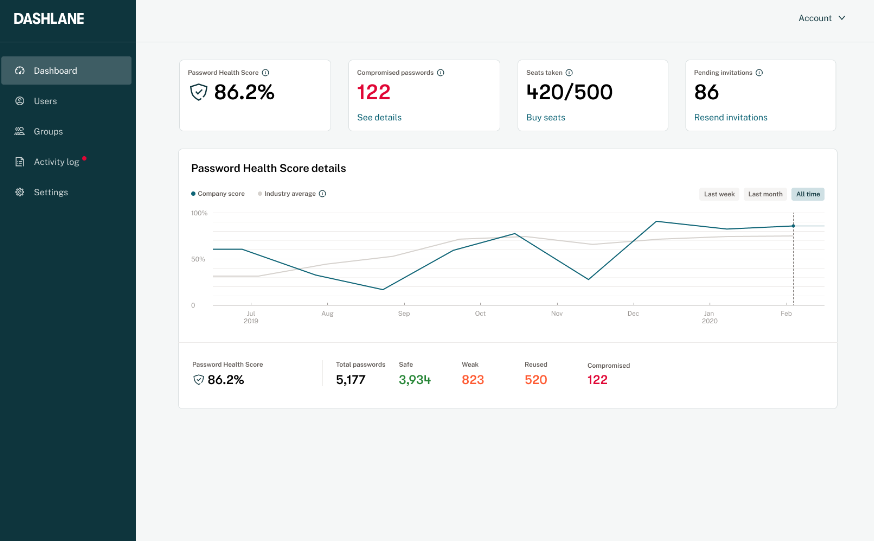
Dashlane is a robust password manager with an array of additional features, including a built-in VPN for added online security. The tool aids in generating, storing, and auto-filling complex passwords across all your devices, keeping your digital identity secure.
Its built-in VPN sets it apart, adding an extra layer of security, particularly when accessing the internet from public or unsecured networks.
Why I Picked Dashlane: I picked Dashlane for its unique built-in VPN feature. While all password managers secure your login credentials, Dashlane goes a step further to safeguard your overall online activities, making it the best option for users who need a VPN along with password management.
This distinct aspect creates a full-package security tool, differentiating Dashlane from many other password managers.
Standout Features & Integrations:
Beyond password management, Dashlane includes a digital wallet for secure online payments and offers dark web monitoring to alert users if their information appears in compromised databases. The tool's VPN functionality provides an encrypted internet connection, a feature not common in many password managers.
Dashlane integrates well with numerous web browsers like Chrome, Firefox, and Safari, and offers apps for both iOS and Android platforms like Microsoft.
Pros and Cons
Pros:
- Offers a digital wallet for secure online payments
- Provides dark web monitoring
- Includes a built-in VPN for added online security
Cons:
- Free version significantly limits the number of passwords and devices
- The built-in VPN is not as fully-featured as standalone VPN services
- More expensive compared to some other password managers


LastPass is a robust password manager that helps individuals and small businesses manage their online credentials securely. It simplifies password management by creating, storing, and filling in login credentials across multiple sites.
Given its ease of use and cost-effectiveness, it is an excellent choice for individual users and small businesses that need a straightforward solution for password management.
Why I Picked LastPass: In assessing password management solutions, I was drawn to LastPass for its simple yet effective approach to password management. What makes LastPass stand out from the crowd is its user-friendly interface and intuitive features, making it accessible to individual users and small businesses.
I believe LastPass is ideal for this user segment due to its combination of affordability, ease of use, and comprehensive feature set that does not compromise on security.
Standout Features & Integrations:
Key features of LastPass include auto-fill and auto-login, secure password sharing, and multi-factor authentication. These features make it easier for users to navigate the web securely without the burden of remembering numerous passwords. LastPass integrates easily with various browsers and operating systems, offering a smooth user experience across devices.
Pros and Cons
Pros:
- Compatible with various platforms and browsers for easy use
- Offers secure password sharing, which is handy for team collaboration
- User-friendly interface, suitable for individuals and small businesses
Cons:
- Some users might find the setup process a bit complex initially
- Customer support could be more responsive
- The mobile app requires a subscription, which may not be ideal for users looking for a free solution

Best for large organizations with complex needs

ManageEngine Password Manager Pro is an enterprise-grade password management solution that enables secure file storage, management, and sharing of passwords and digital identities. It is designed for larger organizations with intricate requirements, allowing for intricate access controls, thorough audit trails, and robust add-ons.
It fits large organizations well because of its scalability and the ability to handle complex hierarchical structures.
Why I Picked ManageEngine Password Manager Pro: I selected ManageEngine Password Manager Pro because of its scalability and extensive feature set catering to complex organizational structures. This tool stood out to me because it's not just a password manager, but a comprehensive privileged access management solution.
It's particularly suitable for large organizations with complex needs due to its extensive customization options, role-based access controls, and robust auditing capabilities.
Standout Features & Integrations:
ManageEngine Password Manager Pro offers a wide array of features such as automated password resets, secure remote access, privileged session management, and detailed audit trails. Its high-level security measures, including two-factor authentication, ensure secure access to sensitive data.
The tool integrates with a range of other platforms, such as Active Directory, LDAP, and a variety of SIEM tools to provide comprehensive security management.
Pros and Cons
Pros:
- Includes detailed audit trails for transparency and accountability
- Provides robust integrations for comprehensive security management
- Offers extensive features suitable for large organizations
Cons:
- The user interface could be more intuitive and user-friendly
- Pricing could be high for organizations with a large number of users
- Can be overwhelming for small businesses or individuals due to its complexity


NordPass is a secure password management tool that operates with a focus on user-friendly design and simplicity. It's developed by the creators of NordVPN, and this attention to straightforward design makes it an excellent choice for those looking for an easy-to-use interface.
Why I Picked NordPass: I chose NordPass for this list because of its clean, intuitive user interface. Compared to some other passkey management tools, NordPass excels in providing a user-friendly experience without sacrificing security.
Given its easy-to-navigate design, I found NordPass to be the best tool for those seeking a straightforward user interface.
Standout Features & Integrations:
NordPass features include password generation, secure passkey sharing, and a built-in OCR scanner to capture information quickly. It's encrypted with the latest security measures (XChaCha20) to keep user information safe.
NordPass also integrates smoothly with various browsers such as Chrome, Firefox, Opera, and Edge, and platforms like iOS and Android, facilitating easy and secure access across devices.
Pros and Cons
Pros:
- Advanced security encryption (XChaCha20)
- Secure password sharing feature
- Clean and straightforward user interface
Cons:
- Annual commitment may not be ideal for all users
- The best features are only available in the paid plan
- Limited advanced features compared to some competitors

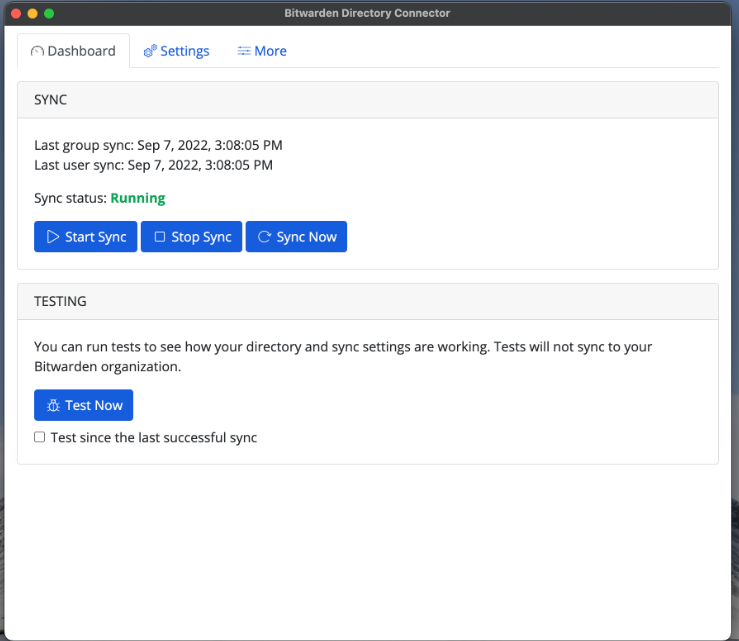
Bitwarden is an open-source password manager that is designed for both individuals and businesses. It offers secure password storage and sharing, making it ideal for organizations that place a premium on the flexibility and transparency of open-source software.
Why I Picked Bitwarden: I selected Bitwarden for inclusion on this list due to its open-source nature. This characteristic sets it apart from many other password management tools. The transparency provided by open-source software can enhance trust and allow for customizable security solutions, making Bitwarden the best choice for organizations valuing open-source software.
Standout Features & Integrations:
Bitwarden provides end-to-end encryption for secure password management and sharing, as well as features such as a password generator and secure note storage. It offers easy integrations with multiple browsers, including Chrome, Firefox, Safari, and Edge, and mobile platforms like iOS and Android, allowing for secure access across various devices.
Pros and Cons
Pros:
- Wide range of browser and platform integrations
- Offers end-to-end encryption
- Open-source nature provides transparency and flexibility
Cons:
- Lacks some advanced features offered by proprietary password managers
- Requires some technical expertise to fully utilize open-source benefits
- User interface may not be as intuitive as some competitors


Keeper is a comprehensive password management solution that takes user security to a higher level. Its commitment to bolstering account security through advanced two-factor authentication makes it ideal for users who prioritize improved security protocols.
Why I Picked Keeper: The decision to include Keeper on this list was largely influenced by its focus on advanced security features. It differentiates itself with robust two-factor authentication, adding an extra layer of security to user accounts.
I am of the opinion that Keeper is the best tool for advanced two-factor authentication due to its uncompromising approach to securing user information.
Standout Features & Integrations:
Keeper offers features like secure record sharing, emergency access, and a strong focus on two-factor authentication, including biometric login. It also provides a secure digital vault for storing sensitive documents. Integration-wise, Keeper works easily with popular platforms like Slack, and it supports SAML 2.0 for secure authentication.
Pros and Cons
Pros:
- Integration with platforms like Slack
- Secure digital vault for storing sensitive documents
- Focuses on advanced two-factor authentication
Cons:
- Its emphasis on security might be overwhelming for users seeking a more straightforward password management tool
- Annual billing may not be suitable for all users
- Lower tiers lack some advanced features


Passportal provides a specialized solution for IT service providers, offering an intuitive password and IT documentation management system. This tool simplifies the task of handling multiple clients' credentials and IT information, making it ideal for IT service providers.
Why I Picked Passportal: Passportal caught my attention due to its specificity in catering to the needs of IT service providers. Its centralized credential management and robust IT documentation features set it apart from other password managers.
I believe Passportal is best for IT service providers because it is designed to manage multiple clients' credentials and IT information efficiently.
Standout Features & Integrations:
Passportal includes features such as automated password resets, secure password sharing, and comprehensive IT documentation. It also provides audit logs to monitor any changes made. Integration-wise, Passportal works well with popular professional service automation (PSA) tools like Autotask and ConnectWise.
Pros and Cons
Pros:
- Integration with popular PSA tools
- Robust IT documentation capabilities
- Centralized management of multiple clients' credentials
Cons:
- Limited usability outside of IT service providers
- May be overwhelming for individual users or small businesses
- Pricing information is not directly available


Specops is a comprehensive password security software that excels in Active Directory (AD) integration. This solution streamlines password policies, breach prevention, and secure password resets while synchronizing easily with your AD environment.
Why I Picked Specops Password Security Software: In assessing a plethora of password managers, Specops emerged as unique due to its deep Active Directory integration. This makes it perfect for organizations heavily reliant on AD for their identity and access management.
Consequently, Specops becomes the top pick for those seeking a solution best for integrating with Active Directory.
Standout Features & Integrations:
Specops stands out with features like customizable password policies, password expiration notifications, and secure self-service password reset functionality. Its ability to integrate easily with Active Directory ensures that password policies and changes reflect instantly across the AD environment, making user management more streamlined.
Pros and Cons
Pros:
- Secure self-service password reset
- Customizable password policies
- Deep Active Directory integration
Cons:
- Some features may have a learning curve
- May not be necessary for organizations not to use Active Directory
- Minimum of 50 seats might be high for smaller teams


Securden is a comprehensive password management tool with a strong emphasis on centralized control of shared credentials. It's a tool designed to provide organizations with the ability to manage and control access to shared accounts, making it a strong choice for those prioritizing such centralized credential management.
Why I Picked Securden: I selected Securden for this list due to its unique focus on providing central control over shared credentials. Its ability to manage and control shared account access sets it apart from many other password management tools.
Given its feature set, I believe Securden is best for users who need a centralized approach to shared credential management.
Standout Features & Integrations:
Securden's standout features include centralized access control, secure password sharing, and comprehensive auditing capabilities. It also includes automatic password resets for major platforms, which adds an extra layer of security.
In terms of integrations, Securden works well with popular platforms like Windows, Linux, and many databases, allowing easy user authentication and access control.
Pros and Cons
Pros:
- Robust auditing capabilities
- Secure password sharing feature
- Centralized control of shared credentials
Cons:
- Annual billing may not suit all users' financial plans
- Requires a learning curve for full feature utilization
- Lacks some advanced features present in other tools
Weitere Passwort-Manager-Software
Hier sind einige zusätzliche Passwort-Manager-Software-Optionen, die es nicht auf meine Kurzliste geschafft haben, aber dennoch einen Blick wert sind:
- Passwork
For teams seeking robust collaboration
- Bravura Pass
For extensive customization options
- Zoho Vault
Good for businesses already using the Zoho suite
- OneLogin
Good for enterprise-level identity management
- Sticky Password
Good for biometric verification options
- ManageEngine ADSelfService Plus
Good for Active Directory environments
- EssentialPIM
Good for integration with personal information management
- LogMeOnce
Good for users seeking a photo login feature
- KeePass
Good for users who prefer open-source solutions
- Enpass
Good for offline password management
- True Key
Good for integration with Intel software
- Remembear
Good for a simple and intuitive user interface
- Password Boss
Good for sharing passwords securely with teams
- BIO-key PortalGuard IDaaS
Good for identity-as-a-service functionality
- TeamPassword
Good for small teams requiring password collaboration


Auswahlkriterien für Passwort-Manager-Software
Bei der Auswahl der besten Passwort-Manager-Software für diese Liste habe ich die typischen Bedürfnisse und Herausforderungen von Käufern berücksichtigt – wie das sichere Verwalten mehrerer Passwörter und die einfache Handhabung. Außerdem habe ich das folgende Bewertungsschema genutzt, um die Auswertung strukturiert und fair zu gestalten:
Kernfunktionen (25 % der Gesamtbewertung)
Damit eine Lösung in diese Liste aufgenommen wird, musste sie folgende allgemeine Anwendungsfälle erfüllen:
- Passwörter sicher speichern
- Anmeldedaten automatisch ausfüllen
- Starke Passwörter generieren
- Synchronisierung über mehrere Geräte
- Sicheres Teilen von Passwörtern ermöglichen
Besondere Zusatzfunktionen (25 % der Gesamtbewertung)
Um die Auswahl weiter einzugrenzen, habe ich zudem auf einzigartige Zusatzfunktionen geachtet, etwa:
- Biometrische Anmeldeoptionen
- Überwachung des Dark Web
- Passwort-Gesundheitsberichte
- Anpassbare Sicherheitsrichtlinien
- Sitzungsaufzeichnung
Benutzerfreundlichkeit (10 % der Gesamtbewertung)
Um mir einen Eindruck von der Benutzerfreundlichkeit des jeweiligen Systems zu verschaffen, habe ich auf Folgendes geachtet:
- Intuitive Benutzeroberfläche
- Einfache Navigation
- Klare Anleitungen und Hinweise
- Anpassbare Einstellungen
- Optisch ansprechendes Design
Onboarding (10 % der Gesamtbewertung)
Um die Onboarding-Experience für jede Plattform zu bewerten, habe ich folgende Punkte betrachtet:
- Verfügbarkeit von Schulungsvideos
- Interaktive Produkttouren
- Zugang zu Vorlagen
- Live-Webinare und Q&A-Sitzungen
- Onboarding-Chat-Support
Kundensupport (10% der Gesamtbewertung)
Zur Bewertung der Kundensupport-Dienste jedes Softwareanbieters habe ich Folgendes berücksichtigt:
- 24/7 Support-Verfügbarkeit
- Mehrere Supportkanäle
- Reaktionszeit und Effizienz
- Zugang zu einer Wissensdatenbank
- Verfügbarkeit von dedizierten Account-Managern
Preis-Leistungs-Verhältnis (10% der Gesamtbewertung)
Zur Bewertung des Preis-Leistungs-Verhältnisses jeder Plattform habe ich Folgendes berücksichtigt:
- Konkurrenzfähige Preisgestaltung
- Funktionen, die im Basistarif enthalten sind
- Rabattmöglichkeiten bei jährlicher Abrechnung
- Keine versteckten Gebühren
- Flexible Zahlungsoptionen
Kundenbewertungen (10% der Gesamtbewertung)
Um einen Eindruck von der allgemeinen Kundenzufriedenheit zu gewinnen, habe ich beim Lesen von Kundenbewertungen Folgendes berücksichtigt:
- Konsistenz positiver Rückmeldungen
- Häufig gemeldete Probleme
- Allgemeine Zufriedenheitsbewertungen
- Vergleich zu Wettbewerbern
- Häufigkeit von Funktionsupdates und Verbesserungen
Wie Sie Passwortmanager-Software auswählen
Es ist leicht, sich in langen Funktionslisten und komplexen Preisstrukturen zu verlieren. Damit Sie im Laufe Ihres individuellen Software-Auswahlprozesses den Überblick behalten, finden Sie hier eine Checkliste mit Faktoren, die Sie im Hinterkopf behalten sollten:
| Faktor | Was zu berücksichtigen ist |
|---|---|
| Skalierbarkeit | Kann das Tool mit Ihrem Team wachsen? Überprüfen Sie, ob es die Aufnahme weiterer Nutzer oder das Verarbeiten größerer Datenmengen ohne Leistungsprobleme unterstützt. Achten Sie auf flexible Nutzerpläne, die Wachstum ermöglichen. |
| Integrationen | Funktioniert es mit anderen Tools, die Sie verwenden? Prüfen Sie die Kompatibilität mit bestehenden Plattformen wie Google Workspace oder Microsoft 365, um Arbeitsabläufe zu optimieren und manuelle Dateneingabe zu vermeiden. |
| Anpassbarkeit | Können Sie das Tool an Ihre Bedürfnisse anpassen? Suchen Sie nach Optionen, die Einstellungen, Berechtigungen und Nutzerrollen flexibel gestalten, um sich an die Struktur und Sicherheitsrichtlinien Ihres Teams anzupassen. |
| Benutzerfreundlichkeit | Ist es für alle einfach zu benutzen? Beurteilen Sie die Benutzeroberfläche und das Design. Stellen Sie sicher, dass es für Ihr Team intuitiv bedienbar ist, um die Lernkurve gering zu halten und den Schulungsaufwand zu minimieren. |
| Implementierung und Onboarding | Wie schnell können Sie starten? Prüfen Sie den Einrichtungs- und Onboarding-Prozess. Achten Sie auf Ressourcen wie Tutorials, Vorlagen und dedizierten Support, um den Übergang zu erleichtern und einen reibungslosen Start sicherzustellen. |
| Kosten | Passt es in Ihr Budget? Analysieren Sie die Preisstruktur, einschließlich möglicher versteckter Gebühren. Vergleichen Sie die Kosten mit den gebotenen Funktionen und achten Sie auf Rabatte bei jährlicher Zahlung oder bei Sammellizenzen. |
| Sicherheitsvorkehrungen | Sind Ihre Passwörter sicher? Vergewissern Sie sich, dass das Tool starke Verschlüsselungsstandards verwendet, Multi-Faktor-Authentifizierung anbietet und Prüfprotokolle bereitstellt, um Zugriffe nachzuverfolgen und unautorisierte Aktivitäten zu erkennen. |
| Compliance-Anforderungen | Erfüllt es gesetzliche Vorgaben? Überprüfen Sie, ob das Tool mit relevanten Standards wie der DSGVO oder HIPAA konform ist, insbesondere wenn Ihr Team sensible Daten verarbeitet. Achten Sie auf Zertifikate oder Dokumentation zur Bestätigung der Einhaltung. |
Was ist Passwortmanager-Software?
Passwortmanager-Software ist ein Tool, das alle Ihre Passwörter sicher an einem Ort speichert, generiert und organisiert. IT-Admins, Sicherheitsexperten und alle, die es leid sind, Logins zu vergessen, nutzen sie, um ihre Konten sicher zu halten, ohne sich endlose Passwörter merken zu müssen. Sie hilft, starke Passwörter zu erstellen, diese automatisch auszufüllen und Ihre Informationen zu verschließen, sodass Sie sich keine Sorgen um schwache oder wiederverwendete Zugangsdaten machen müssen.
Funktionen
Achten Sie bei der Auswahl einer Passwortmanager-Software auf die folgenden wichtigen Funktionen:
- Passwort-Tresor: Speichert alle Ihre Passwörter sicher an einem Ort, sodass Sie sie einfach verwalten und bei Bedarf darauf zugreifen können.
- Automatisches Ausfüllen: Füllt Anmeldedaten automatisch auf Websites aus, spart Zeit und verringert das Risiko von Eingabefehlern.
- Passwort-Generator: Erstellt starke, einzigartige Passwörter für jedes Konto und erhöht so die Sicherheit, indem schwer erratbare Passwörter verhindert werden.
- Multi-Faktor-Authentifizierung: Fügt eine zusätzliche Sicherheitsebene hinzu, indem weitere Verifizierungsschritte über das Passwort hinaus erforderlich sind.
- Darknet-Überwachung: Benachrichtigt Sie, wenn Ihre Zugangsdaten in Datenlecks auftauchen, sodass Sie schnell Maßnahmen ergreifen können, um Ihre Konten zu schützen.
- Anpassbare Zugriffskontrollen: Ermöglicht die Festlegung, wer auf bestimmte Passwörter zugreifen darf, sodass sensible Informationen nur autorisierten Nutzern zur Verfügung stehen.
- Sitzungsaufzeichnung: Überwacht und protokolliert Benutzeraktivitäten und bietet einen Audit-Trail für Sicherheits- und Compliance-Zwecke.
- Biometrische Anmeldung: Nutzt Fingerabdruck- oder Gesichtserkennung für sicheren und bequemen Zugang zu Ihren Konten.
- Sicherheitsberichte: Liefert Einblicke in die Passwortsicherheit, hilft Schwachstellen zu erkennen und die Gesamtsicherheit zu verbessern.
- Integrationsfähigkeit: Verbindet sich mit anderen Tools und Plattformen, die Sie verwenden, und erhöht so die Effizienz der Arbeitsabläufe und reduziert manuelle Dateneingaben.
Vorteile
Die Einführung von Passwort-Manager-Software bietet Ihrem Team und Unternehmen zahlreiche Vorteile. Hier sind einige, auf die Sie sich freuen können:
- Erhöhte Sicherheit: Schützt Ihre Konten durch starke, einzigartige Passwörter und Multi-Faktor-Authentifizierung und senkt das Risiko von Datenlecks.
- Zeitersparnis: Füllt Anmeldedaten automatisch aus und ermöglicht schnellen Zugriff, ohne Passwörter merken oder von Hand eintippen zu müssen.
- Vereinfachte Verwaltung: Zentrale Passwortspeicherung in einem sicheren Tresor erleichtert die Organisation und den Abruf von Zugangsdaten.
- Verbesserte Compliance: Bietet Audit-Trails und Aktivitätsprotokolle zur Unterstützung bei der Einhaltung von Sicherheitsvorschriften und Standards.
- Gesteigerte Produktivität: Integriert sich mit vorhandenen Tools, um Arbeitsabläufe zu optimieren und manuelle Dateneingaben zu verringern.
- Proaktive Bedrohungswarnungen: Überwacht das Darknet auf Datenlecks, sodass Sie schnell auf potenzielle Bedrohungen reagieren können.
- Anpassbarer Zugriff: Gibt Kontrolle darüber, wer Passwörter einsehen oder ändern darf, damit sensible Daten nur autorisierten Nutzern zugänglich sind.
Kosten & Preise
Die Auswahl einer Passwort-Manager-Software erfordert Verständnis für die verschiedenen Preisstrukturen und verfügbaren Tarife. Die Kosten variieren je nach Funktionen, Teamgröße, Zusatzoptionen und mehr. Die folgende Tabelle fasst gängige Tarife, ihre durchschnittlichen Preise und typische Funktionen von Passwort-Manager-Lösungen zusammen:
Vergleichstabelle für Passwort-Manager-Software
| Tarifart | Durchschnittlicher Preis | Gemeinsame Funktionen |
|---|---|---|
| Kostenloser Tarif | $0 | Basis-Passwortspeicherung, automatisches Ausfüllen und Passwort-Generierung. |
| Persönlicher Tarif | $3-$10/user/month | Sicherer Passwort-Tresor, Synchronisation auf mehreren Geräten und Basissupport. |
| Business-Tarif | $5-$25/user/month | Team-Passwortfreigabe, Admin-Kontrollen und priorisierter Support. |
| Enterprise-Tarif | $15-$50/user/month | Erweiterte Sicherheitsfunktionen, Compliance-Tools, dedizierter Kundenbetreuer und individuelle Integrationen. |
Häufig gestellte Fragen zur Passwort-Manager-Software
Hier finden Sie Antworten auf häufig gestellte Fragen zur Passwort-Manager-Software:
Kann ich Passwort-Manager-Software offline nutzen?
Ja, viele Passwort-Manager bieten einen Offline-Zugriff. Sie können gespeicherte Passwörter auch ohne Internetverbindung einsehen. Einige Funktionen wie das Synchronisieren über verschiedene Geräte erfordern jedoch eine Internetverbindung. Prüfen Sie, ob das von Ihnen in Betracht gezogene Tool eine Offline-Funktion bietet, wenn dies für Ihren Arbeitsablauf wichtig ist.
Ist es schwierig, auf einen neuen Passwort-Manager umzusteigen?
Nein, die meisten Passwort-Manager bieten Import-Tools an. Damit können Sie Passwörter ganz einfach von Ihrem alten Manager übertragen. Achten Sie darauf, dass das Tool den Import von gängigen Anbietern wie LastPass oder Dashlane unterstützt. Das spart Zeit und Mühe beim Wechsel und trägt zur Sicherheit bei.
Wie gehen Passwort-Manager mit Datenpannen um?
Passwort-Manager benachrichtigen Sie, wenn Ihre Daten kompromittiert wurden. Sie überwachen Datenlecks und informieren Sie, falls gespeicherte Zugangsdaten betroffen sind. So können Sie Ihre Passwörter schnell ändern und Ihre Konten schützen. Manche Tools bieten sogar Dark-Web-Überwachung für zusätzliche Sicherheit.
Funktionieren Passwort-Manager auf mehreren Geräten?
Ja, sie synchronisieren in der Regel über verschiedene Geräte hinweg. Das bedeutet, dass Sie auf Ihre Passwörter per Smartphone, Tablet und Computer zugreifen können. Prüfen Sie, ob das Tool die von Ihnen verwendeten Betriebssysteme unterstützt, wie Windows, macOS, iOS und Android. So ist ein reibungsloses Nutzungserlebnis auf all Ihren Geräten gewährleistet.
Was kommt als Nächstes:
Wenn Sie gerade Passwort-Manager-Software recherchieren, nehmen Sie Kontakt mit einem SoftwareSelect-Berater auf und erhalten Sie kostenlos Empfehlungen.
Sie füllen ein Formular aus und führen ein kurzes Gespräch, bei dem Ihre spezifischen Anforderungen besprochen werden. Anschließend erhalten Sie eine Auswahlliste geeigneter Software. Die Berater begleiten Sie sogar während des gesamten Kaufprozesses – auch bei Preisverhandlungen.