

20 beste mobile Testautomatisierungstools im Jahr 2026

10 Beste Mobile Testautomatisierungs-Tools Übersicht
Here's my pick of the 10 best software from the 20 tools reviewed.


Angesichts der Vielzahl an mobilen Testautomatisierungs-Tools fällt es schwer, die richtige Wahl zu treffen. Sie wissen, dass Sie Testfälle für Ihre mobilen Apps automatisch ausführen möchten, aber welches Tool ist das beste? Kein Problem! In diesem Beitrag mache ich Ihnen die Entscheidung leicht, indem ich meine persönlichen Erfahrungen mit Dutzenden verschiedener mobiler Testautomatisierungs-Software bei unterschiedlichen Teams und Projekten teile und meine Favoriten vorstelle.
Was sind mobile Testautomatisierungs-Tools?
Mobile Testautomatisierungs-Tools sind Softwarelösungen, die den Testprozess von mobilen Apps automatisieren. Sie führen verschiedene automatisierte Tests an mobilen Anwendungen durch, um Funktionalität, Leistung, Kompatibilität und Benutzeroberfläche auf unterschiedlichen Geräten und Betriebssystemen zu prüfen. Diese Tools führen vordefinierte Testscripte aus, simulieren Benutzerinteraktionen mit der App und überprüfen deren Verhalten unter unterschiedlichen Bedingungen.
Zu den Vorteilen der Nutzung von mobilen Testautomatisierungs-Tools zählen eine erhöhte Effizienz bei Testprozessen, besonders im Hinblick auf wiederkehrende und umfangreiche Test-Szenarien. Sie liefern konsistente und genaue Testergebnisse, wodurch das Risiko von menschlichen Fehlern sinkt. Außerdem ermöglichen diese Tools eine umfassende Testabdeckung auf mehreren Plattformen und Geräten, was dafür sorgt, dass die App für alle Nutzer optimal funktioniert. Durch schnellere Rückmeldungen an Entwickler beschleunigen sie den Entwicklungs- und Verbesserungszyklus mobiler Anwendungen. Insgesamt tragen sie zu einer höheren Qualität, größeren Zuverlässigkeit mobiler Anwendungen und einem schlankeren Entwicklungsprozess bei.
-

Site24x7
Visit WebsiteThis is an aggregated rating for this tool including ratings from Crozdesk users and ratings from other sites.4.7 -
GitHub Actions
Visit WebsiteThis is an aggregated rating for this tool including ratings from Crozdesk users and ratings from other sites.4.8 -
Docker
Visit WebsiteThis is an aggregated rating for this tool including ratings from Crozdesk users and ratings from other sites.4.6





Überblick über die 10 besten Mobile Testautomatisierungs-Tools
Hier finden Sie eine kurze Beschreibung jeder Mobile Testautomatisierungs-Software mit dem jeweiligen besten Anwendungsfall, bemerkenswerten Funktionen sowie einigen Vor- und Nachteilen. Zusätzlich gibt es Screenshots als Einblick in die Benutzeroberfläche.

For businesses seeking a mobile test automation solution, Autify Aximo stands out with its AI-driven capabilities designed to simplify the testing process across web, mobile, and desktop platforms. Aximo's unique approach of executing tests based on plain English descriptions appeals to professionals who want to minimize the complexities associated with scripted automation. This tool is particularly beneficial for teams looking to reduce maintenance efforts and ensure robust testing across iOS and Android applications.
Why I Picked Autify Aximo
I picked Autify Aximo for its innovative AI-driven approach that streamlines mobile test automation by eliminating the need for scripting. This feature allows you to describe test scenarios in natural language, making it accessible to a broader range of team members. Additionally, Aximo's ability to autonomously execute tests and mimic real user interactions significantly reduces the time spent on maintenance and the likelihood of failures due to UI changes. These capabilities are particularly advantageous for teams focused on delivering consistent and reliable mobile applications.
Autify Aximo Key Features
In addition to its AI-driven testing approach, I also found several other features that enhance its mobile test automation capabilities:
- Platform Compatibility: Supports a wide range of platforms, including iOS, Android, Windows, and macOS, ensuring comprehensive testing across different environments.
- Autonomous Execution: Executes tests autonomously, reducing the need for constant human intervention and allowing your team to focus on other critical tasks.
- Scenario Description: Allows test scenarios to be described in plain English, making it accessible for team members who may not have a technical background.
- Maintenance Reduction: Minimizes maintenance efforts by adapting to UI changes, ensuring tests remain valid over time.
Autify Aximo Integrations
Native integrations are not currently listed by Autify Aximo.
Pros and Cons
Pros:
- Supports web, mobile, desktop
- CI/CD pipeline integrations available
- AI-driven automated test creation
Cons:
- Limited traditional scripting control
- Pricing not publicly available


QA Wolf is a managed service that provides end-to-end automated test coverage for web and mobile applications. By handling the creation, maintenance, and execution of tests, QA Wolf allows your team to focus on development while ensuring your applications are thoroughly tested.
Why I picked QA Wolf: QA Wolf's ability to execute your entire test suite in full parallel significantly reduces testing time. This means you can run thousands of tests in minutes without the need for a device farm or complex infrastructure, allowing for faster feedback and quicker releases. Another standout feature is QA Wolf's comprehensive support for various app types and functionalities. Whether your app is native, web-based, or a hybrid, QA Wolf can build tests that cover gestures, camera functions, sensor interactions, and more.
QA Wolf Standout Features and Integrations
Standout features include 24-hour test maintenance. They continuously update your tests to align with new functionality as your app evolves, ensuring they remain relevant and effective. They also offer quick test failure resolution. When a test fails, they promptly resolve the issue to avoid unnecessary workflow disruptions.
Integrations include Jira, Asana, Linear, Slack, Microsoft Teams, GitHub, GitLab, Bitbucket, Jenkins, CircleCI, Travis CI, and Azure DevOps.
Pros and Cons
Pros:
- Easy to collaborate with the QA Wolf team via Slack or Teams
- All bugs are human-verified
- 24-hour test maintenance
Cons:
- Not ideal for development teams wanting full control over tests
- Less flexibility to customize testing
New Product Updates from QA Wolf

QA Wolf Adds Android Emulator Infrastructure for Device Testing
QA Wolf introduces Android emulator infrastructure with expanded device and OS testing support. These updates enable teams to test across real-world device conditions and improve test coverage. For more information, visit QA Wolf’s official site.
 .
.
Best for efficient, AI-powered automation of mobile application testing processes
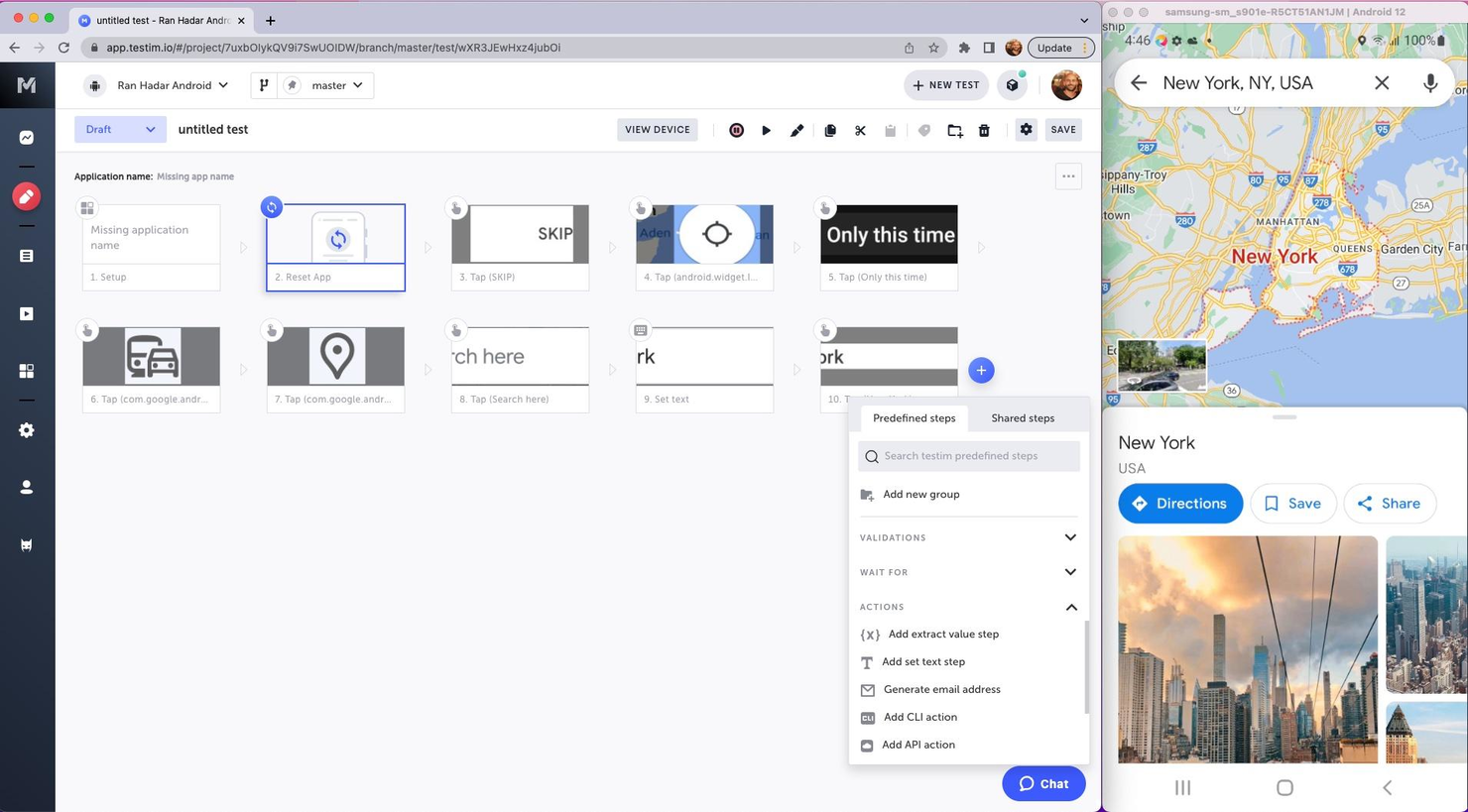
Tricentis Testim Mobile is a software-as-a-service (SaaS) product that's designed to automate mobile testing. It's a part of the Tricentis suite of testing tools and is specifically geared towards mobile applications.
Why I picked Tricentis Testim Mobile: It allows you to create, execute, and analyze tests for mobile apps, both native and hybrid. It's all about making the process of testing mobile apps quicker, more efficient, and more reliable. It uses machine learning to improve test stability and it's got a really intuitive interface that makes creating and managing tests a whole lot easier. Plus, it supports both Android and iOS, which makes it more versatile.
Tricentis Testim Mobile Standout Features and Integrations
Standout features: There are a few features that really make Tricentis Testim Mobile stand out. First off, there's the AI-based test creation and execution. This means that the tool can learn from your tests and improve them over time, making them more reliable and efficient. Then there's the visual test editor, which allows you to create and edit tests visually, without needing to write any code. And then there's the real device testing. This feature allows you to test your apps on real devices, which gives you a much more accurate idea of how your app will perform in the real world.
Integrations include Bamboo, Azure DevOps, Circle CI, Jenkins, GitHub, Saucelabs, LambdaTest, and Bitbucket. If you cannot find the app you are looking for, you can also use its REST API to build custom integrations with your tech stack.
Pros and Cons
Pros:
- Has an API
- Has plenty of integrations
- Free plan available
Cons:
- Bit of a learning curve
- Price might be a bit high for some businesses


LambdaTest is a comprehensive platform for mobile apps and cross-browser testing, offering features for automation testing, live interactive testing, and visual regression testing. With its AI-powered test execution and ability to run tests on 3000+ browsers and devices, it is the best choice for cross-browser testing automation, ensuring exceptional user experience across all devices and browsers.
Why I picked LambdaTest: I chose LambdaTest for mobile test automation because of its comprehensive testing capabilities and the HyperExecute feature, which delivers fast AI-powered testing on the cloud. LambdaTest is an excellent tool for cross-browser testing automation due to its real device cloud for mobile app testing, visual regression testing capabilities, and AI-powered test analytics, all of which are essential for maintaining high-quality mobile applications.
LambdaTest Standout Features and Integrations
Standout features: Their cloud-based infrastructure supports manual and automated cross-browser testing, including the execution of Selenium, Cypress, Playwright, and HyperExecute scripts. The platform also provides an on-premise Selenium Grid for secure testing within a user's network, live-interactive testing of native mobile apps, and access to a real device cloud for accurate test results.
Integrations include project management tools like Jira, Asana, Trello, GitHub, GitLab, and Bitbucket, CI/CD tools such as Jenkins, CircleCI, and Travis CI, and communication platforms like Slack and Microsoft Teams.
Pros and Cons
Pros:
- Fast and helpful customer service
- Low barrier to entry for engineers
- Affordably priced
Cons:
- Limited support for older browser versions
- Occasional issues with simulators not accurately reflecting real devices


testRigor is an AI-driven test automation tool designed to simplify the creation and execution of automated tests for web, mobile, desktop, API, email, and SMS platforms. It allows users to write tests in plain English, making it accessible for non-technical team members.
Why I picked testRigor: The ability to generate tests using plain English commands lowers the barrier to entry for non-technical team members, allowing manual testers, product managers, and other stakeholders to participate in the test creation process. Additionally, the use of Generative AI for testing enables the generation of tests based on documented cases, which accelerates the test creation process.
testRigor Standout Features and Integrations
Standout features include self-healing capabilities that automatically adjust tests in response to application changes, reducing maintenance efforts. Additionally, testRigor supports multi-platform testing, enabling comprehensive testing across web, mobile, and desktop applications, which ensures thorough test coverage and reliability.
Integrations include Jira, TestRail, Zephyr, XRay, ReportPortal, Google Cloud Build, SauceLabs, LambdaTest, BrowserStack, Gitlab, Github Actions, Jenkins, Spinnaker, AWS CodePipeline, Travis, and CircleCI.
Pros and Cons
Pros:
- Offers features to modify custom steps for easier testing
- Allows writing tests in plain English
- Provides detailed analytics on test results
Cons:
- Effectiveness may vary based on the complexity of test scenarios
- May not suit teams requiring extensive customization capabilities

Best mobile test automation tool for cross-functional testing

Katalon Studio is an AI-powered platform that provides a leading mobile test automation tool that lets you plan, author, and execute automated tests. It offers click-and-run cloud environments for automating various forms of mobile testing, including cross-functional testing.
Why I picked Katalon Studio: From cross-functional testing to cross-environment execution and cloud-based mobile platform integration, Katalon offers everything you need to create and run mobile tests reliably and efficiently. It comes with components and prebuilt keywords that help streamline your mobile test automation processes.
Additionally, Katalon enables you to generate tests with a mobile recorder. You can store all UI elements to be reused in future test cases.
Katalon Studio Standout Features and Integrations
Standout features: The cross-environment execution feature allows you to implement tests locally and remotely with real devices, cloud-based devices, or simulators. It offers advanced features like object spying utility and recording utility.
Integrations are available with AppDynamics, Applitools, Atlassian Bamboo, Atlassian Bitbucket, AWS CodeCommit, AWS Device Farm, Azure DevOps, Azure Repos, BrowserStack, and CeeView.
Pros and Cons
Pros:
- Testing on real devices and emulators
- Test automation for native apps, mobile web apps, and hybrid apps
- It supports multiple OSs (Windows, macOS, and Linux)
Cons:
- Some configurations are complex
- There is no massive community support


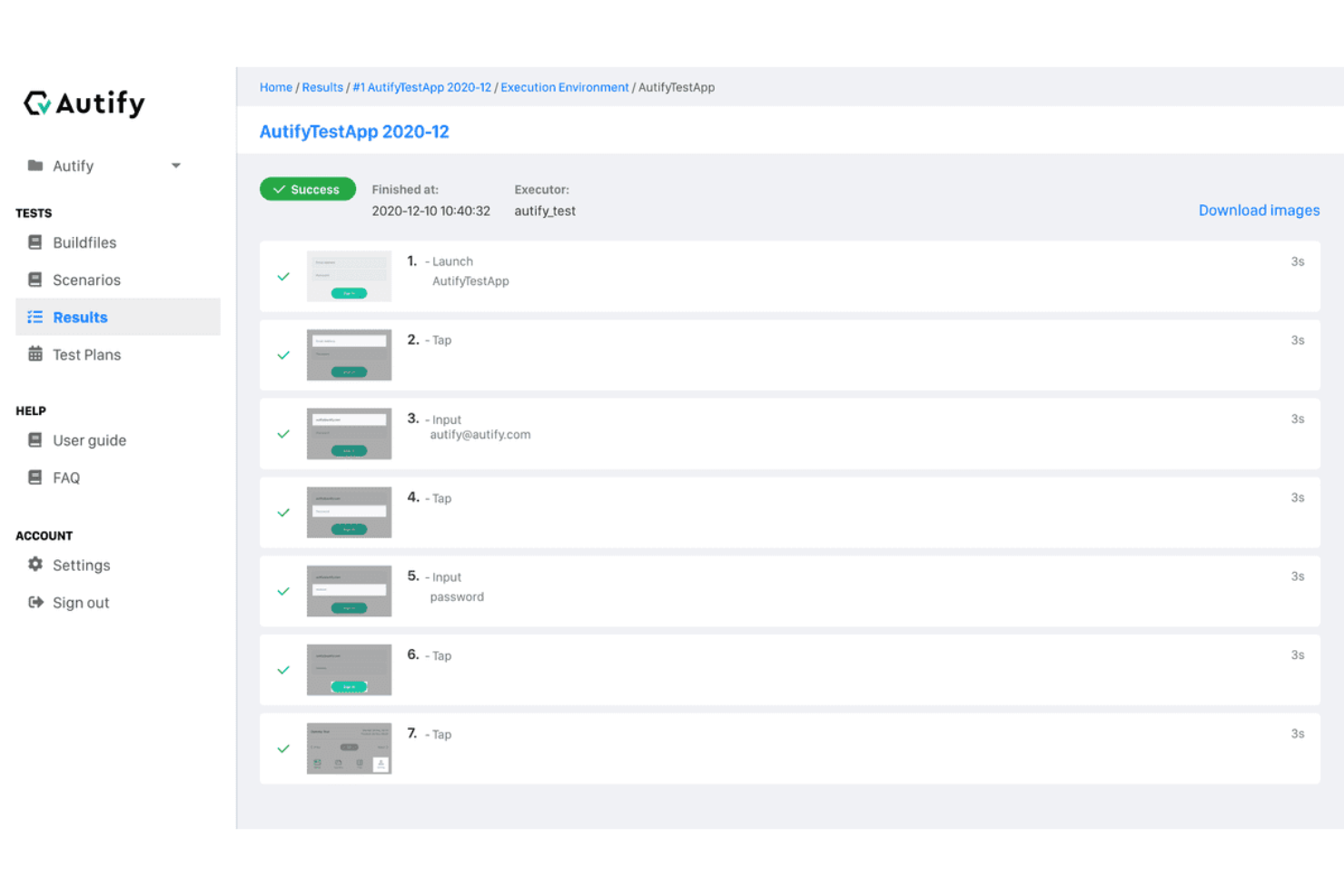
Autify is an AI-powered, no-code platform that automates software testing for web and mobile applications. It enables your team to create, execute, and manage tests without the need for programming skills.
Why I picked Autify: Autify's codeless automation allows you to create test scenarios by simply interacting with your mobile app through a web browser. This approach eliminates the need for real devices during test creation, streamlining the setup process. Additionally, Autify's AI detects changes in your app's source code and UI, automatically updating test scenarios to reduce maintenance efforts. I also like its parallel execution capability. You can run multiple tests simultaneously on various devices and emulators, maximizing test coverage and frequency.
Autify Standout Features and Integrations
Standout features include environment variables that let you pass data during test creation and execution, terminal operation capture to record actions like shaking the device or app backgrounding, and visual regression testing to automatically detect UI changes across app versions.
Integrations include GitHub Actions, CircleCI, Jenkins, Bitrise, and Autify CLI.
Pros and Cons
Pros:
- Test creation without coding knowledge
- Cross-browser and multi-device testing
- Detects visual changes to maintain UI consistency
Cons:
- Offers a narrower range of integrations compared to some competitors
- Lacks integrated tracking for issues discovered during tests


Kobiton enables you to run manual and automated testing on real devices, providing ultra-fast
performance and wide market coverage. It offers scriptless automation, which helps you overcome scripting complexity to get things done faster.
Why I picked Kobiton: This platform supports scriptless automation and allows you to integrate major QA tools, such as Appium, XCUI, and Espresso. Kobiton provides testing capabilities and integrations required to streamline and execute real device testing - in addition to running automation scripts on emulators or simulators.
With Kobiton, you can run tests without coding. Its Intelligent Test Automation lets you create automated test scripts without requiring tedious scripting.
Kobiton Standout Features and Integrations
Standout features include scriptless automation, Intelligent Test Automation, and Appium Anywhere technology. It stands out with its ability to put an end to flaky tests. Kobiton’s industry-first Appium Anywhere technology prevents flaky test scripts by ensuring that the test runs the same across all devices.
Integrations include Appium, Azure DevOps, Espresso, JetBrains, Jira, TeamCity, Travis CI, Visual Studio, XCTest, XCUI, and others.
Pros and Cons
Pros:
- Simplified test scripts creation processes
- Integration with automation frameworks
- No code automation
Cons:
- Doesn’t support delayed test runs
- It can be slow at times


Robotium is a leading Android test automation framework. It’s designed to enable you to automate UI tests for native and hybrid Android applications.
Why I picked Robotium: This solution has the industry-leading features you need to create and execute Android UI automated tests. I added Robotium to my list because it provides seamless, easy ways to write automatic black-box UI tests for Android apps. With this tool, you can write a wide range of function, system, and user acceptance test scenarios.
Another reason I like Robotium is that it lets you execute and manage multiple Android activities automatically.
Robotium Standout Features and Integrations
Standout features include support for native and hybrid applications, fast test case execution, and integration with Maven, Gradle, and Ant. Unlike some alternatives with a steep learning curve, Robotium makes getting started easy with great tutorials. There are instructions and examples to help you get started with your first tests.
Integrations include Android Studio, Appium, Selendroid, TestNG, Gradle, Jenkins, Jira, and Slack.
Pros and Cons
Pros:
- Speedy test case execution
- Improved readability of test cases
- Tests both native and hybrid apps
Cons:
- Its capabilities are limited to Android
- Not highly customizable


Calabash is a BDD framework for mobile operating systems (iOS and Android). This platform provides automated functional testing tools for Android and iOS native and hybrid applications using Cucumber.
Why I picked Calabash: I added Calabash to my list because it offers a simple and powerful set of features for automating mobile app functional testing. Being a BBD framework, the software uses Cucumber to streamline and optimize the testing process. The Cucumber integration gives you a good level of visibility and control of your test cases.
Calabash Standout Features and Integrations
Standout features: Calabash, being an open-source project, gives you access to industry-standard mobile testing solutions for free. It has comprehensive documentation that is split into well-organized sections. As a result, you can easily get started with Calabash by simply browsing through the documentation.
Integrations include Cucumber, Appium, Sauce Labs, CircleCI, Xamarin Test Cloud, Jenkins, Slack, and Travis CI.
Pros and Cons
Pros:
- Improved collaboration
- Easy to understand
- Open-source project
Cons:
- Writing test cases can be challenging at times
- Limited customization
Die besten Mobile Testautomatisierungs-Tools Zusammenfassung
| Tool | Best For | Trial Info | Price | ||
|---|---|---|---|---|---|
| 1 | Best for AI-driven scriptless testing | Free plan available | From $3,600/year | Website | |
| 2 | Best for comprehensive app testing | Free demo available | Pricing upon request | Website | |
| 3 | Best for efficient, AI-powered automation of mobile application testing processes | Free trial + free demo available | Pricing upon request | Website | |
| 4 | Best for cross-browser testing automation | Free plan available + free demo | From $15/user/month (billed annually) | Website | |
| 5 | Best for plain English test creation | Free open source access available + 14-day free trial | Pricing upon request | Website | |
| 6 | Best mobile test automation tool for cross-functional testing | Free plan available + free demo | From $183/user/month | Website | |
| 7 | Best for codeless mobile test automation | Free plan available | From $99/month (billed annually) | Website | |
| 8 | Best scriptless mobile test automation platform | Free trial available | From $83/month | Website | |
| 9 | Best test automation solution for Android UI testing | Not available | Free to use | Website | |
| 10 | Best for automated functional testing of mobile apps | Not available | Free to use | Website |
Weitere Optionen
Hier sind noch ein paar weitere empfehlenswerte Alternativen, die es nicht in die Liste der besten Mobile Testautomatisierungs-Tools geschafft haben:
- TestComplete Mobile
For automating your mobile GUI tests on real devices
- UFT Mobile
For integrating open-source testing tools
- Appium
Tool for facilitating UI automation of many app platforms
- Digital.ai
For increasing test coverage and velocity
- Test.io
Fully managed test automation solution
- Selendroid
For native or hybrid Android apps and the mobile web
- Mobot
For running automated tests on 200+ mobile devices simultaneously
- GPT Driver
For AI-native mobile testing
- Eggplant
AI-driven mobile test automation tool
- Ranorex Studio
Low-code/no-code test automation platform for mobile apps and mobile web


Auswahlkriterien für Mobile Testautomatisierungs-Tools
Hier eine Zusammenfassung der wichtigsten Auswahl- und Bewertungskriterien, die ich verwendet habe, um meine Liste der besten Mobile Testautomatisierungs-Tools für diesen Artikel zu erstellen:
Kernfunktionen
Ich habe zahlreiche mobile Testautomatisierungs-Lösungen recherchiert und gründlich bewertet. In meine Liste aufgenommen habe ich ausschließlich Tools mit folgenden Kernfunktionen:
- Intelligente Automatisierung
- Vereinfachte Test-Erstellung, -Ausführung und -Verwaltung
- Tests auf echten Geräten
- Testmanagement- und Überwachungsfunktionen
Wichtige Funktionen
Ich habe alle Tools daraufhin geprüft, ob sie die wichtigsten Funktionen bieten, die Tester brauchen, um ihre mobilen Produkte umfassend zu bewerten. Die Hauptmerkmale eines guten mobilen Testautomatisierungs-Tools sind:
- Funktionales Testen: Dies ist ein Qualitätssicherungsprozess, bei dem die Spezifikationen oder Funktionen Ihrer mobilen Anwendung beurteilt werden.
- Paralleles Testen: Mit dieser Funktion können identische Tests gleichzeitig in mehreren Umgebungen — Geräten und Browser-Konfigurationen — automatisiert durchgeführt werden.
- Testmanagement: Testmanagement-Funktionen helfen bei der Organisation von Testfällen und ermöglichen es, sämtliche Aktivitäten vom Dashboard oder Kontrollzentrum des Tools aus zu verfolgen.
- Usability-Testing: Auch bekannt als User Experience Testing, ermöglicht Usability-Testing die Bewertung, wie einfach eine Funktion oder ein Design zu nutzen ist, indem das Produkt einer Gruppe von Nutzern zur Verfügung gestellt wird.
- Regressionstest: Dabei werden funktionale und nicht-funktionale Tests erneut durchgeführt, um die Funktionen eines Produkts nach Änderungen am Code erneut zu validieren.
- Berichtswesen & Analytik: Wie der Name schon sagt, nutzen Tester diese Funktion, um Testfälle zu melden und zu analysieren, Aktivitäten zu dokumentieren und Einblicke in die Abläufe zu gewinnen.
Benutzerfreundlichkeit
Das ist ein Maß dafür, wie einfach ein mobiles Produkt zu bedienen ist. Bei der Berücksichtigung dieses Faktors habe ich auf Tools mit einer einfachen Benutzeroberfläche, umfassender Dokumentation, einer aktiven Benutzercommunity, reaktionsschnellem Kundendienst und optimierten Arbeitsabläufen geachtet. Daher sind alle Tools auf meiner Liste leicht zu verwenden. Und wenn Sie doch einmal nicht weiterkommen, bietet jedes Tool Tutorials, Nutzer-Communities oder Kundenservice, um Ihnen bei der Lösung Ihrer Probleme zu helfen.
Anpassbarkeit
Ich habe Lösungen bevorzugt, die leicht anpassbar sind. Anpassbare Tools ermöglichen es Ihnen, ihre Funktionen an die Bedürfnisse und Vorlieben Ihres Teams anzupassen. Sie bieten die notwendige Flexibilität, um Tests entsprechend Ihren Anforderungen und den individuellen Arbeitsweisen Ihres Teams durchzuführen.
Software-Integration
Ihr Team arbeitet bereits mit verschiedenen Softwareentwicklungs-, QA- oder Produktivitätstools. Die Integration der Mobile-Automatisierungssoftware mit Ihren anderen Tools ermöglicht es, den QA-Prozess zu optimieren und Ihrem Team den Aufwand zu ersparen, ständig zwischen verschiedenen Tools zu wechseln. Daher habe ich Lösungen ausgewählt, die sich mit anderen Tools integrieren lassen – so können Sie Tests schnell und kostengünstig durchführen.
Plattformübergreifendes Testen
Eine der wichtigsten Funktionen guter Testautomatisierungssoftware ist das plattformübergreifende Testen. Das bedeutet, Tests auf verschiedenen Betriebssystemen, Geräten, Browsern und Netzwerken durchführen zu können. Ich habe Lösungen ausgewählt, mit denen Sie Tests auf jeder mobilen Plattform oder jedem Gerät durchführen können. Damit entfällt die Notwendigkeit, mehrere Tools zu verwenden, da ein oder zwei All-in-one-Lösungen die Arbeit erledigen können.
Weitere häufig gestellte Fragen
Hier sind Antworten auf einige häufig gestellte Fragen zu mobilen Testautomatisierungstools:
Was sind die Vorteile von mobilen Testautomatisierungstools?
Die Vorteile von mobiler Testautomatisierungssoftware sind eine schnellere Bereitstellung von Apps, höhere Effizienz, optimierte Tests, Echtzeit-Feedback und eine Senkung der QA-Kosten.
Was sind die wichtigsten Funktionen von mobilen Testautomatisierungstools?
Zu den wichtigsten Funktionen von mobilen Testautomatisierungslösungen gehören Testmanagement, funktionales Testen, paralleles Testen, Usability-Testing, Sicherheitstests, Berichts- und Analysetools sowie Regressionstest.
Wie wählt man das beste Tool zur mobilen App-Automatisierung aus?
Um die beste Mobile-Automatisierungssoftware für Ihr Projekt auszuwählen, identifizieren Sie die Tests, die Sie automatisieren möchten, schauen Sie sich die obige Liste an, um Tools zu finden, die Ihren Anforderungen entsprechen, probieren Sie ein oder zwei Tools aus und wählen Sie eines entsprechend Ihren Anforderungen und Ihrem Budget.
Weitere Bewertungen der besten mobilen Test-Automatisierungstools
Fazit
Tools für mobile Automatisierungstests helfen Ihnen, die Probleme zu vermeiden, die mit rein manuellen Tests verbunden sind. Manuelles Testen ist arbeitsintensiv, zeitaufwendig und fehleranfällig. Automatisiertes Testen löst diese Probleme und ermöglicht es Ihnen, Anwendungen schneller, zuverlässiger und kostengünstiger zu testen.
Sehen Sie sich meine Empfehlungen an, um die passende Lösung für Ihre Anforderungen, Ihr Projekt und Ihr Budget zu finden. Wenn Sie mehr über automatisierte Tests und Qualitätssicherung erfahren möchten, abonnieren Sie den The QA Lead Newsletter, um die neuesten Artikel und Podcasts von Branchenexperten zu erhalten.