
21 Beste MBaaS-Software im Test für 2026

10 Beste MBaaS-Software auf einen Blick
Nach einer gründlichen Evaluierung habe ich eine Liste der 10 besten MBaaS-Softwarelösungen zusammengestellt und zusammengefasst, wie jede einzelne spezifische Herausforderungen in der mobilen Entwicklung adressiert.


MBaaS-Software ermöglicht es Ihnen, Apps schnell und effizient zu entwickeln, indem sie das Backend für Sie verwaltet, sodass Sie sich auf die Funktionen konzentrieren können, die Ihren Nutzern am wichtigsten sind. Diese Tools kümmern sich um Datenbanken, Authentifizierung und Push-Benachrichtigungen—und erleichtern so Ihren Entwicklungsalltag erheblich.
Nachdem ich selbst die führenden MBaaS-Optionen getestet habe, stelle ich Ihnen hier die besten vor, damit Sie die Produktivität Ihres Teams steigern und die passende Lösung für Ihr nächstes Projekt wählen können.
Why Trust Our Software Reviews
MBaaS-Software: Kurzübersicht
| Tool | Best For | Trial Info | Price | ||
|---|---|---|---|---|---|
| 1 | Best for easy scalability and user authentication | Free plan available | Pay-as-you-go | Website | |
| 2 | Best for comprehensive app performance analytics | Not available | From $50/user/month (billed annually) | Website | |
| 3 | Best for codeless development and cloud hosting | Not available | From $25/user/month for the Cloud9 plan. This does not include additional costs for exceeding usage limits. | Website | |
| 4 | Best for enterprise mobile app development and data management | Not available | From $101.00 per month (billed annually). This includes 20,000 API calls per month and 10GB of storage. | Website | |
| 5 | Best for rapid prototyping with AWS services | Not available | Uses a pay-as-you-go pricing model. The charges depend on the specific services used. For example, hosting prices start from $0.023 per GB served. | Website | |
| 6 | Best for cross-platform development and integration | Not available | From $14/user/month for the Basic tier (billed annually). This pricing does not include add-on costs for additional services. | Website | |
| 7 | Best for open-source mobile development needs | Not available | Parse is an open-source platform and hence, it's free to use. | Website | |
| 8 | Best for video game backend development | Not available | From $299/month (billed annually), which provides access to all core features, analytics, and standard support. | Website | |
| 9 | Best for real-time data synchronization | Not available | Pricing upon request | Website | |
| 10 | Best for integrating native features swiftly | Not available | From $15/user/month (billed annually) | Website | |
| 11 | Best for secure data storage and retrieval | Not available | BaasBox is an open-source tool, and it's free of charge. | Website | |
| 12 | Best for scalable backend services | Not available | Website |


-

Site24x7
Visit WebsiteThis is an aggregated rating for this tool including ratings from Crozdesk users and ratings from other sites.4.6 -
Docker
Visit WebsiteThis is an aggregated rating for this tool including ratings from Crozdesk users and ratings from other sites.4.6 -
Pulumi
Visit WebsiteThis is an aggregated rating for this tool including ratings from Crozdesk users and ratings from other sites.4.8





MBaaS-Software im Test
Hier finden Sie einen Überblick über die besten MBaaS-Softwarelösungen. Ich hebe die jeweiligen Funktionen der Tools hervor und erkläre, warum sie auf dieser Liste stehen.


Firebase is a leading backend-as-a-service platform for serverless Android, iOS, and web app development. The platform's core strengths lie in its scalability and robust user authentication, making it a top choice for these specific needs.
Why I Picked Firebase:
In selecting Firebase, I was particularly struck by its comprehensive suite of services, most notably its real-time database and user authentication functionalities. These features differentiate Firebase, and its capabilities to scale easily with increasing user demand are unrivaled in the field.
Consequently, I concluded Firebase is the ideal choice for developers who need to prioritize scalability and efficient user authentication in their applications.
Standout Features & Integrations:
Firebase offers a variety of features such as a real-time database, Firestore for more complex data structures, Firebase Authentication, Cloud Messaging, and Firebase Storage for storing user-generated content.
Furthermore, Firebase provides important integrations with other Google services like Google Analytics, Cloud Storage, and AdMob, which can further improve app development and user experience.
Pros and Cons
Pros:
- Real-time database capabilities
- Comprehensive suite of services under one platform
- Easy to use with good documentation
Cons:
- Can be difficult to migrate away from due to the proprietary nature of the service
- Cost can quickly escalate on the pay-as-you-go plan with increased usage
- Limited querying capabilities in its real-time database


Kumulos is a robust MBaaS platform designed to streamline mobile application management. Its extensive feature set, particularly geared towards app performance analytics, makes it an ideal solution for developers and businesses aiming for improved application performance insights.
Why I Picked Kumulos:
I picked Kumulos for its comprehensive focus on app performance analytics. While evaluating various MBaaS platforms, it became clear that Kumulos excels in providing detailed, actionable insights on application performance. I believe this makes it the best choice for developers and businesses keen on optimizing their apps based on user behavior and application performance data.
Standout Features & Integrations:
Kumulos boasts an array of features including crash diagnostics, automated reporting, and user behavior analytics. These tools equip developers with deep insights into their application's performance, aiding in data-driven decision-making.
Kumulos also integrates effectively with various third-party services like Zendesk and Intercom, enabling an improved user experience and efficient customer support.
Pros and Cons
Pros:
- Crash diagnostics and automated reporting feature
- Effective integration with customer support tools
- In-depth app performance analytics
Cons:
- Less flexible than some alternatives
- Pricing might be high for smaller projects
- May be complex for beginners to navigate


Backendless is a backend-as-a-service (BaaS) platform that enables developers to create applications without dealing with the backend coding. Its codeless nature, combined with robust cloud hosting facilities, makes it an ideal pick for developers who want to focus more on the front end and less on server-side concerns.
Why I Picked Backendless:
In deciding on a tool for this list, I selected Backendless due to its significant advantages in codeless development and cloud hosting. It's a unique proposition that stands out because it allows developers to accelerate their projects without getting tied up in backend complexities.
Standout Features & Integrations:
Backendless offers a visual development interface to create backend logic without coding. It also provides a user-friendly database, user management, and cloud code functions. Integration-wise, it works well with a variety of frontend frameworks such as Angular, React, and Vue, which can help developers streamline their overall development process.
Pros and Cons
Pros:
- Smooth integration with popular frontend frameworks
- Robust and reliable cloud hosting
- Offers codeless backend development
Cons:
- Additional costs for usage beyond the included limits
- Limitations in the free plan can hinder large projects
- The user interface might be intimidating for beginners


Oracle Mobile Hub is a cloud-based, mobile-backend-as-a-service (MBaaS) offering from Oracle. It empowers enterprises to develop, test, connect, and manage their mobile applications and associated data effectively.
It's the tool of choice for enterprise mobile app development and data management due to its extensive features and Oracle's proven data management capabilities.
Why I Picked Oracle Mobile Hub:
In deciding on Oracle Mobile Hub, the first thing that stood out to me was its extensive suite of tools and features tailored to enterprise needs. Moreover, with Oracle's deep experience in data management, the platform shines when it comes to handling complex data requirements within a mobile app ecosystem.
That's why I think Oracle Mobile Hub is best suited for enterprise-level mobile app development and data management.
Standout Features & Integrations:
Oracle Mobile Hub provides robust application development tools like API Catalog, which simplifies the integration process with other systems. Other notable features include Mobile Analytics, which provides insights into app usage and performance. It integrates with other Oracle services like Oracle Database and Oracle Identity Management, ensuring a holistic enterprise solution.
Pros and Cons
Pros:
- Good support for data management
- Strong integrations with other Oracle services
- Comprehensive toolset for enterprise mobile app development
Cons:
- Limited third-party integrations
- May be complex for small-scale applications
- More expensive than some other platforms


AWS Amplify is a development platform provided by Amazon Web Services (AWS) that enables developers to build and deploy scalable mobile and web applications quickly. Its deep integration with other AWS services and focus on rapid prototyping align well with its positioning as a top choice for creating prototypes in an AWS environment.
Why I Picked AWS Amplify:
I chose AWS Amplify for this list because of its excellent support for rapid prototyping within the AWS ecosystem. Its ability to leverage a host of AWS services, including authentication, APIs, storage, and analytics, distinguishes it from other tools. This makes AWS Amplify ideal for developers already embedded in or moving towards the AWS environment.
Standout Features & Integrations:
AWS Amplify has a feature-rich environment that includes Authentication, GraphQL, and REST APIs, Analytics, and more, all aimed at enabling fast prototype development. It integrates well with a range of other AWS services, like AWS Lambda for serverless functions and Amazon S3 for storage, creating a holistic development experience.
Pros and Cons
Pros:
- Provides serverless functions
- Deep integration with other AWS services
- Excellent for rapid prototyping
Cons:
- Can be overkill for smaller projects not requiring AWS services
- Steeper learning curve for developers new to AWS
- Pricing can be complex due to the pay-as-you-go model

Best for cross-platform development and integration

Microsoft Azure Mobile App Service is a comprehensive cloud platform that allows developers to build, test, deploy, and manage applications for any platform including iOS, Android, and Windows.
Given its robust cross-platform support and broad integration capabilities, it becomes a go-to solution for developers prioritizing these aspects in their projects.
Why I Picked Microsoft Azure Mobile App Service:
Upon examining various tools, I picked Azure Mobile App Service because of its wide-ranging capabilities, especially in terms of cross-platform development and service integration. What sets it apart is its strong commitment to compatibility and integration with other services, making it an excellent choice for developers who require a tool that excels in these aspects.
Standout Features & Integrations:
Azure Mobile App Service boasts features like the ability to build and deploy for any platform using a variety of web development languages, including .NET, Node.js, Java, Python, or PHP. It also includes out-of-the-box services like push notifications, user authentication, offline sync, and auto-scaling.
The tool provides key integrations with many other Azure services, including Azure DevOps for CI/CD, Azure Functions for serverless computing, and Azure Logic Apps for workflow orchestration.
Pros and Cons
Pros:
- Extensive scalability and reliability
- Robust integration capabilities with other Azure services
- Comprehensive support for different programming languages
Cons:
- Requires a learning curve to fully leverage its capabilities
- Costs can escalate quickly with additional services
- Can be complex for beginners due to the broad range of services


Parse is a highly flexible, open-source Backend as a Service (BaaS) platform that is particularly well-suited for mobile application development. With its broad range of capabilities, developers can create, host, and maintain applications more efficiently, which makes it a suitable choice for open-source mobile development needs.
Why I Picked Parse:
I selected Parse for its noteworthy open-source nature and its focus on mobile development. When comparing different MBaaS tools, Parse stood out for its extensive customization options and its strong developer community. It is this flexibility and support that positions Parse as a top choice for those with open-source mobile development requirements.
Standout Features & Integrations:
Parse's key features include a user-friendly dashboard, cloud code functions, and a real-time database. These features facilitate efficient application development and management.
On the integration front, Parse provides software development kits (SDKs) for many platforms including iOS, Android, JavaScript, Flutter, and more, which facilitates cross-platform app development.
Pros and Cons
Pros:
- Robust developer community
- Extensive platform-specific SDKs
- Open-source with broad customization options
Cons:
- Some advanced features may require complex setup
- Absence of direct customer support
- May require more development skills than managed BaaS solutions


GameSparks is a cloud-based platform dedicated to providing a comprehensive backend solution for game developers. Its robust features and integrations are particularly suited to the specific needs and complexities of video game development, earning it the top spot for this use case.
Why I Picked GameSparks:
Choosing GameSparks for this list was a decision driven by its specialization in video game development. In my judgement, the platform stands out from the competition due to its dedicated game services and scalable multiplayer capabilities.
I determined it to be the optimal solution for video game backend development as it provides a range of features explicitly designed to handle the unique challenges of creating and managing online games.
Standout Features & Integrations:
GameSparks offers an array of impressive features like player authentication, social features, multiplayer matchmaking, and leaderboards. Additionally, its Cloud Code feature allows for server-side logic.
As for integrations, GameSparks can work with a multitude of platforms such as Unity, Unreal, Android, iOS, and more, providing flexibility in game development.
Pros and Cons
Pros:
- Scalable multiplayer capabilities
- Wide range of integrations with game development platforms
- Focused on game development needs
Cons:
- Customer support can be slow at times
- May be too complex for simple games
- Pricing can be steep for small developers or hobbyists

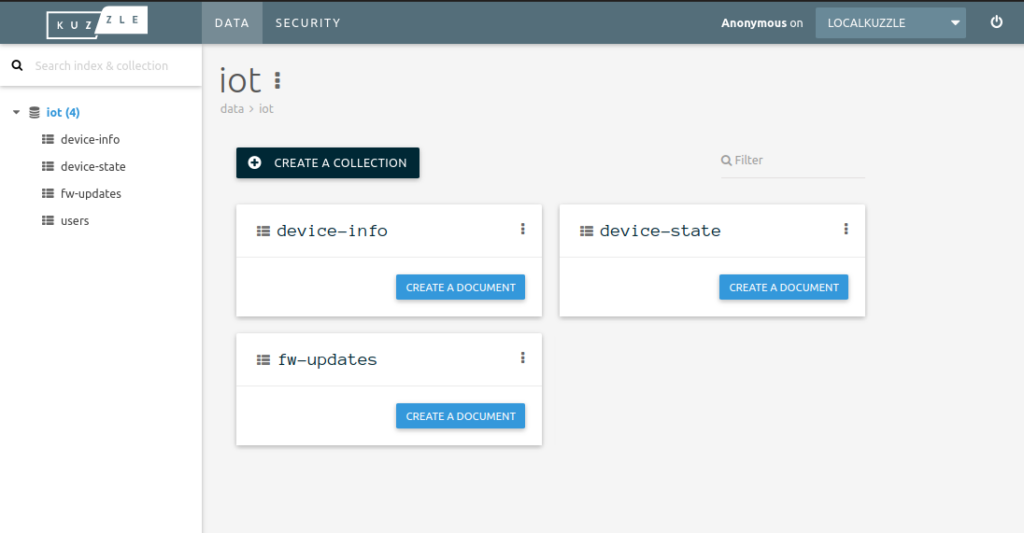
Kuzzle is a scalable and open-source IoT backend and MBaaS solution, renowned for its real-time capabilities. It provides developers with a flexible toolset to manage complex data structures and ensure effective synchronization between different systems in real time.
Why I Picked Kuzzle:
I chose Kuzzle for its exceptional handling of real-time data synchronization. With my comprehensive comparison, it stands out due to its open-source nature and focus on real-time data management. The real-time aspect is critical in today's mobile applications, and Kuzzle's capacity to manage this effortlessly makes it the best option for such use cases.
Standout Features & Integrations:
Kuzzle comes packed with features such as geofencing, pub/sub messaging, and real-time database management. Its data validation rules and role-based access control improve security and compliance. Regarding integrations, Kuzzle supports connections to various databases, including PostgreSQL, Elasticsearch, and Redis, improving the flexibility of data management and analytics.
Pros and Cons
Pros:
- Variety of supported database integrations
- Open-source platform allows for customization
- Excellent real-time data synchronization
Cons:
- Requires technical expertise for setup and management
- Might be too complex for simple applications
- Pricing details are not transparent


Apps Panel is a flexible and powerful MBaaS solution designed to expedite mobile development tasks. It's built with a key focus on quick integration of native features, making it the go-to choice for developers who frequently work with native functionalities.
Why I Picked Apps Panel:
I chose Apps Panel for this list because of its unique approach to handling native features. In my experience, this focus sets it apart from many other MBaaS tools. Its capability to swiftly integrate native features significantly reduces the time and resources required for mobile development tasks, hence its standing as the best choice for such use cases.
Standout Features & Integrations:
Apps Panel provides an array of robust features, including real-time analytics, in-app messaging, and push notifications, all tailored to improve user engagement. Its powerful user management system and cloud storage capabilities also streamline backend processes.
For integrations, Apps Panel connects with popular platforms like WordPress, Drupal, and PrestaShop, which can enrich your app's functionality and data connectivity.
Pros and Cons
Pros:
- Robust third-party integration options
- Powerful user management system
- Quick native feature integration
Cons:
- Limited support for non-native features
- Pricing could be a deterrent for small teams
- Steeper learning curve for beginners
Weitere MBaaS-Software
Unten finden Sie eine Liste zusätzlicher MBaaS-Software, die ich in die engere Auswahl genommen habe, die es aber nicht unter die Top 12 geschafft haben. Sie sind trotzdem definitiv einen Blick wert.
- DreamFactory
For auto-generated APIs
- Apigee
For full lifecycle API management
- brainCloud
For comprehensive backend solutions
- CodeNgo
For app store distribution
- Appgyver Composer
For low-code app development
- Apple CloudKit
For iOS app data storage
- PubNub
For real-time data streaming
- Kinvey
For modernizing legacy applications
- AppDrag
For visual development and cloud hosting


Auswahlkriterien für MBaaS-Software
Bei der Auswahl der besten MBaaS-Software für diese Liste habe ich gängige Anforderungen und Herausforderungen von Käufern wie Integrationsmöglichkeiten und Skalierbarkeit berücksichtigt. Dazu habe ich das folgende Bewertungsraster verwendet, um die Auswahl strukturiert und fair zu gestalten:
Kernfunktionen (25% der Gesamtbewertung)
Um auf diese Liste aufgenommen zu werden, musste jede Lösung die folgenden Anwendungsfälle abdecken:
- Verwaltung der Backend-Infrastruktur
- Benutzerauthentifizierung verwalten
- Lösungen zur Datenspeicherung bereitstellen
- Push-Benachrichtigungen ermöglichen
- Analysen und Berichte anbieten
Besondere Zusatzfunktionen (25% der Gesamtbewertung)
Um die Auswahl weiter einzugrenzen, habe ich zudem nach einzigartigen Funktionen gesucht, zum Beispiel:
- Unterstützung für Echtzeit-Datensynchronisierung
- Erweiterte Sicherheitsprotokolle
- Integration von Modellen für maschinelles Lernen
- Anpassbare Workflow-Automatisierung
- Möglichkeiten zur plattformübergreifenden Bereitstellung
Benutzerfreundlichkeit (10% der Gesamtbewertung)
Um einzuschätzen, wie benutzerfreundlich die Systeme sind, habe ich Folgendes betrachtet:
- Intuitive Benutzeroberfläche
- Einfache Navigation
- Klare Dokumentation
- Geringe Einarbeitungszeit
- Responsives Design
Onboarding (10% der Gesamtbewertung)
Zur Bewertung der Einstiegserfahrung bei jeder Plattform habe ich Folgendes berücksichtigt:
- Verfügbarkeit von Schulungsvideos
- Interaktive Produkttouren
- Zugang zu Vorlagen
- Live-Webinare und Q&A-Sitzungen
- Personalisierte Einführungsunterstützung
Kundensupport (10% der Gesamtbewertung)
Um die Supportleistungen der einzelnen Softwareanbieter zu beurteilen, habe ich Folgendes berücksichtigt:
- 24/7 Erreichbarkeit
- Mehrere Supportkanäle
- Schnelle Reaktionszeiten
- Zugang zu einer Wissensdatenbank
- Feste Ansprechpartner (Account Manager)
Preis-Leistungs-Verhältnis (10% der Gesamtbewertung)
Um das Preis-Leistungs-Verhältnis der einzelnen Plattformen zu beurteilen, habe ich Folgendes berücksichtigt:
- Konkurrenzfähige Preisgestaltung
- Transparente Preisstruktur
- Verfügbarkeit einer kostenlosen Testversion
- Skalierbarkeit der Preismodelle
- Rabatte bei langfristigen Verträgen
Kundenbewertungen (10% der Gesamtbewertung)
Um einen Eindruck von der allgemeinen Kundenzufriedenheit zu gewinnen, habe ich bei der Analyse von Kundenbewertungen Folgendes berücksichtigt:
- Gesamtzufriedenheitswerte
- Häufigkeit positiver Rückmeldungen
- Häufig genannte Probleme
- Nutzerberichte
- Vergleiche mit Wettbewerbern
Wie wählt man MBaaS-Software aus?
Es ist leicht, sich in langen Funktionslisten und komplexen Preismodellen zu verlieren. Damit Sie bei der Auswahl einer passenden Software den Überblick behalten, finden Sie hier eine Checkliste wichtiger Faktoren, die Sie beachten sollten:
| Faktor | Was Sie beachten sollten |
|---|---|
| Skalierbarkeit | Kann die Software mit Ihrem Unternehmen wachsen? Suchen Sie nach Optionen, die steigende Daten- und Nutzeranforderungen ohne Leistungsprobleme oder Zusatzkosten bewältigen können. |
| Integrationen | Lässt sich das System mit Ihren bestehenden Tools verbinden? Achten Sie auf Kompatibilität mit Ihrer aktuellen IT-Landschaft, um Arbeitsunterbrechungen zu vermeiden. |
| Anpassbarkeit | Können Sie das System auf Ihre Bedürfnisse zuschneiden? Prüfen Sie, ob die Plattform individuelle Funktionen oder Abläufe für Ihre Geschäftsprozesse ermöglicht. |
| Benutzerfreundlichkeit | Ist die Lösung für Ihr Team einfach zu bedienen? Berücksichtigen Sie die Einarbeitungszeit und prüfen Sie, ob die Bedienoberfläche zu den Fähigkeiten Ihres Teams passt. |
| Implementierung und Onboarding | Wie schnell können Sie starten? Bewerten Sie den Einrichtungsprozess sowie die Verfügbarkeit von Schulungsressourcen für einen reibungslosen Einstieg. |
| Kosten | Passt die Lösung in Ihr Budget? Vergleichen Sie verschiedene Preismodelle, einschließlich versteckter Kosten, und bedenken Sie langfristige Kosten im Verhältnis zum Nutzen. |
| Sicherheitsmaßnahmen | Sind Ihre Daten und Nutzer geschützt? Achten Sie auf Sicherheitszertifikate und Funktionen wie Verschlüsselung und Zugriffskontrollen. |
| Support-Verfügbarkeit | Bekommen Sie Hilfe, wenn Sie sie benötigen? Prüfen Sie die angebotenen Supportkanäle, Reaktionszeiten und Erreichbarkeit für eine zuverlässige Unterstützung. |
Was ist MBaaS-Software?
MBaaS-Software ist eine Plattform, die die Backend-Infrastruktur für mobile und Web-Anwendungen verwaltet. Entwickler und IT-Fachleute nutzen diese Tools in der Regel, um die Entwicklung zu beschleunigen und die Verwaltung des Backends zu vereinfachen. Funktionen wie Datenspeicherung, Benutzer-Authentifizierung und Push-Benachrichtigungen erleichtern Skalierbarkeit, Integration und Bedienkomfort. Insgesamt vereinfachen MBaaS-Tools die App-Entwicklung und steigern die Produktivität.
Funktionen
Bei der Auswahl von MBaaS-Software sollten Sie auf folgende Schlüsselfunktionen achten:
- Datenspeicher: Bietet sichere und skalierbare Speicherlösungen für App-Daten und ermöglicht eine effiziente Verwaltung von Nutzerinformationen.
- Nutzerauthentifizierung: Stellt Tools zur Verfügung, um Nutzerregistrierungen und Anmeldeprozesse zu verwalten und sorgt für sichere Zugriffskontrolle.
- Push-Benachrichtigungen: Ermöglicht das Versenden von Echtzeit-Benachrichtigungen an Nutzer und verbessert Interaktion und Kommunikation.
- Mobile Analytics-Software mit Berichterstattung: Liefert Einblicke in die App-Performance und das Nutzerverhalten, was datenbasierte Entscheidungen unterstützt.
- Integrationsfähigkeit: Ermöglicht eine nahtlose Anbindung an bestehende Tools und Plattformen und stellt einen reibungslosen Workflow sicher.
- Anpassbare Workflows: Bietet die Flexibilität, Prozesse und Funktionen an spezifische Geschäftsanforderungen anzupassen.
- Echtzeit-Datensynchronisation: Sorgt für Datenkonsistenz auf allen Geräten und bietet ein einheitliches Nutzungserlebnis.
- Sicherheitsfunktionen: Umfasst Verschlüsselung und Zugriffskontrollen zum Schutz von App-Daten und der Privatsphäre der Nutzer.
- Skalierbarkeit: Unterstützt wachsende Daten- und Nutzeranforderungen, ohne die Leistung zu beeinträchtigen oder zusätzliche Kosten zu verursachen.
- Entwicklertools: Stellt APIs und SDKs für eine vereinfachte Entwicklung und Integration bereit und beschleunigt so den App-Entwicklungsprozess.
Vorteile
Die Implementierung von MBaaS-Software bietet Ihrem Team und Unternehmen zahlreiche Vorteile. Auf diese können Sie sich freuen:
- Schnellere Entwicklung: Beschleunigt die App-Erstellung durch die Verwaltung der Backend-Infrastruktur, sodass sich Entwickler auf die Frontend-Funktionen konzentrieren können.
- Kosteneinsparungen: Reduziert Infrastrukturkosten durch skalierbaren Speicher und bedarfsgerechte Rechenleistung.
- Erhöhte Sicherheit: Schützt Nutzerdaten mit integrierten Sicherheitsmerkmalen wie Verschlüsselung und Zugangskontrollen.
- Besseres Nutzerengagement: Erhöht die Kommunikation durch Push-Benachrichtigungen und Echtzeit-Datensynchronisation, damit Nutzer informiert und verbunden bleiben.
- Skalierbarkeit: Wächst mit Ihrem Unternehmen und bewältigt steigende Nutzerzahlen und Datenmengen ohne Leistungsprobleme.
- Datenbasierte Einblicke: Bietet Analyse-Tools, um App-Leistung und Nutzerverhalten zu verfolgen und fundierte Entscheidungen zu unterstützen.
- Einfache Integration: Bindet sich an vorhandene Tools und Plattformen an, sorgt für reibungslose Arbeitsabläufe und minimiert Unterbrechungen.
Kosten & Preise
Die Auswahl von MBaaS-Software setzt ein Verständnis der verschiedenen Preismodelle und verfügbaren Pläne voraus. Die Kosten variieren abhängig von Funktionen, Teamgröße, Erweiterungen und mehr. Die folgende Tabelle fasst gängige Pläne, ihre Durchschnittspreise und typische in MBaaS-Softwarelösungen enthaltene Funktionen zusammen:
Vergleichstabelle der MBaaS-Software-Pläne
| Planart | Durchschnittlicher Preis | Gängige Funktionen |
|---|---|---|
| Gratis-Tarif | $0 | Grundlegende Datenspeicherung, begrenzte API-Aufrufe und Community-Support. |
| Persönlicher Tarif | $10-$30/user/month | Erweiterte Datenspeicherung, Nutzerauthentifizierung, Push-Benachrichtigungen und E-Mail-Support. |
| Business-Tarif | $50-$100/user/month | Erweiterte Analysen, Echtzeit-Datensynchronisation, Integrationen und Prioritäts-Support. |
| Enterprise-Tarif | $150+/user/month | Anpassbare Workflows, dedizierter Account-Manager, Sicherheitskontrollen und SLA-Garantien. |
MBaaS-Software FAQs
Hier finden Sie Antworten auf häufig gestellte Fragen zu MBaaS-Software:
Ist es möglich, MBaaS mit bestehenden Systemen zu integrieren?
Die meisten MBaaS-Plattformen bieten Integrationsmöglichkeiten über APIs, sodass Sie vorhandene Tools und Dienste anbinden können. So bleiben Ihre Arbeitsabläufe erhalten und Sie können bestehende Investitionen weiter nutzen. Überprüfen Sie vorab die Kompatibilität mit Ihrem aktuellen Technologiestack.
Wie schneidet MBaaS-Software im Vergleich zu individueller Backend-Entwicklung ab?
MBaaS-Software ermöglicht eine schnellere Umsetzung, bringt vorgefertigte Funktionen mit und verursacht geringere Einstiegskosten als eine individuelle Backend-Entwicklung. Maßgeschneiderte Backend-Lösungen bieten mehr Kontrolle bei komplexen Anforderungen, erfordern jedoch spezielles Know-how und laufende Wartung. Viele Teams entscheiden sich für Software, um schnell zu starten, und setzen individuelle Entwicklungen für besondere Anforderungen ein.
Ist ein Wechsel zwischen verschiedenen MBaaS-Softwareanbietern möglich?
Die Migration zwischen MBaaS-Softwareanbietern kann je nach Integration mit anbieterspezifischen Funktionen und APIs eine Herausforderung sein. Um einen späteren Umstieg zu erleichtern, sollten Sie beim Einsatz von MBaaS eine Abstraktionsschicht einplanen. Einige Anbieter stellen eigene Migrations-Tools bereit, mit denen Sie Daten von Konkurrenzdiensten übertragen können.
Wie können Unternehmen die Datenkonformität bei der Nutzung von MBaaS-Software sicherstellen?
Unternehmen sollten prüfen, ob die Softwareanbieter relevante Compliance-Zertifizierungen für ihre Branche anbieten (wie GDPR, HIPAA, SOC2). Setzen Sie Daten-Governance-Richtlinien um, die zu den Funktionen Ihrer gewählten MBaaS-Softwareplattform passen. Viele Enterprise-MBaaS-Lösungen bieten Optionen für Datenresidenz, Verschlüsselungssteuerung und Prüfprotokolle, um Compliance-Anforderungen zu erfüllen.
Wie geht es weiter:
Wenn Sie aktuell MBaaS-Software recherchieren, nehmen Sie Kontakt zu einem SoftwareSelect-Berater auf und erhalten Sie kostenlose Empfehlungen.
Sie füllen ein Formular aus und führen ein kurzes Gespräch, in dem auf Ihre individuellen Anforderungen eingegangen wird. Anschließend erhalten Sie eine Shortlist geeigneter Softwarelösungen. Die Berater begleiten Sie während des gesamten Kaufprozesses – einschließlich Preisverhandlungen.