

1 Beste Low-Code-Plattformen zur App-Entwicklung im Jahr 2026

Beste Low-Code-Plattformen Shortlist
Hier ist meine Auswahlliste der besten Low-Code-Plattformen:


Die besten Low-Code-Plattformen helfen Teams, Anwendungen schnell zu erstellen und bereitzustellen, indem sie den Bedarf an manueller Programmierung reduzieren. Dadurch ermöglichen sie schnellere Iterationen, einfachere Updates und eine zügige Bereitstellung in der Produktion. Sie erlauben Entwicklern, sich auf Logik und Benutzererfahrung anstatt auf Boilerplate-Code zu konzentrieren, und ermöglichen es Nicht-Entwicklern, an der Entwicklung interner Tools oder kundenorientierter Apps mitzuwirken.
Viele Teams wenden sich Low-Code-Plattformen zu, wenn sie mit handcodierten Legacy-Anwendungen feststecken, mit Entwicklungsrückständen zu kämpfen haben, die Auslieferungen verzögern, oder versuchen, ohne Unterstützung eines eigenen Entwicklerteams schnell voranzukommen. Wer schon einmal Stunden mit dem Hardcoding von Formularen oder dem immer wiederkehrenden Aufbau von Admin-Dashboards verbracht hat, weiß, wie viel Zeit bei repetitiven Aufgaben verloren gehen kann.
Ich habe Low-Code-Tools in echten Projekten getestet – von internen SaaS-Operations-Dashboards bis hin zu Onboarding-Workflows für Kunden – und bewertet, wie gut sie sich in moderne Tech-Stacks integrieren und mit Teamanforderungen skalieren lassen. Dieser Leitfaden stellt die Plattformen vor, die besonders einfach einzurichten, schnell anzupassen und besonders wirkungsvoll bei der Realisierung von Ergebnissen ohne unnötigen Overhead sind.
Table of Contents
Why Trust Our Software Reviews
We’ve been testing and reviewing software since 2023. As tech leaders ourselves, we know how critical and difficult it is to make the right decision when selecting software.
We invest in deep research to help our audience make better software purchasing decisions. We’ve tested more than 2,000 tools for different tech use cases and written over 1,000 comprehensive software reviews. Learn how we stay transparent & our software review methodology.
Beste Low-Code-Plattformen Zusammenfassung
Diese Vergleichstabelle fasst Preisinformationen zu meinen Top-Low-Code-Plattformen zusammen und hilft Ihnen, die passende für Ihr Budget und Ihre geschäftlichen Anforderungen zu finden.
| Tool | Best For | Trial Info | Price | ||
|---|---|---|---|---|---|
| 1 | Am besten geeignet für die Entwicklung interner Unternehmens-Tools | Kostenloses Paket verfügbar | Ab $20/Entwickler/Monat | Website | |
| 2 | Am besten für KI-gestützte App-Generierung | Kostenloser Tarif verfügbar | Ab $160/Monat (jährlich abgerechnet) | Website | |
| 3 | Am besten geeignet für visuelle Entwicklungstools im Unternehmenseinsatz | Kostenloser Plan verfügbar | Ab $25/Nutzer/Monat | Website | |
| 4 | Am besten geeignet für anpassbare App-Builder | Kostenlose Testversion + kostenlose Demo verfügbar | Ab $2.500/Monat | Website | |
| 5 | Ideal für die Entwicklung auf bestehenden Datenbanken | Kostenlose Testversion verfügbar | Preis auf Anfrage | Website | |
| 6 | Am besten für KI-gestützte Website-Erstellung | Kostenloser Tarif verfügbar | Ab $17/Monat | Website | |
| 7 | Am besten für Skalierbarkeit von Unternehmens-Microservices | Kostenlose Demo verfügbar | Preise auf Anfrage | Website | |
| 8 | Am besten für schnelle Low-Code-Entwicklung | Kostenloser Tarif + kostenlose Demo verfügbar | Ab $15/Nutzer/Monat | Website | |
| 9 | Bester Kundenservice | Kostenloser Tarif verfügbar | Ab $127.50/Monat | Website | |
| 10 | Am besten geeignet für skalierbare No-Code-Backend-Entwicklung | Kostenloser Plan verfügbar | Ab $85/Monat (jährliche Abrechnung) | Website | |
| 11 | Am besten geeignet für den Bau sicherer interner Anwendungen | Kostenloser Plan verfügbar | Ab $15/Nutzer/Monat + $49/Ersteller/Monat | Website | |
| 12 | Am besten für KI-gesteuerte Testautomatisierung | 14 Tage kostenlos testen | Ab $212/Monat | Website | |
| 13 | Beste Case-Management-Funktionen | Kostenloser Tarif verfügbar | Ab $2/Nutzer/Monat | Website | |
| 14 | Am besten geeignet für aPaaS-Management | 30-tägige kostenlose Testversion | Ab $500/Monat | Website | |
| 15 | Am besten für Agilität | Kostenlose Version verfügbar | Ab $60/Monat | Website | |
| 16 | Am besten für schnelle App-Entwicklung | Kostenlose Demo + kostenloser 15-Tage-Test verfügbar | Ab $8/Nutzer/Monat (jährlich abgerechnet) | Website | |
| 17 | La meilleure gamme de fonctionnalités | Gratuit à vie | Gratuit | Website | |
| 18 | Am besten für Anfänger geeignet | Kostenloser Plan verfügbar | Kostenlos | Website | |
| 19 | Am besten geeignet für die Sammlung von Benutzereingaben | Kostenloser Plan mit kostenlosem Jotform-Konto verfügbar | Ab $34/Monat (jährlich abgerechnet) mit dem Jotform-Bronze-Tarif | Website | |
| 20 | Am besten für Salesforce CRM-Integration | 30 Tage kostenlos testen | Ab $25/Nutzer/Monat | Website |
-

Site24x7
Visit WebsiteThis is an aggregated rating for this tool including ratings from Crozdesk users and ratings from other sites.4.7 -
GitHub Actions
Visit WebsiteThis is an aggregated rating for this tool including ratings from Crozdesk users and ratings from other sites.4.8 -
Docker
Visit WebsiteThis is an aggregated rating for this tool including ratings from Crozdesk users and ratings from other sites.4.6





Überblick über die 12 besten Low-Code-Plattformen
In den folgenden Abschnitten finden Sie meine Lieblings-Low-Code-Plattformen inklusive ihrer Stärken, Schwächen und den Gründen für meine Auswahl. Nach den einzelnen Übersichten habe ich die von mir bei der Auswahl berücksichtigten Kriterien erläutert.

Am besten geeignet für die Entwicklung interner Unternehmens-Tools

UI Bakery ist eine Low-Code-Plattform, die für IT-Teams und Geschäftsanwender entwickelt wurde, die datenbasierte Anwendungen mit minimalem Programmieraufwand erstellen, anpassen und bereitstellen sowie Datenbanken anbinden und Workflows automatisieren müssen.
Für wen ist UI Bakery am besten geeignet?
UI Bakery eignet sich besonders für IT-Teams und Entwickler in mittelständischen bis großen Unternehmen, die interne Tools, Admin-Panels und Dashboards erstellen möchten, ohne alles von Grund auf programmieren zu müssen.
Warum habe ich UI Bakery ausgewählt?
UI Bakery verdient seinen Platz auf meiner Auswahlliste, weil es speziell für interne Unternehmens-Tools entwickelt wurde – nicht für generische App-Entwicklung. Besonders schätze ich die integrierte rollenbasierte Zugriffskontrolle (RBAC) und die Audit-Logs, die gerade beim Entwickeln von Apps mit sensiblen Unternehmensdaten über mehrere Teams hinweg von großer Bedeutung sind. Außerdem nutze ich die Self-Hosting-Option, wenn ich in Umgebungen arbeite, in denen Daten das private Netzwerk nicht verlassen dürfen – ein echtes Kriterium in Enterprise-Settings. Der React-Code-Export bedeutet, dass mein Team nicht an die Plattform gebunden ist – wir können den generierten Code übernehmen und in unserer eigenen IDE weiterentwickeln, falls die App den nativen Funktionsumfang von UI Bakery übersteigt.
UI Bakery Hauptfunktionen
- KI-Entwicklungsagent: Mit einem KI-Agenten chatten, um in wenigen Minuten eine voll funktionsfähige App zu generieren und bereitzustellen – ganz ohne manuelles Programmieren.
- Ein-Klick-Bereitstellung: App-Updates mit eingebautem Auto-Scaling, SSL und CDN veröffentlichen sowie verlässliche Rollbacks per Knopfdruck durchführen.
- Über 45 Datenbank- und API-Konnektoren: Direkte Verbindung zu Postgres, MySQL, MongoDB, SQL Server und vielen weiteren, um Anwendungen auf Basis von Live-Daten zu entwickeln.
- Gehostete Datenbank: Eine integrierte, gehostete Datenbank zum schnellen Prototypen neuer App-Ideen aufsetzen, ohne externe Infrastruktur bereitstellen zu müssen.
UI Bakery Integrationen
Zu den Integrationen zählen AWS S3, Airtable, Azure Blob Storage, Close, Databricks, DynamoDB, Elasticsearch, Firebase, GitHub und Google BigQuery.
Pros and Cons
Pros:
- Unbegrenzte eigene Komponenten können hinzugefügt werden
- Geeignet für einfache und komplexe Anwendungen
- Intuitive Drag-and-Drop-Oberfläche
Cons:
- Git-Versionskontrolle nur im Enterprise-Plan verfügbar
- Möglicherweise Schwierigkeiten bei der Integration einiger Drittanbieter-Tools
New Product Updates from UI Bakery

UI Bakery Adds Data Sources and Improves Chat and Licensing
UI Bakery adds Salesforce OpenAPI and MCP server data sources, improves chat features, and updates licensing and billing. These updates expand integration capabilities and improve AI app building and subscription management. For more information, visit UI Bakery’s official site.
 .
.
Base44 ist eine Low-Code-Plattform, die für IT-Teams und Geschäftsanwender entwickelt wurde, die individuelle Anwendungen erstellen und bereitstellen möchten, ohne über tiefgehende Programmierkenntnisse zu verfügen. Sie hilft Unternehmen, Workflows zu automatisieren und Prozesse mit KI-gestützten Tools zu digitalisieren.
Für wen ist Base44 am besten geeignet?
Base44 ist eine gute Lösung für kleine bis mittelgroße Teams und Start-ups, die interne Tools und maßgeschneiderte Apps in kurzer Zeit erstellen müssen, ohne sich auf ein dediziertes Entwicklungsteam verlassen zu müssen.
Warum ich mich für Base44 entschieden habe
Base44 gehört zu meinen Favoriten, weil mir besonders gefällt, wie der Chat-basierte Builder es ermöglicht, in natürlicher Sprache zu beschreiben, was man möchte, und in wenigen Minuten eine funktionsfähige App zu erleben. Ich habe den Diskussionsmodus genutzt, um Ideen zu entwickeln und die Logik von Apps zu skizzieren, bevor ich Änderungen an einer Live-Version vorgenommen habe – eine nützliche Methode, um Ideen zu testen, ohne Credits zu verbrauchen. Die Plattform generiert für jeden Teil der App-Daten automatisch API-Endpunkte, sodass die Anbindung externer Dienste keine manuelle Backend-Konfiguration erfordert. Gemeinsam bieten KI-gestützte Generierung und automatische Infrastruktur Base44 einen Vorteil für Teams, die unter Zeitdruck interne Tools bereitstellen müssen.
Wichtige Funktionen von Base44
- Workflow-Management: Geschäftsprozesse sowie Aufgaben, Freigaben und Abläufe können direkt in der App ohne Programmieraufwand abgebildet und automatisiert werden.
- Benutzerauthentifizierung und -verwaltung: Sichere Registrierungs-, Login- und Nutzerverwaltungsprozesse lassen sich in die App einbauen, wobei die gesamte Authentifizierung von der Plattform übernommen wird.
- Versionskontrolle: Alle Änderungen werden nachvollzogen, sodass Sie jederzeit zu einer früheren Version Ihrer App, Ihres Codes oder Inhalts zurückkehren können.
- Analyse-Dashboard: Das integrierte Dashboard überwacht Nutzerwachstum, Verhalten und Leistungskennzahlen der App an einem zentralen Ort.
Base44-Integrationen
Integrationen umfassen Salesforce, Notion, Slack, Google Calendar, Google Drive, HubSpot, Google Sheets, LinkedIn, TikTok und Gmail.
Pros and Cons
Pros:
- KI-gestützter App-Aufbau in natürlicher Sprache
- Automatisiertes Backend und Hosting
- Große Auswahl an App-Vorlagen
Cons:
- Begrenzte erweiterte Anpassungsmöglichkeiten
- Weniger Unternehmensfunktionen
New Product Updates from Base44
Base44 Launches Mobile App Publishing
Base44 introduces mobile app publishing to Apple App Store and Google Play. This update enables users to turn their projects into fully published mobile apps with a streamlined process. For more information, visit Base44’s official site.
 .
.
Am besten geeignet für visuelle Entwicklungstools im Unternehmenseinsatz
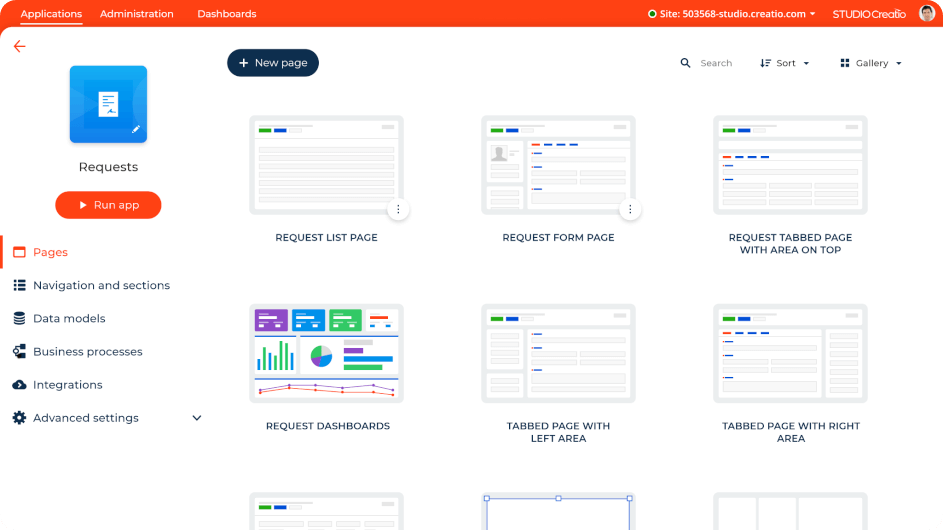
Für Organisationen, die ihre digitale Transformation beschleunigen möchten, bietet Studio Creatio eine intuitive Low-Code-Plattform, die speziell dafür entwickelt wurde, die Anwendungsentwicklung und Workflow-Automatisierung zu vereinfachen. Diese Plattform eignet sich ideal für Unternehmen unterschiedlichster Branchen, insbesondere für jene, die ihre Teams dazu befähigen möchten, ohne tiefgehende technische Kenntnisse Innovationen voranzutreiben. Indem Herausforderungen wie langwierige Entwicklungszyklen und der Bedarf an agilen Reaktionen auf Marktanforderungen angegangen werden, stellt Studio Creatio eine Lösung zur Verfügung, die die betriebliche Effizienz und Zusammenarbeit verbessert.
Warum ich Studio Creatio gewählt habe
Ich habe mich für Studio Creatio entschieden, weil die Plattform mit ihren visuellen Entwicklungstools komplexe Prozesse einzigartig vereinfacht. Die Drag-and-Drop-Oberfläche macht sie auch für Nutzer mit geringen Programmierkenntnissen zugänglich, sodass Ihr Team Anwendungen schnell erstellen und anpassen kann. Außerdem sorgt die Business-Process-Management-Engine für einen strukturierten Ansatz bei der Automatisierung von Workflows und gewährleistet so reibungslose und effiziente Abläufe. Diese Funktionen machen Studio Creatio zur idealen Wahl für Unternehmen, die ihre Entwicklungskompetenz ohne aufwändige Programmierung ausbauen möchten.
Studio Creatio – Hauptfunktionen
Neben der intuitiven Benutzeroberfläche und den Tools zum Prozessmanagement bietet Studio Creatio noch weitere Funktionen, die den Nutzen der Low-Code-Plattform erhöhen.
- Komponierbare Architektur: Ermöglicht den Aufbau von Anwendungen aus wiederverwendbaren Komponenten und sorgt so für Flexibilität sowie Anpassungsfähigkeit in der Entwicklung.
- KI-Tools für Automatisierung: Integriert künstliche Intelligenz, um Routineaufgaben zu automatisieren, die Produktivität zu steigern und die manuelle Arbeitslast zu reduzieren.
- BPMN-2.0-basierter Prozess-Designer: Stellt einen visuellen Rahmen für das Design und die Optimierung von Geschäftsprozessen bereit, sodass Änderungen leichter umgesetzt werden können.
- Marktplatz für einsatzfertige Apps: Bietet eine Auswahl vorgefertigter Anwendungen, die sich in Ihre bestehenden Systeme integrieren lassen und Zeit sowie Ressourcen sparen.
Studio Creatio – Integrationen
Studio Creatio unterstützt Integrationen mit beliebten Diensten wie Microsoft Exchange, Google Kalender, Mailchimp, QuickBooks, PayPal, Twilio, Zendesk, Slack, DocuSign und Salesforce und stellt zudem eine offene API für individuelle Integrationen bereit.
Pros and Cons
Pros:
- Workflow-Automatisierung
- Unterstützt zahlreiche Branchen
- Drag-and-Drop-Oberfläche
Cons:
- Benutzeroberfläche könnte verbessert werden
- Für Nutzer ohne No-Code-Erfahrung eventuell mit Lernkurve verbunden
New Product Updates from Creatio Studio
Creatio Adds AI Tools for Content, Meetings, and Knowledge Management
Creatio 8.3.3 introduces AI-driven functionalities and CRM enhancements to boost platform capabilities. For more information, visit Creatio Studio's official site.
 .
.
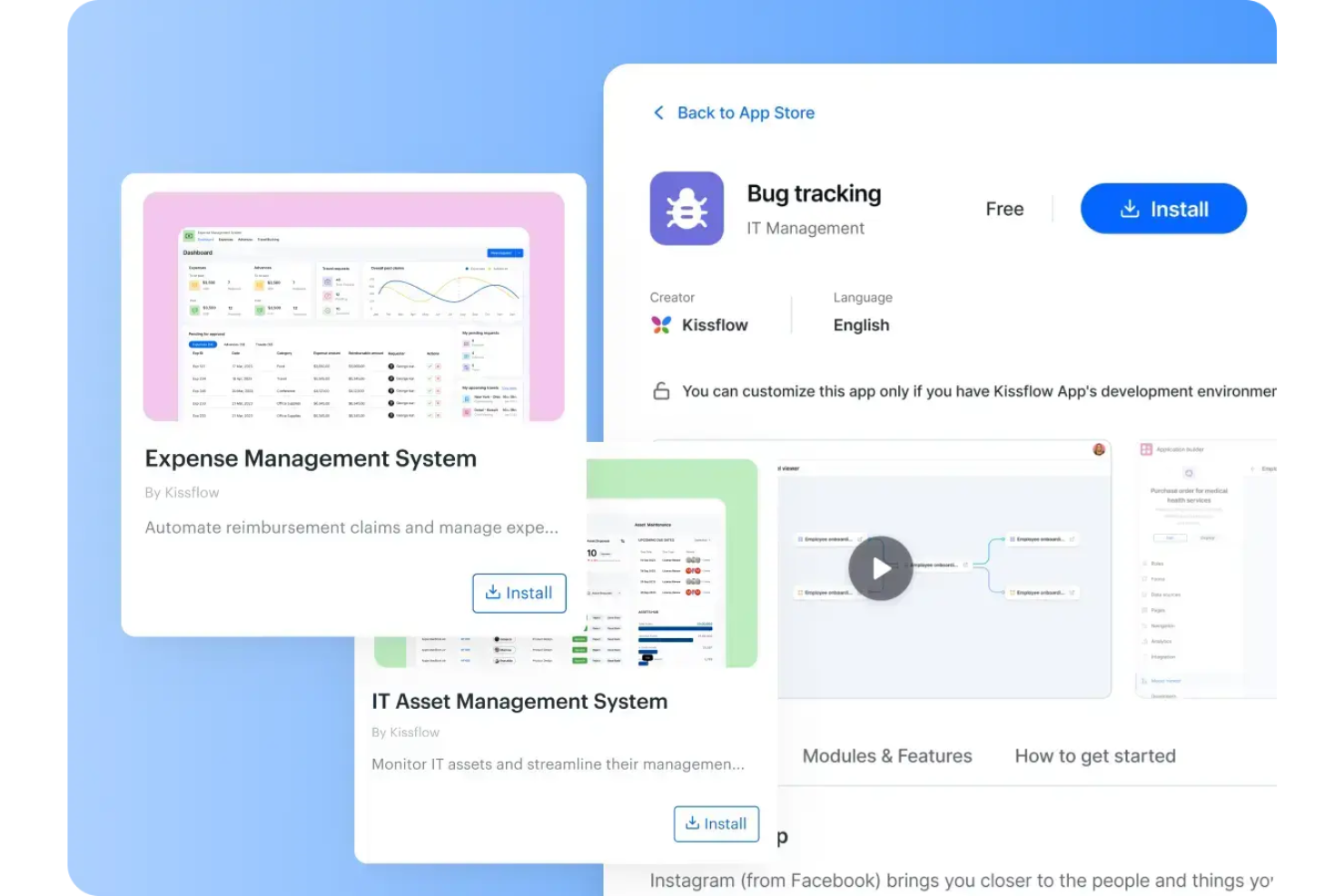
Kissflow ist eine Low-Code-Plattform, die Teams dabei unterstützt, Anwendungen ohne umfangreiche Programmierung zu entwerfen, zu erstellen und zu automatisieren. Die KI-gestützten Entwicklungstools und die Drag-and-Drop-Oberfläche erleichtern es Geschäftsbenutzern, individuelle Workflows zu gestalten und interne Prozesse abteilungsübergreifend zu optimieren.
Warum ich Kissflow ausgewählt habe: Ich habe Kissflow wegen seiner Ausgewogenheit zwischen Flexibilität und Einfachheit gewählt. Mit dem visuellen App-Builder können Anwendungen schnell an sich ändernde Geschäftsanforderungen angepasst werden, während gleichzeitig ein unternehmensweites Regelwerk und Analysen bereitstehen. Außerdem gefällt mir, dass Projektverfolgung, Prozessautomatisierung und Leistungsmanagement in einem einzigen Arbeitsbereich kombiniert werden, wodurch die Nutzung mehrerer Tools für wachsende Teams entfällt.
Herausragende Funktionen und Integrationen von Kissflow:
Funktionen umfassen KI-unterstützte App-Entwicklung, anpassbare Formulare und Workflow-Builder sowie Analyse-Dashboards zur Leistungsüberwachung. Außerdem lassen sich Genehmigungen, HR-Aufgaben und IT-Serviceanfragen mithilfe von vorgefertigten Vorlagen automatisieren.
Integrationen sind unter anderem Salesforce, HubSpot, Slack, Microsoft Teams, Zendesk, Dropbox, Google Forms, Docupilot, Twilio, Jira Software Server, Gmail und Google Sheets.
Pros and Cons
Pros:
- KI-gestützte Entwicklung beschleunigt die App-Erstellung
- Anpassbare Builder ermöglichen flexible Workflows
- Integrationen ermöglichen plattformübergreifenden Datenaustausch
Cons:
- Begrenzte Anpassungsmöglichkeiten betreffen komplexe Konfigurationen
- Gelegentliche Stabilitätsprobleme beeinträchtigen die Zuverlässigkeit

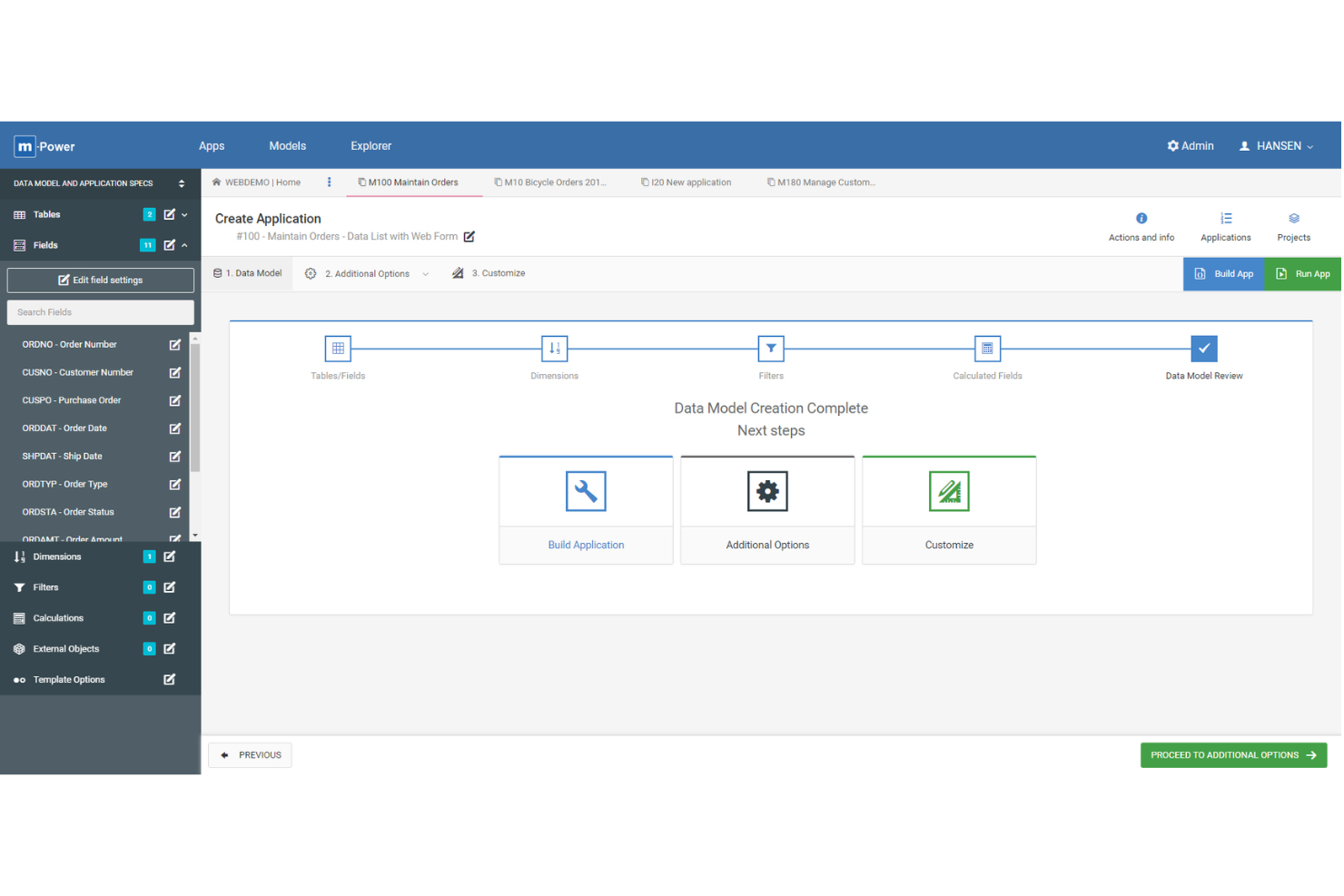
m-Power ist eine Low-Code-Entwicklungsplattform, die für IT-Teams und Business-Analysten entwickelt wurde, die maßgeschneiderte Webanwendungen erstellen möchten, die direkt mit Unternehmensdatenbanken verbunden sind und komplexe Workflows automatisieren, wobei die Entwicklungszeit minimiert wird.
Für wen ist m-Power am besten geeignet?
m-Power eignet sich besonders gut für mittelständische bis große Unternehmen mit einer etablierten Datenbank-Infrastruktur, die individuelle Anwendungen entwickeln müssen, ohne stark auf klassische Entwicklerressourcen angewiesen zu sein.
Warum ich m-Power ausgewählt habe
Ich habe m-Power als eine der besten Low-Code-Plattformen ausgewählt, weil sie speziell dafür konzipiert wurde, direkt mit Ihren bestehenden Datenbanken zu arbeiten – ohne dass Sie etwas migrieren, umstrukturieren oder ersetzen müssen. Während die meisten Low-Code-Tools verlangen, dass Sie Ihre Daten zu ihnen bringen, verbindet sich m-Power direkt mit Ihren Live-Datenbanktabellen, unabhängig davon, ob sie sich auf einer lokalen IBM Db2, Oracle, SQL Server, PostgreSQL oder Snowflake befinden. Besonders gefällt mir der vierstufige Entwicklungsprozess: Sie wählen eine Vorlage, bestimmen Tabellen und Felder, definieren Filter und Logik, und starten dann den Build – so entsteht eine voll funktionsfähige Webanwendung in Minuten. Mit der Smartlink-Funktion lassen sich mehrere m-Power-Apps miteinander verknüpfen und dabei automatisch wichtige Daten zwischen ihnen übertragen. So können Sie problemlos miteinander verbundene Anwendungssuiten über eine einzelne Datenbank aufbauen, ohne die Logik zu duplizieren.
m-Power Hauptfunktionen
- Rollenbasierte Sicherheitsverwaltung: Steuern Sie den Benutzerzugriff auf Anwendungs-, Daten- und Feldebene mit integrierter Multi-Tenant-Sicherheit und Berechtigungskontrollen.
- KI-Assistent und Chatbot-Builder: Betten Sie KI-Assistenten und Chatbots direkt in Ihre Anwendungen ein, indem Sie sie mit Live-Datensätzen und Geschäftsregeln verbinden.
- Workflow-Automatisierungs-Engine: Erstellen Sie Genehmigungsworkflows, Ticket-Routing und automatisierte Datensatzaktualisierungen – ganz ohne Programmierung.
- Unbefristetes Lizenzierungsmodell: Kaufen Sie m-Power einmal, besitzen Sie es vollständig und zahlen keine nutzungsabhängigen oder vertriebsabhängigen Gebühren – unabhängig davon, wie viel Sie nutzen.
m-Power Integrationen
Zu den Integrationen gehören IBM Db2, Oracle, SQL Server, MySQL, PostgreSQL, Snowflake, REST-Services, JSON-Endpunkte, Windows-Server, Linux-Server und AIX-Server.
Pros and Cons
Pros:
- Kann komplexe Anwendungslogik abbilden
- Anwendungen sind anpassbar und erweiterbar
- Schneller und intuitiver Entwicklungsprozess
Cons:
- Weniger vorgefertigte Templates als andere Low-Code-Plattformen
- Vor allem auf US-basierte Unternehmen ausgerichtet

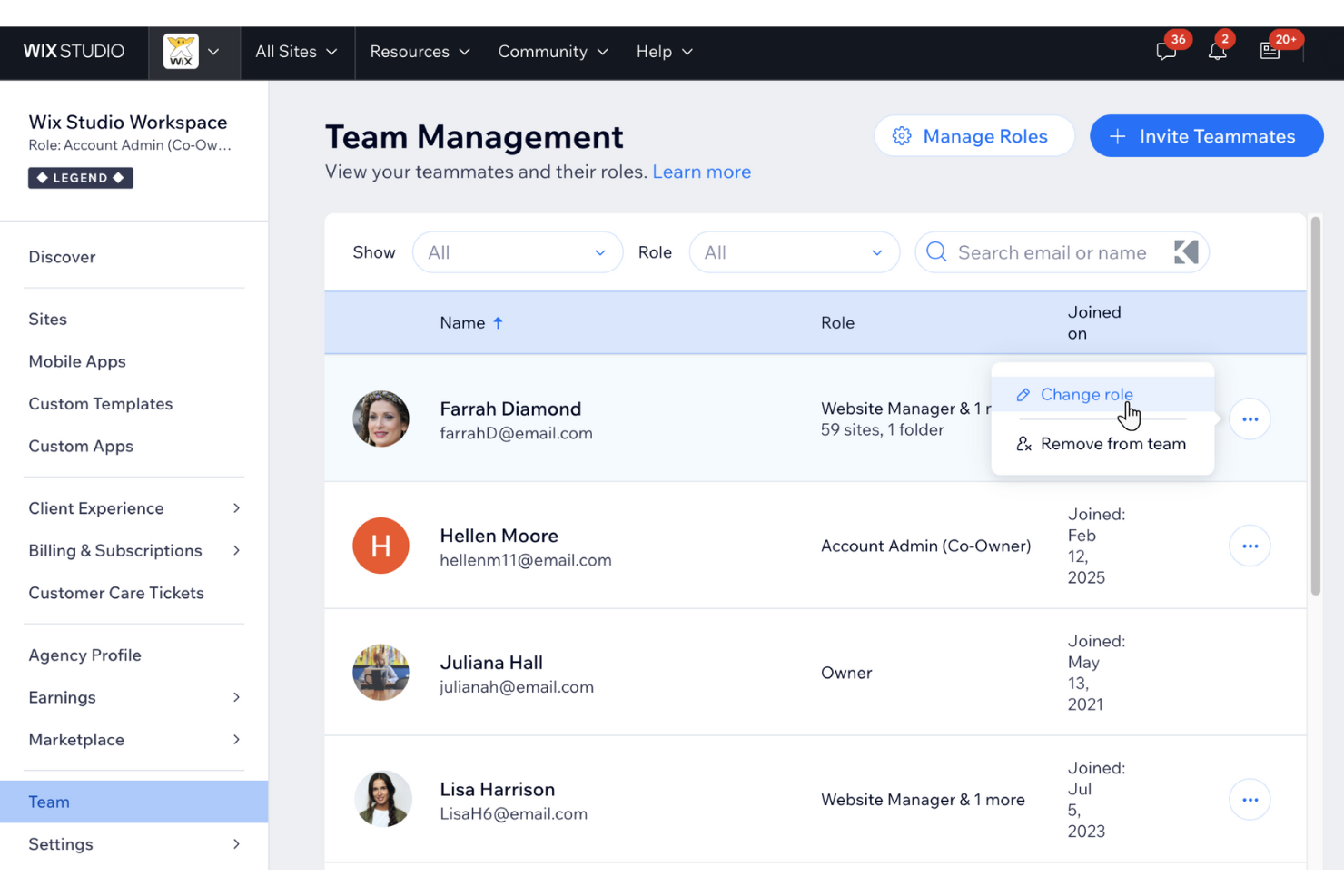
Wix ist eine Low-Code-Plattform für Unternehmen, Unternehmer und Kreative, die Webanwendungen oder Websites ohne umfangreiche Programmierkenntnisse erstellen und veröffentlichen möchten. Sie bietet einen visuellen Editor, integriertes Hosting und eine breite Auswahl an individuell anpassbaren App-Integrationen.
Für wen ist Wix am besten geeignet?
Wix ist besonders geeignet für kleine bis mittelgroße Unternehmen und selbstständige Fachkräfte, die ihre Webpräsenz aufbauen und verwalten möchten, ohne auf ein Entwicklerteam angewiesen zu sein.
Warum ich Wix gewählt habe
Ich habe Wix als eine der besten Low-Code-Plattformen ausgewählt, weil die KI-gestützten Website-Generierungs-Tools große Fortschritte gemacht haben. Der Wix KI-Website-Builder erlaubt es, mit nur wenigen Angaben zum eigenen Unternehmen eine komplett strukturierte Website inklusive Seiten, Layouts und Inhalten zu erstellen. Besonders gefällt mir auch die KI-basierte Text- und Bilderstellung, die direkt im Editor eingebaut ist, sodass mein Team an Texten und Visuals arbeiten kann, ohne die Werkzeuge zu wechseln. Zusätzlich macht es der Wix App-Markt unkompliziert, funktionale Features wie Buchungssysteme, E-Commerce oder Mitgliederbereiche ganz ohne Programmieraufwand zu integrieren.
Wichtige Funktionen von Wix
- Drag-and-Drop-Editor: Visuelles Erstellen und Anpassen von Seiten ohne Programmierung, auf einer freien Arbeitsfläche mit voller Layout-Kontrolle.
- Content-Management-System (CMS): Zentrale Verwaltung und Speicherung von Website-Inhalten sowie die Möglichkeit, dynamische Seiten aus CMS-Kollektionen ohne Programmieraufwand zu gestalten.
- Marken-App-Builder: Erstellung einer vollständig gebrandeten nativen mobilen App direkt aus Wix heraus, ganz ohne Programmierkenntnisse.
- Velo-Code-Entwicklungsplattform: Einbindung von individuellem JavaScript zur Umsetzung erweiterter Funktionen und zur Kontrolle des Designs, wenn der visuelle Editor nicht mehr ausreicht.
Wix-Integrationen
Zu den Integrationen gehören Google Analytics, Facebook Pixel, Semrush, Google Search Console, Instagram, PayPal, Stripe, Mailchimp, QuickBooks und Shopify.
Pros and Cons
Pros:
- Intuitiver Drag-and-Drop-Editor
- Leistungsstarke E-Commerce-Funktionen
- Große Auswahl an Vorlagen
Cons:
- Kostenloser Tarif enthält Wix-Werbung
- Langsamere Ladezeiten bei inhaltsreichen Seiten

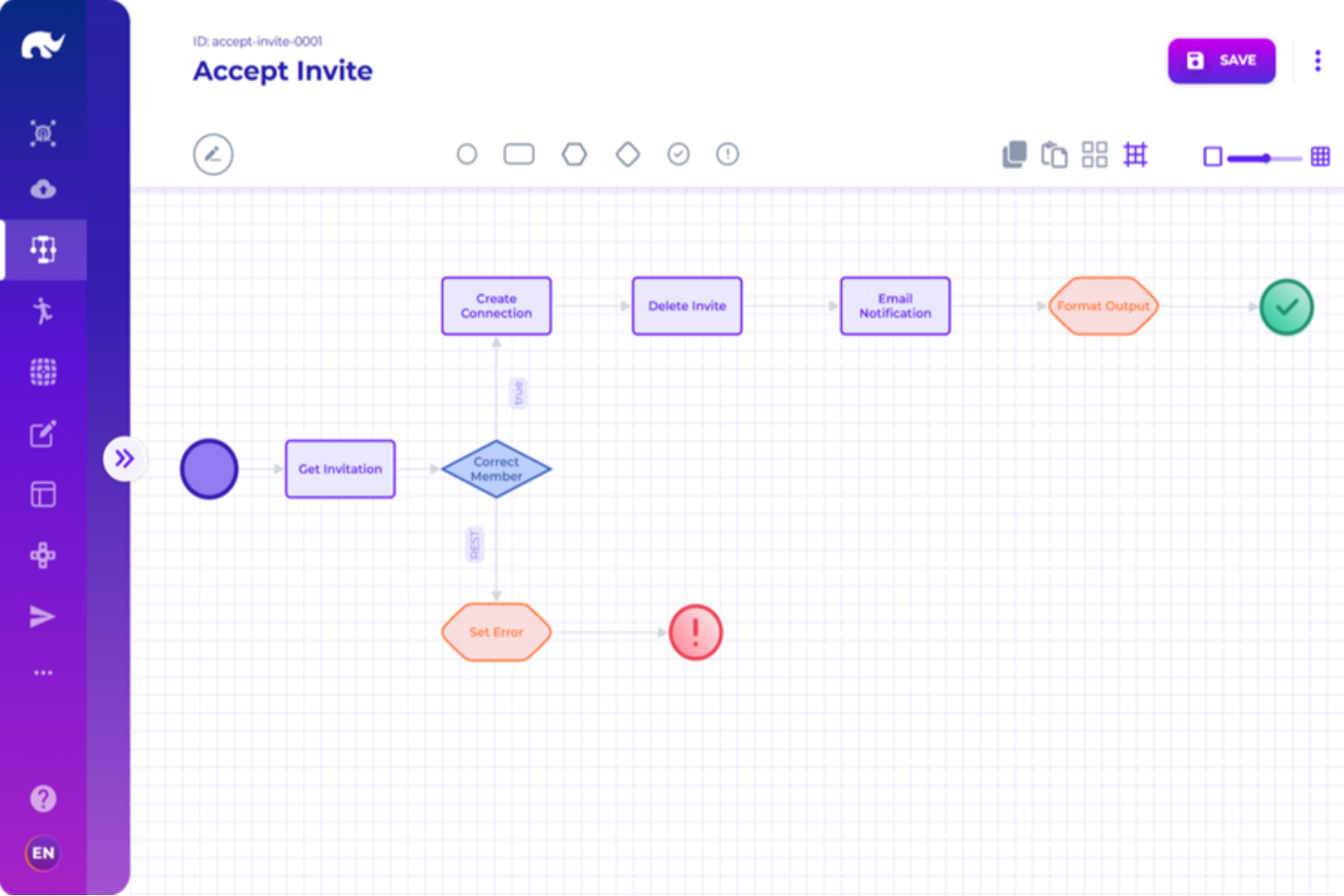
Rierino ist eine Low-Code-Plattform, die für Unternehmen und IT-Teams entwickelt wurde, die komplexe Anwendungen mit Fokus auf Skalierbarkeit, Integration und Prozessautomatisierung erstellen, bereitstellen und verwalten müssen.
Für wen ist Rierino am besten geeignet?
Rierino eignet sich besonders für IT- und Entwicklungsteams in Unternehmen, die verteilte Anwendungen über komplexe, auf Microservices basierende Architekturen hinweg entwickeln und skalieren müssen.
Warum habe ich Rierino ausgewählt?
Rierino verdient einen festen Platz auf meiner Auswahlliste, weil es eine der wenigen Low-Code-Plattformen ist, die Microservice-Architekturen auf Unternehmensniveau wirklich bewältigt – und zwar nicht nur als Marketing-Behauptung, sondern als zentrales Designprinzip. Mir gefällt, dass man Microservices per Drag-and-Drop erstellen, bereitstellen und orchestrieren kann, ohne eine einzige Codezeile zu schreiben, während man dennoch die vollständige Kontrolle darüber behält, wie diese Services über REST, WebSocket oder Kafka kommunizieren. Die Orchestrierungs-Schicht für Microservices ermöglicht es meinem Team, bestehende externe Dienste ebenso wie neu erstellte miteinander zu verbinden und Abläufe aus API-Aufrufen, Change-Data-Capture-Events oder Echtzeit-Eventströmen – alles innerhalb derselben Plattform – auszulösen.
Rierino Hauptfunktionen
- Visueller UI-Builder: Drag-and-Drop-Oberfläche zum Erstellen von Web-Formularen, Datenlisten, Aufgabenansichten und individueller Navigation, zugeschnitten auf spezifische Benutzerrollen und -bereiche.
- Regelmanagement: Konfiguration von Regelbereichen für Preisgestaltung, Betrugserkennung und Aktionen mit individuellen Bewertungsfunktionen und parametrisierbaren Regelvorlagen zur geschäftsnahen Verwaltung.
- ML-Automatisierung: Bereitstellung von Machine-Learning-Modellen in Echtzeit für automatisierte Bewertungen innerhalb von Workflows und APIs, mit integriertem MLOps für Modelltraining und -bereitstellung.
- Flexible Bereitstellungsoptionen: Führen Sie Rierino in jeder Public- oder Private-Cloud, On-Premises oder auf Bare-Metal-Infrastrukturen aus – per Kubernetes-Cluster, Docker-Container oder als Standalone-Anwendung.
Rierino Integrationen
Integrationen umfassen Adyen, Algolia, Amazon Web Services, Cloudinary, Couchbase, Elastic, Google Cloud Platform, Kafka, Keycloak und Microsoft.
Pros and Cons
Pros:
- Anpassungsfähige Technologie, die unterschiedliche Entwicklungsanforderungen erfüllt
- Schnelle Entwicklungsfunktionen für komplexe Projekte
- Entwickler können Anwendungen mit unabhängigen, wiederverwendbaren Services bauen
Cons:
- Die Verwaltung mehrerer Microservices und ereignisgesteuerter Workflows kann herausfordernd sein
- Erfordert sorgfältiges API-Management
New Product Updates from Rierino
Rierino Adds Dynamic Instructions and AI Agent Guidance
Rierino introduces dynamic AI agent instructions and customizable agent guidance features that improve personalization and help users better understand and interact with AI agents. For more information, visit Rierino’s official site.
 .
.
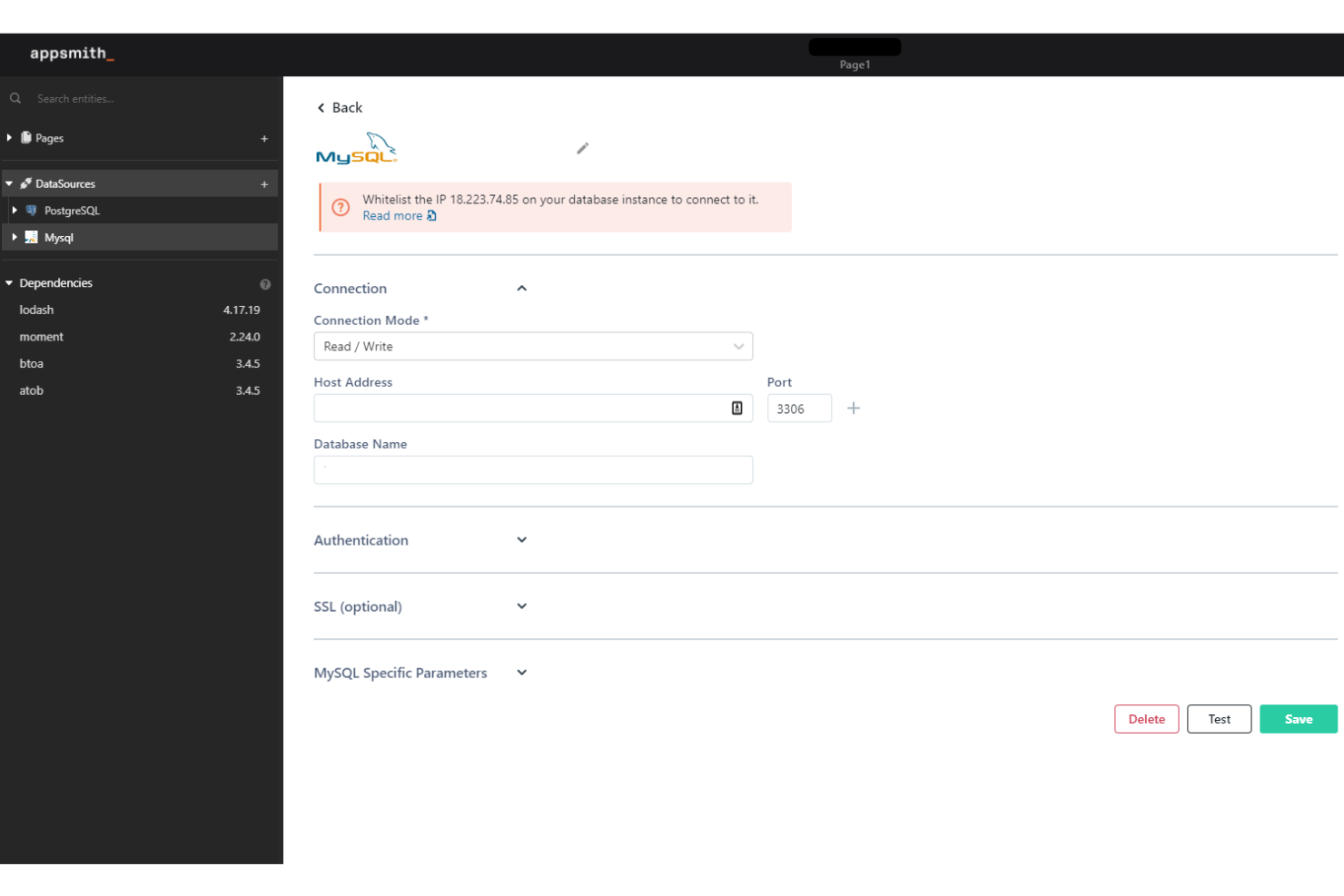
Appsmith bietet IT-Teams und Entwicklern eine Low-Code-Plattform zum Erstellen, Bereitstellen und Verwalten benutzerdefinierter interner Anwendungen, die mit Datenbanken und APIs verbunden werden können. So lassen sich Herausforderungen in den Bereichen Workflow und Automatisierung über verschiedene Unternehmensfunktionen hinweg lösen.
Für wen eignet sich Appsmith am besten?
Appsmith ist besonders geeignet für Entwicklungs- und IT-Teams in mittelständischen bis großen Unternehmen, die interne Tools entwickeln und pflegen müssen, ohne sich vollständig der individuellen Softwareentwicklung zu verschreiben.
Warum habe ich Appsmith ausgewählt?
Appsmith hat es auf meine Auswahlliste geschafft, weil man extrem schnell von einer leeren Leinwand zu einer funktionierenden internen App gelangen kann. Ich habe es speziell wegen seines Git-nativen Deployment-Workflows ausgewählt—Sie können Entwicklungs-, Staging- und Produktions-Branches festlegen, Änderungen übertragen, Pull-Requests prüfen und Updates über Ihre bestehende CI/CD-Pipeline bereitstellen, sodass mein Team nicht ständig zwischen Tools wechseln muss. Außerdem gefällt mir die zentrale IDE, in der wiederverwendbare JS-Funktionen und Logik an einem Ort geschrieben werden, anstatt Code über verschiedene Widgets zu verteilen. Das allein reduziert die Reibungsverluste, die die Entwicklung interner Tools normalerweise verlangsamen.
Appsmith Hauptfunktionen
- Drag-and-drop UI-Builder: Bauen Sie reaktionsfähige App-Oberflächen mit vorgefertigten Widgets, ohne Layout-Code von Grund auf schreiben zu müssen.
- KI-Copilot für Widget- und Logikgenerierung: Nutzen Sie natürliche Spracheingaben, um individuelle Widgets und Workflows direkt im Code zu generieren.
- Rollenbasierte Zugriffskontrolle: Definieren Sie granular Rollen, Gruppen und Berechtigungen, um zu steuern, wer bestimmte Apps ansehen oder bearbeiten darf.
- Selbstgehostete Bereitstellung: Betreiben Sie Appsmith in Ihrer eigenen Infrastruktur, einschließlich isolierter Umgebungen, für sicheren Zugriff auf interne Daten.
Appsmith-Integrationen umfassen Amazon Web Services, Salesforce, MongoDB, PostgreSQL, MySQL, Microsoft SQL Server, Google Sheets, REST APIs, GraphQL und SAML SSO.
Pros and Cons
Pros:
- Open Source für mehr Flexibilität und Anpassungsmöglichkeiten
- Intuitive Drag-and-drop-Funktionen
- Unterstützt benutzerdefinierten JavaScript-Code
Cons:
- Begrenzte Anzahl vorgefertigter Vorlagen
- Mögliche Performance-Probleme bei großen Datenmengen

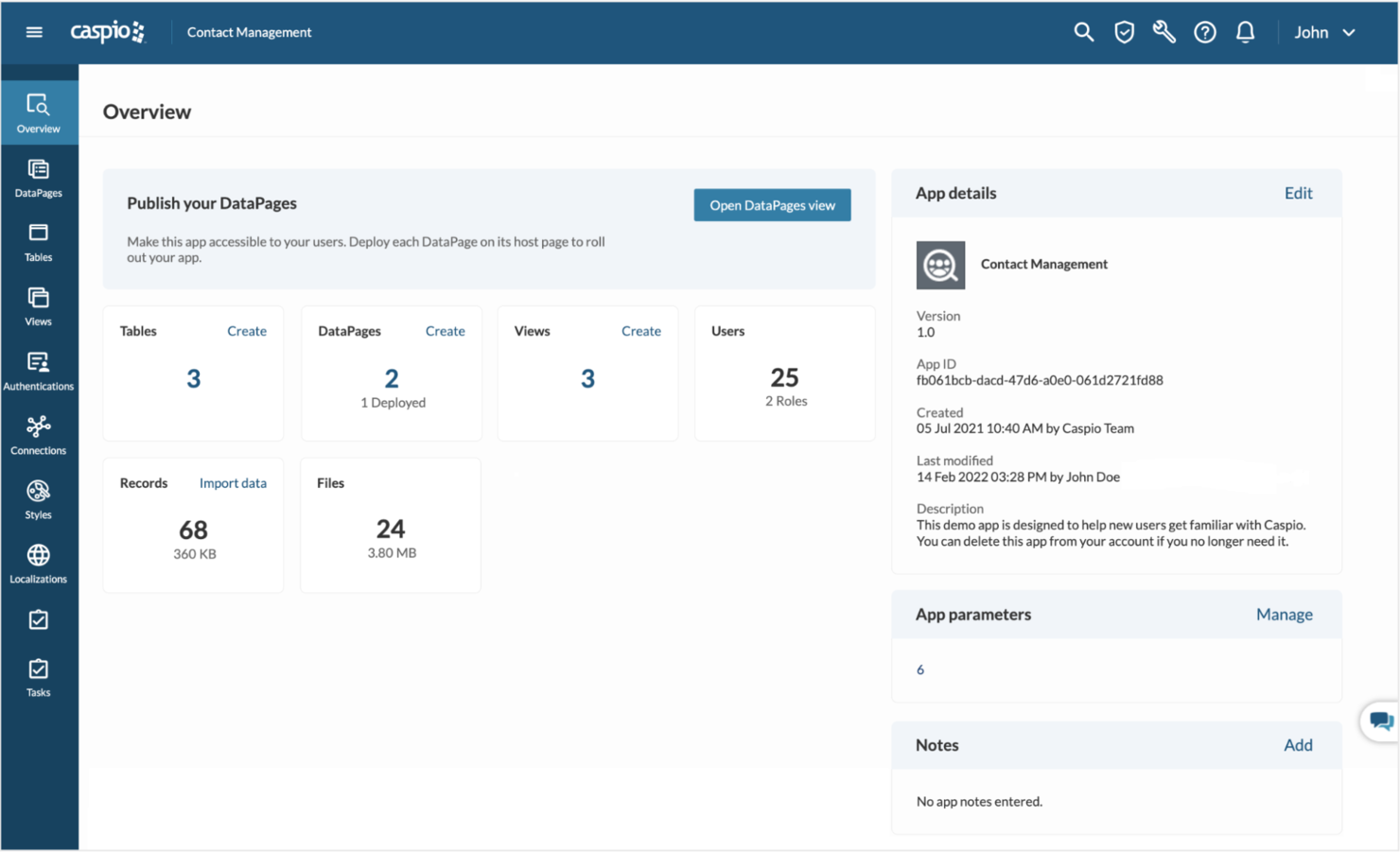
Caspio ist eine Low-Code-Anwendungsplattform, die für IT-Teams und Geschäftsanwender entwickelt wurde, die individuelle Datenbankanwendungen erstellen, Workflows automatisieren und skalierbare Lösungen bereitstellen möchten – und das ganz ohne tiefgreifende Programmierkenntnisse.
Für wen ist Caspio am besten geeignet?
Caspio ist besonders gut geeignet für mittelständische Unternehmen und Konzerne, die individuelle, datenbankgestützte Anwendungen entwickeln und bereitstellen müssen, ohne dabei stark auf Entwicklerressourcen angewiesen zu sein.
Warum ich Caspio ausgewählt habe
Ich habe Caspio als eine der besten Low-Code-Plattformen ausgewählt, weil das Kundendienstmodell sich wirklich von dem unterscheidet, was man von den meisten Tools in diesem Bereich bekommt. Es gibt keine Bots oder ausgelagerten Agenten – ein firmeninternes Support-Team steht rund um die Uhr zur Verfügung und kennt die Plattform genau. Besonders gefällt mir die Funktion 'Expert Sessions', bei der Sie praktische Zeit mit einem Caspio-Support-Ingenieur für spezifische Aufgaben buchen können, wie beispielsweise Architektur-Reviews, Datenmigration oder JavaScript-Anpassungen. Das persönliche Onboarding verkürzt die Zeit bis zur ersten Implementierung – ein wichtiger Faktor, wenn man unter Zeitdruck produktionsreife Apps entwickeln muss.
Wichtige Funktionen von Caspio
- Caspio Flex visueller App-Builder: Ein Drag-and-Drop-Framework, mit dem Sie Anwendungsoberflächen gestalten, anpassen und bereitstellen können, ohne Front-End-Code zu schreiben.
- KI-gestützter GPT Connect: Generiert Anwendungsbestandteile und Berichte aus Beschreibungen in natürlicher Sprache, was die Zeit zum Prototyping von Datenansichten und Logik erheblich verkürzt.
- Sichere Cloud-Datenbank: Basierend auf Microsoft SQL Server und gehostet auf AWS, mit integrierter Unterstützung für HIPAA-, SOC 2 Typ II-, DSGVO- und FERPA-Konformität.
- Rollenbasierte Identitäts- und Zugriffsverwaltung: Verwaltung der Benutzer-Authentifizierung über SSO, SAML und OAuth, mit detaillierten Zugriffskontrollen für alle bereitgestellten Anwendungen.
Caspio-Integrationen
Zu den nativen Integrationen gehören Twilio, PayPal, DocuSign, Microsoft Power BI, Microsoft Office 365, Google Maps, OpenAI, Stripe, QuickBooks und Mailgun.
Pros and Cons
Pros:
- Zuverlässiger Kundensupport
- Umfassender Onboarding-Prozess
- Keine Preisstaffelung pro Nutzer, daher skalierbar und kosteneffizient
Cons:
- Hohe Lernkurve
- Support ist teuer

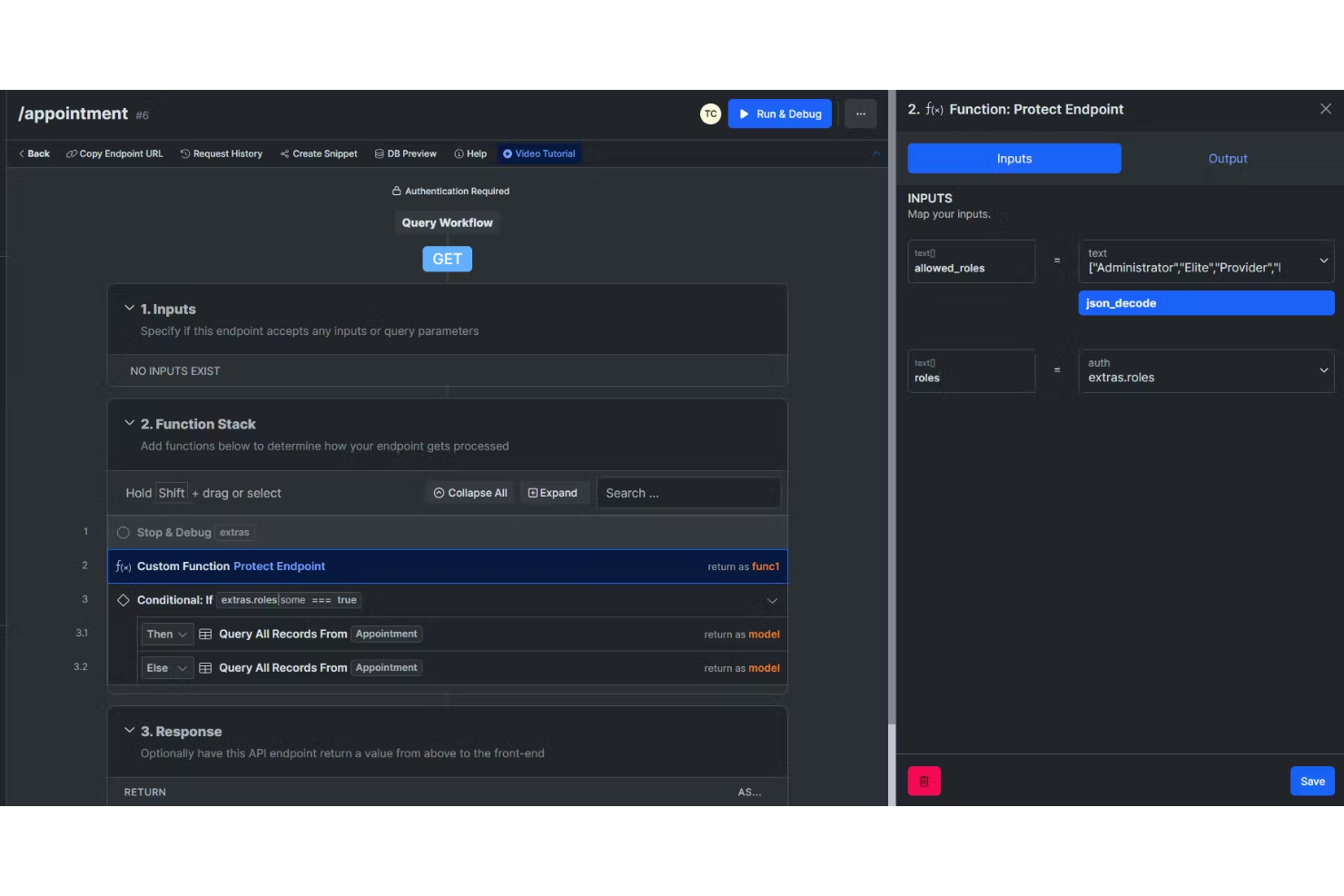
Xano bietet Entwicklern, Startups und IT-Teams eine Möglichkeit, skalierbare Backends für Web- und Mobile-Apps zu entwickeln und zu verwalten, ohne Code schreiben zu müssen. Dadurch wird es einfacher, individuelle Anwendungen zu starten und Arbeitsabläufe zu automatisieren.
Für wen ist Xano am besten geeignet?
Xano eignet sich besonders für Startups und kleine Entwicklungsteams, die eine Backend-Infrastruktur schnell umsetzen müssen und keine dedizierten Backend-Entwicklungsressourcen haben.
Warum ich Xano gewählt habe
Xano steht auf meiner Auswahlliste, weil es eine der wenigen No-Code-Plattformen ist, die die komplette Backend-Schicht – Datenbank, API und serverseitige Logik – übernimmt, ohne dass Infrastruktur von Ihnen verwaltet werden muss. Besonders gefällt mir der visuelle Function Stack, mit dem mein Team komplexe Backend-Logik, bedingte Abläufe und Daten-Transformationen modellieren kann, ohne auch nur eine Zeile Code zu schreiben. Xano läuft auf einer automatisch skalierenden Infrastruktur, die durch Docker und Kubernetes unterstützt wird. Wenn eine App vom Prototypen zur Produktivumgebung wächst, skaliert das Backend damit mit. Die verwaltete Postgres-Datenbank mit integrierten Triggern und Beziehungen bedeutet, dass ich nicht mehrere separate Tools zusammenführen muss, nur um Daten im großen Maßstab zu verwalten.
Xano Hauptfunktionen
- Integrierte Authentifizierung und RBAC: Xano bietet rollenbasierte Zugriffskontrolle und Nutzer-Authentifizierung standardmäßig, sodass Sie keinen separaten Identitätsdienst benötigen.
- MCP Builder: Erstellen Sie Model-Context-Protocol-Endpunkte, um KI-Agenten direkt mit Ihren Backend-Daten und -Logiken in Echtzeit zu verbinden.
- Git-Synchronisierung und Versionskontrolle: Xano unterstützt Git-Synchronisierung, Versionierung und Vergleichsmöglichkeiten für Teams, die zusätzlich zur visuellen Entwicklung vollständige Code-Kontrolle wünschen.
- Private Cloud- und On-Prem-Bereitstellung: Stellen Sie Ihr Backend in einer verwalteten Cloud, Ihrer eigenen Private Cloud oder in Ihrer On-Premise-Umgebung mit Docker und Kubernetes bereit.
Xano Integrationen
Zu den Integrationen gehören Stripe, Google Sheets, OpenAI, Google Gemini, Slack, Postmark, Brevo, Notion, Shopify und Google Maps.
Pros and Cons
Pros:
- Für erhöhten Traffic und Last konzipiert
- Visuelle Oberfläche vereinfacht komplexe Logik
- No-Code-API-Builder
Cons:
- Begrenzter Speicherplatz
- Geografische Einschränkungen bei den meisten Tarifen außer Enterprise

Superblocks
Am besten geeignet für den Bau sicherer interner Anwendungen

Superblocks bietet IT-Teams und Entwicklern eine Low-Code-Plattform zum Erstellen, Bereitstellen und Verwalten individueller interner Anwendungen, die sich mit Datenbanken, APIs und Authentifizierungssystemen verbinden lassen. So hilft das Tool Unternehmen, Arbeitsabläufe zu automatisieren und Betriebsprozesse zu zentralisieren.
Für wen ist Superblocks am besten geeignet?
Superblocks eignet sich besonders für Ingenieur- und IT-Teams in mittelständischen bis großen Unternehmen, die interne Tools erstellen und pflegen müssen, ohne dafür vollständige Entwicklungszyklen aufzuwenden.
Warum ich mich für Superblocks entschieden habe
Superblocks verdient seinen Platz auf meiner Liste der Besten, weil das Thema Sicherheit hier sehr ernst genommen wird, ohne dass die Konfiguration zur Last fällt. Mir gefällt, dass granulare RBAC- und ABAC-Kontrollen direkt in die Plattform integriert sind, sodass mein Team genau festlegen kann, wer auf welche Apps, Integrationen und Datenquellen zugreifen darf – ohne eigene Authentifizierungslogik zu programmieren. Das Audit-Logging protokolliert jede Aktion von Entwicklern und Endnutzern und sendet sie an Ihr SIEM. Das ist für mich bei Umgebungen mit hohen Compliance-Anforderungen enorm wertvoll. Zusätzlich integriert das Secrets Management HashiCorp Vault, AWS Secrets Manager und GCP Secrets Manager, sodass Anmeldedaten niemals offen in der App-Konfiguration stehen.
Superblocks – zentrale Funktionen
- Drag-and-Drop-UI-Builder: Erstellen Sie pixelgenaue Oberflächen mit über 100 vorgefertigten Komponenten wie Tabellen, Diagrammen, Formularen und Karten, inklusive Unterstützung für eigene Design-Systeme.
- Versionskontrolle mit CI/CD-Integration: Anbindung an GitHub oder GitLab, um Pull Requests zu überprüfen, für jeden Commit eine Vorschau-URL zu generieren und bestehende CI/CD-Pipelines zu integrieren.
- Builder für Workflows und Jobs: Erstellen Sie automatisierte Backend-Prozesse und geplante Aufgaben, ohne komplette Anwendungslogik von Grund auf schreiben zu müssen.
- KI-Copilot (Clark): Generieren Sie Code, bauen Sie Oberflächen zusammen und beheben Sie Fehler mithilfe eines KI-Assistenten, der Ihre Integrationen und Datenquellen mit der Zeit lernt.
Superblocks – Integrationen
Zu den Integrationen gehören Airtable, Amazon Redshift, Asana, Azure Blob Storage, Bitbucket, Box, CircleCI, Databricks, Datadog und GitHub.
Pros and Cons
Pros:
- Intuitive und benutzerfreundliche Plattform
- Beschleunigt den Entwicklungsprozess
- Unterstützt viele Integrationen
Cons:
- Eventuell Bedarf an besserer Dokumentation und erweiterten Berichts-Funktionen
- Begrenzte Möglichkeiten für fortgeschrittene Anpassungen

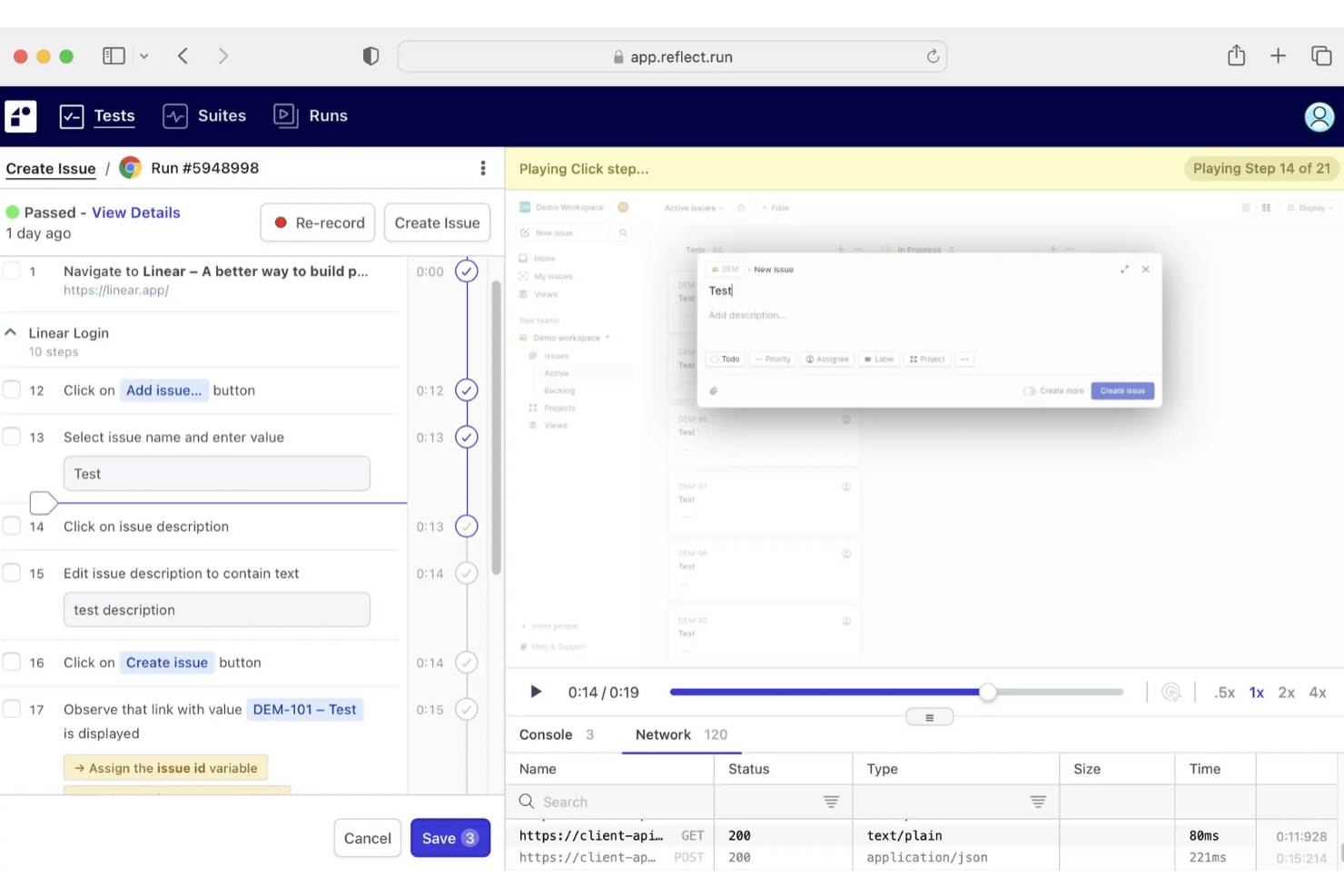
Reflect ist eine No-Code-Testautomatisierungsplattform für Softwareteams, die Webanwendungstests ohne Programmieraufwand erstellen, bereitstellen und pflegen möchten. Dadurch wird manueller QA-Aufwand reduziert und die Release-Zyklen werden beschleunigt.
Für wen ist Reflect am besten geeignet?
Reflect eignet sich für Softwareentwicklungs- und QA-Teams in kleinen bis mittelgroßen Unternehmen, die Webanwendungstests automatisieren möchten, ohne auf spezialisierte Testingenieure angewiesen zu sein.
Warum ich Reflect ausgewählt habe
Reflect hat es auf meine Auswahlliste geschafft, weil das KI-System die Wartung von Tests automatisch übernimmt. Die meisten No-Code-Testtools scheitern bei UI-Änderungen, sodass Ihr Team Selektoren und Locator manuell aktualisieren muss. Die SmartBear HaloAI-Engine von Reflect passt sich solchen UI-Änderungen an, sodass Tests ohne manuelle Eingriffe weiterlaufen. Sie können Testschritte in einfachem Englisch mit GenAI-Prompts definieren, sodass fachliche Tester in meinem Team End-to-End-Regressionstests erstellen können, ohne auf einen Automatisierungsingenieur warten zu müssen, der ein individuelles Framework programmiert.
Wichtige Funktionen von Reflect
- Testaufzeichnung durch Interaktion: Testschritte werden automatisch erfasst, indem Sie in einem Cloud-Browser live mit Ihrer Anwendung interagieren – ganz ohne manuelles Skripten.
- Plattformübergreifendes mobiles Testen: Führen Sie denselben Test auf iOS-, Android- und Hybrid-Apps aus, ohne Tests zu duplizieren oder separate Umgebungen zu verwalten.
- HD-Video-Fehlerberichterstattung: Bei einem Testfehler nimmt Reflect eine HD-Videoaufzeichnung auf, inklusive vollständiger Konsolen- und Netzwerkprotokolle, um Entwicklern die Nachstellung des Problems zu erleichtern.
- Geplante Testdurchläufe: Legen Sie fest, dass Tests regelmäßig ausgeführt werden, um Ihre Anwendung kontinuierlich zwischen Releases auf Regressionen zu überwachen.
Reflect-Integrationen
Integrationen umfassen Slack, Jira, Zephyr, GitHub Actions, CircleCI, Azure DevOps, GitLab, Bitbucket, E-Mail und eine öffentliche API für eigene Integrationen.
Pros and Cons
Pros:
- Testautomatisierung ohne Programmierung
- KI-gestützte Testwartung
- Umfassende CI/CD-Integration
Cons:
- Einschränkungen beim Testen von mobilen Apps
- Mehr Anpassungsmöglichkeiten für Testkonfigurationen wünschenswert

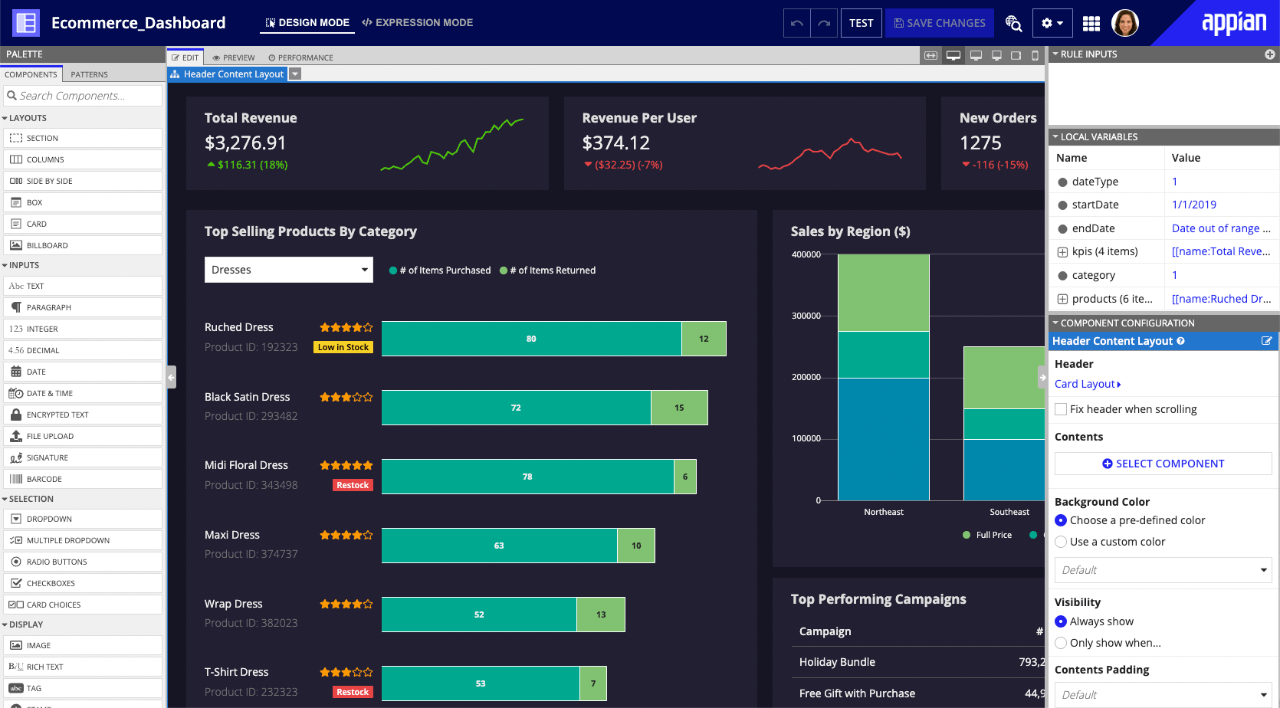
Appian ist eine Low-Code-Plattform, die für Unternehmen und Behörden entwickelt wurde, die komplexe Geschäftsanwendungen schneller erstellen, Arbeitsabläufe automatisieren und Daten aus verschiedenen Systemen ohne umfangreiche Programmierung verbinden müssen.
Für wen ist Appian am besten geeignet?
Appian eignet sich besonders für Unternehmen und Behörden, die komplexe, prozessorientierte Anwendungen im großen Maßstab entwickeln und verwalten müssen.
Warum ich Appian gewählt habe
Appian hat es auf meine Auswahlliste der besten Werkzeuge geschafft, weil das dedizierte Case Management Studio wirklich eines der ausgereiftesten Fallmanagement-Toolsets ist, das ich je in einer Low-Code-Plattform gesehen habe. Mir gefällt, dass es mit vorgefertigten Modulen geliefert wird, die etwa 80 % der typischen Anforderungen an Fallbearbeitung direkt abdecken – so muss mein Team beim Erstellen von Anwendungen für z. B. HR-Serviceanfragen, GRC-Compliance-Verfolgung oder Vorfallmanagement nicht bei null starten. Die KI-gestützte Falldarstellung und die Erkennung von doppelten Datensätzen sind besonders nützlich, wenn man es mit hohen Fallzahlen in mehreren Abteilungen zu tun hat. Außerdem ermöglicht die No-Code-Workflowanpassung Geschäftsanwendern, Abläufe selbst zu ändern, ohne jedes Mal die IT einzubinden, sobald sich ein Prozess verändert.
Wichtigste Funktionen von Appian
- Daten-Fabric: Verbindet und vereinheitlicht Daten aus mehreren Unternehmenssystemen in einer einzigen virtuellen Schicht ohne Datenmigration.
- Process HQ: Ein Prozessanalyse-Tool, das KI und Process Mining zur Identifizierung von Engpässen im Workflow und zur Empfehlung von Verbesserungen nutzt.
- Robotic Process Automation (RPA): Automatisiert wiederkehrende, regelbasierte Aufgaben über Altsysteme und Drittanbieteranwendungen mittels Software-Bots.
- Native CI/CD und Entwicklungs-Governance: Unterstützt gesteuerte Low-Code-Entwicklung mit integrierten Continuous Integration- und Deployment-Funktionen für die Bereitstellung von Anwendungen im Unternehmensmaßstab.
Appian-Integrationen
Zu den Integrationen gehören Salesforce, Google, Microsoft SharePoint, DocuSign, AWS, IBM, Oracle, Microsoft Dynamics, Workday, Box, und eine API ist für individuelle Integrationen verfügbar.
Pros and Cons
Pros:
- Ausgereifte Prozessautomatisierung
- Umfangreiche Fallmanagement-Funktionalität
- Mehrschichtige Sicherheitsplattform
Cons:
- Schwierig zu handhabende integrierte Datenbanksysteme
- Eingeschränkte individuelle Berichtserstellung und Datenvisualisierung

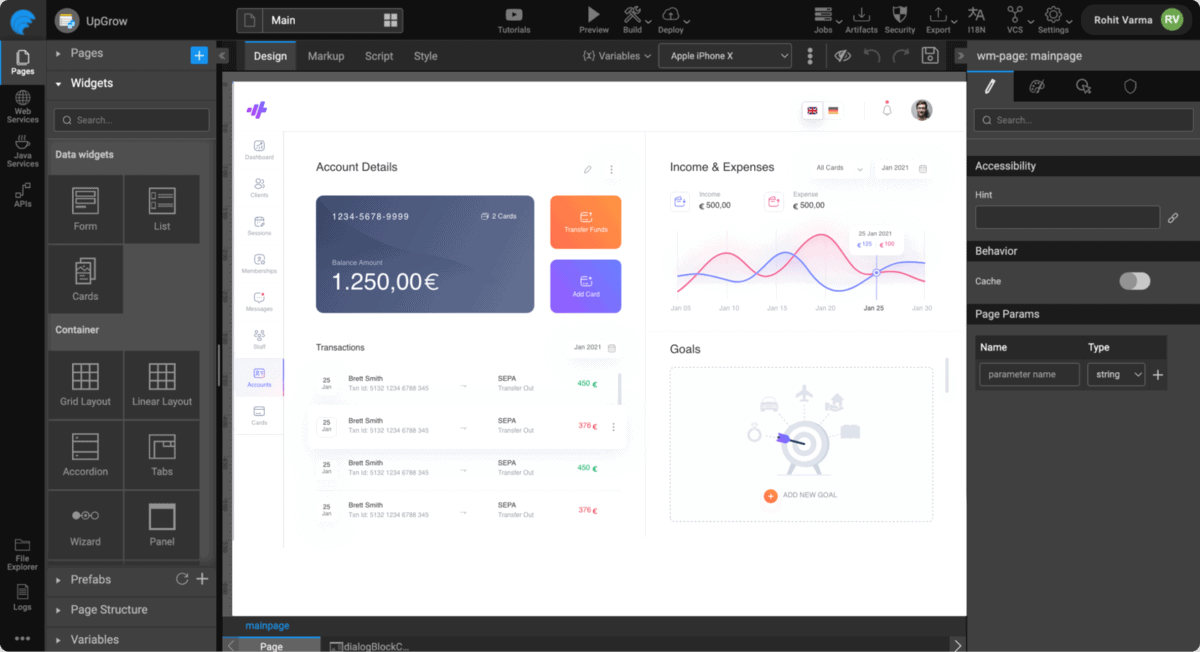
Wavemaker bietet eine Low-Code-Plattform für Unternehmensanwendungen. Die Hauptkundschaft scheint aus Finanzinstituten zu bestehen, aber ich habe festgestellt, dass auch viele andere Gruppen davon profitieren können.
Warum ich Wavemaker ausgewählt habe: Ich habe mich für Wavemaker wegen seiner Application Platform as a Service (aPaaS)-Funktionen entschieden, insbesondere wegen der Vielzahl an Tools, die mir das Management von Deployments sowohl On-Premises als auch in der Cloud ermöglichten. Bei jeder Bereitstellung einer App wurde die Umgebung automatisch mit allen notwendigen Abhängigkeiten, Datenbanken und weiteren Diensten ausgestattet, die ich zum Betrieb benötigte.
Hervorstechende Funktionen und Integrationen von Wavemaker:
Funktionen sind unter anderem das systemweite Cloud-native Design, das mir die Gewissheit gab, dass meine Deployments mit größter Wahrscheinlichkeit optimale Ausfallsicherheit, Skalierbarkeit, Belastbarkeit und Verfügbarkeit aufweisen. Zusätzlich waren Sicherheitsstandards wie SAML und SSL-Verschlüsselung in meinen Deployments bereits integriert.
Integrationen sind vorgefertigt für GitHub, Sharepoint, Google Kalender, Quickbase, Bitbucket und Yammer.
Pros and Cons
Pros:
- Kein Anbieter-Lock-in
- Unterstützt React für die mobile Frontend-Entwicklung
- Einfache, auch für Einsteiger geeignete Benutzeroberfläche
Cons:
- Desktop-Version nicht mehr verfügbar
- Für kleine Unternehmen nicht kosteneffizient
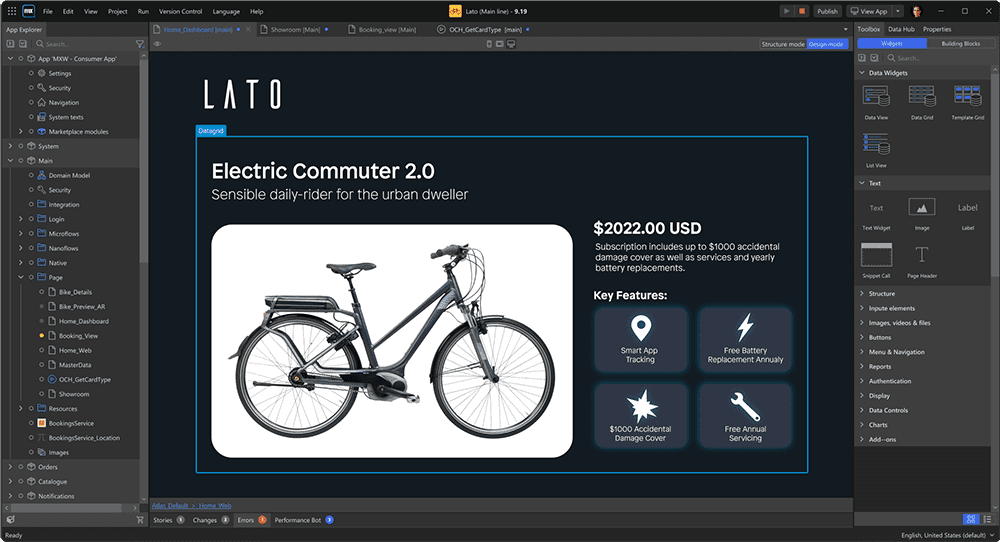
Mendix ist eine Low-Code-Entwicklungsplattform, die speziell für Unternehmen und IT-Teams entwickelt wurde, die komplexe Geschäftsanwendungen für Web und Mobile mit minimalem Programmieraufwand entwerfen, erstellen und bereitstellen müssen.
Für wen ist Mendix am besten geeignet?
Mendix ist besonders geeignet für mittelgroße bis große Unternehmen mit eigenen IT- und Entwicklungsteams, die mehrere interne Geschäftsanwendungen entwickeln und betreuen.
Warum ich Mendix gewählt habe
Ich habe Mendix als eine der besten Low-Code-Plattformen ausgewählt, weil die agile Entwicklung tief in die Plattform selbst integriert ist – und nicht nachträglich hinzugefügt wurde. Jede Anwendung im Mendix-Portal befindet sich in ihrem eigenen Projektbereich mit integrierter Unterstützung für Scrum und Kanban, Backlog-Management und gemeinsamer Nutzer-Story-Erstellung mit Unterhaltungsthreads. Mein Team kann Stories verfeinern und priorisieren – im selben Umfeld, in dem wir tatsächlich entwickeln. Dadurch bleiben Sprint-Planung und Entwicklung eng miteinander verknüpft. Besonders gefällt mir die Portfolio-Management-Funktion, mit der wir den Wert von Initiativen in mehreren App-Projekten gleichzeitig verfolgen und bewerten können – etwas, das beim Managen einer Pipeline von Unternehmensanwendungen wirklich nützlich ist.
Wichtige Funktionen von Mendix
- Mendix AI Assistance (Maia): Ein KI-Codierungsassistent mit Empfehlungen zu Logik, Best Practices und Workflows, der während der Entwicklung auf Probleme hinweist und Verbesserungen vorschlägt.
- Intelligente Prozessautomatisierung: Ein visueller Workflow-Builder, mit dem Sie komplexe Geschäftslogik in Prozesse einfügen können, ohne Code zu schreiben.
- Atlas UI Framework: Ein vorgefertigtes Designsystem mit wiederverwendbaren Templates, Widgets und Komponenten zur Erstellung responsiver Web- und nativer mobiler Apps.
- Mendix Connect Catalog: Ein Datenkatalog, in dem Teams Datenquellen projektübergreifend über Standardprotokolle wie REST, OData und JDBC auffinden, beschreiben und verbinden können.
Mendix-Integrationen
Zu den Integrationen gehören SAP, Salesforce, Microsoft Dynamics 365, AWS, IBM Cloud, Siemens Teamcenter, Oracle, Google Cloud Platform, Microsoft Azure und Twilio.
Pros and Cons
Pros:
- Integriertes Projektmanagement
- Ermöglicht wirklich agile Entwicklung
- Offene Plattform unterstützt individuelle Lösungen
Cons:
- Nicht kosteneffizient für kleine Teams
- Leistungsabfall möglich

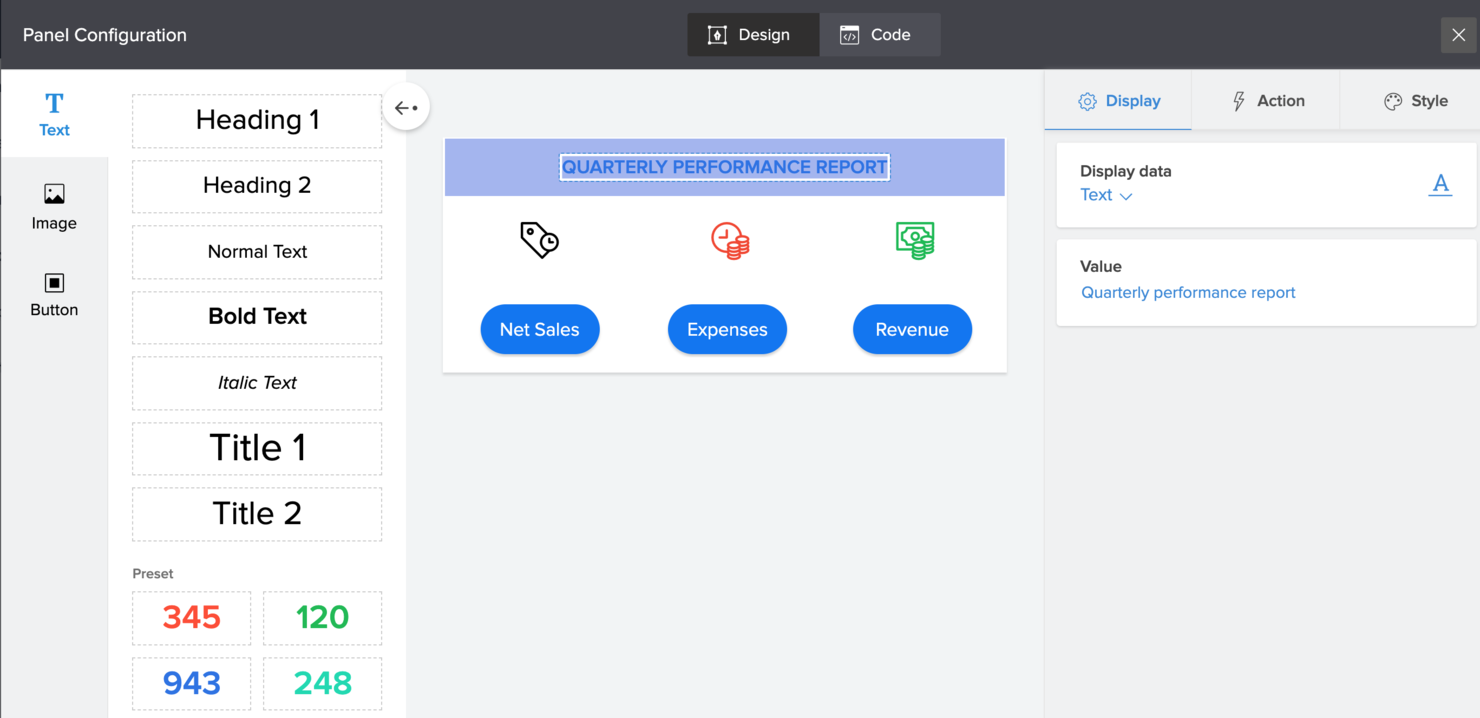
Zoho Creator ist eine Low-Code-Plattform für IT-Teams, Business-Analysten und Betriebsleiter, die maßgeschneiderte Apps in kürzerer Zeit erstellen müssen, um Workflows zu automatisieren, Prozesse zu digitalisieren und Daten abteilungsübergreifend zu verknüpfen – und das alles ohne aufwändiges Programmieren.
Für wen ist Zoho Creator am besten geeignet?
Zoho Creator eignet sich gut für kleine bis mittelständische Unternehmen, die maßgeschneiderte Geschäfts-Apps entwickeln und bereitstellen möchten, ohne auf ein spezialisiertes Entwicklungsteam angewiesen zu sein.
Warum ich Zoho Creator ausgewählt habe
Ich habe Zoho Creator als eine der besten Lösungen ausgewählt, weil die Plattform tatsächlich die Zeit von der Idee bis zur fertigen App verkürzt. Der KI-Assistent Zia trägt einen großen Teil dazu bei – Sie können in Alltagssprache beschreiben, was Sie benötigen, und er erzeugt für Sie Formularfelder, Logik für Workflows und Prozessschritte, ohne alles von Grund auf neu bauen zu müssen. Ebenfalls gefällt mir, dass Creator nach der Erstellung einer App im Web automatisch native Versionen für iOS und Android generiert. So entfällt ein separater Mobilentwicklungsprozess. Für IT-Teams, die interne Tools schnell bereitstellen müssen, beseitigt diese integrierte Multi-Plattform-Bereitstellung einen echten Engpass.
Wichtige Funktionen von Zoho Creator
- Drag-and-drop-Formularersteller: Erstellen Sie Datenformulare visuell, indem Sie Feldtypen per Drag-and-Drop platzieren – ganz ohne Programmierung.
- Deluge-Skripting: Schreiben Sie leichtgewichtige, maßgeschneiderte Logik mit der eigenen Skriptsprache von Zoho, wenn Drag-and-drop allein nicht ausreicht.
- Vorgefertigte App-Vorlagen: Starten Sie direkt mit einer Bibliothek sofort einsetzbarer Apps für häufige Geschäftsbereiche, um die Einrichtung auf der grünen Wiese zu vermeiden.
- Rollenbasierte Zugriffskontrolle: Definieren Sie Benutzerrollen und Berechtigungen individuell für jede App, um zu steuern, wer Daten ansehen, bearbeiten oder verwalten darf.
Zoho Creator Integrationen
Die Integration umfasst Zoho CRM, Zoho Books, Zoho Analytics, Zoho Desk, Zoho Projects, Zoho People, Zoho Invoice, Zoho Mail, Zoho Sign und Zoho Flow.
Pros and Cons
Pros:
- Die einfache Drag-and-drop-Oberfläche ermöglicht es auch Nicht-Entwicklern, Apps schnell zu erstellen.
- Unterstützt Bereitstellungen über Mobilgeräte, Tablets und Web, wodurch Nutzer auf allen Geräten erreicht werden.
- Gute Integrationsmöglichkeiten mit anderen Apps und Datenbanken, was Workflows vereinfacht.
Cons:
- Die Anpassungsmöglichkeiten sind beim Bau komplexerer Anwendungen teilweise eingeschränkt.
- Die Datenmigration aus anderen Systemen auf die Plattform kann schwierig sein.

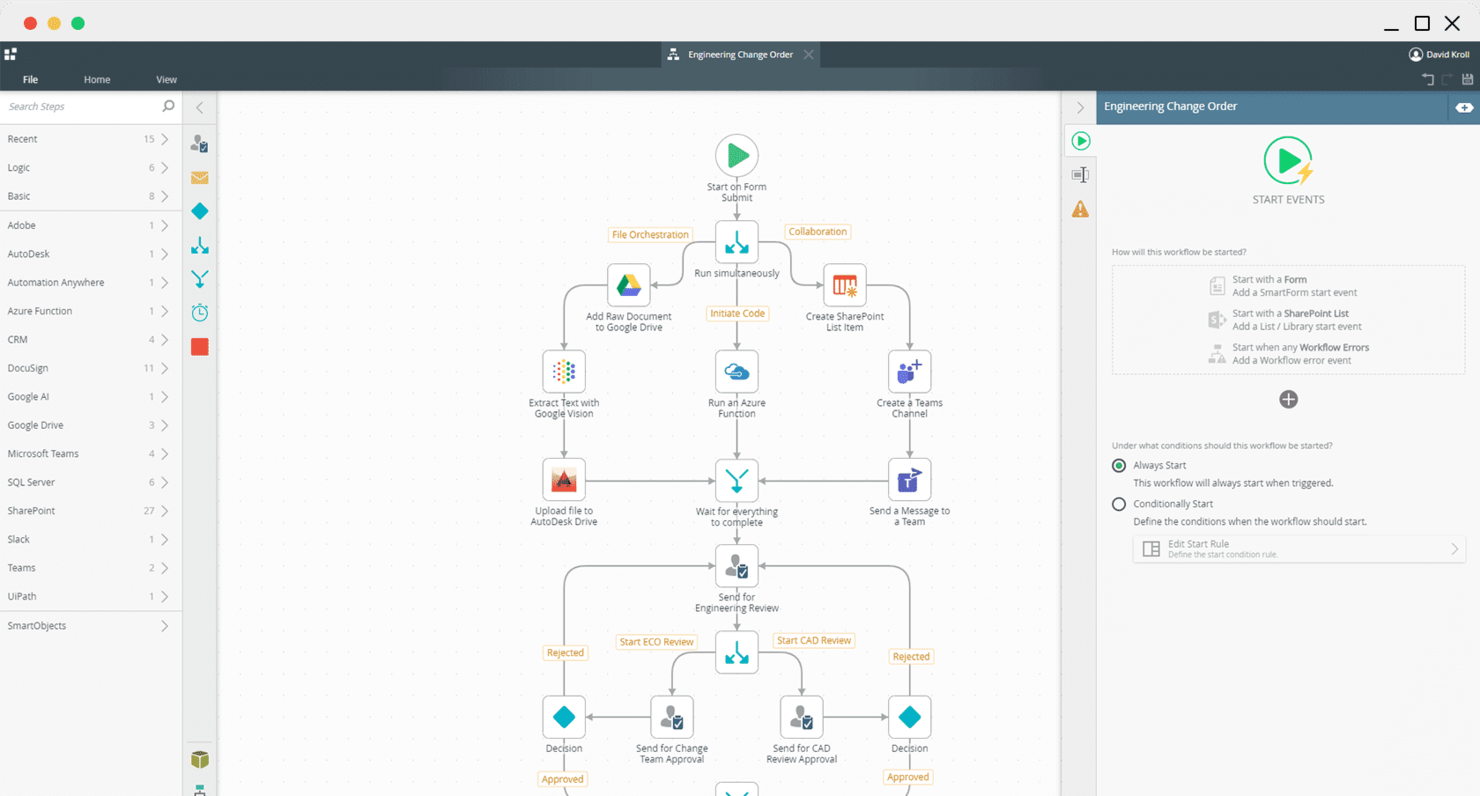
Zabbix se distingue pour les équipes informatiques qui recherchent une plateforme unique afin de surveiller des environnements réseau variés. Son modèle open source et sa riche palette de fonctionnalités séduisent les organisations qui gèrent des infrastructures complexes et multi-constructeurs. Avec Zabbix, vous pouvez suivre les performances du réseau, automatiser les alertes et visualiser les données sur des systèmes sur site, cloud ou hybrides.
Pour qui Zabbix est-il le mieux adapté ?
Pour les administrateurs informatiques et les équipes d'infrastructure dans des organisations de taille moyenne à grande disposant d'une expertise technique en interne. Il convient parfaitement aux entreprises ayant besoin d'un large éventail de fonctionnalités pour surveiller des environnements réseau diversifiés.
Pourquoi j'ai choisi Zabbix
Ce qui m'a attiré chez Zabbix, c'est l'étendue inégalée de ses fonctions de surveillance pour les environnements réseau. Zabbix prend en charge SNMP, IPMI, JMX et la surveillance basée sur des agents, vous permettant ainsi de suivre pratiquement tout appareil ou service dans votre infrastructure. Son moteur d'alertes flexible vous permet de définir des déclencheurs détaillés et des chemins d'escalade pour les événements. Pour les équipes souhaitant un outil unique couvrant aussi bien l'état des appareils que l'analyse du trafic, Zabbix propose un ensemble de fonctionnalités difficile à égaler.
Fonctionnalités clés de Zabbix
En plus de sa large prise en charge de protocoles et d'options d'alertes, Zabbix propose plusieurs autres fonctionnalités notables :
- Découverte automatique : Détecte automatiquement les nouveaux appareils et services sur votre réseau pour faciliter l'intégration.
- Tableaux de bord personnalisables : Permet de créer des cartes réseaux visuelles et des tableaux de bord de performance adaptés à votre environnement.
- Gestion des rôles utilisateur : Prend en charge des autorisations et contrôles d'accès granulaires pour les membres de l'équipe.
- Accès API : Fournit une API REST pour intégrer les données de Zabbix avec d'autres outils et flux de travail.
Intégrations Zabbix
Les intégrations comprennent Zoho, xMatters, VMware, Twilio, Tomcat, SysAid, Tableau, Splunk, Sophos et ServiceNow. Des intégrations personnalisées peuvent également être demandées auprès du support Zabbix.
Pros and Cons
Pros:
- Peut définir les méthodes de notification (SMS, écran ou e-mail) lorsque des seuils sont dépassés
- Communauté active grâce au modèle open source
- Plus de 300 modèles pour la plupart des fabricants de matériel réseau populaires
Cons:
- Nécessite davantage de ressources documentaires
- Nécessite plus de modèles pour une surveillance enrichie

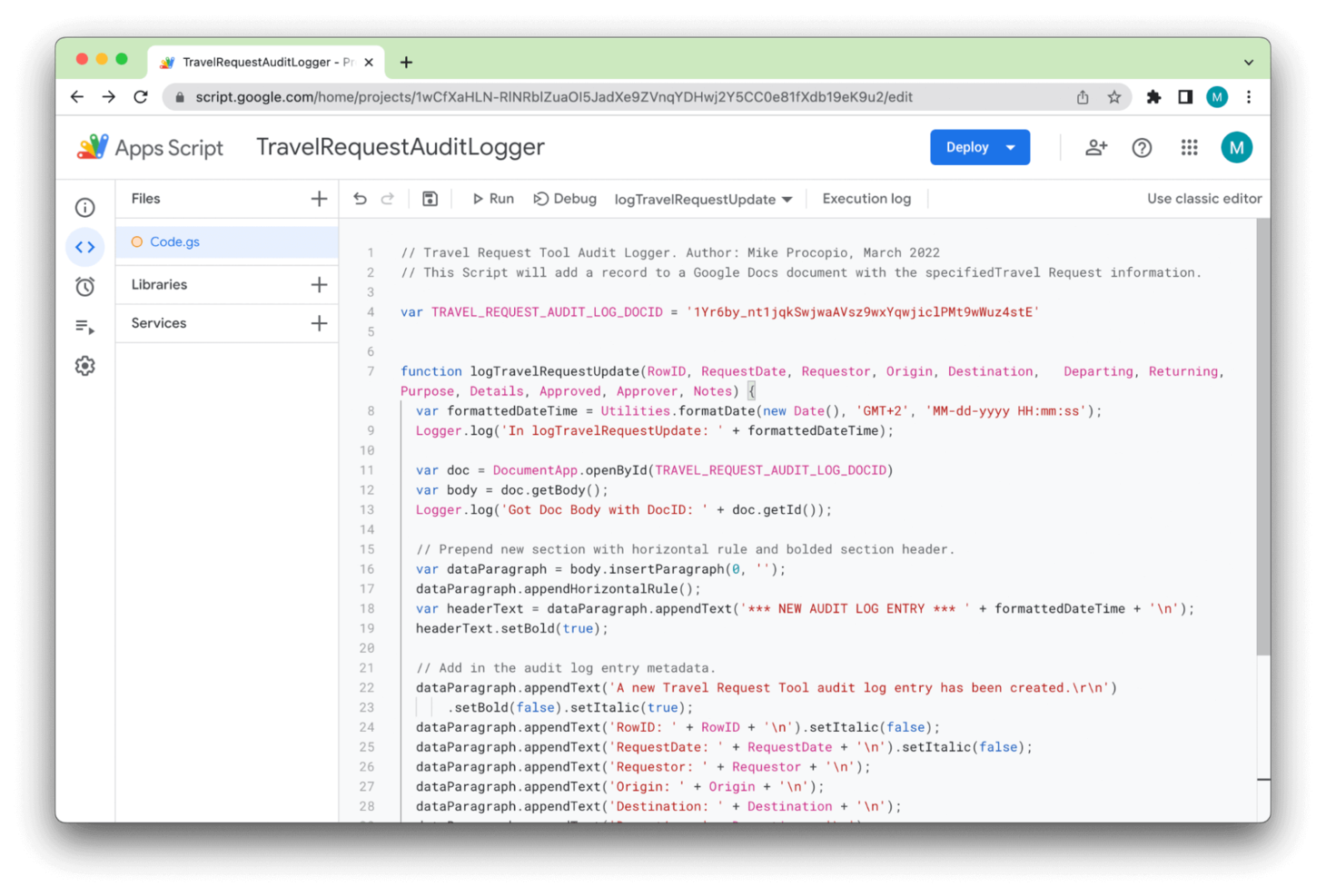
Apps Script ist eine cloud-native Low-Code-Entwicklungsplattform von Google, die darauf ausgelegt ist, mit den meisten seiner Produkte zu funktionieren.
Warum ich Apps Script ausgewählt habe: Apps Script funktioniert über Google Workspace und die Vielzahl dort enthaltener Apps hinweg, was bedeutet, dass jeder mit einem Gmail-Konto leicht damit beginnen kann. Mein erster Kontakt war zum Beispiel ein einfaches Skript, um Sammelzahlungen in Google Sheets zu berechnen.
Hervorstechende Funktionen und Integrationen von Apps Script:
Funktionen in Apps Script, von denen Anfänger besonders profitieren können, sind unter anderem der Makro-Rekorder. Damit können Sie Funktionen Schritt für Schritt aufzeichnen und als Skript speichern, was die Automatisierung erleichtert.
Mir gefiel außerdem, dass beim Tippen für ein benutzerdefiniertes Skript stets Vorschläge und eine Art Mini-Dokumentation wie in einer vollständig integrierten Entwicklungsumgebung (IDE) angezeigt wurden, sodass ich mir nicht die gesamte Syntax merken musste.
Integrationen sind nativ mit über 100 Google-Diensten verfügbar, darunter die meisten Apps in Google Workspace sowie Youtube, Chat, BigQuery und Google Analytics.
Pros and Cons
Pros:
- Einfacher Einstieg
- Mehrere native Integrationen
- 100% kostenlos
Cons:
- Abhängig von Community-Support
- Funktioniert nur mit Google-Produkten

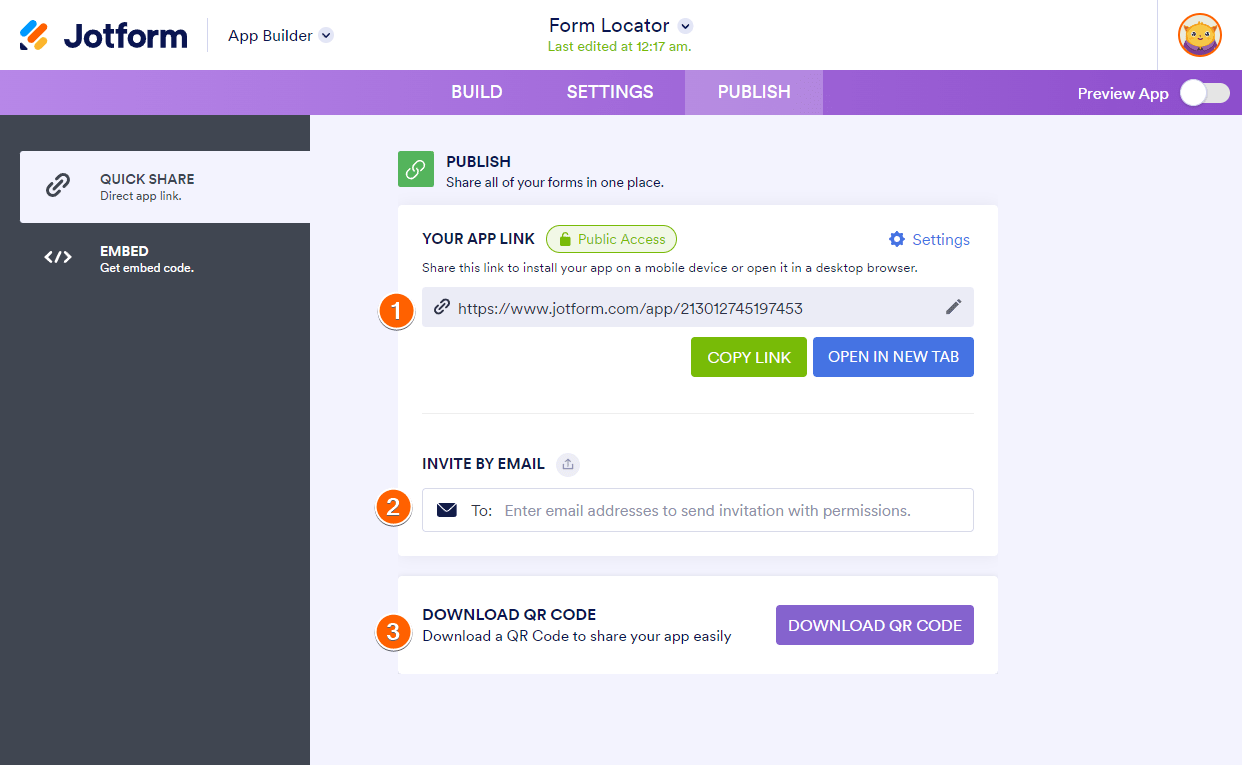
Jotform Apps bietet eine No-Code-Lösung, die sich perfekt für alle eignet, die individuelle Anwendungen ohne umfangreiche Programmierkenntnisse erstellen möchten. Ideal für Unternehmen, Bildungseinrichtungen und Non-Profit-Organisationen ermöglicht diese Plattform das Erstellen von Apps, die auf Ihre spezifischen Bedürfnisse zugeschnitten sind – sei es für E-Commerce, Fundraising oder interne Kommunikation. Durch die Integration von Funktionen wie Drag-and-Drop und anpassbarem Branding löst sie die Herausforderung, benutzerfreundliche und optisch ansprechende Anwendungen zu erstellen, mit denen Sie Ihre Arbeitsprozesse optimieren können.
Warum ich Jotform Apps ausgewählt habe
Ich habe Jotform Apps aufgrund seiner herausragenden Möglichkeiten zur Erfassung von Benutzereingaben gewählt – ein Muss für alle, die eine Low-Code-Plattform benötigen. Der Drag-and-Drop-Formularersteller ermöglicht das Erstellen maßgeschneiderter Formulare für Ihre individuellen Anforderungen und sorgt so für eine reibungslose Datenerfassung. Außerdem erweitert die umfangreiche Bibliothek mit über 80 Widgets Ihre Möglichkeiten, verschiedenste Benutzereingaben zu erfassen, von einfachem Text bis hin zu komplexen Datensätzen. Dieser Fokus auf vielseitige Datenerfassung macht Jotform Apps zu einer attraktiven Wahl für alle, die ihre Datenmanagement-Prozesse optimieren möchten.
Wichtige Funktionen von Jotform Apps
Neben den Möglichkeiten zur Erfassung von Benutzereingaben bietet Jotform Apps eine Reihe von Funktionen, die Ihr App-Erstellungserlebnis verbessern:
- Shop-Builder: Erstellen Sie individuelle E-Commerce-Apps mit integrierten Zahlungsschnittstellen für nahtlose Transaktionen.
- Spenden-Apps: Entwickeln Sie speziell für das Fundraising Anwendungen inkl. Tools zur Spendenverfolgung und Berichterstattung.
- Intranet-App-Builder: Erstellen Sie interne Kommunikationslösungen, um den Informationsaustausch in Ihrer Organisation zu optimieren.
- Education-App-Builder: Gestalten Sie Bildungsanwendungen mit interaktiven Funktionen, die das Lernen und die Beteiligung fördern.
Jotform Apps Integrationen
Integrationen umfassen PayPal, Stripe, Square, Google Sheets, Dropbox, Slack, Mailchimp, Salesforce, HubSpot und monday.com.
Pros and Cons
Pros:
- Einfach zu bedienen
- Hunderte kostenlose Vorlagen
- Kostenlos mit einem Jotform-Konto
Cons:
- Nicht ideal für komplexe Anwendungen
- Viele Vorlagen haben veraltete Oberflächen

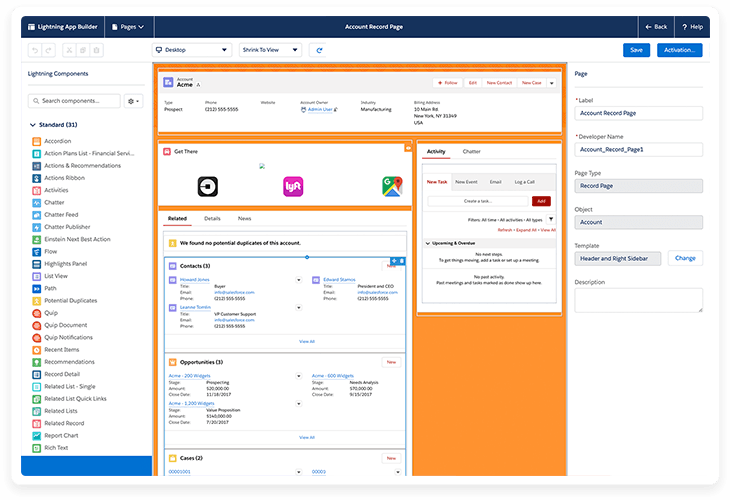
Salesforce Lightning ist ein Low-Code-Produkt, das Teil der Salesforce-Plattform ist. Es ermöglicht Entwicklern, die meisten Vorteile eines vorkonfigurierten CRM-Systems zu nutzen und zusätzlich individuelle Funktionen hinzuzufügen.
Warum ich Salesforce Lightning ausgewählt habe: Salesforce Lightning wird als weitgehend identisch mit der klassischen Version des CRM-Systems beworben, bietet aber die Möglichkeit, es individuell anzupassen. Beim Testen der myLightning-Funktion wurde mir dies deutlich, da ich nahezu alles innerhalb von Salesforce anpassen konnte – von den Farben bis zu benutzerdefinierten Inhaltsseiten.
Herausragende Funktionen und Integrationen von Salesforce Lightning:
Funktionen, von denen CRM-Teams profitieren können, sind unter anderem die Service Console, mit der sich mehrere Fälle auf einem Bildschirm verwalten lassen und die Übersicht bietet, die die meisten benötigten Details auf einen Blick abbildet. Im Bereich Vertrieb gibt es die Funktion „Path“, die die wahrscheinlichsten Wege zum Abschluss eines Deals visualisiert und eine detaillierte Nachverfolgung vergangener und bevorstehender Aktivitäten wie Meetings, E-Mails und Anrufe ermöglicht.
Integrationen sind vorgefertigt für Google Workspace, Slack, HubSpot, Mailchimp, monday.com, ZoomInfo, Docusign, Calendly, Dropbox und LinkedIn.
Pros and Cons
Pros:
- Schneller Kundensupport
- Umfangreiche CRM-Funktionen
- Strukturiertes Ablagesystem
Cons:
- Teilweise langsame Performance
- Hohe Lernkurve für Umsteiger von klassischem Salesforce
Weitere Optionen
Hier sind einige Low-Code-Plattformen, die es zwar nicht in die Hauptliste geschafft haben, die ich aber trotzdem für einen Blick wert halte:
- Power Apps
Am besten für Unternehmensanwendungen geeignet
- Pega
Am besten für DevOps geeignet


Auswahlkriterien für Low-Code-Plattformen
Bei der Auswahl der besten Low-Code-Plattformen für diese Liste habe ich die typischen Anforderungen und Probleme von Käufern wie einfache Integration und Flexibilität bei der Anpassung berücksichtigt. Außerdem habe ich den folgenden Rahmen genutzt, um meine Bewertung strukturiert und fair zu gestalten:
Kernfunktionen (25 % der Gesamtbewertung)
Um in die Liste aufgenommen zu werden, musste jede Lösung diese grundlegenden Anwendungsfälle abdecken:
- Anwendungen erstellen
- Integration mit bestehenden Systemen
- Workflows automatisieren
- Benutzeroberflächen anpassen
- Bereitstellung auf verschiedenen Plattformen
Besondere Zusatzfunktionen (25 % der Gesamtbewertung)
Zur weiteren Eingrenzung habe ich zudem nach besonderen Funktionen gesucht wie zum Beispiel:
- KI-gestützte Automatisierung
- Echtzeit-Analysen
- Mehrsprachigkeit
- Offline-Funktionalität
- IoT-Integration
Benutzerfreundlichkeit (10 % der Gesamtbewertung)
Um die Benutzerfreundlichkeit jedes Systems einzuschätzen, habe ich Folgendes berücksichtigt:
- Intuitive Benutzeroberfläche
- Drag-and-Drop-Funktionalität
- Minimale Programmierkenntnisse erforderlich
- Responsives Design
- Benutzerfreundliche Navigation
Onboarding (10 % der Gesamtwertung)
Um die Onboarding-Erfahrung jeder Plattform zu bewerten, habe ich Folgendes berücksichtigt:
- Verfügbarkeit von Trainingsvideos
- Interaktive Produkttouren
- Zugang zu Vorlagen
- Webinare und Workshops
- Unterstützung durch Chatbots
Kundensupport (10 % der Gesamtwertung)
Zur Bewertung des Kundensupports der jeweiligen Softwareanbieter habe ich Folgendes analysiert:
- 24/7 Support-Verfügbarkeit
- Live-Chat-Optionen
- Umfassendes Hilfezentrum
- Reaktionszeit
- Personalisierter Support
Preis-Leistungs-Verhältnis (10 % der Gesamtwertung)
Um das Preis-Leistungs-Verhältnis jeder Plattform zu beurteilen, habe ich die folgenden Aspekte betrachtet:
- Preistransparenz
- Verfügbarkeit einer kostenlosen Testversion
- Funktionen im Verhältnis zum Preis
- Konkurrenzfähige Preise
- Flexibilität bei den Abonnementplänen
Kundenbewertungen (10 % der Gesamtwertung)
Um einen Gesamteindruck der Kundenzufriedenheit zu gewinnen, habe ich bei der Auswertung von Kundenbewertungen auf Folgendes geachtet:
- Zufriedenheitsbewertungen der Nutzer
- Feedback zur Zuverlässigkeit
- Kommentare zur Benutzerfreundlichkeit
- Erfahrungen mit dem Support
- Effektivität von Funktionen
Wie wählt man eine Low-Code-Plattform aus?
Es ist einfach, sich in langen Feature-Listen und komplexen Preisstrukturen zu verlieren. Um Ihnen zu helfen, bei Ihrem individuellen Auswahlprozess den Überblick zu behalten, finden Sie hier eine Checkliste wichtiger Faktoren:
| Faktor | Worauf achten? |
|---|---|
| Skalierbarkeit | Wächst die Plattform mit Ihrem Unternehmen mit? Beachten Sie zukünftige Anforderungen, Nutzerlimits und Erweiterungsmöglichkeiten. Achten Sie auf Plattformen, die sowohl aktuelle als auch künftige Anforderungen erfüllen können. |
| Integrationen | Funktioniert es mit Ihren bestehenden Tools? Prüfen Sie die Kompatibilität mit Ihrer aktuellen Software-Landschaft. Vermeiden Sie Plattformen, die teure oder komplexe Integrationsumgehungen erfordern. |
| Anpassbarkeit | Können Sie sie an Ihre Prozesse anpassen? Bewerten Sie, inwieweit Workflows und Benutzeroberfläche angepasst werden können. Vorsicht bei Plattformen, die Sie in starre Rahmenbedingungen zwingen. |
| Benutzerfreundlichkeit | Ist sie für Ihr Team einfach zu bedienen? Prüfen Sie die Lernkurve und die Benutzeroberfläche. Wählen Sie Plattformen, die die Einarbeitungszeit minimieren und eine breite Teamnutzung erleichtern. |
| Implementierung und Onboarding | Wie schnell können Sie starten? Überprüfen Sie den Einrichtungsprozess, verfügbare Ressourcen und Support. Meiden Sie Plattformen mit langwierigen oder komplizierten Onboarding-Prozessen. |
| Kosten | Passt es in Ihr Budget? Vergleichen Sie Preismodelle, versteckte Kosten und Langzeitkosten. Setzen Sie auf Transparenz und Wert anstelle vom niedrigsten Einstiegspreis. |
| Sicherheitsmaßnahmen | Sind Ihre Daten und Nutzer geschützt? Informieren Sie sich über Sicherheitsfunktionen, gesetzliche Vorgaben und die Datenhandhabung. Stellen Sie sicher, dass die Plattform Ihre Sicherheitsanforderungen erfüllt. |
| Compliance-Anforderungen | Erfüllt die Plattform branchenspezifische Standards? Überprüfen Sie die Einhaltung relevanter Vorschriften wie DSGVO oder HIPAA. Vermeiden Sie Plattformen, die keine Compliance gewährleisten können. |
Trends bei Low-Code-Plattformen
Im Jahr 2025 befindet sich die Landschaft der Low-Code-Plattformen im Wandel. Entwickler und Unternehmen erweitern die Grenzen dessen, was sich mit minimalem Programmieraufwand umsetzen lässt. Der Bedarf, die digitale Transformation zu beschleunigen, Entwicklung zu vereinfachen und auch Nicht-Technikern die Erstellung komplexer Lösungen zu ermöglichen, treibt diesen Trend voran. Ich habe aktuelle Produkt-Updates, Pressemitteilungen und Release-Notes ausgewertet und dabei einige gängige Trends bei Low-Code-Plattformen festgestellt.
- Integration mit KI und maschinellem Lernen: Viele Low-Code- und No-Code-App-Builder integrieren KI-Funktionen. Diese automatisieren komplexe Teile der App-Entwicklung, wie das Schreiben von Code und die Durchführung prädiktiver Analysen. Dieser Trend spiegelt das wachsende Bedürfnis wider, intelligente Entscheidungsfindung in Anwendungen einzubauen.
- Blockchain-Integration: Die Integration von Blockchain-Technologie wird immer üblicher. Dadurch können Nutzer Apps mit höherer Sicherheit und Datenintegrität innerhalb einer Low-Code-Umgebung entwickeln.
- Echtzeit-Kollaborationstools: Manche Plattformen ermöglichen es verteilten Teams, in Echtzeit zusammenzuarbeiten. Das spiegelt das anhaltende Bedürfnis nach Werkzeugen wider, die verteilte Arbeitsmodelle unterstützen.
Die aktuellen Trends in heutigen Low-Code-Plattformen zu verstehen, ist nicht nur vorteilhaft, sondern entscheidend. Diese Plattformen zielen darauf ab, die App-Entwicklung schneller, zugänglicher und besser integrierbar mit fortschrittlicher Technologie zu machen. Dieses Wissen versetzt Sie in die Lage, eine Plattform zu wählen, die Ihre aktuellen Anforderungen erfüllt und Sie zugleich auf die Zukunft vorbereitet. Es dient zudem als Leitfaden dafür, in Tools zu investieren, die Ihnen einen Wettbewerbsvorteil verschaffen.
Was sind Low-Code-Plattformen?
Low-Code-Plattformen sind Werkzeuge, mit denen Sie Softwareanwendungen mit minimaler Handcodierung über visuelle Oberflächen und vorgefertigte Komponenten erstellen können. Diese Tools werden sowohl von Entwicklern genutzt, die eine schnellere Umsetzung wünschen, als auch von nicht-technischen Teams, die interne Apps oder Workflows ohne Unterstützung der IT erstellen möchten.
Drag-and-Drop-Builder, wiederverwendbare Vorlagen und integrierte Schnittstellen helfen dabei, wiederholtes Programmieren zu überspringen, Entwickler-Rückstände zu verringern und Aktualisierungen schneller zu veröffentlichen. Insgesamt machen Low-Code-Plattformen es leichter, Ideen in funktionierende Apps umzusetzen, ohne sich in individueller Entwicklung zu verlieren.
Funktionen
Beim Auswählen einer Low-Code-Plattform sollten Sie besonders auf folgende Schlüsselfunktionen achten:
- Visuelle Entwicklungsoberfläche: Drag-and-Drop-Builder ermöglichen es, Anwendungen zusammenzustellen, indem Komponenten verschoben werden, statt unzählige Programmzeilen zu schreiben. Es ist, als würde man ein digitales Puzzle zusammensetzen – und sieht sofort, wie die App aussehen und funktionieren wird.
- Wiederverwendbare Komponenten: Vorgefertigte Module bieten Funktionen, die dort platziert werden, wo sie benötigt werden. So muss das Rad nicht jedes Mal neu erfunden werden, wenn etwas Neues entsteht.
- Integrationsmöglichkeiten: Sie können sich mit Datenbanken, externen APIs und weiteren Unternehmens-Tools verbinden, ohne mühsam von Hand zu programmieren. Ihre App muss also nicht isoliert sein, sondern integriert sich in den bestehenden Technologiestapel.
- Bereitstellung auf mehreren Geräten: Eine gute Low-Code-Plattform ermöglicht das Ausrollen von Apps gleichzeitig auf Web- und Mobilgeräten. Es ist nicht nötig, verschiedene Versionen zu entwickeln – einmal bauen, überall verfügbar sein, wo Ihre Nutzer sind.
- Kollaborationstools: Funktionen wie gemeinsame Arbeitsbereiche und Echtzeit-Bearbeitung erleichtern Teamarbeit. Kollegen können gleichzeitig Ideen austauschen, editieren und Änderungen überprüfen – ohne Wartezeiten.
- Rollenbasierte Zugriffskontrolle: Sie bestimmen, wer welche Teile des Projekts bearbeiten, einsehen oder veröffentlichen darf. Das sorgt für Sicherheit und dafür, dass jeder im eigenen Fachgebiet arbeitet.
- Skalierbarkeit: Beginnen Sie mit einem kleinen Projekt, wächst aber die Nutzerbasis oder der Funktionsumfang, stößt die Plattform nicht an ihre Grenzen. Eine skalierbare Lösung wächst reibungslos mit Ihren Ambitionen mit.
- Prozessautomatisierung: Workflows, Freigabeketten und Automatisierungen können eingerichtet werden, um Routineaufgaben zu reduzieren. Die Plattform übernimmt das Wiederkehrende, sodass Sie sich aufs Problemlösen konzentrieren können.
Häufige KI-Funktionen von Low-Code-Plattformen
Über die Standardfunktionen hinaus integrieren viele dieser Lösungen KI mit Features wie:
- Automatisierte Code-Generierung: KI analysiert Ihr App-Design und Ihre Anforderungen, um daraufhin für Sie Code-Snippets oder ganze Abläufe zu erstellen. Das beschleunigt die Entwicklung und minimiert menschliche Fehler.
- Intelligente Workflow-Vorschläge: Die Plattform nutzt KI, um nächste Schritte oder Automatisierungsregeln vorzuschlagen beziehungsweise Engpässe zu erkennen. Es ist, als hätte man immer einen Kollegen zur Seite, der Tipps für effizienteres Arbeiten gibt.
- Verarbeitung natürlicher Sprache: Sprechen oder tippen Sie Ihre Ideen, wandelt die Plattform Ihre Aussagen in App-Logik oder Datenabfragen um. Sie müssen keine Programmiersprache beherrschen, um komplexe Funktionen zu erstellen.
- Intelligentes Testen und Debugging: KI scannt Ihre App auf Fehler, Ineffizienzen oder Sicherheitsrisiken und bietet Lösungsvorschläge an. Statt umständlich nach Fehlern zu suchen, erhalten Sie frühzeitig Ansätze für höhere Zuverlässigkeit.
- Prädiktive Analytik: Integrierte KI kann Ihre Nutzerdaten auswerten, um Trends vorherzusagen oder potenzielle Probleme frühzeitig zu erkennen. Sie erhalten Einblicke, die Ihnen helfen, proaktiv an Funktionen oder Performance Ihrer App zu arbeiten.
Vorteile
Meiner Meinung nach haben Low-Code- und No-Code-Entwicklungsplattformen die Landschaft der Softwareentwicklung grundlegend verändert. Sie machen Programmierung zugänglich und vereinfachen den Prozess zur Erstellung komplexer Anwendungen.
Hier sind fünf Hauptvorteile, die Low-Code-Plattformen Ihren Nutzern und Ihrer Organisation bieten:
- Beschleunigte Entwicklungszeit: Low-Code-Plattformen verkürzen die Zeit, die für die Entwicklung von Anwendungen benötigt wird. Diese Geschwindigkeit ermöglicht es Ihnen, schneller auf Marktveränderungen und interne Anforderungen zu reagieren.
- Reduzierte Kosten Niedrigere Entwicklungskosten: Low-Code-Plattformen minimieren den Aufwand für umfangreiche Programmierung, wodurch weniger Entwicklerstunden pro Projekt erforderlich sind. Diese Effizienz senkt die Personalkosten und setzt Ressourcen für andere wichtige Entwicklungsbereiche frei.
- Ermöglicht Geschäftsanwendern Eigenständigkeit: Diese Plattformen verfügen über benutzerfreundliche Oberflächen und ermöglichen es auch Nicht-Technikern, zu programmieren. Diese Demokratisierung befähigt Ihre Mitarbeitenden, innovativer zu sein und Geschäftslösungen selbst zu entwickeln.
- Erhöhte Flexibilität: Low-Code-Plattformen bieten Werkzeuge, um Anwendungen leicht zu aktualisieren und zu skalieren, während sich die Geschäftsanforderungen verändern. Diese Flexibilität garantiert, dass Software mit dem Unternehmen mitwachsen kann.
- Verbesserte Zusammenarbeit zwischen IT und Fachbereichen: Low-Code-Plattformen vereinfachen den Entwicklungsprozess und ermöglichen eine engere Zusammenarbeit zwischen IT-Abteilung und Business-Einheiten. Diese Zusammenarbeit führt zu Lösungen, die besser auf Geschäftsanforderungen abgestimmt sind.
Low-Code-Plattformen sind mehr als nur Werkzeuge zur Anwendungsentwicklung. Sie sind strategische Innovationsmotoren, die die Arbeitsweise und Wettbewerbsfähigkeit Ihres Unternehmens grundlegend verändern können. Diese Plattformen bieten eine solide Grundlage für digitale Innovation und operative Exzellenz.
Kosten & Preise
Bei meiner Recherche zu Low-Code-Plattformen wurde mir klar, wie wichtig es ist, die angebotenen Pläne und Preismodelle zu verstehen. Diese Plattformen bieten eine Bandbreite an Tarifen, die von Einzelnutzern bis hin zu großen Unternehmen alle Bedürfnisse abdecken.
Hier finden Sie eine Übersicht über typische Tarifarten, deren durchschnittliche Preise sowie die dazugehörigen Funktionen. Diese Informationen helfen Ihnen weiter, selbst wenn Sie wenig bis keine Erfahrung mit dem Einkauf von Low-Code-Plattformen haben.
Tarifvergleichstabelle für Low-Code-Plattformen
| Tarifart | Durchschnittlicher Preis | Häufige Funktionen |
|---|---|---|
| Kostenlos | $0 | Zugang zu grundlegenden Entwicklungstools, Community-Support, eingeschränkte Bereitstellungsoptionen von Apps |
| Basic | $10-25/ user/month | Kernfunktionen zur Entwicklung, Kundensupport, grundlegende Integrationsmöglichkeiten |
| Professional | $50-100/ user/month | Erweiterte Integrationen, mehr Bereitstellungsoptionen, höhere Datenlimits, Premium-Support |
| Enterprise | $250+/ user/month | Volle Individualisierung, unbegrenzte Apps, höchste Sicherheitsstandards, dediziertes Account Management |
Low-Code-Plattform FAQs
Hier finden Sie Antworten auf häufig gestellte Fragen zu Low-Code-Plattformen:
Werden Low-Code-Plattformen Programmierer ersetzen?
Wie sicher sind Low-Code-Plattformen?
Wie integrieren sich Low-Code-Plattformen mit bestehenden Systemen?
Mit welchen Herausforderungen ist bei der Einführung einer Low-Code-Plattform im großen Maßstab zu rechnen?
Wie können Low-Code-Plattformen helfen, technische Schulden zu verwalten?
Nach welchen Kriterien sollte ich Low-Code-Plattformen für mein Unternehmen bewerten?
Unterstützen Low-Code-Plattformen DevOps- und agile Methoden?
Was kommt als Nächstes:
Wenn Sie gerade dabei sind, Low-Code-Plattformen zu recherchieren, kontaktieren Sie kostenlos einen SoftwareSelect-Berater für Empfehlungen.
Sie füllen ein Formular aus und führen ein kurzes Gespräch, in dem Ihre Anforderungen detailliert besprochen werden. Anschließend erhalten Sie eine Auswahlliste von Software, die Sie prüfen können. Die Berater begleiten Sie während des gesamten Kaufprozesses, einschließlich Preisverhandlungen.