

In der schnelllebigen Welt der Softwareentwicklung sind Werkzeuge gefragt, die mithalten können. Laufzeitsoftware kann ein echter Lebensretter sein, da sie Ihrem Team hilft, Ressourcen zu verwalten und die Leistung zu verbessern – ganz ohne Kopfschmerzen.
Ich habe jahrelang Software getestet und weiß, wie schwierig es sein kann, die passende Lösung zu finden. Sie suchen nach etwas, das Ihren Anforderungen entspricht, aber Sie nicht mit überflüssigen Funktionen erschlägt.
In diesem Artikel stelle ich meine Top-Empfehlungen für Laufzeitsoftware vor. Sie erhalten eine ehrliche, objektive Einschätzung jeder Option, damit Sie die richtige Entscheidung für Ihr Team treffen können. Lassen Sie uns gemeinsam die beste Lösung für Sie finden.
Warum Sie unseren Software-Empfehlungen vertrauen können
6,700+
Reviews
20
Industry experts
16+
Evaluation factors
14
Years
Unser Team testet und bewertet Software seit 2012. Als Tech-Führungskräfte wissen wir selbst, wie schwierig – und wichtig – es ist, die richtige Software auszuwählen.
Für diesen Leitfaden haben wir Tools mithilfe von praktischen Tests und unabhängiger Recherche bewertet und dabei unsere Bewertungskriterien angewendet.
Unsere Bewertungen spiegeln unser menschliches redaktionelles Urteilsvermögen wider, keine Verkaufsstrategie.
Expertenprüfer:
- Paulo Gardini MiguelTech-Direktor
 Tim FisherVP für KI
 Gabriel RosasTech Lead & Software-Architekt
 Christhian GruhnTech Lead & Plattform-Architekt

Die beste Laufzeitsoftware – Zusammenfassung
Diese Vergleichstabelle fasst die Preisinformationen zu meinen besten Laufzeitsoftware-Lösungen zusammen und hilft Ihnen, die passende Lösung für Ihr Budget und Ihre Geschäftsanforderungen zu finden.
| Tool | Best For | Trial Info | Price | ||
|---|---|---|---|---|---|
| 1 | Am besten für mehrsprachige Anwendungen auf einer Laufzeitumgebung geeignet | Nicht verfügbar | Kostenloser Tarif verfügbar | Website | |
| 2 | Am besten für modulare Java-Anwendungen geeignet | Nicht verfügbar | Kostenlos und quelloffen | Website | |
| 3 | Am besten geeignet für daemonlose Containerausführung ohne Root-Rechte | Kostenloser Tarif verfügbar | Kostenloser Tarif verfügbar | Website | |
| 4 | Am besten geeignet für eine Container-Laufzeitumgebung nach Industriestandard | Nicht verfügbar | Preise auf Anfrage | Website | |
| 5 | Am besten für die Sandbox-Ausführung von Android-Apps geeignet | Nicht verfügbar | Preis auf Anfrage | Website | |
| 6 | Am besten für sprachübergreifende Interoperabilität geeignet | Kostenloser Plan verfügbar | Preis auf Anfrage | Website | |
| 7 | Am besten für skalierbare Netzwerkanwendungen geeignet | Kostenloser Tarif verfügbar | Kostenlos und quelloffen | Website | |
| 8 | Am besten für nebenläufige Programmierung geeignet | Nicht verfügbar | Kostenlos und quelloffen | Website | |
| 9 | Am besten für die serverlose Ausführung ereignisgesteuerter Funktionen geeignet | Kostenloser Tarif verfügbar | Ab $0.20 pro 1 Million Anfragen/Monat | Website | |
| 10 | Am besten für die standardmäßig sichere JS/TS-Ausführung | Kostenloser Tarif verfügbar | Ab $20/Monat | Website |


Die beste Laufzeitsoftware – Testbericht
Unten finden Sie meine detaillierten Zusammenfassungen der besten Laufzeitsoftware, die es in meine Übersicht geschafft haben. Meine Reviews bieten einen genauen Einblick in die Hauptfunktionen, Vor- & Vorteile, Integrationen und typische Anwendungsfälle jedes Tools, damit Sie das für Sie passendste finden.
 1Am besten für mehrsprachige Anwendungen auf einer Laufzeitumgebung geeignet
.NET
- Nicht verfügbar
- Kostenloser Tarif verfügbar
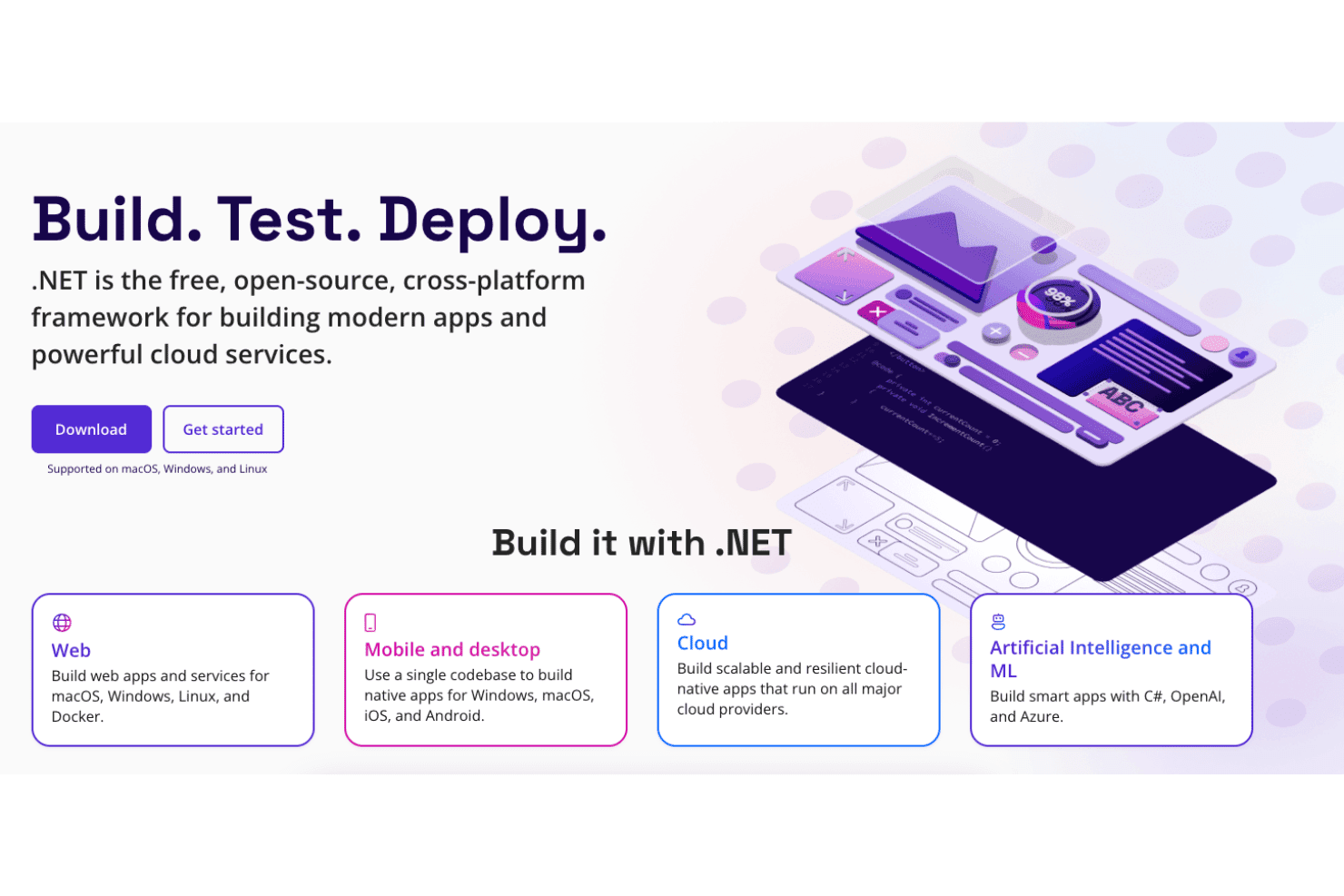
.NET unterstützt die Entwicklung von Web-, Mobil-, Cloud- und AI-Anwendungen. .NET ist die kostenlose Open-Source-Laufzeitplattform von Microsoft, die in C#, F# und Visual Basic geschriebenen Code für Web-, Cloud-, Desktop-, Mobil- und IoT-Arbeitslasten ausführt und dabei eine gemeinsame CLR mit JIT-, Native-AOT- und Mono-Ausführungsoptionen verwendet.
Für wen eignet sich .NET am besten?
.NET eignet sich hervorragend für Plattformingenieure und Softwarearchitekten, die Systeme für mehrere Arbeitslasten entwickeln und C#, F# oder Visual Basic auf einer einzigen, konsistenten Laufzeitumgebung über Cloud, Container und Desktop hinweg ausführen müssen.
Warum ich mich für .NET entschieden habe
.NET verdient einen Platz unter den besten Lösungen auf meiner Auswahlliste, weil C#, F# und Visual Basic alle in dieselbe CLR kompiliert und auf ihr ausgeführt werden. Dadurch müssen Sie nicht mehrere Laufzeitumgebungen verwalten, wenn Ihre Codebasis über mehrere Sprachen hinweg wächst. Besonders gut gefällt mir, wie die Versionierungsdisziplin dies unterstützt: Versionen mit gerader Nummer erhalten drei Jahre LTS-Support mit einem veröffentlichten Enddatum des Supports, sodass die Produktionsplanung nicht zum Ratespiel wird. Native AOT liefert schlanke, schnell startende Binärdateien, wenn der JIT-Overhead problematisch ist, und der generationale GC skaliert im Servermodus zuverlässig bei Arbeitslasten mit hohem Durchsatz.
Wichtige Funktionen von .NET
- Native-AOT-Kompilierung: Kompiliert Ihre Anwendung vorab in eine eigenständige native Binärdatei, beseitigt den JIT-Aufwärm-Overhead und reduziert die Größe des Containerabbilds.
- Verteiltes Aspire-Anwendungsmodell: Eine codebasierte Orchestrierungsebene, die OpenTelemetry-Protokolle, Ablaufverfolgungen und Metriken automatisch für mehrere Dienste konfiguriert, ohne dass eine manuelle Instrumentierung erforderlich ist.
- NuGet-Paketökosystem: Ermöglicht den Zugriff auf mehr als 300.000 versionierte Pakete, die alles von Datenzugriff bis hin zu AI-Integrationen abdecken.
- Parallele Versionierung der Laufzeit: Ermöglicht die Installation und Ausführung mehrerer .NET-Versionen auf demselben Computer, sodass verschiedene Anwendungen ohne Konflikte auf unterschiedliche Laufzeitumgebungen abzielen können.
.NET-Integrationen
.NET bietet mehr als 100 kuratierte Aspire-Integrationen, darunter PostgreSQL, Redis, Dapr und Azure Container Apps, sowie native Integrationen im gesamten Microsoft-Ökosystem. Es unterstützt GitHub Actions, Docker, OpenTelemetry, Entity-Framework-Core-Datenanbieter und benutzerdefinierte Integrationen über APIs.
Pros and Cons
Pros:
- Führt C#, F# und VB auf einer Laufzeitumgebung aus
- Integrierte Beobachtbarkeit durch OpenTelemetry und Aspire
- Parallele Versionsinstallationen für sicherere Upgrades
Cons:
- Keine Sandbox innerhalb der Laufzeit für nicht vertrauenswürdigen Code
- Größere Upgrades können inkompatible Änderungen einführen
Learn more about .NET: Am besten für modulare Java-Anwendungen geeignet
- Nicht verfügbar
- Kostenlos und quelloffen

Apache-Karaf-Webkonsole Apache Karaf ist eine quelloffene Java-Laufzeitumgebung, die die modulare Bereitstellung von Anwendungen durch OSGi-basierte Bundle-Isolierung, Hot-Deployment, dynamische Konfiguration sowie integrierte Werkzeuge für Clustering, Sicherheit und Beobachtbarkeit unterstützt.
Für wen eignet sich die Apache-Karaf-Laufzeitumgebung am besten?
Apache Karaf eignet sich hervorragend für Softwarearchitekten und Plattformingenieure, die modulare Java-Anwendungen entwickeln, welche eine strikte Abhängigkeitsisolierung und dynamische Konfiguration in komplexen Umgebungen mit mehreren Bundles benötigen.
Warum ich mich für die Apache-Karaf-Laufzeitumgebung entschieden habe
Apache Karaf steht auf meiner Auswahlliste, weil die Laufzeitumgebung eine echte Isolierung von Abhängigkeiten auf Bundle-Ebene für modulare Java-Anwendungen so gut handhabt. Ich habe mit Umgebungen gearbeitet, in denen zwei Plug-ins innerhalb einer einzelnen JVM widersprüchliche Versionen derselben Bibliothek benötigen, und Karafs OSGi-Klassenladen pro Bundle löst dieses Problem sauber und ohne Behelfslösungen. Das Features-Bereitstellungssystem macht außerdem die Verwaltung von Abhängigkeiten in komplexen Bereitstellungen deutlich vorhersehbarer, da Anforderungen und Fähigkeiten zum Installationszeitpunkt automatisch aufgelöst werden.
Hauptfunktionen der Apache-Karaf-Laufzeitumgebung
- Karaf-Decanter-Überwachung: Ein integriertes Unterprojekt für Beobachtbarkeit, das JMX-Metriken, Protokolle und Anwendungsereignisse erfasst und anschließend an Backends wie Elasticsearch, Prometheus und Grafana Loki weiterleitet.
- Karaf-Cellar-Clustering: Eine auf Hazelcast basierende Clustering-Schicht, die die Knotenerkennung, die Synchronisierung von Features und Konfigurationen über Clustergruppen hinweg sowie verteilte entfernte OSGi-Aufrufe übernimmt.
- SSH-Zugriff auf die Remote-Konsole: Ein eingebetteter SSHd-Server, der über jeden SSH-Client vollständigen Shell-Zugriff auf eine laufende Karaf-Instanz ermöglicht, einschließlich des Dateisystemzugriffs über SFTP und SCP.
- JAAS-basierte RBAC-Sicherheit: Ein auf JAAS basierendes rollenbasiertes Zugriffskontrollsystem, das Shell-Befehle und JMX-Objekte steuert und Unterstützung für LDAP-Anmeldemodule zur Integration in Identitätssysteme von Unternehmen bietet.
Integrationen der Apache-Karaf-Laufzeitumgebung
Die Apache-Karaf-Laufzeitumgebung verfügt über dokumentierte Integrationen mit Apache Felix, Eclipse Equinox, Apache Camel, Spring, Spring Boot, CDI, Blueprint, Pax Web, Pax JDBC und Pax Logging. Außerdem unterstützt sie Maven-Repositorys, Docker-Paketierung, JMX, SSH und benutzerdefinierte OSGi-Dienste.
Pros and Cons
Pros:
- OSGi-Bundle-Isolierung für widersprüchliche Abhängigkeiten
- Integrierte Unterstützung für SSH und JMX zur Remoteverwaltung
- Dynamische Konfigurationsänderungen ohne Neustart der Laufzeitumgebung
Cons:
- Ausschließlich JVM-basiert, keine Unterstützung für die Ausführung mehrerer Sprachen
- Keine offizielle Anbieter-SLA oder kostenpflichtige Unterstützung
Learn more about Apache Karaf Runtime: Am besten geeignet für daemonlose Containerausführung ohne Root-Rechte
- Kostenloser Tarif verfügbar
- Kostenloser Tarif verfügbar
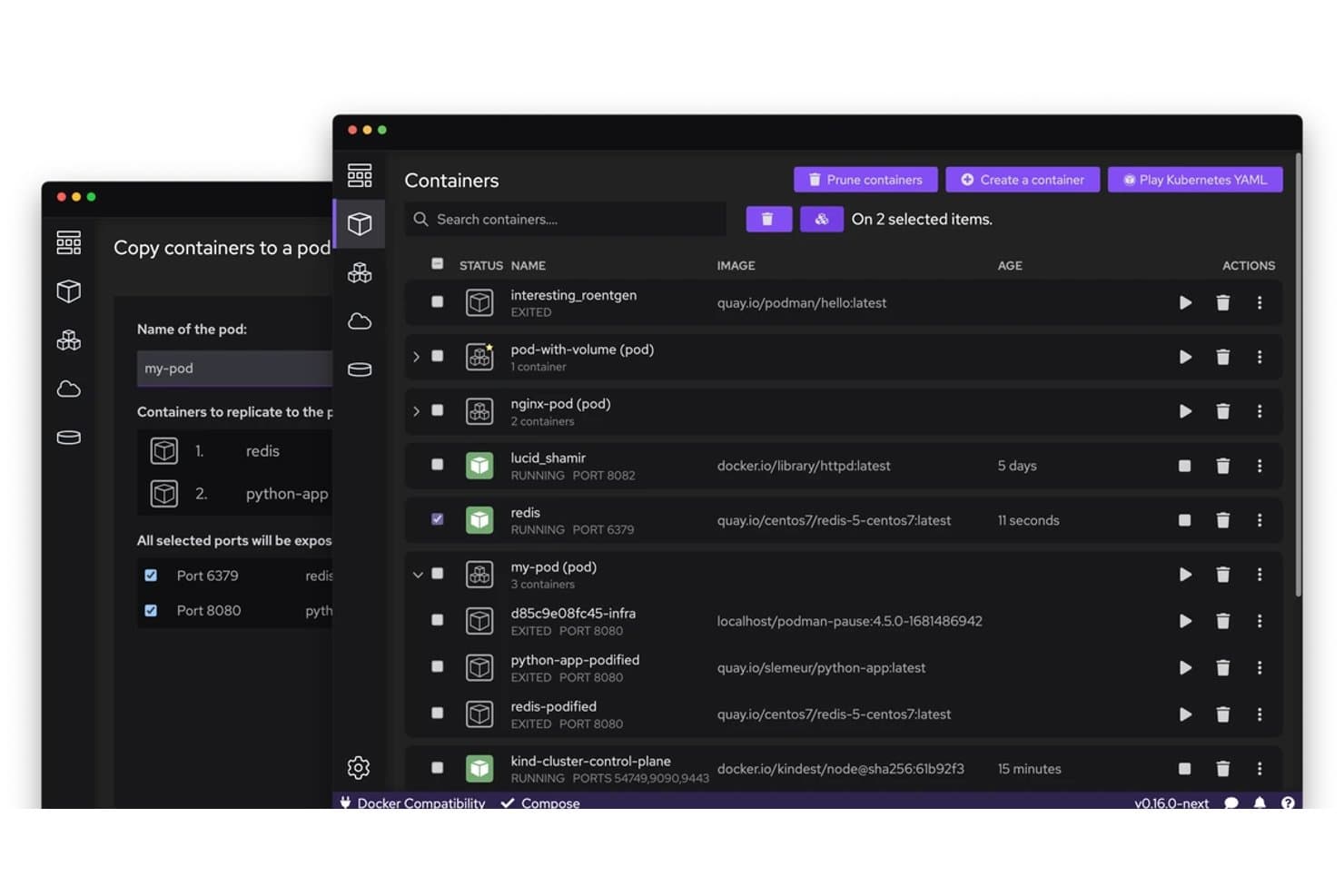
Mit Podman können Benutzer Container visuell in Pods kopieren und verwalten. Podman ist eine Open-Source-Container-Laufzeit-Engine, mit der Sie OCI-Container und Pods mithilfe einer daemonlosen Architektur ohne Root-Rechte sowie Docker-kompatiblen CLI-Befehlen und einer tiefen systemd-Integration über Quadlet ausführen, verwalten und orchestrieren können.
Für wen ist Podman am besten geeignet?
Podman eignet sich besonders für DevOps-Ingenieure und Plattformteams, die Linux-Workloads ausführen und eine Docker-kompatible Laufzeit ohne die Sicherheitsrisiken eines privilegierten Daemons benötigen.
Warum ich Podman ausgewählt habe
Ich habe Podman als eine der besten Lösungen ausgewählt, weil seine daemonlose Architektur ohne Root-Rechte die Sicherheitslage bei der Containerausführung tatsächlich verändert: Container laufen als Kindprozesse Ihrer Benutzersitzung und nicht unter einem privilegierten Root-Daemon. Das bedeutet, dass ein kompromittierter Container nicht wie bei Docker über einen Daemon-Socket seine Rechte erweitern kann. Außerdem verlasse ich mich in der Produktion auf Quadlet, da sich Container damit als systemd-Einheiten deklarieren lassen, die beim Systemstart gestartet werden, Abhängigkeiten berücksichtigen und bei Fehlern ohne benutzerdefinierte Wrapper-Skripte neu gestartet werden.
Wichtige Funktionen von Podman
- Docker-kompatible CLI: Podman bildet die Befehlssyntax von Docker nahezu exakt nach, sodass Sie
podman pull,podman runundpodman psausführen können, ohne Ihren Arbeitsablauf neu erlernen zu müssen. - systemd-Einheitsdateien mit Quadlet: Deklarieren Sie Container als
.container-,.pod- oder.kube-Einheitsdateien, die systemd beim Systemstart mit Abhängigkeitsreihenfolge und Neustartrichtlinien verwaltet. - CRIU-Prüfpunkt und -Wiederherstellung: Erstellen Sie einen Schnappschuss des vollständigen Speicherzustands eines laufenden Containers, exportieren Sie ihn als Archiv und stellen Sie ihn auf demselben oder einem anderen Host wieder her.
- Ressourcensteuerung mit cgroups v2: Legen Sie CPU-, Speicher-, PID- und I/O-Limits pro Container mithilfe von standardmäßigen OCI-Spezifikationsoptionen fest, die direkt über die Linux-cgroups-v2-Hierarchie durchgesetzt werden.
Podman-Integrationen
Podman lässt sich in Buildah, Skopeo, CRI-O, Kubernetes, OpenShift, GitHub Actions, Cirrus CLI, Docker-kompatible Clients und OCI-Registries integrieren. Seine Docker-kompatible REST-API unterstützt benutzerdefinierte Integrationen und CI/CD-Workflows.
Pros and Cons
Pros:
- Führt Container ohne einen dauerhaft laufenden privilegierten Daemon aus
- Ermöglicht die Verwaltung von Containern als systemd-Dienste
- Unterstützt fortgeschrittene Prüfpunkt- und Wiederherstellungsvorgänge
Cons:
- Compose-Workflows unterscheiden sich von Standard-Docker-Compose
- Upgrades können die Abwärtskompatibilität und Workflows beeinträchtigen
Learn more about Podman: Am besten geeignet für eine Container-Laufzeitumgebung nach Industriestandard
- Nicht verfügbar
- Preise auf Anfrage

Hilfefunktion für Container der containerd-Laufzeitumgebung containerd ist ein Open-Source-Daemon für Container-Laufzeitumgebungen.
Pros and Cons
Pros:
- Läuft nativ unter Linux und Windows
- Erweiterte Isolation mit Unterstützung für Benutzer-Namespaces
- Direkt in den Daemon integrierte OpenTelemetry-Ablaufverfolgung
Cons:
- Keine integrierte Netzwerk- oder Protokollverwaltung
- Keine kommerzielle Unterstützung oder SLA verfügbar
Learn more about containerd: Am besten für die Sandbox-Ausführung von Android-Apps geeignet
- Nicht verfügbar
- Preis auf Anfrage

Die Android-Laufzeitumgebung (ART) ist Teil des geschichteten Software-Stacks von Android. Die Android-Laufzeitumgebung (ART) ist die verwaltete Laufzeit-Engine von Android, die DEX-Bytecode mithilfe eines hybriden AOT-, JIT- und Interpreter-Modells ausführt, kombiniert mit profilgesteuerter Neukompilierung, nebenläufiger Garbage Collection und einer vom Betriebssystem erzwungenen App-Sandbox.
Für wen ist die Android-Laufzeitumgebung (ART) am besten geeignet?
ART eignet sich hervorragend für Plattformingenieure und Softwarearchitekten, die Android-System-Images entwickeln oder optimieren und eine präzise Kontrolle über Ausführung, Speicher und App-Isolierung auf Betriebssystemebene benötigen.
Warum ich die Android-Laufzeitumgebung (ART) ausgewählt habe
ART verdient einen Platz auf meiner engeren Auswahl, weil keine andere Laufzeitumgebung die Sandbox für die Ausführung von Android-Apps so umfassend umsetzt. Besonders beeindruckt mich, wie die Isolierung unterhalb der Laufzeitumgebung selbst durchgesetzt wird: Jede App erhält eine eindeutige Linux-UID, eine dedizierte SELinux-Domäne und eine seccomp-bpf-Systemaufruffilterung. Dadurch ist die Abschottung nicht nur ein Versprechen der Laufzeitumgebung, sondern eine Garantie auf Kernel-Ebene. Kombiniert man dies mit der hybriden AOT-/JIT-Ausführung und der profilgesteuerten Neukompilierung von ART, erhält man eine Laufzeitumgebung, die die Sicherheit erhöht, ohne die Leistung zu beeinträchtigen.
Wichtige Funktionen der Android-Laufzeitumgebung (ART)
- Profilgesteuerter Neukompilierungszyklus: ART führt während Leerlaufzeiten aus der Cloud stammende und lokal aufgezeichnete JIT-Profile zusammen und kompiliert anschließend häufig ausgeführte Methoden über einen Hintergrunddienst neu.
- Auswahl des Compilerfilters: Plattformingenieure legen über
dex2oat-Flags und Makefile-Variablen für die Dex-Voroptimierung pro Modul Kompilierungsstrategien wieverify,speedundspeed-profilefest. - Nebenläufiger kopierender Garbage Collector: Der standardmäßige CC-Collector defragmentiert den Heap nebenläufig mithilfe einer Lesesperre und verursacht nur eine einzelne Pause fester Länge, die mit der Heap-Größe nicht zunimmt.
- Auf JDWP basierender Debugger mit Feldüberwachungspunkten: ART unterstützt das standardmäßige Java-Debug-Wire-Protokoll einschließlich Überwachungspunkten, die die Ausführung bei Feldlese- oder Feldschreibzugriffen anhalten, sowie Abfragen aktiver Instanzen.
Integrationen der Android-Laufzeitumgebung (ART)
ART lässt sich in das Build-System des Android Open Source Project,
adb, den Android-Paketmanager, Perfetto, Systrace, JDWP und Cloud-Profile von Google Play integrieren. Außerdem werden benutzerdefinierte Verbindungen über JNI,libnativebridgeundlibnativeloaderunterstützt.Pros and Cons
Pros:
- In der Praxis bewährte hybride AOT- und JIT-Ausführung
- Vom Kernel erzwungene App-Sandbox über SELinux und seccomp
- Integrierter Sampling-Profiler und JDWP-Debugging
Cons:
- Geräte- und Betriebssystemumfang auf Android beschränkt
- Für die erweiterte Feinabstimmung sind Root-Zugriff oder Änderungen zur Build-Zeit erforderlich
Learn more about Android Runtime (ART): Am besten für sprachübergreifende Interoperabilität geeignet
- Kostenloser Plan verfügbar
- Preis auf Anfrage
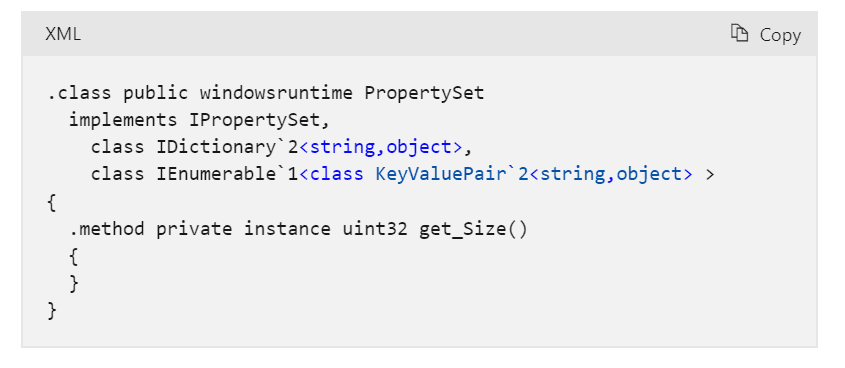
Teilansicht von PropertySet nach der Projektion der Laufzeitumgebung für gemeinsame Sprachen Die Microsoft-Laufzeitumgebung für gemeinsame Sprachen (CLR) ist die verwaltete Ausführungsumgebung im Kern der .NET-Plattform. Sie kombiniert JIT- und Native-AOT-Kompilierung, automatische Speicherverwaltung, Unterstützung mehrerer Sprachen und integrierte Diagnosetools, um verwalteten Code unter Windows, Linux und macOS auszuführen.
Für wen eignet sich die Microsoft-Laufzeitumgebung für gemeinsame Sprachen (CLR) am besten?
Die CLR eignet sich besonders für Entwicklungs- und Plattformteams, die .NET-Anwendungen in mehreren Sprachen entwickeln und eine bewährte, plattformübergreifende verwaltete Ausführungsumgebung benötigen.
Warum ich die Microsoft-Laufzeitumgebung für gemeinsame Sprachen (CLR) ausgewählt habe
Ich habe die CLR in meine Top-Auswahl aufgenommen, weil ihre sprachübergreifende Interoperabilität wirklich unübertroffen ist: C#, F#, Visual Basic und sogar Drittanbietersprachen wie COBOL können Typen gemeinsam verwenden, die Klassen der jeweils anderen Sprache erben und Ausnahmen über Sprachgrenzen hinweg innerhalb einer einzigen Laufzeitumgebung behandeln. Das Common Type System erzwingt dies auf Spezifikationsebene, sodass man nicht einfach hoffen muss, dass alles funktioniert. Auch die umfangreichen Konfigurationsmöglichkeiten der automatischen Speicherbereinigung bewerte ich sehr positiv: Speichergrenzen mit Container-Unterstützung und der Server-GC-Modus geben Plattformteams echte Kontrolle darüber, wie Produktions-Workloads den Speicher nutzen.
Wichtige Funktionen der Microsoft-Laufzeitumgebung für gemeinsame Sprachen (CLR)
- Native-AOT-Kompilierung: Kompiliert .NET-Anwendungen vorab zu eigenständigen nativen Binärdateien, die ohne JIT oder eine installierte Laufzeitumgebung auf dem Zielcomputer ausgeführt werden.
- AssemblyLoadContext: Lädt, isoliert und entlädt Assemblys innerhalb eines einzigen Prozesses und ermöglicht dadurch die parallele Verwendung verschiedener Versionen widersprüchlicher Abhängigkeiten.
- Integrierte Diagnosetools: Stellt CLI-Tools –
dotnet-counters,dotnet-trace,dotnet-dump– zur Überwachung der Leistung im laufenden Betrieb, zur Ablaufverfolgung und zur Speicheranalyse in Produktionsumgebungen bereit. - Strukturierte Ausnahmebehandlung über Sprachgrenzen hinweg: Verwaltet Ausnahmen einheitlich über C#, F#, Visual Basic und Drittanbietersprachen mit CLR-Zielunterstützung innerhalb derselben Laufzeitumgebung.
Integrationen der Microsoft-Laufzeitumgebung für gemeinsame Sprachen (CLR)
Die Microsoft-Laufzeitumgebung für gemeinsame Sprachen (CLR) unterstützt das Microsoft-Ökosystem einschließlich Azure, Visual Studio und der .NET CLI sowie NuGet, OpenTelemetry, Docker, Kubernetes und Podman. Außerdem werden benutzerdefinierte Integrationen über P/Invoke, COM-Interop und native Interoperabilitäts-APIs unterstützt.
Pros and Cons
Pros:
- Führt Code in mehreren Sprachen in einer Laufzeitumgebung aus
- Umfangreiche Optionen zur Feinabstimmung der automatischen Speicherbereinigung
- Integrierte Diagnostik und Ablaufverfolgung auf Produktionsniveau
Cons:
- Keine In-Prozess-Sandbox für nicht vertrauenswürdigen Code
- GC-Einstellungen können zur Laufzeit nicht geändert werden
Learn more about Microsoft Common Language Runtime (CLR): Am besten für skalierbare Netzwerkanwendungen geeignet
- Kostenloser Tarif verfügbar
- Kostenlos und quelloffen

Bibliothek für Node.js-Webaufnahmen Node.js ist eine kostenlose, quelloffene JavaScript-Laufzeitumgebung auf Basis von V8, die JS- und TypeScript-Code serverseitig ausführt, mit einem nicht blockierenden, ereignisgesteuerten I/O-Modell, einem gebündelten npm-Ökosystem und integrierten Werkzeugen für Tests, Profiling und die Erstellung eigenständiger Anwendungen.
Für wen eignet sich Node.js am besten?
Node.js eignet sich besonders für Entwickler und Plattformingenieure, die I/O-intensive, netzwerkorientierte Anwendungen erstellen und eine kostenlose, breit unterstützte Laufzeitumgebung mit einem umfangreichen Ökosystem benötigen.
Warum ich Node.js ausgewählt habe
Node.js verdient seinen Platz als eines der besten Produkte auf meiner Shortlist, weil sein nicht blockierendes, ereignisgesteuertes I/O-Modell es einem einzelnen Prozess ermöglicht, Tausende gleichzeitiger Verbindungen zu verarbeiten, ohne für jede Anfrage einen eigenen Thread zu erzeugen – genau das, was skalierbare Netzwerkanwendungen benötigen. Besonders gefällt mir, dass das Modul
clusterundworker_threadsdie Last bei steigendem Datenverkehr auf mehrere CPU-Kerne verteilen, ohne dass externe Werkzeuge erforderlich sind. Die native TypeScript-Ausführung und der integrierte Testrunner runden eine Laufzeitumgebung ab, die reale Produktionsabläufe von Anfang an abdeckt.Wichtige Funktionen von Node.js
- Native TypeScript-Ausführung: Führt TypeScript-Dateien direkt aus, indem Typannotationen zur Laufzeit entfernt werden, sodass kein separater Build-Schritt erforderlich ist.
- Einzeldatei-Anwendungen (SEA): Bündelt Ihr Skript und Ihre Ressourcen in einer eigenständigen Binärdatei, die auf Rechnern ohne installierte Node.js-Umgebung ausgeführt werden kann.
- Integrierter Testrunner: Führt Tests nativ über das Flag
--testaus, mit Unterstützung für Reporter sowie globale Einrichtung und Aufräumarbeiten, ohne dass ein Framework eines Drittanbieters erforderlich ist. - Berechtigungsmodell: Beschränkt den Zugriff auf Dateisystem, Netzwerk und untergeordnete Prozesse zur Laufzeit mithilfe von Flags wie
--allow-netund--allow-fs-read.
Node.js-Integrationen
Native Integrationen sind nicht eindeutig dokumentiert. Node.js unterstützt das npm-Ökosystem, Chrome DevTools über das V8 Inspector Protocol sowie benutzerdefinierte Integrationen über Node-API, fetch/undici, WebAssembly und WASI.
Pros and Cons
Pros:
- Verarbeitet Tausende gleichzeitiger Netzwerkverbindungen
- Native TypeScript-Ausführung ohne Build-Schritt
- Gebündelter Testrunner und Skriptautomatisierung
Cons:
- Der Singlethread-Ereignisloop kann CPU-intensive Aufgaben ausbremsen
- Das Berechtigungsmodell stellt keine echte Sicherheitsgrenze dar
Learn more about Node.js: Am besten für nebenläufige Programmierung geeignet
- Nicht verfügbar
- Kostenlos und quelloffen

Simulierte Mnesia-Transaktion, die einen Datensatz in der Software Erlang-Laufzeitumgebung schreibt Erlang/OTP ist ein Laufzeitsystem rund um die virtuelle BEAM-Maschine, das kompilierten Bytecode mit einem JIT-Compiler ausführt und leichtgewichtige Prozessplanung, integrierte Verteilung sowie eine vollständige Standardbibliothek zum Erstellen fehlertoleranter, nebenläufiger Anwendungen bietet.
Für wen eignet sich die Erlang-Laufzeitumgebung am besten?
Erlang/OTP eignet sich besonders für Softwarearchitekten und Plattformingenieure, die verteilte, dauerhaft verfügbare Systeme entwickeln, bei denen Nebenläufigkeit und Fehlertoleranz unverzichtbar sind.
Warum ich mich für die Erlang-Laufzeitumgebung entschieden habe
Die Erlang-Laufzeitumgebung steht auf meiner Auswahlliste, weil Nebenläufigkeit keine Funktion ist, die man konfigurieren muss – sie ist direkt in die virtuelle BEAM-Maschine integriert. Ich habe mit Systemen gearbeitet, bei denen die Planung leichtgewichtiger Prozesse und Heaps pro Prozess den gleichzeitigen Betrieb von Hunderttausenden Vorgängen ermöglichten, ohne Konflikte durch gemeinsam genutzten Speicher oder eine Stop-the-World-Garbage-Collection. Der BeamAsm-JIT-Compiler ermöglicht die Ausführung von nativem Code auf x86-64 und aarch64, und Hot-Code-Upgrades über appup/relup erlauben es, laufende Versionen auf Produktionsknoten ohne Ausfallzeit bereitzustellen.
Wichtige Funktionen der Erlang-Laufzeitumgebung
- BeamAsm-JIT-Compiler: Wandelt BEAM-Bytecode beim Laden auf x86-64 und aarch64 in nativen Code um und bietet je nach Arbeitslast Leistungssteigerungen von bis zu 4-fach gegenüber dem Interpreter.
- Observer-GUI: Ein integriertes Diagnosetool, das die aktuelle Speicherzuweisung, die Auslastung der Scheduler, Prozessdetails, ETS-Tabellen und eine Trace-Übersicht für verbundene Knoten anzeigt.
- Emulator-Ressourcenoptionen: Laufzeitoptionen wie
+S,+SDcpuund+hmaxermöglichen es, Scheduler-Threads, sogenannte Dirty-Scheduler und Heap-Grenzwerte pro Prozess direkt über die Befehlszeile zu steuern. - OTP-Anwendungsbibliothek: Wird mit einer umfangreichen Sammlung eigener Bibliotheken ausgeliefert, darunter
crypto,ssl,ssh,mnesia,snmpunddiameterzum Erstellen produktionsbereiter verteilter Systeme.
Integrationen der Erlang-Laufzeitumgebung
Die Erlang-Laufzeitumgebung lässt sich über
erlef/setup-beamin Rebar3, Hex.pm, Docker und GitHub Actions integrieren und unterstützt die Interoperabilität über C-Ports, NIFs und Java-jinterface. Außerdem werden benutzerdefinierte Verbindungen über TCP, TLS, SNMP und verteiltes Erlang unterstützt.Pros and Cons
Pros:
- Hot-Code-Upgrades ermöglichen Versionseinführungen ohne Ausfallzeit
- Der integrierte Observer bietet ein Dashboard für Live-Diagnosen
- Leichtgewichtige Prozesse unterstützen eine massive Skalierung der Nebenläufigkeit
Cons:
- Nicht für CPU-intensive Arbeitslasten vorgesehen
- Keine offiziellen Supportverträge des Herstellers verfügbar
Learn more about Erlang Runtime: Am besten für die serverlose Ausführung ereignisgesteuerter Funktionen geeignet
- Kostenloser Tarif verfügbar
- Ab $0.20 pro 1 Million Anfragen/Monat

Mit AWS Lambda können Benutzer Funktionen manuell an eine bestimmte Version der Laufzeitumgebung binden. AWS Lambda ist eine serverlose Laufzeitplattform von AWS, die ereignisgesteuerte Funktionen in verwalteten Laufzeitumgebungen für Node.js, Python, Java, .NET und Ruby ausführt und zusätzlich benutzerdefinierte Laufzeitumgebungen, MicroVM-Sandboxes, lang laufende verwaltete Instanzen und mehrstufige dauerhafte Funktionen unterstützt.
Für wen eignet sich AWS Lambda am besten?
AWS Lambda eignet sich hervorragend für DevOps-Ingenieure und Anwendungsentwickler, die ereignisgesteuerte Workloads auf AWS erstellen und Code bereitstellen möchten, ohne die Infrastruktur verwalten zu müssen.
Warum ich AWS Lambda ausgewählt habe
Ich habe AWS Lambda als eine der besten Lösungen ausgewählt, weil keine andere Plattform eine vergleichbare Leistungsfähigkeit für die serverlose Ausführung ereignisgesteuerter Funktionen in großem Maßstab bietet. Die Ausführungsisolierung ist für mich besonders hervorzuheben: Jede Funktion läuft in einer dedizierten, auf Nitro basierenden Umgebung, die niemals kontenübergreifend gemeinsam genutzt wird. MicroVM-Sandboxes gehen noch einen Schritt weiter, indem sie eine Isolierung auf VM-Ebene für nicht vertrauenswürdigen oder von KI generierten Code bieten. SnapStart reduziert Kaltstarts von Java um bis zu das 10-Fache, was meiner Ansicht nach ein echter Differenzierungsfaktor ist, wenn es in Produktionsumgebungen auf eine konsistente Latenz ankommt.
Wichtige Funktionen von AWS Lambda
- Kalender für die Einstellung verwalteter Laufzeitumgebungen: Lambda veröffentlicht für jede unterstützte Version einer Laufzeitumgebung die genauen Termine für deren Einstellung sowie für die Sperrung der Erstellung und Aktualisierung, damit Sie Upgrades planen können, bevor sie verbindlich durchgesetzt werden.
- Lambda-Ebenen: Verpacken Sie gemeinsam genutzte Bibliotheken, Abhängigkeiten oder benutzerdefinierte Laufzeitumgebungen in wiederverwendbare Ebenen, auf die mehrere Funktionen verweisen können, sodass Bereitstellungsartefakte schlank bleiben.
- Bereitgestellte Parallelität: Initialisiert Ausführungsumgebungen vor dem Eintreffen von Datenverkehr, damit Funktionen ohne Verzögerung durch einen Kaltstart reagieren. Dies ist für latenzempfindliche Workloads nützlich.
- Dauerhafte Lambda-Funktionen: Führt mehrstufige, lang laufende Workflows mit integrierter Prüfpunkterstellung, Wiederholungen, Verzweigungen und Unterstützung für das Warten auf Signale aus. Die Ausführungen können sich dabei über mehrere Stunden erstrecken.
Integrationen von AWS Lambda
AWS Lambda bietet mehr als 220 native Integrationen in AWS-Services und etwa 50 SaaS-Anwendungen, darunter Amazon S3, DynamoDB, API Gateway, EventBridge, SQS, SNS, Kinesis, Step Functions, Amazon ECR und Amazon EFS. AWS-SDKs und APIs unterstützen benutzerdefinierte Verbindungen.
Pros and Cons
Pros:
- Niemals gemeinsam genutzte, auf Nitro basierende Ausführungsisolierung
- Unterstützt nativ dauerhafte, mehrstufige Workflows
- Leistungsstarke Optionen zur Optimierung von Kaltstarts verfügbar
Cons:
- Läuft ausschließlich auf von AWS verwalteter Infrastruktur
- Ressourcen- und Ausführungszeitlimits gelten
Learn more about AWS Lambda: 10Am besten für die standardmäßig sichere JS/TS-Ausführung
Deno
- Kostenloser Tarif verfügbar
- Ab $20/Monat

Mit Deno können Benutzer WebSocket-Nachrichten im Browser-Debugger untersuchen. Deno ist eine quelloffene JavaScript- und TypeScript-Laufzeitumgebung auf Basis von V8 und Rust, die Ausführung, Paketverwaltung, Tests, Linting, Formatierung und Kompilierung in einer einzigen Binärdatei mit einem standardmäßig sicheren Berechtigungsmodell bündelt.
Für wen ist Deno am besten geeignet?
Deno eignet sich besonders für sicherheitsbewusste Entwickler und Plattformteams, die TypeScript sofort und ohne den Aufbau einer separaten Toolchain ausführen müssen.
Warum ich Deno ausgewählt habe
Ich habe Deno als eines der besten Tools ausgewählt, weil sein standardmäßig sicheres Berechtigungsmodell sich grundlegend von allem unterscheidet, was Node.js oder Bun bietet. Jeder Zugriff auf Dateien, Netzwerke und Unterprozesse erfordert eine ausdrückliche Genehmigung, und der Berechtigungsbroker für Unternehmen ermöglicht es Ihnen, diese Richtlinien zentral durchzusetzen, ohne sich auf einzelne
--allow-*-Flags zu verlassen. Außerdem gefällt mir, dassdeno compilevollständig eigenständige ausführbare Dateien erzeugt, sodass Sie eine abgeschottete Binärdatei ohne Laufzeitabhängigkeit auf dem Zielcomputer bereitstellen können.Wichtige Funktionen von Deno
- Integrierte OpenTelemetry-Instrumentierung: Setzen Sie
OTEL_DENO=true, um Protokolle, Traces und Metriken automatisch zu erfassen, ohne zusätzliche Bibliotheken hinzuzufügen. - All-in-One-Toolchain-Binärdatei: Eine einzige Deno-Binärdatei umfasst einen Test-Runner, Linter, Formatter, Task-Runner und ein Coverage-Tool und ersetzt mehrere separat verwaltete Pakete.
- LTS-Veröffentlichungskanal: Der LTS-Kanal von Deno liefert für einen festgelegten Wartungszeitraum ausschließlich Sicherheits- und kritische Fehlerbehebungen und bietet Teams damit ein stabiles Upgrade-Ziel.
- Kompatibilität mit Node.js und npm: Deno führt npm-Pakete über
npm:-Spezifizierer aus und unterstütztnode:-integrierte Module, sodass Sie vorhandenen Node.js-Code ohne vollständige Neuentwicklung wiederverwenden können.
Deno-Integrationen
Deno lässt sich mit npm, Node.js-APIs, JSR, AWS Lambda, Google Cloud Run, Azure Functions, Cloudflare Workers, Docker, GitHub und OpenTelemetry-kompatiblen Backends integrieren. Außerdem werden private npm-Registries, CI/CD-Workflows und benutzerdefinierte Integrationen über OTLP und Bereitstellungs-APIs unterstützt.
Pros and Cons
Pros:
- Standardmäßig sicheres Berechtigungsmodell für die Ausführung
- Native TypeScript-Ausführung ohne Build-Schritte
- Berechtigungsbroker für Unternehmen und Audit-Protokollierung
Cons:
- Die Node.js-Kompatibilität ist nicht vollständig
- LTS-Supportzeiträume sind relativ kurz
Learn more about Deno:
Weitere Laufzeitsoftware
Hier sind einige weitere Laufzeitsoftware-Lösungen, die es zwar nicht auf meine Hauptliste geschafft haben, die aber dennoch einen Blick wert sind:
- 11Ruby MRIGut zum Ausführen von Skripten in der Ruby-Sprache geeignet
- 12Docker EngineAm besten für Kontrollen zur Isolation der Containersicherheit geeignet
- 13CRI-OAm besten geeignet für die an Kubernetes ausgerichtete Nachverfolgung von Laufzeitversionen
- 14Docker RuntimeAm besten für die Container-Orchestrierung geeignet
- 15Red Hat RuntimesAm besten für die cloudnative Entwicklung geeignet
- 16PHP RuntimeAm besten für serverseitige Skripte geeignet
- 17ElectronAm besten für Desktop-Apps, die mit Webtechnologien entwickelt wurden
Wie ich Laufzeitsoftware bewerte
Ich teile meine Bewertung in zwei Ebenen auf: die grundlegenden Ausführungs- und Laufzeitverwaltungsfunktionen, die ein Werkzeug abdecken muss, sowie die Unterscheidungsmerkmale wie Leistungsoptimierung, Beobachtbarkeit und Laufzeitversionierung, durch die sich einzelne Optionen voneinander abheben.
Kernfunktionen (Grundvoraussetzungen für diese Liste)
Bei der Auswahl der Werkzeuge für meine Liste bewerte ich jedes einzelne für jede der unten aufgeführten Kernfunktionen auf einer Skala von 0 (bietet die Funktion nicht an) bis 5 (ist in diesem Bereich herausragend). Anschließend rechne ich die Gesamtpunktzahl des Werkzeugs in einen Prozentsatz um, wobei 65 % als Richtwert dienen, um die allgemeine Eignung für die Liste einzuschätzen.
- Code- und Arbeitslast-Ausführung: Ich prüfe, ob die Laufzeit den vorgesehenen Anwendungscode oder die vorgesehenen Rechenarbeitslasten zuverlässig ausführt, unabhängig davon, ob es sich um sprachspezifischen Code, Bytecode, Container oder einen anderen unterstützten Arbeitslasttyp handelt.
- Plattform- und Umgebungskompatibilität: Ich bewerte, ob die Laufzeit die Betriebssysteme, Architekturen, Infrastrukturumgebungen und Bereitstellungsziele unterstützt, die für ihren Laufzeittyp relevant sind, und wie konsistent sie sich in diesen Umgebungen verhält.
- Verwaltung von Laufzeitressourcen: Ich bewerte, wie die Laufzeit Ressourcen wie Arbeitsspeicher, Prozesse, Threads, I/O, automatische Speicherbereinigung und Rechenkapazität verwaltet, basierend darauf, was für ihr Ausführungsmodell relevant ist.
- Laufzeitdienste und Abhängigkeiten: Ich prüfe, wie die Laufzeit die Bibliotheken, Module, APIs, Pakete, Systemdienste und Abhängigkeitsmechanismen bereitstellt oder integriert, die ihre unterstützten Arbeitslasten während der Ausführung benötigen.
- Unterstützung des Anwendungslebenszyklus: Ich betrachte, wie die Laufzeit Initialisierung, Ausführung, Beendigung, Fehler, Wiederherstellung und andere für die unterstützten Arbeitslasten geeignete Lebenszyklusvorgänge behandelt.
- Ausführungssteuerung und Isolierung: Ich bewerte die Berechtigungen, Prozesssteuerungen, Isolierungsmechanismen, Ressourcengrenzen und anderen Schutzmaßnahmen, die die Laufzeit für ihr jeweiliges Ausführungsmodell bereitstellt.
Sobald ich eine Liste von Werkzeugen zusammengestellt habe, die die Kriterien erfüllen, prüfe ich, wodurch sich die einzelnen Laufzeiten voneinander unterscheiden.
Unterscheidungsmerkmale (Was Anbieter voneinander abhebt)
So vergleiche ich verschiedene Anbieter miteinander:
Herausragende Funktionen
Die Optimierung der Laufzeitleistung ist ein wichtiges Unterscheidungsmerkmal. Daher achte ich auf Funktionen wie JIT- oder AOT-Kompilierung, adaptive Optimierung, Zwischenspeicherung, Feinabstimmung der automatischen Speicherbereinigung und Hardwarebeschleunigung, sofern diese relevant sind. Außerdem berücksichtige ich die Unterstützung mehrerer Sprachen für Laufzeiten, die mehrere Sprachen oder Bytecode-Formate innerhalb desselben Ökosystems ausführen können. Eine Sicherheits-Sandbox kann eine stärkere Isolierung nicht vertrauenswürdiger oder kompromittierter Arbeitslasten ermöglichen, während integrierte Funktionen für Beobachtbarkeit und Diagnose, einschließlich Ablaufverfolgung, Profilerstellung, Fehlersuche, Protokollierung und Laufzeitmetriken, die Untersuchung von Problemen in der Produktion erleichtern können. Ich prüfe außerdem Funktionen für Laufzeitversionierung und Kompatibilität wie LTS-Veröffentlichungen, parallele Versionen, Abwärtskompatibilität, kontrollierte Upgrades und Unterstützung für Zurücksetzungen.
Über die Funktionen hinaus
Leistungsaufwand und Ressourcenbedarf sind wichtig, da CPU-Verbrauch, Speichernutzung und Startzeit die Effizienz einer Laufzeit in der Produktion beeinflussen können. Außerdem bewerte ich die Reife des Ökosystems und der Gemeinschaft, einschließlich Dokumentation, Bibliotheken von Drittanbietern, Entwicklungstools, Projektverwaltung und der Verfügbarkeit kommerzieller Unterstützung. Lizenzierung und langfristige Unterstützung sind für Teams relevant, die eine Weiterverteilung, Unternehmenssupport, die Häufigkeit von Patches und die Kosten für die langfristige Wartung der Laufzeit berücksichtigen. Schließlich prüfe ich Sicherheits- und Wartungspraktiken, einschließlich der Meldung von Schwachstellen, der Reaktionsfähigkeit bei Patches, signierter Veröffentlichungen, sicherer Verteilung und der Unterstützung relevanter Sicherheitsanforderungen.
So wählen Sie Laufzeitsoftware aus
Es ist leicht, sich in langen Funktionslisten und komplizierten Preismodellen zu verlieren. Damit Sie bei Ihrem persönlichen Auswahlprozess den Überblick behalten, hilft Ihnen diese Checkliste mit wichtigen Faktoren:
| Faktor | Worauf achten? |
|---|---|
| FaktorSkalierbarkeit | Worauf achten?Wächst die Software mit Ihrem Unternehmen mit? Prüfen Sie, ob sie steigende Anforderungen ohne Leistungseinbrüche unterstützt. |
| FaktorIntegrationen | Worauf achten?Funktioniert sie mit Ihren aktuellen Tools? Achten Sie auf einfache Integrationen, um zusätzlichen Einrichtungsaufwand zu vermeiden. |
| FaktorAnpassbarkeit | Worauf achten?Lässt sich die Software auf Ihre Bedürfnisse zuschneiden? Überprüfen Sie, ob sich Einstellungen und Funktionen an Ihren Workflow anpassen lassen. |
| FaktorBenutzerfreundlichkeit | Worauf achten?Ist die Bedienoberfläche intuitiv? Stellen Sie sicher, dass die Software leicht verständlich ist und Ihr Team keine aufwändige Schulung benötigt. |
| FaktorImplementierung und Einführung | Worauf achten?Wie schnell können Sie starten? Denken Sie an die benötigte Zeit und Ressourcen für die Einrichtung und ob währenddessen Support verfügbar ist. |
| FaktorKosten | Worauf achten?Passt sie ins Budget? Vergleichen Sie die Preispläne und achten Sie auf versteckte Gebühren oder langfristige Verträge, die die Finanzen belasten könnten. |
| FaktorSicherheitsmaßnahmen | Worauf achten?Sind Ihre Daten geschützt? Kontrollieren Sie, ob die Software gängige Sicherheitsstandards einhält und Funktionen wie Verschlüsselung und Zugriffskontrolle bietet. |
| FaktorSupport-Verfügbarkeit | Worauf achten?Erhalten Sie Unterstützung, wenn Sie sie brauchen? Prüfen Sie, ob der Kundendienst erreichbar und reaktionsschnell ist und ob verschiedene Kanäle wie Chat oder Telefon angeboten werden. |
Was ist Laufzeitsoftware?
Laufzeitsoftware ist eine Art von Programm, das Anwendungen ermöglicht, effizient zu laufen, indem es Ressourcen verwaltet und Code ausführt. Entwickler, IT-Fachleute und Softwareingenieure verwenden diese Tools in der Regel, um die Anwendungsleistung zu verbessern und einen reibungslosen Betrieb sicherzustellen. Funktionen wie Fehlerbehandlung, Ressourcenmanagement und Leistungsüberwachung helfen dabei, die Systemstabilität und Effizienz aufrechtzuerhalten. Insgesamt bieten diese Tools essenzielle Unterstützung für den effektiven Betrieb von Anwendungen.
Funktionen
Achten Sie bei der Auswahl von Laufzeitsoftware auf die folgenden Schlüsselfunktionen:
- Ressourcenmanagement: Weist Systemressourcen effizient zu, damit Anwendungen reibungslos und ohne Unterbrechungen laufen.
- Fehlerbehandlung: Erkennt und verwaltet Fehler automatisch, um die Stabilität der Anwendung zu gewährleisten und Abstürze zu verhindern.
- Leistungsüberwachung: Überwacht Leistungskennzahlen der Anwendung, um Engpässe zu identifizieren und die Ressourcennutzung zu optimieren.
- Unterstützung mehrerer Programmiersprachen: Unterstützt verschiedene Programmiersprachen und bietet so Flexibilität für Entwickler, die mit unterschiedlichen Codebasen arbeiten.
- Echtzeitanalysen: Liefert Einblicke in die Anwendungsleistung und Systemgesundheit, um zeitnahe Entscheidungen zu ermöglichen.
- Anpassbare Dashboards: Ermöglichen es Benutzern, die Oberfläche auf relevante Daten und Kennzahlen für ihre spezifischen Anforderungen anzupassen.
- Integrationsfähigkeit: Sorgt für Kompatibilität mit bestehenden Systemen und Tools, um Arbeitsabläufe zu optimieren und die Einrichtungszeit zu verkürzen.
- Sicherheitsmaßnahmen: Bietet Funktionen wie Verschlüsselung und Zugriffskontrollen, um sensible Daten zu schützen und die Einhaltung von Sicherheitsstandards zu gewährleisten.
- Automatisches Skalieren: Passt Ressourcen dynamisch je nach Bedarf an, um die Leistung während Spitzenzeiten aufrechtzuerhalten.
- Benutzerfreundliche Oberfläche: Gewährleistet eine einfache Nutzung durch intuitive Navigation und Design, wodurch die Einarbeitungszeit für neue Benutzer reduziert wird.
Vorteile
Die Implementierung von Laufzeitsoftware bietet zahlreiche Vorteile für Ihr Team und Ihr Unternehmen. Hier sind einige, auf die Sie sich freuen können:
- Verbesserte Leistung: Optimiert die Ressourcennutzung und überwacht die Performance, damit Anwendungen reibungslos laufen.
- Reduzierte Ausfallzeiten: Erkennt und behandelt Fehler automatisch, minimiert Unterbrechungen und verhindert Abstürze.
- Flexibilität: Unterstützt mehrere Programmiersprachen, sodass Entwickler mühelos mit verschiedenen Codebasen arbeiten können.
- Fundierte Entscheidungsfindung: Echtzeitanalysen bieten Einblicke in die Systemgesundheit und unterstützen schnelle, effektive Reaktionen.
- Erhöhte Sicherheit: Stellt Verschlüsselung und Zugriffskontrollen bereit, um sensible Daten zu schützen und die Einhaltung von Compliance-Anforderungen sicherzustellen.
- Skalierbarkeit: Passt Ressourcen automatisch je nach Bedarf an und stellt so die Performance auch bei hoher Auslastung sicher.
- Benutzerfreundlichkeit: Benutzerfreundliche Oberflächen reduzieren die Einarbeitungszeit und erleichtern es Teams, die Software effizient zu übernehmen und zu nutzen.
Kosten & Preise
Bei der Auswahl von Laufzeitsoftware ist es wichtig, die verschiedenen Preismodelle und Tarife zu verstehen. Die Kosten variieren je nach Funktionsumfang, Teamgröße, Zusatzoptionen und mehr. Die folgende Tabelle fasst gängige Tarife, ihre durchschnittlichen Preise und typische Funktionen zusammen, die in Laufzeitsoftware-Lösungen enthalten sind:
Tarifvergleichstabelle für Laufzeitsoftware
| Tariftyp | Durchschnittlicher Preis | Häufige Funktionen |
|---|---|---|
| TariftypKostenloser Tarif | Durchschnittlicher Preis$0 | Häufige FunktionenGrundlegendes Ressourcenmanagement, eingeschränkte Fehlerbehandlung und Community-Support. |
| TariftypPersönlicher Tarif | Durchschnittlicher Preis$5-$25/user/month | Häufige FunktionenErweiterte Leistungsüberwachung, Unterstützung mehrerer Programmiersprachen und E-Mail-Support. |
| TariftypGeschäftstarif | Durchschnittlicher Preis$30-$75/user/month | Häufige FunktionenEchtzeitanalysen, anpassbare Dashboards und Integrationsfähigkeit. |
| TariftypEnterprise-Tarif | Durchschnittlicher Preis$100+/user/month | Häufige FunktionenErweiterte Sicherheitsmaßnahmen, automatisches Skalieren und dedizierter Kundensupport. |
FAQs zu Laufzeitsoftware
Hier finden Sie Antworten auf häufig gestellte Fragen zur Laufzeitsoftware:
Was ist der Unterschied zwischen Laufzeitsoftware und Entwicklungssoftware?
Laufzeitsoftware steuert die Ausführung von Anwendungen, während Entwicklungssoftware zur Erstellung dieser Anwendungen verwendet wird. Als Entwickler nutzen Sie Entwicklungswerkzeuge, um Code zu schreiben und zu testen, aber Laufzeitsoftware sorgt dafür, dass Ihr Code korrekt auf den Systemen der Nutzer ausgeführt wird. Man kann sich die Laufzeitumgebung als die Bühne vorstellen, auf der Ihr fertiges Produkt läuft.
Benötige ich spezielle Hardware, um Laufzeitsoftware auszuführen?
Nein, die meisten Laufzeitsoftwares laufen auf Standard-Hardware und sind so konzipiert, dass sie mit verschiedenen Systemen kompatibel sind. Dennoch sollten Sie die jeweiligen Systemanforderungen der gewählten Software prüfen, um die Kompatibilität mit Ihrer vorhandenen Infrastruktur sicherzustellen. Einige erweiterte Funktionen können mehr Rechenleistung oder Speicher erfordern.
Kann Laufzeitsoftware für mobile Anwendungen genutzt werden?
Ja, viele Laufzeitsoftware-Lösungen unterstützen die Entwicklung mobiler Anwendungen. Sie bieten Funktionen, die speziell für mobile Ressourcen optimiert sind und helfen, die App-Leistung auf unterschiedlichen Geräten zu verbessern. Wenn Ihr Team mobile Apps entwickelt, achten Sie auf Laufzeitsoftware mit mobiler Kompatibilität und Testmöglichkeiten.
Wie oft sollte Laufzeitsoftware aktualisiert werden?
Regelmäßige Updates sind entscheidend, um Ihre Laufzeitsoftware effizient und sicher zu halten. Die meisten Anbieter stellen regelmäßige Updates bereit, um Fehler zu beheben, die Leistung zu verbessern und die Sicherheit zu erhöhen. Richten Sie, wenn möglich, automatische Updates ein oder planen Sie regelmäßige Überprüfungen, damit Ihre Software stets aktuell bleibt.
Wie hängt Laufzeitsoftware mit der genutzten Programmiersprache zusammen?
Laufzeitsoftware ist oftmals auf bestimmte Programmiersprachen oder Plattformen zugeschnitten. Zum Beispiel ist die JVM für Java entwickelt, Ruby MRI für Ruby und die CUDA Runtime API für paralleles Rechnen mit CUDA-fähigen GPUs. Diese enge Verbindung stellt sicher, dass der in einer bestimmten Sprache geschriebene Code effizient und sicher auf der vorgesehenen Plattform ausgeführt werden kann.
Kann Laufzeitsoftware die Performance einer Anwendung beeinflussen?
Ja, die Wahl der Laufzeitsoftware kann die Performance einer Anwendung stark beeinflussen. Funktionen wie Optimierungstechniken, Speicherverwaltung und Integrationsmöglichkeiten spielen eine entscheidende Rolle dafür, wie reibungslos und effizient eine Anwendung läuft. Eine informierte Entscheidung, die auf den Anforderungen der Anwendung und den Funktionen der Laufzeitumgebung basiert, kann zu einer optimalen Performance führen.
Wie geht es weiter?
Wenn Sie gerade dabei sind, Laufzeitsoftware zu recherchieren, verbinden Sie sich kostenlos mit einem SoftwareSelect-Berater für passende Empfehlungen.
Sie füllen ein Formular aus und führen ein kurzes Gespräch, in dem Ihre individuellen Anforderungen geklärt werden. Danach erhalten Sie eine auf Ihre Bedürfnisse zugeschnittene Software-Shortlist. Sie werden sogar während des gesamten Kaufprozesses unterstützt – inklusive Preisverhandlungen.