

Die 10 besten kostenlosen Helpdesk-Softwarelösungen im Test 2026

Auswahl der besten kostenlosen Helpdesk-Software


Ein Unternehmen zu führen, kann eine Herausforderung sein, insbesondere wenn die Ressourcen knapp sind und Sie komplexe Daten aus verschiedenen Datenquellen verwalten müssen. Sie müssen Ihre Kunden zufrieden halten, ohne Ihr Budget zu sprengen. Genau hier kommt kostenlose Helpdesk-Software ins Spiel. Sie bietet eine praktische Möglichkeit, Kundenanfragen, Datenflüsse und Supporttickets ohne den hohen Preis zu verwalten.
Meiner Erfahrung nach kann die Suche nach dem richtigen Tool Zeit sparen, Stress reduzieren und die Datenqualität in Kundendatensätzen verbessern. Ich habe verschiedene Optionen getestet und bewertet, um Ihnen einen unvoreingenommenen Überblick über die besten verfügbaren kostenlosen Helpdesk-Lösungen zu geben, darunter cloudbasierte und quelloffene Tools.
In diesem Artikel finden Sie meine besten Empfehlungen mit kostenlosen Tarifen oder Testversionen. Ich hebe ihre besonderen Funktionen und Möglichkeiten zur Datenverwaltung hervor und zeige, wie sie durchgängige Arbeitsabläufe unterstützen, damit Ihr Team alltägliche Herausforderungen bewältigen kann.
Warum Sie unseren Software-Empfehlungen vertrauen können
Unser Team testet und bewertet Software seit 2012. Als Tech-Führungskräfte wissen wir selbst, wie schwierig – und wichtig – es ist, die richtige Software auszuwählen.
Für diesen Leitfaden haben wir Tools mithilfe von praktischen Tests und unabhängiger Recherche bewertet und dabei unsere Bewertungskriterien angewendet.
Unsere Bewertungen spiegeln unser menschliches redaktionelles Urteilsvermögen wider, keine Verkaufsstrategie.
Expertenprüfer:
Vergleichstabelle für kostenlose Helpdesk-Software
Diese Vergleichstabelle zeigt die günstigsten kostenpflichtigen Einstiegspreise für meine Auswahl der besten kostenlosen Helpdesk-Software.
| Tool | Best For | Trial Info | Price | ||
|---|---|---|---|---|---|
| 1 | Am besten für KI-gestütztes Ticketing | Kostenlose Demo + 14 Tage kostenlos testen möglich | Ab $19/Nutzer/Monat (jährliche Abrechnung) | Website | |
| 2 | Am besten zur Verbindung von Ticketbearbeitung & operativem Kontext | 14-tägige kostenlose Testversion verfügbar | Ab $19/Nutzer/Monat (jährliche Abrechnung) | Website | |
| 3 | Am besten geeignet für Chatbot-Automatisierungs-Workflows | 7-tägige kostenlose Testphase + kostenloser Tarif verfügbar | Ab $24.17/Monat (jährliche Abrechnung) | Website | |
| 4 | Am besten mit HIPAA-bereiter Compliance | Kostenlose Testversion verfügbar | Ab $25/Nutzer/Monat (jährliche Abrechnung) | Website | |
| 5 | Am besten für KI-gesteuerte Ticketverwaltung | 14-tägige kostenlose Testversion | Ab $89/Nutzer/Monat (jährliche Abrechnung) | Website | |
| 6 | Am besten für Cloud-Hosting | Kostenloser Plan verfügbar | Kostenlos nutzbar | Website | |
| 7 | Am besten geeignet für einfaches Ticketmanagement | 15-tägige kostenlose Testphase + kostenloser Tarif + kostenlose Demo verfügbar | Ab $39.99/Benutzer/Monat (jährlich abgerechnet) | Website | |
| 8 | Am besten für Asset-Management | Kostenloser Plan + 45 Tage kostenloser Test | Ab €19/Agent/Monat | Website | |
| 9 | Am besten für IT-Fachkräfte | Kostenloser Tarif verfügbar | Ab $5/Sitz/Monat (jährliche Abrechnung) | Website | |
| 10 | Am besten geeignet für E-Mail-Integration | 30-tägige kostenlose Testphase + kostenloser Tarif verfügbar | Ab $12/Nutzer/Monat | Website |


Test der besten kostenlosen Helpdesk-Software
Nachfolgend finden Sie meine ausführlichen Zusammenfassungen der besten kostenlosen Helpdesk-Software, die es in meine Auswahl geschafft hat. Meine Bewertungen bieten einen detaillierten Einblick in die wichtigsten Funktionen, Vor- und Nachteile, Integrationen und idealen Einsatzmöglichkeiten jedes Tools, damit Sie die beste Lösung für sich finden. Einige dieser Tools bieten eine vollständig kostenlose Version, während andere einen kostenlosen Testzeitraum anbieten. Ich habe in jeder meiner Bewertungen vermerkt, welche Funktionen kostenlos verfügbar sind.

Am besten für KI-gestütztes Ticketing
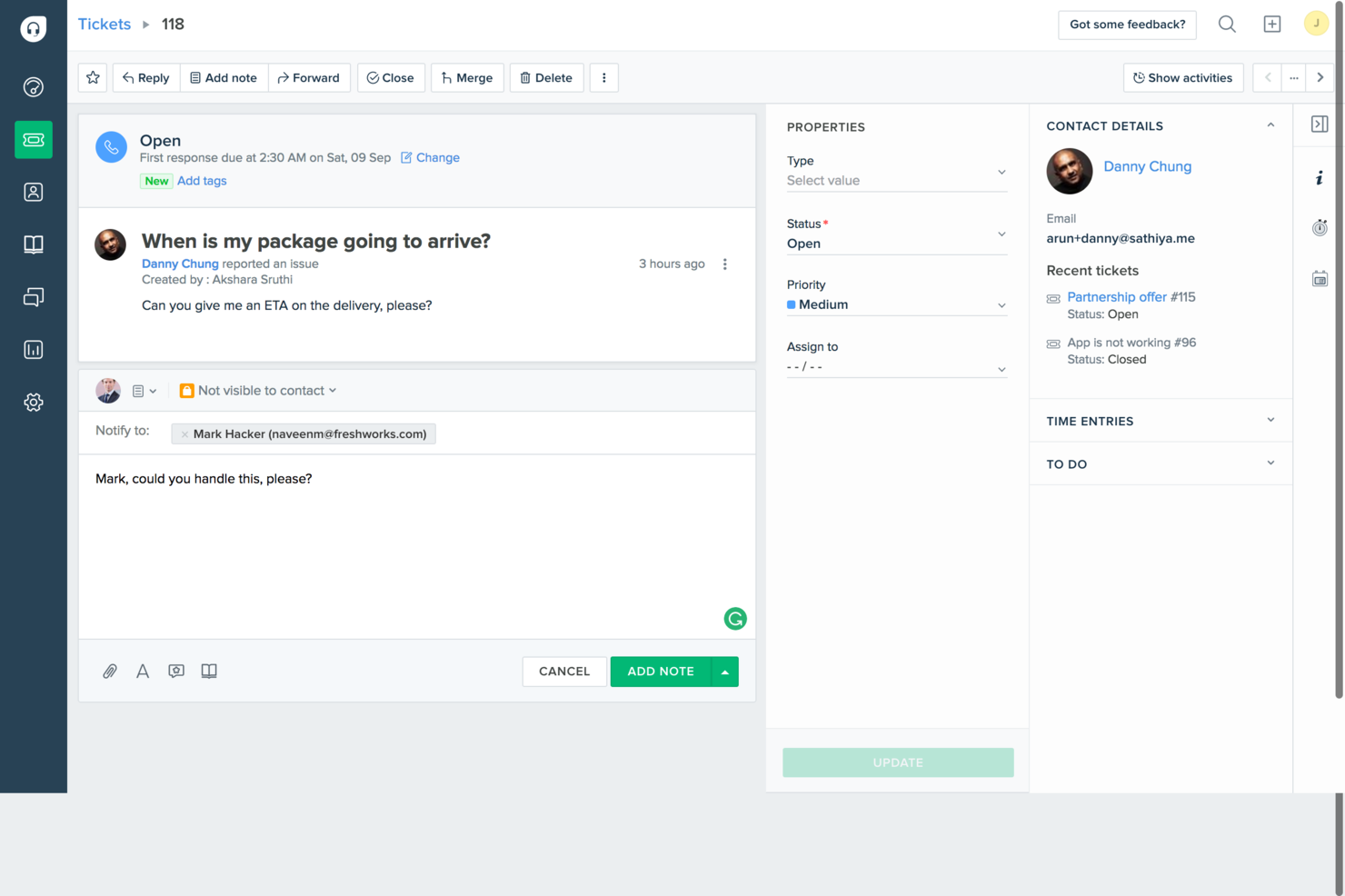
Für Unternehmen, die eine unkomplizierte, effektive Kundensupport-Lösung suchen, ist Freshdesk eine praktische Wahl. Entwickelt mit Blick auf kleine Unternehmen und Start-ups, beinhaltet es die wichtigsten Werkzeuge, die Sie für den Kundenservice benötigen – ohne unnötige Komplexität. Durch die Zentralisierung der Ticketbearbeitung über E-Mail und soziale Medien hilft Freshdesk Ihrem Team, Kundenanfragen an einem Ort zu verwalten, sodass Sie mehr Zeit in den Aufbau starker Kundenbeziehungen investieren können, statt sich mit verschiedenen Kanälen zu verzetteln.
Warum ich Freshdesk gewählt habe
Ich habe Freshdesk ausgewählt, weil es KI-gestütztes Ticketing und Automatisierungsfunktionen integriert, die den Anforderungen von Unternehmen entgegenkommen, die ihren Kundensupport optimieren möchten. Das KI-basierte Ticketingsystem der Plattform verkürzt die Bearbeitungszeiten von Anfragen deutlich, sodass sich Ihr Team auf strategischere Aufgaben konzentrieren kann. Darüber hinaus liefert die Freddy AI von Freshdesk wertvolle Einblicke und automatisiert sich wiederholende Aufgaben, was Effizienz und Produktivität ohne umfangreiche manuelle Eingriffe steigert.
Wichtige Funktionen von Freshdesk
Neben den KI-gestützten Möglichkeiten bietet Freshdesk auch eine Reihe weiterer nützlicher Features für kostenlose Helpdesk-Software:
- Integriertes Ticketsystem: Verwalten Sie Kundenanfragen aus E-Mails und sozialen Medien zentral, damit keine Anfrage unbeantwortet bleibt.
- Wissensdatenbank: Erstellen Sie ein Self-Service-Portal, in dem Kunden Antworten auf ihre Fragen finden und so Ihr Support-Team entlasten.
- Zusammenarbeitstools: Ermöglichen Sie Ihrem Team, gemeinsam an Tickets zu arbeiten, damit komplexe Anliegen effizient gelöst werden.
- Berichte und Analysen: Gewinnen Sie Einblicke in Tickettrends und die Leistung des Teams, um fundierte Geschäftsentscheidungen zu treffen.
Freshdesk-Integrationen
Zu den Integrationen gehören Slack, MS Teams, Shopify, Playvox, Facebook, WhatsApp, QuickBooks, Google Workspace, Trello und Salesforce.
Pros and Cons
Pros:
- Multi-Channel-E-Mail- und Social-Ticketing
- Automatisierte Ticketzuweisung enthalten
- Eingebautes Wissensdatenbank-Portal
Cons:
- Begrenzte Anpassungsmöglichkeiten in niedrigeren Tarifen
- KI-Funktionen nicht vollständig kostenlos
New Product Updates from Freshdesk

Freshdesk Adds Voice AI Agents in Freshcaller
Freshdesk introduces Voice AI Agents available through Freshcaller Marketplace apps to handle routine calls and reduce queues. This feature enables automated call handling with real-time, conversational support. For more information, visit Freshdesk's official site.

Am besten zur Verbindung von Ticketbearbeitung & operativem Kontext
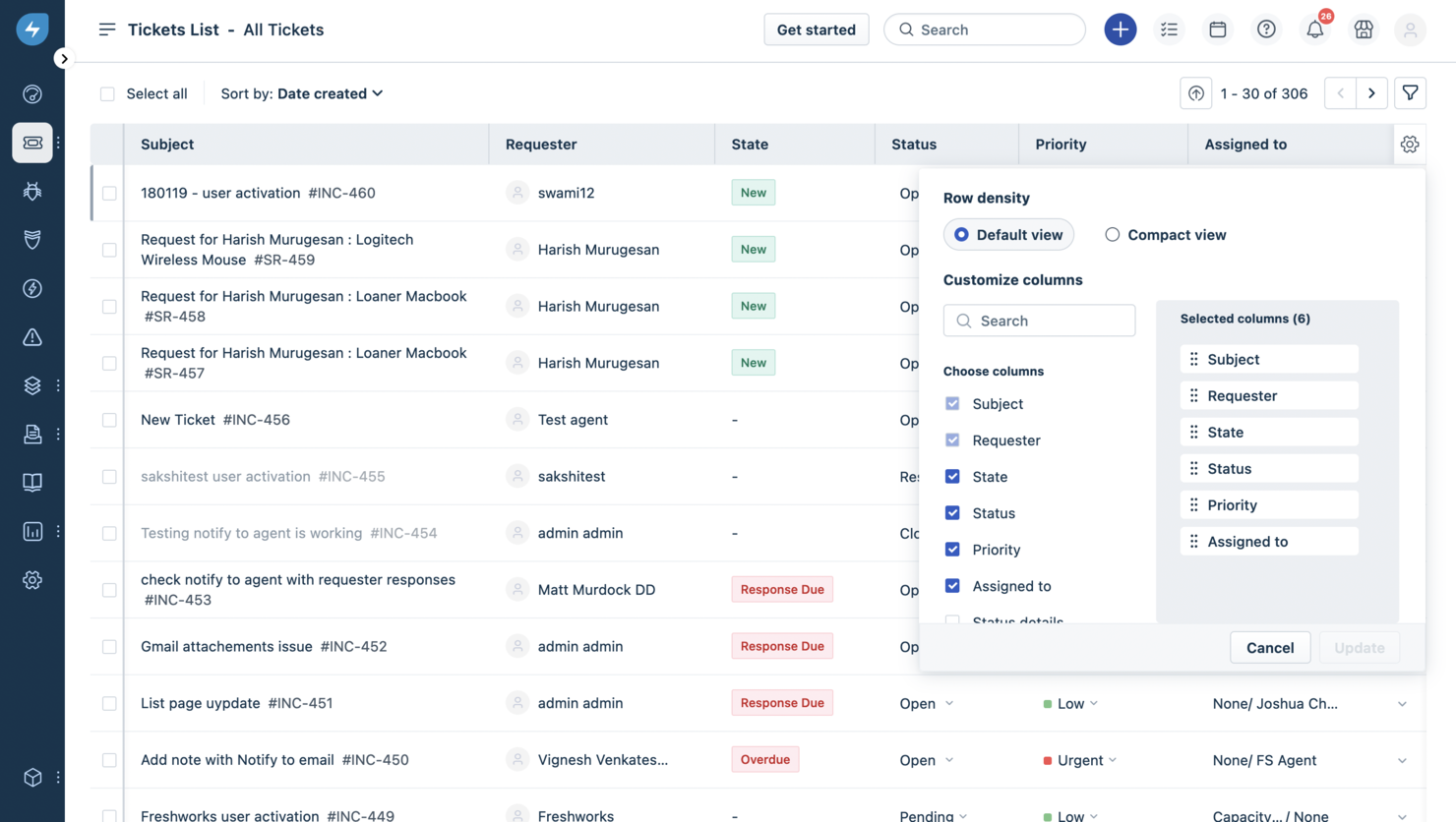
Freshservice positioniert sich als Helpdesk-Software, die mehr bietet als nur die Protokollierung von Tickets, indem sie traditionelle Supportfunktionen mit strukturierten IT-Service-Management-Praktiken kombiniert. So kann Ihr Team eingehende Anfragen bearbeiten, Probleme weiterleiten und Servicearbeiten von einem einzigen Ort aus verwalten. Entwickelt wurde sie für IT-Teams, interne Supportgruppen (wie Personal- oder Gebäudemanagement) und Unternehmen, die einen Helpdesk mit Ticketing, Self-Service und Automatisierungsfunktionen wünschen, um manuelle Arbeit in Serviceprozessen zu reduzieren.
Warum ich Freshservice ausgewählt habe
Ich habe Freshservice wegen seines KI-gestützten Service-Desks gewählt, der die Benutzererfahrung mit Drag-and-Drop-Workflows vereinfacht. Das Incident-Management-Feature der Plattform automatisiert die Ticketzuweisung und sorgt so für schnelle Lösungszeiten – ein entscheidendes Kriterium für jede Helpdesk-Software.
Darüber hinaus ermöglichen die Change-Management-Funktionen von Freshservice, die Einhaltung von Vorschriften effizient nachzuverfolgen, was für die Aufrechterhaltung der betrieblichen Integrität von unschätzbarem Wert ist. Eingebaute Automatisierung und SLA-Management helfen dabei, Aufgaben zuzuweisen und die Serviceperformance ohne manuelle Überwachung zu kontrollieren. Wenn Sie einen Helpdesk möchten, der Ticketbearbeitung mit dem operativen Gesamtzusammenhang und der Einhaltung von Serviceerwartungen verbindet, bietet Freshservice diese Balance.
Freshservice Hauptfunktionen
Neben den Kernfunktionen bietet Freshservice mehrere weitere Features, die seinen Nutzen als Helpdesk-Lösung erhöhen:
- Omnichannel-Support: Verwalten Sie Support über Plattformen wie E-Mail und Slack und sorgen Sie so für eine nahtlose Kommunikation.
- Servicekatalog: Bietet ein zentrales Portal für sämtliche Serviceanfragen, sodass Nutzer problemlos finden, was sie benötigen.
- Wissensmanagement: Zentralisiert Informationen und verringert so die Arbeitsbelastung der Support-Agenten durch Self-Service-Möglichkeiten.
- Asset-Management: Verfolgt Hardware- und Software-Anlagen parallel zu Tickets und verschafft dem Helpdesk Kontext zum unterstützten Objekt sowie dessen Historie.
Freshservice Integrationen
Zu den Integrationen gehören Microsoft Teams, Slack, Google Workspace, Jira, Dropbox, AWS, Azure, Zapier, Trello und Salesforce.
Pros and Cons
Pros:
- Zentrale Verwaltung von Tickets und Helpdesk-Workflows.
- Self-Service-Portal reduziert einfache Anfragen.
- Starke ITIL-konforme Workflows für strukturierte Servicebereitstellung.
Cons:
- Asset-Management kann mit zunehmendem Umfang teuer werden.
- Mobile App bietet für einige Nutzer nur eingeschränkten Funktionsumfang.
New Product Updates from Freshservice
 Experience)
Freshservice Introduces a Reimagined IT Asset Management (ITAM) Experience
Freshservice introduces a reimagined IT Asset Management (ITAM) experience with continuous infrastructure discovery, dependency mapping, IPAM, and Software License Management. This update helps teams improve asset visibility and manage connected IT environments more effectively. For more information, visit Freshservice’s official site.

Tidio
Am besten geeignet für Chatbot-Automatisierungs-Workflows
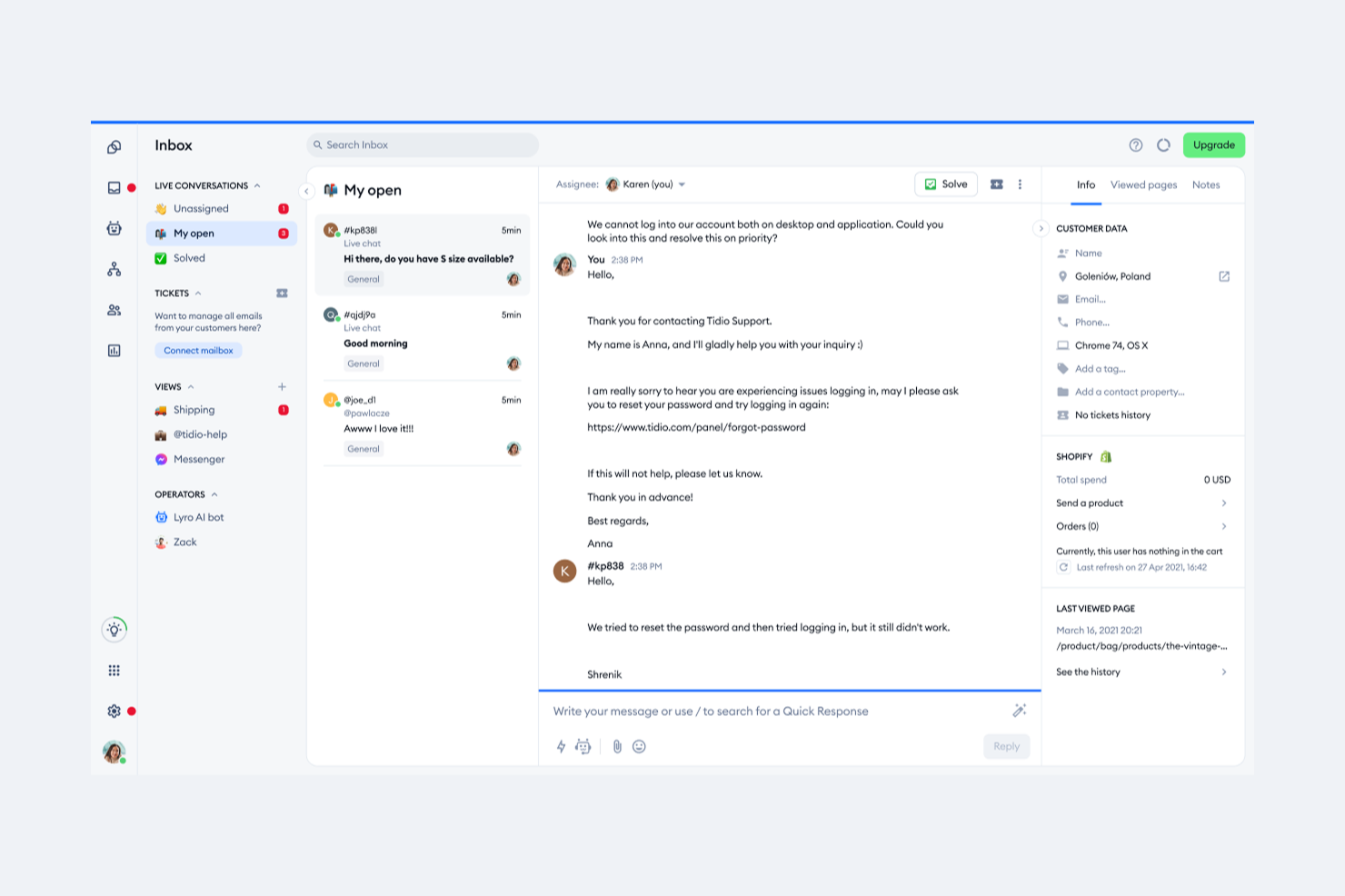
Tidio ist eine Live-Chat- und Helpdesk-Plattform, die ein Multi-Channel-Postfach, Ticketverwaltung, KI-gesteuerte Chat-Automatisierung und eine Echtzeit-Besucherliste in einer einzigen Oberfläche für Kundensupport-Teams vereint.
Für wen eignet sich Tidio am besten?
Tidio eignet sich besonders für kleine E-Commerce-Unternehmen und Start-ups, die ein kostenloses, einfach zu implementierendes Kundensupport-Tool mit integriertem Chat und Automatisierung benötigen.
Warum ich Tidio gewählt habe
Tidio ist einer meiner Favoriten, weil ich es liebe, wie der Flows-Builder die Chatbot-Automatisierung wirklich zugänglich macht, ohne eine einzige Zeile Code schreiben zu müssen. Sie erhalten einen Drag-and-Drop-Editor, mehr als 40 vorgefertigte Vorlagen für Szenarien wie die Wiederherstellung verlassener Warenkörbe und die Beantwortung häufiger Fragen sowie eine logikbasierte Auslösung von Automatisierungen zu bestimmten Zeitpunkten in der Besucherreise. Außerdem finde ich den Auslöser für Scrolltiefe und mobilgeräte-spezifische Aktionspfade hilfreich für Teams, die Präzision bei der Steuerung von Automatisierungen wünschen.
Tidio Hauptfunktionen
- Multi-Channel-Postfach: Verwalten Sie Live-Chat-, E-Mail-, Instagram-, Messenger- und WhatsApp-Konversationen aus einem einzigen gemeinsamen Posteingang.
- Lyro KI-Agent: Ein KI-basierter Agent, der eingehende Support-Anfragen mithilfe Ihrer Wissensdatenbank beantwortet.
- Ticketverwaltung: Wandeln Sie Unterhaltungen in Support-Tickets um, vergeben Sie Prioritätsstufen und leiten Sie Tickets automatisch an den richtigen Agenten weiter.
- Vorgefertigte Antworten: Erstellen und speichern Sie vordefinierte Antwortvorlagen, die Agenten während des Chats sofort einfügen können.
Tidio Integrationen
Tidio bietet native Integrationen mit Shopify, WordPress, Zendesk, WhatsApp, Instagram, Messenger, ActiveCampaign, Agile CRM und BigCommerce sowie weiteren Plattformen. Es verbindet sich mit Zapier und stellt eine OpenAPI für individuelle Integrationen bereit.
Was ist kostenlos?
Tidio bietet einen dauerhaft kostenlosen Tarif mit 50 abrechnungsrelevanten Unterhaltungen pro Monat, bis zu 10 Agentenplätzen, Live-Chat, Ticketverwaltung, einer Echtzeit-Besucherliste, Basis-Analytik und 50 einmaligen Lyro KI-Unterhaltungen. Alle kostenpflichtigen Tarife beinhalten außerdem eine 7-tägige, kostenlose Testphase ohne Kreditkartenangabe.
Pros and Cons
Pros:
- Visueller Chatbot-Flow-Builder mit Drag-and-Drop
- Multi-Channel-Postfach für Chat und soziale Kanäle
- Live-Chat in unter 30 Minuten installiert
Cons:
- Lyro KI stoppt bei täglichem Nutzungslimit
- Analysefunktionen bieten keine Detailtiefe für umfangreiches Reporting

Am besten mit HIPAA-bereiter Compliance
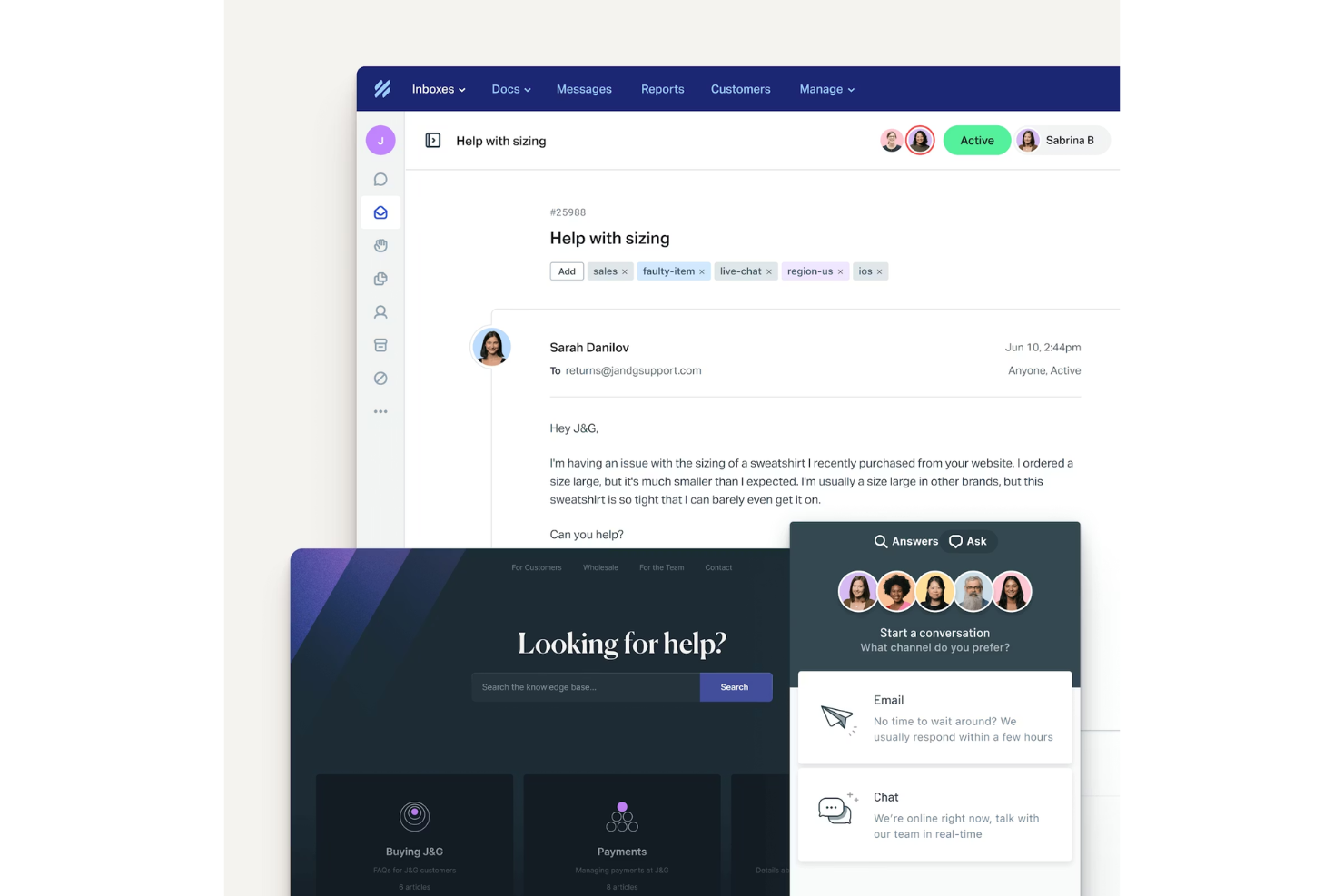
Help Scout bietet eine Helpdesk-Plattform, die für Teams entwickelt wurde, die Kundenanfragen klar und strukturiert verwalten möchten. Sie eignet sich besonders für kleine Unternehmen, SaaS-Firmen und Support-Teams, die einen gemeinsamen Posteingang, Automatisierung und eine integrierte Wissensdatenbank suchen. Wenn Sie eine kostenlose Lösung benötigen, die Teamarbeit und Kundenselbstbedienung in Einklang bringt, ist Help Scout eine Überlegung wert.
Für wen ist Help Scout am besten geeignet?
Help Scout eignet sich für kleine bis mittelgroße Unternehmen und Support-Teams, die einen kollaborativen Helpdesk mit leistungsstarken Tools zur Kundenkommunikation benötigen.
Warum ich Help Scout ausgewählt habe
Für Teams, die strenge Datenschutzanforderungen erfüllen müssen, habe ich Help Scout ausgewählt, weil es eine HIPAA-bereite Compliance-Option bietet. Dies ist besonders wichtig für Gesundheitsorganisationen oder Unternehmen, die mit sensiblen Gesundheitsdaten arbeiten. Der HIPAA-bereite Tarif von Help Scout umfasst Funktionen wie sichere Datenverarbeitung und unterzeichnete Business Associate Agreements (BAAs), die für die Einhaltung gesetzlicher Vorschriften unerlässlich sind. Diese Möglichkeiten machen Help Scout zu einer praktischen Wahl, wenn Sie eine kostenlose Helpdesk-Lösung suchen, die mit Ihren Anforderungen an die HIPAA-Compliance mitwachsen kann.
Wichtige Funktionen von Help Scout
Weitere besonders erwähnenswerte Funktionen für Helpdesk-Teams sind:
- Gemeinsamer Posteingang: Verwalten und zuweisen von Kundengesprächen im gesamten Team über einen einzigen strukturierten Posteingang.
- Wissensdatenbank (Docs): Erstellen und pflegen Sie ein durchsuchbares Self-Service-Portal, in dem Kunden selbst Antworten finden können.
- Automatisierte Workflows: Legen Sie Regeln fest, um wiederkehrende Aufgaben wie Ticketweiterleitung, Tagging und Priorisierung zu automatisieren.
- In-App-Messaging: Kommunizieren Sie mit Kunden direkt in Ihrem Produkt oder auf Ihrer Website durch gezielte Nachrichten.
Help Scout Integrationen
Integriert sind Salesforce, Shopify, WhatsApp, HubSpot, Jira, Linear, Stripe, Slack, FullStory und WooCommerce.
Was ist kostenlos?
Help Scout bietet einen dauerhaft kostenlosen Tarif für Einzelpersonen oder kleine Teams. Der Gratis-Tarif umfasst 1 gemeinsamen Posteingang, 1 öffentliche Wissensdatenbank, bis zu 100 Kontakte pro Monat und begrenzte gespeicherte Antworten, aber keine KI-Tools oder die meisten erweiterten Funktionen.
Pros and Cons
Pros:
- Unternehmensweite Gesprächsansichten für B2B-Support
- Gemeinsamer Posteingang unterstützt Teamarbeit
- Kollisionsschutz verhindert doppelte Antworten
Cons:
- HIPAA-Compliance erfordert ein kostenpflichtiges Upgrade
- Berichts- und Analysefunktionen sind eingeschränkt
New Product Updates from Help Scout

Help Scout Adds Automatic Conversation Reassignment
Help Scout can now automatically unassign conversations when the assigned teammate has been away long enough, keeping replies moving so others can pick them up. For more information, visit Help Scout's official site.
 .
.
SuperOps
Am besten für KI-gesteuerte Ticketverwaltung
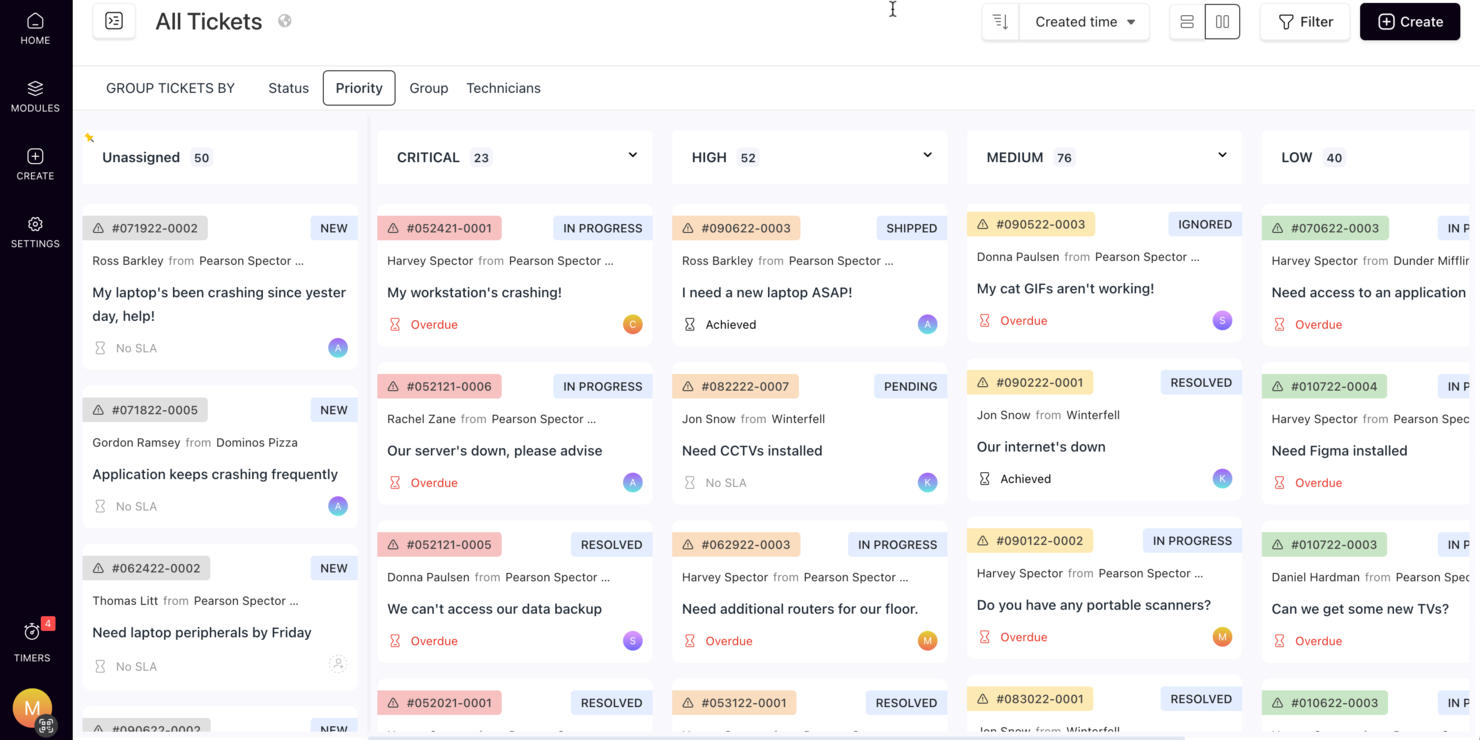
SuperOps bietet eine intelligente Lösung für Unternehmen, die nach kostenloser Helpdesk-Software suchen, und ist besonders attraktiv für Managed Service Provider und IT-Teams. Durch den Einsatz KI-gesteuerter Tools und zentralisierter Kommunikation ermöglicht es eine effiziente Ticketverwaltung und Automatisierung wiederkehrender Aufgaben, wodurch die betriebliche Effizienz und die Kundenzufriedenheit gesteigert werden. Diese Plattform löst Herausforderungen wie langsame Ticketbearbeitung und fragmentierte Kommunikation und ist damit eine wertvolle Wahl für Organisationen, die ihre Support-Operationen ohne erhebliche Kosten verbessern möchten.
Warum ich SuperOps ausgewählt habe
Ich habe SuperOps gewählt, weil es KI-gestützte Ticketverwaltung mit Automatisierungsfunktionen kombiniert und damit eine überzeugende Option im Bereich kostenloser Helpdesk-Software darstellt. Die KI-basierten Kommunikationstools bieten Klarheit und schnelle Ticket-Zusammenfassungen, wodurch die Reaktionszeiten erheblich verkürzt werden. Außerdem automatisiert die Plattform das SLA-Management und vereint Helpdesk- sowie Servicedesk-Funktionen, sodass Anwender ein umfassendes Werkzeug zur effektiven Abdeckung ihrer Support-Bedürfnisse erhalten.
SuperOps Hauptfunktionen
Neben dem KI-gesteuerten Ticketmanagement bietet SuperOps weitere wertvolle Funktionen für den Helpdesk-Betrieb:
- Vereinheitlichte Runbooks: Beschleunigen Sie Freigaben und automatisieren Sie Routineaufgaben mit anpassbaren Workflows, die die betriebliche Effizienz steigern.
- Anlagenverwaltung: Behalten Sie alle Hard- und Software-Assets an einem Ort im Blick, um bessere Kontrolle und fundierte Entscheidungen zu gewährleisten.
- Patch-Management: Automatisieren Sie die Bereitstellung von Software-Updates und Patches, senken Sie Schwachstellen und erhöhen Sie die Sicherheit.
- Verwaltung mobiler Geräte: Verwalten und sichern Sie mobile Endgeräte in Ihrem Unternehmen, um Compliance und Datenschutz zu gewährleisten.
SuperOps Integrationen
Integrationen umfassen Azure AD, Bitdefender, SentinelOne, Webroot, QuickBooks, ConnectWise Control, Stripe, Splashtop, ESET und TeamViewer.
Pros and Cons
Pros:
- Integrierte Verwaltung mobiler Geräte
- Leistungsstarke Automatisierungs- und KI-Tools
- Patch- und Endpunktmanagement inklusive
Cons:
- Kann Einarbeitungszeit erfordern
- Cloud-basiert, erfordert Internetzugang
New Product Updates from SuperOps

SuperOps Improves Ticket Visibility, Dynamic Forms, and Dashboard Views
SuperOps introduces improvements to ticket visibility, dynamic forms, and dashboard visualizations. These updates help technicians manage customer conversations, simplify ticket creation, and keep dashboard views consistent across teams. For more information, visit SuperOps' official site.
 .
.
Am besten für Cloud-Hosting
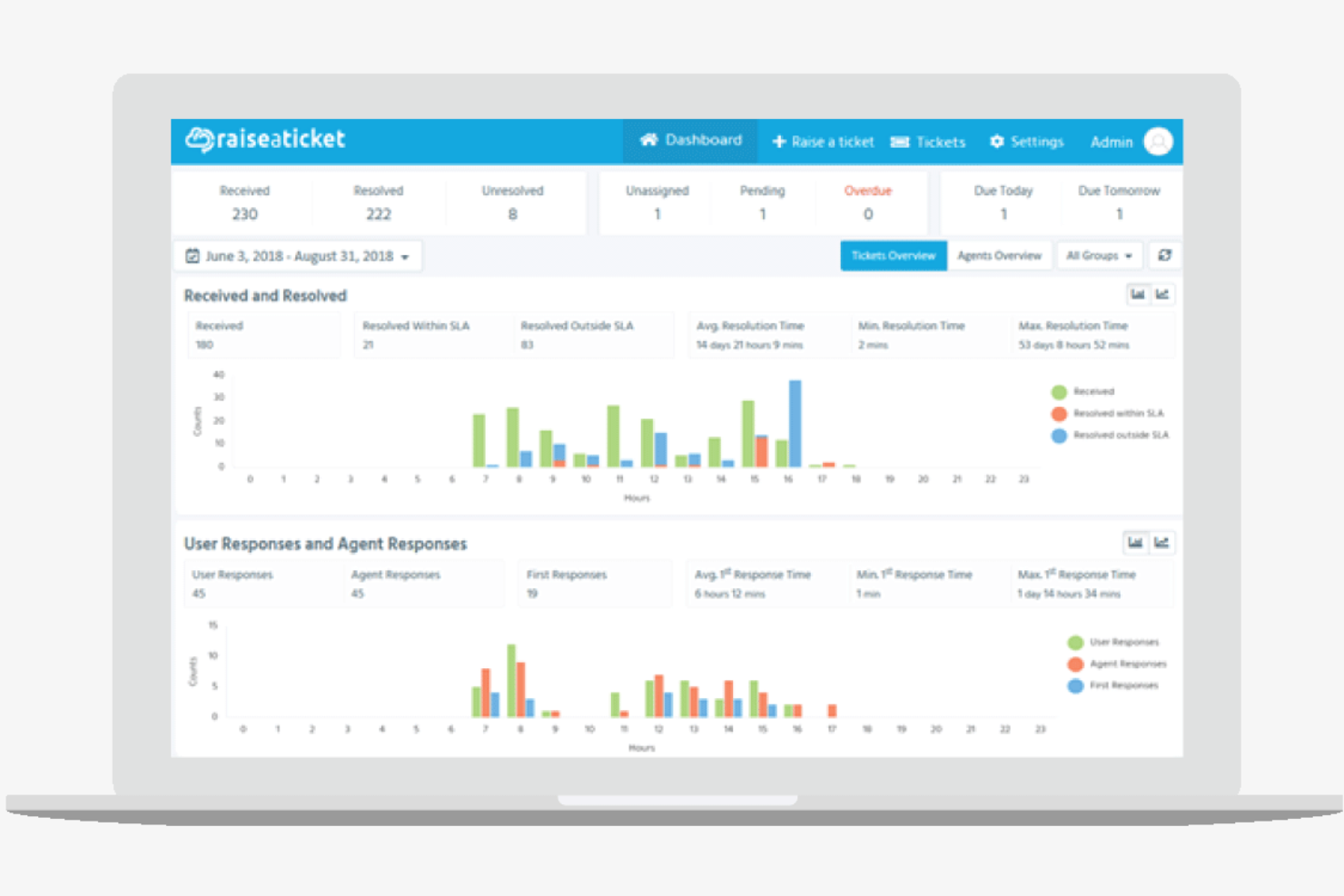
Raiseaticket ist eine cloudbasierte Helpdesk-Plattform, die für Unternehmen entwickelt wurde, die nach effizienten Ticketmanagement- und Kundensupport-Lösungen suchen. Sie bedient verschiedene Branchen, indem sie Werkzeuge zur Ticket-Organisation und Kundenkommunikation anbietet.
Warum ich Raiseaticket gewählt habe: Die kostenlose Version ist ideal, wenn Sie Cloud-Hosting ohne zusätzliche Kosten bevorzugen. Sie können Tickets effizient mit E-Mail-Ticketing und einem intuitiven Dashboard verwalten. Raiseaticket erlaubt unbegrenzt viele Agenten, was es zu einer kostengünstigen Option für wachsende Teams macht, während die Cloud-Hosting-Fähigkeiten Flexibilität und einfachen Zugang für Remote-Support-Teams bieten.
Herausragende Funktionen und Integrationen:
Funktionen beinhalten ein anpassbares Ticketingsystem, das es Ihnen ermöglicht, Workflows an die Bedürfnisse Ihres Unternehmens anzupassen. Sie können automatische Antworten einrichten, um Reaktionszeiten und Kundenzufriedenheit zu verbessern. Raiseaticket bietet außerdem ein Reporting-Tool zur Nachverfolgung der Support-Leistung.
Integrationen umfassen Slack, Microsoft Teams, Google Workspace, Office 365 und mehr.
Was ist kostenlos?
Raiseaticket bietet einen dauerhaft kostenlosen Plan ohne Begrenzung der Agentenanzahl, allerdings kann der Zugang zu erweiterten Funktionen und Anpassungsmöglichkeiten eingeschränkt sein.
Pros and Cons
Pros:
- Unbegrenzte Agenten im kostenlosen Plan
- Cloudbasierter Zugriff
- Anpassbares Ticketingsystem
Cons:
- Für Premium-Integrationen muss bezahlt werden
- Grundlegende Anpassungsoptionen

Am besten geeignet für einfaches Ticketmanagement
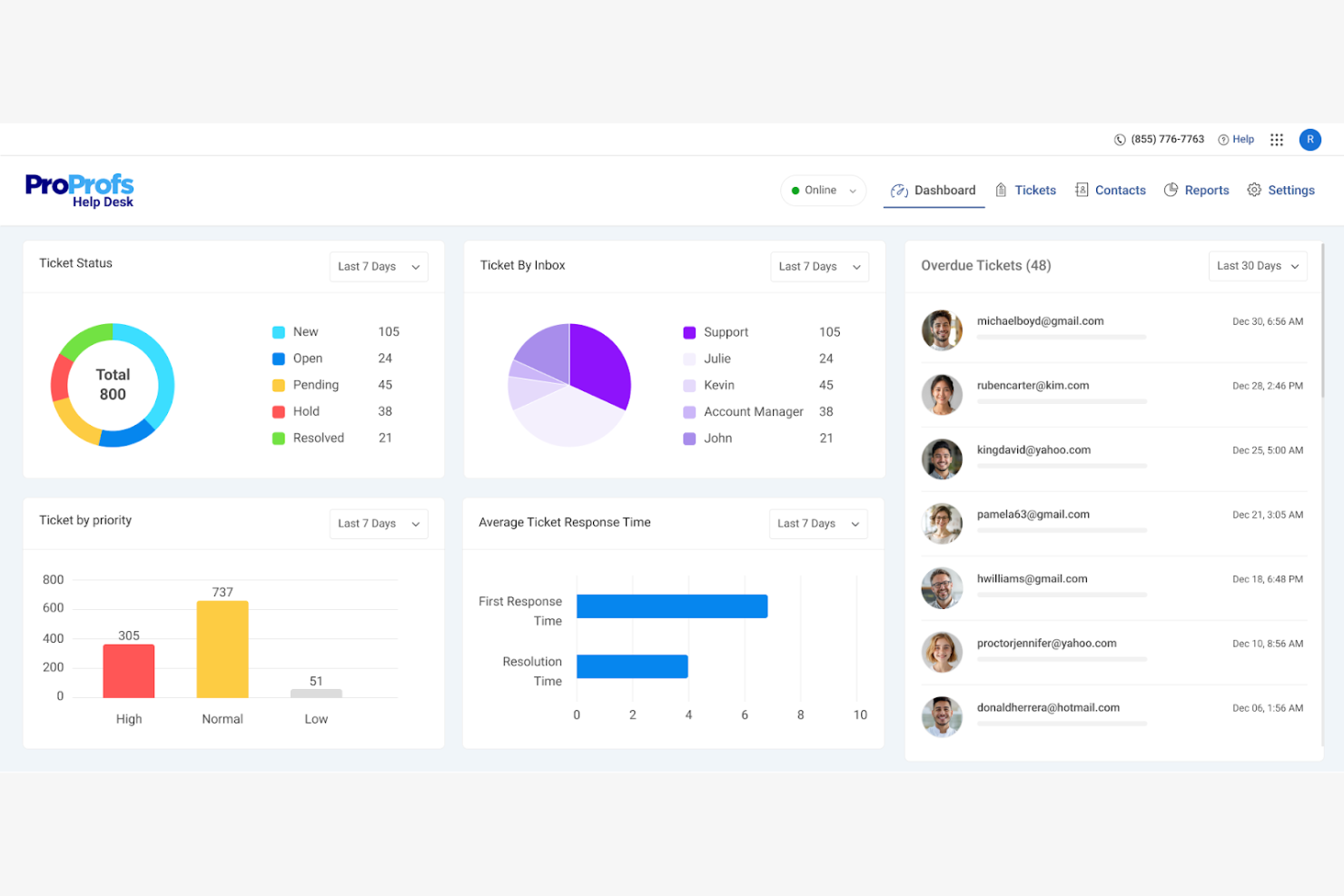
ProProfs Help Desk ist eine KI-gestützte Ticketing- und Support-Software, die für Unternehmen entwickelt wurde, die ihre Effizienz im Kundenservice steigern möchten. Sie eignet sich ideal für Unternehmen aus Branchen wie IT, E-Commerce und Gastronomie und bietet eine zentrale Verwaltung von Tickets sowie Omnichannel-Support.
Warum ich ProProfs Help Desk ausgewählt habe: Der kostenlose Tarif ist perfekt für Einzelanwender, die ein effizientes Ticketmanagement benötigen. Die KI-gestützte Unterstützung ermöglicht eine schnelle Ticketlösung und bündelt Anfragen aus verschiedenen Kanälen wie E-Mail und Chat. Zusätzlich werden Teamfunktionen wie die gemeinsame Posteingangsverwaltung vereinfacht. ProProfs überzeugt durch unkompliziertes und effektives Ticketmanagement und ermöglicht den Export von Ticketdaten für Berichte in Tools wie BigQuery oder Snowflake.
Herausragende Funktionen und Integrationen:
Funktionen umfassen automatische Ticketzuweisung und vordefinierte Antworten, die Zeit sparen. Die Leistungsberichterstattung bietet Einblicke in Kennzahlen wie Antwortzeiten, wodurch die Servicequalität verbessert werden kann. Kundenzufriedenheitsumfragen ermöglichen es, Feedback zur Optimierung Ihres Supports einzuholen.
Integrationen umfassen Salesforce, Slack, Shopify, BigCommerce, Jira, ClickUp, Microsoft Dynamics CRM und weitere.
Was ist kostenlos?
Der kostenlose Tarif steht Einzelanwendern zur Verfügung, mit Begrenzungen hinsichtlich der Anzahl an Agenten und erweiterten Funktionen.
Pros and Cons
Pros:
- Einfach auch für Einsteiger zu bedienen
- KI-gesteuerte Ticketlösung
- Zentralisiert mehrere Kommunikationskanäle
Cons:
- Im kostenlosen Tarif auf einen Nutzer beschränkt
- UI wirkt stellenweise veraltet

GLPI
Am besten für Asset-Management
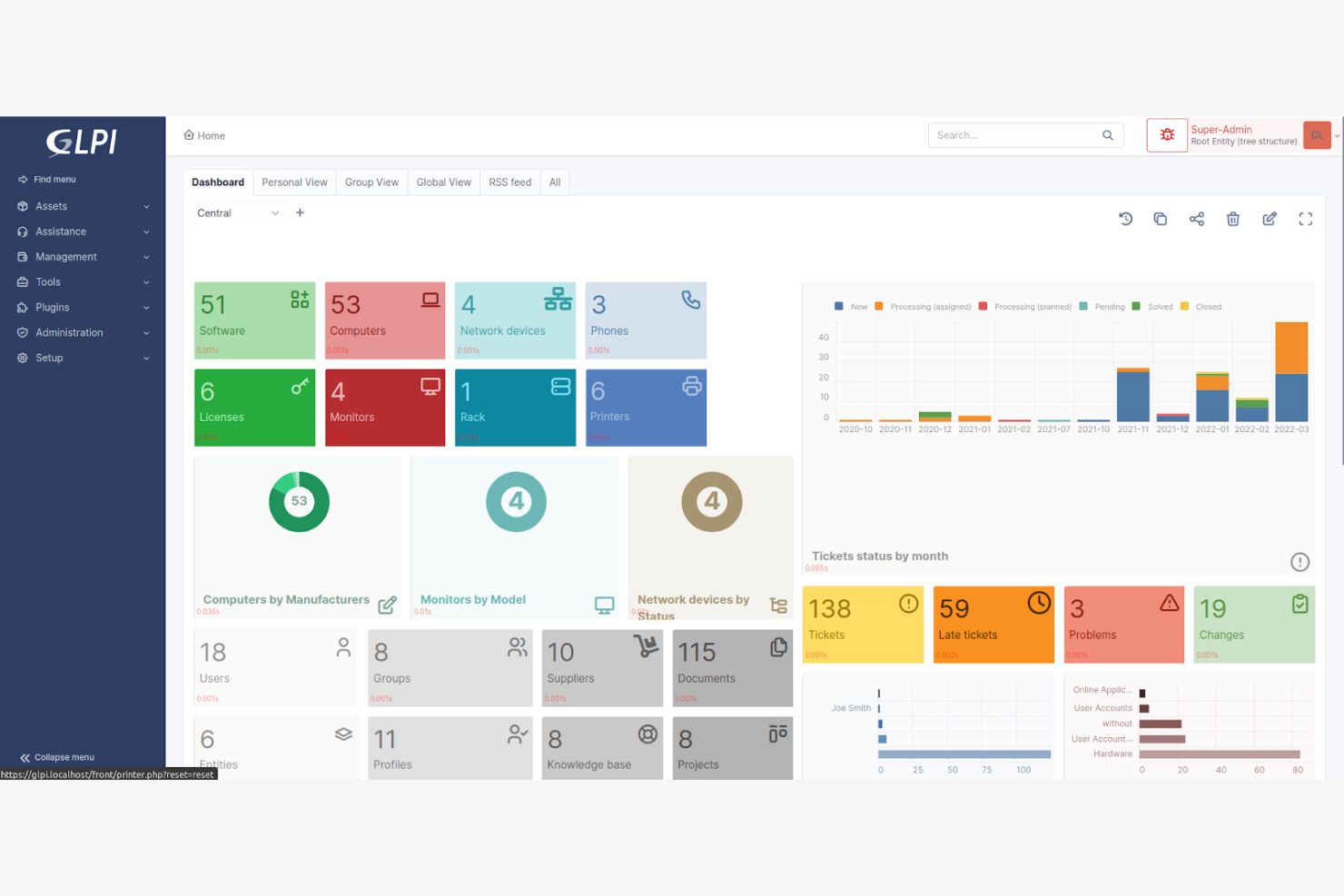
GLPI ist eine Open-Source-Software für IT-Asset-Management und Helpdesk, die Organisationen bei der Verwaltung ihrer IT-Ressourcen und Support-Tickets unterstützt. Sie bietet Werkzeuge zur Nachverfolgung von Assets, zur Inventarverwaltung und zur Organisation von Helpdesk-Anfragen.
Warum ich GLPI gewählt habe: Die kostenlose Version bietet umfassende Möglichkeiten für das Management von IT-Assets und -Ressourcen ohne zusätzliche Kosten. Mit GLPI können Sie Support-Tickets bearbeiten und das Inventar überwachen. Sie können GLPI-Daten mit einem ETL-Tool wie Airbyte in Redshift und Snowflake transformieren und laden.
Hervorstechende Funktionen und Integrationen:
Funktionen umfassen unter anderem eine fortgeschrittene Inventarverwaltung und Transformation, um Hard- und Software-Assets zu verfolgen und Rohdaten zu verwalten. Die Software bietet außerdem ein Ticketsystem, das Support-Anfragen organisiert und priorisiert. Darüber hinaus stellt GLPI Berichtswerkzeuge bereit, um Einblicke in die Asset-Nutzung und Helpdesk-Leistung zu liefern.
Integrationen beinhalten Microsoft Active Directory, LDAP, Apache Directory und weitere.
Was ist kostenlos?
GLPI bietet einen dauerhaft kostenlosen Tarif mit vollem Zugang zu Asset- und Helpdesk-Funktionen, wobei für die Einrichtung technisches Wissen erforderlich sein kann.
Pros and Cons
Pros:
- Erweiterte Funktionen für Asset-Management
- Keine Kosten für Basisfunktionen
- Anpassbare Berichtswerkzeuge
Cons:
- Technisches Fachwissen für Einrichtung erforderlich
- Eingeschränkte mobile Nutzung

Am besten für IT-Fachkräfte
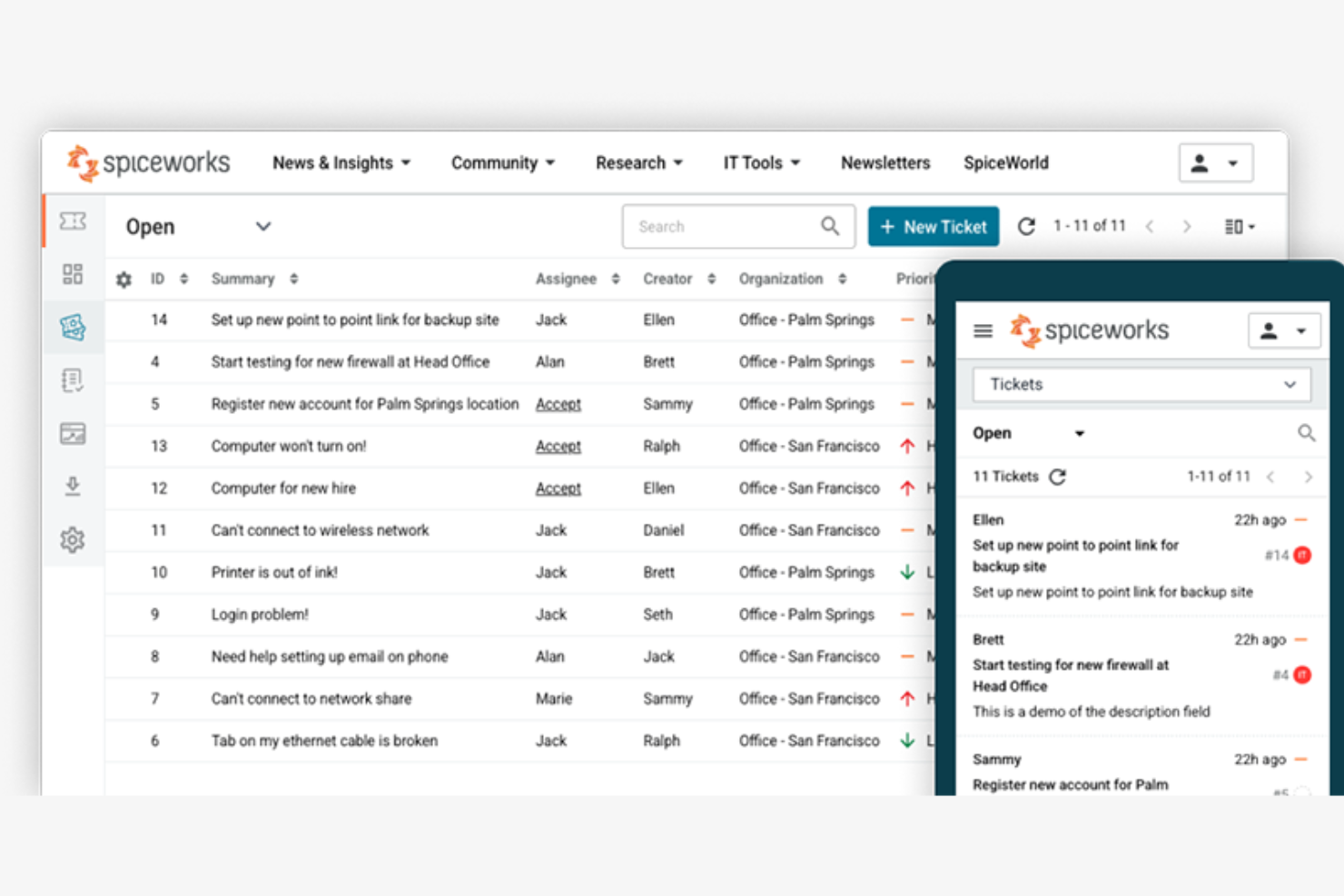
Spiceworks ist eine kostenlose IT-Management-, Helpdesk- und Datenintegrationssoftware, die für IT-Fachkräfte und Teams entwickelt wurde, die große Datenumgebungen verwalten und regelmäßig Daten extrahieren. Sie bietet Werkzeuge zur Verwaltung von Helpdesk-Tickets, Datenpipelines, Netzwerkinventar, IT-Berichterstattung, Datenverarbeitung, Batch-Verarbeitung und Datenreplikation.
Warum ich Spiceworks gewählt habe: Die kostenlose Version ist ideal für IT-Profis, die eine IT-Management-Lösung suchen. Die Funktionen ermöglichen ein effizientes Management von Helpdesk-Tickets. Spiceworks bietet zudem detaillierte Berichtserstattung und Asset-Tracking. Der Fokus auf IT-Management macht die Software besonders geeignet für technikintensive Umgebungen.
Herausragende Funktionen und Integrationen:
Funktionen umfassen Netzwerküberwachung, mit der Sie Ihre Infrastruktur im Auge behalten können. Die Software bietet außerdem Verwaltung von IT-Hardware- und Software-Assets sowie ein Nutzerportal, in dem Teammitglieder Tickets einreichen und nachverfolgen können.
Integrationen umfassen Microsoft Active Directory, LDAP, AlienVault, Webroot SecureAnywhere, NetClarity und weitere.
Was ist kostenlos?
Spiceworks bietet einen dauerhaft kostenlosen Tarif ohne Benutzerbeschränkung, allerdings sind Premium-Support und erweiterte Funktionen möglicherweise eingeschränkt.
Pros and Cons
Pros:
- Keine Benutzerbegrenzung im kostenlosen Tarif
- Fortgeschrittene IT-Management-Tools
- Detaillierte Asset-Verfolgung
Cons:
- Begrenzter Premium-Support in der kostenlosen Version
- Werbefinanzierte Benutzeroberfläche

osTicket
Am besten geeignet für E-Mail-Integration
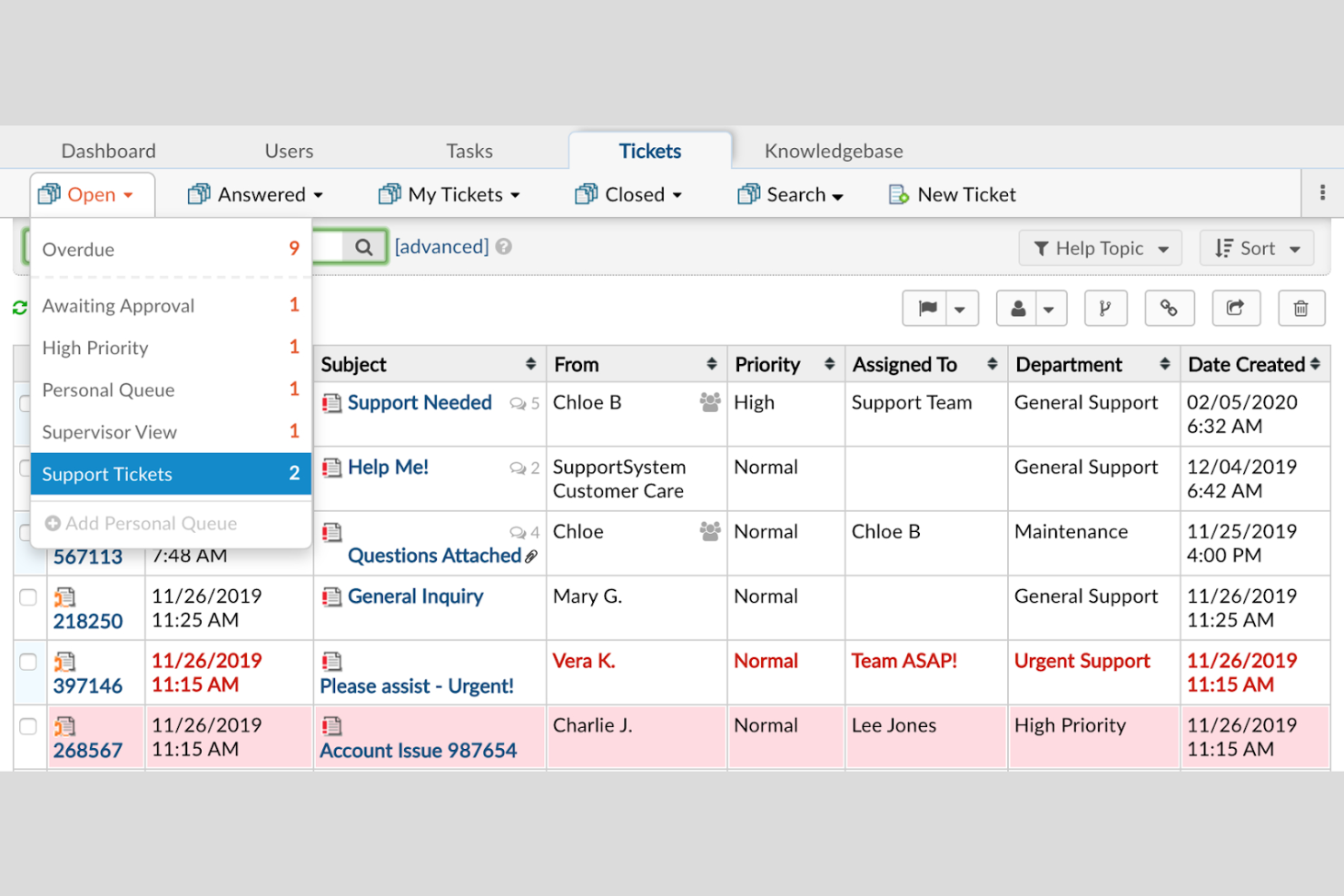
osTicket ist eine weit verbreitete Open-Source-Helpdesk-Software, die für Unternehmen jeder Größe entwickelt wurde, die ein effizientes Ticketmanagement und Möglichkeiten zur Optimierung von Arbeitsabläufen benötigen. Sie bietet Werkzeuge, um den Kundensupport durch E-Mail-Integration und Ticketverfolgung zu vereinfachen. Ticketinformationen können mit ETL-Tools wie Talend Open Studio und Informatica extrahiert und transformiert werden.
Warum ich mich für osTicket entschieden habe: Die kostenlose Version ist ideal für Unternehmen, die stark auf E-Mail-Kommunikation setzen. Sie können Tickets dank der E-Mail-Integration effizient verwalten. osTicket unterstützt unbegrenzt viele Nutzer und ist somit eine kostengünstige Lösung für wachsende Teams.
Hervorzuhebende Funktionen und Integrationen:
Funktionen umfassen ein anpassbares Ticketingsystem, mit dem Sie Arbeitsabläufe einrichten und Daten bei Bedarf laden können. Das System bietet zudem automatisierte Antworten zur Verbesserung der Reaktionszeiten, automatisiert die Datenumwandlung, verwaltet Abhängigkeiten, unterstützt Orchestrierung und sorgt für hohe Datenqualität in ETL-Lösungen und Datenaufnahme-Pipelines. Darüber hinaus stellt osTicket ein Kundenportal bereit, über das Kunden den Status ihrer Tickets verfolgen können.
Integrationen umfassen Microsoft Exchange, Gmail, Office 365, LDAP, Microsoft Active Directory und mehr.
Was ist kostenlos?
osTicket bietet einen dauerhaft kostenlosen Tarif ohne Nutzerbegrenzung, wobei für Einrichtung und Anpassung technisches Know-how erforderlich sein kann.
Pros and Cons
Pros:
- Unbegrenzte Nutzer im kostenlosen Tarif
- Starke E-Mail-Integration und Daten-Streaming
- Anpassbares Ticketingsystem
Cons:
- Keine integrierten Automatisierungsregeln
- Minimale native Berichte
Weitere kostenlose Helpdesk-Software
Hier finden Sie einige weitere Optionen für Helpdesk-Software mit kostenlosen Tarifen oder Testversionen. Diese Tools haben es zwar nicht in meine Auswahl geschafft, sind aber dennoch einen Blick wert:
- Bitrix24
Am besten für Team-Zusammenarbeit
- Frappe
Am besten geeignet für Open-Source-Anpassungen
- Hesk
Am besten für Support in kleinen Unternehmen geeignet
- Uvdesk
Am besten für E-Commerce-Support
- Zammad
Am besten für unbegrenzte Agenten
- FreeScout
Am besten für selbst gehostete Lösungen
- HelpDeskZ
Am besten für mehrsprachigen Support


Wie ich kostenlose Helpdesk-Software bewerte
Ich bewerte kostenlose Helpdesk-Tools in zwei Ebenen – grundlegende Kriterien, die jede Option erfüllen muss, wie beispielsweise ein nutzbares Ticketmanagement im kostenlosen Tarif, und Unterscheidungsmerkmale, die zeigen, welches Tool für Ihre IT-Umgebung am besten geeignet ist.
Kernfunktionen (Grundvoraussetzungen für diese Liste)
Wenn ich Tools für meine Liste auswähle, bewerte ich jedes Tool auf einer Skala von 0 (funktioniert nicht) bis 5 (übertrifft in diesem Bereich) für jede der unten aufgeführten Kernfunktionen. Anschließend rechne ich die Gesamtpunktzahl des Tools in einen Prozentsatz um. Jedes Tool muss mindestens eine Gesamtwertung von 65 % erzielen, um für die Aufnahme in Betracht gezogen zu werden.
- Ticketverwaltung: Ich achte auf einen vollständigen Ticket-Lebenszyklus – Status, Prioritäten, Zuweisungen und benutzerdefinierte Felder – damit Techniker eine Serverstörung oder eine Passwortzurücksetzung ohne Kontextverlust bearbeiten können.
- Echter kostenloser Tarif: Die kostenlose Stufe muss den realen, fortlaufenden Helpdesk-Betrieb unterstützen und darf nicht nur eine 14-tägige Testphase sein. Ich prüfe, ob genügend Agentensitze und Funktionen enthalten sind, um die Warteschlange eines kleinen IT-Teams betreiben zu können.
- Multichannel Ticket-Erfassung: Ich bewerte, ob Tickets mindestens per E-Mail und über ein Webportal eingeliefert werden können, da IT-Teams Anfragen typischerweise aus mehreren Quellen wie Chat, Formularen und API-Integrationen erhalten.
- Wissensdatenbank & Self-Service: Eine durchsuchbare, für Endnutzer zugängliche Wissensdatenbank ist hier entscheidend. Ich suche nach Tools, mit denen Sie Anleitungen veröffentlichen können – etwa VPN-Einrichtungsanleitungen oder Schritte zur Drucker-Fehlerbehebung –, damit Nutzer häufige Probleme selbst lösen können.
- Automatisierung & Routing-Regeln: Ich prüfe regelbasierte Workflows, die Ticketzuweisungen und Eskalationen automatisch abwickeln, zum Beispiel die Weiterleitung aller netzwerkbezogenen Tickets an eine bestimmte Warteschlange auf Basis von Kategorie oder Priorität.
- Berichte & SLA-Tracking: Dashboards, die Erstreaktionszeiten, Lösungsraten und SLA-Einhaltung verfolgen, bieten IT-Leads die nötige Übersicht. Ich bewerte, ob diese Berichte im kostenlosen Tarif verfügbar sind.
Sobald ich eine Liste mit Tools habe, die diese Kriterien erfüllen, achte ich darauf, was jede Plattform besonders macht.
Unterscheidungsmerkmale (Was Anbieter voneinander abhebt)
So vergleiche und bewerte ich verschiedene Anbieter:
Besondere Funktionen
ITIL-/ITSM-Kompatibilität ist ein großes Unterscheidungsmerkmal. Ich achte auf native Workflows für Incident-, Problem- und Change-Management, die über einfache Ticketverwaltung hinausgehen. Eingebautes Asset-Tracking oder eine CMDB bringt ebenfalls echten Mehrwert – die Verknüpfung eines bestimmten Laptops oder Servers mit einem offenen Ticket gibt Technikern sofortigen Kontext bei der Fehlersuche. Für DevOps- und SRE-Teams bewerte ich die Tiefe der API und den Webhook-Support, da diese Teams oft Überwachungsalarme direkt und ohne manuelles Zutun in die Helpdesk-Warteschlange leiten müssen.
Mehr als Funktionen
Ich prüfe, wie flexibel jeder kostenlose Tarif skaliert – Agentenanzahl, Ticketlimits und was mit Ihren Daten passiert, wenn Sie die Stufe überschreiten. Integrationen sind ebenso wichtig. Ein Helpdesk, der nativ mit Jira, Slack oder Azure AD verbunden werden kann, passt ohne Sonderlösungen nahtlos in bestehende IT-Arbeitsabläufe. Sicherheit ist ein weiterer Schlüsselfaktor; ich prüfe, ob SSO, MFA und rollenbasierte Zugriffe im kostenlosen Tarif enthalten sind, da auch kleine IT-Teams täglich mit sensiblen Systemzugängen und Nutzerdaten arbeiten. Tools, die grundlegende Sicherheit nur in kostenpflichtigen Tarifen anbieten, sind für mich bedenklich.
So wählen Sie kostenlose Helpdesk-Software aus
Komplexe Funktionslisten und Preisstrukturen können es schwierig machen, herauszufinden, was Sie tatsächlich von kostenloser Helpdesk-Software erhalten. Damit Sie sich bei der Auswahl Ihrer Software auf das Wesentliche konzentrieren können, sollten Sie folgende Faktoren berücksichtigen:
| Faktor | Was zu beachten ist |
|---|---|
| Umfang des kostenlosen Angebots | Prüfen Sie, welche Funktionen im kostenlosen Tarif enthalten sind. Stellen Sie sicher, dass er Ihre grundlegenden Anforderungen ohne versteckte Kosten oder Einschränkungen abdeckt, die Ihre Abläufe behindern könnten. |
| Skalierbarkeit | Überlegen Sie, ob die Software mit Ihrem Unternehmen wachsen kann. Achten Sie auf Optionen, die einfache Upgrades ermöglichen, wenn Ihr Team oder Kundenstamm wächst. |
| Integrationen | Stellen Sie sicher, dass sich die Software in Ihre bestehenden Tools wie CRM-, E-Mail- oder Chatsysteme integrieren lässt. Das spart Zeit und steigert die Effizienz Ihres Teams. |
| Benutzerfreundlichkeit | Bewerten Sie die Benutzeroberfläche und die allgemeine Nutzererfahrung. Ein einfaches, intuitives Design verkürzt die Einarbeitungszeit und hilft Ihrem Team, schnell loszulegen. |
| Anpassbarkeit | Stellen Sie fest, ob Sie die Software an Ihre spezifischen Arbeitsabläufe anpassen können. Anpassbare Ticketfelder oder Dashboards können die Produktivität steigern. |
| Supportoptionen | Prüfen Sie den Kundensupport, der im kostenlosen Tarif verfügbar ist. Der Zugang zu Live-Chat, E-Mail-Support oder einer Wissensdatenbank kann entscheidend sein, wenn Probleme auftreten. |
| Berichtstools | Prüfen Sie, ob die Software Berichts- oder Analysefunktionen bietet. Erkenntnisse über Ticketvolumen oder Antwortzeiten können dazu beitragen, den Kundenservice zu verbessern. |
| Sicherheit | Bewerten Sie die vorhandenen Sicherheitsmaßnahmen zum Schutz Ihrer Daten. Stellen Sie die Einhaltung von Branchenstandards sicher und ziehen Sie Verschlüsselung oder Mehrfaktor-Authentifizierung in Betracht. |
Was ist kostenlose Helpdesk-Software?
Helpdesk-Software ist ein Tool, das Unternehmen dabei unterstützt, Kundenanfragen und Supportanfragen effizient zu verwalten. Diese Tools bieten häufig kostenlose Tarife oder Testversionen, sodass Nutzer grundlegende Funktionen kostenlos nutzen können. Typischerweise verwenden Kundenserviceteams, IT-Fachleute und Kleinunternehmer diese Tools, um die Kundenkommunikation und die Problemlösung zu verbessern. Ticketverwaltung, Kommunikationskanäle und Berichtsfunktionen helfen dabei, Supportmaßnahmen zu organisieren, die Kundenzufriedenheit zu steigern und wertvolle Erkenntnisse zu gewinnen.
Funktionen
Achten Sie bei der Auswahl einer Helpdesk-Software auf die folgenden wichtigen Funktionen:
Typische Funktionen kostenloser Helpdesk-Software
- Ticketverwaltung: Ermöglicht es Ihnen, Kundenanfragen zu organisieren und nachzuverfolgen, sodass sich Probleme effizienter lösen lassen.
- E-Mail-Integration: Verbindet Ihr E-Mail-System mit dem Helpdesk und ermöglicht so eine effektive Kommunikation mit Kunden.
- Wissensdatenbank: Bietet Kunden ein Selbstbedienungsportal, in dem sie Antworten auf häufige Fragen finden können, wodurch die Anzahl der Supporttickets reduziert wird.
- Grundlegende Berichte: Bietet Einblicke in Supportaktivitäten und hilft Ihnen, Leistungskennzahlen und Verbesserungsbereiche zu verstehen.
- Benutzerverwaltung: Ermöglicht es Ihnen, Teammitglieder hinzuzufügen und zu verwalten, damit alle auf die erforderlichen Supporttools zugreifen können.
Typische Funktionen kostenpflichtiger Helpdesk-Software
- Erweiterte Analysen: Liefern detaillierte Einblicke in Kundeninteraktionen und die Supportleistung und helfen Ihnen, datengestützte Entscheidungen zu treffen.
- Automatisierte Arbeitsabläufe: Vereinfachen wiederkehrende Aufgaben und Prozesse, sparen Zeit und steigern die Effizienz Ihres Supportteams.
- Mehrsprachiger Support: Ermöglicht es Ihnen, Unterstützung in mehreren Sprachen anzubieten und so eine weltweite Kundenbasis zu bedienen.
- Anpassbare Dashboards: Ermöglichen es Ihnen, die Benutzeroberfläche an die spezifischen Anforderungen und Vorlieben Ihres Teams anzupassen.
- KI-gestützte Antworten: Nutzen KI zur Erstellung automatischer Antworten und verbessern dadurch die Antwortzeiten und die Kundenzufriedenheit.
Vorteile
Der Einsatz kostenloser Helpdesk-Software bietet Ihrem Team und Ihrem Unternehmen mehrere Vorteile. Hier sind einige, auf die Sie sich freuen können:
- Kosteneinsparungen: Kostenlose Tarife ermöglichen es Ihnen, den Kundensupport ohne zusätzliche Kosten zu verwalten, was sie ideal für kleine Unternehmen und Start-ups macht.
- Verbesserte Organisation: Ticketverwaltungsfunktionen helfen Ihnen, den Überblick über Kundenanfragen zu behalten und sicherzustellen, dass nichts übersehen wird.
- Verbesserte Kommunikation: E-Mail-Integration und Kommunikationskanäle helfen Ihnen, effektiv mit Kunden in Kontakt zu treten und zeitnahen Support bereitzustellen.
- Optionen zur Selbstbedienung: Eine Wissensdatenbank ermöglicht es Kunden, selbstständig Antworten zu finden, wodurch die Arbeitsbelastung Ihres Supportteams reduziert wird.
- Skalierbarkeit: Viele kostenlose Tarife bieten eine unbegrenzte Nutzerzahl, sodass Ihr Team wachsen kann, ohne dass zusätzliche Kosten entstehen.
- Grundlegende Einblicke: Berichtstools geben Einblick in die Supportleistung und helfen Ihnen, Bereiche mit Verbesserungspotenzial zu identifizieren.
- Flexibilität: Anpassbare Arbeitsabläufe und Funktionen zur Nutzerverwaltung ermöglichen es Ihnen, das System an die Anforderungen Ihres Teams anzupassen.
Kosten & Preise
Obwohl dieser Artikel die besten kostenlosen Kundensupport-Softwareoptionen auflistet, bieten diese Tarife nur eingeschränkte Funktionen. Es ist sehr wahrscheinlich, dass Sie Ihren Tarif in Zukunft erweitern müssen.
Die folgende Tabelle fasst gängige Tarife, deren Durchschnittspreise und typische Funktionen zusammen, die in Kundensupport-Softwarelösungen enthalten sind:
Vergleichstabelle der Tarife für Kundensupport-Software
| Tarifart | Durchschnittlicher Preis | Häufige Funktionen |
|---|---|---|
| Kostenloser Tarif | $0 | Grundlegende Ticketverwaltung, E-Mail-Integration und Portal zur Selbstbedienung. |
| Persönlicher Tarif | $5-$49/Benutzer/Monat | Verbesserte Berichte, anpassbare Arbeitsabläufe und zusätzlicher Speicherplatz. |
| Geschäftstarif | $30-$60/Benutzer/Monat | Mehrsprachiger Support, erweiterte Analysen und CRM-Integration. |
| Unternehmenstarif | $70-$399/Benutzer/Monat | KI-gestützte Automatisierung, eigener Support und umfangreiche Anpassungsmöglichkeiten. |
Häufig gestellte Fragen zu kostenloser Helpdesk-Software
Hier finden Sie einige Antworten auf häufige Fragen zu kostenloser Helpdesk-Software:
Wie wähle ich die beste kostenlose Helpdesk-Software für mein Unternehmen aus?
Die Auswahl der besten kostenlosen Helpdesk-Software hängt von Ihren spezifischen Anforderungen ab. Berücksichtigen Sie die benötigten Funktionen, zum Beispiel Echtzeitdatenzugriff, Ticketverwaltung oder E-Mail-Integration, und stellen Sie sicher, dass die Software die Anzahl Ihrer Benutzer unterstützt. Suchen Sie nach Tools mit GUI-basierter Konfiguration, Ziehen-und-Ablegen-Oberflächen, Automatisierung ohne Programmieraufwand und einer starken Anbindung an Analysetools. Bewerten Sie die Benutzerfreundlichkeit, die verfügbaren Supportoptionen und die Cloud-Dienste, um eine reibungslose Nutzung sicherzustellen.
Ist der Wechsel von einem kostenlosen zu einem kostenpflichtigen Tarif unkompliziert?
Ja, die meisten Anbieter von Helpdesk-Software ermöglichen einen einfachen Wechsel von kostenlosen zu kostenpflichtigen Tarifen. Dadurch erhalten Sie Zugriff auf zusätzliche Funktionen und Support, wenn Ihr Unternehmen wächst. Prüfen Sie, ob der Anbieter flexible Preisoptionen bietet, die zu Ihrem Budget und Ihren Anforderungen passen.
Gibt es Einschränkungen bei der Nutzung kostenloser Helpdesk-Software?
Kostenlose Helpdesk-Software ist häufig mit Einschränkungen verbunden, etwa weniger Funktionen, einer begrenzten Benutzerzahl oder eingeschränktem Support. Es ist wichtig, diese Einschränkungen zu verstehen und zu prüfen, ob sie Ihren aktuellen geschäftlichen Anforderungen entsprechen. Berücksichtigen Sie das zukünftige Wachstum und die Möglichkeit eines Upgrades, falls dies erforderlich wird.
Wie sicher ist kostenlose Helpdesk-Software?
Die Sicherheit variiert je nach Anbieter, aber seriöse kostenlose Helpdesk-Software umfasst in der Regel grundlegende Sicherheitsfunktionen wie Zugriffskontrollen, Daten-Governance und sichere cloudnative Bereitstellungsmodelle. Achten Sie auf Optionen mit Datenverschlüsselung, Benutzerauthentifizierung und der Einhaltung von Branchenstandards. Dies gewährleistet eine zuverlässige Datenübertragung, geringere Latenz und eine sichere Datenintegration über verschiedene Cloud-Datenplattformen hinweg.
Welche Art von Support kann ich bei kostenloser Helpdesk-Software erwarten?
Der Support für kostenlose Helpdesk-Software und Open-Source-Datenintegration ist im Vergleich zu kostenpflichtigen Tarifen in der Regel eingeschränkt. Möglicherweise haben Sie Zugriff auf Community-Foren, Selbsthilfe-Ressourcen oder E-Mail-Support. Bewerten Sie die verfügbaren Supportoptionen und stellen Sie fest, ob sie Ihren Anforderungen entsprechen, insbesondere wenn Sie schnelle Unterstützung benötigen.
Kann kostenlose Helpdesk-Software in andere von mir verwendete Tools integriert werden?
Viele kostenlose Helpdesk-Softwarelösungen bieten grundlegende Integrationen mit beliebten Tools wie E-Mail-, CRM- und Projektmanagement-Software. Prüfen Sie, ob die von Ihnen in Betracht gezogene Software ein geeignetes Datenintegrationstool für Ihre vorhandenen Systeme bietet, um effiziente Arbeitsabläufe und eine hohe Teameffizienz sicherzustellen.