
Leitfaden zu den 21 besten IoT-Betriebssystemen 2026

10 Beste IoT-Betriebssysteme Kurzliste
Here's my pick of the 10 best software from the 21 tools reviewed.


Die Navigation in der Welt der IoT-Betriebssysteme kann eine Herausforderung sein, besonders wenn Sie das passende System für die Anforderungen Ihres Teams suchen. Nach meiner Erfahrung können IoT-Lösungen komplexe Aufgaben vereinfachen und die Konnektivität zwischen Geräten verbessern, was einige der typischen Probleme für Technik-Expert:innen erleichtert.
Ich habe verschiedene Optionen getestet und bewertet, um Ihnen einen unvoreingenommenen Überblick über die besten verfügbaren IoT-Betriebssysteme zu geben. Mein Ziel ist es, Ihnen Einblicke in die einzigartigen Funktionen und Vorteile jeder Lösung zu liefern.
Im Folgenden erwartet Sie ein klarer Leitfaden, der die Stärken und Schwächen jeder Option hervorhebt. Egal, ob Sie nach Skalierbarkeit, branchenspezifischen Funktionen oder Compliance-Fähigkeiten suchen – dieser Artikel hilft Ihnen dabei, eine fundierte Entscheidung zu treffen.
Why Trust Our Software Reviews
Zusammenfassung der besten IoT-Betriebssysteme
| Tool | Best For | Trial Info | Price | ||
|---|---|---|---|---|---|
| 1 | Best for developers seeking a real-time, modular operating system | Free | Open source project and Available for free | Website | |
| 2 | Best for accessing comprehensive resources and expert insights | Free | Open source project and available for free | Website | |
| 3 | Best for businesses requiring secure, robust, and scalable IoT solutions | Not available | From $0.01/device/day (around $0.3/user/month) | Website | |
| 4 | Best for embedded systems with tight memory constraints | Not available | Customized price upon request | Website | |
| 5 | Best for leveraging familiar Windows-based tools and technologies | Not available | Customized price upon request | Website | |
| 6 | Best for users seeking cloud integration with their IoT devices | Not available | From $0.08 per million messages sent | Website | |
| 7 | Best for critical infrastructure and mission-critical applications | Not available | Customized price upon request | Website | |
| 8 | Best for consumer electronics and large-scale device interoperability | Free | Open source project and Available for free | Website | |
| 9 | Best for robust wireless solutions for IoT devices | Not available | Customized price upon request | Website | |
| 10 | Best for wireless sensor network applications | Not available | Open source project and Available for free | Website |
-

Site24x7
Visit WebsiteThis is an aggregated rating for this tool including ratings from Crozdesk users and ratings from other sites.4.6 -
Docker
Visit WebsiteThis is an aggregated rating for this tool including ratings from Crozdesk users and ratings from other sites.4.6 -
Pulumi
Visit WebsiteThis is an aggregated rating for this tool including ratings from Crozdesk users and ratings from other sites.4.8





Bewertungen der besten IoT-Betriebssysteme

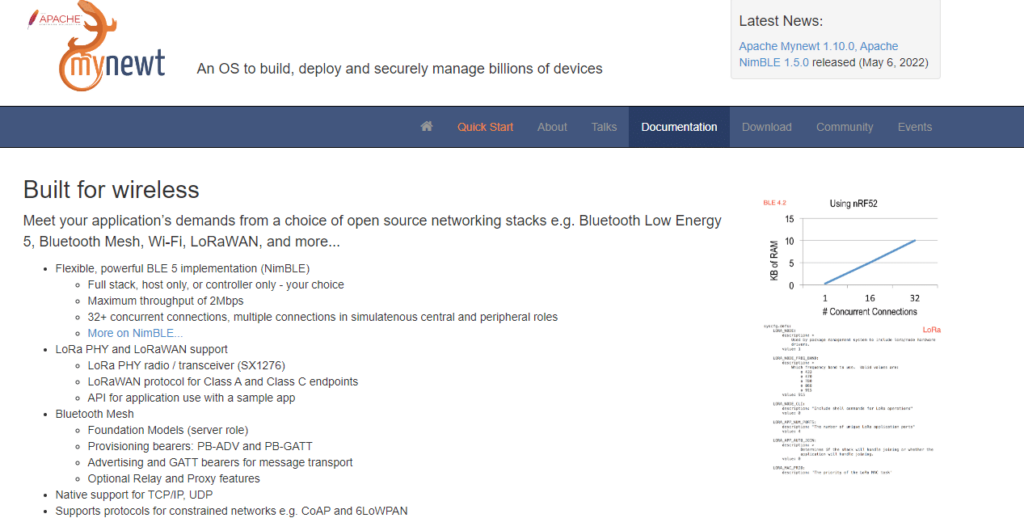
Apache Mynewt is an elegant and efficient operating system built for high-performance applications on IoT devices. Thanks to its real-time capabilities and modular approach, it's designed to work seamlessly on devices with minimal memory. Apache Mynewt stands out in the crowded IoT market because of its impressive runtime, ability to run in constrained environments, and license-friendly approach.
Why I Picked Apache Mynewt:
I chose Apache Mynewt due to its unique feature set that caters to developers seeking a real-time, modular operating system. Its modularity offers a clean separation of responsibilities among the kernel, drivers, file system, shell, and other system utilities. This architecture allows developers to include only the components needed, reducing system overhead, a critical factor for IoT devices with constrained resources.
Standout Features and Integrations:
Apache Mynewt's core feature is its real-time capabilities, making it ideal for time-sensitive applications. Its robust bootloader, "Newt,” can manage multiple firmware images on the device, a critical feature for safe over-the-air updates. Moreover, Apache Mynewt boasts a strong hardware abstraction layer for integrations, enabling developers to write applications that run on a broad range of hardware without modifications.
Pros and Cons
Pros:
- Strong hardware abstraction layer for broad compatibility
- Modular and flexible, enabling lean deployments
- Exceptional real-time capabilities
Cons:
- Some developers may find the lack of a graphical user interface challenging.
- It may require considerable expertise to deploy effectively.
- Limited support and documentation compared to commercial offerings


Insights Hub is a dynamic platform offered by Siemens, packed with resources and expert insights about the world of product lifecycle management (PLM). It brings together a wide array of information beneficial to anyone seeking comprehensive knowledge, which is why it's best for accessing resources and expert insights.
Why I Picked Insights Hub:
I selected Insights Hub because it focuses on delivering valuable, comprehensive content about PLM. As an industry leader, Siemens has demonstrated a keen ability to provide insights and resources that help businesses make informed decisions. Insights Hub stands apart as it aggregates expertise and knowledge from various domain experts, providing an excellent starting point for anyone seeking to deepen their understanding of PLM and related areas. This makes it best for accessing in-depth resources and insights from industry experts.
Standout Features and Integrations:
Insights Hub features many resources, including white papers, case studies, articles, and webinars that offer a deep dive into various aspects of PLM. One of its main strengths is its access to expert opinion pieces, which provide perspectives and insights you can't find elsewhere. The platform integrates with other Siemens PLM tools, offering contextual insights and demonstrating practical applications.
Pros and Cons
Pros:
- Integrated with other Siemens PLM tools
- Access to expert opinions and insights
- Wide range of resources for a comprehensive learning
Cons:
- It doesn’t offer user interaction or discussion features.
- It might not provide specific product tutorials.
- Limited in scope to Siemens products and perspectives

Best for businesses requiring secure, robust, and scalable IoT solutions

Ubuntu Core, by Canonical, is a minimal, containerized version of Ubuntu 20.04 LTS designed for IoT devices and embedded systems. Its keen focus on security, robustness, and scalability aligns perfectly with businesses seeking high-grade IoT solutions.
Why I Picked Ubuntu Core:
I selected Ubuntu Core for the way it addresses the key requirements of business-oriented IoT solutions. It brings robustness, security, and scalability to the forefront, setting it apart from many other IoT operating systems. The proven reliability of Ubuntu, coupled with these business-focused traits, convinced me that Ubuntu Core is best for businesses requiring secure, robust, and scalable IoT solutions.
Standout Features and Integrations:
Ubuntu Core introduces 'snaps' - a containerized software package designed to work securely within isolated sandboxes. This innovation empowers the operating system with enhanced security and facilitates automatic updates. Using trusted execution environments and full-disk encryption further elevates its robust security. Ubuntu Core also has excellent cloud integration, ensuring seamless communication with popular platforms like AWS IoT, Google Cloud IoT, and Azure IoT Hub.
Pros and Cons
Pros:
- Robust and reliable, stemming from the Ubuntu lineage
- Scalability, making it ideal for large deployments
- Strong emphasis on security with automatic updates and sandboxed applications
Cons:
- Deployment and management can require substantial technical expertise.
- Commercial licensing may be complex for large-scale deployments.
- The relatively higher learning curve, particularly for those new to Ubuntu


Nuclear RTOS is a real-time operating system designed to serve embedded applications, particularly those with stringent memory requirements. Its modular, scalable design and small footprint make it an ideal fit for devices operating under tight memory constraints.
Why I Picked Nuclear RTOS:
In my search for the most fitting IoT operating system, I chose Nuclear RTOS due to its remarkable efficiency in resource usage. Its small footprint and modularity stand out, allowing systems to run efficiently despite limited resources. This unique capacity to optimize resource use without compromising functionality led me to conclude that Nuclear RTOS is best for embedded systems with tight memory constraints.
Standout Features and Integrations:
Nuclear RTOS offers a variety of features aimed at real-time performance and efficiency. Key among these is its kernel, which is optimized for minimal memory utilization, thus ensuring efficient system operation. The system also boasts a modular design that enables developers to include only necessary components, thereby saving precious system resources. In terms of integrations, Nuclear RTOS is compatible with various architectures, including ARM, MIPS, and PowerPC, and can work alongside numerous development tools, ensuring flexibility in its implementation.
Pros and Cons
Pros:
- Compatible with various processor architectures and development tools
- Modular design offers flexibility in system configuration.
- Efficient memory management, ideal for systems with tight memory constraints
Cons:
- It could need some of the more advanced features in larger operating systems.
- It may require a certain level of technical expertise to implement
- Pricing information is private.


Windows for IoT is a version of the Windows operating system specifically optimized for IoT devices. This platform is ideal for businesses leveraging the same Windows-based tools and technologies they are already familiar with in their IoT projects.
Why I Picked Windows for IoT:
I selected Windows for IoT due to its direct alignment with existing Windows environments. This feature means developers can use familiar tools, services, and APIs, easing the learning curve and accelerating development times. Furthermore, its built-in security and compatibility with various hardware platforms make it versatile. This tool is best for businesses leveraging familiar Windows-based tools and technologies in their IoT applications.
Standout Features and Integrations:
Windows for IoT offers the same security, manageability, and servicing capabilities as the standard Windows OS, including BitLocker and Secure Boot features. It provides broad compatibility with various devices and hardware, from low-capacity edge devices to robust gateways. The platform also integrates seamlessly with other Microsoft services, including Azure IoT Suite, providing a comprehensive IoT ecosystem for developers.
Pros and Cons
Pros:
- Seamless integration with Azure IoT Suite for a comprehensive IoT ecosystem
- Integration with familiar Windows-based tools and technologies
- Compatibility with various hardware platforms
Cons:
- Limited compatibility with non-Windows platforms and technologies
- It may be overkill for simple, low-complexity IoT projects.
- Pricing can be high for large-scale deployments.

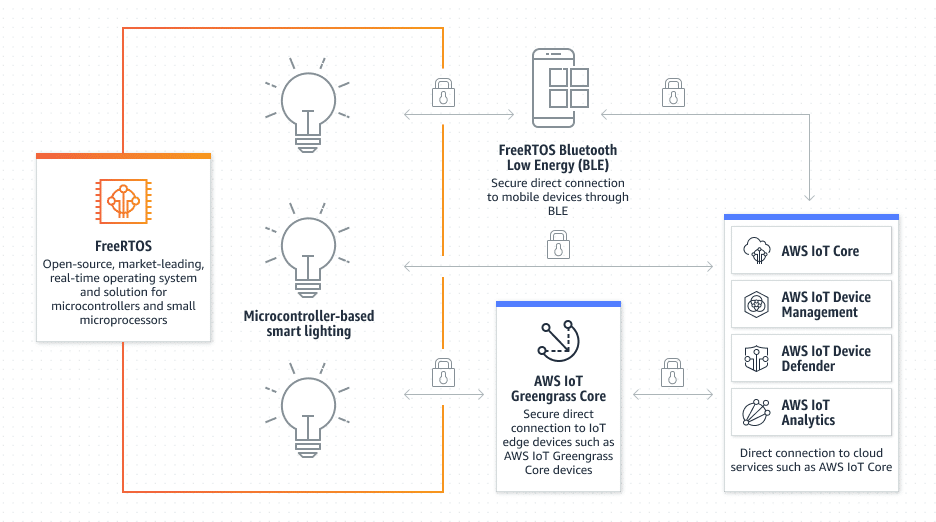
Amazon FreeRTOS is an open-source, microcontroller operating system that makes small, low-power edge devices easy to program, deploy, secure, connect, and manage. Due to its close integration with AWS, it is precious for users seeking strong cloud integration for their IoT devices.
Why I Picked Amazon FreeRTOS:
Amazon FreeRTOS stood out in my selection process due to its seamless integration with AWS cloud services, providing an efficient and secure IoT development environment. In addition, it offers a robust selection of libraries that simplify the programming process. Given these characteristics, Amazon FreeRTOS is an ideal tool for users seeking to integrate their IoT devices with the cloud.
Standout Features and Integrations:
Amazon FreeRTOS provides several essential features, such as local networking capabilities, security protocols, and real-time multitasking. It also integrates effectively with AWS IoT Core, allowing users to collect data from and control their devices in the field. Other key integrations include AWS IoT Device Defender, which offers security metrics for consistent monitoring, and AWS IoT Device Management for remote management.
Pros and Cons
Pros:
- Real-time multitasking capabilities
- Strong security protocols
- Deep integration with AWS IoT services
Cons:
- Requires understanding of the AWS ecosystem
- It might be overly complex for simple projects.
- Pricing can be complex due to dependence on AWS services.

Best for critical infrastructure and mission-critical applications

Wind River VxWorks is a leading real-time operating system (RTOS) recognized for its reliability and robustness in mission-critical applications. Its determinism, safety, security, and reliability features make it a top choice for critical infrastructure and mission-critical applications.
Why I Picked Wind River VxWorks:
I selected Wind River VxWorks for its proven track record in mission-critical environments. Its robustness, reliability, and real-time performance distinguish it from other options. These characteristics and its security features make it an ideal choice for critical infrastructure and mission-critical applications.
Standout Features and Integrations:
Wind River VxWorks provides a range of features for real-time performance and secure operation. It boasts a deterministic process and multitasking capabilities, enabling precise, reliable control in time-sensitive applications. Its security features, such as secure boot and data encryption, are vital in mission-critical use cases. VxWorks supports various hardware platforms and integrates with Wind River's suite of software tools and many third-party development tools, facilitating a comprehensive development environment.
Pros and Cons
Pros:
- Robust security features such as secure boot and data encryption
- Wide-ranging hardware support and integrations
- Robust and reliable performance, suitable for mission-critical applications
Cons:
- The features and capabilities may need more balance for more straightforward applications.
- It may require significant technical expertise for setup and maintenance.
- Pricing information is private.


Tizen is an open-source, Linux-based operating system designed by Samsung for various devices, including smartphones, TVs, wearables, and in-vehicle infotainment systems. It is a top choice for consumer electronics and large-scale device interoperability due to its flexibility and broad compatibility range.
Why I Picked Tizen:
I picked Tizen because it offers an open-source environment that encourages flexibility and broad device compatibility. Its unique selling point lies in its support for many device types, making it stand out among other real-time operating systems. Therefore, I believe Tizen is best suited for projects involving consumer electronics and situations that demand large-scale device interoperability.
Standout Features and Integrations:
Tizen's standout features include its high compatibility with various devices, HTML5 support, and the ability to run native apps using JavaScript and CSS. Furthermore, it provides a robust security framework that ensures its applications’ safety. Tizen also integrates with Samsung's ecosystem, which includes a variety of consumer electronics devices, providing a seamless experience for developers and end-users.
Pros and Cons
Pros:
- Robust security framework
- An open-source environment promotes flexibility.
- Broad device compatibility
Cons:
- Dependent on Samsung's ecosystem
- Higher learning curve due to less common programming languages
- Limited developer community compared to mainstream operating systems.


Sierra Wireless is a global leader in IoT solutions, offering a comprehensive suite of hardware, software, and services for connected devices and applications. Its robust IoT solutions provide efficient wireless connectivity for many devices, making it the best for robust wireless solutions.
Why I Picked Sierra Wireless:
Sierra Wireless came to my attention when selecting a reliable IoT solution due to its strong portfolio of IoT solutions, including gateways, routers, and connectivity services. Sierra Wireless stands out because it focuses on comprehensive wireless solutions for IoT devices, making it a one-stop shop for IoT needs. I deemed Sierra Wireless best for robust wireless solutions due to these features.
Standout Features and Integrations:
Sierra Wireless offers comprehensive solutions from edge-to-cloud, including low power wide area (LPWA) modules, high-speed cellular routers, and global IoT connectivity services. Integrating with their AirVantage IoT platform allows efficient device management and insightful data reporting.
Pros and Cons
Pros:
- Reliable connectivity services
- Strong focus on wireless solutions
- A comprehensive suite of IoT solutions
Cons:
- It may require a steep learning curve for beginners.
- Some products might be overkill for more minor projects.
- Pricing information is not transparent.


TinyOS is an open-source operating system purpose-built for low-power wireless devices, such as those found in sensor networks. Its low memory footprint and energy efficiency make it especially suitable for wireless sensor network applications.
Why I Picked TinyOS:
In the realm of wireless sensor networks, TinyOS is a uniquely fitting choice. Its core attributes, lightweight nature, energy efficiency, and modular design set it apart. Its focus on low-power wireless devices makes it best suited for wireless sensor network applications, considering the standard requirements for resource efficiency and scalability in such scenarios.
Standout Features and Integrations:
TinyOS features a component-based architecture, which promotes modularity and code reusability. Its event-driven execution model contributes to power efficiency—a crucial trait for battery-operated wireless sensor devices. Additionally, TinyOS integrates well with NesC, a programming language specifically designed for embedded systems, and it provides support for a wide range of hardware platforms commonly used in sensor networks.
Pros and Cons
Pros:
- Supports a wide range of hardware platforms used in sensor networks
- Component-based architecture promotes code reusability.
- Lightweight and power-efficient, suitable for sensor networks
Cons:
- Limited to the capabilities of the NesC programming language
- It might require significant technical expertise for setup and maintenance.
- Lacks the extensive support and service network of some commercial alternatives
Weitere IoT-Betriebssysteme
Im Folgenden finden Sie eine Liste zusätzlicher IoT-Betriebssysteme, die ich ausgewählt habe, die es aber noch nicht in die Top 10 geschafft haben. Es lohnt sich, sie anzuschauen.
- Contiki
For small, low-power, networked IoT devices
- Breadware
For rapid, effective IoT hardware development
- FortiOS-Carrier
Good for telecom network protection and scalability
- IDMS Linux Enterprise
Good for customization and flexibility in system management
- Particle Device OS
Good for seamless integration with Particle's IoT hardware and cloud services
- RIOT OS
Good for resource-constrained IoT devices with real-time capabilities
- CIS Oracle Linux 7 Benchmark Level 1
Good for maintaining a secure Oracle Linux 7 environment
- Micrium uC/OS
Good for designing real-time, embedded systems with limited resources
- Nano-RK
Good for energy-efficient, real-time operations in sensor networks
- Zephyr RTOS
Good for small-footprint IoT devices needing real-time operations
- OrbiWAN-Professional
Good for managing large-scale IoT networks in LPWAN deployments


Ähnliche Rezensionen
Auswahlkriterien für IoT-Betriebssysteme
Bei der Auswahl der besten IoT-Betriebssysteme für diese Liste habe ich typische Käuferbedürfnisse und Pain Points wie Sicherheitslücken und Gerätekompatibilität berücksichtigt. Zudem habe ich das folgende Bewertungsraster verwendet, um meine Auswahl strukturiert und fair zu halten:
Kernfunktionen (25 % der Gesamtbewertung)
Um in diese Liste aufgenommen zu werden, musste jede Lösung folgende Anwendungsfälle erfüllen:
- Geräte-Konnektivität
- Echtzeit-Datenverarbeitung
- Skalierbarkeit
- Sicherheitsprotokolle
- Fernverwaltung
Besondere Zusatzfunktionen (25 % der Gesamtbewertung)
Um die Kandidaten weiter zu differenzieren, habe ich nach besonderen Eigenschaften gesucht, wie zum Beispiel:
- Edge-Computing-Fähigkeiten
- Integration von Machine Learning
- Anpassbare Dashboards
- Plattformübergreifende Kompatibilität
- Erweiterte Analysetools
Benutzerfreundlichkeit (10 % der Gesamtbewertung)
Um die Usability jeder Plattform zu beurteilen, habe ich Folgendes berücksichtigt:
- Intuitive Benutzeroberfläche
- Benutzerfreundliche Navigation
- Geringe Einstiegshürde
- Anpassungsmöglichkeiten
- Responsives Design
Onboarding (10 % der Gesamtbewertung)
Um die Onboarding-Erfahrung jeder Plattform zu bewerten, habe ich Folgendes überprüft:
- Verfügbarkeit von Trainingsvideos
- Interaktive Produkttouren
- Zugang zu Vorlagen
- Webinare für neue Nutzer
- Chatbot-Unterstützung
Kundensupport (10 % der Gesamtwertung)
Um die Kundenserviceleistungen jedes Softwareanbieters zu beurteilen, habe ich Folgendes berücksichtigt:
- 24/7 Support-Verfügbarkeit
- Reaktionszeit
- Qualität der technischen Unterstützung
- Verfügbarkeit einer Wissensdatenbank
- Support über mehrere Kanäle
Preis-Leistungs-Verhältnis (10 % der Gesamtwertung)
Um das Preis-Leistungs-Verhältnis jeder Plattform zu bewerten, habe ich Folgendes berücksichtigt:
- Wettbewerbsfähige Preisgestaltung
- Funktionsumfang zum Preis
- Flexible Preismodelle
- Versteckte Kosten
- Return on Investment
Kundenbewertungen (10 % der Gesamtwertung)
Um einen Eindruck von der allgemeinen Kundenzufriedenheit zu gewinnen, habe ich bei der Auswertung der Rezensionen Folgendes berücksichtigt:
- Allgemeine Zufriedenheitsbewertungen
- Feedback zur Zuverlässigkeit
- Kommentare zur Benutzerfreundlichkeit
- Support-Erfahrungen
- Zufriedenheit mit den Funktionen
So wählen Sie ein IoT-Betriebssystem aus
Es ist einfach, sich in langen Funktionslisten und komplexen Preisstrukturen zu verlieren. Damit Sie sich während Ihres individuellen Auswahlprozesses auf das Wesentliche konzentrieren, finden Sie hier eine Checkliste mit Faktoren, die Sie im Blick behalten sollten:
| Faktor | Worauf achten? |
|---|---|
| Skalierbarkeit | Kann das System mit Ihren Anforderungen wachsen? Berücksichtigen Sie zukünftige Geräteerweiterungen und zunehmende Datenmengen. Achten Sie auf Systeme, die Skalierung ohne Leistungseinbußen bewältigen. |
| Integrationen | Lässt es sich mit Ihren bestehenden Tools verbinden? Prüfen Sie die Kompatibilität mit Ihrem aktuellen Technologiestack, wie Cloud-Dienste und Datenbanken. |
| Anpassbarkeit | Wie umfassend können Sie das System anpassen? Suchen Sie nach Optionen, die es erlauben, Einstellungen und Benutzeroberflächen an Ihre Arbeitsabläufe anzupassen. |
| Benutzerfreundlichkeit | Ist die Oberfläche intuitiv? Stellen Sie sicher, dass Teammitglieder sich ohne großen Schulungsaufwand schnell zurechtfinden. Testen Sie Demos, um die Benutzerfreundlichkeit zu beurteilen. |
| Implementierung und Onboarding | Wie lange dauert die Einrichtung? Berücksichtigen Sie Zeit- und Ressourcenaufwand für die vollständige Implementierung. Prüfen Sie, ob während der Onboarding-Phase Unterstützung angeboten wird. |
| Kosten | Ist die Preisgestaltung transparent und im Budgetrahmen? Vergleichen Sie Abonnementmodelle und achten Sie auf versteckte Gebühren. Der Preis sollte mit dem gebotenen Wert übereinstimmen. |
| Sicherheitsmaßnahmen | Gibt es robuste Sicherheitsvorkehrungen? Prüfen Sie Datenschutzfunktionen wie Verschlüsselung und Zugriffskontrollen. Achten Sie auf die Einhaltung relevanter Standards. |
| Compliance-Anforderungen | Werden branchenspezifische Vorschriften eingehalten? Stellen Sie sicher, dass das System die notwendigen Compliance-Standards erfüllt – besonders wichtig bei regulierten Branchen wie Gesundheitswesen oder Finanzwesen. |
Was ist ein IoT-Betriebssystem?
IoT-Betriebssysteme sind schlanke Softwareplattformen, die darauf ausgelegt sind, vernetzte Geräte mit begrenzter Hardware auszuführen. Sie werden von Embedded-Entwicklern, IoT-Ingenieuren und Produktteams genutzt, die Geräteleistung, Kommunikation und Sicherheit verwalten müssen. Funktionen wie Protokollunterstützung, niedriger Speicherverbrauch und Echtzeitverarbeitung helfen dabei, Geräte zu verbinden, Energie zu sparen und Systeme reaktionsschnell zu halten. Diese Tools erleichtern die Entwicklung und Wartung intelligenter Geräte, ohne die Hardware zu überlasten.
Funktionen
Achten Sie bei der Auswahl von IoT-Betriebssystemen auf folgende Schlüsselfunktionen:
- Gerätevernetzung: Ermöglicht nahtlose Kommunikation zwischen verschiedenen IoT-Geräten, sodass sie effizient zusammenarbeiten.
- Echtzeit-Datenverarbeitung: Erlaubt sofortige Analyse und Entscheidungsfindung und verbessert die Reaktionsfähigkeit auf veränderte Bedingungen.
- Skalierbarkeit: Unterstützt Wachstum, indem mehr Geräte und erhöhte Datenmengen ohne Leistungseinbußen verarbeitet werden können.
- Sicherheitsprotokolle: Schützt Daten und Geräte durch Verschlüsselung und Zugangskontrollen und sorgt so für Datenschutz und Compliance.
- Fernverwaltung: Ermöglicht Überwachung und Steuerung von Geräten aus der Ferne und bietet dadurch Flexibilität und Komfort.
- Anpassbarkeit: Bietet Optionen zur individuellen Anpassung von Systemeinstellungen und Benutzeroberflächen an spezifische Arbeitsabläufe und Anforderungen.
- Integrationen: Gewährleistet Kompatibilität mit bestehenden Tools und Systemen und ermöglicht so eine reibungslose Einbindung in aktuelle Technologielandschaften.
- Benutzerfreundliche Oberfläche: Vereinfacht die Bedienung, sodass Teammitglieder das System problemlos navigieren und nutzen können.
- Compliance-Unterstützung: Erfüllt Branchenstandards und gesetzliche Vorgaben, was besonders in Bereichen wie Gesundheitswesen und Finanzen wichtig ist.
- Erweiterte Analysen: Bietet Einblicke durch Datenanalysen, um Abläufe zu optimieren und bessere Entscheidungen zu treffen.
Vorteile
Die Einführung von IoT-Betriebssystemen bietet zahlreiche Vorteile für Ihr Team und Ihr Unternehmen. Hier sind einige, auf die Sie sich freuen können:
- Steigerung der Effizienz: Echtzeit-Datenverarbeitung und Gerätevernetzung verbessern Arbeitsabläufe und Reaktionszeiten.
- Verbesserte Sicherheit: Sicherheitsprotokolle schützen Ihre Daten und Geräte, verringern das Risiko von Sicherheitsverletzungen und sorgen für Compliance.
- Skalierbarkeit: Wachstum wird einfach ermöglicht, da Sie weitere Geräte hinzufügen und erhöhte Datenmengen verarbeiten können, ohne Leistungseinbußen hinnehmen zu müssen.
- Kosteneinsparungen: Die Fernverwaltung reduziert den Bedarf an physischen Eingriffen und spart Zeit und Ressourcen.
- Fundierte Entscheidungen: Erweiterte Analysen liefern Einblicke, damit Sie datenbasierte Entscheidungen zur Prozessoptimierung treffen können.
- Individuelle Anpassung: Die Anpassungsfähigkeit ermöglicht, das System exakt auf Ihre Anforderungen zuzuschneiden, was die Nutzerzufriedenheit und Produktivität verbessert.
Kosten & Preise
Die Auswahl eines IoT-Betriebssystems erfordert ein Verständnis der verschiedenen verfügbaren Preismodelle und -pläne. Die Kosten variieren je nach Funktionen, Teamgröße, Zusatzoptionen und mehr. Die folgende Tabelle fasst gängige Pläne, deren Durchschnittspreise und typische Funktionen von IoT-Betriebssystem-Lösungen zusammen:
Vergleichstabelle für IoT-Betriebssysteme
| Plantyp | Durchschnittspreis | Häufige Funktionen |
|---|---|---|
| Gratisplan | $0 | Grundlegende Gerätevernetzung, eingeschränkte Datenverarbeitung und grundlegende Sicherheitsprotokolle. |
| Persönlicher Plan | $5-$15/user/month | Verbesserte Konnektivität, Echtzeit-Datenverarbeitung, Basisanalysen und Standardsicherheit. |
| Geschäftsplan | $20-$50/user/month | Erweiterte Analysen, Fernverwaltungsfunktionen, Skalierungsoptionen und anpassbare Einstellungen. |
| Unternehmensplan | $60-$100/user/month | Umfangreiche Integrationsunterstützung, umfassende Sicherheitsmaßnahmen, Compliance-Funktionen und dedizierter Kundensupport. |
Die häufigsten Fragen zu IoT-Betriebssystemen (FAQs)
Wie verarbeiten IoT-Betriebssysteme Echtzeitdaten?
IoT-Betriebssysteme verfügen häufig über Echtzeitfähigkeiten, um eine zeitnahe Datenverarbeitung zu gewährleisten. Dies ist besonders wichtig für Anwendungen, bei denen Verzögerungen zu Ineffizienzen oder Sicherheitsrisiken führen können. Achten Sie auf Systeme mit geringer Latenz, damit die Abläufe reibungslos und effektiv bleiben.
Welche Speicheranforderungen sollte ich für IoT-Geräte berücksichtigen?
Der Speicherbedarf variiert je nach Komplexität des Geräts. Einfache Sensoren benötigen oft weniger als 50 KB RAM, während Gateways, die mehr Daten verarbeiten, mehrere Gigabyte brauchen können. Stellen Sie sicher, dass das gewählte Betriebssystem den Speicherbedarf Ihres Geräts unterstützt, um Leistungsprobleme zu vermeiden.
Wie wichtig ist Sicherheit bei IoT-Betriebssystemen?
Sicherheit ist in IoT-Systemen entscheidend, da das Risiko von Datenlecks besteht. Wählen Sie ein Betriebssystem mit starker Verschlüsselung und strikten Zugriffskontrollen. Prüfen Sie, wie das System Updates und Patches handhabt, um Ihr Netzwerk vor Schwachstellen zu schützen.
Können IoT-Betriebssysteme mit bestehenden IT-Systemen integriert werden?
Integrationsfähigkeiten sind für einen reibungslosen Betrieb unerlässlich. Prüfen Sie, ob das IoT-Betriebssystem gängige Protokolle unterstützt und sich mit Ihrer aktuellen IT-Infrastruktur verbinden lässt. Dies sorgt für einen besseren Datenfluss und eine höhere operative Effizienz.
Wie geht es weiter:
Wenn Sie sich aktuell über IoT-Betriebssysteme informieren, nehmen Sie Kontakt zu einem SoftwareSelect-Berater auf und erhalten Sie kostenlose Empfehlungen.
Sie füllen ein Formular aus und führen ein kurzes Gespräch, um die Details Ihres Bedarfs zu klären. Danach erhalten Sie eine Vorauswahl an Softwarelösungen zur Überprüfung. Die Berater unterstützen Sie sogar während des gesamten Kaufprozesses, einschließlich Preisverhandlungen.