
24 beste Game-Engine-Software-Optionen im Jahr 2026

10 Bestes Game-Engine-Software Shortlist
Here's my pick of the 10 best software from the 24 tools reviewed.


Game-Engine-Software treibt Ihren gesamten Entwicklungsprozess an, sodass Sie Spiele effizienter erstellen, testen und veröffentlichen können—ganz gleich, ob Sie Indie-Entwickler sind oder an einem Blockbuster-Titel arbeiten. Die richtige Engine optimiert Ihren Workflow, verbessert die Qualität und verleiht Ihrer kreativen Vision Ausdruck, ohne unnötige Hürden.
Ich habe eine Vielzahl von Game-Engine-Optionen getestet und weiß, wie schwierig es ist, Werkzeuge zu finden, die wirklich zu den eigenen Bedürfnissen passen. Hier stelle ich die besten Game-Engine-Softwares vor, damit Sie die passende für sich und Ihr Team auswählen können.
Why Trust Our Software Reviews
Bestes Game-Engine-Software Zusammenfassung
Diese Vergleichstabelle fasst die Preisinformationen meiner besten Game-Engine-Software-Auswahl zusammen, damit Sie die beste Wahl für Ihr Budget und Ihre geschäftlichen Anforderungen treffen können.
| Tool | Best For | Trial Info | Price | ||
|---|---|---|---|---|---|
| 1 | Best for extensive platform support | 30-day free trial + Free plan available (for students and personal users) | From $185/month (billed annually) | Website | |
| 2 | Best for open-source flexibility | Not available | Free version available (Donations encouraged for supporting the project) | Website | |
| 3 | Best for high-quality visual rendering | Free plan available | Free forever plan | Website | |
| 4 | Best for non-coders and beginners | Free trial available | From $15.99/month (billed annually) | Website | |
| 5 | Best for lightweight mobile games | Not available | Website | ||
| 6 | Best for 2D game development | Free plan available | From $15/user/month (billed annually) | Website | |
| 7 | Best for visual novel creation | Not available | Free | Website | |
| 8 | Best for realistic physics simulation | Free plan available | From $9.90/user/month | Website | |
| 9 | Best for creating classic RPGs | Not available | Website | ||
| 10 | Best for cross-platform XNA development | Not available | Free | Website |


-

Site24x7
Visit WebsiteThis is an aggregated rating for this tool including ratings from Crozdesk users and ratings from other sites.4.6 -
Docker
Visit WebsiteThis is an aggregated rating for this tool including ratings from Crozdesk users and ratings from other sites.4.6 -
Pulumi
Visit WebsiteThis is an aggregated rating for this tool including ratings from Crozdesk users and ratings from other sites.4.8





Bestes Game-Engine-Software Bewertungen
Nachfolgend finden Sie meine ausführlichen Zusammenfassungen der besten Game-Engine-Softwares, die es auf meine Shortlist geschafft haben. Die Bewertungen geben Ihnen einen detaillierten Einblick in die wichtigsten Funktionen, Vor- und Nachteile, Integrationen und optimale Anwendungsfälle jedes Tools, damit Sie das passende für sich finden können.


Developed by Epic Games, Unreal Engine has cemented its reputation as one of the top game development platforms, celebrated for its breathtaking visual capabilities. When it comes to crafting visually immersive experiences, from indie games to AAA titles, its prowess in high-quality visual rendering remains unmatched.
Why I Picked Unreal Engine: In my extensive search for the most powerful rendering tools, Unreal Engine persistently captured my attention. I selected Unreal Engine after thorough comparisons and based on its distinction in the domain of visual brilliance. I firmly believe that for projects demanding superior graphical fidelity and a captivating aesthetic, Unreal Engine stands tall above its contemporaries.
Standout features & integrations:
Unreal Engine flaunts its real-time 3D game engine that is versatile enough to cater to different types of games, from mobile to high-end consoles. With its renowned blueprints system, even those with limited programming skills can develop intricate gameplay mechanisms. Integration-wise, the engine offers compatibility with platforms like PlayStation, Xbox, and Nintendo Switch, ensuring a broad reach for game developers.
Pros and Cons
Pros:
- Robust cross-platform support including Windows, macOS, Linux, Android, iOS, and major consoles.
- Blueprints system allows visual scripting, broadening its appeal.
- Unparalleled visual rendering, ideal for AAA game development.
Cons:
- Certain advanced features might require a deeper understanding of its proprietary scripting language, rather than common languages like Python or JavaScript.
- Larger file sizes due to high-quality assets can be a challenge for mobile game development.
- Might present a steep learning curve for beginners, despite available tutorials.


Construct is a visual game development platform that leans on intuitive visual scripting, allowing users to create games without the need for traditional programming. Designed with beginners in mind, it simplifies the complexities of game development into understandable chunks, especially catering to those who may not have a coding background.
Why I Picked Construct: When curating this list, I was determined to find a tool that would provide an accessible gateway into game development for those new to the field. In comparing various platforms, Construct’s emphasis on visual scripting truly made it stand out. I chose it because, in my judgment, Construct offers a comprehensive yet beginner-friendly environment, making it an ideal choice for non-coders looking to delve into game creation.
Standout features & integrations:
Construct is celebrated for its drag-and-drop functionality, which simplifies the game design process. The platform offers real-time previews, which is essential for immediate feedback during iterations. Furthermore, its extensive tutorials help flatten the learning curve for newcomers. When it comes to integrations, Construct supports exports to platforms like Android, iOS, Windows, and HTML5, ensuring a broad reach for games developed using the platform.
Pros and Cons
Pros:
- Cross-platform game engine capabilities ensure games can be played on a multitude of devices.
- Extensive tutorials available to assist newcomers.
- Visual scripting approach eliminates the need for traditional coding.
Cons:
- Subscription model may not be appealing to those looking for a one-time purchase option.
- The reliance on visual scripting might limit some advanced functionalities.
- Might not offer the depth required for more complex AAA titles.


Cocos2d is an open-source game engine tailored for developers aiming to build lightweight mobile games. Its capabilities ensure efficient game development for mobile devices, making it particularly adept for creating games that don't demand extensive resources.
Why I Picked Cocos2d: In selecting the best tools for specific game development needs, I closely analyzed Cocos2d. Its reputation for enabling the creation of nimble mobile games set it apart from other game engines. Having examined its features, listened to developers' opinions, and compared it with other platforms, it's clear to me that Cocos2d shines brightest when it comes to crafting lightweight games for mobile devices.
Standout features & integrations:
Cocos2d offers a rich set of features, including a physics engine, particle effects, and an array of tools for animations. Additionally, it's armed with a scripting language interface, enabling both JavaScript and python for game logic. Integration-wise, Cocos2d excels with support for Android, iOS, Windows, macOS, and Linux. It's also compatible with third-party libraries and SDKs, boosting its game development functionality.
Pros and Cons
Pros:
- Intuitive workflow suitable for both beginners and seasoned developers.
- Cross-platform game engine, making it versatile for different OS.
- Open-source nature ensures continuous community-driven enhancements.
Cons:
- Requires programmers to have some proficiency in supported scripting languages for advanced functionalities.
- Might face limitations for AAA or heavy-duty games.
- As an open-source game engine, dedicated support might be limited.


GameMaker Studio, part of the YoYo Games catalog, is a powerful game development platform predominantly designed for creating intricate 2D games. Its rich feature set and ease of use have made it a premier choice for those focusing on 2D game design, reinforcing its status as the best for 2D game development.
Why I Picked GameMaker Studio: In the process of selecting game development platforms, GameMaker Studio consistently surfaced as a standout for 2D game creation. After comparing multiple tools, judging their strengths, and weighing opinions from industry veterans, it became clear to me that GameMaker Studio had an edge in the 2D realm. Its intuitive workflow and specialized features tailored for 2D game development reinforced its standing in my list.
Standout features & integrations:
GameMaker Studio boasts a user-friendly drag-and-drop visual scripting system, enabling both novices and experts to craft games without diving deep into traditional coding. Additionally, its rich asset store offers a plethora of tools, enhancing the game creation process. For integrations, GameMaker Studio supports multiple platforms, including Windows, macOS, Android, iOS, and even consoles like Xbox and PlayStation, providing versatility for developers.
Pros and Cons
Pros:
- Broad platform support, from PCs to mobile devices and consoles.
- Drag-and-drop functionality, ideal for those without a deep coding background.
- Dedicated features tailored for 2D game creation.
Cons:
- The licensing structure can become complex for those looking to publish on multiple platforms.
- Might present a learning curve for absolute beginners compared to more basic tools.
- While it does support 3D game development, its primary focus is on 2D, which may limit some 3D functionalities.


Ren'Py is a dedicated game engine tailored to the development of visual novels and interactive storytelling. With its strong focus on narrative-driven experiences, Ren'Py empowers creators to weave intricate tales that engage readers, making it an ideal fit for those seeking to create compelling visual novels.
Why I Picked Ren'Py: While scouring through a myriad of game engines, I selectively determined that Ren'Py possesses an unmatched prowess in the domain of visual novel creation. I chose Ren'Py for its specialized narrative tools, providing creators with a refined toolkit to tell their stories. Given the engine's track record and dedicated features, I firmly believe it stands as the best choice for those delving into visual novel creation.
Standout features & integrations:
Ren'Py shines with its intuitive scripting language that simplifies the process of narrative construction. Features such as easy text display, branching dialogue paths, and multimedia support ensure that creators can bring their vision to life. Integration-wise, Ren'Py supports exporting to multiple platforms, including Windows, macOS, Linux, Android, and iOS, expanding the reach of the visual novels produced.
Pros and Cons
Pros:
- Open-source nature invites community-driven advancements and modifications.
- Supports exports to a broad range of platforms, enhancing distribution potential.
- Tailored specifically for visual novel creation, ensuring a streamlined workflow.
Cons:
- Requires some learning curve, especially for those unfamiliar with visual novel mechanics.
- The user interface, while functional, may not be as polished as some other game engines.
- Not suited for more complex game types beyond visual novels.


CryEngine, developed by Crytek, is a renowned game development platform that offers immersive graphics and lifelike physics simulations. It's often the chosen tool for developers aiming to achieve photo-realistic visuals and highly detailed environments, aligning perfectly with the accolade of being best for realistic physics simulation.
Why I Picked CryEngine: In my journey of selecting and comparing game engines, CryEngine emerged with its unparalleled capabilities in terms of simulating realistic physics. After judging various engines on this specific parameter, my opinion consistently gravitated towards CryEngine. It stands out, primarily due to Crytek's dedication in continually pushing the boundaries of what's possible in game realism.
Standout features & integrations:
CryEngine offers real-time rendering capabilities that elevate the quality of visuals in games. Additionally, its robust artificial intelligence functionalities ensure dynamic and lifelike interactions within the gaming environment. As for integrations, CryEngine is compatible with Windows, consoles like Xbox and PlayStation, ensuring that developers have flexibility in choosing their desired platform for game releases.
Pros and Cons
Pros:
- Compatible with major consoles, making it a choice for many big-title game developers.
- Provides artificial intelligence tools, enhancing NPC interactions and behaviors.
- Acclaimed for achieving AAA-quality visuals and realistic physics.
Cons:
- Requires a relatively high-performance system to utilize its full potential.
- The asset store might not be as expansive as those of its competitors.
- Might present a steeper learning curve for beginners compared to some other engines.


RPG Maker is a specialized game development platform explicitly crafted for those who wish to design traditional role-playing games (RPGs). Its features, tailored to the nuances of RPG design, make it an unmatched tool for those with a passion for creating classic RPGs.
Why I Picked RPG Maker: When I was determining which tools to include in this list, RPG Maker frequently surfaced due to its unique position in the game development arena. After comparing its offerings with other platforms and weighing the opinions of seasoned developers, it was evident that RPG Maker stood out for its dedicated RPG-focused toolset. Its unparalleled capability to simplify the RPG creation process solidified its place as the best for producing classic RPGs.
Standout features & integrations:
RPG Maker brings to the table an intuitive drag-and-drop interface that streamlines the RPG development process. It provides an extensive database of characters, items, and foes, which aids in building a robust RPG universe. For integrations, while RPG Maker primarily supports Windows, its expansive community has contributed plugins and extensions to aid in cross-platform game exports, including Android and macOS.
Pros and Cons
Pros:
- Drag-and-drop functionality, reducing the need for extensive programming skills.
- A vast community-driven asset store to improve game elements.
- Exclusively designed for RPG creation, ensuring a dedicated feature set.
Cons:
- New users might face a learning curve due to its specialized nature.
- While it does support cross-platform exports, some platforms might require third-party plugins.
- Primarily designed for 2D RPGs, which could limit its applicability to other game types.

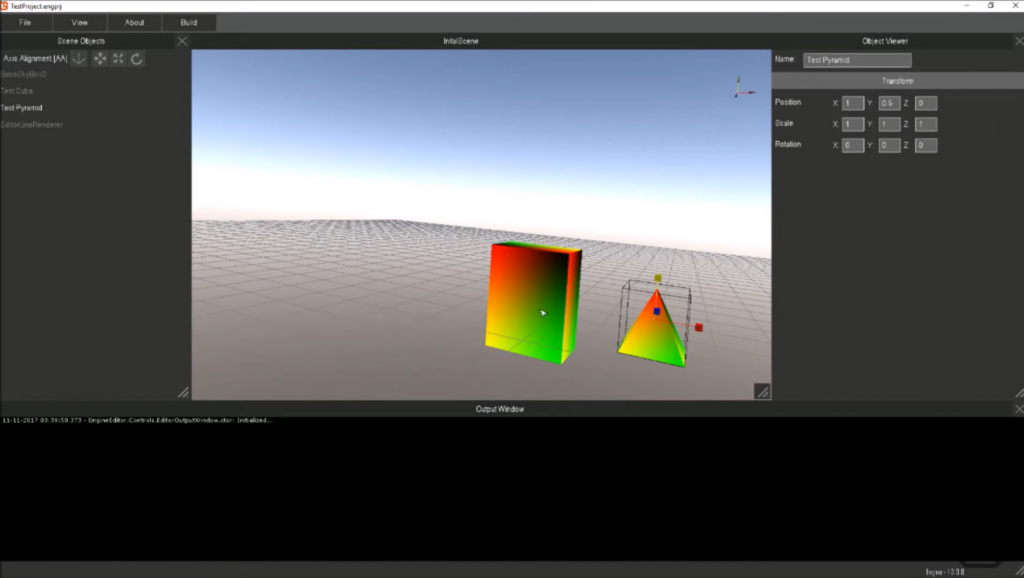
MonoGame is an open-source game engine designed to support XNA game studio projects across a multitude of platforms. With its roots stemming from Microsoft's XNA Framework, MonoGame extends the reach of XNA developments, making it possible for developers to deploy their projects on virtually any platform, thus reinforcing its strength in cross-platform development.
Why I Picked MonoGame: In the quest for a tool that accentuates the cross-platform capabilities of XNA development, MonoGame emerged as a clear frontrunner. Having examined various tools, I observed that MonoGame provides a unique blend of preserving the original essence of XNA while enhancing its cross-platform functionality. I chose MonoGame because it stands as a testament to the evolution of XNA, adeptly catering to the modern requirements of game development and distribution.
Standout features & integrations:
MonoGame's prowess is evident in its support for a multitude of platforms, ranging from iOS, Android, macOS, to Windows and consoles. Furthermore, its rich library offers developers an extensive range of tools and functionalities. In terms of integrations, MonoGame offers an SDK that provides developers the freedom to incorporate third-party tools and plugins, further enhancing the game development workflow.
Pros and Cons
Pros:
- Broad platform support, from mobile devices to consoles.
- Open-source nature allows for customizability and community contributions.
- Provides a robust framework for cross-platform XNA development.
Cons:
- Being community-driven, the pace of updates and new features might vary.
- Absence of a built-in visual editor might pose challenges for some.
- Might require a learning curve for those unfamiliar with XNA.

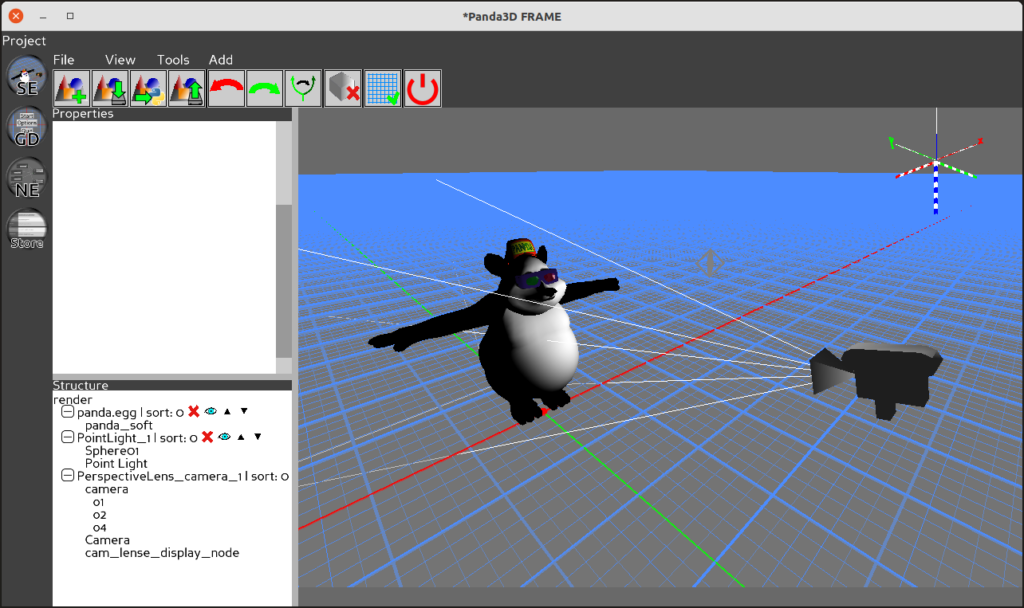
Panda3D is a game engine primarily designed for rendering and developing simulations and visualizations. Developed by Disney and maintained by the Carnegie Mellon Entertainment Technology Center, it's become a reliable tool for academics and researchers, giving them a platform to visualize data and concepts effectively.
Why I Picked Panda3D: In the vast landscape of game engines, Panda3D particularly caught my eye due to its specialized focus on academic and research projects. When I was determining which game engine stood out in the context of research, it became evident that Panda3D, with its history and pedigree from institutions like Disney and Carnegie Mellon, had a unique advantage. I chose Panda3D because it caters specifically to academic necessities, making it optimal for educational and research pursuits.
Standout features & integrations:
Panda3D boasts a robust rendering system, allowing for intricate visualizations crucial for academic projects. Its python scripting capability ensures an intuitive workflow for those familiar with the programming language. Moreover, Panda3D offers an array of integrations, notably with languages like C++, allowing for deeper functionality and more extensive applications in research projects.
Pros and Cons
Pros:
- Open-source nature promotes community-driven development and customizations.
- Python scripting support ensures a familiar programming environment.
- Designed with academic and research projects in mind.
Cons:
- While it's strong in scripting and rendering, it lacks some advanced tools present in more comprehensive game engines.
- The user interface might seem less modern compared to other engines.
- Might not be suitable for AAA game development.


Torque 3D stands as a versatile open-source game engine that provides developers the tools they need to craft detailed and immersive 3D games. With its roots deeply entrenched in the community, the engine benefits from consistent improvements driven by passionate developers, making it the go-to choice for those who value communal growth.
Why I Picked Torque 3D: I singled out Torque 3D after carefully comparing it against other engines, discerning its unique edge in leveraging community contributions. It's not just about the engine's functionalities but the ethos surrounding it. I chose Torque 3D because its ongoing development is predominantly spearheaded by its vibrant community, making it stand out as the best option for those who want an engine that evolves with real-time feedback and improvements.
Standout features & integrations:
Torque 3D boasts features that aid in the creation of both indoor and expansive outdoor environments, harnessing advanced rendering capabilities to bring visuals to life. With its real-time 3D terrain editing and robust scripting language, developers have a broad canvas to work on. Furthermore, its integration with tools like the asset store and support for scripting languages like Python ensure a comprehensive game development experience.
Pros and Cons
Pros:
- Versatile terrain editing tools to craft diverse environments.
- Advanced rendering capabilities suitable for AAA game quality.
- Open-source nature fosters community-driven enhancements.
Cons:
- Reliance on community contributions can sometimes lead to inconsistency in updates.
- Out-of-the-box support for consoles and certain platforms can be limited.
- Might pose a steeper learning curve for beginners compared to other engines.


Weitere Game-Engine-Software
Hier sind weitere Game-Engine-Softwares, die es nicht auf meine Shortlist geschafft haben, aber dennoch einen Blick wert sind:
- Panda3D
For academic and research projects
- Torque 3D
For community-driven improvements
- Armory
Good for Blender-integrated projects
- Phaser
Good for fast 2D game prototyping
- Stride
Good for advanced C# developers
- jMonkeyEngine
Good for Java-based game development
- Solar2D
Good for Lua-scripted applications
- Buildbox
Good for drag-and-drop design
- Defold
Good for streamlined 2D production
- Stencyl
Good for code-free game creation
- PlayCanvas
Good for web-based 3D games
- OpenFL
Good for Flash game migration
- Oxygine
Good for C++ mobile games
- Havok
Good for high-fidelity physics


Auswahlkriterien für Game-Engine-Software
Bei der Auswahl der besten Game-Engine-Software für diese Liste habe ich typische Käuferbedürfnisse und -probleme wie Benutzerfreundlichkeit für Einsteiger und Unterstützung für plattformübergreifende Entwicklung berücksichtigt. Zudem habe ich das folgende Bewertungsraster genutzt, um meine Einschätzung strukturiert und fair zu gestalten:
Kernfunktionen (25 % der Gesamtbewertung)
Um für diese Liste berücksichtigt zu werden, musste jede Lösung diese typischen Anwendungsfälle abdecken:
- Erstellung von 2D- und 3D-Spielen
- Unterstützung der plattformübergreifenden Bereitstellung
- Bereitstellung von Asset-Management-Tools
- Angebot von Scripting-Funktionen
- Ermöglichung von Physiksimulationen
Besondere Zusatzfunktionen (25 % der Gesamtbewertung)
Um die Konkurrenz weiter einzugrenzen, habe ich auch nach einzigartigen Funktionen gesucht, wie zum Beispiel:
- Echtzeit-Kollaborationswerkzeuge
- Fortschrittliche KI-Integration
- Modulare Architektur
- Visuelle Scripting-Oberfläche
- Cloud-basierte Rendering-Optionen
Benutzerfreundlichkeit (10 % der Gesamtbewertung)
Um die Benutzerfreundlichkeit jeder Lösung einzuschätzen, habe ich Folgendes betrachtet:
- Intuitive Benutzeroberfläche
- Individuelle Anpassungsmöglichkeiten
- Benutzerfreundliche Navigation
- Lernaufwand für neue Nutzer
- Reaktionsfähigkeit der Software
Einarbeitung (10 % der Gesamtbewertung)
Zur Einschätzung des Onboarding-Erlebnisses auf jeder Plattform habe ich diese Punkte berücksichtigt:
- Verfügbarkeit von Schulungsvideos
- Interaktive Produkttouren
- Zugriff auf Vorlagen
- Webinare für neue Nutzer
- Unterstützende Community-Foren
Kundensupport (10% der Gesamtbewertung)
Um die Kundensupport-Dienste jedes Softwareanbieters zu bewerten, habe ich Folgendes berücksichtigt:
- Verfügbarkeit von Live-Chat
- Rund-um-die-Uhr-Support
- Umfassendes Hilfezentrum
- Reaktionszeit auf Anfragen
- Qualität der Support-Dokumentation
Preis-Leistungs-Verhältnis (10% der Gesamtbewertung)
Um das Preis-Leistungs-Verhältnis jeder Plattform zu bewerten, habe ich Folgendes berücksichtigt:
- Konkurrenzfähige Preismodelle
- Verfügbarkeit von kostenlosen Testversionen
- Kosten zusätzlicher Funktionen
- Skalierbarkeit der Preistarife
- Transparenz in der Preisstruktur
Kundenbewertungen (10% der Gesamtbewertung)
Um ein Gefühl für die allgemeine Kundenzufriedenheit zu bekommen, habe ich bei der Lektüre von Kundenbewertungen Folgendes berücksichtigt:
- Gesamtbewertung und Feedback
- Häufig genannte Vor- und Nachteile
- Häufigkeit von Updates und Verbesserungen
- Zufriedenheit der Nutzer mit dem Support
- Leichtigkeit des Umstiegs von anderen Tools
Wie Sie Game-Engine-Software auswählen
Es ist leicht, sich in langen Funktionslisten und komplexen Preisstrukturen zu verlieren. Um Ihnen zu helfen, den Überblick während Ihres individuellen Auswahlprozesses zu behalten, finden Sie hier eine Checkliste wichtiger Faktoren:
| Faktor | Was ist zu beachten? |
|---|---|
| Skalierbarkeit | Kann die Software mit Ihren Projekten wachsen? Überlegen Sie, ob sie größere Spiele und Teams unterstützt, wenn Ihr Bedarf steigt. |
| Integrationen | Prüfen Sie, ob sie sich mit Ihren bestehenden Tools verbinden lässt. Dazu gehören Designsoftware, Versionskontrollsysteme und Cloud-Dienste. |
| Anpassbarkeit | Bietet sie die Flexibilität, sich an Ihre spezifischen Projektanforderungen anzupassen? Suchen Sie nach Möglichkeiten, die Engine ohne größere Einschränkungen zu modifizieren. |
| Benutzerfreundlichkeit | Bewerten Sie die Lernkurve für neue Nutzer. Eine benutzerfreundliche Oberfläche und eine klare Dokumentation sparen Zeit und reduzieren Frustration. |
| Implementierung und Einarbeitung | Wie schnell kann Ihr Team an den Start gehen? Prüfen Sie das Angebot an Ressourcen wie Tutorials, Vorlagen und Community-Support, um den Einstieg zu erleichtern. |
| Kosten | Vergleichen Sie die Preise mit Ihrem Budget. Berücksichtigen Sie nicht nur die Anfangskosten, sondern auch laufende Gebühren für Updates oder zusätzliche Funktionen. |
| Sicherheitsmaßnahmen | Stellen Sie sicher, dass die Software Ihre Daten und Ihr geistiges Eigentum schützt. Achten Sie auf Verschlüsselung, Zugriffskontrollen und regelmäßige Sicherheitsupdates. |
| Support-Verfügbarkeit | Gibt es zuverlässigen Support, wenn Sie ihn benötigen? Prüfen Sie, ob eine schnelle Hilfe über verschiedene Kanäle wie Chat, E-Mail oder Telefon angeboten wird. |
Was ist Game-Engine-Software?
Game-Engine-Software ist eine Sammlung von Werkzeugen zur Erstellung von Videospielen, die Entwicklern einen Rahmen für Grafikdarstellung, Skripting und Physik bereitstellt. Spieleentwickler, Designer und Programmierer nutzen diese Tools typischerweise, um interaktive Erlebnisse zu erschaffen. Funktionen wie plattformübergreifende Bereitstellung, Asset-Management und Skriptunterstützung erleichtern eine effiziente Spieleentwicklung und -anpassung. Insgesamt ermöglichen diese Tools die Gestaltung fesselnder und immersiver Spielerfahrungen.
Funktionen
Achten Sie bei der Auswahl von Game-Engine-Software auf folgende Schlüsselfunktionen:
- Plattformübergreifende Bereitstellung: Ermöglicht das Erstellen und Bereitstellen von Spielen auf mehreren Plattformen und erreicht so ein größeres Publikum.
- Asset-Verwaltung: Hilft dabei, Spielassets wie Grafiken, Audio und Skripte zu organisieren und zu speichern, um einen einfachen Zugriff und eine mühelose Anpassung zu ermöglichen.
- Skripting-Fähigkeiten: Erlaubt Entwicklern, eigene Skripte zu schreiben, um das Spielverhalten und die Mechanik zu steuern und bietet so Flexibilität bei der Gestaltung.
- Physiksimulation: Sorgt für realistische Bewegungen und Interaktionen innerhalb der Spielumgebung und erhöht damit die Immersion der Spieler.
- Visuelles Scripting: Bietet eine Möglichkeit, Spiellogik visuell zu erstellen und macht dies auch für Personen ohne Programmierkenntnisse zugänglich.
- Echtzeit-Kollaboration: Unterstützt mehrere Teammitglieder dabei, gleichzeitig an einem Projekt zu arbeiten und verbessert so die Effizienz.
- Modulare Architektur: Erlaubt es Entwickler:innen, Funktionen hinzuzufügen oder zu ändern, ohne das gesamte System umzubauen – das spart Zeit und Ressourcen.
- KI-Integration: Erweitert das Gameplay durch die Integration intelligenter Verhaltensweisen für Nicht-Spieler-Charaktere, was Spiele spannender macht.
- Benutzerfreundliche Oberfläche: Stellt eine einfache Bedienung sicher und verringert die Lernkurve, sodass Entwickler sich auf kreative Aufgaben konzentrieren können.
- Cloud-basiertes Rendering: Nutzt Cloud-Ressourcen für das Rendering, beschleunigt den Entwicklungsprozess und reduziert die Anforderungen an lokale Hardware.
Vorteile
Die Implementierung von Game-Engine-Software bietet Ihrem Team und Unternehmen zahlreiche Vorteile. Hier sind einige, auf die Sie sich freuen können:
- Höhere Effizienz: Plattformübergreifende Bereitstellung und Asset-Verwaltung optimieren den Entwicklungsprozess und sparen Zeit und Aufwand.
- Kreative Flexibilität: Skripting-Fähigkeiten und modulare Architektur ermöglichen individuelle Anpassungen und ein einzigartiges Spieldesign, das Ihrer Vision entspricht.
- Bessere Zusammenarbeit: Echtzeit-Kollaborationswerkzeuge erlauben es Teammitgliedern, nahtlos zusammenzuarbeiten und die Produktivität zu steigern.
- Verbesserte Spielerfahrung: KI-Integration und Physiksimulation ermöglichen immersivere und spannendere Spiele für die Spieler.
- Zugänglichkeit: Visuelles Scripting und benutzerfreundliche Oberflächen machen Spieleentwicklung auch für Personen ohne umfassende Programmierkenntnisse möglich.
- Kosteneinsparungen: Cloud-basiertes Rendering reduziert den Bedarf an teurer lokaler Hardware und senkt die gesamten Entwicklungskosten.
- Größere Reichweite: Durch die Unterstützung mehrerer Plattformen kann Ihr Spiel ein breiteres Publikum erreichen und so das Umsatzpotenzial steigern.
Kosten & Preise
Die Auswahl einer Game-Engine-Software erfordert ein Verständnis der verschiedenen verfügbaren Preismodelle und -pläne. PC-Spielentwicklungssoftware kann beispielsweise günstiger sein als plattformbasierte Lösungen für Konsolen. Die Kosten variieren je nach Funktionen, Teamgröße, Add-ons und vielem mehr. Die folgende Tabelle fasst gängige Pläne, ihre Durchschnittspreise sowie typische Funktionen zusammen, die in Game-Engine-Softwarelösungen enthalten sind:
Vergleichstabelle der Pläne für Game-Engine-Software
| Plan-Typ | Durchschnittlicher Preis | Übliche Funktionen |
|---|---|---|
| Free Plan | $0 | Grundlegende Asset-Verwaltung, eingeschränkte Skripting-Fähigkeiten und Community-Support. |
| Personal Plan | $10-$30/user/month | Volle Skripting-Fähigkeiten, plattformübergreifende Bereitstellung und Zugang zu Tutorials. |
| Business Plan | $50-$100/user/month | Erweiterte Kollaborationswerkzeuge, KI-Integration und Premium-Supportoptionen. |
| Enterprise Plan | $200+/user/month | Anpassbare Lösungen, persönlicher Account-Manager und Sicherheit auf Enterprise-Niveau. |
FAQs zu Game-Engine-Software
Hier sind einige Antworten auf häufig gestellte Fragen zu Game-Engine-Software:
Brauche ich Programmierkenntnisse, um Game-Engine-Software zu nutzen?
Nein, Programmierkenntnisse sind nicht immer erforderlich. Viele Engines bieten visuelle Skriptwerkzeuge, mit denen du Spiel-Logik ganz ohne Code-Erfahrung erstellen kannst. Grundlegende Programmierkenntnisse sind jedoch hilfreich, insbesondere bei komplexeren Projekten. Wenn du neu in der Spieleentwicklung bist, beginne am besten mit Engines, die für Einsteiger geeignet sind.
Kann Game-Engine-Software auch für Nicht-Spiele-Anwendungen genutzt werden?
Ja, Game-Engines sind vielseitig und können für nicht spielbezogene Anwendungen wie Simulationen, Virtual-Reality-Erlebnisse und architektonische Visualisierungen eingesetzt werden. Dank ihrer Fähigkeiten im Rendering und bei Echtzeit-Interaktionen eignen sie sich für zahlreiche Branchen. Informiere dich darüber, wie unterschiedliche Sektoren diese Tools verwenden, um Inspiration für deine Projekte zu finden.
Für welche Plattformen kann ich mit Game-Engine-Software entwickeln?
Du kannst für zahlreiche Plattformen entwickeln, darunter PC, Mobilgeräte, Konsolen und Webbrowser. Die meisten Game-Engines unterstützen plattformübergreifende Entwicklung, sodass du ein Spiel einmal erstellen und für mehrere Plattformen bereitstellen kannst. Prüfe in der Dokumentation jeder Engine, welche Plattformen konkret unterstützt werden, um sicherzustellen, dass sie deinen Anforderungen entspricht.
Wie es weitergeht:
Wenn du gerade dabei bist, Game-Engine-Software zu recherchieren, kontaktiere einen SoftwareSelect-Berater für kostenlose Empfehlungen.
Du füllst ein Formular aus und führst ein kurzes Gespräch, in dem sie sich genau über deine Bedürfnisse informieren. Anschließend erhältst du eine Shortlist mit passender Software zur Auswahl. Sie unterstützen dich sogar während des gesamten Kaufprozesses, einschließlich Preisverhandlungen.