

10 Beste Continuous-Integration-Tools, die Sie nicht übersehen sollten

10 Beste Continuous Integration Tools: Shortlist
Here's my pick of the 10 best software from the 12 tools reviewed.


Die Verwaltung von Code-Änderungen durch mehrere Mitwirkende kann schnell unübersichtlich werden. Ohne einen soliden Continuous Integration (CI) Prozess stoßen Teams auf fehlgeschlagene Builds, unerwartete Regressionen und zeitaufwendige manuelle Merges, die alles verlangsamen. Wer schon einmal mit verzögerten Deployments oder Last-Minute-Bugfixes zu tun hatte, die eigentlich frühzeitig auffallen sollten, weiß, wie entscheidend das richtige CI-Tool ist.
CI-Tools automatisieren die Integration neuer Codes, führen Tests durch und stellen sicher, dass jede Änderung wie erwartet vor dem Deployment funktioniert. Ich habe mit einer Vielzahl solcher Werkzeuge in unterschiedlichen Entwicklungsumgebungen gearbeitet und getestet, wie sie mit Herausforderungen wie Skalierbarkeit, Pipeline-Effizienz und Teamzusammenarbeit umgehen. In diesem Leitfaden stelle ich die besten CI-Tools vor und helfe Ihnen, das passende Tool für Ihren Workflow zu finden, damit Ihre Entwicklungs-Pipeline reibungslos läuft.
Why Trust Our Software Reviews
We’ve been testing and reviewing software since 2023. As tech leaders ourselves, we know how critical and difficult it is to make the right decision when selecting software.
We invest in deep research to help our audience make better software purchasing decisions. We’ve tested more than 2,000 tools for different tech use cases and written over 1,000 comprehensive software reviews. Learn how we stay transparent & our software review methodology.
Zusammenfassung der besten Continuous Integration Tools
Diese Vergleichstabelle fasst die Preisinformationen meiner Top-Auswahl an Continuous Integration Tools zusammen, damit Sie das passende für Ihr Budget und Ihre geschäftlichen Anforderungen finden können.
| Tool | Best For | Trial Info | Price | ||
|---|---|---|---|---|---|
| 1 | Am besten für ultraschnelle CI/CD-Pipelines | Kostenlose Version verfügbar | Ab $20/Nutzer/Monat (jährliche Abrechnung) | Website | |
| 2 | Am besten geeignet aufgrund der riesigen Plugin-Verfügbarkeit | Kostenloser Download verfügbar | Jenkins ist Open Source und kostenlos nutzbar. | Website | |
| 3 | Am besten für umfassende Anpassungsmöglichkeiten | 14 Tage kostenlos testen + Demo verfügbar | Ab $20/Nutzer/Monat (jährliche Abrechnung) | Website | |
| 4 | Am besten geeignet für Microsoft-basierte Projekte | 30-tägige kostenlose Testversion | Ab $30/Nutzer/Monat (jährliche Abrechnung) | Website | |
| 5 | Am besten geeignet für integriertes CI/CD mit Versionsverwaltung | 30 Tage kostenlos testen + kostenlose Demo | Die Preise für GitLab beginnen bei $4/Benutzer/Monat. Dies gilt für die "Premium"-Stufe; höhere Stufen bieten weitere Funktionen und Vorteile. | Website | |
| 6 | Am besten geeignet für Open-Source-Enthusiasten mit hohem Erweiterungsbedarf | Not available | Preise auf Anfrage | Website | |
| 7 | Am besten geeignet für die Integration in die Atlassian-Tool-Suite | Not available | Ab $10/Benutzer/Monat (jährliche Abrechnung) | Website | |
| 8 | Am besten geeignet für Bitbucket-Code-Repositories | Kostenloser Tarif verfügbar | Ab $3/Benutzer/Monat (jährliche Abrechnung) | Website | |
| 9 | Am besten geeignet für cloud-native Apps auf AWS | Not available | Die Preise für AWS CodePipeline beginnen bei $1.00 pro aktiver Pipeline und Monat. Zusätzliche Kosten können anfallen, abhängig von den verwendeten zugehörigen AWS-Diensten. | Website | |
| 10 | Am besten für plattformübergreifende Builds | Kostenloser Plan + Demo verfügbar | Ab $30/Nutzer/Monat | Website |
-

Site24x7
Visit WebsiteThis is an aggregated rating for this tool including ratings from Crozdesk users and ratings from other sites.4.7 -
GitHub Actions
Visit WebsiteThis is an aggregated rating for this tool including ratings from Crozdesk users and ratings from other sites.4.8 -
Docker
Visit WebsiteThis is an aggregated rating for this tool including ratings from Crozdesk users and ratings from other sites.4.6





Bewertungen: Die besten Continuous Integration Tools
Nachfolgend finden Sie meine detaillierten Zusammenfassungen der besten Continuous Integration Tools, die es auf meine Shortlist geschafft haben. In meinen Bewertungen gehe ich im Detail auf die wichtigsten Funktionen, Vor- und Nachteile, Integrationen sowie ideale Anwendungsfälle ein, um Ihnen die Auswahl zu erleichtern.

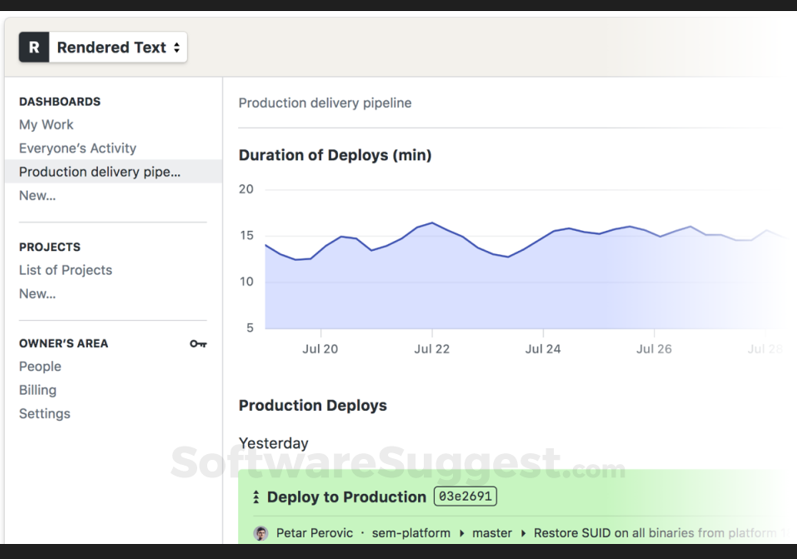
Semaphore hat sich als leistungsstarke CI/CD-Plattform etabliert und ist bekannt dafür, einige der schnellsten Automatisierungspipelines der Branche anzubieten. Geschwindigkeit ist, wie wir wissen, entscheidend in der Softwareentwicklung – und genau hier glänzt Semaphore, wodurch es die optimale Wahl für alle ist, die auf extrem schnelle CI/CD-Pipelines Wert legen.
Warum ich Semaphore gewählt habe: Im weiten Feld der CI/CD-Tools ist die Auswahl des richtigen Werkzeugs alles andere als einfach. Während meiner Bewertungen habe ich Semaphore als außergewöhnlich eingestuft, insbesondere wegen seiner unerreichten Pipeline-Geschwindigkeit. Dieser deutliche Geschwindigkeitsvorteil war ausschlaggebend für meine Wahl und macht Semaphore zur offensichtlichen Empfehlung für Teams, bei denen Geschwindigkeit im Entwicklungszyklus an erster Stelle steht.
Herausragende Funktionen & Integrationen:
Semaphore ist stolz darauf, komplexe Aufgaben in der Softwareentwicklung zu meistern, ohne dabei Geschwindigkeit einzubüßen. Die Plattform ist nicht nur lokal einsetzbar, sondern bietet auch Cloud-Lösungen, um unterschiedlichen Projektanforderungen gerecht zu werden. Durch die nahtlose Integration unterstützt Semaphore eine Vielzahl an Open-Source-Projekten und sorgt dafür, dass Ihr Quellcode stets mit den beliebtesten Repositories im Einklang bleibt.
Pros and Cons
Pros:
- Blitzschnelle CI/CD-Pipelines – ideal für schnelle Deployments
- Exzellenter Support für lokale & Cloud-Umgebungen
- Umfangreiche Integrationen für Open-Source-Projekte
Cons:
- Könnte für kleinere Projekte oder Teams überdimensioniert sein
- Oberfläche kann für Einsteiger abschreckend sein
- Höherer Preis im Vergleich zu einigen anderen CI/CD-Tools

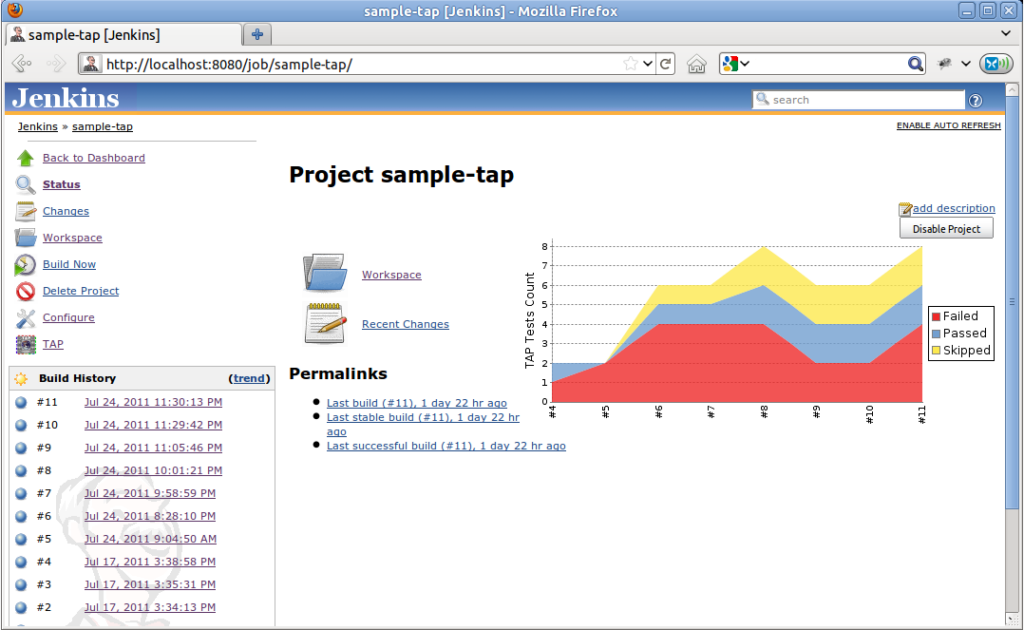
Jenkins ist ein Open-Source-Automatisierungsserver, der die technischen Aspekte von Continuous Integration und Continuous Delivery (CI/CD) erleichtert. Er ermöglicht es Entwicklern und Teams, ihre Softwareprojekte zuverlässig zu bauen, zu testen und zu deployen. Die schiere Menge und Vielfalt der verfügbaren Plugins für Jenkins unterstreicht seine Anpassungsfähigkeit und seine Rolle als bevorzugtes Werkzeug für alle, die Erweiterbarkeit priorisieren.
Warum ich Jenkins ausgewählt habe: Nach einem ausführlichen Vergleich verschiedener CI/CD-Tools habe ich mich vor allem wegen des umfassenden Plugin-Ökosystems für Jenkins entschieden. Dieser Aspekt hebt das Tool wirklich hervor und bietet vielseitige Möglichkeiten, um auf spezielle Projektanforderungen einzugehen.
Meiner Meinung nach ist Jenkins unübertroffen, wenn es um die Verfügbarkeit von Plugins geht. Damit ist es am besten geeignet für Anwender, die eine große Bandbreite an Integrationen und Anpassungen benötigen.
Herausragende Funktionen & Integrationen:
Jenkins ist berühmt für seine Flexibilität und ermöglicht es Teammitgliedern, Tests, Build-Prozesse und Deployments je nach Projektanforderung durchzuführen. Die riesige Bandbreite an Plugins stellt sicher, dass nahezu jedes Tool oder jede Plattform integriert werden kann, was es ideal für vielfältige Softwareprojekte macht. Die Integrationsmöglichkeiten erstrecken sich über zahlreiche SaaS-Produkte, Datenbanken, Build-Tools und Versionskontrollsysteme.
Pros and Cons
Pros:
- Umfassendes Plugin-Ökosystem für verschiedenste Anforderungen.
- Geeignet für eine Vielzahl von Softwareprojekten durch seine Flexibilität.
- Kann für große Teams und Projekte skaliert werden.
Cons:
- Die Ersteinrichtung kann komplex sein, besonders für Einsteiger
- Die Benutzeroberfläche kann im Vergleich zu neueren CI/CD-Tools veraltet wirken
- Wartungsaufwand kann mit zu vielen Plugins steigen
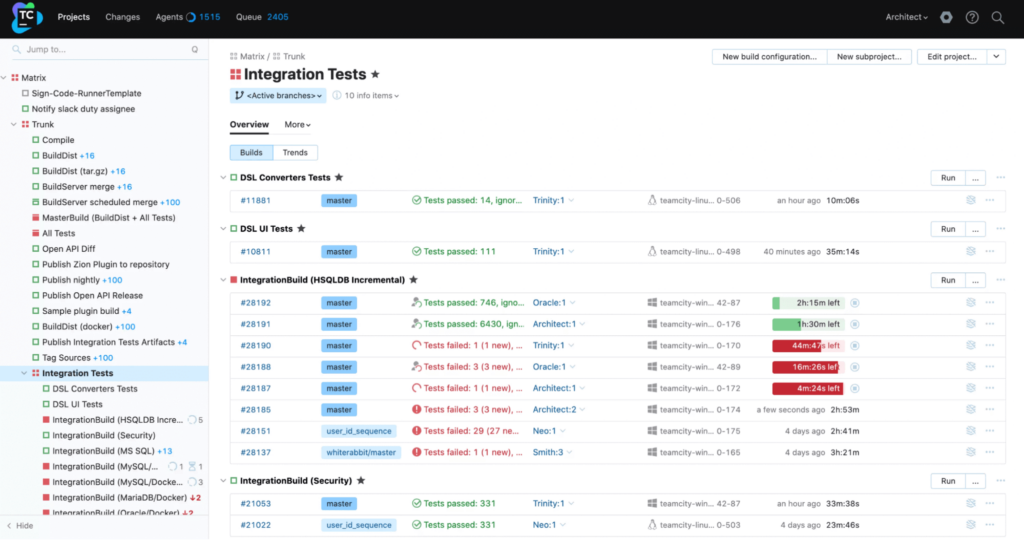
TeamCity ist eine leistungsstarke CI/CD-Plattform, die von JetBrains entwickelt wurde und speziell für umfassende Anpassungsoptionen in der Softwareentwicklungsbranche konzipiert ist. Die Flexibilität, die TeamCity insbesondere bei der Personalisierung des Bereitstellungsprozesses bietet, verschafft dem Tool zweifellos einen Vorteil für alle, die größten Wert auf eine tiefgehende Individualisierung legen.
Warum ich TeamCity gewählt habe: Bei der Auswahl der richtigen CI/CD-Tools stand TeamCity immer wieder im Mittelpunkt meiner Vergleiche. Ich habe es vor allem wegen seiner beispiellosen Anpassungstiefe gewählt. Aus meiner Sicht ist seine einzigartige Fähigkeit, sich an verschiedenste Eigenheiten der Softwarebereitstellung anzupassen, für Teams und Einzelpersonen, die einen maßgeschneiderten Ansatz für kontinuierliche Bereitstellung suchen, unverzichtbar.
Herausragende Funktionen & Integrationen:
TeamCity bietet eine agile Umgebung, die sich für iterative Softwareentwicklung ideal eignet. Seine fortschrittlichen Debugging-Tools sind besonders hervorzuheben und helfen Entwicklern dabei, Probleme schneller zu identifizieren und zu beheben. Für alle, die auf dem Apple-Ökosystem entwickeln, bietet TeamCity eine zuverlässige iOS-Integration und sorgt damit für einen reibungsloseren Bereitstellungsprozess auf Apple-Geräten.
Pros and Cons
Pros:
- Außergewöhnliche Anpassungsoptionen für maßgeschneiderte Deployments
- Agile-orientierte Funktionen für iterative Entwicklung
- Umfassende Debugging-Tools für eine schnelle Problemlösung
Cons:
- Höhere Lernkurve für Einsteiger im Bereich CI/CD-Tools
- Kann insbesondere bei größeren Projekten ressourcenintensiv sein
- Manche Integrationen erfordern eventuell zusätzliche Plugins oder Konfigurationen.

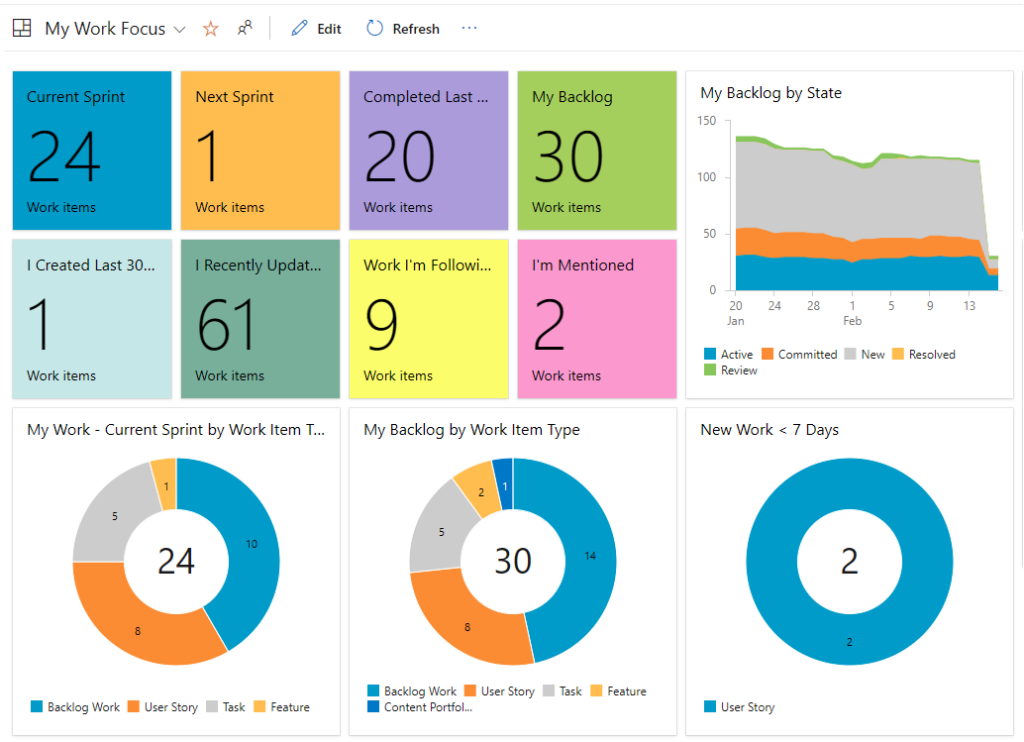
Azure Pipelines ist ein CI/CD-Dienst, der sowohl in öffentlichen als auch in privaten Cloud-Konfigurationen umfassend funktioniert und skalierbare sowie zuverlässige Pipelines bietet. Ursprünglich von Microsoft entwickelt, verfügt er naturgemäß über eine besonders enge Integration mit Microsoft-basierten Projekten und Lösungen.
Warum ich Azure Pipelines ausgewählt habe: Nach dem Vergleich mehrerer Tools habe ich Azure Pipelines aufgrund seiner robusten Leistung und des dedizierten Supports für Microsoft-Plattformen gewählt. Es ist ein Tool, das zweifellos besonders glänzt, wenn es im Zusammenspiel mit Microsoft-Projekten eingesetzt wird und sich dadurch im breiten Angebot an CI/CD-Optionen hervorhebt.
Meiner Meinung nach ist es die erste Wahl für alle, die tief im Microsoft-Ökosystem engagiert sind.
Herausragende Funktionen & Integrationen:
Azure Pipelines ist bekannt für seine umfangreichen Funktionen für automatisierte Tests, die gewährleisten, dass Anwendungen zuverlässig und effizient laufen. Eine weitere bemerkenswerte Eigenschaft sind die hervorragenden Caching-Mechanismen, die die Build-Zeiten deutlich optimieren. Was die Integrationen betrifft, ist die Verknüpfung mit Visual Studio und anderen Microsoft-Lösungen umfassend, wodurch Entwicklungsteams noch besser zusammenarbeiten können.
Pros and Cons
Pros:
- Tiefgehende Integration mit Microsoft-Tools, insbesondere Visual Studio.
- Leistungsstarke automatisierte Testfunktionen erhöhen die Zuverlässigkeit.
- Effiziente Caching-Mechanismen verkürzen die Build-Zeiten.
Cons:
- Könnte für Nutzer, die nicht mit dem Microsoft-Ökosystem vertraut sind, weniger intuitiv sein
- Preisgestaltung kann für kleine Entwicklungsteams hoch sein
- Eingeschränkte Flexibilität im Vergleich zu einigen Open-Source-Alternativen

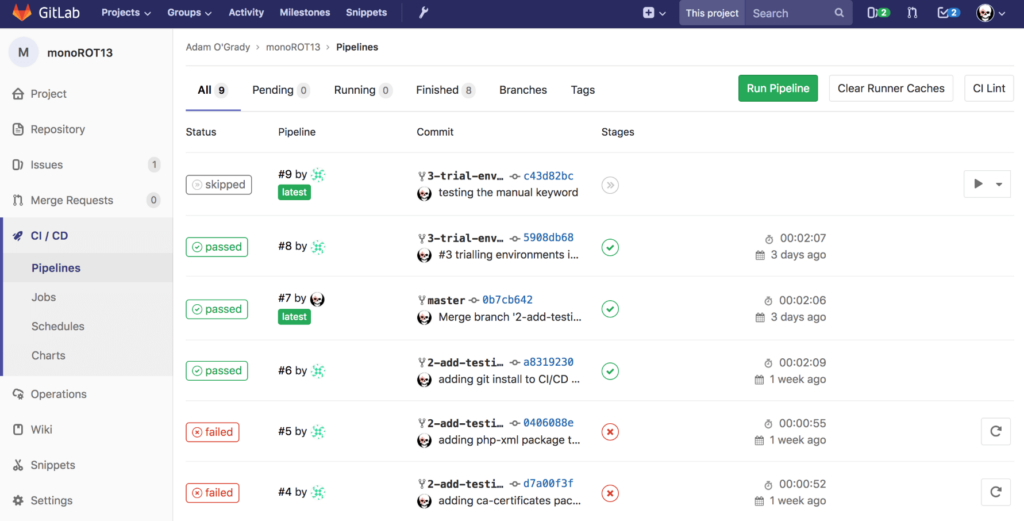
GitLab bietet eine vollständige DevOps-Plattform, um jede Phase des Softwareentwicklungslebenszyklus zu verwalten. Eine seiner Stärken ist die enge Integration von Versionskontrolle und CI/CD, wodurch Entwickler den Prozess von neuem Code bis zur Bereitstellung auf einer einheitlichen Plattform überwachen können.
Warum ich mich für GitLab entschieden habe: Beim Vergleich verschiedener Tools fiel mir GitLab durch die umfassende Integration der CI/CD-Pipelines direkt in die Versionsverwaltung auf. Aufgrund seiner Robustheit und der positiven Meinung vieler Entwickler bietet GitLab einen einzigartigen Vorteil, indem es zwei entscheidende Aspekte der Softwareentwicklung vereint.
Ich habe es als 'am besten für...' bestimmt, weil die Kombination aus CI/CD und Versionsverwaltung die Komplexität verringert und einen reibungslosen Übergang vom Schreiben neuen Codes bis zur Bereitstellung gewährleistet.
Herausragende Funktionen & Integrationen:
Zu den bemerkenswertesten Funktionen von GitLab zählt das integrierte CI/CD, das die Nutzung von Drittanbieterlösungen überflüssig macht. Die Plattform unterstützt Docker-Container und erleichtert so Test- und Bereitstellungsprozesse. Zwar unterstützt GitLab in erster Linie Git, es integriert sich jedoch auch mit Tools wie Buildbot und Systemen, die Mercurial verwenden, und bietet Entwicklern damit vielseitige Möglichkeiten.
Pros and Cons
Pros:
- Integriertes CI/CD und Versionsverwaltung reduziert Kontextwechsel.
- Unterstützung von Docker-Containern verbessert Bereitstellungs-Workflows.
- Integration mit verschiedenen Tools, darunter Buildbot und Systeme mit Mercurial.
Cons:
- Die Vielzahl an Funktionen kann für neue Nutzer überwältigend sein
- Die Performance kann bei sehr großen Repositories gelegentlich nachlassen
- CI-Runner benötigen bei Selbst-Hosting ggf. regelmäßige Wartung
Strider
Am besten geeignet für Open-Source-Enthusiasten mit hohem Erweiterungsbedarf
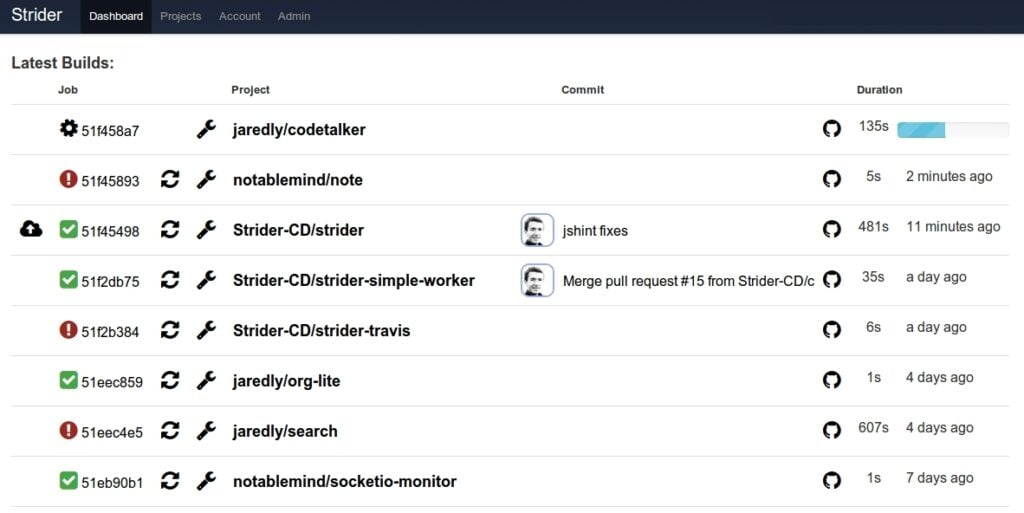
Strider ist eine leistungsstarke Open-Source-Plattform für Continuous Integration und Deployment, die es Entwicklern ermöglicht, ihre Projekte mühelos mit einem starken Fokus auf Erweiterbarkeit zu verwalten. Für diejenigen, die tief in der Open-Source-Welt verwurzelt sind, glänzt Strider durch seine Anpassungsfähigkeit und verdient sich daher den Titel als erste Wahl für Enthusiasten erweiterbarer Open-Source-Lösungen.
Warum ich Strider gewählt habe: Während meiner Erkundung von CI/CD-Tools wurde Strider zu einer herausragenden Wahl. Seine Open-Source-Natur kombiniert mit einem auf Erweiterbarkeit ausgerichteten Design war in meinem Vergleich verschiedener Tools unerreicht. Ich kam zu dem Schluss, dass Strider genau richtig ist für alle, die Open-Source-Plattformen schätzen und uneingeschränkte Anpassung wünschen.
Gerade diese inhärente Anpassungsfähigkeit sichert Strider seinen Platz als beste Lösung für Open-Source-Enthusiasten.
Herausragende Funktionen & Integrationen:
Strider bietet eine leistungsfähige API, die Entwicklern umfangreiche Kontrolle über ihre Pipelines gibt. Es sorgt für exzellentes Management von Abhängigkeiten und stellt sicher, dass Projekte schlank bleiben und mögliche Integrationsprobleme vermieden werden. Zu den Integrationen gehören Verbindungen zu Plattformen wie 'buddy' und Tools für Echtzeit-Benachrichtigungen, um Teams stets auf dem Laufenden zu halten.
Pros and Cons
Pros:
- Umfangreiche API für mehr Kontrolle und Anpassung
- Ausgezeichnetes Management von Abhängigkeiten
- Echtzeit-Benachrichtigungen halten den Workflow informiert
Cons:
- Könnte für Einsteiger etwas komplex sein
- Abhängigkeit von Drittanbieter-Plugins für einige erweiterte Funktionen
- Begrenzte Integrationen direkt nach der Installation im Vergleich zu kommerziellen Tools

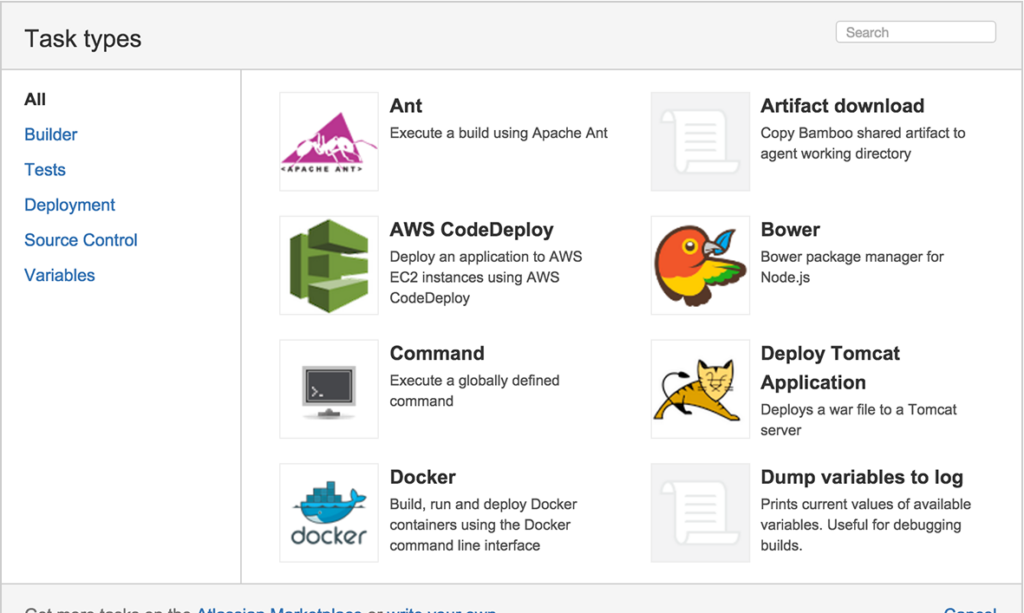
Atlassian Bamboo ist ein leistungsstarkes CI/CD-Tool, das darauf ausgelegt ist, den Build- und Deployment-Prozess zu erleichtern und zu automatisieren. Seine besondere Stärke liegt in der tiefen Integration mit anderen Atlassian-Produkten und bietet somit ein nahtloses Erlebnis für alle, die bereits die Atlassian-Tool-Suite nutzen.
Warum ich Atlassian Bamboo ausgewählt habe: Während meiner Auswahl verschiedener CI/CD-Tools hat Atlassian Bamboo einen klaren Eindruck hinterlassen. Ich habe das Tool in erster Linie wegen seiner unvergleichlichen Integrationsmöglichkeiten mit anderen Atlassian-Produkten gewählt, da es ein einheitliches Benutzererlebnis schafft.
Dieses Tool eignet sich am besten für Teams, die das Maximum aus ihrer Investition in die Atlassian-Tool-Suite herausholen möchten und eine eng integrierte CI/CD-Lösung benötigen.
Herausragende Funktionen & Integrationen:
Atlassian Bamboo besticht durch eine schlanke Build- und Deployment-Pipeline, die sowohl für Open-Source-CI-Projekte als auch für proprietäre Anwendungen geeignet ist. Die Automatisierung von Pull Requests stellt sicher, dass der Code vor dem Mergen getestet wird. Darüber hinaus bedeutet die umfassende Integration mit Tools wie Jira und Bitbucket, dass Teams Aufgaben, Quellcode und Deployments unter einem Dach verwalten können.
Pros and Cons
Pros:
- Umfassende Integration mit Atlassian-Tools verbessert den gesamten Workflow.
- Effektive Pull-Request-Automatisierung ermöglicht frühzeitiges Testen des Codes.
- Bietet eine selbst gehostete Lösung, die mehr Kontrolle über die Umgebung ermöglicht.
Cons:
- Für Teams, die noch nicht in das Atlassian-Ökosystem investiert haben, ist es möglicherweise nicht die erste Wahl.
- Die Einarbeitung für Nutzer, die neu in der Atlassian-Suite sind, kann eine Herausforderung darstellen.
- Einige Open-Source-CI-Alternativen bieten möglicherweise flexiblere Konfigurationsmöglichkeiten.

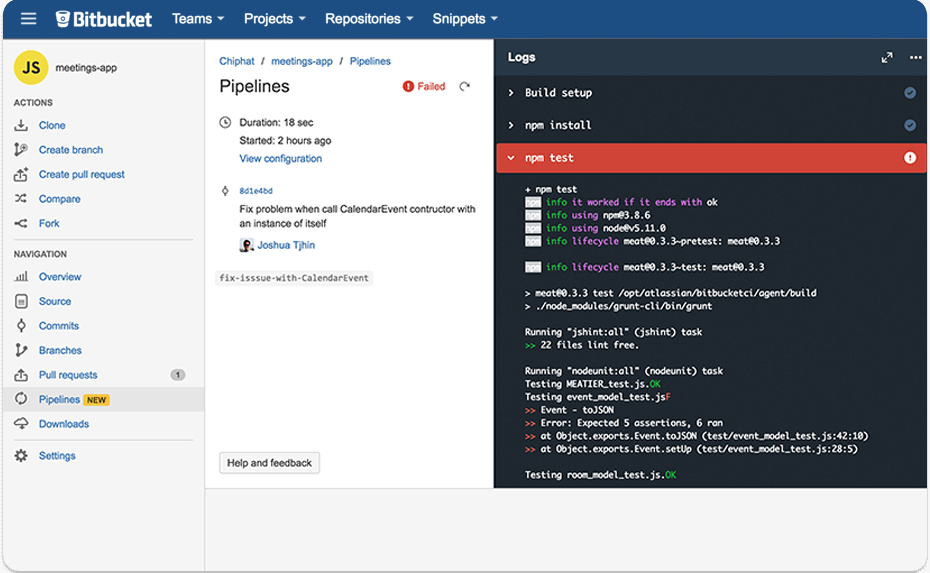
Bitbucket Pipelines ist ein integrierter CI/CD-Dienst, der direkt in Bitbucket eingebaut ist. Er unterstützt Entwickler dabei, ihren Code direkt aus dem Bitbucket-Repository zu bauen, zu testen und bereitzustellen. Aufgrund seiner Integration mit Bitbucket-Repositories ist es eine optimale Wahl für Teams, die stark im Bitbucket-Ökosystem engagiert sind.
Warum ich Bitbucket Pipelines gewählt habe: Nach dem Vergleich verschiedener CI/CD-Tools habe ich mich vor allem wegen der nativen Integration in Bitbucket-Code-Repositories für Bitbucket Pipelines entschieden. Sein Alleinstellungsmerkmal ist die spezifische Kompatibilität mit Bitbucket, was Drittanbieter-Integrationen überflüssig macht.
Meiner Meinung nach ist es das passendste Tool für alle, die die Integration mit Bitbucket-Repositories priorisieren.
Herausragende Funktionen & Integrationen:
Bitbucket Pipelines unterstützt die parallele Ausführung, sodass mehrere Aufgaben oder Test-Suiten gleichzeitig laufen können, was den Build-Prozess beschleunigt. Als Open-Source-Tool bietet es Transparenz und die Möglichkeit zur Individualisierung. Die reibungslose Integration mit einer Vielzahl von Anbietern stellt sicher, dass Teams ihre bevorzugten Werkzeuge problemlos verknüpfen können.
Pros and Cons
Pros:
- Direkte Integration mit Bitbucket-Repositories.
- Parallele Ausführung beschleunigt Builds.
- Open-Source-Natur bietet Transparenz und Individualisierungspotenzial.
Cons:
- Auf Bitbucket beschränkt, was nicht für alle Teams geeignet ist
- Erfordert Verständnis für die spezifische Bitbucket Pipelines-Syntax
- Fehlen einiger fortgeschrittener Funktionen, die bei eigenständigen CI/CD-Tools verfügbar sind

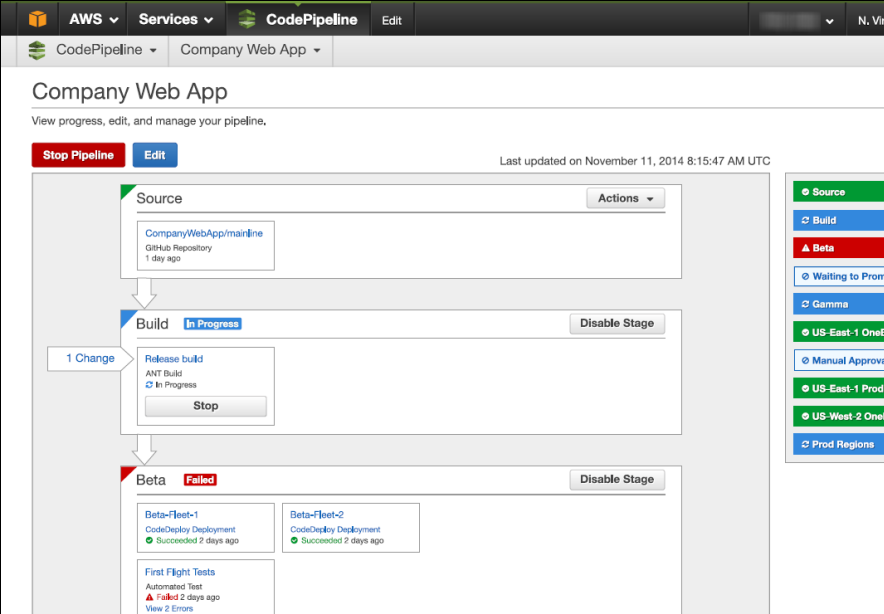
AWS CodePipeline ist ein Continuous Integration- und Continuous Delivery (CI/CD)-Service von Amazon Web Services (AWS). Er wurde speziell entwickelt, um den Prozess der Automatisierung der Bereitstellung von Anwendungen innerhalb des AWS-Ökosystems zu optimieren. Aufgrund seines cloud-nativen Designs, das auf die AWS-Dienste zugeschnitten ist, ist er die natürliche Wahl für cloud-native Apps auf AWS.
Warum ich mich für AWS CodePipeline entschieden habe: Bei der Auswahl der Tools für diese Liste fiel AWS CodePipeline durch seine tiefe Integration in die AWS-Umgebung besonders auf. Meiner Einschätzung nach hebt sich dieses Tool insbesondere durch die Möglichkeit hervor, eine Wertstromkarte des Anwendungslebenszyklus zu erstellen und zu visualisieren, was andere CI/CD-Tools nicht in diesem Maße bieten.
Die cloud-native Struktur des Dienstes und die umfangreiche AWS-Kompatibilität machen ihn zur ersten Wahl für Anwendungen, die eng an das AWS-Ökosystem gebunden sind.
Herausragende Funktionen & Integrationen:
AWS CodePipeline überzeugt durch Funktionen wie die Möglichkeit, verschiedene Phasen des Anwendungslebenszyklus zu modellieren und zu visualisieren. Besonders vorteilhaft ist die Fähigkeit, Builds auf einer virtuellen Maschine oder direkt in einem Container auszuführen. Im Hinblick auf Integrationen bietet es Anbindungen an weitere AWS-Dienste wie AWS Lambda, Amazon EC2 und AWS Elastic Beanstalk, was den Nutzen für AWS-Anwender zusätzlich steigert.
Pros and Cons
Pros:
- Tiefe Integration in das AWS-Ökosystem.
- Möglichkeit, eine Wertstromkarte zu erstellen und zu visualisieren.
- Flexibilität bei der Wahl der Build-Umgebung – egal, ob virtuelle Maschinen oder Container.
Cons:
- Lernkurve für Personen ohne Erfahrung mit AWS-Diensten
- Kann bei komplexen Workflows durch zusätzliche AWS-Dienstgebühren teuer werden
- Begrenzter Nutzen außerhalb der AWS-Umgebung

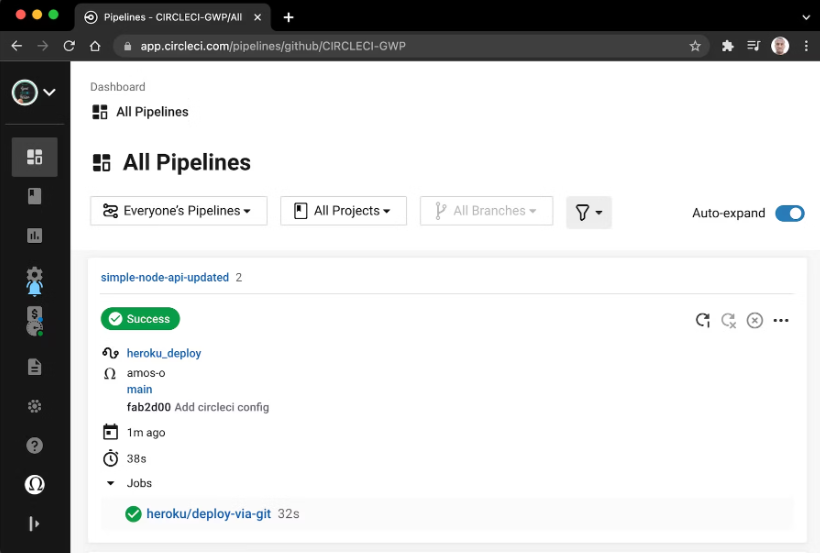
CircleCI ist ein Tool für Continuous Integration und Continuous Deployment, das Entwicklungsteams ermöglicht, ihre Pipeline vom Code-Commit bis zur Bereitstellung zu automatisieren. Seine Fähigkeit, gleichzeitig für mehrere Plattformen zu bauen, hebt es hervor und macht es besonders geeignet für Projekte, die verschiedene Umgebungen ansprechen.
Warum ich CircleCI ausgewählt habe: Nach einer gründlichen Bewertung und dem Vergleich verschiedener CI/CD-Tools stellte ich fest, dass CircleCI Builds für mehrere Plattformen am besten bewältigen kann. Was es unterscheidet, ist die angeborene Fähigkeit, Code plattformübergreifend ohne großen Aufwand zu kompilieren. Aus meinen Beobachtungen und Vergleichen geht es als optimale Wahl für Projekte hervor, die Builds für verschiedene Plattformen bereitstellen müssen.
Hervorstechende Funktionen & Integrationen:
CircleCI überzeugt mit einem einfachen Installationsprozess, der das Team nicht belastet und die Anfangsphase erheblich beschleunigt. Zudem ist der Integrationsprozess unkompliziert, sodass Teams ihre Repositories verbinden und Build-Prozesse ohne große Hürden einrichten können. Bedeutende Integrationen umfassen GitHub, Bitbucket und Slack, was einen nahtlosen und synchronisierten Entwicklungsworkflow gewährleistet.
Pros and Cons
Pros:
- Leistungsstarke plattformübergreifende Build-Funktionen.
- Vereinfachter Integrationsprozess mit wichtigen Repositories.
- Einfache Installation beschleunigt die Ersteinrichtung.
Cons:
- Kann für CI/CD-Neulinge eine gewisse Lernkurve erfordern
- Bestimmte fortgeschrittene Konfigurationen können komplex erscheinen
- Nicht immer die kostengünstigste Lösung für sehr kleine Teams
Weitere Continuous Integration Tools
Hier sind noch einige weitere Continuous Integration Tools, die es nicht auf meine Shortlist geschafft haben, aber dennoch einen Blick wert sind:


Auswahlkriterien für Continuous Integration Tools
Bei der Auswahl der besten Continuous Integration Tools für diese Liste habe ich übliche Bedürfnisse und Problempunkte von Käufern berücksichtigt, wie etwa die Integrationskomplexität und die Notwendigkeit automatisierter Tests. Zusätzlich nutzte ich folgende Kriterien für eine strukturierte und faire Bewertung:
Kernfunktionen (25% der Gesamtbewertung)
Um in diese Liste aufgenommen zu werden, musste jede Lösung folgende Anwendungsfälle abdecken:
- Automatisierung von Build-Prozessen
- Durchführen automatisierter Tests
- Integration mit Versionskontrollsystemen
- Bereitstellung von Build-Logs und Berichten
- Unterstützung mehrerer Programmiersprachen
Zusätzliche herausragende Features (25% der Gesamtbewertung)
Um die Auswahl weiter einzugrenzen, habe ich auch auf besondere Funktionen geachtet, wie:
- Fähigkeit zur parallelen Ausführung
- Anpassbare Build-Pipelines
- Integration mit Container-Technologien
- Unterstützung für Multi-Cloud-Umgebungen
- Erweiterte Sicherheitsfunktionen
Benutzerfreundlichkeit (10% der Gesamtbewertung)
Um die Benutzerfreundlichkeit jedes Systems einschätzen zu können, habe ich Folgendes berücksichtigt:
- Intuitives Oberflächendesign
- Klare Navigationspfade
- Einfachheit bei Einrichtung und Konfiguration
- Verfügbarkeit von Benutzerhandbüchern und Hilfedokumentationen
- Reaktionsgeschwindigkeit des Systems
Onboarding (10% der Gesamtpunktzahl)
Um die Onboarding-Erfahrung jeder Plattform zu bewerten, habe ich Folgendes berücksichtigt:
- Verfügbarkeit von Schulungsvideos
- Interaktive Produktführungen
- Zugriff auf Vorlagen für den schnellen Einstieg
- Reaktionsstarke Chatbots für den Support
- Webinare für vertieftes Lernen
Kundensupport (10% der Gesamtpunktzahl)
Um den Kundensupport jedes Softwareanbieters zu bewerten, habe ich Folgendes berücksichtigt:
- Verfügbarkeit eines 24/7 Supports
- Mehrere Supportkanäle wie Chat und E-Mail
- Reaktionszeit auf Anfragen
- Zugriff auf einen dedizierten Account Manager
- Community-Foren für Unterstützung durch andere Nutzer
Preis-Leistungs-Verhältnis (10% der Gesamtpunktzahl)
Um das Preis-Leistungs-Verhältnis jeder Plattform zu bewerten, habe ich Folgendes berücksichtigt:
- Konkurrenzfähige Preismodelle
- Verfügbarkeit von kostenlosen Testversionen
- Flexibilität bei den Preismodellen
- Enthaltene Funktionen im Basispreis
- Rabatte für Jahresabonnements
Kundenbewertungen (10% der Gesamtpunktzahl)
Um einen Eindruck von der Kundenzufriedenheit zu gewinnen, habe ich beim Lesen von Kundenbewertungen Folgendes berücksichtigt:
- Allgemeine Nutzerzufriedenheitsbewertungen
- Feedback zur Zuverlässigkeit der Software
- Kommentare zur Benutzerfreundlichkeit
- Meinungen zur Qualität des Kundensupports
- Erkenntnisse zur Effektivität und Nützlichkeit von Funktionen
Wie wählt man Continuous Integration Tools aus?
Es ist leicht, sich in langen Funktionslisten und komplexen Preisstrukturen zu verlieren. Um den Fokus während Ihres individuellen Auswahlprozesses zu behalten, finden Sie hier eine Checkliste mit Faktoren, die Sie berücksichtigen sollten:
| Faktor | Worauf achten? |
|---|---|
| Skalierbarkeit | Kann das Tool mit Ihren Projekten wachsen? Berücksichtigen Sie die künftige Teamgröße und Projektkomplexität. Unterstützt es große Builds oder viele Nutzer ohne Leistungseinbußen? |
| Integrationen | Funktioniert es mit Ihren bestehenden Tools? Prüfen Sie die Kompatibilität mit Versionsverwaltung, Projektmanagement-Tools und genutzten Cloud-Diensten. |
| Anpassbarkeit | Lässt sich das Tool an Ihre Workflows anpassen? Achten Sie auf Möglichkeiten, Build-Prozesse, Benachrichtigungen und Berichte individuell auf Ihr Team zuzuschneiden. |
| Benutzerfreundlichkeit | Ist das Tool einfach zu bedienen? Bewerten Sie die Lernkurve und ob Teammitglieder damit effektiv arbeiten können, ohne umfangreiche Schulungen zu benötigen. |
| Implementierung und Onboarding | Wie schnell kann Ihr Team damit starten? Prüfen Sie die Einfachheit der Einrichtung, verfügbare Schulungsressourcen und Unterstützung während der Einführungsphase. |
| Kosten | Liegt es im Budget? Vergleichen Sie Preismodelle einschließlich Abogebühren und bedenken Sie versteckte Kosten wie zusätzliche Nutzerlizenzen oder Supportgebühren. |
| Sicherheitsmaßnahmen | Entspricht es Ihren Sicherheitsanforderungen? Überprüfen Sie den Datenschutz, die Einhaltung branchenüblicher Standards und den Umgang mit sensiblen Informationen. |
| Verfügbarkeit von Support | Auf welchen Support können Sie zählen? Berücksichtigen Sie die Erreichbarkeit des Kundendienstes, Antwortzeiten und die Qualität der vom Anbieter bereitgestellten Hilfsmaterialien. |
Was sind Continuous Integration Tools?
Continuous Integration Tools sind Softwarelösungen, die den Prozess der Integration von Code-Änderungen mehrerer Entwickler in ein gemeinsames Projekt automatisieren. Diese Tools werden in der Regel von Softwareentwicklern und DevOps-Teams eingesetzt, um Integrationsprobleme zu reduzieren und die Zusammenarbeit zu verbessern. Automatisierte Tests, Build-Automatisierung und die Integration mit Versionskontrollsystemen helfen Teams, Fehler frühzeitig zu erkennen und die Codequalität sicherzustellen. Insgesamt sparen diese Werkzeuge Zeit und erhöhen die Effizienz von Softwareentwicklungsprozessen.
Funktionen
Bei der Auswahl von Continuous Integration Tools sollten Sie auf folgende Schlüsselfunktionen achten:
- Automatisiertes Testen: Führt Tests automatisch auf neuem Code aus, um Fehler frühzeitig zu erkennen und die Qualität zu sichern.
- Build-Automatisierung: Übersetzt Code in ausführbare Programme, spart Zeit und reduziert manuellen Aufwand.
- Versionskontrollintegration: Funktioniert nahtlos mit Systemen wie Git, um Codeänderungen und Verlauf zu verwalten.
- Anpassbare Pipelines: Ermöglichen es Teams, Build- und Bereitstellungsprozesse individuell an ihre Arbeitsabläufe anzupassen.
- Parallele Ausführung: Führt mehrere Tests oder Builds gleichzeitig aus, um den Integrationsprozess zu beschleunigen.
- Container-Unterstützung: Integriert sich mit Container-Technologien wie Docker, um konsistente Umgebungen zu gewährleisten.
- Sicherheitsfunktionen: Bietet Maßnahmen zum Schutz von Code und Daten und sorgt für die Einhaltung von Branchenstandards.
- Skalierbarkeit: Unterstützt das Wachstum von Teamgröße und Projektkomplexität ohne Leistungseinbußen.
- Benutzerfreundliche Oberfläche: Bietet ein intuitives Design, das die Navigation und Nutzung für Teammitglieder erleichtert.
- Umfassende Berichte: Stellt detaillierte Protokolle und Berichte zur Verfügung, damit Teams Build-Ergebnisse analysieren und Probleme nachverfolgen können.
Vorteile
Die Implementierung von Continuous-Integration-Tools bringt zahlreiche Vorteile für Ihr Team und Ihr Unternehmen. Hier sind einige, auf die Sie sich freuen können:
- Frühe Fehlererkennung: Automatisiertes Testen erkennt Fehler schnell und senkt das Risiko von Mängeln in der Produktion.
- Schnellere Entwicklungszyklen: Build-Automatisierung und parallele Ausführung beschleunigen den Integrationsprozess und ermöglichen schnellere Releases.
- Verbesserte Zusammenarbeit: Die Integration von Versionskontrolle hilft Teams, effizienter zusammenzuarbeiten, indem Codeänderungen nahtlos verwaltet werden.
- Konsistente Umgebungen: Container-Unterstützung stellt sicher, dass der Code in unterschiedlichen Umgebungen gleich läuft und minimiert Bereitstellungsprobleme.
- Höhere Codequalität: Regelmäßige Tests und umfassende Berichte helfen, hohe Standards zu halten und Verbesserungsbereiche zu identifizieren.
- Skalierbarkeit: Die Fähigkeit, mit wachsender Teamgröße und zunehmender Projektkomplexität umzugehen, sorgt dafür, dass die Tools mit Ihren Anforderungen wachsen.
- Ressourceneffizienz: Die Automatisierung wiederkehrender Aufgaben gibt Entwicklern Zeit für strategischere Arbeiten und steigert die Produktivität.
Kosten & Preise
Die Auswahl von Continuous-Integration-Tools erfordert ein Verständnis der verschiedenen verfügbaren Preismodelle und Tarife. Die Kosten variieren je nach Ausstattung, Teamgröße, Zusatzfunktionen und mehr. Die folgende Tabelle fasst gängige Pläne, deren Durchschnittspreise und typische Funktionen von Continuous-Integration-Tools zusammen:
Vergleichstabelle für Continuous-Integration-Tool-Pläne
| Plan-Typ | Durchschnittspreis | Übliche Funktionen |
|---|---|---|
| Kostenloser Plan | $0 | Basis-Build-Automatisierung, eingeschränktes Testen und Integration mit Versionskontrolle. |
| Persönlicher Plan | $5-$25/user/month | Mehr Build-Minuten, Zugriff auf zusätzliche Plugins und einfache Berichte. |
| Geschäftsplan | $25-$50/user/month | Erweiterte Berichte, anpassbare Pipelines und bevorzugter Support. |
| Enterprise-Plan | $50-$100/user/month | Unbegrenzte Builds, umfassende Sicherheitsfunktionen und ein dedizierter Account-Manager. |
Häufig gestellte Fragen zu Continuous Integration Tools
Hier finden Sie Antworten auf häufig gestellte Fragen zu Continuous Integration Tools:
Können Sie mit Continuous Integration Tools parallele Tests ausführen?
Ja, viele Continuous Integration Tools unterstützen das Ausführen von parallelen Tests, wodurch verschiedene Tests gleichzeitig in unterschiedlichen Umgebungen laufen können. Diese Funktion beschleunigt den Testprozess und hilft, Fehler schneller zu erkennen, was besonders für Teams mit großen Codebasen wertvoll ist.
Wie gehen Continuous Integration Tools mit Versionskontrolle um?
Continuous Integration Tools integrieren sich mit Versionskontrollsystemen wie Git, um Codeänderungen effizient zu verwalten. Sie stellen sicher, dass jede Änderung am Code dokumentiert wird, sodass Entwickler Änderungen nachverfolgen, bei Bedarf frühere Versionen wiederherstellen und effektiver zusammenarbeiten können.
Was ist der Unterschied zwischen Build und Release bei Continuous Integration?
Bei Continuous Integration bezeichnet ein Build das Kompilieren von Code zu einem ausführbaren Programm, während ein Release das Bereitstellen dieses Builds in einer Produktionsumgebung bedeutet. Manche Tools bieten Funktionen, mit denen sich beide Prozesse effektiv verwalten lassen, um einen reibungslosen Übergang von der Entwicklung in die Produktion zu gewährleisten.
Was sollten Sie in Bezug auf Datenschutz bei CI-Tools beachten?
Beim Einsatz von Continuous Integration Tools sollten Sie darauf achten, wie diese den Datenschutz und die Einhaltung von Branchenstandards handhaben. Stellen Sie sicher, dass das Tool eine sichere Datenspeicherung, Zugriffskontrollen und Verschlüsselung bietet, um Ihren Code und sensible Informationen zu schützen. Überprüfen Sie außerdem immer die Datenschutzrichtlinien und Datenverarbeitungspraktiken des Anbieters.
Wie geht es weiter:
Wenn Sie gerade Continuous Integration Tools recherchieren, verbinden Sie sich mit einem SoftwareSelect-Berater für kostenlose Empfehlungen.
Sie füllen ein Formular aus und führen ein kurzes Gespräch, in dem Ihre spezifischen Anforderungen besprochen werden. Anschließend erhalten Sie eine Auswahlliste an Software, die Sie überprüfen können. Die Berater unterstützen Sie sogar während des gesamten Kaufprozesses, einschließlich Preisverhandlungen.