

Die Verwaltung der Containersicherheit kann überwältigend wirken. Sie müssen Compliance, Datenschutz und die allgegenwärtige Bedrohung durch Sicherheitsverletzungen unter einen Hut bringen. Das ist nicht einfach, und ich verstehe das. Deshalb habe ich die besten Containersicherheitslösungen für Sie getestet und bewertet.
Meiner Erfahrung nach kann das richtige Tool einen erheblichen Unterschied machen. Diese Lösungen helfen dabei, Ihre Infrastruktur zu schützen und Ihnen Sicherheit zu geben. Ich stelle Ihnen meine Favoriten vor und konzentriere mich dabei auf deren einzigartige Vorteile und darauf, wie sie zu den Anforderungen Ihres Teams passen können.
Sie können eine detaillierte, unvoreingenommene Bewertung erwarten, die für Klarheit sorgt. Finden wir das Tool, das Ihre Herausforderungen am besten bewältigt und Ihre Entwicklungsziele unterstützt.
Warum Sie unseren Software-Empfehlungen vertrauen können
6,700+
Reviews
20
Industry experts
16+
Evaluation factors
14
Years
Unser Team testet und bewertet Software seit 2012. Als Tech-Führungskräfte wissen wir selbst, wie schwierig – und wichtig – es ist, die richtige Software auszuwählen.
Für diesen Leitfaden haben wir Tools mithilfe von praktischen Tests und unabhängiger Recherche bewertet und dabei unsere Bewertungskriterien angewendet.
Unsere Bewertungen spiegeln unser menschliches redaktionelles Urteilsvermögen wider, keine Verkaufsstrategie.
Expertenprüfer:
- Paulo Gardini MiguelTech-Direktor
 Tim FisherVP für KI
 Gabriel RosasTech Lead & Software-Architekt
 Christhian GruhnTech Lead & Plattform-Architekt

Vergleichstabelle der Containersicherheitslösungen
Diese Vergleichstabelle fasst die Preisinformationen meiner Auswahl der besten Containersicherheitslösungen zusammen:
| Tool | Best For | Trial Info | Price | ||
|---|---|---|---|---|---|
| 1 | Am besten für die Analyse der Kubernetes-Sicherheitslage und Konformitätsprüfungen geeignet | 30-tägige kostenlose Testversion + kostenlose Demo verfügbar | Preis auf Anfrage | Website | |
| 2 | Am besten zur automatischen Behebung von Container-Schwachstellen geeignet | Kostenloser Tarif verfügbar | Ab $350/Monat | Website | |
| 3 | Am besten für die Analyse von Azure-nativen Container-Angriffspfaden geeignet | 30-tägige kostenlose Testversion | Ab $15/Benutzer/Monat (jährliche Abrechnung) | Website | |
| 4 | Am besten für die Bewertung von Container-Risiken über die gesamte technische Umgebung hinweg | Kostenlose 14-tägige Testversion | Preis auf Anfrage | Website | |
| 5 | Am besten geeignet für das Scannen von Schwachstellen und Compliance-Prüfungen | Kostenlose 7-Tage-Testversion | Preis auf Anfrage | Website | |
| 6 | Am besten geeignet für umfassende cloudnative Sicherheit | 30-tägige kostenlose Testversion | Preis auf Anfrage | Website | |
| 7 | Am besten für die Verhinderung von Laufzeitabweichungen in Containern geeignet | Kostenlose Testversion verfügbar | Preis auf Anfrage | Website | |
| 8 | Am besten für Transparenz und Forensik in Containern geeignet | Kostenlose Demo verfügbar | Preise auf Anfrage | Website | |
| 9 | Am besten für die laufzeitbasierte Priorisierung von Schwachstellen geeignet | Kostenlose Demo verfügbar | Preis auf Anfrage | Website | |
| 10 | Am besten für Kubernetes-native Sicherheit der Software-Lieferkette geeignet | Kostenlose 60-Tage-Testversion | Preis auf Anfrage | Website |


Bewertungen der besten Containersicherheitslösungen
Nachfolgend finden Sie meine ausführlichen Zusammenfassungen der besten Containersicherheitslösungen, die es in meine Auswahlliste geschafft haben. Meine Bewertungen bieten einen detaillierten Einblick in die wichtigsten Funktionen, Vor- & Nachteile, Integrationen und idealen Einsatzmöglichkeiten jedes Tools, damit Sie das für Sie beste Tool finden.
 Am besten für die Analyse der Kubernetes-Sicherheitslage und Konformitätsprüfungen geeignet
- 30-tägige kostenlose Testversion + kostenlose Demo verfügbar
- Preis auf Anfrage
Visit WebsiteCustomer Rating:4.5/5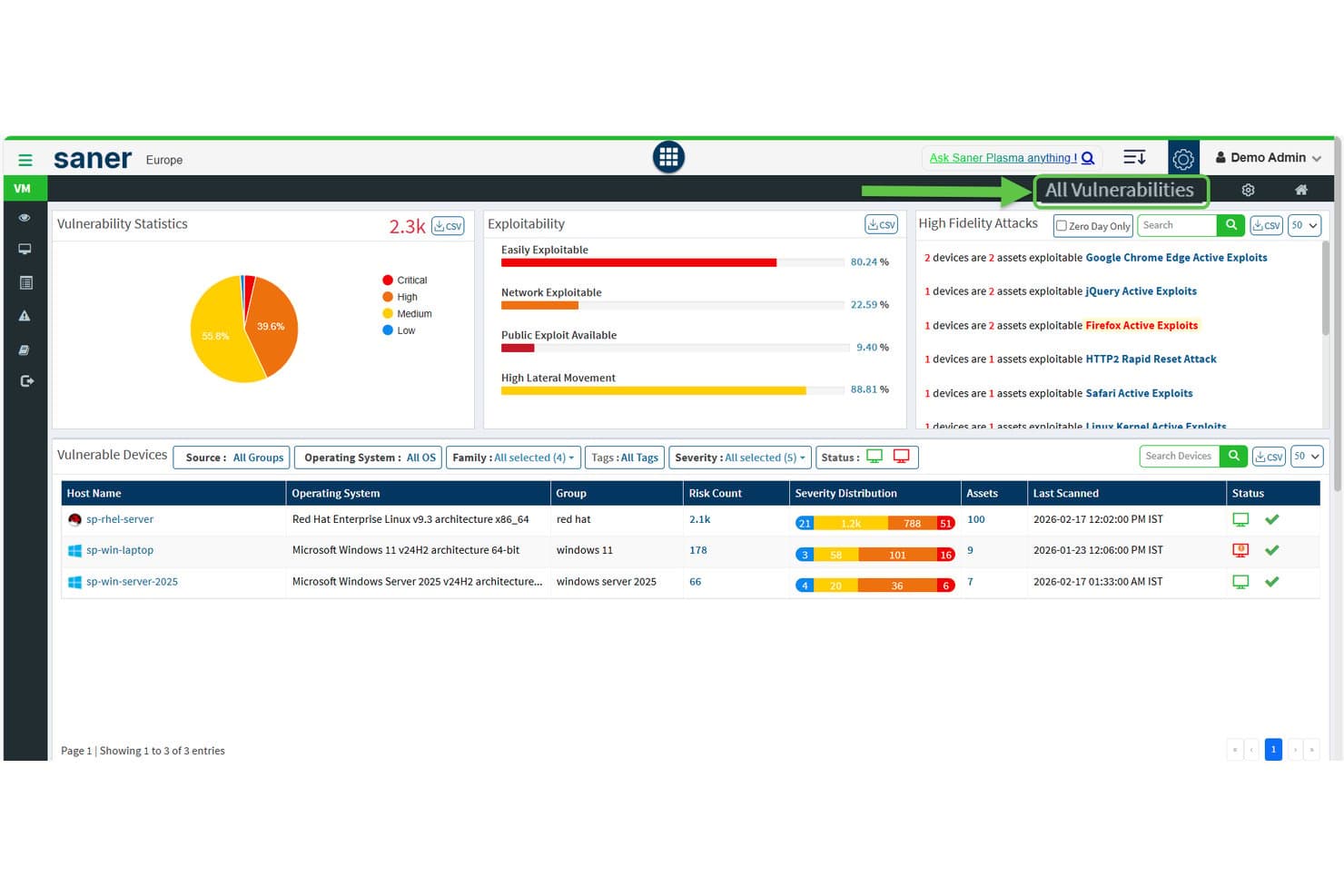
SecPod zeigt Schwachstellenstatistiken und Ausnutzbarkeit für Geräte an. Saner COSP (Plattform für die Sicherheit der Container-Orchestrierung) ist SecPods Kubernetes-Sicherheitsmodul innerhalb seiner umfassenderen CNAPP und deckt die Verwaltung der Cluster-Sicherheitslage, die Analyse der Ressourcenexposition, die Analyse von RBAC-Berechtigungen, Konformitätsprüfungen und die Erkennung von Anomalien in EKS-, AKS-, GKE- und lokalen Clustern ab.
Für wen ist SecPod am besten geeignet?
SecPods Saner COSP eignet sich besonders für Cloud-Sicherheitsarchitekten und Sicherheitsverantwortliche, die Kubernetes-Umgebungen mit mehreren Clustern verwalten und die Konfigurationssicherheitslage, RBAC-Prüfungen und Konformitätsberichte gegenüber der Laufzeit- oder der Image-Prüfung vor der Bereitstellung priorisieren.
Warum ich mich für SecPod (Saner Platform) entschieden habe
Ich habe SecPod als eine der besten Lösungen ausgewählt, weil sein Saner-COSP-Modul bei der Analyse der Kubernetes-Sicherheitslage und bei Konformitätsprüfungen tiefer geht als die meisten von mir bewerteten Tools. Besonders gefällt mir, wie COSP RBAC-Berechtigungen für Benutzer, Dienstkonten und Clusterrollen abbildet und dabei Platzhalterberechtigungen sowie 30 Tage lang nicht verwendete Rollen kennzeichnet. Die Verwaltung der Sicherheitslage prüft Cluster gleichzeitig anhand von CIS, NIST 800-53, PCI DSS und HIPAA, mit benutzerdefinierten Vergleichsmaßstäben pro Namespace.
Wichtige Funktionen von SecPod (Saner Platform)
- Zuordnung der Ressourcenexposition: Ermittelt und verfolgt Namespaces, Pods, Dienste, Ingress, Konfigurationszuordnungen und Geheimnisse und kennzeichnet internetexponierte Ressourcen sowie offene Ports in allen Clustern.
- Bewertung der Hygiene der Container-Orchestrierung: Fasst die Ergebnisse zu Exposition, Konfiguration, Zugriffskontrolle und Sicherheit der Arbeitslasten in einer einzigen Bewertung zusammen, die Sie im Zeitverlauf über Cluster und Namespaces hinweg vergleichen können.
- SSVC-basierte Risikopriorisierung: Verwendet einen CISA-SSVC-Entscheidungsbaum, um Befunde nach Ausnutzbarkeit, Auswirkungen auf den Auftrag und Automatisierungspotenzial zu priorisieren, wobei die Ergebnisse MITRE ATT&CK zugeordnet werden.
- Regeln zur automatisierten Behebung: Ermöglicht die Konfiguration zeitgesteuerter oder auslöserbasierter Korrekturen für erkannte Probleme, einschließlich Unterstützung für ein Zurücksetzen, falls eine angewendete Korrektur rückgängig gemacht werden muss.
Integrationen von SecPod (Saner Platform)
Zu den Integrationen gehören Amazon EKS, Microsoft AKS, Google GKE, selbst verwaltetes Kubernetes, Freshservice, AWS, Azure und Google Cloud. REST- und Berichts-APIs unterstützen benutzerdefinierte Verbindungen, während Okta, Azure AD, Auth0, PingID und PingFederate Identitätsintegrationen bereitstellen.
Pros and Cons
Pros:
- Umfassende Analyse der Kubernetes-Ressourcenexposition und von RBAC
- Konformitätsberichte für mehrere Rahmenwerke mit benutzerdefinierten Vergleichsmaßstäben
- Automatisierte Behebung mit Unterstützung für das Zurücksetzen
Cons:
- Keine Prüfung von Container-Images vor der Bereitstellung
- Keine Bedrohungserkennung in Containern in Echtzeit
Learn more about SecPod (Saner Platform): Am besten zur automatischen Behebung von Container-Schwachstellen geeignet
- Kostenloser Tarif verfügbar
- Ab $350/Monat
Visit WebsiteCustomer Rating:4.7/5
Aikido Security bietet ein einheitliches Dashboard zur Triage und Filterung von Problemen nach Typ, Schweregrad und Scanquelle. Aikido Security ist eine entwicklernative Plattform für Anwendungssicherheit, die das Scannen von Container-Images, SAST, SCA, die Erkennung von Geheimnissen, CSPM und den Laufzeitschutz innerhalb von Anwendungen in Cloud- und CI/CD-Umgebungen kombiniert.
Für wen ist Aikido Security am besten geeignet?
Aikido Security eignet sich besonders für DevSecOps-Teams, die Container-Schwachstellen vor der Bereitstellung erkennen und beheben möchten, ohne zusätzlichen Agentenaufwand oder komplexe Tools einzuführen.
Warum ich Aikido Security ausgewählt habe
Ich habe Aikido Security als eines der besten Tools ausgewählt, weil kein anderes Tool auf dieser Liste die Behebung von Schwachstellen in Basis-Images auf diese Weise handhabt. Statt ein anfälliges Basis-Image lediglich zu markieren, erstellt es drei bis fünf zusammenführungsbereite Dockerfile-Varianten, die jeweils genau angeben, welche CVEs behoben oder eingeführt werden. In Kombination mit der Bibliothek aus über 2.000 gehärteten Basis-Images ohne CVEs kann dein Team ein riskantes Basis-Image ersetzen, ohne mögliche Zielkonflikte abschätzen zu müssen.
Wichtige Funktionen von Aikido Security
- Erreichbarkeitsanalyse: Bestätigt, ob anfällige Funktionen in Abhängigkeiten tatsächlich in deiner Codebasis aufgerufen werden, und reduziert Fehlalarme um bis zu 95 %.
- SBOM-Erstellung: Exportiert Software-Stücklisten in den Formaten CycloneDX, SPDX und CSV mit einer VEX-Ausnutzbarkeitsanalyse, die über eine API für automatisierte Workflows zugänglich ist.
- Steuerung von CI/CD-Pipelines: Blockiert Bereitstellungen auf Grundlage konfigurierbarer Schweregradschwellen für GitHub Actions, GitLab CI/CD, Jenkins, Azure Pipelines, CircleCI und Bitbucket Pipelines.
- Aikido-Intel-Bedrohungsfeed: Ein proprietärer Echtzeit-Feed, der nicht offengelegte Schwachstellen und Malware in Open-Source-Ökosystemen innerhalb von 8 Minuten nach deren Veröffentlichung erkennt.
Integrationen von Aikido Security
Aikido Security bietet native Integrationen mit GitHub, GitLab, Bitbucket, Azure Repos, sechs CI/CD-Plattformen und mehr als 12 Container-Registries, darunter Amazon ECR, Harbor, JFrog und Docker Hub. Außerdem lässt es sich mit AWS, Azure, GCP, Jira und Vanta verbinden und bietet API-Zugriff für benutzerdefinierte Workflows.
Pros and Cons
Pros:
- Erstellt automatisch sichere Dockerfile-Korrekturen für Images
- Reduziert Fehlalarme durch Erreichbarkeitsanalyse
- Bietet über 2.000 Basis-Images ohne CVEs
Cons:
- Keine auf eBPF basierende Erkennung von Container-Laufzeitaktivitäten
- Keine native Kubernetes-Integration für die Zulassungssteuerung
Learn more about Aikido Security: Am besten für die Analyse von Azure-nativen Container-Angriffspfaden geeignet
- 30-tägige kostenlose Testversion
- Ab $15/Benutzer/Monat (jährliche Abrechnung)

Microsoft Defender for Cloud filtert Empfehlungen zu Schwachstellen nach dem Ressourcentyp Container. Microsoft Defender for Cloud ist eine cloudnative Plattform zum Schutz von Anwendungen (CNAPP), die das Scannen von Container-Images, die Erkennung von Bedrohungen zur Laufzeit, die Verwaltung der Kubernetes-Sicherheitslage, die Sicherheit von CI/CD-Pipelines und die Durchsetzung von Richtlinien in Azure-, AWS- und GCP-Umgebungen abdeckt.
Für wen eignet sich Microsoft Defender for Cloud am besten?
Die Lösung eignet sich besonders für Azure-native Sicherheitsteams, die Container-Angriffspfade über Cloud-Ressourcen hinweg nachverfolgen müssen, ohne eine separate CNAPP zusätzlich integrieren zu müssen.
Warum ich Microsoft Defender for Cloud ausgewählt habe
Ich habe Microsoft Defender for Cloud ausgewählt, weil der Cloud-Sicherheitsgraph etwas leistet, das ich in Azure-nativen Umgebungen bisher nicht vergleichbar gesehen habe: Er verfolgt ausnutzbare Angriffspfade von einem öffentlich zugänglichen Container über falsch konfigurierte RBAC-Berechtigungen, laterale Netzwerkpfade und Identitäten mit übermäßigen Berechtigungen bis hin zu kritischen Cloud-Ressourcen. Diese kontextbezogene Priorisierung bedeutet, dass ich mich nicht mit der Anzahl unverarbeiteter CVEs beschäftige, sondern die tatsächlich ausnutzbaren Pfade behebe. Außerdem gefällt mir, dass die gesteuerte Kubernetes-Bereitstellung nicht konforme Images zum Bereitstellungszeitpunkt in AKS, EKS und GKE blockiert und so Erkenntnisse zur Sicherheitslage in durchgesetzte Richtlinien statt nur in Empfehlungen umwandelt.
Wichtige Funktionen von Microsoft Defender for Cloud
- Scannen von Images in mehreren Registries: Die agentenlose Schwachstellenbewertung scannt Container-Images in ACR, ECR, GAR, GCR, Docker Hub und JFrog Artifactory. Tägliche erneute Scans decken dabei Betriebssystem- und Sprachpakete ab.
- MITRE-ATT&CK-zugeordnete Bedrohungserkennung: Mehr als 60 integrierte Analysen, die dem MITRE-ATT&CK-Framework für Container zugeordnet sind, erkennen verdächtige Aktivitäten auf Cluster-, Knoten- und Workload-Ebene.
- Defender-CLI-Integration für CI/CD: Ein Befehlszeilentool integriert das Scannen von Images in mehr als 11 CI/CD-Plattformen, darunter GitHub Actions, Jenkins und GitLab, mit einer auf SARIF basierenden Bestanden/Nicht-bestanden-Steuerung.
- Erreichbarkeitsbasierte SCA über Endor Labs: Eine Integration mit Endor Labs ermittelt, welche Schwachstellen in Container-Abhängigkeiten zur Laufzeit tatsächlich erreichbar sind, und reduziert so das Aufkommen in Behebungswarteschlangen.
Integrationen von Microsoft Defender for Cloud
Microsoft Defender for Cloud bietet native Integrationen mit AKS, Amazon EKS, Google GKE, Azure Container Registry, Amazon ECR, GitHub Actions, Jenkins, GitLab, Microsoft Defender XDR und Microsoft Sentinel. Die Lösung unterstützt 12 dokumentierte CI/CD-Integrationen sowie GitHub Advanced Security, Endor Labs und Azure Arc.
Pros and Cons
Pros:
- Analyse von Angriffspfaden vom Container bis zur Cloud
- Agentenloses Scannen von Images in den wichtigsten Registries
- Gesteuerte Kubernetes-Bereitstellung zur Durchsetzung von Richtlinien
Cons:
- Multi-Cloud-Funktionen hinken der Azure-Parität hinterher
- Von Unternehmenskunden gemeldete Komplexität der Benutzeroberfläche
Learn more about Microsoft Defender for Cloud: 4Am besten für die Bewertung von Container-Risiken über die gesamte technische Umgebung hinweg
Wiz
- Kostenlose 14-tägige Testversion
- Preis auf Anfrage

Wiz organisiert Container-Images nach Lebenszyklus, Schweregrad und Anzahl der Sicherheitslücken. Wiz ist eine cloudnative Plattform zum Schutz von Anwendungen (CNAPP), die agentenloses Image-Scanning, Sicherheitsmanagement der Kubernetes-Konfiguration, Erkennung von Bedrohungen zur Laufzeit, die Integration in CI/CD-Pipelines und die Analyse von Angriffspfaden in einer einzigen einheitlichen Plattform kombiniert.
Für wen ist Wiz am besten geeignet?
Wiz eignet sich besonders für Sicherheitsteams in Unternehmen, die Multi-Cloud-Umgebungen verwalten und eine zentrale Plattform benötigen, um Container-Risiken über die gesamte technische Umgebung hinweg – vom Code bis zur Laufzeit – zu bewerten und zu priorisieren.
Warum ich Wiz ausgewählt habe
Wiz steht auf meiner Auswahlliste, weil keine andere Plattform Container-Risiken über die gesamte technische Umgebung hinweg so korreliert wie der Sicherheitsgraph. Anstatt Tausende unbearbeitete CVEs anzuzeigen, bildet er Beziehungen zwischen Sicherheitslücken, Fehlkonfigurationen, offengelegten Geheimnissen und Netzwerkexpositionen ab, um tatsächlich ausnutzbare Angriffspfade zu identifizieren. Außerdem gefällt mir, dass KSPM EKS, AKS und GKE mit CIS-zertifizierten agentenlosen Bewertungen abdeckt und die laterale Bewegung von Kubernetes-Clustern in die zugrunde liegenden Cloud-Ebenen verfolgt.
Die wichtigsten Funktionen von Wiz
- Wiz-Defend-Sensor zur Laufzeit: Ein auf eBPF basierender Sensor, der Systemaufrufe, Prozessaktivitäten und Netzwerkflüsse in containerisierten Workloads mit weniger als 2 % CPU-Overhead überwacht.
- Wiz-Zulassungscontroller: Ein nativer Kubernetes-Web-Hook, der die Bereitstellung nicht konformer oder nicht signierter Container-Images anhand zentral definierter Sicherheitsrichtlinien blockiert.
- SBOM-Generierung: Agentenlose, kontinuierliche Erstellung einer Software-Stückliste über Registries, CI/CD-Pipelines und Laufzeitumgebungen hinweg mit vollständiger Transparenz auf Paketebene.
- Wiz-Arbeitsabläufe: Auf Python basierende benutzerdefinierte Handlungspläne, die Behebungsmaßnahmen wie das Widerrufen von Cloud-Rollen, das Rotieren von Zugangsdaten und das Blockieren des Zugriffs auf Speicher-Buckets automatisieren.
Integrationen von Wiz
Wiz bietet native Integrationen mit GitHub Actions, Jenkins, GitLab CI/CD, Azure DevOps, Amazon ECR, Google Artifact Registry, Azure Container Registry, Docker Hub, Jira und ServiceNow. Außerdem lässt es sich mit Splunk, Microsoft Sentinel, Cosign und Notary verbinden.
Pros and Cons
Pros:
- Die agentenlose Einrichtung findet Risiken innerhalb weniger Stunden
- Der Sicherheitsgraph identifiziert präzise die tatsächlichen Angriffspfade
- CIS-zertifizierte Sicherheitskonfiguration für alle wichtigen Kubernetes-Plattformen
Cons:
- Die Erkennung von Bedrohungen zur Laufzeit ist vergleichsweise neu
- Einige Arbeitsabläufe für die Ereignissuche wirken umständlich
Learn more about Wiz: Am besten geeignet für das Scannen von Schwachstellen und Compliance-Prüfungen
- Kostenlose 7-Tage-Testversion
- Preis auf Anfrage

Qualys Container Security verfolgt Images, Container und Host-Schwachstellen nach Schweregrad. Qualys Container Security (CS) ist eine Containersicherheitsplattform, die das Scannen von Image-Schwachstellen, die Erkennung von Bedrohungen zur Laufzeit, das Management der Kubernetes-Sicherheitslage und Compliance-Audits über den gesamten Container-Lebenszyklus hinweg abdeckt – von CI/CD-Pipelines bis zur Produktion.
Für wen ist Qualys Container Security (CS) am besten geeignet?
Qualys Container Security eignet sich besonders für Sicherheitsteams in regulierten Branchen, die das Scannen von Schwachstellen, Compliance-Audits und die Erkennung von Bedrohungen zur Laufzeit auf einer einzigen Plattform konsolidieren müssen.
Warum ich Qualys Container Security (CS) ausgewählt habe
Ich habe Qualys Container Security in meine Top-Auswahl aufgenommen, weil die TruRisk-Bewertung über den reinen CVSS-Wert hinausgeht und Signale zur tatsächlichen Ausnutzbarkeit wie CISA-KEV-Daten und Ransomware-Aktivitäten berücksichtigt. Dadurch konzentriert sich Ihr Team auf Schwachstellen, die tatsächlich relevant sind. Der CIS Docker Benchmark v1.7.0 und die Kubernetes-Compliance-Kontrollen werden kontinuierlich durchgesetzt und nicht nur auf Abruf geprüft. Außerdem gefällt mir, dass Exporte von SBOMs in den Formaten SPDX und CycloneDX integriert sind – besonders wichtig, wenn Sie schnell Transparenz über die Software-Lieferkette benötigen.
Wichtige Funktionen von Qualys Container Security (CS)
- Kubernetes-Zulassungscontroller: Fängt Kubernetes-API-Anfragen ab und bewertet organisatorische Sicherheitsrichtlinien, bevor Workloads im Cluster bereitgestellt werden.
- QScanner-CLI: Ein Kommandozeilenwerkzeug ohne Installationsaufwand, das lokale und entfernte Container-Images scannt und Ergebnisse zur Pipeline-Integration in den Formaten JSON, SARIF oder SBOM ausgibt.
- eBPF-basierter Sensor für die Container-Laufzeit: Überwacht Containerprozesse, Dateiaktivitäten, Systemaufrufe und Netzwerkflüsse auf Kernel-Ebene, ohne dass ein Sidecar- oder privilegierter Container erforderlich ist.
- Analyse von Angriffspfaden: Verknüpft Container-Schwachstellen, Fehlkonfigurationen in der Cloud und übermäßige Berechtigungen, um ausnutzbare Pfade über Container, Knoten und Cloud-Ressourcen hinweg zu visualisieren.
Integrationen von Qualys Container Security (CS)
Qualys Container Security bietet native Integrationen mit GitLab CI/CD und Azure DevOps sowie Unterstützung für Jenkins und Registry-Integrationen für Amazon ECR, Azure Container Registry, GitHub Container Registry, JFrog Artifactory und Harbor. QScanner und APIs unterstützen individuelle CI/CD-Workflows.
Pros and Cons
Pros:
- Die TruRisk-Bewertung hebt tatsächlich ausnutzbare Schwachstellen hervor
- Laufzeitschutz auf eBPF-Basis deckt Angriffe auf Kernel-Ebene ab
- SBOM-Erstellung unterstützt die Transparenz der Software-Lieferkette
Cons:
- Das Lizenzmodell ist schwer zu interpretieren
- Maßnahmen zur Behebung erfordern manuelles Eingreifen des Teams
Learn more about Qualys Container Security (CS): Am besten geeignet für umfassende cloudnative Sicherheit
- 30-tägige kostenlose Testversion
- Preis auf Anfrage

Prisma Cloud verfolgt Schwachstellen in Container-Images über die gesamte Pipeline hinweg. Prisma Cloud ist eine cloudnative Plattform zum Schutz von Anwendungen (CNAPP) von Palo Alto Networks, die das Scannen von Container-Images, die Erkennung von Bedrohungen zur Laufzeit, das Management der Kubernetes-Sicherheitslage, die Integration in CI/CD-Pipelines und Compliance-Audits in Multi-Cloud-Umgebungen kombiniert.
Für wen ist Prisma Cloud am besten geeignet?
Prisma Cloud eignet sich besonders für Sicherheitsteams in Unternehmen, die Multi-Cloud-Umgebungen verwalten und eine einzige Plattform benötigen, die den gesamten Container-Lebenszyklus abdeckt – vom Code bis zur Laufzeit.
Warum ich Prisma Cloud ausgewählt habe
Prisma Cloud steht auf meiner Auswahlliste, weil die Plattform mehr Bereiche des Container-Sicherheitslebenszyklus in einer einzigen Plattform abdeckt als alles andere, was ich bewertet habe. Besonders gefällt mir die duale agentenlose und agentenbasierte Architektur: Sie erhalten sofort Einblick in eine Multi-Cloud-Umgebung, ohne einen einzigen Knoten zu berühren, und können anschließend Defender-Agenten für eine umfassende Durchsetzung von Sicherheitsrichtlinien zur Laufzeit dort einsetzen, wo sie besonders wichtig ist. Die Angriffspfadanalyse hebt die Plattform besonders hervor, da sie CVEs, Fehlkonfigurationen von IAM und Netzwerkexposition in einem visuellen Diagramm korreliert, sodass Sie die Risiken beheben, die tatsächlich ausnutzbar sind.
Wichtige Funktionen von Prisma Cloud
- Sandbox zur Image-Analyse: Führt Container-Images dynamisch in einer isolierten Umgebung aus, um Malware oder Aktivitäten von Cryptominern zu erkennen, bevor Images die Produktion erreichen.
- Abdeckung von Compliance-Frameworks: Führt über 400 sofort einsatzbereite Prüfungen anhand von Frameworks wie CIS, NIST SP 800-190, PCI DSS, HIPAA, FedRAMP High und DISA STIG durch.
- Erstellung von Software-Stücklisten: Erstellt im Rahmen des Moduls für die Sicherheit der Software-Lieferkette automatisch SBOMs und verschafft Teams vollständige Transparenz über Open-Source-Abhängigkeiten.
- Verhaltensbaselining: Erstellt während einer anfänglichen Lernphase ein Profil der normalen Container-Prozess-, Dateisystem- und Netzwerkaktivitäten und kennzeichnet oder blockiert anschließend Abweichungen in Echtzeit.
Integrationen von Prisma Cloud
Prisma Cloud bietet native Integrationen mit Jenkins, GitHub Actions, CircleCI, AWS CodeBuild, Azure DevOps, Google Cloud Build, Docker Hub, Amazon ECR, Google Container Registry und Azure Container Registry.
Pros and Cons
Pros:
- Die Angriffspfadanalyse visualisiert reale Exploit-Szenarien
- Duale Optionen für agentenlose und agentenbasierte Bereitstellung
- Über 400 Compliance-Prüfungen für Vorschriften
Cons:
- Ein hohes Alarmaufkommen kann kleine Teams überfordern
- Komplexe Konfiguration für Multi-Cloud-Umgebungen
Learn more about Prisma Cloud: Am besten für die Verhinderung von Laufzeitabweichungen in Containern geeignet
- Kostenlose Testversion verfügbar
- Preis auf Anfrage

Der Aqua-Explorer für Arbeitslasten bietet eine Topologieansicht für die Sicherheit von Kubernetes-Clustern. Aqua Security ist eine Containersicherheitsplattform, die auf eBPF-basiertem Laufzeitschutz, der Schwachstellenanalyse von Images, dem Sicherheitsstatusmanagement von Kubernetes und der Sicherheit der Software-Lieferkette in Multi-Cloud- und hybriden Umgebungen basiert.
Für wen eignet sich Aqua Security am besten?
Aqua Security eignet sich besonders für Sicherheits- und Plattform-Engineering-Teams, die containerisierte Workloads in großem Maßstab betreiben und neben der Sicherheit der Lieferkette auch eine Erkennung von Bedrohungen zur Laufzeit benötigen.
Warum ich mich für Aqua Security entschieden habe
Aqua Security gehört zu meiner engeren Auswahl, weil die eBPF-basierte Verhinderung von Abweichungen wirklich erstklassig ist: Wenn ein Container zur Laufzeit von seinem bekannten, guten Zustand abweicht, blockiert Aqua den nicht autorisierten Prozess oder die nicht autorisierte Dateiänderung, ohne den Workload zu beenden. Auch die Sandbox für dynamische Bedrohungsanalysen gefällt mir, da sie dateilose Schadsoftware und Zero-Day-Bedrohungen erkennt, die bei der statischen Analyse vollständig übersehen werden. Die patentierte Abschirmung gegen Schwachstellen verhindert die Ausnutzung ungepatchter Komponenten zur Laufzeit und verschafft Ihrem Team Zeit, ohne eine Codeänderung zu erfordern.
Wichtige Funktionen von Aqua Security
- Sandbox für dynamische Bedrohungsanalysen: Führt Container-Images in einer sicheren virtuellen Sandbox aus, um dateilose Schadsoftware, Zero-Day-Angriffe und Bedrohungen der Lieferkette zu erkennen, die bei der statischen Analyse übersehen werden.
- Kubernetes-Risiko-Explorer: Bietet eine interaktive Echtzeitkarte laufender Cluster, die Sicherheitsrisiken über Namespaces, Knoten, Container und Netzwerkverbindungen hinweg sichtbar macht und bewertet.
- Modul für die Sicherheit der Software-Lieferkette: Durchsucht alle Quellcode-Repositorys nach Schwachstellen, Fehlkonfigurationen von IaC, Geheimnissen und Lizenzproblemen und erstellt in jeder Phase der Build-Pipeline digital signierte SBOMs.
- CI/CD-Sicherheitsrichtlinien: Erzwingt Sicherheitsprüfungen mit den Ergebnissen bestanden/nicht bestanden über Jenkins, GitHub Actions, GitLab CI und andere Plattformen hinweg, um nicht konforme Images daran zu hindern, zur Bereitstellung weitergeleitet zu werden.
Integrationen von Aqua Security
Aqua Security bietet native Integrationen für mehr als 8 CI/CD-Plattformen und mehr als 10 Container-Registrierungen, darunter Jenkins, GitLab CI, GitHub Actions, Azure DevOps, Amazon ECR, JFrog Artifactory, Harbor, Red Hat Quay, Docker Hub und Sonatype Nexus Repository. Außerdem werden Terraform und AWS CloudFormation unterstützt.
Pros and Cons
Pros:
- Die Verhinderung von Abweichungen blockiert nicht autorisierte Änderungen an Containern
- FedRAMP High-Zulassung unterstützt regulierte Umgebungen
- Dynamische Sandbox erkennt dateilose Schadsoftware in Containern
Cons:
- Preise sind ohne Kontaktaufnahme mit dem Anbieter nicht transparent
- Die Navigation in der Benutzeroberfläche frustriert neue Administratoren
Learn more about Aqua Security: Am besten für Transparenz und Forensik in Containern geeignet
- Kostenlose Demo verfügbar
- Preise auf Anfrage

Sysdig zeigt Paketschwachstellen über die verschiedenen Ebenen eines Container-Images hinweg an. Sysdig ist eine cloudnative Plattform zum Schutz von Anwendungen (CNAPP), die Laufzeit-Bedrohungserkennung, das Scannen von Image-Schwachstellen, Kubernetes-Sicherheitsstatusmanagement und Funktionen zur forensischen Untersuchung kombiniert und auf der Open-Source-Falco-Engine basiert.
Für wen eignet sich Sysdig am besten?
Sysdig eignet sich besonders für Sicherheits- und Plattform-Engineering-Teams, die containerisierte Workloads in großem Maßstab betreiben und eine umfassende Transparenz zur Laufzeit sowie die Möglichkeit benötigen, Vorfälle nach ihrem Auftreten zu untersuchen.
Warum ich Sysdig ausgewählt habe
Sysdig steht auf meiner engeren Auswahlliste, weil es der einzige Anbieter hier ist, der Falco entwickelt hat – die von der CNCF graduierte Engine zur Laufzeiterkennung, die inzwischen in 60 % der Fortune-500-Umgebungen eingesetzt wird. Diese Grundlage verschafft Sysdig eine unübertroffene Transparenz in Containern: Die auf eBPF basierende Erfassung von Systemaufrufen zeigt in Echtzeit genau, welche Prozesse ausgeführt wurden, auf welche Dateien zugegriffen wurde und welche Verbindungen innerhalb eines Containers hergestellt wurden. Wenn ein Vorfall eintritt, können Sie mit der forensischen Rekonstruktion von Sysdig die vollständige Angriffschronologie abspielen, anstatt sie aus unvollständigen Protokollen zusammensetzen zu müssen.
Die wichtigsten Funktionen von Sysdig
- Sysdig Sage: Ein KI-Assistent, der Sicherheitsfragen in verständlicher Sprache beantwortet und automatisch Behebungstickets mit vollständigen Kontextinformationen erstellt.
- Cloud-Angriffsgraph: Visualisiert ausnutzbare Angriffspfade, indem Schwachstellen, Fehlkonfigurationen, offengelegte Geheimnisse und übermäßige Berechtigungen in Ihrer Umgebung miteinander in Beziehung gesetzt werden.
- Sicherheit der Software-Lieferkette: Überprüft die Herkunft von Images und unterstützt die Verifizierung von Sigstore-/Cosign-Image-Signaturen, um Manipulationen entlang der gesamten Kette von der Erstellung bis zur Bereitstellung zu erkennen.
- Kontinuierliche Compliance-Überwachung: Prüft Ihre Umgebung automatisch anhand von Frameworks wie FedRAMP, PCI-DSS, HIPAA und CIS Benchmarks und erstellt auf Abruf PDF-Berichte, die für Audits geeignet sind.
Sysdig-Integrationen
Sysdig bietet dokumentierte Integrationen mit GitHub Actions, GitLab CI, Jenkins, CircleCI, Argo CD, AWS ECR, Google GCR, Azure ACR, Harbor und JFrog Artifactory. Außerdem lässt es sich mit Splunk, Jira, ServiceNow, Slack, PagerDuty und Open Policy Agent verbinden.
Pros and Cons
Pros:
- Umfassendste Transparenz zur Laufzeit durch die Erfassung von Falco-Systemaufrufen
- Verknüpft Risikopfade mit dem Cloud-Angriffsgraphen
- Forensik in Echtzeit mit rekonstruierbaren Angriffschronologien
Cons:
- Die Ersteinrichtung und Feinabstimmung sind komplex
- Keine kostenlose Testversion für Sysdig Secure
Learn more about Sysdig: Am besten für die laufzeitbasierte Priorisierung von Schwachstellen geeignet
- Kostenlose Demo verfügbar
- Preis auf Anfrage

Sysdig Secure zeigt Paketschwachstellen in den Ebenen von Container-Images an. Sysdig Secure ist eine CNAPP- und Containersicherheitsplattform, die auf der eBPF-basierten Laufzeiterkennung aufbaut und Schwachstellen-Scans von Images, Kubernetes-Sicherheitsmanagement, Erkennung und Reaktion in der Cloud, Compliance-Prüfungen sowie die Sicherheit von CI/CD-Pipelines abdeckt.
Für wen eignet sich Sysdig Secure am besten?
Sysdig Secure eignet sich besonders für Sicherheits- und Plattform-Engineering-Teams in Unternehmen, die groß angelegte Kubernetes-Umgebungen betreiben und Laufzeitkontext benötigen, um die Menge irrelevanter Schwachstellenmeldungen zu reduzieren.
Warum ich Sysdig Secure ausgewählt habe
Sysdig Secure steht auf meiner Auswahlliste, weil es auf Falco basiert, der von der CNCF ausgezeichneten Laufzeit-Engine, die Bedrohungen mithilfe von eBPF auf Kernel-Ebene erkennt und dadurch eine Transparenz bietet, die kein statischer Scanner erreichen kann. Besonders überzeugend finde ich die Priorisierung tatsächlich verwendeter Pakete: Der Laufzeitkontext filtert Schwachstellen heraus, die mit Paketen verbunden sind, die nicht tatsächlich im Arbeitsspeicher geladen sind. Dadurch wird die Menge irrelevanter Meldungen um bis zu 99,8 % reduziert, sodass Ihr Team mit einer realen statt einer theoretischen Liste arbeitet. Das CVE360-Diagramm ergänzt diese Informationen um Daten zur Ausnutzbarkeit und zur Kritikalität der Ressourcen, wodurch die Priorisierung tatsächlich umsetzbar wird.
Wichtige Funktionen von Sysdig Secure
- Auf Falco basierende Laufzeit-Engine: Erkennt Bedrohungen mithilfe von eBPF-Instrumentierung auf Kernel-Ebene und erfasst Linux-Systemaufrufe in Containern und auf Hosts in Echtzeit.
- Cloud-Angriffsdiagramm: Korrelatiert Schwachstellen, Fehlkonfigurationen, offengelegte Geheimnisse und übermäßige Berechtigungen, um ausnutzbare Angriffspfade in Ihrer Cloud-Umgebung abzubilden.
- Sysdig-Sage-GenAI-Assistent: Beantwortet Sicherheitsfragen in verständlicher Sprache und führt Ihr Team Schritt für Schritt durch die Behebung, einschließlich exakter Befehle und Pfade zum Upgrade des Basis-Images.
- Compliance-Modul: Prüft Kubernetes- und Cloud-Konfigurationen kontinuierlich anhand von Rahmenwerken wie FedRAMP, PCI DSS 4.0, HIPAA, DISA STIGs und CIS Benchmarks und erstellt zeitgesteuerte PDF- und CSV-Berichte.
Integrationen von Sysdig Secure
Sysdig Secure bietet native Integrationen mit GitHub Actions, GitLab, Jenkins, Azure Pipelines, Amazon ECR, Azure Container Registry, Docker Hub, Quay, Splunk und ServiceNow. Außerdem werden Backstage und eine API für benutzerdefinierte Sicherheits-Workflows unterstützt.
Pros and Cons
Pros:
- Filtert Schwachstellen heraus, die sich nicht im Arbeitsspeicher befinden
- Erkennung auf Kernel-Ebene mit der Falco-eBPF-Engine
- Deckt Compliance-Anforderungen regulierter Branchen ab
Cons:
- Die Ersteinrichtung ist technisch anspruchsvoll
- Die Funktionen für Dashboard-Berichte sind begrenzt
Learn more about Sysdig Secure: Am besten für Kubernetes-native Sicherheit der Software-Lieferkette geeignet
- Kostenlose 60-Tage-Testversion
- Preis auf Anfrage
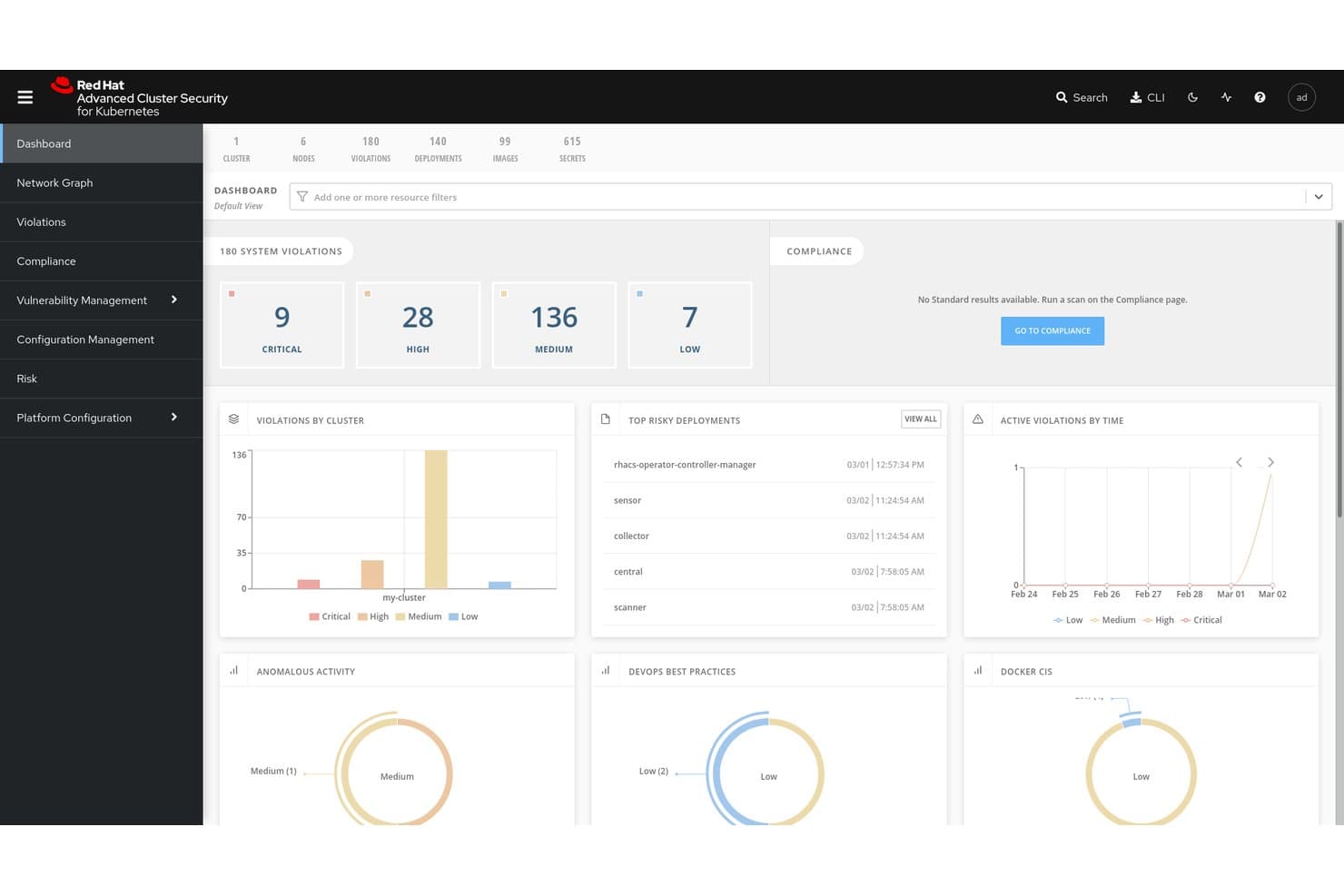
Red Hat Advanced Cluster Security for Kubernetes zentralisiert die Übersicht über Richtlinienverstöße und Risiken. Red Hat Advanced Cluster Security for Kubernetes (RHACS) ist eine Kubernetes-native Containersicherheitsplattform, die Schwachstellenscans von Images, die Erkennung von Laufzeitbedrohungen, die Durchsetzung von Richtlinien und Compliance-Audits in Multi-Cluster- und Multi-Cloud-Umgebungen abdeckt.
Für wen eignet sich Red Hat Advanced Cluster Security for Kubernetes am besten?
RHACS eignet sich besonders für Plattform- und DevSecOps-Teams, die Workloads auf Red Hat OpenShift oder in Multi-Cloud-Kubernetes-Umgebungen betreiben und eine umfassende, native Sicherheitsabdeckung über den gesamten Container-Lebenszyklus hinweg benötigen.
Warum ich Red Hat Advanced Cluster Security for Kubernetes ausgewählt habe
Ich habe RHACS als eine der besten Lösungen ausgewählt, weil es von Grund auf speziell für Kubernetes entwickelt wurde und sich dadurch einzigartig für die Sicherheit der Software-Lieferkette auf Orchestrator-Ebene eignet. Besonders gefällt mir, wie es die Verifizierung von Image-Signaturen mit Cosign/Sigstore mit der Erstellung von SBOMs im SPDX-2.3-Format kombiniert. Dadurch können Teams Richtlinien durchsetzen, die unsignierte Images blockieren, bevor sie überhaupt den Cluster erreichen. Die
roxctl-Befehlszeilenschnittstelle lässt sich direkt in Jenkins-, GitHub-Actions- und Tekton-Pipelines integrieren, um Builds bei Richtlinienverstößen ab konfigurierbaren Schweregraden zu blockieren.Wichtige Funktionen von Red Hat Advanced Cluster Security for Kubernetes
- eBPF-CO-RE-Laufzeiterfassung: Erfasst Kernel-Level-Telemetriedaten zu Systemaufrufen, Prozessen, Dateien und Netzwerken aus laufenden Containern, ohne Kernelmodule oder Sidecar-Container.
- Admission Controller mit konfigurierbaren Fehlermodi: Erzwingt Bereitstellungsrichtlinien über einen Kubernetes-Admission-Webhook, mit dem Verhalten „bei Fehlern öffnen“ oder „bei Fehlern schließen“, passend zu Ihren Anforderungen an Verfügbarkeit und Sicherheit.
- Automatisierte Compliance-Prüfungen: Führt geplante Prüfungen anhand der Frameworks CIS, NIST, PCI DSS 4.0, HIPAA und ISO 27001 durch und ermöglicht den Export prüfergerechter Nachweise mit einem Klick aus einem zentralen Dashboard.
- Multi-Cluster-Erkennung: Erkennt ungeschützte Cluster in Amazon EKS, Google GKE und Microsoft AKS über Paladin Cloud sowie die Integration mit Red Hat OpenShift Cluster Manager.
Integrationen von Red Hat Advanced Cluster Security for Kubernetes
Zu den nativen Integrationen gehören Red Hat OpenShift, Amazon EKS, Google GKE, Microsoft AKS, Jenkins, GitHub Actions, Tekton und Argo CD. RHACS lässt sich über seinen Metrik-Endpunkt außerdem mit Quay, Amazon ECR und Prometheus verbinden.
Pros and Cons
Pros:
- Speziell entwickelte Sicherheitskontrollen für Kubernetes
- eBPF-Laufzeiteinblicke mit Erkennung auf Kernel-Ebene
- Umfassende Compliance-Abdeckung über mehrere Frameworks hinweg
Cons:
- Die umfangreichsten Funktionen sind an die OpenShift-Plattform gebunden
- Einige Verwaltungsaufgaben erfordern eine Befehlszeilenschnittstelle
Learn more about Red Hat Advanced Cluster Security for Kubernetes:
Weitere Containersicherheitslösungen
Hier sind einige zusätzliche Optionen für Containersicherheitslösungen, die es nicht in meine Auswahlliste geschafft haben, aber dennoch einen Blick wert sind:
- 11Orca SecurityAm besten für Containertechnologie mit Side-Scanning geeignet
- 12ARMOAm besten für Kubernetes-RBAC und Härtung zur Laufzeit geeignet
- 13CrowdStrike Falcon Cloud SecurityAm besten für eine durch Informationen über Angreifer unterstützte Einstufung von Containerrisiken
- 14SnykAm besten geeignet für das Management von Container-Schwachstellen
- 15Check Point CloudGuardAm besten geeignet für die durch KI angereicherte ThreatCloud-Abwehr zur Laufzeit
- 16NeuVectorAm besten geeignet für Open-Source-Containersicherheit nach dem Zero-Trust-Prinzip
- 17PingSafeBestes Tool für adaptive Bedrohungsabwehr
- 18Trend Micro Cloud SecurityAm besten für eine Unternehmens-CNAPP mit XDR-Korrelation geeignet
- 19Tenable Container Security ScannerAm besten für ein auf der Exposition basierendes Containerrisikomanagement
Wie ich Container-Sicherheitslösungen bewerte
Ich bewerte Container-Sicherheitstools in zwei Ebenen: Basisfunktionen wie Image-Scanning und Laufzeiterkennung sowie Unterscheidungsmerkmale wie die Tiefe der Kubernetes-Härtung und die Integration in CI/CD.
Kernfunktionen (Mindestanforderungen für diese Liste)
Wenn ich Tools für meine Liste auswähle, bewerte ich jedes auf einer Skala von 0 (bietet die Funktion nicht an) bis 5 (hervorragend in diesem Bereich) für jede unten aufgeführte Kernfunktion. Anschließend berechne ich die Gesamtpunktzahl des Tools als Prozentsatz. Jedes Tool muss eine Mindestgesamtpunktzahl von 65 % erreichen, um berücksichtigt zu werden.
- Image-Schwachstellenscans: Ich prüfe, ob das Tool Container-Images registry-übergreifend auf CVEs, eingebettete Geheimnisse und veraltete Pakete scannt – sowie ob es SBOMs erstellt.
- Laufzeit-Bedrohungserkennung: Die Überwachung laufender Container in Echtzeit ist entscheidend, daher bewerte ich, wie jedes Tool anomale Prozesse, unerwartete Netzwerkaufrufe und Container-Drift erkennt.
- Kubernetes-Konfigurationshärtung: Jedes Tool sollte K8s-Cluster anhand von CIS-Benchmarks bewerten, riskante RBAC-Berechtigungen markieren und fehlkonfigurierte Admission Controller aufzeigen.
- CI/CD-Pipeline-Integration: Ich untersuche, wie jedes Tool in Build-Pipelines integriert werden kann, um Deployments zu kontrollieren – und ob es Richtlinienprüfungen in GitHub Actions, GitLab CI oder Jenkins unterstützt.
- Compliance- & Richtliniendurchsetzung: Vorgefertigte Richtlinienvorlagen für Frameworks wie PCI-DSS, HIPAA und SOC 2 sind Grundvoraussetzung; ich bewerte außerdem die Möglichkeiten zur Erstellung eigener Richtlinien sowie die Tiefe der Berichterstattung.
- Netzwerksegmentierungs-Kontrollen: Container-spezifische Mikrosegmentierung verhindert laterale Bewegungen, daher achte ich auf L3–L7-Richtliniendurchsetzung und transparente Sicht auf Ost-West-Traffic.
Wenn ich eine Liste geeigneter Tools habe, beachte ich, was jede Plattform besonders macht.
Unterscheidungsmerkmale (Was Anbieter voneinander abhebt)
So vergleiche ich die verschiedenen Anbieter:
Herausragende Funktionen
KI-gestützte Risikopriorisierung ist ein großer Unterschied: Tools, die CVEs mit Laufzeitexponierung und Ausnutzbarkeit korrelieren, helfen Teams, sich auf reale Bedrohungen zu konzentrieren und den Alarm-Overload zu reduzieren. Ich werte auch die Durchsetzung von Admission Controllern, die nicht-konforme Workloads blockieren, bevor sie in die Cluster gelangen und Probleme verursachen. Vereinte CNAPP-Fähigkeiten sind relevant, wenn Teams Container-Sicherheit zusammen mit CSPM, CWPP und CIEM in einer Oberfläche wünschen, um Tool-Wildwuchs im Cloud-native-Bereich zu vermeiden.
Mehr als nur Funktionen
Das Bereitstellungsmodell ist hier sehr wichtig. Ich prüfe, ob ein Tool agentenbasiertes, agentenloses oder hybrides Scannen unterstützt – und ob es in isolierten (air-gapped) Umgebungen für regulierte Teams eingesetzt werden kann. Auch Ökosystem-Integrationen sind entscheidend: Ein Tool, das sich mit Ihrem SIEM, Ticketsystem und Registries wie Harbor oder Artifactory verbinden lässt, sorgt dafür, dass Sicherheitsdaten dorthin gelangen, wo Ihr Team bereits arbeitet. Zudem bewerte ich die Skalierbarkeit, insbesondere wie ressourcenschonend die Laufzeitsensoren in Clustern mit Tausenden von Nodes sind und ob Multi-Cloud-Transparenz in einer einzigen Oberfläche möglich ist.
So wählen Sie eine Containersicherheitslösung aus
Bei langen Funktionslisten und komplexen Preisstrukturen verliert man leicht den Überblick. Damit Sie sich bei der Bearbeitung Ihres individuellen Auswahlprozesses für Software auf das Wesentliche konzentrieren können, finden Sie hier eine Checkliste mit Faktoren, die Sie berücksichtigen sollten:
| Faktor | Was Sie berücksichtigen sollten |
|---|---|
| FaktorSkalierbarkeit | Was Sie berücksichtigen solltenKann das Tool mit Ihrem Unternehmen wachsen? Überlegen Sie, ob es steigende Arbeitslasten und Benutzerzahlen ohne ständige Upgrades bewältigen kann. |
| FaktorIntegrationen | Was Sie berücksichtigen solltenFunktioniert es mit Ihren vorhandenen Tools? Prüfen Sie die Kompatibilität mit CI/CD-Pipelines, Cloud-Anbietern und anderer wichtiger Software. |
| FaktorAnpassbarkeit | Was Sie berücksichtigen solltenKönnen Sie es an Ihre Anforderungen anpassen? Achten Sie auf Optionen zur Anpassung von Einstellungen, Dashboards und Warnmeldungen an Ihren Arbeitsablauf. |
| FaktorBenutzerfreundlichkeit | Was Sie berücksichtigen solltenIst es benutzerfreundlich? Stellen Sie sicher, dass die Benutzeroberfläche intuitiv ist und Ihr Team nur eine minimale Einarbeitung benötigt, um loszulegen. |
| FaktorImplementierung und Einführung | Was Sie berücksichtigen solltenWie schnell können Sie starten? Bewerten Sie die Einrichtungszeit, die Verfügbarkeit von Ressourcen wie Schulungen und den Support in der Anfangsphase. |
| FaktorKosten | Was Sie berücksichtigen solltenPasst es in Ihr Budget? Vergleichen Sie die Preispläne, achten Sie auf versteckte Gebühren und berücksichtigen Sie den gebotenen Gegenwert. |
| FaktorSicherheitsvorkehrungen | Was Sie berücksichtigen solltenGibt es wirksame Schutzmaßnahmen? Achten Sie auf Verschlüsselung, Zugriffskontrollen und die Einhaltung von Branchenstandards, um die Datensicherheit zu gewährleisten. |
| FaktorCompliance-Anforderungen | Was Sie berücksichtigen solltenErfüllt es die Vorschriften? Überprüfen Sie, ob die Lösung den für Ihre Branche relevanten gesetzlichen Standards wie der DSGVO oder HIPAA entspricht. |
Was sind Containersicherheitslösungen?
Container-Sicherheitslösungen sind Werkzeuge, die zum Schutz containerisierter Anwendungen vor Schwachstellen und Bedrohungen entwickelt wurden. IT-Fachleute, Entwickler und Sicherheitsteams verwenden diese Werkzeuge in der Regel, um sicherzustellen, dass Anwendungen in verschiedenen Umgebungen sicher ausgeführt werden, unabhängig davon, ob sie Docker-Alternativen oder andere Container-Plattformen verwenden. Schwachstellen-Scans, Compliance-Prüfungen und Laufzeitschutz helfen dabei, Risiken zu identifizieren, Vorschriften einzuhalten und Abläufe abzusichern. Diese Werkzeuge bieten die essenzielle Sicherheit, die erforderlich ist, um Ihre containerisierten Anwendungen sicher und konform zu halten.
Funktionen
Achten Sie bei der Auswahl von Container-Sicherheitslösungen auf die folgenden wichtigen Funktionen:
- Schwachstellen-Scans: Identifizieren potenzielle Sicherheitsrisiken in Ihren Container-Images und ausgeführten Anwendungen und machen Sie darauf aufmerksam.
- Compliance-Prüfungen: Stellen sicher, dass Ihre Container Branchenstandards und Vorschriften wie DSGVO und HIPAA erfüllen.
- Laufzeitschutz: Überwacht Bedrohungen während der Ausführung containerisierter Anwendungen und schützt vor ihnen.
- Integrationsmöglichkeiten: Funktionieren nahtlos mit Ihren bestehenden CI/CD-Pipelines und Cloud-Anbietern, um die Sicherheit über alle Entwicklungsphasen hinweg aufrechtzuerhalten.
- Rollenbasierte Zugriffskontrolle: Ermöglicht es Ihnen, Berechtigungen festzulegen und den Benutzerzugriff auf sensible Informationen und Aktionen zu verwalten.
- Automatisierte Behebung: Bietet automatische Korrekturen für identifizierte Schwachstellen und reduziert dadurch den Bedarf an manuellen Eingriffen.
- Echtzeit-Benachrichtigungen: Informieren Ihr Team sofort über Sicherheitsvorfälle und ermöglichen so eine schnelle Reaktion.
- Anpassbare Dashboards: Bieten eine auf Ihre Bedürfnisse zugeschnittene Ansicht von Sicherheitsmetriken und Warnungen und erleichtern so die Überwachung der für Sie wichtigen Aspekte.
- Verschlüsselung: Stellt sicher, dass Daten innerhalb von Containern vor unbefugtem Zugriff geschützt sind.
- Auf maschinellem Lernen basierende Bedrohungserkennung: Verwendet fortschrittliche Algorithmen, um potenzielle Bedrohungen zu identifizieren und vorherzusagen und dadurch die allgemeinen Sicherheitsmaßnahmen zu verbessern.
Vorteile
Die Implementierung von Container-Sicherheitslösungen bietet Ihrem Team und Ihrem Unternehmen mehrere Vorteile. Hier sind einige davon:
- Erhöhte Sicherheit: Durch den Einsatz von Schwachstellen-Scans und Laufzeitschutz verringern Sie das Risiko von Sicherheitsverletzungen und schützen sensible Daten.
- Einhaltung gesetzlicher Vorschriften: Compliance-Prüfungen stellen sicher, dass Ihre Abläufe die erforderlichen rechtlichen Standards erfüllen, und vermeiden Bußgelder sowie rechtliche Probleme.
- Zeiteinsparungen: Automatisierte Behebung und Echtzeit-Benachrichtigungen ermöglichen es Ihrem Team, schnell auf Bedrohungen zu reagieren, ohne manuellen Aufwand.
- Verbesserte Effizienz: Integrationsmöglichkeiten mit bestehenden Werkzeugen optimieren Prozesse und gewährleisten die Sicherheit während der gesamten Entwicklung.
- Zugriffskontrolle: Die rollenbasierte Zugriffskontrolle hilft dabei zu verwalten, wer worauf zugreifen kann, und verringert das Risiko unbefugter Aktionen.
- Fundierte Entscheidungsfindung: Anpassbare Dashboards liefern Einblicke in Sicherheitsmetriken und helfen Ihnen, besser informierte Sicherheitsentscheidungen zu treffen.
- Datenschutz: Die Verschlüsselung stellt sicher, dass Daten vor unbefugtem Zugriff geschützt sind, und wahrt ihre Vertraulichkeit und Integrität.
Kosten & Preise
Die Auswahl von Container-Sicherheitslösungen erfordert ein Verständnis der verschiedenen verfügbaren Preismodelle und Tarife. Die Kosten variieren je nach Funktionen, Teamgröße, Zusatzoptionen und weiteren Faktoren. Die folgende Tabelle fasst gängige Tarife, ihre Durchschnittspreise und typische in Container-Sicherheitslösungen enthaltene Funktionen zusammen:
Vergleichstabelle für Tarife von Container-Sicherheitslösungen
| Tariftyp | Durchschnittlicher Preis | Übliche Funktionen |
|---|---|---|
| TariftypKostenloser Tarif | Durchschnittlicher Preis$0 | Übliche FunktionenGrundlegende Schwachstellen-Scans, eingeschränkte Compliance-Prüfungen und Community-Support. |
| TariftypPersönlicher Tarif | Durchschnittlicher Preis$5-$25/Benutzer/Monat | Übliche FunktionenErweiterte Scans, grundlegender Laufzeitschutz und E-Mail-Support. |
| TariftypGeschäftstarif | Durchschnittlicher Preis$30-$75/Benutzer/Monat | Übliche FunktionenUmfassende Compliance-Prüfungen, Integrationsmöglichkeiten und rollenbasierte Zugriffskontrolle. |
| TariftypUnternehmenstarif | Durchschnittlicher Preis$100+/Benutzer/Monat | Übliche FunktionenAnpassbare Dashboards, auf maschinellem Lernen basierende Bedrohungserkennung und dedizierter Support. |
Häufig gestellte Fragen zu Lösungen für Containersicherheit
Welche Kompromisse sind zwischen Open-Source- und kommerziellen Tools für Containersicherheit zu erwarten?
Bei Open-Source-Tools erhalten Sie häufig Flexibilität, Anpassungsmöglichkeiten und keine Lizenzgebühren – dafür müssen Sie in der Regel mehr Integrationsarbeit, Feinabstimmung und Supportaufwand übernehmen. Kommerzielle Lösungen bündeln tendenziell mehr sofort einsatzbereite Funktionen (Dashboards, Warnmeldungen, Richtlinien-Engines), aber beim Skalieren können Sie an die Vorgaben des Anbieters gebunden sein oder mit höheren Kosten konfrontiert werden. Sie sollten den Reifegrad Ihres Teams, die Komplexität Ihrer Umgebungen und Ihre Bereitschaft abwägen, Verbindungen zwischen den Tools selbst zu entwickeln.
Welche Herausforderungen entstehen bei der Absicherung von Containern in Multi-Cloud- oder hybriden Infrastrukturen?
In Multi-Cloud-Umgebungen stoßen Sie auf uneinheitliche APIs, unterschiedliche Identitätsmodelle und voneinander abweichende Netzwerk-Richtlinien. Eine Lösung, die in AWS funktioniert, lässt sich möglicherweise nicht problemlos auf Azure oder lokale Umgebungen übertragen. Sie benötigen Tools, die diese Unterschiede abstrahieren (oder eine zentrale Steuerungsebene verwenden) und eine einheitliche Sicherheitslage über alle Clouds hinweg ermöglichen.
Wie kann ich Probleme mit unerwartet beendeten Containern in AWS Fargate beheben?
Unerwartet beendete Container in AWS Fargate können auf Ressourcenbeschränkungen oder Fehlkonfigurationen zurückzuführen sein. Überprüfen Sie die Aufgabendefinition auf korrekte Ressourcenzuweisungen und prüfen Sie die Protokolle auf Fehlermeldungen. Eine Anpassung der Speicher- oder CPU-Einstellungen kann das Problem möglicherweise beheben.
Wie gehen Sie mit Fehlalarmen bei Schwachstellen-Scans von Container-Images um?
Fehlalarme sind häufig, wenn Scanner Probleme mit geringen Auswirkungen oder Abhängigkeiten melden, die Ihre Anwendung tatsächlich nicht verwendet. Um die Anzahl irrelevanter Meldungen zu verringern, passen Sie die Schwellenwerte Ihres Scanners an, unterdrücken Sie Warnmeldungen zu Befunden mit geringem Risiko und gleichen Sie Scan-Ergebnisse im Zeitverlauf ab, um dauerhaft bestehende Probleme zu erkennen. Sie können Befunde außerdem mit mehreren Tools gegenprüfen oder ein Meta-Framework (z. B. LUCID) verwenden, um Inkonsistenzen zwischen Scannern zu reduzieren.