
2026 Leitfaden zu den 10 besten Business-VPNs

10 Beste Business-VPNs in der Übersicht
Here's my pick of the 10 best software from the 25 tools reviewed.


Die Absicherung von Remote-Verbindungen und der Schutz sensibler Informationen stellen für wachstumsstarke Organisationen eine Herausforderung dar. Vielleicht sorgen Sie sich um unverschlüsselte Daten, die über öffentliche Netzwerke reisen, oder Sie möchten Ihren Mitarbeitenden einen sicheren und zuverlässigen Zugriff auf interne Systeme ermöglichen, ohne sie Sicherheitsrisiken auszusetzen. Ein Business-VPN geht diese Probleme an, indem es den Datenverkehr verschlüsselt, Remote-Arbeit unterstützt und die allgemeine Netzwerksicherheit verbessert.
Im Laufe der Jahre habe ich verschiedene VPN-Lösungen getestet – und dabei alles von Verbindungsgeschwindigkeiten bis hin zu Integrationsmöglichkeiten bewertet. Durch den Vergleich von Funktionen, Nutzerbewertungen und der tatsächlichen Praxisleistung habe ich die robustesten und gleichzeitig benutzerfreundlichsten Tools für Unternehmen unterschiedlicher Größen und Anforderungen identifiziert. In diesem Leitfaden teile ich meine Erkenntnisse, damit Sie ein VPN wählen können, das starken Schutz und eine reibungslose Funktion bietet. So können Sie sich auf das Wesentliche konzentrieren: Ihr Unternehmen führen.
Why Trust Our Software Reviews
Business-VPNs im Vergleich – Zusammenfassung
Diese Vergleichstabelle fasst die Preisinformationen meiner Top-Business-VPN-Auswahl zusammen, damit Sie die beste Lösung für Ihr Budget und Ihre Geschäftsanforderungen finden.
| Tool | Best For | Trial Info | Price | ||
|---|---|---|---|---|---|
| 1 | Best for bank-grade encryption | 30-day free trial | From $119.99/year (billed annually) | Website | |
| 2 | Best for small and medium businesses | 14-day free trial + free demo available | From $7/user/month (billed annually) | Website | |
| 3 | Best for Zero Trust access | Free plan available | From $5/user/month (billed annually) | Website | |
| 4 | Best for cloud gateway security | Not available | From $3/user/month (min 5 seats) | Website | |
| 5 | Best for a range of security features | Not available | From $12.95/user/month, with discounts for a longer commitment such as a year plan (billed annually) | Website | |
| 6 | Best for consistent reliability | Not available | From $12.99/month (billed annually) | Website | |
| 7 | Best for privacy controls | Not available | From $9.95/user/month, discounts available for a year plan (billed annually) | Website | |
| 8 | Best for integration with secure email | Not available | From $4/user/month (billed annually) | Website | |
| 9 | Best for diverse server locations | Not available | From $2.75/user/month (billed annually) | Website | |
| 10 | Best for anonymous payment options | Not available | From €5/user/month (approximately $6/user/month as per current conversion rates) | Website |
-

Site24x7
Visit WebsiteThis is an aggregated rating for this tool including ratings from Crozdesk users and ratings from other sites.4.6 -
GitHub Actions
Visit WebsiteThis is an aggregated rating for this tool including ratings from Crozdesk users and ratings from other sites.4.8 -
Docker
Visit WebsiteThis is an aggregated rating for this tool including ratings from Crozdesk users and ratings from other sites.4.6





Business-VPNs im Test
Nachfolgend finden Sie meine detaillierten Zusammenfassungen der besten Business-VPNs, die es auf meine Shortlist geschafft haben. Meine Bewertungen bieten einen detaillierten Einblick in die wichtigsten Funktionen, Vor- & Vorteile, Integrationen und ideale Anwendungsfälle jedes Tools, damit Sie die passende Lösung für sich finden.

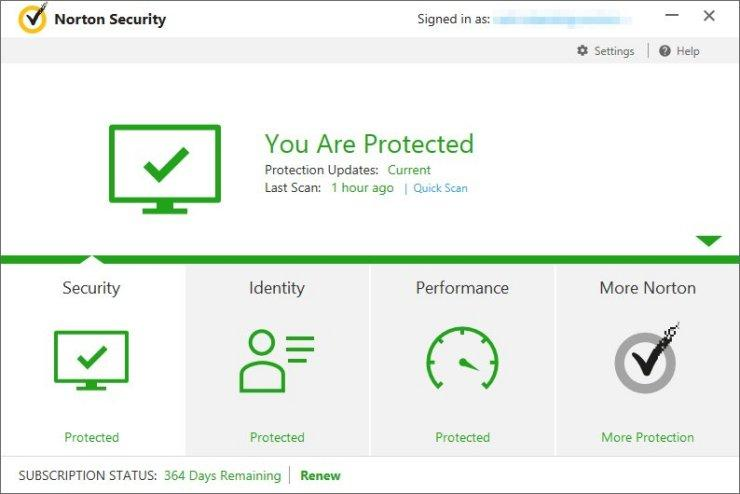
For businesses seeking a reliable VPN solution, Norton offers a compelling option tailored to meet your needs. It provides a secure and efficient service designed to enhance online privacy and protect sensitive data, especially valuable for small businesses and entrepreneurs. With its user-friendly interface and robust security features, Norton can help your team confidently navigate the digital landscape while safeguarding crucial business communications.
Why I Picked Norton
I picked Norton because it offers a secure VPN service that is integrated into its broader cybersecurity suite, providing comprehensive protection for businesses. The VPN includes bank-grade encryption, ensuring your online connections remain private and safe from potential threats. Additionally, Norton's no-log policy guarantees that your browsing activities are not tracked or stored, addressing privacy concerns many businesses face today.
Norton Key Features
In addition to its secure VPN service, Norton offers several features that enhance its value for businesses:
- Device Security: Provides real-time antivirus protection against malware and other threats across multiple devices.
- Cloud Backup: Offers 500 GB of secure cloud storage to protect critical business data from loss.
- Password Manager: Allows secure management of credentials and sensitive business information.
- Dark Web Monitoring: Alerts you if your personal or business information is found on the dark web.
Norton Integrations
Native integrations are not currently listed by Norton.
Pros and Cons
Pros:
- Supports multiple devices and platforms
- Bank-grade encryption protects business traffic
- Integrated VPN and endpoint security
Cons:
- Limited advanced VPN configuration options
- No dedicated IP addresses available


NordLayer is NordVPN’s secure connectivity solution designed for business needs, enabling team members to access company data safely and collaborate efficiently. By offering tools tailored specifically for team collaboration, NordLayer ensures that teams can work together without sacrificing security, making it best for this specific requirement.
Why I Picked NordLayer: I chose NordLayer for this list after careful comparison with other VPN providers, focusing on the functionality it offers for small and medium businesses. What makes NordLayer stand out is its emphasis on team collaboration, complete with features like secure VPN connections, dedicated account managers, and access control. These aspects help address the unique demands of teamwork in today’s remote work environment.
Standout features & integrations:
NordLayer provides advanced security features like 256-bit encryption, a kill switch, and a no-logs policy, ensuring that collaboration happens in a secure environment. The tool integrates with various operating systems, including Windows, Mac, iOS, Android, and Linux, and offers a user-friendly interface that improves ease of use for team members. NordLayer also provides a dedicated server option, supporting smooth collaboration across different regions.
Pros and Cons
Pros:
- Offers a 14-day money-back guarantee
- Integrates with popular operating systems like Windows, Mac, iOS, Android, and Linux
- Tailored for team collaboration with features like secure VPN connections and access control
Cons:
- The focus on team collaboration might leave individual users seeking more personalized features
- May lack some advanced customization options found in other corporate VPN solutions
- More expensive for small business users due to the minimum seat requirement


Twingate is a business VPN alternative that applies Zero Trust principles to secure remote access. Instead of relying on a traditional network tunnel, it validates each request based on user and device context, helping businesses protect sensitive resources without exposing unnecessary attack surfaces.
Why I Picked Twingate: I chose Twingate because of its focus on Zero Trust security, which ensures that every access request is verified before connecting to company resources. This approach prevents lateral network traffic, meaning threats cannot easily spread if a device is compromised. You also get flexible routing options, which can minimize risk while reducing latency compared to conventional VPN setups.
Standout features & integrations
Twingate includes hardware-free deployment that removes the need for physical equipment, internet security tools like DNS filtering to block malicious domains, and an API-first design that supports Infrastructure as Code (IaC) workflows. It integrates with major identity providers and tools such as Azure AD, Okta, Google Workspace, OneLogin, KeyCloak, JumpCloud, Kubernetes, Microsoft 365, Docker, CrowdStrike, Intune, and Jamf.
Pros and Cons
Pros:
- Quick, hardware-free deployment
- Flexible Zero Trust routing
- API-first integration support
Cons:
- No Linux GUI client
- Lacks port-level controls


GoodAccess is a cloud-based VPN service designed to secure company networks and provide safe remote access for team members. With a focus on cloud gateway security, GoodAccess offers a zero-trust network approach that ensures robust authentication and secure VPN connections. This makes it the ideal tool for businesses that prioritize cloud security, positioning it as the best option for cloud gateway security.
Why I Picked GoodAccess: I chose GoodAccess after meticulously comparing and judging various VPN providers, focusing on cloud gateway security. What makes GoodAccess different is its emphasis on securing connections through the cloud, making it stand out among other VPN services. I have determined that GoodAccess is "Best for cloud gateway security" due to its unique architecture and features designed to protect the cloud environment.
Standout features & integrations:
GoodAccess offers a dedicated server for each business, providing improved network security and bandwidth control. It employs 256-bit encryption and offers single sign-on for ease of use. The cloud-based architecture allows integration with existing operating systems like Windows, Mac, Linux, iOS, and Android, as well as the ability to set specific permissions for different team members.
Pros and Cons
Pros:
- Cost-effective pricing for small businesses with a minimum requirement of 5 seats
- Integration with multiple operating systems and platforms such as Windows, Mac, Linux, iOS, and Android
- Specialized in cloud gateway security with zero-trust network approach
Cons:
- The requirement of a minimum of 5 seats may not suit very small teams or individual users
- Limited number of servers compared to other VPN providers
- May lack some advanced features found in consumer VPNs


Surfshark is a highly-regarded VPN provider that offers a wide range of security features and VPN connections to its users. It caters to small to medium businesses by providing a secure and easy-to-use solution, making it the ideal choice for those who are looking for cost-effective yet robust VPN options.
Why I Picked Surfshark: I chose Surfshark after carefully comparing and judging various VPN services. What makes Surfshark stand out is its combination of affordability, comprehensive features, and a user-friendly interface, tailored for small to medium-sized businesses. I found it to be "Best for small to medium businesses" as it offers a balanced approach that meets the security needs without overburdening the budget, a critical factor for growing companies.
Standout features & integrations:
Surfshark comes with a plethora of essential features, including AES 256 encryption, a kill switch, and a zero-trust security model. It also offers split tunnelling and a DNS leak protection mechanism to provide secure internet connections. The tool integrates smoothly with various operating systems such as Windows, macOS, Android, iOS, and Linux, making it versatile for a range of business needs.
Pros and Cons
Pros:
- Offers compatibility with a multitude of operating systems, improving ease of use
- Provides AES 256 encryption and a kill switch, ensuring robust security features
- Affordable and scalable, fitting for small to medium businesses
Cons:
- Although user-friendly, its functionality might not meet the requirements of larger enterprises or those with complex network security demands
- Some users may find the network access and simultaneous connections limited
- Lacks dedicated account manager support for personalized service


ExpressVPN is renowned for its consistent and robust VPN services, ensuring an internet connection without compromising security. Its commitment to providing reliable access across various locations makes it best for consistent reliability, particularly for businesses and individuals who require unwavering network stability.
Why I Picked ExpressVPN: I chose ExpressVPN after carefully judging and comparing the quality of service and reliability it offers against other VPN providers. What sets ExpressVPN apart is its strong network of servers and consistent performance, enabling users to maintain a secure VPN connection without interruptions. I believe ExpressVPN is "Best for consistent reliability" due to its focus on ensuring uninterrupted access, advanced security features like aes 256-bit encryption, and a track record of protecting against data breaches and hackers.
Standout features & integrations:
ExpressVPN offers key security features such as a kill switch, zero-trust architecture, OpenVPN, and split tunnelling, allowing users to customize their security preferences. The tool integrates with various operating systems, including Windows, Mac, Linux, iOS, and Android, providing a user-friendly interface. Additionally, the large number of servers ensures that users can maintain a reliable connection in various locations around the world.
Pros and Cons
Pros:
- Offers a 30-day money-back guarantee, providing confidence in the service
- Advanced security features like 256-bit encryption, kill switch, and OpenVPN
- Exceptional reliability through its vast network of servers and consistent performance
Cons:
- Users looking for more advanced corporate VPN features may find some limitations in functionality
- Limited dedicated IP address options may hinder some specific business needs
- Slightly higher pricing compared to some consumer VPNs


Private Internet Access (PIA) Business VPN is a trusted VPN provider that emphasizes robust privacy controls and secure network access. With its no-logs policy, AES 256 encryption, and a plethora of privacy-focused features, PIA serves as a go-to option for businesses and individuals concerned about maintaining stringent privacy measures. This keen attention to privacy is why I believe it stands out as the best for privacy controls.
Why I Picked Private Internet Access (PIA) Business VPN: I chose PIA Business VPN for this list after judging and comparing it with other contenders based on the privacy controls it offers. What makes PIA different is its staunch commitment to privacy, including a stringent no-logs policy, and the advanced encryption standards it adheres to. I determined that it's "Best for privacy controls" given its extensive measures to safeguard user data, aligning it perfectly with the needs of businesses that prioritize privacy.
Standout features & integrations:
PIA Business VPN offers key features like DNS leak protection, a kill switch, and OpenVPN support, ensuring secure VPN connections. It also provides bandwidth control and multi-factor authentication, improving its appeal for privacy-conscious users. For integrations, PIA is compatible across various platforms, including Windows, macOS, Linux, Android, and iOS, ensuring that it can work with different operating systems and devices.
Pros and Cons
Pros:
- Includes kill switch and DNS leak protection, improving network security
- Offers compatibility across different operating systems, making it user-friendly
- Emphasizes privacy controls with features like no-logs policy and AES 256 encryption
Cons:
- Despite the focus on privacy, it may not offer specialized solutions for large corporations or complex business needs
- Some users might find the interface less intuitive compared to other VPN providers
- Lacks dedicated server options, potentially limiting customization


Proton VPN is a secure and privacy-focused VPN provider known for its integration with ProtonMail, a secure email service. This synergy between a secure VPN and email makes Proton VPN an ideal choice for individuals and businesses looking to combine the security of their internet connection with their email communications. Proton VPN's alignment with secure email solutions renders it the best option for those prioritizing this integration.
Why I Picked Proton VPN: I chose Proton VPN for this list after comparing and judging its unique integrations, particularly with secure email services like ProtonMail. This integration makes it stand out from other VPN providers, ensuring that not only the internet connection but also email communications are kept secure and private. Therefore, Proton VPN is the "Best for integration with secure email," offering a combination of secure VPN connections and email services that few other providers offer.
Standout features & integrations:
Proton VPN offers strong security features such as AES 256 encryption, OpenVPN, and IKEv2/IPsec protocols. The kill switch and DNS leak protection add another layer of security to its offerings. But what truly sets Proton VPN apart is its integration with ProtonMail, allowing users to combine secure internet browsing with encrypted email services, all within one ecosystem.
Pros and Cons
Pros:
- Available on multiple platforms including Windows, Linux, macOS, iOS, and Android
- Robust security features like AES 256 encryption and OpenVPN
- Integration with ProtonMail for secure email communication
Cons:
- Some users may find the integration with secure email unnecessary if they don't use ProtonMail or similar services
- Lacks specific business plans tailored to small business needs
- Does not offer a monthly billing option, only annual


CyberGhost Business VPN is a renowned VPN provider that offers improved privacy and security for business users across a broad range of operating systems. What sets CyberGhost apart is its expansive network of servers, boasting more than 7,000 servers in over 90 countries. This vast network of server locations positions CyberGhost as the best choice for businesses requiring diverse server locations to meet various geographic and regulatory needs.
Why I Picked CyberGhost Business VPN: I chose CyberGhost Business VPN after carefully comparing and judging its capabilities with other VPN providers. The determining factor was its extensive array of server locations, something that offers businesses flexibility in accessing data and services from various regions. This wide range of server locations is what makes CyberGhost stand out, and I believe it's the "Best for diverse server locations," meeting the specific business needs of global companies that require connections to multiple countries.
Standout features & integrations:
CyberGhost offers high-level security features such as 256-bit AES encryption, a kill switch, DNS leak protection, and OpenVPN protocol. It provides great functionality for small business and corporate VPN needs, with dedicated IP addresses and simultaneous connections across multiple devices. Additionally, CyberGhost integrates with various platforms like Windows, Mac, Linux, iOS, and Android, making it suitable for different business scenarios.
Pros and Cons
Pros:
- User-friendly apps for multiple operating systems such as Windows, Mac, Linux, iOS, and Android
- Strong security features including 256-bit encryption and OpenVPN
- Extensive network with over 7,000 servers in more than 90 countries
Cons:
- Some users might find the interface less intuitive compared to other VPN providers
- The low monthly price is available only with a year plan
- Lack of dedicated account manager for personalized customer support


Mullvad VPN is a renowned VPN provider known for its dedication to privacy, security, and most notably, anonymous payment options. By offering payment methods that don't require personal information, Mullvad stands apart as a choice for those prioritizing anonymity in their online transactions. This focus on anonymous payment solutions makes Mullvad the best option for users seeking to keep their financial details private.
Why I Picked Mullvad VPN: I chose Mullvad VPN for this list after carefully determining and comparing the unique features it offers, particularly regarding anonymous payment options. Mullvad stands out by not only providing secure VPN connections but also embracing anonymity at the payment stage. This makes it "Best for anonymous payment options," offering users an extra layer of privacy when purchasing a subscription.
Standout features & integrations:
Mullvad VPN offers an OpenVPN configuration and WireGuard integration, allowing for flexible and secure VPN connections. The kill switch feature and DNS leak protection ensure that your online activities remain private. Mullvad's compatibility with Windows, Linux, macOS, iOS, and Android means that users can benefit from its features across various devices and operating systems.
Pros and Cons
Pros:
- Supports OpenVPN and WireGuard, ensuring versatile and secure VPN connections
- Provides robust security features like kill switch and DNS leak protection
- Offers anonymous payment options, improving user privacy
Cons:
- The user interface may not be as user-friendly as some competitors, affecting ease of use
- Lacks a business plan tailored specifically to small or medium-sized businesses
- Might not offer dedicated customer support compared to other VPN providers
Weitere Business-VPNs
Hier sind einige weitere Business-VPN-Optionen, die es zwar nicht auf meine Shortlist geschafft haben, aber dennoch einen Blick wert sind:
- Windscribe
For flexible pricing plans
- Hotspot Shield Business VPN
For speed and performance
- VyprVPN for Business
For robust security measures
- PureVPN
For global connectivity
- CloudConnexa
Good for cloud-based network solutions
- pfSense
Good for customizable firewall protection
- ClearVPN
Good for intuitive network management
- OpenVPN
Good for secure remote access
- Encrypt.me
Good for personal online protection
- Ivacy Business VPN
Good for small business network security
- Absolute VPN
Good for device and data security
- ZenMate VPN
Good for global server accessibility
- KeepSolid VPN Unlimited
Good for flexible pricing and plans
- HMA VPN for Business
Good for advanced business plan options
- IPVanish VPN for Business
Good for simultaneous connections across devices


Auswahlkriterien für Business-VPNs
Bei der Auswahl der besten Business-VPNs für diese Liste habe ich typische Käuferbedürfnisse und -probleme wie Sicherheitsbedenken und Benutzerfreundlichkeit berücksichtigt. Außerdem habe ich das folgende Bewertungsschema eingesetzt, um die Evaluierung strukturiert und fair zu gestalten:
Kernfunktionen (25 % der Gesamtbewertung)
Um in diese Liste aufgenommen zu werden, musste jede Lösung folgende Anwendungsfälle abdecken:
- Sicherer Remote-Zugang
- Datenverschlüsselung
- Unterstützung mehrerer Geräte
- Netzwerkzugriffskontrolle
- Bandbreitenoptimierung
Weitere herausragende Funktionen (25 % der Gesamtbewertung)
Um die Auswahl weiter einzuschränken, habe ich auch nach besonderen Merkmalen gesucht, wie zum Beispiel:
- Split-Tunneling
- Dedizierte IP-Adressen
- Geo-Restriktionsumgehung
- Erweiterter Bedrohungsschutz
- Anpassbare Sicherheitsprotokolle
Benutzerfreundlichkeit (10 % der Gesamtbewertung)
Um die Nutzerfreundlichkeit jeder Lösung einzuschätzen, habe ich folgende Aspekte betrachtet:
- Intuitive Benutzeroberfläche
- Einfache Konfiguration
- Geringe Einarbeitungszeit
- Reaktionsschnelle Performance
- Barrierefreies Design
Onboarding (10% der Gesamtbewertung)
Um die Onboarding-Erfahrung jeder Plattform zu bewerten, habe ich Folgendes berücksichtigt:
- Verfügbarkeit von Schulungsvideos
- Interaktive Produkttouren
- Umfassende Dokumentation
- Webinare und Workshops
- Chatbot-Unterstützung
Kundensupport (10% der Gesamtbewertung)
Um den Kundenservice jedes Softwareanbieters zu beurteilen, habe ich Folgendes berücksichtigt:
- 24/7 Erreichbarkeit
- Mehrkanal-Support
- Reaktionszeit
- Fachkompetenz des Support-Teams
- Verfügbarkeit von FAQs
Preis-Leistungs-Verhältnis (10% der Gesamtbewertung)
Um das Preis-Leistungs-Verhältnis jeder Plattform zu bewerten, habe ich Folgendes berücksichtigt:
- Konkurrenzfähige Preise
- Flexible Abonnementpläne
- Verfügbarkeit einer kostenlosen Testversion
- Verhältnis von Funktionen zu Preis
- Rabatte für langfristige Nutzung
Kundenbewertungen (10% der Gesamtbewertung)
Um einen Eindruck von der allgemeinen Kundenzufriedenheit zu gewinnen, habe ich bei der Sichtung von Kundenbewertungen Folgendes beachtet:
- Zufriedenheitsbewertungen der Nutzer
- Häufig genannte Vor- und Nachteile
- Häufigkeit von Updates
- Leichte Erreichbarkeit des Kundensupports
- Allgemeiner Ruf bei den Nutzern
So wählen Sie Business VPNs aus
Es ist leicht, sich in langen Funktionslisten und komplexen Preisstrukturen zu verlieren. Damit Sie sich bei der Auswahl Ihrer Software nicht verzetteln, finden Sie hier eine Checkliste mit Faktoren, die Sie berücksichtigen sollten:
| Faktor | Worauf Sie achten sollten |
|---|---|
| Skalierbarkeit | Wächst das VPN mit Ihrem Team? Berücksichtigen Sie Nutzerlimits, gleichzeitige Verbindungen und wie einfach Sie Ihren Tarif mit Ihrem wachsenden Bedarf anpassen können. |
| Integrationen | Prüfen Sie, ob das VPN mit Ihrer aktuellen Software funktioniert. Achten Sie auf Kompatibilität mit Ihren bestehenden Tools und möglichen zukünftigen Plattformen. |
| Anpassbarkeit | Können Sie das VPN auf Ihre Bedürfnisse zuschneiden? Suchen Sie nach Optionen zum Anpassen von Einstellungen, zur Serverauswahl und für Zugriffsrechte, die Ihren Arbeitsabläufen entsprechen. |
| Benutzerfreundlichkeit | Ist das VPN für alle Teammitglieder einfach zu bedienen? Beachten Sie die Benutzeroberfläche, die Einfachheit der Einrichtung und wie schnell sich Nutzer zurechtfinden. |
| Implementierung und Onboarding | Wie einfach gelingt der Einstieg? Berücksichtigen Sie Aufwand und Ressourcen für die Einrichtung und ob der Anbieter Unterstützung oder Schulung beim Onboarding bietet. |
| Kosten | Passen die Preise zu Ihrem Budget? Bewerten Sie die Gesamtkosten, einschließlich Abogebühren, Zusatzkosten und langfristiger Einsparungen. |
| Sicherheitsmaßnahmen | Genügen die Sicherheitsmaßnahmen den Anforderungen? Prüfen Sie Verschlüsselungsstandards, Datenschutzprotokolle und wie das VPN mit Bedrohungen umgeht. |
| Compliance-Anforderungen | Entspricht das VPN Ihren regulatorischen Vorgaben? Berücksichtigen Sie branchenspezifische Standards wie DSGVO oder HIPAA und stellen Sie sicher, dass das VPN diesen entspricht. |
Was sind Business VPNs?
Ein Business VPN ist ein virtueller privater Netzwerkdienst, der zum Schutz und zur privaten Nutzung des Internets für Unternehmen entwickelt wurde. IT-Fachleute, Remote-Mitarbeitende und Unternehmen jeder Größe nutzen diese Tools, um Daten zu schützen und sichere Verbindungen zu gewährleisten. Verschlüsselung, Mehrgeräte-Unterstützung und Netzwerkzugriffskontrolle helfen, sensible Informationen zu sichern und die Privatsphäre zu wahren. Insgesamt bieten diese Tools zusätzliche Sicherheit und ein beruhigendes Gefühl für die Unternehmenskommunikation.
Funktionen
Wenn Sie eine geschäftliche VPN-Software auswählen, achten Sie auf die folgenden Schlüsselfunktionen:
- Sicherer Fernzugriff: Ermöglicht Mitarbeitenden, sich von überall sicher mit den Firmennetzwerken zu verbinden und schützt sensible Daten.
- Datenverschlüsselung: Stellt sicher, dass alle übertragenen Daten codiert sind und verhindert unbefugten Zugriff.
- Mehrgeräteunterstützung: Bietet Konnektivität auf verschiedenen Geräten und sorgt so bei allen Nutzern für gleichbleibende Sicherheit.
- Netzwerkzugriffskontrolle: Steuert, wer auf das Netzwerk zugreifen kann, und erhöht so die Sicherheit durch Begrenzung des Zugriffs.
- Bandbreitenoptimierung: Sichert einen effizienten Einsatz der Netzwerkressourcen und erhält die Performance auch bei hohem Datenaufkommen.
- Split-Tunneling: Ermöglicht Nutzern, einen Teil des Datenverkehrs über das VPN zu leiten, während andere Aufgaben direkt über das Internet erfolgen.
- Dedizierte IP-Adressen: Bietet Unternehmen eindeutige IPs, was einen gleichbleibenden Zugriff und erhöhte Sicherheit unterstützt.
- Umgehung geografischer Sperren: Gewährt Zugang zu Inhalten, die regional beschränkt sind – besonders für globale Teams hilfreich.
- Anpassbare Sicherheitsprotokolle: Ermöglicht es Unternehmen, Sicherheitseinstellungen auf spezifische Anforderungen und Compliance-Vorgaben zuzuschneiden.
- Erweiterter Bedrohungsschutz: Bietet Tools, um potenzielle Sicherheitsbedrohungen in Echtzeit zu erkennen und abzuwehren.
Vorteile
Die Implementierung eines Business VPN bietet zahlreiche Vorteile für Ihr Team und Ihr Unternehmen. Hier sind einige Aspekte, auf die Sie sich freuen können:
- Erhöhte Sicherheit: Schützt sensible Daten durch Verschlüsselung und sichere Verbindungen und senkt das Risiko von Sicherheitsverletzungen.
- Unterstützung für Remote-Arbeit: Mitarbeitende können von überall sicher auf Unternehmensressourcen zugreifen, was Flexibilität und Produktivität steigert.
- Zugriffskontrolle: Steuert, wer das Netzwerk betreten darf, sodass nur autorisierte Nutzer Zugriff erhalten, was die Gesamtsicherheit erhöht.
- Kosteneinsparungen: Verringert den Bedarf an teurer Vor-Ort-Sicherheitsinfrastruktur durch sicheren Fernzugriff.
- Verbesserte Privatsphäre: Verschleiert IP-Adressen und verschlüsselt Daten, sichert vertrauliche Kommunikation und schützt Unternehmensinformationen.
- Weltweite Reichweite: Umgeht geografische Einschränkungen und ermöglicht Teams, nötige Inhalte und Dienste von jedem Ort aus zu nutzen.
- Unterstützung bei Compliance: Erleichtert die Einhaltung branchenspezifischer Vorschriften durch anpassbare Sicherheitsoptionen und Protokolle.
Kosten & Preise
Bei der Auswahl eines Business VPN ist es wichtig, die verschiedenen Preismodelle und verfügbaren Pläne zu verstehen. Die Kosten variieren je nach Funktionen, Teamgröße, Zusatzoptionen und mehr. Die folgende Tabelle fasst gängige Tarife, ihre Durchschnittspreise und typische enthaltene Funktionen von Business-VPN-Lösungen zusammen:
Tarifvergleichstabelle für Business VPN
| Tarifart | Durchschnittlicher Preis | Häufige Funktionen |
|---|---|---|
| Gratis-Tarif | $0 | Grundlegende Sicherheit, begrenztes Datenvolumen und Unterstützung für ein Gerät. |
| Persönlicher Tarif | $5-$15/user/month | Sicheres Surfen, Datenverschlüsselung und Mehrgeräteunterstützung. |
| Geschäftstarif | $15-$25/user/month | Erweiterte Sicherheitsfunktionen, zentrale Verwaltung und priorisierter Support. |
| Enterprise-Tarif | $25-$50/user/month | Individuelle Lösungen, dedizierter Account-Manager und Unterstützung bei Compliance. |
Business-VPNs FAQ
Sie sind sich noch unsicher, wie ein Business-VPN Ihre Daten und Remote-Teams schützen kann? Diese häufig gestellten Fragen und Antworten helfen Ihnen weiter:
Wie unterscheidet sich ein Business-VPN von einem privaten VPN?
Ein Business-VPN bietet zusätzliche Sicherheitsfunktionen, die speziell auf den Einsatz in Unternehmen zugeschnitten sind, wie z. B. zentrales Management, Benutzerzugriffssteuerung und die Einhaltung von Branchenstandards. Private VPNs konzentrieren sich stärker auf individuelle Privatsphäre und grundlegende Verschlüsselung, während Business-VPNs Werkzeuge für das Management mehrerer Nutzer und die Absicherung von Unternehmensdaten bereitstellen.
Kann ein Business-VPN beim Arbeiten aus dem Homeoffice helfen?
Ja, ein Business-VPN ist für Remote-Arbeit unerlässlich, da Mitarbeitende damit sicher von jedem Standort auf Unternehmensressourcen zugreifen können. Durch Verschlüsselung der Daten und Verschleierung der IP-Adressen wird sichergestellt, dass sensible Unternehmensinformationen auch beim mobilen Arbeiten geschützt sind.
Wie erhöht ein Business-VPN die Sicherheit?
Ein Business-VPN erhöht die Sicherheit, indem es Datenübertragungen verschlüsselt, Benutzerzugriffe verwaltet und sichere Verbindungen zum Firmennetzwerk bereitstellt. Dadurch sinkt das Risiko von Datenpannen und unbefugtem Zugriff – ein entscheidendes Werkzeug zum Schutz sensibler Unternehmensdaten.
Ist die Implementierung eines Business-VPN kompliziert?
Die Einführung eines Business-VPN kann – je nach Anforderungen Ihres Unternehmens und Anbieter – unterschiedlich komplex sein. Achten Sie auf Anbieter, die umfassende Unterstützung beim Onboarding bieten, darunter Schulungsmaterialien, Kundensupport und bedienerfreundliche Oberflächen, damit die Umsetzung reibungslos gelingt.
Wie unterstützt ein Business-VPN die Einhaltung von Vorschriften?
Ein Business-VPN kann bei der Einhaltung von Vorschriften helfen, indem es Funktionen bietet, die mit Branchenstandards wie etwa Datenverschlüsselung und sicheren Zugriffskontrollen einhergehen. Stellen Sie sicher, dass der Anbieter transparent über seine Einhaltung von Standards wie DSGVO oder HIPAA informiert und anpassbare Einstellungen für spezifische regulatorische Anforderungen ermöglicht.
Was kommt als Nächstes?
Wenn Sie gerade dabei sind, einen Business-VPN zu recherchieren, können Sie sich kostenlos von einem SoftwareSelect-Berater Empfehlungen geben lassen.
Sie füllen ein Formular aus und führen ein kurzes Gespräch, in dem Ihre Anforderungen genau erfasst werden. Anschließend erhalten Sie eine Auswahlliste relevanter Software-Lösungen zur Überprüfung. Sie werden sogar während des gesamten Kaufprozesses unterstützt, einschließlich Preisverhandlungen.