

Eine überzeugende BetterCloud-Alternative bietet Ihrem Team eine zentrale SaaS-Verwaltung, granulare Zugriffskontrollen und automatisierte Workflows für Onboarding, Offboarding und Compliance. Wenn Sie nach einer BetterCloud-Alternative suchen, stehen Sie wahrscheinlich vor Herausforderungen durch eine unübersichtliche SaaS-Landschaft, die manuelle Bereitstellung von Benutzern oder Lücken bei der umfassenden Transparenz und Sicherheit in Ihrer SaaS-Umgebung.
Die richtige Lösung kann Ihnen dabei helfen, komplexe App-Umgebungen zu verwalten, Risiken zu reduzieren und mit sich wandelnden Geschäftsanforderungen Schritt zu halten. In dieser Liste finden Sie geprüfte Optionen, die diese Prioritäten berücksichtigen – damit Sie Funktionen, Integrationen und Stärken vergleichen und die beste Lösung für Ihre IT-Umgebung auswählen können.
Was ist BetterCloud?
BetterCloud ist eine SaaS-Verwaltungsplattform, die die Kontrolle über Cloud-Anwendungen zentralisiert, Aufgaben im Benutzerlebenszyklus automatisiert und Sicherheitsrichtlinien in Ihrem gesamten Unternehmen durchsetzt.
IT-Teams nutzen BetterCloud, um Onboarding, Offboarding, Berechtigungen und Compliance für mehrere SaaS-Tools über ein einziges Dashboard zu verwalten. Dies trägt dazu bei, manuelle Arbeit zu reduzieren, die Transparenz zu verbessern und einheitliche Sicherheitsstandards aufrechtzuerhalten, während Ihre SaaS-Umgebung wächst.
Vergleichstabelle der BetterCloud-Alternativen
Diese Vergleichstabelle fasst die Preisinformationen meiner besten BetterCloud-Alternativen zusammen:
| Tool | Best For | Trial Info | Price | ||
|---|---|---|---|---|---|
| 1 | Am besten für HR-gesteuerte Automatisierung des SaaS-Zugriffs | Kostenlose Demo verfügbar | Ab $8/Nutzer/Monat (zuzüglich einer monatlichen Grundgebühr) | Website | |
| 2 | Am besten geeignet für die sichere Integration einmaliger Anmeldung | 30-tägige kostenlose Testversion + kostenlose Demo verfügbar | Ab $6/Benutzer/Monat (jährlich abgerechnet) | Website | |
| 3 | Am besten für die einheitliche Geräte- und Benutzerverwaltung geeignet | 30-tägige kostenlose Testversion + kostenlose Demo verfügbar | Preise auf Anfrage | Website | |
| 4 | Am besten für die Integration von Arbeitsabläufen in Unternehmen geeignet | Kostenlose Demo verfügbar | Preise auf Anfrage | Website | |
| 5 | Am besten für die Optimierung von Anbieterverträgen geeignet | Kostenlose Demo verfügbar | Preise auf Anfrage | Website | |
| 6 | Am besten für automatisiertes SaaS-Lebenszyklusmanagement geeignet | Kostenlose Demo verfügbar | Preise auf Anfrage | Website | |
| 7 | Am besten für Kontrollen der Identitätsgovernance | Kostenlose Demo verfügbar | Preis auf Anfrage | Website | |
| 8 | Am besten für das Management der SaaS-Beschaffung geeignet | Kostenlose Demo verfügbar | Ab 250 $/Monat | Website | |
| 9 | Am besten geeignet für Transparenz bei SaaS-Ausgaben | Kostenlose Demo verfügbar | Preis auf Anfrage | Website | |
| 10 | Am besten für die Erkennung und Nutzungsverfolgung von SaaS geeignet | Kostenlose Demo verfügbar | Preise auf Anfrage | Website |


Warum Sie unseren Software-Empfehlungen vertrauen können
6,700+
Reviews
20
Industry experts
16+
Evaluation factors
14
Years
Unser Team testet und bewertet Software seit 2012. Als Tech-Führungskräfte wissen wir selbst, wie schwierig – und wichtig – es ist, die richtige Software auszuwählen.
Für diesen Leitfaden haben wir Tools mithilfe von praktischen Tests und unabhängiger Recherche bewertet und dabei unsere Bewertungskriterien angewendet.
Unsere Bewertungen spiegeln unser menschliches redaktionelles Urteilsvermögen wider, keine Verkaufsstrategie.
Expertenprüfer:
- Paulo Gardini MiguelTech-Direktor
 Tim FisherVP für KI
 Gabriel RosasTech Lead & Software-Architekt
 Christhian GruhnTech Lead & Plattform-Architekt

Bewertungen zu BetterCloud-Alternativen
Im Folgenden finden Sie meine ausführlichen Zusammenfassungen der besten BetterCloud-Alternativen, die es auf meine Auswahlliste geschafft haben. Meine Bewertungen bieten einen detaillierten Einblick in die Funktionen, Integrationen und besten Einsatzmöglichkeiten jeder Plattform, damit Sie die für Sie beste Lösung finden.
 Am besten für HR-gesteuerte Automatisierung des SaaS-Zugriffs
- Kostenlose Demo verfügbar
- Ab $8/Nutzer/Monat (zuzüglich einer monatlichen Grundgebühr)
Visit WebsiteCustomer Rating:4.8/5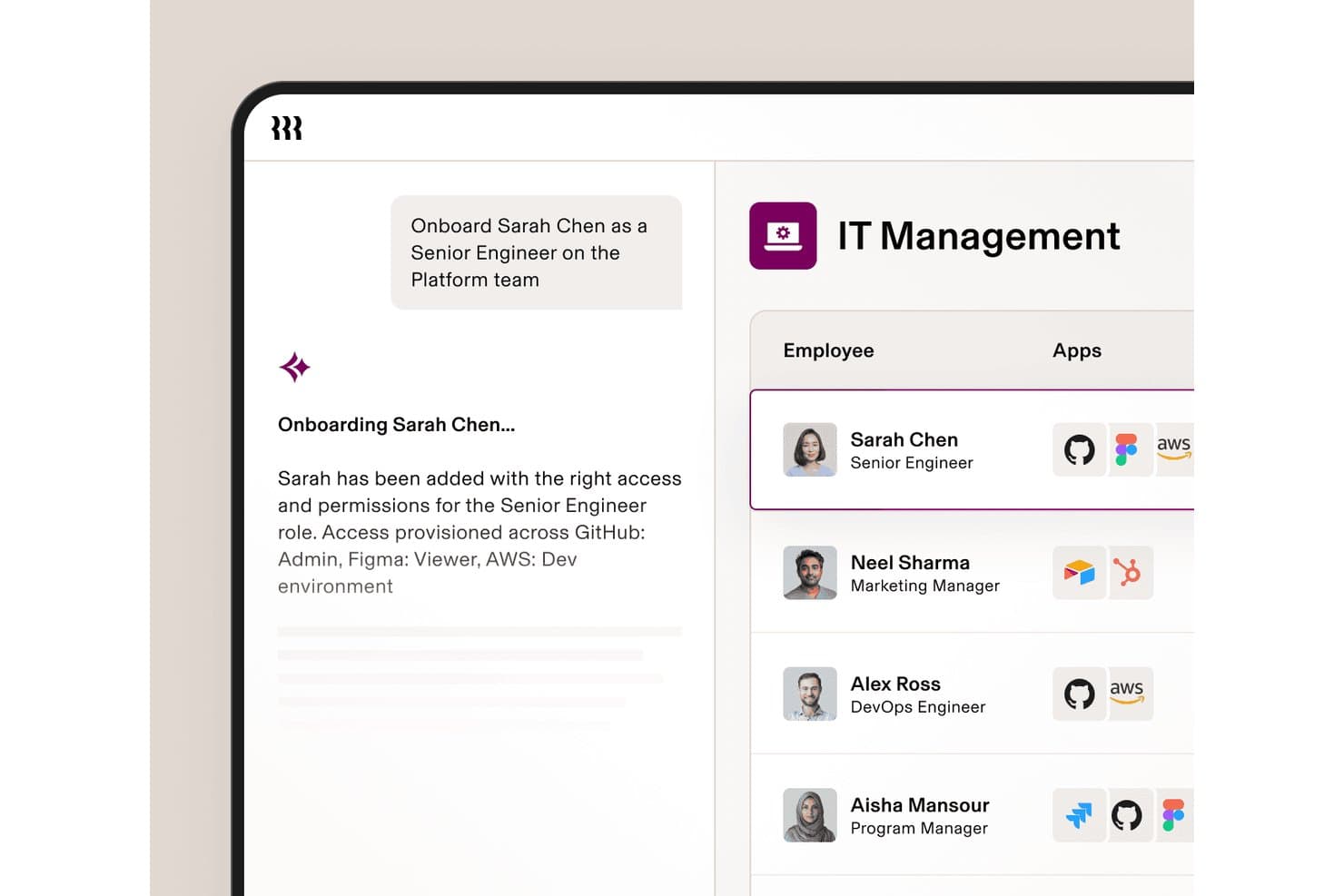
Rippling IT automatisiert die Bereitstellung von Apps beim Onboarding neuer Mitarbeiter. Rippling IT ist eine IT-Management-Plattform für wachsende Unternehmen, die Teams dabei unterstützt, Mitarbeitergeräte, Apps, Zugriffe und Sicherheit über ein verbundenes System zu verwalten.
Für wen eignet sich Rippling IT am besten?
Rippling IT eignet sich für IT- und HR-Teams, die Mitarbeiter-Lifecycle-Ereignisse benötigen, um die Bereitstellung von SaaS-Anwendungen, Zugriffsänderungen und Offboarding-Workflows auszulösen.
Warum Rippling IT eine gute BetterCloud-Alternative ist
Ich habe Rippling IT ausgewählt, weil die HR-gesteuerte Automatisierung des SaaS-Zugriffs Mitarbeiter-Lifecycle-Ereignisse mit der Bereitstellung von Apps und Zugriffsänderungen verbindet. Mein Team kann Onboarding, Rollenänderungen und Offboarding nutzen, um den SaaS-Zugriff zu aktualisieren und gleichzeitig Geräte und Sicherheit über ein System zu verwalten. Das macht Rippling IT zu einer praktischen BetterCloud-Alternative, wenn HR und IT gemeinsame Zugriffs-Workflows benötigen.
Wichtige Funktionen von Rippling IT
- Gerätebereitstellung ohne manuellen Eingriff : Versendet Geräte, die mit den erforderlichen Apps und Richtlinien vorkonfiguriert sind.
- Automatisierung des Helpdesks : Bearbeitet IT-Anfragen von Mitarbeitern über automatisierte Support-Workflows.
- Compliance-Überwachung : Verfolgt SOC-2- und NIST-Kontrollen, Nachweise und Compliance-Lücken.
- KI-Governance : Überwacht die Nutzung von KI-Tools, Ausgaben und Identitäten von Agenten.
Integrationen von Rippling IT
Rippling IT bietet mehr als 600 native Integrationen, darunter Google (G Suite), Microsoft 365, Slack, Jira, GitHub, Datadog, Zoom, Asana, Salesforce und HubSpot. Außerdem stehen eine API und Entwicklertools für benutzerdefinierte Integrationen und Apps aus dem App-Shop zur Verfügung.
Pros and Cons
Pros:
- HR-Ereignisse lösen Änderungen des App-Zugriffs aus
- Geräte- und SaaS-Steuerung über eine gemeinsame Konsole
- Offboarding-Workflows reduzieren verbleibende Kontozugriffe
Cons:
- Das HRIS-zentrierte Modell eignet sich möglicherweise nicht für reine IT-Teams
- Die SaaS-Erkennung ist weniger spezialisiert als bei BetterCloud
Learn more about Rippling IT: 2Am besten geeignet für die sichere Integration einmaliger Anmeldung
Okta
- 30-tägige kostenlose Testversion + kostenlose Demo verfügbar
- Ab $6/Benutzer/Monat (jährlich abgerechnet)
Visit WebsiteCustomer Rating:4.6/5
Okta zentralisiert sichere Anmeldungen mit SSO und Identitätskontrollen Wenn Ihr Team eine sichere, zentralisierte Zugriffsverwaltung benötigt, bietet Okta eine dedizierte Plattform für einmalige Anmeldung und Identitätskontrolle. IT-Administratoren und Sicherheitsverantwortliche nutzen Okta, um die Authentifizierung über Cloud- und lokale Anwendungen hinweg zu vereinheitlichen und so eine unübersichtliche Passwortverwaltung sowie Zugriffsrisiken zu reduzieren. Im Gegensatz zu BetterCloud ist Okta auf Identitäts- und Zugriffsverwaltung spezialisiert und eignet sich daher besonders für Organisationen, die eine sichere Benutzerauthentifizierung und einen optimierten Anwendungszugriff priorisieren.
Für wen ist Okta am besten geeignet?
IT- und Sicherheitsteams in kleinen bis großen Unternehmen weltweit, die sichere Lösungen für einmalige Anmeldung und Identitätsverwaltung einsetzen.
Warum ich Okta ausgewählt habe
Wenn sichere einmalige Anmeldung für Sie oberste Priorität hat, bietet Okta eine fokussierte Lösung, mit der BetterCloud nicht mithalten kann. Ich habe Okta ausgewählt, weil die Plattform zentralisierte Authentifizierung und granular steuerbare Zugriffskontrollen für alle Ihre Cloud- und lokalen Anwendungen bereitstellt. Die Plattform unterstützt adaptive Multi-Faktor-Authentifizierung, sodass Sie Sicherheitsrichtlinien auf Grundlage des Benutzerkontexts und des Risikos durchsetzen können. Wenn Ihre Organisation die Passwortbelastung reduzieren und die Identitätssicherheit stärken muss, sind Oktas Funktionen für einmalige Anmeldung speziell für diese Herausforderung konzipiert.
Wichtige Okta-Funktionen
Einige weitere Okta-Funktionen können Ihrem Team dabei helfen, Identitäten und Zugriffe effektiver zu verwalten:
- Lebenszyklusverwaltung: Automatisiert die Bereitstellung und Aufhebung der Bereitstellung von Benutzern über verbundene Anwendungen hinweg.
- Universelles Verzeichnis: Speichert und verwaltet Benutzerprofile und -attribute in einem zentralisierten Verzeichnis.
- API-Zugriffsverwaltung: Sichert APIs mit OAuth und benutzerdefinierten Zugriffsrichtlinien.
- Zurücksetzen von Passwörtern im Selbstservice: Ermöglicht Benutzern, ihre Passwörter ohne Unterstützung durch die IT selbst zurückzusetzen.
Okta-Integrationen
Zu den Integrationen gehören Microsoft 365, Google Workspace, Salesforce, Slack, Zoom, AWS, ServiceNow, Box, Workday und weitere.
Pros and Cons
Pros:
- Unterstützt einmalige Anmeldung über Hunderte von Cloud- und lokalen Anwendungen hinweg
- Bietet adaptive Multi-Faktor-Authentifizierung für erweiterte Sicherheitsrichtlinien
- Bietet automatisierte Workflows für die Bereitstellung und Aufhebung der Bereitstellung von Benutzern
Cons:
- Bietet keine Automatisierung von SaaS-Abläufen oder Überwachung der Dateisicherheit
- Bietet keine granularen Analysen zur SaaS-Nutzung
Learn more about Okta: Am besten für die einheitliche Geräte- und Benutzerverwaltung geeignet
- 30-tägige kostenlose Testversion + kostenlose Demo verfügbar
- Preise auf Anfrage
Visit WebsiteCustomer Rating:4.6/5
JumpCloud verwaltet Benutzer und Geräte über Windows-, Mac- und Linux-Systeme hinweg Die Verwaltung sowohl von Geräten als auch von Benutzeridentitäten über eine einzige Plattform ist der Bereich, in dem sich JumpCloud auszeichnet. IT-Teams, die nach einer BetterCloud-Alternative suchen, nutzen JumpCloud, um Verzeichnisdienste, Geräteverwaltung und Zugriffskontrolle in Windows-, Mac- und Linux-Umgebungen zu vereinheitlichen. Dieser Ansatz hilft Unternehmen, die Sicherheit von Endgeräten und die Verwaltung des Benutzerlebenszyklus zu vereinfachen, ohne mehrere Tools parallel verwalten zu müssen.
Für wen eignet sich JumpCloud am besten?
IT-Administratoren in kleinen bis mittelgroßen Unternehmen weltweit, die eine einheitliche Geräte- und Benutzerverwaltung überwachen.
Warum ich JumpCloud ausgewählt habe
Wenn Sie eine einheitliche Kontrolle über Geräte und Benutzeridentitäten benötigen, bietet JumpCloud eine Kombination, die BetterCloud nicht bereitstellt. Ich habe JumpCloud ausgewählt, weil Sie damit Verzeichnisdienste, Sicherheitsrichtlinien für Geräte und die Benutzerauthentifizierung über eine einzige Administrationskonsole verwalten können. Die Plattform unterstützt die plattformübergreifende Geräteverwaltung für Windows, Mac und Linux, sodass Sie unabhängig von Ihrer Hardwarekombination Sicherheitsstandards durchsetzen können. Für IT-Teams, die die Anzahl ihrer Tools reduzieren und die Verwaltung von Endgeräten und Identitäten zentralisieren möchten, vereint JumpCloud diese Funktionen an einem Ort.
Wichtigste Funktionen von JumpCloud
Einige weitere Funktionen von JumpCloud können Ihrem Team dabei helfen, weitere Anforderungen an das IT-Management abzudecken:
- Cloud-LDAP und RADIUS: Bietet cloudbasierte LDAP- und RADIUS-Dienste für sicheren Netzwerk- und Anwendungszugriff.
- Multi-Faktor-Authentifizierung (MFA): Erzwingt MFA sowohl für Geräteanmeldungen als auch für den Anwendungszugriff.
- Richtlinienverwaltung: Ermöglicht Ihnen, Sicherheitsrichtlinien für Gerätegruppen zu erstellen und bereitzustellen.
- Single Sign-On (SSO): Unterstützt die SSO-Integration mit einer großen Auswahl an Cloud-Anwendungen.
JumpCloud-Integrationen
Zu den Integrationen gehören Google Workspace, Microsoft 365, Okta, Salesforce, Slack, GitHub, Workday, BambooHR und weitere.
Pros and Cons
Pros:
- Verwaltet Benutzeridentitäten und Geräte über Windows, Mac und Linux hinweg
- Bietet cloudbasierte Verzeichnisdienste mit LDAP- und RADIUS-Unterstützung
- Bietet integrierte Multi-Faktor-Authentifizierung für den Zugriff auf Geräte und Apps
Cons:
- Bietet keine umfassenden Funktionen für die SaaS-Anwendungsverwaltung und -automatisierung
- Die Geräteverwaltung für mobile Plattformen ist weniger umfassend als für Desktop-Plattformen
Learn more about JumpCloud: Am besten für die Integration von Arbeitsabläufen in Unternehmen geeignet
- Kostenlose Demo verfügbar
- Preise auf Anfrage
Visit WebsiteCustomer Rating:4.4/5
ServiceNow führt umfangreiche Servicearbeitsabläufe über IT- und Geschäftsbereiche hinweg aus ServiceNow zeichnet sich für IT-Führungskräfte und Unternehmensteams aus, die komplexe Arbeitsabläufe abteilungs- und systemübergreifend verbinden müssen. Die Plattform geht über die SaaS-Verwaltung hinaus und bietet umfassende Automatisierungs-, Servicemanagement- und Integrationsfunktionen für große Unternehmen. Wenn Sie nach einer BetterCloud-Alternative suchen, die IT-, HR- und Geschäftsprozesse auf einer einzigen Plattform vereinheitlichen kann, ist ServiceNow auf diese Größenordnung und Flexibilität ausgelegt.
Für wen ist ServiceNow am besten geeignet?
IT- und Betriebsführungskräfte in großen Unternehmen weltweit, die Arbeitsabläufe im IT-Servicemanagement und in Geschäftsbereichen integrieren.
Warum ich ServiceNow ausgewählt habe
Wenn Sie Arbeitsabläufe über mehrere Unternehmenssysteme hinweg integrieren müssen, bietet ServiceNow Funktionen, die weit über das hinausgehen, was BetterCloud bereitstellt. Ich habe ServiceNow ausgewählt, weil Sie damit durchgängige automatisierte Arbeitsabläufe entwerfen, automatisieren und überwachen können, die sich über IT, HR, Sicherheit und Geschäftsabläufe erstrecken, und dabei einen Zero-Trust-Ansatz für Zugriff und Governance unterstützen. Die Arbeitsablauf-Engine und die Werkzeuge mit wenig Programmieraufwand der Plattform greifen auf umfangreiche Konnektoren zurück, um Prozesse und Daten zwischen verschiedenen Abteilungen zu verknüpfen und so Silos und manuelle Arbeit zu reduzieren. Für Unternehmen, die Servicemanagement und Automatisierung in großem Maßstab vereinheitlichen möchten, bietet ServiceNow die erforderliche Tiefe und Flexibilität.
Wichtigste Funktionen von ServiceNow
Einige weitere Funktionen von ServiceNow können Ihnen dabei helfen, Technologieumgebungen in Unternehmen effektiver zu verwalten:
- Vorfallmanagement: Verfolgt, priorisiert und löst IT-Vorfälle über ein zentrales Dashboard.
- Asset-Management: Überwacht Hardware- und Software-Assets während ihres gesamten Lebenszyklus.
- Servicekatalog: Ermöglicht Benutzern, IT- und Geschäftsservices über ein anpassbares Portal anzufordern.
- Änderungsmanagement: Kontrolliert und dokumentiert Änderungen an Systemen und Infrastruktur, um Risiken zu reduzieren.
Integrationen von ServiceNow
Zu den Integrationen gehören Microsoft Teams, Slack, Jira, GitHub, Salesforce, SAP, Oracle, Microsoft Dynamics 365, Okta und weitere.
Pros and Cons
Pros:
- Unterstützt komplexe Automatisierung von Arbeitsabläufen in IT, HR und Geschäftsbereichen
- Bietet detaillierte Funktionen für Vorfall-, Asset- und Änderungsmanagement
- Bietet Werkzeuge mit wenig Programmieraufwand zum Erstellen benutzerdefinierter Unternehmensanwendungen
Cons:
- Implementierung und Konfiguration erfordern erheblichen Zeitaufwand sowie umfangreiche technische Ressourcen
- Die Anpassung erfordert häufig spezialisierte Entwicklungskenntnisse für ServiceNow
 Am besten für die Optimierung von Anbieterverträgen geeignet
- Kostenlose Demo verfügbar
- Preise auf Anfrage
Visit WebsiteCustomer Rating:4.6/5
CloudEagle.ai verfolgt SaaS-Ausgaben und ermöglicht das Lizenzmanagement über Teams hinweg CloudEagle.ai wurde für IT-, Beschaffungs- und Finanzteams entwickelt, die SaaS-Anbieterverträge und -verlängerungen optimieren müssen. Im Gegensatz zu anderen BetterCloud-Alternativen kombiniert die Plattform Vertragsmanagement mit Ausgabenanalysen und Arbeitsabläufen für Verlängerungen in einer einzigen Lösung. Dieser Ansatz hilft Ihnen, Einblick in Vertragsbedingungen zu gewinnen, überraschende Verlängerungen zu vermeiden und bessere Preise mit Anbietern auszuhandeln.
Für wen ist CloudEagle.ai am besten geeignet?
Finanz- und IT-Verantwortliche in mittelgroßen bis großen Unternehmen weltweit, die Anbieterverträge optimieren und SaaS-Ausgaben kontrollieren möchten.
Warum ich CloudEagle.ai ausgewählt habe
Für IT- und Beschaffungsteams, die sich auf die Optimierung von Anbieterverträgen konzentrieren, bietet CloudEagle.ai eine Reihe von Funktionen, die über das hinausgehen, was Sie in BetterCloud finden. Ich habe CloudEagle.ai ausgewählt, weil die Plattform die Vertragsspeicherung zentralisiert, Verlängerungstermine verfolgt und die Ausgabenoptimierung mit automatisierten Erinnerungen unterstützt, damit Sie keine Fristen verpassen. Die Plattform analysiert außerdem Vertragsbedingungen und Ausgabendaten und verschafft wichtigen Beteiligten dadurch eine bessere Verhandlungsposition sowie einen umfassenderen Einblick in Ihr SaaS-Portfolio. Wenn Sie unnötige Ausgaben reduzieren und das Anbietermanagement verbessern möchten, ist der vertragsorientierte Ansatz von CloudEagle.ai eine überzeugende Lösung.
Die wichtigsten Funktionen von CloudEagle.ai
Einige weitere Funktionen von CloudEagle.ai helfen Ihnen, Ihren SaaS-Stack strategischer zu verwalten:
- Automatisierte SaaS-Erkennung: Erkennt und katalogisiert alle in Ihrem Unternehmen verwendeten SaaS-Anwendungen.
- Dashboard für Ausgabenanalysen: Visualisiert SaaS-Ausgaben nach Abteilung, Anbieter oder Benutzer und ermöglicht so eine bessere Budgetkontrolle.
- Überprüfung von Benutzerzugriffen: Ermöglicht Ihnen, Benutzerzugriffe auf SaaS-Tools über eine einzige Oberfläche zu prüfen und zu verwalten.
- Automatisierung von Verlängerungsabläufen: Vereinfacht die Prüfung, Genehmigung und Durchführung von SaaS-Verlängerungen.
Integrationen von CloudEagle.ai
Zu den Integrationen gehören Okta, Microsoft Active Directory, Google Workspace, NetSuite, QuickBooks, Sage Intacct, Salesforce, Slack und weitere.
Pros and Cons
Pros:
- Zentralisiert die Speicherung von SaaS-Verträgen und die Nachverfolgung von Verlängerungen für IT-Teams
- Bietet Ausgabenanalysen zur Identifizierung ungenutzter oder zu wenig genutzter Lizenzen
- Bietet automatisierte Erinnerungen an bevorstehende Vertragsverlängerungen und Ablauftermine
Cons:
- Die Möglichkeiten zur Anpassung von Berichten sind möglicherweise weniger fortschrittlich als bei Wettbewerbern
- Der Funktionsumfang konzentriert sich auf Vertragsmanagement und nicht auf umfassendere SaaS-Abläufe
Learn more about CloudEagle.ai: Am besten für automatisiertes SaaS-Lebenszyklusmanagement geeignet
- Kostenlose Demo verfügbar
- Preise auf Anfrage
Visit WebsiteCustomer Rating:4.6/5
Josys erkennt SaaS-Anwendungen automatisch und verwaltet den Zugriff über ein einziges Dashboard Josys bietet ein automatisiertes SaaS-Lebenszyklusmanagement für IT-Teams, die komplexe Anwendungsumgebungen verwalten. Wenn Sie das Onboarding, Offboarding und die Anwendungsbereitstellung über mehrere Cloud-Tools hinweg optimieren müssen, zentralisiert Josys diese Prozesse auf einer Plattform. Der Schwerpunkt auf Automatisierung trägt dazu bei, manuelle Arbeit zu reduzieren und Fehler im Vergleich zu anderen BetterCloud-Alternativen zu minimieren.
Für wen eignet sich Josys am besten?
IT-Betriebs- und Beschaffungsteams in mittelgroßen Unternehmen in Nordamerika und Europa, die das SaaS-Lebenszyklusmanagement abteilungsübergreifend automatisieren.
Warum ich Josys ausgewählt habe
Josys zeichnet sich durch seinen Fokus auf die Automatisierung des gesamten SaaS-Lebenszyklus aus, was für IT-Teams, die ein wachsendes SaaS-Ökosystem aus Cloud-Anwendungen verwalten, besonders wichtig ist. Ich habe Josys als BetterCloud-Alternative ausgewählt, weil es als zentralisiertes SaaS-Verwaltungstool fungiert, mit dem Sie Onboarding, Offboarding und Anwendungsbereitstellung über ein einziges Dashboard automatisieren können. Die Workflow-Automatisierung der Plattform verwendet integrierte Konnektoren, um manuelle Schritte zu reduzieren und eine konsistente Durchsetzung von Richtlinien in Ihrem SaaS-Stack sicherzustellen. Wenn Sie Fehler minimieren und Zeit bei sich wiederholenden Aufgaben der Benutzerverwaltung sparen möchten, bietet Josys eine gezielte Automatisierung, die über das hinausgeht, was viele andere Plattformen bereitstellen.
Wichtige Funktionen von Josys
Einige weitere Funktionen von Josys können Ihnen dabei helfen, SaaS-Umgebungen effizienter zu verwalten:
- Lizenzverwaltung: Verfolgen und verwalten Sie die Nutzung von SaaS-Lizenzen in Ihrem Unternehmen, um Verschwendung zu vermeiden und die Compliance sicherzustellen.
- Prüfprotokollierung: Führen Sie detaillierte Protokolle über Benutzeraktionen und Änderungen für Sicherheitsüberprüfungen und Compliance-Audits.
- Rollenbasierte Zugriffskontrollen: Weisen Sie Benutzern und Administratoren auf Grundlage ihrer Rollen und Verantwortlichkeiten differenzierte Berechtigungen zu.
- Automatische Anwendungserkennung: Identifizieren und katalogisieren Sie alle verwendeten SaaS-Anwendungen, einschließlich solcher, die ohne Genehmigung der IT hinzugefügt wurden.
Wichtige Integrationen von Josys
Zu den Integrationen gehören Microsoft Entra ID, Google Workspace, BambooHR, Workday, Slack, Zoom, Asana, Jira, AWS und weitere.
Pros and Cons
Pros:
- Automatisiert Onboarding- und Offboarding-Workflows für mehrere SaaS-Anwendungen
- Zentralisiert die SaaS-Lizenzverwaltung und Nutzungsverfolgung in einem Dashboard
- Bietet IT-Administratoren differenzierte rollenbasierte Zugriffskontrollen
Cons:
- Benutzerdefinierte Workflow-Optionen sind möglicherweise weniger flexibel als die von BetterCloud
- Eine begrenzte öffentliche Dokumentation erschwert die Bewertung der Funktionen
Learn more about Josys: Am besten für Kontrollen der Identitätsgovernance
- Kostenlose Demo verfügbar
- Preis auf Anfrage

SailPoint schützt Unternehmensidentitäten mit Identitätsgovernance und Analysen Für Organisationen, die eine fortschrittliche Identitätsgovernance benötigen, bietet SailPoint einen fokussierten Ansatz für Zugriffskontrolle und Compliance. Sicherheitsteams und IT-Verantwortliche nutzen SailPoint, um das Lebenszyklusmanagement von Identitäten zu automatisieren und granulare Zugriffsrichtlinien in komplexen Umgebungen durchzusetzen. Im Gegensatz zu BetterCloud ist SailPoint auf umfassende Governance-Kontrollen spezialisiert und eignet sich daher besonders für regulierte Branchen und Unternehmen mit strengen Compliance-Anforderungen.
Für wen ist SailPoint am besten geeignet?
Sicherheits- und Compliance-Verantwortliche in großen Unternehmen weltweit, die Identitätsgovernance und Zugriffskontrollen implementieren.
Warum ich SailPoint ausgewählt habe
Wenn Ihre Organisation eine fortschrittlichere Identitätsgovernance benötigt, als BetterCloud bietet, ist SailPoint eine Überlegung wert. Ich habe SailPoint ausgewählt, weil die Plattform automatisierte Zugriffszertifizierungen und richtlinienbasierte Zugriffskontrollen bietet, die dabei helfen, die Compliance in stark regulierten Umgebungen durchzusetzen. Die Plattform unterstützt außerdem detaillierte Prüfpfade und Berichte, wodurch sich die Compliance bei Sicherheitsüberprüfungen leichter nachweisen lässt. Für IT- und Sicherheitsteams, die sich auf das Lebenszyklusmanagement und die Governance von Identitäten konzentrieren, bietet SailPoint Kontrollen, die über das standardmäßige SaaS-Management hinausgehen.
Die wichtigsten Funktionen von SailPoint
Einige weitere Funktionen von SailPoint können Ihrem Team dabei helfen, Identitätsmanagement und Sicherheit zu stärken:
- Rollenbasierte Zugriffsmodellierung: Ermöglicht Ihnen, Benutzerrollen zu definieren und zu verwalten, um die Zuweisung von Zugriffen zu vereinfachen.
- Tools zur Passwortverwaltung: Bietet das Zurücksetzen von Passwörtern per Self-Service und die Synchronisierung über verschiedene Systeme hinweg.
- Richtlinien zur Aufgabentrennung: Erkennt und verhindert konfligierende Zugriffsrechte in Ihrer Umgebung.
- Unterstützung für Cloud- und On-Premises-Anwendungen: Verwaltet Identitäten sowohl in cloudbasierten als auch in älteren lokalen Anwendungen.
SailPoint-Integrationen
Zu den Integrationen gehören AWS, SAP, Microsoft Active Directory, Oracle, Salesforce, ServiceNow, Box, Epic Systems und weitere.
Pros and Cons
Pros:
- Automatisiert Zugriffszertifizierungen für complianceorientierte Unternehmen
- Unterstützt die granulare Durchsetzung von Richtlinien für Kontrollen der Identitätsgovernance
- Verwaltet Identitäten in Cloud- und lokalen Systemen
Cons:
- Die Berichtsfunktionen müssen für bestimmte Compliance-Anforderungen möglicherweise angepasst werden
- Die Benutzeroberfläche ist im Vergleich zu einigen SaaS-Wettbewerbern weniger modern
Learn more about SailPoint: Am besten für das Management der SaaS-Beschaffung geeignet
- Kostenlose Demo verfügbar
- Ab 250 $/Monat

Vendr verwaltet SaaS-Beschaffung, Verlängerungen und Lieferantenverhandlungen an einem Ort Wenn Ihr Team die SaaS-Beschaffung unter Kontrolle bringen muss, bietet Vendr eine dedizierte Plattform zur Verwaltung von Softwarekäufen und -verlängerungen. Beschaffungsleiter und IT-Asset-Manager nutzen Vendr, um Lieferantenverhandlungen zu zentralisieren, Vertragsbedingungen nachzuverfolgen und SaaS-Ausgaben zu optimieren. Anders als BetterCloud konzentriert sich Vendr auf den gesamten Beschaffungslebenszyklus und ist damit eine gute Wahl für Unternehmen, die ihre Vorgehensweise beim Kauf und bei der Verwaltung von SaaS-Tools standardisieren und automatisieren möchten.
Für wen ist Vendr am besten geeignet?
Beschaffungs- und Finanzteams in mittelgroßen bis großen Unternehmen in Nordamerika, die SaaS-Beschaffung und Lieferantenverhandlungen verwalten.
Warum ich Vendr ausgewählt habe
Für Unternehmen, die mehr Struktur und Transparenz in ihre SaaS-Beschaffung bringen möchten, bietet Vendr eine fokussierte Lösung für einen Bereich, den BetterCloud nicht abdeckt. Ich habe Vendr ausgewählt, weil die Plattform Vertragsmanagement zentralisiert und die Nachverfolgung von Verlängerungen automatisiert. Dadurch können IT- und Beschaffungsteams verpasste Fristen und unerwartete Kosten vermeiden. Die Plattform bietet außerdem Unterstützung bei Lieferantenverhandlungen und gewährt Ihrem Team während des Kaufprozesses Zugriff auf Marktinformationen und Vergleichswerte. Wenn Sie den gesamten SaaS-Beschaffungslebenszyklus verwalten müssen, bietet Vendr Funktionen, die über das standardmäßige SaaS-Management hinausgehen.
Die wichtigsten Funktionen von Vendr
Einige weitere Vendr-Funktionen können Ihrem Team dabei helfen, die SaaS-Beschaffung effizienter zu verwalten:
- SaaS-Ausgabenanalysen: Erfasst und visualisiert Softwareausgaben in Ihrem gesamten Unternehmen.
- Automatisierung von Genehmigungsprozessen: Leitet Kaufanfragen durch individuell anpassbare Genehmigungsketten.
- Zugriff auf eine Lieferantendatenbank: Bietet durchsuchbare Informationen zu Tausenden von SaaS-Lieferanten und -Produkten.
- Verlängerungskalender: Zeigt bevorstehende Vertragsverlängerungen in einem zentralen Dashboard an.
Vendr-Integrationen
Zu den Integrationen gehören Okta, Azure AD, Google Workspace, NetSuite, QuickBooks, Workday, BambooHR, Ironclad, Slack und weitere.
Pros and Cons
Pros:
- Zentralisiert SaaS-Vertragsdaten für mehr Transparenz in der Beschaffung
- Bietet Unterstützung bei Lieferantenverhandlungen mit Vergleichswerten für Marktpreise
- Automatisiert Erinnerungen an Verlängerungen und hilft so, verpasste Fristen zu vermeiden
Cons:
- Bietet kein direktes Management von Benutzerlebenszyklen oder Zugriffskontrollen
- Konzentriert sich auf die Beschaffung und nicht auf SaaS-Betrieb oder Automatisierung
Learn more about Vertice:

Zylo erfasst die SaaS-Nutzung und Verlängerungen für vollständige Transparenz bei SaaS-Ausgaben Wenn Ihr Team einen klaren Überblick über SaaS-Ausgaben und -Nutzung benötigt, wurde Zylo genau für diesen Zweck entwickelt. Die Plattform richtet sich an Fachleute aus IT, Beschaffung und Finanzen, die SaaS-Kosten im gesamten Unternehmen verfolgen, analysieren und optimieren möchten. Im Gegensatz zu BetterCloud ist Zylo darauf spezialisiert, detaillierte Ausgabendaten sichtbar zu machen und ungenutzte oder redundante Abonnements aufzudecken.
Für wen ist Zylo am besten geeignet?
IT-Asset- und Finanzmanager in mittelgroßen bis großen Organisationen in Nordamerika und Europa, die Einblick in SaaS-Ausgaben und -Nutzung erhalten möchten.
Warum ich Zylo ausgewählt habe
Für Organisationen, die ihre SaaS-Ausgaben in den Griff bekommen müssen, bietet Zylo einen tieferen Einblick als BetterCloud. Ich habe Zylo ausgewählt, weil die Plattform automatisch alle verwendeten SaaS-Anwendungen ermittelt und die Ausgaben sowohl auf Organisations- als auch auf Benutzerebene erfasst. Die Analysen der Plattform heben zu wenig genutzte Lizenzen und doppelte Abonnements hervor, wodurch sich Möglichkeiten zur Kosteneinsparung leichter erkennen lassen. Wenn es für Sie Priorität hat, SaaS-Ausgaben zu verstehen und zu kontrollieren, sind Zylos Funktionen zur Ausgabentransparenz besonders geeignet.
Wichtige Zylo-Funktionen
Einige weitere Funktionen von Zylo können Ihnen helfen, Ihre SaaS-Umgebung umfassender zu verwalten:
- Vertragsverwaltung: Zentralisiert SaaS-Verträge und Verlängerungstermine für eine einfachere Nachverfolgung.
- Nutzungsanalysen: Bietet detaillierte Berichte zur Anwendungsnutzung in verschiedenen Abteilungen.
- Lizenzoptimierung: Empfiehlt Anpassungen der Lizenzanzahl auf Grundlage realer Nutzungsdaten.
- Einblicke in SaaS-Anbieter: Bietet Vergleichsdaten und Einblicke in SaaS-Anbieter zur Unterstützung von Verhandlungen.
Wichtige Zylo-Integrationen
Native Integrationen sind derzeit nicht öffentlich aufgeführt.
Pros and Cons
Pros:
- Erfasst SaaS-Ausgaben über alle Abteilungen und Geschäftsbereiche hinweg
- Zentralisiert die Vertrags- und Verlängerungsverwaltung für SaaS-Anbieter
- Bietet detaillierte Nutzungsanalysen für eine bessere SaaS-Governance
Cons:
- Bietet keine detaillierte Verwaltung des Benutzerlebenszyklus und keine Automatisierungsfunktionen
- Unterstützt keine direkte Konfiguration von SaaS-Anwendungen oder Durchsetzung von Richtlinien
Learn more about Zylo: 10Am besten für die Erkennung und Nutzungsverfolgung von SaaS geeignet
Torii
- Kostenlose Demo verfügbar
- Preise auf Anfrage

Torii erkennt Schatten-IT und optimiert die SaaS-Nutzung mit Automatisierungstools Wenn Sie umfassende Transparenz über die SaaS-Nutzung in Ihrer gesamten Organisation benötigen, ist Torii für Sie gemacht. IT-Teams und Verantwortliche für die Beschaffung nutzen Torii, um jede verwendete SaaS-Anwendung – einschließlich Schatten-IT – automatisch zu erkennen, zu verfolgen und zu analysieren. Anders als BetterCloud ist Torii darauf spezialisiert, Nutzungsmuster und Ausgabendaten sichtbar zu machen, damit Sie Ihr SaaS-Portfolio optimieren können.
Für wen ist Torii am besten geeignet?
IT-Betriebsteams und SaaS-Administratoren in mittelgroßen Unternehmen weltweit, die Schatten-IT aufdecken und die Softwarenutzung verfolgen möchten.
Warum ich Torii ausgewählt habe
Wenn es darum geht, die SaaS-Nutzung aufzudecken und zu verfolgen, bietet Torii ein Maß an Transparenz, mit dem BetterCloud nicht mithalten kann. Ich habe Torii ausgewählt, weil die Plattform alle SaaS-Anwendungen in Ihrer Umgebung automatisch erkennt, einschließlich solcher, die nicht von der IT verwaltet werden. Dadurch können Sie Risiken durch Schatten-IT besser begegnen. Die Plattform verfolgt außerdem die Lizenznutzung und Ausgaben, sodass Sie wenig genutzte Abonnements identifizieren und Kosten optimieren können. Für IT-Teams, die sich auf SaaS-Management und Ausgabenanalyse konzentrieren, rückt Torii die Erkennung und Nutzungsverfolgung in den Mittelpunkt.
Wichtige Funktionen von Torii
Einige weitere Funktionen von Torii können Ihrem Team dabei helfen, den SaaS-Betrieb effektiver zu verwalten:
- Automatisiertes Onboarding und Offboarding: Vereinfacht die Bereitstellung und Aufhebung der Bereitstellung von Benutzern über verbundene SaaS-Anwendungen hinweg.
- Benutzerdefinierter Workflow-Builder: Ermöglicht Ihnen, IT-Prozesse für die Anwendungsverwaltung zu entwerfen und zu automatisieren.
- Dashboard zur Verlängerungsverwaltung: Verfolgt bevorstehende Vertragsverlängerungen und sendet Warnmeldungen, um verpasste Fristen zu vermeiden.
- Richtliniendurchsetzungsmodul: Wendet Nutzungs- und Sicherheitsrichtlinien automatisch auf erkannte SaaS-Anwendungen an.
Torii-Integrationen
Zu den Integrationen gehören Okta, Google Workspace, JumpCloud, SAP SuccessFactors, ADP Workforce Now, NetSuite, Expensify, AWS und weitere.
Pros and Cons
Pros:
- Erkennt automatisch sowohl verwaltete als auch nicht verwaltete SaaS-Anwendungen, die verwendet werden
- Verfolgt die Lizenznutzung und Ausgaben für alle verbundenen SaaS-Tools
- Bietet Workflow-Automatisierung für Onboarding- und Offboarding-Prozesse
Cons:
- Die öffentliche Dokumentation und die Support-Ressourcen sind weniger umfangreich
- Bietet nicht die granularen Zugriffsverwaltungsfunktionen von BetterCloud
Learn more about Torii:
Weitere BetterCloud-Alternativen
Hier sind einige weitere Optionen als BetterCloud-Alternative, die es nicht auf meine Auswahlliste geschafft haben, aber dennoch einen Blick wert sind:
- 11LumosAm besten für die Automatisierung von Zugriffsanfragen
- 12ZluriAm besten für die Bereitstellung von Mitarbeiter-Apps geeignet
- 13DoControlAm besten für granulare Datenzugriffskontrollen geeignet
- 14Netskope OneAm besten für den Echtzeit-Datenschutz in der Cloud geeignet
Wie ich BetterCloud-Alternativen bewerte
Ich teile die Bewertung in zwei Ebenen auf: Die Kernfunktionen, die eine BetterCloud-Alternative unbedingt haben muss—wie SaaS-Lifecycle-Automatisierung und Zugriffssteuerungen—und die Alleinstellungsmerkmale, die die Tools voneinander unterscheiden.
Kernfunktionen (Grundvoraussetzung für diese Liste)
Wenn ich Tools für meine Liste auswähle, bewerte ich jedes einzelne auf einer Skala von 0 (bietet die Funktion nicht) bis 5 (hervorragend in diesem Bereich) für jede der unten aufgeführten Kernfunktionen. Anschließend berechne ich die Gesamtpunktzahl des Tools als Prozentsatz. Jedes Tool muss eine Mindestgesamtbewertung von 65 % erreichen, um für die Aufnahme in Betracht gezogen zu werden.
- Integrationstiefe für mehrere SaaS-Anwendungen: Ich prüfe, wie viele native Konnektoren ein Tool bietet und ob diese Integrationen über reine SSO-Verbindungen hinausgehen und einen detaillierten Zugriff auf Aktionen bei Apps wie Google Workspace, Microsoft 365, Slack und Salesforce erlauben.
- Automatisierung des Benutzerlebenszyklus: Es wird bewertet, ob das Tool den vollständigen Joiner-Mover-Leaver-Prozess automatisieren kann—etwa die Bereitstellung der Apps eines neuen Mitarbeiters über einen HRIS-Auslöser und die sofortige Entziehung des Zugriffs bei Kündigung.
- Workflow- & Playbook-Builder: Ich achte auf eine No-Code- oder Low-Code-Engine, die bedingte Verzweigungen und mehrstufige Aktionen unterstützt, wie das automatische Sperren aller Konten eines Nutzers in SaaS-Apps, wenn eine Sicherheitswarnung ausgelöst wird.
- Zugriffs- & Berechtigungsmanagement für SaaS: Zentralisierte Kontrolle über Berechtigungen, Gruppenmitgliedschaften und Richtlinien für Dateifreigaben ist hier wichtig—insbesondere die Möglichkeit zu prüfen, wer Admin-Zugriff auf welche verbundenen Apps hat.
- SaaS-Erkennung & Transparenz: Tools sollten App-Nutzungsdaten und Lizenzverwendung anzeigen, damit IT-Teams Schatten-IT erkennen und ungenutzte Lizenzen aufspüren, die unbemerkt Budget verbrauchen.
- Sicherheits- & Compliance-Kontrollen: Ich prüfe, ob die Plattform Richtliniendurchsetzung, DLP-ähnliches Scannen und Prüfprotokolle zur Unterstützung von Compliance-Workflows für Rahmenwerke wie SOC 2 oder ISO 27001 beinhaltet.
Sobald ich eine Liste der Tools habe, die diese Kriterien erfüllen, betrachte ich die Unterscheidungsmerkmale jeder Plattform.
Unterscheidungsmerkmale (was Anbieter abhebt)
So vergleiche und bewerte ich verschiedene Anbieter:
Herausragende Funktionen
HRIS-gesteuerte Automatisierung ist ein großer Pluspunkt—ich suche nach Tools, die Onboarding-Workflows sofort auslösen, sobald ein neuer Mitarbeiter in Workday oder BambooHR als aktiv markiert wird, völlig ohne manuelle Schritte. Detailliertes, delegiertes Admin-Management ist ebenso wichtig, da Bereichsleiter oder MSP-Techniker häufig gezielten Zugriff benötigen, um ihre eigenen Nutzer zu verwalten, ohne globale Einstellungen zu verändern. Außerdem bewerte ich, ob eine Plattform ein Self-Service-Portal bietet, über das Endnutzer App-Zugriff anfordern oder Passwörter selbst zurücksetzen können, wodurch einfache IT-Tickets reduziert werden.
Mehr als nur Features
Die Tiefe des Integrations-Ökosystems bewerte ich besonders genau—Tools mit offenen APIs und Custom-Connector-Baukästen geben Teams die Flexibilität, auch weniger verbreitete SaaS-Apps anzubinden. Auch die Compliance-Ausrichtung ist wichtig, insbesondere ob ein Anbieter SOC 2 Type II oder ISO 27001-Zertifizierungen hält und exportierbare Prüfprotokolle für Nachweise bietet. Ich berücksichtige zudem die Zielkundengruppe, denn manche Plattformen sind für Enterprise-IT-Teams mit tausenden Usern konzipiert, andere sind besser für kleine Unternehmen oder MSPs geeignet, die mehrere Mandanten betreuen.
Warum nach einer BetterCloud-Alternative suchen?
Obwohl BetterCloud eine gute Wahl als BetterCloud-Alternative ist, gibt es mehrere Gründe, warum sich manche Benutzer nach alternativen Lösungen umsehen. Sie suchen möglicherweise nach einer BetterCloud-Alternative, weil …
- Sie benötigen detailliertere Zugriffskontrollen auf Dateiebene
- Ihr Team wünscht sich umfassendere Automatisierung für SaaS-Sicherheitsworkflows
- Sie benötigen Integrationen mit SaaS-Apps, die von BetterCloud nicht unterstützt werden
- Ihr Unternehmen benötigt eine transparentere oder flexiblere Preisgestaltung
- Sie suchen nach einem Tool mit leistungsfähigeren Funktionen für Compliance-Berichte
- Sie benötigen Unterstützung für globale Umgebungen oder Umgebungen mit mehreren Mandanten
Wenn Sie sich in einem dieser Punkte wiedererkennen, sind Sie hier richtig. Meine Liste umfasst mehrere BetterCloud-Alternativen, die besser für Teams geeignet sind, die mit diesen Herausforderungen bei BetterCloud konfrontiert sind und nach Alternativen suchen.
Wichtige Funktionen von BetterCloud
Hier sind einige der wichtigsten Funktionen von BetterCloud, damit Sie die Angebote alternativer Lösungen gegenüberstellen und vergleichen können:
- Automatisierte Workflows für das Einrichten und Deaktivieren von Benutzerkonten
- Zentralisierte Verwaltung von Berechtigungen und Zugriffen auf SaaS-Anwendungen
- Richtlinienbasierte Automatisierung von Sicherheits- und Compliance-Aufgaben
- Echtzeitüberwachung von SaaS-Aktivitäten und Konfigurationsänderungen
- Individuelle Benachrichtigungen bei verdächtigem oder riskantem Benutzerverhalten
- Massenaktionen zur Verwaltung von Benutzern, Gruppen und Lizenzen
- Detaillierte Prüfprotokolle und Berichte für Compliance-Anforderungen
- Integration mit wichtigen SaaS-Plattformen wie Google Workspace und Microsoft 365
- Delegierte Administration für verteilte IT-Teams
- Vorgefertigte Workflow-Vorlagen für gängige IT-Prozesse