

Eine leistungsstarke Basecamp-Alternative bietet Ihrem Team flexible Funktionen für das Projektmanagement, zuverlässige Werkzeuge für die Zusammenarbeit und Anpassungsmöglichkeiten, die zu Ihrem Arbeitsablauf passen. Wenn Sie nach einem Ersatz suchen, weil die Struktur, Integrationen oder Preise von Basecamp Ihren Anforderungen nicht mehr gerecht werden, sind Sie nicht allein.
Viele IT-Spezialisten und Projektleiter wünschen sich Werkzeuge, die komplexe Projekte bewältigen, Automatisierung unterstützen und eine detailliertere Kontrolle über Aufgaben und Berichte ermöglichen. Diese Liste hilft Ihnen, die besten Basecamp-Alternativen für 2026 zu vergleichen, damit Sie eine Lösung finden, die den Anforderungen Ihres Teams entspricht und Ihre Projekte auf Kurs hält.
Was ist Basecamp?
Basecamp ist eine Projektmanagement-Software, die Teams dabei hilft, Aufgaben zu organisieren, Dateien zu teilen und an einem Ort zu kommunizieren. Sie kombiniert Aufgabenlisten, Nachrichtenforen, Zeitpläne und Dokumentenspeicher, um die Zusammenarbeit an Projekten zu unterstützen.
Unternehmen jeder Größe nutzen Basecamp, um die Arbeit zu koordinieren, den Fortschritt zu verfolgen und Projektinformationen zentral zu verwalten. Die einfache Benutzeroberfläche und der Fokus auf die Teamkommunikation machen die Software zu einer beliebten Wahl für die Verwaltung interner Projekte und Kundenprojekte.
Vergleichstabelle der Basecamp-Alternativen
Diese Vergleichstabelle fasst die Preisinformationen meiner Auswahl an Basecamp-Alternativen zusammen:
| Tool | Best For | Trial Info | Price | ||
|---|---|---|---|---|---|
| 1 | Am besten für vollständig anpassbare Dashboards geeignet | Kostenloser Tarif verfügbar | Ab $7/Benutzer/Monat (jährlich abgerechnet) | Website | |
| 2 | Am besten für die teamübergreifende Automatisierung von Arbeitsabläufen | Kostenloser Tarif verfügbar | Ab $10.99/Nutzer/Monat (jährlich abgerechnet) | Website | |
| 3 | Am besten für zentralisierte Teamdiskussionen geeignet | 14-tägige kostenlose Testversion + kostenlose Demo verfügbar | Ab $45/Monat (jährlich abgerechnet) | Website | |
| 4 | Am besten für Teams, die selbst gehostetes Projektmanagement benötigen | 14-tägige kostenlose Testversion + kostenloser Tarif verfügbar | Ab $7.25/Benutzer/Monat (jährlich abgerechnet) | Website | |
| 5 | Am besten für kundenorientiertes Projektmanagement geeignet | 14-tägige kostenlose Testversion + kostenlose Demo verfügbar | Ab $9.99/Benutzer/Monat (jährliche Abrechnung) | Website | |
| 6 | Am besten für meilensteinbasierte Roadmaps geeignet | Kostenloser Tarif + kostenlose Demo verfügbar + 14-tägige kostenlose Testversion | Ab $39/Nutzer/Monat (jährliche Abrechnung) | Website | |
| 7 | Am besten mit KI-gestützten Projektautomatisierungen | Kostenloser Tarif verfügbar | Ab $9/Nutzer/Monat (jährlich abgerechnet) | Website | |
| 8 | Ideal für die Aufgabenplanung im Tabellenformat | 30-tägige kostenlose Testversion | Ab $9/Nutzer/Monat (jährlich abgerechnet) | Website | |
| 9 | Am besten für integrierte E-Mail-Funktionen | 14-tägige kostenlose Testversion + kostenloser Tarif + kostenlose Demo verfügbar | Ab $5/Benutzer/Monat (jährlich abgerechnet) | Website | |
| 10 | Am besten für fortschrittliche Berichtstools geeignet | 14-tägige kostenlose Testversion + kostenloser Tarif verfügbar | Ab 10 $/Benutzer/Monat (jährlich abgerechnet) | Website |


Warum Sie unseren Software-Empfehlungen vertrauen können
6,700+
Reviews
20
Industry experts
16+
Evaluation factors
14
Years
Unser Team testet und bewertet Software seit 2012. Als Tech-Führungskräfte wissen wir selbst, wie schwierig – und wichtig – es ist, die richtige Software auszuwählen.
Für diesen Leitfaden haben wir Tools mithilfe von praktischen Tests und unabhängiger Recherche bewertet und dabei unsere Bewertungskriterien angewendet.
Unsere Bewertungen spiegeln unser menschliches redaktionelles Urteilsvermögen wider, keine Verkaufsstrategie.
Expertenprüfer:
- Paulo Gardini MiguelTech-Direktor
 Tim FisherVP für KI
 Gabriel RosasTech Lead & Software-Architekt
 Christhian GruhnTech Lead & Plattform-Architekt

Bewertungen von Basecamp-Alternativen
Nachfolgend finden Sie meine ausführlichen Zusammenfassungen der Basecamp-Alternativen, die es in meine Kurzliste geschafft haben. Meine Bewertungen bieten einen detaillierten Einblick in die Funktionen, besten Einsatzmöglichkeiten und Integrationen jeder Plattform, damit Sie die beste Lösung für sich finden.
 Am besten für vollständig anpassbare Dashboards geeignet
- Kostenloser Tarif verfügbar
- Ab $7/Benutzer/Monat (jährlich abgerechnet)
Visit WebsiteCustomer Rating:4.6/5
ClickUp ist ein ganzheitliches Projektmanagement-Tool zur Unterstützung von Aufgaben, Zeiterfassung und Teamarbeit ClickUp zeichnet sich für Teams aus, die Dashboards genau nach ihren Anforderungen erstellen möchten. IT-Abteilungen und Projektmanager, die eine detaillierte Kontrolle über Projektdaten und Berichte benötigen, werden die flexiblen Dashboard-Widgets zu schätzen wissen. Anders als Basecamp ermöglicht ClickUp, nahezu jede Kennzahl oder jeden Arbeitsablauf an einem Ort zu visualisieren und zu verfolgen.
Warum ClickUp eine gute Basecamp-Alternative ist
ClickUp gibt Ihnen die Freiheit, Dashboards zu erstellen, die zu den individuellen Arbeitsabläufen und Berichtsanforderungen Ihres Teams passen. Ich habe ClickUp ausgewählt, weil der Dashboard-Builder es Ihnen ermöglicht, benutzerdefinierte Widgets für Aufgaben, Zeiterfassung, Ziele und Arbeitsauslastung hinzuzufügen – alles in einer Ansicht.
Sie können Diagramme, Listen und Visualisierungen beliebig kombinieren, um genau das zu überwachen, was für Ihre Projekte wichtig ist. Für Teams, die mehr Kontrolle darüber wünschen, wie sie ihre Arbeit sehen und verwalten, geht die Dashboard-Anpassung von ClickUp weit über das hinaus, was Basecamp bietet.
Wichtige Funktionen von ClickUp
Einige weitere Funktionen machen ClickUp zu einer flexiblen Wahl für Projektmanagement-Teams:
- Mehrere Projektansichten: Wechseln Sie zwischen Listen-, Board-, Gantt-, Kalender- und Mindmap-Ansichten, um Aufgaben auf die Weise zu verwalten, die am besten zu Ihrem Team passt.
- Aufgabenautomatisierung: Richten Sie automatisierte Aktionen für wiederkehrende Prozesse ein, z. B. das Zuweisen von Aufgaben oder das Aktualisieren von Statuswerten auf Grundlage von Auslösern.
- Dokumente und Wikis: Erstellen, bearbeiten und teilen Sie Dokumente und Wissensdatenbanken direkt in Ihrem Arbeitsbereich.
- Zielverfolgung: Legen Sie messbare Ziele fest und verknüpfen Sie sie mit Aufgaben oder Projekten, um den Fortschritt in Echtzeit zu überwachen.
ClickUp-Integrationen
Zu den Integrationen gehören Slack, Google Drive, Zoom, Microsoft Teams, Dropbox, GitHub, Evernote, Salesforce, Trello, Outlook und weitere.
Pros and Cons
Pros:
- Benutzerdefinierte Dashboards ermöglichen es Teams, Projektkennzahlen auf ihre eigene Weise zu verfolgen
- Mehrere Projektansichten unterstützen agile, Wasserfall- und hybride Arbeitsabläufe.
- Integrierte Dokumente und Wikis halten Projektwissen an einem Ort
Cons:
- Berechtigungs- und Freigabeoptionen können für neue Benutzer verwirrend sein
- Die funktionsreiche Oberfläche kann für kleinere Teams unübersichtlich wirken
Learn more about ClickUp: Am besten für die teamübergreifende Automatisierung von Arbeitsabläufen
- Kostenloser Tarif verfügbar
- Ab $10.99/Nutzer/Monat (jährlich abgerechnet)
Visit WebsiteCustomer Rating:4.4/5
Asana ist ein Projektmanagement-Tool zum Organisieren von Aufgaben und Verfolgen des Teamfortschritts Asana bietet Teams eine flexible Möglichkeit, Projekte mit Automatisierung und teamübergreifenden Arbeitsabläufen zu verwalten. IT-Spezialisten und Projektleiter, die komplexe Aufgaben über mehrere Abteilungen hinweg koordinieren müssen, werden die Automatisierungsfunktionen besonders nützlich finden. Wenn Sie mehr Anpassungs- und Integrationsmöglichkeiten suchen, als Basecamp bietet, zeichnet sich Asana durch seine anpassbare Arbeitsablaufgestaltung aus.
Warum Asana eine gute Basecamp-Alternative ist
Was Asana als Basecamp-Alternative auszeichnet, ist der Fokus auf die Automatisierung von Arbeitsabläufen über mehrere Teams hinweg. Ich habe Asana für diese Liste ausgewählt, weil Sie damit sich wiederholende Aufgaben automatisieren und benutzerdefinierte Regeln einrichten können, die auf Grundlage von Projektaktivitäten Aktionen auslösen.
Mit dem Arbeitsablauf-Builder können Sie Prozesse entwerfen, die sich über mehrere Abteilungen erstrecken, wodurch die Koordination komplexer Projekte erleichtert wird. Für Teams, die mehr als einfache Aufgabenlisten benötigen, helfen die Automatisierungsfunktionen von Asana dabei, manuelle Arbeit zu reduzieren und Projekte voranzubringen.
Wichtige Funktionen von Asana
Einige weitere Funktionen machen Asana zu einer vielseitigen Wahl für Projektmanagementteams:
- Zeitleistenansicht: Visualisieren Sie Projektzeitpläne und Abhängigkeiten mit einer Zeitleiste im Gantt-Stil, die Ihnen hilft, Aufgaben und Fristen zu planen.
- Arbeitslastverwaltung: Überwachen Sie die Kapazität Ihres Teams und verteilen Sie Aufgaben ausgewogen, um eine Überlastung einzelner Teammitglieder zu verhindern.
- Aufgabenabhängigkeiten: Richten Sie ganz einfach Beziehungen zwischen Aufgaben ein, damit Teams wissen, was abgeschlossen sein muss, bevor der nächste Schritt begonnen werden kann.
- Benutzerdefinierte Felder: Fügen Sie Aufgaben und Projekten benutzerdefinierte Datenfelder hinzu, um Informationen zu verfolgen, die für den Arbeitsablauf Ihres Teams spezifisch sind.
Asana-Integrationen
Zu den Integrationen gehören Slack, Microsoft Teams, Google Drive, Zoom, Salesforce, Dropbox, Jira, Tableau und Zendesk.
Pros and Cons
Pros:
- Die Automatisierung von Arbeitsabläufen reduziert die manuelle Aufgabenverwaltung für Teams
- Benutzerdefinierte Regeln und Auslöser unterstützen komplexe teamübergreifende Prozesse
- Zeitleisten- und Arbeitslastansichten helfen bei der Visualisierung von Projektzeitplänen und Teamkapazitäten
Cons:
- Die Anzahl der Benachrichtigungen kann bei großen Projekten überwältigend werden
- Erweiterte Automatisierungsfunktionen sind nur in höherstufigen Tarifen verfügbar
Learn more about Asana: Am besten für zentralisierte Teamdiskussionen geeignet
- 14-tägige kostenlose Testversion + kostenlose Demo verfügbar
- Ab $45/Monat (jährlich abgerechnet)
Visit WebsiteCustomer Rating:4.5/5
ProofHub ist eine Projektmanagement-Software für Planung, Zusammenarbeit und Bereitstellung Wenn Ihr Team einen zentralen Ort benötigt, um Gespräche zu organisieren, stellt ProofHub Diskussionstools in den Mittelpunkt. Diese Plattform eignet sich gut für Agenturen, Kreativteams und funktionsübergreifende Gruppen, die Projekt-Chats, Feedback und Entscheidungen an einem durchsuchbaren Ort bündeln möchten. Im Gegensatz zu Basecamp bietet ProofHub spezielle Diskussionsforen und verschachtelte Unterhaltungen, damit Teams verstreute Kommunikation vermeiden können.
Warum ProofHub eine gute Basecamp-Alternative ist
Wenn Sie alle Teamdiskussionen organisiert und zugänglich halten möchten, hebt sich ProofHub durch seine zentralisierten Kommunikationstools hervor. Ich schätze, dass Sie für jedes Projekt oder Thema eigene Diskussionsforen erstellen können, wodurch sich Unterhaltungen leicht fokussieren und durchsuchen lassen.
ProofHub unterstützt außerdem verschachtelte Antworten und Kommentare im jeweiligen Kontext, sodass Teams Feedback und Entscheidungen nachverfolgen können, ohne den Zusammenhang zu verlieren. Wenn Ihre Projekte viele Rückfragen und Abstimmungen umfassen oder eine klare Dokumentation der Gespräche erfordern, bietet ProofHub mehr Struktur als die Nachrichtenforen von Basecamp.
ProofHub-Funktionen
Einige weitere Funktionen in ProofHub helfen Teams dabei, Projekte und Ressourcen effektiver zu verwalten:
- Aufgabenverwaltung: Weisen Sie Aufgaben zu, legen Sie Fristen fest und verfolgen Sie den Fortschritt mit visuellen Boards und Listen.
- Gantt-Diagramme: Planen Sie Projektzeitpläne und passen Sie Termine mithilfe interaktiver Gantt-Diagramme an.
- Zeiterfassung: Erfassen Sie abrechenbare und nicht abrechenbare Stunden direkt innerhalb jedes Projekts.
- Dateifreigabe und Prüfung: Laden Sie Dateien hoch, teilen Sie sie und versehen Sie sie mit Anmerkungen, um gemeinsames Feedback und Freigaben zu ermöglichen.
ProofHub-Integrationen
Zu den Integrationen gehören Google Drive, Dropbox, Box, OneDrive, FreshBooks, QuickBooks, Xero, Slack, iCal und Outlook.
Pros and Cons
Pros:
- Diskussionsforen halten Projektgespräche organisiert und durchsuchbar
- Integrierte Prüfwerkzeuge unterstützen visuelles Feedback zu freigegebenen Dateien
- Zeiterfassung ist zur Überwachung abrechenbarer und nicht abrechenbarer Stunden enthalten
Cons:
- Keine integrierte Automatisierung für wiederkehrende Aufgaben oder Workflows
- Native Integrationen mit Tools von Drittanbietern sind sehr begrenzt
Learn more about ProofHub: Am besten für Teams, die selbst gehostetes Projektmanagement benötigen
- 14-tägige kostenlose Testversion + kostenloser Tarif verfügbar
- Ab $7.25/Benutzer/Monat (jährlich abgerechnet)
Visit WebsiteCustomer Rating:4.5/5
OpenProject ist ein Open-Source-Projektmanagement-Tool mit Schwerpunkt auf sicherer Planung und Zusammenarbeit Organisationen, die die vollständige Kontrolle über ihre Projektdaten benötigen, greifen häufig auf OpenProject zurück, da die Plattform Optionen für die selbst gehostete Bereitstellung bietet. Diese Plattform eignet sich besonders für IT-Teams, Regierungsbehörden und datenschutzorientierte Unternehmen, die ein lokal betriebenes Projektmanagement benötigen. Anders als Basecamp bietet OpenProject Ihnen die Flexibilität, Ihre eigene Instanz zu hosten und strenge Sicherheits- oder Compliance-Anforderungen zu erfüllen.
Warum OpenProject eine gute Basecamp-Alternative ist
Für Teams, die sensible Projektdaten auf ihrer eigenen Infrastruktur speichern müssen, zeichnet sich OpenProject durch seine Optionen für die selbst gehostete Bereitstellung aus. Ich schätze, dass Sie die Plattform auf Ihren eigenen Servern installieren und verwalten können, was für Organisationen mit strengen Anforderungen an den Datenschutz oder gesetzlichen Vorgaben unerlässlich ist.
OpenProject unterstützt außerdem erweiterte Benutzerberechtigungen und lokale Backups, sodass Sie mehr Kontrolle über den Zugriff und die Datenaufbewahrung haben. Wenn Sie nach einer Basecamp-Alternative suchen, bei der Sie die Kontrolle über Ihre Projektumgebung behalten, ist OpenProject eine überzeugende Wahl.
Wichtige Funktionen von OpenProject
Einige weitere Funktionen von OpenProject helfen Teams dabei, komplexe Projekte zu verwalten und effektiver zusammenzuarbeiten:
- Agile Aufgabenboards: Organisieren Sie Aufgaben und verfolgen Sie den Fortschritt mithilfe von Kanban- und Scrum-Boards.
- Gantt-Diagramme: Planen und visualisieren Sie Projektzeitpläne mit interaktiven Gantt-Diagrammen.
- Wiki und Dokumentation: Erstellen und pflegen Sie Projektdokumentationen direkt innerhalb der Plattform.
- Zeit- und Kostenerfassung: Erfassen Sie Arbeitsstunden und überwachen Sie Projektbudgets mit integrierten Erfassungstools.
Integrationen von OpenProject
Zu den Integrationen gehören Slack, GitHub, GitLab, Bitbucket, Jenkins, Jira, Redmine, Excel, Microsoft Project und CSV.
Pros and Cons
Pros:
- Die selbst gehostete Bereitstellung unterstützt strenge Anforderungen an Datenschutz und Compliance
- Erweiterte rollenbasierte Berechtigungen ermöglichen eine detaillierte Kontrolle über den Benutzerzugriff
- Integrierte Wiki- und Dokumentationstools zentralisieren das Projektwissen
Cons:
- Die Ersteinrichtung und Serverwartung erfordern technisches Fachwissen
- Weniger native Integrationen im Vergleich zu cloudbasierten Projektmanagement-Tools
Learn more about OpenProject: Am besten für kundenorientiertes Projektmanagement geeignet
- 14-tägige kostenlose Testversion + kostenlose Demo verfügbar
- Ab $9.99/Benutzer/Monat (jährliche Abrechnung)
Visit WebsiteCustomer Rating:4.5/5
Teamwork ist eine Projektmanagementsoftware für die Zusammenarbeit im Team und die Arbeit mit Kunden Agenturen und Serviceteams, die nach einer Projektmanagementsoftware suchen, die für die Zusammenarbeit mit Kunden entwickelt wurde, greifen häufig auf Teamwork zurück. Die Plattform wurde entwickelt, um Sie bei der Verwaltung von Kundenprojekten, der Erfassung abrechenbarer Zeiten und der Weitergabe von Fortschrittsaktualisierungen an externe Beteiligte zu unterstützen. Im Gegensatz zu Basecamp umfasst Teamwork kundenspezifische Berechtigungen und Abrechnungsfunktionen, die eine transparente Bereitstellung von Leistungen erleichtern.
Warum Teamwork eine gute Basecamp-Alternative ist
Für Teams, die direkt mit Kunden arbeiten, bietet Teamwork Funktionen, die über das hinausgehen, was Basecamp bereitstellt. Mir gefällt, dass Sie kundenspezifische Berechtigungen festlegen können, sodass Kunden nur das sehen, was sie sehen sollen.
Integrierte Zeiterfassungs- und Abrechnungstools helfen Ihnen, abrechenbare Arbeiten zu verwalten und Kundenprojekte von Anfang bis Ende organisiert zu halten. Wenn Ihre Projekte häufige Kundenaktualisierungen und Zusammenarbeit erfordern, machen die kundenorientierten Steuerungsmöglichkeiten von Teamwork die Plattform zu einer starken Alternative zu Basecamp.
Wichtige Funktionen von Teamwork
Einige weitere Funktionen von Teamwork helfen Ihnen bei der Verwaltung von Projekten und der Zusammenarbeit mit Ihrem Team:
- Aufgabenabhängigkeiten: Richten Sie Beziehungen zwischen Aufgaben ein, um den Projektablauf zu steuern und Engpässe zu vermeiden.
- Gantt-Diagramme: Visualisieren Sie Projektzeitpläne und passen Sie Zeitpläne mit Werkzeugen zum Ziehen und Ablegen an.
- Notizbücher: Speichern Sie Besprechungsnotizen, Projektdokumentationen und Referenzmaterialien an einem Ort.
- Projektvorlagen: Erstellen und verwenden Sie Vorlagen wieder, um die Projekteinrichtung zu standardisieren und Zeit zu sparen.
Teamwork-Integrationen
Zu den Integrationen gehören Slack, Microsoft Teams, Google Drive, Dropbox, HubSpot, QuickBooks, Xero, Zapier, Harvest und Zendesk.
Pros and Cons
Pros:
- Kundenbenutzer können mit anpassbaren Berechtigungseinstellungen auf Projekte zugreifen
- Integrierte Zeiterfassung unterstützt eine genaue Abrechnung und Rechnungsstellung
- Gantt-Diagramme und Aufgabenabhängigkeiten helfen bei der Verwaltung komplexer Projektzeitpläne
Cons:
- Speicherbeschränkungen für Dateien können bei großen Kundenprojekten einen Tarifwechsel erforderlich machen
- Funktionen wie Gantt-Diagramme fehlen in der mobilen App
Learn more about Teamwork: Am besten für meilensteinbasierte Roadmaps geeignet
- Kostenloser Tarif + kostenlose Demo verfügbar + 14-tägige kostenlose Testversion
- Ab $39/Nutzer/Monat (jährliche Abrechnung)
Visit WebsiteCustomer Rating:4.7/5
Nifty ist ein Projektmanagement-Tool mit Zusammenarbeit in Echtzeit und Fortschrittsverfolgung Teams, die Projekte rund um klare Meilensteine organisieren müssen, greifen oft auf Nifty zurück, da die Plattform einen auf Roadmaps ausgerichteten Ansatz verfolgt. Diese Plattform ist besonders nützlich für Produktmanager, Marketingteams und Agenturen, die Fortschritte visualisieren und alle bei wichtigen Ergebnissen auf dem gleichen Stand halten möchten. Anders als Basecamp stellt Nifty Meilensteine in den Mittelpunkt der Projektplanung und erleichtert so die Nachverfolgung von Zielen und Abhängigkeiten.
Warum Nifty eine gute Basecamp-Alternative ist
Wenn Ihr Team Projekte mit einem starken Fokus auf Meilensteine verwalten muss, bietet Nifty eine Struktur, die in Basecamp nur schwer zu finden ist. Mir gefällt, dass Sie mit den meilensteinbasierten Roadmaps von Nifty Projekte in Phasen unterteilen und den Fortschritt auf dem Weg zu wichtigen Zielen visuell verfolgen können.
Die Plattform verknüpft Aufgaben und Diskussionen außerdem direkt mit Meilensteinen, sodass alle sehen können, wie die tägliche Arbeit mit übergeordneten Zielen zusammenhängt. Für Teams, die Ergebnisse im Mittelpunkt behalten möchten, erleichtert der Ansatz von Nifty die Ausrichtung der Arbeit an den gewünschten Resultaten.
Die wichtigsten Funktionen von Nifty
Einige weitere Funktionen von Nifty helfen Teams dabei, Projekte effizienter zu koordinieren und umzusetzen:
- Automatisierte Fortschrittsberichte: Erstellen Sie Echtzeitaktualisierungen zum Projektstatus ohne manuelle Eingaben.
- Dokumentenverwaltung: Speichern, teilen und bearbeiten Sie Dateien direkt in jedem Projekt gemeinsam mit anderen.
- Zeiterfassung: Erfassen Sie Arbeitsstunden und überwachen Sie die Auslastung des Teams innerhalb der Plattform.
- Individuelle Aufgabenansichten: Wechseln Sie zwischen Kanban-, Listen-, Kalender- und Swimlane-Ansichten, um sie an Ihren Arbeitsablauf anzupassen.
Nifty-Integrationen
Zu den Integrationen gehören Google Drive, Slack, Zoom, Microsoft Teams, Dropbox, GitHub, Trello, Asana, Jira und Evernote.
Pros and Cons
Pros:
- Die Meilensteinverfolgung hält Projektziele sichtbar und umsetzbar
- Die integrierte Dokumentenverwaltung zentralisiert Dateien und Projektressourcen
- Automatisierte Fortschrittsberichte reduzieren den manuellen Aufwand für Statusaktualisierungen
Cons:
- Die erweiterten Berichtsoptionen sind weniger anpassbar als bei einigen Wettbewerbern
- Die Berechtigungen für den Gastzugriff sind weniger detailliert als bei Basecamp
Learn more about Nifty: Am besten mit KI-gestützten Projektautomatisierungen
- Kostenloser Tarif verfügbar
- Ab $9/Nutzer/Monat (jährlich abgerechnet)
Visit WebsiteCustomer Rating:4.6/5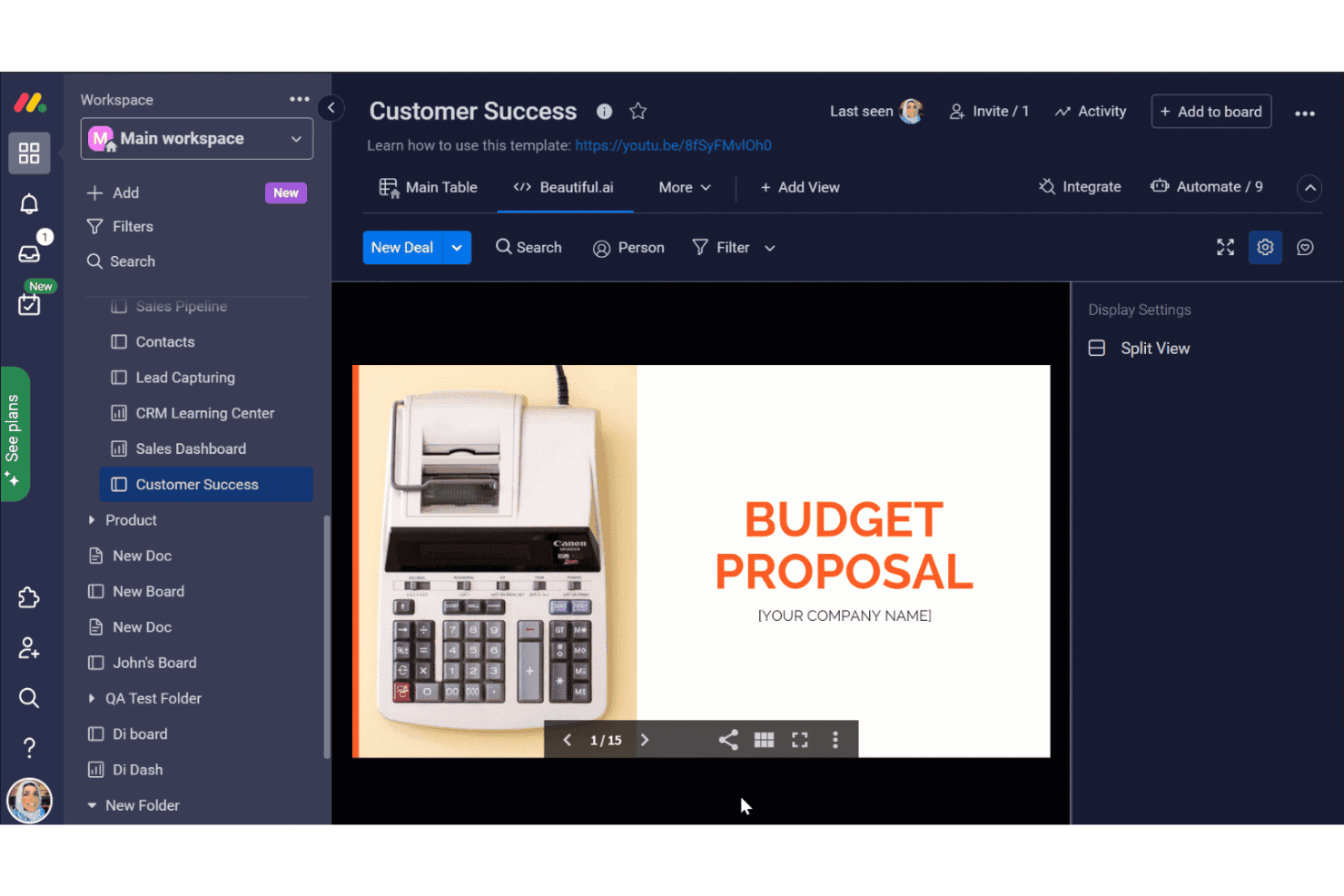
monday.com bietet ein Kundenerfolgsboard mit einer integrierten Beautiful.ai-Ansicht, in der eine Präsentation zum Budgetvorschlag innerhalb des AI Workspace angezeigt wird. monday AI Workspace ist eine flexible Plattform für das Arbeitsmanagement, die für technische Teams entwickelt wurde, die mehr als die Grundfunktionen von Basecamp benötigen – sie vereint KI-gestützte Automatisierungen, die Planung von Entwicklungszyklen und die funktionsübergreifende Projektverfolgung an einem Ort.
Für wen eignet sich monday AI Workspace am besten?
Die Plattform eignet sich besonders für mittelgroße bis große IT- und Engineering-Teams, die mehrere gleichzeitig laufende Projekte funktionsübergreifend verwalten.
Warum monday AI Workspace eine gute Basecamp-Alternative ist
Ich habe monday AI Workspace ausgewählt, weil der KI-Workflow-Editor etwas leistet, das ich bisher anderswo nicht gesehen habe: Er erstellt aus einer Beschreibung Ihres Prozesses in Alltagssprache mehrstufige Automatisierungssequenzen. KI-Spalten können anschließend Aufgaben automatisch kategorisieren, Aktualisierungen zusammenfassen oder Aktionspunkte extrahieren, wodurch die manuelle Verwaltungsarbeit entfällt, die mein Team früher nach jedem Entwicklungszyklus erledigen musste. Die KI erkennt außerdem eine Überauslastung von Ressourcen, bevor daraus verpasste Fristen entstehen.
Wichtige Funktionen von monday AI Workspace
- Werkzeuge für die Verwaltung von Entwicklungszyklen: Aufgabenlisten, Entwicklungszyklen und Veröffentlichungen nativ für agile Entwicklungsabläufe organisieren.
- Übersichten für Portfolios und Arbeitsauslastung: Projektfortschritt, Teamauslastung und den Status mehrerer Projekte in Echtzeit visualisieren.
- Integrierte GitHub-Anbindung: Versionskontrolle und Entwicklungsabläufe direkt mit Projektübersichten verbinden.
- Detaillierte Berechtigungssteuerung: Detaillierte Benutzerrollen, mehrstufige Zugriffsrechte und Gastberechtigungen für mehrere Projekte festlegen.
Integrationen von monday AI Workspace
monday AI Workspace bietet Hunderte native Integrationen und Apps aus dem Marktplatz, darunter Slack, GitHub, Google Workspace, Microsoft Teams, Jira, Zoom, Dropbox, Salesforce, HubSpot und Outlook. Die Plattform unterstützt außerdem Zapier und stellt eine API für benutzerdefinierte Integrationen bereit.
Pros and Cons
Pros:
- Die KI automatisiert mehrstufige Workflows aus einfachem Text
- Native Verwaltung agiler Entwicklungszyklen und Aufgabenlisten
- Hochgradig anpassbare Ansichten einschließlich Gantt- und Zeitleistenansicht
Cons:
- Für Tarife niedrigerer Stufen gelten Automatisierungsbeschränkungen
- Kann für einfache Projekte überdimensioniert wirken
Learn more about monday AI Workspace: Ideal für die Aufgabenplanung im Tabellenformat
- 30-tägige kostenlose Testversion
- Ab $9/Nutzer/Monat (jährlich abgerechnet)
Visit WebsiteCustomer Rating:4.5/5
Smartsheet ist ein Tool für kollaboratives Arbeitsmanagement zur Planung, Nachverfolgung und Automatisierung von Arbeitsabläufen Wenn Ihr Team Projekte lieber in einem vertrauten Tabellenformat plant, bietet Smartsheet eine flexible Alternative zu herkömmlichen Projektmanagement-Tools. Es eignet sich besonders für Betriebs-, IT- und Projektmanager, die Aufgaben, Abhängigkeiten und Ressourcen in einer rasterbasierten Ansicht verfolgen müssen. Smartsheet hebt sich von Basecamp ab, da es Formeln, bedingte Formatierung und automatisierte Arbeitsabläufe direkt in seinen Tabellen unterstützt.
Warum Smartsheet eine gute Basecamp-Alternative ist
Im Gegensatz zu Basecamp bietet Smartsheet eine Benutzeroberfläche im Tabellenkalkulationsstil, die ideal für Teams ist, die eine detaillierte Kontrolle über Projektdaten wünschen. Ich schätze, dass Sie Formeln, Filter und bedingte Formatierung verwenden können, um Aufgaben genau wie in Excel zu organisieren und zu analysieren. Mit den integrierten Tools zur Automatisierung von Arbeitsabläufen können Sie in Smartsheet außerdem wiederkehrende Prozesse automatisieren.
Wenn Ihre Projekte eine detaillierte Nachverfolgung und eine individuelle Datenverwaltung erfordern, bietet Smartsheet eine Flexibilität, mit der Basecamp nicht mithalten kann.
Wichtige Funktionen von Smartsheet
Einige weitere Funktionen von Smartsheet helfen Teams dabei, Projekte in großem Umfang zu koordinieren und zu verwalten:
- Kartenansicht: Wechseln Sie zu einer Ansicht im Kanban-Stil für die visuelle Aufgabenverwaltung und die Nachverfolgung von Arbeitsabläufen.
- Ressourcenverwaltung: Weisen Sie Teammitglieder Aufgaben zu und überwachen Sie die Arbeitsbelastung über mehrere Projekte hinweg.
- Aktualisierungsanfragen: Senden Sie automatisierte Anfragen für Aufgabenaktualisierungen oder Genehmigungen, damit die Informationen aktuell bleiben.
- Dokumentanhänge: Hängen Sie Dateien direkt an Zeilen an, um einfach auf Projektdokumente und Referenzmaterialien zugreifen zu können.
Smartsheet-Integrationen
Zu den Integrationen gehören Microsoft Teams, Slack, Google Workspace, Dropbox, Salesforce, Box, Jira, DocuSign, Tableau und ServiceNow.
Pros and Cons
Pros:
- Die Benutzeroberfläche im Tabellenkalkulationsstil unterstützt erweiterte Formeln und bedingte Formatierung
- Die Kartenansicht ermöglicht ein Projekt- und Aufgabenmanagement im Kanban-Stil
- Automatisierte Arbeitsabläufe reduzieren manuelle Aktualisierungen und wiederkehrende Aufgaben
Cons:
- Der Dateispeicher pro Nutzer ist in den günstigeren Tarifen begrenzt
- Die mobile App bietet nicht alle erweiterten Möglichkeiten zur Tabellenbearbeitung
Learn more about Smartsheet: 9Am besten für integrierte E-Mail-Funktionen
Hive
- 14-tägige kostenlose Testversion + kostenloser Tarif + kostenlose Demo verfügbar
- Ab $5/Benutzer/Monat (jährlich abgerechnet)
Visit WebsiteCustomer Rating:4.5/5
Hive ist ein Projektmanagement-Tool mit Aufgabenverfolgung und KI-gestützter Produktivität Teams, die sich für Projektaktualisierungen und Aufgabenzuweisungen auf E-Mails verlassen, werden die native E-Mail-Integration von Hive besonders nützlich finden. Diese Plattform wurde für Marketingteams, Kundenservice-Teams und alle Gruppen entwickelt, die Projekte und E-Mail-Kommunikation an einem Ort verwalten müssen. Im Gegensatz zu Basecamp können Sie mit Hive E-Mails direkt aus Ihrem Projektarbeitsbereich senden, empfangen und nachverfolgen, wodurch der Wechsel zwischen verschiedenen Tools reduziert wird.
Warum Hive eine gute Basecamp-Alternative ist
Wenn Ihr Team viel Zeit damit verbringt, Projekte über E-Mails zu verwalten, bietet Hive mit seiner integrierten E-Mail-Funktion einen einzigartigen Vorteil. Mir gefällt, dass Sie E-Mails direkt aus Aufgaben senden und empfangen können, sodass die gesamte zugehörige Kommunikation mit der eigentlichen Arbeit verknüpft bleibt.
Mit Hive können Sie E-Mails außerdem in umsetzbare Aufgaben umwandeln, ohne die Plattform zu verlassen. So können Teams vermeiden, wichtige Anfragen oder Aktualisierungen zu übersehen. Für alle, die die Lücke zwischen Projektmanagement und E-Mail schließen möchten, bietet Hive ein Maß an Vernetzung, mit dem Basecamp nicht mithalten kann.
Zentrale Funktionen von Hive
Einige weitere Funktionen von Hive helfen Teams dabei, die Arbeit über mehrere Projekte hinweg zu koordinieren und nachzuverfolgen:
- Gantt-Diagrammansicht: Visualisieren Sie Projektzeitpläne und Abhängigkeiten mit interaktiven Gantt-Diagrammen.
- Zeiterfassung: Erfassen Sie die für Aufgaben aufgewendete Zeit direkt innerhalb der Plattform.
- Automatisierte Arbeitsabläufe: Richten Sie benutzerdefinierte Automatisierungen ein, um sich wiederholende Projektaktionen zu bearbeiten.
- Nachrichten innerhalb der App: Kommunizieren Sie in Echtzeit mit Teammitgliedern, ohne den Arbeitsbereich zu verlassen.
Hive-Integrationen
Zu den Integrationen gehören Slack, Google Drive, Zoom, Microsoft Teams, Dropbox, Salesforce, Jira, Trello, HubSpot und OneDrive.
Pros and Cons
Pros:
- Mit der nativen E-Mail-Integration können Sie E-Mails innerhalb von Projektaufgaben verwalten
- Mehrere Projektansichten umfassen Gantt, Kanban, Kalender und Tabelle
- Die integrierte Zeiterfassung hilft dabei, die für jede Aufgabe aufgewendeten Stunden zu überwachen
Cons:
- Einige Integrationen erfordern zusätzliche Einrichtung oder Konnektoren von Drittanbietern
- Bei großen oder komplexen Projekten treten gelegentlich Leistungsprobleme auf
Learn more about Hive: 10Am besten für fortschrittliche Berichtstools geeignet
Wrike
- 14-tägige kostenlose Testversion + kostenloser Tarif verfügbar
- Ab 10 $/Benutzer/Monat (jährlich abgerechnet)
Visit WebsiteCustomer Rating:4.3/5
Wrike ist eine Projektmanagementplattform für Unternehmen zur Zusammenarbeit und Workflow-Steuerung Wrike zeichnet sich für Teams aus, die fortschrittliche Berichte und Analysen direkt in ihren Projektmanagement-Workflow integrieren müssen. IT-Abteilungen, Projektmanager und Betriebsteams greifen häufig auf Wrike zurück, wenn sie Leistungskennzahlen verfolgen und benutzerdefinierte Berichte über mehrere Projekte hinweg erstellen müssen. Im Gegensatz zu Basecamp bietet Wrike detaillierte Dashboards und Echtzeitanalysen, mit denen Sie den Fortschritt überwachen und Probleme frühzeitig erkennen können.
Warum Wrike eine gute Basecamp-Alternative ist
Wenn Ihr Team mehr als einfache Aufgabenlisten benötigt, heben sich die fortschrittlichen Berichtstools von Wrike von Basecamp ab. Ich habe Wrike ausgewählt, weil Sie damit benutzerdefinierte Dashboards erstellen, KPIs verfolgen und detaillierte Berichte zum Projektstatus und zur Ressourcenzuweisung erstellen können.
Die Analyse-Widgets und Echtzeit-Datenvisualisierungen helfen Ihnen, Trends zu erkennen und Probleme zu beheben, bevor sie zu größeren Schwierigkeiten werden. Für Teams, die sich bei Entscheidungen auf Daten stützen, bietet Wrike Berichtsfunktionen, die weit über das hinausgehen, was Basecamp bereitstellt.
Wichtige Funktionen von Wrike
Einige weitere Funktionen von Wrike helfen Teams dabei, Projekte effizient zu koordinieren und umzusetzen:
- Anfrageformulare: Sammeln Sie Projektanfragen und leiten Sie sie automatisch an das richtige Team oder den richtigen Workflow weiter.
- Zeiterfassung: Erfassen Sie Stunden direkt in Aufgaben, um den Arbeitsaufwand und die Projektkosten zu überwachen.
- Dokumentenprüfung: Überprüfen, kommentieren und genehmigen Sie Dateien innerhalb der Plattform, um Feedbackzyklen zu beschleunigen.
- Ressourcenmanagement: Weisen Sie Teammitglieder Projekten zu und visualisieren Sie die Arbeitsbelastung über mehrere Initiativen hinweg.
Wrike-Integrationen
Zu den Integrationen gehören Salesforce, Microsoft Teams, Slack, Google Drive, Dropbox, Adobe Creative Cloud, Jira, Box, Tableau, Zendesk und weitere.
Pros and Cons
Pros:
- Mit benutzerdefinierten Dashboards können Sie Projektkennzahlen in Echtzeit verfolgen
- Die integrierte Zeiterfassung hilft bei der Überwachung abrechenbarer und nicht abrechenbarer Stunden
- Anfrageformulare automatisieren die Erfassung und Aufgabenzuweisung für Teams
Cons:
- Die Ersteinrichtung und Workflow-Konfiguration kann für neue Benutzer zeitaufwendig sein
- Fortschrittliche Berichte und Analysen erfordern kostenpflichtige Tarife höherer Stufen
Learn more about Wrike:
Weitere Basecamp-Alternativen
Hier finden Sie einige weitere Alternativen zu Basecamp, die es nicht in meine Kurzliste geschafft haben, aber dennoch einen Blick wert sind:
- 11Zoho ProjectsAm besten mit integrierter Zeiterfassung
- 12GoodDayAm besten mit integriertem Zielmanagement
- 13JiraAm besten geeignet für agile Softwareentwicklungsteams
So bewerte ich Basecamp-Alternativen
Ich teile meine Bewertung in zwei Ebenen auf: die grundlegenden Fähigkeiten, die ein Tool haben muss, um die Message Boards, Aufgaben und Dokumente von Basecamp zu ersetzen – und die Differenzierungsmerkmale, die die besten Optionen hervorheben.
Kernfunktionen (Grundvoraussetzungen für diese Liste)
Wenn ich Tools für meine Liste auswähle, bewerte ich jedes auf einer Skala von 0 (bietet diese Funktion nicht) bis 5 (ist in diesem Bereich herausragend) für jede der unten aufgeführten Kernfunktionen. Anschließend rechne ich die Gesamtpunktzahl des Tools in einen Prozentsatz um. Jedes Tool muss eine Mindestgesamtpunktzahl von 75 % erreichen, um in die engere Auswahl zu kommen.
- Aufgaben- & Projektmanagement: Ich prüfe, ob Aufgaben mit Teilaufgaben, Verantwortlichen und Fälligkeitsterminen in verschiedenen Ansichten wie Boards, Zeitplänen oder Gantt-Diagrammen für Sprint- oder Release-Planungen erstellt werden können.
- Team-Zusammenarbeit & Nachrichten: Bei Basecamp steht die Kommunikation über Message Boards und Campfire-Chats im Mittelpunkt, deshalb achte ich auf vergleichbare asynchrone und Echtzeit-Kommunikation, die Projekten zugeordnet ist.
- Dateifreigabe & Dokumentenspeicherung: Jedes Tool sollte es Teams ermöglichen, Dateien an Aufgaben anzuhängen und gemeinsame Dokumente oder Wikis zentral zu speichern, ähnlich wie Basecamp pro Projekt Dokumente und Dateien organisiert.
- Integrationen für Entwickler-Tools: Ich bewerte die nativen Anbindungen an Tools wie GitHub, GitLab, Slack und CI/CD-Plattformen, damit Ihre Entwicklungs- und IT-Workflows ohne manuelle Updates verbunden bleiben.
- Fortschrittsverfolgung & Berichte: Dashboards, Meilensteine und Auslastungsansichten sind hier wichtig. Ich achte darauf, ob der Projektstatus auf einen Blick über laufende Entwicklungszyklen hinweg überwacht werden kann.
- Multi-Projekt- & Zugriffskontrollen: Das Management mehrerer paralleler Projekte mit rollenbasierten Berechtigungen und Gastzugängen ist essenziell, besonders wenn externe Auftragnehmer oder Kunden Einsicht benötigen.
Nachdem ich eine Liste von Tools habe, die diese Kriterien erfüllen, betrachte ich, was jede Plattform besonders macht.
Unterscheidungsmerkmale (Was Anbieter abhebt)
So vergleiche und kontrastiere ich verschiedene Anbieter:
Herausragende Funktionen
Für Entwicklungs- und IT-Teams prüfe ich genau, wie gut die native Unterstützung für agile Methoden ist – Sprint-Planung, Backlogs und Burndown-Charts machen wirklich einen Unterschied bei zweiwöchigen Release-Zyklen. Auch Workflow-Automatisierungen sind entscheidend: Mit Tools wie ClickUp und monday.com können Aufgaben automatisch zugewiesen oder Statusänderungen ausgelöst werden, was wiederkehrenden Aufwand reduziert. Ebenso bewerte ich, wie flexibel Ansichten und benutzerdefinierte Felder gehandhabt werden, da Infrastruktur-Teams und Entwicklergruppen ihre Arbeit selten auf die gleiche Art strukturieren.
Abseits der Funktionen
Die Preisstruktur ist hier ein großes Unterscheidungsmerkmal. Das Pauschalpreismodell von Basecamp ist ungewöhnlich, daher prüfe ich, ob sich nutzerbasierte Preise auch beim Wachstum eines Entwicklerteams im Rahmen halten. Sicherheit und Compliance verdienen ebenfalls Beachtung – SOC 2, SSO und SCIM-Provisionierung sind wichtig, wenn Ihr IT-Team sensible Systeme betreut oder in regulierten Umgebungen arbeitet. Ich bewerte auch die Integrationsstärke, insbesondere den bidirektionalen Abgleich mit GitHub, GitLab oder Bitbucket, denn ein Tool, das sich nicht in den bestehenden Entwicklungs-Stack einfügt, verursacht mehr Aufwand als Nutzen.
Warum nach einer Basecamp-Alternative suchen?
Basecamp ist zwar ein beliebtes Planungstool, das für seine Benutzerfreundlichkeit und die kurze Einarbeitungszeit bekannt ist, doch es gibt mehrere Gründe, warum manche Teams nach alternativen Lösungen suchen. Sie suchen möglicherweise nach einer Basecamp-Alternative, weil …
- Sie benötigen fortschrittlichere Funktionen wie Aufgabenabhängigkeiten, Unteraufgaben und strukturierte Projektabläufe
- Ihr Team benötigt eine integrierte Zeiterfassung oder Ressourcenverwaltung
- Sie wünschen sich umfassendere Funktionen für Berichte und Analysen
- Sie benötigen flexiblere Benutzerberechtigungen und Gastzugriff
- Ihre Organisation ist auf ein umfangreicheres Integrationsökosystem angewiesen, als Basecamp es unterstützt
- Sie suchen nach einer Lösung, die über kleine Teams und einfache Projekte hinaus besser skaliert
Basecamp eignet sich gut für eine unkomplizierte Zusammenarbeit, bietet jedoch keine nativen Kanban-Boards mit erweiterten Anpassungsmöglichkeiten oder detaillierten Werkzeugen für die Backlog-Verwaltung. Wenn die Verwaltung komplexer Fälligkeitstermine, mehrstufiger Arbeitsabläufe oder automatisierter Prozesse für Ihr Team entscheidend ist, benötigen Sie möglicherweise eine Software, die für eine strukturiertere Projektplanung entwickelt wurde.
Wenn einige dieser Punkte auf Sie zutreffen, sind Sie hier genau richtig. Meine Liste enthält mehrere Projektmanagement-Softwareoptionen, die besser für Teams geeignet sind, die mit diesen Herausforderungen bei Basecamp konfrontiert sind und nach alternativen Lösungen suchen.
Wichtige Funktionen von Basecamp
Hier sind einige der wichtigsten Funktionen von Basecamp, damit Sie vergleichen können, was alternative Lösungen bieten:
- Aufgabenlisten zur Zuweisung und Nachverfolgung von Aufgaben
- Nachrichtenforen für Teamdiskussionen
- Echtzeit-Gruppenchat mit Campfire
- Gemeinsame Zeitpläne und Kalenderintegration
- Datei- und Dokumentenspeicherung an einem Ort
- Automatische Check-in-Fragen für Teamaktualisierungen
- Kundenzugriff mit anpassbaren Berechtigungen
- Zentralisierte Projektstartseiten für schnelle Übersichten
- Bergdiagramme zur Visualisierung des Projektfortschritts