

A TOPdesk alternative is a service management solution that combines intuitive workflow design, modern automation, and flexibility to fit your team’s real needs. If you’re searching for a TOPdesk alternative, you likely need features that go beyond basic ticketing—like customizable service portals, AI-powered automation, or support for complex enterprise processes.
With downtime, efficiency, and stakeholder satisfaction on the line, picking the right platform matters. In this guide, you’ll find the standout TOPdesk alternatives and what each offers, so you can match your ITSM goals and get the features your team actually values.
What is TOPdesk?
TOPdesk is an IT service management (ITSM) software designed to help teams handle service requests, incidents, and asset management across departments. It centralizes ticketing, workflow automation, and knowledge management in a single platform. TOPdesk gives IT, facilities, and HR teams a way to track, prioritize, and resolve issues quickly. You can customize processes, automate repetitive tasks, and report on team performance from a unified interface.
TOPdesk Alternatives Comparison Table
This comparison table summarizes pricing details for my top TOPdesk alternative selections:
| Tool | Best For | Trial Info | Price | ||
|---|---|---|---|---|---|
| 1 | Best for rapid deployment across departments | Free demo + 30-day free trial available | From $99/agent/month (billed annually) | Website | |
| 2 | Best for simple multichannel ticketing experience | Free demo available | From $39/user/month (billed annually) | Website | |
| 3 | Best for custom service portals and reporting | Free trial available | From $124.92/month (billed annually) | Website | |
| 4 | Best for no-code process design and knowledge base | Free demo available | Pricing upon request | Website | |
| 5 | Best for flexible on-premise and cloud options | Free demo available | Pricing upon request | Website | |
| 6 | Best for automating complex enterprise workflows | Free demo available | Pricing upon request | Website | |
| 7 | Best for integrated ITIL process templates | Free trial + free demo available | Pricing upon request | Website | |
| 8 | Best for advanced cognitive automation features | Free demo available | Pricing upon request | Website | |
| 9 | Best for unified ITSM and IT asset management | Not available | Pricing upon request | Website | |
| 10 | Best for agile IT teams and DevOps integration | Free plan available | From $20/user/month | Website |


Why Trust Our Software Recommendations
6,700+
Reviews
20
Industry experts
16+
Evaluation factors
14
Years
Our team has been testing and reviewing software since 2012. As tech leaders ourselves, we know how difficult—and important—it is to choose the right software.
For this guide, we evaluated tools using hands-on testing and independent research, scoring tools using our selection criteria.
Our reviews reflect our human editorial judgment, not a sales pitch.
Expert reviewers:
- Paulo Gardini MiguelTech Director
 Tim FisherVP of AI
 Gabriel RosasTech Lead & Software Architect
 Christhian GruhnTech Lead & Platform Architect

Best TOPdesk Alternatives Reviews
Below are my detailed summaries of the best TOPdesk alternatives that made it onto my shortlist. My reviews offer a detailed look at the features, capabilities, and best use cases of each platform to help you find the best one for you.
 1Best for rapid deployment across departments
Halo
- Free demo + 30-day free trial available
- From $99/agent/month (billed annually)
Visit WebsiteCustomer Rating:4.7/5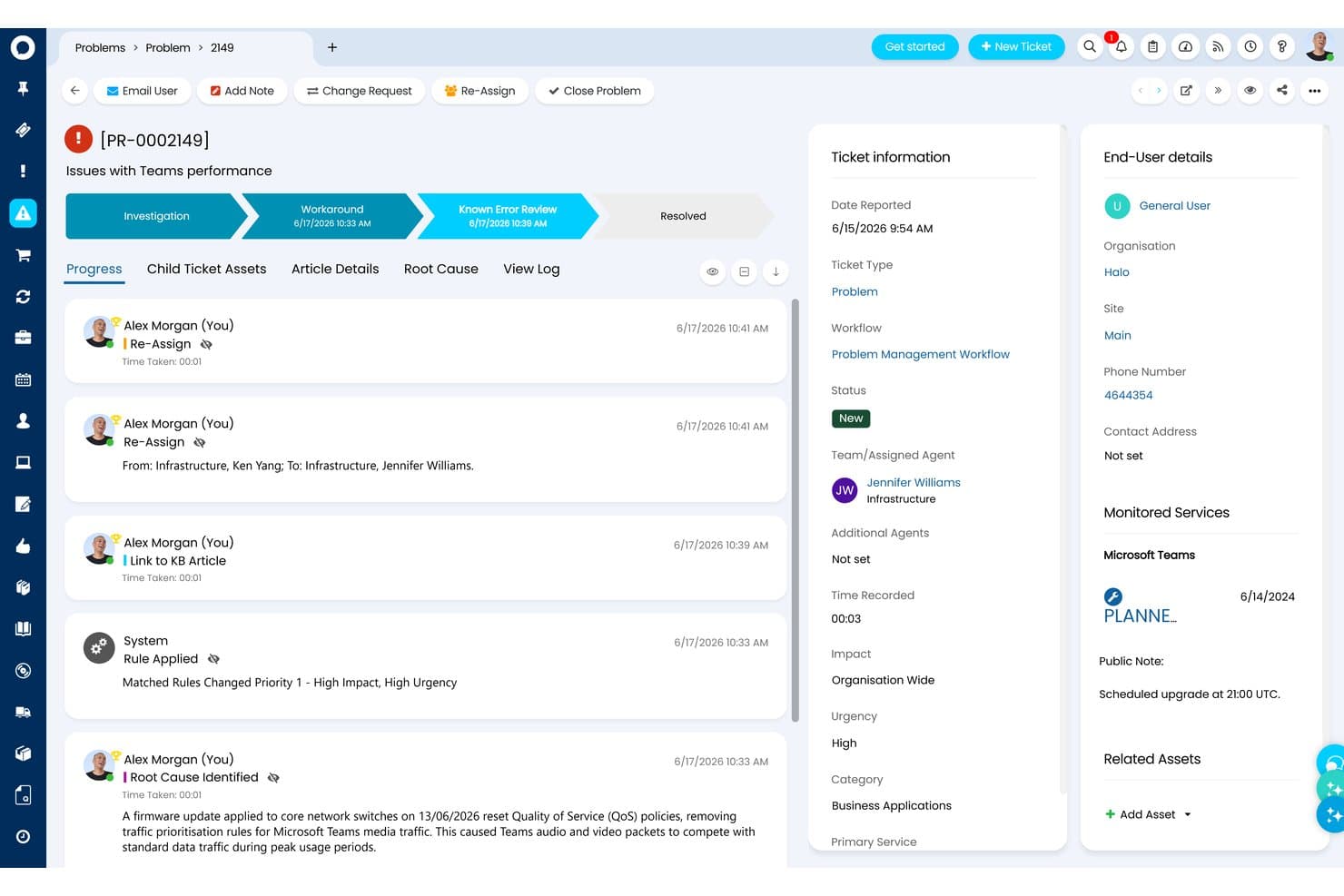
HaloITSM offers a detailed Problem Management workflow with audit trail, root cause tracking, and agent assignment for enterprise IT issue resolution. HaloITSM is a fully ITIL-aligned service management platform for IT teams and enterprise service functions that need incident, change, asset, and ESM workflows unified in one all-inclusive license.
Who is HaloITSM Best For?
HaloITSM suits mid-market to enterprise IT teams that need built-in scalability covering ITSM, ESM, and asset management without paying for separate modules.
Why HaloITSM is a good TOPdesk Alternative
I've included HaloITSM in my top picks because every module, IT, HR, Facilities, and Finance, ships in the base license with no add-ons to procure. In practice, that means I can spin up a dedicated HR service catalog with its own approval workflows and employee portal on day one, without a separate procurement cycle. The no-code workflow builder and AI-powered ticket triaging let my team configure routing and escalation logic across all those departments without writing a single line of code.
HaloITSM Key Features
- AI-powered incident triage: HaloITSM uses built-in AI to categorize, summarize, and suggest responses for incoming IT tickets.
- Integrated CMDB visualization: View asset dependencies and configuration item relationships with a visual, real-time CMDB.
- ITIL-aligned change calendars: Track, schedule, and approve changes using a dedicated calendar linked to risk and impact analysis tools.
- Native Microsoft Teams integration: Create, manage, and update tickets directly from within Microsoft Teams chats and channels.
HaloITSM Integrations
HaloITSM offers 200+ native integrations, including Microsoft 365, Azure Active Directory, Jira, Slack, Microsoft Teams, Confluence, Auvik, Datto, ConnectWise, and OpenAI. An API is available for custom integrations.
Pros and Cons
Pros:
- AI triage auto-categorizes and routes tickets
- ESM extends service workflows beyond IT
- ITIL-aligned templates ready for immediate use
Cons:
- Admin configuration takes time across departments
- Reporting dashboard customization is relatively limited
Learn more about Halo: Best for simple multichannel ticketing experience
- Free demo available
- From $39/user/month (billed annually)
Visit WebsiteCustomer Rating:4.4/5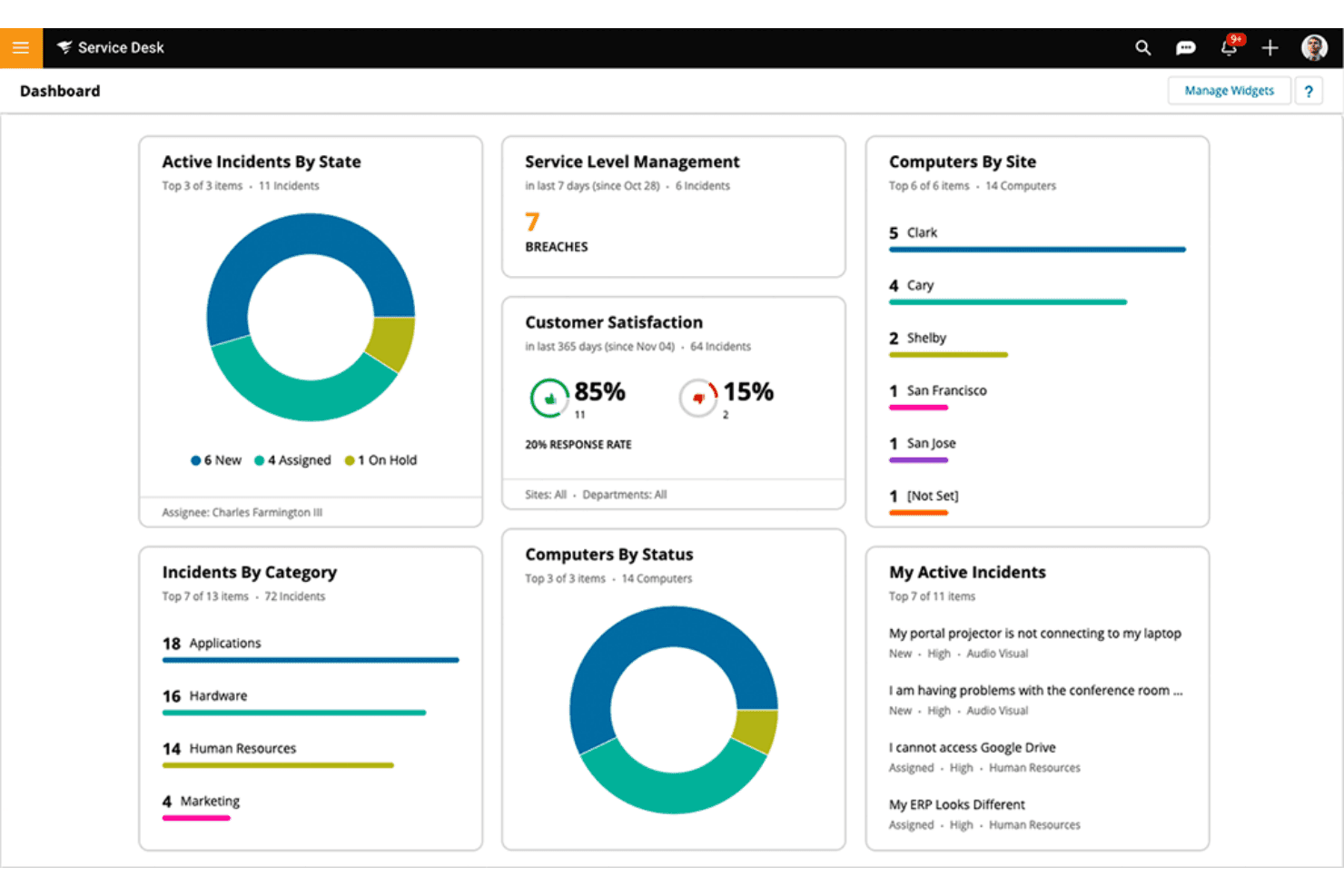
SolarWinds Service Desk offers a centralized dashboard displaying active incidents, service level breaches, customer satisfaction scores, and computer inventory across multiple sites. SolarWinds Service Desk is a cloud-based ITSM platform for IT service desk teams and operations managers who need structured incident, change, and asset management with built-in ESM capabilities to extend service workflows beyond IT.
Who is SolarWinds Service Desk Best For?
It's a strong fit for mid-sized to large IT teams that need a full ITIL-aligned service management platform without the complexity of an enterprise-only deployment.
Why SolarWinds Service Desk is a good TOPdesk Alternative
I picked SolarWinds Service Desk as one of the best because its multichannel intake covers email, a self-service portal, phone, and live chat, all routing into a single ticket queue. I especially like the built-in Virtual Agent, which deflects tickets before they reach your team, and the AI-Generated Responses feature that pulls suggested replies directly from your knowledge base. TOPdesk doesn't match that level of native AI-assisted deflection across channels.
SolarWinds Service Desk Key Features
- Visual CMDB and dependency mapping: See asset relationships, dependencies, and impact directly from the configuration management database.
- Advanced automation workflows: Use rule-based automations to optimize approvals, escalations, and custom ticket handling.
- Custom forms and fields: Tailor intake processes and data capture to match your team’s unique service workflows.
- Network discovery tools: Automatically scan, identify, and inventory network-connected devices to keep asset records up to date.
SolarWinds Service Desk Integrations
SolarWinds Service Desk offers native integrations with Azure Active Directory, Google Workspace, Jira, Zendesk, Salesforce, AWS, Okta, OneLogin, Slack, and Zapier. An API is available for custom integrations.
Pros and Cons
Pros:
- Native CMDB with asset dependency mapping
- ITIL workflows available out of the box
- AI virtual agent deflects L1 tickets
Cons:
- ESM features less mature than dedicated platforms
- Reporting customization is notably limited
Learn more about SolarWinds Service Desk: Best for custom service portals and reporting
- Free trial available
- From $124.92/month (billed annually)
Visit WebsiteCustomer Rating:4.6/5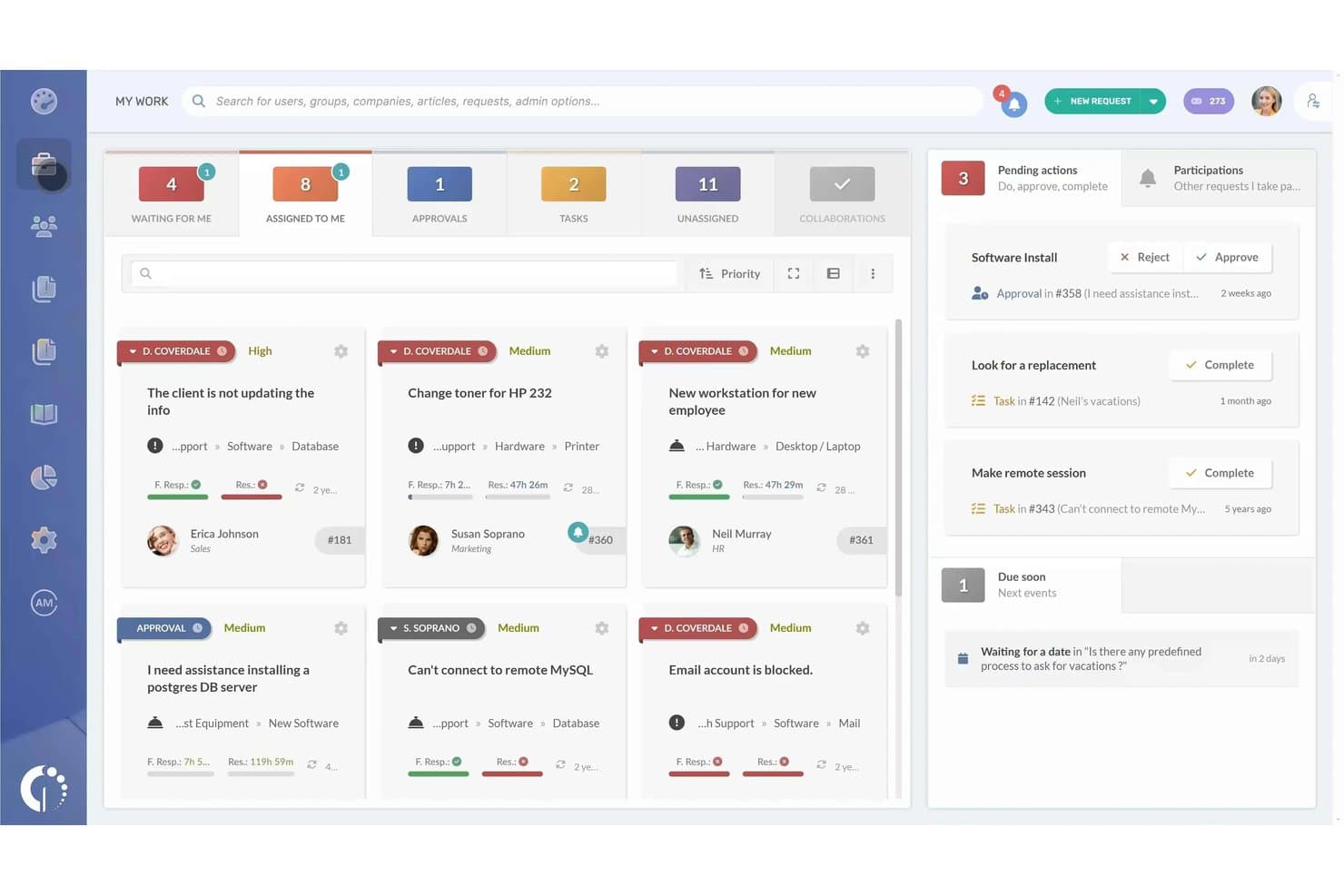
InvGate Service Management offers a My Work dashboard with ticket queues, priority assignments, approval actions, and pending task summaries in a kanban-style layout. InvGate Service Management is an ITIL-certified platform for IT teams and enterprise service managers who want flexible, no-code workflows, customizable self-service portals, and multi-department service delivery without a drawn-out implementation.
Who is InvGate Service Management Best For?
It's a strong fit for mid-sized IT teams that need a fully structured ITSM platform but don't have the bandwidth for lengthy, consultant-heavy deployments.
Why InvGate Service Management is a good TOPdesk Alternative
I've included InvGate Service Management in my top picks because the self-service portal customization is genuinely impressive. You can tailor the portal's layout, branding, service catalog, and request forms without touching a line of code, which is something TOPdesk users often flag as a frustration. I also appreciate the reporting depth: 150+ built-in metrics, customizable dashboards, and the ability to share live dashboards directly with stakeholders, so I'm not exporting spreadsheets every time someone needs an update.
InvGate Service Management Key Features
- No-code workflow builder: Design approval chains and service processes using a drag-and-drop visual editor with pre-built templates.
- Multi-department ESM templates: Deploy service management for HR, facilities, and other business units from a single platform.
- AI-powered virtual agent: Provide instant answers and automated triage of requests through Microsoft Teams, Slack, and WhatsApp.
- Built-in CMDB integration: Map assets, configuration items, and their relationships directly to tickets and IT services.
InvGate Service Management Integrations
InvGate Service Management has native integrations across the Microsoft ecosystem, including Microsoft 365 and Azure, plus native integrations with Jira, Slack, WhatsApp, Okta, SAP, Workday, Azure DevOps, SCCM, and Entra ID. It also connects with Zapier and provides an API for custom integrations.
Pros and Cons
Pros:
- Live reporting dashboards shareable directly with stakeholders
- ITIL-certified across all core service management practices
- Highly customizable portal without writing any code
Cons:
- Mobile app offers limited functionality
- Asset discovery sold as a separate product
Learn more about InvGate Service Management: Best for no-code process design and knowledge base
- Free demo available
- Pricing upon request
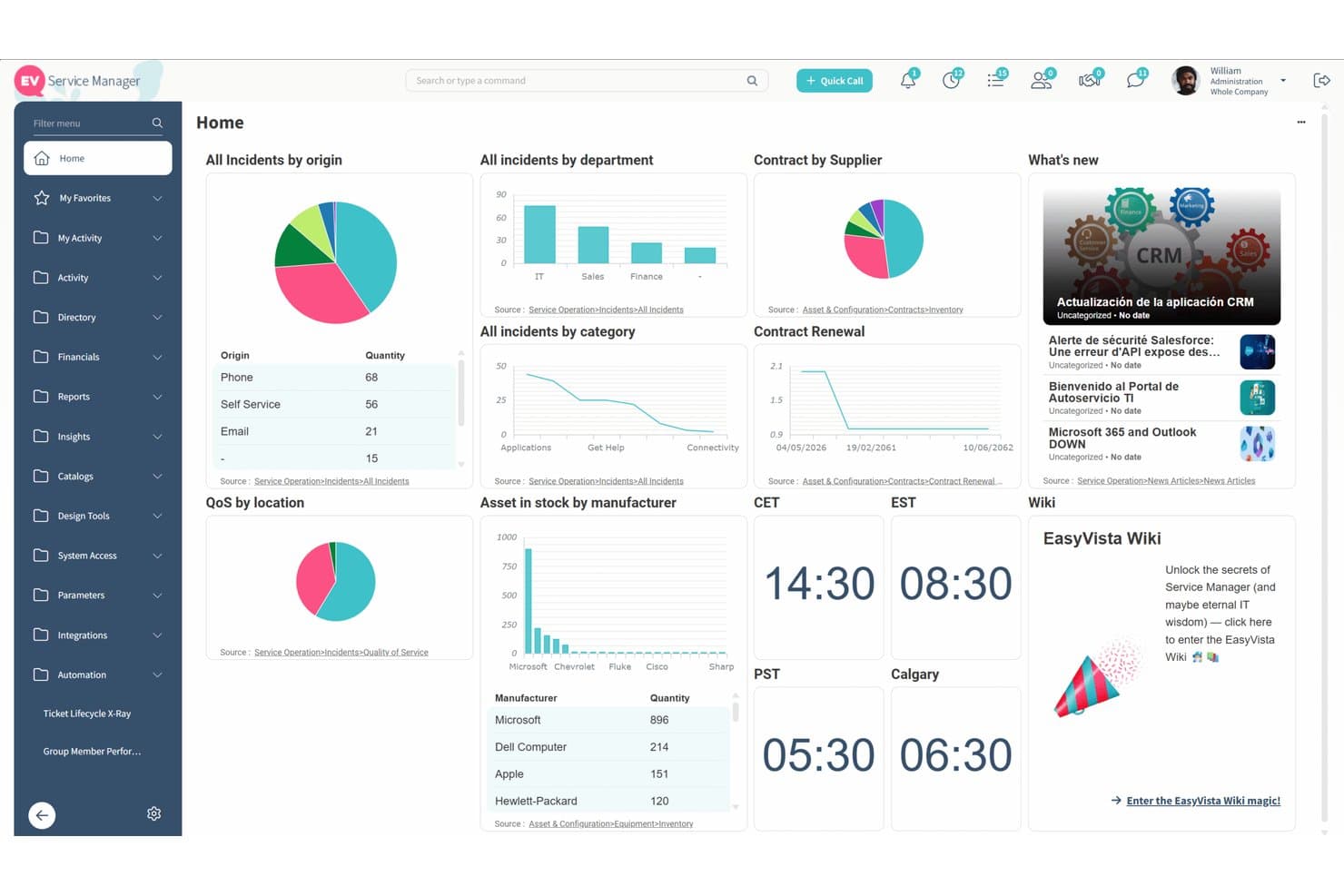
EasyVista offers a comprehensive service manager dashboard displaying incidents, contracts, assets, and real-time metrics across multiple widgets. EasyVista EV Service Manager is a full ITSM and ESM platform built for IT teams that need deep ITIL process coverage, AI-powered automation, and no-code workflow design without relying on developer resources.
Who is EASYVISTA Best For?
It's a strong fit for mid-to-large enterprises in regulated industries like healthcare, finance, and manufacturing that need structured ITIL service delivery across IT and beyond.
Why EASYVISTA is a good TOPdesk Alternative
I've included EasyVista on my shortlist because its no-code workflow builder, called Easy Design, lets you build and modify complex ITIL workflows visually without touching a line of code. Where TOPdesk can feel rigid when you need to adapt processes, I appreciate that EasyVista lets you reshape approval chains, escalation paths, and routing logic directly in the UI. The knowledge base, delivered through EV Self Help, goes further too, with guided resolution procedures that walk end users through fixes step by step rather than just surfacing static articles.
EASYVISTA Key Features
- Automated asset discovery: Scan your IT environment and automatically populate your CMDB with current hardware, software, and network devices.
- AI-powered incident triage: Use built-in AI to classify, prioritize, and route service tickets based on content and historical patterns.
- Multi-channel service intake: Accept and manage service requests via chat, email, phone, web portal, or Microsoft Teams.
- Change calendar with risk analysis: Visualize upcoming change windows and identify potential conflicts and impacts directly from the change calendar.
EASYVISTA Integrations
EASYVISTA offers native integrations with ServiceNow, Salesforce, Microsoft Teams, Azure AD, Jira, Ivanti, SCCM, Bomgar, TeamViewer, and Splunk. An API is available for custom integrations.
Pros and Cons
Pros:
- Extends workflows to HR and facilities teams
- Guided self-help resolves L1 tickets proactively
- No-code ITIL workflow design without developers
Cons:
- Out-of-box reporting needs heavy customization
- Initial setup demands significant time investment
Learn more about EASYVISTA: Best for flexible on-premise and cloud options
- Free demo available
- Pricing upon request
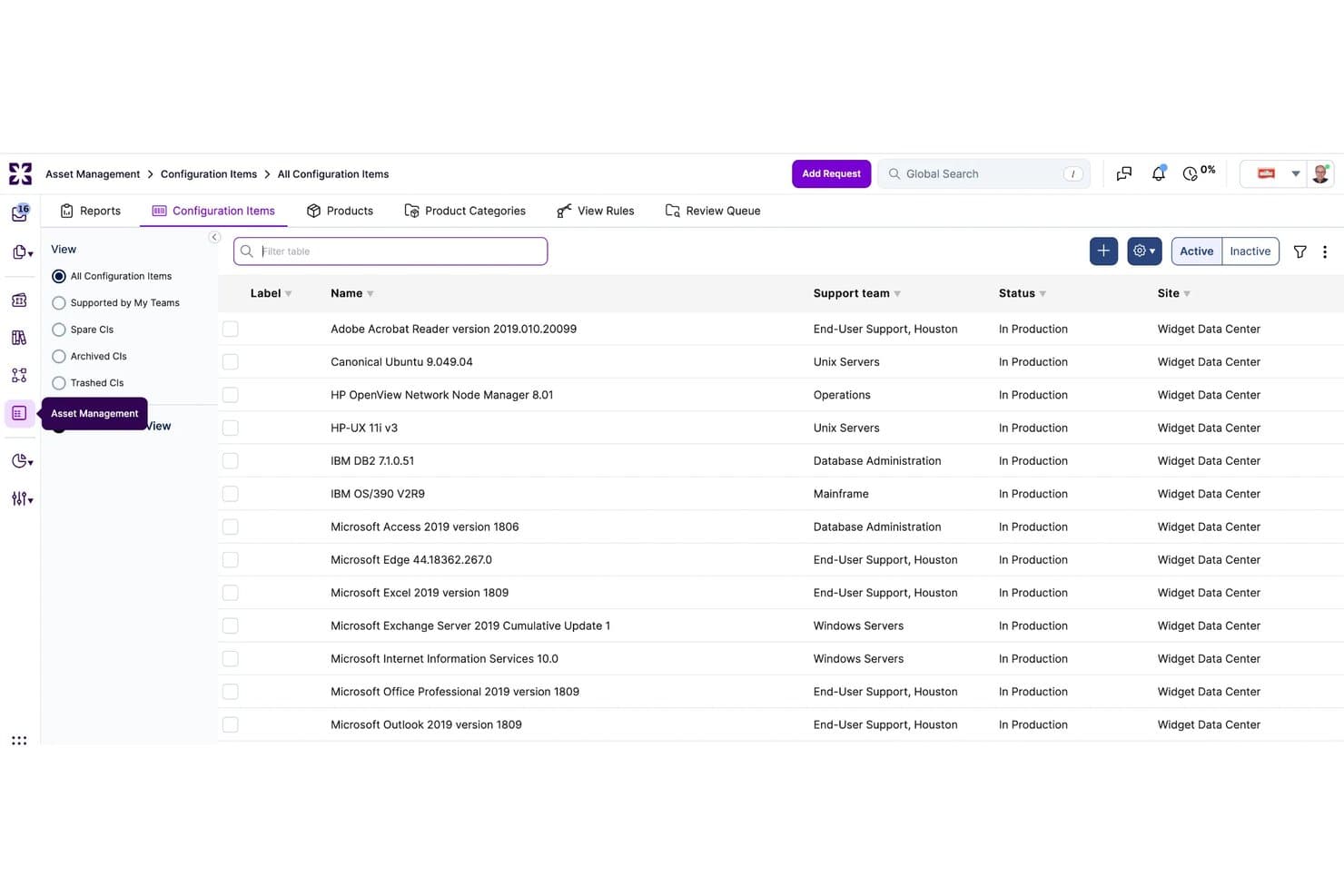
Xurrent ITSM offers a Configuration Items management view displaying software assets, support teams, statuses, and site assignments in a structured table layout. Xurrent ITSM is an AI-native service management platform built for IT teams, MSPs, and enterprise service leads who need full ITIL coverage across incident, change, and request management on a single system of record.
Who is Xurrent ITSM Best For?
It's a strong fit for mid-to-large enterprises and managed service providers that need to coordinate service delivery across multiple internal departments and external providers.
Why Xurrent ITSM is a good TOPdesk Alternative
I've included Xurrent ITSM in my top picks because it gives organizations real control over how and where their data lives. The BYOK (Bring Your Own Key) encryption is available across all plans, and the platform carries C5 attestation (verified by Deloitte), SOC 2 Type II, and ISO 27001/27018 certifications. I especially appreciate that these aren't enterprise add-ons; they're built into the platform regardless of the tier you're on.
Xurrent ITSM Key Features
- ITIL-accredited incident management: Supports end-to-end ticket workflows with automated classification, SLA enforcement, and escalations.
- Multi-department service portal: Lets HR, facilities, and other teams each manage requests and updates from a unified self-service interface.
- Integrated status pages: Enables proactive communication with internal and external stakeholders about service health and incident updates.
- Account trust and SIAM support: Facilitates secure collaboration across multiple service providers within one environment for managed services scenarios.
Xurrent ITSM Integrations
Xurrent ITSM offers native integrations with Jira, Microsoft Entra ID, Intune, Lansweeper, BMC Helix, and LogicMonitor. An API is available for custom integrations.
Pros and Cons
Pros:
- ITIL 4-certified across all core practices
- Built-in SIAM support for multi-provider environments
- Native AI-driven ticket triage and categorization
Cons:
- Limited self-service reporting without extra configuration
- Implementation complexity for smaller IT teams
Learn more about Xurrent ITSM: Best for automating complex enterprise workflows
- Free demo available
- Pricing upon request
Visit WebsiteCustomer Rating:4.4/5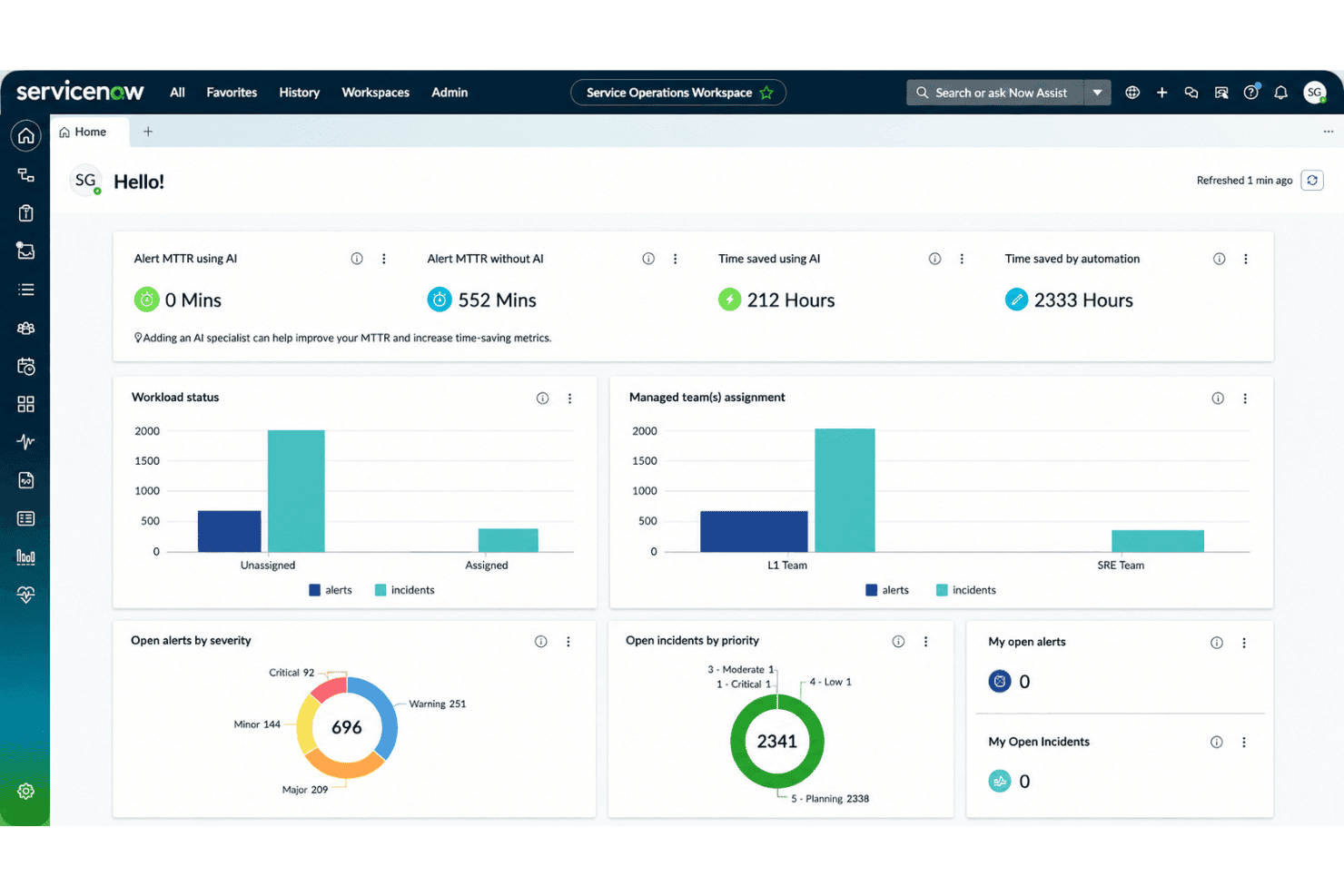
ServiceNow offers a Service Operations Workspace dashboard with AI-driven MTTR metrics, workload status, alert severity breakdowns, and incident priority tracking. ServiceNow is an enterprise ITSM platform that gives IT ops teams, service desk managers, and ESM leads a unified system for managing incidents, changes, assets, and cross-departmental service workflows on a single AI-powered platform.
Who is ServiceNow Best For?
ServiceNow is a strong fit for large enterprises that need to manage IT service delivery at scale across multiple departments and locations.
Why ServiceNow is a good TOPdesk Alternative
ServiceNow earns its spot on my shortlist because the depth of its workflow automation goes well beyond what TOPdesk offers out of the box. I particularly like Flow Designer, which lets you build no-code automation across incident routing, change approvals, and SLA escalations without writing a single line of script. On top of that, ServiceNow's AI agents actively triage incoming tickets, summarize incidents, and draft responses, cutting manual handling time significantly in high-volume environments.
ServiceNow Key Features
- Employee experience portal: Users can submit requests, access knowledge articles, and track tickets from a single branded dashboard.
- Native CMDB discovery: Automatically identifies and updates configuration items and their dependencies throughout your environment.
- ITIL 4 certified modules: Supports core practices like incident, change, and problem management with built-in ITIL processes.
- Low-code workflow builder: Lets teams design and deploy custom workflows, forms, and approval chains without coding skills.
ServiceNow Integrations
ServiceNow offers native integrations with Microsoft 365, Azure Active Directory, Slack, Jira, GitHub, Salesforce, Jamf, AirWatch, ManageEngine, and SCCM. An API is available for custom integrations.
Pros and Cons
Pros:
- Full CMDB with real-time dependency mapping
- Native AI triage reduces L1 ticket volume
- Deep ITIL 4-certified workflow automation
Cons:
- Requires dedicated admin resources to maintain
- Long implementation timelines for enterprise deployments
 Best for integrated ITIL process templates
- Free trial + free demo available
- Pricing upon request
Visit WebsiteCustomer Rating:4.2/5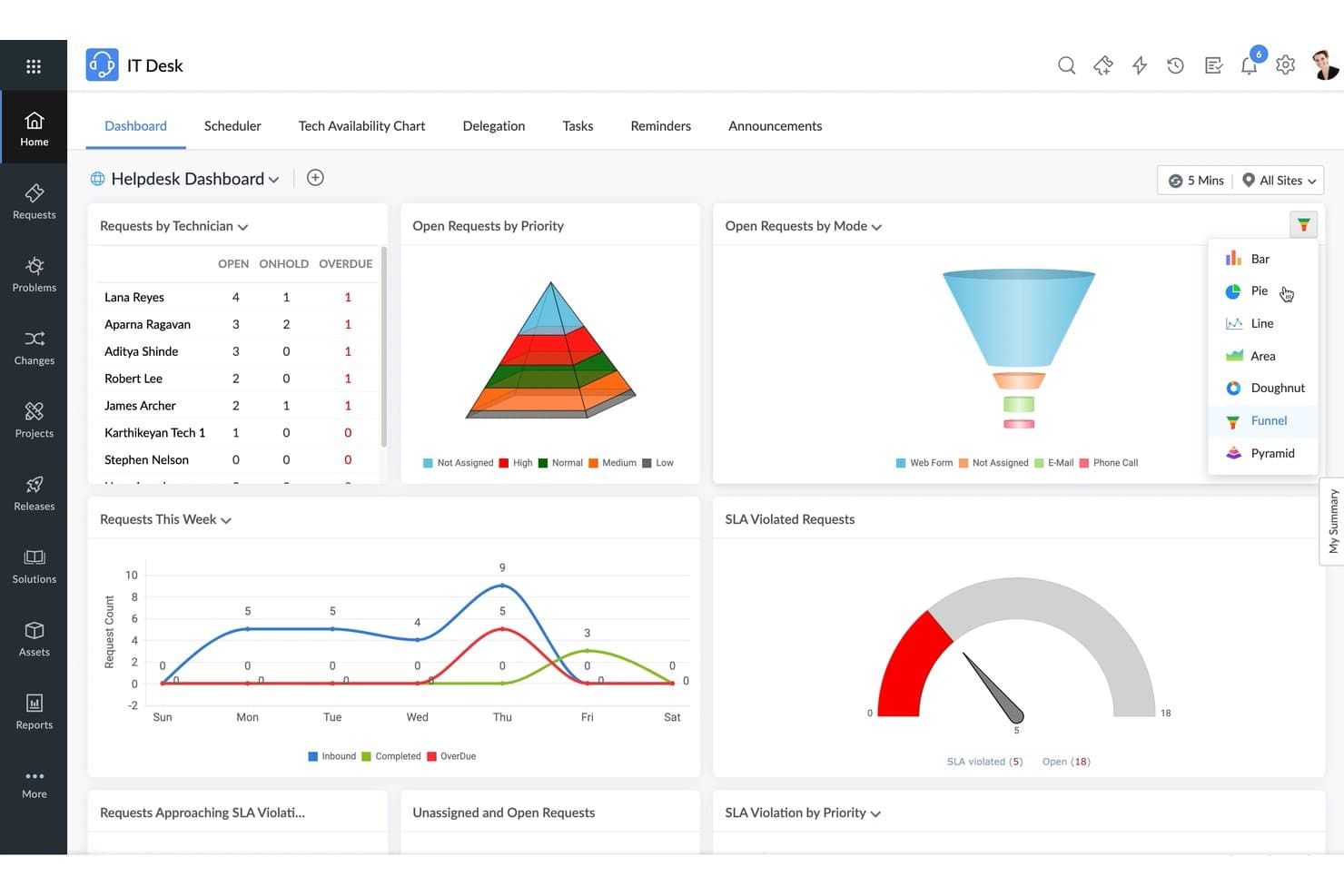
ManageEngine ServiceDesk Plus offers a customizable Helpdesk Dashboard with multiple chart type options including Bar, Pie, Funnel, and Pyramid for visualizing open requests, SLA violations, and technician workloads. ManageEngine ServiceDesk Plus is a full ITSM platform built for IT service desk managers and enterprise service teams who need deep ITIL-aligned workflows, native asset management, and multi-department service delivery—all in one deployable solution.
Who is ManageEngine ServiceDesk Plus Best For?
It's a strong fit for mid-sized to large IT organizations that need on-premises or cloud deployment flexibility alongside a mature ITSM tool.
Why ManageEngine ServiceDesk Plus is a good TOPdesk Alternative
I've included ManageEngine ServiceDesk Plus in my top picks because its ITIL process templates are genuinely built in, not bolted on. The platform is PinkVERIFY™ certified across eight ITIL practices, including change, problem, and release management, meaning the workflows arrive pre-structured and ready to enforce. I particularly appreciate the change management module: CAB voting, risk assessment templates, and change calendars are all part of the native experience, which is something TOPdesk simply can't match.
ManageEngine ServiceDesk Plus Key Features
- Native AI-powered ticket triage: Use Zia and OpenAI integrations to route, categorize, and respond to tickets automatically.
- Multi-instance service management: Deploy up to 15 parallel service desk instances for different departments within the same platform.
- Low-code workflow automation: Build complex ticket routing, approval flows, and business rules without coding experience.
- Out-of-the-box Microsoft 365 integration: Connect with Microsoft Teams, Outlook, and Azure AD for authentication, collaboration, and notifications.
ManageEngine ServiceDesk Plus Integrations
ManageEngine ServiceDesk Plus has native integrations with Jira, Microsoft Teams, Outlook, Azure AD, Endpoint Central, OpManager, Site24x7, Lansweeper, Intune, Slack, and connects with Zapier. An API is available for custom integrations.
Pros and Cons
Pros:
- Built-in CMDB with dependency mapping included
- On-premises and cloud deployment both supported
- PinkVERIFY-certified across eight ITIL practices natively
Cons:
- Initial setup requires significant technical configuration time
- UI feels dated compared to modern tools
Learn more about ManageEngine ServiceDesk Plus: Best for advanced cognitive automation features
- Free demo available
- Pricing upon request
Visit WebsiteCustomer Rating:4.1/5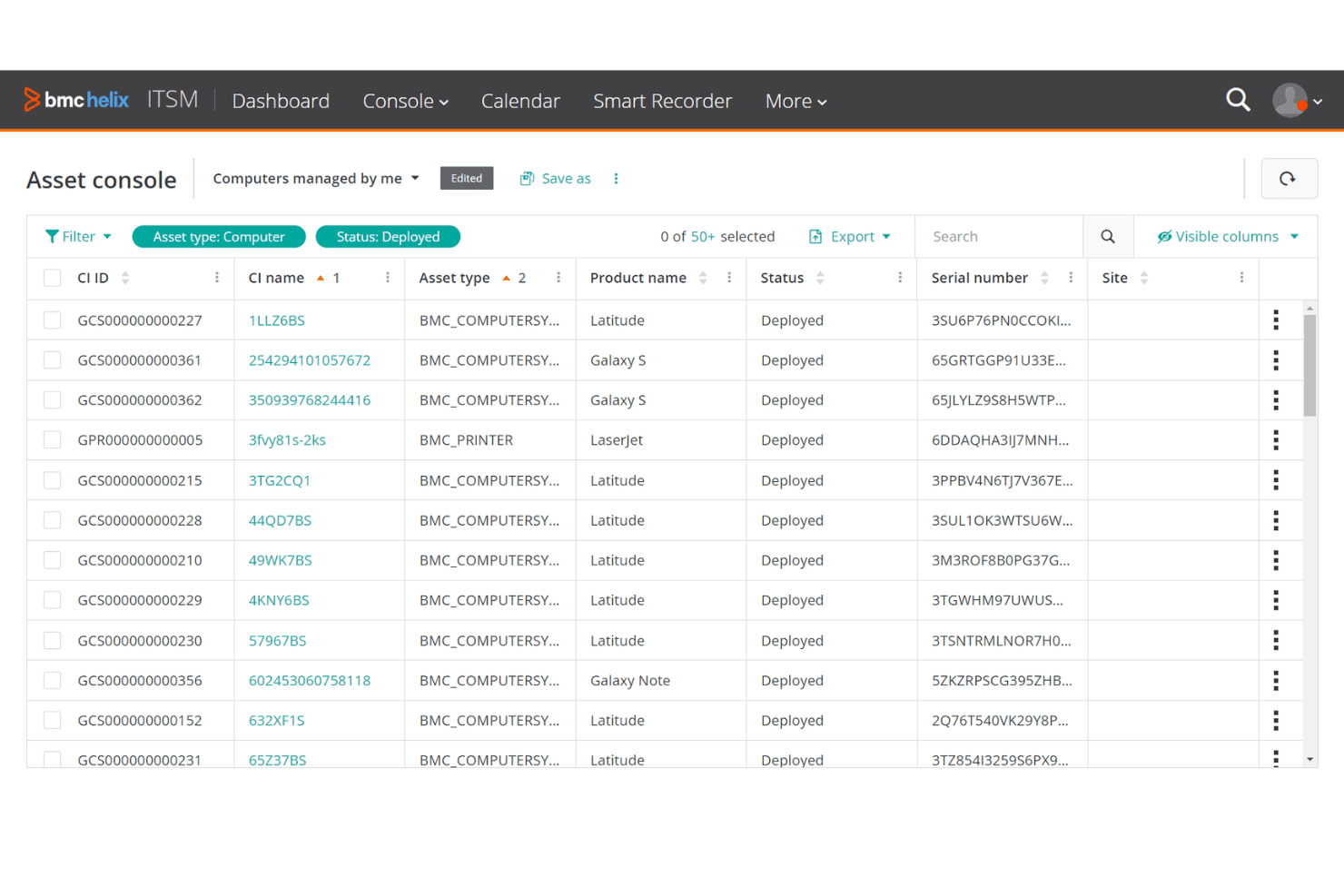
BMC Helix ITSM offers a filterable Asset Console listing deployed computers with CI IDs, names, asset types, product names, serial numbers, and site details. BMC Helix ITSM is an enterprise-grade service management platform built for large IT organizations that need deep ITIL-aligned workflows, a full CMDB, and agentic AI automation across incident, change, and problem management.
Who is BMC Helix ITSM Best For?
It's a strong fit for large enterprises and regulated industries with complex IT infrastructures that need a technically deep, highly customizable service management platform.
Why BMC Helix ITSM is a good TOPdesk Alternative
I picked BMC Helix ITSM as one of the best because its agentic AI assistants go well beyond basic ticket routing. In practice, my team can use proactive problem management to automatically surface root causes from incident patterns before a problem escalates into a major outage. The AI-driven assignee identification also means tickets land with the right person from the start, without any manual triage.
BMC Helix ITSM Key Features
- CMDB with dependency mapping: Visualize and manage relationships between configuration items, assets, and services.
- Change calendar and CAB workflows: Schedule, approve, and track changes with integrated calendar and change advisory board functionality.
- Multi-department service catalog: Offer separate service catalogs and workflows for IT, HR, facilities, or any business unit.
- Native integration with Microsoft Teams and Slack: Enable collaboration and ticket actions directly from chat platforms.
BMC Helix ITSM Integrations
BMC Helix ITSM offers native integrations with Microsoft Teams, Slack, Jira, GitHub, Azure DevOps, Ivanti, and Moveworks. An API is available for custom integrations and it supports CI/CD workflows through its API.
Pros and Cons
Pros:
- AI-driven ticket triage and auto-categorization built in
- CMDB with real-time CI impact analysis
- Full ITIL 4-certified process coverage out of the box
Cons:
- Reporting customization requires significant technical configuration
- Implementation is lengthy and resource-intensive
Learn more about BMC Helix ITSM: Best for unified ITSM and IT asset management
- Not available
- Pricing upon request
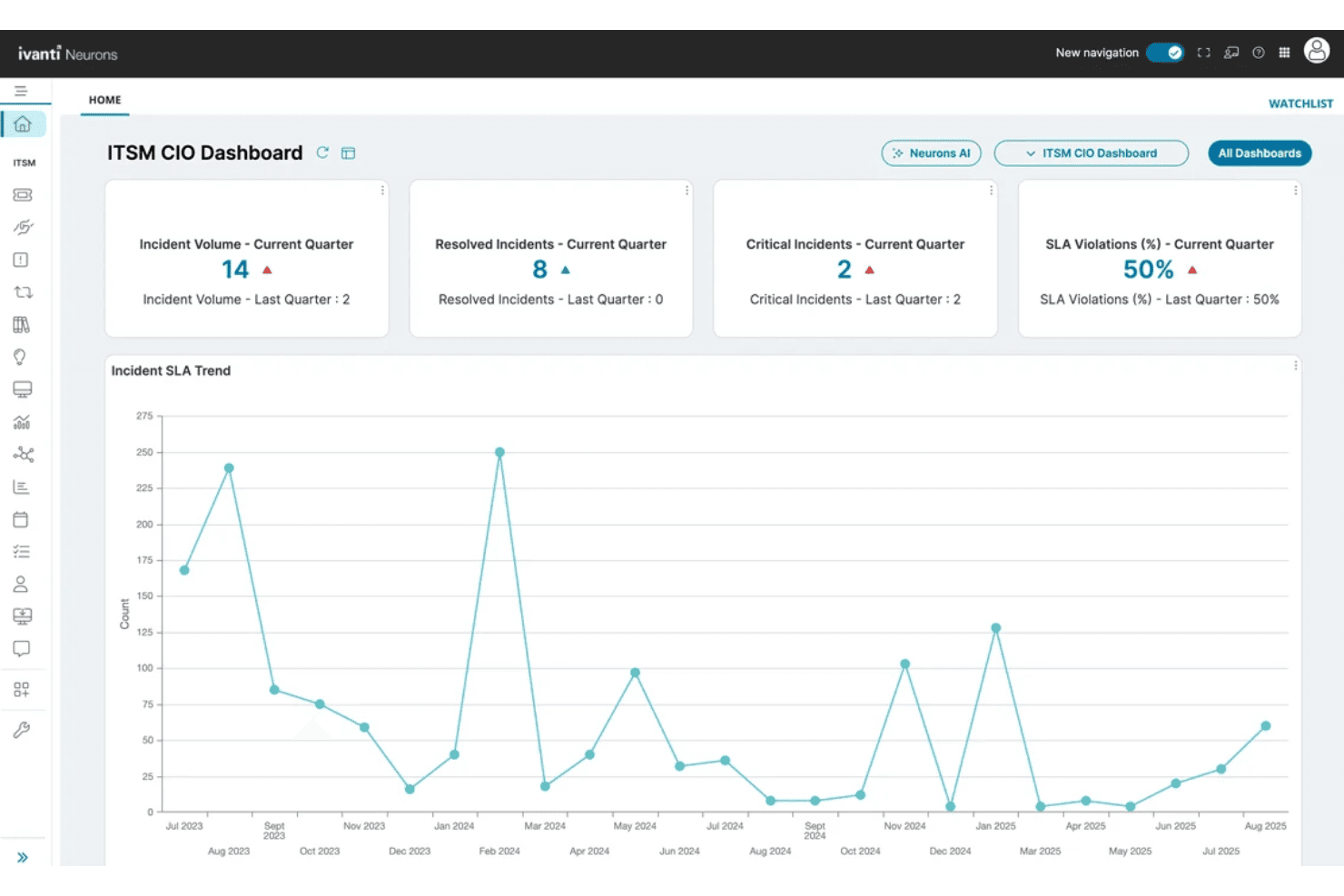
Ivanti Neurons for ITSM offers a CIO Dashboard displaying incident volume, resolved incidents, critical incidents, SLA violations, and an incident SLA trend chart over time. Ivanti Neurons for ITSM is an enterprise-grade service management platform that gives IT operations teams a single system for handling incidents, changes, asset tracking, and multi-department service delivery—all built on 14 ITIL 4-certified processes.
Who is Ivanti Neurons for ITSM Best For?
It's a strong fit for large enterprises with complex IT environments that need a single platform to unify service management, asset control, and cross-departmental workflows.
Why Ivanti Neurons for ITSM is a good TOPdesk Alternative
I've included Ivanti Neurons for ITSM in my top picks because it genuinely unifies ITSM and asset management in a single system at a depth TOPdesk doesn't match. The CMDB tracks full CI relationship mapping, so when an incident hits, I can immediately see which assets are affected and trace dependencies across the environment. AI-driven Intelligent Ticket Classification also auto-routes tickets at intake, which cuts manual triage before a technician ever touches the queue.
Ivanti Neurons for ITSM Key Features
- AI-powered virtual agent: Users get 24x7 automated help and ticket deflection via conversational chatbots.
- No-code workflow designer: Drag-and-drop builder for customizing workflows, forms, and process automation without coding.
- Service catalog management: Teams can publish and update a structured service catalog accessible in the self-service portal.
- Multi-channel ticket intake: Accepts tickets from email, portal, mobile app, Teams, and voice calls for flexible customer support options.
Ivanti Neurons for ITSM Integrations
Ivanti Neurons for ITSM offers native integrations with Okta, Tenable, CrowdStrike, Cisco, Azure AD, Protectco, Zscaler, and more, and provides an API for custom integrations.
Pros and Cons
Pros:
- AI auto-classifies and routes tickets at intake
- 14 ITIL 4-certified processes out of the box
- Native CMDB with full CI dependency mapping
Cons:
- Reporting customization requires significant admin configuration
- Implementation can take months for complex environments
Learn more about Ivanti Neurons for ITSM: Best for agile IT teams and DevOps integration
- Free plan available
- From $20/user/month
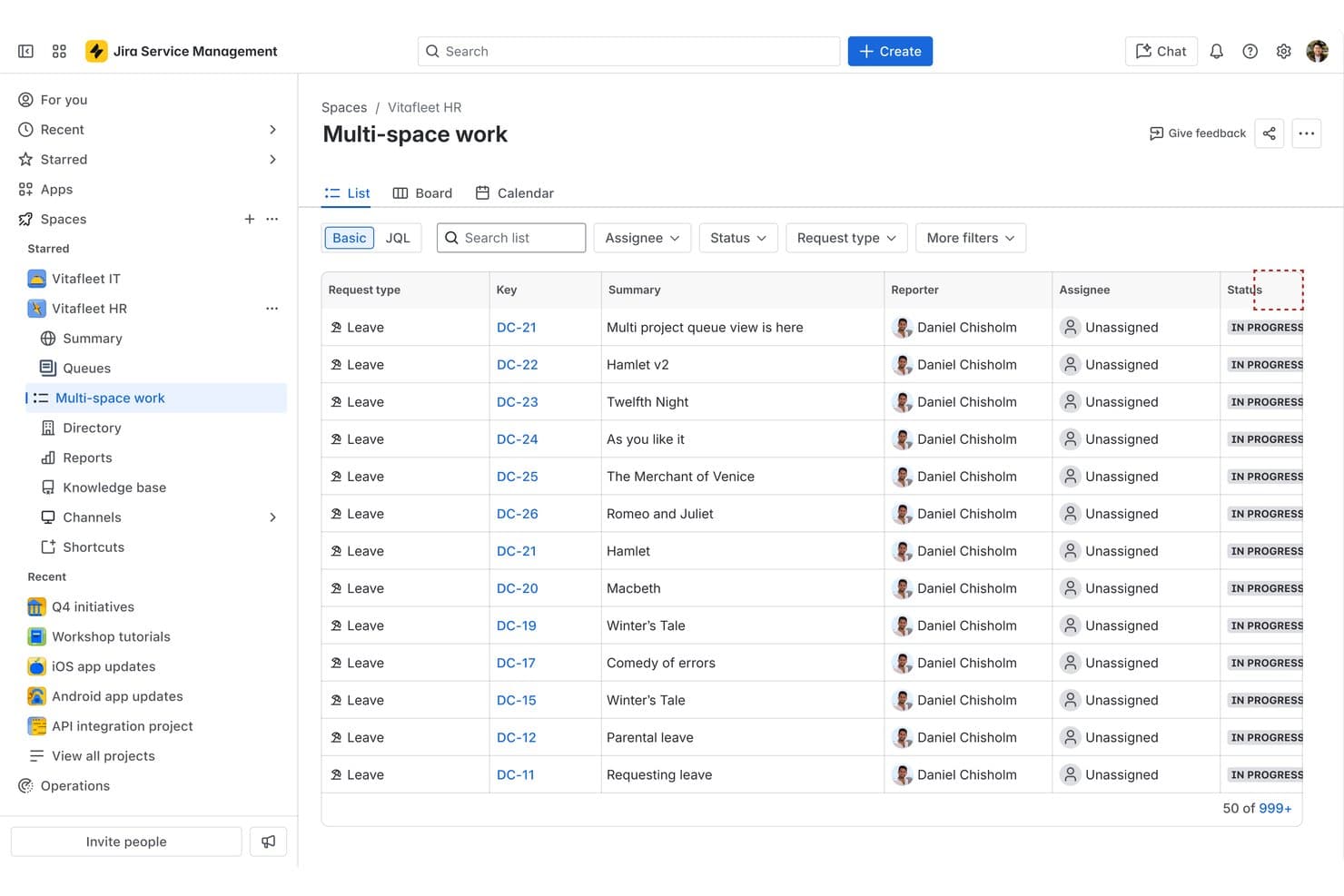
Jira Service Management offers a Multi-space work queue view that consolidates leave requests across projects in a unified list with status tracking. Jira Service Management is Atlassian's ITSM platform built for IT teams that need incident, change, and asset management tightly connected to their software development workflows.
Who is Jira Service Management Best For?
It's a natural fit for mid-size to enterprise IT and DevOps teams already using Atlassian tools like Jira Software or Confluence.
Why Jira Service Management is a good TOPdesk Alternative
I've included Jira Service Management in my top picks because its change management connects directly to CI/CD pipelines via deployment gating, letting you block or approve releases based on open incidents in real time. On the Premium plan, AI-powered risk assessment automatically flags high-risk change requests before CAB review. TOPdesk has no native equivalent to either of these features, which makes JSM a significantly stronger fit for agile IT teams running frequent deployments.
Jira Service Management Key Features
- Configurable SLA policies: Set custom service-level agreements and escalation rules for every ticket type or business unit.
- Branded self-service portal: Create employee-facing help centers with company branding and a searchable knowledge base.
- Department-specific service catalogs: Build tailored request forms and workflows for HR, finance, legal, or facilities teams.
- Low-code automation builder: Design and deploy process automation without coding, using a visual drag-and-drop workflow designer.
Jira Service Management Integrations
Jira Service Management offers native integrations with Jira Software, Confluence, Slack, Microsoft Teams, GitHub, Bitbucket, AWS Service Management Connector, Opsgenie, Statuspage, and Google Workspace, and provides an API for custom integrations.
Pros and Cons
Pros:
- ESM extends workflows to non-IT departments
- AI triage reduces L1 ticket volume
- Native DevOps and CI/CD pipeline connection
Cons:
- Reporting requires add-ons on lower tiers
- Complex initial setup for non-Atlassian shops
Learn more about Jira Service Management:
Other TOPdesk Alternatives
Here are some additional TOPdesk alternatives that didn’t make it onto my shortlist, but are still worth checking out:
- 11FreshserviceBest for intuitive self-service and AI automation
- 12SysAidBest for built-in workflow automation tools
- 13VivantioBest for scalable ITIL-based service management
- 14monday serviceBest for intuitive workflow customization
- 15AtomicworkBest for AI-powered workflow automation
- 16SymphonyAI IT Service ManagementBest for intelligent service operations analytics
- 17HornbillBest for collaborative digital workspaces
- 18AlembaBest for multi-department service management
How I Evaluate Topdesk Alternatives
I split my evaluation into core functionality—like ITIL workflows, self-service portals, and asset management—and differentiators such as AI automation, deployment flexibility, and integration depth. I look for solutions that fit real IT and enterprise service scenarios.
Core Functionality (Table Stakes for This List)
When I'm selecting tools for my list, I rank each one on a scale from 0 (does not offer the functionality) to 5 (excels in this area) for each core functionality listed below. Then, I calculate the tool's total score into a percentage. Each tool needs to achieve a minimum total score of 75% to be considered for inclusion.
- Incident & Request Management: I check for structured ticket workflows with SLA tracking, multi-channel intake, and configurable prioritization rules that scale beyond basic email queues.
- Change & Problem Management: ITIL-aligned change approvals, CAB support, and linked problem records matter here—especially for teams managing scheduled maintenance windows.
- Self-Service Portal: I look for branded portals with a searchable knowledge base and service catalog so end users can submit and track requests without calling the help desk.
- Asset & Configuration Management: A CMDB with CI relationship mapping and discovery is what I evaluate, since linking assets to incidents reveals the real blast radius of outages.
- Enterprise Service Management: Extending service workflows to HR, facilities, or finance from one platform is key. I check for department-specific templates, catalogs, and portals.
- Workflow Automation & Integrations: Visual workflow builders, automated routing and escalations, and native connectors to tools like Microsoft 365, Slack, and Jira all factor into my evaluation.
Once I have a list of tools that meet the criteria, I consider what sets each platform apart.
Differentiating Factors (What Sets Vendors Apart)
Here's how I compare and contrast different vendors:
Standout Features
Native AI and automation can make a real difference by speeding up ticket triage and reducing manual work for service desk teams. I also look for low-code workflow builders that let admins and non-technical users design custom processes without relying on developers. Advanced asset and configuration management is valuable for organizations that need real-time visibility into dependencies and impact analysis. Finally, a strong employee experience portal with omnichannel intake helps drive self-service adoption and user satisfaction.
Beyond Features
ITIL 4 alignment matters—I check whether a platform carries PinkVERIFY or Serview certification and ships with ready-made process templates that cut setup time. Deployment flexibility is another factor I evaluate closely, since many organizations need SaaS, on-premise, or private cloud options to meet data residency requirements. Integration depth rounds out my comparison: I look for native connectors to tools like Microsoft 365, Jira, and monitoring platforms, plus open APIs for custom builds.
Why Look for a TOPdesk Alternative?
While TOPdesk is a great ITSM solution, there are a number of reasons why some users seek out alternative solutions. You might be looking for a TOPdesk alternative because…
- Needing more advanced workflow automation
- Wanting stronger integration with modern SaaS tools
- Requiring more flexible self-service portal customization
- Seeking better AI or machine learning features
- Looking for multi-language or diverse region support
- Facing cost or licensing model concerns at scale
If any of these sound like you, you’ve come to the right place. My list contains several TOPdesk alternative options that are better suited for teams facing these challenges with TOPdesk and looking for alternative solutions.
TOPdesk Key Features
Here are some of the key features of TOPdesk, to help you contrast and compare what alternative solutions offer:
- Incident management: Track, categorize, and resolve IT tickets from multiple intake channels through configurable workflows and SLA management.
- Change management: Support structured changes with approval flows, CAB processes, and audit trails, helping teams manage risk and compliance.
- Self-service portal: Give end users a branded, customizable portal to submit requests, track ticket status, and search a centralized knowledge base.
- Asset management: Store asset records, maintain inventory, and link configuration items to incidents and changes for clear impact analysis.
- CMDB (Configuration management database): Map IT assets and services, build out relationships, and provide visibility across your environment.
- Knowledge base: Centralize documentation so agents and end users can solve routine issues and reduce repetitive tickets.
- Service catalog: Present a clear menu of services and request types for end users to access from the portal.
- Workflow automation: Automate ticket routing, escalations, and notifications using customizable, rule-based triggers and actions.
- Multi-department support: Extend service management beyond IT into HR, facilities, or finance using shared or department-specific workflows.
- Reporting and analytics: Track trends, SLA compliance, and team performance with built-in reports and customizable dashboards.