

Enterprise united IT management platforms are centralized systems that let you oversee, automate, and secure every part of your IT environment from a single place. If you’re searching for ways to reduce complexity, tighten security, and keep your organization’s technology running round-the-clock, these solutions are what you need.
This guide highlights top platforms built for enterprises with the scale, integrations, and controls your business depends on—making it easier for you to compare, evaluate, and pick the right tool for your team.
Why Trust Our Software Recommendations
6,700+
Reviews
20
Industry experts
16+
Evaluation factors
14
Years
Our team has been testing and reviewing software since 2012. As tech leaders ourselves, we know how difficult—and important—it is to choose the right software.
For this guide, we evaluated tools using hands-on testing and independent research, scoring tools using our selection criteria.
Our reviews reflect our human editorial judgment, not a sales pitch.
Expert reviewers:
- Paulo Gardini MiguelTech Director
 Tim FisherVP of AI
 Gabriel RosasTech Lead & Software Architect
 Christhian GruhnTech Lead & Platform Architect

Enterprise United IT Management Platforms Comparison Table
This comparison table summarizes pricing details for my top enterprise united IT management platforms selections:
| Tool | Best For | Trial Info | Price | ||
|---|---|---|---|---|---|
| 1 | Best for real-time endpoint visibility | Free demo available | Pricing upon request | Website | |
| 2 | Best for hyper-automation capabilities | Free demo available | Pricing upon request | Website | |
| 3 | Best for secure mobile device management | 30-day free trial | From $$2.97/client device/month | Website | |
| 4 | Best for rapid patch deployment | Not available | Pricing upon request | Website | |
| 5 | Best for script-based task automation | Free demo available | Pricing upon request | Website | |
| 6 | Best for automated workflow orchestration | Free demo available | Pricing upon request | Website | |
| 7 | Best for Microsoft ecosystem integration | 90-day free trial | From $60/user/month (billed annually) | Website | |
| 8 | Best for predictive service management | Free demo available | Pricing upon request | Website | |
| 9 | Best for agentless remote monitoring | Free trial + free demo available | Pricing upon request | Website | |
| 10 | Best for unified endpoint automation | 30-day free trial + free demo available | From $795/50 endpoints (billed annually) | Website |


Best Enterprise United IT Management Platforms Reviews
Below are my detailed summaries of the best enterprise united IT management platforms that made it onto my shortlist. My reviews offer a detailed look at the features, integrations, and best use cases of each platform to help you find the best one for you.
 Best for real-time endpoint visibility
- Free demo available
- Pricing upon request
Visit WebsiteCustomer Rating:4.5/5
Tanium offers a comprehensive Investigate dashboard displaying open investigations by initial activity, activity count, days opened, priority, assignee, and status for enterprise IT management. Tanium is an autonomous endpoint management platform that unifies real-time endpoint visibility, patch management, vulnerability management, configuration management, and security operations across large-scale enterprise IT environments.
Who Is Tanium Best For?
Tanium is a strong fit for large enterprises and global organizations with complex, distributed IT environments that need centralized control across tens of thousands of endpoints.
Why I Picked Tanium
I picked Tanium as one of the best because its real-time endpoint query engine can pull live data from every managed device simultaneously, returning results in seconds rather than hours. In practice, that means my team can identify exactly which endpoints are missing a specific patch or running a vulnerable process at any given moment. Tanium Atlas then ties that visibility directly to autonomous remediation, so what I see is also what I can act on instantly.
Tanium Key Features
- Autonomous patch management: Automates OS and third-party software patching workflows across your entire endpoint estate.
- Configuration baselines: Maintains and enforces custom configuration standards for Windows, macOS, and Linux devices.
- Vulnerability exposure management: Pinpoints vulnerabilities and compliance gaps across all managed and unmanaged endpoints in real time.
- Role-based access controls: Granular RBAC lets you define privileges and policies for users, teams, and environments.
Tanium Integrations
Tanium offers native integrations with ServiceNow and has native integrations across the Microsoft ecosystem, including Azure. An API is available for custom integrations.
Pros and Cons
Pros:
- Strong compliance and vulnerability modules
- Handles over 100,000 endpoints easily
- Real-time search across all endpoints
Cons:
- Complex deployment for smaller IT teams
- Lacks native network device monitoring
Learn more about Tanium: Best for hyper-automation capabilities
- Free demo available
- Pricing upon request
Visit WebsiteCustomer Rating:4/5
Ivanti Neurons offers a centralized device management dashboard displaying vulnerability metrics, device discovery by data source, and highlights for the past 7 days. Ivanti Neurons is a cloud-native enterprise IT management platform that unifies endpoint management, ITSM, patch management, asset discovery, vulnerability management, and network security under a single architecture powered by AI and automation.
Who Is Ivanti Neurons Best For?
Ivanti Neurons is a strong fit for large enterprises with complex, distributed IT environments where IT operations and security teams need to manage thousands of endpoints across multiple sites.
Why I Picked Ivanti Neurons
Ivanti Neurons earns its spot on my shortlist because of how far its automation goes beyond basic scripting. I love that the self-healing bots detect and resolve endpoint issues before users even notice them, with no technician intervention required. The no-code workflow designer also lets my team build cross-domain automation spanning ITSM, patch management, and security from a single canvas, which cuts out a significant amount of repetitive manual work across the environment.
Ivanti Neurons Key Features
- Unified IT dashboard: Manage endpoints, networks, servers, cloud, and applications from a single interface.
- Risk-based patch management: Automate OS and application patching with prioritized risk scoring.
- AI-powered ticket classification: Automatically categorize and route service requests using machine learning.
- Role-based access controls: Set user permissions and delegation for large, distributed IT teams.
Ivanti Neurons Integrations
Ivanti Neurons offers native integrations with Microsoft 365, Azure Active Directory, AWS, ServiceNow, Jamf, Okta, CrowdStrike, and Tenable. An API is available for custom integrations.
Pros and Cons
Pros:
- Automated risk-based patch deployment
- Real-time asset intelligence across endpoints
- Hyper-automation for proactive issue resolution
Cons:
- Limited advanced analytics customization options
- Workflow automation setup is complex
Learn more about Ivanti Neurons: Best for secure mobile device management
- 30-day free trial
- From $$2.97/client device/month
Visit WebsiteCustomer Rating:4.2/5
IBM MaaS360 offers a unified organization overview dashboard displaying device counts, users, apps, policies, risk scores, shared device usage, watchlists, and battery health metrics. IBM MaaS360 is a cloud-based Unified Endpoint Management (UEM) platform that combines mobile device management, mobile threat defense, AI-powered policy management, and endpoint security across iOS, Android, Windows, and macOS.
Who Is IBM MaaS360 Best For?
It's a strong fit for enterprise IT teams in regulated industries like healthcare and retail that need to secure and manage large, distributed fleets of mobile and mixed-OS endpoints.
Why I Picked IBM MaaS360
IBM MaaS360 earns its spot on my shortlist because of how it handles mobile security at depth. I specifically like the Secure Container feature, which isolates corporate data from personal apps on a BYOD device without requiring full device enrollment. Paired with built-in Mobile Threat Defense that detects MITM attacks and phishing attempts in real time, it covers the two biggest exposure points in any enterprise mobile fleet.
IBM MaaS360 Key Features
- AI-assisted policy guidance: Built-in AI reviews existing configurations and suggests policy improvements with clear explanations.
- Unified endpoint inventory: Consolidates smartphones, tablets, laptops, desktops, wearables, and IoT devices in a single dashboard.
- Granular role-based access controls: Supports multi-tier admin permissions and site-based management for complex organizations.
- Cloud Extender integration: Connects directly with enterprise infrastructure like Active Directory, Exchange, and certificate authorities.
IBM MaaS360 Integrations
IBM MaaS360 offers native integrations with Microsoft Exchange, Office 365, Active Directory, Azure AD, and certificate authorities, and provides an API for custom integrations.
Pros and Cons
Pros:
- Unified management across Windows, macOS, Android, iOS
- Real-time mobile threat detection and alerts
- Policy enforcement for BYOD and corporate devices
Cons:
- No centralized ITSM or help desk module
- Lacks server and network infrastructure management
Learn more about IBM MaaS360:
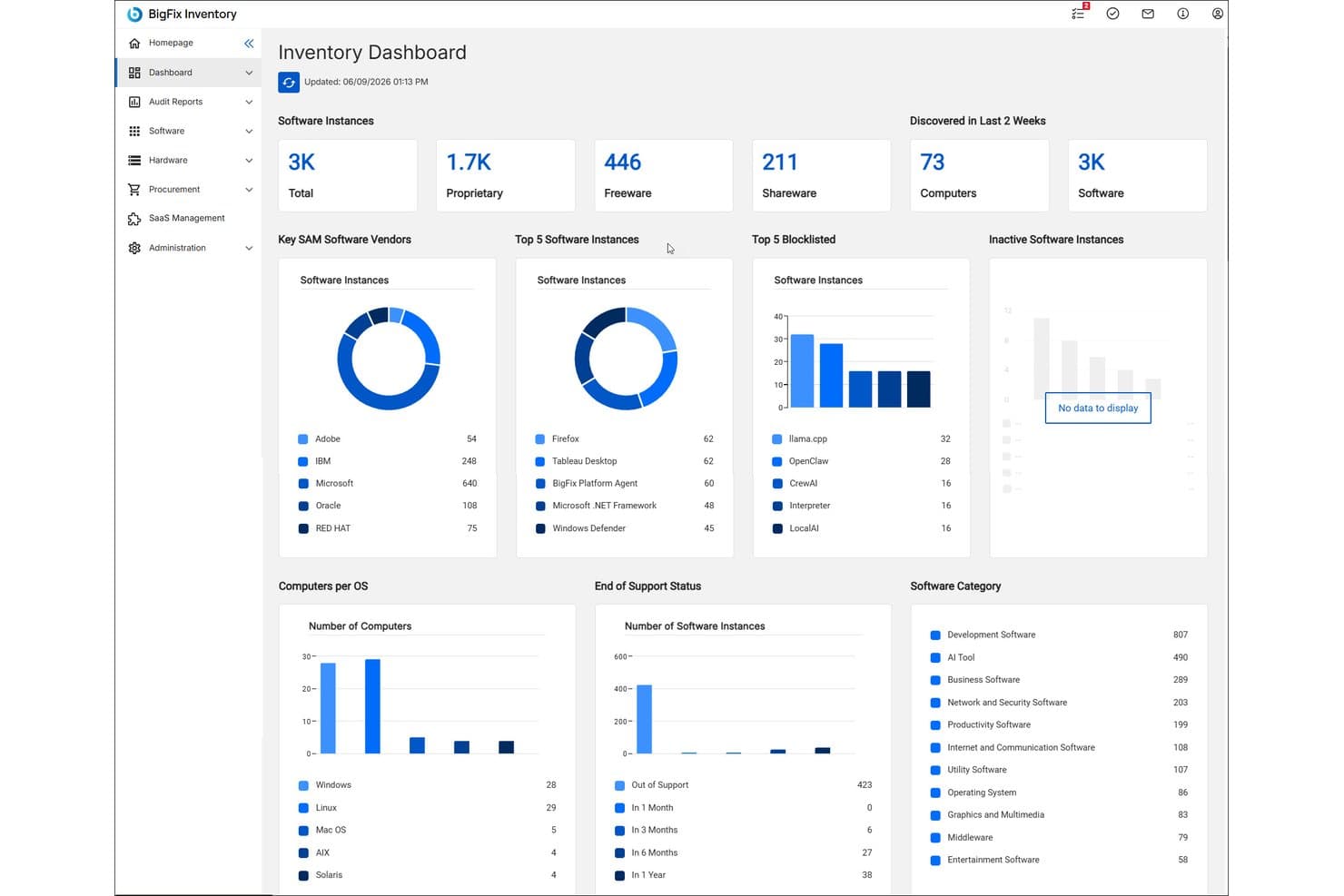
HCL BigFix offers a centralized Inventory Dashboard displaying software instances, top vendors, blocklisted software, OS distribution, and end-of-support status across the enterprise. HCL BigFix is an enterprise endpoint management platform that unifies patch management, vulnerability remediation, compliance enforcement, asset inventory, and cloud lifecycle management across on-premises, hybrid, and multi-cloud environments through a single agent and console.
Who Is HCL BigFix Best For?
HCL BigFix is a strong fit for large enterprise IT and security operations teams managing thousands of endpoints across distributed, heterogeneous infrastructure environments.
Why I Picked HCL BigFix
HCL BigFix earns its spot on my shortlist because of how it handles patch deployment at scale. I like that it covers 100+ OS variants through a single agent, so my team isn't juggling separate tooling for Windows, Linux, and Unix servers simultaneously. The 600K+ pre-built remediations mean we can push patches without authoring content from scratch, and the greater than 98% first-pass patch success rate holds up even across air-gapped environments.
HCL BigFix Key Features
- Agentic AI for employee support: Built-in AI assistant provides automated troubleshooting and IT self-service for end users.
- Digital Employee Experience module: Monitors device health, usage analytics, and employee experience data from a centralized dashboard.
- ServiceNow integration: Connects natively to ServiceNow for automated asset discovery, incident response, and ITSM workflows.
- Software inventory and asset management: Tracks hardware and software assets across every managed endpoint for compliance and audit needs.
HCL BigFix Integrations
HCL BigFix offers native integrations with ServiceNow, Tenable, Qualys, Rapid7, and supports connecting BigFix Inventory with ServiceNow CMDB and Vulnerability Response. An API is available for custom integrations.
Pros and Cons
Pros:
- 600K+ ready-to-use remediation actions
- Single agent for endpoints, servers, and cloud
- Rapid multi-OS patching for large environments
Cons:
- Limited macOS device management depth
- No built-in network device management
Learn more about HCL BigFix: Best for script-based task automation
- Free demo available
- Pricing upon request

Kaseya VSA offers a comprehensive default dashboard displaying system status, active alerts, patch status, and critical system monitoring across multiple client groups. Kaseya VSA is an RMM platform that combines endpoint monitoring, automated patch management, network monitoring, mobile device management, and remote control into a single unified management console.
Who Is Kaseya VSA Best For?
Kaseya VSA is a strong fit for IT operations teams managing large, distributed endpoint environments who need deep scripting flexibility and centralized control at scale.
Why I Picked Kaseya VSA
Kaseya VSA earns its spot on my shortlist because of the depth of its scripting engine. I've worked with the 600+ out-of-the-box script templates to automate everything from patch compliance checks to incident remediation, and the policy-based automation layer lets you push those workflows across thousands of endpoints simultaneously. The auto-remediation capability means alerts don't just notify you, they trigger fixes before a ticket is ever created.
Kaseya VSA Key Features
- Remote monitoring and control: Manage endpoints, servers, and network devices securely from a single interface.
- Automated patch management: Schedule and deploy OS and third-party application patches across distributed environments.
- Network device discovery: Scan and map connected network assets automatically for complete hardware visibility.
- Role-based access control: Configure granular permissions and user roles for multi-team and multi-site administration.
Kaseya VSA Integrations
Kaseya VSA offers native integrations with IT Glue, BMS, Autotask, RocketCyber, and more. An API is available for custom integrations.
Pros and Cons
Pros:
- Policy-based patch and compliance management
- Granular role-based access controls
- Extensive library of pre-built automation scripts
Cons:
- Support response times can vary
- User interface feels outdated
Learn more about Kaseya VSA: Best for automated workflow orchestration
- Free demo available
- Pricing upon request
Visit WebsiteCustomer Rating:4.4/5
ServiceNow ITOM offers an AIOps 360° overview dashboard displaying noise reduction, workload savings, and alert MTTR metrics across assignment groups. ServiceNow ITOM is an AIOps-driven IT operations management platform that unifies infrastructure discovery, event management, service mapping, and automated incident remediation across hybrid and multi-cloud enterprise environments.
Who Is ServiceNow ITOM Best For?
ServiceNow ITOM is built for large enterprises with complex, distributed IT environments where IT directors and operations managers need centralized control at scale.
Why I Picked ServiceNow ITOM
ServiceNow ITOM earns its spot on my shortlist because its agentic AI remediation handles the full incident loop, from root cause identification to triggering a fix workflow, without manual intervention. Flow Designer and IntegrationHub let me build cross-domain orchestration that connects event detection directly to remediation across hybrid environments. In practice, my team handles far fewer incidents manually because the platform resolves them before they escalate.
ServiceNow ITOM Key Features
- Service mapping: Creates dynamic maps of applications and their dependencies across cloud and on-premises environments.
- Event management: Consolidates alerts from third-party monitoring tools and correlates them to critical business services.
- Operational intelligence: Uses machine learning to identify anomalies and forecast potential incidents.
- Cloud governance: Enables policy-driven management of resources and change impact analysis across multi-cloud infrastructure.
ServiceNow ITOM Integrations
ServiceNow ITOM offers native integrations with AWS, Microsoft Azure, Google Cloud Platform, Microsoft Teams, Slack, Jira, Salesforce, Okta, and Power BI, and provides an API for custom integrations.
Pros and Cons
Pros:
- Centralized real-time operations dashboard
- End-to-end service dependency mapping
- Automated issue remediation with AI workflows
Cons:
- Patch automation not included by default
- Requires extensive configuration before deployment
Learn more about ServiceNow ITOM: Best for Microsoft ecosystem integration
- 90-day free trial
- From $60/user/month (billed annually)
Visit WebsiteCustomer Rating:4.7/5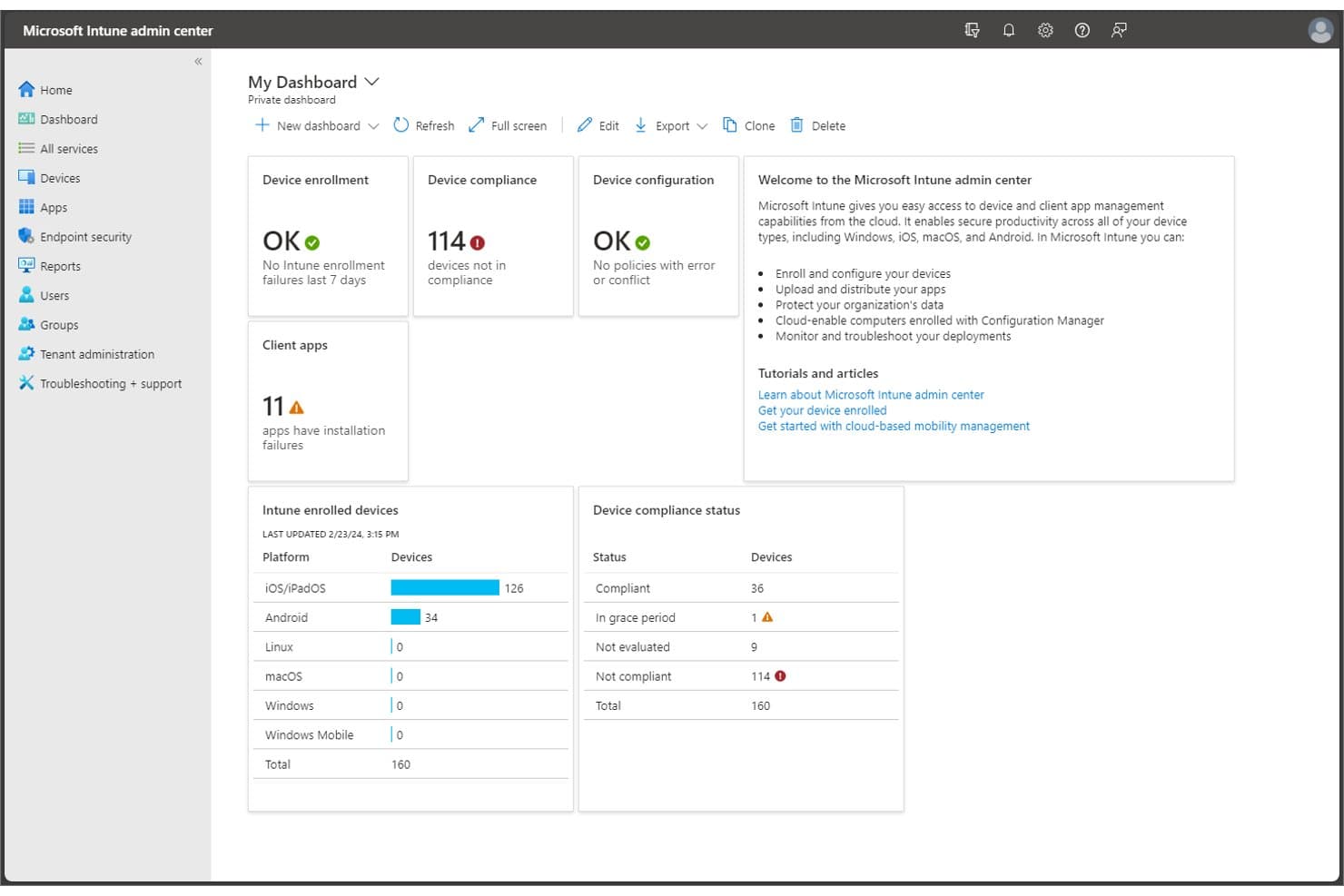
Microsoft Intune offers a unified admin dashboard displaying device enrollment, compliance status, client app failures, and enrolled device breakdowns by platform. Microsoft Intune is a cloud-native unified endpoint management (UEM) platform that covers device enrollment, configuration policy enforcement, patch deployment, application management, and compliance reporting across Windows, macOS, iOS, Android, and Linux environments.
Who Is Microsoft Intune Best For?
It's a strong fit for enterprise IT teams already running Microsoft 365 or Azure, where native integration with Entra ID, Defender, and Configuration Manager adds the most value.
Why I Picked Microsoft Intune
I've included Microsoft Intune in my top picks because its native integration with Entra ID and Microsoft Defender creates a unified security and management layer that no third-party tooling can replicate. I particularly like Endpoint Privilege Management, which lets standard users run only IT-approved elevated tasks without local admin rights. Microsoft Security Copilot in Intune also surfaces AI-driven remediation recommendations directly in the admin console, cutting through alert noise during incident triage.
Microsoft Intune Key Features
- Cloud-based remote help: Secure, real-time remote assistance connections between IT staff and end users for troubleshooting device issues.
- Enterprise application management: Centralized platform to deploy, update, and revoke applications across all enrolled devices.
- Advanced analytics and device queries: Provides detailed reporting and custom device queries to surface compliance and configuration data.
- Specialized device management: Supports management for kiosks, shared devices, and IoT specialty endpoints alongside standard computers and mobile devices.
Microsoft Intune Integrations
Microsoft Intune has native integrations across the Microsoft ecosystem, including Microsoft 365, Azure, Microsoft Entra ID, Microsoft Defender, and Configuration Manager, and offers an API for custom integrations.
Pros and Cons
Pros:
- Scales to 100,000+ endpoints per tenant
- Advanced compliance automation with Microsoft Purview
- Centralized policy enforcement for all device types
Cons:
- Limited visibility into non-Microsoft environments
- Lacks built-in server and network monitoring
Learn more about Microsoft Intune: Best for predictive service management
- Free demo available
- Pricing upon request

BMC Helix ITSM offers an AI-powered 'Ask HelixGPT' insights panel that surfaces potential resolutions, related knowledge articles, and similar ticket data directly within a critical incident record. BMC Helix is an enterprise IT management suite that spans ITSM, AIOps, network observability, CMDB, asset management, and SecOps across cloud, hybrid, and on-premises environments.
Who Is BMC Helix Best For?
BMC Helix is a strong fit for large enterprises with complex, distributed IT environments that need a single platform spanning service management, AIOps, and infrastructure visibility.
Why I Picked BMC Helix
I picked BMC Helix as one of the best because its Proactive Problem Management genuinely shifts IT ops from reactive firefighting to predictive resolution. I like how the AIOps engine automatically identifies root causes and triggers remediation before incidents escalate. BMC HelixGPT is bundled natively into the suite, so my team gets AI-driven insights without bolting on a separate tool.
BMC Helix Key Features
- Unified CMDB: Centralizes and maps IT infrastructure components with automatic dependency discovery.
- Service catalog and portal: Lets users submit requests and track incidents through a configurable self-service interface.
- Role-based access control (RBAC): Supports granular permission models for large, distributed teams and organizations.
- Integrated ChatOps connectors: Enables real-time collaboration using Microsoft Teams and Slack within ITSM workflows.
BMC Helix Integrations
BMC Helix offers native integrations with Microsoft Teams, Slack, Salesforce, and other BMC products like Discovery and CMDB. An API is available for custom integrations.
Pros and Cons
Pros:
- Proactive anomaly detection in cloud and hybrid
- Extensive cross-domain IT service management suite
- Agentic AI automates complex incident remediation
Cons:
- Customization can require specialist BMC expertise
- Limited native patch management capabilities
Learn more about BMC Helix: Best for agentless remote monitoring
- Free trial + free demo available
- Pricing upon request
Visit WebsiteCustomer Rating:5/5
NinjaOne offers a unified IT patching dashboard that displays compliance rates, patch installation status, and device counts by OS version across the enterprise. NinjaOne is a cloud-native unified IT operations platform that combines endpoint management, remote monitoring, automated patch management, backup, MDM, and IT documentation in a single console.
Who Is NinjaOne Best For?
NinjaOne is a strong fit for IT operations teams and MSPs managing large, distributed endpoint environments across hybrid Windows, macOS, and Linux infrastructures.
Why I Picked NinjaOne
NinjaOne earns its spot on my shortlist because of how it handles agentless remote monitoring for network infrastructure. Using SNMP-based polling, I can pull real-time health data from switches, routers, and printers without deploying any software to those devices. I've used this alongside Patch Intelligence AI, which flags problematic updates before they roll out to agent-managed endpoints, keeping the full estate stable across both monitored and managed device types.
NinjaOne Key Features
- Autonomous patch management: Schedule and deploy OS and third-party application updates across multiple platforms.
- Mobile device management: Enroll, monitor, and set policies for Android, iOS, Windows, and macOS devices from a unified dashboard.
- IT asset management: Track hardware and software inventory with automated discovery and comprehensive reporting.
- Integrated backup: Configure endpoint and server backups for fast restore and protection of critical systems.
NinjaOne Integrations
NinjaOne offers native integrations with Microsoft Intune, SentinelOne, ServiceNow, Autotask, HaloPSA, IT Glue, Slack, Zendesk, and more. An API is available for custom integrations.
Pros and Cons
Pros:
- Centralized backup and recovery management
- Automated multi-OS patch deployment
- Agentless monitoring for networked devices
Cons:
- Lacks advanced ITSM workflow modules
- No native network performance monitoring
Learn more about NinjaOne: Best for unified endpoint automation
- 30-day free trial + free demo available
- From $795/50 endpoints (billed annually)
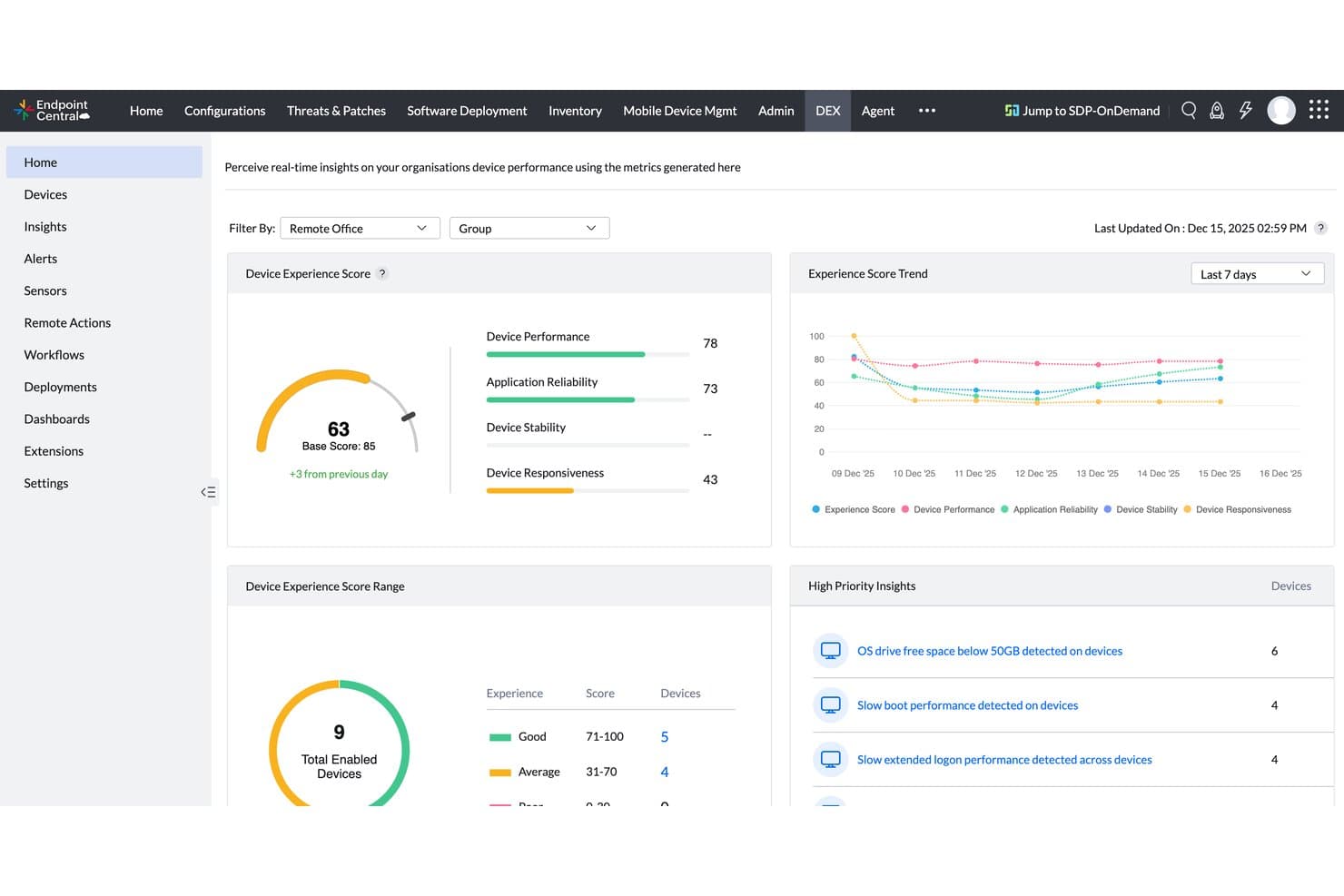
ManageEngine Endpoint Central offers a DEX (Digital Experience) dashboard with real-time device performance scores, experience trends, and high-priority IT insights for enterprise device management. ManageEngine Endpoint Central is a unified endpoint management and security platform that covers patch management, OS deployment, mobile device management, asset management, remote troubleshooting, and built-in endpoint security across Windows, macOS, Linux, and mobile devices.
Who Is ManageEngine Endpoint Central Best For?
It's a strong fit for IT operations teams in mid-size to large enterprises managing distributed endpoints across multiple locations or remote workforces.
Why I Picked ManageEngine Endpoint Central
ManageEngine Endpoint Central earns its spot on my shortlist because the automation depth here is genuinely hard to find in a single platform. I rely on its automated scan-detect-test-deploy workflows to patch 1,100+ third-party applications with a 99% first-pass success rate. I also use the 350+ script repository alongside DEX telemetry to build event-driven remediation workflows that catch and fix endpoint issues before users report them.
ManageEngine Endpoint Central Key Features
- OS imaging and deployment: Create, customize, and deploy operating system images to multiple devices across your environment.
- Role-based access control (RBAC): Set granular permissions for technicians and admins managing endpoints in different locations or departments.
- Built-in endpoint detection and response (EDR): Detect, investigate, and remediate threats with integrated AI-assisted EDR tools.
- Remote control and troubleshooting: Initiate remote sessions to troubleshoot, assist, and resolve issues directly on user devices.
ManageEngine Endpoint Central Integrations
ManageEngine Endpoint Central offers native integrations with ServiceDesk Plus, Zendesk, Splunk Enterprise, Jira Service Management, CrowdStrike, Rapid7, and Tenable Cloud Security. An API is available for custom integrations.
Pros and Cons
Pros:
- Granular role-based access for distributed teams
- Built-in EDR and ransomware rollback features
- Automated patch management for third-party software
Cons:
- Reporting customization options are somewhat limited
- Network monitoring requires separate ManageEngine product
Learn more about ManageEngine Endpoint Central:
Other Enterprise United IT Management Platforms
Here are some additional enterprise united IT management platforms options that didn’t make it onto my shortlist, but are still worth checking out:
- 11Omnissa Workspace ONE UEMBest for multiplatform device control
- 12FreshserviceBest for intuitive service automation
- 13SolarWinds Service DeskBest for advanced ticket management workflows
- 14Hexnode UEMBest for cross-platform device administration
- 15AteraBest for all-in-one IT automation toolkit
- 16Action1Best for cloud-based endpoint compliance
- 17Datto RMMBest for integrated backup and recovery tools
- 18Jamf ProBest for Apple device lifecycle management
- 19ConnectWise RMMBest for policy-driven device oversight
- 20N-able N-central RMMBest for scalable multi-site management
How I Evaluate Enterprise United IT Management Platforms
I split my evaluation into baseline criteria every platform must meet—like cross-domain visibility and automated patching at scale—and differentiating factors that separate the leaders from the rest.
Core Functionality (Table Stakes For This List)
When I'm selecting tools for my list, I rank each one on a scale from 0 (does not offer the functionality) to 5 (excels in this area) for each core functionality listed below. Then, I calculate the tool's total score into a percentage. Each tool needs to achieve a minimum total score of 75% to be considered for inclusion.
- Unified IT Dashboard: I look for a single view that correlates data across endpoints, networks, and cloud—so you're not jumping between tabs to trace an outage.
- Multi-Domain Coverage: The platform should natively handle at least endpoint, network, ITSM, and asset management without bolting on separate products.
- Enterprise-Scale Architecture: I check whether the platform supports multi-site deployments with granular RBAC, since large orgs need delegated admin across regions.
- Automation & Orchestration: Cross-domain workflow automation matters—like auto-creating a ticket, isolating an endpoint, and notifying the team when a threat fires.
- Patch & Configuration Management: I evaluate how the tool handles OS and third-party patching together, plus whether it enforces configuration baselines post-deployment.
- Security & Compliance: Built-in vulnerability management and compliance reporting aligned to frameworks like SOC 2 or ISO 27001 should come standard, not as add-ons.
Once I have a list of tools that meet the criteria, I consider what sets each platform apart.
Differentiating Factors (What Sets Vendors Apart)
Here's how I compare and contrast different vendors:
Standout Features
AIOps capabilities make a real difference—I look for platforms that use ML-driven anomaly detection to cut through alert noise and flag root causes before a minor blip becomes a major outage. A unified CMDB is another separator, since it gives you one source of truth for asset dependencies across ITSM, ITOM, and ITAM modules. I also evaluate low-code workflow builders that let your team automate cross-domain processes without writing custom scripts for every scenario.
Beyond Features
Integration depth matters—I check whether a platform offers native connectors to the enterprise systems you're already running, like AWS, Azure, and ServiceNow, plus open APIs for custom workflows. Licensing transparency is equally important, since hidden costs around implementation and premium support can blow up your total cost of ownership after you've committed. I also evaluate compliance certifications like SOC 2 Type II and ISO 27001, along with granular RBAC and audit trails that regulated industries need to pass audits without scrambling.
How to Choose Enterprise United IT Management Platforms
It’s easy to get bogged down in long feature lists and complex pricing structures. To help you stay focused as you work through your unique software selection process, here’s a checklist of factors to keep in mind:
| Factor | What to Consider |
|---|---|
| FactorScalability | What to ConsiderWill the platform handle your projected growth, site expansions, or M&A activity without degradation or license headaches? |
| FactorIntegrations | What to ConsiderCan it connect natively with your critical apps, cloud platforms, and automation tools, or will you need to build workarounds? |
| FactorCustomizability | What to ConsiderDoes the platform adapt to your policies, processes, and reporting needs—or require workarounds and expensive consulting? |
| FactorEase of use | What to ConsiderWill your team actually adopt it, or will confusing interfaces and workflows cause frustration and drive shadow tool use? |
| FactorImplementation and onboarding | What to ConsiderWhat resources, expertise, and timeline are needed to deploy and train teams at scale? Are there accelerators or partners available? |
| FactorCost | What to ConsiderDo you fully understand license models, implementation, and post-launch costs, including necessary add-ons or hidden fees? |
| FactorSecurity safeguards | What to ConsiderHow well do RBAC, encryption, audit trails, and incident response workflows align with your security model and risk appetite? |
| FactorCompliance requirements | What to ConsiderDoes the vendor offer the certifications and compliance documentation required for your industry or geographic regions? |
What Are Enterprise United IT Management Platforms?
Enterprise united IT management platforms are enterprise-grade solutions that let you monitor, manage, and automate all aspects of your IT environment—including endpoints, networks, servers, and cloud systems—from a single unified interface. These platforms help streamline IT operations, improve service delivery, and support optimization across complex infrastructures by reducing operational silos and eliminating workflow bottlenecks.
They often combine ITSM tools, knowledge management, project management, DevOps, change management, and IT support capabilities with broad integration capabilities. This gives IT teams better visibility into key metrics, strengthens customer support, and enables organizations to work more effectively with technology providers.
Features of Enterprise United IT Management Platforms
When selecting enterprise united IT management platforms, keep an eye out for the following key features:
- Unified dashboard: Provides a consolidated interface for monitoring and managing all IT assets, reducing the need to jump between tools or screens.
- Multi-domain management: Enables oversight across endpoints, networks, servers, cloud resources, and applications in one place, simplifying administration and troubleshooting.
- IT automation: Automates repetitive tasks such as patching, software deployment, and incident response, freeing up your team's time for higher-value work.
- Role-based access control: Allows you to set granular permissions for users and teams, ensuring the right people have the right level of access to systems and data.
- Patch and configuration management: Deploys security updates and enforces configuration policies automatically across heterogeneous environments, reducing vulnerabilities and drift.
- Integrated security and compliance: Offers built-in tools for vulnerability assessment, compliance reporting, and policy enforcement to meet organizational standards and regulations.
- Asset discovery and inventory: Continuously scans your environment to detect and catalog hardware, software, and cloud assets, providing a real-time IT inventory.
- Workflow orchestration: Lets you design and execute multi-step processes spanning multiple IT domains without manual intervention or complex coding.
- Customizable reporting: Generates detailed, shareable reports on IT performance, compliance, and asset status to support audits, management decisions, and regular reviews.
- API and integration ecosystem: Supports connection with existing enterprise applications, cloud platforms, and security tools, allowing for seamless data exchange and expanded capabilities.
Benefits of Enterprise United IT Management Platforms
Implementing enterprise united IT management platforms provides several benefits for your team and your business. Here are a few you can look forward to:
- Centralized visibility: Get a full view of endpoints, networks, servers, and cloud systems for faster decision-making and troubleshooting.
- Improved security posture: Rely on integrated vulnerability management, policy enforcement, and real-time compliance reporting to consistently reduce risk.
- Operational efficiency: Automate patching, configuration, and repetitive workflows to help your team focus on strategic priorities.
- Simplified governance: Enforce policies and controls across IT domains with role-based access and detailed audit trails, making compliance easier.
- Faster incident response: Quickly identify, isolate, and remediate issues using unified dashboards and automation capabilities.
- Cost savings: Consolidate multiple legacy and point tools into one platform, lowering ongoing software costs and training needs.
- Better end-user experience: Leverage digital employee experience insights to proactively resolve issues that impact productivity.
Costs and Pricing of Enterprise United IT Management Platforms
Selecting enterprise united IT management platforms requires an understanding of the various pricing models and plans available. Costs vary based on features, team size, add-ons, and more. The table below summarizes common plans, their average prices, and typical features included in enterprise united IT management platforms solutions:
Plan Comparison Table for Enterprise United IT Management Platforms
| Plan Type | Average Price | Common Features |
|---|---|---|
| Plan TypeFree Plan | Average Price$0 | Common FeaturesBasic device monitoring, limited dashboard access, and community support. |
| Plan TypePersonal Plan | Average Price$20-$50/user/month | Common FeaturesSingle-user access, fundamental automation, standard reporting, and basic patch management. |
| Plan TypeBusiness Plan | Average Price$50-$100/user/month | Common FeaturesMulti-user support, workflow automation, integration options, role-based access control, and compliance tools. |
| Plan TypeEnterprise Plan | Average Price$100+/user/month | Common FeaturesAdvanced automation, customizable dashboards, multi-domain coverage, premium support, and enhanced security. |
Enterprise United IT Management Platforms FAQs
Here are some answers to common questions about enterprise united IT management platforms:
How do enterprise united IT management platforms differ from traditional IT management tools?
Enterprise united IT management platforms combine multiple IT domains—like endpoint, network, and cloud management—into a single solution, while traditional tools typically focus on just one area. This unified approach reduces tool sprawl and makes it easier to enforce policies and troubleshoot issues.
Can these platforms integrate with existing enterprise applications and cloud services?
Yes, most modern platforms offer native integrations for popular enterprise tools and cloud platforms, as well as open APIs for custom workflows. This lets you connect your IT management environment with systems you already use.
What security measures should I expect from these platforms?
You should expect features like role-based access control, encryption of data at rest and in transit, built-in audit trails, and compliance certifications such as SOC 2 Type II or ISO 27001. These safeguards help meet both internal and regulatory requirements.
How long does it take to implement an enterprise united IT management platform?
Implementation timelines vary by organization size and existing complexity, but you can expect anywhere from a few weeks for basic setups to several months for large, multi-domain rollouts. Prebuilt templates and partner support can help accelerate the process.
Are enterprise united IT management platforms suitable for multinational organizations?
Yes, these platforms are often built with global operations in mind, supporting regional data residency, multi-language interfaces, and delegated administration to help you stay compliant and effective across multiple regions.