

Android device management software lets you secure, configure, and monitor Android phones and tablets used in your organization. If you’re looking for ways to control devices, enforce security, and simplify IT work as your fleet grows, you’re in the right place. In this guide, you’ll find the best tools for managing everything from routine updates to lockouts, helping you keep systems running smoothly, minimize risk, and focus on your team’s real priorities.
Why Trust Our Software Recommendations
6,700+
Reviews
20
Industry experts
16+
Evaluation factors
14
Years
Our team has been testing and reviewing software since 2012. As tech leaders ourselves, we know how difficult—and important—it is to choose the right software.
For this guide, we evaluated tools using hands-on testing and independent research, scoring tools using our selection criteria.
Our reviews reflect our human editorial judgment, not a sales pitch.
Expert reviewers:
- Paulo Gardini MiguelTech Director
 Tim FisherVP of AI
 Gabriel RosasTech Lead & Software Architect
 Christhian GruhnTech Lead & Platform Architect

Android Device Management Software Comparison Table
This comparison table summarizes pricing details for my top android device management software selections:
| Tool | Best For | Trial Info | Price | ||
|---|---|---|---|---|---|
| 1 | Best for OEM-specific Android fleet lockdown | 14-day free trial | From $2.00/device/month (billed annually) | Website | |
| 2 | Best quick QR code deployment process | 30-day free trial | From $2.40/device/year (billed annually) | Website | |
| 3 | Best for real-time remote device monitoring | Free demo available | From $1/device/month (billed annually) | Website | |
| 4 | Best for unified identity and device access controls | 30-day free trial | From $9/user/month (billed annually) | Website | |
| 5 | Best for policy automation across device fleets | 14-day free trial + free demo available | From $2.20/device/month (billed annually) | Website | |
| 6 | Best for managing mixed-platform fleets | 14-day free trial + free plan available | From $2.75/device/month (billed annually) | Website | |
| 7 | Best for granular app and content management | Free demo available | Pricing upon request | Website | |
| 8 | Best for built-in AI-driven security insights | 30-day free trial available | From $4/client device/month | Website | |
| 9 | Best for remote troubleshooting on diverse hardware | 30-day free trial + free demo available | From $1.28/device/month (billed annually) | Website | |
| 10 | Best for advanced compliance management | Free demo available | Pricing upon request | Website |


Best Android Device Management Software Reviews
Below are my detailed summaries of the best Android device management software that made it onto my shortlist. My reviews offer a detailed look at the features, capabilities, and best use cases of each platform to help you find the best one for you.
 Best for OEM-specific Android fleet lockdown
- 14-day free trial
- From $2.00/device/month (billed annually)
Visit WebsiteCustomer Rating:4.7/5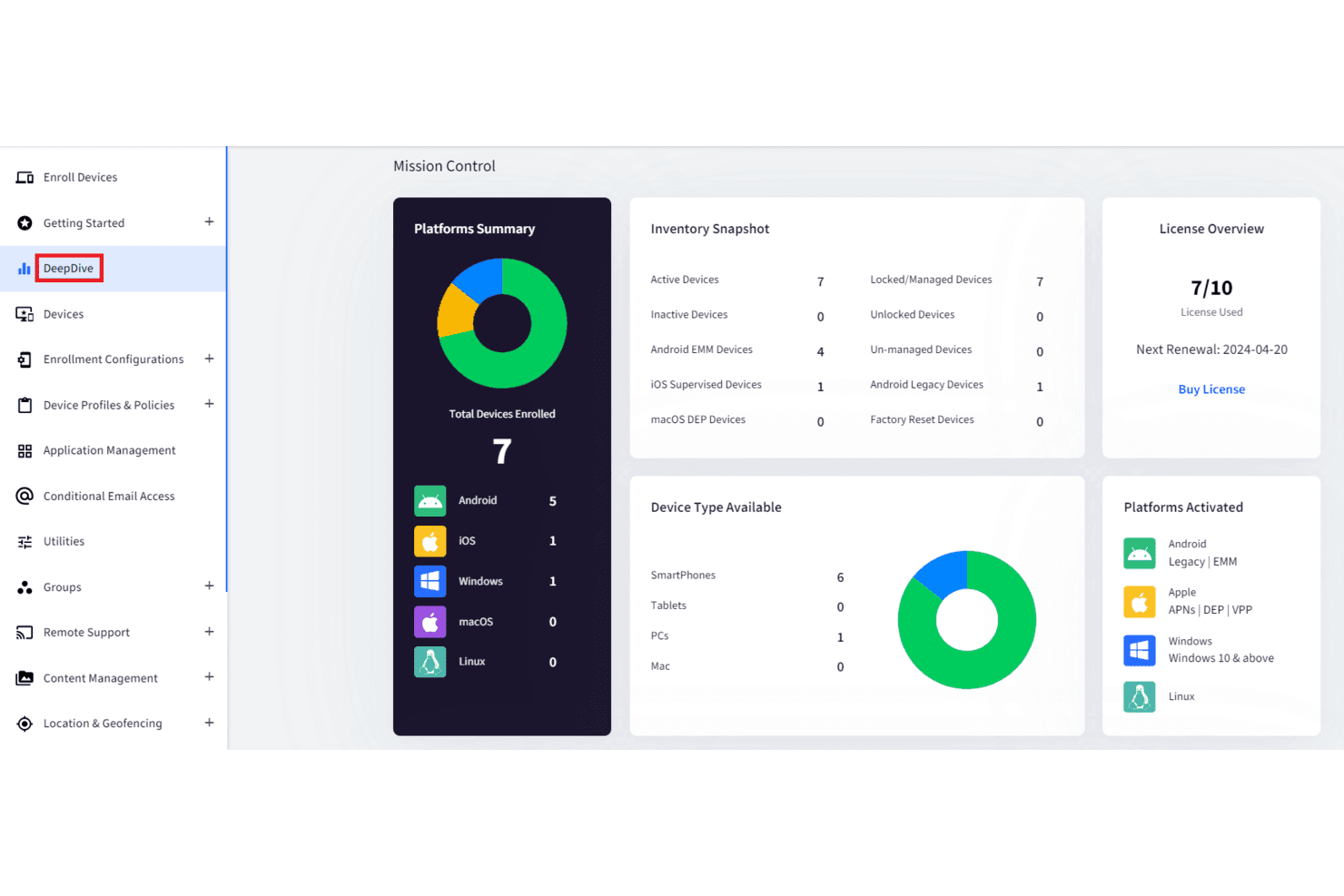
Scalefusion features a detailed dashboard for managing device policies and settings. Scalefusion is a UEM platform that covers Android, iOS/iPadOS, macOS, Windows, Linux, and ChromeOS from a single console, with Android capabilities spanning enrollment, kiosk lockdown, app distribution, OEM-level hardware controls, remote commands, and location tracking across corporate-owned, BYOD, shared-device, and dedicated-device deployments.
Who Is Scalefusion Best For?
Scalefusion is a strong fit for IT teams managing Android fleets across frontline operations, retail, logistics, healthcare, and digital signage deployments.
Why I Picked Scalefusion
Scalefusion earns its spot on my shortlist because of how deep its OEM-level Android controls go, particularly for Samsung Knox and Zebra deployments. I like that administrators can push MX-based configurations to Zebra devices or apply Knox Service Plugin policies on Samsung hardware, going well beyond what standard Android Enterprise policies allow. On kiosk deployments specifically, you get application lockdown, Remote Cast & Control, and security incident alerts for events like unauthorized SIM swaps or failed kiosk exit attempts, which matters when devices are unattended in retail or logistics environments.
Scalefusion Key Features
- Android Enterprise work profile: Separates work apps and data from personal content, letting admins remove corporate data without wiping the device.
- Zero-touch enrollment: Auto-enrolls corporate Android devices on first boot with no manual setup needed.
- Shared Device Mode: Enables shift-based device sharing with OTP login, auto sign-out timers, and data clearing at sign-out.
- Location Insights: Tracks device location for fleet oversight, with geofencing and profile switching scaling by plan tier.
Scalefusion Integrations
Scalefusion supports Microsoft Entra ID, Google Workspace, Samsung Knox, Zebra, Jira, Freshservice, IBM QRadar, and Splunk. Webhooks send JSON event payloads to external HTTP endpoints for custom workflows.
Pros and Cons
Pros:
- Shared-device management supports shift-based frontline teams
- OEM controls for Samsung and Zebra devices
- Extensive Android kiosk and dedicated-device controls
Cons:
- Advanced security capabilities require separate products
- OEM controls depend on model and support
Learn more about Scalefusion: Best quick QR code deployment process
- 30-day free trial
- From $2.40/device/year (billed annually)
Visit WebsiteCustomer Rating:4.7/5
TinyMDM offers granular app management controls within policies, including kiosk mode, app permissions, and per-app update or install options. TinyMDM is a dedicated Android MDM platform that lets IT teams enroll, configure, secure, and remotely manage company-owned and BYOD Android device fleets from a centralized console.
Who is TinyMDM Best For?
TinyMDM works well for IT teams in small to mid-sized businesses that want a straightforward Android-only MDM solution without enterprise-level complexity.
Why I Picked TinyMDM
I've included TinyMDM in my top picks for its QR code enrollment process, which is one of the fastest ways to get a large Android fleet configured and online. I love how the multiple enrollment feature lets you generate a single generic QR code and scan it across every device in a batch. Each scan auto-creates a user, applies the correct policy, and names the device based on a prefix like IMEI, serial number, or date. In practice, my team can go from zero to fully configured devices without touching individual user profiles.
TinyMDM Key Features
- Kiosk mode: Lock devices to a single app or a curated set of apps, preventing users from accessing anything outside the approved configuration.
- Remote control: Access any enrolled Android device in real time to troubleshoot issues, navigate settings, or push fixes without physical access.
- Geolocation tracking: View the live location of each device and access up to three days of location history directly from the console.
- Silent app management: Push, update, or remove apps on enrolled devices without any user interaction or on-screen prompts.
TinyMDM Integrations
TinyMDM offers a REST API for managing enrolled devices through HTTP requests. Native integrations include Microsoft Entra ID for syncing Azure users and contacts, Zero Touch Enrollment (ZTE) for Android devices, and Knox Mobile Enrollment (KME) for Samsung devices. TinyMDM also supports Knox Service Plugin (KSP) for advanced configuration of Samsung Knox devices.
Pros and Cons
Pros:
- Android-only focus keeps the platform lightweight
- QR code enrollment makes device onboarding simple
- Supports all four Android management modes
Cons:
- Play Store app updates can be unreliable
- Does not support iOS or Windows
Learn more about TinyMDM: Best for real-time remote device monitoring
- Free demo available
- From $1/device/month (billed annually)
Visit WebsiteCustomer Rating:4.7/5
AirDroid Business offers live device monitoring with screenshots and camera views. AirDroid Business is an Android device management software that provides centralized device enrollment, real-time monitoring, remote troubleshooting, policy configuration, and app management for organizations managing Android fleets.
Who Is AirDroid Business Best For?
IT managers in logistics, field services, or retail who need to monitor and support distributed Android devices in real time.
Why I Picked AirDroid Business
I picked AirDroid Business because I rely on its real-time device monitoring to track live device status, kiosk activity, and location. I like being able to quickly troubleshoot and remotely access devices on demand, which is crucial during field incidents.
AirDroid Business Key Features
- Device grouping: Organize devices by department, location, or function for easier management.
- Geofence alerts: Set up location-based triggers for device activities and monitoring.
- Usage reports: Generate detailed reports on device operation and compliance status.
AirDroid Business Integrations
AirDroid Business integrates with Google Android Enterprise and offers API integration for IT and CRM systems. AirDroid Business also provides an API for custom integrations and connects with third-party integration tools.
Pros and Cons
Pros:
- Automated workflow for app and device updates
- Remote device control without user intervention
- Live video monitoring and real-time alerts
Cons:
- Limited reporting customization for device analytics
- Tedious initial setup for device configuration templates
Learn more about AirDroid Business: Best for unified identity and device access controls
- 30-day free trial
- From $9/user/month (billed annually)
Visit WebsiteCustomer Rating:4.6/5
JumpCloud offers user-device access controls with OS and permission settings. JumpCloud is a cloud-based UEM and Android device management software that unifies device management, identity management, and policy enforcement across Android, Windows, macOS, and Linux environments.
Who Is JumpCloud Best For?
JumpCloud suits IT teams at mid-sized organizations that need centralized control over both user identities and Android devices within hybrid or remote workplaces.
Why I Picked JumpCloud
I picked JumpCloud because it lets me enforce access controls and device compliance from a single admin console across Android fleets. I like being able to sync user identities and manage device trust rules with the same tool.
JumpCloud Key Features
- Cross-platform support: Manage Android, Windows, macOS, and Linux devices from one interface.
- Policy-based device management: Apply security and usage policies to groups of devices or users.
- Automated device enrollment: Enroll Android devices with zero-touch deployment options.
JumpCloud Integrations
JumpCloud offers native integrations with Google Workspace, Okta, Microsoft 365, Salesforce, Slack, Atlassian, AWS, and Zendesk, and provides an API for custom integrations.
Pros and Cons
Pros:
- Cross-platform device management via a single console
- Unified identity and device access workflows
- Device compliance checks with granular policies
Cons:
- Android features are shallow compared to desktop
- Software deployment is heavily reliant on custom scripting
Learn more about JumpCloud: Best for policy automation across device fleets
- 14-day free trial + free demo available
- From $2.20/device/month (billed annually)
Visit WebsiteCustomer Rating:4.6/5
Hexnode offers automation workflows for policies across device platforms. Hexnode is a unified endpoint management solution for Android that provides app deployment, device lockdown, kiosk modes, remote troubleshooting, compliance automation, and granular control for organizations managing large device fleets.
Who Is Hexnode Best For?
Hexnode suits IT teams at mid-sized organizations looking for automated Android policy enforcement and centralized control across a distributed device fleet.
Why I Picked Hexnode
I picked Hexnode because I use its policy automation tools to set up deployment, security, and app management rules that apply instantly across every Android device in our fleet. My team leverages dynamic group assignment and scheduled actions to optimize repetitive policy tasks.
Hexnode Key Features
- Remote device lock and wipe: Disable or erase lost or stolen Android devices from the admin console.
- Application whitelisting: Allow only approved apps to run on managed devices.
- Compliance reporting: Generate exportable reports on Android device status and policy adherence.
Hexnode Integrations
Hexnode offers native integrations with Azure Active Directory, Google Workspace, Okta, Samsung Knox, Zendesk, and ServiceNow, and provides an API for custom integrations.
Pros and Cons
Pros:
- Remote lock and wipe functionality
- Kiosk mode for Android devices
- Automated compliance policy deployment
Cons:
- Basic automation depth compared to high-end enterprise rivals
- Granular features are heavily restricted by pricing tiers
Learn more about Hexnode: Best for managing mixed-platform fleets
- 14-day free trial + free plan available
- From $2.75/device/month (billed annually)
Visit WebsiteCustomer Rating:4.5/5
Miradore offers device management with status and management type tracking. Miradore is a cloud-based mobile device management solution for Android, iOS, Windows, and macOS that covers device enrollment, remote configuration, security policy enforcement, and real-time inventory tracking.
Who Is Miradore Best For?
Miradore is well-suited for IT teams in small to mid-sized organizations that need to manage Android devices alongside other operating systems in a single dashboard.
Why I Picked Miradore
I picked Miradore because I get flexible oversight for Android, iOS, macOS, and Windows devices in one dashboard. I use remote device enrollment and security policy automation to keep our mixed-platform fleet consistent and compliant.
Miradore Key Features
- Compliance monitoring: Tracks and flags devices that fall out of compliance with predefined policies.
- Application management: Lets you silently deploy, update, or remove apps on Android devices remotely.
- Automated reports: Generates scheduled or on-demand reports for device inventory, status, and security events.
Miradore Integrations
Miradore offers integrations with Microsoft Entra ID, Google Workspace, Apple Business Manager, Google Android Enterprise, Samsung Knox Mobile Enrollment, TeamViewer, and more. An API is available for custom integrations.
Pros and Cons
Pros:
- Policy-based remote wiping and locking options
- Real-time dashboard for device status and alerts
- Covers Android, iOS, Windows, and macOS devices
Cons:
- Bulk app deployment can be unreliable at times
- Rigidity in profile editing and automation
Learn more about Miradore: Best for granular app and content management
- Free demo available
- Pricing upon request
Visit WebsiteCustomer Rating:4.4/5
SOTI MobiControl offers granular Android management via a 4-source app wizard. SOTI MobiControl is an Android device management platform for IT teams that provides advanced tools for app deployment, real-time remote support, content distribution, compliance enforcement, and access management.
Who Is SOTI MobiControl Best For?
SOTI MobiControl is a strong fit for IT admins in healthcare, retail, or logistics who need to tightly manage apps and content across a large Android ecosystem.
Why I Picked SOTI MobiControl
I picked SOTI MobiControl because I rely on its granular app control and content management features; my team uses app whitelisting, secure content distribution, and role-based device access to tightly manage Android endpoints.
SOTI MobiControl Key Features
- Remote troubleshooting tools: Access device screens and resolve Android issues in real time.
- Automated device enrollment: Register large numbers of Android devices using batch enrollment methods.
- Custom scripting for automation: Use scripts to automate routine tasks and enforce device configurations.
SOTI MobiControl Integrations
SOTI MobiControl offers native integrations with Microsoft Intune, Google Workspace, Samsung Knox, Zebra Mobility DNA, and has an API for custom integrations.
Pros and Cons
Pros:
- Real-time device tracking tools
- Kiosk and lockdown modes available
- Deep app permissions control for Android
Cons:
- Interface can feel dated compared to rivals
- Complex and rigid custom report building
Learn more about SOTI MobiControl: Best for built-in AI-driven security insights
- 30-day free trial available
- From $4/client device/month
Visit WebsiteCustomer Rating:4.2/5
IBM MaaS360 offers endpoint alerts, encryption status, and activity feeds. IBM MaaS360 is an enterprise-grade Android device management platform that provides unified endpoint management, advanced threat defense, app control, and secure containerization for mobile fleets.
Who Is IBM MaaS360 Best For?
IT and security teams in highly regulated industries that need centralized device management and advanced mobile threat intelligence.
Why I Picked IBM MaaS360
I picked IBM MaaS360 because I rely on its Watson AI-driven threat detection and contextual security insights, which help my team spot risky device behaviors quickly and automate compliance actions for our Android fleet.
IBM MaaS360 Key Features
- Remote device wipe: Erase all corporate data or trigger a complete factory reset on lost or stolen devices instantly through the admin console.
- Policy enforcement engine: Set granular security and usage policies for groups, users, or individual Android devices.
- Containerization for work apps: Keep corporate apps and data separated from personal content on Bring Your Own Device (BYOD) endpoints.
IBM MaaS360 Integrations
IBM MaaS360 offers native integrations with Microsoft 365, Azure Active Directory, Cisco Security Connector, ServiceNow, and IBM QRadar, and provides an API for custom integrations.
Pros and Cons
Pros:
- Supports Android Enterprise features and profiles
- Granular Android policy management options
- AI-driven threat detection and insights
Cons:
- Some admin tasks require manual configuration steps
- Steep learning curve and complex initial platform setup
Learn more about IBM MaaS360: Best for remote troubleshooting on diverse hardware
- 30-day free trial + free demo available
- From $1.28/device/month (billed annually)

ManageEngine offers Android remote actions for lock, wipe, locate, and lost mode. ManageEngine Mobile Device Manager Plus is a is an excellent Android mdm solution and unified endpoint management solution for Android that delivers device provisioning, app deployment, OS updates, security configuration, and remote troubleshooting tools for managing large, diverse device fleets.
Who Is ManageEngine Mobile Device Manager Plus Best For?
IT teams in large enterprises or education settings managing a mix of Android device models and OS versions.
Why I Picked ManageEngine Mobile Device Manager Plus
I picked ManageEngine Mobile Device Manager Plus because I rely on its ability to remotely troubleshoot devices from different manufacturers, push OS updates, and provide real-time screen sharing for rapid issue resolution.
ManageEngine Mobile Device Manager Plus Key Features
- Kiosk mode: Lock devices to single or multiple specific apps for dedicated use cases.
- App management: Distribute, update, and remove applications via Google play or enterprise stores across devices from a central console.
- Location tracking: View real-time and historical location data for assigned Android devices.
ManageEngine Mobile Device Manager Plus Integrations
ManageEngine Mobile Device Manager Plus offers native integrations with Active Directory, Azure Active Directory, Apple Business Manager, Apple School Manager, and Samsung Knox, and provides an API for custom integrations.
Pros and Cons
Pros:
- Policy templates simplify device onboarding at scale
- Enables live remote control for issue diagnosis
- Supports multi-OS device management in one platform
Cons:
- Cluttered admin interface and laggy profile execution
- Initial setup process can be time-consuming
Learn more about ManageEngine Mobile Device Manager Plus: Best for advanced compliance management
- Free demo available
- Pricing upon request

Ivanti Neurons offers device compliance configuration for Android. Ivanti Neurons for MDM is an enterprise-grade Android device management software focused on device provisioning, remote configuration, security enforcement, inventory tracking, and mobile application management.
Who Is Ivanti Neurons for MDM Best For?
Ivanti Neurons for MDM is a strong fit for IT and security teams in midsize to large enterprises with demanding compliance and risk management requirements.
Why I Picked Ivanti Neurons for MDM
I picked Ivanti Neurons for MDM because I need advanced policy enforcement, granular compliance reporting, and security automation. I use real-time compliance dashboards and automated device remediation to keep Android fleets audit-ready in regulated environments.
Ivanti Neurons for MDM Key Features
- Multi-OS support: Manage Android, iOS, macOS, and Windows devices from a unified console.
- Over-the-air app distribution: Push and update business apps across enrolled Android devices remotely.
- Remote lock and wipe: Instantly lock or wipe lost or compromised devices to protect company data.
Ivanti Neurons for MDM Integrations
Ivanti Neurons for MDM integrates with Microsoft Entra ID, Microsoft Intune, Apple Business Manager, Google Android Enterprise, Splunk, QRadar, and ServiceNow. An API is available for custom integrations.
Pros and Cons
Pros:
- Supports in-depth remote troubleshooting
- Automated patch and update deployment
- Compliance dashboards for Android security audits
Cons:
- High cost and modular complexity
- Device enrollment setup can be slow
Learn more about Ivanti Neurons for MDM:
Other Android Device Management Software
Here are some additional Android device management software options that didn’t make it onto my shortlist, but are still worth checking out:
- 11Samsung Knox ManageBest for defense-grade built-in data security
- 12ZenAdminBest for AI-powered device setup workflows
- 13TeamViewerBest integration with remote support tools
- 14NinjaOneBest unified control across all device types
- 15RipplingBest automated device lifecycle management
How I Evaluate Android Device Management Software
Whether you're locking down warehouse handhelds or rolling out BYOD at scale, I split my evaluation into baseline Android Enterprise requirements and the differentiators that separate each platform.
Core Functionality (Table Stakes For This List)
When I'm selecting tools for my list, I rank each one on a scale from 0 (does not offer the functionality) to 5 (excels in this area) for each core functionality listed below. Then, I calculate the tool's total score into a percentage. Each tool needs to achieve a minimum total score of 65% to be considered for inclusion.
- Android Enrollment Methods: I check for zero-touch, QR code, and KME support so IT teams can stage hundreds of devices from a console instead of configuring each one by hand.
- Policy & Security Enforcement: Each platform should let you push password rules, encryption mandates, and remote wipe commands—the basics for protecting a lost warehouse scanner or stolen phone.
- App Distribution & Control: I evaluate Managed Google Play integration, silent install, and app restriction options to see how easily you can push a custom LOB app to a fleet of field devices.
- Kiosk & Dedicated Device Mode: For teams running point-of-sale terminals or digital signage, I look at single-app and multi-app lockdown with custom launcher branding and peripheral control.
- Remote Monitoring & Troubleshooting: Real-time dashboards, compliance alerts, and remote view or control matter when a driver's handheld goes offline mid-route and you need to diagnose it fast.
- Work Profile & BYOD Separation: I evaluate how well each tool creates a managed container on personal devices, keeping corporate email and apps isolated from a user's personal data.
Once I have a list of tools that meet the criteria, I consider what sets each platform apart.
Differentiating Factors (What Sets Vendors Apart)
Here's how I compare and contrast different vendors:
Standout Features
OEM-level API access matters when you're managing Zebra scanners or Samsung tablets. Platforms with Knox or MX integration unlock hardware controls that standard Android Enterprise APIs can't reach. I also evaluate geofence-triggered policies, which are valuable when devices need automatic lockdowns once they leave a warehouse or job site. Scripting and automation capabilities round out my comparison, since bulk remediation across thousands of endpoints saves hours of manual admin work.
Beyond Features
Licensing flexibility is worth close attention. Per-device pricing suits shared kiosk fleets, while per-user models work better for BYOD programs where one person carries multiple devices. I also check for Android Enterprise Recommended status and relevant compliance certifications like SOC 2 or FedRAMP, since these signal a vendor's investment in meeting enterprise and government audit requirements. Integration depth with identity providers such as Okta or Azure AD is another factor I evaluate, because conditional access policies tied to device compliance make zero-trust adoption far more practical.
How to Choose Android Device Management Software
It’s easy to get bogged down in long feature lists and complex pricing structures. To help you stay focused as you work through your unique software selection process, here’s a checklist of factors to keep in mind:
| Factor | What to Consider |
|---|---|
| FactorScalability | What to ConsiderCan the platform handle your current and projected device numbers without extra admin overhead or loss of visibility? |
| FactorIntegrations | What to ConsiderDoes it support your directory, ticketing, or HR systems natively, or will you need custom API work to connect tools? |
| FactorCustomizability | What to ConsiderAre you able to tailor policy settings, user roles, and workflows specific to your organization’s structure and needs? |
| FactorEase of use | What to ConsiderWill daily management, like finding a lost device or pushing updates, be fast and intuitive for your admin team? |
| FactorImplementation and onboarding | What to ConsiderWhat’s required to get devices enrolled and staff trained? Do you need hands-on onboarding, or can you self-implement? |
| FactorCost | What to ConsiderIs pricing predictable as your fleet grows? Watch for per-device charges and costs for premium support or add-on features. |
| FactorSecurity safeguards | What to ConsiderCan the tool meet your data protection, remote wipe, encryption, and MFA requirements on every device you manage? |
| FactorSupport availability | What to ConsiderAre support channels (live chat, phone, email) responsive when you need help troubleshooting or responding to incidents? |
What is Android Device Management Software?
Android device management software lets IT administrators control, secure, and monitor Android smartphones and tablets from a central dashboard. These tools are designed to simplify app deployment, enforce security policies, track device locations, and perform remote actions like locking or wiping devices. They help organizations manage large numbers of Android endpoints while maintaining compliance and minimizing risks linked to lost or compromised devices.
Features of Android Device Management Software
When selecting Android device management software, keep an eye out for the following key features:
- Device enrollment: Lets you onboard and configure multiple Android devices remotely, often using QR codes, NFC, or zero-touch enrollment methods.
- Remote app management: Allows you to silently install, update, or remove apps from Google play across all managed devices without user intervention.
- Security policy enforcement: Enables you to set and enforce rules for passwords, encryption, network usage, and device compliance from one dashboard.
- Location tracking: Provides real-time location data on each device for asset tracking, theft response, and monitoring mobile workforces.
- Remote lock and wipe: Lets you remotely lock or erase lost or stolen devices to protect sensitive organizational data.
- Compliance monitoring: Flags devices that fall out of policy, alerting admins and generating reports for security audits.
- Kiosk mode: Restricts a device to specific apps or functions, ideal for point-of-sale, digital signage, or single-purpose deployments.
- Inventory management: Gives you a live overview of all Android devices under management, with details on model, OS version, and status.
- Automated alerts: Notifies admins about unusual activity, compliance failures, or critical events that require immediate action.
- Role-based access control: Allows different levels of admin permissions based on job function to reduce errors and improve security within the management platform.
Benefits of Android Device Management Software
Implementing Android device management software provides several benefits for your team and your business. Here are a few you can look forward to:
- Centralized management: Manage, configure, and monitor all Android devices from a single platform, reducing manual overhead.
- Improved security: Enforce security policies, lock down lost devices, and wipe data remotely to protect sensitive information.
- Faster troubleshooting: Use real-time dashboards and notifications to quickly identify and resolve device issues before they escalate.
- Optimized app deployment: Install, update, or remove applications across your device fleet without needing individual user action.
- Regulatory compliance: Automate compliance monitoring and generate audit-ready reports to satisfy corporate and industry requirements.
- Operational efficiency: Automate common device management tasks and workflows, freeing your IT staff for more strategic work.
- Reduced device downtime: Proactively monitor device health and usage, minimizing performance issues and keeping teams productive.
Costs and Pricing of Android Device Management Software
Selecting Android device management software requires an understanding of the various pricing models and plans available. Costs vary based on features, team size, add-ons, and more. The table below summarizes common plans, their average prices, and typical features included in Android device management software solutions:
Plan Comparison Table for Android Device Management Software
| Plan Type | Average Price | Common Features |
|---|---|---|
| Plan TypeFree Plan | Average Price$0 | Common FeaturesSupports limited devices, basic device enrollment, app management, and simple remote actions. |
| Plan TypePersonal Plan | Average Price$5-$10/user/month | Common FeaturesAdds multi-device support, remote lock and wipe, basic compliance features, and email support. |
| Plan TypeBusiness Plan | Average Price$10-$25/user/month | Common FeaturesIncludes central UEM policy enforcement, automated alerts, advanced app deployment, location tracking, and inventory tools. |
| Plan TypeEnterprise Plan | Average Price$25-$50/user/month | Common FeaturesOffers role-based access, audit logging, multi-factor authentication, advanced integrations, premium support, and custom security controls. |
Android Device Management Software FAQs
Here are some answers to common questions about Android device management software:
Can I manage both company-owned and employee-owned (BYOD) devices?
Yes, most Android device management software supports managing both company-owned and BYOD devices. You can apply different policies depending on ownership, helping balance corporate security needs with employee privacy.
Do I need to install anything on each Android device?
Yes, you typically need to install a management app or agent on each device. This app enables remote management, policy enforcement, and real-time updates from your chosen MDM platform.
What happens if a device is lost or stolen?
You can remotely lock, locate, or wipe a lost or stolen device. Most solutions also let you configure automatic responses, such as locking the device after failed login attempts or if it goes offline.
How do Android device management tools help with compliance?
MDM software lets you enforce password policies, encryption, and app restrictions, and provides auditing capabilities. This helps meet data protection and industry compliance standards for mobile fleets.
Is it possible to automate software and security updates?
Yes, most Android device management platforms allow you to schedule and automate OS, app, and security updates, reducing manual work and minimizing the risk of vulnerabilities.
Can I track the location of my devices in real time?
Yes, many tools offer real-time GPS tracking to monitor device locations. This helps with asset recovery, oversight of mobile teams, and compliance with security policies.