

AI coding tools are applications that use artificial intelligence to help you write, review, or improve code with greater speed and reliability. If you’re hunting for tools to boost productivity, cut repetitive tasks, or solve tough programming challenges, this list has you covered.
With so many options and fast-changing tech, it’s tough to know what actually works. I’ll walk you through the top choices for 2026, helping you pick the right fit for your day-to-day coding and team needs.
Why Trust Our Software Recommendations
6,700+
Reviews
20
Industry experts
16+
Evaluation factors
14
Years
Our team has been testing and reviewing software since 2012. As tech leaders ourselves, we know how difficult—and important—it is to choose the right software.
For this guide, we evaluated tools using hands-on testing and independent research, scoring tools using our selection criteria.
Our reviews reflect our human editorial judgment, not a sales pitch.
Expert reviewers:
- Paulo Gardini MiguelTech Director
 Tim FisherVP of AI
 Gabriel RosasTech Lead & Software Architect
 Christhian GruhnTech Lead & Platform Architect

AI Coding Tools Comparison Table
This comparison table summarizes pricing details for my top AI coding tool selections:
| Tool | Best For | Trial Info | Price | ||
|---|---|---|---|---|---|
| 1 | Best for instant project setup in the browser | Free plan available | From $18/month (billed annually) | Website | |
| 2 | Best for optimizing team code reviews | Free plan + free demo available | From $30/user/month (billed annually) | Website | |
| 3 | Best for integrating cloud development workflows | Free plan available | From $19/user/month | Website | |
| 4 | Best for seamless integration with JetBrains IDEs | Free plan available | From $199/user/month | Website | |
| 5 | Best for using conversational coding features | 30-day free trial | From $19/user/month (billed annually) | Website | |
| 6 | Best for real-time code suggestions in editors | Free plan + 30-day free trial available | From $4/user/month | Website | |
| 7 | Best for handling complex multi-file projects | Not available | From $20/month | Website | |
| 8 | Best for privacy-focused code completion | Free demo available | From $39/user/month (billed annually) | Website | |
| 9 | Best for collaborative code editing with AI | Free plan available | From $20/month | Website | |
| 10 | Best for autonomous end-to-end software tasks | Free plan available | From $20/user/month | Website |


Best AI Coding Tools Reviews
Below are my detailed summaries of the best AI coding tools that made it onto my shortlist. My reviews offer a detailed look at the features, capabilities, and integrations of each tool to help you find the best one for you.
 Best for instant project setup in the browser
- Free plan available
- From $18/month (billed annually)
Visit WebsiteCustomer Rating:4.4/5
Replit's AI agent features a priority-labeled to-do list app with color-coded tags and a live canvas preview. Replit is a browser-based AI coding platform where developers can write, run, and deploy full-stack applications using an AI Agent that generates code, manages databases, and handles hosting from a single environment.
Who Is Replit Best For?
Replit is a strong fit for indie developers and early-stage startup teams who need to go from idea to deployed app without managing infrastructure or local dev environments.
Why I Picked Replit
I picked Replit as one of the best because there's genuinely no faster path from idea to running app in a browser. I open a new project, describe what I need, and Agent 4 spins up parallel agents that handle authentication, database setup, and UI simultaneously. The entire stack, including hosting and a built-in PostgreSQL database, is provisioned automatically inside the same workspace, with no terminal configuration needed.
Replit Key Features
- Infinite canvas: Visually organize ideas, run agents, and design workflows using a flexible project workspace.
- Integrated AI chat assistant: Interact with a conversational AI inside your coding environment for task guidance and code help.
- GitHub repository integration: Import, sync, and version control your projects directly inside Replit workspaces.
- Secrets manager: Store API keys and sensitive credentials securely within your project.
Replit Integrations
Replit offers 450+ native integrations including GitHub, Adyen, Stripe, OpenAI, Google Workspace, Ashby, Amplitude, Bitbucket, Brex, and Databricks. An API is available for custom integrations.
Pros and Cons
Pros:
- Built-in database and hosting environment
- Agent 4 generates entire apps from prompts
- Browser-based IDE requires no local setup
Cons:
- Interface layout feels heavily cluttered
- High usage-based billing credit consumption
Learn more about Replit: 2Best for optimizing team code reviews
Qodo
- Free plan + free demo available
- From $30/user/month (billed annually)
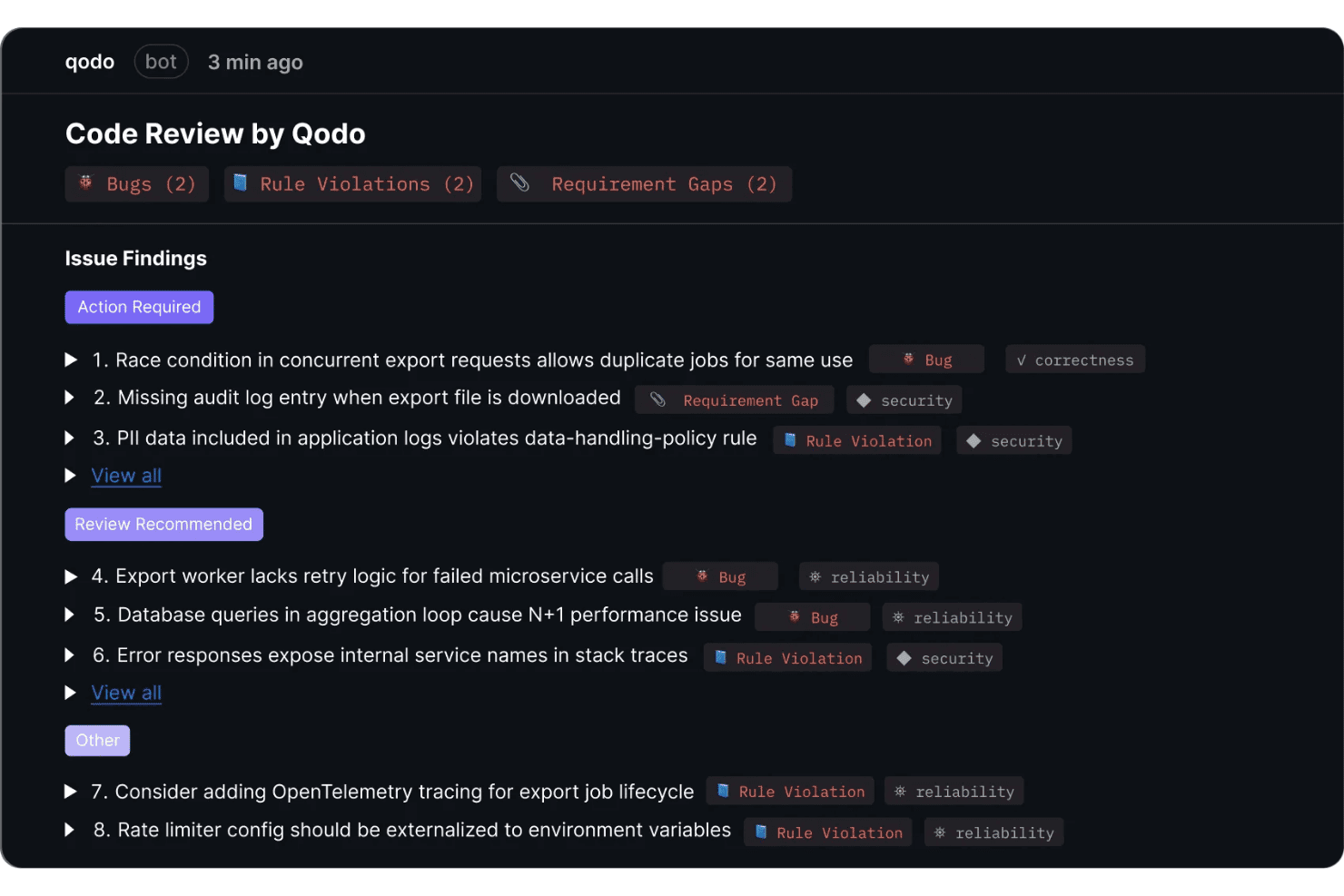
Qodo provides automated code review with categorized issue findings including bugs, rule violations, and requirement gaps with severity prioritization. Qodo is an AI code review and governance platform that runs agentic PR analysis, enforces coding standards through a self-learning rules system, and generates unit tests automatically as part of the review workflow.
Who Is Qodo Best For?
Qodo is a strong fit for engineering teams at mid-size to enterprise companies that need structured, automated code review across multiple repos and contributors.
Why I Picked Qodo
Qodo earns its spot as one of the best on my shortlist because of how it handles code review at the PR level. I love the Living Rules System, which learns your team's coding conventions directly from your PR history and turns them into enforceable, machine-readable standards. What I find especially useful is that when Qodo flags a missing test, it generates one automatically, so reviewers aren't just identifying gaps but closing them in the same workflow.
Qodo Key Features
- Agentic PR code review: Specialized AI agents analyze every pull request with cross-repo context to catch bugs and rule violations.
- Multi-IDE integration: Offers native plugins for VS Code, JetBrains IDEs, and Visual Studio to fit different team workflows.
- Governance portal: Centralized dashboard provides risk intelligence, audit trails, and relationship mapping between repos.
- Slash command automation: Developers and reviewers can trigger reviews and request improvements using slash commands directly in PR comments.
Qodo Integrations
Qodo offers native integrations with Google Cloud, Copilot, Amazon Q, Tabnine, Cursor, and Windsurf. An API is available for custom integrations.
Pros and Cons
Pros:
- Cross-repo dependency analysis flags hidden risks
- Generates unit tests from pull request context
- Automated code review enforces custom team rules
Cons:
- Not suitable for solo developers or small teams
- Autocomplete capabilities are currently being deprecated
Learn more about Qodo: Best for integrating cloud development workflows
- Free plan available
- From $19/user/month

Amazon Q Developer offers an automated code review feature that detects critical security vulnerabilities like unsanitized input execution directly within the IDE. Amazon Q Developer is an AI coding assistant built by AWS that combines inline code suggestions, agentic code generation, automated test creation, security scanning, and legacy code modernization across IDEs, CLI, and the AWS Console.
Who Is Amazon Q Developer Best For?
It's a natural fit for software and DevOps engineers who build, deploy, and operate applications within the AWS ecosystem.
Why I Picked Amazon Q Developer
I picked Amazon Q Developer as one of the best because its cloud workflow integration goes deeper than any other AI coding tool I've used. When writing CloudFormation templates or CDK constructs, it pulls context from my actual AWS environment, not just generic documentation. I can also ask it to diagnose console errors or analyze VPC reachability directly in the AWS Management Console, which keeps cloud troubleshooting inside the same AI-assisted workflow as my code.
Amazon Q Developer Key Features
- Automated test generation: Create unit tests for your code with AI-driven suggestions directly in your IDE.
- Security scanning and secret detection: Uncover security vulnerabilities and hardcoded secrets in your codebase during development.
- Multi-language support: Generate and review code across more than 20 programming languages and frameworks.
- Automated documentation creation: Build project documentation, readmes, and data flow diagrams from your code context.
Amazon Q Developer Integrations
Amazon Q Developer offers native integrations with AWS Management Console, GitHub, GitLab Duo, Datadog, Wiz, CloudZero, Microsoft Teams, and Slack. An API is available within the AWS ecosystem for custom integrations.
Pros and Cons
Pros:
- Works across IDEs, CLI, and AWS Console
- Excellent for modernizing legacy Java or .NET code
- Deep AWS resource context in coding suggestions
Cons:
- IDE plugins sunsetting for Kiro
- Strict monthly agent usage limits
Learn more about Amazon Q Developer: Best for seamless integration with JetBrains IDEs
- Free plan available
- From $199/user/month
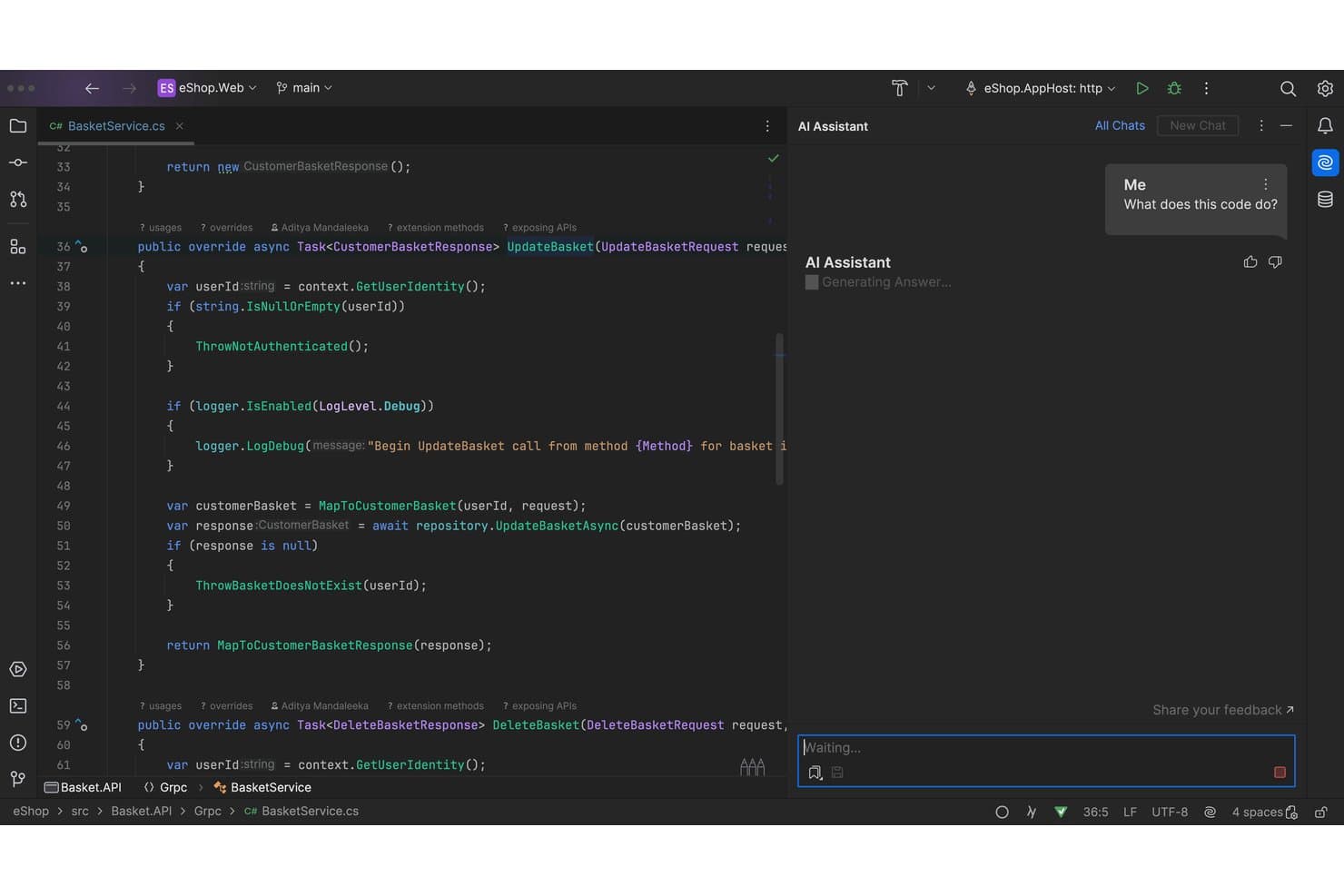
JetBrains AI offers an inline AI Assistant panel that explains selected code by generating answers directly within the IDE editor. JetBrains AI is an AI coding assistant built natively into JetBrains IDEs, offering code completion powered by the Mellum model, AI chat, agentic code generation via Junie, and multi-file refactoring across 20+ programming languages.
Who Is JetBrains AI Best For?
JetBrains AI is a natural fit for software developers and engineering teams already working within the JetBrains ecosystem who want AI assistance without switching tools.
Why I Picked JetBrains AI
JetBrains AI earns its spot on my shortlist because the IDE integration goes far deeper than a plugin layered on top of an editor. I use it inside IntelliJ IDEA with full access to the project's type inference, dependency graph, and refactoring engine, so code completions and Junie's agentic task execution are grounded in real codebase context rather than text-window guesswork. Next Edit Suggestions predicts changes anywhere in the file, not just the current line, which I find genuinely useful during active refactoring sessions.
JetBrains AI Key Features
- AI chat with model selection: Chat with multiple built-in models including Anthropic, OpenAI, and Google Gemini directly from your IDE.
- Local model support: Run supported large language models like Ollama or LM Studio entirely on your own hardware.
- Claude Agent integration: Use Anthropic’s Claude-powered coding agent natively for complex multi-step tasks.
- .aiignore file support: Restrict AI access to sensitive code and directories within your projects using an .aiignore file.
JetBrains AI Integrations
JetBrains AI offers native integrations with Google, OpenAI, AWS, Octopus Deploy, Oracle, Red Hat, Pivotal, among others, and provides an API for custom integrations.
Pros and Cons
Pros:
- Multi-agent coding including Junie and Claude
- ML-powered code completion contextual to project
- Deep integration with JetBrains IDE features
Cons:
- Requires active paid IDE subscription
- Not available for VS Code or Visual Studio
Learn more about JetBrains AI: Best for using conversational coding features
- 30-day free trial
- From $19/user/month (billed annually)

Gemini Code Assist offers an agent mode diff view in VS Code that rewrites README files with tracked additions and deletions shown inline. Gemini Code Assist is Google's AI coding assistant that combines in-IDE code completion, natural language chat, agentic multi-file editing, and automated GitHub code review, all powered by the Gemini 2.5 model with a context window of up to 2 million tokens.
Who Is Gemini Code Assist Best For?
It's a strong fit for enterprise development teams already embedded in the Google Cloud ecosystem who need governance controls alongside AI coding capabilities.
Why I Picked Gemini Code Assist
I picked Gemini Code Assist as one of the best because its in-IDE natural language chat is grounded in a 2-million token context window, so extended coding conversations about a full monorepo never lose context mid-session. When I ask it to trace a bug across multiple services, it already knows the codebase. Agent mode then executes multi-file edits from conversational prompts, with Human-in-the-Loop checkpoints keeping me in control throughout.
Gemini Code Assist Key Features
- Gemini CLI: Run an AI-powered agent directly from the terminal for code understanding, file manipulation, and troubleshooting.
- Automated GitHub code review: Use a Gemini-powered agent to summarize pull requests and provide multi-file code review inside GitHub.
- Private codebase customization: Let teams connect their private codebase for tailored code suggestions and organizational best practice alignment.
- Usage metrics dashboard: Track daily active use, acceptance rates, and code suggestion exposures across your team.
Gemini Code Assist Integrations
Gemini Code Assist offers native integrations with Visual Studio Code, JetBrains IDEs (IntelliJ, PyCharm, GoLand, WebStorm), Android Studio, Google Cloud Workstations, Cloud Shell, Firebase, Colab Enterprise, BigQuery, Apigee API Management, and GitHub. An API is available for custom integrations.
Pros and Cons
Pros:
- Automated pull request reviews on GitHub
- Agent mode supports multi-file code transformation
- Handles monorepos with 2 million token context
Cons:
- Free tier restricts premium models
- Requires complex multi-step cloud setup
Learn more about Gemini Code Assist: Best for real-time code suggestions in editors
- Free plan + 30-day free trial available
- From $4/user/month
Visit WebsiteCustomer Rating:4.8/5
GitHub Copilot offers an AI chat panel with step-by-step implementation planning and inline code editing directly within VS Code. GitHub Copilot is an AI coding assistant from GitHub that delivers inline code completion, multi-file code generation, conversational chat, agentic task execution, and automated code review directly inside your IDE.
Who Is GitHub Copilot Best For?
GitHub Copilot is a strong fit for individual developers and engineering teams already working within the GitHub ecosystem who want AI assistance built directly into their existing IDE workflow.
Why I Picked GitHub Copilot
GitHub Copilot earns its spot as one of the best on my shortlist because of how its next-edit suggestions work in practice. Unlike standard autocomplete, it predicts the next change I need to make based on the edit I just completed, keeping me moving through a refactor without stopping to think about what comes next. I also like that I can switch between models mid-session, choosing Claude Sonnet for nuanced refactors or GPT-5 mini for quick completions, directly inside VS Code or JetBrains.
GitHub Copilot Key Features
- Copilot chat: Chat directly with the AI assistant inside your IDE or on GitHub.com for guidance and code explanations.
- Cloud agent: Assign coding tasks as GitHub Issues and let Copilot autonomously create branches, write code, and open pull requests.
- Copilot CLI: Use AI-powered coding help directly in your terminal for commands, scripting, and file edits.
- Code review automation: Let Copilot review pull requests or file diffs, highlighting issues and suggesting changes before merge.
GitHub Copilot Integrations
GitHub Copilot offers native integrations with VS Code, Visual Studio, JetBrains IDEs, Xcode, Neovim, Eclipse, Raycast, SQL Server Management Studio, Zed, and GitHub. An API is available for custom integrations.
Pros and Cons
Pros:
- Smoothly integrates inside GitHub Issues
- Offers native next-edit token prediction
- Multi-model agentic support in editors
Cons:
- No fine-tuning on private codebases
- Context window can limit large edits
Learn more about GitHub Copilot: Best for handling complex multi-file projects
- Not available
- From $20/month
Visit WebsiteCustomer Rating:4.3/5
Claude Code features a multi-session terminal UI where AI agents can run parallel coding tasks, edit CSS variables, and commit changes directly from the interface. Claude Code is an agentic AI coding tool from Anthropic that works in your terminal and IDE to read codebases, generate and edit code across multiple files, run tests, and submit pull requests.
Who Is Claude Code Best For?
Claude Code suits individual developers and engineering teams who work on large, established codebases and prefer a terminal-first development workflow.
Why I Picked Claude Code
I picked Claude Code as one of the best because of how it handles entire repository structures rather than isolated files. Its agentic search maps the full codebase and dependency graph before touching a single line, so when I ask it to refactor a module, it understands what breaks downstream. The parallel subagent execution (running tens to hundreds of agents simultaneously) means complex, multi-file changes get verified before they're returned, which I genuinely can't say about most other tools in this space.
Claude Code Key Features
- Issue-to-PR workflow: Converts GitHub or GitLab issues into pull requests by generating code, tests, and documentation.
- VS Code and JetBrains integration: Installs as a plugin to work directly inside major IDEs for editing and reviewing code.
- Agent view dashboard: Lets you manage and track all active and historical Claude Code sessions in one place.
- Customizable routines: Allows teams to schedule or trigger code agent tasks on a set schedule or in response to specific events.
Claude Code Integrations
Claude Code offers native integrations with Snowflake, Harvey, Lovable, GitLab, CodeRabbit, Legora, Rogo, Hebbia, and more.
Pros and Cons
Pros:
- Parallel agent execution for multi-file edits
- Generates pull requests including tests and docs
- Handles large and complex codebases natively
Cons:
- Frequently hits strict token caps
- Lacks inline single-line code completion
Learn more about Claude Code: Best for privacy-focused code completion
- Free demo available
- From $39/user/month (billed annually)
Visit WebsiteCustomer Rating:4.6/5
Tabnine offers an AI-powered chat assistant within VS Code that refactors code and suggests type-safe reusable functions in real time. Tabnine is an AI code assistant built around a zero-data-retention architecture, offering real-time code completion, AI chat, agentic code generation, and an Enterprise Context Engine that indexes your organization's codebase and coding standards.
Who Is Tabnine Best For?
Tabnine is a strong fit for enterprise engineering teams in regulated industries where self-hosted or air-gapped AI deployment is a hard requirement.
Why I Picked Tabnine
I picked Tabnine as one of the best because its zero-data-retention architecture sets it apart from every major cloud-first competitor. Your code never leaves your environment, and you can deploy the entire platform on-premises or fully air-gapped, which matters when working with proprietary codebases or regulated data. The Enterprise Context Engine indexes your organization's codebase and coding standards locally, so completions are both private and contextually tuned to how your team actually writes code.
Tabnine Key Features
- AI-powered chat in the IDE: Interact with an AI assistant directly in your coding environment to get code explanations or suggestions.
- Agentic development workflows: Use autonomous agents that can automate code changes, refactorings, and pull requests in local or CI pipelines.
- Multi-language code support: Generate, complete, and review code in over 20 programming languages and frameworks.
- IDE and CLI integrations: Works across 15+ major IDEs, as well as terminal environments, for broad developer workflow coverage.
Tabnine Integrations
Tabnine offers native integrations with Atlassian Jira Cloud and GitHub, GitLab, and Bitbucket Pipelines. It connects to 15+ major IDEs and provides an API for custom integrations.
Pros and Cons
Pros:
- Strong governance and auditability features
- Indexes connected external team repositories
- On-premises and air-gapped deployment available
Cons:
- Setup requires extensive DevOps configuration
- Requires heavy local hardware resources
Learn more about Tabnine: Best for collaborative code editing with AI
- Free plan available
- From $20/month
Visit WebsiteCustomer Rating:5/5
Cursor offers an agent-centric interface where AI autonomously replaces components across multiple files, showing diffs and a review workflow. Cursor is an AI-native code editor that combines codebase-indexed autocomplete, multi-file agentic code generation, and autonomous debugging into a single VS Code-based environment.
Who Is Cursor Best For?
Cursor is a strong fit for professional software engineers and engineering teams who work in complex, multi-file codebases and want AI deeply embedded in their daily coding workflow.
Why I Picked Cursor
Cursor earns its spot as one of the best on my shortlist because of how it handles collaborative AI coding at the team level. Composer lets my team edit across 20+ files simultaneously from a single natural language prompt, which makes large refactors something we can actually delegate to AI. Bugbot runs agentic code reviews directly on GitHub PRs, so the whole team gets AI-flagged feedback without changing their existing review workflow.
Cursor Key Features
- Cloud agents: Run AI-driven build, test, and demo workflows on dedicated remote agents from inside the editor.
- Supermaven tab completion: Deliver fast, context-aware multi-line and function-level code completions as you type.
- Multi-model support: Choose between models from OpenAI, Anthropic, Gemini, xAI, or use Cursor's own Composer models.
- Vector codebase indexing: Enable semantic search and context retrieval across large codebases using vector embeddings.
Cursor Integrations
Cursor offers native integrations with Slack, Datadog, Figma, Linear, Canva, Asana, Kraken, Merge, Composio, and more. An API is available for custom integrations.
Pros and Cons
Pros:
- Blazing-fast custom tab autocomplete model
- AI-powered agentic code review in GitHub
- Handles bulk multi-file code refactoring
Cons:
- Requires entire team to switch to Cursor
- Not available as a plugin for other IDEs
Learn more about Cursor:

Devin offers AI-powered code review analysis that automatically identifies potential bugs and flags issues directly within GitHub pull requests. Devin is an autonomous AI software engineer that independently writes code, executes multi-step tasks, reviews pull requests, runs tests, and works across full repositories — all from a single task prompt.
Who Is Devin Best For?
Devin is a strong fit for engineering teams at growth-stage or enterprise companies managing large backlogs of structured tasks like migrations, refactors, and test coverage.
Why I Picked Devin
Devin earns its spot on my shortlist because no other AI coding tool I've tested actually completes tasks end-to-end without me staying in the loop. I give it a Linear ticket, and it spins up its own sandboxed environment with a browser and terminal, writes and tests the code, and opens a PR. The parallel agent model is what I find most impressive: my team can run multi-repo migrations with dozens of Devin instances working simultaneously, compressing months of backlog work into weeks.
Devin Key Features
- PR review and visual QA: Uses browser-based automation to identify bugs and organize code diffs before merging.
- DeepWiki documentation: Automatically generates thorough documentation and system diagrams for complex legacy codebases.
- Scheduled chore automation: Handles daily QA, documentation updates, and user feedback tasks with customizable workflows.
- Integrated cloud and desktop agents: Lets you deploy session-based agents through a web app, desktop client, or command-line interface.
Devin Integrations
Devin offers native integrations with GitHub, GitLab, Bitbucket, Linear, Jira, Slack, Microsoft Teams, Datadog, Sentry, AWS, Azure, Snowflake, and more, and provides an API for custom integrations.
Pros and Cons
Pros:
- Generates documentation and diagrams from codebase
- Handles legacy code migrations and refactoring
- Executes multi-repo tasks fully autonomously
Cons:
- Struggles with highly ambiguous tasks
- No native IDE plugin for VS Code
Learn more about Devin:
Other AI Coding Tools
Here are some additional AI coding tools that didn’t make it onto my shortlist, but are still worth checking out:
- 11AiderBest for code-focused AI chat
- 12ClineBest for managing pull requests with conversation
- 13CodeRabbitBest for automated code review
- 14OpenAI CodexBest for generating code from natural language
- 15Augment CodeBest for contextual code analysis
- 16GitLab DuoBest for AI-powered DevSecOps pipeline support
- 17Kilo CodeBest for building apps visually from sketches
How I Evaluate AI Coding Tools
To earn a spot on this list, an AI coding tool has to do more than autocomplete a few lines—it needs to meaningfully change how you write, debug, or review code day to day. I split my evaluation into two layers: the core functionality every tool must deliver and the differentiating factors that separate one option from the next.
Core Functionality (Table Stakes For This List)
When I'm selecting tools for my list, I rank each one on a scale from 0 (does not offer the functionality) to 5 (excels in this area) for each core functionality listed below. Then, I calculate the tool's total score into a percentage. Each tool needs to achieve a minimum total score of 75% to be considered for inclusion.
- AI Code Generation: I evaluate whether the tool can turn a natural language prompt into a working function—like generating a REST endpoint from a plain description.
- Code Completion: Real-time suggestions should go beyond single tokens—I look for multi-line block completions that adapt to the patterns already in your code.
- Multi-Language Support: The tool should handle mainstream languages like Python, TypeScript, and Go, plus frameworks your team actually uses in production.
- IDE Integration: I check for native plugins across VS Code, JetBrains, and Neovim so developers don't have to leave their preferred editor to use AI features.
- Codebase Context Awareness: Suggestions should reflect your actual repo—I look for tools that index project files and understand dependencies, not just the open tab.
- AI Debugging & Refactoring: I evaluate whether the tool can spot bugs, suggest fixes, and refactor code—like extracting a method or simplifying nested logic.
Once I have a list of tools that meet the criteria, I consider what sets each platform apart.
Differentiating Factors (What Sets Vendors Apart)
Here's how I compare and contrast different vendors:
Standout Features
Agentic task execution is a major differentiator—I look for tools that can scaffold a feature, run tests, and open a PR without you hand-holding each step. Multi-model flexibility also matters, since swapping between LLMs lets you balance cost and quality depending on the task. I evaluate natural language codebase chat too, which lets developers ask questions like "where is rate limiting handled?" and get answers grounded in the actual repo.
Beyond Features
Security and data handling is high on my list—I check whether vendors offer zero-data-retention policies and let you exclude proprietary code from model training. Toolchain integrations matter too, especially Git provider hooks for PR review and commit generation across GitHub, GitLab, or Bitbucket. I also evaluate pricing models, since per-seat and usage-based plans scale very differently when you're rolling out to a 50-person engineering team.
How to Choose AI Coding Tools
It’s easy to get bogged down in long feature lists and complex pricing structures. To help you stay focused as you work through your unique software selection process, here’s a checklist of factors to keep in mind:
| Factor | What to Consider |
|---|---|
| FactorScalability | What to ConsiderWill the tool support your team size—whether it’s a handful of engineers or a global dev organization? Consider pricing changes and license management as usage grows. |
| FactorIntegrations | What to ConsiderDoes it connect natively with your IDEs, code hosts, ticketing systems, and CI/CD tools? Check for coverage across your current stack to avoid workflow bottlenecks. |
| FactorCustomizability | What to ConsiderCan you tune suggestions, models, or policies for your workflows, team norms, or security preferences? Look for options to tailor prompts or exclude certain files. |
| FactorEase of use | What to ConsiderHow quickly can your developers start using it without heavy documentation or troubleshooting? Try onboarding non-senior team members and track their ramp speed. |
| FactorImplementation and onboarding | What to ConsiderWhat resources—setup guides, admin controls, and migration support—are available? Assess the time/effort needed for rollout and initial team enablement. |
| FactorCost | What to ConsiderCan you predict monthly or annual charges over time, including upgrade costs? Compare per-seat versus usage-based plans against your expected adoption and task volume. |
| FactorSecurity safeguards | What to ConsiderWhat protections exist for source code, credentials, and user data? Look for SOC 2, SSO, and policies around model retraining with your codebase. |
| FactorSupport availability | What to ConsiderWill you get responsive support if something breaks? Check channels (chat, email, phone), SLAs, and availability during your team's core working hours. |
What are AI Coding Tools?
AI coding tools are development tools that use artificial intelligence to help you write, review, and improve code across multiple languages and environments. These tools can generate code from prompts, autocomplete as you type, and offer suggestions based on the context of your codebase, making everyday development tasks faster and more reliable for individuals and teams.
Features
When selecting AI coding tools, keep an eye out for the following key features:
- AI code generation: Converts natural language prompts or descriptions into functional code, helping you speed up repetitive coding tasks or jumpstart new modules.
- Code completion: Offers real-time, context-aware suggestions as you type, predicting and inserting the next lines or blocks to reduce keystrokes and friction.
- Multi-language support: Handles several programming languages and frameworks, so you can use one tool across different projects and avoid switching between specialized platforms.
- IDE integration: Works directly in your preferred development environment through plugins or extensions, keeping your workflow centralized and familiar.
- Codebase context awareness: Understands your project’s structure and dependencies to surface relevant suggestions, reducing generic or error-prone outputs.
- AI-powered debugging: Identifies bugs as you code, explains errors, and recommends or makes fixes to speed up troubleshooting and improve code reliability.
- Automated refactoring: Suggests or performs code improvements, like simplifying logic or reorganizing functions, while preserving your program’s behavior.
- Unit test generation: Produces or scaffolds test cases automatically for your functions to improve test coverage and catch issues before deployment.
- Documentation assistance: Generates or updates docstrings, README files, and usage guides based on your code, cutting down on manual documentation work.
- Security analysis: Flags insecure code patterns and vulnerabilities early in development, supporting safer releases and compliance efforts.
Benefits
Implementing AI coding tools provides several benefits for your team and your business. Here are a few you can look forward to:
- Accelerated development cycles: Instant code generation, smart autocomplete, and automated refactoring help your team ship new features and improvements much faster.
- Higher code quality: AI-assisted debugging, test generation, and code review features catch bugs and suggest fixes before issues reach production.
- Better developer productivity: Smooth IDE integration and codebase-aware suggestions keep developers focused and reduce time spent switching between tools or searching for examples.
- Easier onboarding: Natural language codebase chat and documentation tools help new team members get up to speed with architecture and coding patterns quickly.
- Multi-language flexibility: Support for many languages and frameworks allows teams to work across diverse projects without learning new tools for each one.
- Fewer repetitive tasks: Automated boilerplate generation, documentation assistance, and test scaffolding free up your team to focus on the creative side of development.
- Improved security posture: Built-in security analysis helps you flag vulnerable code patterns early, reducing the risk of introducing critical defects.
Costs and Pricing
Selecting AI coding tools requires an understanding of the various pricing models and plans available. Costs vary based on features, team size, add-ons, and more. The table below summarizes common plans, their average prices, and typical features included in AI coding tools solutions:
Plan Comparison Table for AI Coding Tools
| Plan Type | Average Price | Common Features |
|---|---|---|
| Plan TypeFree Plan | Average Price$0 | Common FeaturesBasic code completion, limited AI code generation, restricted projects, and community support. |
| Plan TypePersonal Plan | Average Price$5-$25/user/month | Common FeaturesMulti-language support, IDE integrations, expanded code generation, limited debugging tools, and standard support. |
| Plan TypeBusiness Plan | Average Price$20-$50/user/month | Common FeaturesTeam management, enhanced security, advanced debugging, API access, priority support, and compliance features. |
| Plan TypeEnterprise Plan | Average Price$50-$120/user/month | Common FeaturesCustom integrations, SSO, advanced data handling, audit logs, admin controls, dedicated onboarding, and SLA support. |
AI Coding Tools FAQs
Here are some answers to common questions about AI coding tools:
Can AI coding tools replace human developers?
No, AI coding tools are designed to assist, not replace, developers. They help automate repetitive work, generate code snippets, and catch errors, but still rely on human expertise for critical thinking, architecture, and final review lines of code.
How do AI coding tools handle sensitive code or data?
Most reputable AI coding tools offer configurable data privacy settings, including options to exclude proprietary code from model training and comply with security standards like SOC 2 or SSO requirements.
Do AI coding tools support multiple programming languages?
Yes, most AI coding tools support popular languages such as Python, JavaScript, TypeScript, Java, and Go, so your team can work across diverse codebases without changing tools.
What should I consider before rolling out AI coding tools to my team?
Check integration compatibility with your IDEs, repository hosts, and security requirements. Evaluate how pricing will scale with your team and whether onboarding resources are provided for smooth adoption.
Can AI coding tools help with onboarding new developers?
Yes, features like codebase-aware AI chat and automated documentation support can make it much faster for new hires to understand unfamiliar projects and ramp up on team conventions.