

Gestionarea sistemelor cloud poate deveni complicată pe măsură ce companiile se dezvoltă și folosesc simultan diferite servicii online. Platformele de gestionare a cloudului simplifică acest lucru, reunind totul într-un singur loc. Acestea ajută echipele să își organizeze, monitorizeze și gestioneze mai ușor activitățile din cloud, păstrând datele în siguranță, asigurând funcționarea eficientă a sistemelor și menținând cheltuielile sub control.
Aceste instrumente simplifică sarcinile de zi cu zi, oferă informații utile despre performanță și ajută companiile să evite risipa. Cu platforma potrivită, echipa se poate concentra asupra lucrurilor care contează cel mai mult, desfășurând operațiunile eficient și în siguranță.
Why Trust Our Software Recommendations
6,700+
Reviews
20
Industry experts
16+
Evaluation factors
14
Years
Our team has been testing and reviewing software since 2012. As tech leaders ourselves, we know how difficult—and important—it is to choose the right software.
For this guide, we evaluated tools using hands-on testing and independent research, scoring tools using our selection criteria.
Our reviews reflect our human editorial judgment, not a sales pitch.
Expert reviewers:
- Paulo Gardini MiguelTech Director
 Tim FisherVP of AI
 Gabriel RosasTech Lead & Software Architect
 Christhian GruhnTech Lead & Platform Architect

Score legend (out of 5)
- Excellent4.5–5
- Good4–4.4
- Average3–3.9
- Below average2–2.9
- Poor1–1.9
Sorted by: Default
| Tool | Starting Price | Website | ||||||
|---|---|---|---|---|---|---|---|---|
Best for Azure integration troubleshooting | 4.0 out of 5 | 5 | 4 | 4 | 3 | 4 | Pricing upon request 14-day free trial | Website |
Best for Kubernetes team cost allocation | 3.8 out of 5 | 5 | 4 | 4 | 2 | 4 | Pricing upon request 14-day free trial | Website |
Best for linking cloud and license spend | 3.8 out of 5 | 5 | 4 | 4 | 2 | 4 | Pricing upon request Free demo available | Website |
Best for AI agent costs alongside cloud spend | 4.0 out of 5 | 5 | 4 | 4 | 3 | 4 | Pricing upon request Free trial + free demo available | Website |
Best for multi-cloud compliance assessments | 3.8 out of 5 | 4 | 4 | 4 | 4 | 3 | Pricing upon request Free demo available | Website |
Best for compliance-segmented cloud estates | 3.6 out of 5 | 3 | 4 | 4 | 4 | 3 | $600/CPU socket/year 60-day free trial + demo available | Website |
Best free CMP for hybrid cloud governance | 3.4 out of 5 | 4 | 4 | 3 | 4 | 2 | Pricing upon request Free plan available | Website |
Best for AWS Outposts data residency needs | 4.0 out of 5 | 4 | 4 | 4 | 4 | 4 | Pricing upon request Free demo available | Website |
Best for AWS server fleets across accounts | 3.6 out of 5 | 2 | 4 | 4 | 4 | 4 | Pricing upon request Free plan + free trial available | Website |
Best for Azure-governed Kubernetes GitOps | 3.6 out of 5 | 2 | 4 | 4 | 4 | 4 | Pricing upon request Free plan available | Website |


Recenzii ale celor mai bune platforme de gestionare a cloudului
În secțiunile următoare, voi prezenta platformele mele preferate de gestionare a cloudului, inclusiv avantajele și dezavantajele, informații despre prețuri și criteriile pe care le-am folosit pentru selecțiile mele.
 Best for Azure integration troubleshooting
- 14-day free trial
- Pricing upon request
Visit WebsiteCustomer Rating:4.8/5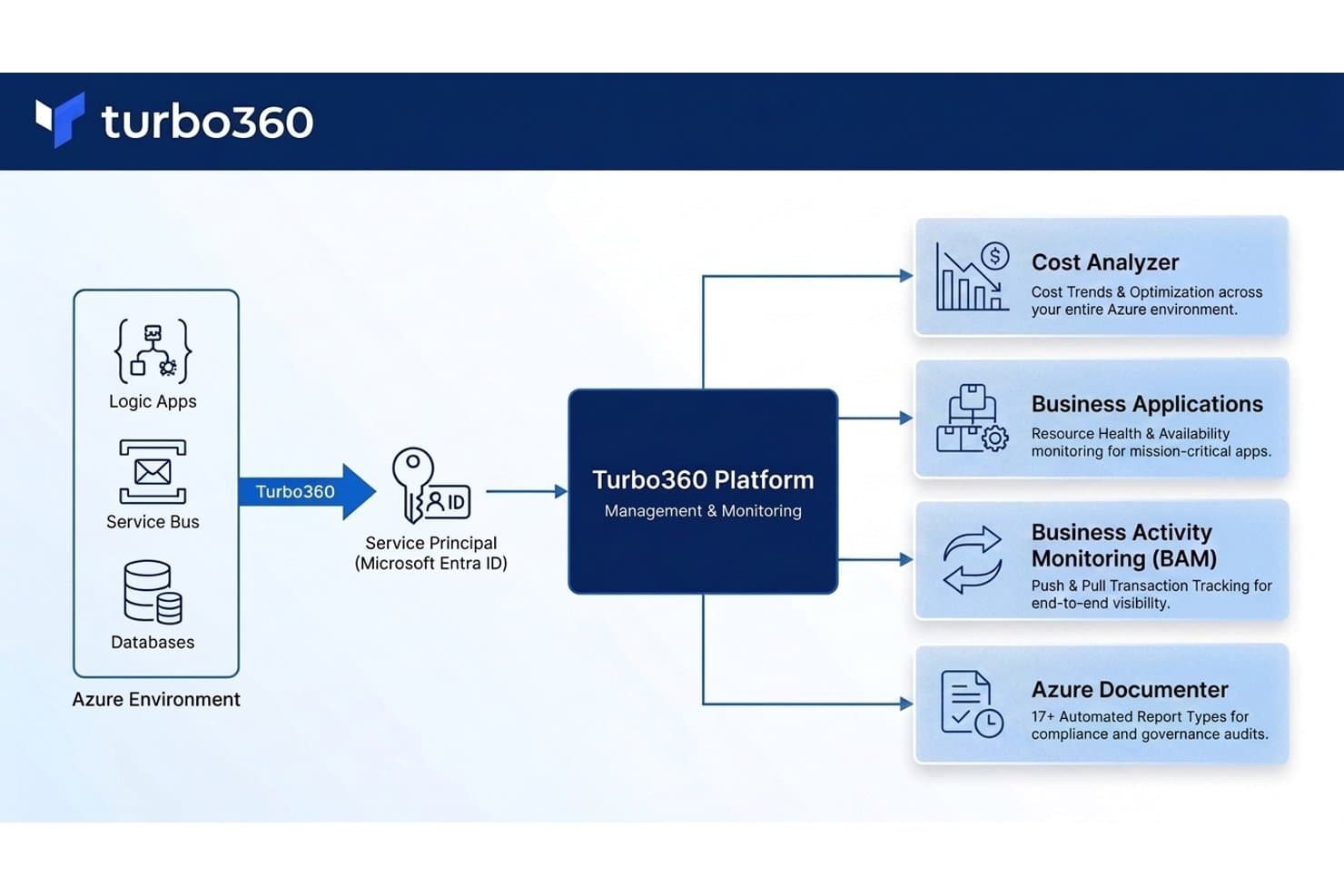
Turbo360 unifies Azure monitoring across cost, apps, and compliance. Turbo360 is an Azure-focused cloud management platform that brings together cost analysis, infrastructure monitoring, business activity tracking, and automated documentation across your Azure subscriptions and Microsoft 365 tenants.
Who Is Turbo360 Best For?
Turbo360 is a strong fit for cloud operations engineers and DevOps teams running Azure-heavy environments who need unified visibility across costs, integration health, and resource performance.
Why I Picked Turbo360
I picked Turbo360 as one of the best because it goes deeper into Azure integration troubleshooting than any other tool on this list. Its Business Activity Monitoring module traces transactions end-to-end across Logic Apps, Azure Functions, and API Management, so when a message fails mid-flow, you can pinpoint the exact step and resubmit it directly from the console. Pair that with AI-powered cost anomaly detection that flags unusual spend against a 30-day baseline, and you get a platform that covers both operational and financial visibility across your Azure estate.
Turbo360 Key Features
- Scheduled resource automation: Automatically pauses and resumes non-production Azure resources on a configurable schedule to reduce idle spend.
- Azure Documenter: Generates scheduled compliance, audit, and cost reports from connected Azure subscriptions and exports them to Word, PDF, or HTML.
- Business application grouping: Organizes related Azure resources from across subscriptions into logical applications with their own dashboards, owners, and alert routing.
- Microsoft 365 license optimization: Surfaces inactive and over-licensed Microsoft 365 accounts so your team can reclaim or downgrade unused seats.
Turbo360 Integrations
Turbo360 connects with Azure services including Logic Apps, Azure Functions, API Management, Application Insights, Log Analytics, and Azure Data Explorer. APIs are available for selected Cost Analyzer, Business Applications, Business Activity Monitoring, and Azure Documenter capabilities.
Pros and Cons
Pros:
- Cost anomaly alerts support targeted optimization
- End-to-end transaction tracing pinpoints failed workflow steps
- Reviewers value consolidated Azure monitoring dashboards
Cons:
- Cost data imports can lag 24–48 hours
- Azure-only coverage excludes other cloud providers
Learn more about Turbo360: Best for Kubernetes team cost allocation
- 14-day free trial
- Pricing upon request
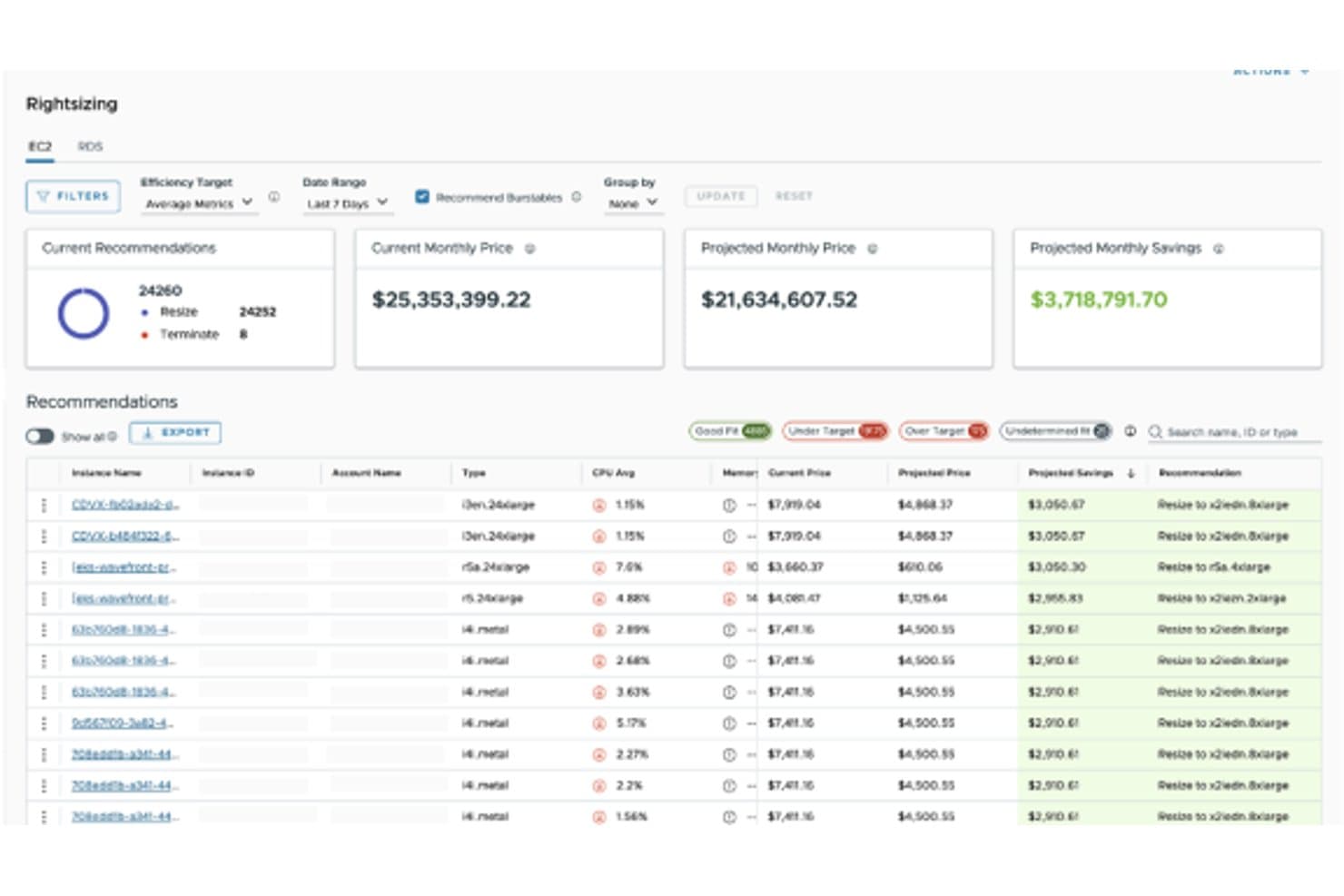
VMware Aria Cost helps users rightsize EC2 instances to cut monthly cloud spend. CloudHealth is a multi-cloud FinOps platform by Broadcom that centralizes cost reporting, resource optimization, governance enforcement, and anomaly detection across AWS, Azure, and Google Cloud.
Who Is VMware Aria Cost Powered by CloudHealth Best For?
CloudHealth is a strong fit for enterprise cloud operations and FinOps teams managing multi-cloud spend across AWS, Azure, and Google Cloud who need Kubernetes cost allocation alongside broader governance and anomaly detection.
Why I Picked VMware Aria Cost Powered by CloudHealth
CloudHealth earns its spot on my shortlist because of how well it handles Kubernetes cost allocation alongside broader multi-cloud FinOps. I particularly like that the Kubernetes Collector breaks down spend by service and team, letting you allocate costs against actual or requested CPU and memory usage across cluster and namespace views. Pair that with Cost Anomaly Detection across AWS, Azure, and GCP, and you get a clear picture of where Kubernetes spend is drifting before it becomes a budget problem.
VMware Aria Cost Powered by CloudHealth Key Features
- FlexOrgs hierarchical access control: Organizes cloud accounts and assets into organizational units with role-based permissions, delegated administration, and SSO-based user assignment.
- FOCUS billing normalization: Standardizes AWS, Azure, and Google Cloud billing data into a unified open-source schema for consistent multi-cloud reporting.
- Data Connect custom ingestion: Pulls in SaaS, PaaS, and external cost data via automated connectors or CSV and Parquet file uploads to combine with cloud spend data.
- Intelligent Assist GenAI co-pilot: Lets you ask questions, generate reports, and surface FinOps recommendations through a natural-language interface.
VMware Aria Cost Powered by CloudHealth Integrations
CloudHealth documents integrations with AWS, Azure, Google Cloud, New Relic, Dynatrace, Datadog, Ansible, Chef, Alert Logic, and Slack. It also supports REST and GraphQL APIs, plus Data Connect connectors for Databricks, OpenAI, GitHub Copilot, and Anthropic.
Pros and Cons
Pros:
- Links budgets, rightsizing, and realized savings
- Surfaces multi-cloud anomalies with cost drivers
- Allocates Kubernetes costs by team and namespace
Cons:
- Tagging and account setup require careful mapping
- Cost reports can lag behind actual spend
Learn more about VMware Aria Cost Powered by CloudHealth: Best for linking cloud and license spend
- Free demo available
- Pricing upon request
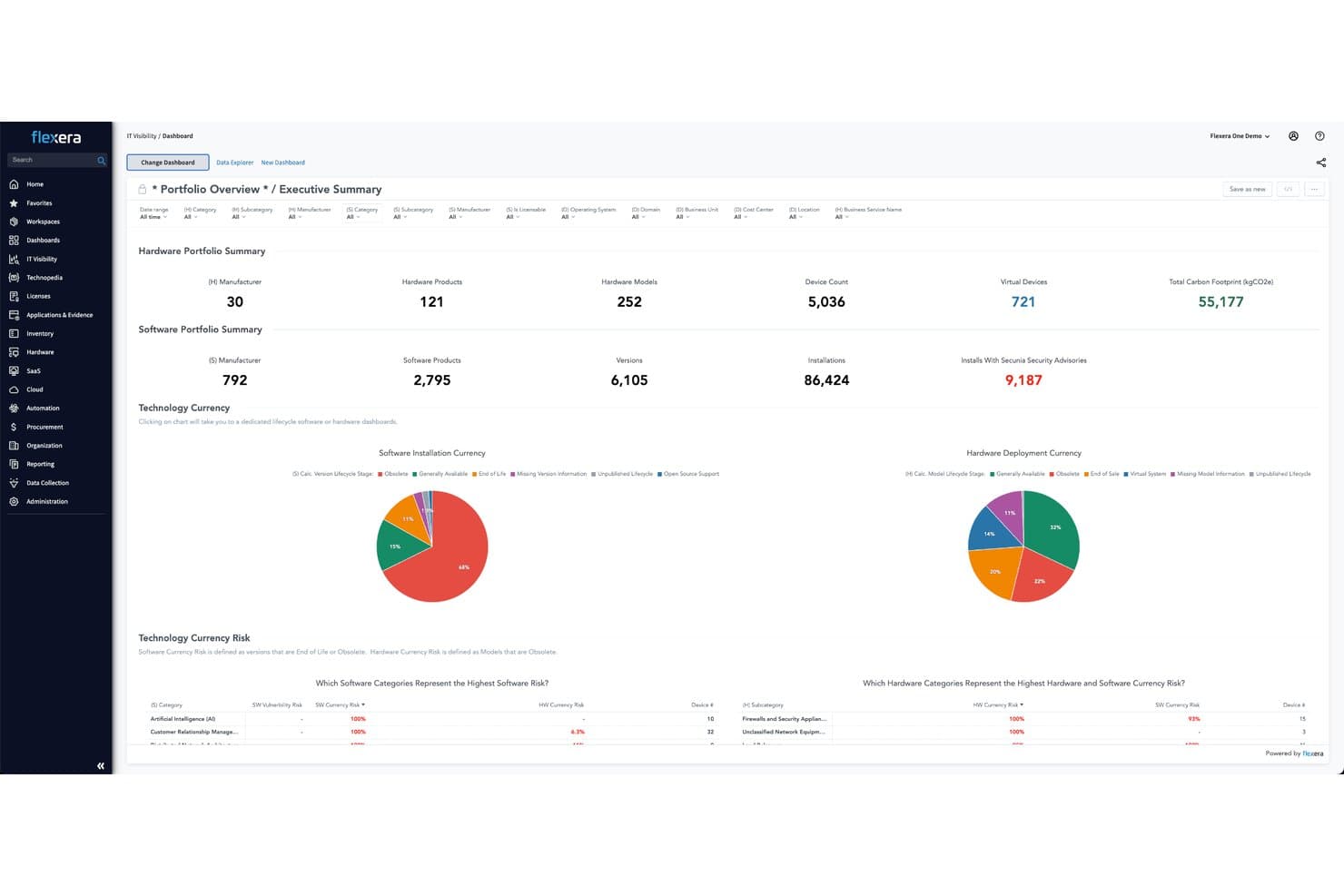
Flexera One centralizes IT and software portfolio visibility in one dashboard. Flexera One is a SaaS platform for hybrid IT management that unifies cloud cost optimization, IT asset management, SaaS management, and FinOps across multi-cloud and on-premises environments.
Who Is Flexera One Best For?
Flexera One suits large enterprises that need to manage software licenses and cloud spend in one place, especially those running hybrid IT across on-premises and multi-cloud environments.
Why I Picked Flexera One
Flexera One earns its spot on my shortlist because no other tool I've evaluated ties software license positions directly to cloud spend in a single view. I like that its FinOps module tracks commitment coverage and realized savings alongside ITAM data, so you can see whether an Azure Reserved Instance overlaps with an existing on-premises license before renewing either. Its 150-plus governance policies also let you automate actions like idle-instance termination without managing a separate policy engine.
Flexera One Key Features
- AI contract and entitlement ingestion: Uses AI to extract data from contracts, invoices, and purchase orders into structured ITAM records.
- Cost anomaly detection: Identifies unexpected cloud spend using Bollinger Bands or an AI-based method with confidence intervals and moving-average windows.
- Common Bill Ingestion: Normalizes billing data from public, private, and custom cloud providers into a single view for analysis.
- Software license position analysis: Applies product-use-rights intelligence to manage licenses from vendors including Microsoft, Oracle, and IBM.
Flexera One Integrations
Flexera One supports 30+ documented data-source integrations, including Microsoft SCCM, ServiceNow Discovery, FlexNet Manager Suite, SolarWinds Orion, JAMF Casper, HCL BigFix, and Tanium. It also connects with SAP Concur and Coupa and offers an OpenAPI specification for custom integrations.
Pros and Cons
Pros:
- Automates governance policies and idle termination
- Tracks commitment coverage and realized savings
- Connects cloud costs with software entitlements
Cons:
- Complex setup can extend implementation timelines
- Cloud provisioning remains narrower than cost controls
Learn more about Flexera One: Best for AI agent costs alongside cloud spend
- Free trial + free demo available
- Pricing upon request
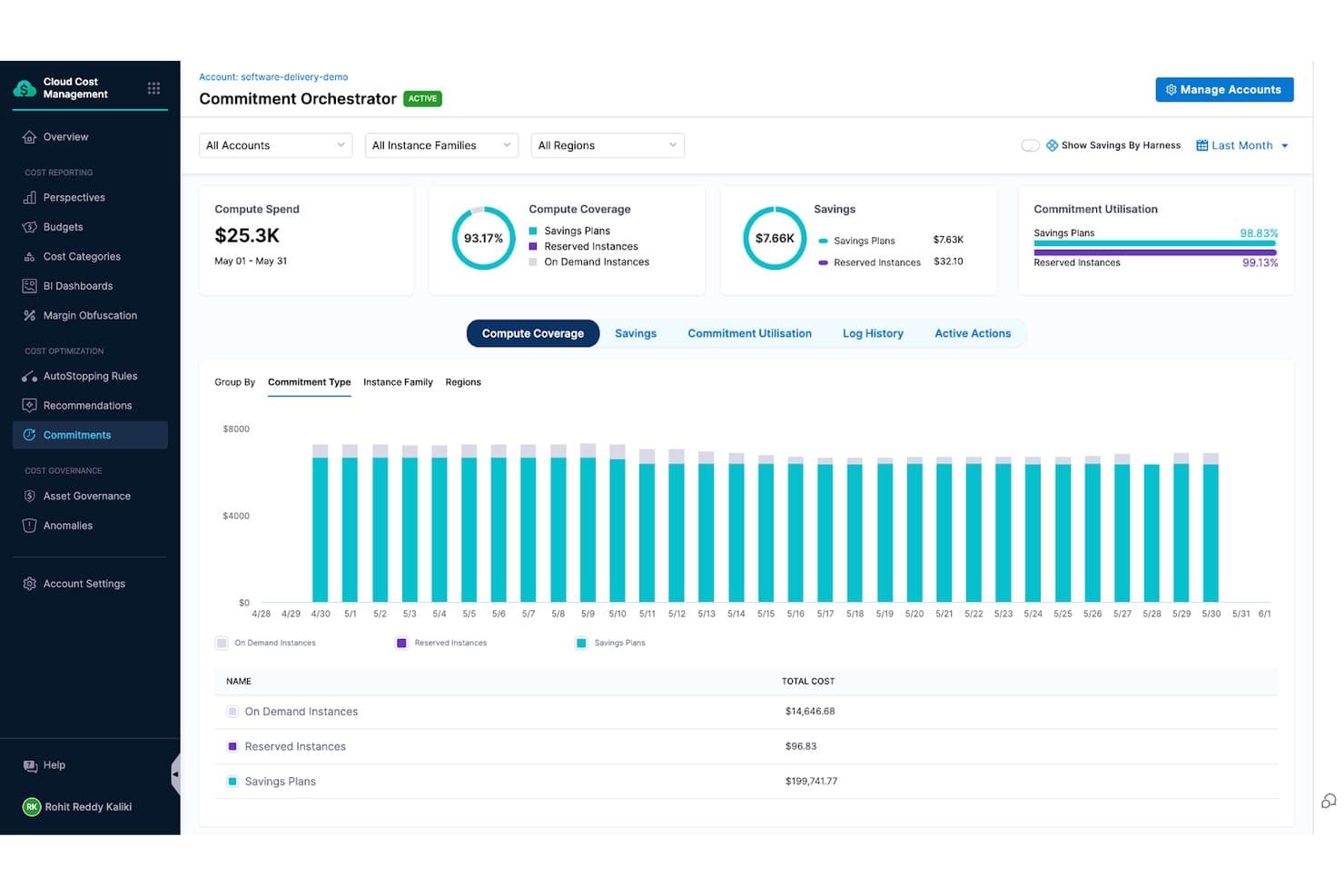
Harness Cloud Cost Management tracks compute coverage and savings commitments. Harness Cloud Cost Management is a FinOps platform that unifies cloud and AI spend visibility, attribution, anomaly detection, rightsizing recommendations, and governance across AWS, Azure, GCP, and Kubernetes.
Who Is Harness Cloud Cost Management Best For?
Harness Cloud Cost Management is a strong fit for FinOps teams and cloud engineers managing multi-cloud environments where AI workload spend is becoming a meaningful part of the cost picture.
Why I Picked Harness Cloud Cost Management
I picked Harness Cloud Cost Management because it's one of the few platforms that treats AI agent spend as a first-class cost object alongside cloud spend. I love that it can trace token and inference costs down to the specific agent, session, or workflow generating them, then roll that up to the team or business unit responsible. Its anomaly detection flags AI spend spikes before they show up on an invoice, which is exactly the kind of early warning I want when autonomous agents can rack up costs fast.
Harness Cloud Cost Management Key Features
- Commitment Orchestrator: Automates the purchase, renewal, and coverage optimization of Reserved Instances and Savings Plans across cloud providers.
- AutoStopping: Detects idle non-production VMs and containers, stops them automatically, and restarts them on demand.
- Asset Governance: Enforces cloud cost policies using OPA-based Policy-as-Code, with 150+ out-of-the-box rules and support for custom rule creation.
- Kubernetes cost attribution: Allocates costs down to individual pods and namespaces across EKS, GKE, AKS, and ECS clusters.
Harness Cloud Cost Management Integrations
Harness Cloud Cost Management integrates with AWS, Azure, Google Cloud, Kubernetes, Terraform, Jira, ServiceNow, OpenAI, Anthropic, and Datadog. Its REST API supports custom integrations and data export.
Pros and Cons
Pros:
- Kubernetes costs drill down to pods
- AI spend traces to agents and workflows
- Improved cost visibility supports faster ROI
Cons:
- Cost recommendations require manual application
- Forecasting and downloadable reporting feel limited
Learn more about Harness Cloud Cost Management: Best for multi-cloud compliance assessments
- Free demo available
- Pricing upon request
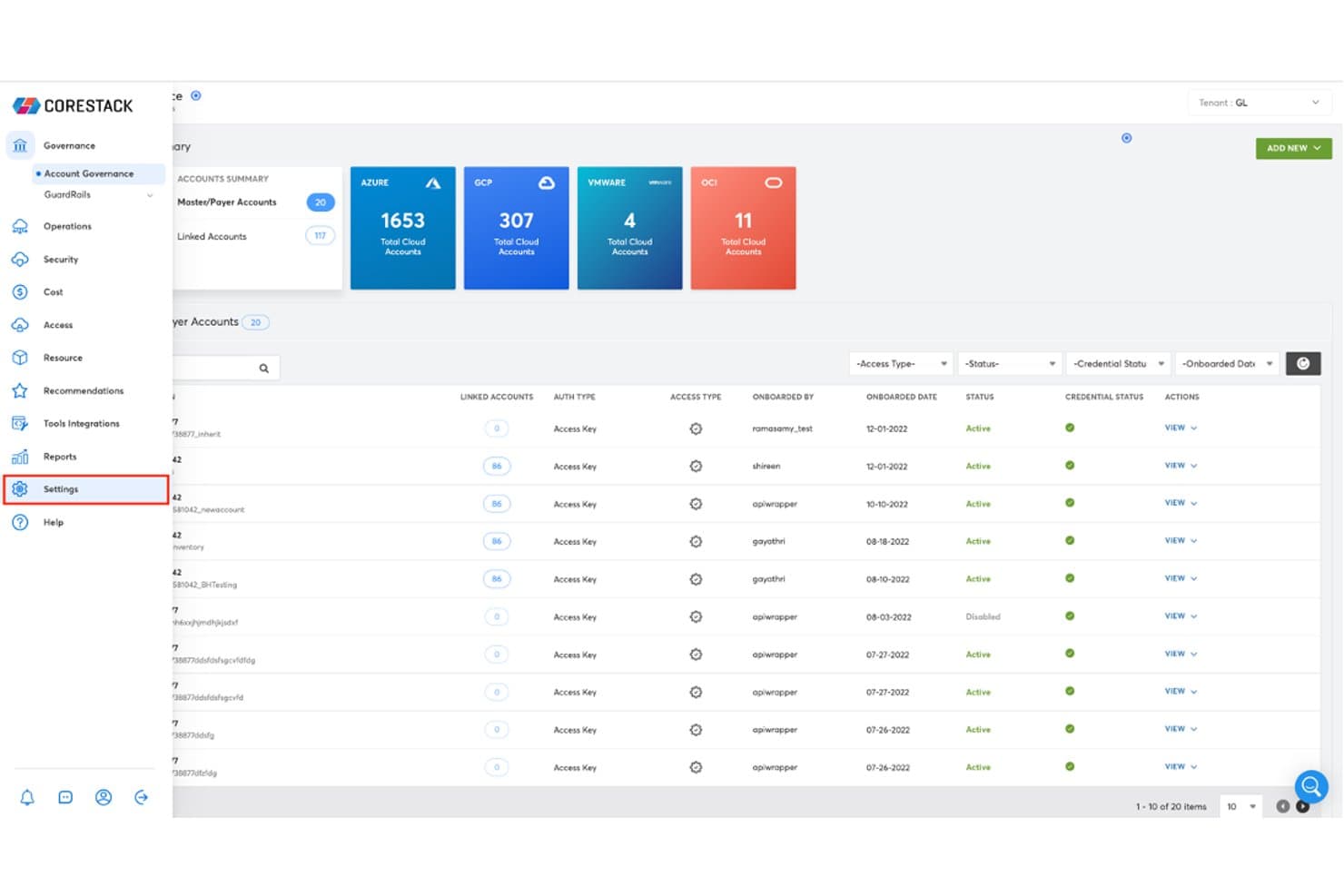
CoreStack centralizes multi-cloud account governance across Azure, GCP, VMware, and OCI. CoreStack Governance is a multi-cloud management platform that unifies FinOps+, SecOps, and CloudOps capabilities across AWS, Azure, Google Cloud, and OCI, with governance tools spanning cost optimization, security posture, compliance policy enforcement, and automated cloud operations.
Who Is CoreStack Best For?
CoreStack is a strong fit for enterprise IT and cloud operations teams managing sprawling infrastructure across AWS, Azure, Google Cloud, and OCI who need compliance enforcement built into their day-to-day workflows.
Why I Picked CoreStack
CoreStack earns its spot on my shortlist because its compliance assessment engine covers 27 frameworks and maps more than 1,600 policies across AWS, Azure, Google Cloud, and OCI simultaneously. I find the SecOps module particularly compelling: it surfaces prioritized violation findings across all four clouds in one posture view, so you're not toggling between provider consoles to reconcile gaps against HIPAA, FedRAMP, or PCI DSS. The ability to run assessments on demand or on a schedule, with evidence attachment built in, makes audit prep genuinely manageable.
CoreStack Key Features
- Self-service resource catalog: Users can browse and request cloud resources through a catalog, with provisioning routed through stakeholder approval workflows before deployment.
- Organizational hierarchy management: Supports flexible multi-tenant account hierarchies with configurable structures for enterprise departments, IT teams, and MSP customers.
- Blueprint-based automation: Groups ordered templates into blueprints that automate cloud resource tasks, with job history tracking for execution status, outputs, and individual tasks.
- AI spend management: Onboards and reports on usage across cloud and AI providers, including Amazon Bedrock and Anthropic, within the same FinOps+ cost dashboards.
CoreStack Integrations
CoreStack documents approximately 80 hyperscaler-specific integrations across AWS, Microsoft Azure, Google Cloud, and OCI, plus native integrations with ServiceNow, Zoho Desk, Tenable Nessus, GitHub, OpenStack, and Terraform. It also supports Jira workflows and provides a REST API for custom integrations.
Pros and Cons
Pros:
- Consolidated security and compliance posture
- Useful FinOps cost recommendations
- Unified multi-cloud governance view
Cons:
- Reporting terminology can confuse teams
- Cost views offer limited flexibility
Learn more about CoreStack: Best for compliance-segmented cloud estates
- 60-day free trial + demo available
- From $600/CPU socket/year (billed annually)
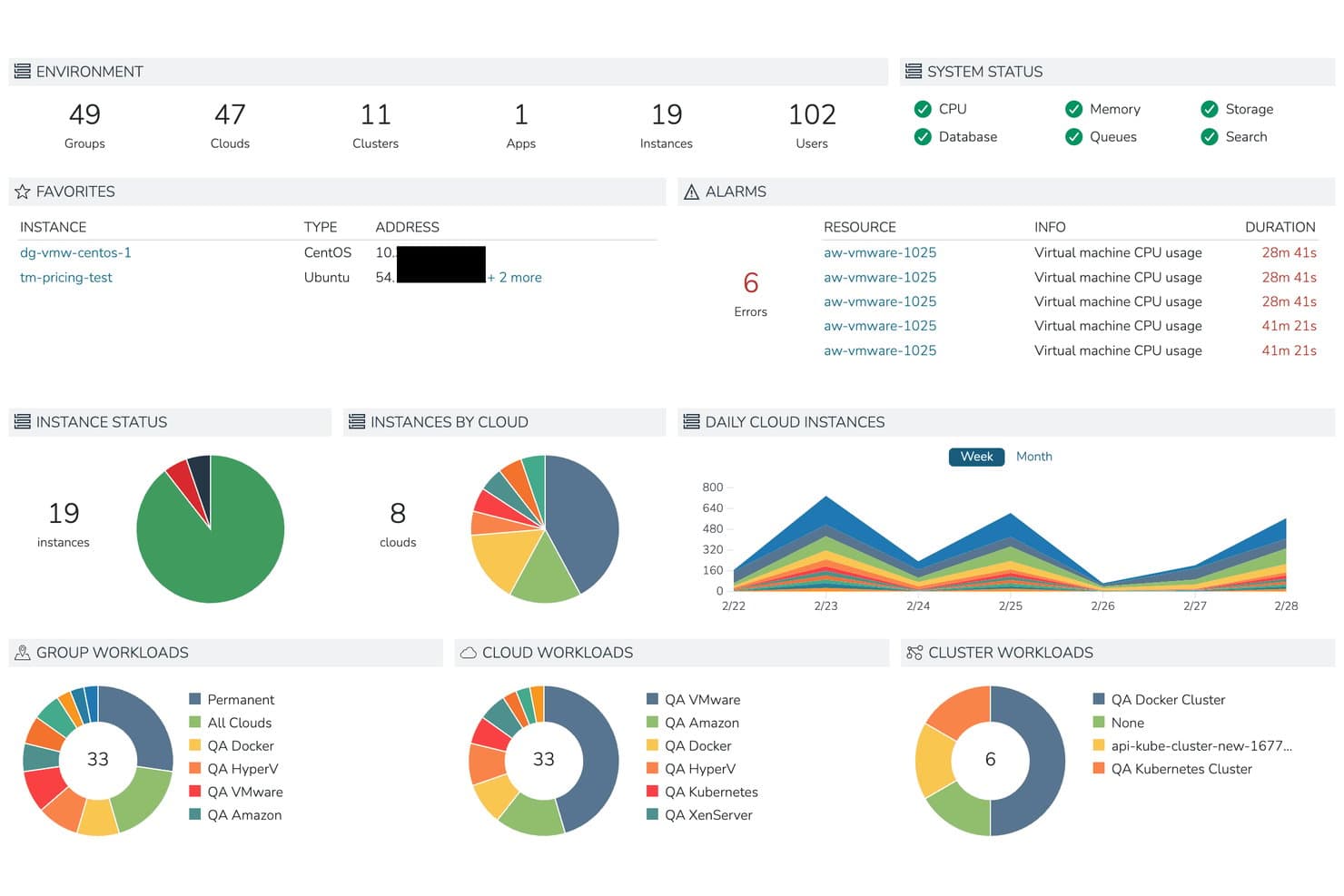
Morpheus centralizes cloud resource monitoring across instances, alarms, and workloads. HPE Morpheus Software is a hybrid cloud management platform that centralizes VM and container provisioning, lifecycle automation, governance policy enforcement, and cost visibility across private, public, and multi-cloud environments.
Who Is Morpheus Best For?
Morpheus is a strong fit for enterprise IT teams that need to enforce hard compliance boundaries across segmented cloud zones without sacrificing centralized visibility.
Why I Picked Morpheus
I picked Morpheus as one of the best because its architecture is purpose-built for compliance-segmented cloud estates: separate regional Managers can be deployed per compliance zone, with Workers in each zone blocked from communicating across boundaries, while HPE Morpheus Central still delivers a unified visibility layer across all of them. I like that the Enterprise policy engine adds quotas, multi-tenancy, and delegated administration on top of that segmentation, so governance rules stay enforced at the zone level without requiring manual oversight.
Morpheus Key Features
- Self-service instance catalog: A role-restricted catalog lets users request and provision VMs, containers, databases, and applications based on the provisioning engines enabled in their environment.
- Tamper-evident audit logging: Every create, update, delete, and sensitive read event is recorded in Common Event Format with a SHA-256 signature and can be forwarded to a SIEM platform.
- Distributed Worker architecture: Workers relay cloud API traffic, agent traffic, and console sessions between edge sites and a regional Manager over outbound HTTPS, extending reach to isolated network segments.
- Invoice views with live cost sync: Cost dashboards show month-to-date, projected, and historical spend with configurable dimensions including cloud, tenant, user, group, and tag, pulling live data from public-cloud costing APIs when available.
Morpheus Integrations
Morpheus offers 90+ native integrations, including AWS, Microsoft Azure, Google Cloud Platform, VMware, Kubernetes, Ansible, Jenkins, and ServiceNow. It also provides REST API access and an Enterprise Terraform provider for custom automation.
Pros and Cons
Pros:
- Separates compliance zones with shared visibility
- Automates repeat provisioning tasks
- Centralizes workloads across cloud platforms
Cons:
- Setup guidance misses some administrative details
- Enterprise deployments can be difficult
Learn more about Morpheus: Best free CMP for hybrid cloud governance
- Free plan available
- Pricing upon request
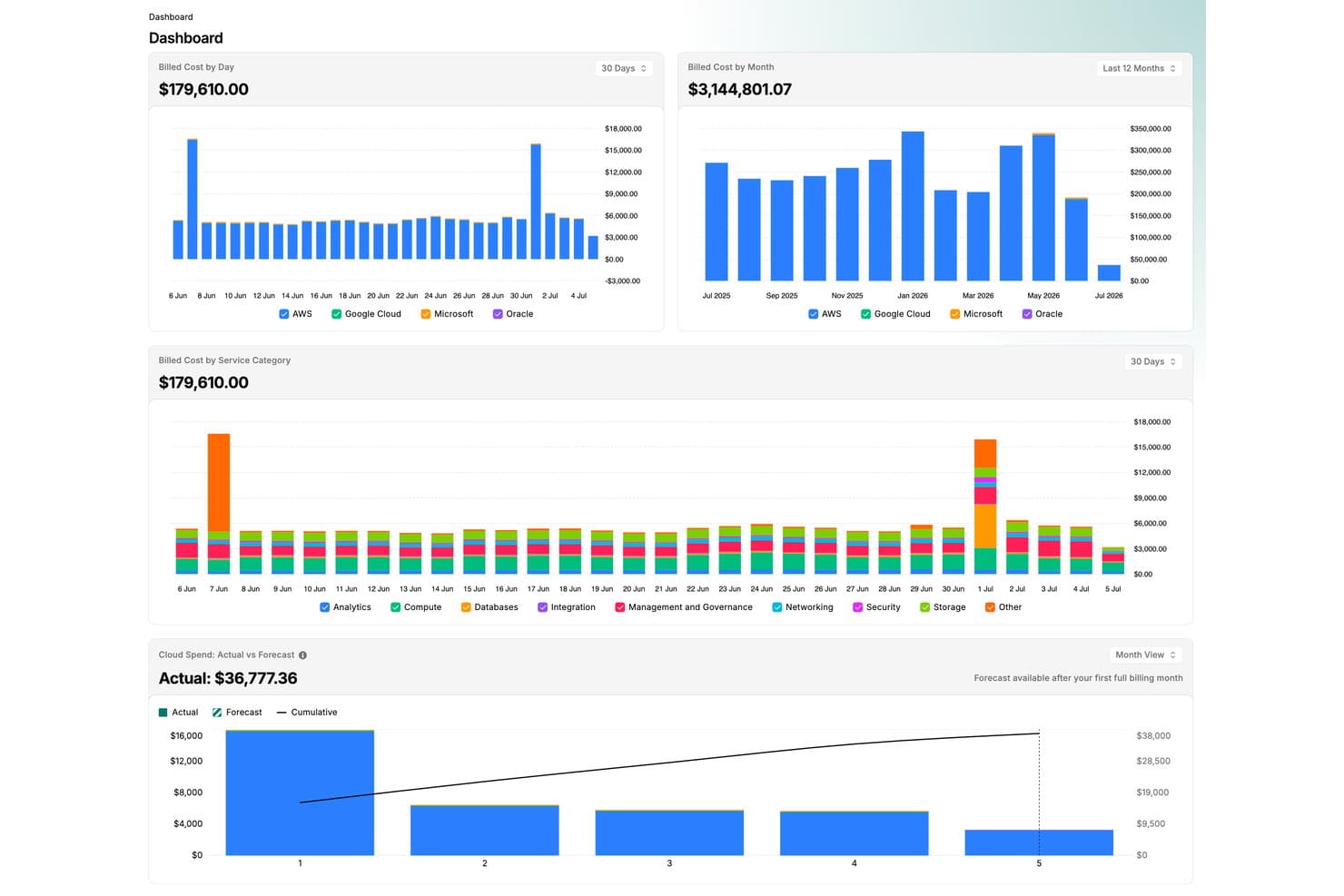
CloudBolt tracks multi-cloud billed costs by day, month, and service category. CloudBolt CMP is a hybrid and multi-cloud management platform that centralizes provisioning, governance, workflow orchestration, cost visibility, and day-2 operations across public, private, and hybrid environments through a self-service catalog and blueprint-driven automation.
Who Is CloudBolt Best For?
CloudBolt CMP is a strong fit for IT and cloud operations teams managing sprawling hybrid or multi-cloud environments who need governance guardrails without building everything from scratch.
Why I Picked CloudBolt
CloudBolt CMP earns its spot on my shortlist because it's one of the few platforms that gives you a fully functional free tier for hybrid cloud governance, not just a watered-down trial. I particularly like how its blueprint system bakes governance directly into provisioning: approval workflows, cost thresholds, required tags, and security-group rules all travel with the blueprint, so governance isn't bolted on after the fact. The free plan covers up to 100 resources with full access to those controls, which means smaller teams can enforce real policy without paying enterprise prices.
CloudBolt CMP Key Features
- Self-service catalog: Users can browse and request pre-approved resources without opening an IT ticket, reducing the burden on infrastructure teams.
- Day-2 action library: Teams can run or schedule operational tasks like patching, backups, certificate rotation, and scaling directly from the platform.
- Python-based extensibility: Administrators can write custom automation logic, integrations, and actions in Python and extend workflows or add custom UI views.
- Multi-tenancy support: A single CMP instance can serve multiple organizations or teams while keeping each group's data and resources fully isolated.
CloudBolt Integrations
CloudBolt offers 200+ out-of-the-box integrations, including AWS, Microsoft Azure, Google Cloud Platform, VMware vSphere, Kubernetes, ServiceNow, Jira, Terraform, Ansible, and Splunk. It also supports Python extensibility, webhooks, remote scripting, and API connectivity for custom integrations.
Pros and Cons
Pros:
- Support helps tailor workflows and integrations
- Blueprints embed governance into resource requests
- Faster provisioning cuts manual build delays
Cons:
- Bulk operations may slow in larger environments
- Advanced orchestration can require scripting expertise
Learn more about Cloudbolt: Best for AWS Outposts data residency needs
- Free demo available
- Pricing upon request
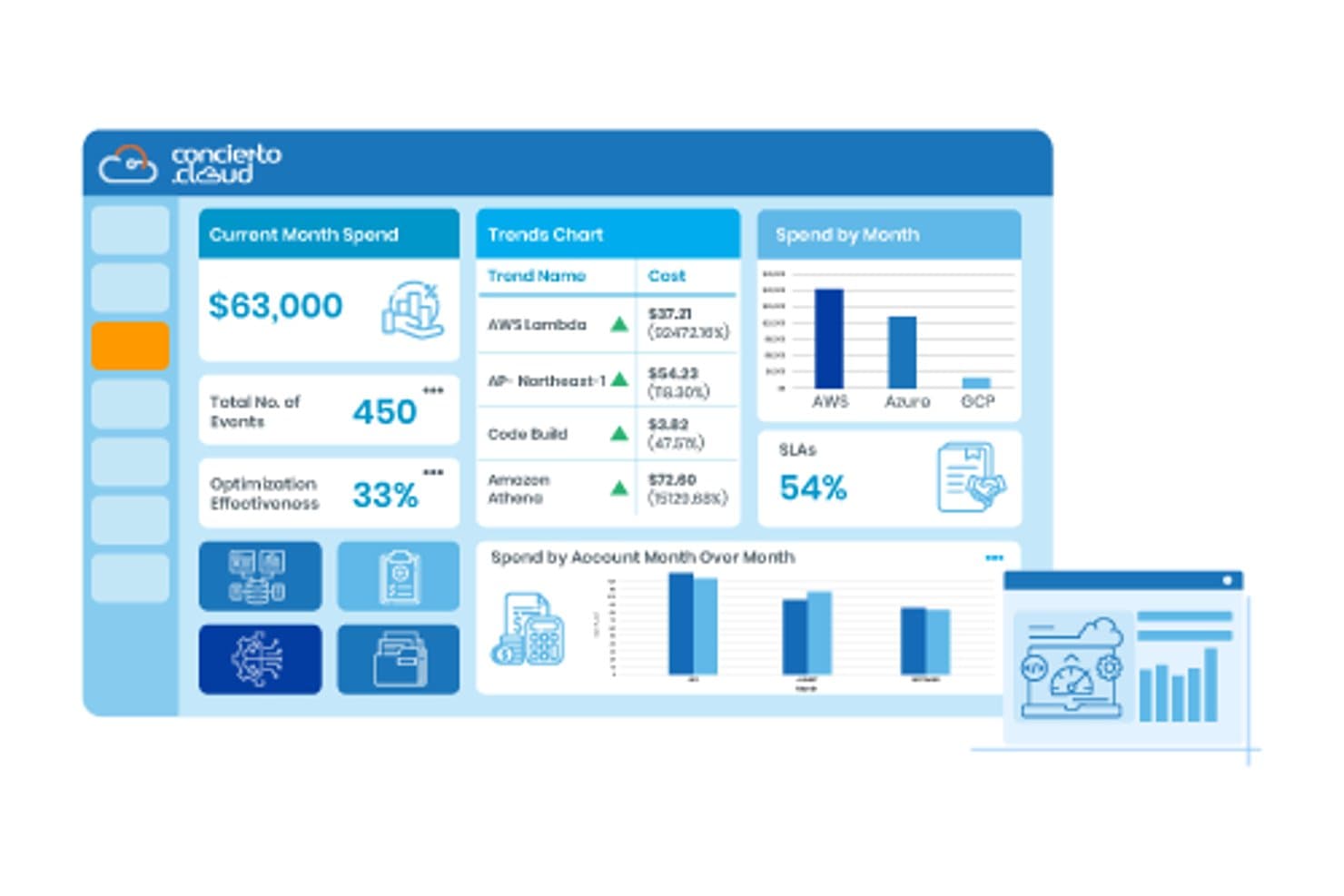
Concierto Cloud tracks cloud spend, trends, and optimization in one dashboard. Concierto is a hybrid and multi-cloud management platform from Trianz that covers infrastructure provisioning, cost optimization, compliance governance, automated patch management, and real-time monitoring across AWS, Azure, GCP, and on-premises environments.
Who Is Concierto Best For?
Concierto is a strong fit for enterprises running hybrid cloud environments where AWS Outposts is part of the strategy and data residency is a hard requirement.
Why I Picked Concierto Cloud
I picked Concierto Cloud because it's one of the few cloud management platforms built to handle AWS Outposts natively, which matters when data residency isn't optional. Its MANAGE module lets you run unified policies, workflows, and dashboards across both Outposts and native AWS environments from a single interface. On top of that, compliance blueprints and audit-ready reporting mean you're not piecing together residency evidence after the fact.
Concierto Cloud Key Features
- Automated patch management: Scans Windows and Unix servers and applies rule-based patch prioritization, sequencing, staging, and execution with failure remediation.
- Dynamic hybrid-cloud CMDB: Maintains near-real-time configuration and asset data across cloud and on-premises environments, correlating infrastructure, applications, and services.
- FinOps dashboards and forecasting: Delivers daily and resource-level cost granularity across AWS, Azure, GCP, and on-premises accounts with AI/ML-based spend forecasts and rightsizing recommendations.
- 1,000+ automation catalog: Provides an out-of-the-box library of automations and standardized processes for multi-environment orchestration, including Terraform pipeline support.
Concierto Cloud Integrations
Concierto Cloud has 10 documented built-in integrations, including ServiceNow, BMC, Datadog, AppDynamics, Dynatrace, New Relic, SCCM, BigFix, Prometheus, and StatusCake. Custom integrations are available as needed, but a public API isn’t documented.
Pros and Cons
Pros:
- FinOps dashboards include forecasts and rightsizing
- 1,000+ automations span multiple environments
- AWS Outposts supports data residency needs
Cons:
- Some operations services are à la carte
- Deployment estimates vary across vendor pages
Learn more about Concierto Cloud: Best for AWS server fleets across accounts
- Free plan + free trial available
- Pricing upon request
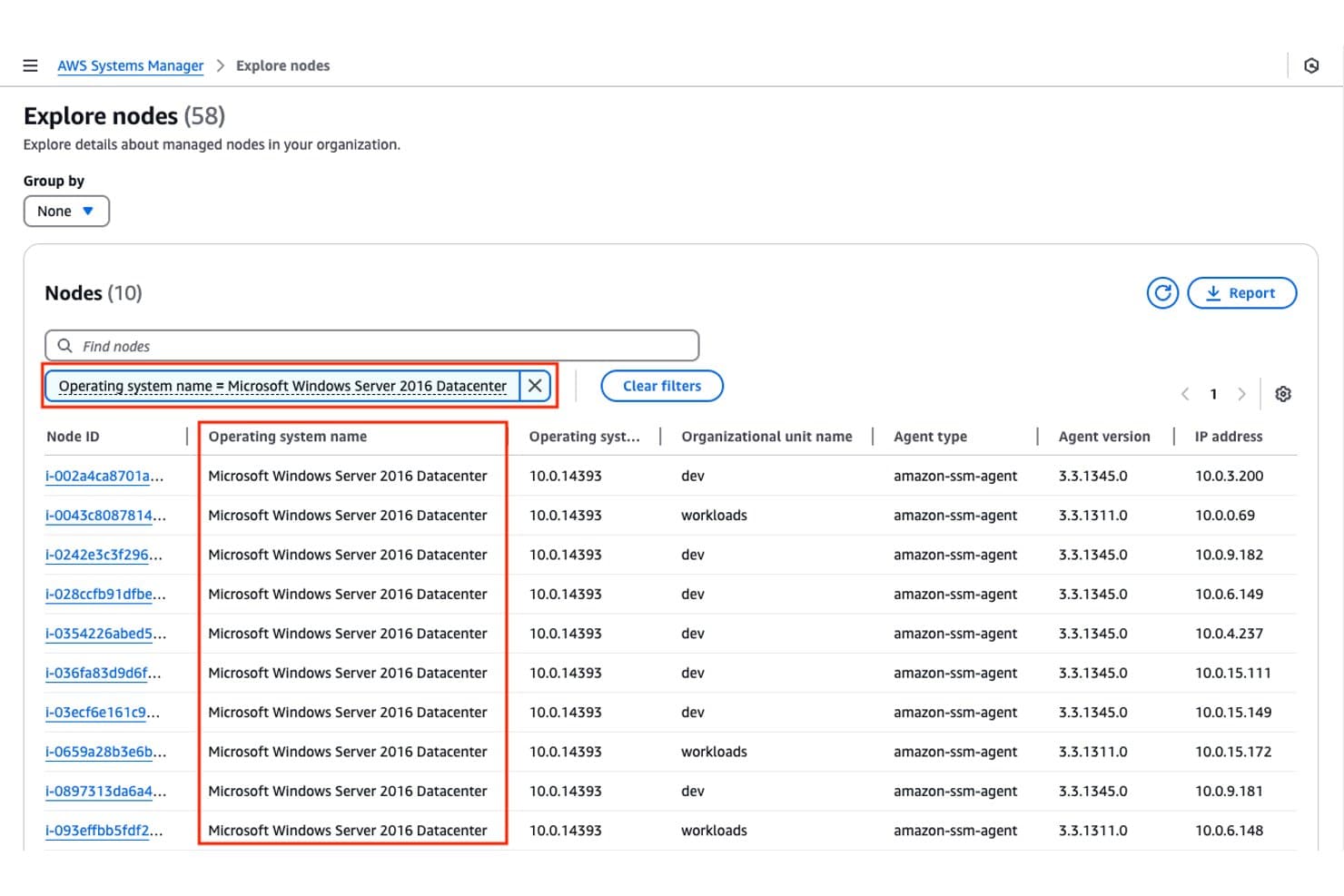
AWS Systems Manager lets users filter and explore managed nodes by OS type. AWS Systems Manager is an AWS-native cloud management platform that centralizes node management, operational automation, patch compliance, remote access, and configuration across AWS, on-premises, and multicloud environments.
Who Is AWS Systems Manager Best For?
AWS Systems Manager is a natural fit for DevOps teams and IT operations engineers managing large EC2 fleets across multiple AWS accounts and Regions.
Why I Picked AWS Systems Manager
I picked AWS Systems Manager as one of the best because it's purpose-built for teams running EC2 fleets across multiple AWS accounts and Regions, which is a real operational gap that generic tools don't address well. Run Command lets me push operations across hundreds of nodes at once, while cross-account Automation targets entire organizational units from a single central account. I also rely on Fleet Manager to filter nodes by account, Region, and OS version without jumping between consoles.
AWS Systems Manager Key Features
- Session Manager: Connects you to managed nodes remotely without SSH keys, open ports, or bastion hosts, with optional session logging to Amazon S3.
- State Manager: Maintains node configurations using associations, including support for running Ansible playbooks and Chef recipes on a defined schedule.
- Patch Manager: Automates OS and software patching across nodes, accounts, and Regions, with patch compliance tracking built in.
- Parameter Store: Stores configuration data and secrets as parameters that applications and other AWS services can reference directly.
AWS Systems Manager Integrations
Native integrations include Amazon EC2, AWS Organizations, AWS Config, AWS CloudTrail, Amazon CloudWatch Logs, IAM, Lambda, Ansible, ServiceNow, and Terraform. An API supports custom integrations.
Pros and Cons
Pros:
- Patch reports help track compliance status
- Remote sessions avoid exposed login ports
- Fleet-wide commands reduce server-by-server work
Cons:
- Other-cloud nodes need manual agent enrollment
- Cost analysis lacks native budgeting tools
Learn more about AWS Systems Manager: Best for Azure-governed Kubernetes GitOps
- Free plan available
- Pricing upon request
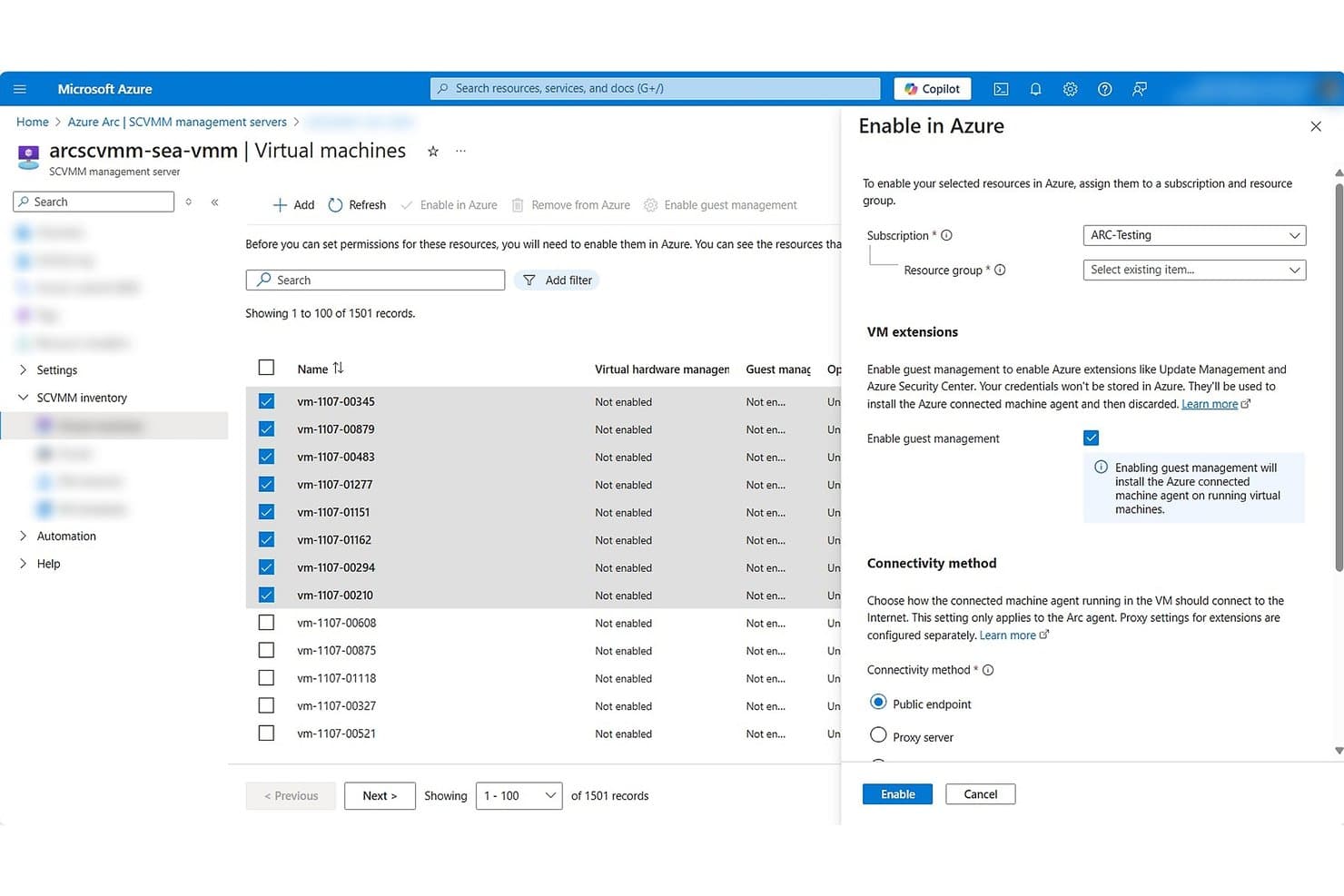
Azure Arc lets users enable VMs in Azure with guest management at scale. Azure Arc is Microsoft's hybrid and multicloud management platform that extends Azure Resource Manager's control plane to servers, Kubernetes clusters, and data services running on-premises, at the edge, or in other clouds.
Who Is Azure Arc Best For?
Azure Arc is a strong fit for infrastructure and cloud operations teams already invested in the Microsoft ecosystem who need to manage servers, Kubernetes clusters, and VMware environments from a single Azure-governed control plane.
Why I Picked Azure Arc
Azure Arc earns its spot on my shortlist because of how it handles Kubernetes GitOps at scale across hybrid and multicloud environments. I love that it uses Flux v2 to continuously reconcile clusters against a Git source of truth, so any configuration drift gets caught and corrected automatically without manual intervention. You can define cluster state using Kubernetes manifests, Helm charts, or existing DevOps pipelines, and Arc enforces that state across every connected cluster, whether it's running on-premises, on another cloud, or at the edge.
Azure Arc Key Features
- Azure Resource Graph queries: Lets you query and explore resource inventory across all connected environments using a unified query interface.
- Azure Policy machine configuration: Audits and enforces operating-system settings on Arc-enabled servers, with a centralized compliance dashboard and automated remediation.
- Connected Machine agent heartbeat monitoring: Tracks server connectivity status by sending heartbeats every five minutes and flagging machines as disconnected after 15–30 minutes of silence.
- VMware vCenter lifecycle management: Supports virtual-machine power operations and lifecycle management for VMware vCenter environments directly through the Azure control plane.
Azure Arc Integrations
Azure Arc offers native integrations with Azure Resource Graph, Azure Policy, Azure Monitor, Microsoft Defender for Cloud, Microsoft Sentinel, VMware vCenter, and System Center Virtual Machine Manager. Its Hybrid Compute REST API supports custom integrations, alongside Terraform and Bicep workflows.
Pros and Cons
Pros:
- Centralized server policy compliance and remediation
- Flux v2 reconciles Kubernetes cluster state
- Unified control for hybrid infrastructure
Cons:
- Cost visibility lacks forecasting and optimization
- Agent setup demands network and elevated access
Learn more about Azure Arc:
Alte platforme de gestionare a cloudului
Mai jos este o listă cu alte platforme de gestionare a cloudului care nu au ajuns în top 10, dar sunt în continuare produse excelente.
- 11Google Cloud ConsoleBest for app-centric Google Cloud operations
- 12IBM CloudabilityBest for multi-cloud commitment cash-flow plans
- 13IBM TurbonomicBest for app resource decisions tied to SLOs
- 14Hashicorp TerraformBest for cross-provider infrastructure as code
- 15Nutanix Cloud ManagerBest for SaaS-free on-prem cloud management
- 16Snow CommanderBest for governing temporary cloud workloads
- 17ServiceNow Cloud ManagementBest for auditable cloud cost changes
- 18ZestyBest for Kubernetes AI GPU sharing
- 19DensifyBest for tuning Kubernetes and cloud together
Recenzii asociate despre software pentru cloud
- Furnizori de servicii cloud
- Instrumente de securitate pentru cloud
- Platforme cloud ca serviciu
- Instrumente de stocare în cloud
- Platforme de dezvoltare cloud
How I Evaluate Cloud Management Platforms
I split my evaluation into baseline requirements—like unified multi-cloud visibility and cost governance—and differentiators that separate a truly capable platform from a glorified billing dashboard.
Core Functionality (Table Stakes For This List)
When I'm selecting tools for my list, I rank each one on a scale from 0 (does not offer the functionality) to 5 (excels in this area) for each core functionality listed below. Then, I calculate the tool's total score into a percentage. Each tool needs to achieve a minimum total score of 75% to be considered for inclusion.
- Multi-Cloud Support: I check whether a platform can manage resources across AWS, Azure, and GCP from one console—and whether hybrid or private cloud coverage is included.
- Cost Management & Optimization: Each tool should surface spend breakdowns, budget alerts, and rightsizing recommendations so teams can track waste across accounts.
- Provisioning & Automation: I evaluate how a platform handles resource lifecycle—whether it supports IaC tools like Terraform, offers blueprints, or enables self-service workflows.
- Governance & Policy Enforcement: Strong platforms let you set guardrails, enforce tagging standards, and run compliance audits across hundreds of cloud accounts at once.
- Monitoring & Resource Inventory: I look for unified dashboards that map deployed assets, track utilization metrics, and give real-time visibility without toggling between providers.
- Security & Compliance Controls: Misconfiguration detection, posture scoring, and mapping to frameworks like SOC 2 or ISO 27001 are what I evaluate for each tool here.
Once I have a list of tools that meet this criteria, I consider what sets each platform apart.
Differentiating Factors (What Sets Vendors Apart)
Here's how I compare and contrast different vendors:
Standout Features
AI-driven recommendations are a big differentiator—I look for platforms that go beyond static reports and actively flag rightsizing opportunities or predict spend anomalies before they hit your bill. A self-service portal also matters when platform teams need to let developers provision pre-approved resources without filing tickets. I also evaluate Kubernetes and container management, since teams running microservices across clouds need cluster-level visibility baked into the same console.
Beyond Features
Pricing model matters here—some platforms charge per resource, others take a percentage of managed cloud spend, and that difference compounds fast at scale. I also evaluate integration depth, especially with ITSM tools like ServiceNow and CI/CD pipelines, since a cloud management platform that sits outside your operational workflows creates more friction than it solves. Compliance certifications are another factor I check, particularly whether a vendor supports audit-ready reporting mapped to frameworks your organization already follows.
Cum să alegi o platformă de gestionare a cloudului
Este ușor să te pierzi în liste lungi de funcții și structuri complexe de prețuri. Pentru a te ajuta să rămâi concentrat în timp ce parcurgi procesul unic de selecție a software-ului, iată o listă de factori de care trebuie să ții cont:
| Factor | Aspecte de luat în considerare |
|---|---|
| FactorScalabilitate | Aspecte de luat în considerarePlatforma susține dezvoltarea companiei tale? Ia în considerare creșterile viitoare ale volumului de lucru și modul în care instrumentul le gestionează fără costuri suplimentare sau scăderi ale performanței. |
| FactorIntegrări | Aspecte de luat în considerareVerifică dacă platforma se conectează la instrumentele existente. Lipsa integrărilor poate însemna muncă manuală sau complexitate sporită. |
| FactorPosibilități de personalizare | Aspecte de luat în considerarePoți adapta platforma pentru a se potrivi fluxurilor tale de lucru? Caută setări ajustabile și șabloane definite de utilizator. |
| FactorUșurință în utilizare | Aspecte de luat în considerareInterfața este intuitivă? O curbă de învățare abruptă ar putea încetini echipa. Caută opinii ale utilizatorilor despre ușurința în utilizare. |
| FactorImplementare și integrare inițială | Aspecte de luat în considerareCât de repede poți începe? Evaluează disponibilitatea resurselor de instruire și a asistenței în timpul perioadei de tranziție. |
| FactorCost | Aspecte de luat în considerareCompară structurile de prețuri. Fii atent la taxele ascunse și asigură-te că prețul se încadrează în bugetul tău și corespunde rentabilității așteptate a investiției. |
| FactorMăsuri de securitate | Aspecte de luat în considerareFuncțiile de securitate sunt suficient de solide pentru nevoile tale? Ia în considerare criptarea, controalele de acces și conformitatea cu standardele din domeniu. |
| FactorDisponibilitatea asistenței | Aspecte de luat în considerareCe canale de asistență sunt disponibile? Verifică existența asistenței non-stop, a chatului live și a managerilor de cont dedicați care să te ajute atunci când apar probleme. |
Ce sunt platformele de gestionare a cloudului?
Platformele de gestionare a cloudului sunt instrumente care ajută companiile să își gestioneze și să își optimizeze resursele și serviciile cloud. Profesioniștii IT și administratorii cloud folosesc de obicei aceste instrumente pentru a spori eficiența operațională și a reduce costurile. Funcțiile de automatizare, monitorizare și integrare ajută la gestionarea volumelor de lucru, asigurarea securității și menținerea conformității. În general, aceste instrumente oferă companiilor un control mai mare asupra mediilor lor cloud.
Funcții
Atunci când alegi platforme de gestionare a cloudului, fii atent la următoarele funcții esențiale:
- Automatizare: Automatizează sarcinile de rutină pentru a economisi timp și a reduce erorile umane, permițând echipei să se concentreze pe inițiative mai strategice.
- Gestionarea costurilor: Oferă informații despre cheltuielile pentru cloud și ajută la identificarea domeniilor în care poți reduce costurile și optimiza utilizarea resurselor.
- Capacități de integrare: Se conectează perfect cu instrumentele existente, precum platformele de protecție a sarcinilor de lucru în cloud, sporind eficiența fluxului de lucru și reducând munca manuală.
- Măsuri de securitate: Asigură protecția datelor prin criptare și controale de acces, menținând conformitatea cu standardele din industrie.
- Monitorizare: Oferă urmărirea în timp real a resurselor cloud pentru a detecta anomalii și a menține performanța.
- Personalizare: Îți permite să adaptezi platforma la nevoile și fluxurile tale de lucru specifice, oferind flexibilitate și adaptabilitate.
- Scalabilitate: Sprijină dezvoltarea afacerii tale prin gestionarea unui volum tot mai mare de sarcini de lucru fără a compromite performanța.
- Monitorizarea conformității: Menține operațiunile aliniate la reglementările din industrie, reducând riscul de neconformitate.
- Interfață ușor de utilizat: Oferă un design intuitiv care simplifică navigarea și reduce curba de învățare pentru echipa ta.
- Analiză predictivă: Oferă informații despre tendințele viitoare și problemele potențiale, ajutându-te să iei decizii bine fundamentate.
Beneficii
Implementarea platformelor de gestionare a cloudului oferă mai multe beneficii pentru echipa și afacerea ta. Iată câteva dintre acestea:
- Economii de costuri: Prin optimizarea utilizării resurselor și reducerea risipei, aceste platforme contribuie la scăderea cheltuielilor pentru cloud.
- Eficiență sporită: Automatizarea sarcinilor de rutină eliberează echipa, permițându-i să se concentreze pe proiecte strategice și sporind productivitatea.
- Securitate îmbunătățită: Funcțiile de securitate integrate protejează datele și asigură conformitatea cu standardele din industrie.
- Luarea unor decizii mai bune: Monitorizarea în timp real și analiza predictivă oferă informații care te ajută să iei decizii bine fundamentate.
- Scalabilitate: Aceste platforme pot gestiona volume de lucru în creștere, sprijinind afacerea pe măsură ce se extinde.
- Flexibilitate: Posibilitatea de personalizare îți permite să adaptezi platforma la nevoile și fluxurile tale de lucru specifice.
- Conformitate mai bună: Monitorizarea conformității asigură respectarea reglementărilor din industrie de către operațiunile tale, reducând riscurile juridice.
Costuri și prețuri
Selectarea platformelor de gestionare a cloudului necesită înțelegerea diferitelor modele de tarifare și planuri disponibile. Costurile variază în funcție de funcții, dimensiunea echipei, suplimente și alți factori. Ia în considerare consultarea comparațiilor NinjaOne și ManageEngine pentru informații detaliate despre prețuri. Tabelul de mai jos rezumă planurile comune, prețurile medii ale acestora și funcțiile incluse de obicei în soluțiile de gestionare a cloudului:
Tabel comparativ al planurilor pentru platformele de gestionare a cloudului
| Tipul planului | Preț mediu | Funcții comune |
|---|---|---|
| Tipul planuluiPlan gratuit | Preț mediu$0 | Funcții comuneMonitorizare de bază, automatizare limitată și asistență din partea comunității. |
| Tipul planuluiPlan personal | Preț mediu$5-$25/user/month | Funcții comuneMonitorizare avansată, automatizare de bază și integrări limitate. |
| Tipul planuluiPlan pentru companii | Preț mediu$30-$75/user/month | Funcții comuneAutomatizare completă, raportare cuprinzătoare și asistență prioritară. |
| Tipul planuluiPlan pentru întreprinderi | Preț mediu$100-$200/user/month | Funcții comuneIntegrări personalizate, manager de cont dedicat și funcții avansate de securitate. |
Întrebări frecvente despre platformele de gestionare a cloudului
Iată câteva răspunsuri la întrebările frecvente despre platformele de gestionare a cloudului:
Poate o singură platformă să gestioneze mai multe servicii cloud?
Da. Multe platforme de gestionare a cloudului îți permit să controlezi diferiți furnizori de cloud, precum AWS, Azure sau Google Cloud, dintr-un singur tablou de bord. Acest lucru ajută echipele să lucreze mai eficient și să mențină un control mai bun asupra sistemelor lor.
Cum contribuie aceste platforme la îmbunătățirea securității?
Acestea oferă control centralizat și setări de securitate consecvente în toate mediile conectate. Funcții precum gestionarea accesului utilizatorilor, monitorizarea activității și alertele contribuie la protejarea datelor și la reducerea riscurilor.
Sunt aceste platforme potrivite pentru echipe mici sau de dimensiune medie?
Da. Majoritatea platformelor sunt concepute pentru a fi flexibile și ușor de utilizat, ceea ce le face potrivite pentru echipe de orice dimensiune. Acestea ajută la simplificarea operațiunilor zilnice și la reducerea muncii manuale prin automatizare și organizare.