

Din experiența mea, instrumentul potrivit poate transforma o situație stresantă într-un proces ușor de gestionat, economisind timp și reducând erorile. Am analizat cele mai bune opțiuni disponibile, concentrându-mă pe ceea ce contează cu adevărat pentru experți IT ca dumneavoastră.
În acest articol, vă voi prezenta alegerile mele principale pentru software-ul de raportare a incidentelor, evidențiind funcțiile și beneficiile esențiale ale acestora. Veți găsi recenzii imparțiale și bine documentate, care vă vor ajuta să luați o decizie informată. Să analizăm soluțiile care vă pot face procesul de gestionare a incidentelor mai simplu și mai eficient.
Why Trust Our Software Recommendations
6,700+
Reviews
20
Industry experts
16+
Evaluation factors
14
Years
Our team has been testing and reviewing software since 2012. As tech leaders ourselves, we know how difficult—and important—it is to choose the right software.
For this guide, we evaluated tools using hands-on testing and independent research, scoring tools using our selection criteria.
Our reviews reflect our human editorial judgment, not a sales pitch.
Expert reviewers:
- Paulo Gardini MiguelTech Director
 Tim FisherVP of AI
 Gabriel RosasTech Lead & Software Architect
 Christhian GruhnTech Lead & Platform Architect

Tabel comparativ pentru software-ul de raportare a incidentelor
Acest tabel comparativ rezumă detaliile de preț pentru selecțiile mele principale de software pentru raportarea incidentelor:
Sorted by: Default
| Tool | Starting Price | Website | |
|---|---|---|---|
Best for incident documentation management | 4.4 out of 5 | Pricing upon request Free demo available | Website |
Best for user-friendly incident handling | 4.6 out of 5 | $19/user/month 14-day free trial | Book Demo |
Best for integrated incident detection & ticketing | 4.6 out of 5 | $149/user/month Free trial available | Book Demo |
Best for linking incidents and asset data | 4.5 out of 5 | $59/user/month Free trial + free demo available | Book Demo |
Best for automating response workflows | 4.8 out of 5 | $20/user/month Free trial available | Website |
Best for real-time incident and threat detection | 4.5 out of 5 | Pricing upon request 30-day free trial + free demo | Website |
Best for automated remediation | Not rated | Pricing upon request Free trial + free demo available | Website |
Best for alert grouping and on-call routing | 4.8 out of 5 | $10/user/month Free plan + 14-day free trial + free demo available | Website |
Best for advanced reporting analytics | 4.6 out of 5 | $9.45/user/month 14-day free trial | Website |
Best for centralized help desk needs | 4.4 out of 5 | $39/user/month Free demo available | Website |


Recenzii despre cele mai bune software-uri de raportare a incidentelor
Mai jos sunt prezentate rezumatele mele detaliate ale celor mai bune software-uri de raportare a incidentelor care au ajuns pe lista mea restrânsă. Recenziile mele oferă o perspectivă detaliată asupra funcțiilor esențiale, avantajelor și dezavantajelor, integrărilor și cazurilor ideale de utilizare pentru fiecare instrument, pentru a vă ajuta să îl găsiți pe cel mai potrivit pentru dumneavoastră.
 Best for incident documentation management
- Free demo available
- Pricing upon request
Visit WebsiteCustomer Rating:4.4/5
Preparis' incident management dashboard provides insights into reported incidents and their statuses. Preparis is a cloud-based platform designed to help businesses prepare for and respond to emergencies, focusing on ensuring business continuity. It enables teams to centralize communication, manage risks, and execute response strategies efficiently.
Why I Picked Preparis: Preparis includes tools for organizing and storing critical documents related to incidents, ensuring important information is easily accessible during an emergency. Its reporting tools allow you to log and analyze incidents, helping you understand patterns and improve your response over time. These features are designed to give your team clear visibility into incidents, ensuring a coordinated and timely response that supports ongoing business operations.
The platform’s alerting system also ensures key personnel are notified the moment an issue arises, helping you respond faster.
Standout Features & Integrations:
Other features include customizable action plans for different types of incidents, so your team knows exactly what steps to take. Additionally, its incident manager lets you track, assign, and resolve IT incidents in one place. Integrations include systems like ADP and Okta.
Pros and Cons
Pros:
- Scalable for organizations of all sizes
- Real-time notification system
- Effective documentation for incident reports, plans, and audits
Cons:
- Could offer ticket management for IT incidents
- Limited customization options available
Learn more about Preparis: Best for user-friendly incident handling
- 14-day free trial
- From $19/user/month (billed annually)
Visit WebsiteCustomer Rating:4.6/5
The Freshservice dashboard provides easy access to all your tickets and the ability to track its progress. Freshservice, by Freshworks, is an IT service management tool tailored to streamline incident and service requests in organizations. Given its intuitive interface and user-centric design, it stands as a prime choice for teams that prioritize user-friendliness when managing and resolving incidents.
Why I Picked Freshservice: When determining the best tools for this list, Freshservice's reputation for being user-friendly made it an immediate consideration. What differentiates it from others is its intuitive design combined with robust capabilities, making the incident-handling process smoother.
Based on my evaluation, Freshservice shines for those organizations seeking a balance between capability and user-friendliness in their incident management tools.
Standout Features & Integrations:
Freshservice offers features like a smart ticketing system, knowledge base, and asset management. Their automation capabilities reduce manual efforts, making the incident resolution process more efficient.
For integrations, Freshservice supports a myriad of apps and platforms, including Slack, Zoom, and Microsoft Teams, ensuring that teams can connect their preferred tools without hassle.
Pros and Cons
Pros:
- Wide range of integration options supports varied organizational needs
- Robust automation capabilities reduce manual intervention
- Intuitive interface facilitates quicker adoption among teams
Cons:
- The need to navigate through multiple features can be overwhelming for some users
- Customization might require some technical expertise
- The tool’s depth might sometimes overshadow its simplicity for first-time users
Learn more about Freshservice: Best for integrated incident detection & ticketing
- Free trial available
- From $149/user/month (billed annually)
Visit WebsiteCustomer Rating:4.6/5
Atera offers ticket automation features to streamline helpdesk operations. Atera is a unified IT management platform primarily built for IT teams and MSPs. It combines remote monitoring and management (RMM), help desk ticketing, and professional services automation (PSA). Its incident reporting features work within this larger system, helping you log, track, and address incidents as part of your ongoing IT operations.
Why I Picked Atera: I included Atera for its ability to turn system alerts into actionable tickets automatically. When the platform detects threshold breaches in performance or hardware health, it can create tickets and categorize them with AI-based tagging. This allows your team to act on incidents quickly, reducing the time it takes to assign issues to the right person. Its real-time monitoring paired with ticket automation gives smaller IT teams a way to centralize incident reporting without needing multiple tools.
Standout Features & Integrations:
Atera includes AI tools that can auto-summarize tickets and draft responses based on incident data. The platform also supports script generation for troubleshooting tasks, knowledge base article creation from resolved tickets, and full network discovery to identify assets that may be affected by incidents. You can access remote devices directly for investigation and apply patch management to minimize vulnerabilities that could lead to future incidents. Integrations include Microsoft Teams, Slack, ServiceNow, Okta, Azure Active Directory, WhatsApp Notifications, Google Workspace, Jira Software Cloud, Acronis Cyber Protect Cloud, Google Sheets, Gmail, ClickUp, Autopilot.
Pros and Cons
Pros:
- Built-in AI support for ticket management and troubleshooting
- Unified platform for RMM, PSA, and help desk
- Pay-per-technician pricing model
Cons:
- Limited customization of workflows
- Mobile app has fewer features than desktop version
 Best for linking incidents and asset data
- Free trial + free demo available
- From $59/user/month (billed annually)
Visit WebsiteCustomer Rating:4.5/5
SysAid ITSM performance dashboard visualizing ticket volumes, SLA indicators, and MTTR trends across support channels. SysAid provides an incident reporting and IT service management platform designed for IT teams that want to manage issues proactively rather than reactively. If your team handles frequent support tickets, manages hardware or software assets, or delivers IT services across multiple departments, SysAid helps bring those processes into a single, more manageable system.
Why I Picked SysAid
I picked SysAid because its incident management capabilities are tightly integrated with AI-driven ticketing and automated workflows that reduce manual effort. SysAid’s AI supports ticket categorization, prioritization, and routing, helping your team spend less time on routine triage and more time resolving higher-impact issues. Incident records are also linked directly to asset and user data, so when a problem occurs, you have immediate context around the affected hardware, software, or user. This combination of automation and visibility can be especially helpful when fast, informed resolution is important.
SysAid Key Features
Aside from what I mentioned above, your team also benefits from features like:
- Self-Service: Lets end users submit tickets or search a knowledge base on their own, reducing the number of manual support requests.
- Workflow Automation: This feature allows you to automate repetitive processes, ensuring consistency and freeing up your team to focus on complex tasks.
- Change Management: SysAid provides tools to manage change processes, minimizing risk and ensuring smooth transitions within your IT environment.
- Reporting: Get built-in metrics (e.g., ticket volume, resolution times, SLA compliance) to monitor IT performance and identify trends over time.
SysAid Integrations
Integrations include Jira, Microsoft Teams, Slack, Active Directory, Azure AD, SCCM, VMware, Google Workspace, Okta, and Salesforce.
Pros and Cons
Pros:
- Workflow automation ensures process consistency.
- Self-service portal empowers users to report incidents directly.
- AI-driven automation reduces manual incident management tasks.
Cons:
- When features are not properly configured, automations and SLA workflows can become complex and confusing for agents.
- Mobile app experience lacks full functionality.
 Best for automating response workflows
- Free trial available
- From $20/user/month
Visit WebsiteCustomer Rating:4.8/5
Rootly shows its updated navigation and configuration UI, offering teams clearer access to incident management and automation settings. Rootly is an incident reporting and response platform designed to help teams detect, manage, and resolve incidents quickly. It centralizes communication, automates alerts, and facilitates collaboration across systems like Slack and Microsoft Teams. By covering the entire incident lifecycle—from detection through to AI-powered postmortems, Rootly helps organizations improve reliability and reduce resolution times.
Why I Picked Rootly: I picked Rootly because it brings AI to the heart of incident management. It automates response workflows in chat tools like Slack and Teams, so your team can take action without switching platforms. I also like its post-incident retrospective feature, which generates AI summaries and timelines automatically.
If you’re looking to enhance visibility and consistency in your incident process, Rootly offers a well-balanced blend of automation and collaboration.
Standout Features & Integrations:
Standout features include AI SRE tools that automate root cause analysis, post-incident retrospectives with AI-generated summaries, and MCP server integration that lets developers resolve incidents directly in their IDE. The on-call management system supports automated scheduling and escalation, while the status page keeps customers informed in real time.
Integrations include Slack, Microsoft Teams, Confluence, Jira, Terraform, Zoom, Datadog, Sentry, Notion, Zapier, Linear, and Google Meet.
Pros and Cons
Pros:
- Automated retrospectives with AI summaries
- Integrates with Slack and Teams
- AI-driven automation for incident response
Cons:
- Limited integration list publicly available
- Enterprise pricing requires custom quote
Learn more about Rootly: Best for real-time incident and threat detection
- 30-day free trial + free demo
- Pricing upon request
Visit WebsiteCustomer Rating:4.5/5
The Incident Workbench in ManageEngine EventLog Analyzer provides a detailed view of incidents, helping in thorough investigation and resolution. ManageEngine EventLog Analyzer is a comprehensive log management and IT compliance solution designed to enhance network security and streamline compliance with IT audit requirements.
Why I Picked ManageEngine EventLog Analyzer: I like the real-time security auditing and instant threat detection capabilities of EventLog Analyzer. The software continuously monitors the network for any suspicious activities and provides immediate alerts, enabling quick response to potential threats.
This real-time monitoring is complemented by comprehensive compliance management, which helps organizations adhere to various regulatory requirements such as PCI-DSS, HIPAA, and GDPR. The ability to generate detailed compliance reports not only simplifies the audit process but also ensures that the organization remains compliant with industry standards.
Standout Features & Integrations:
It also offers advanced threat analytics to enhance security by assessing threats from malicious URLs, IPs, and domains, utilizing third-party threat feeds to prioritize response actions. Additionally, the detailed reporting feature helps organizations comply with regulatory requirements and improve their security posture by generating comprehensive reports on log data. Integrations include Log360, ADAudit Plus, Firewall Analyzer, SharePoint Manager Plus, M365 Security Plus, Cloud Security Plus, and DataSecurity Plus.
Pros and Cons
Pros:
- In-depth auditing capabilities
- Extensive log management capabilities
- Supports real-time monitoring and alerting features
Cons:
- Some users find the initial setup to be complex
- The tool can be resource-intensive
Learn more about ManageEngine EventLog Analyzer: Best for automated remediation
- Free trial + free demo available
- Pricing upon request

Heimdal provides automated patch management for enhanced security. Heimdal caters to businesses seeking incident reporting software, particularly in industries like healthcare, education, and government. It offers automated incident response capabilities that enhance compliance and data governance. By integrating advanced threat detection and response features, Heimdal addresses the need for real-time alerts and continuous monitoring, helping organizations manage security incidents effectively.
Why I Picked Heimdal
I picked Heimdal for its standout automated incident response capabilities that directly tackle the challenges faced in incident reporting. With its Extended Detection and Response (XDR) platform, Heimdal provides real-time threat hunting and automated remediation, ensuring a quick and efficient reaction to security threats. Additionally, the integration with third-party applications streamlines incident management processes, making it a reliable choice for organizations looking to enhance their incident reporting mechanisms.
Heimdal Key Features
In addition to its automated incident response capabilities, Heimdal offers several other features beneficial for incident reporting:
- 24/7 Security Operations Center (SOC) Support: Your team receives round-the-clock assistance to monitor and respond to security incidents promptly.
- Threat Intelligence Integration: Heimdal provides actionable insights by correlating data with threat intelligence, empowering you to make informed decisions.
- Vulnerability Management: This feature helps you identify and address vulnerabilities within your infrastructure, reducing the risk of security breaches.
- Endpoint Detection and Response (EDR): You can monitor and analyze endpoint activities in real-time, ensuring quick identification and response to suspicious behaviour.
Heimdal Integrations
Native integrations are not currently listed by Heimdal; however, the platform supports API-based custom integrations.
Pros and Cons
Pros:
- Detailed asset and license visibility
- Strong vulnerability and threat detection
- Automates patching across endpoints
Cons:
- Interface requires onboarding time
- No native integrations available
Learn more about Heimdal: Best for alert grouping and on-call routing
- Free plan + 14-day free trial + free demo available
- From $10/user/month (billed annually)
Visit WebsiteCustomer Rating:4.8/5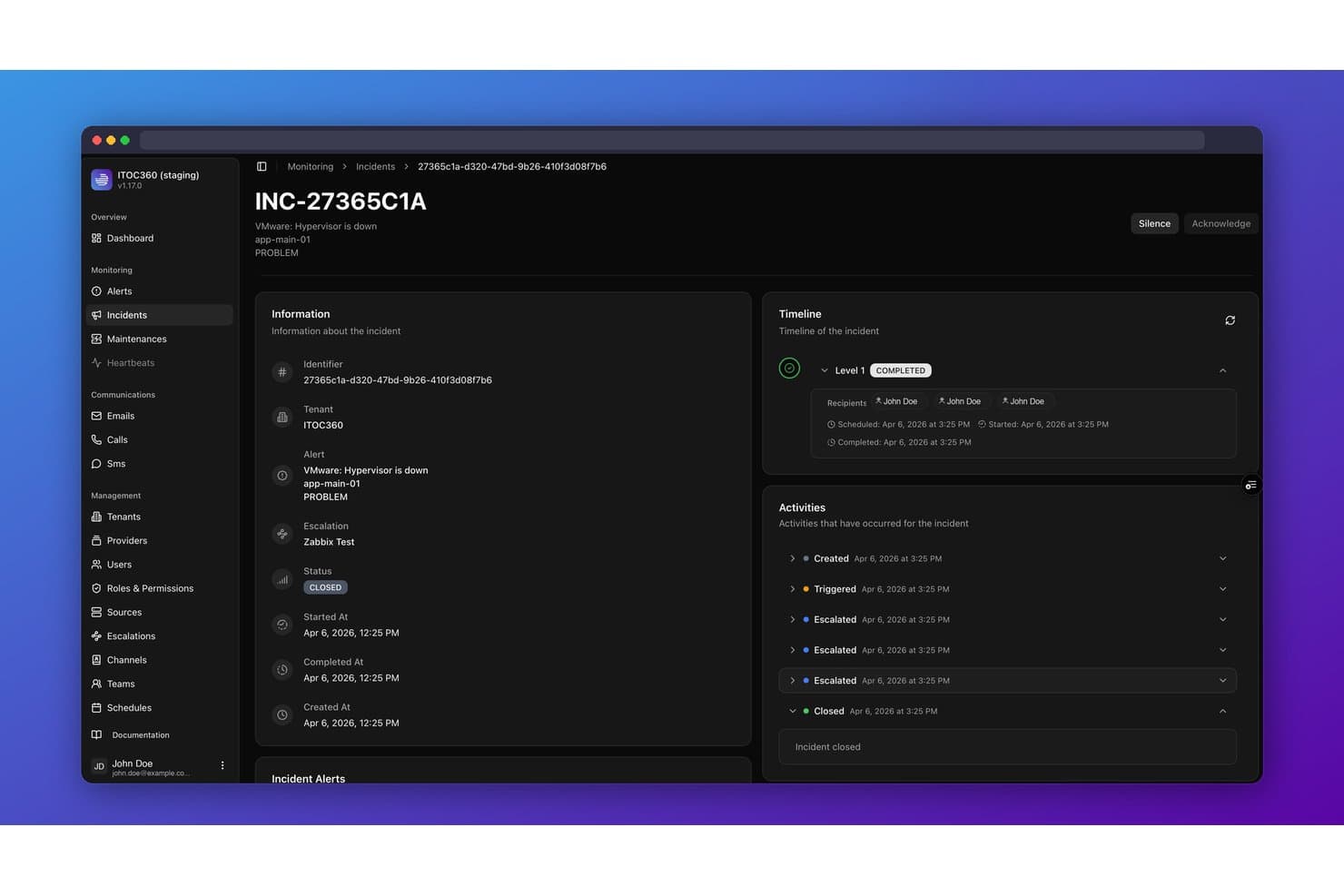
ITOC360 tracks incident timelines, escalations, and activity logs in detail. ITOC360 is an AI-driven IT incident management platform that collects monitoring alerts, groups duplicates, and routes incidents to on-call engineers through automated escalation policies and multi-channel notifications.
Who Is ITOC360 Best For?
ITOC360 is a strong fit for IT operations teams that manage on-call rotations and need to cut through alert noise across multiple monitoring tools.
Why I Picked ITOC360
I've included ITOC360 in my top picks because it handles alert grouping and on-call routing better than most tools I've tested in its class. When your monitoring stack fires duplicate alerts from Prometheus, Datadog, and CloudWatch simultaneously, ITOC360's AI correlation collapses them into a single incident instead of paging your whole team three times. I also like its escalation policies, which automatically route to the next responder if an alert goes unacknowledged, so nothing slips through during a high-volume incident.
ITOC360 Key Features
- Multi-channel notifications: Alerts reach on-call engineers via push, SMS, email, voice calls, Slack, Microsoft Teams, and custom webhooks.
- AI postmortem reports: After an incident closes, ITOC360 compiles Slack conversations and APM latency charts into an exportable retrospective report.
- ITSM sync: The Advanced and Premium plans connect directly with Jira and ServiceNow to create and update tickets from within the incident workflow.
- On-call scheduling and rotations: Teams can configure shifts, overrides, holiday schedules, and time-zone-aware rotations with unlimited schedules on paid plans.
ITOC360 Integrations
ITOC360 offers 59 integrations, including native Jira, ServiceNow, Slack, Microsoft Teams, Prometheus, Datadog, and Statuspage.io connections. It also provides REST, inbound and outbound webhook APIs, plus Zapier.
Pros and Cons
Pros:
- Provides timelines and MTTR visibility
- Escalates unacknowledged alerts across responders
- Groups duplicate alerts into single incidents
Cons:
- No safety corrective-action or compliance tracking
- No structured employee-reported incident forms
Learn more about ITOC360: Best for advanced reporting analytics
- 14-day free trial
- From $9.45/user/month (billed annually)
Visit WebsiteCustomer Rating:4.5/5
The on-call schedules provided by Opsgenie ensure that the appropriate people are informed and ready to act. Opsgenie, an Atlassian product, offers robust alerting and on-call management capabilities designed for teams operating in always-on services. It plays a vital role in consolidating alerts, notifying the right people, and ensuring swift action.
Why I Picked Opsgenie: I chose Opsgenie after carefully comparing its features and integration capabilities with other tools. In my judgment, its strength lies in its deep analytical tools, which provide granular insights into incident reports. This depth in reporting analytics truly differentiates Opsgenie, making it the best choice for organizations that prioritize data-driven insights for incident resolution.
Standout Features & Integrations:
Opsgenie's advanced analytics feature allows teams to dive deep into their performance metrics, facilitating improvements over time. Its alert and incident tracking, combined with flexible on-call schedules, ensures that the right person addresses issues promptly. As for integrations, Opsgenie works with monitoring tools, ticketing systems, and collaboration tools, including JIRA, Slack, and AWS CloudWatch, providing a cohesive incident response experience.
Pros and Cons
Pros:
- In-depth analytics and reporting
- Comprehensive integration ecosystem
- Robust alerting and on-call management
Cons:
- Some custom integrations might need manual configuration
- Advanced features require higher-tier plans
- Steeper learning curve for new users
Learn more about Opsgenie: Best for centralized help desk needs
- Free demo available
- From $39/user/month (billed annually)
Visit WebsiteCustomer Rating:4.4/5
Here's what SolarWinds Service Desk web portal looks like. Employees can conveniently send tickets to the help desk team through a customizable web portal or via email. SolarWinds Service Desk is a versatile platform designed to centralize all help desk operations, making it easier for businesses to handle IT service management. By consolidating diverse IT service processes into one unified platform, it aptly addresses the challenges of organizations looking for a centralized solution.
Why I Picked SolarWinds Service Desk: I selected SolarWinds Service Desk after observing the platform's capability to amalgamate various help desk operations easily. Amongst the myriad of tools I compared, this one distinctly offers a comprehensive central hub, which is pivotal for businesses wanting a unified point of control.
This centralization is the primary reason I deem it the best choice for those in search of centralized help desk solutions.
Standout Features & Integrations:
SolarWinds Service Desk presents an array of features such as incident management, asset discovery, and knowledge base creation. One of its notable attributes is the AI-driven suggestions that help agents resolve tickets faster. As for integrations, the platform connects well with software like Jira, Slack, and Microsoft Teams, facilitating cohesive IT operations across different applications.
Pros and Cons
Pros:
- Extensive integration capabilities with popular applications
- AI-driven suggestions aid in quicker ticket resolution
- Comprehensive central hub for help desk operations
Cons:
- Interface might require a learning period for some users
- Advanced features can be overwhelming for smaller teams
- Some users might find its setup process time-consuming
Learn more about SolarWinds Service Desk:
Alte software-uri de raportare a incidentelor
Iată câteva opțiuni suplimentare de software pentru raportarea incidentelor care nu au ajuns pe lista mea restrânsă, dar care merită totuși analizate:
- 11OneTrustBest for privacy incident management
- 12ServiceNowBest for structured incident workflows
- 13ResolverBest for corporate security management
- 14Jira Service ManagementBest for IT team collaboration
- 15incident.ioBest for streamlined incident tracking
- 16xMattersBest for focused incident response
- 17FireHydrantBest for comprehensive incident orchestration
- 18LogicManagerBest for events and incidents integration
- 19ZendeskBest for customer-centered incident management
- 20ManageEngine ServiceDesk PlusBest for ITIL incident alignment
- 21NinjaOneGood for remote IT operations management
- 22MetricStreamGood for risk-based incident handling
How I Evaluate Incident Reporting Software
I split my evaluation into three parts, weighting core functionality most: capture incident details and route cases by severity. Next, I look for standout features such as offline mobile reporting. Finally, I consider onboarding, support, and pricing value beyond features.
Core Functionality (Table Stakes For This List)
When I'm selecting tools for my list, I score each one on a scale from 0 (does not offer the functionality) to 5 (excels in this area) for each core functionality listed below. I then convert the total into a percentage to help assess each tool's overall fit, with extra weight on any functionalities I’ve deemed essential.
- Incident Intake (Essential): I look for structured web and mobile forms, categories, and attachments so staff can report a hazard or outage when they find it.
- Workflow & Escalation (Essential): I assess rules that route incidents by type or severity and alert the right team when a high-impact outage remains unassigned.
- Investigation & Actions: I check for root-cause templates, evidence, owners, and due dates, plus follow-up to confirm fixes address recurring equipment failures.
- Reporting & Analytics: I look for configurable dashboards and exports that show incident volume, status, and recurrence by site or type over time.
- Compliance & Audit Trail: I evaluate immutable, timestamped action histories and exportable records that help teams reconstruct decisions during an audit.
- Role-Based Access: I consider whether permissions limit sensitive cases by role while giving investigators, managers, and responders the access they need.
Once I have a list of tools that meet the criteria, I consider what sets each platform apart.
Differentiating Factors (What Sets Vendors Apart)
Here's how I compare and contrast different vendors:
Standout Features
Mobile offline capture matters most when your field crews work in areas with no connectivity. I check whether the app queues photos, GPS tags, and form data locally, then syncs without duplicates once a signal returns. Pre-built regulatory templates are the next thing I evaluate—tools that ship with jurisdiction-ready forms like OSHA 300/301 or ISO 45001 save weeks of setup compared to building forms from scratch. I also look at how well each platform connects to ITSM and ERP systems, since pushing incident records into ServiceNow or an HRIS manually defeats the purpose of centralized tracking.
Beyond Features
I evaluate how well each platform fits a buyer's regulatory environment—OSHA-driven manufacturing shops need different form logic than healthcare teams tracking HIPAA-sensitive events. Integration depth matters just as much: I check whether a tool offers pre-built connectors to HRIS, ERP, and SSO systems or requires custom API work, since duplicate data entry kills adoption. I also look at vendor-provided onboarding and training resources, because EHS and compliance teams rarely have dedicated developers to configure a new system on their own.
Cum să alegeți software-ul de raportare a incidentelor
Este ușor să vă pierdeți în liste lungi de funcții și structuri complexe de prețuri. Pentru a vă ajuta să rămâneți concentrat în timp ce parcurgeți procesul unic de selecție a software-ului, iată o listă de factori de care trebuie să țineți cont:
| Factor | Ce trebuie avut în vedere |
|---|---|
| FactorScalabilitate | Ce trebuie avut în vederePoate software-ul să crească odată cu compania dumneavoastră? Luați în considerare numărul de utilizatori acceptați și dacă poate gestiona un volum mai mare de date pe măsură ce afacerea dumneavoastră se extinde. |
| FactorIntegrări | Ce trebuie avut în vedereSe conectează la instrumentele pe care le utilizați deja? Verificați compatibilitatea cu sistemele actuale, precum CRM-ul, e-mailul și platformele de comunicare. |
| FactorPosibilitate de personalizare | Ce trebuie avut în vedereÎl puteți adapta pentru a corespunde fluxurilor dumneavoastră de lucru? Căutați opțiuni pentru modificarea tablourilor de bord, a rapoartelor și a setărilor utilizatorilor, astfel încât să corespundă nevoilor echipei dumneavoastră. |
| FactorUșurință în utilizare | Ce trebuie avut în vedereEste simplu pentru echipa dumneavoastră să învețe să îl folosească? Evaluați interfața de utilizare și dacă este necesară o instruire extinsă pentru utilizarea eficientă. |
| FactorImplementare și integrare inițială | Ce trebuie avut în vedereCât timp este necesar pentru a începe utilizarea? Luați în considerare procesul de configurare, asistența disponibilă și resursele de instruire pentru a asigura o tranziție fără probleme. |
| FactorCost | Ce trebuie avut în vedereSe încadrează în bugetul dumneavoastră? Comparați planurile tarifare, inclusiv eventualele taxe ascunse, și asigurați-vă că prețul este aliniat cu valoarea oferită. |
| FactorMăsuri de securitate | Ce trebuie avut în vedereSunt protejate datele și confidențialitatea dumneavoastră? Căutați criptare, conformitate cu reglementările privind protecția datelor și alte măsuri de securitate. |
| FactorDisponibilitatea asistenței | Ce trebuie avut în vedereVeți primi ajutor atunci când aveți nevoie? Verificați disponibilitatea serviciului de asistență pentru clienți, inclusiv programul și canalele precum telefonul, e-mailul și chatul. |
Ce este software-ul de raportare a incidentelor?
Software-ul de raportare a incidentelor este un instrument utilizat pentru documentarea și gestionarea incidentelor, precum întreruperile serviciilor IT, breșele de securitate sau orice perturbări operaționale. Specialiștii IT, echipele de securitate și responsabilii de conformitate folosesc în general aceste instrumente pentru a soluționa rapid problemele și a menține operațiunile fără întreruperi. Software-ul de alertare IT, înregistrarea datelor și fluxurile de lucru personalizabile contribuie la gestionarea și soluționarea eficientă a incidentelor. Aceste instrumente oferă o valoare semnificativă prin minimizarea perioadelor de nefuncționare și îmbunătățirea timpilor de răspuns.
Funcții
Iată funcțiile esențiale pe care ar trebui să le aibă orice software excelent de raportare a incidentelor:
- Urmărirea incidentelor: Înregistrează automat incidentele, ajutând echipele să țină evidența tuturor problemelor, de la început până la rezolvare.
- Alerte automatizate: Îi notifică instantaneu pe membrii potriviți ai echipei, asigurând un răspuns prompt la incidente.
- Fluxuri de lucru personalizabile: Vă permite să adaptați procesele la nevoile specifice ale echipei și să îmbunătățiți eficiența.
- Înregistrarea datelor: Păstrează o evidență completă a incidentelor, utilă pentru audituri și verificări de conformitate.
- Colaborare în timp real: Permite echipelor să lucreze împreună la incidente în timp real, îmbunătățind comunicarea și soluționarea problemelor.
- Instrumente de raportare: Oferă informații despre tendințele incidentelor și performanța echipei, contribuind la îmbunătățirea continuă.
- Măsuri de securitate: Protejează informațiile sensibile prin criptare și respectarea standardelor de protecție a datelor.
- Capacități de integrare: Se conectează cu alte instrumente, precum Slack și Jira, pentru a simplifica fluxurile de lucru și a crește productivitatea.
- Interfață ușor de utilizat: Simplifică navigarea și reduce la minimum timpul necesar pentru familiarizarea noilor utilizatori.
- Monitorizarea conformității: Ajută la asigurarea faptului că organizația dumneavoastră îndeplinește cerințele de reglementare prin monitorizarea incidentelor legate de conformitate.
Beneficii
Implementarea unui software de raportare a incidentelor oferă mai multe beneficii pentru echipa și compania dumneavoastră. Iată câteva dintre acestea:
- Timpi de răspuns îmbunătățiți: Alertele automatizate și colaborarea în timp real ajută echipa să răspundă rapid și eficient la incidente.
- Acuratețe îmbunătățită a datelor: Înregistrarea datelor asigură capturarea și stocarea corectă a tuturor detaliilor incidentelor pentru consultare ulterioară.
- Gestionarea mai bună a conformității: Monitorizarea conformității ajută compania să respecte cerințele de reglementare și să evite sancțiunile.
- Productivitate crescută: Fluxurile de lucru personalizabile și capacitățile de integrare permit echipei să lucreze mai eficient în cadrul proceselor existente.
- Analize utile: Instrumentele de raportare oferă informații valoroase despre tendințele incidentelor și performanța echipei, contribuind la luarea deciziilor.
- Securitate sporită: Măsurile de securitate protejează datele sensibile, oferind echipei dumneavoastră siguranță atunci când gestionează incidente.
- Ușurință în utilizare: O interfață ușor de utilizat reduce timpul necesar pentru familiarizare, permițând echipei să adopte rapid software-ul.
Costuri și prețuri
Selectarea unui software de raportare a incidentelor necesită înțelegerea diferitelor modele și planuri tarifare disponibile. Costurile variază în funcție de caracteristici, dimensiunea echipei, suplimente și alți factori. Tabelul de mai jos rezumă planurile obișnuite, prețurile medii ale acestora și caracteristicile incluse în mod obișnuit în soluțiile software de raportare a incidentelor:
Tabel comparativ al planurilor pentru software-ul de raportare a incidentelor
| Tipul planului | Preț mediu | Caracteristici comune |
|---|---|---|
| Tipul planuluiPlan gratuit | Preț mediu$0/user/month | Caracteristici comuneUrmărirea de bază a incidentelor, alerte limitate și asistență din partea comunității. |
| Tipul planuluiPlan individual | Preț mediu$5-$25/user/month | Caracteristici comuneUrmărirea incidentelor, instrumente de raportare de bază și asistență prin e-mail. |
| Tipul planuluiPlan pentru companii | Preț mediu$30-$60/user/month | Caracteristici comuneRaportare avansată, fluxuri de lucru personalizabile, integrări și asistență prioritară. |
| Tipul planuluiPlan pentru întreprinderi | Preț mediu$70-$100/user/month | Caracteristici comuneAcces la toate funcționalitățile, măsuri de securitate avansate, monitorizarea conformității și asistență dedicată. |
Întrebări frecvente
Iată câteva răspunsuri la întrebările frecvente despre software-ul de raportare a incidentelor:
Care este diferența dintre raportarea incidentelor și gestionarea incidentelor?
Raportarea incidentelor presupune documentarea incidentelor atunci când au loc, în timp ce gestionarea incidentelor cuprinde întregul proces de soluționare a acestora, de la început până la sfârșit. Raportarea este doar primul pas al procesului de gestionare. Gestionarea eficientă a incidentelor utilizează datele din rapoarte pentru a rezolva rapid problemele și a preveni aparițiile viitoare. Asigurați-vă că echipa dumneavoastră înțelege ambele aspecte pentru a gestiona eficient întreruperile.
Cât de sigur este software-ul de raportare a incidentelor?
Da, majoritatea software-urilor de raportare a incidentelor sunt concepute având în vedere securitatea. Multe instrumente includ criptare, controale de acces și conformitate cu standarde precum GDPR. Totuși, trebuie să verificați întotdeauna funcțiile de securitate ale unui instrument înainte de a-l achiziționa. Căutați criptare, autentificare cu doi factori și certificări de conformitate pentru a vă asigura că datele dumneavoastră rămân protejate.
Se poate integra software-ul de raportare a incidentelor cu sistemele existente?
Da, multe instrumente de raportare a incidentelor oferă posibilități de integrare cu sisteme existente precum Slack, Jira și Microsoft Teams. Integrările contribuie la simplificarea fluxurilor de lucru prin conectarea instrumentului de raportare a incidentelor cu alte software-uri utilizate de echipa dumneavoastră. Înainte de a alege un instrument, verificați compatibilitatea acestuia cu sistemele actuale pentru a asigura o integrare fără probleme.
Cum aleg software-ul potrivit de raportare a incidentelor pentru echipa mea?
Începeți prin a evalua nevoile echipei dumneavoastră și fluxurile de lucru existente. Luați în considerare factori precum ușurința în utilizare, posibilitățile de integrare și scalabilitatea. Căutați un instrument care se încadrează în bugetul dumneavoastră și oferă funcțiile de care aveți nevoie. De asemenea, puteți profita de perioadele de testare gratuite sau de demonstrații pentru a testa software-ul înainte de a lua o decizie.