

Cele mai bune instrumente de testare software ajută echipele să automatizeze testele repetitive, să gestioneze eficient cazurile de testare și să identifice problemele din timp, înainte ca acestea să afecteze mediul de producție. Ele facilitează menținerea calității versiunilor, îmbunătățesc vizibilitatea pe parcursul ciclurilor de testare și asigură transmiterea rapidă a feedbackului către dezvoltatori.
Multe echipe de asigurare a calității încep să caute instrumente noi atunci când se confruntă cu întreținerea suitelor de teste manuale, cu gestionarea rapoartelor în foi de calcul sau cu dificultăți în coordonarea testării în mai multe medii. Aceste provocări duc la erori neidentificate, rezultate inconsecvente și lansări întârziate, frustrând atât dezvoltatorii, cât și părțile interesate.
Am colaborat cu lideri ai echipelor de asigurare a calității și cu echipe de inginerie pentru a evalua platforme de testare în fluxuri reale de implementare, analizând cât de bine gestionează automatizarea, raportarea și colaborarea la scară largă.
În acest ghid, vei vedea care instrumente de testare software reduc efectiv volumul de muncă manuală, îmbunătățesc acuratețea și ajută echipa să livreze versiuni stabile cu încredere.
Why Trust Our Software Recommendations
6,700+
Reviews
20
Industry experts
16+
Evaluation factors
14
Years
Our team has been testing and reviewing software since 2012. As tech leaders ourselves, we know how difficult—and important—it is to choose the right software.
For this guide, we evaluated tools using hands-on testing and independent research, scoring tools using our selection criteria.
Our reviews reflect our human editorial judgment, not a sales pitch.
Expert reviewers:
- Paulo Gardini MiguelTech Director
 Tim FisherVP of AI
 Gabriel RosasTech Lead & Software Architect
 Christhian GruhnTech Lead & Platform Architect

Tabel comparativ al instrumentelor de testare software
Tabelul de mai jos compară prețurile lunare, disponibilitatea perioadei de testare gratuită și opțiunile de plan gratuit pentru principalele mele instrumente de testare software.
Sorted by: Default
| Tool | Starting Price | Website | |
|---|---|---|---|
Best for visual bug tracking | 4.8 out of 5 | $50/month Free trial available | Website |
Best for test case management + bug tracking | 4.6 out of 5 | $9/user/month Free plan available | Website |
Best for checklist-style test management | 4.1 out of 5 | $49/month Free trial available | Website |
Best for cross-project QA oversight | 4.4 out of 5 | $47/user/month 14-day free trial + demo available | Website |
Best for browser testing | 4.8 out of 5 | $99/month 14-day free trial + free plan available | Website |
Best for checking APIs within UI journeys | 4.9 out of 5 | $17/month Free plan + free demo available | Book Demo |
Best for Jira users | 4.9 out of 5 | $15.42/user/month Free plan available | Website |
Best for parallel test execution | 4.9 out of 5 | $199/month/year Free trial available | Website |
Best for risk-based testing | 5.0 out of 5 | $59/seat/month 60-day free trial | Website |
Best for team collaboration | 4.9 out of 5 | From 1¢/AI credit Free demo available | Website |


Recenzii ale celor mai bune instrumente de testare software
Iată o scurtă descriere a fiecăruia dintre instrumentele de testare software, pentru a evidenția cel mai potrivit caz de utilizare al fiecărui instrument, câteva funcții importante și capturi de ecran care oferă o imagine de ansamblu asupra interfeței.


BugHerd displays all website feedback as trackable tasks on a clear Kanban-style board. BugHerd gives QA teams and web development professionals a way to report, track, and manage bugs directly on live websites, helping teams quickly identify and resolve issues during software testing.
Who Is BugHerd Best For?
BugHerd suits web development teams and agencies that need a straightforward way to collect and manage client feedback alongside QA bug reports.
Why I Picked BugHerd
BugHerd earns its spot on my shortlist because of how it handles visual bug tracking—specifically, the ability to pin feedback directly onto individual page elements. When my team runs QA on a live site, that pin stays attached to the element even if the page layout changes, preserving context between report and fix. Every pin automatically captures a screenshot, browser, OS, screen resolution, and the exact selector code, so developers get everything they need to reproduce the bug without a back-and-forth. The built-in Kanban board routes every reported bug straight into a trackable task, preventing issues from slipping through during a testing cycle.
BugHerd Key Features
- Video feedback capture: Record and attach video directly to a bug report to show exactly what's happening on the page.
- PDF and image annotation: Annotate websites, PDFs, and images within the same platform, so feedback stays centralized.
- Public feedback widget: Embed a widget on a live site to collect ongoing bug reports and feedback from site visitors after launch.
- No-login guest access: Clients can submit feedback and bug reports without needing to create an account or log in.
BugHerd Integrations
BugHerd offers native integrations with Jira, Asana, ClickUp, Monday.com, Trello, Linear, Productive, Teamwork, GitHub, FullStory, LogRocket, LambdaTest, Harvest, Time Doctor, Slack, Microsoft Teams, WordPress, Drupal, Firmao, and connects with Zapier. An API and webhooks are available for custom integrations.
Pros and Cons
Pros:
- Supports Kanban-style task management inside the tool.
- Saves time by turning website feedback into actionable tasks with screenshots and context.
- Allows non-technical users (clients, PMs) to report bugs directly on the webpage.
Cons:
- Less suitable for comprehensive full-stack or backend bug tracking outside web UI issues.
- No mobile-app is provided, limiting ease of use on phones.
Learn more about BugHerd: Best for test case management + bug tracking
- Free plan available
- From $9/user/month (billed annually)
Visit WebsiteCustomer Rating:4.6/5
Kualitee’s Build Traceability Report visualizes links between requirements, test scenarios, test cases, and defects across a selected sprint. Kualitee is a cloud-based software testing platform designed for QA teams and software development organizations who need to manage test cases, track bugs, and collaborate across the testing lifecycle.
Who Is Kualitee Best For?
Kualitee is a strong fit for QA teams in small to mid-sized software companies that need a dedicated testing platform without the complexity of enterprise-grade tools.
Why I Picked Kualitee
I picked Kualitee as one of the best because of how tightly it connects test case management and bug tracking into a single workflow. When my team executes a test and finds a failure, we can log a defect instantly—right from within the test execution view—without switching tools or losing context. I also like Kualitee's requirement traceability feature, which links bugs directly back to specific requirements and test cases, so you always know exactly what's affected and where a defect originated. The built-in defect categorization also lets us assign severity, priority, and status to every bug, which keeps the QA and dev sides of the team working from the same picture.
Kualitee Key Features
- AI-powered test case generation: Kualitee's Hootie AI assistant generates test cases from requirements, descriptions, or uploaded images.
- Automated test execution: Hootie runs test cases automatically, updates statuses in real time, and logs defects without manual intervention.
- Customizable reporting: Build, save, and schedule reports using custom templates tailored to different team roles.
- Role-based access control: Create custom roles and assign specific privileges to keep team permissions organized across projects.
Kualitee Integrations
Kualitee offers native integrations with Jira, Selenium, Azure DevOps, and Tricentis Tosca, and provides an API for building custom integrations.
Learn more about Kualitee: Best for checklist-style test management
- Free trial available
- From $49/month (billed annually)
Visit WebsiteCustomer Rating:4.1/5
Testpad allows users to create and manage test plans easily with its keyboard-driven editor. Testpad is a manual test management tool for QA teams and software testers who want a flexible, collaborative way to organize, execute, and track testing without the overhead of traditional test case management systems.
Who Is Testpad Best For?
Testpad suits small to mid-sized QA teams and independent testers who need a lightweight, no-frills tool for manual and exploratory testing.
Why I Picked Testpad
Testpad is one of my top picks because I love how its hierarchical checklist structure lets my team build out test plans the way we actually think—starting high-level and drilling down into detail as we go, almost like a 1D mindmap. When I'm running a regression pass, I can type out hundreds of test prompts in minutes using the keyboard-driven editor without ever touching the mouse. I also rely heavily on the guest testing feature, which lets me pull in developers or product managers at crunch time by sharing a link—no logins, no onboarding required. The ability to edit tests mid-session is something I haven't found in heavier test case management tools, and it makes a real difference when exploratory testing surfaces new scenarios on the fly.
Testpad Key Features
- Instant reports: Generate and share live progress reports that show what passed, failed, and hasn't been checked yet, with no report-generation process to kick off.
- Tag and filter tests: Apply tags to tests and filter down to specific subsets, so you can run targeted test passes without working through an entire plan.
- Developer-friendly API: Connect your CI/CD pipeline to inject automated test results and report manual and automated tests together in one place.
- Simple version control: Copy test plans between releases and archive old plans with their results, keeping a clear record of what was tested and when.
Testpad Integrations
Testpad offers a native API for connecting with CI/CD pipelines and custom integrations, and also supports integration with Zapier.
Learn more about Testpad: Best for cross-project QA oversight
- 14-day free trial + demo available
- From $47/user/month (billed annually)
Visit WebsiteCustomer Rating:4.4/5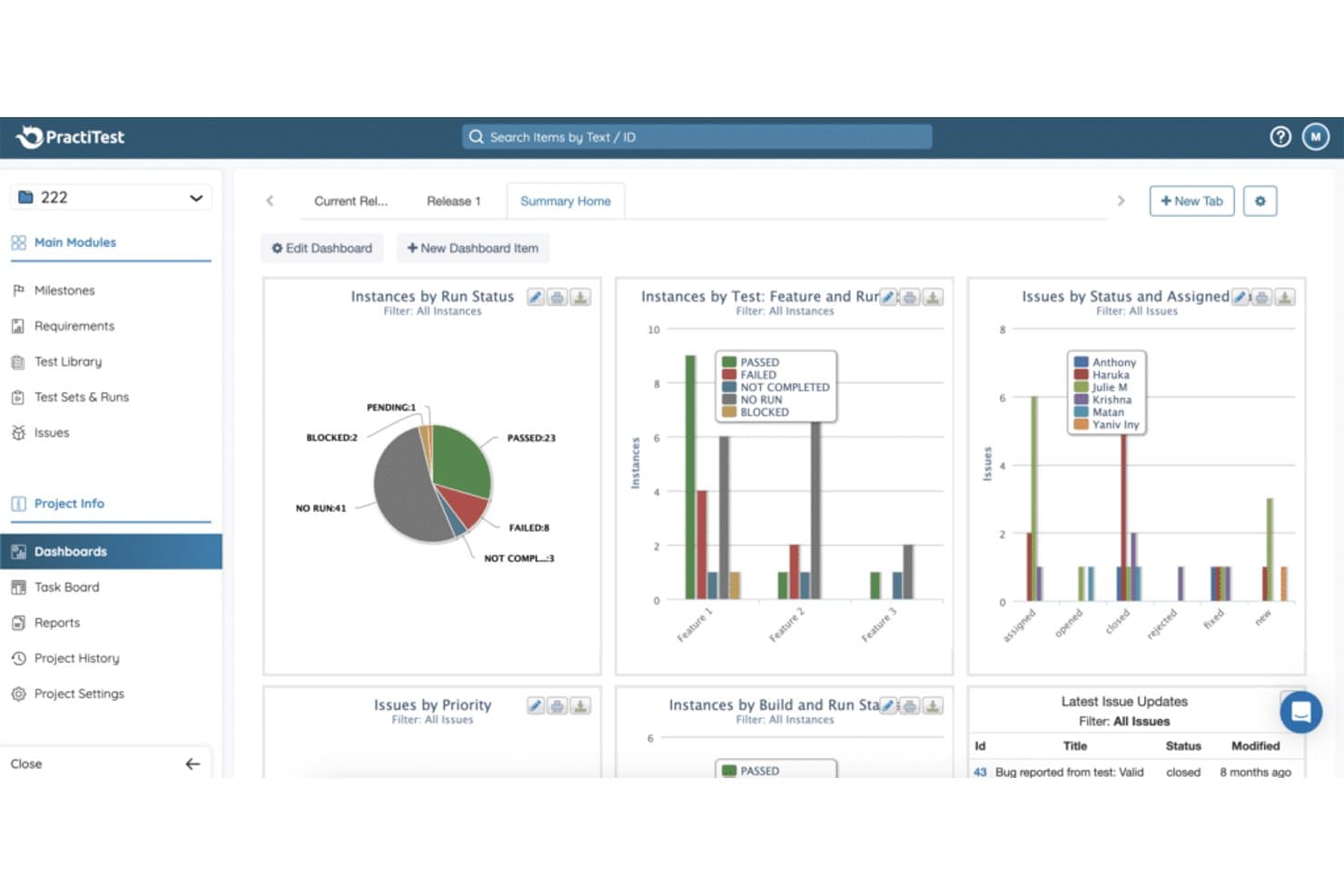
PractiTest displays test results and issues in visual dashboards. PractiTest is a test management platform that connects requirements, test cases, manual and automated test execution, and defect tracking across multiple projects in a single workspace.
Who Is PractiTest Best For?
PractiTest is a strong fit for QA managers and test leads overseeing testing across multiple projects or teams who need traceability, release-readiness visibility, and cross-project reporting in one place.
Why I Picked PractiTest
I've included PractiTest in my top picks because it's one of the few test management platforms built specifically for visibility across multiple projects at once. I particularly like its release-readiness scoring, which pulls together coverage, execution progress, and risk into a single score so QA leads can make informed go/no-go calls without manually piecing together data from separate sources. Its bidirectional traceability, linking user stories through test runs down to defects, means you always know exactly what's tested and what isn't across every project in your workspace.
PractiTest Key Features
- SmartFox AI test generator: Automatically generates test cases and steps by transforming your requirements into test coverage.
- xBot automation scheduling: Triggers and schedules automation test runs directly from within PractiTest without manual intervention.
- Custom fields and multidimensional filtering: Lets you tag and filter testing data across any dimension, so you can slice your test library exactly the way your team works.
- Stakeholder dashboard sharing: Shares live dashboards with external stakeholders or embeds them in third-party tools, with no login required for viewers.
PractiTest Integrations
PractiTest integrates with Jira, Azure DevOps, and Jira Data Center for requirements, issues, and test planning, with two-way synchronization documented for Jira and Azure DevOps. Its REST API supports custom integrations, while Firecracker ingests CI/CD and automation test results.
Pros and Cons
Pros:
- Custom fields and filters fit team workflows
- Release-readiness scores clarify cross-project risk
- Bidirectional traceability connects requirements to defects
Cons:
- Reporting may not meet every team’s needs
- Automated scripts require external execution tools
Learn more about PractiTest: Best for browser testing
- 14-day free trial + free plan available
- From $99/month (billed annually)
Visit WebsiteCustomer Rating:4.8/5
BugBug runs web app tests directly in the browser. BugBug is a no-code test automation platform designed for QA teams and software testers who need to create, schedule, and run browser-based tests without complex setup or coding.
Who Is BugBug Best For?
BugBug is a good fit for small to mid-sized development and QA teams that need a straightforward way to automate browser testing without dedicated automation engineers.
Why I Picked BugBug
BugBug earns its spot on my shortlist because of how well it handles browser-based test automation without requiring any scripting knowledge. I particularly like the Chrome extension test recorder, which captures stable selectors automatically—no XPath or CSS needed—so my team can record full user flows just by clicking through the app. The built-in email testing inbox is a feature I haven't seen in many other tools; it lets you test signup and login flows end-to-end without juggling external email accounts. The visual regression feature catches unintended UI changes by comparing screenshots across test runs, which is useful when shipping frequent updates.
BugBug Key Features
- Parallel testing: Run thousands of tests simultaneously on BugBug's cloud infrastructure instead of waiting for sequential execution.
- Variables & profiles: Manage test data and environment configurations dynamically across different test scenarios.
- Reusable components: Build test building blocks once and reuse them across multiple test suites to avoid duplicating steps.
- Conditional logic: Add if/else branching to tests so they can handle dynamic content and variable application states.
BugBug Integrations
BugBug offers native integrations with Slack, GitHub, GitLab, Bitbucket, Jira, and Trello, and connects with Zapier. An API and command line interface are available for custom integrations and CI/CD pipeline automation.
Pros and Cons
Pros:
- Detailed test reporting
- Easy test scheduling
- No coding required
Cons:
- May not support all browsers
- Limited mobile testing features
Learn more about BugBug: Best for checking APIs within UI journeys
- Free plan + free demo available
- From $17/month (billed annually)
Visit WebsiteCustomer Rating:4.9/5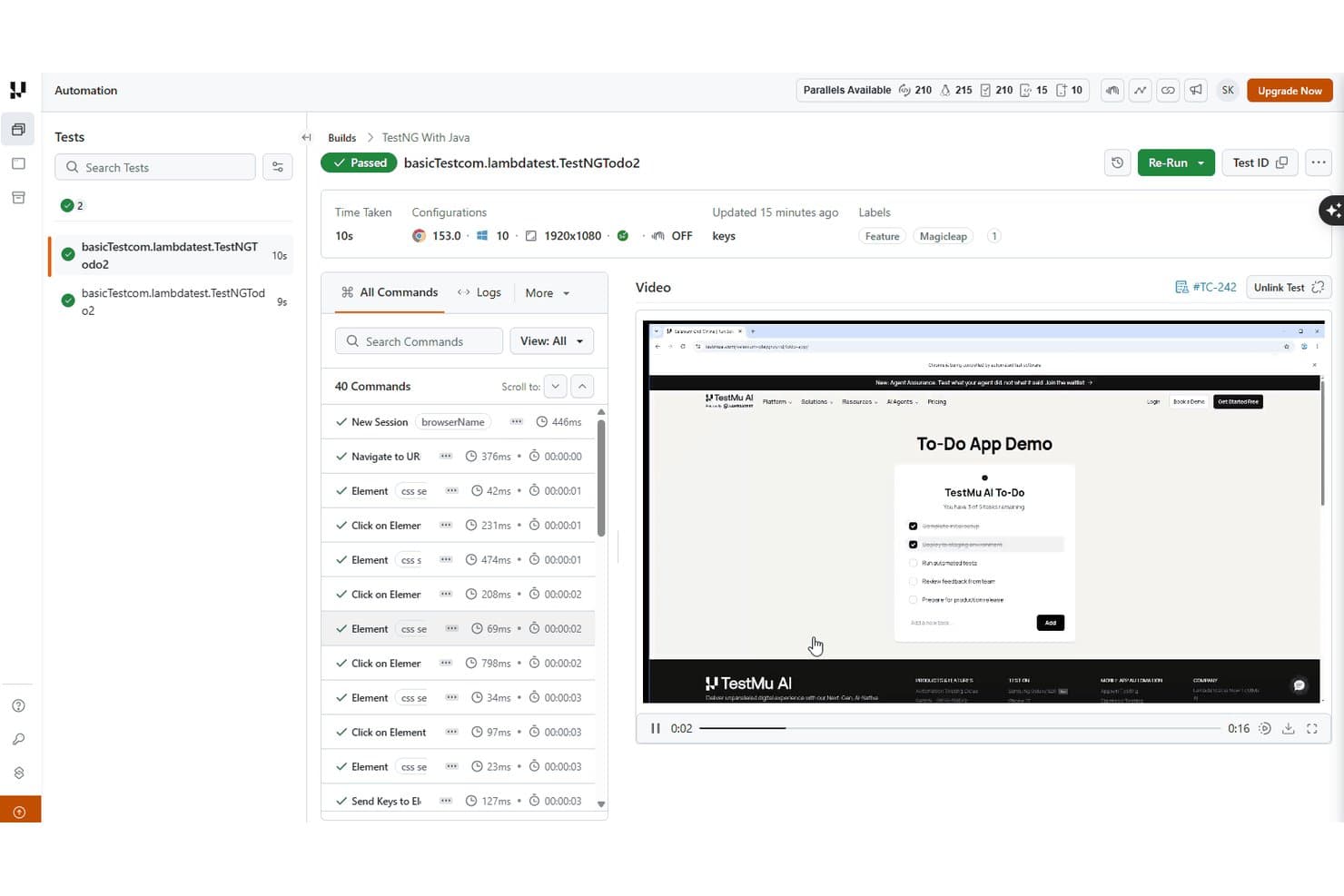
TestMu AI lets users review automation test results with video playback. TestMu AI is an AI-native software testing platform that lets you author, run, and evolve tests across web and mobile apps using natural language, with built-in API checks, visual regression, and CI/CD pipeline support.
Who Is TestMu AI Best For?
TestMu AI is a strong fit for QA engineers and testers who need to validate API behavior as part of end-to-end UI flows, without switching tools mid-test.
Why I Picked TestMu AI
I picked TestMu AI as one of the best because its KaneAI agent lets you check API behavior inline during a UI run, without switching to a separate API testing tool. While a form is submitting or a checkout flow is running, KaneAI monitors for broken endpoints, slow responses, and failed payloads in the same session. I've also found the natural-language test authoring genuinely useful here: you describe the flow in plain English, and KaneAI handles both the UI steps and the network checks together.
TestMu AI Key Features
- Natural-language test authoring: Describe a test flow in plain English and KaneAI generates, runs, and evolves the test across web and mobile apps.
- Self-healing tests: KaneAI detects UI or locator changes, updates the affected steps, and surfaces those changes for your review.
- CI/CD pipeline support: Kane CLI integrates with GitHub Actions, GitLab CI, Jenkins, and Bitbucket Pipelines, returning typed exit codes so your pipeline can act on results.
- Test scheduling: Run tests on demand or set a fixed schedule, with flake and failure insights surfaced across projects after each run.
TestMu AI Integrations
TestMu AI reports 120+ integrations, including Jira, Azure DevOps, GitHub, GitHub Actions, GitLab CI, Jenkins, and Bitbucket Pipelines. Kane CLI also works with Claude Code, Cursor, Codex, and Gemini CLI.
Pros and Cons
Pros:
- Broad browser and device access
- Plain-English test authoring cuts repetitive setup
- Checks API behavior within UI journeys
Cons:
- Healing can route around broken controls
- Can stall during routine UI interactions
Learn more about TestMu AI: Best for Jira users
- Free plan available
- From $15.42/user/month (billed annually)
Visit WebsiteCustomer Rating:4.9/5
Check the status of test cases, monitor the progress of test runs, and view logs to determine the cause of failures. Testiny is a software testing tool that QA professionals use to ensure that software products meet the highest level of quality and functionality.
Why I picked Testiny: The software performs various tests, including functional, regression, and performance testing. It offers insights on code coverage and risk assessment, making pinpointing technical issues easy. Teams can create a shared repository of test cases, enabling team members to view, edit, and reuse any test cases. Moreover, Testiny facilitates remote testing, allowing teams to test and debug software independently or work together from any location.
Testiny enables the QA team to efficiently identify defects and streamline workflow, providing real-time and historical data on each test case run. This test run view presents the results of the test cases in an organized format that facilitates quick and easy analysis. QA analysts can obtain detailed insights into the overall performance of the software under test, including the percentage of passed and failed test cases, average execution time, and the root cause of errors or failures.
Testiny Standout Features & Integrations
Features include automation testing, cross-browser testing, comments and annotations for collaboration, advanced reporting and analytics features that enable QA teams to identify defects and track performance metrics, and granular permissions per user.
Integrations include a Jira extension that allows you to run tests and automatically update Jira issues using the result. The tool can also display for you the status of Jira issues that you have linked with Testiny.
Learn more about Testiny: Best for parallel test execution
- Free trial available
- From $199/month/year (minimum of 4 seats)
Visit WebsiteCustomer Rating:4.9/5
The TestGrid dashboard provides an overview of testing activities and results, critical for monitoring and management of test executions. TestGrid is a cloud-based software testing platform designed for QA teams and developers who need to automate web and mobile testing on real devices, helping businesses accelerate release cycles and improve test coverage.
Who Is TestGrid Best For?
TestGrid suits QA engineers and DevOps teams at mid-size to enterprise companies that require scalable, automated testing for web and mobile applications.
Why I Picked TestGrid
I picked TestGrid because it handles parallel test execution across real devices and browsers very well. The parallel sessions feature lets my team run multiple test suites simultaneously instead of queuing them, cutting total execution time during pre-release sprints. Iterative test case execution lets us batch and run cases in parallel across different OS and browser combinations in a single pass. The scriptless test case creation means we don't spend time writing boilerplate code just to queue a test.
TestGrid Key Features
- AI auto-heal: Automatically detects and fixes broken test locators when UI elements change, reducing manual maintenance between releases.
- Visual testing: Runs visual checks alongside functional tests to catch UI defects like layout shifts and rendering issues across browsers and devices.
- Test data parameterization: Reuses test data sets across multiple test cases, so you can run the same test logic against different data inputs without duplicating scripts.
- Session video and screenshots: Records video and captures screenshots during test execution for post-run debugging and audit trails.
TestGrid Integrations
TestGrid offers native integrations with Jenkins, Jira, GitHub, GitLab, Slack, and Azure DevOps, and Zapier, plus supports CI/CD workflows through its API.
Learn more about TestGrid:

Appsurify TestBrain targets high-risk code to optimize testing. Appsurify TestBrain helps QA teams and software engineers speed up testing cycles by intelligently selecting and prioritizing tests, making it easier to catch issues early and optimize continuous integration workflows.
Who Is Appsurify TestBrain Best For?
Appsurify TestBrain is a good fit for development and QA teams at software companies that run large test suites and need to reduce CI/CD pipeline bottlenecks.
Why I Picked Appsurify TestBrain
I picked Appsurify TestBrain as one of the best because its patented AI-driven risk-based testing approach directly solves one of the most common CI/CD bottlenecks QA teams face: running full test suites on every commit. Instead of executing every test, TestBrain analyzes each developer commit and selects only the tests relevant to the changed code areas. I also like the flaky test management feature, which uses a separate AI model to distinguish real defects from flaky failures—so my team isn't chasing false positives that break builds without any underlying code change. The Model Insights page gives full visibility into how the AI performs on a per-run basis, helping build trust before relying on automated test selection in a production CI pipeline.
Appsurify TestBrain Key Features
- Test run analytics dashboard: View real-time data on test run performance, time savings, and risk-based test selection results across your projects.
- Model maturity wheel: Track how well the AI model has learned your codebase over time, with a visual indicator of model readiness per project.
- Smart subset scheduling: Configure periodic full test runs alongside daily smart subset runs to catch any defects the AI-selected subset may have deferred.
- Code-language agnostic test support: Run UI, E2E, API, integration, and unit tests across any code language without framework-specific configuration.
Appsurify TestBrain Integrations
Appsurify TestBrain offers native integrations with GitHub, Bitbucket, Microsoft TFVC, Perforce, SVN, Jenkins, Buildkite, CircleCI, Bitrise, Azure DevOps, Bamboo, Selenium, Appium, Cucumber, and several more tools. An API is available for custom integrations.
Pros and Cons
Pros:
- Reduces test cycle times
- Smart test selection
- Focuses on high-risk areas
Cons:
- Complexity in large environments
- Technical expertise needed
Learn more about Appsurify TestBrain: 10Best for team collaboration
QA Wolf
- Free demo available
- From 1¢/AI credit
Visit WebsiteCustomer Rating:4.9/5
QA Wolf enables collaborative cloud-based test automation for teams. QA Wolf is a cloud-based test automation platform designed for QA teams and software engineers who need fast, scalable, and easy-to-maintain end-to-end testing for web applications.
Who Is QA Wolf Best For?
QA Wolf is a good fit for mid-size to enterprise engineering teams that need a shared, scalable test automation environment across QA and development functions.
Why I Picked QA Wolf
QA Wolf is one of my top picks because I love how it keeps the entire engineering team connected throughout the testing process. Slack and Microsoft Teams integrations push real-time test results directly to the channels your team already uses, so no one has to go hunting for pass/fail updates. When a test fails, detailed bug reports with videos, traces, and logs get sent straight to your issue tracker—whether that's Jira, Linear, or Asana—so developers can act immediately. I also like that QA Wolf embeds human QA engineers alongside your team, which means collaboration isn't just a feature, it's built into the service model.
QA Wolf Key Features
- Mapping AI: An AI agent that explores your app and automatically maps every feature to build a complete picture of what needs to be tested.
- Parallel run orchestration: Runs your entire test suite concurrently, with automatic retries on failures to eliminate flakes caused by network or environment issues.
- 24-hour test maintenance: QA Wolf's team handles test upkeep around the clock, so broken tests get diagnosed and fixed without pulling your engineers away from development.
- CI/CD pipeline integration: Trigger test runs directly from GitHub, GitLab, or Bitbucket and use QA Wolf as a final release gate before deploying to production.
QA Wolf Integrations
QA Wolf offers native integrations with GitHub, GitLab, Bitbucket, Jira, Linear, Asana, ClickUp, Netlify, Vercel, Microsoft Teams, Slack, and Discord. An API is available for custom integrations.
Pros and Cons
Pros:
- Supports parallel test execution
- Real-time test notifications
- Managed testing services
Cons:
- Limited offline functionality
- High entry price
Learn more about QA Wolf:
Alte instrumente de testare software
Iată câteva soluții suplimentare care nu au intrat în lista principală. Dacă ai nevoie de sugestii în plus pentru instrumente utile de testare software, consultă-le.
- 11Tricentis TestimBest for scalable automation
- 12ReflectBest for no-code testing
- 13EndtestBest for scriptless automation
- 14testRigorBest for no-code test automation
- 15New RelicBest for real-time performance monitoring
- 16TestsigmaBest for open-source testing
- 17Tricentis NeoLoadBest for load testing
- 18Tricentis SeaLightsBest for release quality
- 19Tricentis ToscaBest for model-based testing
- 20SquishBest for object-based testing
How I Evaluate Software Testing Tools
I split my evaluation into two layers: the baseline a tool must clear to make the list, and the differentiators—CI/CD depth, AI test authoring, real-device coverage—that separate tools.
Core Functionality (Table Stakes For This List)
When I'm selecting tools for my list, I rank each one on a scale from 0 (does not offer the functionality) to 5 (excels in this area) for each core functionality listed below. Then, I calculate the tool's total score into a percentage. Each tool needs to achieve a minimum total score of 75% to be considered for inclusion.
- Test Automation Capabilities: I evaluate whether a tool supports automated testing across UI, API, and mobile layers, and whether it offers both coded and codeless approaches for teams with mixed skill sets.
- Test Case Management: Organizing and versioning test cases matters, so I look for suites, tagging, reusable modules, and traceability back to requirements or user stories.
- Multi-Environment Test Execution: I check how each tool handles cross-browser and cross-device runs—whether that's a native cloud grid or support for Selenium Grid and similar infrastructure.
- CI/CD & DevOps Integrations: A tool should plug into pipelines like Jenkins, GitHub Actions, or GitLab CI with minimal friction, triggering tests automatically on each commit or merge.
- Defect Tracking & Reporting: Dashboards, failure analytics, and tight connections to issue trackers like Jira or Azure DevOps are what I evaluate here to gauge how fast teams can act on results.
- Test Data & Scripting Support: I look for parameterization, data-driven test execution from sources like CSV or databases, and flexible scripting to handle complex, real-world test scenarios.
Once I have a list of tools that meet this criteria, I consider what sets each platform apart.
Differentiating Factors (What Sets Vendors Apart)
Here's how I compare and contrast different vendors:
Standout Features
AI-powered self-healing is a big differentiator I evaluate. When front-end teams ship frequent UI changes, tests that auto-adjust broken locators save hours of maintenance work each sprint. Codeless test authoring also matters because it lets manual QA contributors build automated tests without writing code, which expands coverage fast. For mobile-heavy products, I check whether a tool provides real device cloud access—emulators often miss rendering bugs and performance issues that only surface on actual hardware.
Beyond Features
Scalability and parallel execution are top of mind—I evaluate how well a tool handles enterprise-scale suites during high-frequency CI runs without ballooning costs. That ties directly into licensing model, where I check whether pricing scales by user, test run, or parallel thread, since the wrong model can make costs spike as teams grow. I also consider security posture, especially SOC 2 compliance, SSO/SAML support, and whether a tool offers self-hosted deployment for teams in regulated industries like healthcare or finance.
Cum să alegi instrumentele de testare software
Este ușor să te pierzi în liste lungi de funcții și structuri complexe de prețuri. Pentru a rămâne concentrat în timp ce parcurgi procesul unic de selectare a software-ului pentru echipa ta, iată o listă de factori de care trebuie să ții cont:
| Factor | Aspecte de luat în considerare |
|---|---|
| FactorScalabilitate | Aspecte de luat în considerareAsigură-te că instrumentul poate gestiona mai multe cazuri de testare, utilizatori și medii pe măsură ce proiectele tale se dezvoltă, fără a sacrifica performanța sau viteza. |
| FactorIntegrări | Aspecte de luat în considerareCaută compatibilitate perfectă cu fluxul tău CI/CD, sistemele de control al versiunilor, instrumentele de gestionare a proiectelor și instrumentele de testare exploratorie. |
| FactorPosibilitate de personalizare | Aspecte de luat în considerareAlege un instrument care îți permite să adaptezi scripturile de testare, rapoartele și tablourile de bord la fluxurile de lucru și practicile de dezvoltare ale echipei tale. |
| FactorUșurință în utilizare | Aspecte de luat în considerareOptează pentru un instrument intuitiv atât pentru utilizatorii tehnici, cât și pentru cei fără pregătire tehnică. O interfață simplă reduce timpul de integrare și numărul de greșeli. |
| FactorBuget | Aspecte de luat în considerareVerifică dacă prețurile sunt transparente. Asigură-te că funcțiile incluse la fiecare nivel corespund dimensiunii echipei tale și nevoilor actuale de testare. |
| FactorMăsuri de securitate | Aspecte de luat în considerareConfirmă că instrumentul protejează datele de testare prin criptare și controale de acces securizate și că respectă toate cerințele de reglementare aplicabile. |
| FactorColaborare | Aspecte de luat în considerareIa în considerare instrumente care permit mai multor testeri să lucreze simultan și includ funcții integrate de comunicare sau feedback. |
| FactorAcoperirea testării | Aspecte de luat în considerareCaută software de testare ALM care acceptă o gamă largă de tipuri de testare, precum UI, API, regresie și performanță, astfel încât echipa ta să nu fie nevoită să jongleze cu mai multe instrumente. |
Tendințe în instrumentele de testare software
Instrumentele de testare software pe care le folosești și modul în care le folosești vor depinde în mare măsură de tendințele din industrie. Iată câteva tendințe pe care le-am considerat utile în timp ce îți construiești configurația ideală de asigurare a calității:
- Accent sporit pe inteligența artificială și învățarea automată: instrumentele avansate au integrat algoritmi de inteligență artificială și de învățare automată pentru analiza predictivă și generarea inteligentă a cazurilor de testare. Această tendință evidențiază trecerea către procese de testare mai automatizate și mai eficiente, în care inteligența artificială ajută la identificarea problemelor potențiale înainte ca acestea să apară.
- Accent tot mai mare pe capacitățile de integrare: Instrumentele de testare software și-au îmbunătățit integrarea cu fluxurile de lucru CI/CD și cu sistemele de control al versiunilor. Integrarea perfectă asigură că testarea este o parte integrantă a procesului de dezvoltare, facilitând testarea și implementarea continuă.
- Extinderea gestionării mediilor de testare: Introducerea unor funcții sofisticate de gestionare a mediilor de testare în aceste instrumente răspunde nevoii unor medii de testare mai bine controlate și scalabile. Această funcționalitate le permite testerilor să simuleze diverse medii, îmbunătățind fiabilitatea rezultatelor testării.
- Raportare și tablouri de bord îmbunătățite în timp real: Instrumentele de testare software oferă acum tablouri de bord mai dinamice și interactive. Raportarea în timp real permite obținerea imediată de feedback și luarea unor decizii bazate pe date, aspecte esențiale pentru ciclurile de dezvoltare rapide.
- Experiența utilizatorului și testarea gradului de utilizare: Odată cu importanța tot mai mare a experienței utilizatorului, aceste instrumente au integrat funcții de testare a gradului de utilizare. Această schimbare subliniază nevoia de a testa nu doar funcționalitatea, ci și interfața și experiența utilizatorului.
- Declinul funcțiilor de testare manuală: Capacitățile tot mai mari de automatizare duc la reducerea accentului pus pe funcțiile de testare manuală. Acest lucru indică o tendință mai amplă a industriei către automatizare și eficiență, testarea manuală devenind mai puțin centrală în multe strategii de testare.
Ce sunt instrumentele de testare software?
Instrumentele de testare software sunt aplicații care ajută echipele să verifice dacă software-ul funcționează conform așteptărilor, identificând erori, urmărind problemele și verificând performanța. Acestea sunt utilizate de inginerii QA, dezvoltatori și manageri de proiect care au nevoie de metode fiabile pentru menținerea calității în timpul actualizărilor și lansărilor frecvente.
Funcțiile de automatizare, raportare și gestionare a cazurilor de testare contribuie la reducerea efortului manual, îmbunătățirea preciziei și menținerea alinierii tuturor celor implicați cu privire la progresul testării. În general, aceste instrumente facilitează livrarea mai rapidă a unui software stabil și de înaltă calitate.
Funcțiile instrumentelor de testare software
Iată câteva funcții esențiale pe care le puteți întâlni în software-ul din această listă, precum și rolul și importanța acestora:
- Executarea automată a testelor: Automatizează sarcinile repetitive de testare. Această funcție economisește timp și efort semnificative, permițând echipelor să se concentreze asupra unor scenarii de testare mai complexe și asigurând consecvența executării testelor.
- Integrarea cu instrumentele de dezvoltare: Se conectează perfect la mediile IDE, sistemele de control al versiunilor și fluxurile de lucru CI/CD. Integrarea simplifică fluxurile de lucru, asigurând că testarea este o parte integrantă a întregului ciclu de viață al dezvoltării software.
- Gestionarea cazurilor de testare: Instrumentele de testare BDD organizează și gestionează cazurile și scripturile de testare. O gestionare bună a cazurilor de testare ajută la menținerea structurii și ordinii, facilitând examinarea gradului de acoperire a testelor și reutilizarea cazurilor de testare.
- Raportare și analiză în timp real: Oferă feedback instantaneu cu privire la progresul și rezultatele testării. Datele în timp real sunt esențiale pentru luarea rapidă a unor decizii informate și ajustarea strategiilor după cum este necesar.
- Urmărirea și gestionarea erorilor: Înregistrează, urmărește și gestionează eficient defectele. Gestionarea eficientă a erorilor este esențială pentru prioritizarea și rezolvarea promptă a problemelor, reducând riscul apariției defectelor în produsul final.
- Scalabilitate și testarea performanței: Evaluează performanța software-ului în condiții de încărcare. Această funcție este esențială pentru a asigura că software-ul poate face față scenariilor de utilizare din lumea reală fără degradarea performanței.
- Interfață ușor de utilizat: Oferă o interfață intuitivă și ușor de utilizat. Un instrument ușor de utilizat sporește productivitatea și reduce curba de învățare pentru membrii noi ai echipei.
- Compatibilitate multiplatformă: Permite testarea pe mai multe platforme și dispozitive. Acest lucru asigură funcționarea perfectă a software-ului în medii diverse, răspunzând nevoilor unei game largi de utilizatori. De exemplu, instrumentele de testare a aplicațiilor web pot pregăti aplicațiile bazate pe web pentru cea mai largă compatibilitate cu dispozitivele sau browserele.
- Fluxuri de lucru personalizabile: Se adaptează la diferite metodologii și procese de testare. Flexibilitatea fluxurilor de lucru permite echipelor să adapteze instrumentul la nevoile specifice ale proiectului și la abordările de testare utilizate.
- Funcții de colaborare: Facilitează munca în echipă și comunicarea. Funcțiile eficiente de colaborare sunt esențiale pentru coordonarea eforturilor membrilor echipei și menținerea alinierii pe parcursul procesului de testare.
Beneficiile instrumentelor de testare software
Utilizarea instrumentelor de testare software oferă numeroase beneficii, printre care:
- Eficiență îmbunătățită: Automatizează sarcinile repetitive și consumatoare de timp. Prin automatizarea acestor sarcini, instrumentele de testare software reduc semnificativ timpul și efortul necesare pentru testare, permițând echipelor QA să se concentreze asupra aspectelor mai complexe și cu valoare adăugată ale testării.
- Precizie îmbunătățită: Minimizează erorile umane în procesul de testare. Testele automatizate efectuează exact aceiași pași de fiecare dată când sunt executate, eliminând astfel posibilitatea apariției greșelilor care pot apărea în cazul testării manuale.
- Acoperire crescută a testelor: Extinde amploarea și profunzimea testelor. Instrumentele de testare SaaS permit efectuarea unui număr mai mare de teste în același interval de timp, îmbunătățind acoperirea generală și crescând șansele de identificare a problemelor potențiale.
- Informații și analize mai bune: Oferă rapoarte și analize detaliate. Aceste instrumente furnizează informații complete despre procesul de testare, ajutând liderii QA să ia decizii informate pe baza unei analize bazate pe date.
- Lansare mai rapidă pe piață: Accelerează ciclul de testare. Datorită eficienței și automatizării oferite de aceste instrumente, întregul ciclu de viață al dezvoltării software este accelerat, permițând lansarea mai rapidă a produselor.
Costurile și prețurile instrumentelor de testare software
Selectarea instrumentelor de testare software necesită înțelegerea diferitelor modele și planuri de preț disponibile. Costurile variază în funcție de funcții, dimensiunea echipei, suplimente și alți factori. Tabelul de mai jos rezumă planurile comune, prețurile medii ale acestora și funcțiile incluse de obicei în soluțiile de testare software:
Tabel comparativ al planurilor pentru instrumentele de testare software
| Tipul planului | Preț mediu | Funcții comune |
|---|---|---|
| Tipul planuluiPlan gratuit | Preț mediu$0 | Funcții comuneCrearea de bază a cazurilor de testare, execuție limitată a testelor, asistență din partea comunității și integrări restricționate. |
| Tipul planuluiPlan personal | Preț mediu$10–$30/utilizator/lună | Funcții comuneAcces la mai multe tipuri de teste, precum instrumentele de testare vizuală a regresiilor, raportare de bază, asistență prin e-mail și câteva integrări cu terți. |
| Tipul planuluiPlan pentru companii | Preț mediu$30–$100/utilizator/lună | Funcții comuneAutomatizare avansată a testelor, integrări CI/CD, funcții de colaborare în echipă, acces API și permisiuni bazate pe roluri. |
| Tipul planuluiPlan pentru întreprinderi | Preț mediu$100–$300/utilizator/lună | Funcții comuneExecuție nelimitată a testelor, integrări personalizate, asistență premium, controale de securitate, funcții de conformitate și ajutor la integrare. |
Întrebări frecvente despre instrumentele de testare software
Mai aveți întrebări despre alegerea instrumentului perfect pentru testarea software? Secțiunea noastră de întrebări frecvente abordează cele mai comune întrebări pentru a vă ghida prin acest proces decizional important.
Care sunt greșelile frecvente care trebuie evitate atunci când selectați un instrument de testare software?
Greșelile frecvente includ neglijarea cadrelor acceptate de instrument, trecerea cu vederea a compatibilității cu limbajul de scriptare și neevaluarea compatibilității instrumentului cu planul dumneavoastră de gestionare a testelor.
Asigurați-vă întotdeauna că instrumentul ales acceptă cadrele și limbajele pe care le utilizați, precum Python sau Ruby, și că se încadrează în planul general de testare.
Prin ce diferă instrumentele de testare software bazate pe cloud de soluțiile instalate local?
Instrumentele de testare în cloud oferă o flexibilitate mai mare și sunt adesea mai scalabile, ceea ce le face ideale pentru testarea aplicațiilor mobile.
Soluțiile instalate local pot oferi un control mai mare asupra datelor de testare, dar necesită adesea un mediu Windows sau Linux dedicat. Evaluați-vă cu atenție nevoile înainte de a face o alegere.
Care sunt aspectele de securitate de luat în considerare atunci când alegeți un instrument de testare software?
Securitatea este esențială, în special atunci când testați aplicații care gestionează date sensibile ale utilizatorilor finali. Asigurați-vă că instrumentul selectat respectă standardele de securitate din industrie și oferă funcții precum stocarea criptată a datelor de testare. Dacă lucrați într-un mediu Linux, verificați dacă instrumentele dispun de funcții de securitate solide pentru acest sistem de operare.
Cum evaluez rentabilitatea investiției unui instrument de testare software?
Pentru a evalua rentabilitatea investiției, luați în considerare timpul economisit la executarea testelor și reducerea numărului de erori în timpul suitei de teste. Includeți costurile, inclusiv licențierea instrumentelor proprietare sau a pluginurilor pentru un instrument cu sursă deschisă. De asemenea, evaluați cât de bine se integrează instrumentul cu cadrele de testare existente pentru a vă asigura că aduce valoare.
Cum se integrează instrumentele de testare software cu alte instrumente din fluxul DevOps?
Majoritatea instrumentelor moderne de testare software oferă pluginuri sau API-uri care permit integrarea fără probleme în fluxul DevOps. Căutați instrumente care acceptă BDD (dezvoltare bazată pe comportament) și care se pot integra cu instrumentul dumneavoastră de gestionare a testelor pentru a simplifica planul de testare și executarea suitei de teste.
Pot personaliza un instrument de testare software pentru a răspunde nevoilor specifice ale proiectului meu?
Da, multe instrumente permit personalizarea prin pluginuri sau scriptare. De exemplu, dacă lucrați la testarea interfeței grafice, căutați un instrument precum UFT, care oferă opțiuni de personalizare pentru a adapta suita de teste la nevoile specifice ale proiectului dumneavoastră. Pentru aplicațiile bazate pe web, instrumentele complete de testare a site-urilor web pot asigura compatibilitatea între browsere, stabilitatea și multe altele.
Este posibilă migrarea datelor și a setărilor de la un instrument de testare software la altul?
Migrarea datelor este adesea posibilă, în special dacă instrumentele în cauză acceptă formate comune precum XML sau PHP pentru datele de testare. Cu toate acestea, setările de rulare și alte configurații specifice instrumentului s-ar putea să nu fie ușor de transferat. Verificați întotdeauna documentația sau consultați furnizorul înainte de a face schimbarea.
Care sunt tipurile de instrumente de testare software?
Există software de testare diferit pentru diferite domenii ale ciclului de viață al dezvoltării software. Iată câteva dintre principalele tipuri de instrumente de testare software pe care le puteți întâlni în timpul testării aplicațiilor. Soluțiile de testare software se pot specializa într-unul dintre aceste tipuri de testare sau pot acoperi mai multe.
Instrumente de testare funcțională
Testarea funcțională poate fi împărțită în continuare în subcategorii precum testarea unitară, testarea integrării, testarea interfeței, testarea beta/de acceptanță și altele.
Instrumentele de testare funcțională sunt responsabile de identificarea defectelor înainte de lansarea pe piață, sprijinirea clienților în testarea software-ului livrat recent și/sau testarea compatibilității retroactive cu software-ul mai vechi și a compatibilității cu diferite browsere web și sisteme de operare.
Instrumente de testare nefuncțională
Testarea nefuncțională poate fi împărțită în continuare în subcategorii precum testarea performanței, testarea încărcării, testarea securității, testarea instalării și altele.
Instrumentele de testare software din această categorie pot fi responsabile de testarea procesului de instalare pe diferite componente hardware și sisteme de operare, verificarea software-ului pentru eventuale probleme de securitate sau puncte slabe și/sau testarea capacității de încărcare a unui software pentru a vedea dacă poate gestiona un anumit volum de utilizatori care efectuează un anumit volum de acțiuni.
Instrumente de testare automatizată
Instrumentele de testare automatizată sunt concepute pentru a evalua rezultatul așteptat și a-l compara cu rezultatul efectiv. Testarea automatizată se bazează pe scripturi sau software care efectuează acțiuni repetitive și monotone și raportează rezultatele. Testarea automatizată a software-ului poate fi utilizată pentru a efectua acțiuni dificil de reprodus manual.
Instrumente de testare Agile
Dezvoltarea Agile este o metodologie care proiectează un produs în pași organizați și incrementali. Prin urmare, testarea Agile este o soluție de testare software care testează apoi în pași incrementali similari, testând funcționalitățile pe măsură ce sunt dezvoltate.
Ce sunt instrumentele de testare software în contextul ingineriei software?
Ingineria software este procesul de utilizare a cunoștințelor de informatică pentru a planifica, dezvolta, programa și testa produse software precum jocuri, aplicații, SaaS și software de afaceri. Instrumentele de testare software reprezintă o componentă importantă a activității oricărui inginer software, deoarece îl ajută să verifice existența defectelor.
Sunt copleșit! Pot externaliza testarea software?
Da! Există multe companii de testare software care pot prelua procesele de testare. De obicei, acestea vă trimit rapoarte despre erori și chiar sugestii de remediere. Acest lucru vă poate economisi mult timp și vă poate extinde testarea pentru a include experiența utilizatorului sau testarea interfeței. Instrumentele de testare software sunt aplicații care ajută echipele să verifice dacă software-ul funcționează conform așteptărilor, identificând erori, urmărind problemele și verificând performanța. Acestea sunt utilizate de ingineri QA, dezvoltatori și manageri de proiect care au nevoie de metode fiabile pentru menținerea calității în timpul actualizărilor și lansărilor frecvente. Funcțiile de automatizare, raportare și gestionare a cazurilor de testare contribuie la reducerea efortului manual, îmbunătățirea preciziei și menținerea alinierii tuturor cu privire la progresul testării. În general, aceste instrumente facilitează livrarea mai rapidă a unui software stabil și de înaltă calitate.
Instrumente suplimentare de testare
- Cel mai bun software de urmărire a erorilor
- Cele mai bune instrumente de analiză statică a codului
- Cel mai bun software de testare la stres
- Cele mai bune instrumente de testare a API-urilor
- Cele mai bune instrumente de testare cu cutie neagră
- Cele mai bune instrumente de testare în mai multe browsere
- Cel mai bun software pentru servere web
- Cele mai bune instrumente de automatizare a testării mobile
- Cele mai bune instrumente gratuite pentru gestionarea testelor