

Platformele DevOps ajută echipele să gestioneze codul, să automatizeze compilările și să livreze software mai fiabil.
S-ar putea să începi să cauți o alternativă la GitLab dacă te confrunți cu integrări limitate, conducte lente sau o interfață care nu se potrivește fluxului de lucru al echipei tale. Schimbarea instrumentelor nu este niciodată ușoară, dar platforma potrivită poate îmbunătăți colaborarea, accelera implementările și susține practici de dezvoltare mai consecvente.
Am colaborat cu echipe de inginerie și DevOps pentru a evalua platforme pe baza cerințelor reale ale proiectelor, de la extinderea CI/CD până la îmbunătățirea experienței dezvoltatorilor. Acest ghid se bazează pe aceste experiențe pentru a te ajuta să alegi un instrument potrivit modului în care lucrează efectiv echipa ta.
Ce este GitLab?
GitLab este o platformă DevOps care acceptă întregul ciclu de viață al dezvoltării software. Este utilizată de obicei de dezvoltatori, manageri de proiect și echipe de operațiuni IT care doresc să îmbunătățească colaborarea și eficiența.
Funcțiile de gestionare a codului sursă, integrare continuă și urmărire a problemelor ajută la organizarea proiectelor și la creșterea productivității echipei. În general, GitLab oferă o platformă unificată care simplifică procesul de dezvoltare pentru echipa ta.
Why Trust Our Software Recommendations
6,700+
Reviews
20
Industry experts
16+
Evaluation factors
14
Years
Our team has been testing and reviewing software since 2012. As tech leaders ourselves, we know how difficult—and important—it is to choose the right software.
For this guide, we evaluated tools using hands-on testing and independent research, scoring tools using our selection criteria.
Our reviews reflect our human editorial judgment, not a sales pitch.
Expert reviewers:
- Paulo Gardini MiguelTech Director
 Tim FisherVP of AI
 Gabriel RosasTech Lead & Software Architect
 Christhian GruhnTech Lead & Platform Architect

Tabel comparativ al alternativelor la GitLab
Acest tabel comparativ rezumă detaliile de preț pentru principalele mele alegeri de alternative la GitLab:
Sorted by: Default
| Tool | Starting Price | Website | |
|---|---|---|---|
Best for AI-assisted coding | 4.8 out of 5 | $4/user/month Free plan available | Website |
Best for Jira integration | 4.5 out of 5 | $3.65/user/month Free plan available | Website |
Best for CI/CD automation | 4.4 out of 5 | Pricing upon request Not available | Website |
Best for continuous integration | 4.3 out of 5 | $540/year Free plan + 14-day trial + demo available | Website |
Best for open-source projects | 4.3 out of 5 | Pricing upon request Free plan available | Website |
Best for project management | 4.3 out of 5 | $8.48/user/month Free plan available | Website |
Best for Atlassian pipelines | 4.1 out of 5 | Pricing upon request 30-day free trial | Website |
Best for AWS integration | Not rated | $1/user/month Free plan available | Website |
Best for Microsoft integration | Not rated | $6/user/month Free plan available | Website |
Best for fast build testing | Not rated | $15/month Free plan + free demo available | Website |


Recenzii ale celor mai bune alternative la GitLab
Mai jos sunt rezumatele mele detaliate ale celor mai bune alternative la GitLab care au ajuns pe lista scurtă. Recenziile mele oferă o analiză detaliată a funcțiilor principale, avantajelor și dezavantajelor, integrărilor și cazurilor de utilizare ideale ale fiecărui instrument, pentru a te ajuta să îl găsești pe cel mai potrivit pentru tine.

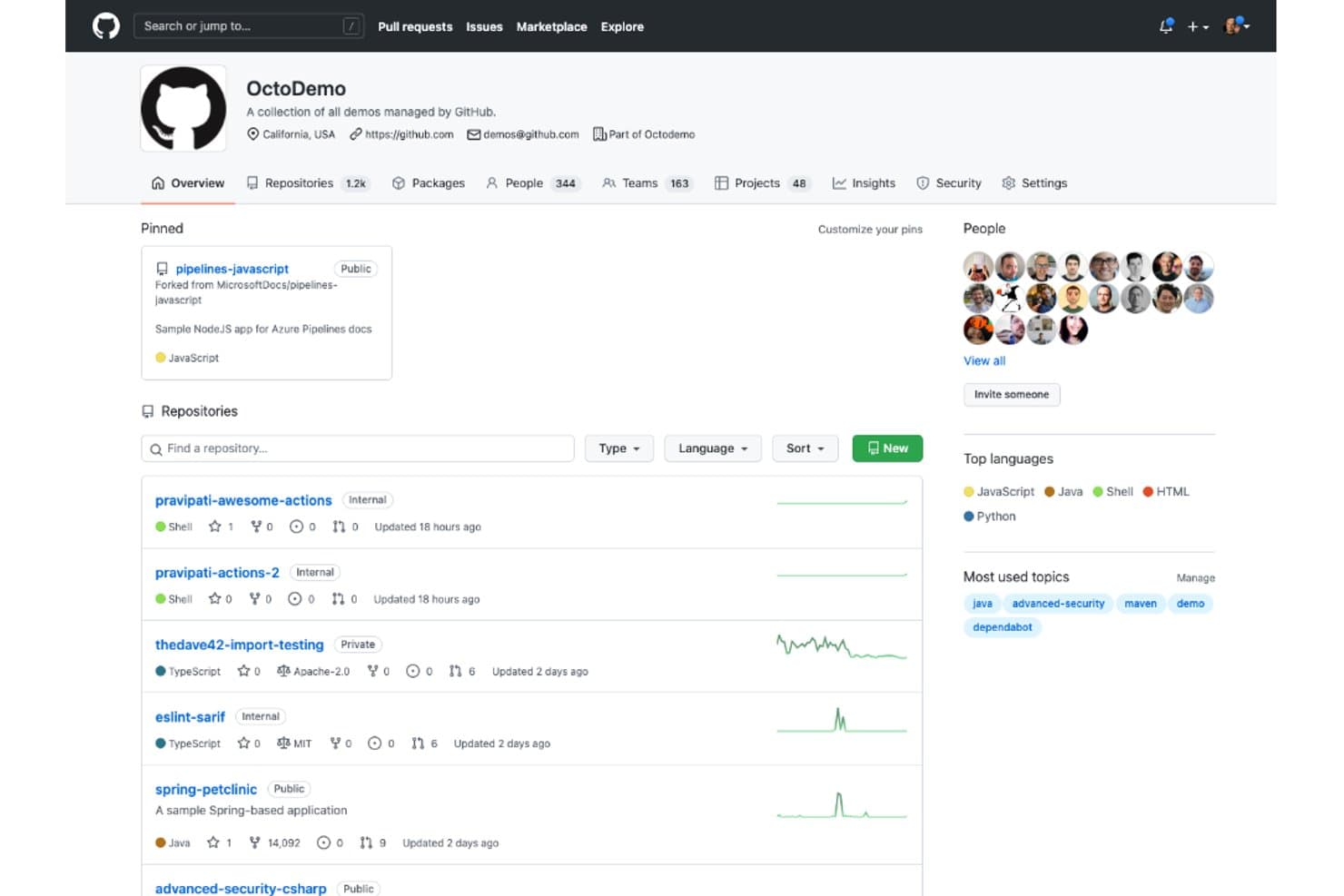
GitHub organizes repositories, teams, and topics within an org profile. GitHub gives software and IT teams a shared platform for source control, code review, issue tracking, and CI/CD, helping them coordinate changes and move builds toward release.
Who Is GitHub Best For?
GitHub is a good fit for developers and engineering teams that want AI coding assistance alongside their repository workflows.
Why I Picked GitHub
I picked GitHub as a GitLab alternative because it’s my pick for Best for AI-assisted coding. Copilot’s inline suggestions and chat help developers draft or explain code in supported IDEs. I like that developers can then submit those changes through GitHub pull requests for review.
GitHub Key Features
- Repository hosting: Store Git repositories with branch and access controls.
- GitHub Actions: Define CI/CD workflows that run on repository events.
- Issue tracking: Track bugs and tasks with labels, milestones, and assignments.
- GitHub Projects: Organize work in table, board, or roadmap views.
GitHub Integrations
GitHub’s Marketplace offers apps for Jira, Slack, CircleCI, Azure Pipelines, Linear, and Snyk. GitHub also provides REST and GraphQL APIs and webhooks for building custom integrations.
Pros and Cons
Pros:
- Large open-source community makes project discovery easier
- Pull requests keep code review beside changes
- Copilot suggests code inside everyday editor workflows
Cons:
- Self-hosting requires Enterprise Server administration
- CI/CD workflows require more assembly than GitLab

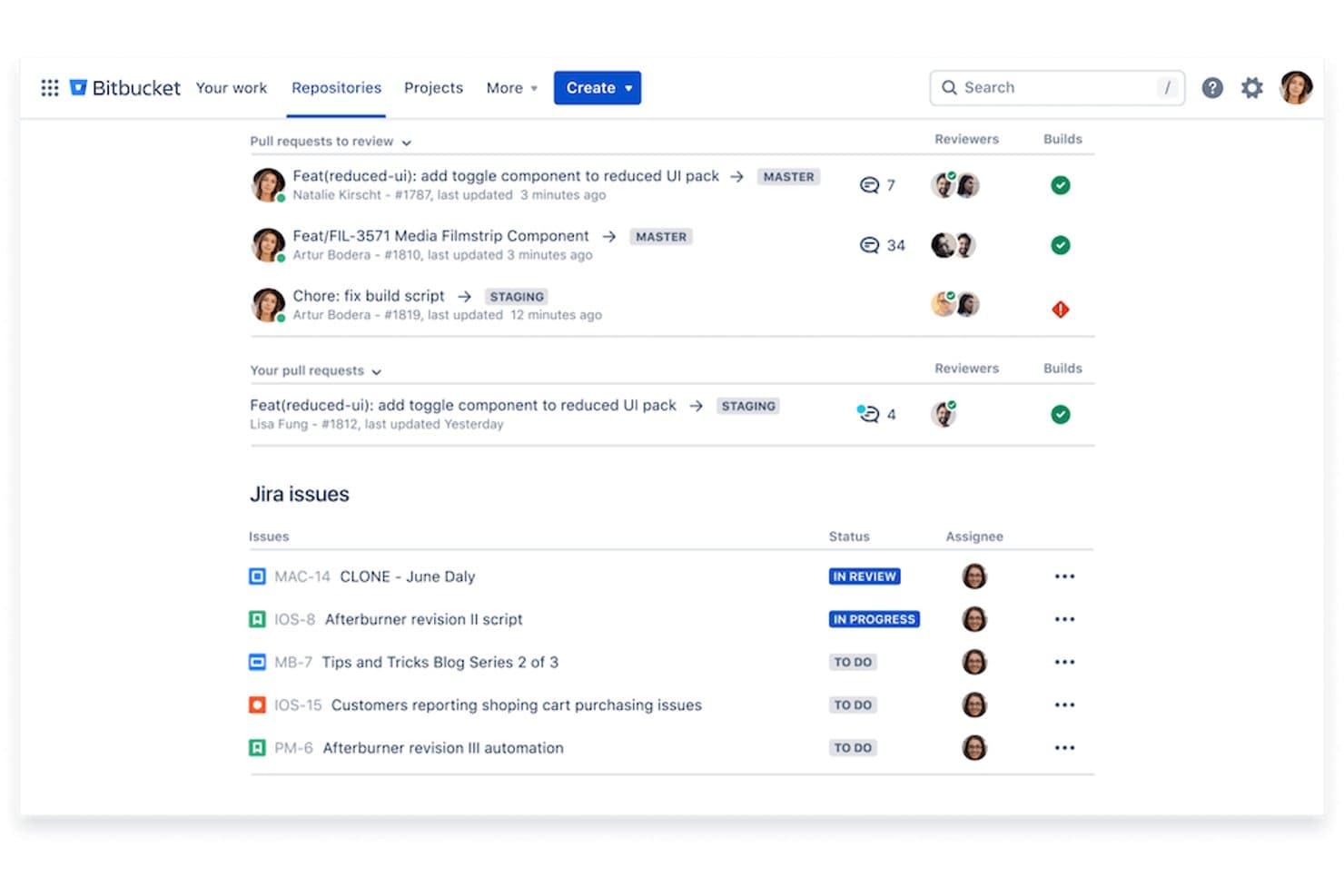
Bitbucket centralizes pull requests and Jira issues in one dashboard. Built for software teams managing shared codebases, Bitbucket provides Git repository hosting and collaboration tools that help developers review changes, control access, and organize releases.
Who Is Bitbucket Best For?
Software teams that manage development work in Jira and want Git repositories and code reviews connected to issue tracking.
Why I Picked Bitbucket
I picked Bitbucket as a GitLab alternative for teams that track development work in Jira. Jira issue keys in branches and commits link code changes to tickets, while Bitbucket pull requests appear in Jira’s development panel. I rate it Best for Jira integration when you need to trace a ticket from code review back to the work.
Bitbucket Key Features
- Bitbucket Pipelines: Run CI/CD workflows from repository configuration files.
- Branch permissions: Restrict who can write to or merge specific branches.
- Merge checks: Require conditions such as successful builds before merges.
- Git LFS: Track large files outside the main Git repository.
Bitbucket Integrations
Bitbucket has native integrations with Jira and Slack, linking code changes to Jira work items and sending repository and pipeline updates to Slack. It also supports Atlassian Marketplace apps and offers a REST API for custom integrations.
Pros and Cons
Pros:
- Granular branch permissions limit write access
- Pull requests surface build status
- Merge checks enforce repository policies
Cons:
- Pipeline reuse and scaling draw complaints
- Large repositories can slow pull requests
Learn more about Bitbucket:
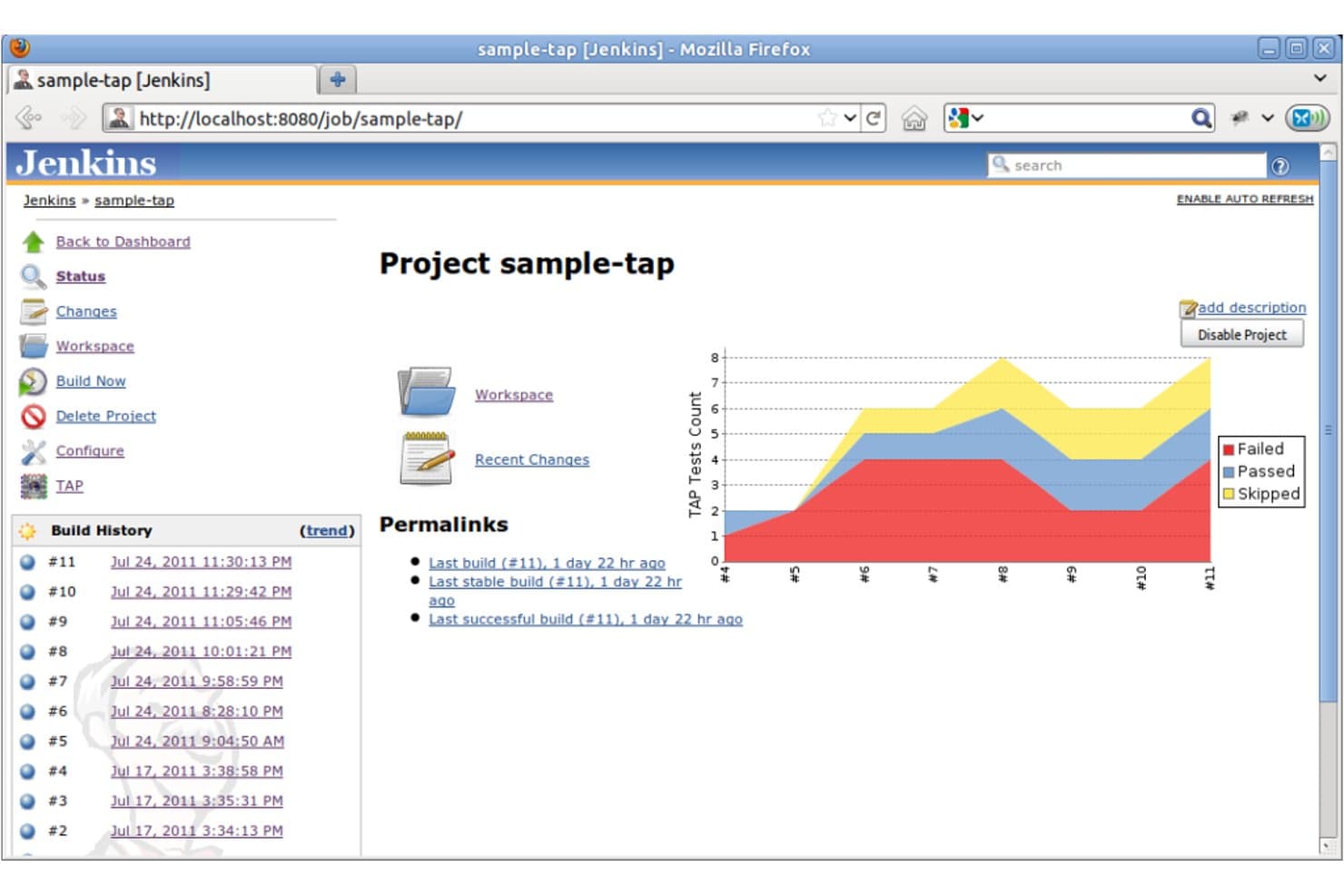
Jenkins tracks TAP test results across builds with a visual trend chart. Jenkins is an open-source automation server for development and IT teams that need flexible CI/CD pipelines to build, test, and deploy software across varied tools and environments.
Who Is Jenkins Best For?
Jenkins suits DevOps teams that want hands-on control over CI/CD pipelines and need to connect builds with a wide range of development tools.
Why I Picked Jenkins
I picked Jenkins, tagged “Best for CI/CD automation,” as a GitLab alternative because its pipelines can live as code in a Jenkinsfile alongside your application. I like that pipeline stages can run across distributed agents, so your team can test Linux and Windows builds in parallel before promoting a release.
Jenkins Key Features
- Plugin ecosystem: Add plugins for source control, notifications, testing, and other integrations.
- Build triggers: Start jobs on a schedule, after upstream jobs, or when source changes are detected.
- Credential management: Store secrets centrally and reference them in job configurations.
- Build history: Review job results, logs, and past runs in the Jenkins web interface.
Jenkins Integrations
Jenkins offers 2,300+ community-contributed plugins through its plugin ecosystem, including plugins for GitHub, Git, and Slack. Its Remote Access API supports custom integrations.
Pros and Cons
Pros:
- Scripted pipelines handle complex release workflows
- Parallel agents run builds across environments
- Versioned Jenkinsfiles keep pipeline changes reviewable
Cons:
- Controller and agent upkeep stays your responsibility
- Plugin updates can break dependent pipelines
 Best for continuous integration
- Free plan + 14-day trial + demo available
- From $540/year (billed annually)
Visit WebsiteCustomer Rating:4.3/5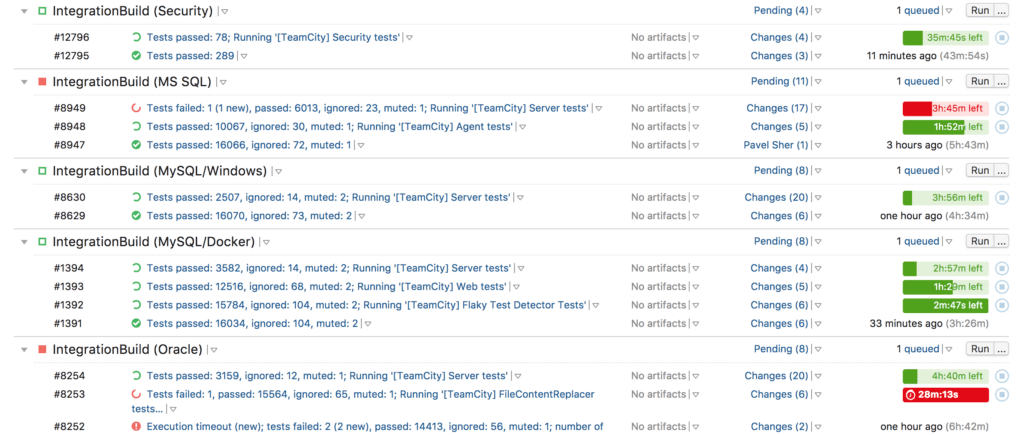
This is TeamCity's continuous integration where you can remotely run and pre-tested commit and also with on-the-fly build progress reporting. JetBrains TeamCity is a build management platform for development and IT teams that connects version control systems with testing and deployment workflows, helping manage code changes and releases across projects.
Who Is TeamCity Best For?
Development and IT teams that need to automate builds and tests across projects will find TeamCity a good fit, especially when they want control over CI infrastructure.
Why I Picked TeamCity
I picked TeamCity as Best for continuous integration because it separates CI orchestration from GitLab while reacting to repository changes. Its VCS triggers launch builds on commits or pull requests, and build chains coordinate dependent jobs while independent tests run in parallel. I like that setup for validating changes before deployment.
TeamCity Key Features
- Build configuration templates: Reuse shared settings across multiple build configurations.
- Kotlin DSL: Define build configurations as versioned Kotlin code.
- Test history: Review test results and trends across builds.
- Code coverage reports: View coverage results collected during builds.
TeamCity Integrations
TeamCity supports integrations with GitHub, GitLab, Bitbucket, Azure DevOps, Perforce, Subversion, Jira, YouTrack, Slack, and AWS. Its REST API provides access to builds, projects, and pipelines for custom integrations.
Pros and Cons
Pros:
- Build history helps trace test failures and regressions
- Templates standardize settings across build configurations
- Build chains coordinate dependent jobs and parallel tests
Cons:
- Upgrades can be cumbersome and time-consuming
- Reviewers describe the interface as dated
Learn more about TeamCity: Best for open-source projects
- Free plan available
- Pricing upon request
Visit WebsiteCustomer Rating:4.3/5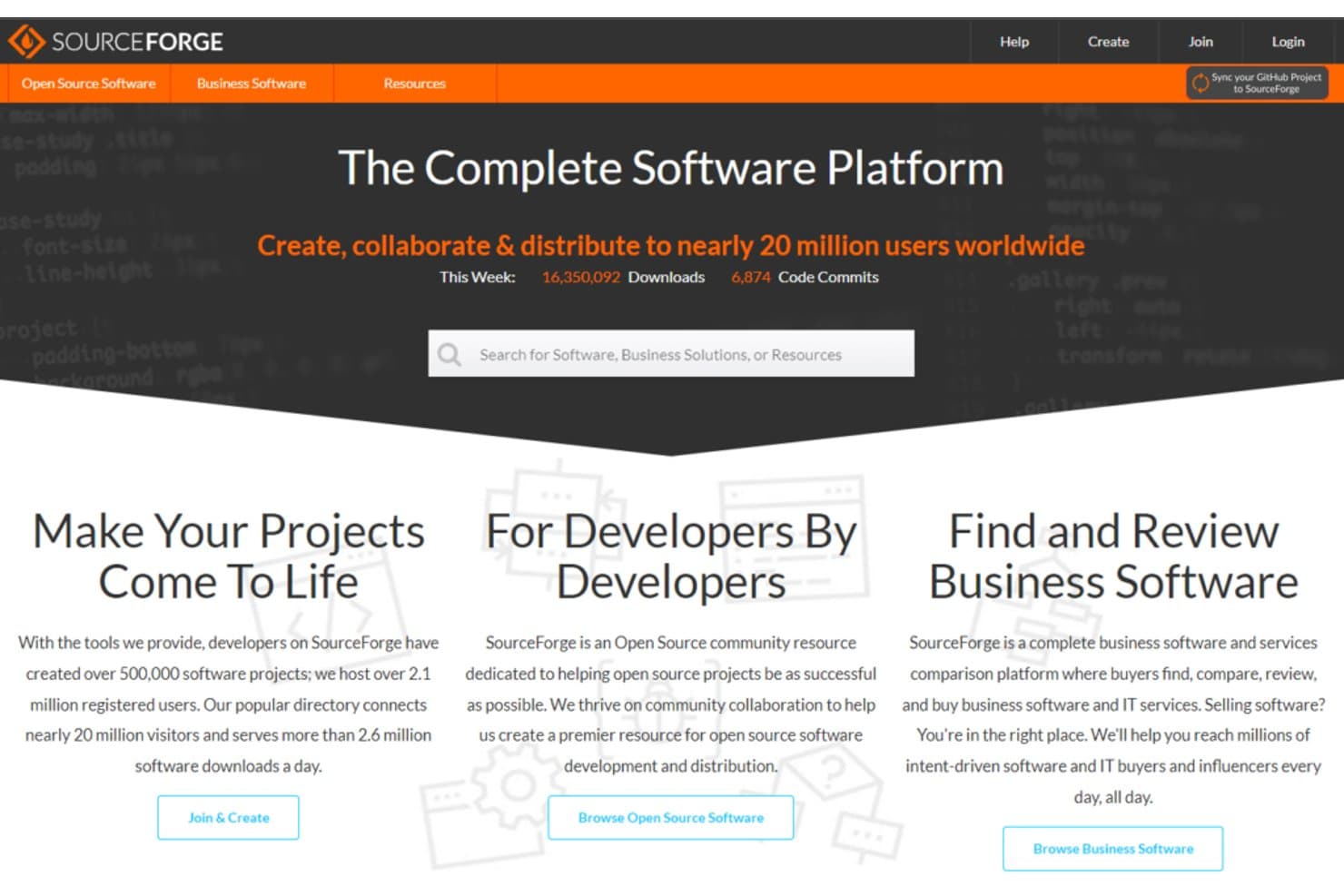
SourceForge helps users create, collaborate, and distribute open source software. SourceForge gives development teams tools to host code, manage project files, and distribute software, helping IT groups coordinate open-source development and releases outside a full DevOps suite.
Who Is SourceForge Best For?
SourceForge suits volunteer and independent open-source maintainers who need a public home for project updates and community downloads.
Why I Picked SourceForge
I picked SourceForge for its “Best for open-source projects” fit as a GitLab alternative. I like that maintainers can host code, manage project files, and distribute software from a public project hub. They can also share project updates and community downloads alongside release files.
SourceForge Key Features
- Issue tracking: Create tickets with milestones, custom fields, labels, and file attachments.
- Mailing lists: Let project members subscribe and follow discussions through email.
- Wiki documentation: Write Markdown pages with attachments and code syntax highlighting.
- Forums: Enable email or RSS subscriptions, with moderation and spam protection.
SourceForge Integrations
SourceForge doesn’t clearly document native integrations for its open-source project hosting; Zapier support is documented for buyer-intent data. It offers Allura and download statistics APIs for custom connections.
Pros and Cons
Pros:
- Tickets, forums, and mailing lists support project communities
- Download statistics help maintainers track release interest
- Code repositories and release hosting share one project hub
Cons:
- No comparable built-in CI/CD pipeline suite
- Some reviewers describe the interface as dated
Learn more about SourceForge: 6Best for project management
Jira
- Free plan available
- From $8.48/user/month (billed annually)
Visit WebsiteCustomer Rating:4.3/5
Take a look at Jira's agile board, where you can plan, track and manage projects. Jira is a project management tool designed for agile teams to plan, track, and manage software development projects. It caters to developers, project managers, and teams looking to improve their workflow and collaboration.
Why it's a good GitLab alternative: Jira excels in project management, offering features like agile boards and backlog prioritization that help your team stay organized. The tool allows you to create customizable workflows, ensuring that your projects align with your team's specific processes.
Jira's reporting and analytics capabilities provide insights into your team's performance and project progress. Unlike GitLab, Jira focuses on enhancing project management and collaboration among team members.
Standout features & integrations:
Features include roadmaps, advanced search, and customizable dashboards. Roadmaps help visualize your project’s timeline and objectives for better planning. Advanced search with JQL and personalized dashboards make it easy to track issues and monitor team progress.
Integrations include Confluence, Bitbucket, Slack, Microsoft Teams, GitHub, Trello, Zoom, Google Drive, Zendesk, and Salesforce.
Pros and Cons
Pros:
- Advanced search capabilities
- Detailed reporting and analytics
- Strong project management features
Cons:
- Complex configuration options
- Can be overwhelming for new users
Learn more about Jira:
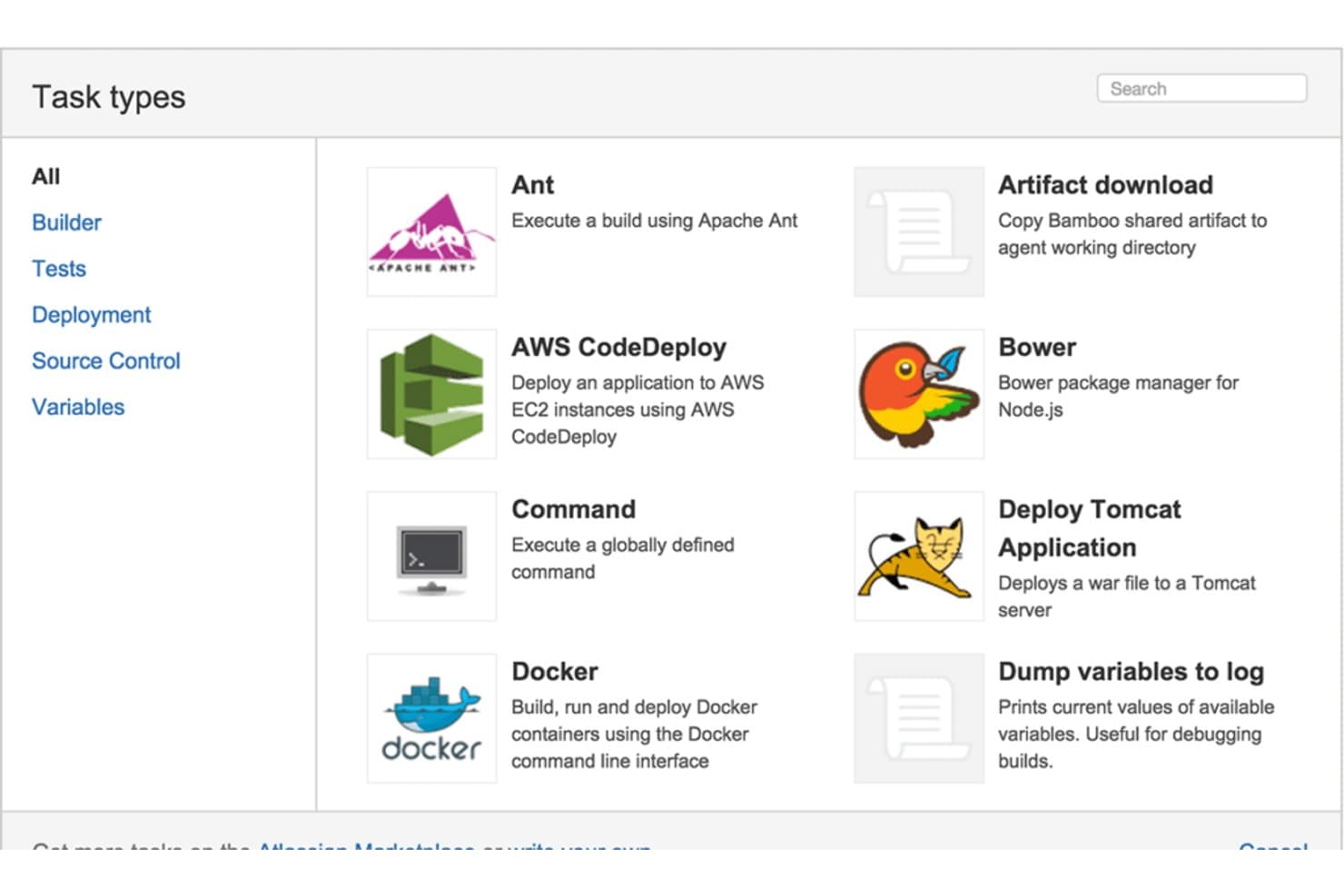
Bamboo lets users choose from multiple task types when building pipelines. Bamboo is a CI/CD server for software teams that need to automate builds, tests, and deployments while coordinating release work across development and operations.
Who Is Bamboo Best For?
Bamboo suits software delivery teams that use Atlassian tools and want to connect build and deployment workflows with their existing development processes.
Why I Picked Bamboo
I picked Bamboo for the “Best for Atlassian pipelines” slot because it ties build and deployment work to Atlassian development workflows. Its automated workflows cover the path from code to deployment, while Bitbucket and Jira Software connections help track a feature request through to release.
Bamboo Key Features
- Build agents: Run jobs on local or remote agents.
- Deployment projects: Organize releases into environments and track deployments.
- Plan branches: Create branch-specific build plans as Bamboo detects repository branches.
- Build artifacts: Define files to preserve and share between build jobs.
Bamboo Integrations
Bamboo has native integrations with Bitbucket and Jira Software, linking repository changes and issues to builds and deployments. It also offers a REST API for custom integrations.
Pros and Cons
Pros:
- Remote agents distribute build and deployment workloads
- Deployment projects organize releases by environment
- Branch-specific plans track repository changes
Cons:
- Data Center support ends in 2029
- Pipeline-as-code can frustrate routine maintenance
Learn more about Bamboo:
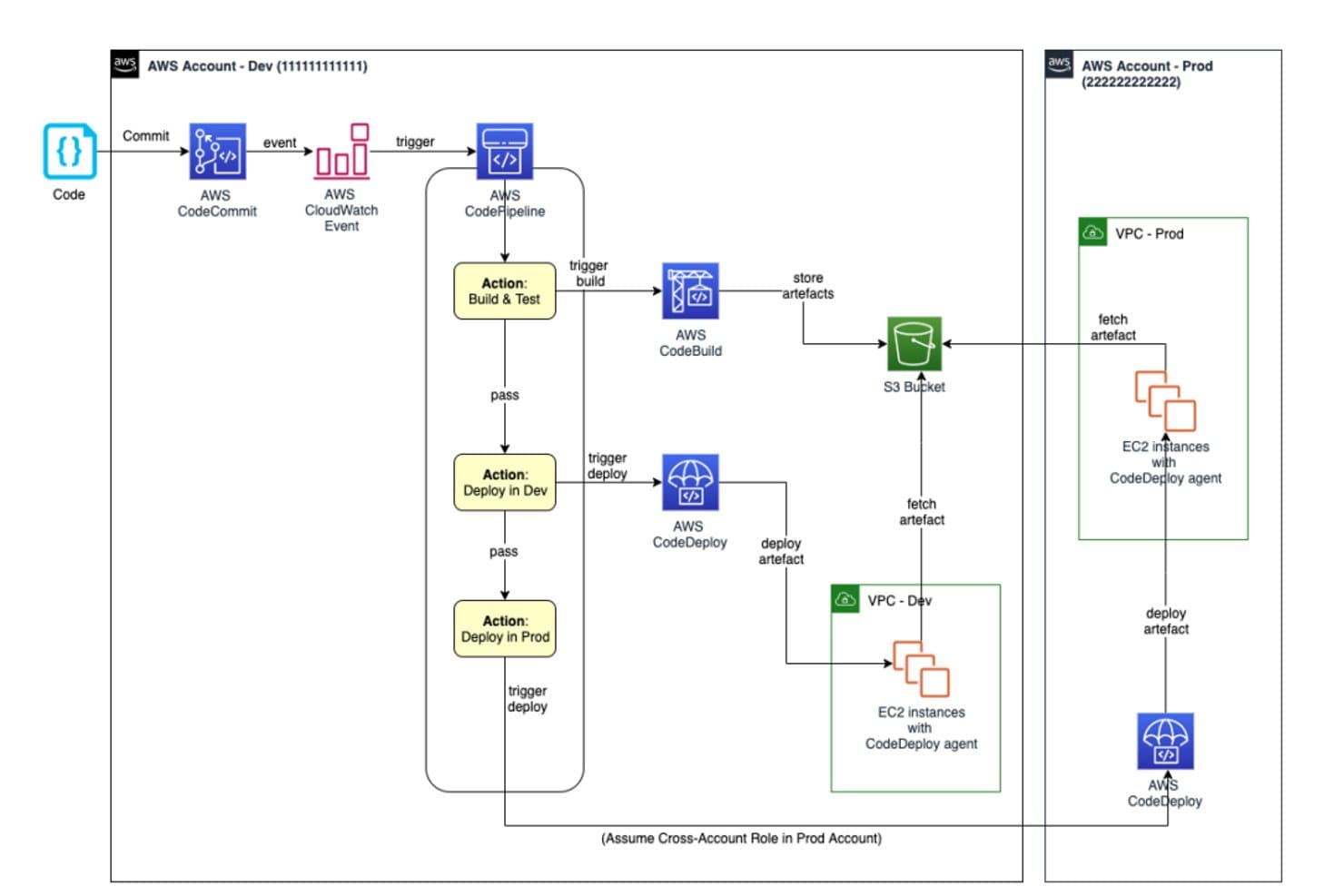
AWS CodeCommit enables cross-account CI/CD pipelines to dev and prod environments. AWS CodeCommit gives software teams a managed Git repository service for organizing code changes, coordinating contributions, and maintaining source control as projects grow.
Who Is AWS CodeCommit Best For?
AWS CodeCommit suits development and IT teams already working in AWS who want their source control to fit their cloud environment.
Why I Picked AWS CodeCommit
I picked AWS CodeCommit as a GitLab alternative for Best for AWS integration. I like that IAM policies control repository access, while CloudTrail records API activity for audits. Repository triggers can also invoke AWS Lambda or send Amazon SNS notifications, such as when developers push changes.
AWS CodeCommit Key Features
- Git compatibility: Use familiar Git commands and tools with CodeCommit repositories.
- Pull requests: Review proposed changes, discuss code, and approve or reject updates.
- Branch management: Create branches to develop changes separately from the main code line.
- Encryption: Protect repository data with encryption at rest and in transit.
AWS CodeCommit Integrations
AWS CodeCommit integrates with 12 AWS services, including AWS Amplify, AWS CloudTrail, Amazon CloudWatch Events, AWS CodeBuild, Amazon CodeGuru Reviewer, AWS CodePipeline, AWS Key Management Service, AWS Lambda, Amazon SNS, and AWS CloudFormation. It also provides an API for custom integrations.
Pros and Cons
Pros:
- Familiar Git workflows need no proprietary client
- No source-control servers to maintain
- Repository permissions follow AWS IAM policies
Cons:
- Search and repository browsing feel limited
- Pull-request reviews feel clunky beside GitLab
Learn more about AWS CodeCommit:
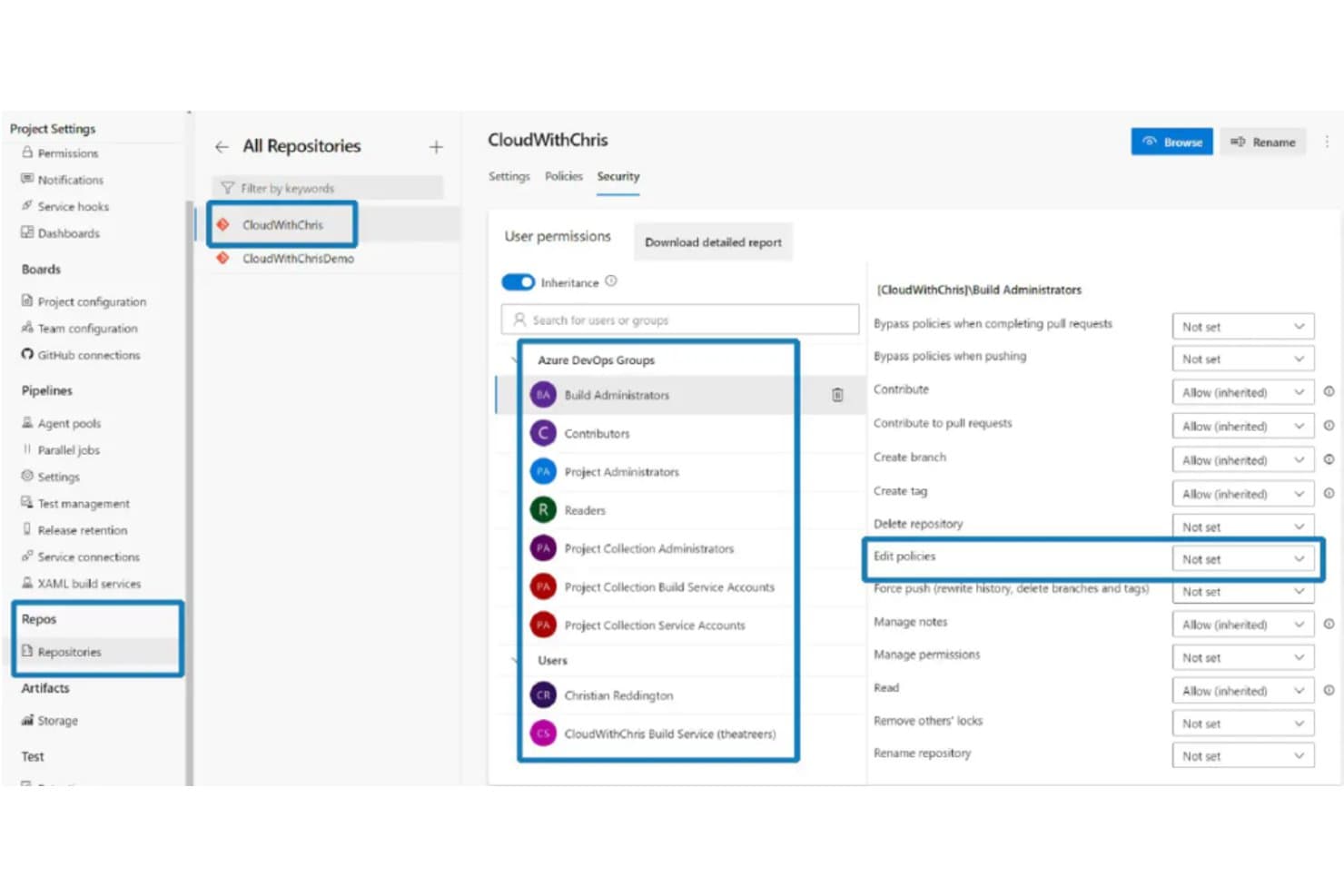
Azure DevOps lets users manage repository security permissions by group. Azure DevOps is a software delivery platform for development and IT teams that need to coordinate work, manage code, automate builds and releases, and address bottlenecks across complex projects.
Who Is Azure DevOps Best For?
Azure DevOps suits software and IT teams working in the Microsoft ecosystem that want development and delivery tools connected to their existing workflows.
Why I Picked Azure DevOps
I picked Azure DevOps as a GitLab alternative because it’s Best for Microsoft integration. I like how Azure Boards links work items to code changes and pipeline runs, so I can trace a support fix from ticket through release. Azure Pipelines also builds and deploys Azure workloads from the same project.
Azure DevOps Key Features
- Azure Repos: Host Git repositories and review changes with pull requests.
- Azure Test Plans: Create test cases and run manual or exploratory tests.
- Azure Artifacts: Create, host, and share packages with your team.
- Dashboards: Build project dashboards with configurable charts and widgets.
Azure DevOps Integrations
Azure DevOps supports integrations with Slack and Microsoft Teams for Azure Boards and Repos, and with ServiceNow and Jenkins for Azure Pipelines; service hooks also connect with Datadog, Grafana, and Trello. Marketplace extensions and REST APIs support additional integrations and custom connections.
Pros and Cons
Pros:
- Boards support configurable backlogs and sprint tracking
- Runs CI/CD across Linux, macOS, and Windows
- Links work items, code changes, and releases
Cons:
- Backlog templates and reporting remain limited
- Clunky navigation slows routine project work
Learn more about Azure DevOps:
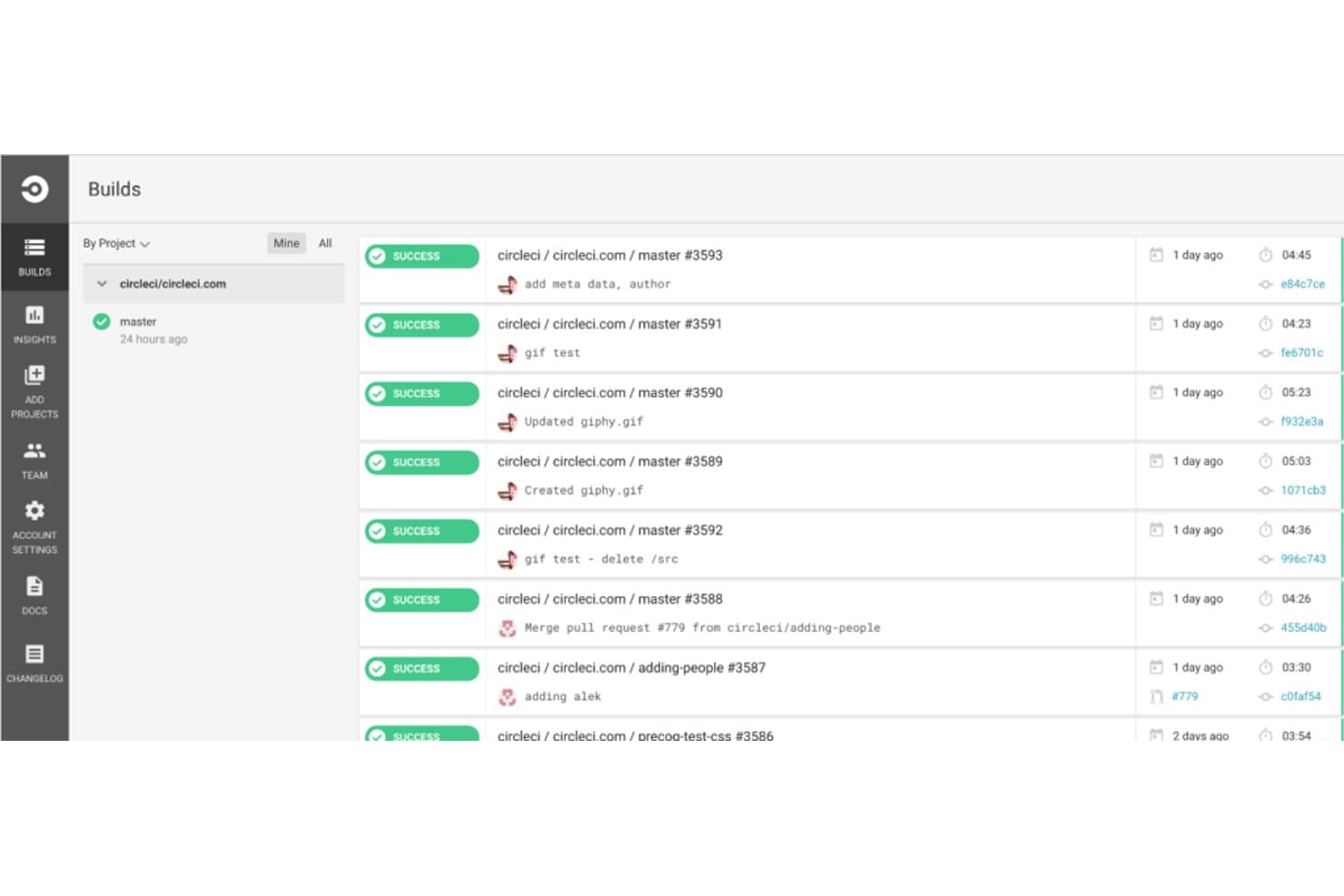
CircleCI displays real-time build statuses across project branches. For engineering teams that need dependable software releases, CircleCI is a CI/CD platform that automates build, test, and deployment workflows across code repositories.
Who Is CircleCI Best For?
Software engineering and DevOps teams can use CircleCI to validate code changes across repositories before merging or deployment.
Why I Picked CircleCI
I picked CircleCI as a GitLab alternative because it’s Best for fast build testing. Parallel jobs and test splitting distribute suites across executors, while dependency caching avoids rebuilding unchanged packages. I like this setup for pull requests with lengthy test suites, where faster feedback helps developers catch regressions before merging.
CircleCI Key Features
- Workflows: Define job sequences, dependencies, and approval steps in a pipeline.
- Orbs: Import reusable configuration packages for common tools and tasks.
- Docker executor: Run jobs in Docker containers with a specified image.
- Contexts: Store environment variables and restrict access to approved projects or users.
CircleCI Integrations
CircleCI connects with GitHub, Bitbucket Cloud, and GitLab for repository access and build triggers, and offers an official Slack app for workflow notifications. Its API v2 supports custom integrations.
Pros and Cons
Pros:
- Workflows support job dependencies and approvals
- Docker layer caching avoids repeated builds
- Test splitting shortens long suites
Cons:
- Large pipelines can create repetitive configuration
- Caching requires manual key management
Learn more about CircleCI:
Alte alternative la GitLab
Iată câteva alternative suplimentare la GitLab care nu au ajuns pe lista mea scurtă, dar merită totuși analizate:
- 11MercurialBest for distributed version control
- 12Travis CIBest for GitHub CI pipelines
- 13RhodeCodeBest for enterprise security
- 14TuleapBest for agile project management
- 15PerforceBest for large-scale projects
- 16Plastic SCMBest for game development teams
- 17IBM Rational ClearCaseBest for complex software builds
- 18Subversion (SVN)Best for centralized version control
- 19LaunchpadBest for open-source collaboration
- 20Crucible (by Atlassian)Best for peer code reviews
How I Evaluate GitLab Alternatives
I look at GitLab alternatives in two layers: must-haves like native CI/CD, merge request workflows, and self-hosted options, then differentiators like AI assistance and deployment flexibility.
Core Functionality (Table Stakes For This List)
When I'm selecting tools for my list, I rank each one on a scale from 0 (does not offer the functionality) to 5 (excels in this area) for each core functionality listed below. Then, I calculate the tool's total score into a percentage. Each tool needs to achieve a minimum total score of 75% to be considered for inclusion.
- Git Repository Management: I evaluate how each platform handles branching strategies, merge workflows, and repo-level permissions—things like monorepo support, LFS, and repository mirroring.
- Built-In CI/CD Pipelines: Each tool needs native pipeline automation configured via code, so I check for features like parallel jobs, matrix builds, and self-hosted runners.
- Issue & Project Tracking: I look at how tightly issues connect to commits and pull requests, and whether the tool supports boards, milestones, and sprint-style planning.
- Code Review & Collaboration: Strong review workflows matter, so I evaluate inline commenting, approval gates, branch protection rules, and features like code owners assignments.
- Security & DevSecOps Scanning: Tools like GitHub, Bitbucket, and Gitea handle this differently, so I check for native SAST, dependency scanning, secret detection, or container scanning.
- Deployment Flexibility: I look at whether the platform offers both SaaS and self-managed options, since many teams need on-premises hosting for compliance or data residency reasons.
Once I have a list of tools that meet this criteria, I consider what sets each platform apart.
Differentiating Factors (What Sets Vendors Apart)
Here's how I compare and contrast different vendors:
Standout Features
AI-powered code suggestions and review summaries are increasingly built into platforms like GitHub and Bitbucket, and I evaluate how deeply these features integrate into the daily development workflow. I also check for built-in package and artifact registries—teams running containerized workloads benefit from hosting Docker images and Helm charts alongside their code. Value stream analytics is another differentiator, since DORA metrics and cycle time dashboards help engineering managers pinpoint delivery bottlenecks without stitching together external reporting tools.
Beyond Features
Migration tooling is one of the first things I evaluate, since moving repositories, CI configs, and issue histories from GitLab can be a major undertaking without automated import support. Security and compliance certifications also weigh heavily—teams in regulated industries need coverage like SOC 2 Type II or ISO 27001, and I check whether each vendor supports SSO, SAML, and SCIM for enterprise identity management. Ecosystem fit matters too, so I look at integrations with tools like Jira, Slack, and major cloud providers that most teams already rely on.
De ce să cauți o alternativă la GitLab?
Interfața aglomerată a GitLab poate necesita timp pentru a fi învățată, proiectele și conductele mari pot părea lente, iar rularea pe propriile servere necesită hardware performant, aspect important pe măsură ce echipele și bazele de cod cresc. Iată când un alt instrument s-ar putea potrivi mai bine:
- Vrei ca dezvoltatorii să fie productivi din prima zi. Unii utilizatori consideră că interfața GitLab este aglomerată și că setările sunt greu de găsit, mai ales pentru începători. Înainte de a lua o decizie, cere-le noilor membri ai echipei să efectueze o îmbinare și să ruleze o conductă reală în fiecare perioadă de testare.
- Ai nevoie de compilări mai rapide pentru proiecte mari. Unii utilizatori raportează întârzieri în cazul depozitelor și conductelor mari, ceea ce încetinește feedbackul pentru dezvoltatori. Instrumente precum CircleCI accelerează compilările prin memorarea în cache a straturilor Docker, împărțirea testelor și lucrul în paralel.
- Vrei o configurare a conductelor mai ușor de realizat corect. Unii utilizatori consideră dificilă configurarea conductelor, deoarece erorile minore pot întrerupe compilările, iar cauzele eșecurilor sunt greu de identificat. Platforme precum TeamCity folosesc șabloane de compilare pentru a standardiza setările și păstrează un istoric al compilărilor care te ajută să identifici eșecurile.
- Preferi să nu îți administrezi propriile servere. Punctul de pornire recomandat de GitLab pentru o instalare găzduită local este un server bine echipat, iar problemele de infrastructură nu intră în domeniul de asistență al GitLab. Opțiuni precum AWS CodeCommit îți oferă fluxuri de lucru Git familiare, fără servere de control al codului sursă pe care să trebuiască să le întreții.
GitLab rămâne alegerea potrivită dacă vrei să creezi, să securizezi și să rulezi software într-o singură aplicație, cu cod, conducte CI/CD și scanare de securitate într-un singur loc. Pentru echipele care preferă să nu combine mai multe instrumente, acest avantaj poate compensa o curbă de învățare abruptă și conductele mai lente în cazul proiectelor mari.
Funcțiile principale ale GitLab
Iată câteva dintre funcțiile principale ale GitLab, care te ajută să compari ceea ce oferă soluțiile alternative:
- Instrumente de planificare: Gestionați portofolii și urmăriți progresul cu ajutorul epicurilor și al etapelor importante.
- Gestionarea codului sursă: Activați controlul versiunilor și colaborarea la nivelul codului.
- Integrare/livrare continuă: Automatizați procesele de testare și implementare.
- Securitate și conformitate: Gestionați securitatea lanțului de aprovizionare software.
- Observabilitate și măsurare: Obțineți informații despre performanța proiectului.
- Gestionarea sarcinilor: Organizați sarcinile împărțind problemele în componente mai mici.
- Analiza problemelor: Analizați problemele la nivel de grup pentru a obține informații utile.
- Integrarea Jira: Conectați-vă la Jira pentru o gestionare îmbunătățită a proiectelor.
- Urmărirea timpului: Înregistrați timpul petrecut pentru probleme și solicitări de îmbinare.
- Paginile GitLab: Implementați site-uri web statice cu funcții precum domenii personalizate și suport HTTPS.