

A escolha das ferramentas DevSecOps certas pode melhorar significativamente a integração da segurança no ciclo de vida do desenvolvimento de software, bem como a conformidade, a gestão de riscos e a velocidade de implementação — quer precise de automatizar verificações de segurança, aplicar políticas ou mitigar vulnerabilidades numa fase inicial do desenvolvimento.
No entanto, encontrar a opção mais adequada pode parecer avassalador, dada a quantidade de opções disponíveis — e o desafio de equilibrar a segurança com a eficiência do desenvolvimento.
Neste artigo, baseio-me na minha experiência como especialista em DevSecOps e em testes práticos de dezenas de ferramentas de automatização da segurança para analisar as suas capacidades, os casos de utilização ideais e a forma como podem ajudá-lo a obter uma entrega de software mais rápida e segura, com o mínimo de perturbação nos fluxos de trabalho de desenvolvimento.
Why Trust Our Software Recommendations
6,700+
Reviews
20
Industry experts
16+
Evaluation factors
14
Years
Our team has been testing and reviewing software since 2012. As tech leaders ourselves, we know how difficult—and important—it is to choose the right software.
For this guide, we evaluated tools using hands-on testing and independent research, scoring tools using our selection criteria.
Our reviews reflect our human editorial judgment, not a sales pitch.
Expert reviewers:
- Paulo Gardini MiguelTech Director
 Tim FisherVP of AI
 Gabriel RosasTech Lead & Software Architect
 Christhian GruhnTech Lead & Platform Architect

Tabela de comparação de ferramentas DevSecOps
Esta tabela de comparação resume os detalhes de preços das minhas principais escolhas de ferramentas DevSecOps:
| Tool | Best For | Trial Info | Price | ||
|---|---|---|---|---|---|
| 1 | Best for security fixes across the stack | Free plan available | From $350/month | Website | |
| 2 | Best for SCA and SAST with reachability analysis | Free demo available | Up to $1,000/dev/year (billed annually) | Website | |
| 3 | Best for context-aware SAST | Free plan available | From $200/month | Website | |
| 4 | Best for cloud monitoring and AI insights | Free plan + 30-day trial + demo available | From $10/month | Website | |
| 5 | Best for full-stack application monitoring | Free plan available | From $15/month (billed annually) | Website | |
| 6 | Best for performance engineering and analysis | Free plan available | From $10/user/month | Website | |
| 7 | Best for AI-driven end-to-end testing | 14-day free trial + free demo available | Pricing upon request | Website | |
| 8 | Best for creating form endpoints in minutes | From $10/user/month | Website | ||
| 9 | Best for real-time observability and analytics | From $10/user/month (billed annually) | Website | ||
| 10 | Best for observability and debugging in production systems | Free plan + demo available | From $130/month | Website |


Análises das melhores ferramentas DevSecOps
Abaixo encontram-se os meus resumos detalhados das melhores ferramentas DevSecOps que chegaram à minha lista de seleção. As minhas análises apresentam uma visão detalhada das principais funcionalidades, vantagens e desvantagens, integrações e casos de utilização ideais de cada ferramenta, para ajudá-lo a encontrar a melhor opção para si.
 Best for security fixes across the stack
- Free plan available
- From $350/month
Visit WebsiteCustomer Rating:4.7/5
Aikido Security surfaces CVE details and fix paths per dependency. Aikido Security is a DevSecOps platform that consolidates SAST, SCA, secrets detection, IaC scanning, container scanning, CSPM, DAST, and runtime protection into a single tool covering code, cloud, and runtime environments.
Who Is Aikido Security Best For?
Aikido Security is a strong fit for engineering teams that need to secure code, containers, and cloud infrastructure without managing a separate tool for each layer.
Why I Picked Aikido Security
I picked Aikido Security as one of the best because it's the only tool on my list that runs reachability analysis alongside CVE exploitability triage, so instead of triaging hundreds of dependency alerts, I can see exactly which vulnerable functions are actually callable from my application's entry points. AutoFix then generates reviewable PRs with the minimum version bump needed, distinguishing patch upgrades from major ones. That combination of "is this reachable?" and "here's the fix" covers the full remediation loop across code, containers, and IaC without switching tools.
Aikido Security Key Features
- Compliance reporting: Generates audit-ready reports mapped to frameworks including ISO 27001, SOC 2, PCI DSS, HIPAA, NIS2, and DORA based on active scans and findings.
- IDE plugin scanning: Surfaces SAST, secrets, and IaC findings inline as you code, with remediation details available directly in the editor.
- PR and release gating: Blocks pull requests or deployments when new issues meet or exceed a configured severity threshold across selected scan types.
- CVE exploitability analysis: Runs agent-based triage on open dependency CVEs nightly, automatically adjusting severity or snoozing findings based on exploitability evidence.
Aikido Security Integrations
Aikido Security offers 100+ integrations, including GitHub Actions, GitLab CI/CD, Jenkins, CircleCI, Azure Pipelines, AWS, Google Cloud, Azure, Jira, and Visual Studio Code. Its public REST API and webhooks support custom integrations.
Pros and Cons
Pros:
- Reviewers praise actionable triage and remediation
- AutoFix proposes reviewable cross-stack fixes
- Reachability helps prioritize exploitable dependency risks
Cons:
- Reviewers want deeper reporting detail
- Some findings still produce false positives
Learn more about Aikido Security: Best for SCA and SAST with reachability analysis
- Free demo available
- Up to $1,000/dev/year (billed annually)
Visit WebsiteCustomer Rating:4.7/5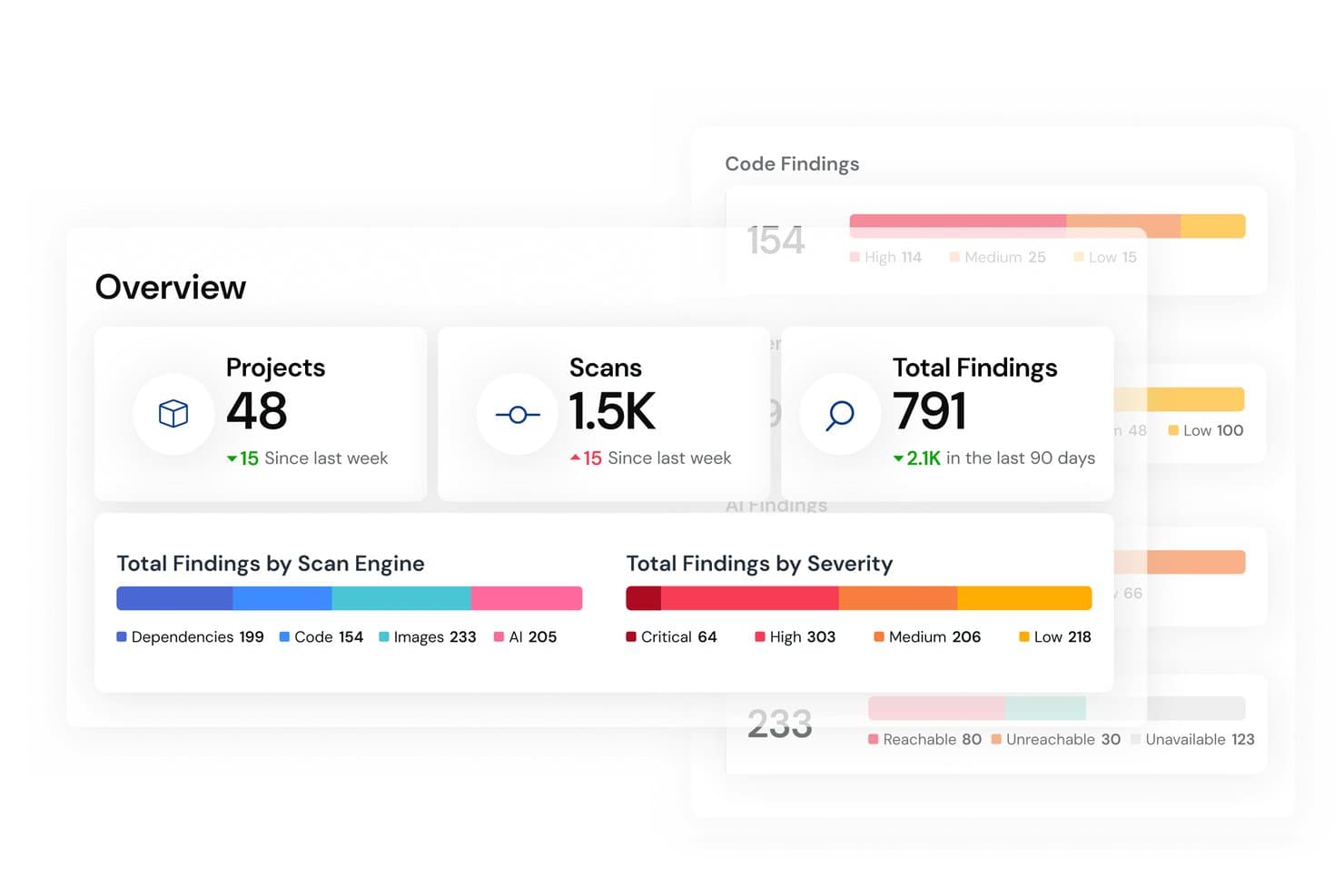
Mend.io centralizes security findings across scan engines and severity levels. Mend AppSec is a DevSecOps platform that unifies SAST, SCA, and container scanning across CI/CD pipelines, with reachability analysis, AI-assisted triage, and automated dependency-fix pull requests built into developer workflows.
Who Is Mend AppSec Best For?
Mend AppSec is a strong fit for security and engineering teams that need mature SCA and SAST coverage with reachability analysis built directly into their CI/CD pipelines.
Why I Picked Mend AppSec
I picked Mend AppSec as one of the best because its reachability analysis sets it apart from tools that simply flag every vulnerable dependency. Instead of burying your team in alerts, it traces whether your application code actually calls the vulnerable function, so you fix what matters first. I also like that AI-assisted triage classifies SAST findings as True Positive, Inconclusive, or False Positive with data-flow context, cutting the manual review cycle significantly.
Mend AppSec Key Features
- Malicious package detection: Identifies typosquats, dependency-confusion attacks, and packages containing backdoor or data-exfiltration code in your open-source dependencies.
- Unified policy engine: Applies shared severity thresholds, SLAs, and license rules across SAST, SCA, and container scans, with violations triggering alerts, pipeline failures, or pull-request blocks.
- SBOM generation and ingestion: Exports software bills of materials in SPDX and CycloneDX formats and imports third-party SBOMs, with VEX data to communicate component exploitability.
- IaC scanning: Scans Terraform, CloudFormation, Kubernetes YAML, Helm, and Dockerfiles for misconfigurations via the Mend CLI.
Mend.io Integrations
Mend.io integrates with GitHub, GitLab, Azure DevOps, Bitbucket, Jenkins, CircleCI, AWS CodeBuild, Docker, Amazon ECR, and JFrog Artifactory. Its REST API supports custom integrations.
Pros and Cons
Pros:
- Dependency-fix pull requests reduce manual remediation
- Pipeline gates enforce security policies and SLAs
- Reachability analysis helps prioritize vulnerable dependencies
Cons:
- Policy setup takes effort across large codebases
- False positives still require manual review
Learn more about Mend.io:

ZeroPath provides a unified security dashboard that highlights scan activity, vulnerability types, issue severity, and top critical findings at a glance. ZeroPath provides an AI-native application security platform designed to cater to security-conscious companies aiming to enhance their application security processes. By offering tools such as Static Application Security Testing (SAST) and Software Composition Analysis (SCA), ZeroPath intelligently identifies and auto-fixes vulnerabilities, making it particularly appealing to businesses that prioritize minimizing false positives and gaining actionable insights.
Why I Picked Zeropath
I picked ZeroPath because it brings a distinctive focus on detecting exploitable vulnerabilities (not just surface-level issues) through features like context-aware SAST with exploitability scoring, and one-click AI-generated patching that helps developers act on security findings without leaving the code flow. These align directly with what your team may struggle with—slow builds, noisy alerts, and friction between security and development—and help make security feedback feel like part of the workflow rather than an obstacle.
Zeropath Key Features
In addition to its core vulnerability remediation capabilities, Zeropath offers several other valuable features:
- Real-Time Feedback: The platform provides immediate insights to developers, helping them address security issues before code merges.
- Incremental Scanning: Analyzes only changed code paths, so PR checks complete in under 60 seconds.
- Natural-Language Policy Engine: Lets you write code-security rules in plain language and enforce them across repositories.
- Developer-Friendly Integrations and Toolchain Support: Includes VS Code plugin, CLI tools, REST API and visual application analysis for embedding security into dev workflows.
Zeropath Integrations
Integrations include GitHub, GitLab, Bitbucket, Azure DevOps, Jira, Linear, Slack and other security tools.
Pros and Cons
Pros:
- Unified dashboard and analytics gives visibility into security posture and velocity metrics
- One-click or near-automatic remediation support for many vulnerabilities
- Catches logic flaws and hidden authorization issues that many scanners miss
Cons:
- May be over-featured for small teams that only need basic vulnerability scanning
- As with any AI-powered tool, trusting the automation (patch generation, triage) requires verification
Learn more about Zeropath: Best for cloud monitoring and AI insights
- Free plan + 30-day trial + demo available
- From $10/month
Visit WebsiteCustomer Rating:4.7/5
Site24x7’s AI-powered dashboard unifies application, cloud, and network monitoring in one view. Site24x7 offers a comprehensive suite of monitoring tools tailored for DevSecOps, including website monitoring, application performance monitoring, log management, and cloud cost management. It caters to IT professionals and businesses seeking to enhance operational efficiency and security. By emphasizing proactive diagnostics and risk assessment, Site24x7 stands out as a valuable resource for organizations focused on maintaining robust and secure digital environments.
Why I Picked Site24x7
I picked Site24x7 because it excels in providing comprehensive cloud monitoring and AI-driven insights, which are crucial for DevSecOps tools. Its ability to seamlessly integrate with major cloud platforms like AWS, Azure, and GCP allows your team to monitor cloud resources effectively. The platform's AI-driven IT monitoring offers proactive diagnostics, ensuring that potential issues are identified before they impact operations. In my experience, the extensive plugin integrations further enhance its capability to manage diverse IT environments, making it a strong contender for organizations aiming to maintain security and efficiency.
Site24x7 Key Features
Aside from its cloud monitoring capabilities, I also found the following features to be particularly useful:
- Real User Monitoring: This feature helps you understand the actual user experience by tracking how real users interact with your applications.
- Synthetic Web Transaction Monitoring: It allows you to simulate user transactions to ensure that your application performs well under various conditions.
- Network Monitoring: This provides insights into your network's health, helping identify and resolve connectivity issues.
- Log Management: It enables you to collect, analyze, and manage logs from various sources, aiding in troubleshooting and security monitoring.
Site24x7 Integrations
Site24x7 offers a variety of native integrations to enhance its monitoring capabilities. Integrations include Slack, Microsoft Teams, Zoho Cliq, Discord, Telegram, Jira, ServiceDesk Plus MSP Cloud, Amazon EventBridge, and Zapier.
Pros and Cons
Pros:
- AI-driven anomaly detection
- Real and synthetic user monitoring
- Broad DevSecOps monitoring coverage
Cons:
- Alert customization can feel restrictive
- Limited deep security testing
Learn more about Site24x7: Best for full-stack application monitoring
- Free plan available
- From $15/month (billed annually)
Visit WebsiteCustomer Rating:4.5/5
A photo of the customizable dashboard made for the tool Datadog. Datadog is a powerful tool designed to provide extensive full-stack application monitoring. With its in-depth insights across your entire stack, it firmly earns the title of the best comprehensive application surveillance tool.
Why I Picked Datadog: I chose Datadog for its unmatched ability to delve deep into every layer of your applications. Its breadth of monitoring capabilities stands out, uniquely suited for teams seeking a thorough understanding of their entire stack. That's why it's the best for full-stack application monitoring.
Standout features & integrations:
Datadog offers real-time performance dashboards, extensive automation, and advanced alerting capabilities. These features empower you to stay proactive about potential issues.
On the integration front, Datadog supports many platforms, including AWS, Google Cloud, Azure, and many more, ensuring compatibility with your existing infrastructure.
Pros and Cons
Pros:
- Wide range of integrations
- Extensive automation features
- Comprehensive full-stack monitoring
Cons:
- Can be overwhelming due to the sheer volume of data
- Higher cost compared to some alternatives
- Can be complex for beginners
 Best for performance engineering and analysis
- Free plan available
- From $10/user/month
Visit WebsiteCustomer Rating:4.3/5
A screenshot displaying the APM dashboard of New Relic. New Relic is a tool that offers observability and real-time analytics to help developers and operations teams understand, debug, and improve the performance of their applications. Its strong focus on performance analysis and engineering excels at helping teams refine and maintain high-quality, high-performance applications.
Why I Picked New Relic: I picked New Relic due to its robust suite of features aimed at performance analysis, including detailed analytics and flexible data visualizations. This tool offers real-time insights for developers to quickly address performance issues, making it the top choice for performance engineering and analysis.
Standout features & integrations:
New Relic features extensive real-time analytics, distributed tracing, and error tracking, which are critical for a detailed understanding of application performance.
It also integrates with various other tools like AWS, Azure, and GCP, thus extending its functionality across multiple platforms.
Pros and Cons
Pros:
- Broad range of integrations
- Real-time insights for faster troubleshooting
- Powerful performance analytics
Cons:
- Customization can be complex
- Steep learning curve for some users
- Higher price point
Learn more about New Relic: 7Best for AI-driven end-to-end testing
Mabl
- 14-day free trial + free demo available
- Pricing upon request
Visit WebsiteCustomer Rating:4.2/5
A screenshot of the test automation elements in the tool Mabl. mabl is an intelligent end-to-end test automation platform that offers AI-driven testing capabilities. As the solution is equipped with machine learning algorithms, it proves highly effective at managing and executing complex testing scenarios, justifying its standing as the best for AI-driven end-to-end testing.
Why I Picked mabl: In my evaluation, mabl stood out for its innovative application of AI to the testing landscape. I chose mabl because it allows teams to create, execute, and maintain reliable tests quickly. What makes it unique is its use of machine learning to adapt tests as your application evolves - this feature truly justifies its place as the best for AI-driven end-to-end testing.
Standout features & integrations:
mabl's AI learning capabilities truly set it apart - it auto-heals tests, meaning they evolve with your application, saving significant time during the testing phase. Furthermore, its easy-to-read test output helps users identify issues quickly.
On the integration front, mabl plays well with others, providing integration with popular CI/CD and IDE tools such as Jenkins, Bamboo, CircleCI, and more.
Pros and Cons
Pros:
- Clear and useful test output
- Extensive integration capabilities
- Intelligent auto-healing tests
Cons:
- Limited capabilities for performance testing
- Requires learning to fully utilize AI capabilities
- Could be pricey for small teams
Learn more about Mabl:

Here's a screenshot of the form builder inside Headlessforms. Headlessforms is a specialized tool that helps developers quickly set up form endpoints. This ability to facilitate speedy form creation makes it an optimal choice for tasks requiring swift form integration, cementing its place as the best for creating form endpoints in minutes.
Why I Picked Headlessforms: When it comes to setting up forms, speed and reliability matter, that’s why I picked Headlessforms. Its emphasis on rapid-form endpoint creation makes it a standout. This tool does a specific job well, which is why it's best for anyone needing to create form endpoints in record time.
Standout features & integrations:
Headlessforms offers a streamlined form creation process that bypasses server setup, a huge timesaver. It also delivers robust spam filtering features, an essential open-source component of any form tool.
For integrations, Headlessforms shines by providing webhooks that can easily connect with any of your existing systems.
Pros and Cons
Pros:
- Versatile webhooks for integrations
- Strong spam filtering
- Swift form endpoint creation
Cons:
- Lack of advanced customization options
- Might be overkill for occasional form creators
- Limited to form-related tasks
Learn more about Headlessforms: Best for real-time observability and analytics
- From $10/user/month (billed annually)
Visit WebsiteCustomer Rating:4.5/5
A photo focused on the log search tab of the tool Edge Delta. Edge Delta is a cutting-edge DevSecOps tool with real-time observability and analytics powered by machine learning. Get immediate insights into your system's performance and security.
Why I Picked Edge Delta: Edge Delta delivers a powerful solution for observability and analytics that sets it apart. It harnesses real-time data to give you insight into your DevOps processes. I chose it for the list due to its exceptional capacity to handle massive volumes of data with minimal latency, enabling instant response to potential issues. It shines as the best for real-time observability and analytics, as its performance-focused design ensures timely and accurate insight.
Standout features & integrations:
Edge Delta boasts the ability to process and analyze data at the source, a unique feature that can drastically reduce costs and time for data transport and storage. Its autonomous monitoring capability also canenables you to pinpoint issues swiftly and reliably.
For integrations, it stands strong with major data platforms such as AWS, Azure, GCP, and more, providing a highly compatible solution that fits into diverse technological ecosystems.
Pros and Cons
Pros:
- Broad compatibility with major data platforms
- Autonomous monitoring capability
- Efficient real-time analytics
Cons:
- Customization options can be overwhelming
- The cost may be higher for smaller DevSecOps teams
- Requires a steep learning curve for new users
Learn more about Edge Delta: Best for observability and debugging in production systems
- Free plan + demo available
- From $130/month
Visit WebsiteCustomer Rating:4.6/5
A screenshot of the visualized system metrics of the tool Honeycomb. Honeycomb is a tool designed to provide insight into production systems, allowing for effective debugging and improved system health. As a platform for high cardinality data and collaborative problem solving, it's uniquely positioned to enhance observability in production environments.
Why I Picked Honeycomb: In my quest to select the ideal tool for observability and debugging, Honeycomb stood out due to its robust feature set and ability to handle complex, high-cardinality data. Honeycomb is the best tool for debugging and ensuring reliable observability in production systems because developers can ask any necessary questions to fully understand their software's behavior.
Standout features & integrations:
Honeycomb’s standout features include its dynamic sampling, which reduces noise, and its trace view, allowing for clear visibility into requests' path.
Additionally, Honeycomb's Query Builder enables complex queries, aiding in-depth debugging. Honeycomb provides vital integrations with numerous platforms like Kubernetes, AWS, and GCP and tools like Terraform, making it flexible and versatile.
Pros and Cons
Pros:
- Supports a wide range of integrations
- Robust trace view for improved observability
- Great for high cardinality data
Cons:
- UI may be overwhelming for beginners
- Has a steeper learning curve
- Starting price is higher compared to some competitors
Learn more about Honeycomb:
Outras ferramentas DevSecOps
Eis algumas opções adicionais de ferramentas DevSecOps que não chegaram à minha lista de seleção, mas que vale a pena conhecer:
- 11GitLabBest for comprehensive CI/CD in a single application
- 12VMwareBest for managing a multi-cloud environment
- 13Wiz IaC ScanningBest for identifying risks in Infrastructure as Code
- 14SysdigBest for container and Kubernetes security
- 15FlosumBest for Salesforce-specific DevOps
- 16Octopus DeployBest for automated deployments for .NET applications
- 17GitHubGood for version control and collaborative software development
- 18BitbucketGood for integrated Git code management and collaboration
- 19WrikeGood for project management and collaboration in large teams
- 20Splunk EnterpriseGood for big data analysis and operational intelligence
- 21OpsgenieGood for incident management with powerful alerting functionality
- 22Open DevOpsGood for end-to-end DevOps workflow management
- 23RollbarGood for real-time error tracking and debugging
- 24BuildkiteGood for scalable and flexible CI/CD pipelines
- 25Travis CIGood for continuous integration in software development
- 26SpiraTeamGood for integrated project management with requirements and quality assurance
- 27PyCharmGood for Python development with smart coding assistance
How I Evaluate DevSecOps Tools
I evaluate DevSecOps tools in two layers: baseline requirements like pipeline-integrated SAST, SCA, and secrets detection, and differentiators that matter when security and release velocity collide.
Core Functionality (Table Stakes For This List)
When I'm selecting tools for my list, I rank each one on a scale from 0 (does not offer the functionality) to 5 (excels in this area) for each core functionality listed below. Then, I calculate the tool's total score into a percentage. Each tool needs to achieve a minimum total score of 65% to be considered for inclusion.
- SAST & DAST Scanning: I check language coverage and false positive rates—tools that flag a SQL injection in a parameterized query waste developer time and erode trust.
- SCA & Dependency Analysis: Transitive dependency detection matters here, since a vulnerable package buried three layers deep in your supply chain is easy to miss without it.
- CI/CD Pipeline Integration: I look for native plugins across Jenkins, GitHub Actions, GitLab CI, and Azure DevOps, plus the ability to set build-fail thresholds on severity levels.
- Container & IaC Scanning: I evaluate whether the tool covers Dockerfiles, Kubernetes manifests, and Terraform templates, including misconfiguration checks beyond just CVE lookups.
- Secrets Detection: Good tools catch hardcoded API keys and credentials in both current commits and repo history, ideally before code is pushed via pre-commit hooks.
- Policy & Compliance Automation: I look for policy-as-code support and mapping to frameworks like SOC 2, PCI-DSS, and HIPAA so audit prep isn't a manual scramble every quarter.
Once I have a list of tools that meet this criteria, I consider what sets each platform apart.
Differentiating Factors (What Sets Vendors Apart)
Here's how I compare and contrast different vendors:
Standout Features
AI-powered remediation is a major differentiator—I look for tools that generate fix suggestions or auto-PRs ranked by exploitability, not just severity scores. A unified ASPM dashboard also matters when your team runs separate SAST, SCA, and container scans; consolidating findings into one risk-prioritized view cuts triage time dramatically. Developer-native workflows round this out. Tools that surface findings directly in IDE plugins or pull request comments get faster adoption than those requiring engineers to log into a separate portal.
Beyond Features
Integration ecosystem depth is one of the first things I evaluate. A DevSecOps tool needs to plug into your SCM, ticketing system, and SIEM without custom glue code. Deployment flexibility matters just as much—teams in regulated industries often need self-hosted or air-gapped options, while fast-scaling startups want SaaS they can connect in minutes. I also check pricing model transparency, since per-developer versus per-repo licensing can mean wildly different costs depending on whether your org has 50 developers or 500 working across a handful of monorepos.
Como escolher ferramentas DevSecOps
É fácil perder-se em listas extensas de funcionalidades e estruturas de preços complexas. Para o ajudar a manter o foco enquanto percorre o seu processo específico de seleção de software, eis uma lista de verificação dos fatores a ter em conta:
| Fator | O que considerar |
|---|---|
| FatorEscalabilidade | O que considerarA ferramenta é capaz de crescer com a sua equipa? Considere até que ponto consegue lidar com maiores volumes de dados e mais utilizadores sem uma diminuição do desempenho. |
| FatorIntegrações | O que considerarA ferramenta integra-se com os seus sistemas atuais, como os processos de CI/CD? Procure integrações nativas com software como o Docker ou alternativas ao Docker para evitar trabalho de desenvolvimento personalizado. |
| FatorPersonalização | O que considerarPode adaptar a ferramenta aos seus fluxos de trabalho específicos? Procure opções para ajustar funcionalidades e definições de acordo com os seus processos. |
| FatorFacilidade de utilização | O que considerarQuão intuitiva é a ferramenta para novos utilizadores? Evite curvas de aprendizagem acentuadas escolhendo ferramentas com interfaces fáceis de utilizar e documentação clara. |
| FatorImplementação e integração inicial | O que considerarQuanto tempo é necessário para começar a utilizar a ferramenta? Considere o tempo e os recursos necessários para a configuração, bem como a rapidez com que a sua equipa poderá começar a obter benefícios. |
| FatorCusto | O que considerarExistem custos ocultos para além da taxa de subscrição? Avalie o custo total de propriedade, incluindo suporte, formação e possíveis encargos por utilização excedente. |
| FatorMedidas de segurança | O que considerarExistem medidas de segurança incorporadas para proteger os seus dados? Certifique-se de que a ferramenta cumpre as normas do setor e disponibiliza funcionalidades como encriptação e auditorias. |
| FatorRequisitos de conformidade | O que considerarA ferramenta suporta a conformidade com regulamentos como o RGPD ou a HIPAA? Verifique se cumpre as normas necessárias, especialmente se trabalhar com dados sensíveis. |
O que são ferramentas DevSecOps?
As ferramentas DevSecOps são soluções de software que integram práticas de segurança no processo de DevOps. Estas ferramentas são normalmente utilizadas por programadores, equipas de segurança e profissionais de operações de TI para melhorar a colaboração e garantir a segurança ao longo de todo o ciclo de vida do desenvolvimento de software. As funcionalidades de testes de segurança automatizados, monitorização contínua e elaboração de relatórios de conformidade ajudam as equipas a detetar vulnerabilidades numa fase inicial e a manter ambientes seguros. De um modo geral, estas ferramentas permitem gerir eficazmente os riscos de segurança enquanto aceleram o desenvolvimento.
Funcionalidades
Ao selecionar ferramentas DevSecOps, tenha em atenção as seguintes funcionalidades principais:
- Testes de segurança automatizados: as ferramentas de testes DevOps integram verificações de segurança no processo de desenvolvimento para detetar vulnerabilidades numa fase inicial, poupando tempo e esforço.
- Monitorização contínua: fornece informações em tempo real sobre o estado do sistema, ajudando as equipas a identificar e resolver rapidamente potenciais problemas.
- Relatórios de conformidade: disponibiliza ferramentas para gerar relatórios que garantem o cumprimento dos regulamentos e das normas do setor.
- Gestão multinuvem: permite gerir recursos de forma integrada em diferentes plataformas de computação na nuvem, aumentando a flexibilidade.
- Controlo de versões: permite acompanhar e gerir alterações ao código-fonte, garantindo a consistência e a colaboração entre os membros da equipa.
- Deteção de anomalias: identifica padrões invulgares nos dados que podem indicar ameaças à segurança, ajudando a prevenir violações.
- Painéis de controlo personalizáveis: disponibiliza uma interface fácil de utilizar para visualizar dados e monitorizar métricas de desempenho importantes.
- Capacidades de integração: liga-se facilmente a outras ferramentas e plataformas, reduzindo a necessidade de transferências manuais de dados.
- Informações sobre ameaças: fornece informações sobre ameaças emergentes, ajudando as equipas a antecipar potenciais vulnerabilidades.
- Remediação automatizada: sugere ou implementa correções para os problemas identificados, reduzindo a carga sobre a sua equipa de segurança.
Benefícios
A implementação de ferramentas DevSecOps proporciona vários benefícios à sua equipa e à sua empresa. Quando combinados com ferramentas de IA avançadas para DevOps, estes benefícios podem ser significativamente ampliados. Eis alguns dos benefícios que pode esperar:
- Segurança reforçada: os testes de segurança automatizados e a deteção de anomalias ajudam a identificar vulnerabilidades numa fase inicial, reduzindo o risco de violações.
- Conformidade melhorada: as funcionalidades de elaboração de relatórios de conformidade garantem que os seus processos cumprem as normas do setor, simplificando auditorias e verificações regulamentares.
- Ciclos de desenvolvimento mais rápidos: ao integrar a segurança nos processos de CI/CD, estas ferramentas permitem às equipas disponibilizar software mais rapidamente sem comprometer a segurança.
- Maior colaboração: o controlo de versões e as capacidades de integração promovem o trabalho em equipa, garantindo que todos estão alinhados relativamente às alterações ao código.
- Melhor gestão de recursos: a gestão multinuvem e os painéis de controlo personalizáveis oferecem uma visão clara da utilização dos recursos, ajudando a otimizar as operações.
- Gestão proativa de ameaças: as informações sobre ameaças mantêm a sua equipa informada sobre os riscos emergentes, permitindo-lhe agir antes de surgirem problemas.
Custos e preços
A seleção de ferramentas DevSecOps requer uma compreensão dos vários modelos de preços e planos disponíveis. Os custos variam consoante as funcionalidades, o tamanho da equipa, os complementos e outros fatores. A tabela abaixo resume os planos comuns, os seus preços médios e as funcionalidades normalmente incluídas nas soluções de ferramentas DevSecOps:
Tabela de comparação de planos para ferramentas DevSecOps
| Tipo de plano | Preço médio | Funcionalidades comuns |
|---|---|---|
| Tipo de planoPlano gratuito | Preço médio$0 | Funcionalidades comunsTestes de segurança básicos, integrações limitadas e suporte da comunidade. |
| Tipo de planoPlano pessoal | Preço médio$5-$25/utilizador/mês | Funcionalidades comunsTestes de segurança melhorados, controlo de versões e análise básica. |
| Tipo de planoPlano empresarial | Preço médio$30-$75/utilizador/mês | Funcionalidades comunsMonitorização avançada, relatórios de conformidade e gestão de várias nuvens. |
| Tipo de planoPlano empresarial de grande dimensão | Preço médio$100-$200/utilizador/mês | Funcionalidades comunsPainéis personalizáveis, suporte dedicado e capacidades completas de integração. |
Perguntas frequentes sobre ferramentas DevSecOps
Eis algumas respostas a perguntas comuns sobre ferramentas DevSecOps:
Qual é o principal objetivo das ferramentas DevSecOps?
O principal objetivo das ferramentas DevSecOps é integrar práticas de segurança no processo de DevOps. Estas ferramentas ajudam a sua equipa a identificar vulnerabilidades numa fase inicial do ciclo de desenvolvimento, garantindo que a segurança é uma preocupação contínua e não algo considerado apenas posteriormente. Ao utilizar estas ferramentas, pode automatizar verificações de segurança, facilitar a colaboração entre equipas e manter a conformidade com as normas do setor.
As ferramentas DevSecOps são adequadas para equipas pequenas?
Sim, as ferramentas DevSecOps podem ser adequadas para equipas pequenas. Muitas ferramentas oferecem soluções escaláveis que se adaptam a diferentes tamanhos de equipa, fornecendo funcionalidades de segurança essenciais sem sobrecarregar as equipas mais pequenas. Procure ferramentas que ofereçam planos de preços flexíveis e interfaces fáceis de utilizar para ajudar a sua equipa a integrar práticas de segurança sem necessitar de recursos ou conhecimentos especializados extensos.
Como é que as ferramentas DevSecOps melhoram a colaboração entre equipas?
As ferramentas DevSecOps melhoram a colaboração entre equipas ao integrarem a segurança no fluxo de trabalho de desenvolvimento. Fornecem uma plataforma partilhada onde as equipas de desenvolvimento, operações e segurança podem trabalhar em conjunto, resolvendo os problemas de segurança à medida que surgem. Funcionalidades como alertas em tempo real e painéis partilhados mantêm todos informados, promovendo uma cultura de transparência e cooperação.
As ferramentas DevSecOps podem ser integradas em sistemas existentes?
Sim, a maioria das ferramentas DevSecOps pode ser integrada em sistemas existentes. Normalmente, oferecem compatibilidade com plataformas populares como AWS, Azure, Docker e Kubernetes. Ao escolher uma ferramenta, verifique as suas capacidades de integração para garantir que se adapta perfeitamente ao seu conjunto tecnológico atual, facilitando uma transição mais simples e uma maior eficiência do fluxo de trabalho.