

No mundo tecnológico acelerado dos dias de hoje, garantir que o seu código é seguro é mais importante do que nunca. As ferramentas de testes de segurança estáticos de aplicações podem fazer toda a diferença para si e para a sua equipa, identificando vulnerabilidades antes de estas se tornarem um problema. Conhece os desafios de acompanhar as ameaças à segurança, e estas ferramentas oferecem uma forma prática de os resolver.
Testei e analisei estas ferramentas de forma independente para lhe proporcionar uma visão imparcial do que está disponível. Pode confiar que as minhas principais escolhas são baseadas numa pesquisa aprofundada e focadas nas necessidades do desenvolvimento SaaS. Neste artigo, vou orientá-lo pelas melhores opções, destacando as suas funcionalidades únicas e a forma como podem ajudar a sua equipa a manter-se segura.
Why Trust Our Software Recommendations
6,700+
Reviews
20
Industry experts
16+
Evaluation factors
14
Years
Our team has been testing and reviewing software since 2012. As tech leaders ourselves, we know how difficult—and important—it is to choose the right software.
For this guide, we evaluated tools using hands-on testing and independent research, scoring tools using our selection criteria.
Our reviews reflect our human editorial judgment, not a sales pitch.
Expert reviewers:
- Paulo Gardini MiguelTech Director
 Tim FisherVP of AI
 Gabriel RosasTech Lead & Software Architect
 Christhian GruhnTech Lead & Platform Architect

Tabela comparativa de ferramentas de testes de segurança estáticos de aplicações
Esta tabela comparativa resume os detalhes de preços das minhas principais escolhas de ferramentas de testes de segurança estáticos de aplicações.
| Tool | Best For | Trial Info | Price | ||
|---|---|---|---|---|---|
| 1 | Best for scalable vulnerability detection | Free plan available | From $350/month | Website | |
| 2 | Best for AI SAST scanning | Free demo available | Up to $1,000/dev/year (billed annually) | Website | |
| 3 | Best for fitting into CI/CD pipelines | Free plan available | From $34/developer/month | Website | |
| 4 | Best for supply chain threat detection | 7-day free trial + free demo available | From $399/month (billed annually) | Website | |
| 5 | Best for automatic patch generation | Free plan available | From $200/month | Website | |
| 6 | Best for open-source collaboration | Free plan available | From $4/user/month | Website | |
| 7 | Best for unlimited parallel test runs | Free demo available | From 1¢/AI credit | Website | |
| 8 | Best for real-time observability | 15-day free trial | From $7/month | Website | |
| 9 | Best for integrated DevOps workflows | Free plan + free trial available | From $29/user/month (billed annually) | Website | |
| 10 | Best for real-time observability | Free plan available | From $10/user/month | Website |


Análises das melhores ferramentas de testes de segurança estáticos de aplicações
Seguem-se os meus resumos detalhados das melhores ferramentas de testes de segurança estáticos de aplicações que entraram na minha seleção. As minhas análises oferecem uma visão detalhada das principais funcionalidades, vantagens & desvantagens, integrações e casos de utilização ideais de cada ferramenta, para o ajudar a encontrar a melhor opção para si.
 Best for scalable vulnerability detection
- Free plan available
- From $350/month
Visit WebsiteCustomer Rating:4.7/5
Aikido Security provides a unified dashboard to triage and filter issues by type, severity, and scan source. Aikido Security offers a Static Application Security Testing (SAST) solution aimed at securing code, cloud, and runtime environments. It's designed for developers across industries like FinTech, HealthTech, and startups, focusing on vulnerability detection and compliance support.
Why I picked Aikido Security: Aikido Security specializes in scalable vulnerability detection, ensuring genuine security issues are prioritized. It integrates seamlessly with CI/CD pipelines and IDEs for real-time detection. Users can customize rules to fit their specific needs, and AI-powered one-click fixes simplify the remediation process. Its support for compliance with standards like SOC 2 and ISO further enhances its appeal.
Standout features & integrations:
Features include vulnerability detection that minimizes false alerts, customizability for tailored rule creation, and automated compliance support for standards like SOC 2 and ISO.
Integrations include Azure Pipelines, Jira, GitHub, Bitbucket, GitLab, Slack, Trello, Jenkins, CircleCI, and Travis CI.
Pros and Cons
Pros:
- Real-time detection
- Great for compliance support
- Scalable for large teams
Cons:
- Limited offline support
- May require technical setup
Learn more about Aikido Security: Best for AI SAST scanning
- Free demo available
- Up to $1,000/dev/year (billed annually)
Visit WebsiteCustomer Rating:4.7/5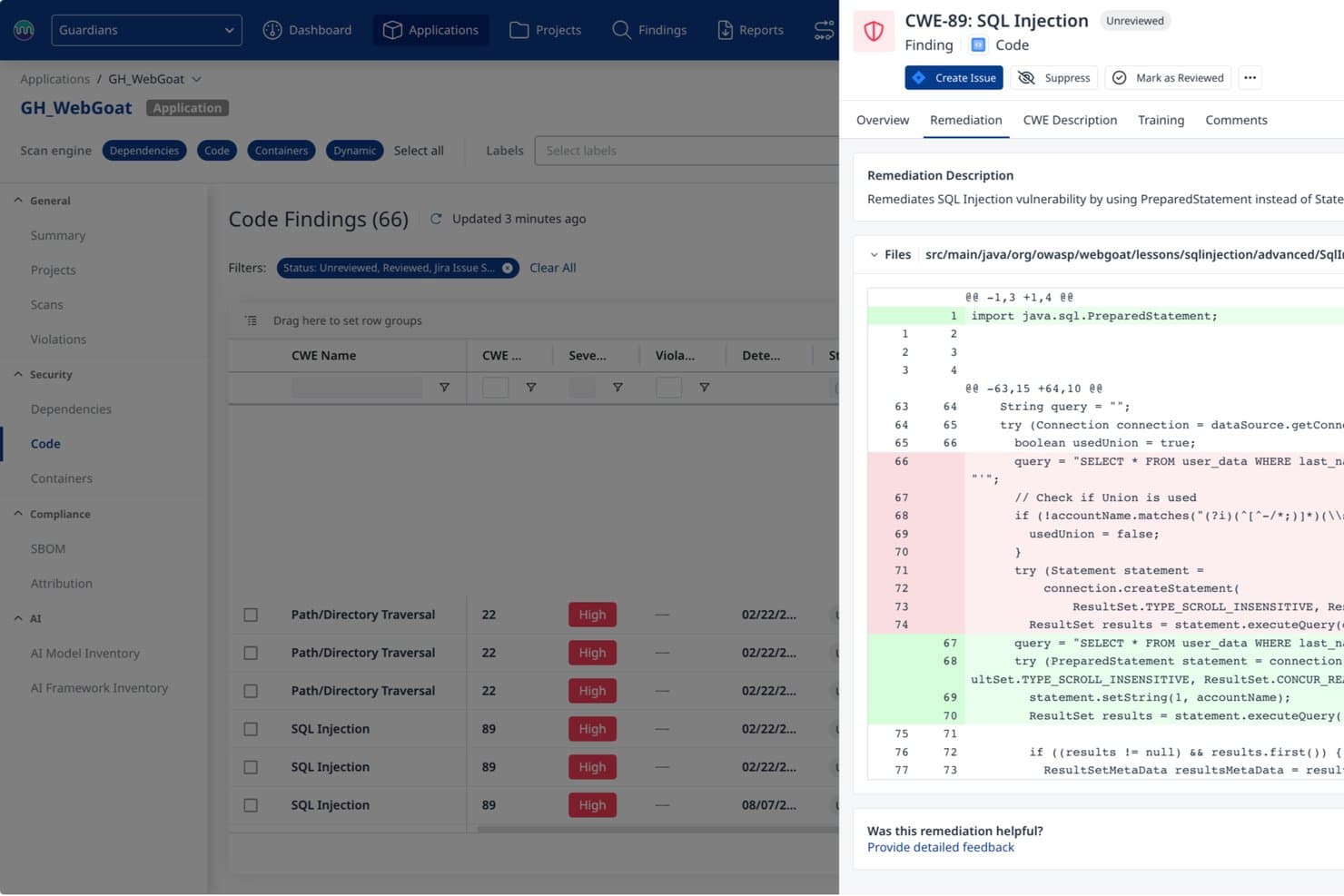
Mend.io provides AI-powered SQL injection remediation with code fix previews. Mend AppSec is an application security platform that combines SAST, software composition analysis, and container scanning to identify vulnerabilities in proprietary source code across 30+ languages, with AI-powered fix suggestions and CI/CD pipeline integration.
Who Is Mend.io Best For?
Mend AppSec is a strong fit for AppSec and DevSecOps teams that need AI-powered SAST with benchmark-verified accuracy and fixes delivered directly in the repository.
Why I Picked Mend.io
I picked Mend.io as one of the best because its SAST engine posts +38% precision and +48% recall against benchmark competitors, which matters when you're trying to trust your scan results. It also scans up to 10x faster than those same competitors, so findings land while the code is still in context. On top of that, its AI-powered remediation generates fixes 46% more accurate than the competitor average and opens them directly as pull requests.
Mend.io Key Features
- Secrets detection: Scans proprietary source code for hardcoded credentials, API keys, tokens, and certificates, with the option to trigger policy violations or fail a build on detection.
- Code compliance reporting: Generates reports mapped to standards including OWASP, PCI DSS, NIST, HIPAA, and MISRA, exportable as HTML, PDF, XML, JSON, CSV, or SARIF.
- Incremental scanning: Analyzes only changed code against an uploaded baseline, reducing scan time for pull requests and feature branches without requiring a full repository rescan.
- Monorepo project mapping: Splits a single repository into separate Mend projects using a JSON path mapping, so commits trigger scans only for the affected project segments.
Mend.io Integrations
Mend.io lists integrations with GitHub, GitHub Enterprise, GitLab, Bitbucket, Azure DevOps, Jira, Jenkins, CircleCI, TeamCity, and Bamboo. It also supports CLI-based SAST scans in CI/CD pipelines; API availability isn't documented.
Pros and Cons
Pros:
- 46% more accurate fixes open as PRs
- Scans up to 10x faster than competitors
- Precision +38% and recall +48% versus competitors
Cons:
- Less mature than dedicated SAST tools
- Some findings require manual triage
Learn more about Mend.io: Best for fitting into CI/CD pipelines
- Free plan available
- From $34/developer/month

Corgea flags SQL injection risks directly in GitHub pull requests, with context-aware fix suggestions developers can review before merging. Corgea is built for developers and security teams who want stronger application security through static analysis. It uses AI to surface vulnerabilities that traditional tools often miss, including business logic flaws and configuration issues. Because it integrates directly into common development environments, teams can improve security without slowing down their workflow.
Why I Picked Corgea
I picked Corgea because its AI-driven analysis reduces false positives while improving detection quality. Its use of Large Language Models (LLMs) helps it reason about code context and catch issues like business logic flaws that are typically hard to find with rule-based scanners. Corgea also fits cleanly into CI/CD pipelines, providing real-time feedback so teams can fix issues early and keep security part of the normal development process.
Corgea Key Features
In addition to its AI-driven analysis, I also found the following features noteworthy:
- Comprehensive Language Support: Analyzes code across 10+ languages and frameworks, ensuring broad coverage for diverse tech stacks.
- Secret Scanning: Identifies hardcoded secrets and sensitive data within your code to prevent data breaches.
- Intelligent File Filtering: Optimizes scan performance by excluding non-relevant files, ensuring accurate and efficient analysis.
- Automated Fixing: Offers context-aware fixes that can be applied either automatically or after review, streamlining the remediation process.
Corgea Integrations
Integrations include CI/CD pipelines, pull request reviews, IDE support, GitHub, GitLab, Bitbucket, Jenkins, and Azure DevOps.
Pros and Cons
Pros:
- Broad multi-language code coverage
- Reduced false positives with AI
- Detects complex business logic flaws
Cons:
- Newer tool with limited history
- Results may vary between scans
Learn more about Corgea: Best for supply chain threat detection
- 7-day free trial + free demo available
- From $399/month (billed annually)

Xygeni dashboard showing prioritized application security risks across code, dependencies, CI/CD, secrets, and IaC. Xygeni is an AI-powered application security platform that combines SAST, SCA, DAST, secrets detection, CI/CD security, and supply chain malware defense into a single system for end-to-end SDLC coverage.
Who Is Xygeni Best For?
Xygeni is a strong fit for security-focused engineering teams at mid-size to enterprise companies that need unified visibility across code, dependencies, pipelines, and third-party components.
Why I Picked Xygeni
I've included Xygeni in my top picks because its supply chain threat detection goes well beyond what most SAST tools offer. The SCA module analyzes thousands of new and updated open source packages daily to detect and block zero-day malware before it reaches your codebase. On top of that, the anomaly detection engine monitors behavioral signals across code, dependencies, pipelines, and config files to catch unauthorized modifications in real time—the kind of attack vector that pure static analysis simply won't surface.
Xygeni Key Features
- AI-powered SAST scanning: Scans source code for vulnerabilities including SQLi, XSS, insecure authentication, and backdoors, benchmarked against the OWASP test suite.
- AI auto-fix via pull request: Generates code-level fixes for detected vulnerabilities and submits them as pull requests for developer review.
- Secrets detection: Scans repositories, commits, and CI/CD configs to identify exposed credentials, API keys, and tokens before they reach production.
- IaC security scanning: Analyzes infrastructure-as-code files to detect misconfigurations in cloud and container environments before deployment.
Xygeni Integrations
Xygeni offers native integrations with GitHub, GitLab, Bitbucket, Azure DevOps, and Jenkins, as well as CircleCI for SCM and CI/CD pipeline scanning. For ticketing and alerts, it integrates with Jira, GitHub Issues, and Slack. IDE plugins are available for VS Code, IntelliJ, Eclipse, Visual Studio, Windsurf, and Cursor. Xygeni also provides a REST API for custom integrations and automation across CI/CD and governance workflows.
Pros and Cons
Pros:
- Unifies SAST, SCA, and secrets scanning
- Detects malware in open source dependencies
- Reachability analysis reduces false positives significantly
Cons:
- Smaller community compared to Snyk or SonarQube
- Alert volume can be high initially
Learn more about Xygeni: Best for automatic patch generation
- Free plan available
- From $200/month
Visit WebsiteCustomer Rating:4.5/5
ZeroPath provides a unified security dashboard that highlights scan activity, vulnerability types, issue severity, and top critical findings at a glance. ZeroPath is designed to help development and security teams get ahead of code vulnerabilities by using AI to surface issues such as broken authentication, logic bugs, exploitable dependencies, and misconfigured pipelines. If your team is building software rapidly and wants a SAST solution that catches real threats without overwhelming you with false alarms, then ZeroPath is worth a look.
Why I Picked Zeropath
I picked ZeroPath because its AI-native static application security testing (SAST) engine goes beyond pattern matching and understands code context and business logic—so you and your team can trust that findings are meaningful. The tool’s automatic patch generation lets you review or merge suggested fixes directly in pull requests, reducing time spent manually crafting remediation. Its deep discovery of authentication bypasses, IDORs, race conditions and logic flaws means you’re catching vulnerability types many legacy scanners miss.
Zeropath Key Features
In addition to its core SAST capabilities, ZeroPath offers:
- Custom Code Policies: Create natural-language or rule-based policies to flag specific patterns or anti-patterns in your codebase.
- Secrets Detection: Scan for leaked credentials, keys, tokens, or API secrets within repositories and enforce remediation workflows.
- Infrastructure as Code (IaC) Misconfiguration Detection: Analyze IaC templates (e.g., Terraform, CloudFormation) for insecure configurations before deployment.
- Security Intelligence Dashboard: View real-time metrics on vulnerability trends, exploitability scoring (CVSS 4.0), team performance, and compliance status.
Zeropath Integrations
Integrations include GitHub, GitLab, Bitbucket, Azure DevOps, Jira, Jenkins, Slack, Microsoft Teams, and CircleCI.
Pros and Cons
Pros:
- Gives you clear fixes that speed up your security reviews.
- Cuts down noisy findings so your team can focus on real issues.
- It catches logic flaws and hidden risks you might miss in normal scans.
Cons:
- You may need time to adjust your workflow around its automation.
- Integration options may not be extensive enough for complex enterprise environments.
Learn more about Zeropath: Best for open-source collaboration
- Free plan available
- From $4/user/month
Visit WebsiteCustomer Rating:4.8/5
GitHub dialog for adding images GitHub is a collaborative software development platform widely used by developers across various industries, including healthcare and finance. It offers tools for security, automation, and code management, making it suitable for tasks like DevSecOps and CI/CD.
Why I picked GitHub: GitHub excels in open-source collaboration, providing a platform where developers can work together on projects from anywhere. Its built-in application security tools use AI to quickly identify and address vulnerabilities, which supports its USP. GitHub Actions automate workflows, enhancing efficiency in managing code changes. With GitHub Advanced Security, you gain enterprise-grade security options to protect your codebase.
Standout features & integrations:
Features include GitHub Copilot for AI-assisted coding, GitHub Actions for workflow automation, and Codespaces for instant development environments. These features enhance collaboration and streamline development processes.
Integrations include Slack, Trello, Jira, Visual Studio, Azure DevOps, Google Cloud, AWS, Heroku, Docker, and Kubernetes.
Pros and Cons
Pros:
- GitHub Actions for automation
- AI-driven security tools
- Extensive open-source community
Cons:
- Dependency on Git knowledge
- Potential for complex configurations
 Best for unlimited parallel test runs
- Free demo available
- From 1¢/AI credit
Visit WebsiteCustomer Rating:4.9/5
QA Wolf's team can design, create, and manage automated tests and report bugs in a timely manner. QA Wolf is a hybrid platform and service aimed at software teams in industries like fintech, healthcare, and eCommerce. It provides automated end-to-end test coverage for web and mobile applications, enhancing quality assurance and reducing QA costs.
Why I picked QA Wolf: QA Wolf excels in offering unlimited parallel test runs, which is a game-changer for teams looking to speed up their testing processes. The platform's human-verified bug reports help ensure accuracy. Its zero-flake guarantee reduces the chances of flaky tests, making it reliable for consistent testing. The AI-driven test creation and maintenance improve productivity by minimizing the time spent on QA tasks.
Standout features & integrations:
Features include human-verified bug reports that ensure accuracy, a zero-flake guarantee to reduce flaky tests, and AI-driven test creation for improved productivity.
Integrations include GitHub, GitLab, Bitbucket, Slack, Jira, Trello, Asana, CircleCI, Jenkins, Travis CI, and Azure DevOps.
Pros and Cons
Pros:
- AI-driven test creation
- Human-verified bug reports
- Unlimited parallel test runs
Cons:
- May need technical expertise
- Not ideal for small teams
Learn more about QA Wolf:

Dynatrace overview dashboard Dynatrace is an all-in-one software intelligence platform used by IT and DevOps teams across various sectors. It provides monitoring and analytics for applications, infrastructure, and user experience, helping teams optimize performance and ensure reliability.
Why I picked Dynatrace: Dynatrace offers real-time observability, making it a top choice for teams needing instant insights into their systems. Its AI-powered root cause analysis helps quickly identify issues, saving you time. The platform's full-stack monitoring covers everything from applications to infrastructure. Additionally, automated deployment and scaling simplify managing complex environments.
Standout features & integrations:
Features include AI-driven root cause analysis that speeds up troubleshooting, full-stack monitoring to cover applications and infrastructure, and automated deployment for simplified management of complex environments.
Integrations include AWS, Azure, Google Cloud, Kubernetes, ServiceNow, Slack, Jira, Microsoft Teams, Ansible, and Puppet.
Pros and Cons
Pros:
- Full-stack monitoring
- AI-driven root cause analysis
- Real-time data analysis
Cons:
- Complex initial setup
- High resource consumption
 Best for integrated DevOps workflows
- Free plan + free trial available
- From $29/user/month (billed annually)
Visit WebsiteCustomer Rating:4.5/5
GitLab issue-tracking functionality displayed on a Kanban board GitLab empowers users to build modern applications and accelerate digital transformation by embracing automated processes to deliver code faster.
In addition to providing code repository and version control functions, GitLab comes with built-in DevOps workflows such as continuous integration and continuous delivery (CI/CD) pipelines. GitLab boosts developer productivity and collaboration among developers while reducing costs, cycle time, and time to market.
GitLab is free for individual users. Its Premium edition targets customers who want to enhance team productivity and coordination and is priced at $19/user/month. GitLab Ultimate tier is priced at $99/user/month and is designed for organization-wide security, planning, and compliance.
 Best for real-time observability
- Free plan available
- From $10/user/month
Visit WebsiteCustomer Rating:4.3/5
You can prioritize, track, and report vulnerabilities through the software at an organizational, team, or component level. New Relic is an observability platform tailored for developers, offering monitoring solutions for applications and infrastructure. It's designed for IT teams looking to enhance performance and gain insights through data analysis.
Why I picked New Relic: New Relic excels in real-time observability, providing instant insights into application performance. Its ability to monitor an entire stack in real-time with pre-built dashboards is a key differentiator. The platform supports over 780 integrations, ensuring comprehensive visibility across programming environments. This makes it a versatile tool for troubleshooting and enhancing user experience.
Standout features & integrations:
Features include end-to-end monitoring set up in under five minutes, comprehensive visibility across various programming environments, and actionable insights to proactively troubleshoot issues.
Integrations include AWS, Azure, Google Cloud, Kubernetes, Slack, Jira, PagerDuty, ServiceNow, Splunk, and Datadog.
Pros and Cons
Pros:
- Actionable performance insights
- Supports extensive integrations
- Real-time application monitoring
Cons:
- Dependency on internet connectivity
- High data volume costs
Learn more about New Relic:
Outras ferramentas de testes de segurança estáticos de aplicações
Eis algumas opções adicionais de ferramentas de testes de segurança estáticos de aplicações que não entraram na minha seleção, mas que ainda vale a pena conhecer:
- 11DeepSourceBest for code quality analysis
- 12IDA ProBest for advanced binary analysis
- 13Nexus Lifecycle Best for open-source management
- 14Mend SASTBest for fast vulnerability detection
- 15StackHawkBest for automated security testing
- 16CodigaBest for real-time code analysis
- 17GuardRailsBest for developer-first security
- 18FlawnterBest for in-depth code inspection
- 19SonarQubeBest for continuous code quality
- 20DerScannerBest for vulnerability detection
- 21CodacyDevOps intelligence platform with high-quality code on 40+ programming languages.
- 22CheckmarxFast and accurate scans easily integrated into the tools you use daily, with remediation guidance.
- 23KlocworkStatic code analysis and SAST tool for C, C++, C#, Java, JavaScript, Python, and Kotlin.
- 24VeracodeIntegrate automated AppSec testing into your CI/CD pipeline.
- 25BrinqaConsolidate, prioritize and manage findings from all your AST tools.
- 26SpectralOpsAdvanced AI backed technology with over 2000 detectors to discover and classify your data silos and uncover data breaches.
- 27LGTM.COMFree SAST tool for open source projects.
- 28ReshiftCode security tool that secures your code as you build
- 29INSIDER CLICovers the OWASP Top 10 to make source code analysis to find vulnerabilities right in the source code.
How I Evaluate Static Application Security Testing Tools
I evaluate every tool in two layers—baseline requirements like CI/CD pipeline integration and multi-language scanning, and the differentiators that determine which tools developers will actually use.
Core Functionality (Table Stakes For This List)
When I'm selecting tools for my list, I rank each one on a scale from 0 (does not offer the functionality) to 5 (excels in this area) for each core functionality listed below. Then, I calculate the tool's total score into a percentage. Each tool needs to achieve a minimum total score of 65% to be considered for inclusion.
- Source Code Analysis: I check how many languages each tool scans and whether it handles source code, bytecode, and binaries—especially for teams running mixed stacks like Java alongside Go or Kotlin.
- Vulnerability Detection Coverage: Each tool's rule set should map to OWASP Top 10 and CWE/SANS Top 25 at minimum, with regular updates as new vulnerability classes emerge.
- CI/CD & IDE Integration: I look for native plugins in tools like Jenkins, GitHub Actions, and GitLab CI, plus IDE support in VS Code or IntelliJ so developers get feedback before code even hits a pipeline.
- Remediation Guidance: The best tools surface line-level fix suggestions with contextual code examples, not just a CVE description that sends developers searching through docs on their own.
- False Positive Management: I evaluate whether a tool lets security teams tune rules, suppress known safe patterns, and carry those decisions across projects to keep scan results meaningful.
- Compliance & Reporting: Reports should map findings to frameworks like PCI-DSS, HIPAA, or ISO 27001 and offer both developer-facing detail and executive-level summaries ready for audits.
Once I have a list of tools that meet this criteria, I consider what sets each platform apart.
Differentiating Factors (What Sets Vendors Apart)
Here's how I compare and contrast different vendors:
Standout Features
AI-powered auto-remediation is a major differentiator—tools that suggest or generate code fixes directly in a pull request save developers from context-switching into security docs. Incremental scanning matters just as much, since a tool that re-scans an entire codebase on every commit will slow pipelines and frustrate teams. I also look for custom rule authoring, which lets security teams write detection rules for internal frameworks or coding patterns that generic rule sets won't catch.
Beyond Features
Language and framework coverage is one of the first things I check—a tool that supports Java and Python but misses Kotlin or Rust won't work for teams modernizing their stacks. The integration ecosystem matters too. I evaluate whether a tool connects natively with SCM platforms, ticketing systems like Jira, and broader AppSec suites so findings don't live in a silo. Pricing transparency plays a role as well, since per-developer vs. per-scan licensing can dramatically shift total cost depending on your team size and build frequency.
Como escolher uma ferramenta de testes de segurança estáticos de aplicações
É fácil ficar preso a longas listas de funcionalidades e estruturas de preços complexas. Para o ajudar a manter o foco enquanto trabalha no seu processo único de seleção de software, eis uma lista de verificação dos fatores a ter em conta:
| Fator | O que considerar |
|---|---|
| FatorEscalabilidade | O que considerarA ferramenta pode crescer com a sua empresa? Considere os limites de utilizadores, a capacidade de processamento de dados e a facilidade com que se integra em tecnologias futuras. |
| FatorIntegrações | O que considerarFunciona com as suas ferramentas e fluxos de trabalho existentes? Verifique a compatibilidade com pipelines de CI/CD e ambientes de desenvolvimento para garantir operações sem problemas. |
| FatorPersonalização | O que considerarPode adaptar a ferramenta às suas necessidades específicas? Procure opções para ajustar as regras de deteção e os relatórios de modo a corresponderem às suas políticas de segurança. |
| FatorFacilidade de utilização | O que considerarA ferramenta é fácil de utilizar por todos os membros da equipa? Avalie a interface e a navegação para garantir uma adoção rápida sem necessidade de formação extensa. |
| FatorImplementação e integração inicial | O que considerarCom que rapidez pode começar a utilizar a ferramenta de forma eficaz? Considere o tempo e os recursos necessários para a configuração, a formação inicial e a integração com os sistemas existentes. |
| FatorCusto | O que considerarO preço cabe no seu orçamento? Compare as estruturas de preços, incluindo quaisquer custos ocultos, e verifique se existe um período experimental gratuito para testar a ferramenta antes de assumir um compromisso. |
| FatorMedidas de proteção da segurança | O que considerarA ferramenta segue as melhores práticas de segurança? Verifique a encriptação de dados, os controlos de acesso e a conformidade com os regulamentos aplicáveis. |
| FatorRequisitos de conformidade | O que considerarA ferramenta cumpre as normas específicas do setor? Verifique se existem certificações ou suporte para regulamentos como o RGPD ou a HIPAA, caso sejam aplicáveis ao seu setor. |
O que são as ferramentas de testes de segurança de aplicações estáticas?
As ferramentas de testes de segurança de aplicações estáticas são soluções de software que analisam o código-fonte para identificar vulnerabilidades de segurança numa fase inicial do processo de desenvolvimento. Os programadores, as equipas de segurança e os profissionais de garantia de qualidade utilizam estas ferramentas para melhorar a segurança do código e garantir a conformidade com as normas do setor. A análise de código, a deteção de vulnerabilidades e as capacidades de integração ajudam a identificar potenciais ameaças e a melhorar a qualidade do código. De um modo geral, estas ferramentas fornecem informações valiosas que ajudam as equipas a manter aplicações de software seguras e fiáveis.
Funcionalidades
Ao selecionar ferramentas de testes de segurança de aplicações estáticas, esteja atento às seguintes funcionalidades principais:
- Análise de código: Analisa automaticamente o código-fonte para identificar vulnerabilidades de segurança, ajudando os programadores a corrigir problemas numa fase inicial do processo de desenvolvimento.
- Deteção de vulnerabilidades: Identifica potenciais ameaças e pontos fracos no código, fornecendo relatórios detalhados para a sua correção.
- Capacidades de integração: Liga-se perfeitamente aos ambientes de desenvolvimento e pipelines de CI/CD existentes para garantir testes de segurança contínuos.
- Regras personalizáveis: Permite aos utilizadores adaptar as verificações de segurança para corresponderem às políticas organizacionais específicas e aos requisitos de conformidade.
- Feedback em tempo real: Fornece informações e sugestões instantâneas aos programadores, reduzindo o tempo necessário para revisões manuais do código.
- Relatórios de conformidade: Gera documentação que demonstra a conformidade com as normas e os regulamentos do setor, como o RGPD ou a HIPAA.
- Suporte para várias linguagens: Analisa código escrito em várias linguagens de programação, acomodando equipas de desenvolvimento diversificadas.
- Interface fácil de utilizar: Garante uma utilização simples através de uma navegação intuitiva, reduzindo a curva de aprendizagem para os novos utilizadores.
- Escalabilidade: Adapta-se às necessidades crescentes da sua empresa, processando de forma eficiente maiores volumes de dados e exigências de utilizadores.
- Medidas de proteção da segurança: Inclui funcionalidades como a encriptação de dados e os controlos de acesso para proteger informações sensíveis durante a análise.
Vantagens
A implementação de ferramentas de testes de segurança de aplicações estáticas proporciona várias vantagens para a sua equipa e para a sua empresa. Eis algumas das vantagens que pode esperar:
- Deteção precoce de vulnerabilidades: Identifica problemas de segurança no código antes de estes chegarem à produção, reduzindo o risco de exploração.
- Melhoria da qualidade do código: Fornece análises e feedback detalhados, ajudando os programadores a escrever código mais limpo e seguro.
- Conformidade reforçada: Gera relatórios que demonstram a conformidade com as normas e os regulamentos do setor, simplificando as auditorias.
- Poupança de tempo: Automatiza o processo de revisão de segurança, permitindo aos programadores concentrarem-se no desenvolvimento de funcionalidades em vez de verificarem manualmente o código.
- Eficiência de custos: Deteta vulnerabilidades numa fase inicial do ciclo de desenvolvimento, poupando os custos associados à correção de problemas após a implementação.
- Maior colaboração: Integra-se com as ferramentas e os fluxos de trabalho existentes, promovendo uma melhor comunicação entre as equipas de desenvolvimento e de segurança.
- Escalabilidade: Adapta-se às necessidades das equipas em crescimento, garantindo práticas de segurança consistentes à medida que a sua empresa se expande.
Custos e preços
A seleção de ferramentas de testes de segurança de aplicações estáticas requer uma compreensão dos vários modelos de preços e planos disponíveis. Os custos variam consoante as funcionalidades, o tamanho da equipa, os complementos e muito mais. A tabela abaixo resume os planos comuns, os seus preços médios e as funcionalidades normalmente incluídas nas soluções de ferramentas de testes de segurança de aplicações estáticas:
Tabela de comparação de planos para ferramentas de testes de segurança de aplicações estáticas
| Tipo de plano | Preço médio | Funcionalidades comuns |
|---|---|---|
| Tipo de planoPlano gratuito | Preço médio$0 | Funcionalidades comunsAnálise básica de código, suporte limitado a linguagens e suporte da comunidade. |
| Tipo de planoPlano pessoal | Preço médio$10-$30/utilizador/mês | Funcionalidades comunsAnálise avançada de código, suporte para várias linguagens e capacidades básicas de integração. |
| Tipo de planoPlano empresarial | Preço médio$45-$100/utilizador/mês | Funcionalidades comunsAnálise abrangente de código, regras personalizadas, integração com pipelines de CI/CD e suporte por e-mail. |
| Tipo de planoPlano empresarial avançado | Preço médio$150-$300/utilizador/mês | Funcionalidades comunsAnálise com todas as funcionalidades, deteção de vulnerabilidades em tempo real, relatórios de conformidade e suporte dedicado. |
Ferramentas de testes de segurança de aplicações estáticas (perguntas frequentes)
Eis algumas respostas a perguntas comuns sobre ferramentas de testes de segurança de aplicações estáticas:
Quando podem ser utilizados testes de segurança de aplicações estáticas em qualquer projeto?
Pode utilizar ferramentas de testes de segurança de aplicações estáticas numa fase inicial do ciclo de vida do desenvolvimento de software. Estas não requerem uma aplicação em execução, pelo que são ideais para detetar vulnerabilidades durante a fase de desenvolvimento, permitindo abordar proativamente as questões de segurança.
Qual dos seguintes problemas não será encontrado pelas ferramentas SAST?
As ferramentas SAST não conseguem detetar problemas de execução, uma vez que analisam o código sem o executar. Isto significa que não encontrarão problemas como falhas de autenticação ou configurações incorretas do servidor, que exigem que a aplicação esteja em execução para serem identificados.
Os testes de segurança de aplicações estáticas podem ajudar a identificar potenciais vulnerabilidades?
Sim, os testes de segurança de aplicações estáticas são eficazes na identificação de potenciais vulnerabilidades no código-fonte de uma aplicação. Estas ferramentas realizam testes de caixa branca, que ajudam a encontrar as causas principais das falhas de segurança e fornecem orientações para a sua correção.
As ferramentas de testes de segurança de aplicações estáticas são adequadas para todas as linguagens de programação?
Não, nem todas as ferramentas de testes de segurança de aplicações estáticas suportam todas as linguagens de programação. A maioria das ferramentas especializa-se em linguagens populares como Java, C++ e Python, mas o suporte pode variar. Antes de comprar, certifique-se de que a ferramenta escolhida suporta as linguagens utilizadas pela sua equipa. Se trabalhar com linguagens menos comuns, poderá ter de procurar ferramentas especializadas ou confirmar o suporte junto do fornecedor.