

Programvare for infrastrukturovervåking hjelper deg med å følge med på tilstanden og ytelsen til systemene dine, enten du administrerer servere, nettverk, applikasjoner eller virtuelle maskiner.
Mange team ser etter disse verktøyene når de har blindsoner i infrastrukturen, sliter med å oppdage problemer tidlig eller kaster bort tid på å holde oversikt over ulike kontrollpaneler. Å velge feil verktøy eller stole på et som er utdatert, kan føre til ubesvarte varsler, nedetid eller begrenset oversikt.
Jeg har hjulpet team med å velge og sette opp overvåkingsplattformer som passer behovene deres og faktisk gjør feilsøking enklere, ikke vanskeligere. Denne veiledningen er basert på denne praktiske erfaringen, slik at du kan finne programvare som gir deg oversikt uten bryderiet.
Hvorfor du kan stole på våre programvareanbefalinger
6,700+
Reviews
20
Industry experts
16+
Evaluation factors
14
Years
Teamet vårt har testet og anmeldt programvare siden 2012. Vi er selv teknologiledere, så vi vet hvor vanskelig og hvor viktig det er å velge riktig programvare.
I denne guiden har vi vurdert verktøyene gjennom praktisk testing og uavhengig research og gitt dem poeng ut fra våre utvelgelseskriterier.
Anmeldelsene våre bygger på vår egen redaksjonelle vurdering. De er ikke et salgsargument.
Ekspertanmeldere:
- Paulo Gardini MiguelTech Director
 Tim FisherVP of AI
 Gabriel RosasTech Lead & Software Architect
 Christhian GruhnTech Lead & Platform Architect

Sammenligningstabell for overvåkingsverktøy
Tabellen nedenfor sammenligner prisopplysninger for mine beste utvalgte overvåkingsverktøy.
| Tool | Best For | Trial Info | Price | ||
|---|---|---|---|---|---|
| 1 | Best for monitoring IT, OT, and cloud | 30-day free trial + free plan available | From $200/month (billed annually) | Website | |
| 2 | Best for real-time network visibility | 14-day free trial | Pricing upon request | Website | |
| 3 | Best for proactive issue detection | 30-day free trial | From $149/user/month (billed annually) | Website | |
| 4 | Best open-source solution | Free plan available | Pricing upon request | Website | |
| 5 | Best for real-time performance tracking | 30-day free trial + free demo + free plan availabl | From $199/year | Website | |
| 6 | Best for real-time application error tracking | Free plan available | From $26/month (billed annually) | Website | |
| 7 | Best for complete network management | 30-day free trial | From $1,233/year (billed annually) | Website | |
| 8 | Best for proactive monitoring | 30-day free trial | From $3/device/month | Website | |
| 9 | Best for AI-assisted anomaly detection | 15-day free trial | From $7/month | Website | |
| 10 | Best for cloud-scale monitoring | Free plan available | From $15/month (billed annually) | Website |


Anmeldelser av de beste overvåkingsverktøyene
Nedenfor finner du mine detaljerte sammendrag av de beste overvåkingsverktøyene som kom med på kortlisten min. Anmeldelsene mine gir en detaljert gjennomgang av de viktigste funksjonene, fordelene & ulempene, integrasjonene og ideelle bruksområdene for hvert verktøy, slik at du kan finne det beste for deg.
 Best for monitoring IT, OT, and cloud
- 30-day free trial + free plan available
- From $200/month (billed annually)
Visit WebsiteCustomer Rating:4.6/5
The device tree for network monitoring in PRTG showcases how devices are interconnected and provides detailed information about each device's status. PRTG Network Monitor is a comprehensive tool that helps you keep an eye on your entire IT infrastructure. It monitors systems, devices, traffic, and applications, providing real-time insights into your network's health. With PRTG, you can identify and address issues before they become critical.
Why I Picked PRTG: I chose PRTG for its ability to unify the monitoring of various technologies through integrated protocols like SNMP, WMI, SSH, and more. This means you can oversee a wide range of platforms, devices and systems within your network, ensuring all components are functioning properly. Additionally, PRTG offers customizable reporting, allowing you to generate detailed reports tailored to your needs. Another valuable aspect of PRTG is its real-time alerting system. You receive immediate notifications about potential issues, enabling you to respond promptly and minimize downtime. Most monitoring tools cover IT infrastructure, cloud, or industrial systems — rarely all three. PRTG brings servers, network devices, and cloud services together with modern OT equipment via Modbus and OPC UA, so teams overseeing a mix of standard IT and industrial environments aren't stuck stitching together separate tools.
Standout Features & Integrations:
Other key features include detailed statistics for applications running in your network, helping you manage resources effectively. Additionally, its distributed monitoring feature allows you to monitor multiple networks in different locations, all from a single interface. It also has real-time maps and dashboards that visualize your network's status, making it easier to identify and address issues. Integrations include AWS, Cisco, Dell Technologies, HPE, VMware, ServiceNow, Check Point, Sonicwall, NetApp, Fujitsu, Lansweeper, and Martello.
Pros and Cons
Pros:
- Supports multiple monitoring technologies
- Customizable dashboards and real-time alerts
- Provides a comprehensive overview of network infrastructure
Cons:
- Licensing based on sensors can become expensive for larger networks
- Initial setup can be time-consuming
Learn more about Paessler PRTG: Best for real-time network visibility
- 14-day free trial
- Pricing upon request
Visit WebsiteCustomer Rating:4.7/5
Auvik offers a detailed network monitoring dashboard. Auvik is a network management platform that enhances your network's visibility and performance. It offers monitoring tools to help you keep your network in check and running smoothly.
Why I Picked Auvik: One of the reasons I chose Auvik as a top monitoring tool is its ability to provide real-time device monitoring. This feature lets you keep a constant eye on your network's health, ensuring that you can catch and address issues as they arise. Another compelling feature is automated network mapping, which visually represents your network's layout and connections. This helps you understand how different devices interact, making it easier to manage and troubleshoot. Another feature that stands out is performance metrics tracking. With this, you can gather valuable data about your network's performance, allowing you to make informed decisions to optimize its functionality. The platform also offers customizable alerts that notify you of potential issues, so you can address them before they escalate.
Standout Features & Integrations:
Features include configuration backups that ensure you never lose critical settings, remote device management that allows you to control devices from anywhere, and global alert settings that provide consistent monitoring across your network. These features work together to provide a comprehensive solution for managing and monitoring your network.
Integrations include Cisco, Datto, Microsoft Intune, Slack, ServiceNow, ConnectWise, Dell, Fortinet, Palo Alto Networks, Cisco Meraki, Okta, and Jamf.
Pros and Cons
Pros:
- Configuration backups and comparison automation
- Automated network mapping and discovery
- Real-time visibility into network performance
Cons:
- Limited offline management capability
- Pricing details not publicly available
Learn more about Auvik: Best for proactive issue detection
- 30-day free trial
- From $149/user/month (billed annually)
Visit WebsiteCustomer Rating:4.6/5
Atera offers real-time monitoring and alerts for efficient system management. Atera is an all-in-one IT management platform designed for Managed Service Providers (MSPs) and IT professionals. It helps you monitor, manage, and automate IT operations across devices and networks, with a strong focus on reducing manual workload through AI and automation. Atera offers real-time visibility into system performance, network health, and device status, making it easier to proactively manage IT environments.
Why I Picked Atera: I chose Atera because it stands out for its remote monitoring and management (RMM) capabilities, which let you keep tabs on performance, uptime, and network health in real time. This makes it easier to catch and resolve issues before they escalate. I also value Atera’s AI-driven automation tools, which help speed up ticket resolution and free up time for more strategic IT work. Its customizable dashboards further enhance usability by giving you full control over how you view your environment.
Standout Features & Integrations:
Atera’s features include patch management to ensure systems stay secure and current, along with network discovery tools that provide a clear picture of all connected devices. Advanced reporting helps you analyze performance trends, while its built-in ticketing system centralizes issue tracking. Integrations include Salesforce, HubSpot, Microsoft Teams, Zendesk, Jira Software Cloud, Acronis Cyber Protect Cloud, Asana, ServiceNow, and WhatsApp Notifications, among others.
Pros and Cons
Pros:
- Effective IT management and issue resolution
- Combines remote monitoring, ticketing, and automation
- Affordable pricing which charges per technician rather than per device
Cons:
- Lacking some advanced customization options
- May require a slight learning curve

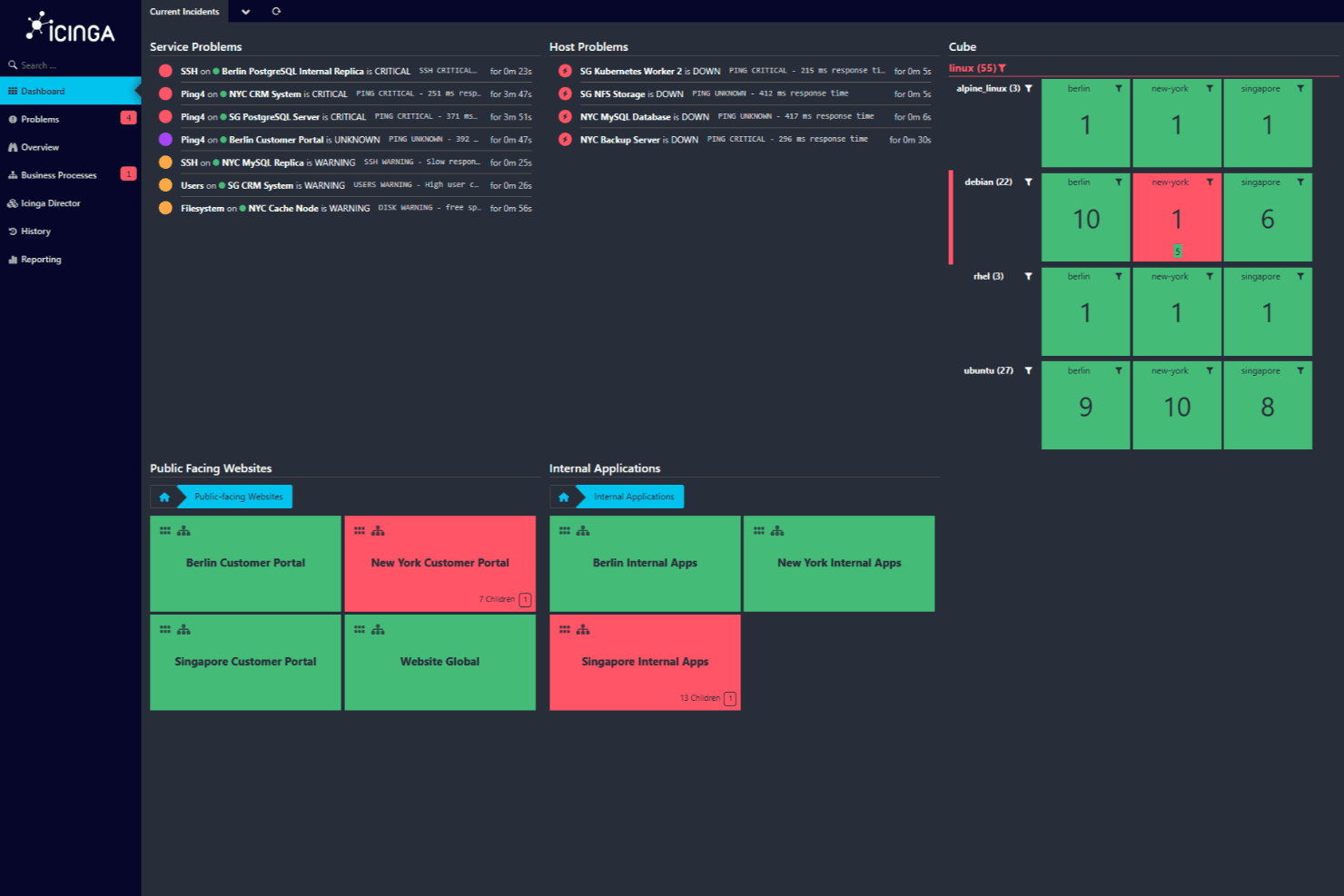
Icinga dashboard displaying current incidents with critical and warning service issues across public-facing websites and internal applications. Icinga is an open-source monitoring solution that helps you keep an eye on your entire IT infrastructure. It's designed to handle complex environments, offering a wide range of features to ensure your systems are running smoothly.
Why I Picked Icinga: It allows you to monitor everything from servers and networks to applications and databases. You can automatically import data from sources like Active Directory or cloud platforms like AWS and Azure, keeping your monitoring setup in sync with your infrastructure. I also like that it provides monitoring automation, allowing you to manage repetitive processes more easily. And, with its metrics and logs, you can gather and analyze data to gain valuable insights into your systems.
Standout Features & Integrations:
Other key features include distributed and agent-based monitoring to support coverage across multiple locations and customizable alerts and notifications to help you resolve issues quickly. Its analytics tools also let you create custom dashboards and reports, helping you identify bottlenecks and track historical uptime.
Some of Icinga's integrations include Grafana, AWS, Azure, Puppet, Ansible, Chef, Terraform, Jira, PagerDuty, ServiceNow, BigPanda, and Stackstorm.
Pros and Cons
Pros:
- Free to use with no setup fees
- Scalable for both small and large environments
- Highly customizable for various IT infrastructure needs
Cons:
- Occasional performance issues reported during high-load scenarios
- Setup and configuration comes with a learning curve
Learn more about Icinga: Best for real-time performance tracking
- 30-day free trial + free demo + free plan availabl
- From $199/year
Visit WebsiteCustomer Rating:4.3/5
ManageEngine Applications Manager provides real-time application monitoring, showing system health, availability, and uptime status in a centralized dashboard. ManageEngine Applications Manager is a tool that helps you monitor the performance of your applications and IT infrastructure. It keeps an eye on various components like servers, databases, and cloud services to ensure they're running smoothly. By doing so, it helps your team identify and fix issues before they affect your users.
Why I Picked ManageEngine Applications Manager: One reason I chose ManageEngine Applications Manager is its ability to monitor a wide range of technologies. It supports over 150 technologies, including application servers, databases, and cloud platforms. This means you can oversee your entire IT environment from a single console, making it easier to spot and address potential problems. Another useful feature is its real-time performance tracking. The tool provides insights into metrics like CPU and memory usage, response times, and transaction details. With this information, your team can quickly identify performance bottlenecks and take corrective actions to maintain optimal application performance.
Standout Features & Integrations:
Features include synthetic transaction monitoring, which allows you to simulate user interactions with your applications to identify potential issues before they impact real users. Additionally, real user monitoring provides insights into the actual experiences of your users, helping you understand how your applications perform under real-world conditions.
Integrations include ManageEngine ServiceDesk Plus, ServiceNow, Site24x7, AlarmsOne, Slack, Prometheus, AWS, Google Cloud, Microsoft Azure, Oracle, and MySQL.
Pros and Cons
Pros:
- Monitors a wide range of applications and infrastructure components
- Real-time alerting system helps teams respond promptly to issues
- Simplifies management of applications and their relationships
Cons:
- Setting up the tool to meet specific needs can be challenging
- The tool can be resource-intensive
Learn more about ManageEngine Applications Manager: Best for real-time application error tracking
- Free plan available
- From $26/month (billed annually)
Visit WebsiteCustomer Rating:4.5/5
Sentry provides code-level application monitoring for developers. For developers and businesses seeking a monitoring tool that provides immediate insights into application performance and errors, Sentry stands out as a comprehensive solution. It is particularly appealing to those in web and mobile development, e-commerce, and enterprise sectors, addressing the critical need for real-time error tracking and performance optimization during high-traffic periods.
Why I Picked Sentry
I picked Sentry for its robust error monitoring and performance tracking capabilities. The tool excels at real-time error tracking, immediately alerting your team to issues and enabling swift resolution. Sentry's distributed tracing feature provides a detailed view of transaction performance, helping you identify slow operations and optimize them. Additionally, the session replay functionality offers visual context for debugging, making it easier to understand user interactions and address issues effectively.
Sentry Key Features
In addition to real-time application error tracking, Sentry offers:
- Mobile App Crash Reporting: Provides insights into mobile app crashes with detailed stack traces.
- Gaming Analytics: Provides performance monitoring tailored for gaming applications, highlighting latency and frame-rate issues.
- AI Code Review: Leverages AI to suggest potential fixes for detected issues, streamlining the debugging process.
- Security and Compliance: Ensures user data protection through industry-standard security measures, making it suitable for applications handling sensitive information.
Sentry Integrations
Sentry offers a wide range of native integrations to enhance workflow efficiency, including GitHub, Bitbucket, GitLab, Slack, Microsoft Teams, Jira, Asana, Trello, Datadog, and PagerDuty.
Pros and Cons
Pros:
- Offers real-time error tracking across web, mobile, and backend apps
- Advanced error grouping helps prioritize issues for fast resolution
- Distributed tracing shows transaction-level performance insights
Cons:
- Limited alerts and applications insights in lower-tier plans
- Not all integrations are available natively, relying on third-party APIs for some
Learn more about Sentry: Best for complete network management
- 30-day free trial
- From $1,233/year (billed annually)
Visit WebsiteCustomer Rating:4.3/5
ManageEngine OpManager network management dashboard ManageEngine OpManager is a robust tool that specializes in providing an integrated approach to network management. It offers functionalities that span from monitoring network performance to automating network configurations, aligning it perfectly as a solution for comprehensive network management.
Why I Picked ManageEngine OpManager: When it came to choosing a tool for all-encompassing network management, ManageEngine OpManager emerged at the forefront of my evaluations. Its distinct suite of features caters specifically to those who seek a holistic perspective on their network's operations and health.
Based on these assessments, I formed the opinion that ManageEngine OpManager is best positioned for complete network management tasks.
Standout Features & Integrations:
OpManager is distinguished by its physical and virtual server monitoring capabilities. Its network configuration management allows administrators to backup, restore, and automate tasks, providing peace of mind against configuration errors.
On the integration front, ManageEngine OpManager supports integration with popular ITOM solutions and third-party IT management apps, enriching its functionality.
Pros and Cons
Pros:
- Extensive integration capabilities with other IT management solutions.
- Features a comprehensive suite for network configuration management.
- Offers both physical and virtual server monitoring.
Cons:
- Licensing model may not be favorable for all types of businesses.
- Its wide array of features might be overwhelming for small-scale operations.
- Might have a steep learning curve for beginners.
Learn more about ManageEngine OpManager: Best for proactive monitoring
- 30-day free trial
- From $3/device/month
Visit WebsiteCustomer Rating:4.7/5
Site24x7 provides real-time dashboards, displaying key performance metrics such as response time, availability, packet loss, active sessions, and network traffic. Site24x7 is a cloud-based monitoring solution designed for DevOps and IT operations teams. It offers comprehensive monitoring capabilities for websites, servers, applications, and network devices, providing real-time insights into performance and availability.
Why I Picked Site24x7: I like Site24x7 for its robust application performance monitoring (APM). It supports various programming languages, including Java, .NET, Ruby, PHP, and Node.js. Another notable aspect is Site24x7's real user monitoring (RUM). This feature enables you to analyze the actual experience of users interacting with your website or web applications. By segmenting performance data by browser, platform, geography, and more, you can gain valuable insights into how different factors affect user experience and make informed decisions to improve it. Overall, these features help you proactively monitor various components of your IT infrastructure.
Standout Features & Integrations:
Other features include synthetic web transaction monitoring, which lets you record and simulate multi-step user interactions in a real browser, helping you optimize critical user journeys like login forms and shopping carts. Additionally, Site24x7's log management consolidates and indexes logs from various sources, aiding in efficient troubleshooting and issue resolution.
Integrations include ServiceNow, PagerDuty, Opsgenie, Jira, ManageEngine AlarmsOne, ManageEngine ServiceDesk Plus, Slack, Microsoft Teams, Zoho Cliq, Amazon EventBridge, Zapier, and Webhooks.
Pros and Cons
Pros:
- Comprehensive monitoring capabilities across various IT infrastructure components
- Reliable real-time alerts that enable prompt issue resolution
- Flexible customization options for dashboards and reports
Cons:
- Configuration complexity can be challenging for new users
- Limited integration options with certain third-party tools
Learn more about Site24x7: Best for AI-assisted anomaly detection
- 15-day free trial
- From $7/month
Visit WebsiteCustomer Rating:4.5/5
Dynatrace monitoring tool central dashboard Dynatrace is a performance monitoring tool designed to oversee the entirety of a digital ecosystem. Its sophisticated AI capabilities enable it to not only monitor but also proactively identify anomalies within a system.
This particular focus on AI-driven insights makes it especially suited for those in search of a solution for anomaly detection.
Why I Picked Dynatrace: In my search for monitoring solutions, Dynatrace captured my attention because of its pronounced emphasis on AI. The decision to select it was influenced by how its unique AI capabilities facilitate rapid anomaly detection, often preempting issues before they escalate.
My judgment, after comparing various tools, led me to believe that Dynatrace is unparalleled in its offering of AI-assisted anomaly detection.
Standout Features & Integrations:
Dynatrace offers real-time anomaly detection and root cause determination, attributes that are vital for quick issue resolution. It is full-stack monitoring, from applications to infrastructure, ensures comprehensive coverage.
When it comes to integrations, Dynatrace ties in with cloud platforms, CI/CD tools, and major IT operations platforms, making it adaptable to varied IT environments.
Pros and Cons
Pros:
- Rich integration environment with popular cloud and IT operation platforms.
- Comprehensive full-stack monitoring.
- Advanced AI capabilities for real-time anomaly detection.
Cons:
- The lack of transparent pricing can be a deterrent for some potential users.
- The vast array of features might require dedicated training sessions.
- Can be complex for users unfamiliar with AI-driven tools.
 10Best for cloud-scale monitoring
Datadog
- Free plan available
- From $15/month (billed annually)
Visit WebsiteCustomer Rating:4.5/5
Datadog's simplistic drag-and-drop interface Datadog is a comprehensive monitoring and analytics platform that offers a unified view of IT infrastructure. Its emphasis on cloud-scale monitoring enables organizations to gain insights into their operations across various cloud environments. This close alignment with cloud-scale operations is what makes Datadog an optimal choice for such a purpose.
Why I Picked Datadog: In my process of selecting a tool for this list, Datadog consistently emerged as a top contender. I judged its capabilities based on its specialized approach to cloud-centric monitoring, which is not commonly seen in other tools.
This specific focus led me to determine that Datadog is indeed the best for those requiring cloud-scale monitoring solutions.
Standout Features & Integrations:
Datadog is known for its real-time performance dashboards, which can be tailored to display metrics, traces, and logs. Additionally, its anomaly detection can proactively identify issues before they impact users.
In terms of integrations, Datadog supports over 400 integrations, including but not limited to AWS, Google Cloud Platform, Azure, Slack, and Docker.
Pros and Cons
Pros:
- Proactive anomaly detection helps in early issue identification.
- Supports a wide array of integrations for maximum compatibility.
- Tailored dashboards provide a comprehensive view of operations.
Cons:
- Some users may face a learning curve in the beginning.
- Pricing can become substantial for larger teams.
- Might be over-complex for small-scale operations.
Andre overvåkingsverktøy
Nedenfor finner du en liste over flere overvåkingsverktøy som jeg hadde på kortlisten, men som ikke kom med blant de ti beste. De er absolutt verdt å sjekke ut.
- 11New RelicBest for application performance insights
- 12Nagios XIBest for comprehensive infrastructure monitoring
- 13PrometheusBest for real-time alerting and multi-dimensional data collection
- 14SolarWinds Observability SaaSGood for real-time database health monitoring
- 15Micro Focus SiteScopeBest for agentless application monitoring
- 16SensuBest for flexible monitoring workflows
- 17ObserviumBest for network and server hardware health checks
- 18CheckmkBest for unified monitoring solutions
- 19Dotcom MonitorBest for building multi-step scripts
- 20Splunk EnterpriseGood for large-scale infrastructure data analytics
- 21AppDynamicsGood for deep application performance insights
- 22LogicMonitorGood for cloud-based infrastructure monitoring
- 23NetdataGood for real-time system performance troubleshooting
- 24CentreonGood for IT operation analytics in complex networks
- 25AteraBest for integrated remote IT management
How I Evaluate Monitoring Tools
I split my evaluation into two layers: the baseline features a tool needs to handle 3am alerts and trace failures across distributed services, and the differentiators that separate good from great.
Core Functionality (Table Stakes For This List)
When I'm selecting tools for my list, I rank each one on a scale from 0 (does not offer the functionality) to 5 (excels in this area) for each core functionality listed below. Then, I calculate the tool's total score into a percentage. Each tool needs to achieve a minimum total score of 75% to be considered for inclusion.
- Real-Time Monitoring: I check how quickly each tool surfaces live metrics—whether it's CPU spikes on a host or latency shifts across a Kubernetes cluster during a deployment.
- Alerting & Notifications: Each tool's alert system should support configurable thresholds, anomaly-based triggers, and routing to channels like Slack, PagerDuty, or email.
- Multi-Source Data Collection: I evaluate whether the tool ingests metrics, logs, and traces from servers, containers, cloud services, and applications rather than covering just one telemetry type.
- Dashboards & Visualization: The ability to build custom dashboards matters—think a single pane showing API error rates alongside database query times during an incident.
- Historical Data & Reporting: Trend analysis over weeks or months is essential for capacity planning, so I look at retention windows and the depth of reporting options.
- Integrations & Extensibility: A tool should connect to the broader stack—CI/CD pipelines, ITSM platforms, cloud providers—via native integrations, APIs, or open standards like OpenTelemetry.
Once I have a list of tools that meet this criteria, I consider what sets each platform apart.
Differentiating Factors (What Sets Vendors Apart)
Here's how I compare and contrast different vendors:
Standout Features
Distributed tracing is a major differentiator—when a checkout flow spans five microservices, I want to see exactly where latency builds up. Auto-discovery and topology mapping also matters for teams managing dynamic environments where containers spin up constantly. I look at synthetic monitoring too, which lets you simulate user transactions and API calls to catch failures before real users are impacted.
Beyond Features
Pricing predictability is something I evaluate closely—monitoring costs can spiral when data ingestion spikes during incidents, so I check whether a vendor's model stays manageable as your environment grows. Security and compliance certifications like SOC 2 and ISO 27001 also factor in, especially for teams in regulated industries. I consider time-to-value too: pre-built dashboards, auto-instrumentation, and lightweight agents make a real difference when you need visibility on day one.
Slik velger du overvåkingsverktøy
Det er lett å gå seg vill i lange lister over funksjoner og kompliserte prismodeller. For å hjelpe deg med å holde fokus mens du går gjennom den unike prosessen din for valg av programvare, er dette en sjekkliste over faktorer du bør ha i tankene:
| Faktor | Hva du bør vurdere |
|---|---|
| FaktorSkalerbarhet | Hva du bør vurdereKan verktøyet vokse med virksomheten din? Vurder fremtidige behov og om verktøyet kan håndtere økte datamengder og flere brukere uten ytelsesproblemer. Se etter fleksible skaleringsmuligheter. |
| FaktorIntegrasjoner | Hva du bør vurdereKan det kobles til de eksisterende systemene dine? Sørg for kompatibilitet med den nåværende teknologiplattformen din, for eksempel CRM, ERP eller skytjenester, for å unngå kostbare omveier. |
| FaktorTilpasningsmuligheter | Hva du bør vurdereKan du tilpasse verktøyet til arbeidsflytene dine? Sjekk om du kan endre oversikter, varsler og rapporter slik at de passer til teamets spesifikke prosesser og behov. |
| FaktorBrukervennlighet | Hva du bør vurdereEr verktøyet intuitivt for teamet ditt? Vurder læringskurven og om teamet raskt kan ta verktøyet i bruk uten omfattende opplæring. Se etter brukervennlige grensesnitt. |
| FaktorImplementering og innføring | Hva du bør vurdereHvor smidig er oppsettprosessen? Vurder tiden og ressursene som kreves for å få verktøyet i gang. Se etter leverandører som tilbyr omfattende støtte og ressurser for innføring. |
| FaktorKostnad | Hva du bør vurderePasser prisen inn i budsjettet ditt? Sammenlign kostnaden for verktøyet med funksjonene og fordelene det tilbyr. Vær oppmerksom på skjulte gebyrer eller kostnader for flere brukere eller funksjoner. |
| FaktorSikkerhetstiltak | Hva du bør vurdereBeskytter det dataene dine? Vurder sikkerhetstiltakene som er på plass, for eksempel kryptering og samsvar med bransjestandarder, for å sikre at dataene dine forblir trygge. |
| FaktorTilgjengelig brukerstøtte | Hva du bør vurdereEr hjelp tilgjengelig når det trengs? Sjekk hvilke støttealternativer som finnes, for eksempel hjelp døgnet rundt, chat eller dedikerte kundeansvarlige, for å sikre at du får hjelp når du trenger det. |
Hva er overvåkingsverktøy?
Overvåkingsverktøy er programvare som overvåker ytelsen og tilstanden til systemer, nettverk og applikasjoner. De brukes av IT-team, DevOps-ingeniører og systemadministratorer til å oppdage problemer tidlig, redusere nedetid og sørge for at systemene fungerer problemfritt. Sporing av måledata, varsler og oversikter gjør det enklere å oppdage trender, feilsøke problemer og holde teamene informert. Programvare for maskinvareovervåking gir teamene den oversikten de trenger for å administrere systemer uten overraskelser.
Funksjoner
Når du velger overvåkingsverktøy, bør du se etter følgende viktige funksjoner:
- Varsler i sanntid: Varsle brukerne umiddelbart når problemer oppstår, slik at de kan reagere og løse dem raskt.
- Tilpassbare oversikter: Tilpass grensesnittet slik at det viser måledata og informasjon som er mest relevant for teamet ditt.
- Integrasjonsmuligheter: Koble sømløst til eksisterende systemer og programvare for å gi en samlet oversikt over driften.
- Automatisert analyse av grunnårsak: Identifiser den underliggende årsaken til problemer uten manuell inngripen, og spar tid og arbeid.
- Prediktiv analyse: Forutse potensielle problemer før de oppstår, slik at systemstabiliteten opprettholdes.
- Skalerbarhet: Tilpass deg økende datamengder og brukerbehov, slik at verktøyet forblir effektivt når virksomheten vokser.
- Sikkerhetstiltak: Beskytt sensitive data med kryptering og samsvar med bransjestandarder.
- Omfattende rapportering: Generer detaljerte rapporter for å analysere ytelsestrender og støtte beslutningstaking.
- Støtte for flere skyer: Overvåk applikasjoner på tvers av ulike skymiljøer og få en omfattende oversikt over driften.
- Brukervennlig grensesnitt: Sørg for at verktøyet er enkelt å bruke, slik at teammedlemmene kan navigere i og utnytte det effektivt.
Fordeler
Implementering av overvåkingsverktøy sammen med verktøy for nettverkskartlegging gir flere fordeler for teamet og virksomheten din. Her er noen av fordelene du kan se frem til:
- Forbedret systemytelse: Varsler i sanntid og automatisert analyse av grunnårsak hjelper deg med å håndtere problemer raskt, slik at systemene fungerer problemfritt.
- Bedre beslutningstaking: Omfattende rapportering og prediktiv analyse gir innsikt som støtter velinformerte forretningsbeslutninger.
- Økt effektivitet: Tilpassbare oversikter og integrasjonsmuligheter sparer tid ved å levere relevante data i et tilgjengelig format.
- Skalerbarhet: Når virksomheten vokser, sørger skalerbarheten for at verktøyet tilpasser seg økte behov uten ytelsesproblemer.
- Datasikkerhet: Sikkerhetstiltak beskytter den sensitive informasjonen din og sikrer samsvar med bransjestandarder.
- Kostnadsbesparelser: Tidlig oppdagelse og løsning av problemer reduserer nedetid og tilknyttede kostnader, noe som styrker resultatet.
- Oversikt på tvers av plattformer: Støtte for flere skyer gir en samlet oversikt over driften på tvers av ulike miljøer og forbedrer den generelle innsynligheten.
Kostnader og priser
Valg av overvåkingsverktøy krever en forståelse av de ulike prismodellene og planene som er tilgjengelige. Kostnadene varierer basert på funksjoner, teamstørrelse, tillegg og mer. Tabellen nedenfor oppsummerer vanlige planer, gjennomsnittsprisene deres og typiske funksjoner som er inkludert i løsninger for overvåkingsverktøy:
Tabell for sammenligning av planer for overvåkingsverktøy
| Plantype | Gjennomsnittspris | Vanlige funksjoner |
|---|---|---|
| PlantypeGratisplan | Gjennomsnittspris$0/bruker/måned | Vanlige funksjonerGrunnleggende overvåking, begrenset varsling og brukerstøtte fra fellesskapet. |
| PlantypePersonlig plan | Gjennomsnittspris$5-$25/bruker/måned | Vanlige funksjonerVarsler i sanntid, tilpassbare instrumentbord og grunnleggende analyse. |
| PlantypeBedriftsplan | Gjennomsnittspris$30-$75/bruker/måned | Vanlige funksjonerAvansert rapportering, integrasjonsmuligheter og tilgang for flere brukere. |
| PlantypeVirksomhetsplan | Gjennomsnittspris$100-$300/bruker/måned | Vanlige funksjonerPrediktiv analyse, brukerstøtte døgnet rundt og fullstendige tilpasningsmuligheter. |
Vanlige spørsmål om overvåkingsverktøy
Her er noen svar på vanlige spørsmål om overvåkingsverktøy:
Hvordan fungerer et overvåkingsverktøy?
Et overvåkingsverktøy sporer ulike måleverdier, for eksempel CPU-belastning, nettverksbåndbredde og diskplass. Det bidrar til å oppdage problemer og varsler administratorer før brukerne blir berørt. Disse verktøyene sørger for at systemene fungerer problemfritt ved å gi innsikt i ytelse og mulige problemer.
Hvilke ferdigheter trengs for å bruke overvåkingsverktøy?
Du trenger statistiske og analytiske ferdigheter for å samle inn og analysere data. Disse ferdighetene hjelper deg med å forstå effekten av overvåking og ta informerte beslutninger. Det er også en fordel å være komfortabel med datatolkning og ha en grunnleggende forståelse av IT-systemer.
Hvordan velger man overvåkingsverktøy for applikasjoner?
Ta hensyn til applikasjonens type og kompleksitet. Vurder hvor enkelt verktøyet er å distribuere og administrere, og sørg for at det oppfyller sikkerhetsstandardene dine. Se etter funksjoner som samsvarer med de spesifikke behovene dine og gir teamet størst mulig verdi.
Hvordan fungerer nettverksovervåkingsverktøy?
Nettverksovervåkingsverktøy sporer aspekter som trafikk, båndbreddeutnyttelse og oppetid. De oppdager enheter i nettverket og gir statusoppdateringer. Dette bidrar til å administrere nettverksytelsen og identifisere mulige problemer før de påvirker brukerne.
Hva er vanlige utfordringer ved bruk av overvåkingsverktøy?
Brukere møter ofte utfordringer som datamengder som kan gjøre det vanskelig å identifisere de viktigste problemene. Integrasjon med eksisterende systemer kan også være krevende. Det er viktig å konfigurere varsler riktig for å unngå unødvendige varslinger som kan føre til varslingstretthet.
Hvordan kan overvåkingsverktøy forbedre systemytelsen?
Overvåkingsverktøy gir innsikt i systemytelsen i sanntid, slik at du raskt kan identifisere og løse problemer. Ved å analysere trender og varsle deg om mulige problemer bidrar disse verktøyene til å opprettholde optimal systemhelse og redusere nedetid.