

Det kan være en krevende oppgave å administrere skymiljøer. Du må håndtere ytelsesovervåking, sikkerhet og kostnadseffektivitet på tvers av mange arbeidsbelastninger. Verktøy for skyovervåking kan være en livline ved å fungere som en sentral sikkerhetsplattform som hjelper deg og teamet ditt med å opprettholde en sterk sikkerhetsstilling, holde systemene i gang uten problemer og identifisere problemer før de blir alvorlige.
Jeg har brukt utallige timer på å teste og vurdere disse verktøyene for å gi deg en objektiv og grundig undersøkt liste over de beste alternativene. Etter min erfaring kan det å velge riktig løsning for skyovervåking utgjøre en betydelig forskjell for driften av skymiljøet ditt.
I denne artikkelen vil jeg lede deg gjennom de beste tilgjengelige verktøyene for skyovervåking og fremheve deres unike funksjoner og fordeler. Enten du er et lite team eller en stor virksomhet, finnes det noe her som passer behovene dine.
Why Trust Our Software Recommendations
6,700+
Reviews
20
Industry experts
16+
Evaluation factors
14
Years
Our team has been testing and reviewing software since 2012. As tech leaders ourselves, we know how difficult—and important—it is to choose the right software.
For this guide, we evaluated tools using hands-on testing and independent research, scoring tools using our selection criteria.
Our reviews reflect our human editorial judgment, not a sales pitch.
Expert reviewers:
- Paulo Gardini MiguelTech Director
 Tim FisherVP of AI
 Gabriel RosasTech Lead & Software Architect
 Christhian GruhnTech Lead & Platform Architect

Sammenligningstabell for verktøy for skyovervåking
Denne sammenligningstabellen oppsummerer prisopplysningene for mine utvalgte toppverktøy for skyovervåking:
| Tool | Best For | Trial Info | Price | ||
|---|---|---|---|---|---|
| 1 | Best with customizable sensor-based monitoring | 30-day free trial + free plan available | From $200/month (billed annually) | Website | |
| 2 | Best for hybrid environments | 14-day free trial | Pricing upon request | Website | |
| 3 | Best for open-source flexibility | Free download available | From $325/month (billed annually) | Website | |
| 4 | Best for network monitoring | Free 30-day trial + Free edition available | Pricing upon request | Website | |
| 5 | Best for infrastructure monitoring and alerting | Free demo + 30-day free trial + free plan available | From $2,595/100 node license | Website | |
| 6 | Best for time-series data | Free to use | No licensing cost | Website | |
| 7 | Best for Google Cloud users | Free plan available | From $0.1510/MiB for metrics ingested | Website | |
| 8 | Best for AWS integration | Free plan available | Pricing upon request | Website | |
| 9 | Best for Azure services | Free demo available | Pricing upon request | Website | |
| 10 | Best for real-time dashboards | Free plan available and 14-day free trial | From $5/month (billed annually) | Website |


Anmeldelser av de beste verktøyene for skyovervåking
Nedenfor finner du mine detaljerte sammendrag av de beste verktøyene for skyovervåking som kom med på kortlisten min. Anmeldelsene mine gir en detaljert gjennomgang av de viktigste funksjonene, fordelene og ulempene, integrasjonene og de ideelle bruksområdene for hvert verktøy, slik at du kan finne det beste alternativet for deg.
 Best with customizable sensor-based monitoring
- 30-day free trial + free plan available
- From $200/month (billed annually)
Visit WebsiteCustomer Rating:4.6/5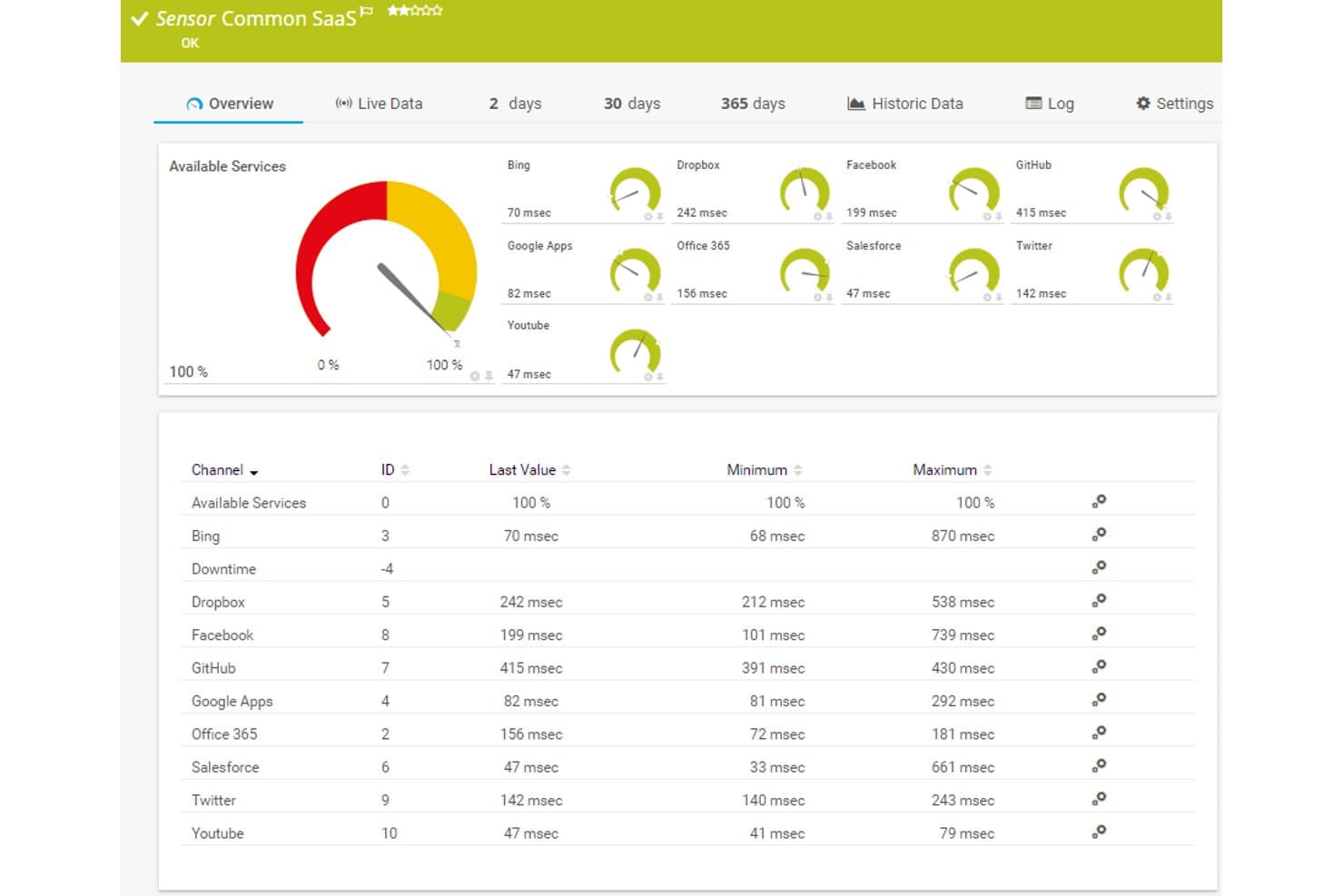
Paessler PRTG offers a Common SaaS sensor dashboard displaying real-time response times and availability for cloud services like Dropbox, Office 365, Salesforce, and GitHub. Paessler PRTG is a sensor-based monitoring platform that tracks infrastructure, cloud services, and network performance across AWS, Azure, and hybrid environments using 250+ preconfigured sensors.
Who Is Paessler PRTG Best For?
IT operations teams managing mixed environments—combining on-premises infrastructure with cloud services—who need a single monitoring platform without per-host pricing surprises.
Why I Picked Paessler PRTG
I picked Paessler PRTG as one of the best because its sensor-based architecture gives me precise control over exactly what gets monitored. I can deploy preconfigured AWS sensors like AWS EC2 v2 and AWS Cost alongside Cloud HTTP v2 sensors that check response times from Asia, Europe, and the USA simultaneously. When standard sensors aren't enough, I build custom ones via REST API or HTTP requests to cover gaps no other tool addresses out of the box.
Paessler PRTG Key Features
- Multi-cloud integrations: Native sensors connect directly with AWS, Azure, Microsoft 365, and Google Cloud services.
- Customizable dashboards: Drag-and-drop Maps and dashboards visualize metrics, alarms, and device status across your environment.
- Grafana exporter: Export metrics from multiple PRTG servers to Grafana for unified multi-instance visualization.
- Syslog and SNMP monitoring: Built-in support for Syslog, SNMP, and Windows Event Log collection from network devices and servers.
Paessler PRTG Integrations
Paessler PRTG offers native integrations with AWS, Azure, Google Cloud, Microsoft 365, vSphere, and SNMP network devices. An API is available for custom integrations and data exports.
Pros and Cons
Pros:
- Monitors on-premises and cloud from one interface
- Sensor-based pricing scales predictably with coverage
- 250+ preconfigured sensors for deployment
Cons:
- Log analysis capabilities are limited
- Cloud-native monitoring depth trails dedicated cloud tools
Learn more about Paessler PRTG:

LogicMonitor tracks multi-cloud resources from a single pane of glass. LogicMonitor is a cloud-based infrastructure monitoring platform designed for IT operations teams and managed service providers. It helps monitor both on-premises and cloud environments, providing a unified view of your IT infrastructure. The tool is valuable for businesses needing to track performance across diverse environments.
Why I picked LogicMonitor: It excels in monitoring hybrid environments, allowing you to keep an eye on both cloud and on-premises resources. You can set up automated alerts to notify your team of any issues. The tool's customizable dashboards offer insights into key metrics across your infrastructure. Its scalability makes it suitable for growing businesses with complex needs.
Standout Features and Integrations:
Features include automated discovery of devices and resources, which saves you time during setup. You can use its forecasting capabilities to predict future resource needs. The tool also provides detailed reporting to help you analyze performance trends over time.
Integrations include AWS, Microsoft Azure, Google Cloud Platform, Slack, and more.
Pros and Cons
Pros:
- Automated device discovery
- Scalable for large organizations
- Supports hybrid infrastructure
Cons:
- Can return a high volume of alerts
- Limited native reporting
Learn more about LogicMonitor: Best for open-source flexibility
- Free download available
- From $325/month (billed annually)
Visit WebsiteCustomer Rating:4.4/5
Zabbix monitors server resources such as CPU, memory, disk, and network usage. Zabbix is an open-source monitoring solution designed for IT infrastructure, applications, and cloud operations. It's widely used by IT administrators and developers to monitor the performance and availability of network servers, devices, VMs, and applications. The tool provides a range of monitoring capabilities, including network, server, and cloud monitoring.
Why I picked Zabbix: It offers open-source flexibility that allows you to customize and extend monitoring capabilities to fit infrastructure needs. With its reliable alerting system, you can set triggers based on thresholds and receive notifications. The tool supports distributed monitoring, which is ideal for large-scale environments. Detailed visualization options help you track metrics.
Standout Features and Integrations:
Features include a built-in web interface that provides easy access to monitoring data. You can create custom templates to optimize the monitoring setup. The tool also supports auto-discovery of network devices, which saves you time in configuration.
Integrations include VMware, AWS, Microsoft Azure, IBM Tivoli, Oracle, SAP, and more.
Pros and Cons
Pros:
- Extensive monitoring capabilities
- Detailed visualization options
- Scalable for large environments
Cons:
- Alert management can be intricate
- Resource-intensive for large deployments
 Best for network monitoring
- Free 30-day trial + Free edition available
- Pricing upon request
Visit WebsiteCustomer Rating:4.4/5
WhatsUp Gold monitors network devices and cloud status with live dashboards. WhatsUp Gold is a network monitoring software designed for IT professionals and network administrators. It helps monitor network performance and availability, providing insights to maintain smooth operations. The tool is valuable for businesses needing to track and manage network resources efficiently.
Why I picked WhatsUp Gold: It offers specialized network monitoring capabilities, making it ideal for IT teams. The tool allows you to visualize your network topology, giving you a clear view of device connections. You can set up alerts for network issues to support timely responses. A user-friendly interface simplifies network management, even for those with limited technical expertise.
Standout Features and Integrations:
Features include customizable dashboards that let you track key network metrics at a glance. You can automate network discovery to keep your inventory up-to-date. The tool also provides detailed reporting to help you analyze network performance trends.
Integrations include Microsoft Active Directory, VMware, AWS, Microsoft Azure, Google Cloud Platform, Slack, and more.
Pros and Cons
Pros:
- Customizable dashboards
- Automated network discovery
- Specialized network monitoring
Cons:
- Can be resource-intensive
- Limited scalability
Learn more about WhatsUp Gold: Best for infrastructure monitoring and alerting
- Free demo + 30-day free trial + free plan available
- From $2,595/100 node license
Visit WebsiteCustomer Rating:4.6/5
Nagios XI tracks system health with dashboards for alerts, hosts, and services. Nagios XI is an enterprise-level monitoring solution for IT infrastructure. It serves IT administrators and managers by providing insights into system health and performance. The tool excels in monitoring servers, networks, and applications.
Why I picked Nagios XI: Its complete alerting system helps you catch all critical issues. You can configure alerts based on specific thresholds and conditions. The tool provides an easy-to-use web interface for managing alerts and notifications. Its customizable alerting options make it a reliable choice for IT teams.
Standout Features and Integrations:
Features include advanced reporting that helps you analyze trends and performance over time. You can also use its visualizations to create custom dashboards for your team. The tool's capacity planning features assist in predicting future resource needs.
Integrations include AWS, Microsoft Azure, VMware, Oracle, Cisco, Slack, and more.
Pros and Cons
Pros:
- Reliable notification system
- Scalable architecture
- Extensive alert customization
Cons:
- Performance issues at scale
- High cost compared to competitors
Learn more about Nagios XI:

Prometheus monitors real-time server metrics such as CPU, memory, and traffic. Prometheus is an open-source monitoring system designed for capturing time-series data. It integrates with CI/CD pipelines to monitor applications, systems, and services. The tool collects and queries metrics for alerting and dashboarding.
Why I picked Prometheus: Its functional language, PromQL, allows you to query and transform data efficiently. It operates independently, relying on local storage, and is easy to deploy across environments. A large selection of instrumentation libraries supports most programming languages.
Standout Features and Integrations:
Features include a multi-dimensional data model that identifies time series with a metric name and key-value pairs. It supports precise alerting rules based on PromQL. The tool also offers simple operation with statically linked binaries for easy deployment.
Integrations include Kubernetes, Consul, etcd, HAProxy, and more.
Pros and Cons
Pros:
- Cloud-native integration
- Flexible query language
- Strong time-series support
Cons:
- No built-in long-term storage
- Limited dashboarding
Learn more about Prometheus: Best for Google Cloud users
- Free plan available
- From $0.1510/MiB for metrics ingested

Google Cloud Monitoring tracks cloud metrics with customizable dashboards. Google Cloud Monitoring is designed for monitoring applications running on Google Cloud Platform and other cloud environments. It's primarily used by developers and IT operations teams to gain insights into system performance and availability. The tool helps identify and resolve issues quickly, maintaining smooth operations.
Why I picked Google Cloud Monitoring: It's tailored for Google Cloud users, offering deep integration with Google's services. The tool provides out-of-the-box dashboards for a quick overview of system health. Its integration with other Google services improves the monitoring experience for those already using Google Cloud.
Standout Features and Integrations:
Features include the ability to create custom dashboards to visualize data in a way that makes sense for your team. You can set up alerting policies to notify you of issues based on specific conditions. The tool also offers uptime checks to help keep your services available to users.
Integrations are not publicly listed.
Pros and Cons
Pros:
- Supports multi-cloud environments
- Quick setup for Google Cloud users
- Deep integration with Google services
Cons:
- Complex alerting setup for beginners
- Limited to the Google ecosystem
Learn more about Google Cloud Monitoring:

Amazon CloudWatch monitors AWS resources with dashboards, alarms, and metrics. Amazon CloudWatch is a monitoring service for AWS cloud resources and applications. It's primarily used by developers and IT operations teams to track system performance and optimize resource usage. The tool provides metrics and logs to help you monitor your AWS environments.
Why I picked Amazon CloudWatch: It provides optimal integration with AWS services, making it a natural choice for AWS users. You can monitor and collect metrics from multiple AWS services with ease. The tool's ability to create custom dashboards helps you visualize key metrics. The alerting system helps you stay informed about important events.
Standout Features and Integrations:
Features include the ability to collect and monitor log files, which aids in troubleshooting. You can set alarms to automatically respond to changes in your AWS resources. The tool also supports real-time monitoring, helping you react quickly to issues.
Integrations include nearly all AWS services, Zapier, Grafana, and more.
Pros and Cons
Pros:
- Supports multiple AWS services
- Real-time monitoring capabilities
- Deep AWS integration
Cons:
- Limited visualization options
- Complex setup for non-AWS users
Learn more about Amazon CloudWatch:

Azure Monitor tracks real-time usage, performance, and reliability metrics. Azure Monitor is a complete monitoring solution offering native visibility into serverless workloads within the Microsoft Azure cloud provider ecosystem. It's designed for IT administrators and developers who need insights into the performance and health of their Azure resources. The tool supports application availability and performance through detailed data collection and analysis.
Why I picked Azure Monitor: It offers deep integration with Azure services, providing a continuous monitoring experience for Azure users. You can collect and analyze telemetry data across your Azure resources with ease. The tool's ability to create personalized dashboards helps you visualize important metrics, and its alerting capabilities keep you informed about critical issues.
Standout Features and Integrations:
Features include the ability to perform end-to-end monitoring of your applications, which aids in quickly identifying performance issues. You can set up proactive alerts based on specific conditions to mitigate risks. The tool also offers advanced analytics to dive deeper into your data for better insights.
Integrations include Microsoft Entra ID, Datadog, Dynatrace, and more.
Pros and Cons
Pros:
- Scalable for large environments
- Advanced data analytics
- Deep integration with Azure
Cons:
- High data ingestion costs
- Complex for non-Azure environments
Learn more about Azure Monitor: 10Best for real-time dashboards
Datadog
- Free plan available and 14-day free trial
- From $5/month (billed annually)
Visit WebsiteCustomer Rating:4.5/5
Datadog monitors apps and infrastructure with real-time metrics and logs. Datadog is a monitoring and analytics platform for cloud applications. It's used by developers, IT operations teams, and business users to track the performance and health of applications and infrastructure. The tool provides real-time insights into multiple layers of your tech stack. Its strong APM is useful for identifying latency issues and improving overall response times.
Why I picked Datadog: Its real-time dashboards offer immediate visibility into system performance, which is important for quick decision-making. You can customize dashboards to display metrics that matter most to your team. The tool's ability to correlate events and metrics helps in diagnosing issues efficiently, while its intuitive interface makes it accessible for both technical and non-technical users.
Standout Features and Integrations:
Features include log management that allows you to analyze logs for troubleshooting. The tool supports distributed tracing to track requests across different services. You can also use its anomaly detection to identify unusual patterns in your data.
Integrations include AWS, Azure, Google Cloud Platform, Slack, Jira, GitHub, and more.
Pros and Cons
Pros:
- Supports distributed tracing
- Customizable alerts
- Real-time data visualization
Cons:
- Complexity in dashboard setup
- High data-volume costs
Andre verktøy for skyovervåking
Her er noen flere verktøy for skyovervåking som ikke kom med på kortlisten min, men som likevel er verdt å sjekke ut:
- 11ManageEngine OpManagerBest for network management
- 12ManageEngine NetFlow AnalyzerBest for traffic analysis
- 13Nagios CoreBest for open-source monitoring
How I Evaluate Cloud Monitoring Tools
I look at tools through two lenses: whether they cover the fundamentals—real-time metrics, multi-cloud alerting, log aggregation—and what sets them apart, like AI anomaly detection or cost visibility.
Core Functionality (Table Stakes For This List)
When I'm selecting tools for my list, I rank each one on a scale from 0 (does not offer the functionality) to 5 (excels in this area) for each core functionality listed below. Then, I calculate the tool's total score into a percentage. Each tool needs to achieve a minimum total score of 75% to be considered for inclusion.
- Real-Time Infrastructure Monitoring: I check whether a tool can pull live metrics like CPU, memory, and disk I/O from VMs, containers, and serverless functions with sub-minute refresh intervals.
- Multi-Cloud & Hybrid Support: Tools that integrate with AWS, Azure, and GCP through native connectors earn higher marks, especially when they also cover on-prem or hybrid setups.
- Alerting & Incident Notifications: I evaluate how flexible alert rules are and whether the tool routes notifications to channels teams already use, like Slack, PagerDuty, or email.
- Log Aggregation & Analysis: Centralizing logs from dozens of cloud services matters, so I look for strong search, filtering, and the ability to correlate log entries with metrics.
- Dashboards & Visualization: I look at whether teams can build custom dashboards with relevant widgets, share them across roles, and template views for repeated use across environments.
- Application Performance Monitoring: Distributed tracing across microservices is what I focus on here, along with support for common languages and frameworks used in cloud-native apps.
Once I have a list of tools that meet this criteria, I consider what sets each platform apart.
Differentiating Factors (What Sets Vendors Apart)
Here's how I compare and contrast different vendors:
Standout Features
AI-driven anomaly detection is a big differentiator—I look for tools that surface unusual patterns in metrics and logs without requiring teams to manually configure every threshold. Kubernetes observability also matters, especially auto-discovery of pods, nodes, and service meshes across clusters. Cost monitoring ties it together; tools that connect resource utilization data directly to cloud spend help teams spot waste without switching to a separate FinOps platform.
Beyond Features
Integration ecosystem is one of the first things I evaluate. A tool that connects to your CI/CD pipeline, ITSM platform, and supports OpenTelemetry means fewer data silos across your stack. Pricing model also shapes long-term fit—I check whether costs scale by host count, data volume, or events, since unpredictable ingestion-based billing can spiral fast in large environments. For teams in regulated industries, I look at compliance certifications like SOC 2 Type II and HIPAA, along with data residency options and RBAC controls.
Slik velger du verktøy for skyovervåking
Det er lett å gå seg vill i lange funksjonslister og komplekse prismodeller. For å hjelpe deg med å holde fokus mens du går gjennom den unike programvareutvelgelsesprosessen din, får du her en sjekkliste over faktorer du bør ha i tankene:
| Faktor | Hva du bør vurdere |
| Skalerbarhet | Kan verktøyet vokse med virksomheten din? Kontroller om det støtter økende datamengder og flere brukere uten redusert ytelse. Vurder fremtidig vekst og om verktøyet kan håndtere den. |
| Integrasjoner | Kan det kobles til de eksisterende systemene dine? Se etter kompatibilitet med den nåværende teknologistakken for å unngå ekstraarbeid. Kontroller at det integreres problemfritt med de viktigste applikasjonene og plattformene dine. |
| Tilpasningsmuligheter | Kan du tilpasse verktøyet etter behovene dine? Finn ut om det tillater justeringer av dashbord og varsler slik at de passer til de spesifikke arbeidsflytene dine. Se etter fleksibilitet i hvordan data vises og åpnes. |
| Brukervennlighet | Er det brukervennlig for teamet ditt? Vurder læringskurven og hvor raskt teamet kan begynne å bruke det effektivt. Verktøy med intuitive grensesnitt kan spare tid og redusere frustrasjon. |
| Implementering og innføring | Hvor lang tid vil oppsettet ta? Vurder ressursene som kreves for en vellykket utrulling. Vurder tilgjengeligheten av støtte og opplæring under innføringsfasen for å minimere forstyrrelser. |
| Kostnad | Passer det inn i budsjettet ditt? Analyser de totale kostnadene, inkludert skjulte gebyrer eller langsiktige forpliktelser. Sammenlign prisen med verdien det gir, og ta hensyn til både innledende og løpende utgifter. |
| Sikkerhetstiltak | Er dataene og driften din sikre? Kontroller verktøyets sikkerhetstiltak, for eksempel datakryptering og tilgangskontroller. Bekreft at det er i tråd med organisasjonens sikkerhetspolicyer og standarder. |
| Etterlevelseskrav | Oppfyller det bransjereguleringene? Vurder om verktøyet overholder relevante juridiske krav og bransjestandarder, særlig hvis du driver virksomhet i strengt regulerte sektorer. Bekreft at det støtter nødvendig rapportering og revisjon knyttet til etterlevelse. |
Hva er verktøy for skyovervåking?
Verktøy for skyovervåking er programvareløsninger som brukes til å spore og administrere ytelsen, sikkerheten og tilgjengeligheten til skybaserte ressurser. IT-fagfolk, utviklere og driftsteam bruker vanligvis disse verktøyene for å holde systemene i gang på en smidig og effektiv måte. Dashbord, varsler og integrasjonsfunksjoner bidrar til overvåking i sanntid og rask problemløsning. Disse verktøyene gir viktig innsikt som gjør det mulig for team å optimalisere ytelsen og opprettholde pålitelige skytjenester.
Funksjoner
Her er de viktigste funksjonene et godt verktøy for skyovervåking bør ha:
- Overvåking i sanntid: Sporer kontinuerlig ytelsen og tilstanden til skyressurser og gir umiddelbar innsikt i systemstatusen.
- Dashbord: Tilbyr tilpassbare visualiseringer av viktige måleverdier, slik at team raskt kan vurdere ytelsen og identifisere problemer.
- Varsler: Sender varsler basert på forhåndsdefinerte betingelser for å støtte raske svar på potensielle problemer.
- Integrasjonsfunksjoner: Kobler seg til eksisterende systemer og applikasjoner for å gi en samlet oversikt over IT-infrastrukturen.
- Skalerbarhet: Støtter vekst ved å håndtere økende datamengder og flere brukere uten tap av ytelse.
- Sikkerhetstiltak: Omfatter tiltak som kryptering og tilgangskontroller for å beskytte data og oppfylle krav til etterlevelse.
- Dataanalyse: Analyserer innsamlede data for å identifisere trender og gi handlingsrettet innsikt for optimalisering.
- Tilpasningsmuligheter: Gjør det mulig å tilpasse dashbord og varsler til bestemte arbeidsflyter og organisatoriske behov.
- Avviksdeteksjon: Identifiserer uvanlige mønstre i data for proaktivt å håndtere potensielle problemer før de eskalerer.
- Brukeradministrasjon: Tilbyr rollebaserte tilgangskontroller for å administrere tillatelser og opprettholde datasikkerheten på tvers av team.
Fordeler
Implementering av en løsning for skyovervåking gir flere fordeler for teamet og virksomheten din. Her er noen av fordelene du kan se frem til:
- Forbedret ytelse: Ved å spore data i sanntid hjelper disse verktøyene deg med å identifisere og løse ytelsesproblemer.
- Større sikkerhet: Sikkerhetstiltak som kryptering og tilgangskontroller beskytter dataene dine og opprettholder etterlevelse av regelverk.
- Kostnadseffektivitet: Skalerbarhetsfunksjoner gjør det mulig å administrere ressurser effektivt og redusere unødvendige utgifter.
- Økt oppetid: Varsler informerer deg om potensielle problemer, noe som bidrar til å forhindre nedetid og opprettholde tjenestetilgjengeligheten.
- Datadrevet innsikt: Dataanalyse gir handlingsrettet innsikt som muliggjør bedre beslutningstaking og optimalisering.
- Tilpasningsmuligheter: Tilpassbare dashbord og varsler lar deg tilpasse verktøyene til teamets spesifikke behov og arbeidsflyter.
- Proaktiv problemløsning: Avviksdeteksjon bidrar til å identifisere potensielle problemer tidlig og reduserer risikoen for større forstyrrelser.
Kostnader og priser
Valg av verktøy for skyovervåking krever en forståelse av de ulike prismodellene og abonnementene som er tilgjengelige. Kostnadene varierer basert på funksjoner, teamstørrelse, tillegg og mer. Tabellen nedenfor oppsummerer vanlige abonnementer, gjennomsnittsprisene deres og typiske funksjoner som er inkludert i løsninger for skyovervåking:
Sammenligningstabell for abonnementer for verktøy for skyovervåking
| Abonnementstype | Gjennomsnittspris | Vanlige funksjoner |
| Gratisabonnement | $0 | Grunnleggende overvåking, begrensede varsler og brukerstøtte fra fellesskapet. |
| Personlig abonnement | $15-$300/bruker/måned | Overvåking i sanntid, tilpassbare dashbord og e-postvarsler. |
| Bedriftsabonnement | $1000-$4000/måned | Avansert analyse, rollebasert tilgangskontroll og integrasjonsmuligheter. |
| Enterprise-abonnement | $10000-$50000/måned | Full oversikt over hele teknologistakken, AI-drevet innsikt, dedikert kundestøtte og omfattende sikkerhetsfunksjoner. |
Vanlige spørsmål
Her er noen svar på vanlige spørsmål om verktøy for skyovervåking:
Hva er hovedformålet med verktøy for skyovervåking?
Verktøy for skyovervåking brukes hovedsakelig til å spore og administrere ytelsen, sikkerheten og tilgjengeligheten til skybaserte ressurser. De hjelper teamet ditt med å holde systemene i gang uten problemer ved å gi sanntidsdata og varsler. Dette gjør at du raskt kan identifisere og løse problemer, slik at driften forblir effektiv og pålitelig.
Hvordan støtter verktøy for skyovervåking miljøer med flere skyer?
Verktøy for skyovervåking støtter miljøer med flere skyer ved å samle ytelsesdata på tvers av leverandører som AWS, Azure og Google Cloud. Du får ett dashbord for måledata, logger og varsler, noe som hjelper deg med å spore bruken sentralt og oppdage problemer på tvers av skymiljøene.
Kan verktøy for skyovervåking fungere med hybride miljøer?
Ja, mange verktøy for skyovervåking kan fungere med hybride miljøer og støtte både skybaserte ressurser og ressurser lokalt. Denne fleksibiliteten er viktig hvis organisasjonen din bruker en blanding av infrastruktur. Se etter verktøy som tilbyr integrasjonsmuligheter med de eksisterende systemene dine, slik at du kan opprettholde kontinuerlig overvåking på tvers av alle miljøer.
Kan plattformer for skyovervåking bidra til samsvars- og sikkerhetsovervåking?
Ja, de fleste plattformer for skyovervåking har funksjoner for samsvars- og sikkerhetsovervåking. De sporer brukertilgang, revisjonslogger og systemendringer. Verktøyene inkluderer ofte regelbaserte varsler for uautorisert aktivitet, noe som bidrar til å oppfylle rammeverk som SOC 2, HIPAA eller GDPR.
Er verktøy for skyovervåking egnet for små bedrifter?
Ja, verktøy for skyovervåking egner seg for små bedrifter, særlig de som tilbyr skalerbare abonnementer. Start med et grunnleggende abonnement som dekker de viktigste overvåkingsbehovene, og oppgrader etter hvert som bedriften vokser. Disse verktøyene kan gi verdifull innsikt selv i mindre skala, slik at du kan optimalisere ytelsen og administrere ressursene.
Hvordan måler CTO-er avkastningen på en investering i skyovervåking?
CTO-er måler avkastningen ved å følge med på redusert nedetid, raskere hendelsesløsning og lavere driftskostnader. Overvåk gjennomsnittlig gjenopprettingstid, og se om proaktiv overvåking hjelper deg med å prioritere manuelle kontroller lavere. Samsvar med virksomhetens mål for oppetid tyder også på positiv avkastning.