

Det kan være utfordrende å finne den rette programvaren for spillutvikling for virksomheter. Du ønsker verktøy som passer teamets behov og forenkler komplekse oppgaver. Enten du håndterer problemer på tvers av plattformer eller avansert 3D-modellering, utgjør riktig programvare hele forskjellen.
Etter min erfaring gjør det enklere å velge de beste løsningene når man forstår disse utfordringene. Jeg har testet og gjennomgått ulike programmer uavhengig, med fokus på det som virkelig betyr noe for utviklere som deg.
I denne artikkelen deler jeg mine beste anbefalinger, basert på grundige undersøkelser. Du får innsikt i de unike styrkene til hvert verktøy, slik at du kan ta velinformerte beslutninger for prosjektene dine. La oss se nærmere på de beste alternativene og finne ut hvilke som passer med målene dine.
Why Trust Our Software Recommendations
6,700+
Reviews
20
Industry experts
16+
Evaluation factors
14
Years
Our team has been testing and reviewing software since 2012. As tech leaders ourselves, we know how difficult—and important—it is to choose the right software.
For this guide, we evaluated tools using hands-on testing and independent research, scoring tools using our selection criteria.
Our reviews reflect our human editorial judgment, not a sales pitch.
Expert reviewers:
- Paulo Gardini MiguelTech Director
 Tim FisherVP of AI
 Gabriel RosasTech Lead & Software Architect
 Christhian GruhnTech Lead & Platform Architect

Sammenligningstabell for programvare for spillutvikling for virksomheter
Tabellen nedenfor sammenligner prisdetaljene for mine beste utvalgte programmer for spillutvikling for virksomheter.
| Tool | Best For | Trial Info | Price | ||
|---|---|---|---|---|---|
| 1 | Best for open-source flexibility | Free plan available | From $800 | Website | |
| 2 | Best for user-generated content | Free 30-day trial | Pricing upon request | Website | |
| 3 | Best for quick, drag-and-drop prototyping | Free trial available | From $15.99/month (billed annually) | Website | |
| 4 | Best for open-source projects | Not available | Pricing upon request | Website | |
| 5 | Best for royalty-free 2D console shipping | Free plan available | From $79.99/month | Website | |
| 6 | Best for cross-platform development | 30-day free trial + Free plan available (for students and personal users) | From $185/month (billed annually) | Website | |
| 7 | Best for photorealistic graphics | Free plan available | Free forever plan | Website | |
| 8 | Best for high-fidelity visual effects | Free plan available | From 5% royalty after $5,000 annual revenue per project | Website |


Anmeldelser av den beste programvaren for spillutvikling for virksomheter
Nedenfor finner du mine detaljerte sammendrag av den beste programvaren for spillutvikling for virksomheter som kom med på listen min. Anmeldelsene mine gir en detaljert gjennomgang av de viktigste funksjonene, fordeler & ulemper, integrasjoner og ideelle bruksområder for hvert verktøy, slik at du kan finne det som passer best for deg.

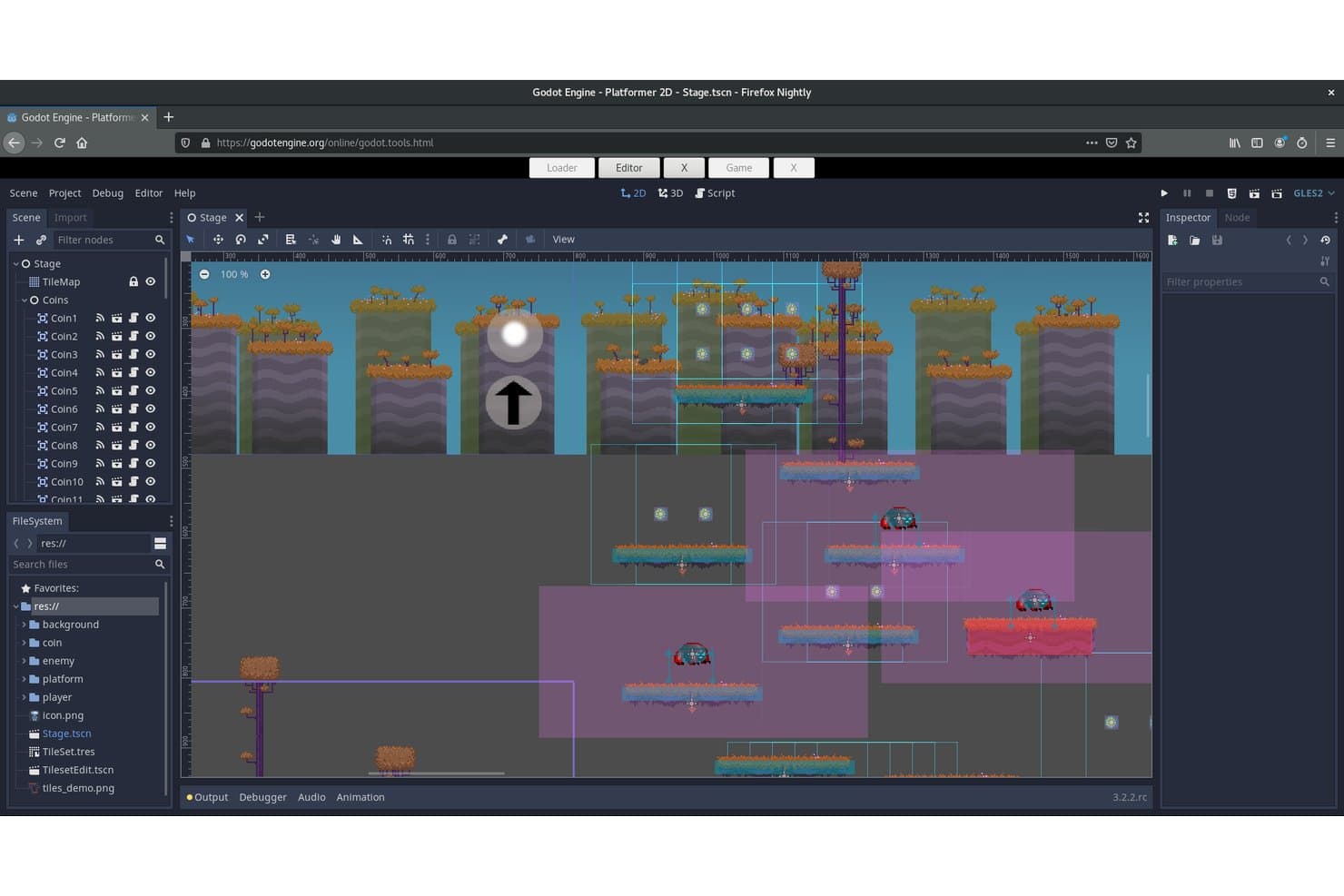
Godot Engine lets users build and visualize 2D platformer scenes with assets. Godot Engine is a free, open-source 2D and 3D game engine that supports multi-language scripting, physically-based rendering, cross-platform deployment, and a modular node-based scene architecture.
Who Is Godot Engine Best For?
Godot Engine is a strong fit for indie studios and mid-size development teams that want full control over their engine without licensing fees or vendor lock-in.
Why I Picked Godot Engine
I've included Godot Engine in my top picks because its MIT license gives studios something no commercial engine can match: permanent, unconditional source access with zero royalties. I love that a team migrating from Unity, like Mega Crit did for Slay the Spire 2, can fork the full C++ codebase, build custom rendering or networking layers, and ship without ever negotiating a license agreement. The GDExtension API lets you write high-performance C++ extensions without recompiling the engine, which makes deep pipeline customization practical at enterprise scale.
Godot Engine Key Features
- Multi-language scripting support: Write game logic in GDScript, C#, or high-performance C++ via the GDExtension API without recompiling the engine.
- OpenXR and WebXR integration: Deploy XR experiences natively across VR and AR platforms, with support for hand tracking, body tracking, and spatial understanding.
- Text-based scene format: Godot's
.tscnformat stores scenes as human-readable text, making Git-based version control and merge conflict resolution practical for development teams. - Godot Asset Store: A built-in marketplace integrated in Godot 4.7 that lets teams browse, rate, and download assets with version-specific downloads and changelogs.
Godot Engine Integrations
Godot Engine integrates with W4 Games, Nakama by Heroic Labs, JetBrains Rider, Blender, GitHub, GitLab, OpenXR, and WebXR. Community SDKs support Firebase, PlayFab, Supabase, and Talo, while GDExtension enables custom integrations.
Pros and Cons
Pros:
- Native cross-platform and XR deployment support
- Full source code access for customization
- Zero royalties with MIT licensing
Cons:
- Lacks native multi-user concurrent editing
- No first-party live-ops or backend services
Learn more about Godot Engine:
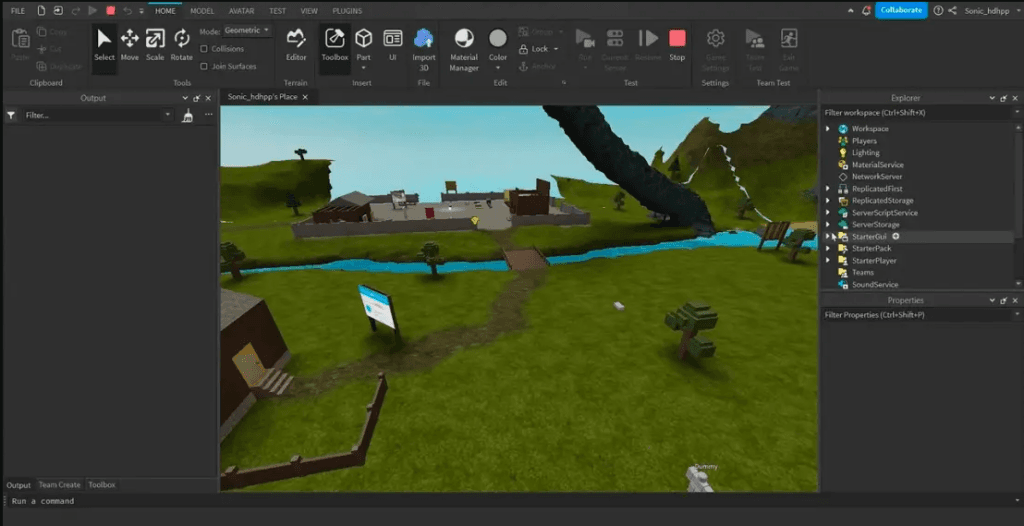
Create immersive 3D Roblox experiences with Roblox studio. Roblox is a game development platform that allows users to create and share games, primarily catering to a community of both amateur and professional developers. It provides tools for developing a wide range of games and experiences, offering an interactive environment for creativity and collaboration.
Why I picked Roblox: Roblox is unparalleled in supporting user-generated content, providing a platform where you can create and share games with a global audience. Its user-friendly development tools, like Roblox Studio, make it accessible for creators of all levels. The robust community fosters collaboration and learning, enhancing your team's development skills. Roblox's built-in marketplace allows you to monetize your creations, offering a unique business opportunity.
Standout features & integrations:
Features include an integrated development environment, Roblox Studio, which simplifies game creation with its drag-and-drop functionality. The platform supports multiplayer game development, enabling you to create interactive experiences. Roblox also offers a marketplace for buying and selling game assets, enhancing creativity and monetization opportunities.
Integrations include Discord, YouTube, Twitch, Twitter, Facebook, Google Analytics, Microsoft Azure, AWS, and Unity.
Pros and Cons
Pros:
- Large and active community
- Encourages creative collaboration
- Integrated monetization options
Cons:
- Limited graphical capabilities
- Requires internet connection
Learn more about Roblox: Best for quick, drag-and-drop prototyping
- Free trial available
- From $15.99/month (billed annually)
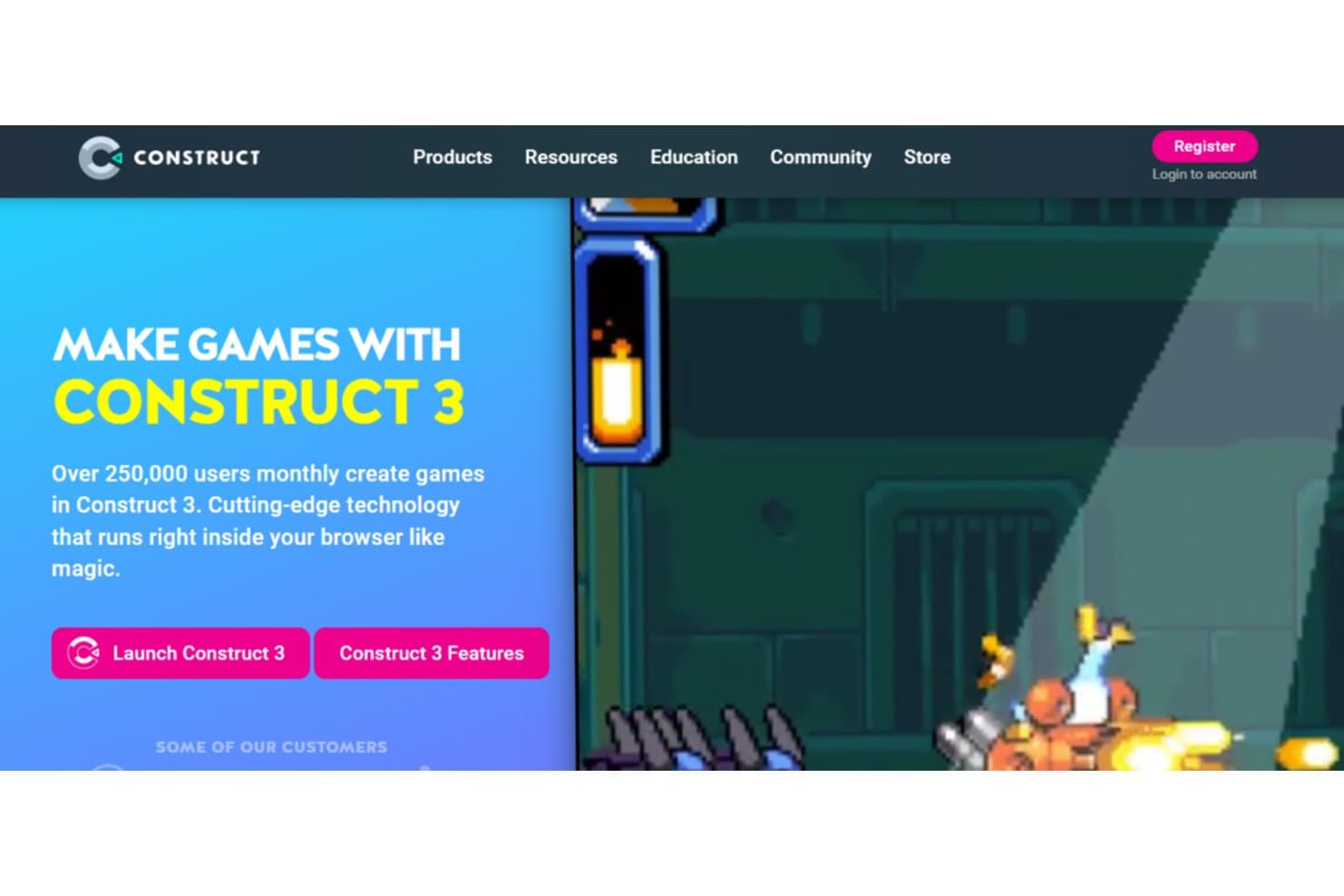
Construct enables users to create their own games. Construct is a browser-based game development platform designed to help teams create 2D games using visual programming. It’s aimed at users who want to build and test projects fast without writing much code.
Why I picked Construct: Construct uses an event-based system that skips traditional coding, so you can focus more on design and logic. It’s got a built-in image editor, layout tools, and instant preview, which makes it easy to tweak and test on the fly. You can build a full prototype without digging through syntax or debugging scripts. It’s especially helpful if your team wants to pitch or test ideas quickly before scaling up. The drag-and-drop interface keeps things moving fast, even for less technical users.
Standout features & integrations:
Features include a timeline editor for animations, custom plugin support, and in-editor multiplayer preview. You can build and edit directly in the browser without installing anything. It also supports real-time collaboration, so your team can co-edit games together.
Integrations include Steam, Google Play, Apple App Store, Facebook Instant Games, Chrome Web Store, itch.io, Android, Windows, Xbox, and Amazon Appstore.
Pros and Cons
Pros:
- No install needed to get started
- Good for quick early-stage testing
- Fast to learn visual logic system
Cons:
- Limited scripting for advanced users
- Not suited for 3D or large games
Learn more about Construct:
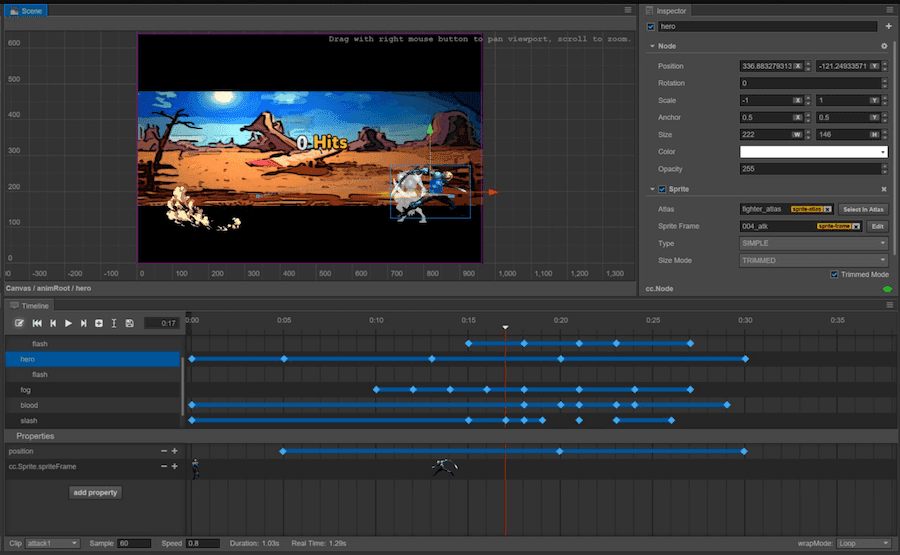
Cocos2d-x offers an open-source, stable, customizable cross-platform game solution. Cocos2d-x is an open-source, C++-based 2D game framework that supports cross-platform deployment to iOS, Android, desktop, and HTML5, with multi-language scripting via C++, Lua, and JavaScript.
Who Is Cocos2d-x Best For?
Cocos2d-x suits small teams and independent developers building 2D mobile games who need a fully open-source, royalty-free framework they can modify at the source level.
Why I Picked Cocos2d-x
I've included Cocos2d-x in my top picks because its MIT license gives you complete source-level freedom, which is rare in this category. If your team needs to modify the rendering pipeline, strip out unused subsystems, or ship a 2D mobile title with no royalties attached, Cocos2d-x delivers that without restrictions. I also rate its hot-update capability highly: Lua and JavaScript scripting let you push live patches directly to players, bypassing app store review cycles entirely.
Cocos2d-x Key Features
- Multi-language scripting support: Write game logic in C++, Lua, or JavaScript within the same project, giving teams flexibility based on their existing skill sets.
- Box2D and Chipmunk physics integration: Both physics engines are bundled directly into the framework, letting developers implement collision detection and rigid body simulation without third-party setup.
- Spine skeletal animation runtime: Built-in support for Spine (v3.x) and DragonBones runtimes lets animators import and play back skeletal animations at runtime.
- CMake-based cross-platform build system: From v3.17 onward, a unified CMake configuration handles builds across iOS, Android, Windows, macOS, and HTML5 from a single setup.
Cocos2d-x Integrations
Documented integrations include Nakama, Microsoft PlayFab, Spine, DragonBones, Git, and SVN. Cocos2d-x also bundles Box2D and Chipmunk physics engines, while teams manage external integrations through project files and custom code.
Pros and Cons
Pros:
- Hot updates bypass app store reviews
- Supports C++, Lua, and JavaScript scripting
- Fully open source with MIT license
Cons:
- Development discontinued since December 2019
- No integrated visual editor available
Learn more about Cocos2d-x: Best for royalty-free 2D console shipping
- Free plan available
- From $79.99/month
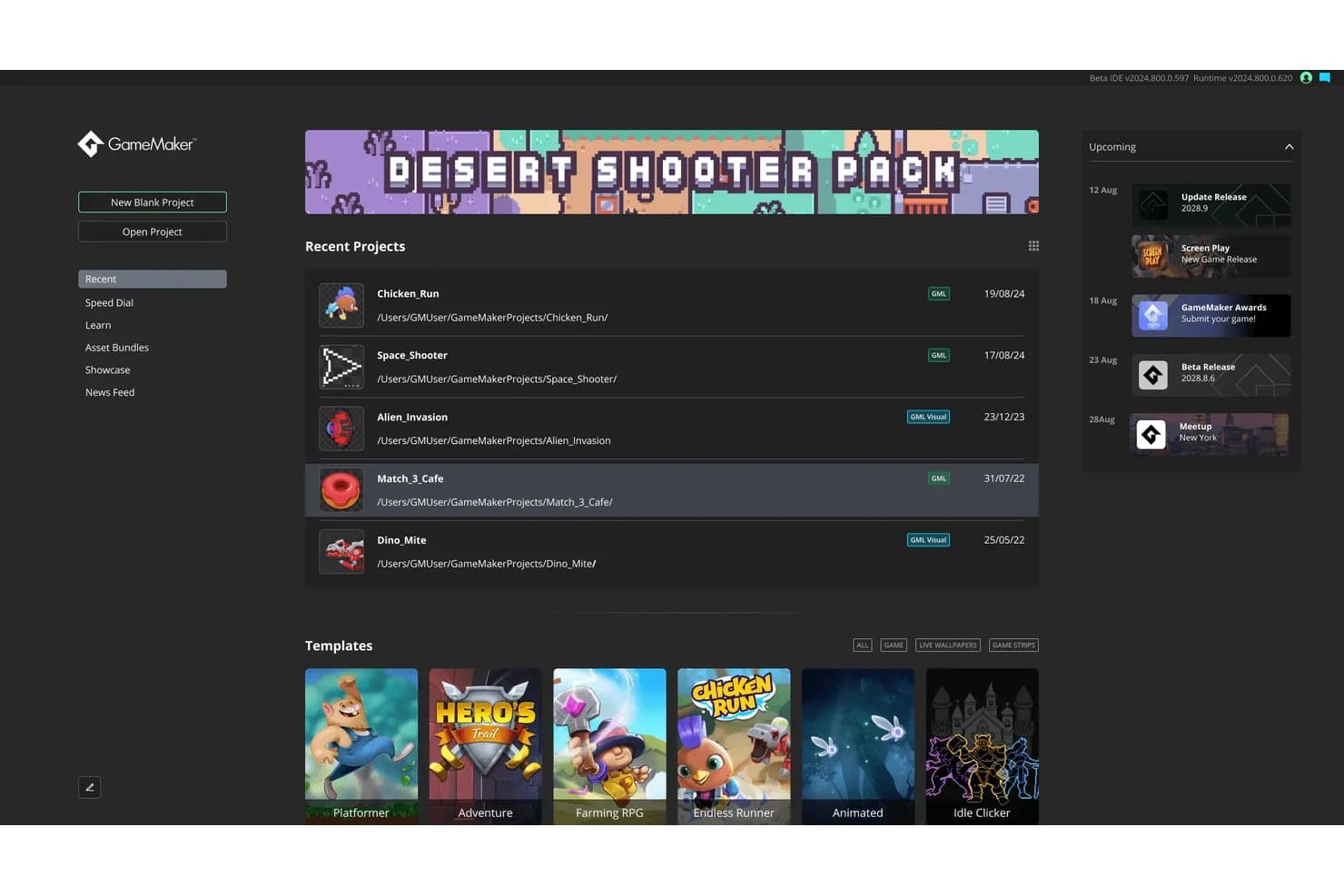
GameMaker lets users manage recent projects and templates from one dashboard. GameMaker is a 2D game engine that combines a visual IDE, proprietary scripting, sprite and animation tooling, and multi-platform export—including console targets—under a no-royalty licensing model.
Who Is GameMaker Best For?
GameMaker is a strong fit for indie and mid-size studios that ship 2D titles commercially across console and mobile without paying royalties.
Why I Picked GameMaker
I picked GameMaker as one of the best because it's the only engine I know that ships to Nintendo Switch, PlayStation 4/5, and Xbox One/Series X|S under a flat subscription with zero royalties. The Enterprise tier unlocks full runner source code across desktop, mobile, and console targets, so your studio can patch and maintain builds independently without waiting on official release cycles. Add the Photon multiplayer extension for matchmaking and voice, and you have a credible commercial 2D production pipeline across every major console.
GameMaker Key Features
- Runner source code access: Enterprise subscribers receive the full source code for all GameMaker runners, including desktop, mobile, WebAssembly, and console targets.
- GML scripting language: GameMaker uses its own proprietary scripting language, GML, alongside a drag-and-drop visual interface for building game logic.
- Spine skeletal animation runtime: GameMaker includes native support for Spine Runtime 4.0, enabling 2D skeletal animation directly within the IDE.
- Git version control plugin: A built-in Git plugin lets teams commit, push, pull, and resolve conflicts from within the GameMaker IDE without switching to an external tool.
GameMaker Integrations
GameMaker offers official integrations with Git, Steamworks, Photon Multiplayer, Namazu Elements, Discord Social SDK, and Spine, plus console SDK connectivity for Nintendo, PlayStation, and Xbox. It also supports custom networking through TCP/UDP functions and Namazu Elements’ REST API.
Pros and Cons
Pros:
- Ships 2D games to all major consoles
- Runner source code access for full control
- No royalties or revenue share required
Cons:
- No SLA, SSO, or compliance certifications
- Lacks 3D tools and high-fidelity rendering
Learn more about GameMaker: Best for cross-platform development
- 30-day free trial + Free plan available (for students and personal users)
- From $185/month (billed annually)
Visit WebsiteCustomer Rating:4.6/5
Unity empowers content creators to create innovative RT3D experiences and improve industries. Unity is a versatile game development platform designed for developers aiming to create 2D and 3D games. It's widely used by indie developers and large studios alike for its capability to deploy games across multiple platforms efficiently.
Why I picked Unity: Unity excels in cross-platform development, allowing you to create a game and deploy it on various platforms with ease. Its advanced rendering solutions, like URP and HDRP, enhance visual performance, making it stand out. The asset store offers a vast collection of resources, enabling your team to accelerate project development. Unity's user-friendly interface, combined with its support for C#, makes it accessible for developers of all skill levels.
Standout features & integrations:
Features include a dynamic animation system, customizable rendering solutions, and a vast asset store. Unity supports both 2D and 3D game development, making it ideal for diverse gaming projects. Its user-friendly interface ensures accessibility for developers at any experience level.
Integrations include Visual Studio, Autodesk, Facebook SDK, Google Play, Oculus, PlayStation Network, Xbox Live, Steamworks, Unity Ads, and Vuforia.
Pros and Cons
Pros:
- Extensive asset store
- Customizable interface layout
- Beginner-friendly C# language
Cons:
- High memory usage
- No project templates
Learn more about Unity:

Unreal Engine is a comprehensive development tool for real-time technology. Unreal Engine is a highly advanced game development platform, primarily used by developers and studios focused on creating visually stunning 3D games. It is known for its capabilities in real-time rendering and high-resolution graphics.
Why I picked Unreal Engine: Unreal Engine excels in delivering photorealistic graphics, which is vital for creating immersive gaming experiences. The engine's real-time ray tracing allows your team to achieve lifelike lighting and shadows. Its powerful rendering pipeline supports high-fidelity visuals, making it a favorite for AAA game development. With Blueprints, you can create complex gameplay mechanics without extensive coding knowledge.
Standout features & integrations:
Features include a robust material editor, letting you create detailed textures and surfaces. The animation tools support complex character movements, enhancing realism in games. Unreal Engine also offers a versatile audio engine, providing immersive soundscapes for your projects.
Integrations include Autodesk Maya, 3ds Max, Blender, Quixel Megascans, Substance Painter, Houdini, Adobe Photoshop, SpeedTree, Oculus, and NVIDIA GeForce.
Pros and Cons
Pros:
- Extensive animation tools
- Blueprints for non-coders
- Photorealistic rendering capabilities
Cons:
- Large file sizes
- Requires high-end hardware
Learn more about Unreal Engine: Best for high-fidelity visual effects
- Free plan available
- From 5% royalty after $5,000 annual revenue per project
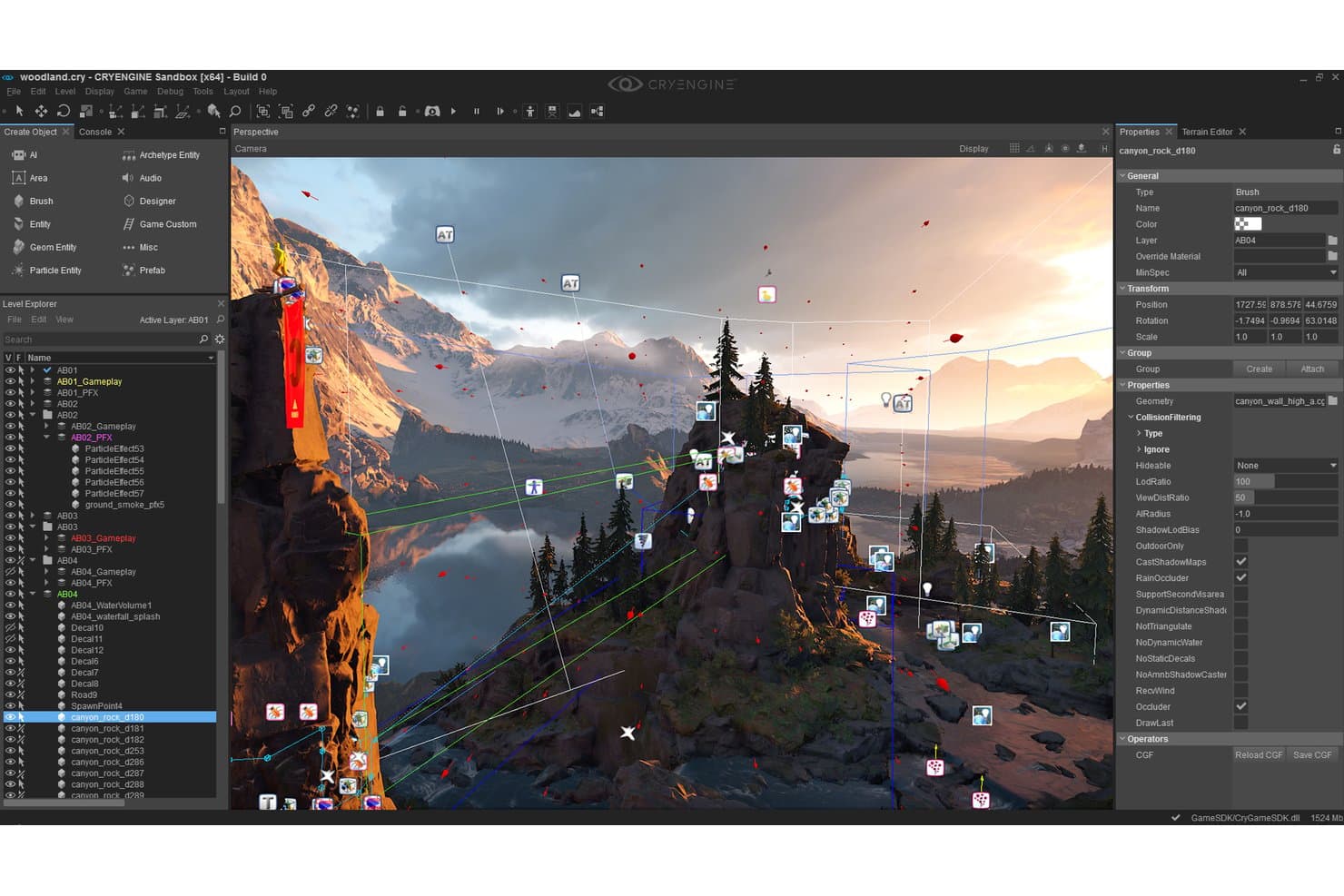
CryEngine's Sandbox editor lets users build detailed 3D game worlds. CryEngine is a real-time game engine built for AAA development, offering a rendering pipeline with hardware-agnostic ray tracing, voxel-based global illumination, PBR materials, and a WYSIWYP Sandbox editor for scene and asset authoring.
Who Is CryEngine Best For?
CryEngine suits AAA studios and technical art teams where photorealistic rendering and visual fidelity take priority over cross-platform reach or live-service infrastructure.
Why I Picked CryEngine
CryEngine earns its spot on my list because no other engine matches its real-time visual fidelity out of the box. I'm particularly impressed by the SVOGI system, which delivers dynamic global illumination across massive open-world scenes without any light baking. Its hardware-agnostic "Neon Noir" ray tracing runs on both AMD and NVIDIA GPUs, so AAA teams aren't locked into a single hardware ecosystem to achieve photorealistic reflections and refractions.
CryEngine Key Features
- Full C++ source code access: Every licensee gets complete access to the engine and editor source code via a private GitHub repository, enabling deep customization at any level.
- Schematyc visual scripting system: A node-based scripting environment built on an Entity Component System architecture, letting developers define game logic without writing raw C++.
- Audio Translation Layer: A middleware-agnostic audio system that lets your team integrate any audio middleware—such as Wwise or FMOD—without engine-level lock-in.
- Multi-layer navigation mesh: An advanced AI pathfinding system that supports complex, multi-surface environments for realistic NPC movement across large open-world levels.
CryEngine Integrations
CryEngine documents integrations with Adobe Substance, Wwise, Scaleform 4, Steam, Discord, PlayStation, Xbox, Oculus SDK, OSVR, and HTC Vive SDKs. It has no documented native VCS integration or managed backend, so teams must configure Git, Perforce, and backend services separately.
Pros and Cons
Pros:
- Best-in-class global illumination for open worlds
- Full C++ source code included for all
- Real-time ray tracing on AMD and NVIDIA GPUs
Cons:
- Lacks mobile and web deployment support
- No native version control integration
Learn more about CryEngine:
Annen programvare for spillutvikling for virksomheter
Her er noen flere alternativer for programvare for spillutvikling for virksomheter som ikke kom med på listen min, men som likevel er verdt å se nærmere på:
How I Evaluate Enterprise Game Development Software
When a studio is shipping across six platforms with a 200-person team, the tools either hold up or they don't—so I split my evaluation into baseline requirements and the differentiators that separate good from great.
Core Functionality (Table Stakes For This List)
When I'm selecting tools for my list, I rank each one on a scale from 0 (does not offer the functionality) to 5 (excels in this area) for each core functionality listed below. I then calculate the tool's total score into a percentage, using 65% as a benchmark to help assess its overall fit for the list.
- Game Engine & Rendering: I look for tools that provide a real-time engine with 2D/3D rendering, physics, animation, and scripting to build interactive game experiences.
- Cross-Platform Deployment: I check for whether they support building and publishing games across major platforms including PC, console, mobile, web, and VR/AR.
- Asset & Scene Management: I evaluate the tools for importing, organizing, and manipulating game assets, levels, and scenes within a unified editor environment.
- Enterprise Collaboration & Version Control: I only included products that truly enable large, distributed teams to collaborate concurrently with integrated or compatible version control, project management, and permissions.
- Scalable Backend & Live Ops: I made sure they offer (or integrate with) services for multiplayer networking, matchmaking, analytics, and live-service operations at enterprise scale.
- Enterprise Licensing & Security: I prioritized products that provides enterprise-tier licensing, source code access or extensibility, dedicated support, and compliance/security controls suited for large organizations.
Once I have a list of tools that meet the criteria, I consider what sets each platform apart.
Differentiating Factors (What Sets Vendors Apart)
Here's how I compare and contrast different vendors:
Standout Features
AI-assisted content creation is worth examining closely—specifically whether ML tools handle animation retargeting and procedural generation natively or require third-party plugins. I also evaluate integrated live services backends, like Epic Online Services or PlayFab, looking at whether matchmaking, cloud saves, and remote config ship as first-party modules or need to be assembled from external SDKs. For studios running virtual production workflows, I check nDisplay-style multi-projector sync and live link support for motion capture hardware.
Beyond Features
Licensing structure shapes long-term costs in ways that aren't obvious upfront—royalty models, seat-based subscriptions, and source-available arrangements all hit differently once a title scales. I also weigh enterprise support depth: named technical account managers, guaranteed response SLAs, and roadmap visibility matter when a studio is mid-crunch or navigating a live-ops incident. For closed platforms, I look at how well a tool supports console certification workflows, since TRC/TCR compliance tooling can meaningfully reduce submission risk.
Slik velger du programvare for spillutvikling for virksomheter
Det er lett å gå seg vill i lange funksjonslister og komplekse prismodeller. For å hjelpe deg med å holde fokus mens du går gjennom den unike prosessen din for valg av programvare, er her en sjekkliste over faktorer du bør ha i tankene:
| Faktor | Hva du bør vurdere |
| Skalerbarhet | Sørg for at programvaren kan vokse med teamet ditt og håndtere store prosjekter. Se etter alternativer som støtter et økende antall brukere og et større antall spillressurser. |
| Integrasjoner | Kontroller kompatibiliteten med verktøyene du allerede bruker, som Unity eller Unreal Engine, og programvare for utvikling av virtuell virkelighet for å opprettholde en smidig arbeidsflyt og unngå avbrudd. |
| Tilpasningsmuligheter | Velg programvare som lar deg tilpasse funksjonene etter de spesifikke behovene i prosjektet ditt, slik at teamet får fleksibilitet innen spilldesign og funksjonalitet. |
| Brukervennlighet | Velg verktøy med intuitive grensesnitt og brukervennlige funksjoner for å minimere opplæringstiden og hjelpe teamet med å komme raskt i gang. |
| Budsjett | Vei kostnadene opp mot funksjonene som tilbys. Ta hensyn til alle utgifter, inkludert lisensavgifter og potensielle tillegg, for å sikre at du får best mulig verdi for pengene. |
| Sikkerhetstiltak | Prioriter programvare som sikrer databeskyttelse med kryptering og sikre tilgangskontroller for å beskytte prosjektene dine mot uautorisert tilgang. |
| Støtte og ressurser | Se etter gode alternativer for kundestøtte, inkludert veiledninger, fora og direkte hjelp, slik at teamet effektivt kan overvinne utfordringer. |
| Ytelse | Vurder programvarens evne til å håndtere kompleks grafikk og prosesseringskrav uten forsinkelser, slik at utviklingsprosessen blir smidig. |
Trender innen programvare for utvikling av bedriftsspill
I undersøkelsen min hentet jeg inn utallige produktoppdateringer, pressemeldinger og lanseringslogger fra ulike leverandører av programvare for utvikling av bedriftsspill. Her er noen av de nye trendene jeg følger med på:
- Samarbeid i sanntid: Team kan nå arbeide sammen i sanntid fra ulike steder. Denne trenden øker produktiviteten og kreativiteten, med plattformer som Unity som innlemmer funksjoner som lar flere utviklere gjøre endringer samtidig.
- Integrasjon av VR og AR: Funksjoner for virtuell og utvidet virkelighet blir stadig vanligere i programvare for utvikling av PC-spill. Utviklere bruker verktøy som Unreal Engine til å skape oppslukende opplevelser, noe som tilfører nye dimensjoner til spillopplevelser og treningssimuleringer.
- Prosedyregenerering av innhold: Automatisk generering av spillinnhold får stadig større utbredelse. Dette reduserer utviklingstiden og åpner for mer dynamiske spillmiljøer. Verktøy som Godot Engine utforsker måter å integrere disse funksjonene på en effektiv måte.
- Skybasert utvikling: Flere verktøy tilbyr skybaserte løsninger som gjør det mulig for utviklere å få tilgang til kraftige databehandlingsressurser uten behov for avansert lokal maskinvare. Amazon Lumberyard er et eksempel som tilbyr skyintegrasjon for å støtte prosjekter i stor skala.
- AI-drevet analyse: Integrering av AI for å analysere spilleratferd blir stadig mer standard. Dette hjelper utviklere med å forstå brukerinteraksjoner og forbedre spillopplevelsen. Leverandører innlemmer AI-verktøy for å tilby innsikt som driver forbedringer av spill og brukerengasjement.
Hva er programvare for utvikling av bedriftsspill?
Programvare for utvikling av bedriftsspill er en samling verktøy utviklet for å bidra til oppretting og administrasjon av videospill, særlig for prosjekter i stor skala. Disse verktøyene brukes vanligvis av spillutviklere, designere og studioer som ønsker å produsere spill av høy kvalitet på en effektiv måte.
Funksjoner som samarbeid i sanntid, integrasjon med programvare for utvidet virkelighet og skybasert utvikling hjelper team med å arbeide sammen, skape oppslukende opplevelser og få tilgang til kraftige ressurser. Alt i alt gir disse verktøyene infrastrukturen som trengs for å utvikle nyskapende og engasjerende spill i et konkurransepreget marked.
Funksjoner i programvare for utvikling av bedriftsspill
Når du velger programvare for utvikling av bedriftsspill, bør du se etter følgende viktige funksjoner:
- Distribusjon på tvers av plattformer: Gjør det mulig å lansere spill på flere enheter, slik at du når ut til et større publikum.
- Samarbeid i sanntid: Lar teammedlemmer arbeide sammen samtidig, noe som øker produktiviteten og kreativiteten.
- Integrasjon med AR- og VR-motor: Støtter oppretting av oppslukende opplevelser og tilfører dybde til spillopplevelser og treningsapplikasjoner.
- Skybasert utvikling: Gir tilgang til kraftige databehandlingsressurser uten behov for avansert lokal maskinvare.
- Prosedyregenerering av innhold: Oppretter spillinnhold automatisk, sparer utviklingstid og tilbyr dynamiske miljøer.
- Avansert fysikkmotor: Simulerer realistiske interaksjoner og atferd, noe som forbedrer spillopplevelsen. Ta hensyn til størrelsen på og aktivitetsnivået i programvarens fellesskap når du tar valget ditt.
Fordeler med programvare for utvikling av bedriftsspill
Implementering av programvare for spillutvikling for bedrifter gir flere fordeler for teamet og virksomheten din. Her er noen du kan se frem til:
- Raskere produksjonssykluser: Innebygde ressursbiblioteker, gjenbrukbare komponenter og arbeidsflytverktøy hjelper team med å lansere spill raskere.
- Støtte på tvers av plattformer: De fleste verktøy lar deg opprette innhold én gang og distribuere det til mobil, konsoll, PC og nett uten å bygge det på nytt.
- Teamsamarbeid: Delte miljøer og funksjoner for versjonskontroll gjør det enklere for store team å jobbe med det samme prosjektet.
- Ytelsesovervåking: Innebygde profilerings- og feilsøkingsverktøy hjelper deg med å spore og løse problemer før lansering.
- Skalerbarhet: Disse plattformene håndterer større kodebaser og ressursmengder, slik at studioer kan bygge store prosjekter uten at ting slutter å fungere.
- Integrasjon med bedriftsverktøy: Støtte for verktøy som Jira, Git eller skybaserte bygg gjør det enklere å passe inn i eksisterende prosesser.
- Tilpassede arbeidsflyter: Bedriftsplattformer støtter ofte skripting og programtilleggssystemer, slik at du kan tilpasse verktøyene til hvordan teamet ditt arbeider.
Kostnader og priser for programvare for spillutvikling for bedrifter
Valg av programvare for spillutvikling for bedrifter krever en forståelse av de ulike prismodellene og abonnementene som er tilgjengelige. Kostnadene varierer basert på funksjoner, teamstørrelse, tillegg og mer. Tabellen nedenfor oppsummerer vanlige abonnementer, gjennomsnittsprisene deres og typiske funksjoner som er inkludert i programvareløsninger for spillutvikling for bedrifter:
Sammenligningstabell for abonnementer for programvare for spillutvikling for bedrifter
| Abonnementstype | Gjennomsnittspris | Vanlige funksjoner |
| Gratisabonnement | $0 | Inkluderer grunnleggende tilgang til redigeringsverktøyet, begrenset bruk av ressurser og lisens for én bruker. |
| Personlig abonnement | $20–$50/bruker/måned | Inkluderer full tilgang til redigeringsverktøyet, brukerstøtte fra fellesskapet, bruk av ressursbutikk og skybaserte bygg. |
| Forretningsabonnement | $60–$150/bruker/måned | Inkluderer verktøy for teamsamarbeid, integrasjon med versjonskontroll, analyse og teknisk brukerstøtte. |
| Bedriftsabonnement | $200–$500/bruker/måned | Inkluderer tilpassede arbeidsflyter, dedikert brukerstøtte, avanserte integrasjoner og lisensiering for store team. |