

De beste verktøyene for API-testing hjelper utviklere og QA-team med å verifisere endepunkter, oppdage integrasjonsproblemer og sikre at API-er fungerer pålitelig på tvers av miljøer. De gjør det enklere å automatisere testing, validere nyttelaster og overvåke svartider, slik at teamene kan oppdage problemer før de påvirker produksjonssystemer.
Team begynner vanligvis å se etter bedre programvare for API-testing når de feilsøker uklare svarkoder, prøver å finne årsaken til periodiske feil eller håndterer flere miljøer uten konsekvent testdekning. Manuell testing eller ufullstendig automatisering fører ofte til at feil ikke blir oppdaget, og til lange tilbakemeldingssløyfer mellom utvikling og QA.
Jeg har jobbet med utviklingsteam som implementerer rammeverk for API-testing på tvers av REST- og GraphQL-arkitekturer, og evaluert hvordan ulike verktøy håndterer automatisering, rapportering og CI/CD-integrasjon i både smidige og virksomhetsomfattende oppsett.
I denne veiledningen lærer du hvilke verktøy for API-testing som faktisk hjelper deg med å redusere manuelt arbeid, forbedre påliteligheten på tvers av utgivelser og få bedre innsikt i API-enes ytelse.
Hvorfor du kan stole på våre programvareanbefalinger
6,700+
Reviews
20
Industry experts
16+
Evaluation factors
14
Years
Teamet vårt har testet og anmeldt programvare siden 2012. Vi er selv teknologiledere, så vi vet hvor vanskelig og hvor viktig det er å velge riktig programvare.
I denne guiden har vi vurdert verktøyene gjennom praktisk testing og uavhengig research og gitt dem poeng ut fra våre utvelgelseskriterier.
Anmeldelsene våre bygger på vår egen redaksjonelle vurdering. De er ikke et salgsargument.
Ekspertanmeldere:
- Paulo Gardini MiguelTech Director
 Tim FisherVP of AI
 Gabriel RosasTech Lead & Software Architect
 Christhian GruhnTech Lead & Platform Architect

Sammenligningstabell for verktøy for API-testing
Denne sammenligningstabellen oppsummerer prisdetaljene for mine beste utvalgte verktøy for API-testing:
| Tool | Best For | Trial Info | Price | ||
|---|---|---|---|---|---|
| 1 | Best for enterprise codeless test automation | 14-day free trial | Pricing upon request | Website | |
| 2 | Best for dynamic application security testing | Free plan available | From $350/month | Website | |
| 3 | Best with end-to-end testing workflows | Free demo available | Pricing upon request | Website | |
| 4 | Best for continuous security testing | Free demo available | Pricing upon request | Website | |
| 5 | Best for AI-driven test creation | Free trial available + free demo | Pricing upon request | Website | |
| 6 | Best for beginners in testing | Free plan + 30-day free trial + free demo available | From $180/seat/month | Website | |
| 7 | Best for cloud-based testing | 28-day free trial + free demo available | From $39/month (billed annually) | Website | |
| 8 | Best for cross-platform support | Free trial available | Pricing upon request | Website | |
| 9 | Best for detecting vulnerabilities | Free demo available | Pricing upon request | Website | |
| 10 | Best for AI-powered vulnerability scanning | Free demo available | From $99/month | Website |


Anmeldelser av de beste verktøyene for API-testing
Nedenfor finner du mine detaljerte sammendrag av de beste verktøyene for API-testing som kom med på kortlisten. Anmeldelsene mine gir en detaljert oversikt over de viktigste funksjonene, fordelene & ulempene, integrasjonene og ideelle bruksområdene for hvert verktøy, slik at du kan finne det som passer best for deg.
 Best for enterprise codeless test automation
- 14-day free trial
- Pricing upon request
Visit WebsiteCustomer Rating:4.8/5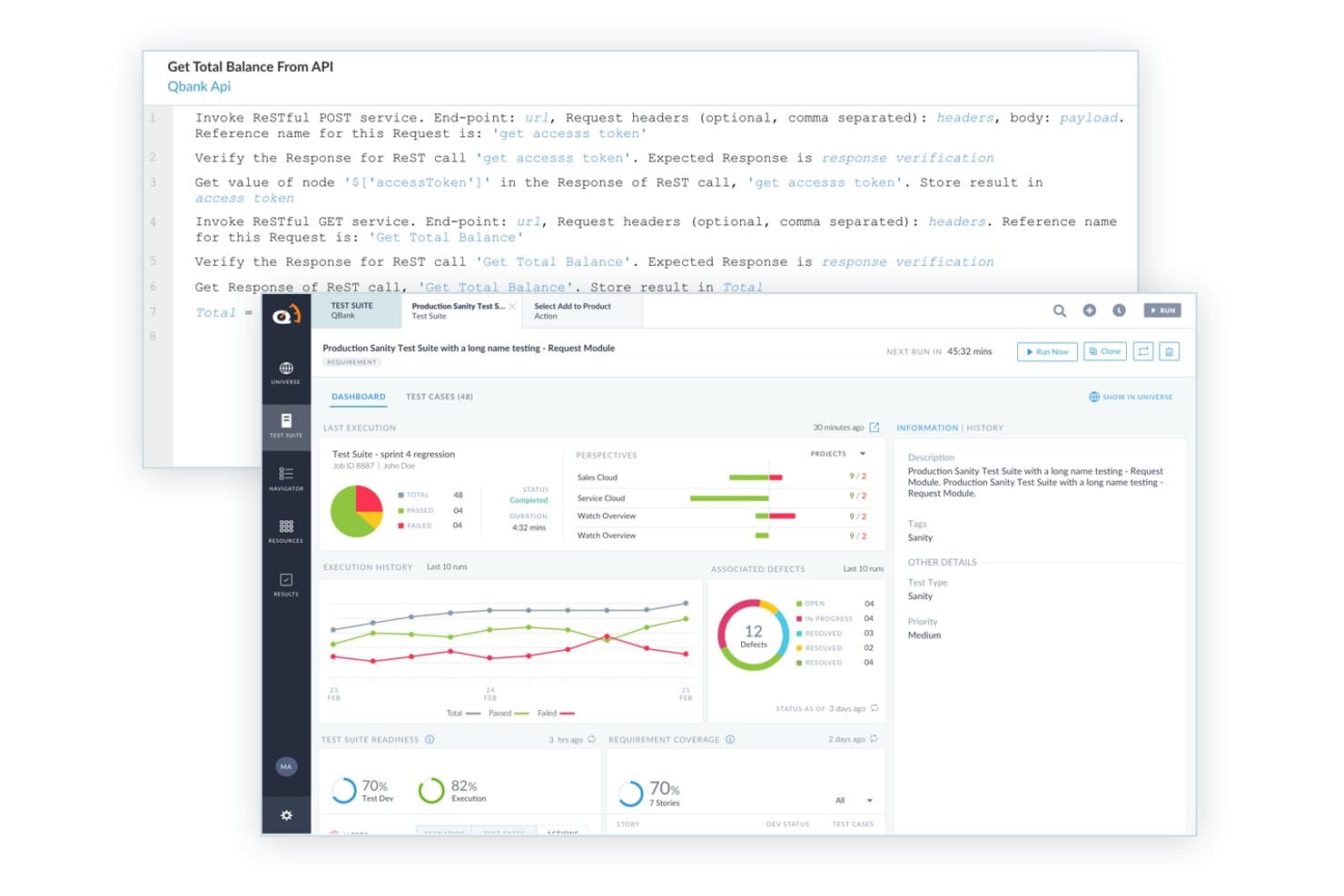
ACCELQ offers a codeless API testing interface with RESTful service invocation, test suite dashboards, execution history, and defect tracking built in. ACCELQ is a cloud-native test automation platform that covers API, web, mobile, and backend testing across REST, SOAP, GraphQL, and messaging protocols using a codeless, AI-assisted authoring environment.
Who Is ACCELQ Best For?
ACCELQ is a strong fit for enterprise QA teams that need to scale test automation across complex application stacks without relying on developer resources.
Why I Picked ACCELQ
I picked ACCELQ as one of the best because its codeless API test authoring genuinely removes the bottleneck of needing developer involvement to build test suites. Using the Business Process Scenario Builder, my team can chain API and UI calls into end-to-end flows without writing a single line of code. I also like the AI-powered self-healing, which automatically updates tests when endpoints change, cutting maintenance time on large regression suites significantly.
ACCELQ Key Features
- Multi-protocol API coverage: Test REST, SOAP, GraphQL, Kafka, MQ, and microservices endpoints from a single interface.
- Environment and variable management: Set up reusable variables, environment-specific configs, and secure authentication for accurate multi-stage testing.
- Service virtualization: Simulate unavailable or evolving APIs with built-in API virtualization for reliable test runs.
- Native CI/CD integrations: Connect directly to Jenkins, Azure DevOps, Bamboo, and TeamCity to automate API tests in every build.
ACCELQ Integrations
ACCELQ offers native integrations with Jenkins, Jira, ClickUp, Bamboo, TeamCity, Slack, and Microsoft Teams, and provides an API for custom integrations.
Pros and Cons
Pros:
- Built-in service virtualization for end-to-end tests
- AI-driven self-healing of test scenarios
- Codeless automation for UI, API, and mobile
Cons:
- Advanced reporting can require additional customization
- No documented support for gRPC or WebSockets
Learn more about ACCELQ: Best for dynamic application security testing
- Free plan available
- From $350/month
Visit WebsiteCustomer Rating:4.7/5
Aikido Security provides a unified dashboard to triage and filter issues by type, severity, and scan source. Aikido Security is a platform designed to protect your code, cloud, and runtime environments with its suite of security features. It offers tools for dynamic application security testing (DAST), API scanning, and other measures to safeguard your applications against vulnerabilities.
Why I Picked Aikido Security: I picked Aikido Security for API testing because of its dynamic application security testing, API scanning, and AI-driven AutoFix feature, which automatically generates pull requests to fix vulnerabilities. This automation saves time and keeps security measures up to date. Aikido also supports custom rule creation, allowing you to filter non-essential paths and focus on critical vulnerabilities, helping you prioritize and secure your API endpoints effectively.
Standout features & integrations:
Features include bulk fix, which allows you to create multiple ready-to-merge pull requests with a single action, streamlining the resolution process. TL;DR summaries provide concise overviews and ticket creation options for complex issues, enhancing management efficiency. Aikido also prioritizes data security through read-only access to repositories, short-lived access tokens, and separate Docker containers for each scan.
Integrations include VSCode, Azure Pipelines, BitBucket Pipes, GitHub, GitLab, Jira, Asana, Monday, ClickUp, YouTrack, Drata, and Vanta.
Pros and Cons
Pros:
- User-friendly interface
- Provides actionable insights
- Offers a comprehensive dashboard and customizable reports
Cons:
- Ignores vulnerabilities if no fix is available
- Only supports English
Learn more about Aikido Security: Best with end-to-end testing workflows
- Free demo available
- Pricing upon request

Centralize, connect, and govern your entire API estate with DigitalAPI. DigitalAPI is a flexible platform for teams that need a complete solution for API management and testing. It’s well-suited to industries like healthcare, banking, and insurance, where reliable API operations are essential. With tools for API discovery, governance, and lifecycle management, DigitalAPI supports more consistent workflows and better productivity. Whether the goal is improving API quality or ensuring reliable integrations, the platform is built to address those needs.
Why I Picked DigitalAPI
I chose DigitalAPI for its AI-driven automated test generation, which reduces manual testing work and shortens deployment timelines. The platform offers a solid testing environment that includes load testing and end-to-end testing, helping teams validate API performance under different conditions. Its real-time analytics also allow teams to identify and resolve issues early, making it a strong option for developers and QA teams focused on maintaining API quality.
DigitalAPI Key Features
In addition to its AI-driven test generation, I also found several other features valuable for API testing:
- Load Testing: Simulates peak traffic to identify performance issues and scalability challenges.
- End-to-End Testing: Ensures API functionality within the entire application workflow.
- Security Assessments: Conducts thorough checks to validate API security and data protection.
- Automated Documentation: Streamlines the documentation process, making it easier to maintain and share API specifications.
DigitalAPI Integrations
Native integrations are not currently listed by DigitalAPI.
Pros and Cons
Pros:
- Centralized governance across multiple gateways
- Detailed analytics for API performance
- Helix Gateway supports full lifecycle
Cons:
- No listed native integrations
- Pricing details not publicly available
Learn more about DigitalAPI: Best for continuous security testing
- Free demo available
- Pricing upon request
Visit WebsiteCustomer Rating:4.6/5
Invicti's dashboard shows various metrics and statuses of API tests. Invicti is a comprehensive API security tool tailored for developers and security teams. It automates vulnerability detection and integrates into CI/CD pipelines to enhance security workflows.
Why I picked Invicti: It offers real-time vulnerability detection and zero false positives, which aligns with its USP of continuous security testing. The tool's advanced scanning technology supports REST, SOAP, and GraphQL APIs. Invicti's DAST + IAST approach increases accuracy and identifies more vulnerabilities. It also provides visibility into exposed assets, helping teams manage risks effectively.
Standout features & integrations:
Features include advanced scanning technology for multiple API types, real-time vulnerability detection, and zero false positives. The platform promotes proactive security by helping developers write secure code. Its automation capabilities enhance the software development lifecycle.
Integrations include Jenkins, JIRA, GitHub, Azure DevOps, Bamboo, Bitbucket, GitLab, Slack, ServiceNow, and Microsoft Teams.
Pros and Cons
Pros:
- Automates vulnerability detection
- Supports multiple API types
- Proactive security measures
Cons:
- Pricing not readily available
- May require technical expertise
Learn more about Invicti: Best for AI-driven test creation
- Free trial available + free demo
- Pricing upon request
Visit WebsiteCustomer Rating:4.5/5
Testim validates and protects numerous endpoints to safeguard web services. Tricentis Testim is an AI-powered test automation tool tailored for web, mobile, and Salesforce applications. It's designed for development teams looking to improve testing efficiency and reduce maintenance efforts.
Why I picked Tricentis Testim: This tool focuses on AI-driven test creation with its low-code test authoring and self-healing AI locators. Testim Copilot uses generative AI to speed up test creation and debugging, aligning with its USP of being best for AI-driven test creation. The platform's integrated TestOps feature aids in managing tests effectively, and Testim Mobile provides comprehensive mobile app testing.
Standout features & integrations:
Features include low-code test authoring, self-healing AI locators, and Testim Copilot for faster test creation and debugging. Testim Mobile supports extensive mobile app testing, and Testim Salesforce simplifies testing for Salesforce applications.
Integrations include Jenkins, JIRA, GitHub, Slack, GitLab, Bitbucket, Azure DevOps, CircleCI, Bamboo, and TeamCity.
Pros and Cons
Pros:
- AI-driven test creation
- Low-code authoring
- Self-healing locators
Cons:
- May require technical knowledge
- Steep learning curve
Learn more about Tricentis Testim: Best for beginners in testing
- Free plan + 30-day free trial + free demo available
- From $180/seat/month
Visit WebsiteCustomer Rating:4.4/5
Katalon Studio integrates API test solutions across various test suites and accounts for effective test environments. Katalon Studio is a test automation tool designed for testers and developers. It offers a comprehensive solution for web, API, mobile, and desktop app testing, making it ideal for teams looking to streamline their testing processes.
Why I picked Katalon Studio: It's beginner-friendly, providing an intuitive user interface that simplifies test automation. The tool supports both scriptless and scripting modes, catering to users with varying levels of coding experience. With built-in keywords and templates, it reduces the learning curve for new testers. Additionally, its extensive documentation and community support make it accessible for beginners.
Standout features & integrations:
Features include scriptless test creation, which allows you to build tests without coding. The tool also offers built-in keywords and templates to simplify the process. You can switch between scripting and scriptless modes, giving flexibility to your testing approach.
Integrations include Jenkins, JIRA, Git, TestRail, Slack, qTest, Kobiton, Azure DevOps, Sauce Labs, and BrowserStack.
Pros and Cons
Pros:
- Beginner-friendly interface
- Supports scriptless test creation
- Extensive community support
Cons:
- Limited advanced features
- May require initial setup time
Learn more about Katalon Studio: Best for cloud-based testing
- 28-day free trial + free demo available
- From $39/month (billed annually)
Visit WebsiteCustomer Rating:4.3/5
Use Sauce Labs’s recorder to capture your test efforts. Sauce Labs is a cloud-based testing platform tailored for developers and QA teams. It provides automated testing solutions for web, mobile, and API applications, enabling teams to test across multiple browsers and devices.
Why I picked Sauce Labs: It offers a cloud-based infrastructure, allowing you to run tests without maintaining an in-house setup. This makes it ideal for teams looking to scale testing efforts efficiently. You can perform automated testing across a wide array of devices and browsers, ensuring comprehensive coverage. Sauce Labs real-time analytics and reporting features help your team quickly identify and resolve issues.
Standout features & integrations:
Features include real-time analytics that give you insights into test results. The platform supports a wide variety of browsers and devices, enhancing your testing coverage. Additionally, it offers instant access to a vast infrastructure, eliminating the need for in-house maintenance.
Integrations include Jenkins, JIRA, GitHub, CircleCI, Slack, Bamboo, Travis CI, Bitbucket, TeamCity, and Azure DevOps.
Pros and Cons
Pros:
- Cloud-based infrastructure
- Supports multiple devices
- Real-time analytics
Cons:
- May require advanced technical skills
- Can be costly for small teams
Learn more about Sauce Labs: Best for cross-platform support
- Free trial available
- Pricing upon request
Visit WebsiteCustomer Rating:2/5
Smartbear provides functional, security, and load testing of RESTful, SOAP, and GraphQL web services. SmartBear is a versatile testing tool designed for QA teams and developers. It provides comprehensive testing solutions for web, mobile, and API applications, making it ideal for teams needing cross-platform support.
Why I picked SmartBear: It offers extensive cross-platform compatibility, allowing your team to test on various environments without hassle. The tool supports automated testing for web, mobile, and desktop applications, aligning with its USP of cross-platform support. SmartBear robust reporting features provide insights into your testing efforts. Additionally, SmartBear's flexible scripting options cater to both beginners and experienced testers.
Standout features & integrations:
Features include robust reporting capabilities that offer insights into test results. The tool provides flexible scripting options, catering to testers with different skill levels. Its support for automated testing across web, mobile, and desktop applications enhances your testing coverage.
Integrations include Jenkins, JIRA, GitHub, Azure DevOps, Slack, Bitbucket, TeamCity, Bamboo, qTest, TestRail, and Confluence.
Pros and Cons
Pros:
- Extensive cross-platform compatibility
- Flexible scripting options
- Comprehensive reporting features
Cons:
- Pricing not transparent
- Limited offline support
Learn more about SmartBear: Best for detecting vulnerabilities
- Free demo available
- Pricing upon request
Visit WebsiteCustomer Rating:4.2/5
Acunetix's vulnerability scanner dashboard provides an overview of the scan results and detected vulnerabilities. Acunetix is a web application security scanner designed for security teams and developers. It focuses on detecting vulnerabilities in web applications to enhance your security posture.
Why I picked Acunetix: It excels in vulnerability detection with its ability to identify over 7,000 vulnerabilities, which aligns with its USP of being best for detecting vulnerabilities. The tool integrates dynamic and static analysis to cover a wide range of security issues. Acunetix's scanning engine is fast and accurate, providing comprehensive security assessments. It also supports a wide range of technologies, making it versatile for different environments.
Standout features & integrations:
Features include advanced scanning for over 7,000 vulnerabilities, fast and accurate scanning engine, and comprehensive security assessments. The tool supports various technologies, enhancing its versatility. It also provides detailed reports to help you understand and address security issues.
Integrations include Jenkins, JIRA, GitHub, GitLab, Azure DevOps, TFS, Bugzilla, Mantis, ServiceNow, and Slack.
Pros and Cons
Pros:
- Detects over 7,000 vulnerabilities
- Fast scanning engine
- Supports various technologies
Cons:
- Requires technical expertise
- Initial setup complexity
Learn more about Acunetix: Best for AI-powered vulnerability scanning
- Free demo available
- From $99/month

Astra API Security scans APIs for vulnerabilities using AI-driven security testing. For software development teams and businesses looking to safeguard their digital interactions, Astra API Security provides a solution for identifying and mitigating API vulnerabilities. This platform is particularly appealing to industries like fintech and healthcare, where API security is paramount. By combining AI-driven vulnerability scanning with manual testing, Astra addresses complex security challenges, helping teams protect sensitive data and maintain compliance with industry regulations.
Why I Picked Astra API Security
I picked Astra API Security because it offers a unique combination of AI-driven vulnerability scanning and manual penetration testing, which is crucial for identifying complex attack vectors and business logic vulnerabilities. The platform's ability to perform continuous discovery and risk classification provides a comprehensive view of potential threats, enabling your team to prioritize fixes effectively. With over 15,000 tests available, it ensures that your API security keeps pace with development, significantly reducing the time to address vulnerabilities.
Astra API Security Key Features
In addition to AI-powered vulnerability scanning, Astra API Security offers:
- Rapid API Discovery: The platform can quickly identify all APIs within 30 minutes, ensuring that no endpoint goes unnoticed.
- Continuous DAST Testing: Ongoing dynamic application security testing helps maintain a secure environment by constantly evaluating API vulnerabilities.
- AI-Driven Risk Prioritization: By classifying and scoring risks based on exposure and sensitivity, your team can focus on the most critical vulnerabilities first.
- Manual Pentesting: This feature complements automated scans by detecting complex vulnerabilities that require human insight.
Astra API Security Integrations
Integrations include GitHub, Jira, Slack, Jenkins, Bitbucket, GitLab, Microsoft Teams, AWS, Azure, and Google Cloud.
Pros and Cons
Pros:
- Includes both automated and manual security tests
- Centralized dashboard for vulnerability management with AI-generated remediation
- Helps maintain compliance with ISO 27001, HIPAA, and GDPR
Cons:
- Occasional false positives increase validation work
- Some technical bugs and glitches reported
Learn more about Astra API Security:
Andre verktøy for API-testing
Her er noen flere alternativer for verktøy for API-testing som ikke kom med på kortlisten, men som likevel er verdt å undersøke:
- 11SoapUIBest for open-source testing
- 12Apigee EdgeBest for API management
- 13HoppscotchBest for quick API requests
- 14Subject7Best for codeless automation
- 15QA WolfBest for fast test creation
- 16ReflectBest for no-code test automation
- 17Apache JMeterBest for load testing
- 18Parasoft SOAtestBest for service virtualization
- 19SmartBear ReadyAPIBest for end-to-end testing
- 20PostmanBest for collaboration features
- 21TricentisBest for continuous testing
- 22Karate DSLBest for BDD testing
- 23Rest AssuredBest for Java developers
How I Evaluate API Testing Tools
My evaluation has two layers: the baseline a tool must clear to qualify, and differentiators I look for when teams need contract testing, mock servers, or CI/CD-native automation coverage.
Core Functionality (Table Stakes For This List)
When I'm selecting tools for my list, I rank each one on a scale from 0 (does not offer the functionality) to 5 (excels in this area) for each core functionality listed below. Then, I calculate the tool's total score into a percentage. Each tool needs to achieve a minimum total score of 75% to be considered for inclusion.
- Multi-Protocol API Support: I check whether a tool handles REST, SOAP, GraphQL, and newer protocols like gRPC or WebSockets so teams aren't juggling separate tools per service.
- Automated Test Creation & Execution: Tools should support scripted assertions, parameterized runs, and data-driven test suites—think validating a payments endpoint across hundreds of currency inputs.
- CI/CD Integration: I look for native hooks into pipelines like Jenkins, GitHub Actions, or GitLab CI so API tests run automatically on every commit or deploy.
- Environment & Variable Management: Switching between dev, staging, and production configs with reusable tokens and secrets matters, especially when teams share collections across projects.
- Reporting & Analytics: Clear pass/fail results, response validation details, and exportable reports help QA leads and engineering managers track test coverage without digging through logs.
- Mocking & Virtualization: I evaluate whether the tool offers mock servers or service virtualization so teams can test against dependencies that are unstable, rate-limited, or still in development.
Once I have a list of tools that meet the criteria, I consider what sets each platform apart.
Differentiating Factors (What Sets Vendors Apart)
Here's how I compare and contrast different vendors:
Standout Features
Contract and schema testing is a major differentiator—tools that validate endpoints against OpenAPI or AsyncAPI specs catch breaking changes before they hit production. AI-powered test generation also matters here, since auto-generating assertions from an API spec cuts the time it takes to build coverage across large endpoint sets. I look for integrated security scanning that flags OWASP API Top 10 vulnerabilities within existing test runs rather than requiring a separate tool. Performance and load testing built into the same platform rounds things out for teams who want one place to run functional and scalability checks.
Beyond Features
Ecosystem and integration depth matters a lot—I evaluate whether a tool connects natively with source control, CI/CD platforms, and issue trackers like Jira so test results feed into existing workflows. Pricing models also deserve attention, since per-user costs can spike fast when QA, dev, and DevOps teams all need access. I also consider the learning curve: tools like Postman and Insomnia offer large community libraries and public collections that help new team members ramp up quickly, while code-first platforms like Karate or REST Assured assume stronger developer fluency from day one.
Slik velger du verktøy for API-testing
Det er lett å gå seg vill i lange funksjonslister og komplekse prismodeller. For å hjelpe deg med å holde fokus mens du går gjennom den unike prosessen med å velge programvare, får du her en sjekkliste over faktorer du bør ha i tankene:
| Faktor | Hva du bør vurdere |
| Skalerbarhet | Forsikre deg om at verktøyet kan håndtere økte testbehov etter hvert som teamet eller prosjektet vokser. Se etter løsninger som støtter flere brukere og testing i stor skala uten ytelsesproblemer. |
| Integrasjoner | Kontroller om verktøyet integreres med den eksisterende programvarestakken din, for eksempel CI/CD-pipelines, versjonskontrollsystemer og samarbeidsverktøy. Dette kan effektivisere arbeidsflyten og redusere manuelt arbeid. |
| Tilpasningsmuligheter | Se etter verktøy som lar deg tilpasse testprosessene til teamets spesifikke behov. Tilpassbare kontrollpaneler og testkonfigurasjoner kan forbedre produktiviteten og relevansen. |
| Brukervennlighet | Vurder brukergrensesnittet og den helhetlige brukeropplevelsen. Et verktøy som er enkelt å navigere i og krever minimalt med opplæring, sparer teamet for tid og hjelper dem med å fokusere på testing i stedet for å lære programvaren. |
| Budsjett | Ta hensyn til de totale eierkostnadene, inkludert lisensiering, kundestøtte og eventuelle tillegg. Sørg for at verktøyet passer innenfor budsjettet, samtidig som det dekker teamets behov. |
| Sikkerhetstiltak | Forsikre deg om at verktøyet tilbyr tilstrekkelige sikkerhetstiltak for å beskytte sensitive data og testresultater. Funksjoner som datakryptering, tilgangskontroller og samsvar med bransjestandarder er avgjørende. |
| Støtte og ressurser | Vurder tilgangen på kundestøtte, dokumentasjon og brukerfora. Pålitelig støtte kan være uvurderlig under implementering og feilsøking. |
| Ytelse | Vurder verktøyets hastighet og pålitelighet ved gjennomføring av tester. Et verktøy med god ytelse gir raskere tilbakemeldinger og gjør det mulig å identifisere problemer raskt. |
Trender innen verktøy for API-testing
I forbindelse med undersøkelsen min samlet jeg inn utallige produktoppdateringer, pressemeldinger og utgivelseslogger fra ulike leverandører av verktøy for API-testing. Her er noen av trendene som er i ferd med å vokse frem, og som jeg følger med på:
- AI-drevet testing: AI brukes i økende grad til å skape smartere testprosesser. Verktøy benytter AI til prediktiv analyse og automatisk generering av testtilfeller, noe som gjør testingen mer effektiv. Noen leverandører integrerer AI for å identifisere potensielle feil før de oppstår.
- Venstreforskyvning av testing: Denne trenden innebærer at testingen gjennomføres tidligere i utviklingsprosessen. Ved å oppdage problemer tidligere kan team redusere kostnadene og forbedre programvarekvaliteten. Leverandørene forbedrer verktøyene sine for å støtte denne tilnærmingen og integrerer dem med utviklingsmiljøer for å legge til rette for tidlig testing.
- Sikkerhetstesting av API-er: Etter hvert som sikkerhet blir viktigere, fokuserer verktøyene på å identifisere sårbarheter i API-er. Avanserte funksjoner for sikkerhetstesting integreres for å beskytte data og sikre samsvar med standarder. Denne trenden svarer på den økende bekymringen for datainnbrudd.
- Støtte for mikrotjenester: Med fremveksten av mikrotjenestearkitektur tilpasses verktøyene for å teste disse distribuerte systemene effektivt. Dette innebærer å håndtere komplekse avhengigheter og sikre at kommunikasjonen mellom tjenestene er pålitelig. Leverandørene tilpasser verktøyene sine for å støtte disse arkitekturene.
- Fokus på brukeropplevelse: Det er et økende fokus på å forbedre brukergrensesnittet og brukeropplevelsen i testverktøy. Forenklede grensesnitt og bedre veiledning gjør verktøyene mer tilgjengelige for ikke-tekniske brukere. Leverandørene investerer i designoppdateringer for å gjøre produktene mer intuitive.
Hva er verktøy for API-testing?
Verktøy for API-testing er programvareapplikasjoner som hjelper utviklere og QA-team med å teste, validere og overvåke funksjonaliteten og ytelsen til API-er. De brukes vanligvis av programvareingeniører, testere og DevOps-profesjonelle for å sikre at API-er fungerer som de skal, håndterer grenseverdier og kommuniserer riktig mellom systemer.
Funksjoner som automatiserte testskript, miljøstyring og detaljert rapportering bidrar til raskere feilsøking, enklere integrasjonstesting og bedre nøyaktighet på tvers av miljøer. Alt i alt gjør disse verktøyene det enklere å vedlikeholde pålitelige API-er av høy kvalitet som støtter stabil levering av programvare.
Funksjoner i verktøy for API-testing
Når du velger verktøy for API-overvåking, bør du se etter følgende viktige funksjoner:
- Automatiseringsmuligheter: Automatiser repetitive tester for å spare tid og redusere manuelt arbeid, slik at effektiviteten i testprosessen øker.
- Sikkerhetstesting: Identifiser sårbarheter i API-er for å beskytte data og sikre samsvar med sikkerhetsstandarder.
- Skalerbarhet: Håndter økte testbehov effektivt etter hvert som teamet eller prosjektet vokser, og sørg for at ytelsen forblir stabil.
- Brukervennlig grensesnitt: Forenkle navigeringen og reduser læringskurven, slik at løsningen blir tilgjengelig for både tekniske og ikke-tekniske brukere.
- Tilpasningsmuligheter: Tilpass testprosesser og dashbord etter teamets spesifikke behov, slik at relevansen og produktiviteten forbedres.
- Analyse i sanntid: Gi innsikt i API-ytelse og -bruk, slik at problemer raskt kan identifiseres og løses.
- Integrasjonsstøtte: Verktøy for API-integrasjon kobles til eksisterende programvarestakker, for eksempel CI/CD-pipelines og versjonskontrollsystemer, for å effektivisere arbeidsflyten.
- Støtte for mikrotjenester: Test distribuerte systemer effektivt, sørg for pålitelig kommunikasjon mellom tjenester og håndter komplekse avhengigheter.
Fordeler med verktøy for API-testing
Implementering av verktøy for API-testing gir flere fordeler for teamet og virksomheten din. Her er noen av fordelene du kan se frem til:
- Bedre effektivitet: Automatiseringsmuligheter reduserer behovet for manuell testing, slik at teamet kan konsentrere seg om mer komplekse oppgaver og fremskynde utviklingsprosessen.
- Forbedret sikkerhet: Funksjoner for sikkerhetstesting bidrar til å identifisere sårbarheter tidlig, beskytte sensitive data og sikre samsvar med bransjestandarder.
- Bedre pålitelighet: Integrasjonsstøtte sikrer at API-er fungerer problemfritt sammen med andre programvarekomponenter, noe som reduserer risikoen for feil og nedetid.
- Skalerbarhet: Muligheten til å håndtere økte testbehov betyr at du kan opprettholde ytelsen etter hvert som teamet eller prosjektet vokser.
- Rask identifisering av problemer: Analyse i sanntid gir innsikt i API-ytelsen, slik at teamet raskt kan oppdage og løse problemer.
- Tilpasningsmuligheter: Tilpasning av testprosesser etter teamets spesifikke behov forbedrer produktiviteten og relevansen.
- Forenklet brukeropplevelse: Et brukervennlig grensesnitt gjør det enklere for både tekniske og ikke-tekniske brukere å navigere i verktøyet, og reduserer læringskurven.
Kostnader og priser for verktøy for API-testing
Valg av testverktøy for API-er krever en forståelse av de ulike prismodellene og abonnementene som er tilgjengelige. Kostnadene varierer basert på funksjoner, teamstørrelse, tillegg og mer. Tabellen nedenfor oppsummerer vanlige abonnementer, gjennomsnittsprisene deres og typiske funksjoner som er inkludert i løsninger for API-testing:
Sammenligningstabell for abonnementer for API-testing
| Abonnementstype | Gjennomsnittspris | Vanlige funksjoner |
| Gratisabonnement | $0 | Grunnleggende testfunksjoner, begrenset støtte og tilgang til fellesskapet. |
| Personlig abonnement | $10-$30 /bruker /måned | Automatiseringsmuligheter, grunnleggende integrasjoner og støtte via e-post. |
| Bedriftsabonnement | $50-$100 /bruker /måned | Avanserte integrasjoner, sikkerhetstesting og prioritert støtte. |
| Virksomhetsabonnement | $150-$300/bruker /måned | Tilpassbare funksjoner, dedikert kundeansvarlig og avansert analyse. |
Vanlige spørsmål om verktøy for API-testing
Her er noen svar på vanlige spørsmål om API-verktøy:
Hvilket verktøy brukes mest til API-testing?
Postman er et av de mest brukte verktøyene for API-testing. Det foretrekkes på grunn av det brukervennlige grensesnittet og de omfattende funksjonene, som automatisert testing og samarbeid. Teamet ditt kan enkelt opprette, dele og teste API-er, noe som gjør Postman til et populært valg blant utviklere og testere.
Hva er de største utfordringene ved API-testing?
En stor utfordring er å ivareta sikkerheten, særlig ved håndtering av sensitive data. En annen utfordring er å opprettholde datakonsistens på tvers av ulike API-versjoner. Teamet ditt kan også møte problemer med å skalere tester og håndtere komplekse dataformater. Å overvinne disse utfordringene krever grundig planlegging og de riktige verktøyene.
Hva bør kontrolleres når man utfører API-testing?
Ved API-testing bør du kontrollere endepunktets funksjonalitet for å sikre at det fungerer som forventet. Kontroller at svarene er korrekte, og at API-et håndterer feil på riktig måte. Det er også viktig å teste dataformatet, for eksempel JSON eller XML, og sikre at API-et fungerer godt under ulike belastninger.
Hva er de tre typene testing i API-er?
De tre hovedtypene API-testing er funksjonell testing, ytelsestesting og sikkerhetstesting. Funksjonell testing sikrer at API-et oppfører seg som forventet, ytelsestesting måler hastighet og håndtering av belastning, og sikkerhetstesting ser etter sårbarheter. Hver type bidrar til å opprettholde API-ets pålitelighet og sikkerhet.
Hvordan kan jeg forbedre effektiviteten til API-testene mine?
For å forbedre effektiviteten bør du bruke automatisering for å redusere behovet for manuell testing. Fokuser på gjenbruk ved å opprette modulære testtilfeller som kan brukes i ulike scenarier. Integrer også testverktøyene med CI/CD-pipelinen for å effektivisere testprosessen og få raskere tilbakemeldinger.
Hvorfor er det viktig å teste API-er tidlig i utviklingsprosessen?
Tidlig testing av API-er bidrar til å oppdage problemer før de eskalerer, og sparer dermed tid og ressurser. Det gjør det mulig for teamet ditt å rette feil når de er mindre kostbare å håndtere. Tidlig testing forbedrer også den generelle kvaliteten på programvaren, noe som fører til en mer pålitelig og robust applikasjon.