

Jeg forstår hvor viktig det er å finne et robust alternativ til SolarWinds som oppfyller behovene til teamet mitt. Du ønsker et verktøy som gjør mer enn bare å overvåke nettverksytelsen, og som tilbyr omfattende moduler, utmerket API-støtte og kompatibilitet med Microsoft. Du ønsker programvare som gir IT-teamene bedre forutsetninger og gjør arbeidet deres enklere.
Hva er SolarWinds?
SolarWinds er et IT-overvåkingsverktøy som hjelper deg med å følge med på ytelsen og tilstanden til nettverket, serverne og infrastrukturen din. Det brukes av IT-administratorer, nettverksingeniører og MSP-er som trenger å oppdage problemer tidlig og sørge for at systemene fungerer problemfritt. Overvåkingsdashbord, varsler og rapporteringsverktøy gjør det enklere å identifisere problemer, administrere ressurser og vise oppetid til interessenter. Alt i alt gir SolarWinds teamet ditt den synligheten dere trenger for å ligge i forkant av IT-problemer.
Why Trust Our Software Recommendations
6,700+
Reviews
20
Industry experts
16+
Evaluation factors
14
Years
Our team has been testing and reviewing software since 2012. As tech leaders ourselves, we know how difficult—and important—it is to choose the right software.
For this guide, we evaluated tools using hands-on testing and independent research, scoring tools using our selection criteria.
Our reviews reflect our human editorial judgment, not a sales pitch.
Expert reviewers:
- Paulo Gardini MiguelTech Director
 Tim FisherVP of AI
 Gabriel RosasTech Lead & Software Architect
 Christhian GruhnTech Lead & Platform Architect

Sammenligningstabell for alternativer til SolarWinds
Denne sammenligningstabellen oppsummerer prisopplysningene for mine beste utvalgte alternativer til SolarWinds:
| Tool | Best For | Trial Info | Price | ||
|---|---|---|---|---|---|
| 1 | Best for intuitive setup with auto-discovery | 30-day free trial + free plan available | From $200/month (billed annually) | Website | |
| 2 | Best for automated network mapping | 14-day free trial | Pricing upon request | Website | |
| 3 | Best for its scalable and extensible architecture | Free plan available | Pricing upon request | Website | |
| 4 | Best for integrated fault and performance management | 30-day free trial | From $1,233/year (billed annually) | Website | |
| 5 | Best with customizable dashboards | Free plan + 30-day free trial available | From $275/month (billed annually) | Website | |
| 6 | Best for real user monitoring | 30-day free trial | From $3/device/month | Website | |
| 7 | Best for log monitoring and tamper-proof retention | Free plan + free demo available | From $0.09/GB/month | Website | |
| 8 | Best for comprehensive infrastructure monitoring | Free plan and free demo available | From $2,595 (perpetual license for 100 nodes) | Website | |
| 9 | Best for cloud infrastructure monitoring and analytics | Free plan available | From $15/month (billed annually) | Website | |
| 10 | Best for hybrid IT monitoring from the cloud | 14-day free trial | Pricing upon request | Website |


Anmeldelser av de beste alternativene til SolarWinds
Nedenfor finner du mine detaljerte sammendrag av de beste alternativene til SolarWinds som kom med på kortlisten min. Anmeldelsene mine gir en detaljert gjennomgang av de viktigste funksjonene, fordelene og ulempene, integrasjonene og ideelle bruksområdene for hvert verktøy, slik at du kan finne det som passer best for deg.
 Best for intuitive setup with auto-discovery
- 30-day free trial + free plan available
- From $200/month (billed annually)
Visit WebsiteCustomer Rating:4.6/5
The device tree view in PRTG provides an organized layout of monitored devices, making it easy to manage and monitor network elements. Paessler PRTG is a comprehensive network monitoring solution designed to provide real-time insights into the health and performance of IT infrastructures. With PRTG, IT teams can monitor a wide range of devices, including servers, switches, routers, and applications, through customizable sensors.
Why I Picked PRTG:
PRTG’s auto-discovery tool simplifies the initial setup by automatically detecting devices and setting up relevant sensors. This approach allows your IT team to start monitoring their network almost immediately, saving time and reducing the complexity of the implementation process.
Additionally, PRTG's all-in-one monitoring tool supports various protocols such as SNMP, WMI, Flow, and Ping, allowing it to track key metrics like bandwidth usage, uptime, CPU load, and more.
Standout features & integrations:
PRTG offers other comprehensive features, including flexible alerting, multiple user interfaces, and cluster failover solutions. It also has built-in reporting tools that allow for detailed insights into network performance over time, and a map feature for creating customized, visual representations of your entire network infrastructure, offering a clear and organized view of devices, metrics, and overall network health.
Pricing:
The pricing for PRTG starts from $2,149 for 500 aspects of your devices in your network (billed annually).
Pros and Cons
Pros:
- Rapid auto-discovery of network devices
- Intuitive setup and user-friendly interface
- Wide range of supported technologies for integration
Cons:
- No built-in ticketing system
- Advanced features may require technical expertise
- High cost for managing larger networks
Learn more about Paessler PRTG: Best for automated network mapping
- 14-day free trial
- Pricing upon request
Visit WebsiteCustomer Rating:4.7/5
Auvik automatically displays detailed device data, lifecycle info, and setup status for complete asset visibility. Auvik is a cloud-based network monitoring platform built to help IT teams and managed service providers (MSPs) gain real-time visibility and control over network infrastructure. It offers tools for network discovery, mapping, monitoring, and performance analysis through a user-friendly interface that requires no additional hardware.
Why I Picked Auvik:
I picked Auvik for this list because it offers automated network mapping that helps you visualize device connections in real time, making it easier to pinpoint performance issues and track changes across complex environments. I also liked that Auvik can be deployed quickly, typically without additional hardware, and provides centralized monitoring for multi-site environments through a single dashboard with global alerting. These features make it especially well-suited for MSPs managing distributed networks.
Standout Features & Integrations:
Auvik’s features include performance monitoring with health metrics, customizable alerts for unusual activity, centralized syslog management, automatic configuration backups, and remote access for faster troubleshooting. For more advanced workflows, Auvik provides tools like configuration comparisons, command execution, and API access. As a cloud-based platform, Auvik ensures automatic updates and scalability without the need for extra infrastructure. Integrations include Slack, Microsoft Teams, ConnectWise Manage, ServiceNow, Autotask PSA, Freshdesk, BrightGauge, PagerDuty, and more.
Pros and Cons
Pros:
- Prompt alerting system for various issues
- Can back up and restore device configurations
- Detailed device inventory aids in lifecycle management
Cons:
- Setting up more advanced functionalities can be challenging
- Occasional delays in real-time data updates
Learn more about Auvik: Best for its scalable and extensible architecture
- Free plan available
- Pricing upon request
Visit WebsiteCustomer Rating:4.7/5
Icinga dashboard displaying current incidents with critical and warning service issues across public-facing websites and internal applications. Icinga is an open-source network monitoring tool that offers flexible and scalable solutions to monitor network resources, notify users of outages, and provide data for reporting. It's known for its extensible architecture which makes it perfect for environments that need a customizable and scalable monitoring solution.
Pros and Cons
Pros:
- Open-source with enterprise-level support available
- Strong integration capabilities
- Highly scalable and extensible
Cons:
- Interface can feel outdated and less intuitive compared to competitors
- Documentation could be improved
- Requires technical knowledge for setup and customization
Learn more about Icinga: Best for integrated fault and performance management
- 30-day free trial
- From $1,233/year (billed annually)
Visit WebsiteCustomer Rating:4.3/5
A photo for the dashboard of ManageEngine OpManager. ManageEngine OpManager, a versatile network management software, offers a comprehensive toolset for integrated fault and performance management. With its ability to swiftly identify, notify, and rectify network issues, it truly shines in ensuring smooth network operations.
Pros and Cons
Pros:
- Detailed network visualization and mapping
- Good scalability for growing networks
- Integrated fault and performance management
Cons:
- High cost for managing larger networks
- Initial setup may require technical expertise
- UI can feel cluttered due to numerous features
Learn more about ManageEngine OpManager: Best with customizable dashboards
- Free plan + 30-day free trial available
- From $275/month (billed annually)
Visit WebsiteCustomer Rating:4.7/5
Checkmk monitoring dashboard showing real-time host and service statistics, problem trends, alert percentages, and top alerting systems across the infrastructure. Checkmk is a monitoring platform designed for IT teams managing complex, hybrid, or large-scale infrastructures. It stands out for its flexibility and depth, offering broad compatibility with modern and legacy systems that many SolarWinds alternatives struggle to match. If you need unified visibility, automation, and granular control across diverse environments, Checkmk addresses these challenges head-on.
Who Is Checkmk Best For?
Checkmk is a strong fit for IT operations teams and system administrators who need to create tailored monitoring views for different departments or business units.
Why Checkmk Is a Good solarwinds alternative
If you need monitoring dashboards that adapt to your team’s unique workflows, Checkmk is a strong SolarWinds alternative. I like that you can build fully customizable dashboards, choosing exactly which metrics, graphs, and alerts to display for each user or team. The drag-and-drop dashboard editor and widget library make it easy to create views tailored to specific roles or business needs. This flexibility helps IT teams focus on the most relevant data without distraction from unnecessary information.
Checkmk Key Features
Some other features in Checkmk that stand out for IT teams include:
- Customizable dashboards: Build and tailor dashboards to display the most relevant metrics and alerts for your environment.
- Automated host discovery: Automatically detect and add new devices or services to your monitoring setup without manual intervention.
- Granular alerting rules: Set up detailed notification policies based on thresholds, dependencies, or business hours.
- Integrated log and event analysis: Collect, analyze, and correlate logs and events directly within the monitoring platform.
Checkmk Integrations
Integrations include AWS, Azure, Google Cloud Platform, Cisco, Dell, VMware vSphere, Kubernetes, Microsoft Windows, Oracle, and SAP.
Pros and Cons
Pros:
- Provides deep visibility into network and application layers
- Scales efficiently for large enterprise environments
- Highly granular alerting and notification options
- Offers over 2,000 native plug-ins
- Supports hybrid, cloud, and on-premises monitoring
Cons:
- Community support is less active than SolarWinds
- Fewer out-of-the-box integrations for SaaS tools
- Limited mobile app functionality
- Initial setup can be time-intensive
- Fewer built-in reporting templates than SolarWinds
Learn more about Checkmk: Best for real user monitoring
- 30-day free trial
- From $3/device/month
Visit WebsiteCustomer Rating:4.7/5
Site24x7 offers customizable dashboards where users can tailor their monitoring views according to their specific needs. Site24x7 is a cloud-based, AI-powered monitoring solution that helps you oversee your websites, servers, applications, and network infrastructure. It offers real-time insights into performance and availability, enabling you to detect and address issues promptly.
Why I Picked Site24x7:
One reason I like Site24x7 is its application performance monitoring (APM) capabilities. Site24x7's APM lets you monitor applications built on various platforms, including Java, .NET, PHP, and Node.js. This feature helps you identify and resolve performance bottlenecks in your applications, ensuring a smooth user experience. Another advantage of Site24x7 is its real user monitoring (RUM) feature. RUM provides insights into how actual users experience your website or application by analyzing metrics like page load times and user interactions.
Standout features & integrations:
Other features include synthetic web transaction monitoring, which allows you to record and simulate multi-step user interactions in a real browser to optimize critical user paths like login forms and shopping carts. Additionally, Site24x7 offers log management from the cloud, enabling you to collect, consolidate, and search application logs across servers and data centers for efficient troubleshooting.
Integrations include ServiceNow, PagerDuty, Jira, Microsoft Teams, Slack, Nagios, AWS, Azure, Google Cloud Platform, Docker, Jenkins, and Kubernetes.
Pros and Cons
Pros:
- Comprehensive monitoring for various systems
- Customizable dashboards and reports
- Offers real-time alerts across various channels
Cons:
- Alert overload may be overwhelming for users
- Complexity in initial setup for large environments
Learn more about Site24x7: Best for log monitoring and tamper-proof retention
- Free plan + free demo available
- From $0.09/GB/month
Visit WebsiteCustomer Rating:5/5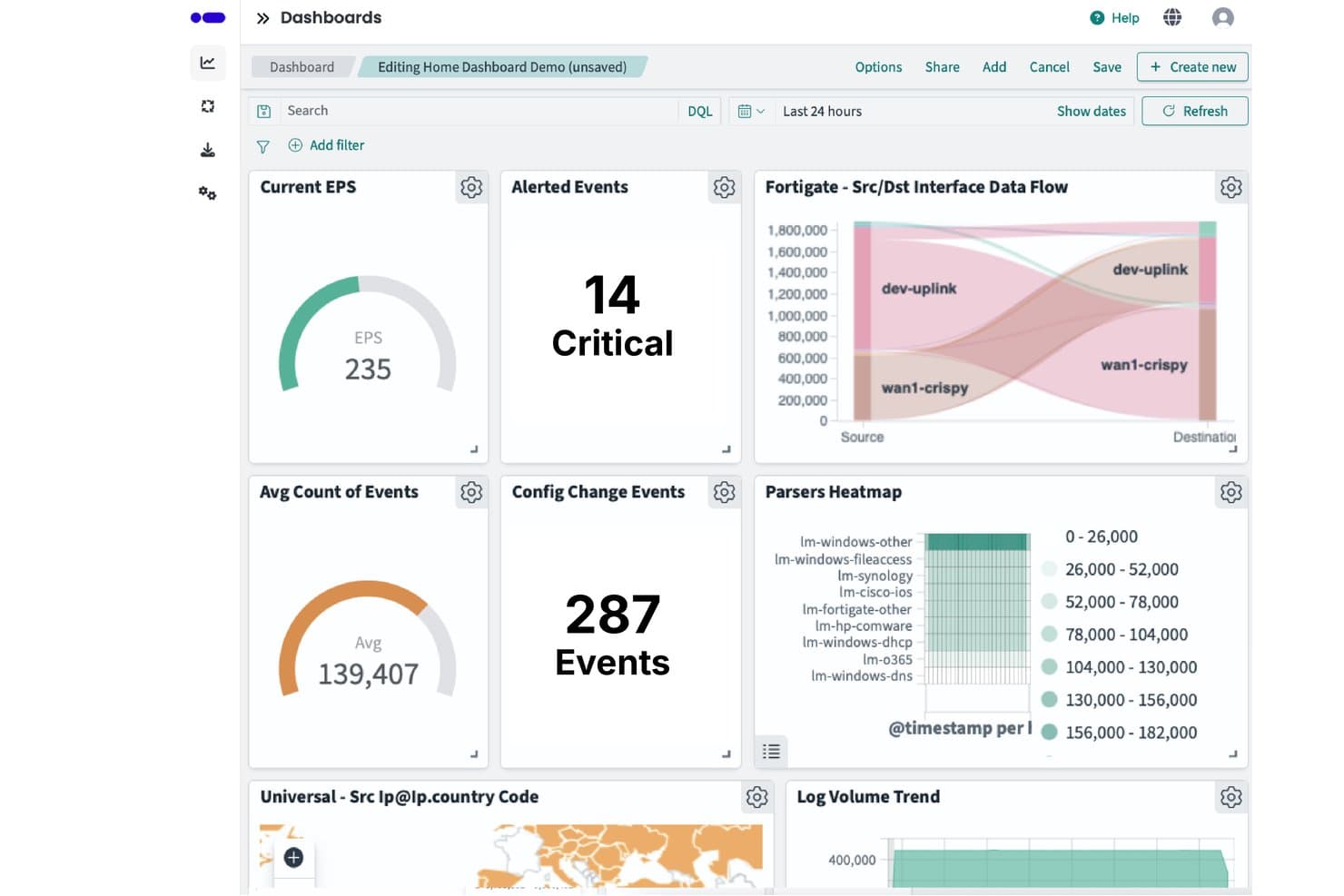
Logmanager centralizes security event monitoring across customizable dashboards. Logmanager is a log management platform for IT teams seeking a SolarWinds alternative, with observability, security, and compliance tools, budget-friendly pricing, greater data control, and flexible log retention.
Who Is Logmanager Best For?
Logmanager suits infrastructure and security teams that need normalized, enriched log data and tamper-proof retention for monitoring and compliance.
Why I Picked Logmanager
I picked Logmanager as a SolarWinds alternative for log monitoring and tamper-proof retention. Tamper-proof storage helps preserve audit evidence, while log normalization and enrichment give teams consistent event data. Built-in parsers and compliance reporting tools support investigations and audit preparation.
Logmanager Key Features
- Advanced log search: Discover filters and analyzes events across collected logs.
- Custom dashboards: Create visual views with charts, heatmaps, and maps.
- Alert rules: Configure alerts based on event thresholds or triggers.
- Two-factor authentication: Protect user accounts with authenticator apps and backup codes.
Logmanager Integrations
Logmanager supports 140+ out-of-the-box integrations, including Microsoft 365, Fortinet, Cisco, Apache, NGINX, and MikroTik. It also provides APIs for custom integrations.
Pros and Cons
Pros:
- Free plan includes 20 GB storage
- Built-in parsers, compliance reports, and no-code customization
- Consistent normalization, enrichment, and tamper-proof storage
Cons:
- Large report exports can run slowly
- Advanced correlation options are limited
Learn more about Logmanager: Best for comprehensive infrastructure monitoring
- Free plan and free demo available
- From $2,595 (perpetual license for 100 nodes)
Visit WebsiteCustomer Rating:4.6/5
A photo for the monitoring system of Nagios. Nagios, a renowned player in the IT infrastructure monitoring space, offers a holistic view of your network environment. With its comprehensive feature set, it justifies its stance as the best solution for wide-ranging infrastructure oversight.
Pros and Cons
Pros:
- Extensive integration possibilities
- High level of customization
- Wide-ranging monitoring capability
Cons:
- Cost might be high for small businesses
- Interface could be more modern
- Steep learning curve for beginners
Learn more about Nagios: Best for cloud infrastructure monitoring and analytics
- Free plan available
- From $15/month (billed annually)
Visit WebsiteCustomer Rating:4.5/5
A photo for the dashboard of Datadog. Datadog is a robust monitoring service for cloud-scale applications, providing businesses with observability into their entire infrastructure, from applications to the underlying hardware. Tailored primarily for cloud environments, it allows organizations to understand their systems' performance and derive insights from data analytics.
Pros and Cons
Pros:
- Powerful analytics tools
- Robust integrations with other services
- Comprehensive cloud infrastructure monitoring
Cons:
- Some users report the need for better alert customization
- Requires a learning curve to utilize full features
- Costly for small businesses
 Best for hybrid IT monitoring from the cloud
- 14-day free trial
- Pricing upon request
Visit WebsiteCustomer Rating:4.5/5
A screenshot of the overview tab of the tool LogicMonitor. LogicMonitor is an automated SaaS-based infrastructure monitoring platform designed to help businesses monitor their hybrid IT environments. It provides an intuitive, cloud-based solution for monitoring and visualizing critical metrics, justifying its suitability for hybrid IT monitoring from the cloud.
Pros and Cons
Pros:
- Supports a wide range of integrations
- Provides a comprehensive view of hybrid IT environments
- Offers an automated, cloud-based platform for efficient monitoring
Cons:
- Some users have reported occasional lags in alert notifications
- Initial setup and customization might require technical expertise
- Can be pricey for smaller organizations
Learn more about LogicMonitor:
Andre verktøy som kan være alternativer til SolarWinds
Her er noen flere alternativer til SolarWinds som ikke kom med på kortlisten min, men som likevel er verdt å undersøke:
- 11ZabbixBest for versatility in data collection methods
- 12InvGate Service ManagementNo-code ITSM workflows with predictable governance
- 13SpiceworksBest for free network monitoring and helpdesk solution
- 14ScienceLogicBest for AI-based IT operations and service management
- 15ZenossBest for unified monitoring of large-scale environments
- 16Opsview MonitorBest for business service monitoring and reporting
- 17AppDynamicsGood for end-to-end business and application performance monitoring
- 18DynatraceGood for AI-powered, full-stack observability
- 19New RelicGood for real-time insights into application performance
- 20Sumo LogicGood for cloud-native log management and analytics
- 21WhatsUp GoldGood for network monitoring with visual interactive maps
- 22PrometheusGood for monitoring and alerting in Kubernetes environments
- 23ConnectWise AutomateGood for automated IT management and remote monitoring
- 24SysAidGood for combining IT service management and help desk needs
- 25Grafana CloudGood for customizable data visualization and analytics
- 26AteraBest for all-in-one RMM software for MSPs
- 27SematextGood for combining monitoring and logging with real-user monitoring
- 28Pandora FMSGood for flexible, open-source monitoring of large environments
- 29Elastic Stack (ELK Stack)Good for powerful log analysis and search capabilities
Andre programvareanmeldelser
How I Evaluate SolarWinds NCM Alternatives
I evaluate NCM tools across two layers: baseline must-haves like multi-vendor config backup and change detection, and the differentiators that determine the right fit for your environment.
Core Functionality (Table Stakes For This List)
When I'm selecting tools for my list, I rank each one on a scale from 0 (does not offer the functionality) to 5 (excels in this area) for each core functionality listed below. Then, I calculate the tool's total score into a percentage. Each tool needs to achieve a minimum total score of 65% to be considered for inclusion.
- Multi-Vendor Device Support: I check whether a tool handles configs across vendors like Cisco, Juniper, Arista, Fortinet, and Palo Alto with consistent depth across each.
- Automated Configuration Backup: Each tool should schedule and run backups of running and startup configs without manual intervention, with encrypted, searchable storage.
- Change Detection & Versioning: I look for real-time change alerts, side-by-side diffs, and version rollback—especially useful when tracking down an unauthorized ACL change at 2 a.m.
- Bulk Configuration Deployment: Pushing a VLAN update to hundreds of switches at once is a common scenario, so I evaluate template-based mass pushes and scheduled deployments.
- Compliance & Policy Auditing: Tools should include prebuilt policy checks for frameworks like PCI-DSS or HIPAA while also letting you define custom rules for internal standards.
- Role-Based Access & Audit Logs: Granular RBAC matters when multiple teams touch network configs, so I evaluate permission controls, SSO/LDAP support, and audit trail detail.
Once I have a list of tools that meet this criteria, I consider what sets each platform apart.
Differentiating Factors (What Sets Vendors Apart)
Here's how I compare and contrast different vendors:
Standout Features
Configuration drift remediation is a big differentiator—I look for tools that detect when a device strays from its golden baseline and auto-correct it without a ticket. API and automation support also matters, especially if your team uses Ansible or Terraform to manage infrastructure as code. I evaluate change approval workflows too, since tying config pushes to ITSM tools like ServiceNow gives every change an auditable approval chain before it reaches production.
Beyond Features
Vendor security posture matters here more than in most categories. Many teams started shopping for NCM alternatives after the SUNBURST incident, so I check each vendor's disclosure practices, certifications, and patching cadence. Deployment flexibility is another factor I evaluate—some environments require on-premise or air-gapped installations, while others benefit from SaaS. I also consider scalability, particularly whether a tool supports distributed pollers or worker nodes for managing thousands of devices across multiple sites without performance issues.
Hvorfor se etter et alternativ til SolarWinds?
Selv om SolarWinds er et godt valg av IT-overvåkingsverktøy, finnes det flere grunner til at noen brukere ser etter alternative løsninger. Det kan hende du ser etter et alternativ til SolarWinds fordi …
- Du ønsker et raskere og mer moderne brukergrensesnitt.
- Du trenger ikke alle de avanserte funksjonene for virksomheter.
- Du ønsker enklere oppsett og konfigurasjon.
- Du foretrekker enklere og mer oversiktlige priser.
- Du trenger bedre støtte for skybaserte miljøer.
- Du administrerer et mindre team eller færre endepunkter.
Hvis noe av dette høres kjent ut, har du kommet til rett sted. Listen min inneholder flere IT-overvåkingsverktøy som egner seg bedre for team som møter utfordringer med SolarWinds, og som ser etter alternativer til SolarWinds eller New Relic.
Viktige funksjoner i SolarWinds
Her er noen av de viktigste funksjonene i SolarWinds, slik at du kan sammenligne hva alternative løsninger tilbyr:
- Skymonitorering: Gir deg oversikt over skytjenestene dine sammen med lokalt driftsatte systemer.
- Nettverksytelsesovervåking: Lar deg oppdage, diagnostisere og løse nettverksproblemer.
- Server- og applikasjonsovervåking: Hjelper deg med å følge med på servertilstand og applikasjonsytelse.
- Konfigurasjonsbehandling: Lar deg sikkerhetskopiere og administrere enhetskonfigurasjoner på tvers av nettverket.
- IP-adressebehandling: Hjelper teamet ditt med å spore og administrere IP-adresser automatisk.
- NetFlow-trafikkanalyse: Viser hvor nettverkstrafikken din kommer fra, og hvor den går.
- Virtualiseringsbehandling: Overvåker og administrerer virtuelle maskiner i infrastrukturen din.
- Logganalyse: Hjelper deg med å samle inn og søke i logger for raskere feilsøking.
- Varslingssystem: Sender varsler i sanntid når ytelsen synker eller det oppstår problemer.
- Tilpassede oversikter: Lar deg opprette visuelle visninger for å følge med på dataene som betyr mest.