

Etter en grundig vurdering har jeg satt sammen en liste over de 12 beste verktøyene for generering av naturlig språk for å løse akkurat den utfordringen du står overfor.
I en tid med chatboter og virtuelle assistenter skiller programvare for generering av naturlig språk (NLG) seg ut som en banebrytende løsning. Ved å utnytte datavitenskap og stordata simulerer disse verktøyene menneskelig språk og omformer tekstdata til sammenhengende fortellinger. Jeg har selv sett hvordan NLG-teknologi bidrar til oppsummering i sosiale medier, besvarelse av spørsmål i selvbetjeningsportaler og tekstklassifisering i helsesektoren.
Leverandører har integrert NLG- og NLU-rammeverk i plattformene sine, noe som åpner for betydelige fordeler. Kort sagt oversetter NLG-programvare data til menneskelignende fortellinger og gir virksomheter et verktøy som forbedrer hver kundeinteraksjon, slik at teknologien føles mer intuitiv og menneskesentrert.
Why Trust Our Software Recommendations
6,700+
Reviews
20
Industry experts
16+
Evaluation factors
14
Years
Our team has been testing and reviewing software since 2012. As tech leaders ourselves, we know how difficult—and important—it is to choose the right software.
For this guide, we evaluated tools using hands-on testing and independent research, scoring tools using our selection criteria.
Our reviews reflect our human editorial judgment, not a sales pitch.
Expert reviewers:
- Paulo Gardini MiguelTech Director
 Tim FisherVP of AI
 Gabriel RosasTech Lead & Software Architect
 Christhian GruhnTech Lead & Platform Architect

Sammenligningstabell for programvare for generering av naturlig språk
Denne sammenligningstabellen oppsummerer prisopplysningene for mine beste utvalgte programmer for generering av naturlig språk:
| Tool | Best For | Trial Info | Price | ||
|---|---|---|---|---|---|
| 1 | Best for NLG across the Google Cloud stack | Free plan available | Pricing upon request | Website | |
| 2 | Best for 1M-token context NLG at API scale | Free plan available | From $20/user/month | Website | |
| 3 | Best for governed NLG in regulated enterprises | Free demo available | Pricing upon request | Website | |
| 4 | Best for document-to-text NLG at scale | Free plan available | From $14.99/month | Website | |
| 5 | Best for NLG across the AWS cloud stack | 6-month free trial + free demo available | Pricing upon request | Website | |
| 6 | Best for research-backed natural language models | Free plan available | From $20/user/month | Website | |
| 7 | Best for template-driven data-to-text at scale | Free demo available | Pricing upon request | Website | |
| 8 | Best for deterministic BI dashboard narration | Free trial + free demo available | Pricing upon request | Website | |
| 9 | Best for e-commerce product descriptions | Not available | Pricing upon request | Website | |
| 10 | Best for pharma and finance regulatory writing | Free demo available | Pricing upon request | Website |


Anmeldelser av den beste programvaren for generering av naturlig språk
Nedenfor finner du mine detaljerte sammendrag av den beste programvaren for generering av naturlig språk som kom med på kortlisten. Anmeldelsene mine gir en detaljert gjennomgang av de viktigste funksjonene, fordeler & ulemper, integrasjoner og ideelle bruksområder for hvert verktøy, slik at du kan finne det beste for deg.
 Best for NLG across the Google Cloud stack
- Free plan available
- Pricing upon request
Visit WebsiteCustomer Rating:4.3/5
Vertex AI Studio lets users build and test NLG prompts in one place. Vertex AI is Google Cloud's AI development platform that gives you access to 200+ language models—including the Gemini family—for text generation, summarization, structured data-to-text output, and automated report and documentation creation.
Who Is Vertex AI Best For?
Vertex AI is a strong fit for IT and engineering teams already operating within the Google Cloud ecosystem who need to embed NLG into existing data pipelines, observability workflows, or internal tooling at scale.
Why I Picked Vertex AI
Vertex AI earns its spot on my shortlist because it's the strongest option I've found for teams already running on Google Cloud who want NLG woven directly into their existing data pipelines. I love that you can pull structured data straight from BigQuery or Cloud Storage, pipe it through a Gemini model with enforced JSON schema output, and get reliable text generation without standing up separate infrastructure. The native RAG Engine also means I can ground generated incident summaries or technical reports in real enterprise knowledge bases, which cuts down meaningfully on hallucinations in high-stakes IT outputs.
Vertex AI Key Features
- Supervised fine-tuning: Fine-tune Gemini models on your own labeled datasets through a fully managed service—no GPU provisioning required.
- Model Registry: Track, version, and manage custom-trained models with full audit logging and deployment controls.
- Batch inference: Process up to 200,000 requests per job asynchronously, with automatic parallelization and retry handling.
- Configurable safety filters: Set per-category content thresholds across harm types to control the tone and safety of generated outputs.
Vertex AI Integrations
Vertex AI has native integrations with BigQuery, Cloud Storage, Cloud SQL, Looker, Pub/Sub, Google Kubernetes Engine, Cloud Run, Cloud Logging, Cloud Monitoring, and Apigee. Its REST API and SDKs support custom integrations and CI/CD workflows.
Pros and Cons
Pros:
- Multi-language output supports global teams
- Real-time and scalable batch generation
- NLG grounded in enterprise data sources
Cons:
- Batch jobs lack uptime or throughput guarantees
- Quota errors common for new accounts
Learn more about Vertex AI: Best for 1M-token context NLG at API scale
- Free plan available
- From $20/user/month
Visit WebsiteCustomer Rating:4.4/5
Claude flags contract term issues and suggests precise NLG edits. Claude is an NLG API platform from Anthropic that combines a 1-million-token context window, multi-format text generation, and a seven-language SDK ecosystem to support structured data-to-text, batch processing, and RAG workflows at scale.
Who Is Claude Best For?
Claude is a strong fit for engineering and DevOps teams that need to run large-scale NLG workloads through an API, particularly when ingesting full log files, documentation sets, or data exports in a single call.
Why I Picked Claude
I've included Claude in my top picks because its 1-million-token context window is genuinely unmatched for API-scale NLG workloads. I can feed it an entire log file, a full database export, or a sprawling documentation set in a single call and get a coherent, structured narrative back. The Message Batches API handles up to 100,000 requests per batch at half the standard token cost, which makes high-volume text generation pipelines practical without ballooning your budget.
Claude Key Features
- Structured outputs: Constrains API responses to customer-defined JSON schemas, ensuring downstream pipelines receive clean, parseable text without manual post-processing.
- Citations feature: Grounds generated text directly in source documents provided at inference time, giving you an auditable trail for every claim in the output.
- Real-time streaming via SSE: Delivers token-by-token output over Server-Sent Events so you can build live incident summaries and dynamic dashboards without waiting for full response completion.
- Multilingual output support: Infers and generates text in the language of your conversation context, with explicit language control available through the system prompt for translation workflows.
Claude Integrations
Claude supports 818+ MCP connector integrations, including GitHub, Atlassian, Microsoft 365, Slack, Notion, Google Drive, and Asana. Its REST API and seven official SDKs support custom integrations and CI/CD workflows.
Pros and Cons
Pros:
- Token-by-token real-time streaming available
- Enforces JSON schema for structured outputs
- Handles full log files in one call
Cons:
- Strict rate limits frustrate high-volume users
- No direct fine-tuning outside AWS
Learn more about Claude: Best for governed NLG in regulated enterprises
- Free demo available
- Pricing upon request
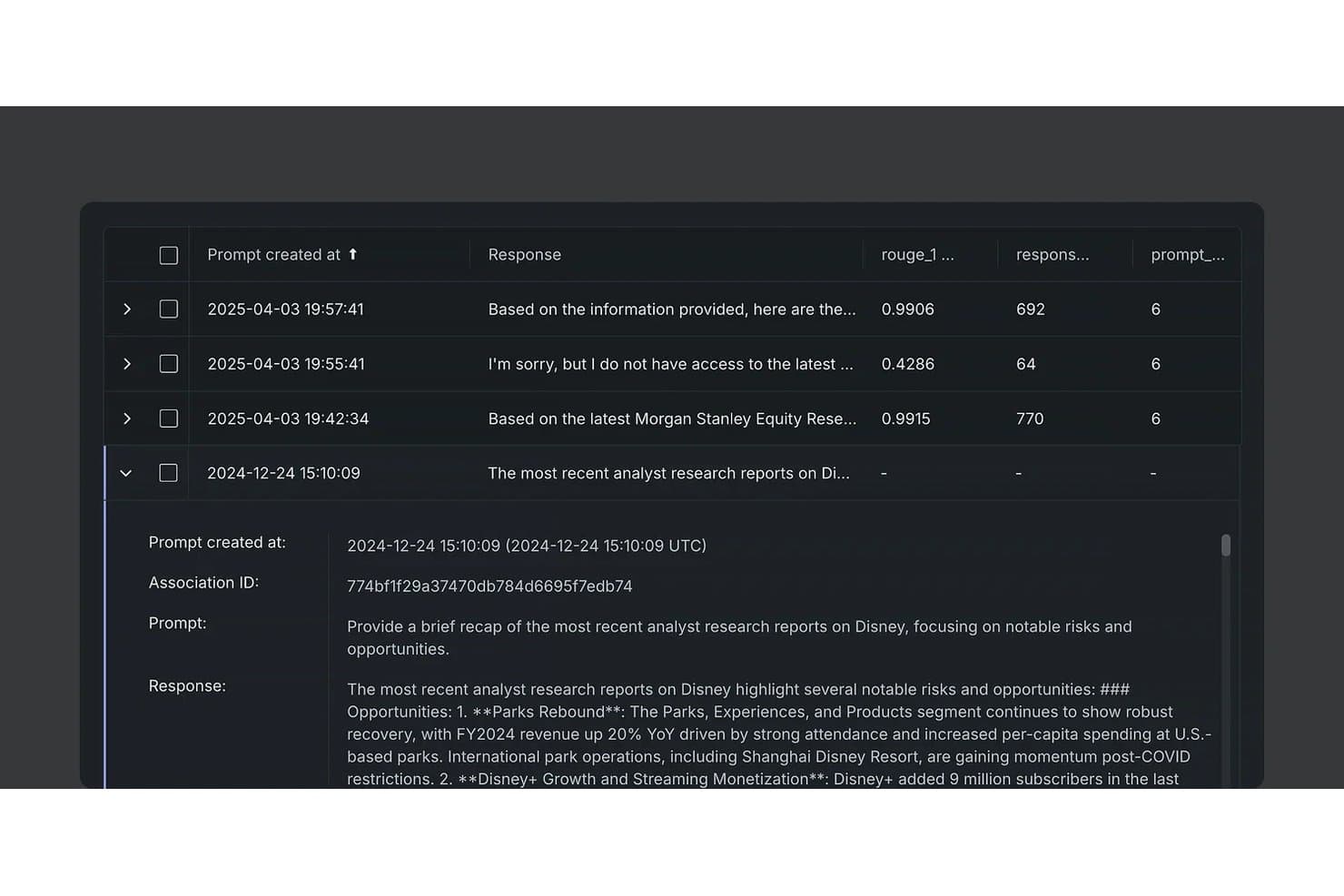
DataRobot tracks NLG prompt responses with ROUGE scores and token counts. DataRobot is an enterprise AI and machine learning platform that delivers NLG through its generative AI workbench, supporting structured data-to-text generation, RAG pipelines, LLM fine-tuning, and agentic workflows across regulated deployment environments.
Who Is DataRobot Best For?
DataRobot is a strong fit for enterprise AI and ML teams in regulated industries that need governed, auditable NLG with flexible deployment options, including air-gapped and on-premise environments.
Why I Picked DataRobot
I picked DataRobot as one of the best because it's the only NLG option I'd trust in a regulated environment where every generated output needs a full audit trail. Its LLM lineage tracking logs every prompt and vector input, and its governance layer maps directly to frameworks like the EU AI Act and NIST AI RMF. I also rate its hallucination controls highly: the LLM-as-a-judge evaluation and NVIDIA NeMo Guardrails work together to flag unfaithful outputs before they reach production.
DataRobot Key Features
- RAG pipeline builder: Create, register, and deploy vector databases with support for Pinecone, Elasticsearch, and FAISS, including chunking strategies, metadata indexing, and query rewriting.
- 70+ LLM gateway: Access over 70 large language models and embedding models through a single interface without managing separate API keys or accounts.
- Batch Prediction API: Run large-scale, offline prediction jobs across JDBC sources, cloud warehouses, and S3 with managed Apache Airflow orchestration.
- OpenTelemetry-compliant tracing: Track full lineage across prompts, vector inputs, and model versions with audit trails that feed directly into SIEM tools and observability pipelines.
DataRobot Integrations
DataRobot offers integrations with AWS, Microsoft Azure, Google Cloud Platform, Snowflake, Databricks, SAP, OpenAI, Google Gemini, Pinecone, and Elasticsearch. Its REST API, Python SDK, R client, CLI, and OpenAI-compatible endpoints support custom integrations.
Pros and Cons
Pros:
- Access to 70+ language models
- Hallucination controls with real-time monitoring
- Full audit trails and compliance features
Cons:
- Opaque, custom enterprise licensing model
- NLG functions secondary to ML platform
Learn more about DataRobot: Best for document-to-text NLG at scale
- Free plan available
- From $14.99/month

Mistral Document AI converts receipt images into structured JSON data. Mistral Document AI is an NLG platform built around enterprise OCR and document understanding, converting PDFs, scans, DOCX, and handwritten files into structured text, JSON, and natural language outputs across 170+ languages.
Who Is Mistral Document AI Best For?
Mistral Document AI is a strong fit for AI/ML engineers and technical teams that need to process large volumes of documents—PDFs, scans, DOCX files—into structured text or JSON at enterprise scale.
Why I Picked Mistral Document AI
I picked Mistral Document AI because it handles document-to-text conversion at a scale most NLG platforms simply can't match, processing up to 1,000 pages per minute on a single GPU and handling batch jobs of up to one million requests. The OCR 4.1 model goes well beyond basic text extraction, returning paragraph-level bounding boxes and block-level confidence scores across 170+ languages, including handwritten inputs. I also like that you can define custom JSON schemas to control exactly what structured output gets extracted, which makes it practical for building automated document pipelines rather than just one-off extractions.
Mistral Document AI Key Features
- Native RAG support: Pairs the
mistral-embedembedding model with document search to enable natural language querying over extracted content. - Moderation API: A free classifier that flags outputs across 11 content categories, with configurable thresholds you can inject directly into API requests.
- Three-tier fine-tuning: Offers self-hosted LoRA, managed serverless, and enterprise custom pre-training to match your infrastructure and data requirements.
- Streaming SSE output: Delivers token-by-token responses via Server-Sent Events, supporting live dashboards, chatbots, and real-time incident summary interfaces.
Mistral Document AI Integrations
Mistral Document AI supports 20+ MCP connectors, including GitHub, Notion, Jira, Confluence, Pinecone, and Sentry. It also offers Python and JavaScript/TypeScript SDKs plus a REST API for custom integrations.
Pros and Cons
Pros:
- Flexible deployment including on-premises and air-gapped
- Broadest multilingual OCR support in category
- Excels at high-volume document-to-text conversion
Cons:
- Steep rate limits on entry-level plans
- No native ITSM or observability tool connectors
Learn more about Mistral Document AI: Best for NLG across the AWS cloud stack
- 6-month free trial + free demo available
- Pricing upon request

Amazon Bedrock supports NLG via chat, text, and image playgrounds. Amazon Bedrock is AWS's fully managed NLG and foundation model platform, giving you API access to 100+ models from providers like Anthropic, Meta, and Mistral alongside built-in tools for RAG, fine-tuning, batch inference, and guardrails.
Who Is Amazon Bedrock Best For?
Amazon Bedrock is a strong fit for engineering and IT teams already running workloads on AWS who need to embed NLG into their existing cloud infrastructure without managing model hosting themselves.
Why I Picked Amazon Bedrock
Amazon Bedrock earns its spot on my shortlist because it's built entirely within the AWS ecosystem, making it the most natural choice if your infrastructure already lives there. I love that it gives you API access to 100+ foundation models through a single unified interface, so you can swap between Anthropic Claude, Meta Llama, or Amazon Nova without re-architecting your pipeline. The built-in Guardrails layer, with its Automated Reasoning checks hitting 99% accuracy, is what sets it apart for teams who need verifiable NLG output rather than just plausible-sounding text.
Amazon Bedrock Key Features
- Retrieval-augmented generation (RAG): A fully managed Knowledge Bases service that ingests data from S3, SharePoint, Confluence, and Google Drive and retrieves grounded context for text generation.
- Batch inference API: Processes high-volume prompt jobs asynchronously at approximately 50% lower cost than on-demand pricing, with output delivered to S3.
- Bedrock Guardrails: A six-layer configurable safety policy system covering PII redaction, denied topics, content filters, and mathematically verified output accuracy checks.
- Custom model import: Lets you bring externally trained models into Bedrock and serve them through the same managed API as native foundation models.
Amazon Bedrock Integrations
Amazon Bedrock has native integrations across AWS, including Amazon S3, Amazon CloudWatch, AWS CloudTrail, AWS IAM, AWS KMS, Amazon VPC, and AWS PrivateLink. It connects to SharePoint, Confluence, Google Drive, Splunk MLTK, LangChain, LlamaIndex, and CrewAI, with APIs and SDKs for custom integrations.
Pros and Cons
Pros:
- Handles real-time and batch text generation
- Powerful guardrails with automated reasoning checks
- Unified access to over 100 language models
Cons:
- Limited fine-tuning for popular models
- Complex multi-service setup required
Learn more about Amazon Bedrock: Best for research-backed natural language models
- Free plan available
- From $20/user/month

OpenAI's Playground lets users run code interpreter queries via assistants. OpenAI is an AI platform that provides natural language generation through a developer API, offering structured text output, multi-format generation, retrieval-augmented generation, real-time streaming, and batch processing across a wide range of language models.
Who Is OpenAI Best For?
OpenAI is a strong fit for engineering and IT teams that need production-grade NLG capabilities embedded directly into applications via a mature, well-documented API.
Why I Picked OpenAI
OpenAI earns its spot on my shortlist because its research-backed model lineup, from GPT-5.x to the reasoning-focused o-series, consistently sets the benchmark for natural language generation quality. I particularly like the Structured Outputs feature, which enforces strict JSON Schema adherence so generated text fits exactly into downstream pipelines, whether that's an incident report or an API reference doc. The built-in Vector Stores and File Search tool also let me ground generation in proprietary knowledge bases without standing up external infrastructure.
OpenAI Key Features
- Batch API: Processes up to 50,000 API requests per batch at a 50% cost discount, with a 24-hour completion window and separate rate limits.
- Real-time streaming: Delivers token-by-token output via SSE and WebSocket transport, enabling live incident dashboards and interactive application interfaces.
- Multi-language support: Generates text across 50–95+ human languages, including multilingual semantic search via the
text-embedding-3-largeembeddings model. - Version-pinned model snapshots: Lets developers pin requests to specific dated model versions (e.g.,
gpt-4.1-2025-04-14) for reproducible, consistent output across deployments.
OpenAI Integrations
OpenAI has integrations across Microsoft 365 and Google Workspace, plus Datadog, GitHub, Slack, Notion, and AWS Bedrock. Its API, SDKs, and MCP support custom connections to technical tools and data sources.
Pros and Cons
Pros:
- Token-by-token streaming for incident summaries
- Batch API for high-volume document production
- Structured output guarantees schema-compliant text
Cons:
- No on-premise or air-gapped deployments available
- Fine-tuning platform is not accepting new users
Learn more about OpenAI: Best for template-driven data-to-text at scale
- Free demo available
- Pricing upon request

Automated Insights Wordsmith lets users review and compare generated narratives. Wordsmith by Automated Insights is a template-driven NLG platform that converts structured data inputs—CSV files, JSON payloads, and database records—into written narratives at scale using conditional branching, synonym variation, and a REST API with Python, Node.js, and Ruby SDKs.
Who Is Automated Insights Wordsmith Best For?
Wordsmith is a strong fit for data-heavy teams in finance, insurance, and media that need to generate thousands of consistent, audit-ready narratives from structured data at scale.
Why I Picked Wordsmith
I picked Wordsmith as one of the best because no other tool on this list has proven template-driven NLG at the scale it operates: over 1.5 billion narratives annually, including the AP's automated earnings reports and millions of Yahoo Sports fantasy recaps generated in a single NFL Sunday. Its Template Editor gives you conditional branching and synonym variation to control every output precisely, with zero hallucinations. That determinism is what makes it irreplaceable in finance, insurance, and any domain where audit-ready, predictable text output isn't optional.
Automated Insights Wordsmith Key Features
- Variability heatmap: Flags low-variation sections in your templates and surfaces suggestions to increase narrative diversity across generated outputs.
- Zapier connector: Links Wordsmith to thousands of apps—including Google Sheets, Salesforce, and Airtable—without writing custom integration code.
- BI tool extensions: Native extensions for Tableau, MicroStrategy, Qlik, and TIBCO Spotfire embed generated narratives directly inside your existing dashboards.
- Data tester: Lets you test branch logic against live data rows inside the Template Editor before pushing any changes to production.
Automated Insights Wordsmith Integrations
Automated Insights Wordsmith offers integrations with Tableau, MicroStrategy, Qlik, TIBCO Spotfire, and Amazon Alexa, plus REST API access and Python, Node.js, and Ruby SDKs. It also supports Zapier.
Pros and Cons
Pros:
- Deep template and rule configuration options
- Guarantees audit-ready, hallucination-free output
- Scales to billions of narratives annually
Cons:
- Setup requires significant template engineering upfront
- No language model fine-tuning available
Learn more about Automated Insights Wordsmith: Best for deterministic BI dashboard narration
- Free trial + free demo available
- Pricing upon request

Arria NLG auto-generates fund summaries and reports from data. Arria NLG is a natural language generation platform that transforms structured data into written and spoken narratives using a hybrid deterministic and LLM architecture, with native integrations for BI tools like Power BI, Tableau, and Qlik.
Who Is Arria NLG Best For?
Arria NLG is a strong fit for enterprise analytics and BI teams that need deterministic, auditable narratives generated directly from structured data at scale.
Why I Picked Arria NLG
Arria NLG earns its spot on my shortlist because its deterministic-first architecture solves a problem that most NLG tools ignore: accuracy in high-stakes reporting. Instead of generating plausible-sounding text, Arria calculates the correct insight first, then narrates it, which matters when you're producing BI dashboard narratives that inform real decisions. I particularly like Arria Author's three-layer output model, which layers deterministic rules, human-authored commentary, and optional LLM summaries into a single auditable report.
Arria NLG Key Features
- Arria Connect SDK: Embed NLG capabilities into any API-based platform using direct REST calls, a full UI+API library, or a headless API for process automation.
- Arria Answers: A conversational AI module that lets users query approved data sources and receive traceable, fact-based answers with full visibility into how each response was generated.
- On-premises deployment: Run Arria fully behind your own firewall, keeping data entirely within your controlled environment to meet strict security and data residency requirements.
- Batch report generation: Automatically generate thousands of customized narrative reports by submitting JSON or CSV payloads via HTTPS, with Kubernetes-backed autoscaling on AWS.
Arria NLG Integrations
Arria NLG offers six documented native integrations with Microsoft Power BI, Microsoft Excel, Tableau, Qlik, TIBCO Spotfire, and MicroStrategy. Arria Connect also provides REST API, full SDK, and headless API access for custom integrations.
Pros and Cons
Pros:
- Scales to generate thousands of reports automatically
- Highly customizable template and rules engine
- Deterministic narratives eliminate data hallucination risk
Cons:
- Requires manual editing for accessible output language
- No built-in support for code documentation
Learn more about Arria NLG:
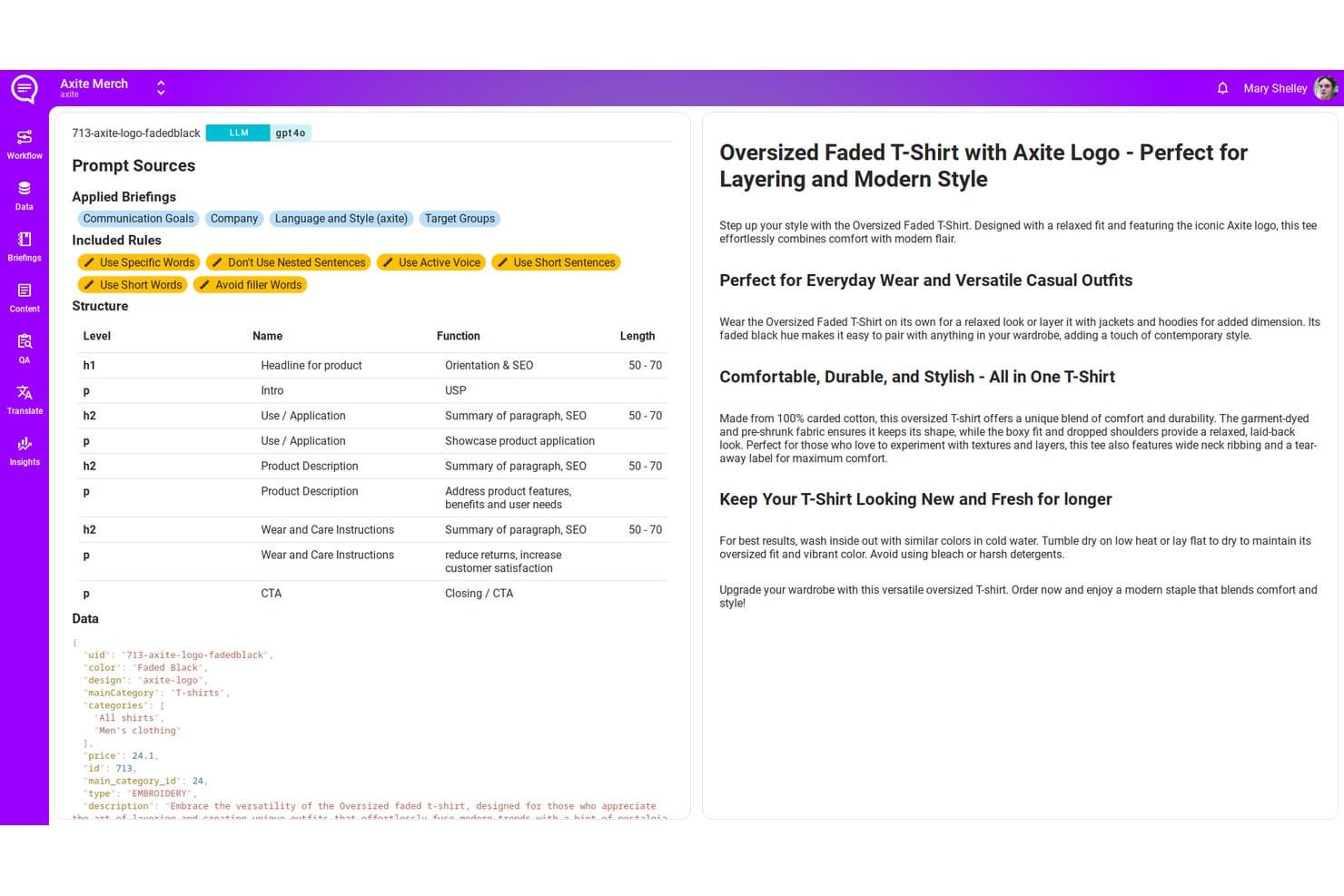
AX Semantics generates structured product descriptions using rules and data. AX Semantics is a rule-based NLG platform that converts structured product data into natural language text across 110+ languages, using a declarative content engine with built-in QA, batch processing, and webhook-based delivery.
Who Is AX Semantics Best For?
AX Semantics is a strong fit for ecommerce teams managing large product catalogs who need accurate, multilingual product descriptions at scale.
Why I Picked AX Semantics
AX Semantics earns its spot on my shortlist because its rule-based NLG engine is purpose-built for exactly what large ecommerce catalogs demand: turning structured product data into accurate, brand-consistent descriptions at scale. I love that it handles native morphology across 110+ languages, meaning a product description in German or Japanese isn't a translated afterthought but grammatically correct output generated from source rules. Its declarative content engine also enforces auto-QA gates before any text publishes, so factual accuracy stays locked to the source data.
AX Semantics Key Features
- Performance feedback loop: Correlates published content with SEO rankings, conversion rates, and return data to inform and improve future content generation rules.
- Automated QA gates: Checks generated text against source data before publishing to catch factual inconsistencies before they go live.
- A/B content variant assignment: Assigns content variations to different audience segments for testing via the axite Tag, managed without manual duplication.
- 5 GB batch ingestion: Accepts JSONL uploads up to 5 GB, enabling large-scale product catalog processing in a single pipeline run.
AX Semantics Integrations
AX Semantics offers a Contentserv marketplace connector, REST Data API, webhook delivery, and a Make module for custom content workflows. It’s also listed on Zapier.
Pros and Cons
Pros:
- Performance feedback loop connects content and results
- Native grammar rules for 110+ languages
- Hallucination-free outputs grounded in source data
Cons:
- Not suited for technical documentation or IT reports
- No free trial or demo
Learn more about AX Semantics:

Yseop automates report narrative generation with customizable text settings. Yseop is an NLG platform that uses a combination of symbolic AI and large language models to convert structured data into compliant, human-readable regulatory and financial documents.
Who Is Yseop Best For?
Yseop is built for medical writers and financial analysts at enterprise pharma and banking firms who need to generate compliant, audit-ready regulatory documents at scale.
Why I Picked Yseop
Yseop earns its spot on my shortlist because it's purpose-built for the two regulated writing environments where NLG errors carry the highest stakes: pharma regulatory submissions and financial reporting. I'm particularly impressed by its Composite AI architecture, which pairs Symbolic AI with domain-specific LLMs to produce fully traceable output, right down to the source data behind every generated sentence. In a GSK validation, less than 7% of content required re-authoring. That's the kind of accuracy that makes it viable for eCTD submissions and credit risk reports alike.
Yseop Key Features
- Automation Packs: Pre-configured component bundles that let medical writers and finance teams set up document generation for specific document types without writing code.
- Multilingual document generation: Produces regulatory and financial documents in multiple languages to support global submission requirements.
- Human approval gates: Built-in review checkpoints that prevent any automated output from advancing in the workflow without sign-off from a qualified reviewer.
- GxP-compliant audit trail: Tracks all data interactions, access, and content changes to maintain submission-ready documentation throughout the authoring process.
Yseop Integrations
Yseop has documented integrations with Microsoft Word, Veeva Vault, Tableau, Qlik, and Power BI. It has no publicly documented REST API or SDK for custom integrations.
Pros and Cons
Pros:
- Built-in GxP compliance and audit trail
- Deterministic outputs with full data traceability
- Purpose-built for pharma and finance documents
Cons:
- Not suitable for general-purpose NLG use cases
- No public developer API or SDK access
Learn more about Yseop:
Annen programvare for generering av naturlig språk
Nedenfor finner du en liste over annen programvare for generering av naturlig språk som jeg satte på kortlisten, men som ikke kom med blant de 10 beste. De er absolutt verdt å undersøke.
- 11Cohere NorthBest for private-deployment NLG with RAG citations
- 12Azure OpenAIBest for NLG within the Azure cloud stack
- 13WriterBest for graph-RAG grounded NLG via API
- 14NarrativaBest for automating news and report generation
- 15RetrescoBest for enterprise content automation
- 16Hugging Face TransformersBest for fine-tuning NLG on proprietary data
How I Evaluate Natural Language Generation Software
I split my evaluation into two layers: core requirements—like converting log data into incident summaries via API—and the differentiators that separate a good tool from the right one.
Core Functionality (Table Stakes For This List)
When I'm selecting tools for my list, I rank each one on a scale from 0 (does not offer the functionality) to 5 (excels in this area) for each core functionality listed below. Then, I calculate the tool's total score into a percentage. Each tool needs to achieve a minimum total score of 65% to be considered for inclusion.
- Structured Data-to-Text Generation: I check whether the tool can ingest structured inputs like JSON payloads, database queries, or system logs and turn them into readable narratives.
- Developer API/SDK Access: Every tool I evaluate needs programmatic endpoints so teams can embed NLG into pipelines, internal apps, or monitoring stacks.
- Customizable Language Models: I look for the ability to fine-tune or configure models on domain-specific data, such as training on your org's runbook language or ticket history.
- Multi-Format Output Support: The tool should generate different text types from the same data source, whether that's an executive summary, a detailed incident report, or inline code docs.
- Template & Rule Configuration: I evaluate how much control you get over output structure, tone, and logic—for example, setting rules so a post-mortem follows your team's standard format.
- Scalable Batch Processing: High-volume use cases matter, so I look at how well a platform handles concurrent requests, like generating hundreds of server health summaries overnight.
Once I have a list of tools that meet this criteria, I consider what sets each platform apart.
Differentiating Factors (What Sets Vendors Apart)
Here's how I compare and contrast different vendors:
Standout Features
Retrieval-augmented generation is a key differentiator I look for because it lets the tool ground output in your actual knowledge base—think runbooks, internal wikis, or code repos. That matters when generated incident summaries need to reflect your real infrastructure. I also evaluate hallucination controls, like confidence scoring and fact-checking layers, since inaccurate output in a post-mortem or status page update can erode trust fast. Real-time streaming is worth weighing too, especially for teams building live chatbots or dynamic dashboard narratives.
Beyond Features
Deployment flexibility matters a lot here. I check whether a vendor supports on-premise, VPC-isolated, or hybrid hosting since many IT teams handle sensitive infrastructure data that can't leave their environment. Integration coverage is another big factor—I evaluate native connectors to tools like Datadog, ServiceNow, and GitHub because NLG output is only useful if it fits into existing observability and ITSM workflows. Security certifications like SOC 2 Type II and data residency controls also carry weight, especially when generated text touches production system data.
Slik velger du programvare for generering av naturlig språk
Det er lett å gå seg vill i lange funksjonslister og komplekse prismodeller. For å hjelpe deg med å holde fokus mens du går gjennom den unike prosessen din for valg av programvare, får du her en sjekkliste over faktorer du bør ha i bakhodet:
| Faktor | Hva du bør vurdere |
|---|---|
| FaktorSkalerbarhet | Hva du bør vurdereKan programvaren vokse med virksomheten din? Vurder brukerbegrensninger, databehandlingskapasitet og hvor godt den tilpasser seg økte arbeidsmengder uten at ytelsen svekkes. |
| FaktorIntegrasjoner | Hva du bør vurdereFungerer den med verktøyene du allerede bruker? Kontroller kompatibilitet med CRM-systemer, analyseplattformer og andre viktige applikasjoner for å sikre sømløs integrasjon i arbeidsflyten. |
| FaktorTilpasningsmuligheter | Hva du bør vurdereHvor fleksibel er programvaren? Se etter alternativer for å tilpasse grensesnittet, rapportene og resultatene til dine spesifikke behov og bransjekrav. |
| FaktorBrukervennlighet | Hva du bør vurdereEr programvaren brukervennlig? Vurder læringskurven, utformingen av grensesnittet og tilgjengeligheten av støttemateriell for nye brukere. |
| FaktorImplementering og oppstart | Hva du bør vurdereHvor smidig er oppsettprosessen? Vurder tiden og ressursene som kreves for den første utrullingen og opplæringen, inkludert tilgang til veiledninger og støtte. |
| FaktorKostnad | Hva du bør vurderePasser den inn i budsjettet ditt? Sammenlign prisplaner, skjulte gebyrer og valuta for pengene. Ta hensyn til langsiktige kostnader og potensiell avkastning på investeringen. |
| FaktorSikkerhetstiltak | Hva du bør vurdereHvor godt er dataene dine beskyttet? Sørg for at programvaren overholder lover om databeskyttelse og tilbyr kryptering, tilgangskontroller og regelmessige sikkerhetsoppdateringer. |
Hva er programvare for generering av naturlig språk?
Programvare for generering av naturlig språk (NLG) er en delmengde av kunstig intelligens som automatiserer opprettelsen av tekst basert på strukturerte data. Den brukes hovedsakelig av innholdsskapere, dataanalytikere og virksomheter, og har som mål å produsere sammenhengende fortellinger, rapporter eller beskrivelser, effektivisere prosesser for innholdsproduksjon, sikre konsistens og omforme data til forståelige fortellinger tilpasset ulike målgrupper.
Funksjoner
Når du velger programvare for generering av naturlig språk, bør du se etter følgende nøkkelfunksjoner:
- Automatisk tekstoppretting: Genererer tekst automatisk fra datainndata, noe som sparer brukerne for tid og arbeid.
- Flerspråklige funksjoner: Støtter flere språk, slik at du kan nå et globalt publikum med innholdet ditt.
- Datadrevet innsikt: Analyserer data for å produsere nøyaktig og relevant innhold, noe som bidrar til informerte beslutninger.
- Tilpassbare maler: Tilbyr maler som du kan tilpasse for å dekke spesifikke behov i bransjen eller virksomheten.
- Prediktiv ytelsesscore: Vurderer hvor vellykket innholdet ditt kan bli før publisering, slik at resultatene optimaliseres.
- Sanntidsdataintegrasjon: Integreres med datakilder i sanntid for å sikre at innholdet er oppdatert og relevant. Denne funksjonen er spesielt viktig når du velger programvare for samtaleintelligens.
- Adaptiv læring: Justerer innholdsgenereringen basert på tilbakemeldinger fra brukerne, noe som forbedrer nøyaktigheten over tid.
- Personalisering av innhold: Tilpasser innholdet til merkevarens stemme og målgruppens preferanser, noe som øker engasjementet.
- Sikkerhetstiltak: Beskytter dataene dine med kryptering og tilgangskontroller, slik at regelverk overholdes.
Fordeler
Implementering av programvare for generering av naturlig språk eller NLP-programvare gir flere fordeler for teamet og virksomheten din. Her er noen av fordelene du kan se frem til:
- Tidsbesparelser: Automatiserer tekstoppretting, slik at teamet ditt kan konsentrere seg om mer strategiske oppgaver.
- Global rekkevidde: Flerspråklige funksjoner gjør det mulig å kommunisere effektivt med internasjonale målgrupper.
- Forbedret nøyaktighet: Datadrevet innsikt sikrer at innholdet som produseres, er relevant og presist.
- Økt engasjement: Personalisering tilpasser innholdet til målgruppen din, noe som øker interaksjonen og interessen.
- Skalerbarhet: Tilpasser seg enkelt økte innholdsbehov etter hvert som virksomheten din vokser.
- Konsistens: Tilpassbare maler sørger for enhetlighet i innholdet og opprettholder merkevarens stemme i alt materiell.
Kostnader og priser
Valg av programvare for generering av naturlig språk krever en forståelse av de ulike prismodellene og planene som er tilgjengelige. Kostnadene varierer basert på funksjoner, teamstørrelse, tillegg og mer. Tabellen nedenfor oppsummerer vanlige planer, gjennomsnittsprisene deres og typiske funksjoner som er inkludert i programvareløsninger for generering av naturlig språk:
Sammenligningstabell for planer for programvare for generering av naturlig språk
| Plantype | Gjennomsnittspris | Vanlige funksjoner |
|---|---|---|
| PlantypeGratisplan | Gjennomsnittspris$0 | Vanlige funksjonerGrunnleggende tekstgenerering, begrenset tilpasning og tilgang til støtteressurser. |
| PlantypePersonlig plan | Gjennomsnittspris$10-$30 per bruker/måned | Vanlige funksjonerTekstgenerering, grunnleggende analyse, støtte for flere språk og begrensede muligheter for personlig tilpasning. |
| PlantypeBedriftsplan | Gjennomsnittspris$50-$100 per bruker/måned | Vanlige funksjonerAvansert analyse, utvidet tilpasning, sanntidsdataintegrasjon og verktøy for teamsamarbeid. |
| PlantypeForetaksplan | Gjennomsnittspris$200+ per bruker/måned | Vanlige funksjonerFull tilpasning, dedikert brukerstøtte, avanserte sikkerhetsfunksjoner og omfattende dataintegrasjon. |
Vanlige spørsmål om programvare for generering av naturlig språk
Her er noen svar på vanlige spørsmål om programvare for generering av naturlig språk:
Hvordan håndterer programvare for generering av naturlig språk personvern?
Programvare for generering av naturlig språk inkluderer vanligvis datakryptering og tilgangskontroller for å beskytte personvernet. Du bør sørge for at programvaren overholder relevante personvernforordninger, som GDPR. Det er også viktig å kontrollere hvordan programvareleverandøren håndterer lagring og deling av data.
Hvilke integrasjonsmuligheter har programvare for generering av naturlig språk?
De fleste verktøy for generering av naturlig språk kan integreres med populære plattformer som CRM-systemer, analyseprogramvare og innholdsstyringssystemer. Kontroller om programvaren støtter API-tilgang for tilpassede integrasjoner. Sørg for at den kan kobles til verktøyene teamet ditt allerede bruker.
Hvordan kan jeg måle hvor effektiv programvare for generering av naturlig språk er?
Effektiviteten kan måles ved å vurdere kvaliteten og relevansen til det genererte innholdet. Se etter funksjoner som prediktiv ytelsesskåring. Vurder også hvor godt verktøyet dekker de spesifikke forretningsbehovene dine og forbedrer arbeidsflyten.
Hvor omfattende tilpasning er tilgjengelig i programvare for generering av naturlig språk?
Tilpasningsmulighetene varierer fra verktøy til verktøy, men omfatter ofte muligheten til å tilpasse maler, justere språktonen og endre resultater slik at de samsvarer med merkevareretningslinjene. Sørg for at programvaren gir nok fleksibilitet til å dekke virksomhetens krav uten omfattende tekniske justeringer.
Hvor viktig er brukerstøtte når man velger programvare for generering av naturlig språk?
God brukerstøtte er avgjørende for en problemfri opplevelse. Se etter leverandører som tilbyr brukerstøtte døgnet rundt, omfattende dokumentasjon og opplæringsressurser. Raske svartider og flere støttekanaler kan ha stor betydning for teamets produktivitet.
Finnes det bransjespesifikke løsninger for generering av naturlig språk?
Ja, noen løsninger er tilpasset bestemte bransjer, som finans, helsetjenester eller netthandel. Disse verktøyene kan tilby spesialiserte maler og funksjoner utviklet for bransjespesifikke behov for innhold. Vurder om et bransjespesifikt verktøy kan dekke de unike kravene dine bedre.