

Som en person som er dypt involvert i IT-drift, forstår jeg kompleksiteten og behovene knyttet til håndtering av ulike aspekter som endepunkthåndtering, kunnskapshåndtering og fjernstyring. ConnectWise PSA, spesielt gjennom moduler som ConnectWise Manage, kombinerer alle disse elementene og tilbyr maler, skripting, selvbetjeningsalternativer og en robust kunnskapsbase. Det er utviklet for å effektivisere driften og øke lønnsomheten, samtidig som sluttbrukeropplevelsen forbedres.
ConnectWise PSA tilbyr en omfattende plattform for IT-drift som integrerer alt fra fjernstyring til kunnskapshåndtering. Fordelene med dette verktøyet er mange; det forenkler ikke bare endepunkthåndtering, men tilbyr også omfattende moduler for økt effektivitet og lønnsomhet.
Likevel kan noen være på utkikk etter alternativer til ConnectWise PSA for å finne en løsning som passer bedre til deres unike behov eller budsjettbegrensninger, og derfor er det viktig å utforske andre alternativer.
Hva er ConnectWise PSA?
ConnectWise PSA er en plattform for automatisering av profesjonelle tjenester (PSA) som hjelper IT-tjenesteleverandører med å administrere og spore prosjekter, saker, fakturering og tjenesteleveranser. Den brukes hovedsakelig av MSP-er, IT-konsulenter og tjenestebaserte team som trenger ett sted for å administrere driften og holde kundene fornøyde. Funksjoner for saksbehandling, tidsregistrering og fakturering bidrar til daglige tjenesteoppgaver og ansvarlighet overfor kundene. ConnectWise PSA gir teamet ditt verktøy for å holde orden og sørge for fremdrift i arbeidet uten å måtte hoppe mellom ulike systemer.
Hvorfor du kan stole på våre programvareanbefalinger
6,700+
Reviews
20
Industry experts
16+
Evaluation factors
14
Years
Teamet vårt har testet og anmeldt programvare siden 2012. Vi er selv teknologiledere, så vi vet hvor vanskelig og hvor viktig det er å velge riktig programvare.
I denne guiden har vi vurdert verktøyene gjennom praktisk testing og uavhengig research og gitt dem poeng ut fra våre utvelgelseskriterier.
Anmeldelsene våre bygger på vår egen redaksjonelle vurdering. De er ikke et salgsargument.
Ekspertanmeldere:
- Paulo Gardini MiguelTech Director
 Tim FisherVP of AI
 Gabriel RosasTech Lead & Software Architect
 Christhian GruhnTech Lead & Platform Architect

Sammenligningstabell for ConnectWise PSA-alternativer
Denne sammenligningstabellen oppsummerer prisopplysningene for mine beste utvalgte ConnectWise PSA-alternativer:
| Tool | Best For | Trial Info | Price | ||
|---|---|---|---|---|---|
| 1 | Best for automated patch management | Free trial available | From $149/user/month (billed annually) | Website | |
| 2 | Best for cloud backup services | 15-day free trial | From $1.67/month (billed annually) | Website | |
| 3 | Best for IT documentation management | Free demo available | From $29/user/month | Website | |
| 4 | Best for Agile teams | Free plan available | From $21.50/user/month | Website | |
| 5 | Best for on-demand remote support | Free plan available | Pricing upon request | Website | |
| 6 | Best for remote IT support | Not available | Pricing upon request | Website | |
| 7 | Best for MSPs switching from ConnectWise | 14-day free trial | From $159/user/month | Website | |
| 8 | Best for service business automation | Free demo available | Pricing upon request | Website | |
| 9 | Best for client communications and reporting | Free demo available | From $145/month | Website | |
| 10 | Best for large-scale project management | Not available | Pricing upon request | Website |


Anmeldelser av de beste ConnectWise PSA-alternativene
Nedenfor finner du mine detaljerte sammendrag av de beste ConnectWise PSA-alternativene som kom med på kortlisten min. Anmeldelsene gir en detaljert gjennomgang av de viktigste funksjonene, fordelene og ulempene, integrasjonene og ideelle bruksområdene for hvert verktøy, slik at du kan finne det som passer best for deg.
 Best for automated patch management
- Free trial available
- From $149/user/month (billed annually)
Visit WebsiteCustomer Rating:4.6/5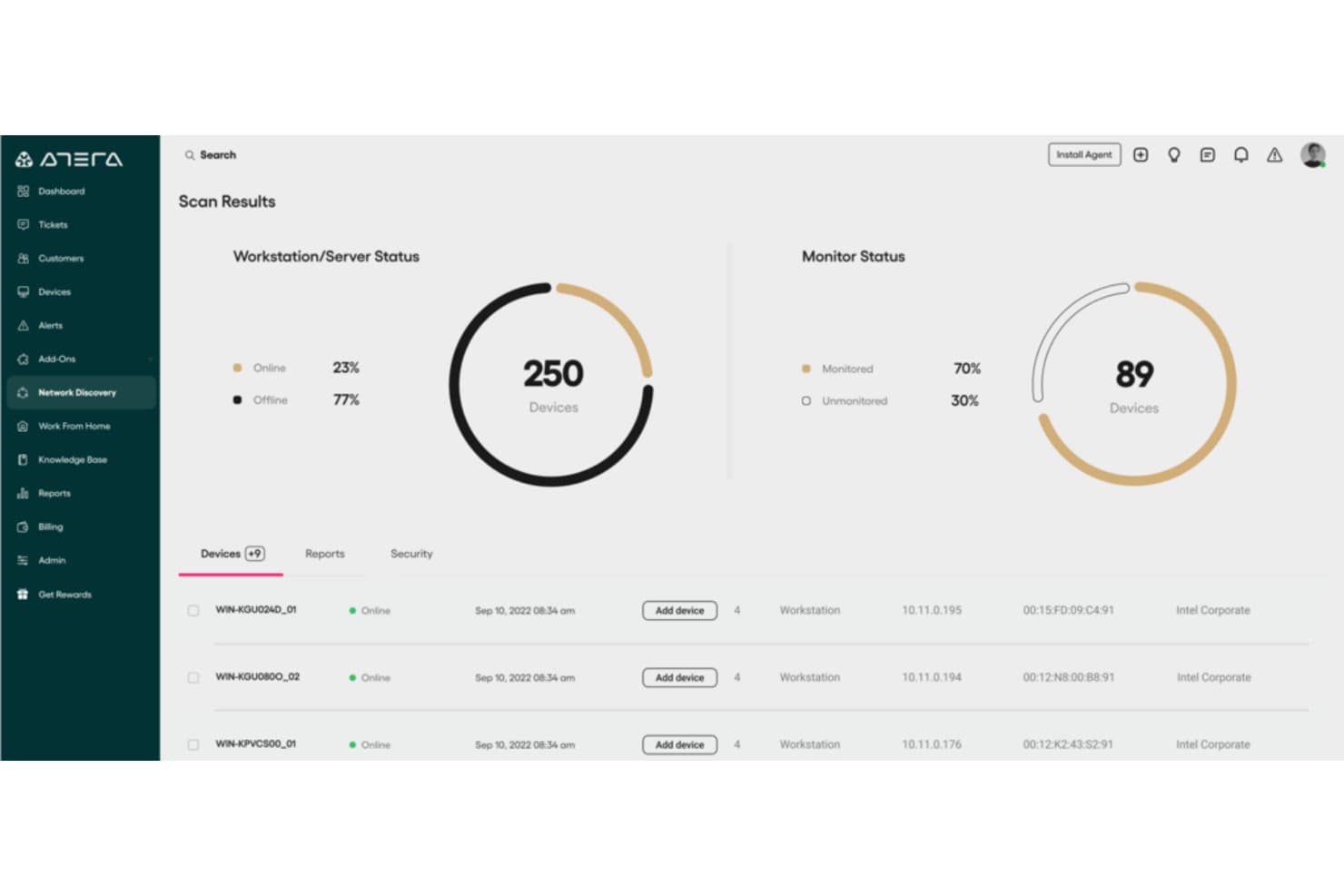
Atera's Network Discovery scans and monitors devices across your network. Atera is an IT management and PSA platform for MSPs and internal IT teams seeking an alternative to ConnectWise PSA, combining service desk, remote support, and endpoint management to manage requests and client environments.
Who Is Atera Best For?
Atera suits MSPs and internal IT teams that need to automate patch management across the endpoints they support.
Why I Picked Atera
I picked Atera as a ConnectWise PSA alternative because its automated patch management covers Windows, Mac, and Linux endpoints. I like that patching sits alongside remote monitoring in one dashboard, so I can track client devices and address software updates without switching tools.
Atera Key Features
- Ticketing: Create tickets from email, schedule recurring tickets, and use quick-reply templates.
- Customer portal: Let clients submit and track tickets, view ticket history, and access a knowledge base.
- Time tracking: Record billable hours automatically or manually, then review technician timesheets.
- Billing and contracts: Set customer-specific contract rates and export billing batches and invoices to QuickBooks or Xero.
Atera Integrations
Atera documents integrations with QuickBooks Online, Xero, IT Glue, AnyDesk, Splashtop, TeamViewer, and ScreenConnect; QuickBooks Online and Xero support accounting workflows. Atera also connects with Zapier and provides API access for custom integrations.
Pros and Cons
Pros:
- Supports bulk scripting and routine maintenance automation
- Combines endpoint monitoring, ticketing, and remote support
- Automates patching across Windows, Mac, and Linux
Cons:
- Patch policies provide less granular control than ConnectWise’s tools
- Reporting offers limited customization for complex needs
 Best for cloud backup services
- 15-day free trial
- From $1.67/month (billed annually)
Visit WebsiteCustomer Rating:4.6/5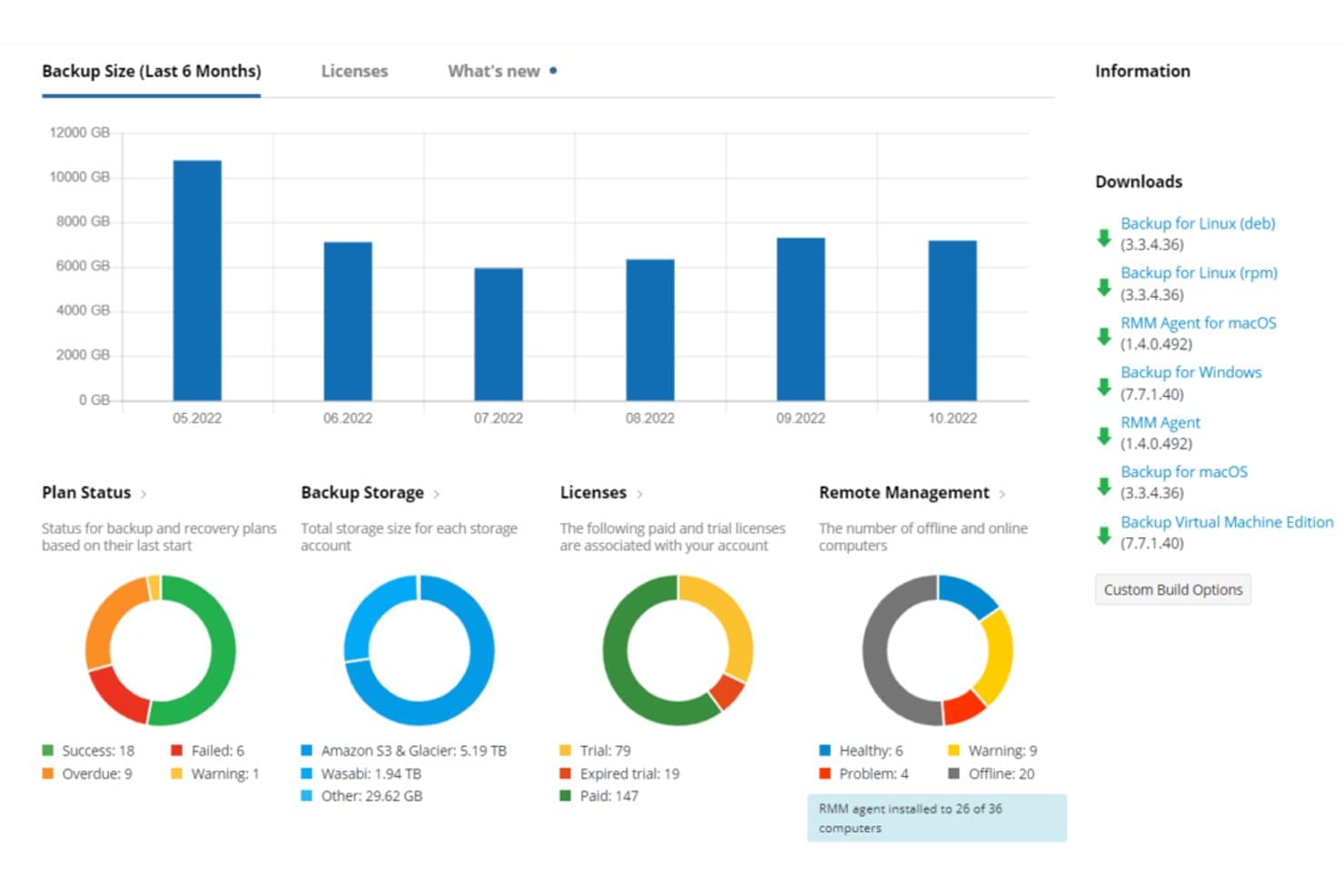
MSP360 Backup displays storage, license, and plan status at a glance. MSP360 Backup is a backup and recovery platform for managed service providers and IT teams that need to protect client data and restore systems alongside their ConnectWise PSA workflows.
Who Is MSP360 Backup Best For?
MSP360 Backup suits IT teams that need to protect distributed workloads and recover business data from cloud backups.
Why I Picked MSP360 Backup
I picked MSP360 Backup as my Best for cloud backup services choice because it covers client data and system recovery beyond PSA ticket workflows. I like its file-level and image-based backups, which let me restore a deleted client folder or rebuild a failed workstation from a system image. It also lets me choose the cloud storage target.
MSP360 Backup Key Features
- Multi-tenant management: Manage backup settings across multiple client environments from one web console.
- Scheduled backups: Set automated backup schedules for protected devices.
- Backup alerts and reporting: Review backup activity and configure alerts for job status.
- Encryption: Encrypt backup data in transit and at rest.
MSP360 Backup Integrations
MSP360 Backup integrates with ConnectWise PSA and Autotask PSA for billing and reporting, and with HaloPSA for asset syncing and backup-alert ticketing. It also provides APIs for custom integrations.
Pros and Cons
Pros:
- Bring-your-own-storage avoids proprietary cloud lock-in
- File and image backups cover varied recovery
- Multi-tenant console centralizes client backup status
Cons:
- Large image restores can take considerable time
- Doesn't replace PSA ticketing or service workflows
Learn more about MSP360 Backup: Best for IT documentation management
- Free demo available
- From $29/user/month
Visit WebsiteCustomer Rating:4.6/5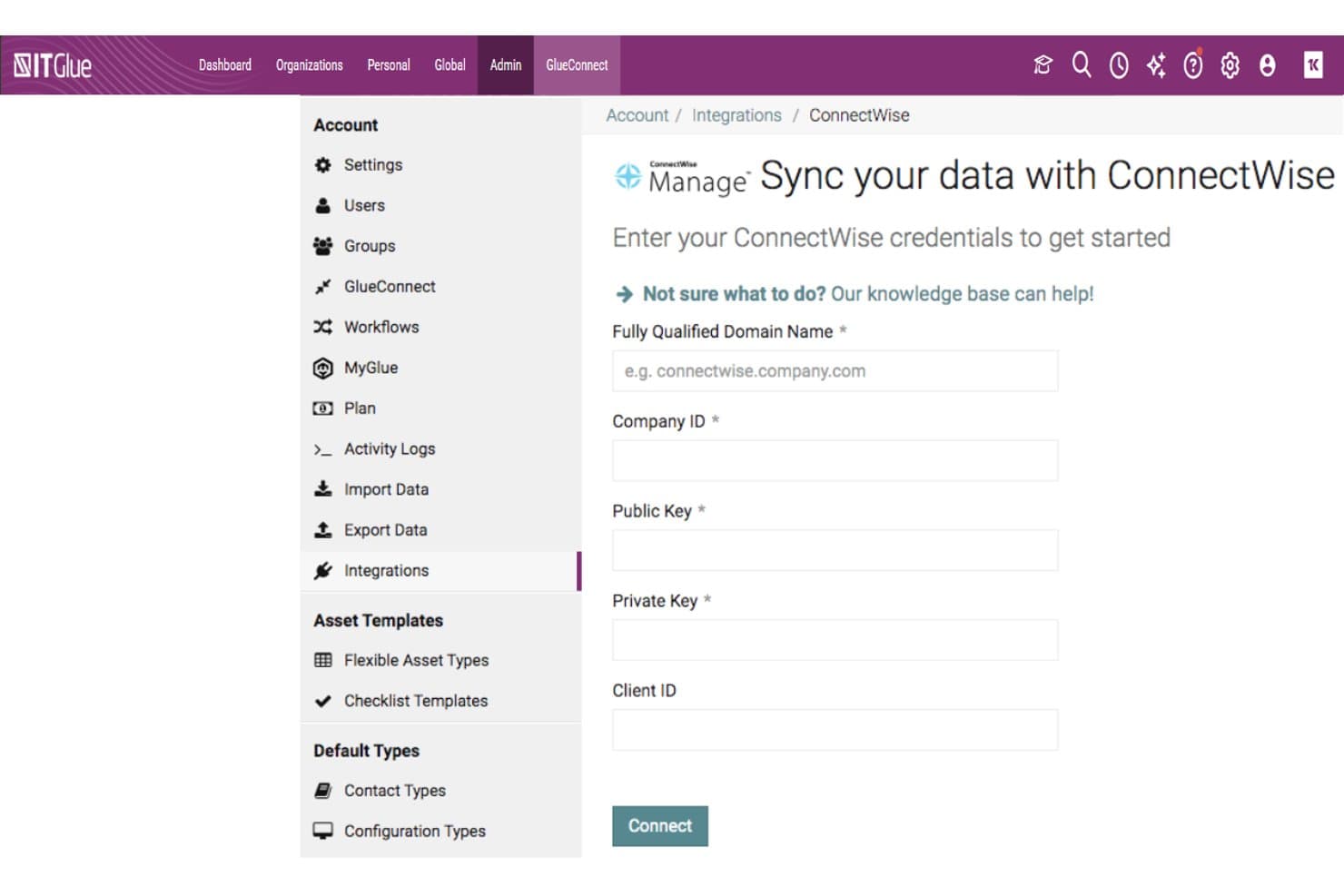
IT Glue connects with ConnectWise Manage via API credential input. IT Glue gives managed service providers a dedicated knowledge platform for organizing client environments and operational records, helping technicians resolve support requests without hunting through scattered information.
Who Is IT Glue Best For?
IT Glue suits MSP technicians and service desk teams that need a shared, searchable record of client systems, configurations, and support procedures.
Why I Picked IT Glue
I picked IT Glue as a documentation-focused alternative to ConnectWise PSA because it’s Best for IT documentation management. Its configuration records and relationship mapping connect devices, services, and related documentation, while flexible assets capture client-specific runbooks. I like how that structure helps a technician trace a server issue to its dependencies and recovery steps.
IT Glue Key Features
- Secure password management: Store credentials with an immutable audit trail.
- Native integrations: Connect IT Glue with PSA, RMM, and backup platforms.
- Search: Find documentation across the platform.
- Version control: Review document changes and roll back to earlier versions.
IT Glue Integrations
IT Glue lists dozens of integrations, including ConnectWise Manage, Autotask PSA, Kaseya BMS, ServiceNow, Ninja RMM, ConnectWise Automate, Microsoft Teams, Slack, Microsoft 365, and Zapier. It also offers a public API for custom integrations.
Pros and Cons
Pros:
- Credential audit trails support accountable access
- Flexible assets capture client-specific runbooks
- Linked configuration records reveal related dependencies
Cons:
- Document tagging remains unavailable
- Search can retain previous queries
Learn more about IT Glue:
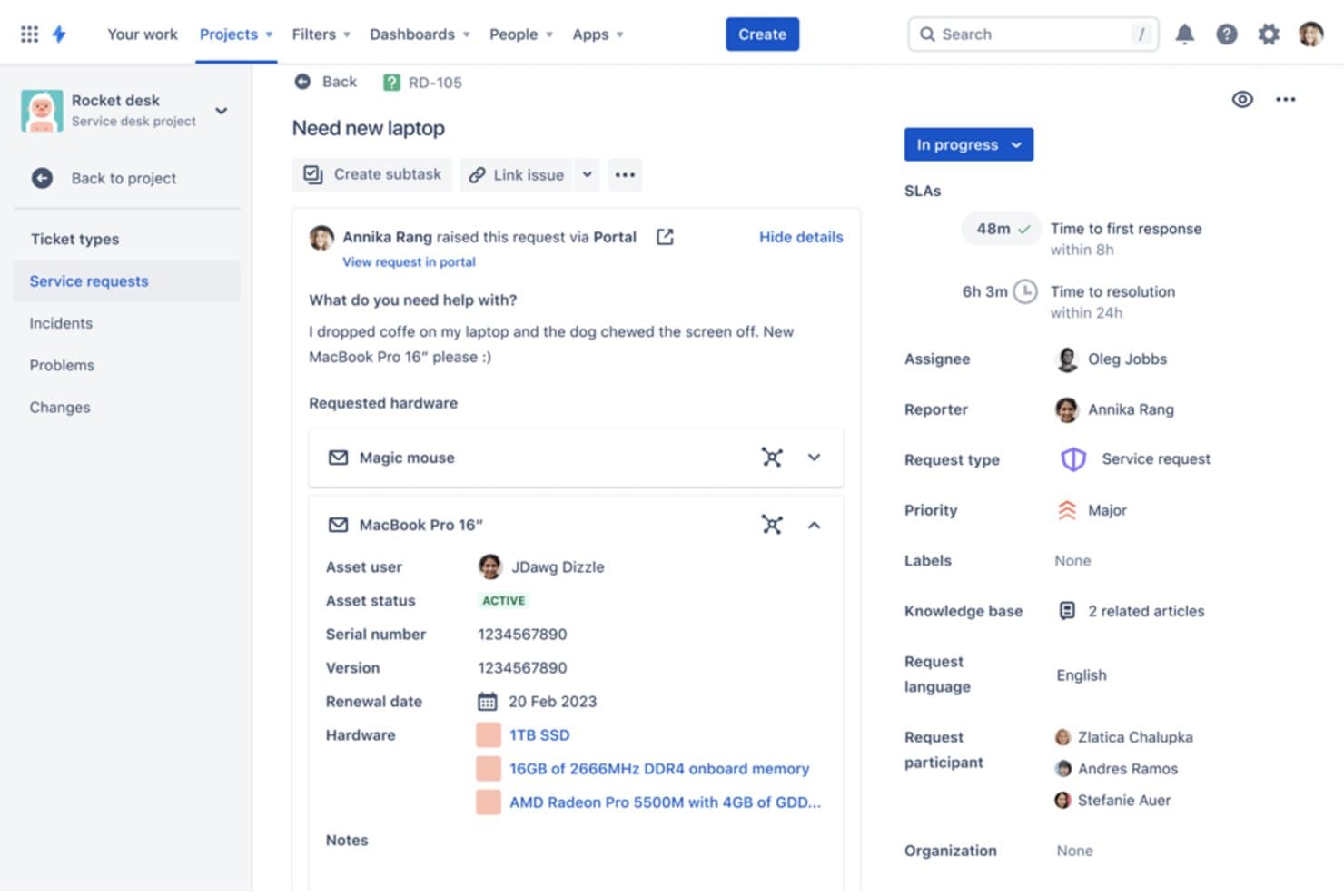
Jira Service Management tracks hardware requests with asset details and SLAs. For IT and professional services teams, Jira Service Management provides service desk and operations tools to coordinate incidents, requests, and delivery work within Atlassian’s project workflow ecosystem.
Who Is Jira Service Management Best For?
Jira Service Management suits IT support and operations teams that want service requests and incident work to follow the same agile workflows as development teams.
Why I Picked Jira Service Management
I picked Jira Service Management as Best for Agile teams because it connects service requests and incident response with development workflows. When a client issue needs an engineering fix, teams can link the request to Jira work and track it alongside sprint tasks. Its incident and change management workflows also help coordinate operational work without losing delivery context.
Jira Service Management Key Features
- Customer portal: Configure request types and forms for client submissions.
- SLA tracking: Set response and resolution targets with calendars and timers.
- Knowledge base: Connect Confluence articles to portal requests.
- Asset management: Track assets and configuration items in Assets.
Jira Service Management Integrations
Jira Service Management supports integrations with Slack and Microsoft Teams, and connects with Confluence for knowledge base articles; Atlassian Marketplace offers over 1,000 apps. It also provides REST APIs for custom integrations.
Pros and Cons
Pros:
- Automated request routing reduces manual triage
- SLA timers and escalation rules organize response
- Links service tickets directly to agile delivery work
Cons:
- Workflow setup can demand dedicated admin effort
- No native PSA billing or invoicing workflows
Learn more about Jira Service Management:
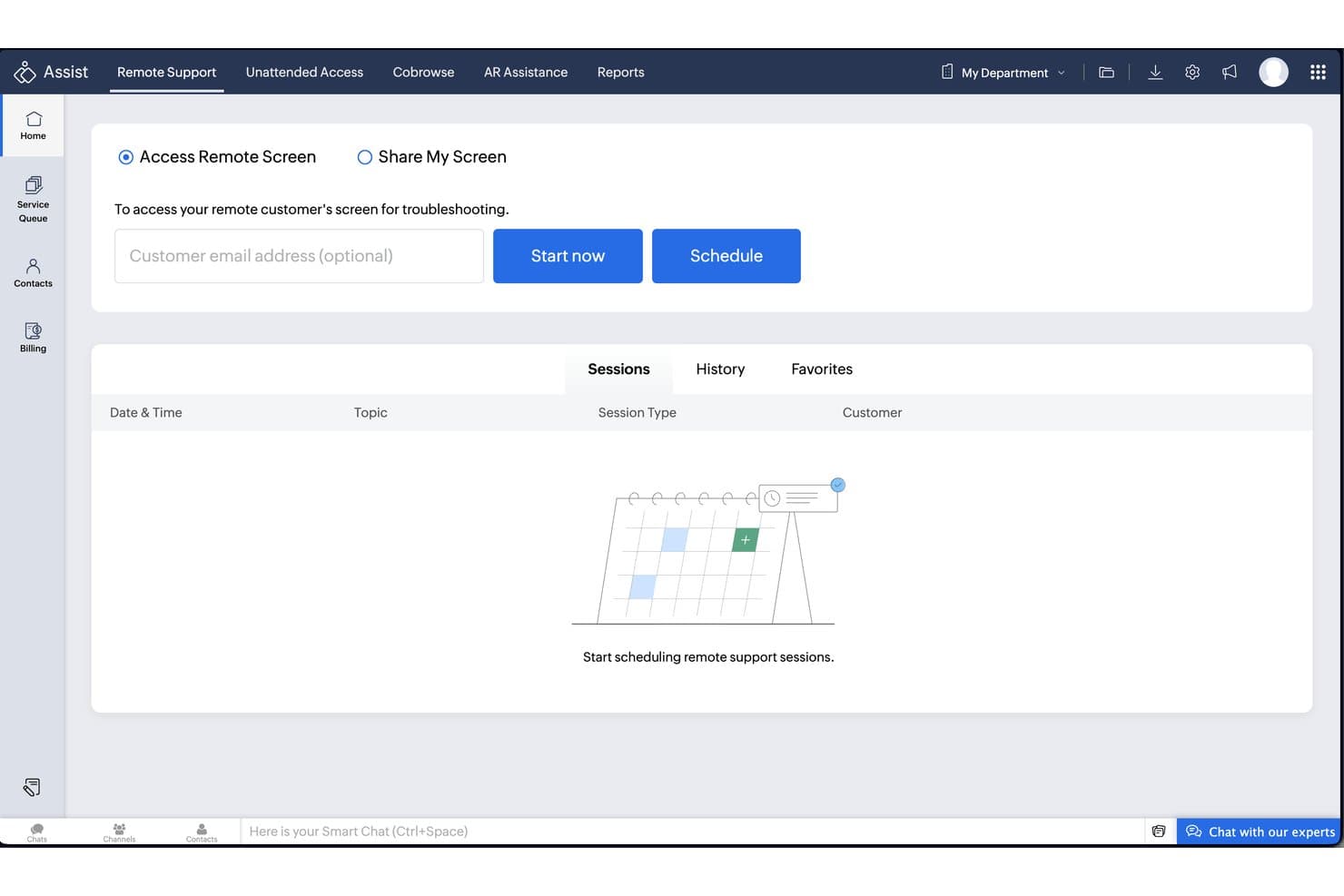
Zoho Assist lets users start or schedule remote support sessions instantly. Zoho Assist is remote access and support software for MSPs and IT teams that need to diagnose device issues and help users remotely, offering a focused alternative to ConnectWise PSA’s broader service-management workflows.
Who Is Zoho Assist Best For?
Zoho Assist suits help desk technicians who need to troubleshoot user-reported issues through remote support sessions.
Why I Picked Zoho Assist
I picked Zoho Assist because its USP is Best for on-demand remote support, which fits a PSA alternatives shortlist when a ticket needs device troubleshooting instead of broad service-management workflows. When a user reports an application problem, a technician can start an ad hoc session without prior installation and inspect the endpoint with background Command Prompt or Device Manager tools.
Zoho Assist Key Features
- Multi-monitor navigation: Switch between a customer’s connected screens and change their viewing layout.
- File transfer: Send files between the technician’s device and the customer’s device during a session.
- Session transfer: Invite another technician to join an active session and hand over control.
- Remote printing: Print documents on the customer’s printer from a remote location.
Zoho Assist Integrations
Zoho Assist has built-in integrations with ServiceNow, Freshdesk, Zoho Desk, Zendesk, Jira, Spiceworks, Zoho SalesIQ, Slack, and Microsoft Teams. It also connects with Zapier and offers APIs for custom integrations.
Pros and Cons
Pros:
- Multi-monitor navigation aids endpoint investigations
- Background diagnostic tools support remote troubleshooting
- Starts on-demand sessions without prior installation
Cons:
- Network issues can interrupt remote sessions
- Windows elevation can complicate UAC workflows
Learn more about Zoho Assist:
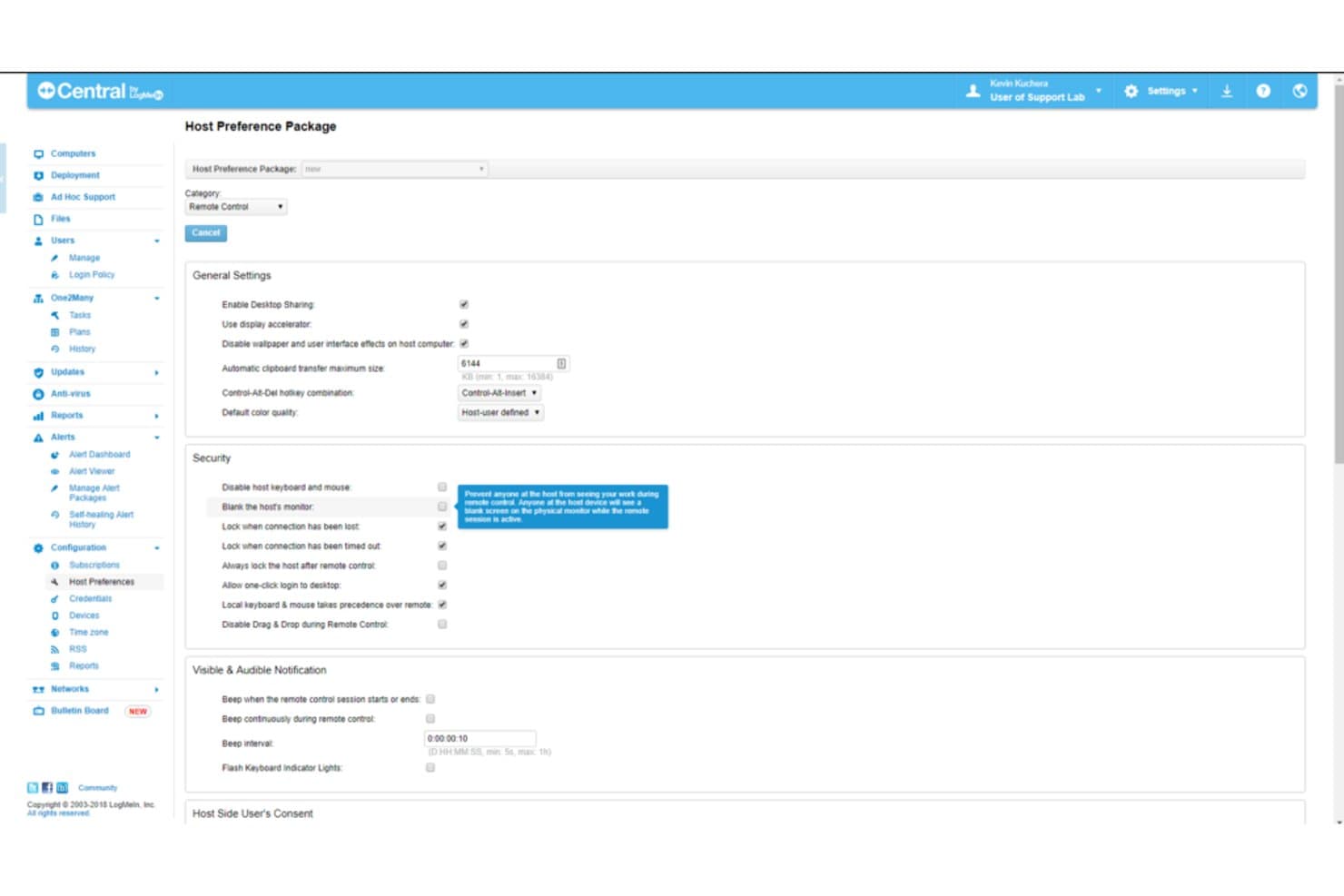
Central by GoTo lets users configure remote control security and host preferences. For teams comparing ConnectWise PSA alternatives, Central by GoTo is a remote access and endpoint management platform that helps IT staff troubleshoot distributed computers and support users without adopting a full PSA suite.
Who Is Central by GoTo Best For?
It’s a good fit for IT support teams that need to access employee devices remotely and resolve technical issues across a distributed workforce.
Why I Picked Central by GoTo
I picked Central by GoTo for the “Best for remote IT support” spot because it focuses on hands-on device troubleshooting rather than a full PSA suite. Its Remote Support module connects PCs, Macs, iOS, Android, and Chromebooks through SMS, email, or direct links. Multi-session handling lets technicians work on several user issues at once.
Central by GoTo Key Features
- Patch management: Deploy Windows and third-party application updates through the Security module.
- Alerts and task automation: Set customizable alerts and automate tasks with scripting through the Automation module.
- Asset inventory and reporting: Track hardware and software inventory and create reports through the Insight module.
- Antivirus management: Configure antivirus settings and scan profiles for groups of Windows computers.
Central by GoTo Integrations
Central integrates with OPSWAT’s OESIS Framework for antivirus management and application patching, supporting more than 200 third-party antivirus applications, including Bitdefender and Malwarebytes. It also offers an API for custom integrations.
Pros and Cons
Pros:
- Multi-session support helps technicians handle concurrent issues
- Attended sessions can start from browser links
- Quick remote access earns reviewer praise
Cons:
- RMM patching trails dedicated management platforms
- Mac access and permissions can be unreliable
Learn more about Central by GoTo:
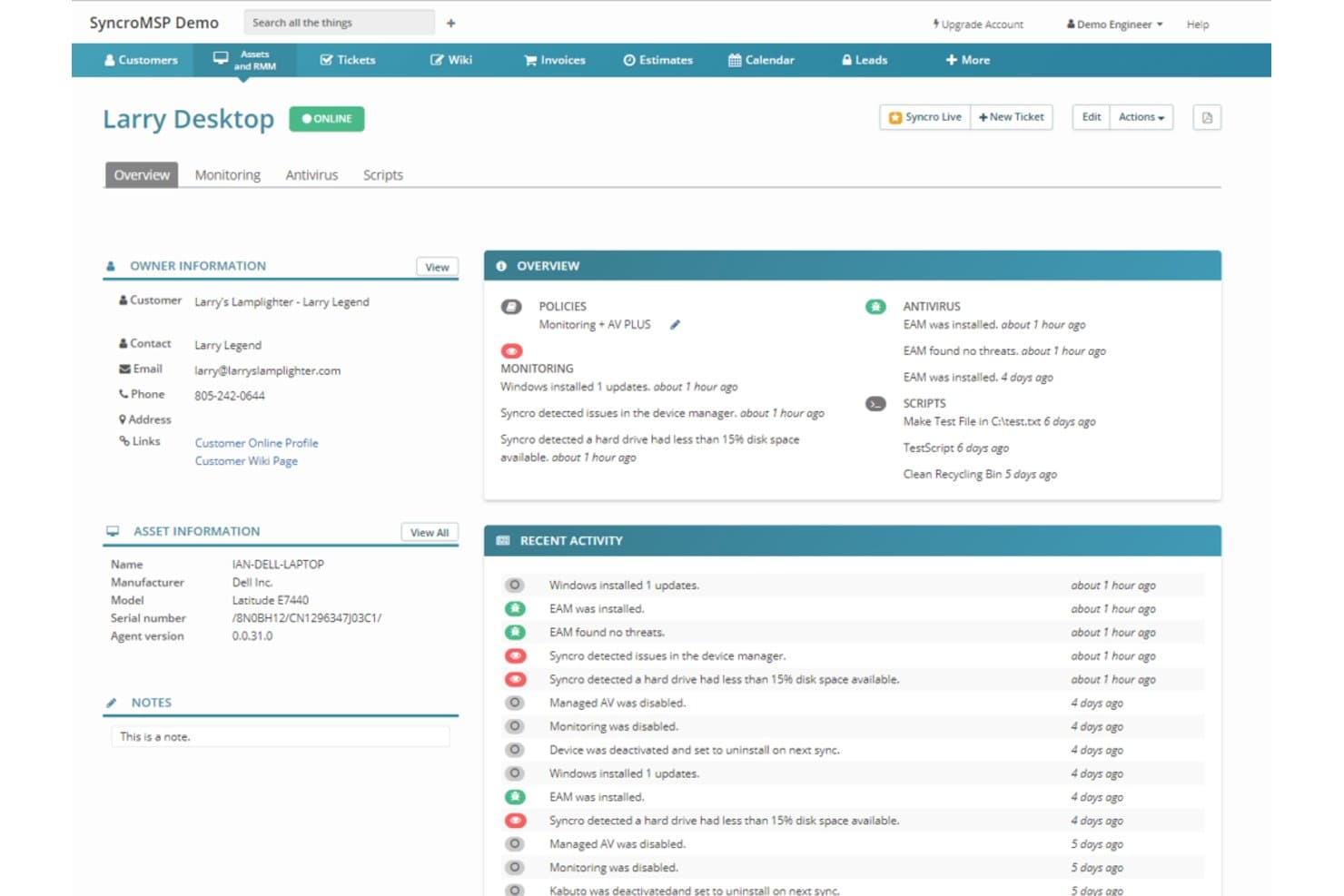
Syncro centralizes device monitoring, antivirus, and activity logs in one dashboard. Syncro is a PSA platform for managed service providers that helps IT teams organize client support, service workflows, and business operations in one workspace.
Who Is Syncro Best For?
Syncro suits managed service provider teams that need one workspace to coordinate technicians, client requests, and day-to-day service delivery.
Why I Picked Syncro
I picked Syncro as a ConnectWise PSA alternative for its “Best for combined PSA and Remote Monitoring and Management” fit. PSA ticketing and RMM monitoring sit together, while automated patch management and scripting help me address issues such as outdated software across client endpoints.
Syncro Key Features
- Time tracking: Log billable and non-billable technician time.
- Automated billing: Generate invoices from contracts, time entries, and usage.
- Customer portal: Let clients submit requests and follow ticket status.
- Reporting and analytics: Review operational and financial metrics by client, service, or technician.
Syncro Integrations
Syncro lists 50+ integrations, including QuickBooks Online, Xero, Microsoft 365, Microsoft Entra ID, IT Glue, Hudu, Microsoft Teams, Slack, and Zapier. It also offers a REST API for custom integrations.
Pros and Cons
Pros:
- Applies patch policies across managed endpoints
- Automates billing from contracts and technician time
- Combines ticketing, RMM, and endpoint scripting
Cons:
- Reporting tools can feel difficult to navigate
- Patch status updates lack real-time visibility
Learn more about Syncro:
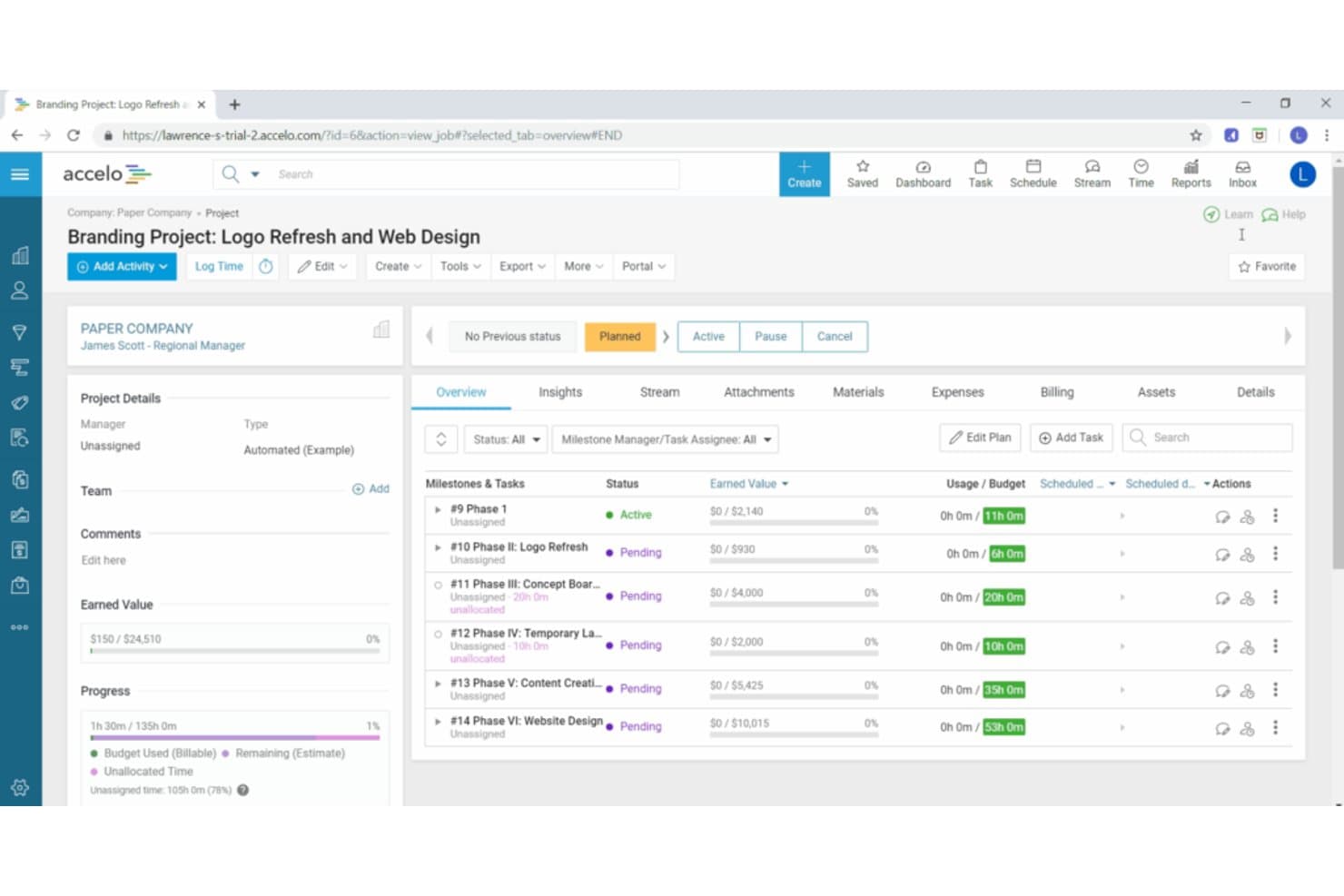
Accelo lets users track project milestones, budgets, and task status in one view. Accelo is a professional services automation platform for consulting and other client-service teams that need a central way to manage projects, resources, time, and billing beyond an IT-focused PSA workflow.
Who Is Accelo Best For?
Accelo suits consulting and other client-service firms that need to coordinate project delivery, staff capacity, time tracking, and billing in one system.
Why I Picked Accelo
I picked Accelo as a ConnectWise PSA alternative because it’s built for service business automation. I like how work can move from a won sale into project delivery, while tracked time and expenses feed billing. Recurring retainers also help me organize ongoing client work and monitor its usage.
Accelo Key Features
- Task management: Assign tasks, set priorities, and track status and dependencies.
- Capacity planning: Forecast team availability and manage soft or confirmed allocations.
- Client approvals: Send project deliverables and requests to clients for review.
- Reporting dashboards: View utilization, project performance, and forecasts.
Accelo Integrations
Accelo lists 25 integrations, including Azure DevOps, GitHub, GitLab, Jira, Microsoft 365, NinjaOne, QuickBooks, Slack, Xero, and Zapier. It also offers a RESTful API for custom applications and a Forms API for sending data into Accelo.
Pros and Cons
Pros:
- Shows team capacity and utilization
- Supports retainers alongside project delivery
- Connects client work, time, and billing
Cons:
- Configuration and setup demand substantial effort
- Historical hours take effort to retrieve
Learn more about Accelo: Best for client communications and reporting
- Free demo available
- From $145/month
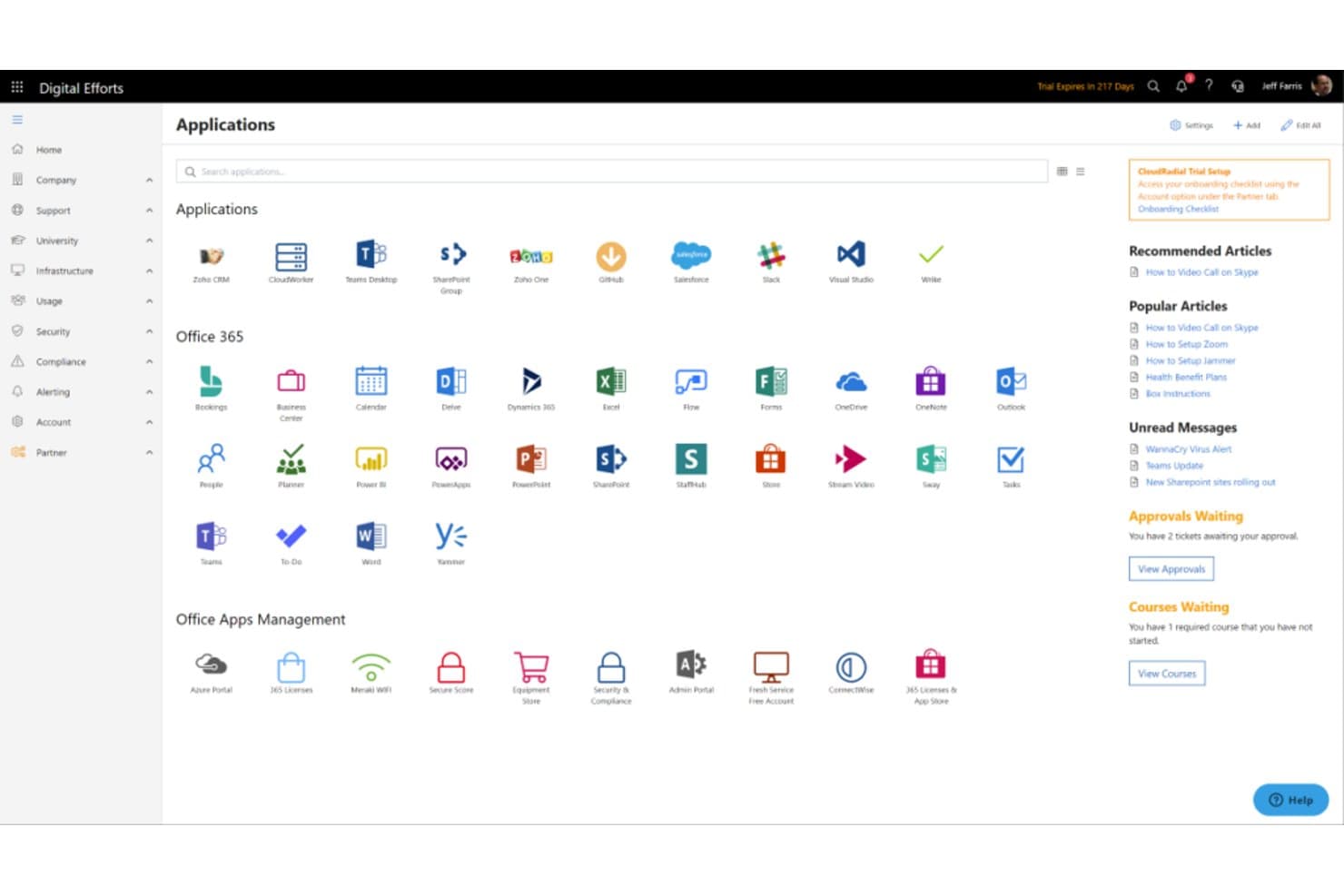
CloudRadial centralizes apps, Office 365 tools, and IT resources in one portal. CloudRadial is an MSP-focused client portal that connects service delivery tools and support workflows, helping IT providers organize client access to services without relying solely on a traditional PSA interface.
Who Is CloudRadial Best For?
CloudRadial suits managed service providers that need a client-facing hub for service updates, reporting, and support communications.
Why I Picked CloudRadial
I picked CloudRadial, “Best for client communications and reporting,” because its client portal gives customers a place to follow service updates and support workflows outside the PSA interface. I like that MSPs can pair client-facing reporting with those updates, so customers can see service activity without accessing the provider’s internal PSA.
CloudRadial Key Features
- Client training: Create courses in the native LMS and track completion.
- Client intranet: Add application bookmarks, a knowledge base, and messaging.
- Software inventory: Display software inventory information in the portal.
- Custom portal domain: Set a custom domain for the client portal.
CloudRadial Integrations
CloudRadial offers direct API integrations with five PSAs: ConnectWise Manage, Autotask, HaloPSA, Syncro, and Kaseya BMS. It also supports Zapier and provides an API for custom integrations.
Pros and Cons
Pros:
- Standardizes ticket intake, reducing client calls
- Shows endpoint, software, and compliance data together
- Gives clients on-demand QBRs and service reports
Cons:
- Inventory accuracy depends on verified source data
- Content setup and configuration take substantial effort
Learn more about CloudRadial: Best for large-scale project management
- Not available
- Pricing upon request
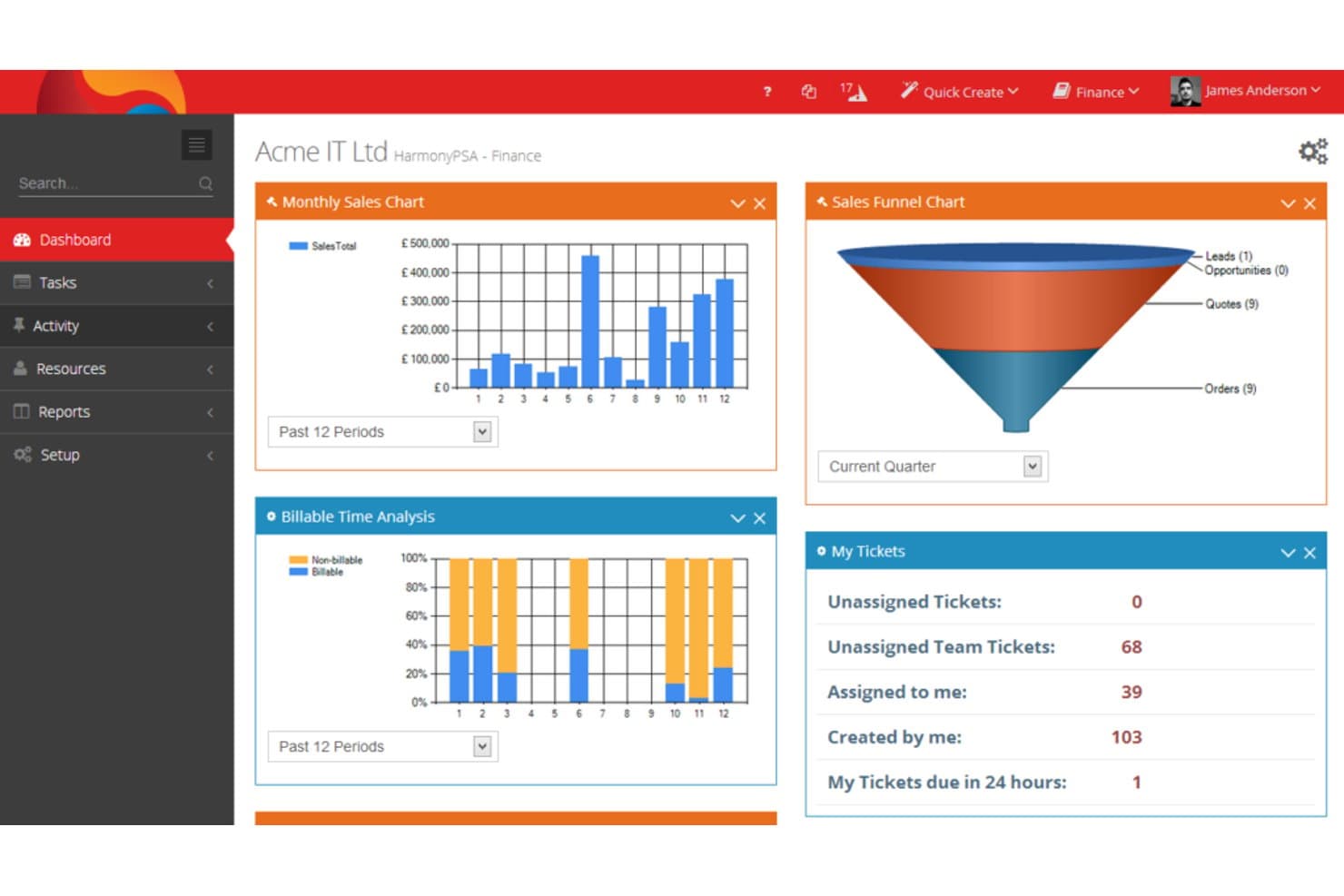
CloudBlue PSA centralizes sales, tickets, and time data on one dashboard. CloudBlue PSA is a professional services automation platform for IT and cloud service providers that helps coordinate project delivery, service operations, and billing workflows.
Who Is CloudBlue PSA Best For?
CloudBlue PSA suits IT and cloud service providers managing complex projects across multiple teams.
Why I Picked CloudBlue PSA
I picked CloudBlue PSA for the use case described as “Best for large-scale project management.” It connects project delivery with service operations and billing, while giving teams visibility into projects, customers, and profitability. That helps me track work from estimates through final billing when comparing ConnectWise PSA alternatives.
CloudBlue PSA Key Features
- Ticketing system: Create and manage service tickets through the service desk.
- CRM: Track customer and sales information in one system.
- Timesheets: Record time spent on client work.
- Expense management: Enter and manage business expenses.
CloudBlue PSA Integrations
Documented integrations include N-able N-central, N-able N-sight RMM, Liongard, Acronis Cyber Protect Cloud, BlueSnap, and Quoter. They support workflows such as RMM ticket synchronization, alert handling, quoting, and payment processing.
Pros and Cons
Pros:
- Gantt planning connects schedules with allocated time
- Contract-level cost tracking exposes project margins
- Project, service desk, and billing share workflows
Cons:
- Sparse documentation can slow team onboarding
- Setup and migration can burden smaller MSPs
Learn more about CloudBlue PSA:
Andre ConnectWise PSA-alternativer
Her er noen flere ConnectWise PSA-alternativer som ikke kom med på kortlisten min, men som likevel er verdt å undersøke:
- 11NaveriskBest for integrated device and network monitoring
- 12FreshserviceBest for IT service desk operations
- 13SyncroBest for combined PSA and Remote Monitoring and Management
- 14BigTimeGood for time tracking, billing, and project management
- 15Datto RMMGood for remote monitoring and management
- 16Autotask PSAGood for automating professional service operations
- 17Planview Adaptive WorkGood for work management and collaboration
- 18Projector PSAGood for improving service delivery and financial performance
- 19Certinia PS CloudGood for project and resource management
- 20OpenAir PSAGood for service organizations seeking comprehensive professional services automation
- 21Kantata Cloud for Professional ServicesGood for data-driven insights and analytics
- 22Tigerpaw OneGood for business automation in technology services
- 23Replicon PSAGood for real-time business visibility and analytics
Relaterte anmeldelser
How I Evaluate ConnectWise PSA Alternatives
I split my evaluation into two layers: the baseline capabilities—like ticketing, billing, and RMM integration—a PSA must have to serve MSPs, and the differentiators that separate the best options.
Core Functionality (Table Stakes For This List)
When I'm selecting tools for my list, I rank each one on a scale from 0 (does not offer the functionality) to 5 (excels in this area) for each core functionality listed below. Then, I calculate the tool's total score into a percentage. Each tool needs to achieve a minimum total score of 65% to be considered for inclusion.
- Ticketing & Service Desk: I look at how each tool handles ticket routing, SLA tracking, and multi-channel intake—like converting client emails into tickets with the right priority and board assignment.
- Time Tracking & Billing: Each platform should let techs log time against tickets or projects and tie those entries to invoices, including support for managed service agreements and recurring contracts.
- Project Management: I evaluate whether a tool supports task assignments, milestones, and resource planning for client-facing work like network rollouts or cloud migrations.
- CRM & Account Management: A good PSA keeps client records, contracts, and configuration details in one place so your team has full context before responding to a ticket or scoping new work.
- RMM & Ecosystem Integrations: I check for native connectors to popular RMM platforms, IT documentation tools, and accounting software—tools like Datto, IT Glue, and QuickBooks that MSPs rely on daily.
- Reporting & Dashboards: The platform should surface operational and financial KPIs, like agreement profitability or average resolution time, through dashboards your service managers actually use.
Once I have a list of tools that meet this criteria, I consider what sets each platform apart.
Differentiating Factors (What Sets Vendors Apart)
Here's how I compare and contrast different vendors:
Standout Features
Contract profitability tracking is a big one—I look for tools that compare labor costs against agreement revenue so you can spot underperforming clients before they drain margins. A client self-service portal also makes a real difference, giving end users a place to submit tickets and approve quotes without calling your dispatch. I evaluate whether a platform offers AI-assisted ticketing too, like auto-categorization or suggested responses, which can cut the time techs spend on triage.
Beyond Features
Pricing transparency matters when you're scaling a team—I check whether vendors charge per technician with clear tiers or lock you into annual contracts with hidden add-ons. Migration support is another factor I weigh heavily, especially for MSPs moving years of ticket history, contracts, and client data out of ConnectWise PSA. A vendor that offers guided migration and dedicated onboarding saves weeks of manual cleanup. I also evaluate each platform's security posture, looking for SOC 2 Type II compliance and role-based access controls that match what regulated client verticals expect.
Hvorfor se etter et ConnectWise PSA-alternativ?
ConnectWise PSA er et verktøy for automatisering av profesjonelle tjenester (PSA), utviklet for å hjelpe IT-tjenesteleverandører, MSP-er og programvarekonsulenter med å effektivisere driften. Det tilbyr en integrert samling funksjoner, inkludert saksbehandling, prosjektstyring, fakturering og rapportering.
Til tross for de omfattende funksjonene ser noen virksomheter etter alternativer på grunn av kostnader, kompleksitet eller behovet for en løsning som er bedre tilpasset deres spesifikke krav. Ulike organisasjoner har unike behov og arbeidsflyter; det som fungerer best for én, er ikke nødvendigvis det ideelle valget for en annen. Ved å utforske ConnectWise PSA-alternativer kan man derfor finne et verktøy som i større grad samsvarer med virksomhetens driftsbehov og budsjettbegrensninger.
Viktige funksjoner i ConnectWise PSA
Her er noen av de viktigste funksjonene i ConnectWise PSA, slik at du kan sammenligne hva alternative løsninger tilbyr:
- Supportsystem: Lar teamet ditt opprette, tildele og administrere supportsaker på ett sted.
- Tidsregistrering: Registrerer tiden som brukes på oppgaver, slik at du kan fakturere nøyaktig og se hvor tiden går.
- Fakturaautomatisering: Hjelper deg med å opprette og sende fakturaer basert på registrert tid, avtaler eller produkter.
- Prosjektstyring: Lar deg planlegge, tildele og følge opp prosjektoppgaver, slik at tidsfrister ikke overskrides.
- Kundeportal: Gir kundene dine mulighet til å sende inn supportsaker og sjekke oppdateringer uten å ringe deg.
- Servicenivåavtaler (SLA-er): Hjelper deg med å overholde svartider og supportforpliktelser.
- Arbeidsflytautomatisering: Lar deg konfigurere regler for å håndtere gjentakende oppgaver som ruting av supportsaker eller varsler.
- CRM-integrasjon: Kobler seg til salgsverktøyene dine, slik at teamet ditt kan holde kundeinformasjonen synkronisert.
- Innkjøpssporing: Håndterer innkjøp og lagerbeholdning, slik at du ikke går tom for nødvendige varer.
- Rapporteringsverktøy: Tilbyr innebygde rapporter som viser hvordan teamet ditt presterer på tvers av prosjekter og support.