

I 10 Migliori Software di Gestione delle Risorse Software del 2026

Migliori Software di Gestione delle Risorse Software (SAM)


Il software di gestione delle risorse software ti aiuta a tracciare, gestire e ottimizzare le licenze software della tua organizzazione, per restare conforme ed evitare costi imprevisti o complicazioni manuali. Utilizzalo per trasformare fogli di calcolo caotici e preoccupazioni sulla conformità in un controllo chiaro e organizzato dei tuoi investimenti software.
Ridurrai i rischi, risparmierai denaro e prenderai decisioni più intelligenti per il tuo portafoglio tecnologico. In questo articolo ti guiderò tra le migliori soluzioni di software SAM per mantenere la tua organizzazione efficiente.
Perché fidarsi dei nostri consigli sui software
Il nostro team testa e recensisce software dal 2012. In quanto leader tecnologici noi stessi, sappiamo quanto sia difficile — e importante — scegliere il software giusto.
Per questa guida, abbiamo valutato gli strumenti attraverso test praticie ricerche indipendenti, assegnando un punteggio agli strumenti in base ai nostri criteri di selezione.
Le nostre recensioni riflettono il nostro giudizio editoriale umano, non un discorso di vendita.
Revisori esperti:
Riepilogo dei Migliori Software di Gestione delle Risorse Software
Questa tabella comparativa riassume i dettagli sui prezzi delle mie principali scelte di software per la gestione delle risorse software per aiutarti a trovare la soluzione migliore per il tuo budget e le esigenze della tua azienda.
| Tool | Best For | Trial Info | Price | ||
|---|---|---|---|---|---|
| 1 | Ideale per preconfigurare le apparecchiature con risorse software | Demo gratuita disponibile | da $5/persona/mese | Website | |
| 2 | Migliore per una gestione del ciclo di vita degli asset intuitiva | Prova gratuita di 14 giorni + demo gratuita disponibile | A partire da $19/utente/mese (fatturazione annuale) | Website | |
| 3 | Ideale per il monitoraggio delle risorse in tempo reale | Prova gratuita di 30 giorni + demo gratuita disponibile | A partire da $129/tecnico/mese (con fatturazione annuale) | Website | |
| 4 | Ideale per organizzazioni orientate alla conformità | Prezzo su richiesta | Website | ||
| 5 | Ideale per il monitoraggio delle licenze software nativamente cloud | Not available | Prezzi su richiesta | Website | |
| 6 | Ideale per la governance IT multifunzionale | Demo gratuita disponibile | Prezzo su richiesta | Website | |
| 7 | Migliore per l'integrazione con i flussi di lavoro dei servizi IT | Prezzo su richiesta | Website | ||
| 8 | Ideale per MSP e gestione remota degli asset | Not available | Prezzo su richiesta | Website | |
| 9 | Ideale per la visualizzazione intuitiva degli asset | Prova gratuita di 30 giorni | Prezzo su richiesta | Website | |
| 10 | Ideale per la trasparenza dei costi negli asset software | Prezzo su richiesta | Website |


Recensioni dei Migliori Software di Gestione delle Risorse Software
Di seguito trovi i miei riepiloghi dettagliati dei migliori software di gestione delle risorse software che sono entrati nella mia shortlist. Le mie recensioni offrono uno sguardo approfondito alle funzionalità principali, ai pro e contro, alle integrazioni e ai casi d’uso ideali di ciascun strumento per aiutarti a trovare quello più adatto a te.

Deel IT
Ideale per preconfigurare le apparecchiature con risorse software
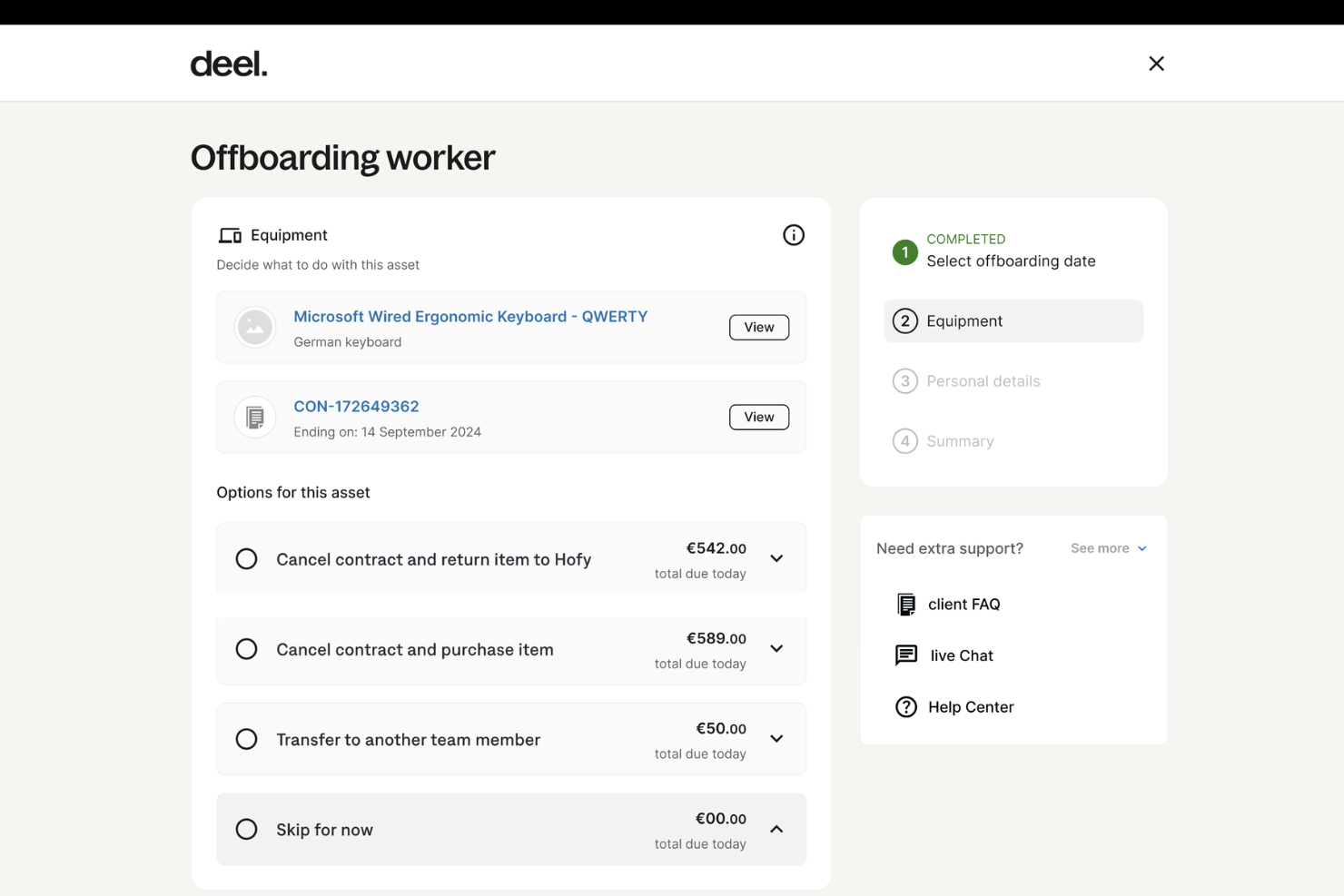
Deel IT è una soluzione completa per la gestione delle operazioni e delle risorse IT in tutto il mondo, in oltre 130 Paesi. In quanto parte della piattaforma Deel, nota per le sue soluzioni per le risorse umane, le buste paga e la conformità, Deel IT estende i propri servizi includendo la gestione delle apparecchiature dall'inizio alla fine per le aziende con forza lavoro distribuita.
Perché ho scelto Deel:
Le aziende possono spedire dispositivi preconfigurati con applicazioni, protocolli di sicurezza e configurazioni specifiche direttamente dalla piattaforma, assicurandosi che ogni nuovo assunto sia operativo fin dal primo giorno. Questo riduce la complessità dell'inserimento dei nuovi dipendenti, in particolare negli ambienti da remoto o ibridi, e garantisce che l'hardware sia dotato del software e degli strumenti giusti non appena arriva.
La piattaforma automatizza anche attività come la predisposizione, la gestione delle licenze software e la revoca dell'accesso alle applicazioni quando i dipendenti terminano il rapporto di lavoro. Grazie a queste funzionalità, Deel IT garantisce alle aziende un controllo rigoroso sulla distribuzione del software e sulle licenze.
Funzionalità e integrazioni principali:
Tra le altre funzionalità principali figurano l'assistenza globale 24/7 di Deel IT e la gestione dei dispositivi in tempo reale. La piattaforma offre risoluzione dei problemi e riparazioni 24 ore su 24, garantendo tempi di inattività minimi per i dipendenti indipendentemente dalla loro posizione. Inoltre, l'interfaccia centralizzata per la gestione dei dispositivi offre visibilità su tutte le risorse IT.
Le integrazioni includono Deel HR, Apple Business Manager, Windows Autopilot, Slack, Microsoft Teams, Okta, BambooHR, Workday, Zenefits e Greenhouse.
Pros and Cons
Pros:
- Può riunire la gestione delle risorse HR e IT in un'unica soluzione
- Aiuta ad automatizzare i flussi di lavoro delle risorse
- Supporta la distribuzione delle apparecchiature in oltre 130 Paesi
Cons:
- Potrebbe non essere ideale per i team con esigenze di risorse IT molto complesse
- Non offre funzionalità oltre alla gestione dei dispositivi, come la gestione delle reti e dei server

Migliore per una gestione del ciclo di vita degli asset intuitiva
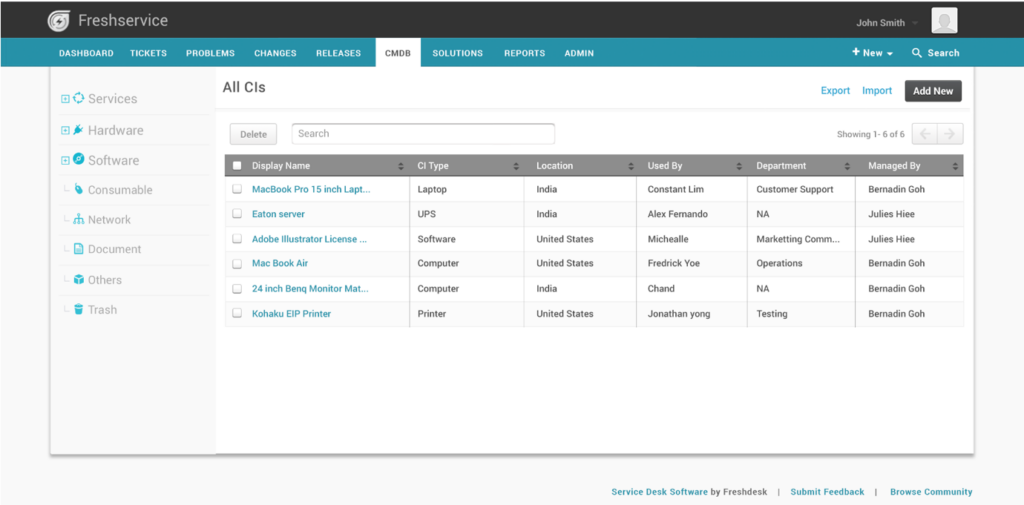
Freshservice di Freshworks è uno strumento dinamico di gestione dei servizi IT (ITSM) basato su cloud, progettato per offrire funzionalità sia di supporto IT sia di gestione degli asset. Si distingue in particolare per la sua interfaccia intuitiva che aiuta le organizzazioni a gestire l'intero ciclo di vita degli asset, in linea con il concetto di 'gestione del ciclo di vita degli asset facile da usare'.
Perché ho scelto Freshservice:
Esaminando diversi strumenti ITAM, Freshservice mi ha colpito per il suo design intuitivo e l'attenzione rivolta alla semplificazione della gestione del ciclo di vita degli asset. Attraverso confronti e valutazioni, ho constatato che l'enfasi di Freshservice sulla facilità d'uso lo distingue nettamente dagli altri software di gestione degli asset IT.
Perciò, secondo me, rappresenta davvero la 'migliore scelta per una gestione del ciclo di vita degli asset intuitiva' per le organizzazioni che danno priorità all'esperienza dell'utente nella gestione degli asset.
Caratteristiche principali e integrazioni:
Freshservice offre funzionalità essenziali come la scoperta degli asset, audit e una CMDB che insieme consentono una visibilità completa sia sugli asset hardware sia su quelli digitali. La piattaforma integra anche un portale self-service, garantendo così che gli utenti finali possano accedere senza difficoltà ai servizi necessari.
Quanto alle integrazioni, Freshservice si fonde perfettamente con soluzioni software diffuse tra cui i prodotti Microsoft, vari dispositivi mobili e persino provider come IBM, assicurando compatibilità e funzionalità estese ai team IT.
Pros and Cons
Pros:
- Design orientato all'utente che semplifica i processi di gestione del ciclo di vita degli asset
- Robuste capacità di scoperta e reportistica degli asset.
- Ampia gamma di integrazioni, inclusi Microsoft, IBM e dispositivi mobili
Cons:
- Il modello SaaS potrebbe non piacere a chi cerca soluzioni on-premise
- Nonostante l'intuitività, la profondità delle funzionalità può richiedere formazione per alcuni utenti finali
- Il prezzo può risultare elevato per le PMI in fase di espansione
New Product Updates from Freshservice
 Experience)
Freshservice Introduces a Reimagined IT Asset Management (ITAM) Experience
Freshservice introduces a reimagined IT Asset Management (ITAM) experience with continuous infrastructure discovery, dependency mapping, IPAM, and Software License Management. This update helps teams improve asset visibility and manage connected IT environments more effectively. For more information, visit Freshservice’s official site.

Atera
Ideale per il monitoraggio delle risorse in tempo reale

Atera è una piattaforma di gestione IT progettata per aiutare i professionisti IT e i fornitori di servizi gestiti (MSP) a supervisionare le proprie risorse hardware e software. La sua offerta principale combina monitoraggio remoto, automazione IT e funzionalità di assistenza tecnica per mantenere efficienti gli ambienti IT.
Perché ho scelto Atera:
Ho scelto Atera per l'efficacia con cui supporta i team IT nel monitoraggio delle risorse in tempo reale. I suoi strumenti di monitoraggio e gestione remota offrono visibilità sugli ambienti IT, aiutando a identificare i potenziali problemi prima che si aggravino. Ho trovato particolarmente utile anche la gestione automatizzata degli aggiornamenti: mantiene i sistemi aggiornati e sicuri senza la necessità di una supervisione manuale. Queste funzionalità rendono Atera una soluzione ideale per i team che vogliono prevenire i problemi IT e mantenere la continuità operativa.
Funzionalità e integrazioni principali:
Atera offre funzionalità come pannelli di controllo per il monitoraggio in tempo reale, gestione integrata dei ticket per gli incidenti IT e automazione delle attività ricorrenti. Include inoltre strumenti avanzati di reportistica per aiutare i professionisti IT a monitorare tendenze e prestazioni. Per quanto riguarda le integrazioni, Atera funziona con Microsoft Teams, Slack, ServiceNow, Azure Active Directory, Okta, Google Chat, monday.com, Acronis, Xero e Zapier, tra gli altri.
Pros and Cons
Pros:
- Reportistica dettagliata e pannelli di controllo rivolti ai clienti
- Rilevamento proattivo dei problemi e opzioni di automazione
- Centralizza la gestione dei ticket, RMM, PSA e delle risorse
Cons:
- Alcune limitazioni nelle funzionalità PSA e di fatturazione
- Curva di apprendimento per i nuovi utenti a causa dell'ampiezza delle funzionalità
New Product Updates from Atera

Atera Adds Webhook Triggers for Technician Assignment Changes
Atera ticket automation rules now support a webhook trigger when a ticket’s technician assignment changes, expanding automation beyond creation, status updates, and closure/resolution events. For more information, visit Atera's official site.

Ideale per organizzazioni orientate alla conformità

Lansweeper è una soluzione di gestione degli asset che aiuta le organizzazioni a gestire e verificare i loro beni software e hardware. Il suo focus sul garantire la conformità, in particolare nella gestione delle licenze software, la posiziona come leader per le aziende che danno priorità al rispetto degli standard normativi.
Perché ho scelto Lansweeper:
Nella mia esperienza nella selezione degli strumenti giusti, Lansweeper mi ha colpito per la sua attenzione alla conformità, specialmente nell'ambito delle licenze software. Ho notato che va oltre il semplice tracciamento degli asset, assicurando che le organizzazioni restino nei limiti degli accordi di licenza software.
Ho scelto Lansweeper perché la sua dedizione alla conformità e la capacità di audit delle licenze software lo distinguono, rendendolo il migliore per le organizzazioni guidate da esigenze di conformità.
Caratteristiche principali e integrazioni:
Lansweeper offre solide capacità di individuazione degli asset, garantendo che i team IT abbiano piena visibilità su hardware e software in tempo reale. Inoltre, la sua soluzione di gestione degli asset IT dispone di funzionalità di reportistica dettagliata, aiutando le organizzazioni a rimanere aggiornate sui requisiti di conformità.
Per quanto riguarda le integrazioni, Lansweeper si collega con Microsoft Windows e altri dispositivi di rete, assicurando che i dati sugli asset rimangano coerenti su diverse piattaforme.
Pros and Cons
Pros:
- Forte attenzione alla conformità delle licenze software
- Scoperta completa degli asset e solide capacità di reportistica
- Integrazione efficace con le principali piattaforme come Microsoft Windows
Cons:
- La trasparenza dei prezzi potrebbe essere migliorata per i potenziali utenti
- Potrebbe richiedere una formazione iniziale per gli utenti finali non familiari con strumenti ITAM
- Alcuni utenti possono trovare l'interfaccia meno moderna rispetto ad altre soluzioni SaaS

Ideale per il monitoraggio delle licenze software nativamente cloud

AWS License Manager, un servizio offerto da Amazon Web Services, è specializzato nell'aiutare le organizzazioni a tracciare, gestire e controllare le proprie licenze software in un ambiente cloud. Con l'aumento delle applicazioni e dei servizi nativi cloud, questo strumento è essenziale per le organizzazioni che danno priorità al rispetto della conformità delle licenze software, soprattutto all'interno dell'ampio ecosistema cloud di AWS.
Perché ho scelto AWS License Manager:
Dopo aver valutato e confrontato diversi strumenti di gestione delle risorse IT, ho scelto AWS License Manager per il suo approccio unico ed efficiente nel monitoraggio delle licenze software nativamente cloud. Con la crescente migrazione dei servizi nel cloud, disporre di uno strumento integrato nel cuore di uno dei più grandi provider cloud al mondo rappresenta un elemento distintivo.
Secondo me, AWS License Manager è insuperabile per le organizzazioni che fanno ampio affidamento sui servizi AWS e desiderano una soluzione integrata per la gestione delle licenze software, rendendolo il 'migliore per il monitoraggio delle licenze software nativamente cloud.'
Funzionalità principali e integrazioni:
AWS License Manager offre capacità di monitoraggio delle licenze in tempo reale, assicurando che le organizzazioni possano mantenere facilmente la conformità delle licenze. Inoltre, lo strumento semplifica il processo di gestione dell'inventario e si integra con gli altri servizi AWS.
Per quanto riguarda le integrazioni, AWS License Manager lavora armoniosamente con una gamma di servizi AWS come EC2, RDS e altri, garantendo che tutte le risorse software all'interno dell'ecosistema AWS siano tracciate e gestite in modo meticoloso.
Pros and Cons
Pros:
- Integrato nell'ecosistema AWS, offre un'esperienza coesa
- Monitoraggio delle licenze in tempo reale
- Gestione semplificata dell'inventario all'interno dei servizi AWS
Cons:
- Potrebbe essere meno adatto per organizzazioni che non operano principalmente su AWS
- Curva di apprendimento per chi non conosce i servizi AWS
- Potenzialmente più complesso per le piccole aziende non pienamente integrate nelle piattaforme cloud


Flexera One è una soluzione completa per la gestione degli asset IT, in grado di ottimizzare e semplificare i processi di individuazione degli asset, gestione degli inventari e governance IT. Quando le organizzazioni puntano a una governance multifunzionale dei propri asset IT, Flexera One si distingue come leader, garantendo che gli asset non siano solo tracciati, ma gestiti con una chiara attenzione alle strategie IT generali.
Perché ho scelto Flexera One:
Scegliere il miglior software per la gestione degli asset IT richiede un giudizio accurato e ho ritenuto che Flexera One si distinguesse per il suo approccio multifaccettato alla governance IT. Questo strumento non si limita a gestire le basi della gestione degli asset, ma va oltre integrando principi di governance IT strategica nel suo nucleo.
Ho scelto Flexera One per le sue capacità multifunzionali, rendendolo lo strumento ideale per le organizzazioni che vogliono andare oltre il semplice tracciamento degli asset — desiderano una governance IT completa.
Funzionalità principali & integrazioni:
Flexera One offre un'imponente suite di funzionalità che consente una visibilità completa sia sugli asset hardware che digitali, favorendo così una gestione efficiente degli asset e audit in tempo reale. I suoi meccanismi di individuazione degli asset sono solidi, assicurando che nessun asset passi inosservato, mentre le sue capacità di reportistica forniscono ai team IT i dati necessari per prendere decisioni informate.
Per quanto riguarda le integrazioni, Flexera One eccelle integrandosi senza problemi con fornitori come Microsoft, IBM e una vasta gamma di sistemi cloud e on-premise.
Pros and Cons
Pros:
- Approccio completo alla governance IT
- Individuazione degli asset ed efficiente reportistica
- Integrazioni con i principali fornitori e piattaforme
Cons:
- La trasparenza sui prezzi potrebbe essere migliorata
- La vasta gamma di funzionalità può risultare eccessiva per le piccole imprese
- Possibile curva di apprendimento per chi non conosce strumenti di governance IT multifunzionale

Migliore per l'integrazione con i flussi di lavoro dei servizi IT
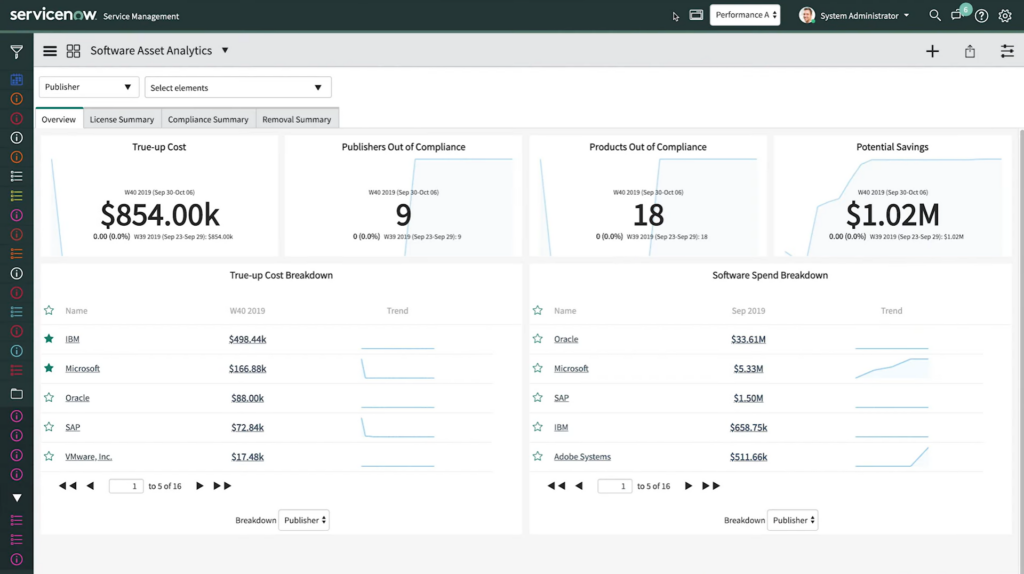
ServiceNow Software Asset Management (SAM) è una soluzione cloud completa pensata per la gestione efficace degli asset software all'interno di un'organizzazione. Un elemento cruciale della sua offerta è l'integrazione profonda con i flussi di lavoro dei servizi IT, garantendo che le aziende possano intrecciare la gestione degli asset con i loro processi IT principali.
Perché ho scelto ServiceNow Software Asset Management (SAM):
Nella fase di valutazione e confronto delle soluzioni di gestione degli asset, ho selezionato ServiceNow SAM per la sua profondità nell'integrazione con i flussi di lavoro dei servizi IT. Questo strumento si distingue per la sua capacità di fondere in modo efficiente il mondo della gestione degli asset software con la gestione dei servizi IT (ITSM).
Secondo la mia valutazione e confronto, ServiceNow SAM eccelle come 'Migliore per l'integrazione con i flussi di lavoro dei servizi IT' soprattutto grazie al suo approccio olistico e all'allineamento con l'ecosistema più ampio di ServiceNow.
Funzionalità principali & Integrazioni:
ServiceNow SAM è rinomato per le sue funzionalità di monitoraggio in tempo reale e le sue solide capacità di reportistica. Non solo fornisce una visibilità completa sugli asset software, ma automatizza anche il ciclo di vita del software, riducendo l'impegno richiesto ai team IT.
Una delle sue integrazioni di spicco è con la suite ServiceNow ITSM, assicurando che gli asset software siano gestiti insieme ai servizi IT. Inoltre, le integrazioni con fornitori come Microsoft e IBM arricchiscono ulteriormente le sue capacità.
Pros and Cons
Pros:
- Integrazione profonda con i flussi di lavoro dei servizi IT tramite ServiceNow ITSM
- Monitoraggio e reportistica in tempo reale completi
- Ampia gamma di integrazioni con i principali fornitori di software
Cons:
- Potrebbe essere complesso per le piccole aziende senza un team IT dedicato
- Può risultare eccessivo per le organizzazioni che cercano solo una gestione base degli asset software
- Curva di apprendimento per chi non ha familiarità con l'ecosistema ServiceNow

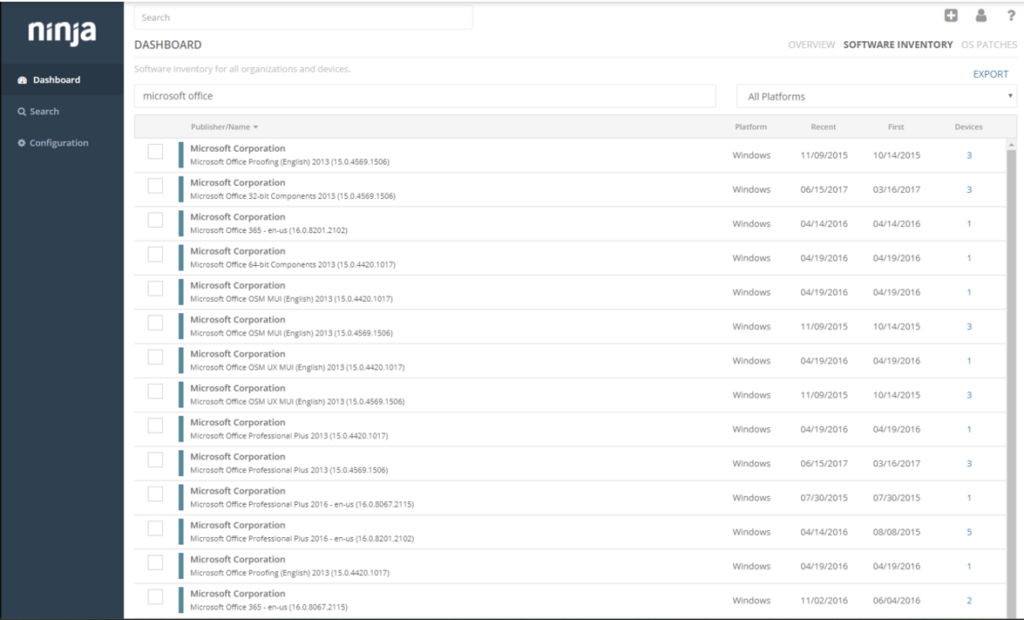
NinjaOne è una soluzione versatile per la gestione degli asset IT progettata per soddisfare le esigenze specifiche dei Managed Service Provider (MSP) e delle organizzazioni che danno priorità alla gestione remota degli asset. Il software è pensato per offrire ai MSP una piattaforma centralizzata dalla quale monitorare gli asset dei clienti, particolarmente utile nei moderni modelli operativi remote-first.
Perché ho scelto NinjaOne IT Asset Management Software:
Nella mia approfondita analisi e selezione, NinjaOne si è distinto grazie al suo focus rivolto ai MSP e agli strumenti dedicati al controllo remoto degli asset. Con l'evoluzione del lavoro verso modelli sempre più decentralizzati e remoti, uno strumento che semplifica la gestione degli asset remoti risulta estremamente prezioso.
La mia decisione è stata quindi chiara: NinjaOne si posiziona idealmente come la 'migliore soluzione per MSP e gestione remota degli asset' grazie alle sue capacità uniche e al diretto allineamento con le esigenze attuali del settore.
Caratteristiche distintive e integrazioni:
NinjaOne si distingue per il monitoraggio in tempo reale dei dati sugli asset e per verifiche approfondite, garantendo ai team IT una visibilità completa sia sugli asset hardware che su quelli digitali. La sua natura basata su cloud consente un facile accesso da qualsiasi luogo, rappresentando un grande vantaggio per le operazioni remote. Inoltre, le integrazioni con soluzioni software chiave come Microsoft e la presenza di un'API offrono ampie opportunità di connettività e automazione dei flussi di lavoro.
Pros and Cons
Pros:
- Focus su MSP, per strumenti e funzionalità direttamente rilevanti
- Monitoraggio degli asset in tempo reale per una visibilità completa
- Integrazioni robuste, inclusi Microsoft e un'API versatile
Cons:
- Potrebbe non essere adatto ad aziende che non lavorano secondo il modello MSP
- Potrebbe risultare complesso per realtà più piccole senza un team ITSM o IT dedicato
- Il modello cloud-based potrebbe non essere preferito da organizzazioni che cercano soluzioni on-premises

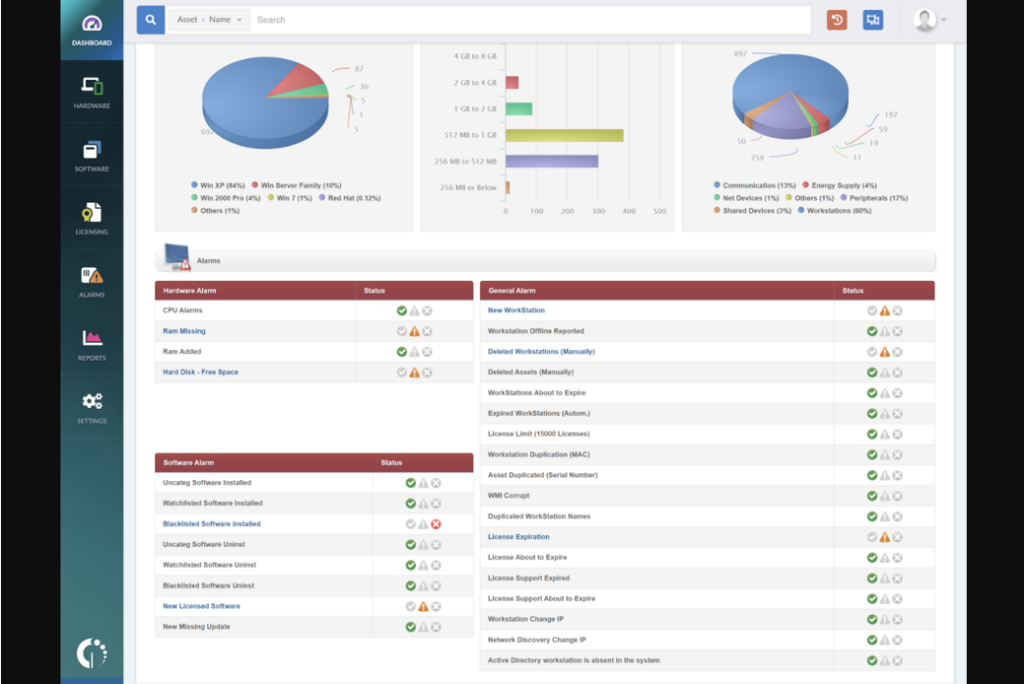
InvGate Assets offre una soluzione che centralizza e visualizza sia gli asset hardware che software all'interno di un'organizzazione. La sua capacità di presentare gli asset in un formato visivo e di facile comprensione giustifica la sua reputazione per la visualizzazione intuitiva degli asset.
Perché ho scelto InvGate Assets:
Nella selezione degli strumenti per questa lista, InvGate Assets mi ha colpito per il suo particolare focus sulla rappresentazione visiva degli asset. Ho riscontrato che il suo approccio nel presentare i dati degli asset in modo facilmente assimilabile lo distingue dalle altre soluzioni.
Proprio questa enfasi visiva è il motivo per cui ritengo che InvGate Assets sia 'il migliore per la visualizzazione intuitiva degli asset', poiché semplifica il processo di gestione degli asset rendendo comprensibili dati complessi a colpo d'occhio.
Funzionalità e integrazioni principali:
InvGate Assets vanta una funzionalità robusta di rilevamento automatico degli asset, che consente ai team IT di individuare e registrare automaticamente nuovi asset in tempo reale. Inoltre, la sua piattaforma di gestione degli asset si integra con un sistema di codici a barre per il monitoraggio fisico degli asset.
Dal punto di vista delle integrazioni, InvGate supporta la sincronizzazione con le più famose soluzioni ITSM e può essere facilmente collegato a piattaforme come Microsoft Windows, garantendo un'esperienza di gestione degli asset coesa.
Pros and Cons
Pros:
- La presentazione visiva degli asset semplifica dati complessi
- Rilevamento automatico degli asset garantisce dati aggiornati
- Integrazione con le principali soluzioni ITSM e piattaforme
Cons:
- L'assenza di prezzi trasparenti può scoraggiare l'interesse iniziale
- Potrebbe presentare una curva di apprendimento più ripida per chi è nuovo ai sistemi di gestione degli asset
- Alcune soluzioni software di nicchia potrebbero non avere integrazioni native disponibili

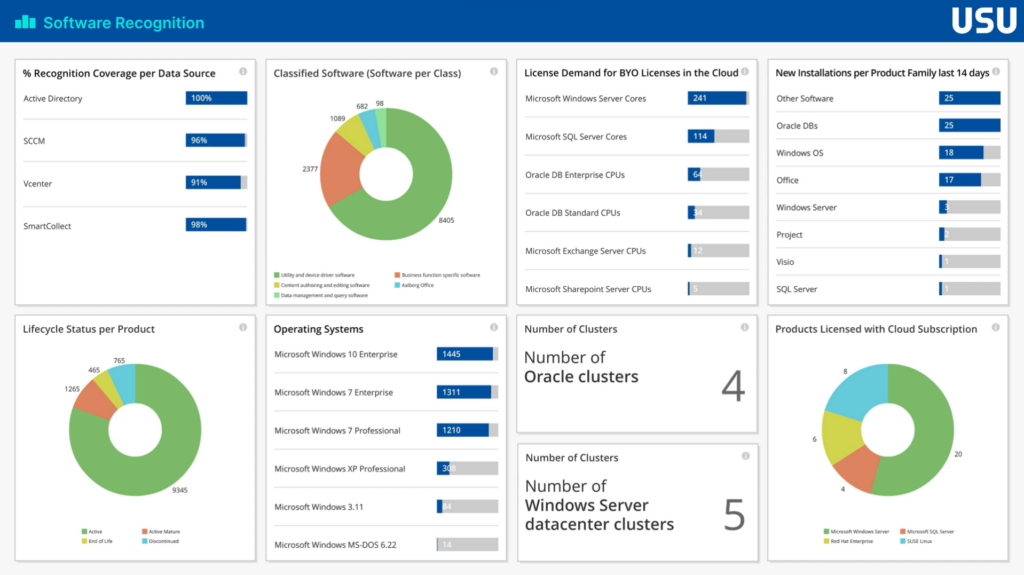
USU è una piattaforma di gestione degli asset IT di spicco che si concentra specificamente nel fornire una dettagliata suddivisione dei costi degli asset software. Puntando sulla trasparenza dei costi, USU offre alle organizzazioni una chiara comprensione delle spese relative agli asset software, rendendola così particolarmente adatta a chi desidera ottenere approfondite informazioni sui propri investimenti software.
Perché ho scelto USU:
Nell’ampio panorama delle soluzioni di gestione degli asset IT, ho selezionato USU dopo un’attenta comparazione e valutazione. Il suo focus distintivo sulla trasparenza dei costi per gli asset software la differenzia realmente dagli altri strumenti presenti sul mercato. A mio parere, USU si distingue per le organizzazioni che danno priorità a comprendere dove viene speso ogni dollaro nei propri investimenti software, consolidando la sua posizione come “la migliore per la trasparenza dei costi negli asset software”.
Funzionalità e integrazioni principali:
USU vanta solide funzionalità che automatizzano il processo di raccolta dati sugli asset e audit in tempo reale, garantendo che ogni costo software venga tracciato. Le sue capacità di reporting offrono ai team IT informazioni dettagliate, semplificando così un processo altrimenti complesso come la gestione degli asset software.
In termini di integrazioni, USU collabora efficientemente con i principali fornitori di software, tra cui Microsoft e IBM, oltre a numerosi sistemi cloud e on-premises.
Pros and Cons
Pros:
- Suddivisione dettagliata dei costi degli asset software
- Integrazioni solide con i principali fornitori di software
- Automazione efficiente della raccolta dati sugli asset
Cons:
- I dettagli sui prezzi potrebbero risultare meno trasparenti per gli acquirenti potenziali
- Può risultare complesso per le piccole imprese che non hanno investimenti software estesi
- Potrebbe richiedere un periodo di apprendimento per chi è nuovo agli strumenti di analisi dei costi software
Altri Software di Gestione delle Risorse Software
Ecco alcune altre soluzioni di software per la gestione delle risorse software che non sono entrate nella mia shortlist, ma che vale comunque la pena considerare:
- Cherwell Asset Management
Ideale per strategie di gestione degli asset scalabili nelle imprese
- Belarc
Ideale per la profilazione completa dei sistemi
- ManageEngine Endpoint Central
Ideale per il monitoraggio degli asset centrato sugli endpoint
- ManageEngine ServiceDesk Plus
Ideale per la gestione combinata di servizi e risorse IT


Come Valuto i Software di Gestione delle Risorse Software
Divido la mia valutazione in due livelli: i requisiti fondamentali che ogni strumento SAM deve soddisfare—come la riconciliazione delle licenze e la scoperta delle installazioni—e i fattori distintivi che separano i migliori dagli altri.
Funzionalità di Base (Requisiti Minimi per Questa Lista)
Quando seleziono gli strumenti per la mia lista, valuto ciascuno su una scala da 0 (non offre la funzionalità) a 5 (eccelle in quest'area) per ciascuna delle funzionalità di base elencate di seguito. Successivamente, calcolo il punteggio totale dello strumento in percentuale. Ogni strumento deve raggiungere un punteggio totale minimo del 75% per essere preso in considerazione.
- Rilevamento e Inventario Software: Verifico se uno strumento può rilevare automaticamente le installazioni su endpoint, server e ambienti cloud invece di affidarsi a importazioni manuali da fogli di calcolo.
- Gestione Licenze e Conformità: Ogni strumento dovrebbe riconciliare i diritti d'uso con le installazioni effettive, specialmente per modelli complessi come la licenza per core o per utente nominativo.
- Misurazione dell'Uso e Ottimizzazione: Cerco un tracciamento dettagliato dell'utilizzo che evidenzi le licenze inutilizzate e supporti flussi di lavoro per il recupero, non solo conteggi basilari delle installazioni.
- Gestione del Ciclo di Vita del Software: Lo strumento dovrebbe coprire l'intero ciclo che va dalla richiesta e approvazione fino al deployment e al ritiro o dismissione finale.
- Gestione dei Fornitori e dei Contratti: Valuto quanto bene uno strumento collega contratti e date di rinnovo alle registrazioni dei diritti, rendendo facile individuare i prossimi adeguamenti.
- Gestione di App SaaS e Cloud: La scoperta di Shadow IT tramite SSO, browser o integrazioni finanziarie è essenziale, così come la visibilità a livello utente sugli abbonamenti SaaS.
Una volta che ho una lista di strumenti che soddisfano questi criteri, considero ciò che distingue ciascuna piattaforma.
Fattori Distintivi (Cosa Distingue i Fornitori)
Ecco come confronto i diversi fornitori:
Funzionalità Eccellenti
L'intelligenza specifica per editore è un fattore di differenziazione importante. Strumenti con librerie preconfigurate di diritti per Oracle, Microsoft o SAP fanno risparmiare ore di mappatura manuale durante le verifiche di conformità. Cerco anche analisi della spesa che vadano oltre il semplice reporting—la possibilità di simulare scenari di adeguamento o prevedere i costi di rinnovo aiuta i responsabili IT a costruire una strategia durante la pianificazione del budget. Un'integrazione nativa con ITSM è altrettanto importante, perché collegare i dati degli asset a piattaforme come ServiceNow o Jira consente di integrare le informazioni sulle licenze direttamente nei flussi di lavoro di gestione di cambiamenti e incidenti.
Oltre le Funzionalità
L'ecosistema di integrazione è fondamentale in questo ambito. Uno strumento SAM che si connette alla gestione degli endpoint, ai provider di identità e ai sistemi ERP raccoglie dati più completi per la riconciliazione delle licenze. Un altro fattore che valuto è il supporto alla difesa in caso di audit—alcuni fornitori offrono servizi gestiti o consulenza sulle licenze durante le verifiche dei fornitori, aiutando così il tuo team ad evitare costosi adeguamenti. Valuto inoltre il costo totale di proprietà, incluso il tempo necessario per la scoperta e la normalizzazione iniziale, perché uno strumento che impiega mesi per fornire una posizione precisa sulle licenze ritarda il ROI atteso.
Come scegliere un software di gestione delle risorse software
È facile perdersi in lunghe liste di funzionalità e strutture di prezzo complesse. Per aiutarti a rimanere concentrato durante il tuo processo di selezione del software, ecco un elenco di fattori da tenere a mente:
| Fattore | Cosa considerare |
|---|---|
| Scalabilità | Il tool può crescere insieme alla tua azienda? Verifica se supporta un aumento di utenti e dataset più grandi senza problemi di performance. |
| Integrazioni | Funziona con i tuoi sistemi esistenti? Assicurati che si colleghi all'infrastruttura IT attuale per evitare dati isolati. |
| Personalizzazione | Puoi adattarlo alle tue esigenze? Cerca strumenti che consentano di modificare flussi di lavoro e impostazioni in base ai processi aziendali. |
| Facilità d’uso | È user-friendly? Accertati che l'interfaccia sia intuitiva, così il tuo team non perderà tempo a imparare sistemi complessi. |
| Implementazione e onboarding | Quanto tempo ci vuole per iniziare? Considera le risorse necessarie per distribuire il tool e formare efficacemente il team. |
| Costo | È in linea con il tuo budget? Confronta i modelli di prezzo e verifica eventuali costi nascosti che potrebbero incidere sulla spesa totale. |
| Sicurezza | Quanto sono sicuri i tuoi dati? Controlla la conformità agli standard di settore e le misure adottate per la protezione dei dati sensibili. |
| Requisiti di conformità | Soddisfa le normative richieste? Verifica che il software sia conforme alle leggi e agli standard pertinenti per il tuo settore o area geografica. |
Cos’è un software di gestione delle risorse software?
Il software di gestione delle risorse software è uno strumento che aiuta le aziende a tracciare e gestire in modo efficiente le proprie risorse software. Questi strumenti sono generalmente utilizzati da professionisti IT, team di approvvigionamento e responsabili della conformità per assicurare una corretta gestione delle licenze, ottimizzare l’uso dei software e ridurre i costi.
Le funzioni di tracciamento delle licenze, gestione della conformità e reportistica sull’utilizzo aiutano a mantenere responsabilità e a migliorare l’efficienza operativa. Questi strumenti, insieme ai software di gestione dell’inventario IT, consentono in definitiva di risparmiare tempo e denaro semplificando le attività di gestione del software.
Funzionalità
Quando si analizzano diversi tipi di software per la gestione delle risorse fisse, è importante considerare le seguenti funzionalità chiave:
- Gestione delle licenze: Tiene traccia delle licenze software per garantire la conformità ed evitare acquisti superflui.
- Tracciamento dell’utilizzo: Monitora l’utilizzo dei software per identificare risorse sottoutilizzate e ottimizzare i costi.
- Reportistica sulla conformità: Genera report per dimostrare l’aderenza alle normative e agli standard di settore.
- Dashboard personalizzabili: Offre viste e report su misura per soddisfare specifiche esigenze e preferenze aziendali.
- Avvisi automatici: Fornisce notifiche su scadenza delle licenze, problemi di conformità e anomalie di utilizzo.
- Interfaccia intuitiva: Garantisce facilità d’uso grazie a una navigazione semplice e a un design intuitivo.
- Analisi in tempo reale: Fornisce informazioni aggiornate per decisioni informate e pianificazione strategica.
- Sicurezza avanzata: Protegge i dati sensibili con solide misure di sicurezza e standard di conformità.
- Capacità di integrazione: Si collega a software per la gestione dei contratti IT e altri sistemi esistenti per un flusso di dati efficiente e integrato.
- Scalabilità: Supporta la crescita aziendale gestendo un numero sempre maggiore di utenti e dati senza problemi di prestazioni.
Benefici
L’implementazione di un software di gestione delle risorse software offre numerosi vantaggi sia per il tuo team che per l’azienda. Eccone alcuni di cui puoi beneficiare:
- Risparmio sui costi: Ottimizza l’utilizzo dei software ed elimina licenze inutili, permettendo un risparmio economico.
- Migliore conformità: Garantisce il rispetto delle normative di settore grazie a report di conformità automatizzati.
- Decisioni più informate: Offre analisi in tempo reale per una pianificazione strategica efficace e un miglior impiego delle risorse.
- Maggiore efficienza: Automatizza le attività di tracciamento e gestione, liberando tempo per compiti più importanti.
- Sicurezza potenziata: Protegge i dati sensibili con misure di sicurezza avanzate e controlli di conformità.
- Scalabilità: Supporta la crescita aziendale adattandosi all’aumento di utenti e alla maggiore quantità di dati.
- Processi semplificati: Si integra con i sistemi esistenti, assicurando efficacia operativa e coerenza dei dati.
Costi & Prezzi
La scelta di un software di gestione delle risorse software richiede la comprensione dei diversi modelli e piani tariffari disponibili. I costi variano in base alle funzionalità, alla dimensione del team, ad eventuali componenti aggiuntivi e altro ancora. La tabella seguente riassume i piani più comuni, i loro prezzi medi e le funzionalità tipiche incluse nelle soluzioni di gestione delle risorse software:
Tabella di confronto dei piani per software di gestione delle risorse software
| Tipologia di piano | Prezzo medio | Funzionalità comuni |
|---|---|---|
| Piano gratuito | $0 | Tracciamento di base delle licenze, report di utilizzo limitati e supporto tramite community. |
| Piano personale | $10-$30/user/month | Gestione delle licenze, report di conformità di base e supporto via email. |
| Piano business | $30-$60/user/month | Gestione avanzata della conformità, integrazioni e supporto telefonico. |
| Piano enterprise | $60-$100/user/month | Dashboard personalizzabili, analisi in tempo reale, account manager dedicato e supporto 24/7. |
Domande frequenti sul software di gestione delle risorse software
Ecco alcune risposte alle domande più comuni riguardo ai software di gestione delle risorse software:
Il SAM supporta i modelli Bring-Your-Own-Licenses e Subscriptions?
Sì, il SAM supporta i modelli Bring-Your-Own-Licenses (BYOL) e Bring-Your-Own-Subscription (BYOS). Questa flessibilità consente al tuo team di gestire le licenze su ambienti ibridi, soddisfacendo diversi bisogni software senza costi aggiuntivi.
Come gestisce il SAM il caricamento massivo delle concessioni software?
Il SAM fornisce una guida passo passo per caricare in modo massivo le concessioni software tramite un modello Excel. Questo processo semplifica l’inserimento dei dati e include la gestione degli errori, facilitando la gestione efficiente delle concessioni da parte del tuo team.
Il software SAM può funzionare tra diversi reparti?
Sì, spesso viene implementato a livello organizzativo per fornire una visione unificata dell’utilizzo del software. I reparti accedono allo stesso sistema per garantire coerenza. Questa struttura condivisa mantiene le informazioni sincronizzate tra i team.
Quali tipi di risorse possono essere tracciate dagli strumenti SAM?
Le piattaforme SAM normalmente tracciano licenze software, installazioni, dati di utilizzo e cronologia delle versioni. Alcune includono anche la tracciatura di abbonamenti SaaS e risorse virtuali. La profondità della tracciabilità dipende dalla configurazione del sistema e dalle integrazioni supportate.
Gli strumenti SAM sono aggiornati in tempo reale?
Alcuni strumenti offrono aggiornamenti quasi in tempo reale, specialmente se collegati a directory attive o agenti di monitoraggio. Altri operano tramite sincronizzazioni programmate o aggiornamenti manuali. La frequenza degli aggiornamenti dipende dall’architettura e dal modello di implementazione.
Che tipi di ambienti sono supportati?
Gli strumenti SAM possono supportare ambienti on-premise, cloud, ibridi o virtualizzati. La compatibilità dipende da come il sistema si collega agli endpoint e recupera i dati. Alcuni strumenti si specializzano in un tipo di ambiente, mentre altri coprono infrastrutture multiple.
Cosa succede dopo:
Se stai cercando informazioni su software di gestione delle risorse software, contatta un consulente di SoftwareSelect per raccomandazioni gratuite.
Compila un modulo e fai una breve chiacchierata dove approfondiranno le specifiche delle tue esigenze. Successivamente riceverai una lista ristretta di software da valutare. Ti supporteranno anche durante l'intero processo d’acquisto, incluse le trattative sul prezzo.