

Il software di gestione delle password mantiene i tuoi account sicuri archiviando, generando e organizzando tutte le tue password in un unico posto, così non dovrai ricordare dozzine di accessi diversi né preoccuparti di errori di sicurezza. Lo strumento giusto facilita la fase di accesso e ti protegge da password deboli, riutilizzate o dimenticate.
Ho aiutato persone e team a trovare gestori di password che combinano una configurazione semplice con una forte sicurezza. In questa guida ti mostrerò esattamente come scegliere il miglior software di gestione delle password per le tue esigenze.
Perché fidarsi dei nostri consigli sui software
6,700+
Reviews
20
Industry experts
16+
Evaluation factors
14
Years
Il nostro team testa e recensisce software dal 2012. In quanto leader tecnologici noi stessi, sappiamo quanto sia difficile — e importante — scegliere il software giusto.
Per questa guida, abbiamo valutato gli strumenti attraverso test praticie ricerche indipendenti, assegnando un punteggio agli strumenti in base ai nostri criteri di selezione.
Le nostre recensioni riflettono il nostro giudizio editoriale umano, non un discorso di vendita.
Revisori esperti:
- Paulo Gardini MiguelDirettore tecnico
 Tim FisherVP dell'IA
 Gabriel RosasTech Lead e architetto software
 Christhian GruhnTech Lead e architetto della piattaforma

Riepilogo dei migliori software di gestione password
Questa tabella comparativa riassume i dettagli sui prezzi delle mie migliori selezioni di software di gestione password per aiutarti a trovare quello più adatto alle tue esigenze di budget e di business.
| Tool | Best For | Trial Info | Price | ||
|---|---|---|---|---|---|
| 1 | Ideale per i controlli di accesso privilegiato temporizzati | Prova gratuita disponibile | Prezzo su richiesta | Website | |
| 2 | Ideale per utenti individuali e piccole imprese | Prova gratuita di 30 giorni + piano gratuito disponibile | Da $3/utente/mese (fatturazione annuale) | Website | |
| 3 | Ideale per la sincronizzazione delle password su più piattaforme | Demo gratuita + prova gratuita di 14 giorni disponibile | Da $2.99/utente/mese (fatturato annualmente) | Website | |
| 4 | Ideale per la funzione VPN integrata | Da $4.99/utente/mese (fatturato annualmente) | Website | ||
| 5 | Ideale per grandi organizzazioni con esigenze complesse | Da $2,96/utente/mese (minimo 5 licenze, fatturazione annuale) | Website | ||
| 6 | Ideale per un'interfaccia utente semplice e diretta | Da $2.49/utente/mese (fatturazione annuale) | Website | ||
| 7 | Ideale per organizzazioni che valorizzano il software open-source | Prova gratuita di 7 giorni + piano gratuito + demo gratuita disponibile | Da $3/utente/mese | Website | |
| 8 | Ideale per offrire autenticazione avanzata a due fattori | Demo gratuita disponibile | Da $3,75/utente/mese (fatturato annualmente) | Website | |
| 9 | Ideale per fornitori di servizi IT | Prezzo su richiesta | Website | ||
| 10 | Ideale per l'integrazione con Active Directory | Da $5/utente/mese (min 50 postazioni) | Website |


Recensioni dei migliori software di gestione password
Di seguito trovi i miei riepiloghi dettagliati dei migliori software di gestione password che sono entrati nella mia shortlist. Le mie recensioni offrono uno sguardo approfondito alle caratteristiche principali, ai pro e contro, alle integrazioni e agli utilizzi ideali di ciascun strumento per aiutarti a trovare quello più adatto a te.
 Ideale per i controlli di accesso privilegiato temporizzati
- Prova gratuita disponibile
- Prezzo su richiesta
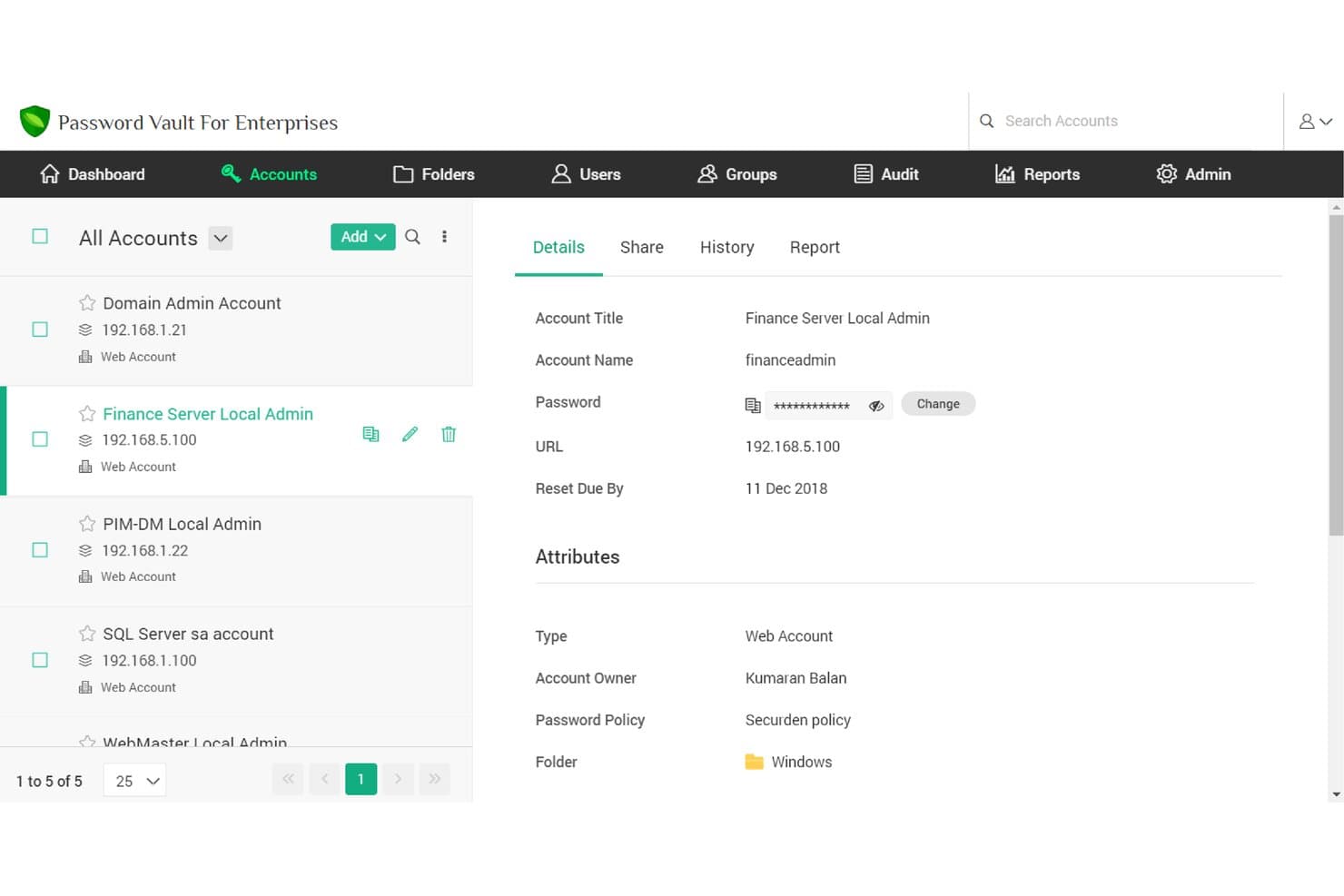
Securden Unified PAM offre un archivio centralizzato degli account in cui gli utenti possono visualizzare e gestire credenziali, password e dettagli degli account memorizzati con controlli basati sui ruoli. Securden Unified PAM è una piattaforma aziendale di gestione degli accessi privilegiati che combina l'archiviazione delle credenziali, il monitoraggio delle sessioni, la gestione dei segreti e i controlli dei privilegi degli endpoint in un'unica soluzione.
Per chi è più indicato Securden Unified PAM?
È particolarmente adatto ai team IT attenti alla sicurezza di organizzazioni di medie e grandi dimensioni che devono governare gli accessi privilegiati in ambienti complessi e multi-sistema.
Perché ho scelto Securden Unified PAM
Ho scelto Securden Unified PAM perché i suoi controlli di accesso al momento necessario vanno oltre quelli della maggior parte dei gestori di password. Le sessioni soggette ad approvazione revocano automaticamente l'accesso e modificano casualmente la credenziale sottostante nel momento in cui scade la finestra temporale, così gli utenti non conservano mai password utilizzabili al termine di una sessione. Apprezzo inoltre la possibilità di limitare l'accesso dei fornitori terzi a una finestra temporale specifica, con la registrazione completa della sessione attiva per tutta la durata, il che semplifica le revisioni successive agli incidenti.
Funzionalità principali di Securden Unified PAM
- Condivisione granulare delle credenziali basata sui ruoli: Condividi credenziali e segreti sensibili con team, utenti o terze parti specifici, usufruendo di controlli completi sulle autorizzazioni.
- Tracce di verifica complete e registrazione delle sessioni: Acquisisci registri dettagliati di tutte le attività privilegiate, incluse le sequenze di tasti e la riproduzione video delle sessioni.
- Sincronizzazione delle directory e integrazione SSO: Connettiti ad Active Directory, LDAP e ai provider di identità SAML per la predisposizione e l'autenticazione automatizzate.
- Criteri automatici di rotazione delle credenziali: Applica la complessità delle password e le pianificazioni di rotazione per account privilegiati, chiavi e segreti delle applicazioni.
Integrazioni di Securden Unified PAM
Securden Unified PAM offre integrazioni native con Okta, OneLogin, Microsoft Entra ID (Azure AD), Google Workspace, Ping Identity, Active Directory, LDAP, ServiceNow e IBM QRadar. È disponibile un'API per le integrazioni personalizzate.
Pros and Cons
Pros:
- L'accesso al momento necessario riduce al minimo l'esposizione ai privilegi permanenti
- La registrazione delle sessioni facilita le analisi forensi successive agli incidenti
- Definizione granulare dell'ambito di accesso dei fornitori con limiti temporali
Cons:
- Complessità iniziale dell'implementazione per i team IT più piccoli
- Nessuna esperienza di compilazione automatica delle password nel browser per i consumatori
Learn more about Securden Unified PAM: Ideale per utenti individuali e piccole imprese
- Prova gratuita di 30 giorni + piano gratuito disponibile
- Da $3/utente/mese (fatturazione annuale)
Visit WebsiteCustomer Rating:4.6/5This rating combines scores from multiple user review sites to reflect overall customer sentiment about the product.
LastPass monitora i tuoi account e ti invia un avviso se le tue informazioni vengono compromesse. LastPass è un gestore di password robusto che aiuta privati e piccole imprese a gestire in modo sicuro le proprie credenziali online. Semplifica la gestione delle password creando, memorizzando e compilando le credenziali di accesso su più siti.
Grazie alla sua facilità d'uso e al rapporto qualità-prezzo, è un'ottima scelta per utenti singoli e piccole aziende che necessitano di una soluzione semplice per la gestione delle password.
Perché ho scelto LastPass: Valutando le soluzioni di gestione delle password, sono stato attratto da LastPass per il suo approccio semplice ma efficace alla gestione delle password. Ciò che distingue LastPass dalla concorrenza è la sua interfaccia intuitiva e le sue funzionalità chiare, che lo rendono accessibile sia agli utenti individuali che alle piccole imprese.
Ritengo che LastPass sia ideale per questo segmento di utenti grazie alla sua combinazione di convenienza economica, facilità d'uso e una gamma completa di funzionalità che non compromettono la sicurezza.
Caratteristiche principali e integrazioni:
Le principali funzionalità di LastPass includono il riempimento automatico e l'accesso automatico, la condivisione sicura delle password e l'autenticazione a più fattori. Queste funzioni facilitano una navigazione sicura sul web senza il peso di dover ricordare numerose password. LastPass si integra facilmente con diversi browser e sistemi operativi, offrendo un'esperienza utente fluida su tutti i dispositivi.
Pros and Cons
Pros:
- Interfaccia intuitiva, adatta a privati e piccole imprese
- Offre la condivisione sicura delle password, utile per la collaborazione in team
- Compatibile con diverse piattaforme e browser per un utilizzo facilitato
Cons:
- L’app mobile richiede un abbonamento, il che potrebbe non essere ideale per chi cerca una soluzione gratuita
- L’assistenza clienti potrebbe essere più reattiva
- Alcuni utenti potrebbero trovare inizialmente complesso il processo di configurazione
Learn more about LastPass: Ideale per la sincronizzazione delle password su più piattaforme
- Demo gratuita + prova gratuita di 14 giorni disponibile
- Da $2.99/utente/mese (fatturato annualmente)
Visit WebsiteCustomer Rating:4.7/5This rating combines scores from multiple user review sites to reflect overall customer sentiment about the product.
I vault di 1Password organizzano, condividono e controllano l'accesso alle informazioni del team. 1Password offre una soluzione sicura e intuitiva per gestire tutte le tue password su diverse piattaforme. Si distingue per la sincronizzazione delle tue informazioni sensibili su tutti i dispositivi e sistemi operativi, proteggendo la tua vita digitale ovunque ti trovi.
Perché ho scelto 1Password: Il supporto multipiattaforma e la sincronizzazione semplice hanno fatto spiccare 1Password nella mia valutazione. Con sempre più persone che lavorano da dispositivi e luoghi differenti, è fondamentale avere un gestore di password che armonizzi i dati su tutte le piattaforme.
Per questo motivo, 1Password si è aggiudicato il primato come migliore per la sincronizzazione delle password su più piattaforme.
Funzionalità e integrazioni principali:
1Password offre crittografia end-to-end, funzione di riempimento automatico e Modalità Viaggio, che ti consente di rimuovere dati sensibili dai tuoi dispositivi durante gli spostamenti. Si integra con i browser più diffusi per accessi e compilazioni di moduli senza sforzo ed è compatibile con i principali sistemi operativi come Windows, macOS, iOS e Android.
Pros and Cons
Pros:
- Crittografia end-to-end per la massima sicurezza
- Modalità Viaggio per la sicurezza dei dati in trasferta
- Sincronizzazione semplice su tutte le piattaforme
Cons:
- Il prezzo è basato sulla fatturazione annuale
- Nessuna versione gratuita disponibile
- Potrebbe essere necessario un apprendimento iniziale per utilizzare tutte le funzionalità
Learn more about 1Password: Ideale per la funzione VPN integrata
- Da $4.99/utente/mese (fatturato annualmente)
Visit WebsiteCustomer Rating:4.5/5This rating combines scores from multiple user review sites to reflect overall customer sentiment about the product.
Ecco come appare il cruscotto di reportistica in Dashlane. Dashlane è un gestore di password robusto con una serie di funzionalità aggiuntive, tra cui una VPN integrata per una maggiore sicurezza online. Lo strumento aiuta a generare, memorizzare e compilare automaticamente password complesse su tutti i tuoi dispositivi, mantenendo la tua identità digitale al sicuro.
La VPN integrata lo distingue, aggiungendo un ulteriore livello di sicurezza, soprattutto quando si accede a internet da reti pubbliche o non sicure.
Perché ho scelto Dashlane: Ho scelto Dashlane per la sua esclusiva funzionalità di VPN integrata. Mentre tutti i gestori di password proteggono le tue credenziali di accesso, Dashlane va oltre per salvaguardare tutte le tue attività online, rendendolo la migliore opzione per chi ha bisogno di una VPN insieme alla gestione delle password.
Questo aspetto distintivo crea uno strumento di sicurezza completo, che differenzia Dashlane da molti altri gestori di password.
Funzionalità e integrazioni principali:
Oltre alla gestione delle password, Dashlane include un portafoglio digitale per pagamenti online sicuri e offre il monitoraggio del dark web per avvisare gli utenti se le loro informazioni compaiono in database compromessi. La funzionalità VPN dello strumento fornisce una connessione internet criptata, una caratteristica non comune tra molti gestori di password.
Dashlane si integra bene con numerosi browser web come Chrome, Firefox e Safari e offre app per le piattaforme iOS e Android, oltre che per Microsoft.
Pros and Cons
Pros:
- Include una VPN integrata per una maggiore sicurezza online
- Fornisce il monitoraggio del dark web
- Offre un portafoglio digitale per pagamenti online sicuri
Cons:
- Più costoso rispetto ad altri gestori di password
- La VPN integrata non è completa come i servizi VPN autonomi
- La versione gratuita limita notevolmente il numero di password e dispositivi
Learn more about Dashlane: Ideale per grandi organizzazioni con esigenze complesse
- Da $2,96/utente/mese (minimo 5 licenze, fatturazione annuale)
Visit WebsiteCustomer Rating:3.8/5This rating combines scores from multiple user review sites to reflect overall customer sentiment about the product.
Questa immagine è uno screenshot del sito web di ManageEngine Password Manager Pro. ManageEngine Password Manager Pro è una soluzione di gestione delle password di livello aziendale che consente l'archiviazione sicura di file, la gestione e la condivisione di password e identità digitali. È progettata per organizzazioni di grandi dimensioni con esigenze complesse, offrendo controlli di accesso articolati, tracciabilità dettagliata delle attività e solidi componenti aggiuntivi.
Si adatta perfettamente alle grandi organizzazioni grazie alla sua scalabilità e alla capacità di gestire strutture gerarchiche complesse.
Perché ho scelto ManageEngine Password Manager Pro: Ho selezionato ManageEngine Password Manager Pro per la sua scalabilità e l'ampia gamma di funzionalità volte a soddisfare strutture organizzative complesse. Questo strumento mi ha colpito perché non è solo un gestore di password, ma una soluzione completa di gestione degli accessi privilegiati.
È particolarmente indicato per le grandi organizzazioni con esigenze complesse grazie alle numerose opzioni di personalizzazione, ai controlli di accesso basati sui ruoli e alle robuste capacità di auditing.
Funzionalità e integrazioni distintive:
ManageEngine Password Manager Pro offre una vasta gamma di funzionalità come reset automatizzati delle password, accesso remoto sicuro, gestione delle sessioni privilegiate e tracciabilità dettagliata delle attività. Le sue avanzate misure di sicurezza, tra cui l'autenticazione a due fattori, garantiscono l'accesso sicuro ai dati sensibili.
Lo strumento si integra con una serie di altre piattaforme, come Active Directory, LDAP e una varietà di strumenti SIEM, per fornire una gestione della sicurezza completa.
Pros and Cons
Pros:
- Propone funzionalità estese adatte alle grandi organizzazioni
- Offre solide integrazioni per una gestione della sicurezza completa
- Include tracciabilità dettagliata delle attività per trasparenza e responsabilità
Cons:
- Può risultare complesso o eccessivo per piccole aziende o singoli utenti
- Il prezzo può essere elevato per le organizzazioni con un gran numero di utenti
- L'interfaccia utente potrebbe essere più intuitiva e facile da usare
Learn more about ManageEngine Password Manager Pro: Ideale per un'interfaccia utente semplice e diretta
- Da $2.49/utente/mese (fatturazione annuale)

Implementa misure di sicurezza aziendali, incluse linee guida per le password e autenticazione a più fattori con NordPass. NordPass è uno strumento di gestione delle password sicuro che punta su un design user-friendly e sulla semplicità. Sviluppato dai creatori di NordVPN, questa attenzione a un design essenziale lo rende un'ottima scelta per chi cerca un'interfaccia facile da usare.
Perché ho scelto NordPass: Ho scelto NordPass per questa lista grazie alla sua interfaccia utente pulita e intuitiva. Rispetto ad altri strumenti di gestione delle passkey, NordPass si distingue per un'esperienza orientata all'utente senza compromettere la sicurezza.
Grazie al suo design facile da navigare, ho trovato NordPass il miglior strumento per chi desidera un'interfaccia semplice e diretta.
Funzionalità principali e integrazioni:
Le funzionalità di NordPass includono la generazione di password, la condivisione sicura di passkey e uno scanner OCR integrato per catturare rapidamente le informazioni. È crittografato con le più recenti misure di sicurezza (XChaCha20) per mantenere al sicuro le informazioni degli utenti.
NordPass si integra anche senza problemi con diversi browser come Chrome, Firefox, Opera ed Edge, oltre che con piattaforme come iOS e Android, facilitando l'accesso facile e sicuro su più dispositivi.
Pros and Cons
Pros:
- Interfaccia utente pulita e semplice
- Funzione di condivisione password sicura
- Crittografia avanzata per la sicurezza (XChaCha20)
Cons:
- Funzionalità avanzate limitate rispetto ad alcuni concorrenti
- Le migliori funzionalità sono disponibili solo nel piano a pagamento
- L'impegno annuale può non essere ideale per tutti gli utenti
Learn more about NordPass: Ideale per organizzazioni che valorizzano il software open-source
- Prova gratuita di 7 giorni + piano gratuito + demo gratuita disponibile
- Da $3/utente/mese

Migliora l'onboarding degli utenti e la gestione degli account (provision/de-provision) utilizzando Bitwarden Directory Connector o l'integrazione SCIM. Bitwarden è un gestore di password open-source progettato sia per individui che per aziende. Offre un archivio sicuro per le password e la loro condivisione, rendendolo ideale per le organizzazioni che puntano molto sulla flessibilità e trasparenza del software open-source.
Perché ho scelto Bitwarden: Ho selezionato Bitwarden per questa lista grazie alla sua natura open-source. Questa caratteristica lo distingue da molti altri strumenti di gestione delle password. La trasparenza offerta dal software open-source può aumentare la fiducia e consentire soluzioni di sicurezza personalizzabili, facendo di Bitwarden la scelta migliore per le organizzazioni che danno valore al software open-source.
Funzionalità principali e integrazioni:
Bitwarden fornisce crittografia end-to-end per una gestione e condivisione sicura delle password, oltre a funzionalità come il generatore di password e la memorizzazione sicura delle note. Offre facili integrazioni con numerosi browser, tra cui Chrome, Firefox, Safari ed Edge, e piattaforme mobili come iOS e Android, permettendo un accesso sicuro su vari dispositivi.
Pros and Cons
Pros:
- La natura open-source garantisce trasparenza e flessibilità
- Offre crittografia end-to-end
- Ampia gamma di integrazioni con browser e piattaforme
Cons:
- L'interfaccia utente può non essere intuitiva come quella di alcuni concorrenti
- Richiede qualche competenza tecnica per sfruttare tutti i vantaggi dell'open-source
- Mancano alcune funzionalità avanzate offerte dai gestori di password proprietari
Learn more about Bitwarden: Ideale per offrire autenticazione avanzata a due fattori
- Demo gratuita disponibile
- Da $3,75/utente/mese (fatturato annualmente)

Ecco la condivisione sicura di file e password in Keeper. Keeper è una soluzione completa per la gestione delle password che porta la sicurezza dell’utente a un livello superiore. Il suo impegno nel rafforzare la sicurezza degli account tramite un’autenticazione a due fattori avanzata lo rende ideale per chi dà priorità a protocolli di sicurezza migliorati.
Perché ho scelto Keeper: La decisione di includere Keeper in questo elenco è stata fortemente influenzata dal suo focus sulle funzionalità di sicurezza avanzata. Si distingue per una robusta autenticazione a due fattori, che aggiunge un ulteriore livello di protezione agli account degli utenti.
Ritengo che Keeper sia il miglior strumento per l’autenticazione a due fattori avanzata grazie al suo approccio senza compromessi nella protezione delle informazioni degli utenti.
Funzionalità principali e integrazioni:
Keeper offre funzionalità come la condivisione sicura dei record, l’accesso di emergenza e una forte attenzione all’autenticazione a due fattori, compreso l’accesso biometrico. Offre anche una cassaforte digitale sicura per archiviare documenti sensibili. Sul fronte delle integrazioni, Keeper si integra facilmente con piattaforme popolari come Slack e supporta SAML 2.0 per un’autenticazione sicura.
Pros and Cons
Pros:
- Si concentra sull’autenticazione avanzata a due fattori
- Cassaforte digitale sicura per archiviare documenti sensibili
- Integrazione con piattaforme come Slack
Cons:
- I livelli inferiori non includono alcune funzionalità avanzate
- La fatturazione annuale potrebbe non essere adatta a tutti gli utenti
- L’enfasi sulla sicurezza può risultare eccessiva per chi cerca uno strumento di gestione password più semplice
Learn more about Keeper:

Con i report completi ed esportabili di Passportal, nulla ti sfuggirà. Passportal offre una soluzione specializzata per i fornitori di servizi IT, proponendo un sistema intuitivo di gestione delle password e della documentazione IT. Questo strumento semplifica la gestione delle credenziali e delle informazioni IT di più clienti, rendendolo ideale per i fornitori di servizi IT.
Perché ho scelto Passportal: Passportal ha attirato la mia attenzione grazie alla sua specificità nell'adattarsi alle esigenze dei fornitori di servizi IT. La gestione centralizzata delle credenziali e le solide funzionalità di documentazione IT lo distinguono dagli altri gestori di password.
Credo che Passportal sia la soluzione migliore per i fornitori di servizi IT perché è progettato per gestire in modo efficiente le credenziali e le informazioni IT di più clienti.
Funzionalità distintive & Integrazioni:
Passportal include funzionalità come reset automatici delle password, condivisione sicura delle password e una documentazione IT completa. Fornisce inoltre registri di audit per monitorare tutte le modifiche effettuate. In termini di integrazioni, Passportal funziona bene con i più popolari strumenti di automazione dei servizi professionali (PSA) come Autotask e ConnectWise.
Pros and Cons
Pros:
- Gestione centralizzata delle credenziali di più clienti
- Solide capacità di documentazione IT
- Integrazione con i principali strumenti PSA
Cons:
- Le informazioni sui prezzi non sono direttamente disponibili
- Può risultare complesso per utenti singoli o piccole imprese
- Usabilità limitata al di fuori dei fornitori di servizi IT
Learn more about Passportal: Ideale per l'integrazione con Active Directory
- Da $5/utente/mese (min 50 postazioni)

Specops Password Security Software protegge i dati aziendali prevenendo password deboli. Specops è un software completo per la sicurezza delle password che eccelle nell'integrazione con Active Directory (AD). Questa soluzione semplifica le policy delle password, la prevenzione delle violazioni e i reset sicuri delle password, sincronizzandosi facilmente con il tuo ambiente AD.
Perché ho scelto Specops Password Security Software: Dopo aver valutato una miriade di gestori di password, Specops si è distinto per la sua profonda integrazione con Active Directory. Questo lo rende perfetto per le organizzazioni che dipendono fortemente da AD per la gestione di identità e accessi.
Di conseguenza, Specops diventa la scelta principale per chi cerca una soluzione ideale per l'integrazione con Active Directory.
Caratteristiche principali e integrazioni:
Specops si distingue per funzionalità come policy delle password personalizzabili, notifiche di scadenza delle password e la possibilità per gli utenti di eseguire il reset sicuro delle password in autonomia. La sua capacità di integrarsi facilmente con Active Directory assicura che policy e modifiche alle password si riflettano istantaneamente in tutto l'ambiente AD, rendendo la gestione degli utenti più efficiente.
Pros and Cons
Pros:
- Profonda integrazione con Active Directory
- Policy delle password personalizzabili
- Reset sicuro delle password in autonomia
Cons:
- Un minimo di 50 postazioni potrebbe essere troppo alto per i team più piccoli
- Potrebbe non essere necessario per organizzazioni che non usano Active Directory
- Alcune funzionalità possono richiedere un periodo di apprendimento
Learn more about Specops Password Security Software:
Altri software di gestione password
Ecco alcune altre opzioni di software di gestione password che non sono entrate nella mia shortlist, ma che vale comunque la pena considerare:
- 11SecurdenIdeale per il controllo centralizzato delle credenziali condivise
- 12PassworkIdeale per i team che cercano una collaborazione solida
- 13Bravura PassIdeale per chi cerca vaste opzioni di personalizzazione
- 14EnpassIdeale per la gestione delle password offline
Come Valuto i Software di Gestione delle Password
Divido la valutazione in due livelli: una base che ogni strumento deve soddisfare—architetture zero-knowledge, controlli delle policy amministrative, provisioning SCIM—e dei fattori differenzianti che separano le soluzioni migliori dalle altre.
Funzionalità di Base (Requisiti Fondamentali per Questa Lista)
Quando seleziono gli strumenti per la mia lista, valuto ciascuno su una scala da 0 (non offre la funzionalità) a 5 (eccelle in questo ambito) per ogni caratteristica di base elencata qui sotto. Successivamente, calcolo il punteggio totale dello strumento in percentuale. Ogni strumento deve raggiungere un punteggio minimo totale del 65% per essere considerato.
- Vault per Credenziali Criptate: Valuto il modello di crittografia e se il fornitore mantiene un'architettura zero-knowledge, il che significa che nemmeno il provider può accedere a password, note o file memorizzati.
- Condivisione Sicura delle Credenziali: I team condividono costantemente credenziali di database e accessi ad ambienti di staging, quindi cerco la condivisione basata sui ruoli con controlli di revoca e scadenza.
- Compilazione Automatica & Integrazione con il Browser: Una compilazione automatica affidabile su tutti i principali browser e piattaforme è fondamentale. Verifico la copertura su desktop, mobile e CLI, poiché i team IT e di sviluppo lavorano in ambienti diversi.
- Controlli delle Policy Amministrative: Analizzo la console di amministrazione per regole applicabili sulla robustezza delle password, requisiti MFA e restrizioni di accesso come allowlist di IP o policy di fiducia sui dispositivi.
- Integrazione SSO & Directory: Eseguire manualmente il provisioning degli utenti su larga scala è complicato. Valuto il supporto SAML SSO e la sincronizzazione SCIM con provider come Okta, Azure AD e Google Workspace.
- Log di Audit & Reportistica: Gli audit di conformità richiedono prove su chi ha avuto accesso a cosa e quando. Controllo la presenza di log di attività dettagliati ed esportabili e dashboard sullo stato delle password almeno come standard minimo.
Una volta ottenuta una lista di strumenti che soddisfano questi criteri, considero cosa differenzia ciascuna piattaforma.
Fattori Differenzianti (Cosa Distingue i Vendor)
Ecco come confronto e metto in contrasto i diversi vendor:
Funzionalità Distintive
La gestione dei segreti è una differenza chiave. I team Dev e DevOps necessitano di un vault che gestisca API key, SSH key e variabili d’ambiente con accesso CLI o SDK, non solo password via browser. Valuto anche le funzionalità di gestione degli accessi privilegiati come la rotazione delle credenziali e accesso just-in-time per account amministrativi. Per le organizzazioni con stringenti requisiti di residenza dei dati, l’opzione self-hosted può essere un fattore decisivo, consentendo di distribuire il vault sulla propria infrastruttura.
Oltre le Funzionalità
Le certificazioni di sicurezza sono importanti. Controllo se un fornitore possiede SOC 2 Type II o ISO 27001 e se pubblica i risultati dei penetration test da terze parti. L’integrazione per developer e DevOps è un altro fattore chiave—gli strumenti che offrono provider Terraform, supporto alle pipeline CI/CD e REST API si integrano molto meglio nei workflow esistenti rispetto a quelli limitati alle sole estensioni browser. Valuto anche la postura verso la risposta agli incidenti, incluso il recupero dell’account senza compromettere la crittografia zero-knowledge e la trasparenza tenuta dal fornitore riguardo a precedenti eventi di sicurezza.
Come scegliere un software di gestione password
È facile perdersi tra lunghe liste di funzionalità e strutture di prezzo complesse. Per aiutarti a restare concentrato durante il tuo processo di selezione del software, ecco un elenco di fattori da tenere in considerazione:
| Fattore | Cosa Considerare |
|---|---|
| FattoreScalabilità | Cosa ConsiderareLo strumento può crescere insieme al tuo team? Considera se supporta l'aggiunta di nuovi utenti o la gestione di un aumento dei dati senza problemi di prestazioni. Cerca piani utente flessibili che possano adattarsi alla crescita. |
| FattoreIntegrazioni | Cosa ConsiderareFunziona con gli altri strumenti che utilizzi? Controlla la compatibilità con piattaforme già in uso come Google Workspace o Microsoft 365 per rendere i flussi di lavoro più efficienti ed evitare l'inserimento manuale dei dati. |
| FattorePersonalizzazione | Cosa ConsiderarePuoi adattare lo strumento alle tue esigenze? Cerca opzioni che permettano di modificare impostazioni, autorizzazioni e ruoli utenti in base alla struttura e alle politiche di sicurezza del tuo team. |
| FattoreFacilità d’uso | Cosa ConsiderareÈ facile da usare per tutti? Valuta l'interfaccia e il design. Assicurati che sia intuitiva per il tuo team, così da ridurre la curva di apprendimento e la necessità di formazione approfondita. |
| FattoreImplementazione e onboarding | Cosa ConsiderareQuanto tempo ci vuole per iniziare? Valuta il processo di configurazione e onboarding. Cerca risorse come tutorial, modelli e supporto dedicato per facilitare la transizione e garantire un avvio senza ostacoli. |
| FattoreCosto | Cosa ConsiderareRientra nel tuo budget? Analizza la struttura dei prezzi, inclusi eventuali costi nascosti. Confronta il costo con le funzionalità offerte e valuta la presenza di sconti per la fatturazione annuale o piani per più utenti. |
| FattoreTutele di sicurezza | Cosa ConsiderareLe tue password sono al sicuro? Assicurati che lo strumento utilizzi standard di crittografia robusti, offra l'autenticazione a più fattori e fornisca audit trail per monitorare l’accesso e rilevare attività non autorizzate. |
| FattoreRequisiti di conformità | Cosa ConsiderareRispetta le normative del settore? Verifica se lo strumento è conforme agli standard legali rilevanti come GDPR o HIPAA, soprattutto se il tuo team gestisce dati sensibili. Cerca certificazioni o documentazione che ne attestino la conformità. |
Cos'è un software di password manager?
Il software password manager è uno strumento che memorizza, genera e organizza tutte le tue password in un unico luogo sicuro. Figure come amministratori IT, professionisti della sicurezza e chiunque sia stanco di dimenticare le credenziali lo utilizzano per mantenere sicuri i loro account senza lo stress di dover ricordare password infinite. Ti aiuta a creare password robuste, le compila automaticamente e mette al sicuro le tue informazioni così da non dover temere password deboli o riutilizzate.
Funzionalità
Quando scegli un software password manager, presta attenzione alle seguenti funzionalità chiave:
- Archivio password: Conserva in modo sicuro tutte le tue password in un unico posto, agevolando la gestione e l’accesso quando necessario.
- Compilazione automatica: Compila automaticamente le credenziali di accesso sui siti web, facendoti risparmiare tempo e riducendo il rischio di errori di inserimento.
- Generatore di password: Crea password robuste e uniche per ogni account, aumentando la sicurezza e prevenendo combinazioni facili da indovinare.
- Autenticazione a più fattori: Aggiunge un ulteriore livello di sicurezza richiedendo passaggi aggiuntivi di verifica oltre alla semplice password.
- Monitoraggio del dark web: Ti avvisa se le tue credenziali compaiono in violazioni di dati, permettendoti di agire rapidamente per proteggere i tuoi account.
- Controlli di accesso personalizzabili: Ti permette di definire chi può accedere a determinate password, garantendo che le informazioni sensibili siano visibili solo agli utenti autorizzati.
- Registrazione delle sessioni: Monitora e registra le attività degli utenti, fornendo un audit trail utile per la sicurezza e la conformità.
- Accesso biometrico: Utilizza impronta digitale o riconoscimento facciale per un accesso ai tuoi account sicuro e immediato.
- Report di sicurezza: Offre informazioni sullo stato e la robustezza delle password, aiutandoti a individuare punti deboli e migliorare la sicurezza generale.
- Integrazione con altre piattaforme: Si collega agli altri strumenti e piattaforme che utilizzi, migliorando l’efficienza dei flussi di lavoro e riducendo l’inserimento manuale dei dati.
Vantaggi
L'adozione di un software password manager porta diversi vantaggi al tuo team e alla tua azienda. Ecco alcuni benefici a cui puoi aspirare:
- Sicurezza migliorata: Protegge i tuoi account con password forti e uniche e l'autenticazione a più fattori, riducendo il rischio di violazioni.
- Risparmio di tempo: Compila automaticamente i dati di accesso per un accesso rapido, eliminando la necessità di ricordare o digitare manualmente le password.
- Gestione semplificata: Centralizza la memorizzazione delle password in una cassaforte sicura, rendendo semplice organizzare e recuperare le credenziali.
- Migliore conformità: Fornisce tracciabilità delle azioni e registri delle attività per aiutare a soddisfare le normative e gli standard di sicurezza.
- Aumento della produttività: Si integra con gli strumenti esistenti per ottimizzare i flussi di lavoro e ridurre l'inserimento manuale dei dati.
- Avvisi proattivi sulle minacce: Monitora il dark web per individuare violazioni, permettendoti di rispondere rapidamente a potenziali minacce.
- Accesso personalizzabile: Offre il controllo su chi può visualizzare o modificare le password, garantendo che i dati sensibili siano accessibili solo agli utenti autorizzati.
Costi e Prezzi
La scelta di un software per la gestione delle password richiede la comprensione dei diversi modelli di prezzo e piani disponibili. I costi variano in base alle funzionalità, alle dimensioni del team, agli add-on e altro ancora. La tabella seguente riassume i piani comuni, i prezzi medi e le caratteristiche tipiche incluse nelle soluzioni software di gestione delle password:
Tabella di confronto dei piani per software di gestione delle password
| Tipo di Piano | Prezzo Medio | Funzionalità Comuni |
|---|---|---|
| Tipo di PianoPiano Gratuito | Prezzo Medio$0 | Funzionalità ComuniArchiviazione base delle password, compilazione automatica e generazione delle password. |
| Tipo di PianoPiano Personale | Prezzo Medio$3-$10/user/month | Funzionalità ComuniCassaforte per password sicura, sincronizzazione multi-dispositivo e assistenza di base. |
| Tipo di PianoPiano Business | Prezzo Medio$5-$25/user/month | Funzionalità ComuniCondivisione delle password in team, controlli amministrativi e supporto prioritario. |
| Tipo di PianoPiano Enterprise | Prezzo Medio$15-$50/user/month | Funzionalità ComuniFunzionalità di sicurezza avanzate, strumenti di conformità, account manager dedicato e integrazioni personalizzate. |
FAQ sul Software di Gestione Password
Ecco alcune risposte alle domande più frequenti sul software di gestione password:
Posso utilizzare il software di gestione password offline?
Sì, molti gestori di password offrono l’accesso offline. Puoi visualizzare le password memorizzate anche senza una connessione internet. Tuttavia, alcune funzionalità come la sincronizzazione tra dispositivi potrebbero richiedere la connessione. Verifica se lo strumento che stai considerando supporta la funzionalità offline, se per te è importante.
È difficile passare a un nuovo gestore di password?
No, la maggior parte dei gestori di password offre strumenti di importazione. Ti permettono di trasferire facilmente le password dal vecchio gestore. Cerca opzioni che supportino l’importazione da strumenti popolari come LastPass o Dashlane. Questo può farti risparmiare tempo e fatica durante la transizione, aiutandoti a mantenere la sicurezza.
Come gestiscono le violazioni dei dati i gestori di password?
I gestori di password ti avvisano se i tuoi dati sono compromessi. Monitorano le violazioni e ti notificano se una delle credenziali archiviate risulta colpita. Puoi quindi cambiare rapidamente le password per proteggere i tuoi account. Alcuni strumenti offrono anche il monitoraggio del dark web per una sicurezza aggiuntiva.
I gestori di password funzionano su più dispositivi?
Sì, di solito si sincronizzano tra i dispositivi. Questo significa che puoi accedere alle tue password da telefono, tablet e computer. Verifica che lo strumento supporti i sistemi operativi che utilizzi, come Windows, macOS, iOS e Android. Ciò garantisce un’esperienza senza interruzioni su tutti i tuoi dispositivi.
Cosa succede dopo:
Se stai valutando software per la gestione delle password, collegati gratuitamente con un consulente SoftwareSelect per ricevere consigli.
Compili un modulo e fai una breve chiacchierata, durante la quale verranno approfondite le tue esigenze. Riceverai quindi una shortlist di software da valutare. Ti supporteranno anche in tutto il processo di acquisto, comprese le negoziazioni sui prezzi.