

Il software per la gestione dei dispositivi iOS consente di controllare, monitorare e proteggere iPhone, iPad, Mac e altri dispositivi hardware iOS della tua organizzazione da un pannello di controllo centralizzato. Se sei responsabile della gestione di flotte di dispositivi iOS in crescita, della sicurezza dei sistemi e della conformità, trovare il software giusto è essenziale. Qui troverai la mia opinione sulle migliori piattaforme per la gestione dei dispositivi iOS, con consigli aggiornati per aiutarti a confrontare le funzionalità, verificare quali soluzioni soddisfano gli standard aziendali e dare priorità agli strumenti che semplificano il tuo lavoro.
Perché fidarsi dei nostri consigli sui software
6,700+
Reviews
20
Industry experts
16+
Evaluation factors
14
Years
Il nostro team testa e recensisce software dal 2012. In quanto leader tecnologici noi stessi, sappiamo quanto sia difficile — e importante — scegliere il software giusto.
Per questa guida, abbiamo valutato gli strumenti attraverso test praticie ricerche indipendenti, assegnando un punteggio agli strumenti in base ai nostri criteri di selezione.
Le nostre recensioni riflettono il nostro giudizio editoriale umano, non un discorso di vendita.
Revisori esperti:
- Paulo Gardini MiguelDirettore tecnico
 Tim FisherVP dell'IA
 Gabriel RosasTech Lead e architetto software
 Christhian GruhnTech Lead e architetto della piattaforma

Tabella di confronto dei software per la gestione dei dispositivi iOS
Questa tabella di confronto riassume i dettagli sui prezzi delle mie migliori selezioni di software per la gestione dei dispositivi iOS.
| Tool | Best For | Trial Info | Price | ||
|---|---|---|---|---|---|
| 1 | Ideale per la gestione del ciclo di vita dei dispositivi attivata dalle risorse umane | Prova gratuita di 14 giorni | A partire da $8/utente/mese | Website | |
| 2 | Ideale per la modalità chiosco e la modalità con app singola su Apple | Prova gratuita di 14 giorni | A partire da $2.00/dispositivo/mese (fatturato annualmente) | Website | |
| 3 | Ideale per integrazione con Munki | Prova gratuita di 30 giorni + demo gratuita disponibile | Da $2,50/dispositivo/mese (fatturazione annuale) | Website | |
| 4 | Ideale per la gestione multi-OS delle PMI | Prova gratuita di 14 giorni + piano gratuito disponibile | Da $2,75/dispositivo/mese (fatturato annualmente) | Website | |
| 5 | Ideale per il monitoraggio in tempo reale dei dispositivi | Prova gratuita di 14 giorni + demo gratuita disponibile | Da $8,25/Mac/mese | Website | |
| 6 | Le migliori analisi di sicurezza AI integrate | Prova gratuita di 30 giorni disponibile | Da $4,24/dispositivo client/mese | Website | |
| 7 | Ideale per il controllo degli endpoint multipiattaforma | Prova gratuita di 30 giorni disponibile | Da $4/utente/mese (fatturato annualmente) | Website | |
| 8 | Ideale per il provisioning di profili multi-OS | Prova gratuita di 30 giorni + demo gratuita disponibile | Da $1.28/dispositivo/mese (fatturato annualmente) | Website | |
| 9 | Le migliori funzionalità integrate di sicurezza Apple | Piano gratuito + prova gratuita di 30 giorni disponibile | Da $0,46/dispositivo/mese | Website | |
| 10 | Ideale per la risoluzione automatizzata dei problemi | Demo gratuita disponibile | Da $3/dispositivo/mese | Website |


Recensioni dei migliori software per la gestione dei dispositivi iOS
Di seguito trovi le mie sintesi dettagliate dei migliori software per la gestione dei dispositivi iOS inclusi nella mia selezione. Le mie recensioni offrono uno sguardo approfondito alle funzionalità, alle integrazioni e ai casi d’uso migliori di ciascuna piattaforma, per aiutarti a trovare quella più adatta a te.
 Ideale per la gestione del ciclo di vita dei dispositivi attivata dalle risorse umane
- Prova gratuita di 14 giorni
- A partire da $8/utente/mese
Visit WebsiteCustomer Rating:4.8/5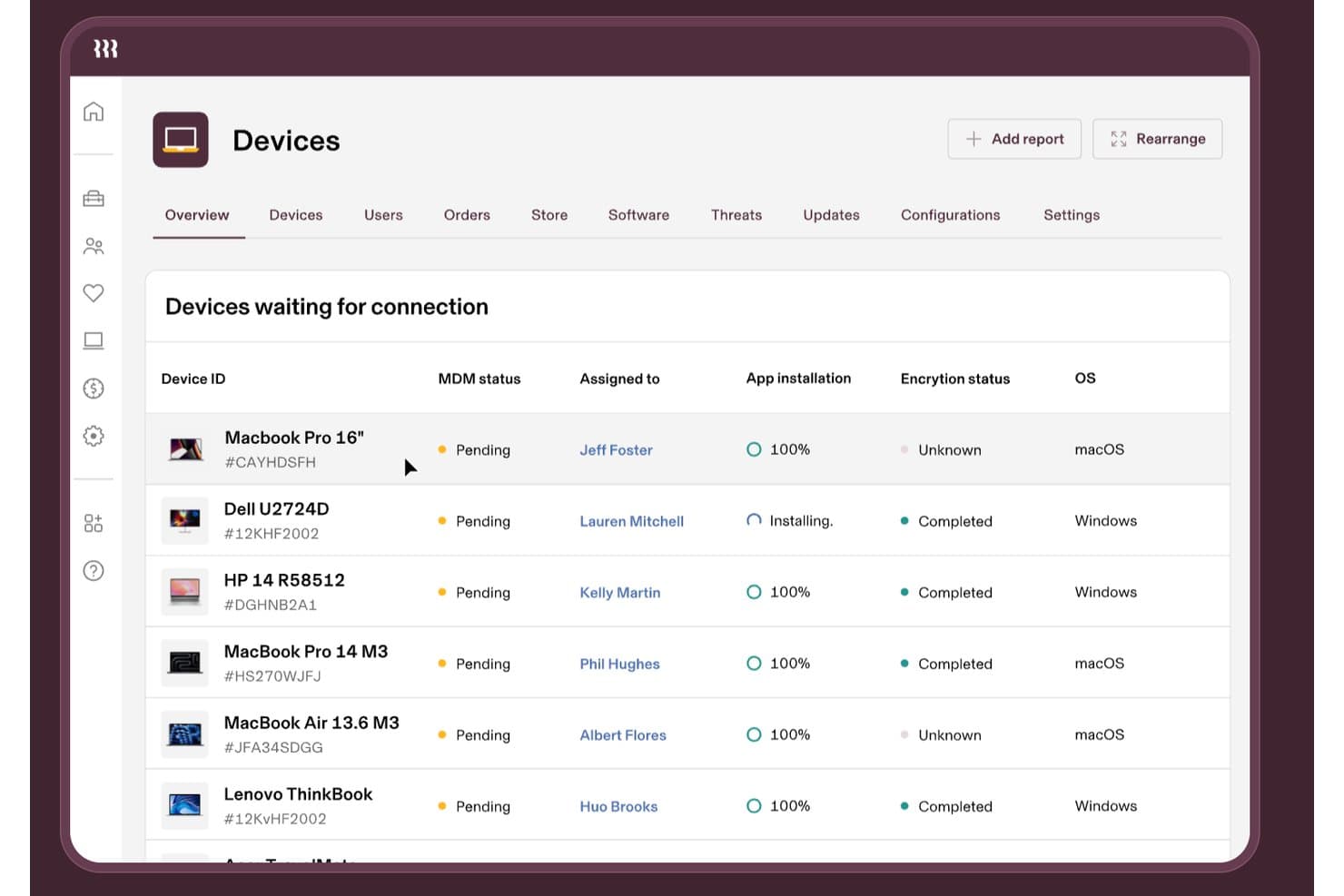
Rippling IT monitora lo stato MDM dei dispositivi Apple e Windows in un unico pannello di controllo. Rippling IT è una piattaforma MDM e di gestione IT che combina l'iscrizione dei dispositivi Apple, la distribuzione dei profili di configurazione, la distribuzione delle app, il blocco e la cancellazione da remoto e l'applicazione della conformità con l'automazione integrata dei flussi di lavoro basata sulle risorse umane.
Per chi è più adatto Rippling IT?
Rippling IT è particolarmente adatto alle aziende che già utilizzano Rippling per le risorse umane e desiderano una gestione del ciclo di vita dei dispositivi direttamente collegata all'inserimento dei dipendenti, ai cambiamenti di ruolo e alla cessazione del rapporto di lavoro.
Perché ho scelto Rippling IT
Ho incluso Rippling IT tra le mie scelte principali perché nessun altro MDM collega la gestione del ciclo di vita dei dispositivi agli eventi delle risorse umane in modo altrettanto stretto. Quando si assume una persona, un singolo evento in Rippling può ordinare il Mac, iscriverlo tramite ADE attraverso ABM, distribuire le app corrette usando i Supergroups e spedirlo al dipendente, il tutto senza interventi manuali da parte dell'IT. Apprezzo anche il fatto che la procedura di cessazione funzioni allo stesso modo al contrario, con la cancellazione da remoto o il blocco programmato sincronizzati direttamente con l'evento di cessazione.
Funzionalità principali di Rippling IT
- Gestione dichiarativa dei dispositivi (DDM): applica criteri per i codici di accesso, finestre di aggiornamento del sistema operativo e controlli di sicurezza direttamente sui dispositivi macOS, iOS e iPadOS utilizzando il protocollo DDM nativo di Apple.
- Supergroups: assegna dinamicamente profili di configurazione, app e criteri agli utenti in base agli attributi delle risorse umane e dei dispositivi, aggiornandoli automaticamente quando cambiano i ruoli.
- Applicazione della crittografia FileVault: distribuisce la crittografia FileVault sui dispositivi macOS e conserva le chiavi di recupero nella console di Rippling.
- Integrazione con la protezione dalle minacce SentinelOne: distribuisce automaticamente l'agente SentinelOne sui dispositivi gestiti e mostra la risoluzione delle minacce direttamente nel pannello di controllo di Rippling IT.
Integrazioni di Rippling IT
Rippling IT offre oltre 600 integrazioni preconfigurate, tra cui Slack, Jira, GitHub, AWS, Microsoft 365, Zoom, Salesforce, Microsoft Entra ID e Google Workspace. La sua API REST supporta integrazioni personalizzate.
Pros and Cons
Pros:
- Automazione dell'inserimento e della cessazione attivata dalle risorse umane
- Iscrizione ABM automatizzata con assegnazioni dinamiche
- Supporto per il recupero e il riacquisto dell'hardware
Cons:
- Nessuna applicazione documentata di patch per app di terze parti
- Gli amministratori Mac segnalano problemi dopo gli aggiornamenti
Learn more about Rippling IT: Ideale per la modalità chiosco e la modalità con app singola su Apple
- Prova gratuita di 14 giorni
- A partire da $2.00/dispositivo/mese (fatturato annualmente)
Visit WebsiteCustomer Rating:4.7/5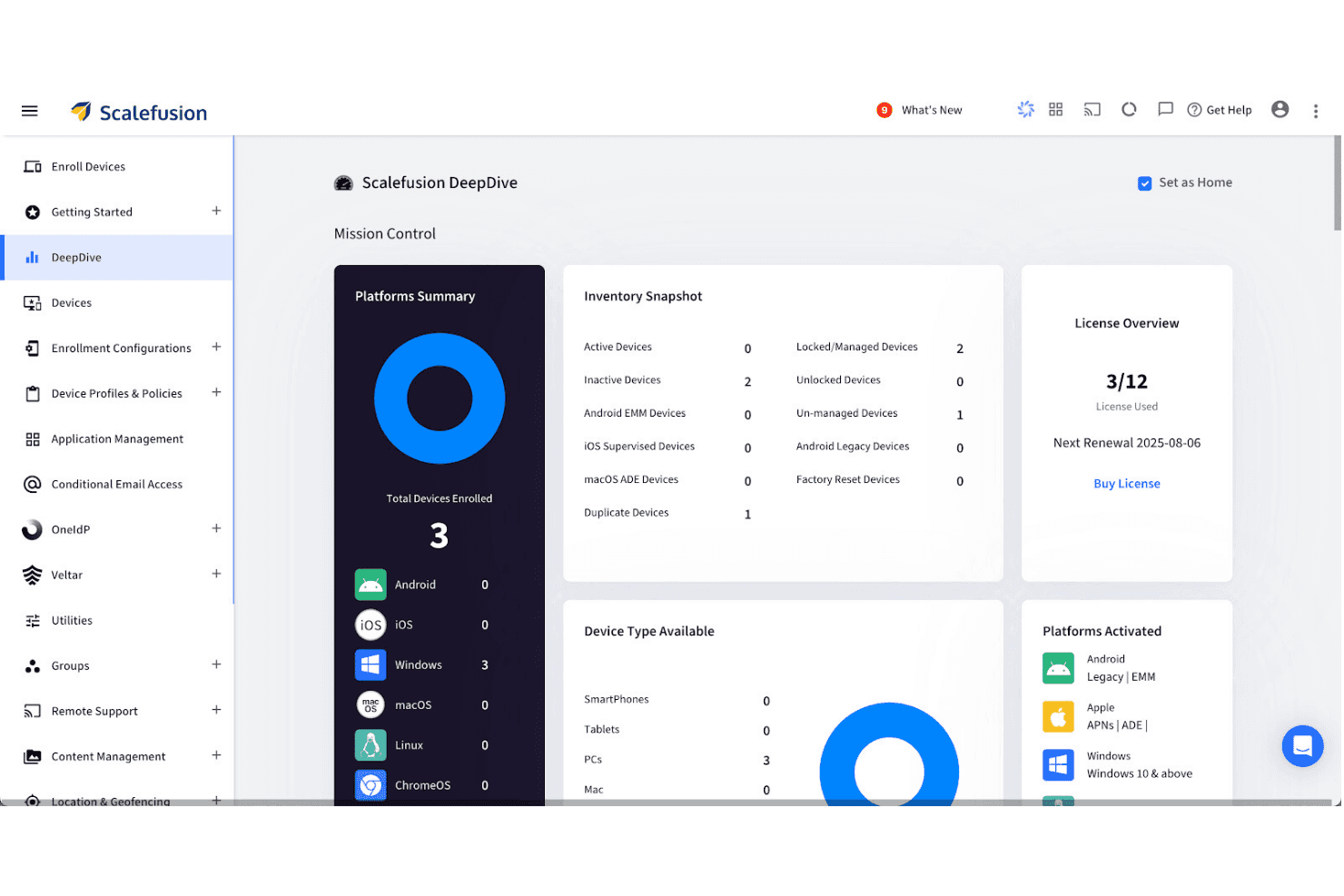
Scalefusion offre una console dettagliata per la gestione dei criteri e delle impostazioni dei dispositivi. Scalefusion è una piattaforma unificata per la gestione dei dispositivi che copre i dispositivi iOS, iPadOS, macOS e tvOS, oltre ad Android, Windows, Linux e ChromeOS, tutti gestiti da un'unica console con controlli per modalità chiosco, distribuzione delle app, registrazione automatica e integrazione delle identità.
Per chi è più adatto Scalefusion?
Scalefusion è una soluzione ideale per i team IT che gestiscono flotte con sistemi operativi misti e necessitano di controlli avanzati per la modalità chiosco e la modalità con app singola, oltre alle funzionalità MDM standard di Apple.
Perché ho scelto Scalefusion
Scalefusion è entrato nella mia lista ristretta soprattutto per l'ampiezza dei suoi controlli relativi alla modalità chiosco e alla modalità con app singola, che vanno oltre ciò che offre la maggior parte delle soluzioni MDM Apple. Ho configurato la modalità chiosco con app singola su distribuzioni iOS in cui i dispositivi devono eseguire permanentemente una sola app, e Scalefusion gestisce questa esigenza senza soluzioni alternative. Supporta inoltre la gestione di Apple TV, inclusa la modalità con app singola per tvOS, consentendo di bloccare i display nelle aree d'ingresso o la segnaletica digitale dalla stessa console utilizzata per iPhone e Mac.
Funzionalità principali di Scalefusion
- Catalogo delle app per macOS: Una libreria di oltre 400 app macOS di terze parti basata su Installomator, che supporta l'installazione silenziosa, gli aggiornamenti automatici in background e gli script prima e dopo l'installazione.
- Generazione di script con AirThink AI: Uno strumento basato sull'intelligenza artificiale che genera script Shell, Bash, Python e PowerShell pronti per la distribuzione su macOS e altre piattaforme, senza necessità di codifica manuale.
- Gestione di Apple TV (tvOS): Distribuzione remota delle app, controllo della disposizione della schermata iniziale e gestione delle impostazioni AirPlay per i dispositivi Apple TV dalla stessa console utilizzata per iOS e macOS.
- Gestione della crittografia FileVault: Impone la crittografia completa del disco sui Mac gestiti, con supporto per il deposito e la rotazione delle chiavi direttamente dalla console di Scalefusion.
Integrazioni di Scalefusion
Scalefusion offre integrazioni native con Apple Business Manager, Apple School Manager, Okta, Microsoft Entra ID, Google Workspace, Samsung Knox, Zebra, Lenovo, Bluebird e Kyocera, oltre a Platform SSO per macOS. Sono disponibili un'API aperta e webhook per integrazioni personalizzate e flussi di lavoro automatizzati.
Pros and Cons
Pros:
- Modalità chiosco con app singola su iOS e tvOS
- Catalogo delle app per macOS con distribuzioni silenziose
- Generazione integrata di script basata sull'intelligenza artificiale per l'automazione
Cons:
- Nessun rilevamento nativo dei dispositivi Mac né EDR
- Mancanza di opzioni di conformità in sede o FedRAMP
Learn more about Scalefusion: Ideale per integrazione con Munki
- Prova gratuita di 30 giorni + demo gratuita disponibile
- Da $2,50/dispositivo/mese (fatturazione annuale)
Visit WebsiteCustomer Rating:4.8/5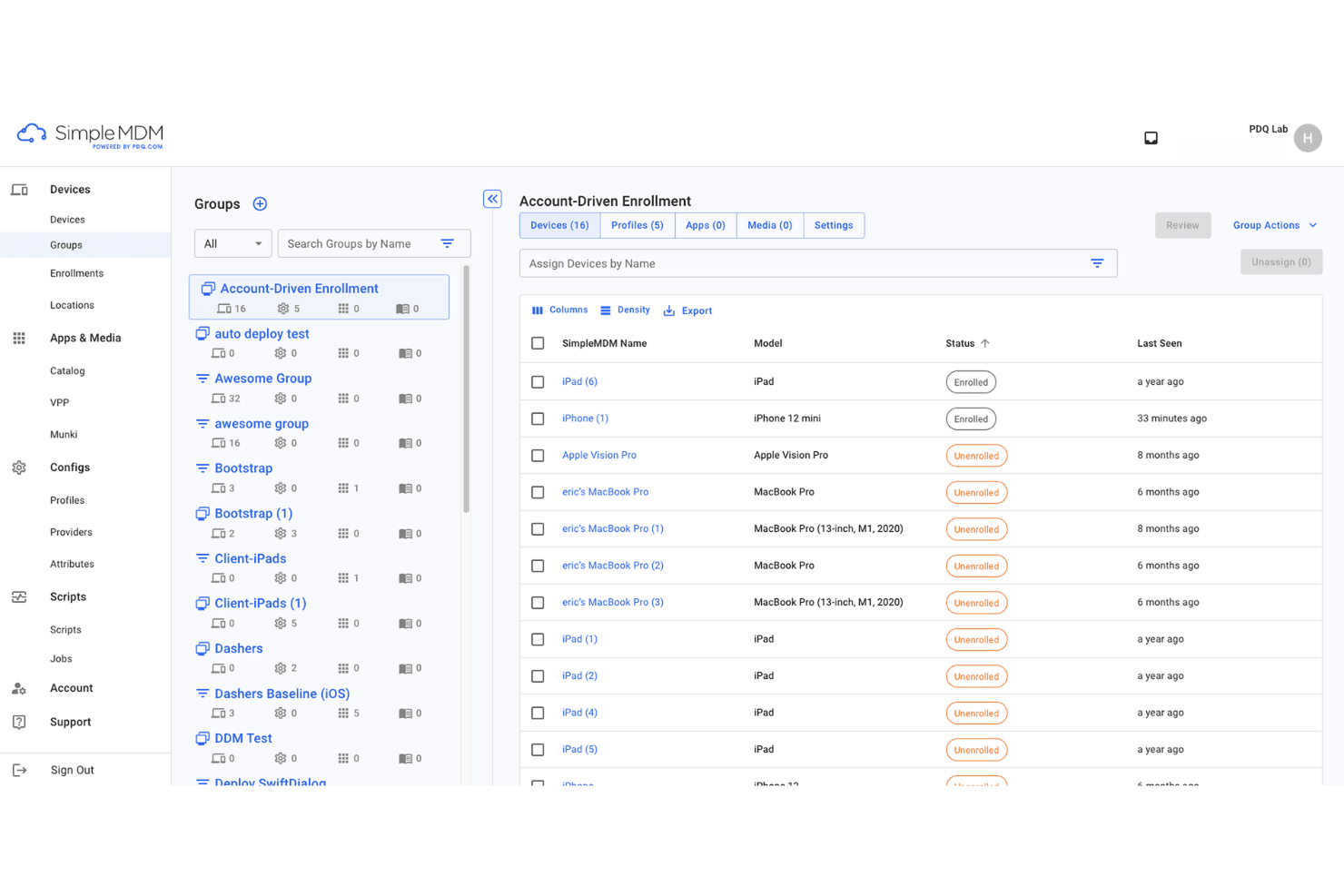
Dashboard di enrollment dispositivi SimpleMDM con monitoraggio dello stato dei dispositivi Apple. SimpleMDM è una piattaforma di gestione dispositivi macOS e iOS per automatizzare la configurazione, la gestione delle app, l’inventario dei dispositivi e l’applicazione delle policy, offrendo funzionalità pensate per gli amministratori che gestiscono ambienti con dispositivi Apple.
Per chi è ideale SimpleMDM?
SimpleMDM è ideale per team IT di aziende di medie dimensioni e istituzioni educative che gestiscono ampi inventari di dispositivi Apple.
Perché ho scelto SimpleMDM
Ho scelto SimpleMDM tra i migliori perché offre un’integrazione Munki dedicata che semplifica la creazione di cataloghi personalizzati di app e la gestione di rollout software complessi. Inoltre, apprezzo la possibilità di automatizzare facilmente il patching e la distribuzione delle app.
Funzionalità principali di SimpleMDM
- Provisioning zero-touch dei dispositivi: Configura e approvvigiona dispositivi Apple da remoto fin dal primo avvio.
- Profili di configurazione granulari: Applica restrizioni e preferenze dettagliate su flotte di dispositivi.
- Blocco e cancellazione remoti: Proteggi dispositivi persi o rubati con blocco centralizzato e rimozione dei dati.
- Gestione di certificati e Wi-Fi: Invia credenziali di rete e certificati direttamente ai dispositivi gestiti.
Integrazioni SimpleMDM
Le integrazioni includono Apple Business Manager, Apple School Manager, Microsoft Azure, OneLogin, Okta, ADFS e JumpCloud.
Pros and Cons
Pros:
- Workflows automatizzati per il deployment software basato su Munki
- Workflows automatizzati per il deployment software basato su Munki
- Creazione semplice di cataloghi app Configurazione rapida della piattaforma
Cons:
- Gestione limitata di Windows o piattaforme diverse da Apple
- Nessun agente locale per il controllo dei dispositivi offline
Learn more about SimpleMDM: Ideale per la gestione multi-OS delle PMI
- Prova gratuita di 14 giorni + piano gratuito disponibile
- Da $2,75/dispositivo/mese (fatturato annualmente)
Visit WebsiteCustomer Rating:4.5/5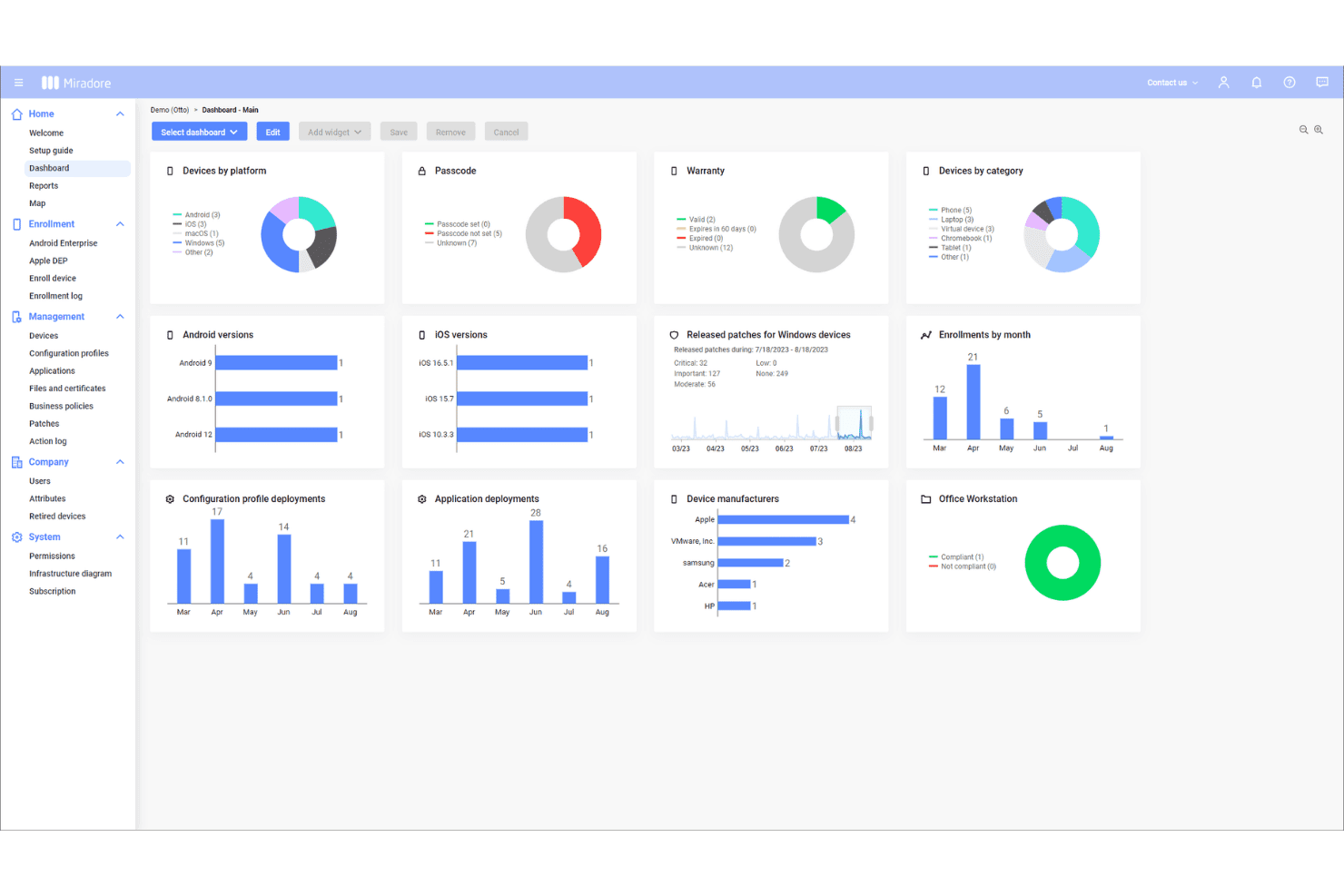
La dashboard di Miradore mostra la gestione di dispositivi Apple, Android e Windows. Miradore è una soluzione di gestione dei dispositivi mobili basata su cloud per le PMI che consente di registrare, monitorare, mettere in sicurezza e controllare dispositivi Apple, Android e Windows da un'unica console web.
A chi è rivolto Miradore?
Gli amministratori IT delle PMI che hanno bisogno di una soluzione semplice per gestire dispositivi Apple e altre piattaforme su più sedi troveranno Miradore particolarmente adatto.
Perché ho scelto Miradore
Ho scelto Miradore perché permette di gestire dispositivi iOS, Android e Windows da una sola dashboard—ideale per le PMI con flotte di dispositivi eterogenee. Il mio team utilizza le configurazioni over-the-air e le funzionalità di blocco/cancellazione remota per mantenere sicuri i dispositivi Apple.
Funzionalità principali di Miradore
- Gestione inventario dispositivi: Traccia informazioni dettagliate su hardware e software per tutti i dispositivi Apple gestiti.
- Whitelist e blacklist delle applicazioni: Specifica quali app possono o non possono essere installate o eseguite sui dispositivi.
- Gestione automatizzata degli aggiornamenti OS: Pianifica ed impone aggiornamenti del sistema operativo su tutti i dispositivi Apple registrati.
- Monitoraggio della conformità: Controlla lo stato dei dispositivi e il livello di sicurezza tramite dashboard di conformità in tempo reale.
Integrazioni di Miradore
Le integrazioni includono TeamViewer, API, Microsoft Active Directory, Microsoft Entra ID e Google Workspace.
Pros and Cons
Pros:
- Console web centralizzata per la supervisione dei dispositivi
- Distribuzione semplice delle policy sui dispositivi Apple
- Supporta flussi di provisioning di dispositivi in massa
Cons:
- Strumenti di reportistica sulla conformità alla sicurezza limitati
- Alcune restrizioni sulle azioni remote sui dispositivi
Learn more about Miradore: Ideale per il monitoraggio in tempo reale dei dispositivi
- Prova gratuita di 14 giorni + demo gratuita disponibile
- Da $8,25/Mac/mese
Visit WebsiteCustomer Rating:4.5/5
La dashboard di Addigy mostra il monitoraggio live dei dispositivi e approfondimenti sullo stato della sicurezza. Addigy è una piattaforma di gestione dei dispositivi Apple che offre ai team IT strumenti per la configurazione centralizzata, la gestione dell'inventario, il monitoraggio remoto, la distribuzione del software e l'applicazione delle politiche di sicurezza su Mac, iPhone e iPad.
Per chi è consigliato Addigy?
Team IT di organizzazioni di medie e grandi dimensioni che devono monitorare, gestire e mettere in sicurezza dispositivi Apple in sedi diverse.
Perché ho scelto Addigy
Ho scelto Addigy tra i migliori perché mi affido al suo monitoraggio in tempo reale dei dispositivi per segnalare rapidamente problemi di conformità e di sistema. Il suo cruscotto live e la rimedizione automatizzata mi permettono di reagire ai cambiamenti critici mano a mano che si verificano, senza dover aspettare ore.
Funzionalità principali di Addigy
- Flussi di lavoro di onboarding automatizzati: Implementa nuovi dispositivi Apple con script personalizzati, configurazioni e app non appena si collegano alla rete.
- Gestione delle patch: Pianifica e distribuisci aggiornamenti di sistema operativo e patch delle applicazioni su tutto il parco dispositivi Apple.
- Portale self-service: Offri agli utenti l’accesso a un catalogo di app e risorse approvate per installazioni semplici e sicure.
- Gestione delle policy: Applica e modifica centralmente le politiche di conformità, sicurezza e utilizzo per dispositivi macOS, iOS e iPadOS.
Integrazioni di Addigy
Le integrazioni comprendono Apple Business Manager, Okta, Google, ThreatDown, Autotask, Backblaze, BrightGauge, CloudRadial, Hudu e Zapier.
Pros and Cons
Pros:
- Monitoraggio in tempo reale per aggiornamenti di stato istantanei
- Applicazione delle policy tra diversi tipi di dispositivi
- Supporta il provisioning zero-touch
Cons:
- Visibilità limitata sui contenuti web
- Meno modelli di reportistica
Learn more about Addigy: Le migliori analisi di sicurezza AI integrate
- Prova gratuita di 30 giorni disponibile
- Da $4,24/dispositivo client/mese
Visit WebsiteCustomer Rating:4.2/5
La dashboard IBM MaaS360 mostra il monitoraggio della conformità e dei rischi dei dispositivi. IBM MaaS360 è una piattaforma di gestione unificata degli endpoint progettata per la gestione dei dispositivi Apple, che offre controllo basato su cloud, monitoraggio in tempo reale, configurazione remota e automazione delle policy su dispositivi iOS, macOS e altri dispositivi.
Per chi è consigliato IBM MaaS360?
Team IT per la sicurezza e la conformità nei settori regolamentati che necessitano di monitoraggio e controllo in tempo reale dei dispositivi Apple su larga scala.
Perché ho scelto IBM MaaS360
Ho scelto IBM MaaS360 perché faccio affidamento sulle sue analisi di sicurezza AI integrate per il rilevamento avanzato delle minacce sui dispositivi Apple. Utilizzo le dashboard alimentate dall'AI Watson per individuare rapidamente comportamenti sospetti e automatizzare gli avvisi di conformità su tutti gli endpoint aziendali.
Funzionalità principali di IBM MaaS360
- Cancellazione remota del dispositivo: Cancella da remoto i dati su dispositivi Apple smarriti o rubati.
- Registrazione automatica dei dispositivi: Configura e registra nuovi dispositivi Apple su larga scala.
- Catalogo applicazioni: Distribuisci, aggiorna e gestisci le app su tutti i dispositivi Apple gestiti.
- Policy di geofencing: Applica regole di sicurezza e accesso in base alla posizione del dispositivo.
Integrazioni IBM MaaS360
Le integrazioni includono Zimperium Mobile Threat Defense (MTD), IBM Verify, IBM Cloud Pak for Security, TeamViewer, Zscaler, Microsoft Azure e Microsoft 365.
Pros and Cons
Pros:
- Evidenzia proattivamente i problemi di sicurezza dei dispositivi
- Supporta controlli granulare sulle policy di dispositivi e app
- Il monitoraggio integrato delle spese mobili tiene traccia dell'utilizzo dei dati
Cons:
- Il controllo remoto richiede una licenza TeamViewer separata
- È necessario il rinnovo manuale per la sincronizzazione Entra ID
Learn more about IBM MaaS360: Ideale per il controllo degli endpoint multipiattaforma
- Prova gratuita di 30 giorni disponibile
- Da $4/utente/mese (fatturato annualmente)

Dashboard di Microsoft Intune con stato di conformità e registrazione dei dispositivi. Microsoft Intune è una piattaforma di gestione unificata degli endpoint di Microsoft progettata per i team IT per gestire dispositivi Apple, Windows e Android, con strumenti per la configurazione dei dispositivi, l'applicazione delle policy di sicurezza e la distribuzione delle applicazioni.
Per chi è indicato Microsoft Intune?
Microsoft Intune è una scelta vincente per gli amministratori IT in organizzazioni di medie e grandi dimensioni con flotte eterogenee di dispositivi Apple e altri dispositivi.
Perché ho scelto Microsoft Intune
Ho scelto Microsoft Intune tra i migliori perché posso creare e applicare policy di sicurezza multipiattaforma per endpoint Apple insieme a dispositivi Windows e Android. Il mio team lo utilizza per automatizzare l'iscrizione dei dispositivi, inviare configurazioni personalizzate di conformità e gestire la distribuzione delle app da un'unica dashboard.
Funzionalità principali di Microsoft Intune
- Gestione del ciclo di vita dei dispositivi: Gestione della fornitura, degli aggiornamenti e della dismissione dell'hardware Apple.
- Azioni da remoto sui dispositivi: Blocca, elimina o ripristina a distanza i dispositivi Apple dalla console.
- Integrazione con Apple Business Manager: Sincronizza e gestisci i dispositivi acquistati tramite Apple Business Manager.
- Distribuzione in massa di applicazioni: Installa, aggiorna o rimuovi app su ampi insiemi di dispositivi gestiti.
Integrazioni di Microsoft Intune
Le integrazioni includono Configuration Manager, Windows Autopilot, Endpoint analytics, Microsoft 365, Microsoft Defender for Endpoint, Windows Autopatch, Managed Google Play, token e certificati Apple e TeamViewer.
Pros and Cons
Pros:
- Gestione centralizzata dei dispositivi Mac e iOS
- Applicazione automatica della conformità dei dispositivi Apple
- Gestione delle distribuzioni aziendali su larga scala
Cons:
- Il controllo delle versioni dei sistemi operativi Apple può risultare restrittivo
- Le impostazioni avanzate di macOS richiedono una configurazione manuale
Learn more about Microsoft Intune: Ideale per il provisioning di profili multi-OS
- Prova gratuita di 30 giorni + demo gratuita disponibile
- Da $1.28/dispositivo/mese (fatturato annualmente)

La dashboard di ManageEngine mostra le piattaforme dei dispositivi e i log delle attività di audit. ManageEngine Mobile Device Manager Plus è una soluzione di gestione degli endpoint per i team IT che necessitano di un controllo centralizzato su dispositivi Apple, Android, Windows, Chrome OS e Linux, con funzionalità per l'iscrizione dei dispositivi, la configurazione e l'applicazione delle policy di sicurezza.
A chi è rivolto ManageEngine Mobile Device Manager Plus?
I team IT di istituti scolastici e medie aziende che gestiscono grandi flotte di dispositivi multi-OS troveranno ManageEngine Mobile Device Manager Plus particolarmente utile.
Perché ho scelto ManageEngine Mobile Device Manager Plus
Ho scelto ManageEngine Mobile Device Manager Plus perché posso fornire e assegnare profili personalizzati su iOS, macOS, Android e Windows da una singola console. Il mio team lo utilizza per automatizzare il deployment delle policy basate su utenti e dispositivi, così non dobbiamo gestire separatamente più piattaforme.
Funzionalità principali di ManageEngine Mobile Device Manager Plus
- Risoluzione remota dei problemi dei dispositivi: Visualizza e controlla da remoto i dispositivi Apple per supporto e diagnosi.
- Gestione della distribuzione delle app: Invia, aggiorna o rimuovi app su dispositivi iOS e macOS via OTA.
- Report di conformità: Genera report sullo stato di conformità dei dispositivi e sulla postura di sicurezza.
- Gestione dei contenuti: Distribuisci, aggiorna e proteggi i documenti sui dispositivi Apple gestiti.
Integrazioni di ManageEngine Mobile Device Manager Plus
Le integrazioni includono ServiceDesk Plus, ServiceNow, Zendesk, Analytics Plus, AssetExplorer, Zoho Creator e Zoho CRM.
Pros and Cons
Pros:
- Deployment automatico delle policy su più sistemi operativi
- Risoluzione remota dei problemi per dispositivi iOS e macOS
Cons:
- Permette la visualizzazione remota dei dispositivi
- Controlli di accesso granulari sono complessi
- Personalizzazione limitata per i modelli di configurazione
Learn more about ManageEngine Mobile Device Manager Plus: Le migliori funzionalità integrate di sicurezza Apple
- Piano gratuito + prova gratuita di 30 giorni disponibile
- Da $0,46/dispositivo/mese

Pannello di sicurezza dei dispositivi Mosyle con controlli remoti e strumenti di protezione. Mosyle è una piattaforma di gestione dei dispositivi Apple che offre configurazione, distribuzione, controlli di conformità e gestione della sicurezza per dispositivi macOS, iOS, iPadOS e tvOS in ambienti aziendali ed educativi.
Per chi è più indicato Mosyle?
Team IT in contesti educativi e aziendali che necessitano di sicurezza e gestione specializzate per flotte miste di dispositivi Apple.
Perché ho scelto Mosyle
Ho scelto Mosyle tra i migliori perché offre un'integrazione stretta di funzionalità di sicurezza specifiche di Apple come la crittografia dei dispositivi, la protezione degli endpoint e i controlli automatici di conformità direttamente dalla piattaforma di gestione. Questo mi permette di occuparmi sia della sicurezza sia della configurazione da un'unica postazione.
Caratteristiche principali di Mosyle
- Distribuzione remota dei dispositivi: Fornisce e configura dispositivi Apple senza la necessità di configurazione in loco.
- Gestione delle applicazioni: Installa, aggiorna e rimuove applicazioni su tutti gli endpoint gestiti.
- Configurazioni basate su profilo: Applica impostazioni mirate in base ai gruppi di utenti o ai tipi di dispositivi.
- Monitoraggio in tempo reale dei dispositivi: Monitora stato hardware e conformità in tempo reale.
Integrazioni Mosyle
Le integrazioni includono Google Workspace, Microsoft 365 for Business, Okta, Ping Identity, AD Federation Services (AD FS) e LDAP Active Directory.
Pros and Cons
Pros:
- Sicurezza nativa per dispositivi Apple
- Strumenti di conformità dettagliati e specifici per Apple
- Include la gestione della crittografia
Cons:
- Personalizzazione limitata per i report di conformità
- Mancano funzionalità avanzate di scripting
Learn more about Mosyle: Ideale per la risoluzione automatizzata dei problemi
- Demo gratuita disponibile
- Da $3/dispositivo/mese

La dashboard di Omnissa mostra il tracciamento dei problemi sui dispositivi e il monitoraggio dell'esperienza. Omnissa Workspace ONE è una piattaforma di gestione unificata degli endpoint per dispositivi Apple che offre gestione delle app, conformità dei dispositivi, enrollment senza intervento manuale e monitoraggio in tempo reale in un ambiente cloud.
Per chi è più indicato Omnissa Workspace ONE?
I team IT nelle grandi aziende hanno bisogno di automatizzare la gestione, il monitoraggio e la risoluzione dei problemi dei dispositivi Apple in ambienti complessi.
Perché ho scelto Omnissa Workspace ONE
Ho scelto Omnissa Workspace ONE perché ho utilizzato il suo motore di automazione per risolvere problemi ricorrenti dei dispositivi Apple prima che arrivassero agli utenti finali. Il mio team si affida a workflow di rimedio intelligenti e a un'applicazione dettagliata delle policy che vanno oltre quanto offerto dalle tipiche piattaforme MDM.
Funzionalità chiave di Omnissa Workspace ONE
- Provisioning senza intervento manuale: Configura e registra a distanza i dispositivi Apple senza configurazioni manuali.
- Gestione del catalogo delle app: Distribuisci e gestisci le applicazioni approvate su tutta la flotta di dispositivi Apple.
- Controlli di crittografia dei dispositivi: Applica policy di crittografia per proteggere i dati sensibili su tutti i dispositivi Apple gestiti.
- Blocco e cancellazione remota: Blocca o cancella a distanza i dispositivi in caso di smarrimento o compromissione.
Integrazioni Omnissa Workspace ONE
Le integrazioni includono Omnissa Access, Okta, Microsoft Entra ID, ServiceNow, Horizon 8, Horizon Cloud e Omnissa Intelligence.
Pros and Cons
Pros:
- Risoluzione automatizzata per i problemi comuni
- Il monitoraggio del punteggio dell'esperienza migliora il supporto
- Controllo dettagliato degli accessi basato sui ruoli per i team IT
Cons:
- Licenza aggiuntiva richiesta per report personalizzati
- Alto carico di memoria server durante i cambi di certificato
Learn more about Omnissa Workspace ONE:
Altri software per la gestione dei dispositivi iOS
Ecco alcune ulteriori opzioni di software per la gestione dei dispositivi iOS che non sono state incluse nella mia selezione, ma che vale comunque la pena valutare:
- 11Ivanti Neurons for MDMIdeale per la registrazione automatica dei dispositivi
- 12FleetI migliori strumenti open source per la gestione
- 13RipplingLa migliore gestione unificata di risorse umane e dispositivi IT
- 14Cisco Meraki Systems ManagerI migliori controlli dei dispositivi basati sulla rete
- 15iMazingMigliore gestione dei backup locali dei dispositivi
Come valuto i software per la gestione dei dispositivi iOS
Valuto questi strumenti su due livelli: i requisiti di base, come il supporto nativo ad ABM e l'iscrizione ADE, e gli elementi distintivi che separano gli strumenti che vale la pena raccomandare da quelli che non lo meritano.
Funzionalità principali (requisiti fondamentali per questo elenco)
Quando seleziono gli strumenti per il mio elenco, assegno a ciascuno un punteggio su una scala da 0 (non offre la funzionalità) a 5 (eccelle in quest'area) per ogni funzionalità principale elencata di seguito. Quindi calcolo il punteggio totale dello strumento come percentuale. Ogni strumento deve raggiungere un punteggio totale minimo del 65% per essere preso in considerazione.
- Supporto al protocollo MDM per iOS: verifico l'integrazione nativa con il framework MDM di Apple e Apple Business Manager, poiché gli strumenti privi di una connettività ABM adeguata creano difficoltà di iscrizione su larga scala.
- Distribuzione senza intervento: ogni strumento dovrebbe supportare l'iscrizione automatizzata dei dispositivi, in modo che i nuovi dipendenti possano estrarre un Mac dalla confezione, connettersi al Wi-Fi e ritrovarsi su un desktop completamente configurato senza interventi dell'IT sul dispositivo.
- Gestione dei profili di configurazione: valuto come ogni strumento gestisce la creazione e l'assegnazione di profili per elementi come Wi-Fi, VPN e payload di restrizione sui dispositivi macOS e iOS.
- Gestione delle app e delle patch: la distribuzione delle app acquistate tramite VPP è un requisito fondamentale, ma valuto anche come ogni strumento gestisce l'applicazione di patch di terze parti per app come Chrome, Zoom e Slack su macOS.
- Applicazione di sicurezza e conformità: lo strumento dovrebbe gestire il deposito delle chiavi FileVault, i criteri per i codici di accesso, le impostazioni di Gatekeeper e il blocco o la cancellazione da remoto, per mantenere gli endpoint iOS allineati alle configurazioni di sicurezza di base.
- Inventario e reportistica: la visibilità in tempo reale sull'hardware dei dispositivi, sul software installato e sulle versioni del sistema operativo è importante. Cerco funzionalità di reportistica che aiutino a individuare rapidamente i dispositivi non conformi o obsoleti.
Una volta ottenuto un elenco di strumenti che soddisfano i criteri, valuto ciò che distingue ciascuna piattaforma.
Fattori distintivi (ciò che differenzia i fornitori)
Ecco come confronto e metto in contrapposizione i diversi fornitori:
Funzionalità di rilievo
L'integrazione con i provider di identità come Okta, Entra ID o Google Workspace è un importante elemento distintivo: collega direttamente l'attendibilità del dispositivo all'autenticazione dell'utente tramite Platform SSO. Valuto anche se uno strumento supporta script personalizzati per attività come l'applicazione di convenzioni di denominazione o la correzione della deriva della configurazione tramite script shell. Un portale self-service in cui i dipendenti installano app approvate senza aprire un ticket riduce il volume delle richieste al supporto. Anche il rilevamento degli endpoint integrato è importante, poiché le minacce specifiche per Mac vengono individuate meglio da strumenti ottimizzati per i comportamenti di macOS.
Oltre le funzionalità
Le certificazioni di conformità sono molto importanti in questo ambito. Verifico se un fornitore possiede la certificazione SOC 2 Type II o ISO 27001 e offre modelli predefiniti per framework come CIS Benchmarks o NIST 800-53. Anche la struttura dei prezzi è un altro fattore che considero: le licenze per dispositivo rispetto a quelle per utente modificano significativamente il costo totale quando i dipendenti utilizzano sia un Mac sia un iPhone. Valuto inoltre le integrazioni con l'ecosistema, in particolare i connettori per le piattaforme SIEM e gli strumenti ITSM come ServiceNow, poiché gli MDM per iOS raramente operano in isolamento rispetto a uno stack più ampio di sicurezza e operazioni.
Come scegliere il software per la gestione dei dispositivi iOS
È facile perdersi tra lunghi elenchi di funzionalità e strutture di prezzo complesse. Per aiutarti a rimanere concentrato mentre affronti il tuo specifico processo di selezione del software, ecco una lista di fattori da tenere presenti:
| Fattore | Cosa considerare |
|---|---|
| FattoreScalabilità | Cosa considerareLa soluzione è in grado di gestire il numero attuale e previsto di dispositivi iOS? Verifica i prezzi per dispositivo e i limiti relativi alle unità organizzative. |
| FattoreIntegrazioni | Cosa considerareSi connette nativamente al tuo provider di identità, all'inventario dei dispositivi, agli strumenti di gestione dei ticket o di sicurezza della rete? Verifica il supporto per iOS Business Manager. |
| FattorePersonalizzazione | Cosa considerarePotrai creare criteri granulari, automatizzare i flussi di lavoro o adattare il pannello di controllo ai tuoi flussi di lavoro? Se possibile, prova i controlli amministrativi durante un periodo di prova. |
| FattoreFacilità d'uso | Cosa considerareIl pannello di controllo dell'amministratore è intuitivo? Il personale può registrare e gestire rapidamente i dispositivi senza una formazione approfondita o processi manuali? |
| FattoreImplementazione e onboarding | Cosa considerareQuanto tempo richiederanno la distribuzione dei dispositivi e la configurazione dei criteri? Informati sul supporto del fornitore, sugli strumenti di importazione e sull'assistenza alla migrazione per le flotte numerose. |
| FattoreCosto | Cosa considerareI costi di licenza, supporto e aggiornamento sono prevedibili? Calcola la spesa mensile e annuale prevista, non solo il prezzo indicato. |
| FattoreMisure di sicurezza | Cosa considerareLa piattaforma è in linea con i tuoi requisiti di conformità e gli standard interni in materia di privacy dei dati, crittografia e controlli degli accessi? |
| FattoreDisponibilità del supporto | Cosa considerarePuoi accedere tempestivamente al supporto nella tua area geografica e nel tuo fuso orario? Informati sulla chat dal vivo, sugli orari dell'assistenza telefonica e sulle procedure di escalation. |
Che cos'è il software per la gestione dei dispositivi iOS?
Il software per la gestione dei dispositivi iOS è una piattaforma per registrare, configurare, proteggere e monitorare centralmente flotte di dispositivi iOS, iPadOS e macOS. I team IT lo utilizzano per automatizzare il provisioning dei dispositivi, distribuire criteri, applicare la conformità e fornire assistenza agli utenti da remoto. Questi strumenti aiutano a gestire gli aggiornamenti, limitare le funzioni e proteggere i dati sensibili su tutti i dispositivi iOS gestiti di un'organizzazione.
Funzionalità
Quando selezioni un software per la gestione dei dispositivi iOS, presta attenzione alle seguenti funzionalità chiave:
- Registrazione automatizzata dei dispositivi: Registra nuovi iPhone, iPad o Mac in blocco tramite ABM o Apple School Manager, così saranno pronti all'uso subito dopo l'estrazione dalla confezione, riducendo i tempi di configurazione manuale per i team IT.
- Distribuzione e aggiornamento delle app: Installa, aggiorna o rimuovi da remoto le applicazioni sui dispositivi gestiti per garantire che gli utenti dispongano degli strumenti giusti e utilizzino sempre software supportato dall'App Store.
- Blocco e cancellazione da remoto: Blocca o cancella da remoto i dispositivi smarriti, rubati o dismessi per proteggere i dati sensibili e ridurre il rischio di accessi non autorizzati.
- Gestione di criteri e configurazioni: Definisci e applica impostazioni di sicurezza, dettagli Wi-Fi, impostazioni VPN, filtri dei contenuti e restrizioni sui codici di accesso tra i dispositivi per mantenere conformità e coerenza.
- Pannello per conformità e report: Monitora lo stato di conformità dei dispositivi e degli utenti, genera report sul livello di sicurezza e identifica rapidamente i dispositivi che non rispettano più i criteri.
- Monitoraggio dell'inventario dei dispositivi: Mantieni un inventario in tempo reale di tutti i dispositivi iOS gestiti, inclusi i dettagli hardware, i payload attivi e le versioni software, per supportare la gestione e la pianificazione delle risorse.
- Monitoraggio della posizione e delimitazione geografica: Monitora la posizione dei dispositivi e applica restrizioni basate sulla posizione, come la disattivazione di funzionalità o il blocco dell'accesso al di fuori dei confini approvati.
- Integrazione con identità e accessi: Connettiti ai provider di identità per applicare criteri basati sugli utenti, gestire l'accesso singolo (SSO) e l'autenticazione e richiedere accessi sicuri o l'autenticazione a più fattori su tutti i dispositivi.
- Portali autonomi: Consenti agli utenti di installare app, reimpostare le password o gestire la registrazione dei dispositivi senza l'intervento dell'IT, sia che utilizzino un iPad condiviso, una distribuzione aziendale o modelli BYOD tramite la registrazione degli utenti.
- Controlli amministrativi basati sui ruoli: Assegna diversi livelli di autorizzazione agli amministratori, come MSP esterni o team interni, così da poter delegare la gestione dei dispositivi senza compromettere la sicurezza o la conformità.
Vantaggi
L'implementazione di un software per la gestione dei dispositivi iOS offre diversi vantaggi al tuo team e alla tua azienda. Ecco alcuni dei vantaggi che puoi aspettarti:
- Visibilità centralizzata dei dispositivi: Monitora e gestisci tutti i dispositivi iOS aziendali tramite un unico pannello di controllo per un controllo e una supervisione migliori su iOS, macOS, iPadOS, tvOS e persino Visionos.
- Applicazione automatizzata della sicurezza: Imposta e applica automaticamente i criteri di sicurezza sui dispositivi, riducendo al minimo gli errori manuali e proteggendo i dati sensibili.
- Configurazione più rapida dei dispositivi: Permetti ai nuovi dipendenti di iniziare rapidamente a lavorare grazie alla registrazione automatizzata dei dispositivi e ai profili di configurazione preconfigurati.
- Supporto alla conformità normativa: Monitora lo stato di conformità e genera report dettagliati per contribuire al rispetto degli standard di sicurezza del settore o dell'organizzazione su ogni endpoint.
- Riduzione del carico di lavoro dell'assistenza: Fornisci agli utenti strumenti autonomi, risolvi i problemi da remoto e automatizza le attività IT comuni per alleggerire il carico quotidiano dell'assistenza.
- Esperienza utente coerente: Offri app, accessi e impostazioni standardizzati, così che tutti gli utenti dispongano dello stesso ambiente di lavoro sicuro e produttivo.
- Funzionalità di risposta da remoto: Blocca, cancella o invia aggiornamenti ai dispositivi da remoto per gestire incidenti o cambiamenti nelle esigenze aziendali senza richiedere l'accesso fisico.
Costi e prezzi
La scelta di un software per la gestione dei dispositivi iOS richiede la comprensione dei vari modelli e piani tariffari disponibili. I costi variano in base alle funzionalità, alle dimensioni del team, agli extra e ad altri fattori. La tabella seguente riepiloga i piani più comuni, i relativi prezzi medi e le funzionalità tipicamente incluse nelle soluzioni software per la gestione dei dispositivi iOS:
Tabella comparativa dei piani
| Tipo di piano | Prezzo medio | Funzionalità comuni |
|---|---|---|
| Tipo di pianoPiano gratuito | Prezzo medio$0 | Funzionalità comuniSupporta un numero limitato di dispositivi, include la registrazione di base, la gestione di base delle app e un supporto limitato. |
| Tipo di pianoPiano personale | Prezzo medio$5-$10/user/month | Funzionalità comuniAggiunge la distribuzione avanzata delle app, il blocco e la cancellazione da remoto, il monitoraggio dell'inventario dei dispositivi e il supporto via e-mail. |
| Tipo di pianoPiano aziendale | Prezzo medio$10-$25/user/month | Funzionalità comuniInclude l'applicazione dei criteri, i pannelli di conformità, l'integrazione con i provider di identità, i report e i controlli amministrativi. |
| Tipo di pianoPiano aziendale avanzato | Prezzo medio$25-$50/user/month | Funzionalità comuniOffre analisi avanzate della sicurezza, conformità automatizzata, delimitazione geografica, configurazione personalizzata, supporto premium e SLA. |
Domande frequenti sul software per la gestione dei dispositivi iOS
Ecco alcune risposte alle domande comuni sul software per la gestione dei dispositivi iOS:
Posso gestire sia i Mac che gli iPhone con lo stesso strumento?
Sì, la maggior parte dei software per la gestione dei dispositivi Apple consente di gestire Mac, modelli di iPhone, modelli di iPad e talvolta persino dispositivi Apple TV da un’unica console di amministrazione. Questo approccio unificato all’interno dell’ecosistema Apple semplifica l’applicazione delle policy e il monitoraggio dell’inventario su tutti i dispositivi hardware.
È necessario Apple Business Manager per utilizzare un software per la gestione dei dispositivi?
No, ma l’integrazione con Apple Business Manager consente l’iscrizione automatica dei dispositivi e un controllo più approfondito. Senza questa integrazione, potrebbe essere necessario iscrivere manualmente i dispositivi utilizzando strumenti come Apple Configurator, con tempi più lunghi e una minore automazione per i parchi dispositivi più grandi.
Cosa succede se un dipendente perde il dispositivo gestito?
È possibile bloccare, localizzare o inizializzare da remoto i dispositivi Apple smarriti o rubati tramite la piattaforma di gestione, proteggendoli immediatamente. In questo modo si proteggono i dati aziendali e si impedisce l’accesso non autorizzato anche se il dispositivo si trova fuori dall’ufficio.
Come vengono gestiti gli aggiornamenti e le nuove versioni di iOS/macOS?
La maggior parte delle piattaforme supporta la distribuzione degli aggiornamenti e il controllo del momento in cui un nuovo sistema operativo viene installato sui dispositivi gestiti. In questo modo i team IT possono testare la compatibilità prima di installare gli aggiornamenti del sistema operativo e contribuire a evitare interruzioni.
L'IT può controllare gli account personali sull'hardware di proprietà dell'azienda o dei dipendenti?
No. Sebbene il software MDM consenta alle organizzazioni di gestire configurazioni aziendali, applicazioni e parametri di sicurezza, non può accedere ai dati personali, agli account iCloud privati o alle foto personali né gestirli.
Qual è il tempo di configurazione tipico per un nuovo dispositivo?
Con l’iscrizione automatica dei dispositivi, un nuovo dispositivo può essere configurato per gli utenti in pochi minuti. La configurazione manuale richiede più tempo, ma la maggior parte degli strumenti offre guide dettagliate e modelli per velocizzare il processo.