

Nel mondo dello sviluppo software, caratterizzato da ritmi frenetici, servono strumenti in grado di stare al passo. Il software di runtime può rivelarsi una vera salvezza, aiutando il tuo team a gestire le risorse e migliorare le prestazioni senza grattacapi.
Ho trascorso anni a recensire software e so quanto possa essere difficile trovare la soluzione giusta. Cerchi qualcosa che soddisfi le tue esigenze senza sommergerti di funzionalità inutili.
In questo articolo condividerò le mie migliori scelte di software di runtime. Per ogni opzione troverai una valutazione onesta e imparziale, così potrai prendere una decisione informata per il tuo team. Iniziamo e troviamo la soluzione migliore per te.
Perché fidarsi dei nostri consigli sui software
6,700+
Reviews
20
Industry experts
16+
Evaluation factors
14
Years
Il nostro team testa e recensisce software dal 2012. In quanto leader tecnologici noi stessi, sappiamo quanto sia difficile — e importante — scegliere il software giusto.
Per questa guida, abbiamo valutato gli strumenti attraverso test praticie ricerche indipendenti, assegnando un punteggio agli strumenti in base ai nostri criteri di selezione.
Le nostre recensioni riflettono il nostro giudizio editoriale umano, non un discorso di vendita.
Revisori esperti:
- Paulo Gardini MiguelDirettore tecnico
 Tim FisherVP dell'IA
 Gabriel RosasTech Lead e architetto software
 Christhian GruhnTech Lead e architetto della piattaforma

Tabella di confronto dei software di runtime
La tabella seguente confronta i dettagli dei prezzi delle mie migliori selezioni di software di runtime.
| Tool | Best For | Trial Info | Price | ||
|---|---|---|---|---|---|
| 1 | Ideale per app multilinguaggio su un unico runtime | Non disponibile | Piano gratuito disponibile | Website | |
| 2 | Ideale per applicazioni Java modulari | Non disponibile | Gratuito e a codice aperto | Website | |
| 3 | Ideale per l'esecuzione di container senza daemon e senza root | Piano gratuito disponibile | Piano gratuito disponibile | Website | |
| 4 | Ideale per un runtime per container standard del settore | Non disponibile | Prezzo su richiesta | Website | |
| 5 | Ideale per l'isolamento dell'esecuzione delle app Android | Non disponibile | Prezzi su richiesta | Website | |
| 6 | Ideale per l'interoperabilità tra linguaggi | Piano gratuito disponibile | Prezzi su richiesta | Website | |
| 7 | Ideale per applicazioni di rete scalabili | Piano gratuito disponibile | Gratuito e a codice sorgente aperto | Website | |
| 8 | Ideale per la programmazione concorrente | Non disponibile | Gratuito e open source | Website | |
| 9 | Ideale per l'esecuzione di funzioni serverless guidate da eventi | Piano gratuito disponibile | A partire da $0.20 per 1 milione di richieste/mese | Website | |
| 10 | Ideale per l'esecuzione di JS/TS sicura per impostazione predefinita | Piano gratuito disponibile | A partire da $20/mese | Website |


Recensione dei migliori software di runtime
Di seguito trovi i miei riepiloghi dettagliati dei migliori software di runtime entrati nella mia selezione. Le mie recensioni offrono uno sguardo approfondito alle caratteristiche principali, ai vantaggi & svantaggi, alle integrazioni e ai casi d’uso ideali di ogni strumento, per aiutarti a trovare quello più adatto a te.

.NET supporta lo sviluppo di app web, mobile, cloud e di intelligenza artificiale. .NET è la piattaforma runtime gratuita e open source di Microsoft che esegue codice scritto in C#, F# e Visual Basic per carichi di lavoro web, cloud, desktop, mobile e IoT, utilizzando un CLR condiviso con opzioni di esecuzione JIT, AOT nativa e Mono.
Per chi è più adatto .NET?
.NET è particolarmente adatto agli ingegneri di piattaforma e agli architetti software che sviluppano sistemi per più carichi di lavoro e devono eseguire C#, F# o Visual Basic su un unico runtime coerente tra cloud, container e desktop.
Perché ho scelto .NET
.NET si guadagna un posto tra le migliori opzioni della mia selezione perché C#, F# e Visual Basic vengono tutti compilati ed eseguiti sullo stesso CLR; questo significa che, man mano che la base di codice cresce tra diversi linguaggi, non è necessario gestire runtime separati. Apprezzo in particolare il rigore nella gestione delle versioni: le release con numerazione pari ricevono tre anni di supporto LTS, con una data di fine supporto pubblicata, quindi la pianificazione della produzione non si basa su supposizioni. La compilazione AOT nativa offre binari compatti e ad avvio rapido quando l'overhead del JIT è un problema, mentre la modalità server del GC generazionale si adatta in modo efficiente ai carichi di lavoro ad alta produttività.
Funzionalità principali di .NET
- Compilazione AOT nativa: compila l'app in anticipo in un binario nativo autonomo, eliminando l'overhead del riscaldamento del JIT e riducendo le dimensioni dell'immagine del container.
- Modello di app distribuite Aspire: un livello di orchestrazione basato sul codice che configura automaticamente log, tracce e metriche OpenTelemetry tra i servizi senza strumentazione manuale.
- Ecosistema di pacchetti NuGet: offre accesso a oltre 300.000 pacchetti con versionamento, che coprono ogni ambito, dall'accesso ai dati alle integrazioni con l'intelligenza artificiale.
- Versionamento affiancato dei runtime: consente di installare ed eseguire più versioni di .NET sulla stessa macchina, così applicazioni diverse possono essere indirizzate a runtime differenti senza conflitti.
Integrazioni di .NET
.NET offre oltre 100 integrazioni Aspire selezionate, tra cui PostgreSQL, Redis, Dapr e Azure Container Apps, oltre a integrazioni native nell'ecosistema Microsoft. Supporta GitHub Actions, Docker, OpenTelemetry, provider di dati Entity Framework Core e integrazioni personalizzate tramite API.
Pros and Cons
Pros:
- Esegue C#, F# e VB su un unico runtime
- Osservabilità integrata tramite OpenTelemetry e Aspire
- Installazioni affiancate delle versioni per aggiornamenti più sicuri
Cons:
- Nessuna sandbox nel runtime per codice non attendibile
- Gli aggiornamenti principali possono introdurre modifiche incompatibili
Learn more about .NET: Ideale per applicazioni Java modulari
- Non disponibile
- Gratuito e a codice aperto

Console web di Apache Karaf Apache Karaf è un ambiente di esecuzione Java a codice aperto che supporta la distribuzione di applicazioni modulari tramite l'isolamento dei bundle basato su OSGi, la distribuzione a caldo, la configurazione dinamica e strumenti integrati per il clustering, la sicurezza e l'osservabilità.
A chi è più adatto l'ambiente di esecuzione Apache Karaf?
Apache Karaf è particolarmente adatto agli architetti software e agli ingegneri di piattaforma che sviluppano applicazioni Java modulari con la necessità di un rigoroso isolamento delle dipendenze e di una configurazione dinamica in ambienti complessi composti da più bundle.
Perché ho scelto l'ambiente di esecuzione Apache Karaf
Apache Karaf è incluso nella mia lista ristretta perché gestisce molto bene il vero isolamento delle dipendenze a livello di bundle per le applicazioni Java modulari. Ho lavorato con configurazioni in cui due componenti aggiuntivi richiedevano versioni in conflitto della stessa libreria all'interno di una singola JVM, e il caricamento delle classi OSGi per bundle di Karaf risolve il problema in modo pulito, senza soluzioni alternative. Anche il sistema di gestione delle funzionalità rende la gestione delle dipendenze nelle distribuzioni complesse molto più prevedibile, risolvendo automaticamente requisiti e funzionalità al momento dell'installazione.
Caratteristiche principali dell'ambiente di esecuzione Apache Karaf
- Monitoraggio Karaf Decanter: un sottoprogetto integrato per l'osservabilità che raccoglie metriche JMX, log ed eventi delle applicazioni, inoltrandoli poi a sistemi di back-end come Elasticsearch, Prometheus e Grafana Loki.
- Clustering Karaf Cellar: un livello di clustering basato su Hazelcast che gestisce il rilevamento dei nodi, la sincronizzazione delle funzionalità e della configurazione tra i gruppi del cluster e le chiamate remote OSGi distribuite.
- Accesso alla console remota tramite SSH: un server SSHd integrato che offre accesso completo alla shell di un'istanza Karaf in esecuzione da qualsiasi client SSH, incluso l'accesso al filesystem tramite SFTP e SCP.
- Sicurezza RBAC basata su JAAS: un sistema di controllo degli accessi basato sui ruoli e fondato su JAAS, che governa i comandi della shell e gli oggetti JMX, con supporto per i moduli di accesso LDAP per l'integrazione con i sistemi di identità aziendali.
Integrazioni dell'ambiente di esecuzione Apache Karaf
L'ambiente di esecuzione Apache Karaf dispone di integrazioni documentate con Apache Felix, Eclipse Equinox, Apache Camel, Spring, Spring Boot, CDI, Blueprint, Pax Web, Pax JDBC e Pax Logging. Supporta inoltre repository Maven, pacchettizzazione Docker, JMX, SSH e servizi OSGi personalizzati.
Pros and Cons
Pros:
- Isolamento dei bundle OSGi per dipendenze in conflitto
- SSH e JMX integrati per la gestione remota
- Modifiche alla configurazione dinamica senza riavviare l'ambiente di esecuzione
Cons:
- Esclusivo per JVM, senza supporto per l'esecuzione in più linguaggi
- Nessun SLA ufficiale del fornitore né supporto a pagamento
Learn more about Apache Karaf Runtime: Ideale per l'esecuzione di container senza daemon e senza root
- Piano gratuito disponibile
- Piano gratuito disponibile
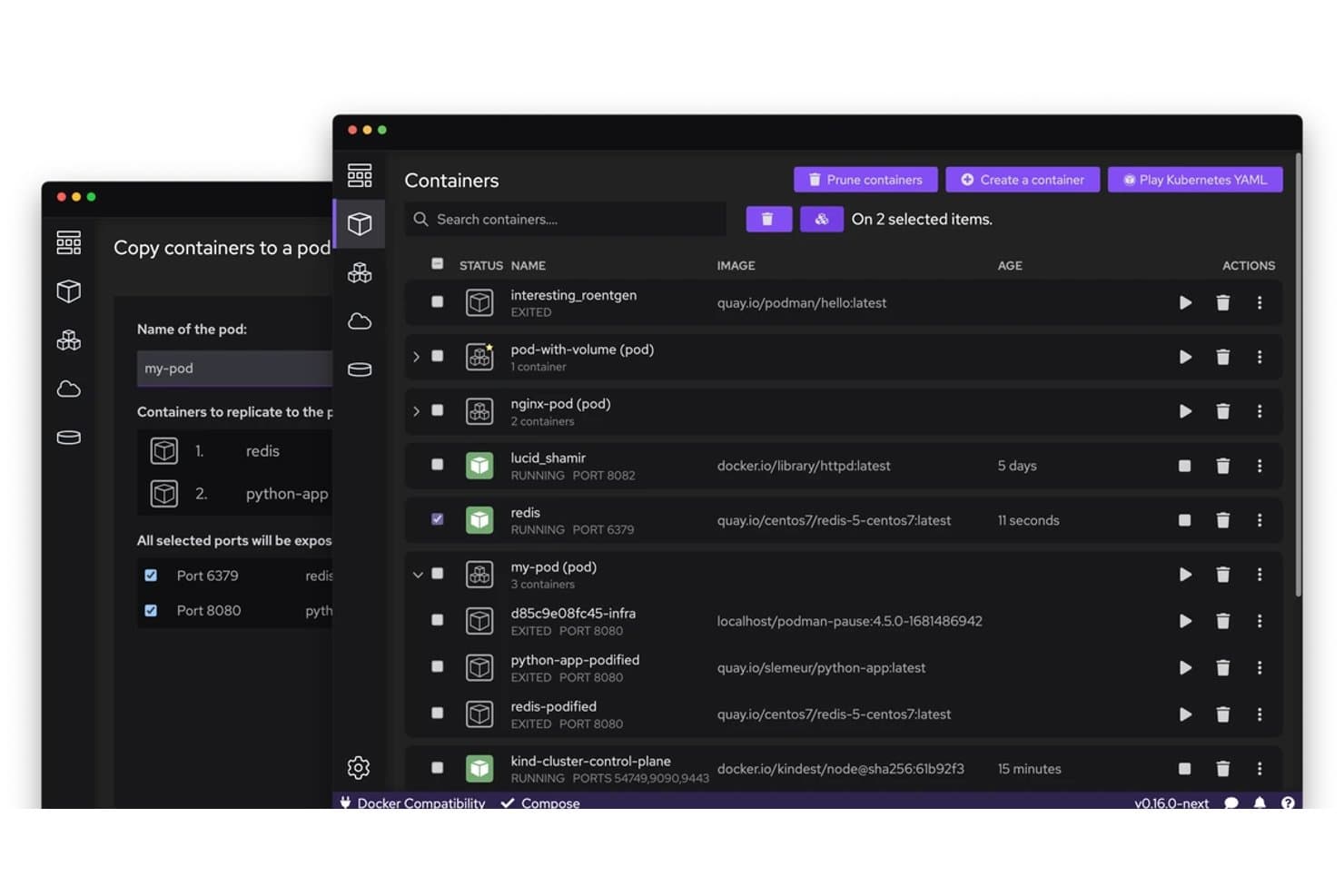
Podman consente agli utenti di copiare e gestire visivamente i container nei pod. Podman è un motore open source per il runtime dei container che consente di eseguire, gestire e orchestrare container e pod OCI utilizzando un'architettura senza daemon e senza root, con comandi CLI compatibili con Docker e una profonda integrazione con systemd tramite Quadlet.
Per chi è più adatto Podman?
Podman è particolarmente adatto agli ingegneri DevOps e ai team delle piattaforme che eseguono carichi di lavoro Linux e necessitano di un runtime compatibile con Docker senza i rischi per la sicurezza di un daemon con privilegi.
Perché ho scelto Podman
Ho scelto Podman come una delle opzioni migliori perché la sua architettura senza daemon e senza root modifica concretamente il livello di sicurezza dell'esecuzione dei container: i container vengono eseguiti come processi figlio della sessione dell'utente, non sotto un daemon root con privilegi. Ciò significa che un container compromesso non può effettuare un'escalation attraverso un socket del daemon come può accadere in Docker. Mi affido inoltre a Quadlet per l'affidabilità in produzione, poiché consente di dichiarare i container come unità systemd che si avviano all'avvio del sistema, rispettano le dipendenze e si riavviano in caso di errore senza alcuno script wrapper personalizzato.
Funzionalità principali di Podman
- CLI compatibile con Docker: Podman riproduce la sintassi dei comandi Docker quasi esattamente, quindi è possibile eseguire
podman pull,podman runepodman pssenza dover reimparare il proprio flusso di lavoro. - File delle unità systemd Quadlet: È possibile dichiarare i container come file di unità
.container,.podo.kubeche systemd gestisce all'avvio, con ordinamento delle dipendenze e criteri di riavvio. - Checkpoint e ripristino con CRIU: È possibile acquisire un'istantanea dello stato completo della memoria di un container in esecuzione, esportarla come archivio e ripristinarla sullo stesso host o su un host diverso.
- Controlli delle risorse con cgroups v2: È possibile impostare limiti per container relativi a CPU, memoria, PID e I/O utilizzando flag standard conformi alle specifiche OCI, applicati direttamente attraverso la gerarchia Linux cgroups v2.
Integrazioni di Podman
Podman si integra con Buildah, Skopeo, CRI-O, Kubernetes, OpenShift, GitHub Actions, Cirrus CLI, client compatibili con Docker e registri OCI. La sua API REST compatibile con Docker supporta integrazioni personalizzate e flussi di lavoro CI/CD.
Pros and Cons
Pros:
- Esegue i container senza un daemon persistente con privilegi
- Consente di gestire i container come servizi systemd
- Supporta operazioni avanzate di checkpoint e ripristino
Cons:
- I flussi di lavoro Compose differiscono da Docker Compose standard
- Gli aggiornamenti possono interrompere la compatibilità con le versioni precedenti e i flussi di lavoro
Learn more about Podman: Ideale per un runtime per container standard del settore
- Non disponibile
- Prezzo su richiesta

funzionalità di assistenza per i container del runtime containerd containerd è un demone runtime per container open source che gestisce l'intero ciclo di vita dei container, inclusi il trasferimento e l'archiviazione delle immagini, l'esecuzione delle attività tramite runtime conformi a OCI, gli snapshotter, la gestione delle sandbox e la gestione multi-tenant basata sugli spazi dei nomi in Linux e Windows.
A chi è più adatto containerd?
containerd è particolarmente adatto agli ingegneri delle piattaforme e ai team DevOps che eseguono Kubernetes in produzione e hanno bisogno di un runtime stabile e leggero su cui costruire, anziché di uno strumento completo per la gestione dei container.
Perché ho scelto containerd
containerd si è guadagnato un posto tra le migliori soluzioni della mia selezione perché è il runtime effettivo alla base di Kubernetes su EKS, AKS e GKE, il che lo rende di fatto lo standard del settore, non soltanto un concorrente. Apprezzo in particolare la sua architettura shim Runtime v2, che mantiene uno shim per ogni container, consentendo al demone di riavviarsi senza interrompere i carichi di lavoro in esecuzione. La sua API delle sandbox, stabile dalla versione 2.0, permette inoltre ai team delle piattaforme di modellare nativamente la semantica dei pod Kubernetes, inclusa l'isolamento in stile microVM, senza aggiungere astrazioni esterne.
Funzionalità principali di containerd
- Framework di plugin NRI: Un'interfaccia indipendente dal runtime per inserire logiche personalizzate di gestione delle risorse, come l'assegnazione NUMA/CPU, nella creazione dei container senza modificare il demone principale.
- Tracciamento OTel: Tracciamento OpenTelemetry integrato sulle chiamate gRPC, configurabile tramite le variabili d'ambiente standard
OTEL_*e un pacchetto di strumentazione manuale per gli span personalizzati. - Plugin per la verifica delle immagini: Un gancio binario esterno che approva o blocca il download di un'immagine in base al descrittore OCI, consentendo di applicare criteri per le firme o per la denominazione prima che il contenuto venga archiviato.
- Checkpoint e ripristino: Acquisisce lo stato di un'attività in esecuzione tramite CRIU, invia il checkpoint a un registro e lo ripristina in un nuovo container su qualsiasi host compatibile.
Integrazioni di containerd
containerd si integra nativamente con Kubernetes tramite il suo plugin CRI integrato e supporta Docker Engine, Docker Desktop, runc, CRIU e OpenTelemetry. Il suo client Go e l'API gRPC supportano integrazioni personalizzate, mentre nerdctl offre un'interfaccia a riga di comando compatibile con Docker.
Pros and Cons
Pros:
- Esecuzione nativa su Linux e Windows
- Isolamento avanzato con supporto agli spazi dei nomi utente
- Tracciamento OpenTelemetry integrato direttamente nel demone
Cons:
- Nessuna gestione integrata della rete o dei log
- Nessun supporto commerciale o SLA offerto
Learn more about containerd: Ideale per l'isolamento dell'esecuzione delle app Android
- Non disponibile
- Prezzi su richiesta

Il Runtime Android (ART) si trova all'interno della struttura software a livelli di Android. Il Runtime Android (ART) è il motore di runtime gestito di Android che esegue il bytecode DEX utilizzando un modello ibrido AOT, JIT e interprete, combinato con la ricompilazione guidata dai profili, la raccolta simultanea dei rifiuti e l'isolamento delle app applicato dal sistema operativo.
Per chi è più indicato il Runtime Android (ART)?
ART è particolarmente adatto agli ingegneri di piattaforma e agli architetti software che sviluppano o ottimizzano immagini di sistema Android e necessitano di un controllo preciso sull'esecuzione, sulla memoria e sull'isolamento delle app a livello di sistema operativo.
Perché ho scelto il Runtime Android (ART)
ART si è guadagnato un posto nella mia lista ristretta perché nessun altro runtime offre un isolamento dell'esecuzione delle app Android altrettanto completo. Sono particolarmente colpito dal modo in cui l'isolamento viene applicato al di sotto del runtime stesso: ogni app riceve un UID Linux univoco, un dominio SELinux dedicato e il filtraggio delle chiamate di sistema tramite seccomp-bpf, perciò il contenimento non è soltanto una promessa del runtime, ma una garanzia a livello del kernel. Se a questo si aggiunge l'esecuzione ibrida AOT/JIT di ART con la ricompilazione guidata dai profili, si ottiene un runtime che rafforza la sicurezza senza sacrificare le prestazioni.
Caratteristiche principali del Runtime Android (ART)
- Ciclo di ricompilazione guidato dai profili: ART unisce i profili JIT provenienti dal cloud e quelli registrati localmente durante i periodi di inattività, quindi ricompila i metodi più utilizzati tramite un demone in background.
- Selezione del filtro del compilatore: gli ingegneri di piattaforma impostano strategie di compilazione per modulo —
verify,speed,speed-profile— tramite i flag didex2oate le variabili dei file make per la preottimizzazione dex. - Raccoglitore di rifiuti con copia simultanea: il raccoglitore CC predefinito deframmenta l'heap simultaneamente utilizzando una barriera di lettura, con una singola pausa di dimensione fissa che non aumenta con le dimensioni dell'heap.
- Debugger basato su JDWP con punti di osservazione dei campi: ART supporta il protocollo standard Java di debug via connessione, inclusi i punti di osservazione che sospendono l'esecuzione durante le letture o le scritture dei campi e le query sulle istanze attive.
Integrazioni del Runtime Android (ART)
ART si integra con il sistema di compilazione dell'Android Open Source Project,
adb, il gestore dei pacchetti Android, Perfetto, Systrace, JDWP e i profili cloud di Google Play. Supporta inoltre la connettività personalizzata tramite JNI,libnativebridgeelibnativeloader.Pros and Cons
Pros:
- Esecuzione ibrida AOT e JIT collaudata in produzione
- Isolamento delle app applicato dal kernel tramite SELinux e seccomp
- Profiler di campionamento integrato e debug JDWP
Cons:
- Ambito limitato ai dispositivi e ai sistemi operativi Android
- La messa a punto avanzata richiede l'accesso root o modifiche in fase di compilazione
Learn more about Android Runtime (ART): Ideale per l'interoperabilità tra linguaggi
- Piano gratuito disponibile
- Prezzi su richiesta
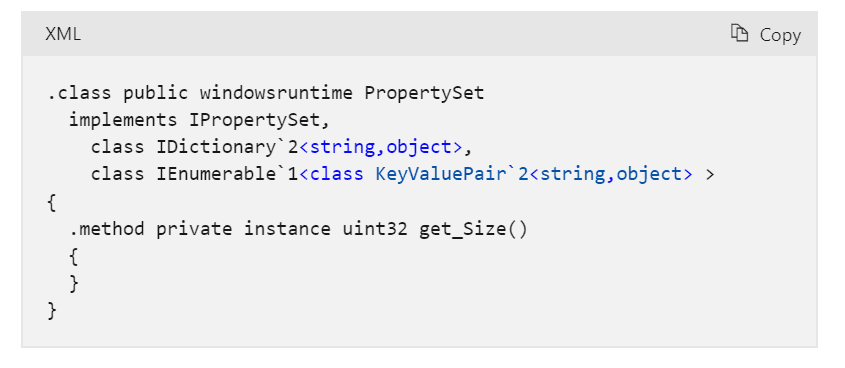
Vista parziale di PropertySet dopo la proiezione di Common Language Runtime Microsoft Common Language Runtime (CLR) è il motore di esecuzione gestito al centro della piattaforma .NET, che combina la compilazione JIT e AOT nativa, la gestione automatica della memoria, il supporto per più linguaggi e strumenti di diagnostica integrati per eseguire codice gestito su Windows, Linux e macOS.
A chi è più adatto Microsoft Common Language Runtime (CLR)?
CLR è una soluzione particolarmente adatta ai team di sviluppo e di piattaforma che realizzano applicazioni .NET in più linguaggi e necessitano di un ambiente di esecuzione gestito affidabile e multipiattaforma.
Perché ho scelto Microsoft Common Language Runtime (CLR)
Ho incluso CLR tra le mie scelte principali perché la sua interoperabilità tra linguaggi è davvero senza pari: C#, F#, Visual Basic e persino linguaggi di terze parti come COBOL possono condividere tipi, ereditare dalle classi degli altri linguaggi e gestire eccezioni oltre i confini dei linguaggi all'interno di un singolo ambiente di esecuzione. Il sistema di tipi comune lo impone a livello di specifica, quindi non ci si limita a sperare che tutto funzioni. Inoltre, valuto molto positivamente la profondità delle opzioni di configurazione della raccolta automatica della memoria: i limiti dell'heap consapevoli dei container e la modalità di raccolta automatica della memoria lato server offrono ai team di piattaforma un controllo concreto sul modo in cui i carichi di lavoro di produzione consumano la memoria.
Funzionalità principali di Microsoft Common Language Runtime (CLR)
- Compilazione AOT nativa: Compila le app .NET in anticipo in file binari nativi autonomi che vengono eseguiti senza un JIT o un ambiente di esecuzione installato sul computer di destinazione.
- AssemblyLoadContext: Carica, isola e scarica gli assembly all'interno di un singolo processo, consentendo la gestione affiancata di versioni di dipendenze in conflitto.
- Strumenti di diagnostica integrati: Fornisce strumenti CLI—
dotnet-counters,dotnet-trace,dotnet-dump—per il monitoraggio delle prestazioni in tempo reale, il tracciamento e l'analisi della memoria in produzione. - Gestione strutturata delle eccezioni tra linguaggi: Gestisce le eccezioni in modo uniforme tra C#, F#, Visual Basic e i linguaggi di terze parti destinati a CLR all'interno dello stesso ambiente di esecuzione.
Integrazioni di Microsoft Common Language Runtime (CLR)
Microsoft Common Language Runtime (CLR) supporta l'ecosistema Microsoft, inclusi Azure, Visual Studio e la CLI .NET, oltre a NuGet, OpenTelemetry, Docker, Kubernetes e Podman. Supporta inoltre integrazioni personalizzate tramite P/Invoke, interoperabilità COM e API di interoperabilità nativa.
Pros and Cons
Pros:
- Esegue codice in più linguaggi all'interno di un unico ambiente di esecuzione
- Ampie opzioni per la regolazione della raccolta automatica della memoria
- Strumenti integrati di diagnostica e tracciamento di livello produttivo
Cons:
- Nessun ambiente isolato all'interno del processo per il codice non attendibile
- Le impostazioni della raccolta automatica della memoria non possono essere modificate durante l'esecuzione
Learn more about Microsoft Common Language Runtime (CLR): Ideale per applicazioni di rete scalabili
- Piano gratuito disponibile
- Gratuito e a codice sorgente aperto

Libreria di schermate web di Node.js Node.js è un ambiente di esecuzione JavaScript gratuito e a codice sorgente aperto basato su V8, che esegue codice JS e TypeScript lato server, con un modello di I/O non bloccante e basato sugli eventi, un ecosistema npm integrato e strumenti integrati per il test, la profilazione e la creazione di applicazioni eseguibili singolarmente.
Per chi è più adatto Node.js?
Node.js è particolarmente adatto agli sviluppatori e agli ingegneri di piattaforma che creano applicazioni ad alta intensità di I/O e rivolte alla rete, e che necessitano di un ambiente di esecuzione gratuito e ampiamente supportato, sostenuto da un ecosistema enorme.
Perché ho scelto Node.js
Node.js si guadagna un posto tra le migliori opzioni della mia selezione perché il suo modello di I/O non bloccante e basato sugli eventi consente a un singolo processo di gestire migliaia di connessioni simultanee senza creare un thread per ogni richiesta, esattamente ciò di cui hanno bisogno le applicazioni di rete scalabili. Apprezzo in particolare il fatto che il modulo
clustereworker_threadsconsentano di distribuire il carico tra i core della CPU quando il traffico aumenta, senza dover ricorrere a strumenti esterni. La rimozione nativa delle annotazioni TypeScript e lo strumento integrato per i test completano un ambiente di esecuzione che copre fin dall'inizio i flussi di lavoro reali degli ambienti di produzione.Caratteristiche principali di Node.js
- Esecuzione nativa di TypeScript: Esegue direttamente i file TypeScript rimuovendo le annotazioni di tipo durante l'esecuzione, senza richiedere un passaggio di compilazione separato.
- Applicazioni eseguibili singolarmente (SEA): Raggruppa lo script e le risorse in un file binario autonomo che può essere eseguito su macchine su cui Node.js non è installato.
- Strumento integrato per i test: Esegue i test in modo nativo tramite l'opzione
--test, con supporto per i generatori di report e per la configurazione e la pulizia globali, senza la necessità di un framework di terze parti. - Modello delle autorizzazioni: Limita l'accesso al file system, alla rete e ai processi figlio durante l'esecuzione, utilizzando opzioni come
--allow-nete--allow-fs-read.
Integrazioni di Node.js
Le integrazioni native non sono documentate in modo chiaro. Node.js supporta l'ecosistema npm, Chrome DevTools tramite il protocollo V8 Inspector e integrazioni personalizzate tramite Node-API, fetch/undici, WebAssembly e WASI.
Pros and Cons
Pros:
- Gestisce migliaia di connessioni di rete simultanee
- Esecuzione nativa di TypeScript senza passaggio di compilazione
- Strumento integrato per i test e automazione degli script
Cons:
- Il ciclo degli eventi a thread singolo crea colli di bottiglia per le attività vincolate dalla CPU
- Il modello delle autorizzazioni non costituisce un vero confine di sicurezza
Learn more about Node.js: Ideale per la programmazione concorrente
- Non disponibile
- Gratuito e open source

Transazione Mnesia simulata che scrive un record nel software runtime Erlang Erlang/OTP è un sistema di runtime basato sulla macchina virtuale BEAM che esegue bytecode compilato con un compilatore JIT, una pianificazione dei processi leggeri, una distribuzione integrata e una libreria standard completa per creare applicazioni concorrenti e tolleranti ai guasti.
Per chi è più adatto il runtime Erlang?
Erlang/OTP è una scelta ideale per architetti software e ingegneri di piattaforma che sviluppano sistemi distribuiti e sempre attivi, nei quali la concorrenza e la tolleranza ai guasti non sono opzionali.
Perché ho scelto il runtime Erlang
Il runtime Erlang si è guadagnato un posto nella mia lista ristretta perché la concorrenza non è una funzionalità da configurare: è integrata nella macchina virtuale BEAM. Ho lavorato con sistemi in cui la pianificazione dei processi leggeri e gli heap dedicati a ciascun processo consentivano l'esecuzione di centinaia di migliaia di operazioni concorrenti senza contesa per la memoria condivisa o raccolta dei rifiuti con arresto globale. Il compilatore JIT BeamAsm aggiunge l'esecuzione di codice nativo su x86-64 e aarch64, mentre gli aggiornamenti del codice a caldo tramite appup/relup consentono di distribuire versioni attive sui nodi di produzione senza tempi di inattività.
Caratteristiche principali del runtime Erlang
- Compilatore JIT BeamAsm: converte il bytecode BEAM in codice nativo al momento del caricamento su x86-64 e aarch64, con miglioramenti delle prestazioni fino a 4 volte rispetto all'interprete, a seconda del carico di lavoro.
- Interfaccia grafica Observer: uno strumento diagnostico integrato che visualizza l'allocazione della memoria in tempo reale, l'utilizzo degli scheduler, i dettagli dei processi, le tabelle ETS e una panoramica delle tracce tra i nodi connessi.
- Flag per le risorse dell'emulatore: flag del runtime come
+S,+SDcpue+hmaxconsentono di controllare direttamente dalla riga di comando i thread degli scheduler, gli scheduler per le operazioni complesse e i limiti dell'heap per processo. - Libreria di applicazioni OTP: include un'ampia raccolta di librerie ufficiali, tra cui
crypto,ssl,ssh,mnesia,snmpediameter, per creare sistemi distribuiti pronti per la produzione.
Integrazioni del runtime Erlang
Il runtime Erlang si integra con Rebar3, Hex.pm, Docker e GitHub Actions tramite
erlef/setup-beam, offrendo interoperabilità tramite porte C, NIF ejinterfaceper Java. Supporta inoltre connettività personalizzata tramite TCP, TLS, SNMP ed Erlang distribuito.Pros and Cons
Pros:
- Gli aggiornamenti del codice a caldo consentono distribuzioni senza tempi di inattività
- Observer integrato fornisce un pannello di diagnostica in tempo reale
- I processi leggeri supportano un'enorme scalabilità della concorrenza
Cons:
- Non è progettato per carichi di lavoro vincolati dalla CPU
- Non sono disponibili contratti ufficiali di assistenza del fornitore
Learn more about Erlang Runtime: Ideale per l'esecuzione di funzioni serverless guidate da eventi
- Piano gratuito disponibile
- A partire da $0.20 per 1 milione di richieste/mese

AWS Lambda consente agli utenti di associare manualmente le funzioni a una versione specifica dell'ambiente di esecuzione. AWS Lambda è una piattaforma di esecuzione senza server di AWS che esegue funzioni guidate da eventi attraverso ambienti di esecuzione gestiti per Node.js, Python, Java, .NET e Ruby, con supporto aggiuntivo per ambienti di esecuzione personalizzati, sandbox MicroVM, istanze gestite di lunga durata e funzioni durevoli multi-step.
Per chi è più adatto AWS Lambda?
AWS Lambda è particolarmente adatto agli ingegneri DevOps e agli sviluppatori di applicazioni che creano carichi di lavoro guidati da eventi su AWS e desiderano distribuire il codice senza gestire l'infrastruttura.
Perché ho scelto AWS Lambda
Ho scelto AWS Lambda come una delle soluzioni migliori perché nessun'altra piattaforma eguaglia la sua profondità nell'esecuzione di funzioni serverless guidate da eventi su larga scala. Il suo isolamento dell'esecuzione si distingue ai miei occhi: ogni funzione viene eseguita in un ambiente dedicato basato su Nitro, mai condiviso tra gli account, e le sandbox MicroVM portano questo principio ancora oltre, offrendo un isolamento a livello di macchina virtuale per il codice non attendibile o generato dall'IA. SnapStart riduce gli avvii a freddo di Java fino a 10 volte, un aspetto che considero un autentico elemento distintivo quando la coerenza della latenza è importante in produzione.
Caratteristiche principali di AWS Lambda
- Calendario di dismissione degli ambienti di esecuzione gestiti: Lambda pubblica le date esatte di dismissione, blocco della creazione e blocco degli aggiornamenti per ogni versione degli ambienti di esecuzione supportata, consentendo di pianificare gli aggiornamenti prima che diventino obbligatori.
- Livelli Lambda: Inserisci librerie condivise, dipendenze o ambienti di esecuzione personalizzati in livelli riutilizzabili a cui possono fare riferimento più funzioni, mantenendo leggeri gli artefatti di distribuzione.
- Concorrenza predisposta: Preinizializza gli ambienti di esecuzione prima dell'arrivo del traffico, così le funzioni rispondono senza il ritardo di un avvio a freddo, una soluzione utile per i carichi di lavoro sensibili alla latenza.
- Funzioni durevoli Lambda: Esegue flussi di lavoro multi-step e di lunga durata con checkpoint integrati, nuovi tentativi, diramazioni e supporto per l'attesa di segnali tra esecuzioni che possono durare ore.
Integrazioni di AWS Lambda
AWS Lambda offre oltre 220 integrazioni native tra i servizi AWS e circa 50 applicazioni SaaS, tra cui Amazon S3, DynamoDB, API Gateway, EventBridge, SQS, SNS, Kinesis, Step Functions, Amazon ECR e Amazon EFS. Gli SDK e le API AWS supportano la connettività personalizzata.
Pros and Cons
Pros:
- Isolamento dell'esecuzione basato su Nitro, mai condiviso
- Supporta nativamente flussi di lavoro durevoli e multi-step
- Sono disponibili solide opzioni di ottimizzazione degli avvii a freddo
Cons:
- Funziona solo su infrastruttura gestita da AWS
- Si applicano limiti alle risorse e al tempo di esecuzione
Learn more about AWS Lambda: 10Ideale per l'esecuzione di JS/TS sicura per impostazione predefinita
Deno
- Piano gratuito disponibile
- A partire da $20/mese

Deno consente agli utenti di esaminare i messaggi WebSocket nel debugger del browser. Deno è un runtime open source per JavaScript e TypeScript basato su V8 e Rust che integra esecuzione, gestione dei pacchetti, test, linting, formattazione e compilazione in un unico binario, con un modello di autorizzazioni sicuro per impostazione predefinita.
Per chi è più adatto Deno?
Deno è particolarmente adatto agli sviluppatori attenti alla sicurezza e ai team che gestiscono piattaforme e che necessitano dell'esecuzione di TypeScript pronta all'uso senza dover assemblare una toolchain separata.
Perché ho scelto Deno
Ho scelto Deno come uno dei migliori perché il suo modello di autorizzazioni sicuro per impostazione predefinita è davvero diverso da qualsiasi soluzione offerta da Node.js o Bun. Ogni accesso a file, rete e sottoprocessi richiede un'autorizzazione esplicita, mentre il broker di autorizzazioni aziendale consente di applicare centralmente tali criteri senza affidarsi ai singoli flag
--allow-*. Apprezzo anche il fatto chedeno compileproduca eseguibili completamente autonomi, così è possibile distribuire un binario isolato senza dipendenze dal runtime sulla macchina di destinazione.Funzionalità principali di Deno
- Strumentazione OpenTelemetry integrata: Imposta
OTEL_DENO=trueper raccogliere automaticamente log, tracce e metriche senza aggiungere librerie extra. - Binario della toolchain tutto-in-uno: Un singolo binario Deno include un esecutore di test, un linter, un formattatore, un esecutore di attività e uno strumento per la copertura del codice, sostituendo diversi pacchetti gestiti separatamente.
- Canale di rilascio LTS: Il canale LTS di Deno fornisce esclusivamente patch di sicurezza e correzioni critiche durante un periodo di manutenzione definito, offrendo ai team un obiettivo di aggiornamento stabile.
- Compatibilità con Node.js e npm: Deno esegue i pacchetti npm tramite gli specificatori
npm:e supporta i moduli integratinode:, consentendo di riutilizzare il codice Node.js esistente senza una riscrittura completa.
Integrazioni di Deno
Deno si integra con npm, le API di Node.js, JSR, AWS Lambda, Google Cloud Run, Azure Functions, Cloudflare Workers, Docker, GitHub e i backend compatibili con OpenTelemetry. Supporta inoltre registry npm privati, flussi di lavoro CI/CD e integrazioni personalizzate tramite OTLP e API di distribuzione.
Pros and Cons
Pros:
- Modello di autorizzazioni sicuro per impostazione predefinita per l'esecuzione
- TypeScript nativo eseguito senza passaggi di compilazione
- Broker di autorizzazioni aziendale e registrazione degli audit
Cons:
- La compatibilità con Node.js non è completa
- I periodi di supporto LTS sono relativamente brevi
Learn more about Deno:
Altri software di runtime
Ecco alcune opzioni aggiuntive di software di runtime che non sono entrate nella mia selezione, ma che vale comunque la pena prendere in considerazione:
- 11Ruby MRIAdatto per eseguire script nel linguaggio Ruby
- 12Docker EngineLa soluzione migliore per i controlli di isolamento della sicurezza dei container
- 13CRI-OIdeale per il monitoraggio delle versioni del runtime allineate a Kubernetes
- 14Docker RuntimeLa soluzione migliore per l'orchestrazione dei container
- 15Red Hat RuntimesMigliore per lo sviluppo nativo per il cloud
- 16PHP RuntimeIdeale per lo scripting dei server web
- 17ElectronIdeale per le applicazioni desktop basate su tecnologie web
Come valuto i software di runtime
Divido la mia valutazione in due livelli: le capacità fondamentali di esecuzione e gestione del runtime che uno strumento deve offrire e gli elementi distintivi, come l'ottimizzazione delle prestazioni, l'osservabilità e il controllo delle versioni del runtime, che differenziano le singole opzioni.
Funzionalità principali (Requisiti fondamentali per questo elenco)
Quando seleziono gli strumenti da includere nel mio elenco, assegno a ciascuno un punteggio su una scala da 0 (non offre la funzionalità) a 5 (eccelle in quest'area) per ogni funzionalità principale elencata di seguito. Calcolo quindi il punteggio totale dello strumento come percentuale, utilizzando il 65% come riferimento per valutarne l'idoneità complessiva per l'elenco.
- Esecuzione del codice & dei carichi di lavoro: valuto se il runtime esegue in modo affidabile il codice dell'applicazione o i carichi di lavoro computazionali previsti, che si tratti di codice specifico di un linguaggio, bytecode, contenitori o di un altro tipo di carico di lavoro supportato.
- Compatibilità con piattaforme & ambienti: valuto se il runtime supporta i sistemi operativi, le architetture, gli ambienti infrastrutturali e le destinazioni di distribuzione pertinenti al suo tipo di runtime, oltre alla coerenza del suo comportamento tra questi.
- Gestione delle risorse del runtime: valuto come il runtime gestisce risorse quali memoria, processi, thread, I/O, garbage collection e allocazione delle risorse di calcolo, in base a ciò che è pertinente al suo modello di esecuzione.
- Servizi & dipendenze del runtime: verifico come il runtime fornisce o integra le librerie, i moduli, le API, i pacchetti, i servizi di sistema e i meccanismi di gestione delle dipendenze necessari durante l'esecuzione ai carichi di lavoro supportati.
- Supporto al ciclo di vita delle applicazioni: valuto come il runtime gestisce l'inizializzazione, l'esecuzione, la terminazione, gli errori, il ripristino e le altre operazioni del ciclo di vita appropriate ai carichi di lavoro supportati.
- Controlli dell'esecuzione & isolamento: valuto le autorizzazioni, i controlli dei processi, i meccanismi di isolamento, i limiti delle risorse e le altre misure di protezione che il runtime offre per il proprio modello di esecuzione.
Dopo aver ottenuto un elenco di strumenti che soddisfano i criteri, considero ciò che distingue ciascun runtime.
Fattori distintivi (Ciò che differenzia i fornitori)
Ecco come confronto e metto a confronto i diversi fornitori:
Funzionalità distintive
L'ottimizzazione delle prestazioni del runtime è un importante elemento distintivo, quindi cerco funzionalità come la compilazione JIT o AOT, l'ottimizzazione adattiva, la memorizzazione nella cache, l'ottimizzazione della garbage collection e l'accelerazione hardware, quando pertinenti. Considero anche il supporto multilinguaggio per i runtime in grado di eseguire più linguaggi o formati bytecode all'interno dello stesso ecosistema. Il sandboxing di sicurezza può offrire un isolamento più efficace per i carichi di lavoro non attendibili o compromessi, mentre le funzionalità integrate di osservabilità e diagnostica, tra cui tracing, profilazione, debug, registrazione e metriche del runtime, possono semplificare l'analisi dei problemi in produzione. Valuto inoltre le funzionalità di gestione delle versioni e di compatibilità del runtime, come le versioni LTS, le versioni affiancate, la compatibilità con le versioni precedenti, gli aggiornamenti controllati e il supporto al rollback.
Oltre le funzionalità
Il sovraccarico delle prestazioni e l'ingombro sono importanti perché il consumo della CPU, l'utilizzo della memoria e i tempi di avvio possono influire sull'efficienza del runtime in produzione. Valuto anche la maturità dell'ecosistema e della community, inclusi la documentazione, le librerie di terze parti, gli strumenti di sviluppo, la governance del progetto e la disponibilità di supporto commerciale. Le licenze e il supporto a lungo termine sono importanti per i team che considerano i diritti di ridistribuzione, il supporto aziendale, la frequenza delle patch e il costo di manutenzione del runtime nel tempo. Infine, considero le pratiche di sicurezza e manutenzione, tra cui la divulgazione delle vulnerabilità, la tempestività delle patch, le release firmate, la distribuzione sicura e il supporto ai requisiti di sicurezza pertinenti.
Come scegliere un software di runtime
È facile perdersi in lunghi elenchi di funzionalità e strutture tariffarie complesse. Per aiutarti a rimanere concentrato mentre affronti il tuo specifico processo di selezione del software, ecco una lista di fattori da tenere a mente:
| Fattore | Cosa considerare |
|---|---|
| FattoreScalabilità | Cosa considerareIl software può crescere insieme alla tua azienda? Verifica che supporti carichi di lavoro crescenti senza problemi di prestazioni. |
| FattoreIntegrazioni | Cosa considerareFunziona con gli strumenti che già utilizzi? Cerca integrazioni semplici con i sistemi esistenti per evitare ulteriore lavoro di configurazione. |
| FattorePersonalizzazione | Cosa considerarePuoi adattarlo alle tue esigenze? Valuta se puoi modificare impostazioni e funzionalità per adattarle al flusso di lavoro del tuo team. |
| FattoreFacilità d'uso | Cosa considerareL'interfaccia è intuitiva? Assicurati che il software sia facile da usare e che non richieda una formazione approfondita affinché il tuo team possa utilizzarlo efficacemente. |
| FattoreImplementazione e avvio | Cosa considerareQuanto velocemente puoi iniziare? Considera il tempo e le risorse necessari per la configurazione e verifica se è disponibile assistenza durante questa fase. |
| FattoreCosto | Cosa considerareRientra nel tuo budget? Confronta i piani tariffari e fai attenzione ai costi nascosti o ai contratti a lungo termine che potrebbero incidere sulle tue finanze. |
| FattoreMisure di sicurezza | Cosa considerareI tuoi dati sono protetti? Verifica che il software segua gli standard di sicurezza del settore e offra funzionalità come la crittografia e i controlli degli accessi. |
| FattoreDisponibilità dell'assistenza | Cosa considerareRiceverai aiuto quando ne avrai bisogno? Verifica che l'assistenza clienti sia accessibile e reattiva e che offra diversi canali, come la chat o il supporto telefonico. |
Cos'è un software di runtime?
Il software di runtime è un tipo di programma che consente alle applicazioni di funzionare in modo efficiente gestendo le risorse ed eseguendo il codice. Gli sviluppatori, i professionisti IT e gli ingegneri del software utilizzano generalmente questi strumenti per migliorare le prestazioni delle applicazioni e garantirne il corretto funzionamento. Le funzionalità di gestione degli errori, gestione delle risorse e monitoraggio delle prestazioni aiutano a mantenere la stabilità e l'efficienza del sistema. Nel complesso, questi strumenti forniscono un supporto essenziale per eseguire le applicazioni in modo efficace.
Funzionalità
Quando selezioni un software di runtime, presta attenzione alle seguenti funzionalità chiave:
- Gestione delle risorse: Alloca le risorse di sistema in modo efficiente per garantire il corretto funzionamento delle applicazioni senza interruzioni.
- Gestione degli errori: Rileva e gestisce automaticamente gli errori per mantenere la stabilità dell'applicazione e prevenire gli arresti anomali.
- Monitoraggio delle prestazioni: Tiene traccia delle metriche relative alle prestazioni delle applicazioni per identificare i colli di bottiglia e ottimizzare l'utilizzo delle risorse.
- Supporto multilinguaggio: Supporta diversi linguaggi di programmazione per offrire flessibilità agli sviluppatori che lavorano con basi di codice eterogenee.
- Analisi in tempo reale: Fornisce informazioni sulle prestazioni delle applicazioni e sullo stato del sistema per favorire decisioni tempestive.
- Pannelli di controllo personalizzabili: Consente agli utenti di adattare l'interfaccia per visualizzare dati e metriche pertinenti alle proprie esigenze specifiche.
- Funzionalità di integrazione: Garantisce la compatibilità con i sistemi e gli strumenti esistenti per semplificare i flussi di lavoro e ridurre i tempi di configurazione.
- Misure di sicurezza: Offre funzionalità come la crittografia e i controlli di accesso per proteggere i dati sensibili e mantenere la conformità agli standard di sicurezza.
- Ridimensionamento automatico: Regola dinamicamente le risorse in base alla domanda per mantenere le prestazioni durante i periodi di utilizzo intenso.
- Interfaccia intuitiva: Garantisce facilità d'uso grazie a una navigazione e a un design intuitivi, riducendo la curva di apprendimento per i nuovi utenti.
Vantaggi
L'implementazione di un software di runtime offre diversi vantaggi al tuo team e alla tua azienda. Eccone alcuni:
- Prestazioni migliorate: Ottimizza l'utilizzo delle risorse e monitora le prestazioni per mantenere le applicazioni in esecuzione senza problemi.
- Riduzione dei tempi di inattività: Rileva e gestisce automaticamente gli errori, riducendo al minimo le interruzioni e prevenendo gli arresti anomali.
- Flessibilità: Supporta diversi linguaggi di programmazione, consentendo agli sviluppatori di lavorare facilmente con varie basi di codice.
- Decisioni più consapevoli: L'analisi in tempo reale offre informazioni sullo stato del sistema, favorendo risposte rapide ed efficaci.
- Sicurezza avanzata: Fornisce crittografia e controlli di accesso per proteggere i dati sensibili e soddisfare gli standard di conformità.
- Scalabilità: Regola automaticamente le risorse in base alla domanda, garantendo le prestazioni durante i periodi di utilizzo intenso.
- Facilità d'uso: Le interfacce intuitive riducono la curva di apprendimento, facilitando l'adozione e l'utilizzo efficiente del software da parte dei team.
Costi & prezzi
La scelta di un software di runtime richiede la comprensione dei vari modelli e piani tariffari disponibili. I costi variano in base alle funzionalità, alle dimensioni del team, ai componenti aggiuntivi e ad altri fattori. La tabella seguente riassume i piani più comuni, i relativi prezzi medi e le funzionalità tipicamente incluse nelle soluzioni software di runtime:
Tabella di confronto dei piani per il software di runtime
| Tipo di piano | Prezzo medio | Funzionalità comuni |
|---|---|---|
| Tipo di pianoPiano gratuito | Prezzo medio$0 | Funzionalità comuniGestione di base delle risorse, gestione limitata degli errori e supporto della comunità. |
| Tipo di pianoPiano personale | Prezzo medio$5-$25/utente/mese | Funzionalità comuniMonitoraggio avanzato delle prestazioni, supporto multilinguaggio e supporto via e-mail. |
| Tipo di pianoPiano aziendale | Prezzo medio$30-$75/utente/mese | Funzionalità comuniAnalisi in tempo reale, pannelli di controllo personalizzabili e funzionalità di integrazione. |
| Tipo di pianoPiano aziendale | Prezzo medio$100+/utente/mese | Funzionalità comuniMisure di sicurezza avanzate, ridimensionamento automatico e supporto clienti dedicato. |
Domande frequenti sul software di esecuzione
Ecco alcune risposte alle domande comuni sul software di esecuzione:
Qual è la differenza tra il software di esecuzione e il software di sviluppo?
Il software di esecuzione gestisce l’esecuzione delle applicazioni, mentre il software di sviluppo viene utilizzato per crearle. In qualità di sviluppatore, utilizzerai gli strumenti di sviluppo per scrivere e testare il codice, ma il software di esecuzione garantisce che il codice funzioni correttamente sui sistemi degli utenti. Pensa al software di esecuzione come al palcoscenico sul quale opera il prodotto finito.
Ho bisogno di hardware specifico per eseguire il software di esecuzione?
No, la maggior parte dei software di esecuzione funziona su hardware standard ed è progettata per essere compatibile con vari sistemi. Tuttavia, verifica i requisiti di sistema specifici del software scelto per assicurarti che sia compatibile con l’infrastruttura esistente. Alcune funzionalità avanzate potrebbero richiedere una maggiore potenza di elaborazione o memoria.
Il software di esecuzione può essere utilizzato per le applicazioni mobili?
Sì, molte soluzioni software di esecuzione supportano lo sviluppo di applicazioni mobili. Offrono funzionalità che aiutano a gestire le risorse specifiche dei dispositivi mobili e a ottimizzare le prestazioni delle app su dispositivi diversi. Se il tuo team sviluppa app mobili, cerca un software di esecuzione compatibile con i dispositivi mobili e dotato di funzionalità di test.
Con quale frequenza deve essere aggiornato il software di esecuzione?
Gli aggiornamenti regolari sono essenziali per mantenere il software di esecuzione efficiente e sicuro. La maggior parte dei fornitori offre aggiornamenti periodici per correggere i bug, migliorare le prestazioni e potenziare la sicurezza. Configura gli aggiornamenti automatici, se disponibili, oppure pianifica controlli regolari per assicurarti che il software sia sempre aggiornato.
Qual è il rapporto tra il software di esecuzione e il linguaggio di programmazione utilizzato?
Il software di esecuzione spesso corrisponde a specifici linguaggi di programmazione o piattaforme. Ad esempio, la JVM è progettata per Java, Ruby MRI per Ruby e CUDA Runtime API è progettata per il calcolo parallelo utilizzando GPU compatibili con CUDA. Questo rapporto garantisce che il codice scritto in un linguaggio specifico venga eseguito in modo efficiente e sicuro sulla piattaforma prevista.
Il software di esecuzione può influire sulle prestazioni di un'applicazione?
Sì, la scelta del software di esecuzione può influire significativamente sulle prestazioni di un’applicazione. Funzionalità come le tecniche di ottimizzazione, la gestione della memoria e le capacità di integrazione svolgono un ruolo fondamentale nel determinare la fluidità e l’efficienza con cui viene eseguita un’applicazione. Una scelta consapevole basata sulle esigenze dell’applicazione e sulle funzionalità del software di esecuzione può portare a prestazioni ottimali.