

Il software CMDB (database di gestione della configurazione) tiene traccia degli elementi di configurazione (CI), dei relativi attributi e delle relazioni all'interno del tuo ambiente IT. I migliori strumenti CMDB automatizzano l'individuazione, la mappatura delle dipendenze, il monitoraggio delle modifiche e l'integrazione con ITSM, contribuendo a prevenire lacune nella configurazione e tempi di inattività.
In questa guida confronto i migliori software CMDB per infrastrutture ibride, ambienti cloud, esigenze di conformità e altri casi d'uso IT complessi.
Perché fidarsi dei nostri consigli sui software
6,700+
Reviews
20
Industry experts
16+
Evaluation factors
14
Years
Il nostro team testa e recensisce software dal 2012. In quanto leader tecnologici noi stessi, sappiamo quanto sia difficile — e importante — scegliere il software giusto.
Per questa guida, abbiamo valutato gli strumenti attraverso test praticie ricerche indipendenti, assegnando un punteggio agli strumenti in base ai nostri criteri di selezione.
Le nostre recensioni riflettono il nostro giudizio editoriale umano, non un discorso di vendita.
Revisori esperti:
- Paulo Gardini MiguelDirettore tecnico
 Tim FisherVP dell'IA
 Gabriel RosasTech Lead e architetto software
 Christhian GruhnTech Lead e architetto della piattaforma

Tabella comparativa dei software CMDB
Questa tabella comparativa riassume i dettagli dei prezzi delle mie migliori selezioni di software CMDB:
| Tool | Best For | Trial Info | Price | ||
|---|---|---|---|---|---|
| 1 | Ideale per un CMDB collegato ai flussi di lavoro ITSM nativi | Demo gratuita disponibile | Prezzo su richiesta | Website | |
| 2 | Ideale per il controllo delle modifiche basato sulla CMDB | Demo gratuita disponibile | Prezzo su richiesta | Website | |
| 3 | Ideale per CMDB open source personalizzabili | Piano gratuito disponibile | Prezzi su richiesta | Website | |
| 4 | Ideale per la mappatura visiva dell'impatto delle modifiche | Prova gratuita disponibile | A partire da $10,000/anno (fatturato annualmente) | Website | |
| 5 | Ideale per l'individuazione di asset multi-cloud | Prova gratuita di 30 giorni | Da 67 $/mese | Website | |
| 6 | Ideale per la mappatura delle dipendenze applicative | Prova gratuita disponibile | Prezzi su richiesta | Website | |
| 7 | Ideale per i suggerimenti di mappatura automatica della CMDB | Prova gratuita di 30 giorni | A partire da $1,499/anno (fatturato annualmente) | Website | |
| 8 | Ideale per il rilevamento IT ibrido su larga scala | Demo gratuita disponibile | Prezzi su richiesta | Website | |
| 9 | Ideale per CMDB con mappatura dei servizi | Demo gratuita disponibile | Prezzi su richiesta | Website | |
| 10 | Ideale per i dati di configurazione federati | Demo gratuita disponibile | Prezzo su richiesta | Website |





Recensioni dei software CMDB
Di seguito trovi i miei riepiloghi dettagliati dei migliori software CMDB inclusi nel mio elenco. Le mie recensioni offrono uno sguardo approfondito alle funzionalità, alle capacità e alle integrazioni di ciascuna piattaforma, per aiutarti a trovare quella più adatta a te.
 Ideale per un CMDB collegato ai flussi di lavoro ITSM nativi
- Demo gratuita disponibile
- Prezzo su richiesta
Visit WebsiteCustomer Rating:4.4/5
L'area di lavoro CMDB di ServiceNow centralizza lo stato delle risorse IT e la gestione delle attività. ServiceNow CMDB è un database di gestione della configurazione di livello aziendale basato sulla piattaforma Now, che offre il rilevamento degli elementi di configurazione (CI), la mappatura delle dipendenze, la riconciliazione dei dati tramite IRE e l'integrazione nativa con l'intera suite ITSM di ServiceNow.
Per chi è più adatto ServiceNow?
ServiceNow CMDB è particolarmente adatto alle grandi aziende che già utilizzano—o stanno pianificando di utilizzare—ServiceNow ITSM e desiderano gestire i dati di configurazione e i flussi di lavoro dei servizi su un'unica piattaforma unificata.
Perché ho scelto ServiceNow
ServiceNow CMDB è entrato nella mia selezione perché il CMDB non è semplicemente aggiunto al livello ITSM: è il livello ITSM. Mi piace il fatto che, quando si apre un incidente, i dati CI pertinenti vengano visualizzati automaticamente, senza chiamate API o ritardi di sincronizzazione. La mappatura dei servizi traccia il modo in cui un'applicazione aziendale si collega all'infrastruttura sottostante, così, quando un CI cambia, è possibile vedere la portata dell'impatto prima di approvare la modifica, direttamente nel flusso di lavoro della Gestione delle modifiche.
Funzionalità principali di ServiceNow
- Cruscotto dello stato del CMDB: monitora la qualità dei dati in termini di completezza, correttezza e conformità, evidenziando le lacune nei record dei CI.
- Motore di identificazione e riconciliazione (IRE): applica la classificazione delle fonti in base alla priorità e regole di deduplicazione per normalizzare i dati dei CI acquisiti simultaneamente da più fonti.
- Connettori Service Graph: integrazioni certificate e preconfigurate per AWS, Azure, GCP, Kubernetes, Dynatrace e Datadog acquisiscono continuamente i dati dei CI direttamente nel CMDB.
- Correlazione degli eventi AIOps: il raggruppamento degli avvisi e il rilevamento delle anomalie basati sull'apprendimento automatico fanno emergere gli incidenti correlati alla configurazione prima che si trasformino in interruzioni del servizio.
Integrazioni di ServiceNow
ServiceNow CMDB offre oltre 40 Connettori Service Graph certificati, tra cui AWS, Microsoft Azure, Google Cloud Platform, Kubernetes, Dynatrace, Datadog, SCCM e VMware, oltre a integrazioni native con la suite ITSM di ServiceNow (Incidente, Problema, Modifica, Richiesta). Sono disponibili un'API REST e il marketplace ServiceNow Store per integrazioni personalizzate e sviluppate da partner.
Pros and Cons
Pros:
- I flussi di lavoro ITSM nativi visualizzano immediatamente i dati dei CI
- I Connettori Service Graph coprono tutti i principali ambienti cloud
- Il motore di identificazione impedisce la duplicazione degli elementi di configurazione
Cons:
- I prezzi personalizzati richiedono una trattativa con il reparto vendite
- Sono necessari amministratori dedicati per mantenere la qualità dei dati
 2Ideale per il controllo delle modifiche basato sulla CMDB
USU
- Demo gratuita disponibile
- Prezzo su richiesta

USU monitora il riconoscimento del software, l'utilizzo dei sistemi operativi e la domanda di licenze in un unico pannello. USU è una piattaforma ITSM con una CMDB integrata nativamente che unifica il monitoraggio degli elementi di configurazione, il rilevamento automatizzato, la mappatura delle dipendenze e la gestione delle modifiche all'interno di un'unica suite certificata ITIL 4.
Per chi è più adatta USU?
USU è particolarmente adatta ai team IT aziendali che necessitano di gestire CMDB e ITAM all'interno di un'unica piattaforma certificata ITIL 4.
Perché ho scelto USU
USU è entrata nella mia rosa di candidati perché la sua CMDB è integrata direttamente in una suite ITSM completa e certificata ITIL 4, invece di essere aggiunta in un secondo momento. Ciò che la rende realmente utile per il controllo delle modifiche è il calcolo del rischio delle modifiche basato sull'IA e il rilevamento delle collisioni, che segnalano le modifiche in conflitto prima che causino incidenti. Apprezzo anche la funzionalità di convalida delle modifiche, che confronta automaticamente i record della CMDB con i dati aggiornati dello scanner dell'inventario e attiva flussi di lavoro correttivi quando rileva discrepanze.
Caratteristiche principali di USU
- Integrazione federata dei dati: Recupera i dati degli elementi di configurazione da fonti esterne nella CMDB senza duplicare i record nel tuo ambiente.
- Flussi di lavoro per le modifiche certificati ITIL 4: Esegui processi di modifica standard, normali ed emergenziali collegati nativamente ai record della CMDB e completamente certificati per tutte le 19 pratiche ITIL 4.
- Registrazione delle modifiche agli elementi di configurazione conforme agli audit: Mantieni un registro completo, esteso all'intero ciclo di vita, di ogni modifica apportata a ciascun elemento di configurazione per garantire la conformità a DORA, NIS-2 e ISO 27001.
- Convergenza ITAM-CMDB: I dati relativi agli asset hardware e software provenienti dal modulo ITAM compilano e arricchiscono automaticamente i record degli elementi di configurazione nella CMDB.
Integrazioni di USU
USU offre oltre 50 connettori integrati per i dati della CMDB e degli asset, tra cui ServiceNow, Microsoft SCCM, IBM ILMT, AWS, Azure, Google Cloud, Active Directory, Microsoft Exchange, Okta e Oracle, oltre a più di 400 integrazioni con applicazioni SaaS all'interno del modulo di gestione SaaS. Sono disponibili API aperte per le integrazioni personalizzate.
Pros and Cons
Pros:
- Integrata nativamente in una suite ITSM completa
- Certificazione ITIL 4 per 19 pratiche
- Valutazione del rischio delle modifiche e rilevamento delle collisioni basati sull'IA
Cons:
- La configurazione è complessa e richiede molte risorse
- La personalizzazione dei report è limitata e rigida
Learn more about USU: 3Ideale per CMDB open source personalizzabili
iTop
- Piano gratuito disponibile
- Prezzi su richiesta
Visit WebsiteCustomer Rating:4.3/5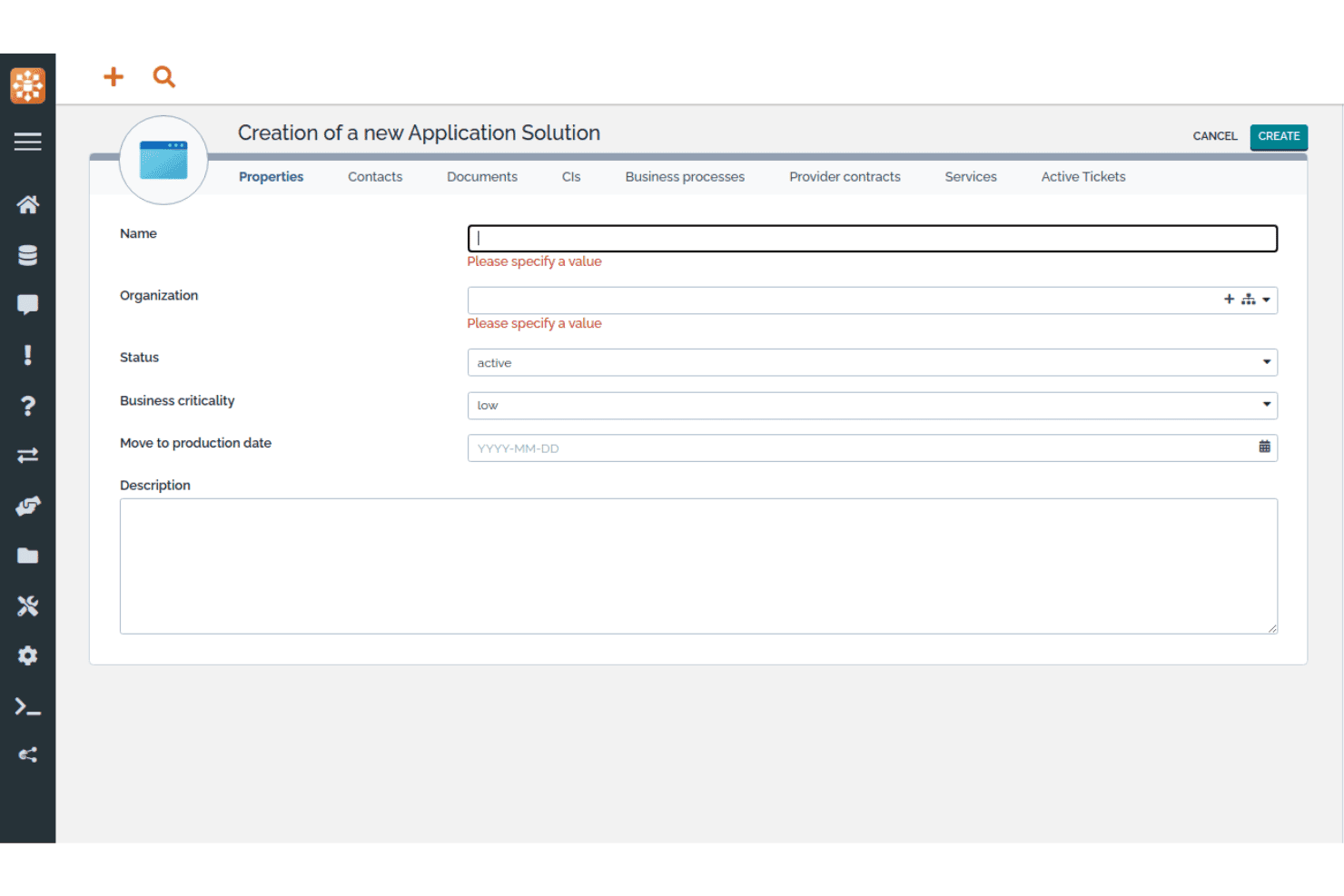
iTop consente agli utenti di registrare nuove soluzioni applicative con le relative proprietà principali. iTop è una piattaforma CMDB e ITSM open source che combina un repository di CI personalizzabile, la mappatura delle dipendenze, l'analisi dell'impatto e processi nativi di gestione dei servizi IT in un'unica implementazione autogestita o SaaS.
Per chi è più adatto iTop?
iTop è particolarmente adatto ai team IT che desiderano una CMDB open source completamente personalizzabile senza pagare costi di licenza per utente o per CI.
Perché ho scelto iTop
iTop si è guadagnato un posto nella mia lista ristretta perché iTop Designer consente di creare classi CI completamente nuove, attributi personalizzati e tipi di relazione senza scrivere codice grezzo, una possibilità rara negli strumenti CMDB open source. Apprezzo anche il fatto che l'analisi dell'impatto sia integrata direttamente nella piattaforma principale: collega una CI a un incidente e iTop mostra immediatamente ogni servizio o contratto dipendente interessato. L'edizione Community offre tutto questo senza limiti al numero di CI e senza costi di licenza.
Caratteristiche principali di iTop
- Motore di sincronizzazione dei dati: Recupera simultaneamente i dati delle CI da più fonti esterne, con regole di riconciliazione configurabili per fonte e classe CI.
- Supporto multi-organizzazione: Gestisci CI, team, contatti e relazioni tra servizi all'interno di unità organizzative separate, usando una singola istanza di iTop.
- API REST/JSON: Esegui operazioni CRUD complete su tutti gli oggetti, incluse le classi CI personalizzate, per collegare iTop a strumenti esterni e flussi di lavoro automatizzati.
- Controllo degli accessi basato sui ruoli: Definisci profili utente granulari tramite Designer, con SSO (SAML, OAuth, OpenID Connect) e MFA (TOTP, chiavi hardware) integrati.
Integrazioni di iTop
iTop offre integrazioni native con Microsoft Azure, VMware vSphere, Microsoft InTune, Proxmox, OCS Inventory NG, Ansible, LDAP/Active Directory, Slack e Microsoft Teams (tramite webhook), oltre a TeemIP per la gestione degli indirizzi IP. È disponibile un'API REST/JSON per le integrazioni personalizzate e Case Exchange supporta la sincronizzazione dei ticket con strumenti ITSM di terze parti nei livelli superiori.
Pros and Cons
Pros:
- CI illimitate nell'edizione Community gratuita
- Integrazione nativa di ITSM e CMDB in tutta la piattaforma
- Interfaccia a basso codice per classi CI personalizzate
Cons:
- Nessun supporto nativo alla rilevazione di AWS o GCP
- L'interfaccia utente appare datata rispetto ai concorrenti
Learn more about iTop: Ideale per la mappatura visiva dell'impatto delle modifiche
- Prova gratuita disponibile
- A partire da $10,000/anno (fatturato annualmente)

Virima offre un pannello di controllo unificato per la visibilità sull'infrastruttura IT. Virima è una piattaforma CMDB e di gestione degli asset IT che combina rilevamento automatizzato multimodale, mappatura delle dipendenze e integrazioni ITSM bidirezionali in un'unica soluzione completa.
Per chi è più adatta Virima?
Virima è particolarmente adatta ai team IT del mercato intermedio che necessitano di una CMDB completa con mappatura visiva delle dipendenze, senza dover pagare separatamente ogni modulo.
Perché ho scelto Virima
Ho scelto Virima come una delle migliori perché il suo motore ViVID™ fa qualcosa che la maggior parte delle CMDB non può fare: genera mappe interattive e aggiornate in tempo reale delle dipendenze dei servizi, con analisi del raggio d'impatto prima che una modifica venga approvata, così i revisori del CAB possono vedere esattamente quali CI sono a rischio. Gli incidenti attivi, le richieste di modifica aperte e i contrassegni CVE vengono inoltre sovrapposti direttamente alla stessa mappa. Apprezzo anche il fatto che il punteggio di integrità della CMDB monitori la qualità dei dati per ogni CI in base a completezza, aggiornamento e coerenza, e possa bloccare le modifiche sui record con un basso livello di affidabilità.
Caratteristiche principali di Virima
- Rilevamento automatizzato multimodale: Esegue il rilevamento basato su agenti, senza agenti (oltre 140 sonde) e basato su API contemporaneamente negli ambienti locali, AWS, Azure, VMware, Hyper-V e Kubernetes.
- Punteggio di integrità della CMDB: Monitora la qualità dei dati per ogni CI in base alle dimensioni di completezza, aggiornamento e coerenza, e può attivare nuove scansioni o bloccare le modifiche sui record con un basso livello di affidabilità.
- Integrazioni ITSM bidirezionali: Sincronizza nativamente i dati dei CI con ServiceNow, Jira Service Management, Ivanti, HaloITSM, Xurrent, Hornbill e TeamDynamix, inclusi in ogni piano senza costi aggiuntivi.
- Misurazione dell'utilizzo del software: Monitora l'utilizzo effettivo delle applicazioni tramite Windows Discovery Agent per identificare le licenze inutilizzate e supportare le decisioni di riallocazione.
Integrazioni di Virima
Virima offre integrazioni native bidirezionali con ServiceNow, Jira Service Management, Ivanti, HaloITSM, Xurrent, Hornbill e TeamDynamix per i flussi di lavoro ITSM, oltre a connettori basati su API per AWS, Azure, VMware, Hyper-V, Kubernetes, LogicMonitor, SolarWinds, Okta, Microsoft SCCM e il National Vulnerability Database del NIST. Un'API REST completa è inclusa in ogni piano per le integrazioni personalizzate.
Pros and Cons
Pros:
- Mappatura visiva dell'impatto delle modifiche con dati aggiornati in tempo reale
- Rilevamento automatizzato multimodale degli asset IT
- Il punteggio di integrità della CMDB blocca le modifiche rischiose
Cons:
- Non è disponibile alcun connettore per il rilevamento di Google Cloud
- L'editor dei moduli non dispone di un'interfaccia con trascinamento della selezione
Learn more about Virima: Ideale per l'individuazione di asset multi-cloud
- Prova gratuita di 30 giorni
- Da 67 $/mese

CloudAware consente agli utenti di filtrare e gestire tutti gli asset IT in un'unica vista dell'inventario. CloudAware è una piattaforma CMDB nativa di Salesforce che combina l'individuazione degli asset multi-cloud senza agenti, la mappatura delle dipendenze, la gestione degli asset IT, la conformità come codice e la gestione integrata di FinOps e della postura di sicurezza negli ambienti cloud e ibridi.
Per chi è più adatto CloudAware?
CloudAware è particolarmente adatto ai team aziendali IT e alle squadre che gestiscono le operazioni cloud su asset distribuiti tra due o più provider cloud e che necessitano di una visibilità unificata senza implementare agenti.
Perché ho scelto CloudAware
Ho incluso CloudAware tra le mie scelte principali perché la sua individuazione basata su API e senza agenti copre simultaneamente AWS, Azure, GCP, Oracle Cloud e Alibaba Cloud, offrendoti una CMDB unificata per ogni cloud utilizzato senza implementare un singolo agente. Apprezzo in particolare il fatto che crei un inventario completo degli asset in un giorno, utilizzando credenziali di sola lettura. Il suo analizzatore dei tag normalizza quindi i tag tra tutti i provider, così i record CI rimangono coerenti indipendentemente dal team che ha effettuato il provisioning della risorsa.
Funzionalità principali di CloudAware
- Conformità come codice: Crea policy di conformità in un DSL personalizzato, gestiscile con il controllo delle versioni in Git ed esegui revisioni delle richieste di integrazione e test unitari prima della distribuzione.
- Automazione con il generatore di flussi: Utilizza un'interfaccia senza codice con funzionalità di trascinamento per creare e orchestrare flussi di lavoro automatizzati negli ambienti cloud e locali.
- Modulo FinOps: Monitora l'utilizzo delle istanze riservate, genera report di riaddebito e ricevi consigli sul dimensionamento ottimale tra le fonti di fatturazione multi-cloud.
- Gestione delle vulnerabilità: Raggruppa e assegna priorità alle vulnerabilità utilizzando la proprietà degli asset nella CMDB e il contesto dell'ambiente per classificare e risolvere i risultati su larga scala.
Integrazioni di CloudAware
CloudAware offre oltre 60 integrazioni native, tra cui AWS, Microsoft Azure, Google Cloud Platform, ServiceNow, Jira, PagerDuty, Datadog, CrowdStrike, Splunk e Terraform. Fornisce inoltre un'API REST, un'API Bulk e una CLI per le integrazioni personalizzate.
Pros and Cons
Pros:
- Individuazione e mappatura unificate degli asset multi-cloud
- CMDB nativa di Salesforce con controlli granulari degli accessi
- Conformità come codice automatizzata per l'applicazione delle policy
Cons:
- I flussi di lavoro ITSM dipendono da piattaforme esterne
- Le prestazioni dell'interfaccia possono rallentare negli ambienti di grandi dimensioni
Learn more about CloudAware: Ideale per la mappatura delle dipendenze applicative
- Prova gratuita disponibile
- Prezzi su richiesta
Visit WebsiteCustomer Rating:4.8/5
Device42 mappa visivamente le dipendenze delle risorse cloud in tempo reale. Device42 è una piattaforma CMDB che combina il rilevamento automatizzato senza agenti, la mappatura delle dipendenze applicative, la gestione degli asset IT e la normalizzazione dei dati negli ambienti fisici, virtuali, cloud e container.
Per chi è più adatto Device42?
Device42 è particolarmente adatto ai team IT di medie e grandi dimensioni che gestiscono ambienti ibridi e necessitano di mappe accurate delle dipendenze applicative per supportare le migrazioni al cloud e l'analisi dell'impatto delle modifiche.
Perché ho scelto Device42
Ho scelto Device42 come una delle migliori soluzioni perché la sua funzionalità di mappatura delle dipendenze applicative genera automaticamente rappresentazioni visive delle dipendenze tra servizi senza agenti, un aspetto importante quando si pianifica una migrazione al cloud e si deve sapere esattamente cosa si interromperà spostando un determinato componente. Mi piace anche il fatto che gli elenchi dell'impatto applicativo consentano di valutare il raggio d'azione prima di apportare modifiche e che il rilevamento dei gruppi di affinità faccia emergere risorse logicamente correlate che altrimenti potrebbero sfuggire.
Caratteristiche principali di Device42
- Normalizzazione dei dati con EnrichAI: standardizza automaticamente i nomi dei sistemi operativi, dei fornitori e dei software provenienti dalle diverse fonti di rilevamento e aggiunge i dati sul ciclo di vita EOL/EOS dei principali fornitori di software.
- Rilevamento multi-cloud senza agenti: rileva gli asset su AWS, Azure, GCP, Oracle Cloud e Alibaba Cloud utilizzando le API native del cloud, senza richiedere agenti sui sistemi di destinazione.
- Gestione delle licenze software: confronta il numero di software installati con le licenze acquistate, segnala i software vietati e tiene traccia delle date di scadenza degli accordi di licenza.
- Query in linguaggio naturale con InsightsAI: converte le domande in linguaggio naturale in query SQL sul database degli elementi di configurazione, restituendo report personalizzati senza richiedere competenze specifiche nelle query.
Integrazioni di Device42
Device42 offre oltre 40 integrazioni native, tra cui Freshservice, ServiceNow, Jira Service Management, Zendesk, Ansible, Puppet, Chef, Jenkins, Splunk e PagerDuty. Fornisce inoltre un'API RESTful e webhook per le integrazioni personalizzate.
Pros and Cons
Pros:
- Non sono necessari agenti per la mappatura delle dipendenze
- EnrichAI normalizza automaticamente i nomi dei fornitori e dei sistemi operativi
- I cruscotti di conformità supportano più framework
Cons:
- La configurazione iniziale può risultare complessa per i team di piccole dimensioni
- Il rilevamento può rallentare sotto carichi elevati
Learn more about Device42: Ideale per i suggerimenti di mappatura automatica della CMDB
- Prova gratuita di 30 giorni
- A partire da $1,499/anno (fatturato annualmente)
Visit WebsiteCustomer Rating:4.6/5
InvGate Asset Management mappa le relazioni tra i CI in una visualizzazione a diagramma. InvGate Asset Management è una piattaforma CMDB e di gestione degli asset IT che combina il rilevamento automatizzato da più fonti, la mappatura visiva delle dipendenze, suggerimenti sulle relazioni basati sull'intelligenza artificiale e l'integrazione nativa con ITSM.
Per chi è più adatto InvGate Asset Management?
Team IT che gestiscono ambienti ibridi e desiderano una mappatura delle relazioni CMDB assistita dall'intelligenza artificiale senza la complessità delle piattaforme di livello enterprise.
Perché ho scelto InvGate Asset Management
Ho incluso InvGate Asset Management tra le mie scelte principali perché la funzionalità di mappatura automatica della CMDB cambia concretamente il modo in cui i team creano e mantengono i dati sulle relazioni. Invece di tracciare manualmente le dipendenze, il motore di intelligenza artificiale rileva le relazioni critiche tra gli asset negli ambienti locali e cloud e le inserisce in una coda di suggerimenti da accettare o rifiutare. Apprezzo inoltre il fatto che Atlas arricchisca automaticamente i record CI con lo stato di fine del ciclo di vita e della versione, così la CMDB riflette lo stato reale degli asset senza continui aggiornamenti manuali.
Funzionalità principali di InvGate Asset Management
- Rilevamento automatizzato da più fonti: Esegue scansioni di ambienti locali, cloud (AWS, Azure, GCP) e ibridi utilizzando metodi con e senza agenti attraverso più di 11 protocolli.
- Regole di integrità: Definisci condizioni personalizzate per classificare i CI come integri, a rischio o critici, mantenendo sotto controllo la qualità dei dati dei CI nella CMDB.
- Arricchimento degli asset con Atlas: Compila automaticamente i record CI con date di fine del ciclo di vita, stato della versione e avvisi sul ciclo di vita, recuperati da un database IT universale.
- RBAC granulare: Definisci l'ambito delle autorizzazioni di accesso in base a posizione, tipo di asset e tag, in modo che i diversi team possano visualizzare e gestire solo i CI pertinenti al proprio ruolo.
Integrazioni di InvGate Asset Management
InvGate Asset Management offre integrazioni native con InvGate Service Management, ServiceNow CMDB, Jira, Zendesk, Microsoft Intune, Jamf, AWS, Azure, Google Cloud Platform e VMware, oltre alla connettività con l'ecosistema Microsoft, inclusi Microsoft 365 ed Entra ID. È disponibile un'API REST per le integrazioni personalizzate e il supporto per Zapier è offerto come componente aggiuntivo a pagamento tramite InvGate Service Management.
Pros and Cons
Pros:
- Suggerimenti di mappatura automatica della CMDB basati sull'intelligenza artificiale
- Rilevamento automatizzato da più fonti, inclusa la gestione dei dispositivi mobili
- Mappatura visiva delle dipendenze e della topologia
Cons:
- La funzionalità di mappatura automatica è in accesso anticipato
- La personalizzazione di report e pannelli di controllo è limitata
Learn more about InvGate Asset Management: Ideale per il rilevamento IT ibrido su larga scala
- Demo gratuita disponibile
- Prezzi su richiesta
Visit WebsiteCustomer Rating:4.2/5
OpenText centralizza dati di vendita, contratti e ordini in un'unica dashboard. OpenText Universal Discovery e CMDB è una piattaforma CMDB di livello enterprise progettata per ambienti IT ibridi su larga scala, che offre rilevamento automatizzato, mappatura delle dipendenze, modellazione dei servizi e normalizzazione dei dati dei CI in infrastrutture on-premise, multicloud e containerizzate.
Per chi è più adatto OpenText?
OpenText Universal Discovery e CMDB è progettato per grandi aziende con team IT esperti che gestiscono infrastrutture complesse e multilivello in ambienti on-premise, cloud e ibridi.
Perché ho scelto OpenText
Ho scelto OpenText Universal Discovery e CMDB perché è progettato per gestire il rilevamento su una scala che la maggior parte degli strumenti semplicemente non è in grado di eguagliare. La piattaforma supporta oltre 3.500 tipi di dispositivi di rete e più di 250 fornitori, mentre la sua modellazione automatizzata dei servizi ricostruisce continuamente mappe aggiornate delle dipendenze man mano che l'infrastruttura cambia, senza intervento manuale. Trovo inoltre davvero utile la funzionalità di rilevamento dell'ultimo accesso, che consente di individuare gli account inattivi e recuperare le licenze negli ambienti di grandi dimensioni.
Funzionalità principali di OpenText
- Rilevamento dinamico del software: Esegue scansioni dell'ambiente confrontandolo con una libreria di oltre 140.000 titoli software, inclusi indicatori dello stato di fine vita, per evidenziare lacune di conformità e sicurezza.
- Linguaggio di interrogazione della topologia (TQL): Consente di scrivere query personalizzate per estrarre relazioni e dipendenze specifiche tra CI direttamente dal modello di dati del CMDB.
- Controllo degli accessi basato sui ruoli (RBAC): Limita l'accesso ai dati dei CI in base al ruolo dell'utente, supportando i requisiti di audit per la conformità a SOX, HIPAA e ISO 27001.
- Gestione delle sonde remote: Consente di distribuire simultaneamente aggiornamenti rapidi a tutte le sonde di rilevamento dall'interfaccia utente, senza dover accedere direttamente a ciascuna sonda.
Integrazioni di OpenText
OpenText Universal Discovery e CMDB offre integrazioni native con ServiceNow (app certificata), BMC, Jira Service Management, CrowdStrike Falcon, Infoblox e Oracle LMS, oltre a connessioni avanzate con l'ecosistema OpenText, tra cui SMAX, Network Operations Management, Cloud Management, AI Operations Management e Asset Management. Supporta inoltre il Linguaggio di interrogazione della topologia (TQL) e un'API estensibile per integrazioni personalizzate ed estrazione dei dati dei CI.
Pros and Cons
Pros:
- Rileva oltre 3.500 tipi di dispositivi di rete
- Supporta mappe dei servizi aggiornate automaticamente
- Gestisce ambienti con 200 milioni di CI
Cons:
- Richiede competenze specialistiche per una configurazione affidabile
- L'interfaccia utente appare datata rispetto alle piattaforme più recenti
Learn more about OpenText: Ideale per CMDB con mappatura dei servizi
- Demo gratuita disponibile
- Prezzi su richiesta
Visit WebsiteCustomer Rating:4/5
Ivanti Neurons evidenzia i rischi di vulnerabilità degli endpoint su tutti i dispositivi. Ivanti Neurons è una piattaforma di CMDB e gestione degli asset IT che combina il rilevamento continuo in ambienti diversi, la mappatura delle dipendenze dei servizi e un repository unificato degli elementi di configurazione con l'integrazione nativa con l'ITSM.
Per chi è più adatto Ivanti Neurons?
Ivanti Neurons è particolarmente adatto ai team IT aziendali che necessitano di un'unica piattaforma per gestire sia i dati degli asset sia le relazioni di configurazione all'interno di infrastrutture complesse e multi-ambiente.
Perché ho scelto Ivanti Neurons
Ho scelto Ivanti Neurons come una delle soluzioni migliori perché la sua funzionalità di mappatura dei servizi la distingue realmente dagli strumenti CMDB autonomi. La piattaforma genera automaticamente mappe dinamiche delle dipendenze direttamente dai dati di rilevamento, quindi sovrappone gli incidenti aperti e le modifiche in sospeso, consentendo di vedere l'impatto sul raggio d'azione prima di approvare qualsiasi modifica. Apprezzo anche il fatto che i record ITAM e CMDB rimangano sincronizzati in un unico modello, così i dati degli elementi di configurazione includono già il contesto relativo al ciclo di vita e alla proprietà, senza alcun riferimento incrociato manuale.
Funzionalità principali di Ivanti Neurons
- Rilevamento continuo in ambienti diversi: Esegue automaticamente la scansione di ambienti locali, cloud (AWS, Azure), SaaS, OT/IoT e legacy utilizzando metodi sia attivi sia passivi per mantenere aggiornati i record degli elementi di configurazione.
- Rilevamento delle deviazioni di configurazione: Monitora gli elementi di configurazione per individuare deviazioni dallo stato previsto e segnala le modifiche, fornendo una traccia di audit continua per ogni elemento di configurazione.
- Motore di riconciliazione e normalizzazione: Elimina automaticamente i duplicati e consolida i dati degli asset provenienti da UEM, piattaforme cloud, scanner di vulnerabilità e fonti ITSM in un unico record autorevole.
- Controllo degli accessi basato sui ruoli con SSO e MFA: Gestisce le autorizzazioni degli utenti a livello granulare con autenticazione centralizzata, supporto per l'accesso singolo e autenticazione a più fattori applicata per impostazione predefinita.
Integrazioni di Ivanti Neurons
Ivanti Neurons offre integrazioni native con ServiceNow, BMC, Jamf, CrowdStrike, Wiz, Tenable, Rapid7, Qualys, Okta e Zscaler, oltre alla connettività nativa con l'ecosistema Microsoft, tra cui Azure, Azure AD e Azure DevOps (tramite Ivanti Neurons iPaaS). Si connette inoltre ad AWS, Google Chrome Enterprise e Cisco e fornisce API REST aperte tramite Ivanti Developer Hub per le integrazioni personalizzate, con ulteriori connettori preconfigurati disponibili su Ivanti Marketplace.
Pros and Cons
Pros:
- Genera automaticamente mappe dinamiche delle dipendenze dei servizi
- Piattaforma unificata per ITAM e CMDB
- Analisi del raggio d'azione per le modifiche imminenti
Cons:
- Non è disponibile una prova gratuita con attivazione autonoma
- L'implementazione può richiedere un notevole impegno di configurazione
Learn more about Ivanti Neurons: Ideale per i dati di configurazione federati
- Demo gratuita disponibile
- Prezzo su richiesta

BMC Helix CMDB monitora l'integrità e la completezza dei dati tra gli asset IT. BMC Helix CMDB è un database di gestione della configurazione di livello enterprise che combina un archivio federato di CI, il rilevamento multi-cloud senza agenti, la mappatura delle dipendenze e un motore integrato di riconciliazione e normalizzazione.
Per chi è più adatto BMC Helix?
BMC Helix CMDB è particolarmente adatto alle grandi aziende che gestiscono ambienti IT complessi e multi-origine, in cui l'accuratezza dei dati tra strumenti di rilevamento, piattaforme cloud e flussi di lavoro ITSM è imprescindibile.
Perché ho scelto BMC Helix
BMC Helix CMDB è entrato nella mia lista ristretta perché la sua architettura dati federata consente di acquisire dati sui CI da più fonti autorevoli, come BMC Helix Discovery, SCCM e i connettori cloud, in un unico database di riferimento, senza appiattire tutto in un unico modello dati rigido. Apprezzo in particolare il Motore di riconciliazione, che consente di definire regole di precedenza dei dati per ogni attributo, in modo che, quando i record sono in conflitto, per ciascun campo prevalga la fonte corretta. Abbinandolo alla deduplicazione basata su regole del Motore di normalizzazione tra insiemi di dati e classi di CI, si ottiene un CMDB che mantiene la propria accuratezza anche quando le fonti di rilevamento aumentano.
Funzionalità principali di BMC Helix
- Rilevamento multi-cloud senza agenti: BMC Helix Discovery analizza gli ambienti AWS, Azure, GCP e OCI senza richiedere l'installazione di agenti, utilizzando un'architettura basata su Outpost.
- Assistente di IA generativa HelixGPT: uno strumento di IA integrato che produce riepiloghi in linguaggio naturale, descrizioni narrative dei pannelli di controllo e automazione dei flussi di lavoro nell'intera piattaforma.
- Rilevamento di Kubernetes e dei container: la piattaforma mappa i collegamenti tra container, le correlazioni tra pod e distribuzioni e le dipendenze software esterne negli ambienti containerizzati.
- Flussi di lavoro ITSM certificati PinkVerify: i dati dei CI confluiscono direttamente nei record di gestione di incidenti, problemi, modifiche e asset all'interno della suite BMC Helix ITSM, certificata per 18 pratiche ITIL.
Integrazioni di BMC Helix
BMC Helix CMDB offre integrazioni native nell'ecosistema BMC Helix (Helix ITSM, Helix Discovery, Helix Operations Management e Atrium Integrator), oltre che con Microsoft SCCM, Active Directory, Microsoft Teams, ServiceNow CMDB, CyberArk e ARCON PAM, nonché con connettori cloud per AWS, Azure, GCP e OCI. Sono disponibili API REST per le integrazioni personalizzate, mentre gli ambienti Kubernetes e i sistemi centrali sono supportati tramite fornitori di rilevamento dedicati.
Pros and Cons
Pros:
- Gestisce centinaia di milioni di CI
- Rilevamento multi-cloud e dei container senza agenti
- Motori maturi di normalizzazione e riconciliazione
Cons:
- L'analisi dell'impatto può essere lenta
- La deduplicazione lato server è poco granulare
Learn more about BMC Helix:
Altri software CMDB
Ecco alcune ulteriori opzioni di software CMDB che non sono entrate nel mio elenco, ma che vale comunque la pena valutare:
- 11Xurrent ITSMIdeale per record CI e asset unificati
- 12FreshserviceIdeale per ITSM e CMDB per aziende di medie dimensioni in un'unica soluzione
- 13LansweeperIdeale per alimentare una CMDB orientata innanzitutto alla scoperta
- 14ServiceDesk PlusIdeale per flussi di lavoro unificati di CMDB e ITSM
- 15HaloIdeale per il monitoraggio dei CI nativo di ITSM
- 16Jira Service ManagementIdeale per i team ITSM che collegano gli elementi di configurazione a ogni ticket
- 17Flexera OneIdeale per l'intelligence tecnologica normalizzata
- 18AtomicworkIdeale per CMDB e ITSM nativi dell'IA in un'unica soluzione
- 19AxoniusIdeale per la qualità e l'arricchimento dei dati CMDB
- 20ServiceNow CMDBIdeale per i dati del grafo dei servizi aziendali
Come valuto i software CMDB
Divido la mia valutazione in funzionalità di base che ogni strumento deve soddisfare e negli elementi distintivi che separano una CMDB solida da una che regge quando una CI configurata in modo errato provoca un incidente P1.
Funzionalità principali (requisiti minimi per questo elenco)
Quando seleziono gli strumenti da includere nel mio elenco, assegno a ciascuno un punteggio su una scala da 0 (non offre la funzionalità) a 5 (eccelle in quest'area) per ognuna delle funzionalità principali elencate di seguito. Calcolo quindi il punteggio totale dello strumento come percentuale, utilizzando il 75% come parametro di riferimento per valutarne l'idoneità complessiva per l'elenco.
- Repository delle CI e modello dei dati: valuto quanto sia flessibile il modello dei dati, verificando se è possibile definire classi, attributi e gerarchie personalizzate delle CI oppure se si è vincolati a un rigido elenco piatto.
- Rilevamento automatizzato: lo strumento dovrebbe rilevare le risorse negli ambienti on-premise, cloud e containerizzati senza dipendere da importazioni manuali di file CSV o da agenti limitati a un singolo ambiente.
- Mappatura delle dipendenze e delle relazioni: cerco visualizzazioni dinamiche della topologia e analisi dell'impatto, non semplici collegamenti statici padre/figlio: l'obiettivo è avere visibilità sul raggio d'azione di un problema prima di applicare una modifica.
- Integrazione ITSM: in questo ambito è importante disporre del contesto delle CI in entrambe le direzioni nei ticket relativi a incidenti, problemi e modifiche. Strumenti come ServiceNow e BMC Helix gestiscono questa funzione in modo nativo, mentre altri si affidano a connettori.
- Riconciliazione e normalizzazione: più fonti di rilevamento comportano duplicati e conflitti. Verifico la presenza di motori di riconciliazione basati su regole, in grado di eliminare automaticamente i duplicati e attribuire un punteggio alla qualità dei dati.
- Controllo degli accessi e registrazione degli audit: cerco un RBAC granulare e una traccia di audit completa per ogni modifica alle CI, soprattutto per i team che devono dimostrare la conformità durante gli audit.
Una volta ottenuto un elenco di strumenti che soddisfano i criteri, valuto ciò che distingue ogni piattaforma.
Fattori distintivi (ciò che differenzia i fornitori)
Ecco come confronto i diversi fornitori:
Funzionalità di rilievo
Cerco una visualizzazione del grafo dei servizi che mappi in tempo reale le dipendenze tra applicazioni e infrastruttura: prima di una finestra di modifica, voglio tracciare il raggio d'azione di un problema negli ambienti ibridi, non procedere per supposizioni. La mappatura dei servizi aziendali è altrettanto importante perché collega le CI alle applicazioni che generano ricavi e agli SLA, consentendo di stabilire la priorità di un P1 in base all'impatto sul business. Valuto inoltre i connettori per il rilevamento multi-cloud, verificando se uno strumento supporta AWS, Azure, GCP e Kubernetes direttamente, con il rilevamento integrato delle derive dalla configurazione prevista.
Oltre le funzionalità
Valuto innanzitutto la flessibilità di implementazione: la disponibilità di opzioni SaaS, autogestite e isolate da parte di un fornitore è importante quando il proprio livello di sicurezza esclude il cloud multi-tenant. Le certificazioni di conformità come SOC 2 Type II e ISO 27001 sono altrettanto importanti, soprattutto se è necessario generare prove di audit per PCI-DSS o SOX senza assemblare manualmente i report. Verifico inoltre il costo totale di proprietà: alcuni fornitori includono il rilevamento e la mappatura dei servizi nel prezzo di base, mentre altri applicano costi per modulo, con il rischio di raddoppiare la spesa man mano che aumenta il numero di CI.
Come scegliere un software CMDB
La scelta del software CMDB giusto dipende da ciò di cui il tuo team ha bisogno per mantenere i dati di configurazione accurati, accessibili e utilizzabili su larga scala:
| Se la tua priorità è... | Cerca... |
| Supportare ambienti multi-cloud | Connettori di individuazione integrati per AWS, Azure, GCP e Kubernetes |
| Ridurre gli aggiornamenti manuali degli asset | Individuazione automatizzata degli asset e delle dipendenze tra ambienti locali e cloud |
| Integrare i flussi di lavoro degli incidenti | Integrazione ITSM nativa o bidirezionale con il tuo centro assistenza |
| Dimostrare la preparazione agli audit | RBAC configurabile, registri di audit e report di conformità esportabili |
| Adattarsi a infrastrutture complesse | Modelli di dati flessibili con classi e attributi CI personalizzati |
Come valutare il tuo elenco
- Testa l'automazione dell'individuazione: Esegui una prova di cinque giorni per inventariare risorse cloud, locali e container senza importare file CSV.
- Verifica la profondità della mappatura dei servizi: Mappa le dipendenze delle applicazioni e verifica che le visualizzazioni si aggiornino in tempo reale dopo aver apportato una modifica.
- Convalida l'integrazione ITSM: Apri un ticket di modifica e verifica se i dettagli del CI e l'impatto della modifica vengono sincronizzati automaticamente con la tua piattaforma ITSM.
- Esamina gli elementi di conformità: Richiedi un esempio di registro di controllo e verifica la presenza di modifiche CI dettagliate e con marcatura temporale, associate agli utenti.
- Scegli tra open source ed enterprise: Valuta l'estensibilità e il risparmio sui costi rispetto al supporto gestito e alle certificazioni di sicurezza.
Che cos'è il software CMDB?
CMDB è l'acronimo di database per la gestione della configurazione. Il software CMDB è uno strumento che raccoglie, archivia e gestisce i dati degli elementi di configurazione (CI) nell'intero ambiente IT. Mappa le relazioni tra le risorse, tiene traccia delle modifiche e conserva un registro dettagliato dei componenti dell'infrastruttura. L'utilizzo di una CMDB aiuta il team a mantenere accurati i dati, tracciare le dipendenze e supportare i processi relativi agli incidenti e alla conformità, garantendo che ogni CI e le relative connessioni siano sempre visibili e aggiornati.
Funzionalità del software CMDB
Quando scegli il software CMDB, presta attenzione alle seguenti funzionalità chiave:
- Repository CI e modellazione dei dati: Crea, categorizza e gestisci gli elementi di configurazione (CI), incluse classi, attributi e relazioni personalizzati.
- Rilevamento automatizzato delle risorse: Individua e registra le risorse negli ambienti locali, cloud e ibridi con un intervento manuale minimo.
- Mappatura delle dipendenze e delle relazioni: Mappa dinamicamente le dipendenze tra applicazioni, servizi, server e dispositivi di rete. Ciò offre al team una visione grafica delle interazioni tra i componenti e aiuta a valutare l'impatto delle modifiche e degli incidenti.
- Monitoraggio delle modifiche e dei controlli: Monitora le modifiche alla configurazione dei singoli CI, registra le azioni degli utenti e salva istantanee per i ripristini. Questa traccia di controllo è preziosa per la risoluzione dei problemi, la conformità e la comprensione degli stati storici della configurazione.
- Controllo degli accessi e autorizzazioni: Questa funzionalità fornisce controlli basati sui ruoli per diversi gruppi di utenti, in modo che solo il personale autorizzato possa visualizzare o modificare record specifici. Mantiene protetti i dati di configurazione sensibili e supporta la separazione dei compiti.
- Integrazione con gli strumenti ITSM: Collega la CMDB ai flussi di lavoro per la gestione degli incidenti, dei problemi e delle modifiche. Ciò garantisce che gli operatori dell'assistenza dispongano di un contesto accurato e possano collegare direttamente i ticket ai CI e alle relative relazioni.
- Riconciliazione e normalizzazione: Risolve i conflitti tra i dati provenienti da più fonti di rilevamento, elimina i duplicati delle risorse e standardizza i formati dei record. Mantiene il database pulito e affidabile, soprattutto negli ambienti più grandi.
- Mappatura dei servizi e dell'attività aziendale: Collega le risorse IT ai servizi e ai processi aziendali, semplificando la definizione delle priorità dei problemi in base al loro potenziale impatto sulle operazioni principali o sulle applicazioni che generano ricavi.
- Dashboard e report: Fornisce dashboard predefinite e personalizzabili per visualizzare l'accuratezza dell'inventario, le modifiche recenti, lo stato delle risorse e lo stato di conformità. I team le utilizzano per monitorare l'ambiente e condividere informazioni con le parti interessate.
- Funzionalità di conformità ed esportazione: Offre report configurabili per supportare i controlli, esportando registri e dati CI secondo necessità per scopi normativi o per la condivisione tra team. Ciò è particolarmente importante per le organizzazioni soggette a standard come SOC 2 o ISO 27001.
Funzionalità comuni di intelligenza artificiale del software CMDB
Oltre alle funzionalità standard del software CMDB elencate in precedenza, molte di queste soluzioni stanno integrando l'intelligenza artificiale con funzionalità come:
- Rilevamento automatizzato delle anomalie: Utilizza algoritmi di intelligenza artificiale per monitorare i dati di configurazione e le modifiche alle risorse, segnalando schemi o deviazioni insoliti che potrebbero indicare configurazioni errate, rischi per la sicurezza o problemi di conformità. Ciò aiuta il team a individuare tempestivamente i problemi, anche negli ambienti complessi.
- Analisi predittiva dell'impatto: Applica l'apprendimento automatico ai dati storici relativi a incidenti e modifiche per prevedere il potenziale impatto delle modifiche proposte sui sistemi e servizi correlati. In questo modo, offre una visione più chiara del rischio prima di apportare aggiornamenti.
- Classificazione intelligente delle risorse: Sfrutta l'intelligenza artificiale per categorizzare automaticamente le risorse nuove o sconosciute in base ai comportamenti osservati, ai metadati e all'attività di rete. Ciò riduce l'inserimento manuale dei dati e mantiene organizzata la CMDB con l'evolversi dell'ambiente.
- Ricerca e informazioni dettagliate in linguaggio naturale: consente agli utenti di interrogare il CMDB utilizzando un linguaggio naturale, con l'IA che interpreta l'intento e mette in evidenza gli elementi di configurazione, le relazioni o i registri di audit pertinenti. Questo facilita la ricerca delle informazioni necessarie per gli utenti non specialisti.
- Analisi automatizzata delle cause principali: utilizza l'IA per correlare incidenti, modifiche e dati di configurazione, aiutando il team a identificare rapidamente la causa sottostante di interruzioni o problemi di prestazioni. Questo riduce i tempi di analisi e favorisce una risoluzione più rapida.
Vantaggi del software CMDB
L'implementazione di un software CMDB offre numerosi vantaggi al team e all'azienda. Ecco alcuni dei vantaggi che puoi aspettarti:
- Inventario accurato degli asset: mantieni un database unificato e in tempo reale di tutti gli elementi di configurazione (CI) utilizzando l'individuazione automatizzata e una modellazione flessibile dei dati.
- Mappatura chiara delle dipendenze: visualizza le relazioni e le dipendenze tra infrastruttura, applicazioni e servizi aziendali per supportare valutazioni delle modifiche e una gestione del triage degli incidenti più efficaci.
- Supporto per audit e conformità: accedi a tracce di audit dettagliate, registri delle modifiche attribuiti agli utenti e report di conformità esportabili per soddisfare gli standard normativi e le politiche interne.
- Risoluzione più rapida degli incidenti: collega incidenti, problemi e modifiche direttamente agli elementi di configurazione pertinenti e alle relative relazioni, fornendo ai team il contesto immediato necessario per risolvere i problemi.
- Riduzione del lavoro manuale: rileva, riconcilia e normalizza automaticamente i dati degli asset provenienti da più fonti, riducendo al minimo la necessità di aggiornare manualmente i record.
- Controllo dei dati basato sui ruoli: limita l'accesso a record CMDB specifici con ruoli e autorizzazioni granulari.
- Informazioni dettagliate assistite dall'IA: rileva anomalie, classifica gli asset e valuta i potenziali impatti delle modifiche utilizzando analisi basate sull'IA.
Costi e prezzi
La scelta di un software CMDB richiede la comprensione dei diversi modelli e piani tariffari disponibili. I costi variano in base alle funzionalità, alle dimensioni del team, ai componenti aggiuntivi e ad altri fattori. La tabella seguente riassume i piani più comuni, i relativi prezzi medi e le funzionalità tipicamente incluse nelle soluzioni software CMDB:
Tabella di confronto dei piani per il software CMDB
| Tipo di piano | Prezzo medio | Funzionalità comuni |
|---|---|---|
| Tipo di pianoPiano gratuito | Prezzo medio$0 | Funzionalità comuniArchivio CI di base, individuazione limitata degli asset, reportistica di base e supporto della comunità. |
| Tipo di pianoPiano personale | Prezzo medio$10–$25/utente/mese | Funzionalità comuniClassi CI personalizzate, individuazione automatizzata degli asset, mappatura di base delle relazioni e integrazioni limitate. |
| Tipo di pianoPiano aziendale | Prezzo medio$25–$60/utente/mese | Funzionalità comuniMappatura avanzata delle dipendenze, integrazioni ITSM, riconciliazione e normalizzazione e registrazione degli audit. |
| Tipo di pianoPiano per grandi aziende | Prezzo medio$60–$150/utente/mese | Funzionalità comuniMappatura dei servizi e dell'azienda, accesso API, RBAC avanzato, esportazioni per la conformità e supporto prioritario. |
Domande frequenti sul software CMDB
Ecco alcune risposte alle domande comuni sul software CMDB: