

I 10 Migliori Software per la Gestione dei Problemi del 2026 Spiegati

Migliori Software di Issue Tracking - Shortlist


Il software di issue tracking aiuta i team a registrare, prioritizzare e risolvere bug, task e feedback senza perdere di vista ciò che conta davvero.
Molti team iniziano la ricerca di un nuovo strumento quando la soluzione attuale rallenta il lavoro—ad esempio quando le segnalazioni si perdono, le priorità non sono chiare o gli strumenti non comunicano tra loro. Queste lacune portano confusione, ritardi e scambi inutili tra sviluppatori, QA e altri team.
Ho collaborato con team prodotto e ingegneristici per valutare strumenti di issue tracking che supportano davvero il lavoro quotidiano invece di ostacolarlo. Questa guida si basa su quell’esperienza e serve ad aiutarti a trovare uno strumento che si adatti al modo in cui lavora il tuo team, non solo a come lo propone un fornitore.
Perché fidarsi dei nostri consigli sui software
Il nostro team testa e recensisce software dal 2012. In quanto leader tecnologici noi stessi, sappiamo quanto sia difficile — e importante — scegliere il software giusto.
Per questa guida, abbiamo valutato gli strumenti attraverso test praticie ricerche indipendenti, assegnando un punteggio agli strumenti in base ai nostri criteri di selezione.
Le nostre recensioni riflettono il nostro giudizio editoriale umano, non un discorso di vendita.
Revisori esperti:
Riepilogo Migliori Software di Issue Tracking
Questa tabella comparativa riassume i dettagli dei prezzi delle mie migliori selezioni di Software di Issue Tracking per aiutarti a trovare quello più adatto al tuo budget e alle esigenze della tua azienda.
| Tool | Best For | Trial Info | Price | ||
|---|---|---|---|---|---|
| 1 | Ideale per controllo di versione e collaborazione | No | $4/utente/mese | Website | |
| 2 | Ideale per la gestione dei servizi IT a livello aziendale | No | Prezzo su richiesta | Website | |
| 3 | Ideale per la gestione di team e progetti remoti | No | $99/mese per utenti e progetti illimitati | Website | |
| 4 | Ideale per tracciamento e supporto delle problematiche focalizzati sul cliente | No | $15/utente/mese (fatturati annualmente) | Website | |
| 5 | Ideale per visualizzare le attività di progetto in modo flessibile e simile ad una bacheca | No | $10/utente/mese (fatturato annualmente) | Website | |
| 6 | Ideale per chi necessita di una piattaforma DevOps completa | No | $4/user/month (fatturato annualmente) | Website | |
| 7 | Ideale per la gestione dei flussi di lavoro e la collaborazione del team | No | $10,99/utente/mese (fatturazione annuale) | Website | |
| 8 | Ideale per la gestione dei problemi semplice in un ambiente intuitivo e user-friendly | No | Gratuito | Website | |
| 9 | Migliore per il tracciamento open-source dei bug | No | Gratuito | Website | |
| 10 | Migliore per una gestione di progetto solida e il tracciamento dei bug | No | $7/user/month | Website |
Recensioni Migliori Software di Issue Tracking
Di seguito trovi i miei riepiloghi dettagliati dei migliori Software di Issue Tracking che sono entrati nella mia shortlist. Le recensioni offrono una panoramica approfondita di funzionalità chiave, pro e contro, integrazioni e casi d’uso ideali di ogni strumento per aiutarti a trovare quello perfetto per te.

GitHub
Ideale per controllo di versione e collaborazione

GitHub è una svolta per i team che necessitano di un controllo di versione superiore e di una collaborazione efficace. Come servizio di hosting di repository, offre una piattaforma in cui gli sviluppatori possono lavorare insieme, revisionare il codice e gestire le modifiche.
Perché ho scelto GitHub: Durante il mio processo di selezione, GitHub si è distinto per la sua ampia diffusione nella comunità degli sviluppatori e per le sue impressionanti capacità di controllo versione. Favorisce un ambiente collaborativo in cui il codice non viene solo archiviato, ma anche condiviso e discusso. Pertanto, lo considero il 'Migliore per il controllo di versione e la collaborazione' grazie alle sue funzionalità senza pari nell’incoraggiare la cooperazione tra i membri del team e mantenere la coerenza delle versioni.
Caratteristiche principali e integrazioni:
Le funzionalità principali di GitHub includono le pull request, che consentono di revisionare le modifiche prima di unirle, e GitHub Actions, che permette di automatizzare i processi di lavoro. GitHub dispone inoltre di un solido sistema di tracciamento dei problemi integrato direttamente nella base di codice. Le integrazioni chiave includono Slack per la comunicazione di squadra, Jira per la gestione delle attività e Jenkins per l'integrazione e la consegna continua (CI/CD).
Pros and Cons
Pros:
- Capacità di controllo di versione superiori
- Strumenti di collaborazione e revisione integrati
- Numerose integrazioni con altri software
Cons:
- Può essere complesso per i principianti
- I repository privati richiedono un piano a pagamento
- Le funzionalità più avanzate possono richiedere l'auto-hosting

Ideale per la gestione dei servizi IT a livello aziendale

ServiceNow è una piattaforma completa di gestione dei servizi IT progettata per semplificare l'erogazione e la gestione dei servizi IT. Offre soluzioni che definiscono, strutturano, gestiscono e automatizzano i servizi per le operazioni aziendali, rendendola uno strumento ideale per le grandi organizzazioni che necessitano di potenti capacità di gestione dei servizi IT.
Perché ho scelto ServiceNow: Ho scelto ServiceNow per questa lista grazie al suo approccio solido e completo alla gestione dei servizi IT. Ciò che distingue ServiceNow è la sua potente suite di applicazioni in grado di gestire praticamente ogni aspetto dei servizi IT a livello aziendale, dalla gestione degli incidenti e dei problemi alla gestione aziendale dell’IT. A mio giudizio, ServiceNow rappresenta la scelta migliore per le organizzazioni che richiedono funzionalità estese di gestione dei servizi IT.
Funzionalità e integrazioni di spicco:
Le funzionalità di ServiceNow vanno oltre le capacità usuali di gestione dei servizi IT. Include la gestione di incidenti, problemi, cambiamenti e conoscenze, oltre a un assistente virtuale dotato di intelligenza artificiale per interazioni automatizzate con i clienti. Dispone anche di un catalogo servizi per soddisfare facilmente le richieste. ServiceNow offre integrazioni con diversi sistemi e piattaforme, tra cui Active Directory, LDAP, SCCM e altri, consentendo alle organizzazioni di ampliare la loro attuale infrastruttura IT.
Pros and Cons
Pros:
- Ampia suite di capacità di gestione dei servizi IT
- Consente l'automatizzazione dei processi
- Elevato livello di personalizzazione
Cons:
- Curva di apprendimento elevata per i nuovi utenti
- La personalizzazione può richiedere notevole competenza IT
- Mancanza di trasparenza sui prezzi

Basecamp
Ideale per la gestione di team e progetti remoti

Basecamp è uno strumento di gestione dei progetti e collaborazione progettato per migliorare l'organizzazione e la produttività sia di piccoli che grandi team. Conosciuto per il suo design pulito e l'interfaccia intuitiva, si distingue nella gestione di team e progetti remoti grazie alle sue funzionalità complete che facilitano la comunicazione, la delega dei compiti e il monitoraggio dei progressi.
Perché ho scelto Basecamp: Nel mio processo di selezione, ho ritenuto Basecamp un'opzione eccezionale grazie alla sua gamma di funzionalità abbinate a un design semplice e facile da usare. Lo strumento è particolarmente efficace per la gestione di team remoti e il coordinamento dei progetti, poiché le sue bacheche delle discussioni, le liste di cose da fare e le funzioni di pianificazione favoriscono una comunicazione efficace e una distribuzione mirata dei compiti. Per questo considero Basecamp la scelta migliore per gestire team e progetti remoti.
Funzionalità e integrazioni eccezionali:
Le principali caratteristiche di Basecamp includono liste di cose da fare per la gestione delle attività, bacheche per le discussioni del team, archiviazione di documenti e file, e uno strumento di pianificazione per scadenze e appuntamenti. Inoltre, la funzione di check-in automatici richiede aggiornamenti ai membri del team, promuovendo responsabilità e trasparenza. Basecamp si integra con numerosi altri strumenti, come Google Calendar, Outlook, Slack e Zapier, aumentando la sua versatilità.
Pros and Cons
Pros:
- Propone un modello di prezzo fisso senza costi per singolo utente
- Supporta utenti e progetti illimitati
- Offre una vasta gamma di funzionalità che facilitano la collaborazione tra team remoti
Cons:
- Mancano alcune funzionalità avanzate di project management presenti in strumenti specializzati
- L'interfaccia, pur essendo intuitiva, può richiedere un po' di tempo per essere utilizzata al meglio
- Opzioni di personalizzazione limitate rispetto ad altri strumenti sul mercato

Ideale per tracciamento e supporto delle problematiche focalizzati sul cliente

Freshdesk è un software di assistenza clienti che fornisce alle aziende gli strumenti necessari per gestire le interazioni con i clienti e semplificare il processo di tracciamento delle problematiche. Unificando le conversazioni con i clienti in un unico luogo e rendendo più semplice il supporto, si guadagna la reputazione di piattaforma di riferimento per il tracciamento e il supporto delle problematiche orientati al cliente.
Perché ho scelto Freshdesk: La scelta di Freshdesk è stata semplice grazie alla sua forte attenzione all'esperienza del cliente. Si è distinto nel processo di selezione per la sua potente suite di funzionalità che danno priorità al coinvolgimento dei clienti. Per questo l'ho selezionato come la scelta ottimale per le organizzazioni che richiedono una piattaforma con una forte attenzione al tracciamento e al supporto delle problematiche incentrati sul cliente.
Funzionalità e integrazioni di rilievo:
Le funzionalità di spicco di Freshdesk includono la gestione automatizzata dei ticket, strumenti per la collaborazione del team e il supporto multicanale tramite email, telefono, social media e siti web. Inoltre, le sue capacità di supporto basate sull’IA consentono risposte rapide e accurate alle richieste dei clienti. In termini di integrazioni, Freshdesk si distingue per la sua connettività con numerose app di terze parti come Slack, Google Workspace, Mailchimp e altre, offrendo un’esperienza di supporto più completa ed efficiente.
Pros and Cons
Pros:
- Offre supporto multicanale
- Si integra con numerose applicazioni di terze parti
- Gestione dei ticket robusta e automatizzata
Cons:
- Le funzionalità IA potrebbero essere più sofisticate
- Alcuni utenti potrebbero trovare l’interfaccia meno intuitiva
- Le funzionalità di livello superiore possono essere costose per le piccole imprese

Trello
Ideale per visualizzare le attività di progetto in modo flessibile e simile ad una bacheca
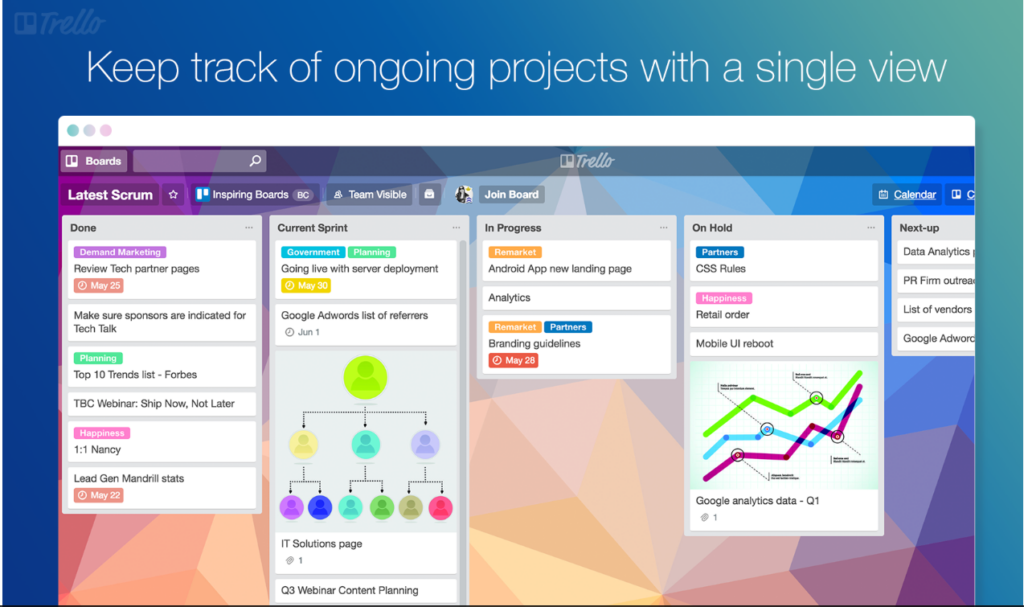
Trello è uno strumento di gestione progetti basato sul web che utilizza il concetto di bacheche, che rappresentano i progetti, e di schede, che rappresentano le attività. L'approccio visuale e facile da usare di Trello nell'organizzare il lavoro lo rende una scelta eccellente per i team che preferiscono una gestione flessibile e visiva delle proprie attività e progetti.
Perché ho scelto Trello: Nella selezione degli strumenti per questa lista, ho optato per Trello grazie al suo approccio visuale unico nella gestione di attività e progetti. Trello si distingue per il suo sistema a bacheche e schede, che consente ai team di vedere a colpo d'occhio lo stato di avanzamento del proprio lavoro. Pertanto, credo che Trello sia ideale per chi predilige un metodo flessibile e visivo per gestire progetti e attività.
Funzionalità principali e integrazioni:
Le funzionalità chiave di Trello includono bacheche, liste e schede personalizzabili, funzione drag-and-drop e la possibilità di aggiungere checklist, etichette e scadenze alle schede. Queste funzioni favoriscono una gestione delle attività intuitiva e flessibile. Trello si integra inoltre perfettamente con molti degli strumenti comunemente utilizzati dai team, come Slack, Google Drive e Dropbox, permettendo così un flusso di lavoro più connesso ed efficiente.
Pros and Cons
Pros:
- Interfaccia utente altamente visuale e intuitiva
- Gestione delle attività flessibile e personalizzabile
- Capacità di integrazione robuste
Cons:
- Mancano funzionalità avanzate di project management presenti in strumenti più specializzati
- Può diventare caotico in progetti di grande scala
- Costi maggiori per l'accesso alle funzionalità premium

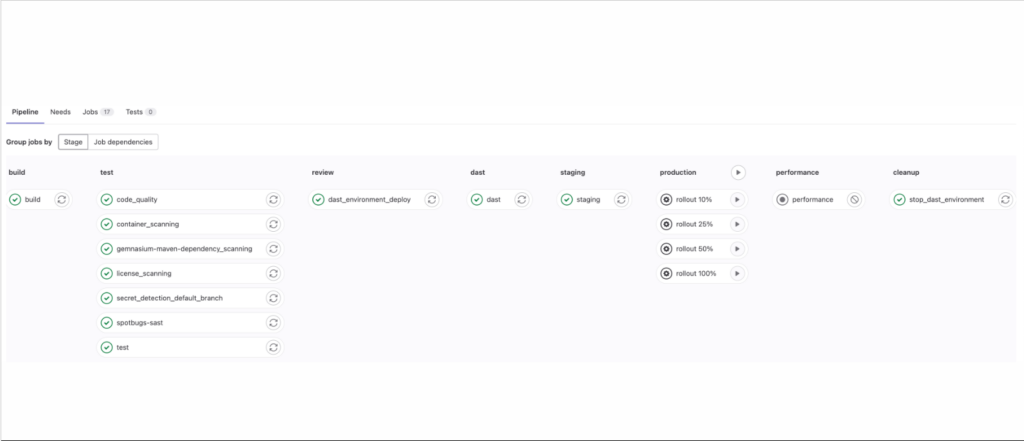
GitLab offre una suite completamente integrata per la gestione del ciclo di vita del software, coprendo tutto dalla pianificazione del progetto e gestione del codice sorgente fino a CI/CD e monitoraggio. Se cerchi una piattaforma DevOps completa, GitLab propone un approccio olistico allo sviluppo software.
Perché ho scelto GitLab: Ho scelto GitLab per la sua ampia gamma di strumenti integrati che consentono di gestire l’intero ciclo di vita DevOps. Il punto di forza di GitLab risiede nel suo approccio olistico allo sviluppo software, motivo per cui rappresenta la 'Scelta migliore per chi ha bisogni DevOps completi'. Con GitLab, hai tutto sotto lo stesso tetto—gestione del codice sorgente, CI/CD, sicurezza e molto altro, eliminando la necessità di integrare sistemi diversi.
Funzionalità e integrazioni principali:
GitLab è ricco di funzionalità che coprono ogni fase del ciclo di vita DevOps. Queste includono CI/CD integrato, Auto DevOps (auto-configurazione), integrazione con Kubernetes e strumenti di sicurezza completi. Come piattaforma all-in-one, GitLab si integra facilmente con diversi altri strumenti, come Jira, Slack e Jenkins, permettendoti di espandere ulteriormente le sue capacità.
Pros and Cons
Pros:
- Copertura totale del ciclo di vita DevOps in un'unica piattaforma
- Prezzo accessibile rispetto alla ricchezza di funzionalità
- Strumenti di sicurezza avanzati
Cons:
- Curva di apprendimento dovuta alla natura completa della piattaforma
- L'interfaccia può risultare complessa per i principianti
- Supporto clienti limitato per i piani di fascia bassa

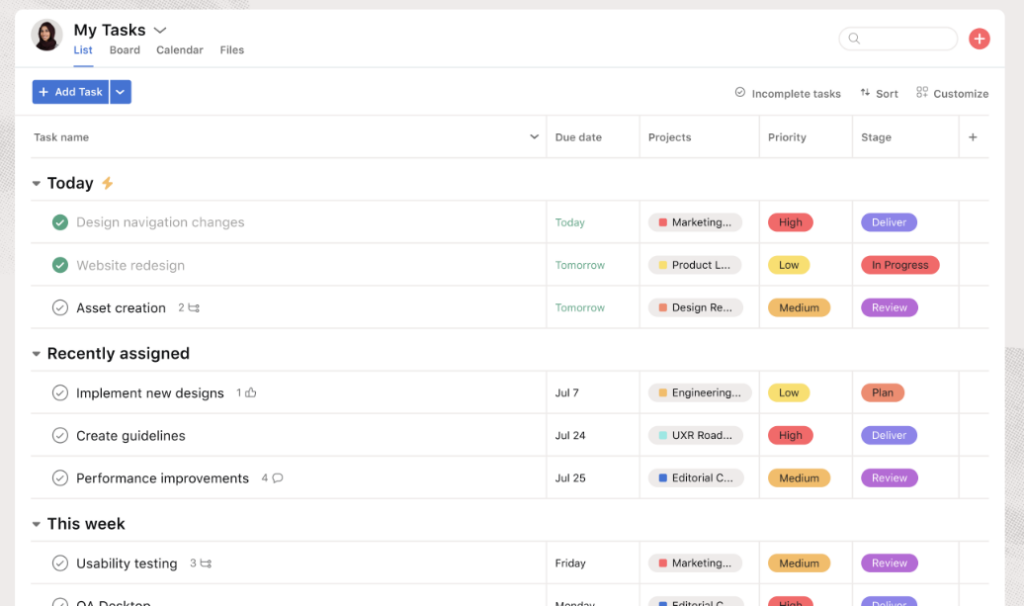
Asana è uno strumento di project management altamente flessibile progettato per aiutare i team a organizzare, monitorare e gestire il proprio lavoro. Favorisce la collaborazione tra i membri del gruppo ed è una scelta eccellente per ottimizzare i flussi di lavoro in diverse funzioni e progetti.
Perché ho scelto Asana: Ho selezionato Asana per la sua flessibilità e l'interfaccia intuitiva, caratteristiche che lo distinguono rispetto ad altri strumenti di project management. Con Asana, gestire i flussi di lavoro e incentivare la collaborazione è un processo semplice. Ritengo che Asana sia 'Ideale per la gestione dei flussi di lavoro e la collaborazione del team' grazie alla sua capacità di adattarsi a vari tipi di progetti, siano semplici elenchi di attività o flussi di lavoro complessi.
Funzionalità e integrazioni principali:
Le funzionalità più rilevanti di Asana includono modelli personalizzabili per diversi tipi di progetti, visualizzazione su timeline per la pianificazione e strumenti avanzati di ricerca e reportistica. Inoltre, Asana offre solide capacità di integrazione e si sincronizza facilmente con gli strumenti più diffusi come Slack, Google Drive e Microsoft Teams, migliorando ulteriormente la collaborazione.
Pros and Cons
Pros:
- Flessibile e personalizzabile per adattarsi a vari tipi di progetti
- Integrazione solida con altri strumenti di collaborazione popolari
- Strumenti avanzati di ricerca e reportistica
Cons:
- La versione gratuita è piuttosto limitata nelle funzionalità
- Può risultare complesso per i nuovi utenti a causa delle numerose funzionalità
- Costo elevato per team piccoli con budget limitato

MantisBT
Ideale per la gestione dei problemi semplice in un ambiente intuitivo e user-friendly

MantisBT è un software open source per la gestione dei problemi che offre un'interfaccia chiara e semplice per consentire ai team di progetto di gestire e monitorare bug e problematiche software. Con MantisBT, la facilità d'uso non compromette la completezza delle funzionalità, rendendolo ideale per i team che desiderano semplicità nella gestione dei flussi di lavoro.
Perché ho scelto MantisBT: Ho scelto MantisBT per la sua combinazione di semplicità e funzionalità avanzate. Rende la gestione dei problemi meno difficile, soprattutto per i team che si avvicinano per la prima volta a questo processo. L'ambiente intuitivo è ciò che lo distingue, portandomi a considerare MantisBT lo strumento migliore per una gestione semplice dei problemi.
Caratteristiche principali e integrazioni:
Le caratteristiche distintive di MantisBT includono campi personalizzati, notifiche email e un sistema di reportistica facile da usare. Supporta inoltre più progetti all'interno di una singola istanza. MantisBT dispone di un sistema di plugin che consente l'integrazione con altri strumenti come Slack, EmailReporting e Source Control Integration, ampliando le sue funzionalità e la facilità d'utilizzo.
Pros and Cons
Pros:
- Interfaccia semplice e intuitiva
- Open source e gratuito
- Possibilità di gestire più progetti simultaneamente
Cons:
- Mancano funzionalità avanzate presenti in altri software di issue tracking
- L'interfaccia, pur essendo user-friendly, può sembrare datata
- Capacità di integrazione limitate rispetto ad altri strumenti

Bugzilla è una soluzione collaudata per chi cerca un sistema affidabile e open-source per il tracciamento dei bug. Essendo uno strumento gratuito e open-source, offre funzionalità essenziali di gestione dei problemi per team di tutte le dimensioni.
Perché ho scelto Bugzilla: Ho scelto Bugzilla per la sua solida reputazione nella comunità open-source e per le sue robuste capacità di tracciamento dei bug. La sua natura open-source garantisce che venga costantemente aggiornato da una community di sviluppatori, assicurando l’evoluzione in base alle esigenze degli utenti. È senza dubbio il 'Migliore per il tracciamento open-source dei bug' grazie alla sua accessibilità e a un set di funzionalità che compete con molte soluzioni a pagamento.
Funzionalità principali & integrazioni:
Bugzilla offre capacità avanzate di ricerca, rilevamento automatico dei bug duplicati e tracciamento del tempo, rendendolo una soluzione completa per la gestione dei bug. Le integrazioni possono variare vista la sua natura open-source, ma Bugzilla può essere reso compatibile con diversi sistemi tramite personalizzazione, inclusi sistemi di posta elettronica e altri strumenti di gestione progetti.
Pros and Cons
Pros:
- Funzionalità complete di tracciamento dei bug
- Conveniente (open-source e gratuito)
- Flessibilità grazie alla natura open-source
Cons:
- Potrebbe richiedere competenze tecniche per installazione e personalizzazione
- Interfaccia utente non moderna come alcune alternative
- Supporto meno strutturato rispetto alle soluzioni commerciali

Jira
Migliore per una gestione di progetto solida e il tracciamento dei bug

Jira è una potenza nel campo della gestione dei progetti e del tracciamento dei problemi. Nota per le sue funzionalità robuste e la sua versatilità, si presenta come una soluzione completa per gestire e monitorare i bug nei tuoi progetti.
Perché ho scelto Jira: Quando si trattava di scegliere uno strumento con una solida reputazione e capacità complete, Jira era una scelta indiscutibile. È la scelta di molti sviluppatori e project manager per un motivo: offre una combinazione di flussi di lavoro personalizzabili e un tracciamento dettagliato dei bug difficile da eguagliare. Per questo credo fermamente che sia la 'Migliore per una gestione di progetto solida e il tracciamento dei bug.'
Funzionalità e integrazioni principali:
Jira si distingue per i suoi flussi di lavoro personalizzabili e le capacità di reporting dettagliato, che consentono ai team di rimanere aggiornati su compiti e problemi in modo efficiente. Le sue bacheche Kanban e Scrum offrono una panoramica visiva dell'avanzamento del progetto, facilitando la collaborazione tra i membri del team. In quanto a integrazioni, Jira è compatibile con una vasta gamma di altri strumenti come Confluence per la documentazione, Bitbucket per il repository di codice e Trello per la gestione visiva delle attività.
Pros and Cons
Pros:
- Tracciamento dei bug dettagliato e personalizzabile
- Ricche integrazioni con altri software
- Supporto sia per le metodologie Scrum che Kanban
Cons:
- Curva di apprendimento ripida per i nuovi utenti
- Può risultare eccessivo per progetti di piccole dimensioni
- L'interfaccia può sembrare affollata a causa delle numerose funzionalità
Altri Software di Issue Tracking da Segnalare
Qui sotto trovi un elenco di altri software di issue tracking che ho selezionato, ma che non sono entrati nella top 10. Vale comunque la pena darci un’occhiata.


Come valuto i software di tracciamento delle segnalazioni
Valuto questi strumenti su due livelli: la funzionalità di base che ogni opzione deve avere—gestione dei ticket, integrazioni per sviluppatori, automazione dei flussi di lavoro—e i fattori distintivi che differenziano i migliori.
Funzionalità di base (Requisiti essenziali per questa lista)
Quando seleziono gli strumenti per la mia lista, valuto ciascuno su una scala da 0 (funzionalità assente) a 5 (eccellente in questo ambito) per ogni funzionalità di base riportata di seguito. Poi calcolo il punteggio totale dello strumento come percentuale. Ogni strumento deve raggiungere un punteggio totale minimo del 75% per essere considerato per l'inclusione.
- Gestione dei ticket delle segnalazioni: Cerco campi ticket configurabili come gravità, priorità, tipo di segnalazione e assegnatario—oltre alla possibilità di collegare ticket correlati, creare sotto-attività e modificare in blocco l’arretrato.
- Flusso di lavoro e tracciamento dello stato: Ogni strumento dovrebbe permettere di costruire flussi di lavoro personalizzati per progetto o tipo di segnalazione, così che una segnalazione di bug e una richiesta di funzionalità possano seguire percorsi di risoluzione diversi.
- Ricerca, filtri e visualizzazioni dell’arretrato: Valuto quanto rapidamente i team possono smistare una coda in crescita—costruttori di query avanzati, filtri salvati e più tipi di visualizzazione (Kanban, elenco, board sprint) sono tutti fattori importanti.
- Integrazioni con strumenti di sviluppo: Collegare le segnalazioni a pull request, build e deploy è importante, quindi verifico la presenza di integrazioni native con piattaforme come GitHub, GitLab, Bitbucket e i più diffusi strumenti CI/CD.
- Collaborazione e notifiche: I team necessitano di commenti annidati, menzioni @, allegati di file e impostazioni di alert dettagliate affinché gli ingegneri reperibili ricevano soltanto le notifiche rilevanti, senza intasare la casella di posta di tutti.
- Reportistica e analisi: Controllo se le dashboard coprono tempi di risoluzione, trend dell’arretrato, rispetto degli SLA e produttività del team—e se è possibile personalizzare o esportare questi report.
Quando ho una lista di strumenti che soddisfano questi criteri, considero ciò che distingue ciascuna piattaforma.
Fattori distintivi (Cosa differenzia i fornitori)
Ecco come confronto e metto a paragone i vari fornitori:
Funzionalità eccezionali
Le regole di automazione sono un grande elemento di differenziazione—verifico se uno strumento può assegnare automaticamente i bug in entrata in base al componente o all’etichetta, attivare escalation quando i ticket restano irrisolti o far avanzare le segnalazioni tra gli stadi senza input manuali. La gestione SLA è importante per i team di supporto e DevOps che hanno bisogno di avvisi di violazione e timer di escalation legati ai livelli di priorità. Valuto anche le funzionalità di triage basate su intelligenza artificiale come il rilevamento dei duplicati e la categorizzazione intelligente, che fanno risparmiare ore di ordinamento manuale in progetti ad alto volume.
Oltre le funzionalità
Certificazioni di sicurezza e conformità pesano molto nella mia valutazione—i team che gestiscono incidenti in produzione o bug segnalati dai clienti necessitano della garanzia SOC 2 o ISO 27001, oltre a SSO e controlli di accesso basati sui ruoli. Anche la flessibilità di implementazione conta. Alcune organizzazioni richiedono opzioni self-hosted o single-tenant per soddisfare requisiti di residenza dei dati. Controllo anche la trasparenza dei prezzi, in particolare se un fornitore offre un piano gratuito per piccoli team e costi prevedibili per utente in caso di crescita dell’organico.
Come scegliere il software di issue tracking
È facile perdersi tra lunghe liste di funzionalità e strutture di prezzo complesse. Per aiutarti a restare concentrato durante il tuo processo di selezione del software, ecco una checklist di fattori da considerare:
| Fattore | Cosa considerare |
|---|---|
| Scalabilità | Lo strumento può crescere insieme al tuo team? Considera i limiti degli utenti, la capacità di dati e come gestisce l’aumento del carico di lavoro quando i tuoi progetti si espandono. |
| Personalizzazione | Può essere adattato al tuo flusso di lavoro? Verifica la possibilità di modificare campi, workflow e report per adattarsi ai processi del tuo team |
| Integrazioni | Funziona con i tuoi strumenti attuali? Controlla la compatibilità con i sistemi che già utilizzi come Slack, GitHub o client email. |
| Facilità d’uso | È semplice da utilizzare per il tuo team? Considera la curva di apprendimento e se il team può adattarsi rapidamente all’interfaccia senza formazione approfondita |
| Implementazione e Onboarding | Quanto velocemente puoi partire? Valuta il tempo e le risorse necessarie per configurare lo strumento e formare efficacemente il team. |
| Costo | Si adatta al tuo budget? Confronta piani tariffari, eventuali costi nascosti e spese a lungo termine rispetto ai vincoli di budget. |
| Salvaguardie di sicurezza | I tuoi dati sono protetti? Cerca crittografia, controlli di accesso e conformità agli standard di settore per garantire la sicurezza dei dati. |
Cos’è un software di Issue Tracking?
Il software di tracciamento delle segnalazioni è uno strumento che aiuta i team a registrare, organizzare e gestire bug, attività e richieste in un unico luogo. Viene utilizzato da sviluppatori, team di controllo qualità, personale di supporto e project manager per mantenere il lavoro visibile e sotto controllo.
Funzionalità come la creazione di ticket, la classificazione per priorità e il monitoraggio dello stato aiutano a ridurre la confusione, rispettare le scadenze e garantire che nulla venga tralasciato. Questi strumenti aiutano i team a rimanere allineati e a rispondere più velocemente ai problemi.
Funzionalità
Quando scegli un software di tracciamento delle segnalazioni, presta attenzione alle seguenti funzionalità chiave:
- Tracciamento delle segnalazioni: Permette di registrare, monitorare e gestire efficacemente i problemi, assicurando che nulla venga trascurato.
- Assegnazione dei compiti: Facilita l'assegnazione dei compiti ai membri del team, aiutando a distribuire efficacemente il carico di lavoro.
- Impostazione delle priorità: Consente di impostare i livelli di priorità dei problemi, garantendo che i problemi critici vengano affrontati per primi.
- Capacità di integrazione: Offre compatibilità con strumenti esistenti come Slack o GitHub, migliorando la continuità del flusso di lavoro.
- Flussi di lavoro personalizzabili: Permette di adattare i processi alle esigenze specifiche del tuo team, aumentando la produttività.
- Strumenti di reportistica: Fornisce report dettagliati sullo stato delle segnalazioni e sulle prestazioni del team, supportando decisioni basate sui dati.
- Interfaccia intuitiva: Garantisce facilità d'uso, riducendo la curva di apprendimento per i nuovi utenti.
- Notifiche automatiche: Tiene i membri del team aggiornati su novità e cambiamenti, migliorando la comunicazione.
- Misure di sicurezza: Protegge i dati tramite crittografia e controlli di accesso, mantenendo la riservatezza.
- Disponibilità dell’app mobile: Consente agli utenti di gestire le segnalazioni ovunque si trovino, garantendo flessibilità e accessibilità.
Vantaggi
Implementare un software di tracciamento delle segnalazioni offre numerosi vantaggi sia per il tuo team che per la tua azienda. Ecco alcuni benefici a cui puoi aspirare:
- Migliore organizzazione: Mantiene tutte le segnalazioni e le attività in un unico posto, rendendo più facile gestire e dare priorità al lavoro.
- Comunicazione potenziata: Le notifiche automatiche e l'assegnazione dei compiti aiutano a mantenere tutti aggiornati.
- Aumento dell'efficienza: I flussi di lavoro personalizzabili e l’impostazione delle priorità permettono ai team di concentrarsi su ciò che conta di più.
- Migliori decisioni: Gli strumenti di reportistica forniscono approfondimenti sulle prestazioni del team e sulle tendenze delle segnalazioni, supportando scelte informate.
- Flessibilità e accessibilità: La disponibilità dell’app mobile garantisce che i membri del team possano gestire le segnalazioni ovunque si trovino.
- Sicurezza dei dati: Misure di sicurezza come la crittografia proteggono le informazioni sensibili, rafforzando la fiducia all’interno del team.
- Scalabilità: La capacità di crescere con il tuo team garantisce un uso continuativo nel tempo, man mano che i progetti si espandono.
Costi e prezzi
Scegliere un software di tracciamento delle segnalazioni richiede la comprensione dei diversi modelli e piani tariffari disponibili. I costi variano in base alle funzionalità, alla dimensione del team, agli addon e altro ancora.
La tabella seguente riassume i piani più comuni, i loro prezzi medi e le caratteristiche tipiche incluse nelle soluzioni di software di tracciamento delle segnalazioni:
Tabella di confronto dei piani per il software di tracciamento delle segnalazioni
| Tipo di piano | Prezzo medio | Caratteristiche comuni |
|---|---|---|
| Piano gratuito | $0 | Tracciamento delle segnalazioni di base, assegnazione delle attività e integrazioni limitate. |
| Piano personale | $5-$15/user/month | Tracciamento delle segnalazioni, assegnazione delle attività, impostazione delle priorità e strumenti base di reportistica. |
| Piano business | $20-$40/user/month | Reportistica avanzata, flussi di lavoro personalizzabili, integrazioni e accesso all’app mobile. |
| Piano enterprise | $50-$100/user/month | Set completo di funzionalità con misure di sicurezza, supporto personalizzato e opzioni di scalabilità. |
FAQ sul Software di Tracciamento delle Segnalazioni
Ecco alcune risposte alle domande più comuni sul Software di Tracciamento delle Segnalazioni:
Qual è lo scopo principale del software di tracciamento delle segnalazioni?
Lo scopo principale del software di tracciamento delle segnalazioni è aiutarti a gestire e risolvere le problematiche in modo efficiente. Permette di monitorare i bug, assegnare compiti e tenere sotto controllo l’avanzamento dei lavori, assicurando che il tuo team resti organizzato e che nulla venga trascurato. Questo strumento è particolarmente utile per i team di sviluppo che lavorano su progetti complessi.
Il software di tracciamento delle segnalazioni può essere usato da team non tecnici?
Sì, il software di tracciamento delle segnalazioni può essere utilizzato anche da team non tecnici. Sebbene sia molto popolare tra gli sviluppatori, qualsiasi team che gestisce compiti, scadenze o progetti può trarne vantaggio. Ad esempio, i team marketing potrebbero usarlo per tracciare le attività di una campagna, mentre i team HR potrebbero gestire i processi di selezione del personale.
Come scelgo il software di tracciamento delle segnalazioni più adatto al mio team?
Per scegliere il software giusto, valuta le esigenze specifiche del tuo team, il budget e i sistemi già in uso. Cerca una soluzione che si integri bene con gli strumenti che utilizzi attualmente e che offra le funzionalità di cui hai bisogno. Testare qualche opzione con versioni di prova può aiutarti a prendere una decisione consapevole.
È possibile migrare i dati con un software di tracciamento delle segnalazioni?
Sì, la maggior parte dei software di tracciamento delle segnalazioni consente la migrazione dei dati. Questa funzionalità è fondamentale se stai passando da un altro strumento. Verifica se il software consente di importare i dati dal tuo sistema attuale e valuta la possibilità di chiedere assistenza al fornitore per garantire una transizione senza intoppi.
E ora?
Se stai cercando informazioni su un software di tracciamento delle segnalazioni, collegati gratuitamente a un consulente SoftwareSelect per ricevere suggerimenti.
Compili un modulo e fai una breve chiacchierata in cui il consulente approfondisce le tue esigenze specifiche. Successivamente riceverai una lista ristretta di software da valutare. Avrai anche supporto durante l’intero processo d’acquisto, comprese le negoziazioni sul prezzo.