

In qualità di professionista IT, comprendo la necessità di soluzioni complete in grado di gestire le diverse esigenze del lavoro. Strumenti come ConnectWise sono un punto di riferimento per molti team IT e offrono un'ampia gamma di funzionalità, dallo scripting alla messaggistica, il tutto integrato in una piattaforma basata sul Web accessibile da app desktop e mobili. Tuttavia, sebbene ConnectWise possa essere una risorsa preziosa, per alcuni team o casi d'uso potrebbero esserci soluzioni più adatte.
Ritengo fondamentale valutare alternative a ConnectWise più in linea con le esigenze specifiche del tuo team. Cerca strumenti con un'integrazione semplice, un supporto remoto superiore e interfacce intuitive. Individuare la soluzione più adatta al tuo team è essenziale per migliorare la tua esperienza di gestione IT.
Che cos'è ConnectWise?
ConnectWise è una piattaforma di gestione IT che aiuta le aziende a fornire e supportare servizi tecnologici. Viene utilizzata principalmente da MSP, fornitori di servizi IT e team IT interni per tenere sotto controllo ticket, risorse e sistemi dei clienti. L'accesso remoto, gli strumenti di automazione e le funzionalità di reportistica aiutano a gestire i dispositivi, risolvere più rapidamente i problemi e mantenere tutto organizzato. Nel complesso, ConnectWise facilita la produttività del tuo team e l'erogazione di un supporto affidabile.
Perché fidarsi dei nostri consigli sui software
6,700+
Reviews
20
Industry experts
16+
Evaluation factors
14
Years
Il nostro team testa e recensisce software dal 2012. In quanto leader tecnologici noi stessi, sappiamo quanto sia difficile — e importante — scegliere il software giusto.
Per questa guida, abbiamo valutato gli strumenti attraverso test praticie ricerche indipendenti, assegnando un punteggio agli strumenti in base ai nostri criteri di selezione.
Le nostre recensioni riflettono il nostro giudizio editoriale umano, non un discorso di vendita.
Revisori esperti:
- Paulo Gardini MiguelDirettore tecnico
 Tim FisherVP dell'IA
 Gabriel RosasTech Lead e architetto software
 Christhian GruhnTech Lead e architetto della piattaforma

Tabella di confronto delle alternative a ConnectWise
Questa tabella di confronto riassume i dettagli sui prezzi delle mie principali alternative a ConnectWise:
| Tool | Best For | Trial Info | Price | ||
|---|---|---|---|---|---|
| 1 | Ideale per la gestione dei dispositivi e delle identità basata sulle risorse umane | Demo gratuita disponibile | Da $8/utente/mese (più una tariffa base mensile) | Website | |
| 2 | Ideale per la gestione remota degli endpoint | No | $79/user/month | Website | |
| 3 | Ideale per l’automazione delle attività tramite IA | Prova gratuita di 21 giorni + demo gratuita disponibile | Da $149/tecnico/mese (fatturazione annuale) | Website | |
| 4 | Ideale con connettori predefiniti per un'integrazione rapida | Demo gratuita disponibile | Prezzo su richiesta | Website | |
| 5 | Ideale per la gestione completa di aziende IT | No | $39/utente/mese | Website | |
| 6 | Ideale per la gestione agile dei servizi IT | No | $10/utente/mese (per i primi tre agenti) | Website | |
| 7 | Ideale per la gestione dei servizi IT basata sull'IA | No | Prezzo su richiesta | Website | |
| 8 | Ideale per la gestione cloud di dispositivi mobili e desktop | No | $6/user/month | Website | |
| 9 | Ideale per l'ottimizzazione degli endpoint alimentata dall'IA | No | Prezzo su richiesta | Website | |
| 10 | Ideale per la gestione unificata degli endpoint e la sicurezza | No | $1/utente/mese (minimo 50 postazioni) | Website |


Recensioni delle migliori alternative a ConnectWise
Di seguito trovi i miei riepiloghi dettagliati delle migliori alternative a ConnectWise incluse nel mio elenco. Le mie recensioni offrono uno sguardo approfondito alle funzionalità principali, ai pro e contro, alle integrazioni e ai casi d’uso ideali di ogni strumento, per aiutarti a trovare quello più adatto a te.
 Ideale per la gestione dei dispositivi e delle identità basata sulle risorse umane
- Demo gratuita disponibile
- Da $8/utente/mese (più una tariffa base mensile)
Visit WebsiteCustomer Rating:4.8/5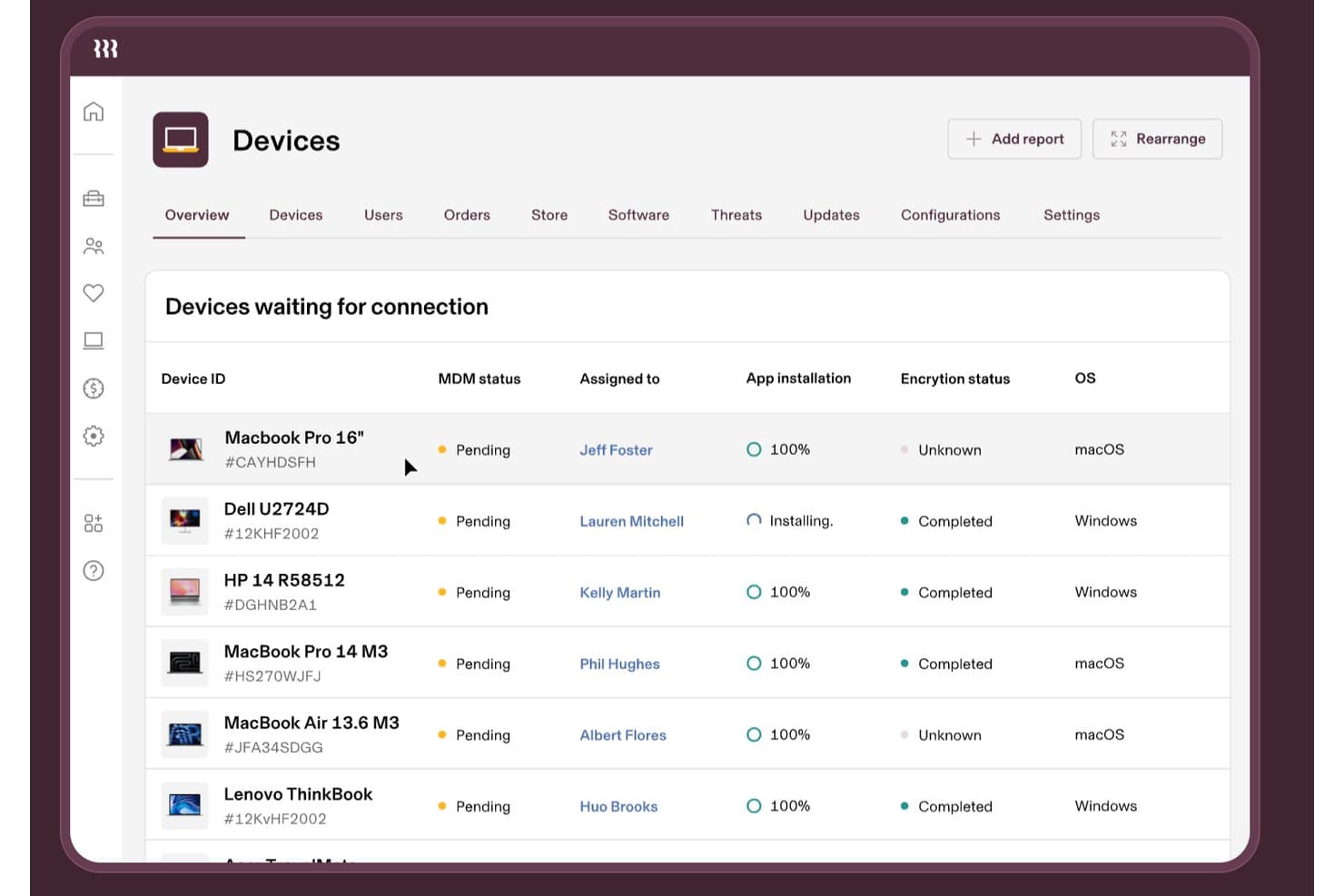
Rippling IT tiene traccia dello stato MDM dei dispositivi, della crittografia e delle installazioni delle app. Rippling IT è una piattaforma di gestione IT per aziende in crescita che collega i dati dei dipendenti ai flussi di lavoro relativi ai dispositivi e agli accessi, aiutando i team IT a semplificare l'inserimento, la disabilitazione e l'amministrazione quotidiana degli endpoint.
Per chi è più adatto Rippling IT?
Rippling IT è adatto alle aziende in crescita in cui i team delle risorse umane e IT condividono la responsabilità dei dispositivi, degli accessi, dell'inserimento e della disabilitazione dei dipendenti.
Perché Rippling IT è una buona alternativa a ConnectWise
Ho scelto Rippling IT perché la sua gestione dei dispositivi e delle identità basata sulle risorse umane collega i dati dei dipendenti ai flussi di lavoro relativi ai dispositivi e agli accessi. Lo uso per coordinare l'inserimento, la disabilitazione, l'amministrazione degli endpoint e le modifiche agli accessi tra i team delle risorse umane e IT. Questo aiuta a impedire che gli ex dipendenti mantengano l'accesso quando cambia il loro stato.
Funzionalità principali di Rippling IT
- Inventario software: Visualizza le applicazioni installate sui dispositivi aziendali.
- Blocco e cancellazione da remoto: Proteggi da remoto i dispositivi smarriti o compromessi.
- Monitoraggio dello stato dei dispositivi: Controlla lo stato degli endpoint e i dettagli della configurazione.
- Applicazione automatizzata delle patch: Applica gli aggiornamenti del sistema operativo ai dispositivi gestiti.
Integrazioni di Rippling IT
Rippling IT offre oltre 650 integrazioni native con app, tra cui GitHub, Slack, Jira, AWS, Zoom e Microsoft 365. Fornisce inoltre un'API REST per integrazioni personalizzate e l'automazione dei flussi di lavoro.
Pros and Cons
Pros:
- Flussi di lavoro per l'inserimento e la disabilitazione attivati dalle risorse umane
- Modifiche automatizzate agli accessi alle applicazioni
- Controlli per il blocco e la cancellazione da remoto
Cons:
- Bug ricorrenti influiscono sull'amministrazione quotidiana
- Le risposte dell'assistenza possono richiedere tempo
Learn more about Rippling IT:

Questa è una panoramica del monitoraggio della disponibilità di Atera. Atera è una piattaforma di gestione informatica (IT) basata su cloud che unisce Monitoraggio e Gestione Remota (RMM), Automazione dei Servizi Professionali (PSA) e accesso remoto in un'unica soluzione. È progettata per aiutare i professionisti IT e i Fornitori di Servizi Gestiti (MSP) a gestire proattivamente i sistemi, automatizzare le attività e supportare gli utenti finali in modo efficiente.
Perché è una valida alternativa a ConnectWise:
Ho selezionato Atera per questa lista perché semplifica la gestione IT con la sua piattaforma tutto-in-uno, soprattutto per gli MSP e i team IT più piccoli. La sua suite integrata di strumenti RMM, PSA e accesso remoto offre un approccio diverso rispetto alla struttura più modulare di ConnectWise. Per gli MSP che desiderano gestire gli endpoint da remoto senza dover utilizzare più piattaforme, Atera è la migliore per il monitoraggio e la gestione IT remota per MSP.
Funzionalità e integrazioni principali:
Atera offre funzionalità essenziali come il monitoraggio del sistema in tempo reale, la gestione delle patch, l'accesso remoto e flussi di lavoro di ticketing automatizzati. Le sue capacità di automazione riducono le attività manuali attraverso script personalizzabili e diagnostica alimentata da intelligenza artificiale. Le integrazioni includono Microsoft Teams, Slack, ServiceNow, Salesforce, HubSpot, ClickUp e Acronis Cyber Protect Cloud, tra le altre, aiutando gli MSP ad ampliare le funzionalità sull'infrastruttura tecnologica già in uso.
Pros and Cons
Pros:
- Piattaforma unificata con RMM, PSA e accesso remoto
- Potenti capacità di automazione IT
- Solide integrazioni con strumenti aziendali
Cons:
- L'interfaccia può sembrare complessa ai nuovi utenti
- Le opzioni di personalizzazione potrebbero essere migliorate
- Le funzionalità di report avanzati possono essere inferiori rispetto ad altri strumenti.
 Ideale per l’automazione delle attività tramite IA
- Prova gratuita di 21 giorni + demo gratuita disponibile
- Da $149/tecnico/mese (fatturazione annuale)
Visit WebsiteCustomer Rating:4.6/5
Dashboard di gestione dei ticket di SuperOps che mostra le richieste di supporto IT organizzate per priorità, con il monitoraggio dello stato e indicatori SLA per operazioni della scrivania di assistenza ottimizzate. Per i team IT e i Managed Service Provider (MSP) che cercano una soluzione moderna e guidata dall’IA per migliorare le proprie operazioni, SuperOps offre un’alternativa interessante alle piattaforme tradizionali. Integra l’Automazione dei Servizi Professionali (PSA) con il Monitoraggio e la Gestione Remota (RMM), fornendo una piattaforma unificata progettata per semplificare l’erogazione dei servizi e aumentare l’efficienza. Con funzionalità come i flussi di lavoro automatizzati e approfondimenti strategici sul business, SuperOps è particolarmente adatto a chi desidera ridurre la sovrapposizione di strumenti mantenendo un elevato livello di qualità del servizio.
Perché ho scelto SuperOps
Ho scelto SuperOps come alternativa a ConnectWise per la sua integrazione innovativa di automazione basata su IA e gestione IT. Troverai la funzione Agentic AI particolarmente utile per automatizzare attività ripetitive, consentendo al tuo team di concentrarsi su iniziative più strategiche. Anche la gestione della scrivania di assistenza del portale è una caratteristica di spicco, offrendo uno spazio centralizzato per gestire in modo più efficace le problematiche e i ticket dei clienti. Inoltre, i suoi strumenti per la sicurezza degli endpoint garantiscono che l’ambiente IT rimanga sicuro senza la necessità di sistemi separati e frammentati.
Funzionalità chiave di SuperOps
Oltre alle capacità di IA e alla gestione della scrivania di assistenza, ho trovato utili anche le seguenti funzionalità:
- Gestione degli asset: Consente di tracciare e gestire gli asset IT in tutta l’organizzazione, fornendo informazioni sulle prestazioni e sul ciclo di vita degli asset.
- Gestione delle patch: Automatizza la distribuzione degli aggiornamenti software, aiutandoti a mantenere la sicurezza e la conformità del sistema con un intervento manuale minimo.
- Pianificazione degli eventi: Facilita la programmazione e la gestione degli eventi IT, garantendo che il team sia sempre allineato alle priorità organizzative.
- Gestione dei contratti: Semplifica il processo di gestione dei contratti con i clienti, facilitando il monitoraggio delle condizioni, dei rinnovi e della conformità.
Integrazioni di SuperOps
Le integrazioni includono ConnectWise Control, Xero, QuickBooks, Bitdefender, TeamViewer, SentinelOne, Azure AD, Stripe, Acronis e Splashtop.
Pros and Cons
Pros:
- Gestione dei dispositivi mobili integrata
- Potenti strumenti di automazione e IA
- Gestione delle patch e degli endpoint inclusa
Cons:
- Potrebbe richiedere tempo per l’onboarding
- Basato su cloud, richiede accesso a Internet
Learn more about SuperOps: Ideale con connettori predefiniti per un'integrazione rapida
- Demo gratuita disponibile
- Prezzo su richiesta

Scopri un'alternativa più intelligente e flessibile a ConnectWise con Celigo. Celigo è una piattaforma di integrazione progettata per team IT e aziende che necessitano di connettere e automatizzare i flussi di lavoro tra più applicazioni cloud. Se cerchi un'alternativa a ConnectWise che dia priorità a flessibilità e controllo sulle integrazioni, Celigo merita un'analisi approfondita.
Per chi è ideale Celigo?
Team IT di aziende di medie e grandi dimensioni che hanno bisogno di integrare rapidamente applicazioni cloud per il business.
Perché Celigo è una valida alternativa a ConnectWise
Ho scelto Celigo perché i suoi connettori predefiniti permettono al mio team di integrare nuove app cloud in poche ore invece che settimane. Apprezzo la possibilità di collegare Salesforce, NetSuite e Microsoft Dynamics senza dover scrivere codice personalizzato. In pratica, questo significa che automatizziamo la sincronizzazione dei dati e i flussi di lavoro già dal primo utilizzo. Questa rapidità è un grande vantaggio rispetto a ConnectWise per le esigenze di implementazione veloce.
Caratteristiche principali di Celigo
- Costruttore di flussi visivo: Progetta e gestisci integrazioni tramite un’interfaccia drag-and-drop.
- Dashboard per la gestione degli errori: Monitora e risolvi gli errori d’integrazione in tempo reale.
- Controlli accessi basati su ruoli: Imposta permessi per utenti e team sulle varie integrazioni.
- Strumenti di trasformazione dati: Mappa e converti i formati dei dati tra sistemi collegati.
Integrazioni Celigo
Le integrazioni includono Salesforce, Microsoft Dynamics 365 Business Central, Oracle NetSuite, Walmart, SAP, Snowflake, Acumatica, Adobe, ADP e 3M.
Pros and Cons
Pros:
- Strumenti di monitoraggio e gestione errori in tempo reale
- Supporta integrazioni multi-step e multi-app
- Opzioni flessibili di mappatura e trasformazione dei dati
Cons:
- La configurazione iniziale può richiedere tempo
- Integrazione limitata con sistemi on-premise
Learn more about Celigo:

Questa è la funzionalità di HaloPSA che gestisce il service desk con funzionalità allineate agli standard ITIL. HaloPSA è una soluzione di automazione dei servizi professionali che funge da piattaforma tutto-in-uno per gestire tutti gli aspetti di un'azienda IT. Risponde alle esigenze delle aziende di servizi IT offrendo capacità complete di gestione IT.
Pros and Cons
Pros:
- Set completo di strumenti per la gestione aziendale IT
- Ampia gamma di integrazioni
- Assistenza clienti solida
Cons:
- Potrebbe risultare complesso per le piccole imprese
- L'interfaccia potrebbe essere più intuitiva.
- Alcune funzionalità possono richiedere costi aggiuntivi.
Learn more about HaloPSA: Ideale per la gestione agile dei servizi IT
- No
- $10/utente/mese (per i primi tre agenti)
Visit WebsiteCustomer Rating:4/5
Migliora i team operativi IT con informazioni contestuali per migliori decisioni e riduzione dei rischi in Jira Service Management. Jira Service Management, di Atlassian, è uno strumento di gestione dei servizi IT molto diffuso, progettato per integrarsi con gli altri prodotti di Atlassian e offrire pratiche agili per la gestione dei servizi. Riunisce sviluppatori e operazioni IT per collaborare e risolvere i problemi in modo più rapido ed efficiente.
Pros and Cons
Pros:
- Capacità di gestione agile dei servizi IT
- Eccellente integrazione con la suite Atlassian
- Processi certificati ITIL
Cons:
- Potrebbe risultare troppo ricco di funzionalità per le piccole imprese
- L'interfaccia utente potrebbe essere più intuitiva.
- Costo più elevato per i team piccoli a causa del requisito minimo di agenti
Learn more about Jira Service Management: Ideale per la gestione dei servizi IT basata sull'IA
- No
- Prezzo su richiesta
Visit WebsiteCustomer Rating:4.1/5
Utilizzando l'automazione intelligente dei servizi, puoi migliorare l'esperienza degli agenti con BMC Helix ITSM. BMC Helix ITSM è uno strumento completo di gestione dei servizi IT che sfrutta l'intelligenza artificiale per automatizzare l'erogazione e la gestione dei servizi. Offre funzionalità di gestione predittiva dei servizi, rendendolo una scelta valida per le aziende che desiderano sfruttare l'IA nei loro processi IT.
Pros and Cons
Pros:
- Potenti funzionalità di gestione dei servizi basate sull'IA
- Gestione completa degli incidenti e dei problemi
- Ampia gamma di integrazioni con piattaforme cloud e altre applicazioni
Cons:
- Mancanza di trasparenza nei prezzi
- Potrebbe essere eccessivamente ricco di funzioni per le piccole imprese.
- Alcuni utenti segnalano un processo di configurazione complesso.
Learn more about BMC Helix ITSM: Ideale per la gestione cloud di dispositivi mobili e desktop
- No
- $6/user/month

Ecco Microsoft Intune: produttività mobile sicura, sicurezza basata sull'identità e gestione moderna di Windows/Mac. Microsoft Intune è un servizio basato su cloud nel settore della gestione della mobilità aziendale (EMM) che aiuta la tua forza lavoro a essere produttiva proteggendo al contempo i dati aziendali. È particolarmente noto per le sue robuste funzionalità di gestione di dispositivi mobili e desktop.
Pros and Cons
Pros:
- Forti funzionalità di gestione per dispositivi mobili e desktop
- Eccellente integrazione con l'ecosistema Microsoft
- Solide capacità di sicurezza
Cons:
- Richiede un certo apprendimento per utenti non tecnici
- Più costoso rispetto ad alcune altre opzioni
- Potrebbe offrire supporto migliore per piattaforme non Microsoft
Learn more about Microsoft Intune: Ideale per l'ottimizzazione degli endpoint alimentata dall'IA
- No
- Prezzo su richiesta

Ecco il controllo integrato e intelligente di Ivanti Neurons for UEM su molte piattaforme desktop e mobili utilizzate dai tuoi utenti. Ivanti Neurons for UEM offre una piattaforma che combina la gestione unificata degli endpoint (UEM) e funzionalità di sicurezza, con un focus sull'utilizzo dell'IA per ottimizzare gli endpoint. Si rivolge alle organizzazioni di tutte le dimensioni che devono gestire e proteggere diversi dispositivi garantendo prestazioni ottimali.
Pros and Cons
Pros:
- Potenti capacità di automazione basate sull'IA
- Gestione completa di dispositivi e sicurezza
- Ampie possibilità di integrazione
Cons:
- I dettagli sui prezzi non sono trasparenti.
- Può avere una curva di apprendimento ripida.
- La configurazione può essere complessa per nuovi utenti
Learn more about Ivanti Neurons for UEM: Ideale per la gestione unificata degli endpoint e la sicurezza
- No
- $1/utente/mese (minimo 50 postazioni)

Ecco le funzionalità di ManageEngine Desktop Central per la gestione di server, desktop, laptop, smartphone, tablet e dispositivi POS. ManageEngine Desktop Central è una soluzione di gestione unificata degli endpoint (UEM) che offre una vasta gamma di strumenti per gestire e proteggere i tuoi endpoint. La sua specializzazione sia nella UEM che nella sicurezza degli endpoint la rende una scelta pratica per le aziende che necessitano di una soluzione olistica di gestione e sicurezza.
Pros and Cons
Pros:
- Strumenti completi per la gestione e la sicurezza degli endpoint
- Supporta diversi sistemi operativi e dispositivi
- Offre gestione automatizzata delle patch
Cons:
- Richiede un minimo di 50 postazioni
- Può risultare complesso per le piccole imprese.
- Alcuni utenti segnalano difficoltà nella configurazione iniziale.
Learn more about ManageEngine Desktop Central:
Altre alternative a ConnectWise
Ecco alcune alternative aggiuntive a ConnectWise che non sono state incluse nel mio elenco, ma che vale comunque la pena valutare:
- 11Quest KACEIdeale per una gestione completa delle risorse IT
- 12N-able MSP ManagerIdeale per la gestione scalabile dei servizi IT per gli MSP
- 13Tanium XEMIdeale per la sicurezza e la gestione integrata degli endpoint
- 14NinjaOneIdeale per ottimizzare le attività dei fornitori di servizi gestiti
- 15RepairShoprIdeale per l'automazione dei negozi di riparazione di piccole imprese
- 16SyncroIdeale per flussi di lavoro IT automatizzati
Altre recensioni di software
Come Valuto le Alternative a ConnectWise
Valuto questi strumenti su due livelli: le capacità principali di RMM e PSA che ogni opzione deve avere, e i fattori differenzianti che contano quando gestisci più di 50 clienti o quando devi migrare una cronologia di ticket.
Funzionalità Principali (Requisiti Essenziali per Questa Lista)
Quando seleziono gli strumenti per la mia lista, valuto ciascuno su una scala da 0 (non offre la funzionalità) a 5 (eccelle in questa area) per ogni funzionalità principale elencata di seguito. Poi, calcolo il punteggio totale dello strumento come percentuale. Ogni strumento deve raggiungere un punteggio minimo totale del 65% per essere considerato per l'inclusione.
- Monitoraggio & Gestione Remota: Verifico che la piattaforma possa monitorare endpoint, server e dispositivi di rete con avvisi proattivi e gestione delle patch su diversi ambienti OS.
- PSA & Ticketing: Ogni strumento dovrebbe offrire un service desk con monitoraggio SLA, instradamento dei ticket e flussi di lavoro di dispatch che aiutano i tecnici a gestire le code.
- Accesso & Controllo Remoto: Valuto il supporto per sessioni assistite e non assistite, analizzando funzionalità come trasferimento file, registrazione della sessione e gestione multi-monitor durante la risoluzione dei problemi in tempo reale.
- Automazione & Scripting: Strumenti come Datto RMM e NinjaOne adottano approcci diversi allo scripting, quindi valuto librerie di script, attività pianificate e opzioni di automazione basate su policy.
- Fatturazione & Gestione Clienti: Cerco la possibilità di tracciare il tempo collegato ai ticket, la gestione dei contratti e funzionalità di fatturazione che aiutano gli MSP a collegare l'erogazione del servizio alle entrate.
- Reportistica & Integrazioni: Lo strumento dovrebbe offrire dashboard configurabili e connettersi alle piattaforme già utilizzate dagli MSP, come IT Glue, QuickBooks o soluzioni di backup.
Una volta che ho una lista di strumenti che soddisfano questi criteri, considero cosa distingue ciascuna piattaforma.
Fattori Differenzianti (Cosa Distingue i Fornitori)
Ecco come confronto e metto a confronto i diversi fornitori:
Funzionalità Da Evidenziare
Uno stack di sicurezza integrato è un grande fattore distintivo: le piattaforme con rilevamento degli endpoint nativo riducono la proliferazione di agenti sui dispositivi dei clienti rispetto all'aggiunta di strumenti di terze parti. Valuto anche le funzionalità di discovery e mappatura della rete, che velocizzano l'onboarding di nuovi clienti rilevando automaticamente dispositivi e dipendenze. Una app mobile completa è importante, soprattutto per i tecnici che lavorano sul campo e che hanno bisogno di gestire i ticket o avviare sessioni remote dal telefono tra una visita e l'altra.
Oltre alle Funzionalità
Anche il modello di prezzo è molto importante. La tariffa per tecnico favorisce i team più piccoli, mentre i modelli per endpoint possono funzionare meglio su larga scala, quindi valuto quale struttura si adatta alle diverse dimensioni di MSP. Esamino anche il supporto alla migrazione: passare da ConnectWise significa trasferire storici dei ticket, configurazioni dei clienti e dati contrattuali, e alcuni fornitori offrono percorsi di migrazione dedicati mentre altri lasciano tutto a carico tuo. Vale la pena controllare anche le certificazioni di conformità come SOC 2 e la preparazione HIPAA, soprattutto se hai clienti in settori regolamentati come la sanità o la finanza.
Perché cercare un'alternativa a ConnectWise?
Sebbene ConnectWise sia una buona scelta come piattaforma di gestione IT, sono diversi i motivi per cui alcuni utenti cercano soluzioni alternative. Potresti cercare un'alternativa a ConnectWise perché…
- Hai bisogno di uno strumento più semplice, facile da configurare e utilizzare.
- Il tuo team non ha bisogno di tutti gli strumenti aggiuntivi inclusi.
- Stai riscontrando problemi legati a prestazioni lente o instabili.
- Desideri un supporto clienti più rapido o disponibile.
- Cerchi un modello di prezzi più conveniente.
- Hai bisogno di funzionalità più adatte all'IT interno anziché agli MSP.
Se ti riconosci in una di queste situazioni, sei nel posto giusto. Il mio elenco contiene diverse opzioni di piattaforme di gestione IT più adatte ai team che affrontano queste difficoltà con ConnectWise e cercano soluzioni alternative.
Funzionalità principali di ConnectWise
Ecco alcune delle principali funzionalità di ConnectWise che ti aiuteranno a confrontare le caratteristiche offerte dalle soluzioni alternative:
- Monitoraggio e gestione da remoto: Ti permette di tenere sotto controllo gli endpoint dei clienti e risolvere i problemi senza dover essere sul posto.
- Sistema di ticketing: Aiuta il tuo team a monitorare, gestire e risolvere le richieste di assistenza in un unico posto.
- Automazione IT: Ti permette di configurare regole per gestire attività ripetitive come l’applicazione di patch e la manutenzione.
- Fatturazione ed emissione delle fatture: Genera fatture in base al lavoro svolto, così il tuo team riceve pagamenti accurati.
- Gestione delle risorse: Tiene traccia di tutto l’hardware e il software per semplificare gli audit e la pianificazione.
- Individuazione della rete: Trova tutti i dispositivi presenti su una rete, così nulla sfugge al controllo.
- Report e dashboard: Mostra al tuo team i risultati relativi a ticket, monitoraggio del tempo ed erogazione dei servizi.
- Gestione delle patch: Ti permette di distribuire gli aggiornamenti di sicurezza sui sistemi, così puoi mantenerli aggiornati.
- Integrazioni di terze parti: Si collega agli altri strumenti utilizzati dal tuo team, così non devi passare da un’app all’altra.
- Strumenti di sicurezza degli endpoint: Aiuta a proteggere i sistemi dei clienti con funzionalità antivirus e di rilevamento delle minacce.