

Une bonne alternative à Basecamp offre à votre équipe des fonctionnalités flexibles de gestion de projet, des outils de collaboration fiables et des options de personnalisation adaptées à votre flux de travail. Si vous cherchez un remplacement parce que la structure, les intégrations ou les tarifs de Basecamp ne répondent plus à vos besoins, vous n’êtes pas seul.
De nombreux spécialistes informatiques et responsables de projet recherchent des outils capables de gérer des projets complexes, de prendre en charge l’automatisation et d’offrir un contrôle plus précis des tâches et des rapports. Cette liste vous aidera à comparer les meilleures alternatives à Basecamp pour 2026, afin de trouver une solution qui répond aux exigences de votre équipe et vous permet de garder vos projets sur la bonne voie.
Qu’est-ce que Basecamp ?
Basecamp est un logiciel de gestion de projet qui aide les équipes à organiser les tâches, à partager des fichiers et à communiquer au même endroit. Il combine des listes de tâches, des tableaux de discussion, des calendriers et un espace de stockage de documents pour faciliter la collaboration sur les projets.
Basecamp est utilisé par des entreprises de toutes tailles pour coordonner le travail, suivre l’avancement et centraliser les informations relatives aux projets. Son interface simple et son orientation axée sur la communication d’équipe en font un choix populaire pour gérer les projets internes et ceux destinés aux clients.
Tableau comparatif des alternatives à Basecamp
Ce tableau comparatif résume les informations tarifaires relatives à mes sélections d’alternatives à Basecamp :
| Tool | Best For | Trial Info | Price | ||
|---|---|---|---|---|---|
| 1 | Idéal pour les tableaux de bord entièrement personnalisables | Forfait gratuit disponible | À partir de 7 $/utilisateur/mois (facturé annuellement) | Website | |
| 2 | Idéal pour l’automatisation des flux de travail entre les équipes | Forfait gratuit disponible | À partir de $10.99/utilisateur/mois (facturé annuellement) | Website | |
| 3 | Idéal pour centraliser les discussions d’équipe | Essai gratuit de 14 jours + démonstration gratuite disponible | À partir de 45 $/mois (facturation annuelle) | Website | |
| 4 | Idéal pour les équipes qui ont besoin d’une gestion de projets auto-hébergée | Essai gratuit de 14 jours + forfait gratuit disponible | À partir de $7.25/utilisateur/mois (facturé annuellement) | Website | |
| 5 | Idéal pour la gestion de projets destinés aux clients | Essai gratuit de 14 jours + démonstration gratuite disponible | À partir de 9.99 $/utilisateur/mois (facturé annuellement) | Website | |
| 6 | Idéal pour les feuilles de route axées sur les jalons | Forfait gratuit + démonstration gratuite disponible + essai gratuit de 14 jours | À partir de 39 $/utilisateur/mois (facturation annuelle) | Website | |
| 7 | Idéal pour les automatisations de projets alimentées par l’IA | Forfait gratuit disponible | À partir de $9/utilisateur/mois (facturé annuellement) | Website | |
| 8 | Idéal pour planifier les tâches dans un format de feuille de calcul | Essai gratuit de 30 jours | À partir de $9/utilisateur/mois (facturé annuellement) | Website | |
| 9 | Idéal pour l’intégration native des e-mails | Essai gratuit de 14 jours + forfait gratuit + démonstration gratuite disponible | À partir de 5 $/utilisateur/mois (facturé annuellement) | Website | |
| 10 | Idéal pour les outils avancés de production de rapports | Essai gratuit de 14 jours + forfait gratuit disponible | À partir de $10/utilisateur/mois (facturé annuellement) | Website |


Pourquoi faire confiance à nos recommandations de logiciels
6,700+
Reviews
20
Industry experts
16+
Evaluation factors
14
Years
Notre équipe teste et évalue des logiciels depuis 2012. En tant que leaders technologiques nous-mêmes, nous savons à quel point il est difficile — et important — de choisir le bon logiciel.
Pour ce guide, nous avons évalué les outils grâce à des tests pratiques et une recherche indépendante, en notant les outils selon nos critères de sélection.
Nos avis reflètent notre jugement éditorial humain, et non un argumentaire de vente.
Réviseurs experts:
- Paulo Gardini MiguelDirecteur technique
 Tim FisherVP de l'IA
 Gabriel RosasTech Lead et architecte logiciel
 Christhian GruhnTech Lead et architecte plateforme

Avis sur les alternatives à Basecamp
Vous trouverez ci-dessous mes résumés détaillés des alternatives à Basecamp qui ont retenu mon attention. Mes avis présentent en détail les fonctionnalités, les cas d’utilisation les plus adaptés et les intégrations de chaque plateforme afin de vous aider à trouver celle qui vous convient le mieux.
 Idéal pour les tableaux de bord entièrement personnalisables
- Forfait gratuit disponible
- À partir de 7 $/utilisateur/mois (facturé annuellement)
Visit WebsiteCustomer Rating:4.6/5
ClickUp est un outil de gestion de projet tout-en-un conçu pour prendre en charge les tâches, le suivi du temps et le travail d’équipe ClickUp se distingue pour les équipes qui souhaitent créer des tableaux de bord adaptés à leurs besoins précis. Les services informatiques et les chefs de projet qui ont besoin d’un contrôle granulaire des données de projet et des rapports apprécieront ses widgets de tableau de bord flexibles. Contrairement à Basecamp, ClickUp vous permet de visualiser et de suivre presque n’importe quelle métrique ou flux de travail au même endroit.
Pourquoi ClickUp est une bonne alternative à Basecamp
ClickUp vous donne la liberté de concevoir des tableaux de bord adaptés aux flux de travail et aux besoins de reporting uniques de votre équipe. J’ai choisi ClickUp parce que son générateur de tableaux de bord vous permet d’ajouter des widgets personnalisés pour les tâches, le suivi du temps, les objectifs et la charge de travail, le tout dans une seule vue.
Vous pouvez combiner des graphiques, des listes et des visualisations pour surveiller exactement ce qui compte pour vos projets. Pour les équipes qui souhaitent davantage de contrôle sur la manière dont elles visualisent et gèrent le travail, la personnalisation des tableaux de bord de ClickUp va bien au-delà de ce que propose Basecamp.
Fonctionnalités principales de ClickUp
Voici quelques autres fonctionnalités de ClickUp qui en font un choix flexible pour les équipes de gestion de projet :
- Vues de projet multiples : Passez d’une vue en liste, en tableau, de Gantt, de calendrier ou de carte heuristique pour gérer les tâches de la manière qui convient le mieux à votre équipe.
- Automatisation des tâches : Configurez des actions automatisées pour les processus récurrents, comme l’attribution de tâches ou la mise à jour des statuts en fonction de déclencheurs.
- Documents et wikis : Créez, modifiez et partagez des documents et des bases de connaissances directement dans votre espace de travail.
- Suivi des objectifs : Définissez des objectifs mesurables et associez-les à des tâches ou à des projets pour suivre les progrès en temps réel.
Intégrations de ClickUp
Les intégrations incluent Slack, Google Drive, Zoom, Microsoft Teams, Dropbox, GitHub, Evernote, Salesforce, Trello, Outlook, et bien plus encore.
Pros and Cons
Pros:
- Les tableaux de bord personnalisés permettent aux équipes de suivre les métriques de projet à leur manière
- Les multiples vues de projet prennent en charge les flux de travail agiles, en cascade et hybrides.
- Les documents et wikis intégrés regroupent les connaissances du projet au même endroit
Cons:
- Les autorisations et les options de partage peuvent être déroutantes pour les nouveaux utilisateurs
- L’interface riche en fonctionnalités peut sembler encombrée pour les petites équipes
Learn more about ClickUp: Idéal pour l’automatisation des flux de travail entre les équipes
- Forfait gratuit disponible
- À partir de $10.99/utilisateur/mois (facturé annuellement)
Visit WebsiteCustomer Rating:4.4/5
Asana est un outil de gestion de projets permettant d’organiser les tâches et de suivre l’avancement de l’équipe Asana offre aux équipes une manière flexible de gérer les projets grâce à l’automatisation et aux flux de travail interfonctionnels. Les spécialistes informatiques et les responsables de projet qui doivent coordonner des tâches complexes entre plusieurs services trouveront ses fonctionnalités d’automatisation particulièrement utiles. Si vous recherchez davantage d’options de personnalisation et d’intégration que celles proposées par Basecamp, Asana se distingue par la conception adaptable de ses flux de travail.
Pourquoi Asana est une bonne alternative à Basecamp
Ce qui distingue Asana en tant qu’alternative à Basecamp, c’est l’importance accordée à l’automatisation des flux de travail entre les équipes. J’ai choisi Asana pour cette liste, car il vous permet d’automatiser les tâches répétitives et de configurer des règles personnalisées qui déclenchent des actions en fonction de l’activité du projet.
Son générateur de flux de travail vous permet de concevoir des processus qui s’étendent sur plusieurs services, ce qui facilite la coordination de projets complexes. Pour les équipes qui ont besoin de plus que de simples listes de tâches, les fonctionnalités d’automatisation d’Asana contribuent à réduire le travail manuel et à maintenir l’avancement des projets.
Fonctionnalités principales d’Asana
Certaines autres fonctionnalités d’Asana en font un choix polyvalent pour les équipes de gestion de projets :
- Vue chronologique : Visualisez les calendriers et les dépendances des projets grâce à une chronologie de type diagramme de Gantt qui vous aide à planifier les tâches et les échéances.
- Gestion de la charge de travail : Surveillez la capacité de l’équipe et équilibrez les affectations afin d’éviter de surcharger un membre de l’équipe.
- Dépendances entre les tâches : Configurez facilement les relations entre les tâches afin que les équipes sachent ce qui doit être terminé avant de commencer l’étape suivante.
- Champs personnalisés : Ajoutez des champs de données personnalisés aux tâches et aux projets pour suivre les informations propres au flux de travail de votre équipe.
Intégrations d’Asana
Les intégrations comprennent Slack, Microsoft Teams, Google Drive, Zoom, Salesforce, Dropbox, Jira, Tableau et Zendesk.
Pros and Cons
Pros:
- L’automatisation des flux de travail réduit la gestion manuelle des tâches pour les équipes
- Les règles et déclencheurs personnalisés prennent en charge les processus complexes entre les équipes
- Les vues chronologiques et de la charge de travail aident à visualiser les calendriers des projets et la capacité de l’équipe
Cons:
- Le volume de notifications peut devenir difficile à gérer dans les projets de grande envergure
- Les fonctionnalités d’automatisation avancées sont uniquement disponibles avec les forfaits de niveau supérieur
Learn more about Asana: Idéal pour centraliser les discussions d’équipe
- Essai gratuit de 14 jours + démonstration gratuite disponible
- À partir de 45 $/mois (facturation annuelle)
Visit WebsiteCustomer Rating:4.5/5
ProofHub est un logiciel de gestion de projet destiné à la planification, à la collaboration et à la livraison Si votre équipe a besoin d’un espace unique pour organiser les conversations, ProofHub place les outils de discussion au premier plan. Cette plateforme convient parfaitement aux agences, aux équipes créatives et aux groupes interfonctionnels qui souhaitent conserver les discussions de projet, les retours et les décisions dans un espace consultable. Contrairement à Basecamp, ProofHub propose des tableaux de discussion dédiés et des conversations en fils, afin d’aider les équipes à éviter une communication dispersée.
Pourquoi ProofHub est une bonne alternative à Basecamp
Lorsque vous souhaitez garder toutes les discussions de l’équipe organisées et accessibles, ProofHub se distingue par ses outils de communication centralisés. J’apprécie le fait que vous puissiez créer des tableaux de discussion dédiés à chaque projet ou sujet, ce qui facilite le maintien de conversations ciblées et consultables.
ProofHub prend également en charge les réponses en fil et les commentaires contextuels, afin que les équipes puissent suivre les retours et les décisions sans perdre le contexte. Si vos projets impliquent de nombreux échanges ou nécessitent une documentation claire des conversations, ProofHub offre davantage de structure que les tableaux de messages de Basecamp.
Fonctionnalités de ProofHub
Certaines autres fonctionnalités de ProofHub aident les équipes à gérer plus efficacement les projets et les ressources :
- Gestion des tâches : Attribuez des tâches, définissez des échéances et suivez la progression à l’aide de tableaux visuels et de listes.
- Diagrammes de Gantt : Planifiez les échéanciers des projets et ajustez les calendriers à l’aide de diagrammes de Gantt interactifs.
- Suivi du temps : Enregistrez directement dans chaque projet les heures facturables et non facturables.
- Partage et annotation de fichiers : Importez, partagez et annotez des fichiers pour faciliter les retours collaboratifs et les validations.
Intégrations de ProofHub
Les intégrations incluent Google Drive, Dropbox, Box, OneDrive, FreshBooks, QuickBooks, Xero, Slack, iCal et Outlook.
Pros and Cons
Pros:
- Les tableaux de discussion permettent d’organiser les conversations de projet et de les retrouver facilement
- Les outils d’annotation intégrés facilitent les retours visuels sur les fichiers partagés
- Le suivi du temps est inclus pour surveiller les heures facturables et non facturables
Cons:
- Aucune automatisation intégrée pour les tâches ou les flux de travail récurrents
- Les intégrations natives avec les outils tiers sont très limitées
Learn more about ProofHub: Idéal pour les équipes qui ont besoin d’une gestion de projets auto-hébergée
- Essai gratuit de 14 jours + forfait gratuit disponible
- À partir de $7.25/utilisateur/mois (facturé annuellement)
Visit WebsiteCustomer Rating:4.5/5
OpenProject est un outil de gestion de projets à code source ouvert axé sur la planification et la collaboration sécurisées Les organisations qui ont besoin d’un contrôle total sur les données de leurs projets se tournent souvent vers OpenProject pour ses options de déploiement auto-hébergé. Cette plateforme convient parfaitement aux équipes informatiques, aux organismes gouvernementaux et aux entreprises soucieuses de la confidentialité qui exigent une gestion de projets sur site. Contrairement à Basecamp, OpenProject vous offre la flexibilité d’héberger votre propre instance et de répondre à des exigences strictes en matière de sécurité ou de conformité.
Pourquoi OpenProject est une bonne alternative à Basecamp
Pour les équipes qui doivent conserver les données sensibles de leurs projets sur leur propre infrastructure, OpenProject se démarque par ses options de déploiement auto-hébergé. J’apprécie le fait que vous puissiez installer et gérer la plateforme sur vos propres serveurs, ce qui est essentiel pour les organisations soumises à des exigences strictes en matière de confidentialité des données ou de réglementation.
OpenProject prend également en charge des autorisations utilisateur avancées et des sauvegardes sur site, vous offrant ainsi un meilleur contrôle sur les accès et la conservation des données. Si vous recherchez une alternative à Basecamp qui vous permette de garder la maîtrise de votre environnement de projet, OpenProject constitue un excellent choix.
Fonctionnalités clés d’OpenProject
Voici quelques autres fonctionnalités d’OpenProject qui aident les équipes à gérer des projets complexes et à collaborer plus efficacement :
- Tableaux agiles : Organisez les tâches et suivez la progression à l’aide de tableaux Kanban et Scrum.
- Diagrammes de Gantt : Planifiez et visualisez les échéanciers des projets à l’aide de diagrammes de Gantt interactifs.
- Wiki et documentation : Créez et gérez la documentation des projets directement au sein de la plateforme.
- Suivi du temps et des coûts : Enregistrez les heures et surveillez les budgets des projets grâce aux outils de suivi intégrés.
Intégrations d’OpenProject
Les intégrations comprennent Slack, GitHub, GitLab, Bitbucket, Jenkins, Jira, Redmine, Excel, Microsoft Project et CSV.
Pros and Cons
Pros:
- Le déploiement auto-hébergé répond aux exigences strictes en matière de confidentialité et de conformité des données
- Les autorisations avancées fondées sur les rôles permettent un contrôle granulaire de l’accès des utilisateurs
- Les outils intégrés de wiki et de documentation centralisent les connaissances liées aux projets
Cons:
- La configuration initiale et la maintenance du serveur nécessitent une expertise technique
- Moins d’intégrations natives que les outils de gestion de projets infonuagiques
Learn more about OpenProject: Idéal pour la gestion de projets destinés aux clients
- Essai gratuit de 14 jours + démonstration gratuite disponible
- À partir de 9.99 $/utilisateur/mois (facturé annuellement)
Visit WebsiteCustomer Rating:4.5/5
Teamwork est un logiciel de gestion de projets destiné à la collaboration en équipe et au travail avec les clients Les agences et les équipes de services à la recherche d’un logiciel de gestion de projets conçu pour la collaboration avec les clients se tournent souvent vers Teamwork. La plateforme est conçue pour vous aider à gérer les projets clients, suivre le temps facturable et partager les mises à jour d’avancement avec les parties prenantes externes. Contrairement à Basecamp, Teamwork inclut des autorisations spécifiques aux clients et des fonctionnalités de facturation qui facilitent la réalisation du travail en toute transparence.
Pourquoi Teamwork est une bonne alternative à Basecamp
Pour les équipes qui travaillent directement avec des clients, Teamwork propose des fonctionnalités qui vont au-delà de ce qu’offre Basecamp. J’apprécie le fait de pouvoir définir des autorisations spécifiques aux clients, afin qu’ils ne voient que ce que vous souhaitez leur montrer.
Les outils intégrés de suivi du temps et de facturation vous aident à gérer le travail facturable et à organiser les projets clients du début à la fin. Si vos projets nécessitent des mises à jour fréquentes pour les clients et une collaboration avec eux, les contrôles destinés aux clients de Teamwork en font une alternative solide à Basecamp.
Principales fonctionnalités de Teamwork
Teamwork propose également d’autres fonctionnalités pour vous aider à gérer les projets et à collaborer avec votre équipe :
- Dépendances entre les tâches : Établissez des relations entre les tâches pour contrôler le déroulement du projet et éviter les goulots d’étranglement.
- Diagrammes de Gantt : Visualisez les échéances des projets et ajustez les calendriers grâce aux outils de glisser-déposer.
- Carnets : Stockez les notes de réunion, la documentation des projets et les documents de référence au même endroit.
- Modèles de projet : Créez et réutilisez des modèles pour standardiser la configuration des projets et gagner du temps.
Intégrations de Teamwork
Les intégrations comprennent Slack, Microsoft Teams, Google Drive, Dropbox, HubSpot, QuickBooks, Xero, Zapier, Harvest et Zendesk.
Pros and Cons
Pros:
- Les utilisateurs clients peuvent accéder aux projets avec des paramètres d’autorisation personnalisables
- Le suivi du temps intégré facilite une facturation précise
- Les diagrammes de Gantt et les dépendances entre les tâches aident à gérer les échéanciers de projets complexes
Cons:
- Les limites de stockage des fichiers peuvent nécessiter une mise à niveau pour les projets clients volumineux
- L’application mobile ne propose pas certaines fonctionnalités de bureau, comme les diagrammes de Gantt
Learn more about Teamwork: Idéal pour les feuilles de route axées sur les jalons
- Forfait gratuit + démonstration gratuite disponible + essai gratuit de 14 jours
- À partir de 39 $/utilisateur/mois (facturation annuelle)
Visit WebsiteCustomer Rating:4.7/5
Nifty est un outil de gestion de projets avec collaboration en temps réel et suivi des progrès Les équipes qui doivent organiser des projets autour de jalons clairs se tournent souvent vers Nifty pour son approche axée sur les feuilles de route. Cette plateforme est particulièrement utile pour les chefs de produit, les équipes marketing et les agences qui souhaitent visualiser les progrès et maintenir l’alignement de tous sur les livrables clés. Contrairement à Basecamp, Nifty place les jalons au centre de la planification des projets, ce qui facilite le suivi des objectifs et des dépendances.
Pourquoi Nifty est une bonne alternative à Basecamp
Si votre équipe doit gérer des projets en mettant fortement l’accent sur les jalons, Nifty offre une structure difficile à trouver dans Basecamp. J’apprécie le fait que les feuilles de route de Nifty, fondées sur les jalons, vous permettent de diviser les projets en phases et de suivre visuellement les progrès vers les objectifs clés.
La plateforme relie également les tâches et les discussions directement aux jalons, afin que chacun puisse voir comment le travail quotidien contribue aux objectifs plus larges. Pour les équipes qui souhaitent garder les livrables au premier plan, l’approche de Nifty facilite l’alignement du travail sur les résultats.
Fonctionnalités clés de Nifty
Voici quelques autres fonctionnalités de Nifty qui aident les équipes à coordonner et à mener à bien leurs projets plus efficacement :
- Rapports d’avancement automatisés : Générez des mises à jour en temps réel sur l’état des projets sans saisie manuelle.
- Gestion des documents : Stockez, partagez et modifiez des fichiers en collaboration directement dans chaque projet.
- Suivi du temps : Enregistrez les heures et surveillez la charge de travail de l’équipe depuis la plateforme.
- Vues personnalisées des tâches : Passez d’une présentation Kanban à une présentation en liste, en calendrier ou en couloirs pour l’adapter à votre flux de travail.
Intégrations de Nifty
Les intégrations comprennent Google Drive, Slack, Zoom, Microsoft Teams, Dropbox, GitHub, Trello, Asana, Jira et Evernote.
Pros and Cons
Pros:
- Le suivi des jalons rend les objectifs des projets visibles et exploitables
- La gestion des documents intégrée centralise les fichiers et les ressources des projets
- Les rapports d’avancement automatisés réduisent le travail manuel de mise à jour de l’état des projets
Cons:
- Les options de rapports avancés sont moins personnalisables que chez certains concurrents
- Les autorisations d’accès des invités sont moins détaillées que dans Basecamp
Learn more about Nifty: Idéal pour les automatisations de projets alimentées par l’IA
- Forfait gratuit disponible
- À partir de $9/utilisateur/mois (facturé annuellement)
Visit WebsiteCustomer Rating:4.6/5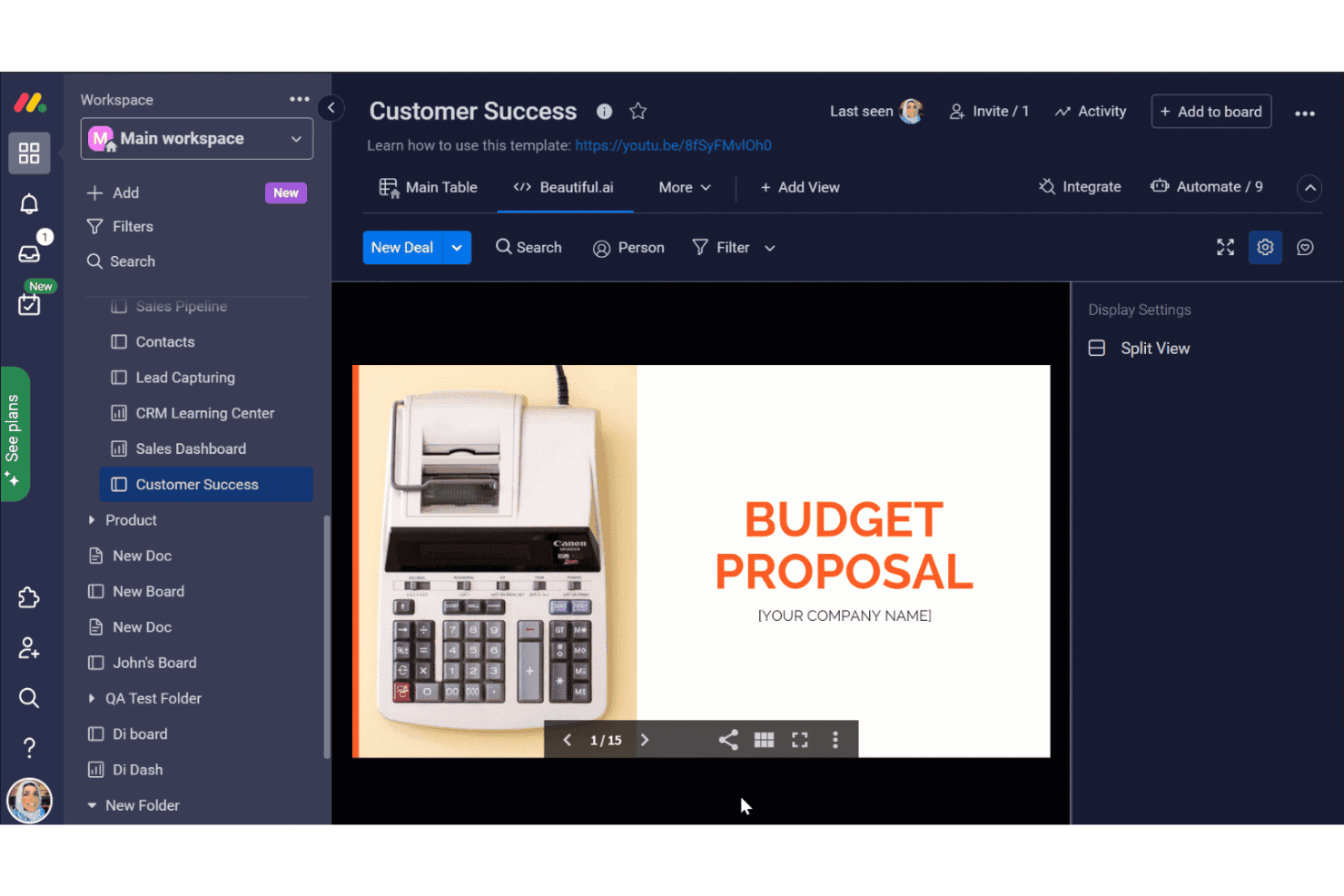
monday.com propose un tableau de réussite client avec une vue Beautiful.ai intégrée affichant une présentation de proposition budgétaire dans son AI Workspace. monday AI Workspace est une plateforme flexible de gestion du travail conçue pour les équipes techniques qui ont besoin de plus que les fonctionnalités de base de Basecamp : elle combine des automatisations pilotées par l’IA, la planification des sprints et le suivi de projets interfonctionnels en un seul endroit.
À qui monday AI Workspace convient-il le mieux ?
C’est une solution particulièrement adaptée aux équipes informatiques et d’ingénierie de taille moyenne à grande entreprise qui gèrent plusieurs projets simultanés entre différentes fonctions.
Pourquoi monday AI Workspace est une bonne alternative à Basecamp
J’ai choisi monday AI Workspace parce que son générateur de flux de travail avec IA propose quelque chose que je n’avais encore jamais vu ailleurs : il construit des séquences d’automatisation en plusieurs étapes à partir d’une description en langage courant de votre processus. Les colonnes d’IA peuvent ensuite catégoriser automatiquement les tâches, résumer les mises à jour ou extraire les éléments d’action, réduisant ainsi le travail administratif manuel que mon équipe devait effectuer après chaque sprint. L’IA signale également les surallocations de ressources avant qu’elles n’entraînent des retards.
Fonctionnalités clés de monday AI Workspace
- Outils de gestion des sprints : Organisez nativement les backlogs, les sprints et les versions pour les cycles de développement agile.
- Tableaux de bord de portefeuille et de charge de travail : Visualisez en temps réel l’avancement des projets, la charge de travail de l’équipe et l’état des projets transversaux.
- Intégration native avec GitHub : Reliez directement le contrôle de version et les flux de développement aux tableaux de projets.
- Contrôles d’autorisation granulaires : Définissez des rôles utilisateur détaillés, des niveaux d’accès multiples et des autorisations pour les invités sur plusieurs projets.
Intégrations de monday AI Workspace
monday AI Workspace propose des centaines d’intégrations natives et d’applications de marketplace, notamment Slack, GitHub, Google Workspace, Microsoft Teams, Jira, Zoom, Dropbox, Salesforce, HubSpot et Outlook. La plateforme prend également en charge Zapier et fournit une API pour les intégrations personnalisées.
Pros and Cons
Pros:
- L’IA automatise les flux de travail en plusieurs étapes à partir de texte brut
- Gestion native des sprints et des backlogs agiles
- Vues hautement personnalisables, notamment les diagrammes de Gantt et les échéanciers
Cons:
- Des limites d’automatisation s’appliquent aux forfaits d’entrée de gamme
- Peut sembler trop complexe pour les projets simples
Learn more about monday AI Workspace: Idéal pour planifier les tâches dans un format de feuille de calcul
- Essai gratuit de 30 jours
- À partir de $9/utilisateur/mois (facturé annuellement)
Visit WebsiteCustomer Rating:4.5/5
Smartsheet est un outil collaboratif de gestion du travail pour planifier, suivre et automatiser les flux de travail Si votre équipe préfère planifier les projets dans un format familier de feuille de calcul, Smartsheet offre une alternative flexible aux outils de gestion de projet traditionnels. Il est particulièrement utile pour les équipes des opérations et de l’informatique, ainsi que pour les chefs de projet qui doivent suivre les tâches, les dépendances et les ressources dans une vue sous forme de grille. Smartsheet se distingue de Basecamp en prenant en charge les formules, la mise en forme conditionnelle et les flux de travail automatisés directement dans ses feuilles.
Pourquoi Smartsheet est une bonne alternative à Basecamp
Contrairement à Basecamp, Smartsheet vous offre une interface de type feuille de calcul, idéale pour les équipes qui souhaitent un contrôle précis des données de leurs projets. J’apprécie le fait que vous puissiez utiliser des formules, des filtres et la mise en forme conditionnelle pour organiser et analyser les tâches comme vous le feriez dans Excel. Smartsheet vous permet également d’automatiser les processus répétitifs grâce à ses outils intégrés d’automatisation des flux de travail.
Si vos projets nécessitent un suivi détaillé et une gestion personnalisée des données, Smartsheet offre une flexibilité que Basecamp n’égale pas.
Fonctionnalités principales de Smartsheet
Certaines autres fonctionnalités de Smartsheet aident les équipes à coordonner et à gérer des projets à grande échelle :
- Vue en cartes : passez à un tableau de type kanban pour gérer visuellement les tâches et suivre les flux de travail.
- Gestion des ressources : affectez des membres de l’équipe aux tâches et surveillez la charge de travail sur plusieurs projets.
- Demandes de mise à jour : envoyez des demandes automatisées de mise à jour des tâches ou d’approbation afin de maintenir les informations à jour.
- Pièces jointes de documents : joignez directement des fichiers aux lignes pour accéder facilement aux documents du projet et aux documents de référence.
Intégrations de Smartsheet
Les intégrations comprennent Microsoft Teams, Slack, Google Workspace, Dropbox, Salesforce, Box, Jira, DocuSign, Tableau et ServiceNow.
Pros and Cons
Pros:
- L’interface de type feuille de calcul prend en charge les formules avancées et la mise en forme conditionnelle
- La vue en cartes permet de gérer les projets et les tâches dans un style kanban
- Les flux de travail automatisés réduisent les mises à jour manuelles et les tâches répétitives
Cons:
- Le stockage de fichiers par utilisateur est limité dans les forfaits d’entrée de gamme
- L’application mobile ne dispose pas de certaines fonctionnalités avancées de modification des feuilles
Learn more about Smartsheet: 9Idéal pour l’intégration native des e-mails
Hive
- Essai gratuit de 14 jours + forfait gratuit + démonstration gratuite disponible
- À partir de 5 $/utilisateur/mois (facturé annuellement)
Visit WebsiteCustomer Rating:4.5/5
Hive est un outil de gestion de projet doté du suivi des tâches et d’une productivité optimisée par l’IA Les équipes qui utilisent les e-mails pour communiquer les mises à jour des projets et attribuer les tâches trouveront l’intégration native des e-mails de Hive particulièrement utile. Cette plateforme est conçue pour les équipes marketing, les services clients et tout groupe qui doit gérer des projets et des communications par e-mail au même endroit. Contrairement à Basecamp, Hive vous permet d’envoyer, de recevoir et de suivre des e-mails directement depuis votre espace de travail de projet, ce qui réduit le besoin de passer d’un outil à l’autre.
Pourquoi Hive est une bonne alternative à Basecamp
Si votre équipe consacre beaucoup de temps à gérer des projets par e-mail, Hive offre un avantage unique grâce à son intégration intégrée des e-mails. J’apprécie le fait que vous puissiez envoyer et recevoir des e-mails directement depuis les tâches, afin que toutes les communications associées restent liées au travail lui-même.
Hive vous permet également de transformer les e-mails en tâches concrètes sans quitter la plateforme, ce qui aide les équipes à éviter de manquer des demandes ou des mises à jour importantes. Pour toute personne souhaitant combler le fossé entre la gestion de projet et les e-mails, Hive offre un niveau de connectivité que Basecamp n’égale pas.
Fonctionnalités principales de Hive
Certaines autres fonctionnalités de Hive aident les équipes à coordonner et à suivre le travail sur plusieurs projets :
- Vue en diagramme de Gantt : Visualisez les échéances et les dépendances des projets grâce à des diagrammes de Gantt interactifs.
- Suivi du temps : Suivez le temps consacré aux tâches directement depuis la plateforme.
- Flux de travail automatisés : Configurez des automatisations personnalisées pour gérer les actions répétitives des projets.
- Messagerie intégrée : Communiquez avec les membres de l’équipe en temps réel sans quitter l’espace de travail.
Intégrations de Hive
Les intégrations comprennent Slack, Google Drive, Zoom, Microsoft Teams, Dropbox, Salesforce, Jira, Trello, HubSpot et OneDrive.
Pros and Cons
Pros:
- L’intégration native des e-mails vous permet de gérer les e-mails au sein des tâches des projets
- Plusieurs vues de projet comprennent les diagrammes de Gantt, Kanban, calendrier et tableau
- Le suivi intégré du temps aide à contrôler le nombre d’heures consacrées à chaque tâche
Cons:
- Certaines intégrations nécessitent une configuration supplémentaire ou des connecteurs tiers
- Des problèmes de performance occasionnels surviennent avec les projets volumineux ou complexes
Learn more about Hive: 10Idéal pour les outils avancés de production de rapports
Wrike
- Essai gratuit de 14 jours + forfait gratuit disponible
- À partir de $10/utilisateur/mois (facturé annuellement)
Visit WebsiteCustomer Rating:4.3/5
Wrike est une plateforme de gestion de projets d’entreprise destinée à la collaboration et au contrôle des flux de travail Wrike se distingue pour les équipes qui ont besoin de fonctionnalités avancées de production de rapports et d’analyse intégrées à leur flux de travail de gestion de projet. Les services informatiques, les chefs de projet et les équipes opérationnelles se tournent souvent vers Wrike lorsqu’ils doivent suivre des indicateurs de performance et générer des rapports personnalisés sur plusieurs projets. Contrairement à Basecamp, Wrike propose des tableaux de bord détaillés et des analyses en temps réel qui vous aident à suivre les progrès et à repérer rapidement les problèmes.
Pourquoi Wrike est une bonne alternative à Basecamp
Si votre équipe a besoin de plus que de simples listes de tâches, les outils avancés de production de rapports de Wrike le distinguent de Basecamp. J’ai choisi Wrike parce qu’il vous permet de créer des tableaux de bord personnalisés, de suivre les KPI et de générer des rapports détaillés sur l’état des projets et l’allocation des ressources.
Les composants d’analyse et les visualisations de données en temps réel vous aident à repérer les tendances et à résoudre les problèmes avant qu’ils ne deviennent réellement graves. Pour les équipes qui s’appuient sur une prise de décision fondée sur les données, Wrike offre des fonctionnalités de production de rapports qui vont bien au-delà de celles de Basecamp.
Fonctionnalités clés de Wrike
Certaines autres fonctionnalités de Wrike aident les équipes à coordonner et à mener à bien leurs projets efficacement :
- Formulaires de demande : recueillez les demandes de projet et acheminez-les automatiquement vers la bonne équipe ou le bon flux de travail.
- Suivi du temps : enregistrez les heures directement sur les tâches afin de suivre l’effort consacré et les coûts des projets.
- Révision de documents : révisez, commentez et approuvez les fichiers au sein de la plateforme afin d’accélérer les cycles de commentaires.
- Gestion des ressources : affectez les membres de l’équipe aux projets et visualisez la charge de travail sur plusieurs initiatives.
Intégrations de Wrike
Les intégrations comprennent Salesforce, Microsoft Teams, Slack, Google Drive, Dropbox, Adobe Creative Cloud, Jira, Box, Tableau, Zendesk et bien plus encore.
Pros and Cons
Pros:
- Les tableaux de bord personnalisés permettent de suivre les indicateurs des projets en temps réel
- Le suivi du temps intégré aide à surveiller les heures facturables et non facturables
- Les formulaires de demande automatisent la réception et l’attribution des tâches aux équipes
Cons:
- La configuration initiale et la mise en place des flux de travail peuvent être chronophages pour les nouveaux utilisateurs
- Les fonctionnalités avancées de production de rapports et d’analyse nécessitent des forfaits payants de niveau supérieur
Learn more about Wrike:
Autres alternatives à Basecamp
Voici quelques autres options d’alternatives à Basecamp qui n’ont pas été retenues dans ma sélection, mais qui méritent tout de même d’être découvertes :
- 11Zoho ProjectsIdéal avec le suivi du temps intégré
- 12GoodDayIdéal avec une gestion intégrée des objectifs
- 13JiraIdéal pour les équipes de développement logiciel agiles
Comment j'évalue les alternatives à Basecamp
Je divise mon évaluation en deux niveaux : les fonctionnalités de base qu'un outil doit absolument offrir pour remplacer les tableaux de messages, les tâches et les documents de Basecamp ; et les éléments différenciateurs qui distinguent les meilleures options.
Fonctionnalité principale (Critères minimaux pour figurer dans cette liste)
Lorsque je sélectionne des outils pour ma liste, j'attribue à chacun une note de 0 (ne propose pas la fonctionnalité) à 5 (excelle dans ce domaine) pour chaque fonctionnalité essentielle mentionnée ci-dessous. Ensuite, j'intègre le score total de l'outil en pourcentage. Chaque outil doit obtenir un score total minimum de 75 % pour être pris en considération.
- Gestion des tâches et de projets : Je vérifie si l’on peut créer des tâches avec des sous-tâches, des assignations et des dates d’échéance sur différentes vues, comme des tableaux, des timelines ou des diagrammes de Gantt, afin de planifier des sprints ou des livraisons.
- Collaboration en équipe et messagerie : Basecamp centre la communication autour des tableaux de messages et des chats "campfire". Je recherche donc des solutions offrant des messageries asynchrones et en temps réel associées aux projets, similaires.
- Partage de fichiers et stockage de documents : Chaque outil doit permettre aux équipes de joindre des fichiers aux tâches et de stocker des documents partagés ou des wikis dans un espace central, comme Basecamp organise docs et fichiers par projet.
- Intégrations d’outils développeurs : J'évalue les connexions natives à des outils tels que GitHub, GitLab, Slack et les plateformes CI/CD, afin que vos flux de travail dev et IT restent connectés sans mises à jour manuelles.
- Suivi de l’avancement et rapports : Tableaux de bord, jalons, vues de charge de travail sont importants ici. Je vérifie la possibilité de contrôler la santé des projets d’un simple coup d’œil au fil des cycles de développement actifs.
- Gestion multi-projets et droits d’accès : Gérer plusieurs projets en parallèle avec des permissions par rôle et un accès invité est essentiel, surtout lorsque des prestataires externes ou des clients ont besoin de visibilité.
Une fois la liste restreinte aux outils qui respectent ces critères, j’analyse ce qui distingue chaque plateforme.
Facteurs différenciants (Ce qui distingue les fournisseurs)
Voici comment je compare et distingue les différents fournisseurs :
Fonctionnalités remarquables
Pour les équipes dev et IT, j’examine de près le support natif de l’agilité : planification de sprints, gestion du backlog, burndown charts, autant d’atouts pour gérer des cycles de livraison de deux semaines. Les automatisations de workflow sont également capitales : des outils comme ClickUp ou monday.com permettent d’assigner automatiquement des tâches ou de modifier des statuts en fonction de déclencheurs, ce qui réduit les tâches répétitives. J’évalue aussi la flexibilité des vues et des champs personnalisés, puisque les équipes d'infrastructure et les développeurs n’organisent pas leur travail de la même façon.
Au-delà des fonctionnalités
La structure tarifaire est un critère de différenciation majeur ici. Le modèle à tarif unique de Basecamp est inhabituel, donc je vérifie si la tarification par utilisateur reste raisonnable à mesure que votre équipe d’ingénierie grandit. La sécurité et la conformité sont également à prendre en compte : SOC 2, SSO et la gestion des identités (SCIM) sont importants si votre équipe IT gère des systèmes sensibles ou travaille dans un environnement réglementé. J’évalue aussi la profondeur des intégrations, surtout la synchronisation bidirectionnelle avec GitHub, GitLab ou Bitbucket, car un outil incapable de se connecter à votre pile dev existante crée plus de lourdeur qu’il n’en supprime.
Pourquoi chercher une alternative à Basecamp ?
Bien que Basecamp soit un outil de planification populaire, réputé pour sa facilité d’utilisation et sa courte courbe d’apprentissage, plusieurs raisons peuvent pousser certaines équipes à rechercher d’autres solutions. Vous cherchez peut-être une alternative à Basecamp parce que…
- Vous avez besoin de fonctionnalités plus avancées, comme les dépendances entre tâches, les sous-tâches et des flux de travail de projet structurés
- Votre équipe a besoin d’un suivi du temps ou d’une gestion des ressources intégrés
- Vous souhaitez disposer de fonctionnalités plus approfondies de création de rapports et d’analyse
- Vous avez besoin d’autorisations utilisateur et d’un accès invité plus flexibles
- Votre organisation dépend d’un écosystème d’intégrations plus étendu que celui pris en charge par Basecamp
- Vous recherchez une solution qui évolue mieux au-delà des petites équipes et des projets simples
Basecamp fonctionne bien pour la collaboration simple, mais il ne propose pas de tableaux Kanban natifs avec des options de personnalisation avancées ni d’outils détaillés de gestion du carnet de tâches. Si la gestion d’échéances complexes, de flux de travail à plusieurs niveaux ou de processus automatisés est essentielle pour votre équipe, vous aurez peut-être besoin d’un logiciel conçu pour une planification de projet plus structurée.
Si l’un de ces cas vous correspond, vous êtes au bon endroit. Ma liste contient plusieurs logiciels de gestion de projet mieux adaptés aux équipes confrontées à ces difficultés avec Basecamp et à la recherche de solutions alternatives.
Fonctionnalités principales de Basecamp
Voici quelques-unes des principales fonctionnalités de Basecamp, afin de vous aider à comparer les offres des solutions alternatives :
- Listes de tâches pour l’attribution et le suivi des tâches
- Tableaux de messages pour les discussions d’équipe
- Discussion de groupe en temps réel avec Campfire
- Plannings partagés et intégration au calendrier
- Stockage des fichiers et des documents au même endroit
- Questions automatiques de suivi pour faire le point avec l’équipe
- Accès client avec des autorisations personnalisables
- Pages d’accueil de projet centralisées pour une vue d’ensemble rapide
- Graphiques de progression pour visualiser l’avancement du projet