

Avis sur Corgea : avantages, inconvénients, fonctionnalités et tarifs
Vous êtes submergé par un volume croissant d’alertes de sécurité et vous vous demandez si Corgea est la plateforme AppSec capable de corriger réellement les vulnérabilités pour vous ? Cet avis détaille ses fonctionnalités, ses points forts et ses limites afin que vous puissiez rapidement décider si elle s’intègre au flux de travail et aux objectifs de sécurité de votre équipe.

Nous évaluons les outils indépendamment ; les commissions aident à financer nos tests. Consultez notre politique de transparence et notre méthodologie.
Security alerts keep piling up, developers keep shipping, and the gap between finding vulnerabilities and fixing them keeps getting wider.
Many AppSec platforms promise to detect and fix issues automatically, but it makes sense to pause and take a closer look at specific features before committing time and budget.
In this Corgea review, I break down how the platform works, what problems it solves, and where it fits compared to other tools so you can decide if it is worth adopting.
Corgea Evaluation Summary

0/5
- From $34/developer/month
- Free plan available
Pourquoi faire confiance à nos recommandations de logiciels
6,700+
Reviews
20
Industry experts
16+
Evaluation factors
14
Years
Notre équipe teste et évalue des logiciels depuis 2012. En tant que leaders technologiques nous-mêmes, nous savons à quel point il est difficile — et important — de choisir le bon logiciel.
Pour ce guide, nous avons évalué les outils grâce à des tests pratiques et une recherche indépendante, en notant les outils selon nos critères de sélection.
Nos avis reflètent notre jugement éditorial humain, et non un argumentaire de vente.
Réviseurs experts:
- Paulo Gardini MiguelDirecteur technique
 Tim FisherVP de l'IA
 Gabriel RosasTech Lead et architecte logiciel
 Christhian GruhnTech Lead et architecte plateforme

Corgea Overview
Corgea is an AI-driven application security platform that helps development and security teams detect, prioritize, and fix vulnerabilities.
Rather than operating as a standalone security tool, Corgea integrates with repositories, CI pipelines, and developer environments to continuously scan code, identify real risks, and generate remediation suggestions.
By combining automated scanning, alert prioritization, and AI-generated fixes, the platform reduces manual security work. It helps teams ship secure code faster without slowing development.
One area where Corgea stands out is its ability to detect complex application-layer vulnerabilities, including business logic and authorization issues, while providing contextual analysis that helps reduce unnecessary security alerts.
Pros
- AI-generated security fixes help reduce manual remediation work.
- Strong automation helps streamline vulnerability detection, prioritize actionable findings, and reduce time spent reviewing low-value alerts.
- Built to integrate into developer workflows and existing toolchains.
Cons
- Primarily designed for technical teams.
- Newer vendor with a limited track record.
- Reporting and analytics are limited to higher-tier plans, so teams that need deeper visibility may have to upgrade sooner.
Is Corgea Right For Your Needs?
Who Would be a Good Fit for Corgea?
Corgea is built for modern software teams that want security built into their development workflow without slowing releases. If your team ships frequently and relies on CI/CD, Corgea helps automate vulnerability detection, triage, and remediation so security can scale alongside development.
- Fast-Moving Software Development TeamsFrequent release teams benefit from continuous scanning and auto-fix, which detect vulnerabilities and generate remediation pull requests automatically.
- DevOps and CI/CD-Driven WorkflowsTeams using GitHub, GitLab, Jenkins, or Azure DevOps benefit from native integrations that run security checks directly in pipelines and pull requests.
- Teams With Large Security BacklogsAuto-triage helps engineering and security teams prioritize real risks and reduce false positives.
- Companies Using Open-Source DependenciesTeams that rely on third-party libraries benefit from OSS dependency scanning that detects vulnerable packages early.
- Organizations Handling Sensitive DataBusinesses working with personal or healthcare data benefit from using PII/PHI and secret scanning to detect exposed sensitive information.
- Security Teams Supporting Developer ProductivityPolicies and automated remediation help AppSec and DevSecOps teams enforce security standards with minimal manual effort.
Who Would be a Bad Fit for Corgea?
Corgea targets modern development teams with active CI/CD workflows and dedicated engineering resources. If your organization doesn’t regularly ship software, lacks technical infrastructure, or needs highly specialized enterprise security tooling, Corgea is unlikely to be a strong fit.
- Non-Software or Offline BusinessesOrganizations that don’t build or maintain software won’t benefit from Corgea’s code scanning and CI/CD integrations, which are built specifically for development workflows.
- Teams Without CI/CD or Version Control WorkflowsCorgea relies on pipeline and repository integrations, so teams not using tools like GitHub, GitLab, or CI/CD pipelines won’t fully benefit from the platform.
- Very Small Teams With Minimal Security NeedsSmall teams with simple applications may find Corgea’s automation and advanced scanning features unnecessary compared to lighter security tools.
- Organizations Needing Deep Security CustomizationTeams requiring highly specialized or heavily customized security tooling may find Corgea’s policy and customization options too limited.
- Non-Technical or Business-Only TeamsCorgea is built for developers and security engineers, so teams without technical expertise may struggle to use the platform effectively.
Notre méthodologie d'évaluation
Comment nous testons et notons les outils
Nous avons passé des années à développer, affiner et améliorer notre système de test et de notation des logiciels. Cette grille d’évaluation est conçue pour saisir les subtilités de la sélection des logiciels et ce qui rend un outil efficace, en se concentrant sur les aspects critiques du processus de décision.
Vous trouverez ci-dessous le détail de notre processus de test et de notation sur sept critères. Cela nous permet de fournir une évaluation impartiale du logiciel basée sur les fonctionnalités principales, les caractéristiques distinctives, la facilité d’utilisation, l’intégration, l’accompagnement lors de la prise en main, le support client, les avis utilisateurs et le rapport qualité-prix.
Fonctionnalité principale (25% de la note finale)
Le point de départ de notre évaluation est toujours la fonctionnalité principale de l’outil. Possède-t-il les fonctions de base auxquelles un utilisateur s’attend ? Certaines de ces fonctionnalités principales sont-elles limitées à des forfaits plus chers ? Nous attendons d’un outil qu’il soit au moins à la hauteur des capacités de base de ses concurrents.
Fonctionnalités remarquables (25% de la note finale)
Ensuite, nous évaluons les fonctionnalités exceptionnelles qui dépassent la fonctionnalité de base habituellement trouvée dans ce type d’outil. Un score élevé reflète des fonctionnalités spécialisées ou uniques rendant le produit plus rapide, plus efficace ou apportant une valeur ajoutée à l’utilisateur.
Nous évaluons aussi la facilité d’intégration avec d’autres outils courants dans la pile technologique pour élargir les fonctionnalités et l’utilité du logiciel. Les outils dotés de nombreuses intégrations natives, de connexions tierces et d’un accès API facilitant des intégrations personnalisées obtiennent les meilleurs scores.
Facilité d’utilisation (10% de la note finale)
Nous considérons la rapidité et la simplicité d’exécution des tâches principales avec l’outil. Les logiciels les mieux notés sont bien conçus, intuitifs, proposent des applications mobiles, offrent des modèles et rendent des tâches relativement complexes très simples.
Accompagnement lors de la prise en main (10% de la note finale)
Nous savons que l’adoption rapide d’une nouvelle plateforme au sein d’une équipe est cruciale. Nous évaluons donc la facilité avec laquelle un nouvel utilisateur peut apprendre et utiliser un outil avec un minimum de formation. Les meilleures solutions permettent une mise en route rapide, sans nécessité de support.
Support client (10% de la note finale)
Nous analysons la facilité et la rapidité avec lesquelles il est possible d’obtenir de l’aide par téléphone, chat en direct ou base de connaissances. Les outils et entreprises offrant une assistance en temps réel obtiennent les meilleurs scores, tandis que les chatbots sont moins bien notés.
Avis utilisateurs (10% de la note finale)
Au-delà de nos propres tests et évaluations, nous tenons compte du net promoter score des utilisateurs actuels et passés. Nous regardons la probabilité qu’ils choisiraient à nouveau l’outil pour ses fonctionnalités principales. Un logiciel bien noté reflète un net promoter score élevé.
Rapport qualité-prix (10% de la note finale)
Enfin, en tenant compte de tous les autres critères, nous examinons le prix moyen des forfaits d’entrée de gamme par rapport aux fonctionnalités principales et à la valeur des autres critères. Un logiciel offrant plus, pour moins cher, obtiendra un meilleur score.
Core Features
AI Application Security Scanning
This capability forms the foundation of the platform. Every other feature depends on accurate detection, so strong scanning enables Corgea to provide meaningful triage and remediation.
OSS Dependency Scanning
Modern applications rely heavily on open source software. Supply chain security reduces real-world risk and prevents attacks from compromised packages.
Secret Detection
Credential exposure remains one of the most common causes of breaches. Detecting secrets in code prevents credential leaks and security incidents.
Malware Detection
Corgea scans code and dependencies to detect malicious or injected code that could compromise applications, infrastructure, or development environments.
AI Auto Triage
Security teams often struggle with large volumes of alerts. Reducing noise and highlighting real risks lets teams move faster and make better decisions.
AI Auto Fix
Many security tools stop at detection. Corgea closes the gap between finding vulnerabilities and fixing them.

Standout Features
In Editor Security Fixes
Corgea provides a Visual Studio Code extension that allows developers to review and apply security fixes directly inside their editor while they write code.
Source and Sink Analysis
This deeper context helps Corgea identify complex security issues, including business logic flaws and authorization vulnerabilities that traditional pattern-based scanners can miss. By analyzing how data moves through an application, the platform provides more relevant findings and helps reduce alert noise so teams can focus on issues that matter most.

Ease of Use
Corgea fits directly into existing developer workflows, making it easy to adopt without major process changes.
You can connect repositories, run scans through CI pipelines, and receive fixes directly in pull requests, so security becomes part of your normal development cycle instead of a separate task.
With CLI and API support for automation, teams can integrate scanning and remediation quickly and keep development moving without extra overhead.

Onboarding
Corgea provides a quickstart guide that lets teams connect their repositories and begin scanning in minutes.
Documentation states you can get started in less than five minutes by installing the GitHub app and connecting your code. The documentation also walks teams through configuration, customization, applying fixes, and managing team access, giving users a clear step-by-step path from setup to ongoing use.
With built-in guides, tutorials, and API documentation available for deeper integrations and automation, teams have multiple resources to support both initial setup and long term adoption.

Customer Support
Corgea provides support through a contact form for direct inquiries and a knowledge hub with documentation, guides, and resources to help teams troubleshoot and learn independently. The platform also offers custom demos that explain workflows and features during evaluation.

Integrations
Corgea offers native integrations with developer tools and workflows, including GitHub, GitLab, Azure DevOps, Jenkins, Visual Studio Code, Visual Studio, and a CLI for automation.
It also connects with tools like Jira, Slack, Zapier, and SAML-based identity providers, helping teams embed security directly into repositories, pipelines, chat, and ticketing systems.
An API is available for teams that want to build custom integrations or automate security workflows further.

Value for Money
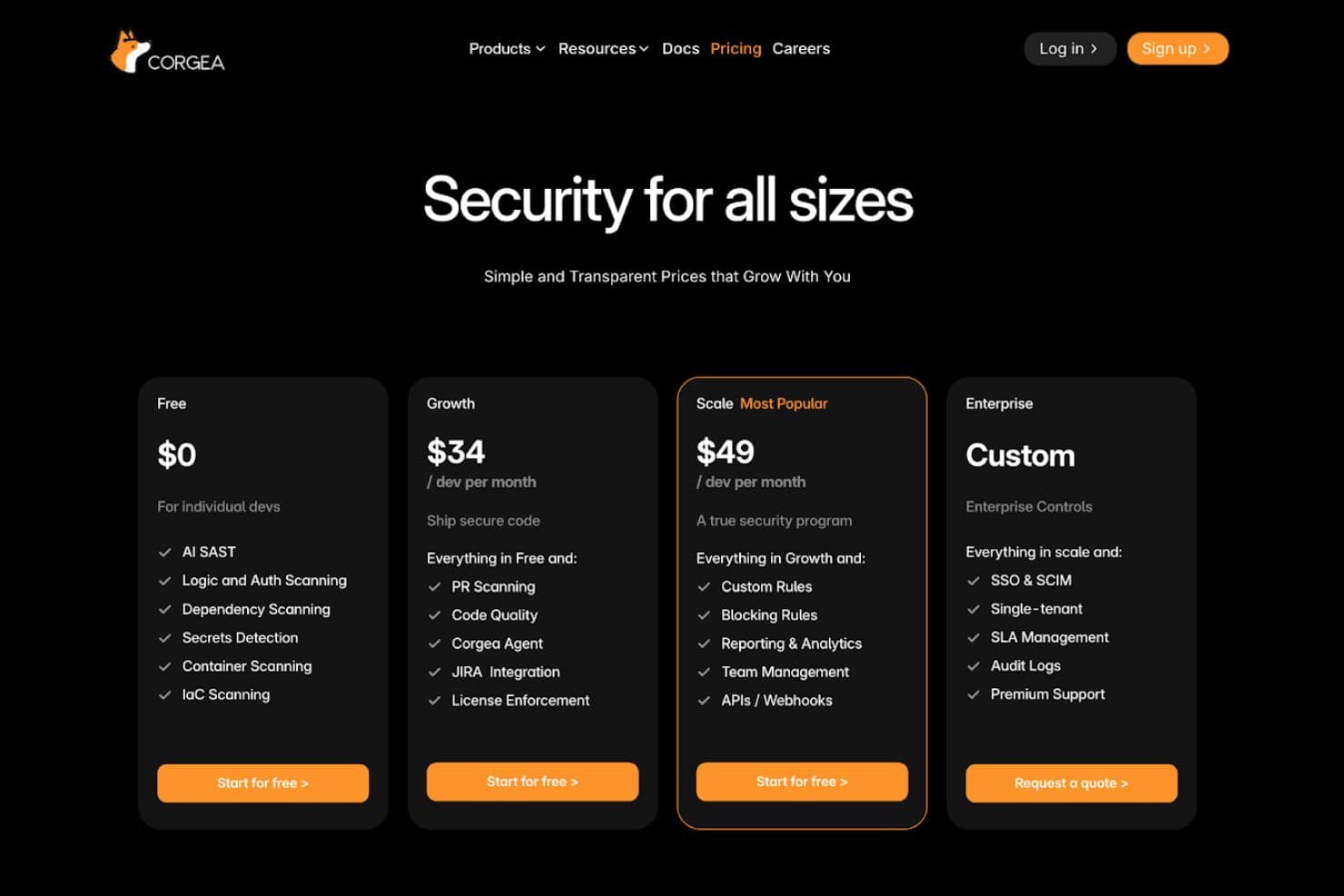
Corgea uses a tiered pricing model that lets teams start with core security scanning and expand into automation, integrations, and enterprise governance as they grow.
- Free: Includes AI SAST, logic and auth scanning, dependency scanning, secrets detection, container scanning, and IaC scanning for individual developers and small teams.
- Growth: Adds pull request scanning, code quality checks, Jira integration, and license enforcement to support team workflows.
- Scale: Introduces custom rules, blocking rules, reporting and analytics, team management, APIs, and webhooks for a more complete security program.
- Enterprise: Provides SSO, SCIM, single tenant deployment, SLA management, audit logs, and premium support for enterprise environments.
This structure makes it easy to begin with essential features and upgrade as security and compliance needs increase.
Corgea Specs
- 2-Factor Authentication: No
- Access Management: No
- Anti-Virus: No
- API: Yes
- Audit Management: No
- Audit Trail: No
- Batch Permissions & Access: No
- Compliance Tracking: No
- Dashboard: Yes
- Data Export: Yes
- Data Import: Yes
- DDoS Protection: No
- External Integrations: Yes
- File Sharing: No
- File Transfer: No
- Firewall: No
- Incident Management: Yes
- Malware Protection: No
- Multi-User: Yes
- Notifications: Yes
- Password & Access Management: No
- Policy Management: Yes
- Real-time Alerts: Yes
- Report & Compliance: Yes
- Risk Assessment: Yes
- Security Migration: No
- Threat Detection: No
- Workflow Management: Yes
Corgea FAQs
Corgea Company Overview & History
Corgea, founded by Ahmad Sadeddin, is a San Francisco-based cybersecurity startup founded in 2023 that builds an AI-driven platform to automate vulnerability detection, triage, and remediation for modern development teams.
The company focuses on helping developers secure applications more efficiently by reducing false positives and accelerating remediation workflows.
Corgea Major Milestones
- 2023: Corgea was founded in California.
- 2024: Raised USD 2.6 million in seed funding from prominent investors.