

En el mundo de las pequeñas empresas, mantener a tus clientes satisfechos es fundamental. Pero compaginar la atención al cliente con todo lo demás puede ser difícil. Ahí es donde entra en juego el software de mesa de ayuda. Te ayuda a gestionar consultas, realizar un seguimiento de los problemas y mantener organizado a tu equipo.
Llevo años probando y analizando software, y entiendo los desafíos a los que te enfrentas. Necesitas herramientas fiables que te faciliten el trabajo, no que lo compliquen. En este artículo, compartiré mis principales recomendaciones de software de mesa de ayuda para ayudar a tu equipo a ofrecer una asistencia excelente.
Tanto si buscas soluciones basadas en el correo electrónico como si necesitas algo que se integre con tus herramientas actuales, aquí encontrarás lo que necesitas. Vamos a analizar las mejores opciones disponibles para tu pequeña empresa.
Por qué confiar en nuestras recomendaciones de software
6,700+
Reviews
20
Industry experts
16+
Evaluation factors
14
Years
Nuestro equipo lleva probando y evaluando software desde 2012. Como líderes tecnológicos, sabemos lo difícil —y lo importante— que es elegir el software adecuado.
Para esta guía, evaluamos las herramientas mediante pruebas prácticas e investigación independiente, puntuando las herramientas según nuestros criterios de selección.
Nuestras reseñas reflejan nuestro criterio editorial humano, no un discurso de ventas.
Revisores expertos:
- Paulo Gardini MiguelDirector técnico
 Tim FisherVP de IA
 Gabriel RosasTech Lead y arquitecto de software
 Christhian GruhnTech Lead y arquitecto de plataforma

Tabla comparativa del software de mesa de ayuda para pequeñas empresas
Esta tabla comparativa resume los detalles de precios de mis principales selecciones de software de mesa de ayuda para pequeñas empresas:
| Tool | Best For | Trial Info | Price | ||
|---|---|---|---|---|---|
| 1 | Ideal para automatización de soporte en ecommerce | Prueba gratuita de 14 días | Desde $39/agente/mes | Website | |
| 2 | Mejor con clasificación de tickets mediante IA integrada | Prueba gratuita de 14 días + plan gratuito + demostración gratuita | Desde $16/usuario/mes (facturado anualmente) | Website | |
| 3 | Mejor con bots conversacionales impulsados por GPT | Plan gratuito disponible | Desde $32/mes (facturado anualmente) | Website | |
| 4 | La mejor para automatizar interacciones con clientes | Prueba gratuita de 7 días + plan gratuito disponible | Desde $24.17/mes (facturado anualmente) | Website | |
| 5 | Mejor para opciones de personalización | Demo gratuita disponible | Precios a consultar | Website | |
| 6 | Lo mejor para funciones de base de conocimientos | Plan gratuito + demo gratis disponible | Desde $39.99/mes (facturado anualmente) | Website | |
| 7 | Ideal para usuarios con presupuesto limitado | Plan gratuito + demo gratis disponible | Desde $29.99/10 usuarios/mes (facturado anualmente) | Website | |
| 8 | Mejor para integración con Gmail | Plan gratuito + prueba gratuita de 7 días + demostración gratuita disponible | Desde $25/usuario/mes (facturado anualmente) | Website | |
| 9 | Mejor para soporte por chat en vivo | Prueba gratuita de 30 días + demo gratuita disponible | Desde $15/mes (facturado anualmente) | Website | |
| 10 | Ideal para soporte basado en correo electrónico | Prueba gratuita disponible | Desde $25/usuario/mes (facturado anualmente) | Website |


Análisis del mejor software de mesa de ayuda para pequeñas empresas
A continuación se muestran mis resúmenes detallados del mejor software de mesa de ayuda para pequeñas empresas que se incluyó en mi selección. Mis análisis ofrecen una visión detallada de las funciones principales, las ventajas y desventajas, las integraciones y los casos de uso ideales de cada herramienta para ayudarte a encontrar la más adecuada para ti.
 Ideal para automatización de soporte en ecommerce
- Prueba gratuita de 14 días
- Desde $39/agente/mes
Visit WebsiteCustomer Rating:4.4/5
eDesk organiza los tickets de soporte de ecommerce con clasificación y prioridades impulsadas por IA. eDesk está diseñado para pequeñas empresas de comercio electrónico, con soporte para la automatización de atención al cliente que ayuda a los equipos a gestionar solicitudes rutinarias de manera más eficiente. Ofrece una plataforma unificada para administrar interacciones con los clientes a través de múltiples canales mientras mantiene organizada la comunicación. Con integraciones en herramientas comunes de ventas y comunicación, eDesk permite a los equipos mantener un soporte al cliente ágil sin añadir carga de trabajo innecesaria.
Por qué elegí eDesk
Elegí eDesk por su automatización de soporte para ecommerce, que ayuda a los equipos pequeños a gestionar solicitudes rutinarias de clientes de manera más eficiente a través de los canales de ventas. La bandeja de entrada unificada recopila mensajes de clientes provenientes de los marketplaces, ayudando a los equipos a mantener organizadas las consultas y evitar respuestas perdidas. Sus herramientas de automatización reducen el trabajo manual de soporte, permitiendo a los equipos concentrarse en problemas de clientes más complejos y facilitando una gestión de respuestas más rápida y consistente.
Principales características de eDesk
Además de la automatización del soporte para ecommerce, eDesk ofrece:
- Chatbot 24/7: Proporciona atención al cliente en todo momento, gestionando consultas incluso cuando tu equipo está fuera de línea.
- Informes en tiempo real: Ofrece información sobre las operaciones de soporte, permitiendo tomar decisiones basadas en datos para mejorar la calidad del servicio.
- Enrutamiento inteligente de tickets: Asegura que las consultas de los clientes se dirijan al miembro del equipo más adecuado, reduciendo los tiempos de resolución.
- Base de conocimientos: Permite que los clientes encuentren respuestas por su cuenta, reduciendo el volumen de solicitudes entrantes de soporte.
Integraciones de eDesk
Las integraciones incluyen Amazon, eBay, Walmart, Shopify, Magento, BigCommerce, WooCommerce, Facebook, WhatsApp e Instagram.
Pros and Cons
Pros:
- Sincronización fluida de datos de pedidos con los principales marketplaces
- Las automatizaciones impulsadas por IA mejoran la eficiencia en las respuestas
- Las plantillas de respuestas guardadas aceleran las respuestas al cliente
Cons:
- Principalmente desarrollado para ecommerce, menos flexible para otras industrias
- Los informes y análisis, aunque presentes, pueden ser menos personalizables que los paneles empresariales más avanzados
Learn more about eDesk: Mejor con clasificación de tickets mediante IA integrada
- Prueba gratuita de 14 días + plan gratuito + demostración gratuita
- Desde $16/usuario/mes (facturado anualmente)
Visit WebsiteCustomer Rating:4.6/5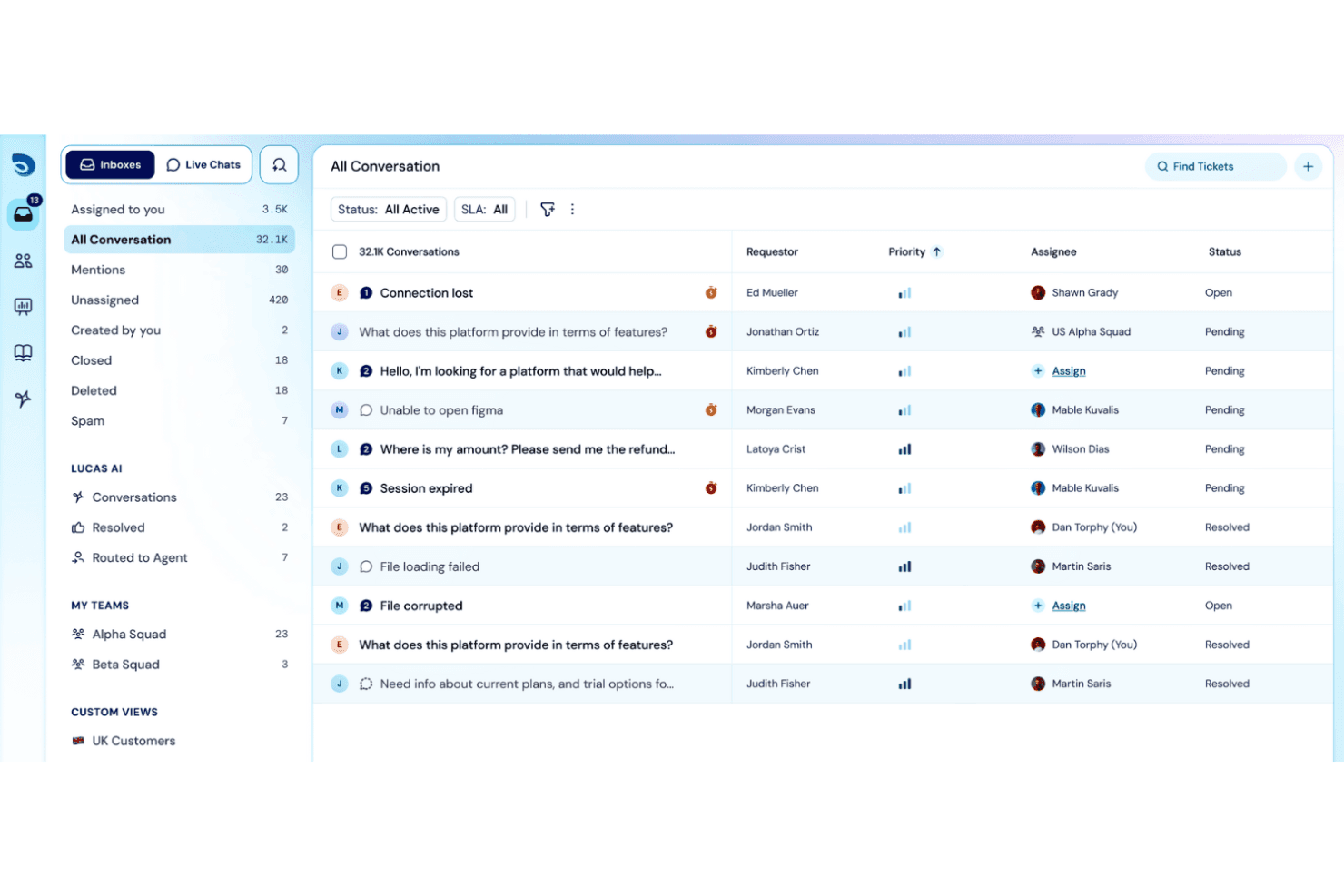
SparrowDesk muestra una bandeja de entrada de conversaciones unificada con columnas de prioridad, persona asignada y estado para gestionar 32.1K tickets de soporte. SparrowDesk es una plataforma de mesa de ayuda impulsada por IA que combina la gestión omnicanal de tickets, una base de conocimientos de autoservicio, el seguimiento de SLA y la automatización de flujos de trabajo en una sola bandeja de entrada.
¿Para quién es más adecuada SparrowDesk?
SparrowDesk es una opción excelente para equipos pequeños y en crecimiento que necesitan soporte interno estructurado sin la carga de una plataforma ITSM completa.
Por qué elegí SparrowDesk
SparrowDesk ocupa un lugar en mi lista de favoritas gracias a Zoona, su agente de IA que lee los tickets entrantes y los resuelve de forma autónoma, de día o de noche. Me gusta que Zoona se entrene directamente con tu base de conocimientos existente, los archivos PDF cargados y las URL de tu sitio web, por lo que no se requiere ninguna configuración personalizada para que gestione solicitudes reales. La capa de copiloto de IA se encarga de lo que Zoona no puede resolver, generando al instante resúmenes de tickets y borradores de respuestas para que los agentes dediquen menos tiempo a volver a leer el contexto y más a resolver problemas.
Características principales de SparrowDesk
- Bandeja de entrada omnicanal: Consulta y gestiona tickets de correo electrónico, chat en vivo, Slack y WhatsApp en una sola cola.
- Centro de ayuda de autoservicio: Publica una base de conocimientos con marca y capacidad de búsqueda a la que empleados o clientes pueden acceder directamente.
- Gestión de SLA: Establece, realiza un seguimiento y aplica objetivos de respuesta y resolución con notificaciones automáticas de incumplimiento.
- Permisos basados en roles: Asigna roles personalizados y niveles de acceso para mantener seguros los datos internos y controlar las capacidades de los agentes.
Integraciones de SparrowDesk
SparrowDesk ofrece integraciones nativas con Slack, WhatsApp y Linear. Hay una API disponible para integraciones personalizadas.
Pros and Cons
Pros:
- El agente de IA resuelve tickets sin intervención humana
- Zoona se entrena directamente con el contenido existente
- La bandeja de entrada omnicanal unifica el correo electrónico, el chat y Slack
Cons:
- Las funciones de seguimiento de activos no están integradas
- Los informes carecen de opciones avanzadas de personalización
Learn more about SparrowDesk: Mejor con bots conversacionales impulsados por GPT
- Plan gratuito disponible
- Desde $32/mes (facturado anualmente)
Visit WebsiteCustomer Rating:4.4/5
Chatbase ofrece una función de acciones con IA que puede actualizar simultáneamente suscripciones y bases de datos, aplicando automáticamente los cambios de plan. Chatbase encaja en esta lista como una capa de respuesta inicial impulsada por IA que puede responder preguntas de los clientes, guiar a los usuarios y captar prospectos directamente desde tus fuentes de contenido.
¿Para quién es mejor Chatbase?
Chatbase es una buena opción para propietarios de pequeñas empresas y equipos de soporte reducidos que desean automatizar las conversaciones con clientes sin necesidad de un equipo de desarrollo dedicado.
Por qué elegí Chatbase
En lugar de gestionar tickets o flujos de trabajo de agentes, Chatbase se centra en automatizar las conversaciones entrantes a través de un widget de chat integrable. Para pequeñas empresas sin un sistema de helpdesk formal, puede funcionar como una interfaz de soporte ligera; para equipos con herramientas ya existentes, trabaja junto a ellas para reducir consultas repetitivas. Chatbase se gana su lugar en mi lista porque crea bots conversacionales con GPT que realmente gestionan conversaciones de soporte de varios turnos, no solo respuestas de una sola línea. Me gusta que los bots mantengan el contexto a lo largo de la conversación, por lo que si un cliente realiza una pregunta de seguimiento, el bot no pierde de vista lo que ya se ha discutido. Mi equipo utiliza la función de instrucciones personalizadas para afinar cómo responde el bot, lo que significa que podemos adaptar nuestro tono de soporte y gestionar casos especiales sin tener que reentrenar desde cero.
Características clave de Chatbase
- Formularios de captura de prospectos: Recoge la información de los visitantes directamente en la ventana del chat antes o durante una conversación de soporte.
- Escalado a agente humano: Redirige las conversaciones a un miembro del equipo cuando el bot alcanza los límites de su base de conocimientos.
- Panel de análisis: Supervisa el volumen de chats, preguntas sin respuesta y puntajes de satisfacción del usuario para detectar carencias en el soporte.
- Widget de chat integrable: Añade el chatbot a tu sitio web con un fragmento de código, sin necesidad de programador.
Integraciones de Chatbase
Chatbase ofrece integraciones nativas con Zendesk, Notion, Slack, Stripe, Salesforce, Cal.com, Calendly, WhatsApp, Messenger y Make. También se conecta con Zapier y proporciona una API para integraciones personalizadas.
Pros and Cons
Pros:
- Las sugerencias de tickets similares ayudan a resolver incidencias repetitivas
- La detección de colisiones minimiza el trabajo duplicado entre agentes
- Entrena al chatbot directamente desde el sitio web o documentos
Cons:
- No se pueden automatizar las escaladas por tipo de ticket
- No hay soporte telefónico ni chat en vivo disponible
Learn more about Chatbase: La mejor para automatizar interacciones con clientes
- Prueba gratuita de 7 días + plan gratuito disponible
- Desde $24.17/mes (facturado anualmente)
Visit WebsiteCustomer Rating:4.7/5
Vista de la bandeja de entrada de Tidio mostrando conversaciones en vivo, detalles de tickets y la barra lateral de datos del cliente. Tidio está diseñado para abordar los desafíos que enfrentan las pequeñas empresas al gestionar las interacciones con los clientes. Al integrar soluciones impulsadas por IA con herramientas fáciles de usar, ayuda a optimizar los procesos de atención al cliente, convirtiéndose en una opción atractiva para negocios que buscan mejorar la calidad del servicio y los tiempos de respuesta. Esta herramienta es especialmente beneficiosa para pequeñas empresas que desean automatizar consultas rutinarias, gestionar comunicaciones multicanal y mejorar la satisfacción del cliente sin necesitar grandes recursos.
Por qué elegí Tidio
Elegí Tidio porque ofrece un enfoque único impulsado por IA que se adapta a las necesidades de helpdesk de las pequeñas empresas. El agente Lyro AI destaca por automatizar las interacciones con los clientes, lo que responde directamente a la necesidad de tiempos de respuesta rápidos y un servicio eficiente. Además, la función de chat en vivo de Tidio permite interactuar en tiempo real, algo crucial para negocios que priorizan la atención inmediata. Estas características convierten a Tidio en una opción convincente para propietarios de pequeñas empresas que buscan potenciar sus capacidades de atención al cliente.
Características clave de Tidio
Además de su automatización impulsada por IA, Tidio ofrece varias otras características que aumentan su utilidad para pequeñas empresas:
- Comunicación multicanal: Gestiona las interacciones con clientes en diversas plataformas como correo electrónico, chat y redes sociales desde una sola interfaz.
- Widgets de chat personalizables: Personaliza los widgets de chat para adaptarlos a la estética de tu marca y captar efectivamente la atención de los visitantes del sitio web.
- Seguimiento de visitantes: Monitorea y analiza el comportamiento de los visitantes en tu web para comprender mejor las necesidades de los clientes y mejorar las estrategias de servicio.
- Interacción proactiva: Envía mensajes automáticos a los visitantes según su comportamiento, fomentando la interacción y mejorando la experiencia del cliente.
Integraciones de Tidio
Las integraciones incluyen Salesforce, Shopify, WordPress, Instagram, Messenger, Zendesk, WhatsApp, Intercom y Zapier.
Pros and Cons
Pros:
- El chatbot con IA resuelve consultas rutinarias automáticamente
- Admite más de 120 integraciones incluyendo Shopify y HubSpot
- La bandeja de entrada multicanal centraliza chat, correo electrónico y redes sociales
Cons:
- Se aplican límites de uso de IA en los planes de nivel inferior
- El precio puede ser elevado para empresas con alto volumen de conversaciones
Learn more about Tidio: Mejor para opciones de personalización
- Demo gratuita disponible
- Precios a consultar
Visit WebsiteCustomer Rating:4.5/5
HappyFox ayuda a los equipos a gestionar y personalizar flujos de trabajo de soporte al cliente de manera eficiente. HappyFox es un software de mesa de ayuda para empresas de diversos tamaños que ofrece soluciones personalizables para satisfacer diversas necesidades de soporte. Proporciona herramientas para gestionar consultas de clientes, tickets y flujos de trabajo de soporte, lo que lo hace adecuado para equipos que buscan soluciones de soporte a medida.
Por qué elegí HappyFox: Es perfecto para equipos que necesitan amplias opciones de personalización para adaptarse a sus procesos específicos. HappyFox ofrece funciones como campos de tickets personalizables y flujos de trabajo adaptados a tus necesidades únicas. Sus capacidades te permiten automatizar tareas repetitivas, mejorando la eficiencia. Las herramientas de generación de informes del software proporcionan información sobre el rendimiento del soporte que te ayuda a tomar decisiones basadas en datos.
Características destacadas e integraciones:
Características incluyen un portal de autoservicio que permite a los clientes encontrar respuestas de manera independiente, automatización de tickets para reducir el trabajo manual e informes detallados para analizar métricas de soporte. Estas características te ayudan a brindar un servicio al cliente eficiente y proactivo.
Integraciones incluyen Slack, Salesforce, Shopify, Mailchimp, Microsoft Teams, Jira y WhatsApp.
Pros and Cons
Pros:
- Campos de tickets altamente personalizables
- Potentes capacidades de automatización
- Gestión flexible de flujos de trabajo
Cons:
- Herramientas de base de conocimientos limitadas
- No es ideal para equipos muy pequeños
Learn more about HappyFox: Lo mejor para funciones de base de conocimientos
- Plan gratuito + demo gratis disponible
- Desde $39.99/mes (facturado anualmente)
Visit WebsiteCustomer Rating:4.7/5
ProProfs Help Desk admite la gestión de tickets y el soporte de autoservicio para equipos pequeños. ProProfs Help Desk es una solución de software de administración de tickets para pequeñas y medianas empresas, centrada en ofrecer soporte al cliente eficiente mediante una base de conocimientos extensiva. Ayuda a los equipos a gestionar tickets y brindar opciones de autoservicio, mejorando la satisfacción del cliente.
Por qué elegí ProProfs Help Desk: Ofrece una sólida función de base de conocimientos, lo que lo hace perfecto para equipos que desean empoderar a los clientes con opciones de autoservicio. ProProfs Help Desk incluye funciones como la priorización de tickets y la automatización para mejorar los flujos de trabajo de soporte. Las capacidades de generación de informes del software proporcionan información sobre el desempeño del equipo, ayudando a identificar áreas de mejora. Su simplicidad y facilidad de uso garantizan que tu equipo pueda comenzar rápidamente sin capacitación extensa.
Funciones y conectores destacados:
Funciones incluyen campos de tickets personalizables que permiten capturar información específica del cliente, asignación automática de tickets para asegurar tiempos de respuesta rápidos e informes de desempeño que te ayudan a monitorear la eficiencia del soporte. Estas funciones ayudan a tu equipo a gestionar eficazmente las solicitudes de los clientes.
Integraciones incluyen Salesforce, Slack, Shopify, ClickUp, Jira y Microsoft Dynamics.
Pros and Cons
Pros:
- Funcionalidad robusta de base de conocimientos
- Campos de tickets personalizables
- Asignación automática de tickets
Cons:
- Funciones avanzadas limitadas
- Integraciones limitadas con terceros
Learn more about ProProfs Help Desk: 7Ideal para usuarios con presupuesto limitado
Hesk
- Plan gratuito + demo gratis disponible
- Desde $29.99/10 usuarios/mes (facturado anualmente)

Hesk ofrece gestión de tickets económica para el soporte de pequeñas empresas. Hesk es una solución de software de mesa de ayuda diseñada para pequeñas empresas y equipos con presupuesto limitado. Ofrece funciones esenciales de gestión de tickets y posibilita operaciones de atención al cliente efectivas sin altos costos.
Por qué elegí Hesk: Es ideal para equipos que buscan gestionar tickets de soporte sin gastar mucho dinero. Hesk brinda funcionalidades clave como el envío de tickets, su categorización y seguimiento de estado, adaptándose a presupuestos ajustados. Su interfaz sencilla facilita el uso sin necesidad de mucha capacitación. La opción de alojamiento propio te da control sobre tus datos y añade flexibilidad.
Funciones destacadas e integraciones:
Funciones: campos de ticket personalizables para recopilar los detalles del cliente que tu equipo necesita, una base de conocimientos incorporada para reducir preguntas repetidas y respuestas predefinidas que ayudan a los agentes a responder más rápido. Estas herramientas trabajan en conjunto para optimizar la resolución de tickets y mejorar la productividad del equipo, proporcionando a tu software de soporte un proceso de atención al cliente más organizado y eficiente.
Integraciones: incluye Slack, Microsoft Teams, Zapier, Google Workspace, Outlook, Freshdesk, Jira, Trello, Asana y Zoho CRM.
Pros and Cons
Pros:
- Opción de autoalojamiento
- Ligero y eficiente
- Campos de ticket personalizables
Cons:
- Herramientas de informes básicas
- Ideal para startups y no para grandes equipos
Learn more about Hesk: Mejor para integración con Gmail
- Plan gratuito + prueba gratuita de 7 días + demostración gratuita disponible
- Desde $25/usuario/mes (facturado anualmente)
Visit WebsiteCustomer Rating:4.7/5
Hiver permite a los equipos gestionar el soporte al cliente directamente dentro de Gmail. Hiver es un software de soporte técnico diseñado para equipos que dependen en gran medida de Gmail para la atención al cliente. Permite a los usuarios gestionar los correos electrónicos de los clientes directamente desde la interfaz de Gmail, lo que lo convierte en una opción natural para empresas que desean mejorar el soporte basado en correo electrónico.
Por qué elegí Hiver: Se integra perfectamente con Gmail, proporcionando un entorno familiar para tu equipo. Hiver ofrece funciones como delegación de correos, bandejas de entrada compartidas y alertas de colisión para evitar respuestas duplicadas. Sus notas y etiquetas ayudan a organizar la comunicación dentro del equipo. También puedes hacer seguimiento del estado de los correos y de los tiempos de respuesta, garantizando un servicio al cliente eficiente.
Funciones y integraciones destacadas:
Funciones incluyen plantillas de correo para ahorrar tiempo en respuestas repetitivas, analíticas para monitorizar el rendimiento del equipo y asignación en turnos rotativos para distribuir los correos de manera equitativa entre los miembros del equipo. Estas funciones ayudan a agilizar el proceso de gestión de correos y a mejorar la eficiencia en las respuestas.
Integraciones incluyen Salesforce, Zapier, HubSpot, Jira, Asana y NetSuite.
Pros and Cons
Pros:
- Integración fácil con Gmail
- Curva de aprendizaje mínima
- Seguimiento de correos en tiempo real
Cons:
- Integraciones limitadas con terceros
- Fallos ocasionales en correos
Learn more about Hiver: Mejor para soporte por chat en vivo
- Prueba gratuita de 30 días + demo gratuita disponible
- Desde $15/mes (facturado anualmente)
Visit WebsiteCustomer Rating:4.6/5
LiveAgent ayuda a las empresas a gestionar consultas de clientes en tiempo real a través de múltiples canales. LiveAgent es un software de atención al cliente en la nube (SaaS) conocido por sus sólidas funciones de chat en vivo, ofreciendo a las empresas que dependen de interacciones en tiempo real con los clientes una forma fiable de gestionar el soporte. Ofrece un amplio conjunto de herramientas de helpdesk que agrupan consultas provenientes de correo electrónico, chat y redes sociales en un solo sistema, ayudando a los equipos a responder más rápidamente.
LiveAgent también soporta la escalación de tickets para asegurar que los problemas urgentes se deriven a los agentes adecuados, e incluye opciones como foros de clientes para ayudar a las organizaciones a crear comunidades y reducir preguntas repetitivas.
Por qué elegí LiveAgent: Destaca por brindar soporte a través de chat en vivo, lo que lo hace ideal para empresas que necesitan una comunicación instantánea con el cliente. LiveAgent incluye funciones como chat en tiempo real, gestión de tickets y un centro de llamadas integrado. La bandeja de entrada universal del software permite a tu equipo gestionar todas las consultas de clientes en un solo lugar. Sus herramientas de automatización ayudan a distribuir tickets y desbloquear flujos de trabajo, mejorando la eficiencia del soporte.
Funciones destacadas e integraciones:
Funciones incluyen un portal de clientes donde los usuarios pueden seguir el estado de sus tickets, una base de conocimientos que ayuda a reducir el volumen de tickets al ofrecer opciones de autoservicio, y elementos de gamificación para motivar a tu equipo de soporte. Estas características contribuyen a un entorno de soporte más organizado y atractivo.
Integraciones incluyen Slack, WhatsApp, Shopify, WordPress, Mailchimp, Google Analytics, Zapier, Salesforce, HubSpot, Wix y Trello.
Pros and Cons
Pros:
- Comunicación multicanal sólida
- Opciones avanzadas de chat en vivo
- Centro de llamadas integrado
Cons:
- Configuración compleja para flujos de trabajo personalizados
- Búsqueda en el historial limitada
Learn more about LiveAgent: Ideal para soporte basado en correo electrónico
- Prueba gratuita disponible
- Desde $25/usuario/mes (facturado anualmente)
Visit WebsiteCustomer Rating:4.5/5
Help Scout ayuda a los equipos a gestionar soporte al cliente personalizado y eficiente basado en correo electrónico. Help Scout es una solución de software de mesa de ayuda diseñada para pequeñas y medianas empresas que priorizan el soporte al cliente basado en correo electrónico. Ofrece un espacio de trabajo limpio y organizado para gestionar consultas de clientes con claridad y personalización. Help Scout también es ampliamente adoptado por empresas de comercio electrónico que dependen de una comunicación rápida y amigable para asistir a los clientes a lo largo de su proceso de compra.
Por qué elegí Help Scout: Gestiona el soporte por correo electrónico, convirtiéndose en la opción ideal para los equipos que dependen de las interacciones por email. Help Scout incluye funciones como bandejas de entrada compartidas y perfiles de clientes para mantener a tu equipo informado sobre las interacciones con los clientes. Su automatización de flujos de trabajo simplifica tareas repetitivas, liberando tiempo para abordar asuntos más complejos. Las herramientas de informes ofrecen información sobre el rendimiento del equipo, ayudando a mejorar la calidad del servicio.
Funciones e integraciones destacadas:
Funciones incluyen una base de conocimientos para empoderar a los clientes con opciones de autoservicio, detección de colisiones para evitar respuestas duplicadas y etiquetas que ayudan a organizar y categorizar los tickets de forma eficiente. Estas funciones aseguran que tu equipo pueda gestionar el soporte basado en correo electrónico de manera eficaz.
Integraciones incluyen Slack, Mailchimp, HubSpot, Salesforce, Shopify, WordPress, Jira, Trello, Asana y Google Workspace.
Pros and Cons
Pros:
- Fuerte enfoque en soporte por correo electrónico
- Automatización eficiente de flujos de trabajo
- Perfiles de cliente detallados
Cons:
- La automatización del chatbot podría mejorar
- Pocas opciones de personalización de widgets
Learn more about Help Scout:
Otros programas de mesa de ayuda para pequeñas empresas
Estas son algunas opciones adicionales de software de mesa de ayuda para pequeñas empresas que no se incluyeron en mi selección, pero que aun así merece la pena considerar:
- 11Desk365Ideal para usuarios de Microsoft 365
- 12TeamSupportMejor para soporte B2B
- 13SuperOpsMejor para proveedores de servicios de TI
- 14HelpDeskIdeal para flujos de trabajo inteligentes
- 15Agentforce Service (formerly Service Cloud)Mejor para integración con CRM
Cómo evalúo el software de mesa de ayuda para pequeñas empresas
Divido mi evaluación en criterios básicos—si un equipo de TI de dos personas puede enrutar tickets, hacer cumplir los SLA y desviar solicitudes repetitivas—y los diferenciadores que hacen que una herramienta sea mejor que otra.
Funcionalidad principal (Requisitos mínimos para esta lista)
Cuando selecciono las herramientas para mi lista, califico cada una en una escala del 0 (no ofrece la funcionalidad) al 5 (destaca en esta área) por cada funcionalidad principal que se menciona a continuación. Luego, calculo la puntuación total de la herramienta en porcentaje. Cada herramienta debe alcanzar una puntuación total mínima del 65% para ser considerada.
- Gestión de tickets: Evalúo todo el ciclo de vida del ticket—creación, categorización, priorización, asignación y seguimiento de resolución—incluyendo si los agentes pueden fusionar tickets duplicados o crear tareas hijas para soluciones de varios pasos, como la configuración de una estación de trabajo.
- Recepción multicanal: Cada herramienta debe unificar las solicitudes de correo electrónico, portal web y chat en vivo en una sola cola para que un equipo pequeño de TI no tenga que alternar entre bandejas de entrada para ver un reinicio de contraseña enviado por correo y un problema de VPN registrado por chat.
- Automatización y reglas de SLA: Busco automatizaciones de flujo de trabajo que gestionen el enrutamiento, la escalada y los temporizadores de SLA, como la asignación automática de fallas de impresora a un técnico concreto o la escalada de un ticket cuando supera una ventana de respuesta de cuatro horas.
- Base de conocimientos de autoservicio: Una base de conocimientos (KB) clasificable y con búsquedas donde los usuarios puedan encontrar respuestas a preguntas frecuentes (configuración de Wi-Fi, configuración de VPN, pasos para instalar software) antes de crear un ticket es algo que exijo en todas las herramientas.
- Informes y análisis: Los paneles sobre el volumen de tickets, tiempos de resolución, cumplimiento de SLA y carga de trabajo por agente ayudan al responsable de TI a identificar problemas recurrentes—como una oleada de tickets de onboarding cada trimestre—y planificar la dotación de personal en consecuencia.
- Capacidades específicas de TI: Compruebo si la herramienta incluye módulos orientados a TI como seguimiento de activos, gestión de incidentes o flujos de trabajo alineados con ITIL y no solo ofrece un sistema de soporte al cliente genérico reconfigurado para TI.
Una vez tengo una lista de herramientas que cumplen estos criterios, valoro aquello que distingue a cada plataforma.
Factores diferenciadores (Lo que distingue a los proveedores)
Así es como comparo y contrasto los diferentes proveedores:
Funciones destacadas
La asistencia con tickets mediante IA es una diferenciación importante—las herramientas que sugieren automáticamente artículos de la KB o redactan respuestas ahorran tiempo al técnico solitario cuando llega por décima vez en una semana la solicitud "¿cómo restablezco mi contraseña?". La integración con soporte remoto es igual de relevante; iniciar una sesión de pantalla compartida directamente desde un ticket, en vez de abrir otro software, agiliza la resolución. También valoro la disponibilidad de una app móvil completa, ya que los equipos pequeños suelen estar fuera de su escritorio solucionando problemas presenciales mientras los tickets siguen llegando.
Más allá de las funciones
La transparencia de precios importa cuando el presupuesto de TI es ajustado—reviso que la herramienta ofrezca un nivel gratuito o de bajo coste y no bloquee funciones esenciales como la gestión de SLA en niveles caros. El ecosistema de integraciones también es fundamental; una mesa de ayuda que se conecte nativamente con Microsoft 365, Google Workspace y Slack se ajusta al entorno típico de pequeña empresa sin necesidad de desarrollo personalizado. También evalúo el tiempo hasta obtener valor, buscando plantillas prediseñadas y una configuración autoservicio que permita que un equipo de TI de dos personas esté operativo en días, no semanas.
Cómo elegir un software de mesa de ayuda para una pequeña empresa
Es fácil perderse entre largas listas de funciones y estructuras de precios complejas. Para ayudarte a mantener la concentración mientras llevas a cabo tu proceso único de selección de software, aquí tienes una lista de factores que debes tener en cuenta:
| Factor | Qué debes considerar |
|---|---|
| FactorEscalabilidad | Qué debes considerar¿Puede la herramienta crecer con tu empresa? Busca planes de precios flexibles y funciones que se adapten al aumento del volumen de tickets y del tamaño del equipo. |
| FactorIntegraciones | Qué debes considerar¿Se conecta con tus herramientas actuales? Comprueba que disponga de integraciones nativas con tu CRM, correo electrónico y otras plataformas esenciales para garantizar flujos de trabajo fluidos. |
| FactorPersonalización | Qué debes considerar¿Puedes adaptarla a tus necesidades? Evalúa la posibilidad de modificar flujos de trabajo, paneles e informes para ajustarlos a tus procesos y preferencias específicos. |
| FactorFacilidad de uso | Qué debes considerar¿Es intuitiva la interfaz? Evita las herramientas con curvas de aprendizaje pronunciadas y opta por aquellas con una navegación sencilla y unos requisitos mínimos de formación. |
| FactorImplementación e incorporación | Qué debes considerar¿Con qué rapidez puedes empezar? Considera el tiempo de configuración, la disponibilidad de recursos de formación y si se ofrece asistencia específica para la incorporación. |
| FactorCoste | Qué debes considerar¿Cómo se ajusta a tu presupuesto? Compara el coste total de propiedad, incluidas las tarifas iniciales, los costes de suscripción y los posibles cargos ocultos. |
| FactorMedidas de seguridad | Qué debes considerar¿Están protegidos tus datos? Asegúrate de que el software cumpla las normas de protección de datos y ofrezca funciones como el cifrado y los controles de acceso de usuarios. |
| FactorDisponibilidad de asistencia | Qué debes considerar¿Qué opciones de asistencia hay disponibles? Busca asistencia las 24 horas del día, los 7 días de la semana, y varios métodos de contacto para garantizar que puedas obtener ayuda cuando la necesites. |
¿Qué es el software de mesa de ayuda para pequeñas empresas?
El software de mesa de ayuda para pequeñas empresas es una herramienta diseñada para gestionar de forma eficiente las consultas de los clientes y las solicitudes de asistencia. Los equipos de atención al cliente, el personal de asistencia informática y los responsables de empresas lo utilizan habitualmente para mejorar los tiempos de respuesta y aumentar la satisfacción del cliente.
Las funciones de gestión de tickets, comunicación multicanal y generación de informes ayudan a organizar las consultas, facilitar la comunicación y analizar el rendimiento. En general, estas herramientas aportan valor al garantizar que los problemas de los clientes se resuelvan de forma rápida y eficiente, lo que se traduce en clientes más satisfechos y equipos más productivos.
Funciones del software de mesa de ayuda para pequeñas empresas
Al seleccionar un software de mesa de ayuda para una pequeña empresa, presta atención a las siguientes funciones clave:
- Gestión de tickets: Organiza las consultas de los clientes en tickets, lo que facilita que tu equipo haga un seguimiento y las resuelva.
- Compatibilidad multicanal: Permite la comunicación a través de diversas plataformas, como el correo electrónico, el chat y el teléfono, para garantizar que los clientes puedan ponerse en contacto contigo mediante su método preferido.
- Automatización: Automatiza tareas repetitivas, como la asignación de tickets y los seguimientos, lo que ahorra tiempo y reduce los errores manuales.
- Informes y análisis: Proporciona información sobre el rendimiento del equipo y la satisfacción de los clientes, lo que te ayuda a identificar áreas de mejora.
- Flujos de trabajo personalizables: Adapta los procesos a las necesidades de tu empresa, lo que permite unas operaciones más eficientes.
- Base de conocimientos: Ofrece opciones de autoservicio para los clientes, lo que reduce el número de tickets entrantes y mejora la satisfacción de los usuarios.
- Integraciones: Se conecta con otras herramientas, como CRM y plataformas de correo electrónico, lo que facilita unos flujos de trabajo fluidos y el intercambio de datos.
- Funciones de seguridad: Garantiza la protección de los datos mediante el cifrado y los controles de acceso, manteniendo a salvo la información confidencial.
- Herramientas de colaboración: Permiten que los miembros del equipo trabajen juntos en los tickets, mejorando los tiempos de resolución y la calidad del servicio.
Ventajas del software de mesa de ayuda para pequeñas empresas
La implementación de un software de mesa de ayuda en una pequeña empresa ofrece varias ventajas para tu equipo y tu negocio. Estas son algunas de las que puedes esperar:
- Mayor eficiencia: La automatización de tareas y la gestión de tickets ayudan a tu equipo a gestionar más consultas en menos tiempo.
- Mayor satisfacción de los clientes: La compatibilidad multicanal y los tiempos de respuesta rápidos garantizan que los clientes se sientan escuchados y valorados.
- Mejor colaboración del equipo: Las herramientas de colaboración permiten que los miembros del equipo trabajen juntos en los problemas, lo que conduce a resoluciones más rápidas.
- Información basada en datos: Los informes y análisis proporcionan datos valiosos sobre el rendimiento, lo que te ayuda a tomar decisiones fundamentadas.
- Escalabilidad: Los flujos de trabajo personalizables y las integraciones favorecen el crecimiento y permiten que el sistema evolucione al ritmo de las necesidades de tu empresa.
- Más opciones de autoservicio: Una base de conocimientos permite que los clientes encuentren respuestas por sí mismos, lo que reduce el volumen de tickets.
- Mayor seguridad de los datos: Las funciones de seguridad protegen la información confidencial de los clientes, fomentando la confianza y el cumplimiento normativo.
Costes y precios del software de mesa de ayuda para pequeñas empresas
Seleccionar un software de mesa de ayuda para una pequeña empresa requiere comprender los distintos modelos de precios y planes disponibles. Los costes varían en función de las funciones, el tamaño del equipo, los complementos y otros factores. La tabla siguiente resume los planes habituales, sus precios medios y las funciones que suelen incluir las soluciones de software de mesa de ayuda para pequeñas empresas:
Tabla comparativa de planes de software de mesa de ayuda para pequeñas empresas
| Tipo de plan | Precio medio | Funciones habituales |
|---|---|---|
| Tipo de planPlan gratuito | Precio medio$0 | Funciones habitualesGestión básica de tickets, asistencia por correo electrónico e informes limitados. |
| Tipo de planPlan personal | Precio medio$5-$25/usuario/mes | Funciones habitualesGestión de tickets, asistencia por correo electrónico y chat, y automatización básica. |
| Tipo de planPlan empresarial | Precio medio$30-$50/usuario/ mes | Funciones habitualesCompatibilidad multicanal, automatización avanzada y flujos de trabajo personalizables. |
| Tipo de planPlan para empresas | Precio medio$60-$100/usuario/ mes | Funciones habitualesAsistencia prioritaria, análisis avanzado, integraciones personalizadas y funciones de seguridad mejoradas. |
Preguntas frecuentes sobre software de soporte técnico para pequeñas empresas
Aquí encontrarás respuestas a preguntas frecuentes sobre el software de soporte técnico para pequeñas empresas:
¿Cuáles son los requisitos del sistema para el software de soporte técnico?
Sí, la mayoría de las soluciones de software de soporte técnico funcionan en la web, lo que significa que solo necesitas una conexión a internet fiable y un navegador web moderno para acceder a ellas. Algunas herramientas pueden ofrecer aplicaciones para escritorio o dispositivos móviles, por lo que debes comprobar la compatibilidad con tus dispositivos. Asegúrate de que el hardware y el software de tu equipo estén actualizados para evitar problemas de rendimiento.
¿Puede el software de soporte técnico integrarse con mi CRM actual?
Sí, muchas soluciones de soporte técnico ofrecen integraciones con sistemas CRM populares como Salesforce o HubSpot. Esto permite que tu equipo acceda a la información de los clientes desde un único lugar, mejorando la eficiencia y la calidad del servicio. Antes de realizar la compra, comprueba que el software sea compatible con tu CRM para garantizar un intercambio de datos fluido y la continuidad de los flujos de trabajo.
¿Es seguro el software de soporte técnico para gestionar datos confidenciales de los clientes?
Sí, la mayoría de los proveedores de software de soporte técnico priorizan la seguridad con funciones como el cifrado de datos, los controles de acceso de los usuarios y el cumplimiento de la normativa de protección de datos. Comprueba siempre las certificaciones de seguridad y pregunta a los proveedores por sus medidas de protección de datos. Es fundamental asegurarse de que el software cumple los estándares de seguridad de tu sector.
¿Cómo puede el software de soporte técnico ayudar a los equipos remotos?
El software de soporte técnico es ideal para los equipos remotos porque centraliza la comunicación y la gestión de tareas en una única plataforma. Funciones como el acceso basado en la nube, la asistencia multicanal y las herramientas de colaboración ayudan a tu equipo a trabajar conjuntamente de forma eficaz, independientemente de su ubicación. Asegúrate de que el software que elijas ofrezca acceso móvil y sea compatible con los requisitos del trabajo remoto.